RSS
 

Archive for November, 2017

Tips for Aerial Photography from Small Planes and Drones

20 Nov

At its heart, good photography is about showing people views of the world they would not otherwise see. That might be; places your viewers have not visited, impossible ways of seeing to the human eye such as long exposures and night photography, but most often this novelty comes in the form of a different perspective. Even familiar scenes and objects can make compelling photographic subjects if we are willing to explore them from new angles.

Tips for Aerial Photography from Small Planes and Drones

Aerial photography is one of my favorite ways to provide that novel perspective. I’m fortunate to spend a lot of time in small planes. My life in Alaska is full of flights in bush planes to remote places in the state. While only occasionally do I fly specifically to make aerial images, I find simply going to and from different locations provides ample opportunity.

The second way I frequently use to access an aerial perspective is by flying drones. While both techniques get me the elevation I want, the photographic experience is very, very different. The two methods, planes and drones, require very different ways of thinking about image-making.

Tips for Aerial Photography from Small Planes and Drones

Here are a few tips to improve your aerial photography images, whether you are shooting from a plane or using a remote drone.

Airplanes

While big passenger jets are great for getting us from one place to another quickly, they are lousy photography platforms. Sure, I’ve made some images from jet windows, but they inevitably follow the same formula. There’s an airplane wing in the foreground with some sunset or mountain beyond. It gets old. Plus the perpetually fogged or scratched windows will destroy your image quality. Except for the occasional phone snap, I rarely bother with it anymore.

Small, single-engine planes, however, are a different story and can be an amazing platform for creative aerial photography.

Tips for Aerial Photography from Small Planes and Drones

Sharpness

Attaining a sharp image is a major challenge because airplanes are vibration-filled nightmares. Here are four things to help you improve sharpness:

  1. Use a fast shutter speed. I like anything over 1/1000th of a second.
  2. Don’t brace your lens or arms on the plane. Hold your camera and elbows free of the window. If you touch the plane, the vibrations will be transmitted straight into your camera. I tuck my arms against my sides and hold the lens an inch or so away from the window glass.
  3. Focus at infinity. I often shoot manual focus from the air and pre-set my focus point to infinity. Everything you are seeing from the air will be in focus when the lens is set to infinity, so don’t even bother with autofocus.
  4. Shoot wide open. The depth of field is not a problem from a 1000 or meters from your subject. So a take advantage of the extra shutter speed provided by your fastest f-stop.

Lens Choices

Tips for Aerial Photography from Small Planes and Drones

When flying 100+ mph at low altitude, the landscape passes very quickly. If you don’t act quickly, you’ll miss the shot. That’s why I like zoom lenses for aerial photography. I can quickly compose with different focal lengths, without having to change lenses or cameras. I favor a wide to moderate zoom. A 24-105mm or similar lens is about right.

Communication

Usually, in a small plane, you’ll be in direct communication with your pilot, who might be willing to help you out with your photography. When I’m flying over something interesting, but a wing or strut is in the way, I’ll often simply ask the pilot to tip a wing one way or another. Pilots are often happy to accommodate you.

Tips for Aerial Photography from Small Planes and Drones

You can also ask them to make slight turns, or even circle if there is something particularly compelling. If you’ve chartered a flight for photographic purposes, feel free to ask for what you want.

I recommend talking to your pilot ahead of your trip to discuss what kind of images you want, and how he or she might be able to help you. If it is a photography-specific flight, you may even be able to remove windows or doors from the plane.

Tips for Aerial Photography from Small Planes and Drones

Remember your pilot is the final judge of what is acceptable in terms of safety and time. If they say they can’t do something, they can’t. Don’t push them into something with which they aren’t comfortable.

Composition

There are almost as many ways to shoot from an airplane as there are from the ground so any discussion of composition runs the risk of leading us deep into the photographic weeds. However, the general rules of landscape photography still apply. Remember depth, foregrounds, and the way lines connect the image.

Tips for Aerial Photography from Small Planes and Drones

Some shots from the air could be details of the landscape below, but more often they will be sweeping landscapes. I like to place elements in the frame that guide the eye through; a river, a mountain valley, or a highlight like a lake or patch of colorful ground.

The altitude at which you are flying will also dictate your options. When making aerial images of mountain environments (my usual subject) I prefer the plane to be below the level of the surrounding peaks. This perspective still provides a sense of grandeur, while maintaining the unique aerial perspective. Ask your pilot if you can fly lower or higher, and they may be able to help you out if conditions are safe.

Tips for Aerial Photography from Small Planes and Drones

Drones

Flying a remote copter or drone is a very different experience from being up high yourself. There are advantages, but also some drawbacks.

First the drawbacks. Most consumer grade drones limit you to one focal length. Without the ability to zoom or change lenses, most drone shots tend to have the same wide-angle look. To change the scene, you’ve got to move the drone. Drones also have limited ranges, elevation capabilities, and at times, limiting regulations.

Tips for Aerial Photography from Small Planes and Drones

Some locations, like national parks in the United States (and many other countries) are off-limits for drones. Range limitations also mean that you have to get yourself close to your desired subject. So if you want to make images of some remote, or difficult to access location, you’ll still have to do it on the ground.

The advantages, however, are many. Cost is a big one. For the price of a couple hours charter of a small plane, you can buy a decent drone, literally. Flexibility is another. If you want to go make some aerial photos, you simply do it, no waiting around for a pilot or plane charter. If the light is right, you just go fly.

The biggest advantage for me, though, is composition flexibility. You can create an image from a few meters off the ground, to a couple hundred. You can also spend the time necessary to get the composition right. The drone sits still when you want it to, or you can adjust to your heart’s desire.

Composition

I like to fly my drone fairly low. I find the combination of altitude and wide angle lenses make everything look less dramatic and smaller if I’m flying too high. 20-30 meters off the ground is probably my favorite height, but of course, it varies on where I’m flying and the image I’m creating.

Remember to take advantage of the many camera angles drones allow. Shooting straight down is almost impossible from a plane. But with a drone, it’s as easy as angling your camera.

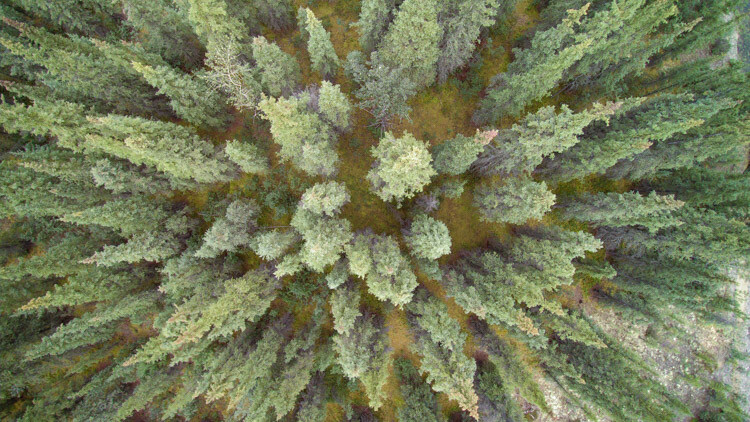
Playing with lines and patterns is a drone specialty, so take advantage of the way the world looks from above. Play with dividing your images into parts using the natural variations in the landscape. Trees from above, for example, create a starburst pattern, not a typical way humans see a forest!
Tips for Aerial Photography from Small Planes and Drones

The flexibility provided by drones is extraordinary. Don’t be afraid to experiment with aerial images of places a plane could never fly.

Drone Warning

Follow the rules! Flying a drone in a dangerous area like around airports, or at the scene of an emergency is not only irresponsible it can be life-threatening. Be aware of the laws surrounding drones, and fly only in areas where it is allowed, and at permitted elevations.

Lastly, be respectful of others. Don’t fly over private property if you don’t have permission, and be aware of how your flight is impacting the experience of others. Simply put, don’t be a jerk.

Tips for Aerial Photography from Small Planes and Drones

Conclusion

Aerial photography is a gateway to new ways of seeing. Whether you are shooting from the passenger seat of a Cessna or from your phone screen using a drone, there are abundant opportunities to make new and exciting images. Explore it and share with me what you make!

The post Tips for Aerial Photography from Small Planes and Drones by David Shaw appeared first on Digital Photography School.
Digital Photography School

 
Comments Off on Tips for Aerial Photography from Small Planes and Drones

Posted in Photography


10 pictures from Fat Bike Riding in Northern Colorado

20 Nov

I enjoy a variety of outdoor activities. Of course, paddling in different flavors (SUP, kayak, canoe, packraft) comes first. It includes long distance racing. But, there is also biking, hiking, inline skating, drone flying and 4WD driving. The common theme […]
paddling with a camera

 
Comments Off on 10 pictures from Fat Bike Riding in Northern Colorado

Posted in Photography


New Ayesha Curry, Michael Mina San Francisco Hot Spot International Smoke, A Contemporary Take on Barbecue

20 Nov

International Smoke
International Smoke, San Francisco’s newest restaurant in the lobby of the Millennium Tower

International Smoke

Last night mrsth, the four kids and I had the opportunity to dine at San Francisco’s newest restaurant hot spot from celebrity chefs Ayesha Curry and Michael Mina, International Smoke. The restaurant is the latest lobby tenant in the great leaning tower of Millennium at 301 Mission Street in San Francisco’s SoMA district.

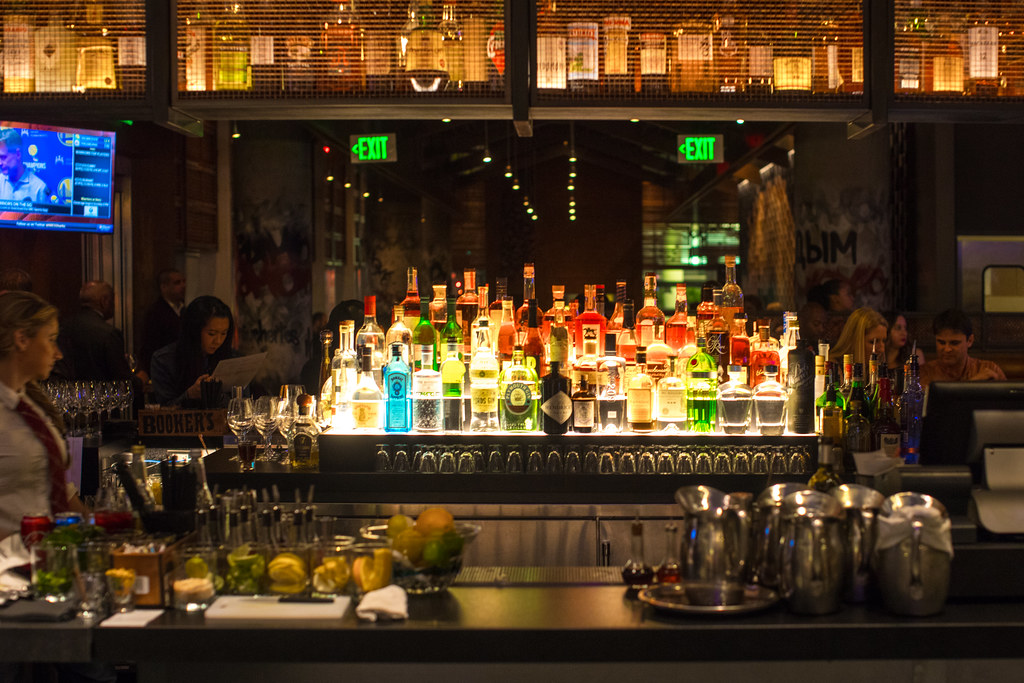
Only a week old, International Smoke is already solidly booked for months. The good news though is that they take walk ins at the bar and have several tables that can seat up to six in the bar. Before getting into my thoughts on the food, I will say that with a big family (six of us) one of my frequent disappointments is when too many diners are crammed into a small table at a bar. In the case of International Smoke this is not the case for their 6 tops. They are large, roomy and comfortably accommodated our large group. There are also several 4 tops in the bar and of course you can also dine seating at the bar itself. We luckily got the last table in the bar last night just before dinner service started at 5:30 pm.

The bar also has several televisions which can be viewed from almost every seat and which were appropriately tuned in last night to the Warriors 124-116 win over the Philadelphia 76ers during dinner.

Although barbecue features prominently on the International Smoke menu, it would be misleading to call it a “barbecue” restaurant. While definitely a place for carnivores, the barbecue has a more modern and international presentation and the menu also includes many non-barbecue offerings.

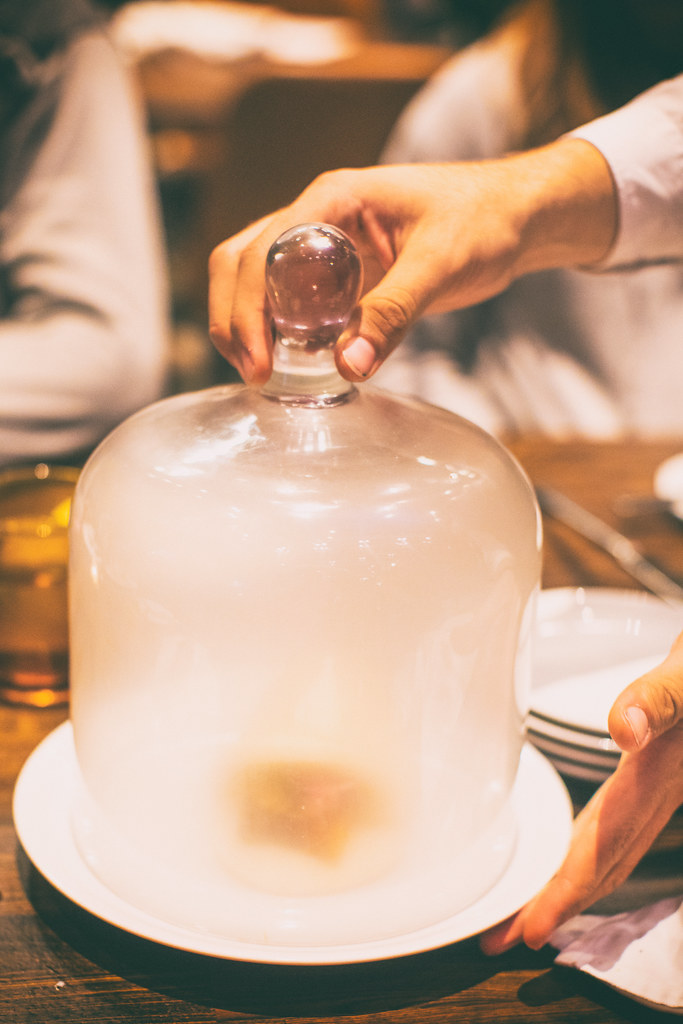
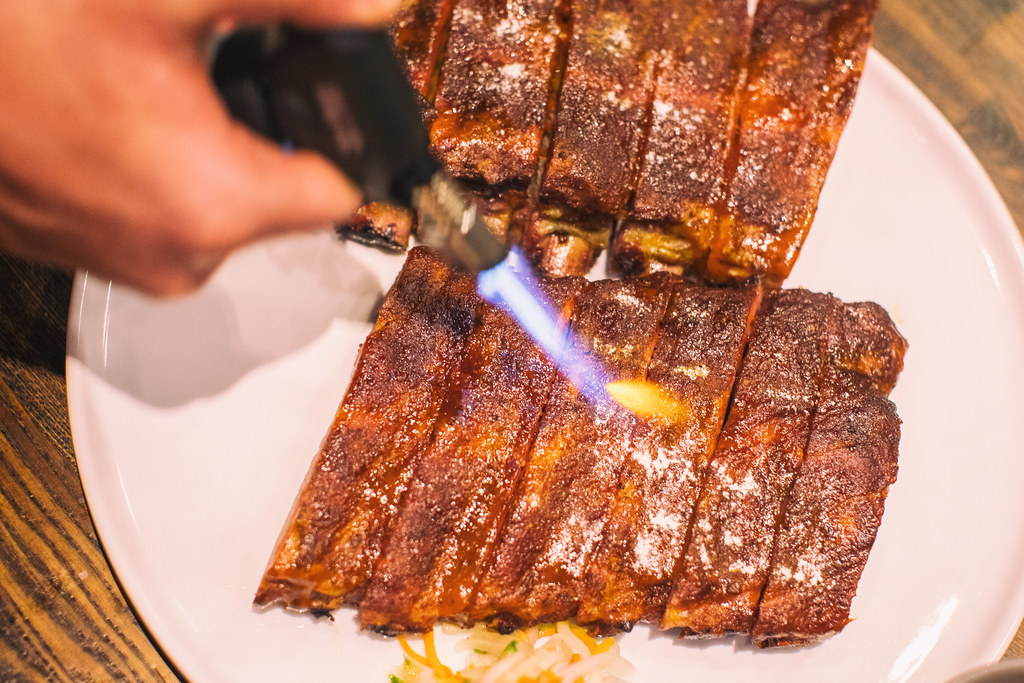
Many of the offerings are also fairly theatrical in nature, not quite what you’d find at say Edith’s down in Cabo San Lucas, but they incorporate smoke prominently to give you your fun little dinner show to go along with the food. In addition to serving two of our dishes (the smoked burrata and instant bacon) in glass encased smoke filled canisters, they prepare the Wagyu Shaking beef in a hot skillet tableside and use a cooking torch to caramelize the sugar while serving the ribs. It’s always nice to get a little extra pizzaz at the table when taking the kids out.

So let’s get into the cocktails and food.

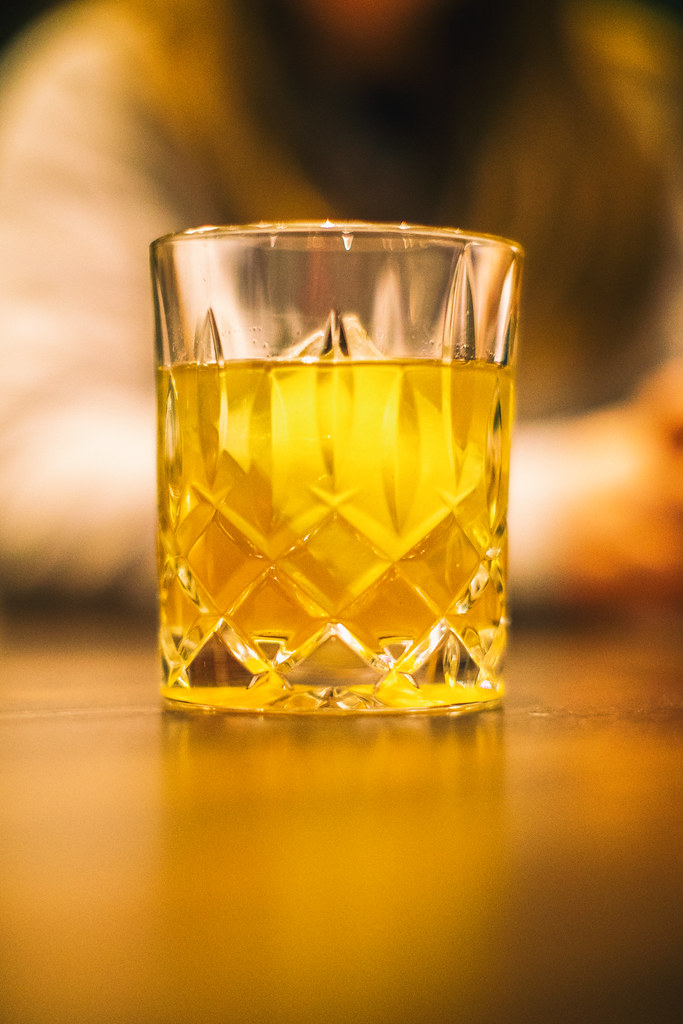
I started off the evening with the Curry Up Now cocktail, because, well Steph Curry right? Plus I like bourbon. The drink is made with Wild Turkey 101 Bourbon, Madras Curry, Amontillado Sherry, and Corazon Bitters. It was served in a beautiful Waterford crystal style tumbler over one of those giant ice cubes you get at fancy bars these days. Although I’m not sure that Steph drinks one of these things every day at cocktail hour, it was a well balanced, slightly sweet bourbon based cocktail and it worked just fine for me.

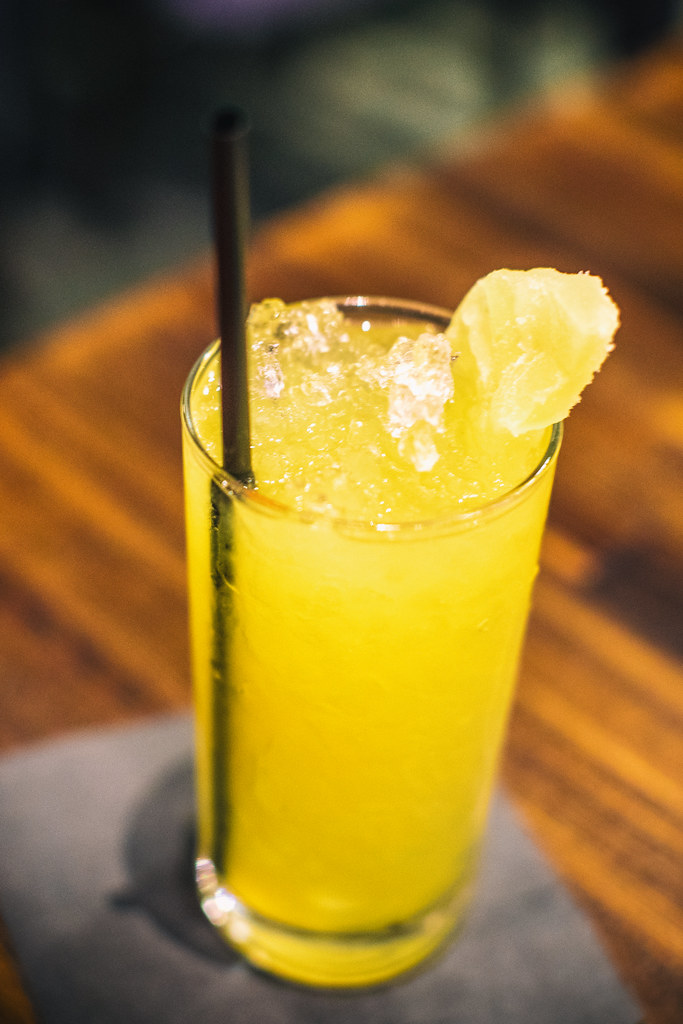
We also tried the Rhinestone Cowboy, made with Hangar One Kaffir Lime Vodka, Espolòn Blanco Tequila, and Coconut Calamansi, refreshing served over that nice soft crushed ice that you also find at fancy bars these days.

WAGYU SHAKING BEEF, International Smoke
International Smoke’s Wagyu Shaking Beef

International Smoke
International Smoke’s Wagyu Shaking Beef

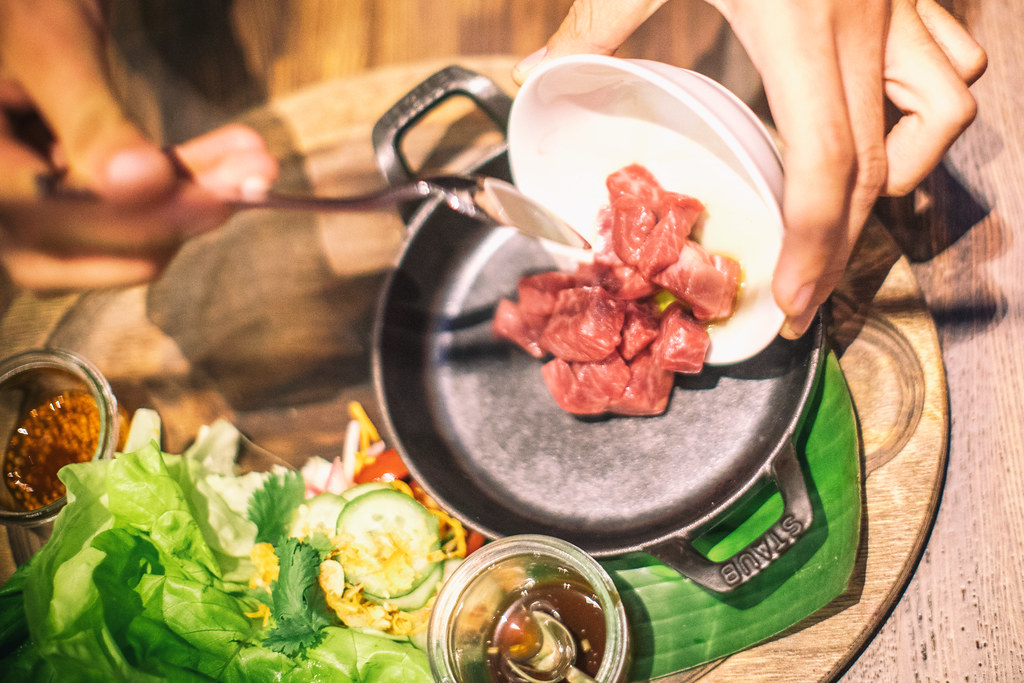
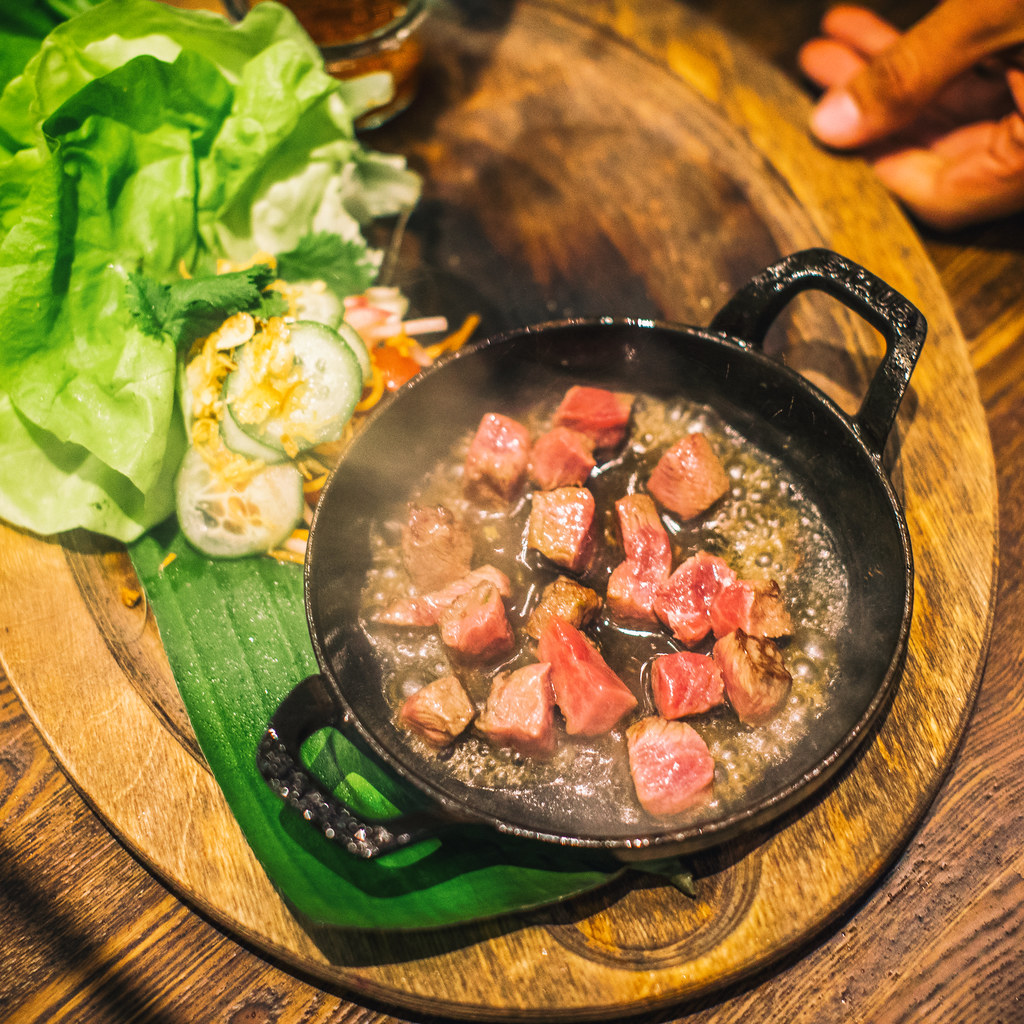
Our first dish was the aforementioned Wagyu Shaking Beef, cooked in that black hot skillet tableside. It comes with lettuce and you make little lettuce wrap taco like things. This was a favorite. The beef was delicious, cooked slightly rare and very juicy. They added a marinade to the beef as it was cooking. It’s Wagyu so it’s bound to be tasty, but as expected for things labeled Wagyu, it’s also expensive and you wish you got a lot more of it. I would probably order this again, and probably again, and again.

Classic American Wedge, nternational Smoke

Smoked, Burrata, International Smoke

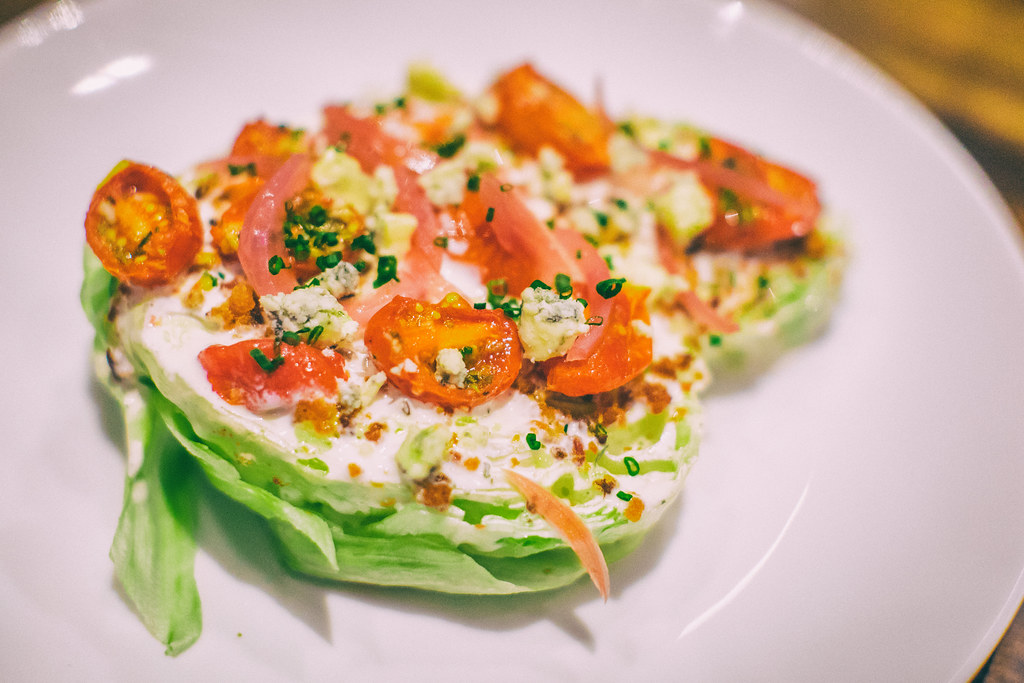
Next up was International Smoke’s take on an all time classic, the wedge salad. It’s prepared cut in half with everything served up on top. Again, a little small, but delicious and a beautifully balanced mixture of dressing, bacon, onions and tomatoes.

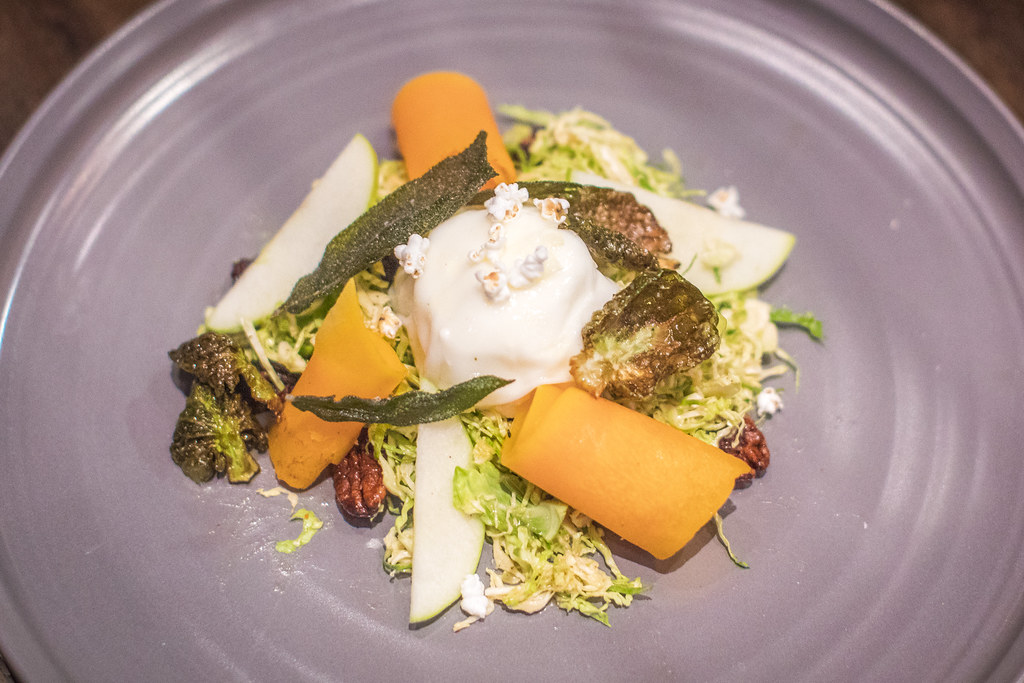
The burrata was served at the same time as the wedge and came in the previously described smoke filled canister. The aha moment comes as the canister lid is lifted and the smoke disappears into the air, leaving you with a very creamy piece of smoke flavored cheese. The brussel sprouts went well with the cheese and it was a nice bit of salad before getting into the meats.

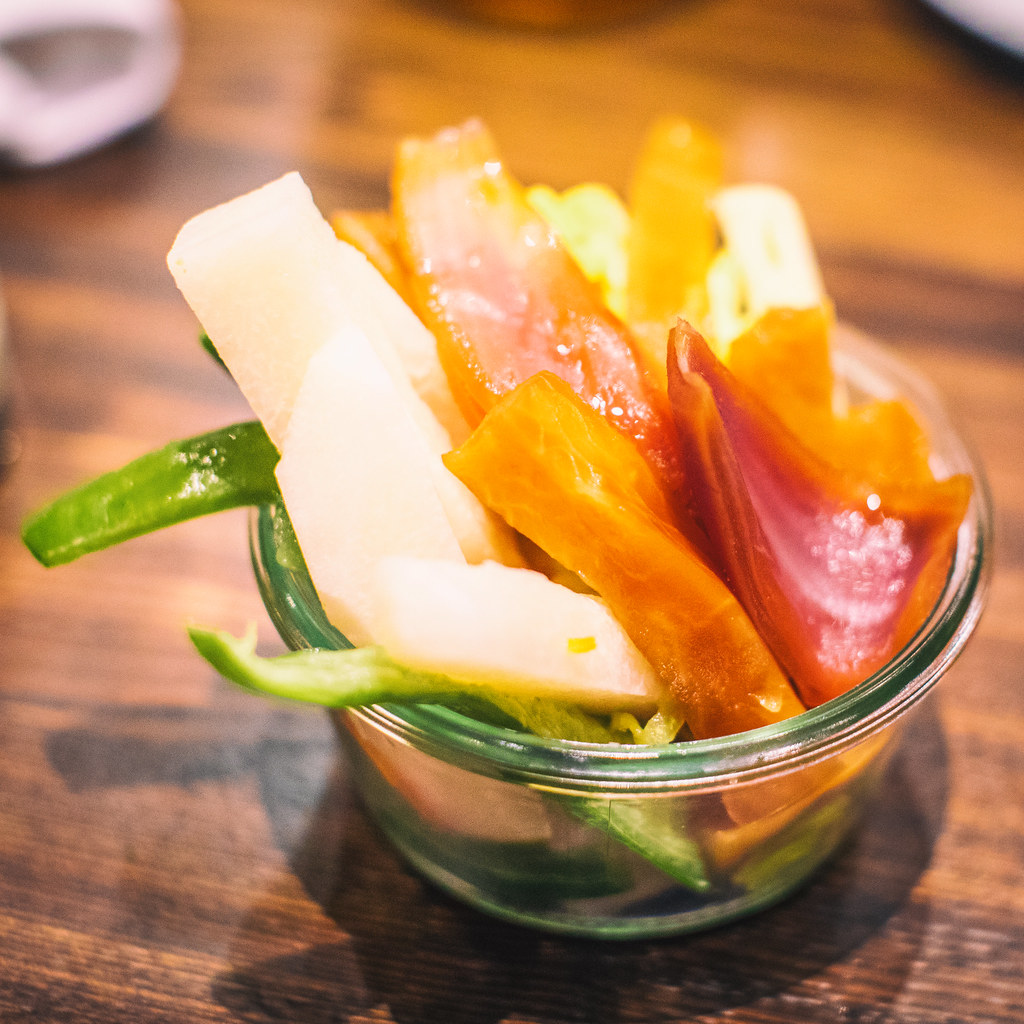
We also ordered a mixed pickle jar which is a myriad of pickled vegetables. At $ 6 it felt like a bargain on the menu and if you like pickled veggies I’d recommend it. I liked the pickled onions the best.

Kalua Style, Instant Bacon, International Smoke
The big reveal, Kalua Style, Instant Bacon, International Smoke

Kalua Style, Instant Bacon, International Smoke

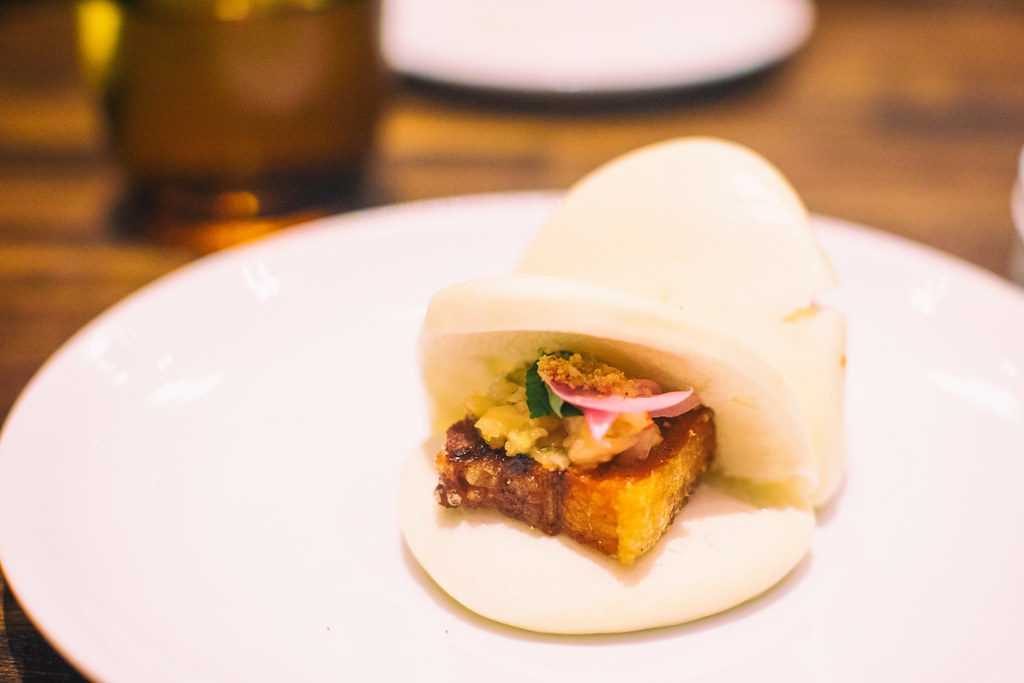
The Kalua “Instant Bacon” is more like a pork bun than anything, served in another one of those smokey canisters with the big reveal — a very rich piece of pork served in a bun — again very tasty, but two to a plate a bit on the small side.

Smoked Pork Shoulder, International Smoke

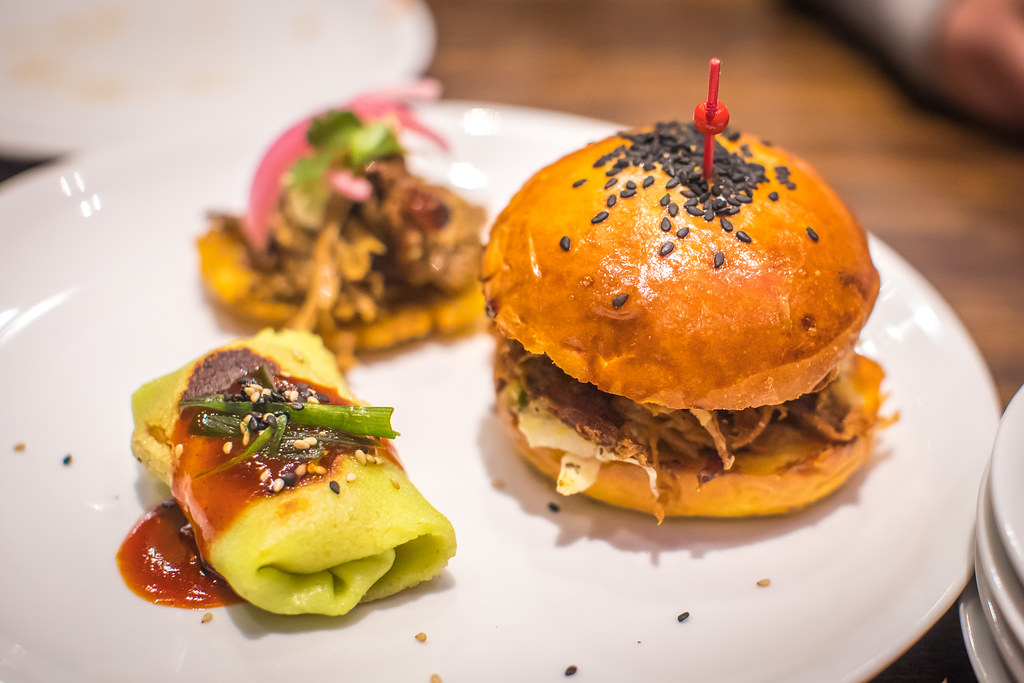
We tried two orders of the Trio Sampler smoked pork shoulder. This consisted of an American pulled pork slider, Cuban Mojo Tostones and Korean Scallion Crepes. The American pulled pork slider was the favorite (especially with the kids) but I liked the Cuban Mojo Tostones the best myself. I did not care for the Korean Scallion Crepes.

Double Duck Wings, International Smoke

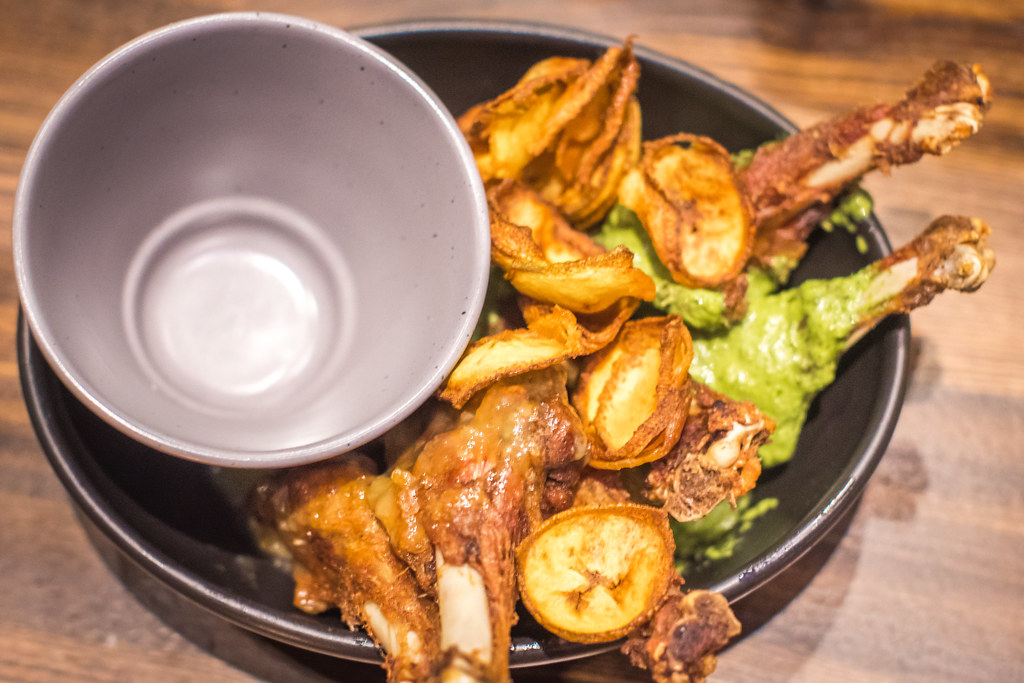
The double duck wings were up next. These were ok but my least favorite dish of the evening. They were pretty basic and a bit bland. The sauce they came in was tasty and interesting, but I would not order this again. We didn’t eat most of this dish and took it home with us in a box. I tried it again for breakfast this morning and it tasted a little better cold, but still not a favorite.

Smoked Pork Ribs, St. Louis Cut, International Smoke

Up next was the main event, a full slab of the smoked pork ribs. As previously mentioned, they bring these out with a cooking torch and torch the sugar on the ribs right there tableside. As far as ribs go these were perfectly adequate but nothing spectacular. The ribs probably had too high a bar to live up to in my mind though. When I read “St. Louis Cut” on the menu the only thing I could think about from then on was how much I love the ribs at Pappy’s in St. Louis. Those juicy, beautiful bone dripping ribs at Pappys, or if not Pappy’s at least all of the great sauces at St. Louis’ latest downtown barbecue spot Sugarfire with one of the best neon signs ever.

International Smoke’s ribs were just fine, but they were not as good as what you’d get at the best spots in St. Louis, or Kansas City, or Texas or Alabama. Again, I’m spoiled having experienced some spectacular barbecue over the years though. I probably should have known San Francisco celebrity chefs would be no match for hardcore pitmasters who’ve been doing their thing for 30 years.

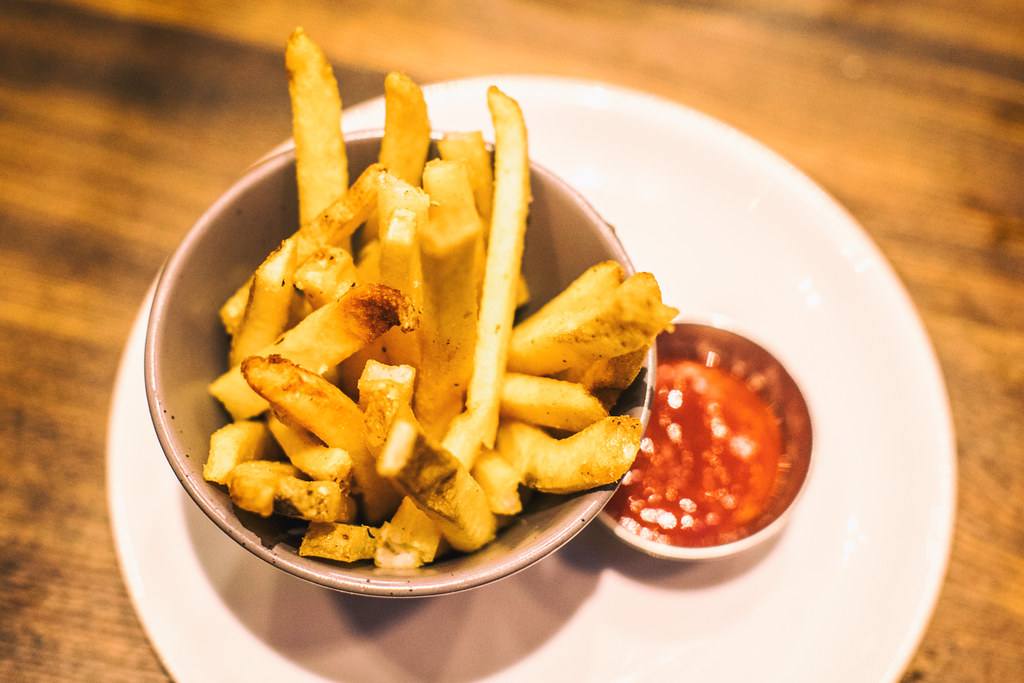
Along with the ribs we ordered the french fries, which were pretty much the same basic fries you’d get anywhere and three sides of the mac and cheese.

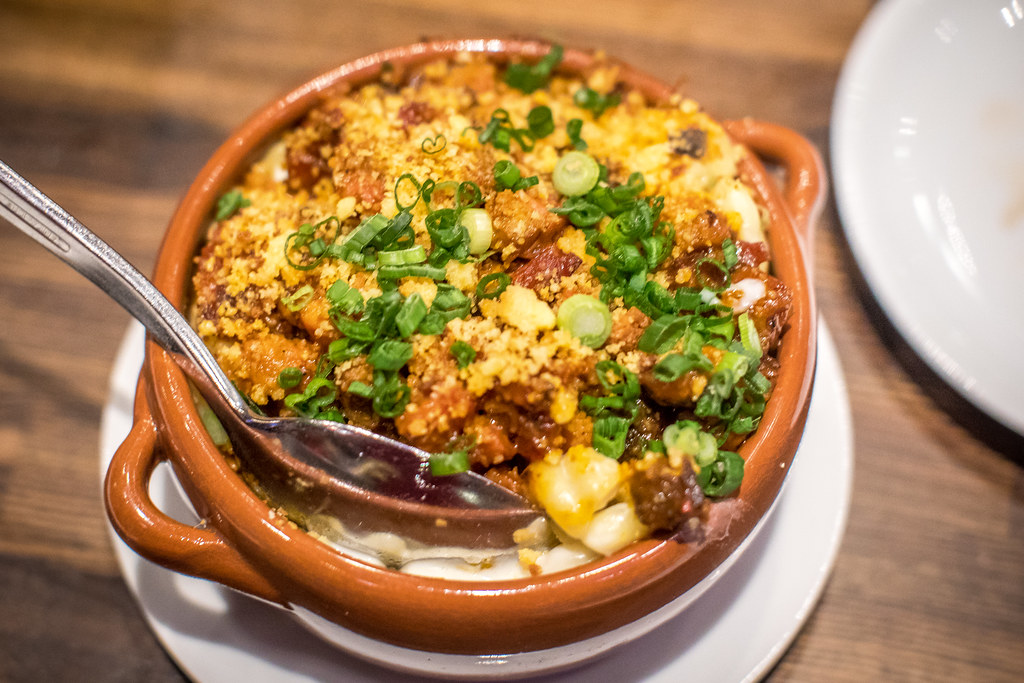
Smoked Rib Tip Mac and Cheese, International Smoke

The mac and cheese was interesting — actually it was my favorite dish of the evening, but I’m a big mac and cheese fan. It’s served with rib tips and cornbread crumble on top. It was very good. I was very happy with this dish… but… would I rather have International Smoke’s mac and cheese or the buffalo chicken mac from Homeroom? See, again, it’s a high bar in my opinion, so while I was perfectly happy with this dish it was probably doomed from the start in my mind.

Anyways, there you have it. We ordered too much food for dinner so didn’t have room for dessert. Apparently my youngest daughter Kate was promised ice cream earlier in the day, however, so we stopped by Fenton’s on the way back home to pick up a half gallon of toasted almond. I’m sure International Smoke’s ice cream is probably just fine, but I doubt they hold a candle to Fentons. ?

More on International Smoke from Business Insider, SF Eater and the San Francisco Chronicle.

International Smoke
Bar at International Smoke

Curry Up Now, International Smoke
Curry Up Now cocktail

International Smoke
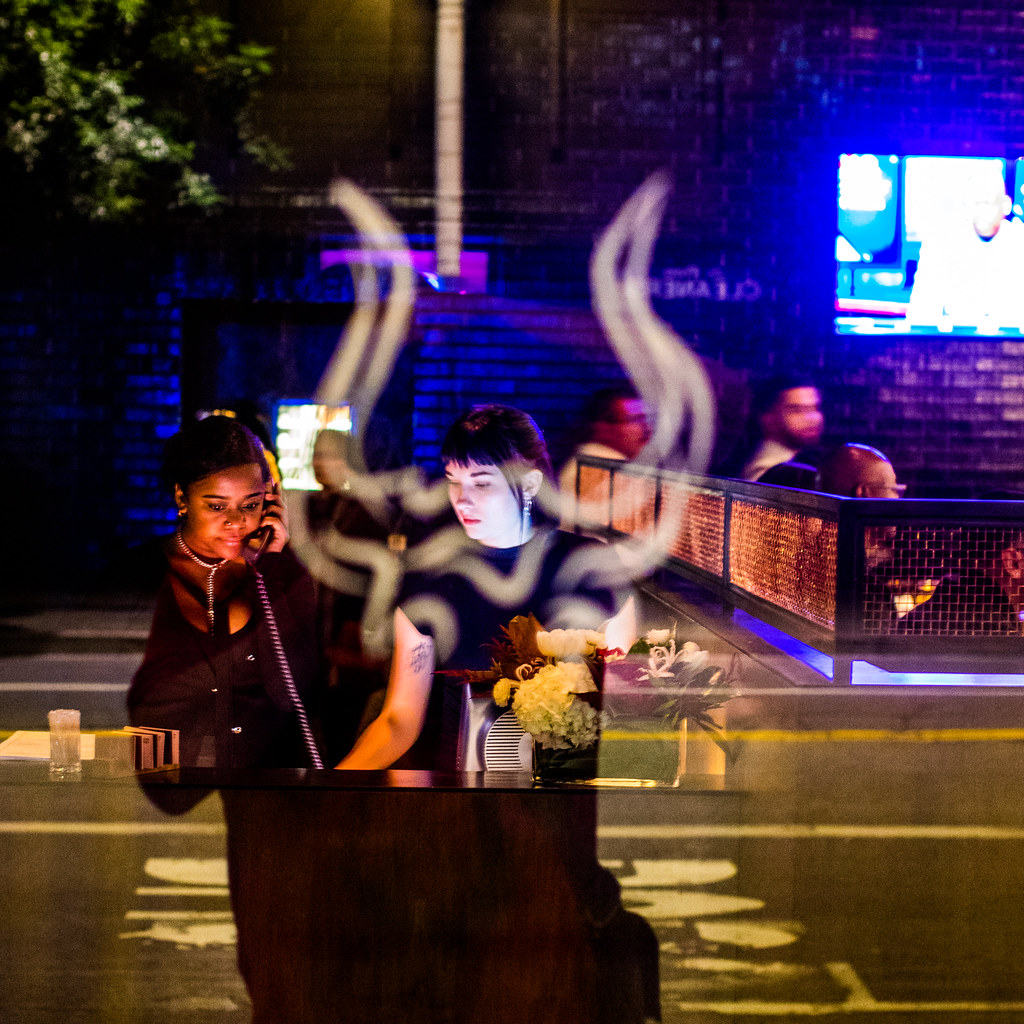
Front desk at International Smoke

Rhinestone Cowboy, International Smoke
Like a Rhinestone Cowboy

Mixed Pickle Jar, International Smoke
Pickles at International Smoke

French Fries, International Smoke


Thomas Hawk Digital Connection

 
Comments Off on New Ayesha Curry, Michael Mina San Francisco Hot Spot International Smoke, A Contemporary Take on Barbecue

Posted in Photography


Full Frame or APS-C for Wildlife Photography – Which is Best?

20 Nov

Choosing between a full frame or cropped sensor camera for wildlife photography can be a tough decision. Both options offer their own benefits, so choosing between the two can cause quite the headache. Lots of photographers have their opinions, but choosing what’s right for your own use will largely come down to your personal style of shooting. So let’s break it down.

FX full frame and APS-C - Full Frame or APS-C for Wildlife Photography - Which is Best?

The Basics

Most modern camera companies use either full frame or APS-C (crop) type sensors in their DSLR (and mirrorless) cameras. The former is often classed as the professional standard, with the sensor size being a close replica to that of a 35mm film negative.

APS-C on the other hand, is roughly two thirds the size of a full frame sensor, resulting in the field of view being multiplied by a factor of 1.5-1.6x that of a standard full frame model. These sensors feature mostly in the lower tiered offerings by camera companies, with the chips being less expensive to produce.

Full Frame or APS-C for Wildlife Photography - Which is Best?

Working with APS-C means you can travel lighter.

Crop Factor

For APS-C models one of the largest benefits for wildlife photographers is that of the additional crop factor. The 1.5-1.6x magnification of your optics can be hugely beneficial when working out in the field, trying to photograph small birds or distant wildlife.

The crop factor also allows you to get a similar angle of view with a far smaller lens, helping to reduce the gear you need to carry while still giving you great telephoto reach. This is something a lot of photographers find as a huge benefit, as they can minimize the size and weight of the gear they need to carry out into the field.

For example, a 70-200mm lens on a 1.5x crop-factor body gives you the equivalent of a 105-300mm lens. A perfect compact wildlife setup.

APS-c cameras crop factor can be a great benefit for wildlife photography - Full Frame or APS-C for Wildlife Photography - Which is Best?

APS-C cameras crop factor can be a great benefit for wildlife photography.

ISO Sensitivity

One of the large benefits of a full frame camera is that of better image quality when shooting at high ISO. The larger sensor means in the individual pixels (and light sensitive photo sites) are larger than those on an APS-C type camera. This means as a general rule they are more sensitive to light, allowing cleaner noise-free images at high ISO settings, something that is fabulous when trying to work and photograph wildlife in low light conditions.

Now with modern sensor advances, APS-C models of the past few years have come up leaps and bounds in terms of ISO performance – easily being useable to ISO 6,400. But, if low light usability is key for the subjects you’re working with, a full frame camera is still king.

Full Frame or APS-C for Wildlife Photography - Which is Best?

APS-C cameras can still make great results at a high ISO.

Depth of Field

When comparing that of full frame sensors with APS-C models, one extra thing to consider is the depth of field characteristics and how areas are rendered out of focus.

With the smaller sensor in APS-C models, they give the effect of having a larger depth of field at equivalent apertures when compared to a full frame camera. This means that if you are going after images that render clean bokeh and have a very restricted depth of field to isolate and direct your viewer’s attention to your subject, a full frame model will be better suited.

Full Frame or APS-C for Wildlife Photography - Which is Best?

Full frame cameras are great for shallow depth of field effects.

Of course, if you do a large amount of macro work and want to maximize the depth then an APS-C camera might be right up your alley.

Resolution

In the past few years, technology has advanced in resolution steadily, with cameras being introduced that have high 36-42 megapixel sensors. For the most part, ultra high-res sensors have been used in the realms of advertising and commercial photography for years. But of course, now having been brought into DSLRs they offer photographers more flexibility.

The high resolutions models are mainly full frame sensors, as packing huge numbers of pixels onto small sensors can heavily impact their quality. The FX models that have high resolution offer a unique advantage, as they make the most of the benefits of full frame models, yet offer the ability to crop heavily to replicate the crop factor of those advanced APS-C DSLRs.

Often a disadvantage is that these high-resolution cameras are slower in terms of frames per second, due to internal data writing limitations. But this is advancing all the time, especially with new forms of storage media offering faster write times.


Full Frame or APS-C for Wildlife Photography - Which is Best?

High megapixel full frame cameras offer great all-around performance.

The full frame camera with a high-resolution sensor can be somewhat of a perfect compromise for those wanting the ISO performance and bokeh rendering benefits of full frame, combined with the ability to crop. Providing, of course, that they aren’t to hung up on needing blazing fast frame per second shooting rates.

Cost

One factor that always plays a part when looking to buy new gear is that of cost. Full frame bodies by their nature are more expensive, with the chips inside being harder to engineer and more expensive to produce. APS-C cameras are often found at lower price points, but this depends on the body design and extra features such as speed, construction, and technologies implemented.

Some full spec APS-C cameras are significantly more expensive than full frame models due to the advanced autofocus features, frame rates, and build quality.

So what to choose?

For wildlife photography, it largely depends on your target subjects.

If you love photographing birds and small creatures, a high-end APS-C body that combines the crop factor with speed will serve you well. The crop factor is also a huge benefit if you want to get a longer telephoto reach without having to shell out for ultra-expensive super telephoto lenses. Meaning you can have a small set up that offers a good compromise for most situations.

If you want to truly get the best performance and quality, full frame models are where to look. The high-resolution sensors and excellent low light performance make for great image quality. However, of course, you’ll also need to invest in the best optics to make the most of them.

These are both costly and a large burden to carry around. However, if you want the best quality imaginable that’s what it takes. For those starting out investing, an APS-C model would be my recommendation. Save your funds to buy decent quality lenses, as these will largely make more of a difference to your images than a single stop of ISO or a slightly higher resolution sensor.

The post Full Frame or APS-C for Wildlife Photography – Which is Best? by Tom Mason appeared first on Digital Photography School.

Digital Photography School

 
Comments Off on Full Frame or APS-C for Wildlife Photography – Which is Best?

Posted in Photography


How to Use Framing in an Urban Environment

20 Nov

Photographers have long developed different classifications to pair with the design and execution of a photograph – lines, shape, texture, light, framing, contrast, just to name a few. For example, leading lines appeal to a viewer’s natural tenancy to trace line into a photograph. Sharp lines are used to grab attention and organic lines create a peaceful atmosphere.

Other composition techniques like the Rule of Thirds require a photographer to mentally break down an image to evaluate balance. Low and high perspective alter the way a viewer sees the world and symmetrical/asymmetrical elements highlights the quirky beauty of life. The technique we’ll have a quick look in this article, demonstrates the power of framing, especially in an urban environment.

How to Use Framing in an Urban Environment

What is framing?

Framing in photography creates a self-contained image, like a photo-within-a-photo effect. As photographers, we are used to seeing the world through the frame of a viewfinder. We constantly evaluate what we’ll keep in an image and what we’ll exclude. We deliberately apply perspective, aim, zoom and positioning techniques to construct our photographs – sometimes without even noticing.

By cradling the subject in a balance of space and line, a frame is created, not dissimilar to the photo frames you’d find on your shelf at home.  Essentially, you are crafting a frame within a frame to deliberately bring focus to a subject, adding narrative and the unique experience of voyeurism that photography affords.

How to Use Framing in an Urban Environment

How do I frame a photograph?

For such an effective technique, framing has plenty to offer. It makes use of strong design skills, adding an extra layer to an image to create more depth.  Framing can also be used to obscure more mundane areas of a scene, boosting the efficacy of a photograph when viewed by others.

Composing an image by making use of framing is fairly straightforward. Start out searching for windows and doors as they are the most abundant frames in an urban environment. You’ll find that windows and doors, when photographed, contain their own little ecosystem within the one image. This is great for capitalizing on both content and narrative, almost like reading a window in a comic strip!

Frame shapes

Square or rectangular frames are probably the first things that leap to mind when someone considers framing. Doorways and windows are a great way for emphasizing a subject or depth, but they are not the only options and framing is not limited to squares or rectangles.

The image below proves how versatile the urban environment can be for artificial framing. The image was taken from the floor of a train station, lens pointed to the floor above. The darkness of the building structure is silhouetted against the blue sky, forming a crescent shape. The frame draws attention to the contrast of the architecture against the sky but also cradles the form of a human passing by.

How to Use Framing in an Urban Environment

How to Use Framing in an Urban Environment

This photo was taken by chance in a late night shopping district. The framing of the man emphasizes his presence but also isolates him from the rest of the landscape.

How to Use Framing in an Urban Environment

For this image, I aimed to align a gap in the cage with the cat’s face. The slight distortion caused by the lens draws the center square closer to the viewer’s eye. Framing isn’t always a split-second discovery, taking the time to assess a situation and respond creatively can be just as effective as shooting from the hip.

How to Use Framing in an Urban Environment

Shattered windows in rundown urban landscapes offer beautifully detailed landscapes complemented by an informed framing technique.

Keep it real

Framing can be really effective for highlighting specific areas of a photograph. However, it’s important to keep in mind that not every photograph needs framing. Some images are much more effective when they stand alone. Like most photography, you need to be versatile and trust your instincts.

While lining up a perfect shot through a fence can be effective, make sure to be aware of your surroundings too. Don’t focus so heavily on framing that you sacrifice other photographic opportunities. You don’t need to force a frame on an image, so don’t overthink it. You want natural images that are enhanced by a frame, not poor images that require a frame to garner interest.

Just stay open to the idea of framing and gather enough experience to recognize a framing opportunity when one presents itself. This way, opportunities tend to reveal themselves rather than you having to force them out of hiding.

How to Use Framing in an Urban Environment

How to Use Framing in an Urban Environment

The branches of these trees act as a natural frame, sectioning up the image to draw attraction to the cute little bunnies within.

The post How to Use Framing in an Urban Environment by Megan Kennedy appeared first on Digital Photography School.

Digital Photography School

 
Comments Off on How to Use Framing in an Urban Environment

Posted in Photography


Top 10 sample galleries of the year #6: the Sigma 85mm F1.4 Art

19 Nov

$ (document).ready(function() { SampleGalleryV2({“containerId”:”embeddedSampleGallery_1444131463″,”galleryId”:”1444131463″,”isEmbeddedWidget”:true,”standalone”:false,”selectedImageIndex”:0,”startInCommentsView”:false,”isMobile”:false}) });

We’re counting down our top 10 most popular sample galleries of 2017. Our #6 gallery was looked through more than 1.3 million times. So what product attracted this number of eyeballs? Why, the Sigma 85mm F1.4 DH HSM Art lens of course.

Oh the portraits you will take! This lens is capable of outstanding image quality – read our full review and find out why we gave it a gold award. Not only that, it’s one of the most affordable 85mm F1.4 lens available. So peak through our gallery and see just what all the hype is about.


Top 10 most popular sample galleries of 2017:

#10: Sigma 14mm F1.8 Art
#9: Fujifilm GFX 50S
#8: Nikon D7500
#7: Olympus Tough TG-5
#6: Sigma 85mm F1.4
#5: To be revealed on 11/20
#4: To be revealed on 11/21
#3: To be revealed on 11/22
#2: To be revealed on 11/23
#1: To be revealed on 11/24

Articles: Digital Photography Review (dpreview.com)

 
Comments Off on Top 10 sample galleries of the year #6: the Sigma 85mm F1.4 Art

Posted in Uncategorized


Photography gifts for every budget

19 Nov

Shopping for a photographer? Whether you are one yourself or not, chances are you could use some ideas. From stocking stuffers on up, we’ve got some photography gift suggestions for every budget.

2017 Holiday Gift Guide: Under $ 50

2017 Holiday Gift Guide: $ 50-200

2017 Holiday Gift Guide: Over $ 200

Articles: Digital Photography Review (dpreview.com)

 
Comments Off on Photography gifts for every budget

Posted in Uncategorized


Retrographic: The world’s most iconic black & white images brought to life in color

19 Nov

There’s an incredibly talented online community of colorization enthusiasts and professional retouchers who spend their free time bringing iconic black-and-white photography to life in color. You typically find their work on Facebook, Reddit, or occasionally featured on photo blogs, but we’ve never seen it published in any official printed capacity we’d want to display on a coffee table… until now.

Retrographic: History’s Most Exciting Images Transformed Into Living Color is a photo book released in September that any photo lover would be proud to own and display. A labor of love created alongside the aforementioned colorization enthusiasts and professional retouchers, the book is the brain-child of author, photo-curator, and Royal Photographic Society member Michael D. Carroll.

“Through the careful selection of striking images and dedicated colorization research, Retrographic takes the reader on a visual tour of the distant past,” explains Carroll. “Many of these moments are already burned into our collective memory through the power of photography as shared by people across the 190-year long Age of the Image. And now, these visual time capsules are collected together for the first time and presented in living color.”

The book contains 120 images in all, including some of the most iconic and influential in history—The Burning Monk, V-J Day in Times Square, The Wright Brothers’ First Flight, and many many more. As Carroll explained to us over email, the idea was to present people with a photographic history they could more easily relate to:

There is a tendency for people of the present to look back at history in black and white, which can be highly aesthetic in that black and white makes the subject look pleasing to many people. However, black and white can make the viewer feel detached from the subject. We hope that adding color breathes life into historical images and reconnects people to those who went before and helps us to understand and empathize with them.

And if the colorized photos aren’t enough, the book’s remaining 73 pages are filled will “informational gems” and narrative, including a forward by Royal Photographic Society Ambassador Jeff Vickers.

You can browse through a sampling of the images included in the book below, and if you want to learn more about Retrographic, visit the book’s Facebook page, or pick it up for yourself on Amazon.

$ (document).ready(function() { SampleGalleryV2({“containerId”:”embeddedSampleGallery_8897698142″,”galleryId”:”8897698142″,”isEmbeddedWidget”:true,”standalone”:false,”selectedImageIndex”:0,”startInCommentsView”:false,”isMobile”:false}) });
Articles: Digital Photography Review (dpreview.com)

 
Comments Off on Retrographic: The world’s most iconic black & white images brought to life in color

Posted in Uncategorized


How to Understand Pixels, Resolution, and Resize Your in Photoshop Correctly

19 Nov

Size, resolution, and formats… What do pixels have to do with it?

Do you buy your camera based on its number of megapixels? Are you having problems sharing your photos online? Does your print look low quality even if it looks great on the screen? There seems to be a lot of confusion between pixels and bytes (image size and file size), quality and quantity, size, and resolution.

So let’s review some basics to make your life easier, your workflow more efficient, and your images the correct size for the intended usage.

How to Understand Pixels, Resolution, and Resize Your in Photoshop Correctly

This image is sized to 750×500 pixels at 72 dpi, saved as a compressed JPG which is 174kb. Let’s look at what all that means.

Is resolution the same as size?

One of the biggest misunderstandings comes from the concept of resolution. If this is your case, believe me you’re not alone.

The problem is that resolution can refer to many things, two of them relate to the problem at hand. Further on I’ll explain these two resolution concepts, however, they have one thing in common that I need to clarify first. They both have to do with pixels.

You’ve probably heard a lot about pixels, at least when you bought your camera. This is one of the most available and “valued” specs on the market so I’ll start there.

What is a pixel?

A digital photo is not one non-dividable thing. If you zoom in far enough you’ll see that your image is like a mosaic formed by small tiles, which in photography are called pixels.

Pixel grid - How to Understand Pixels, Resolution, and Resize Your in Photoshop Correctly

The amount of these pixels and the way they are distributed are the two factors that you need to consider to understand resolution.

Pixel count

The first kind of resolution refers to the pixel count which is the number of pixels that form your photo. In order to calculate this resolution you just use the same formula you would use for the area of any rectangle; multiply the length by the height. For example, if you have a photo that has 4,500 pixels on the horizontal side, and 3,000 on the vertical size it gives you a total of 13,500,000. Because this number is very unpractical to use, you can just divide it by a million to convert it into megapixels. So 13,500,000 / 1,000000 = 13.5 Megapixels.

Pixel density

The other kind of resolution is about how you distribute the total amount of pixels that you have, which is commonly referred as pixel density.

Now, the resolution is expressed in dpi (or ppi), which is the acronym for dots (or pixels) per inch. So, if you see 72 dpi it means that the image will have 72 pixels per inch; if you see 300 dpi means 300 pixels per inch, and so on.

The final size of your image depends on the resolution that you choose. If an image is 4500 x 3000 pixels it means that it will print at 15 x 10 inches if you set the resolution to 300 dpi, but it will be 62.5 x 41.6 inches at 72 dpi. While the size of your print does change, you are not resizing your photo (image file), you are just reorganizing the existing pixels.

Imagine a rubber band, you can stretch it or shrink it but you’re not changing the composition of the band, you’re not adding or cutting any of the rubber.

Pixel Density 72dpi - How to Understand Pixels, Resolution, and Resize Your in Photoshop Correctly

Pixel Density 300dpi - How to Understand Pixels, Resolution, and Resize Your in Photoshop Correctly

In summary, no resolution is not the same as size, but they are related.

So quantity equals quality?

Because of the aforementioned correlation between size and resolution, a lot of people think that megapixels equal quality. And in a sense it does because the more pixels you have to spread out, the higher the pixel density will be.

However, on top of the quantity you should also consider the depth of the pixels, this is what determines the amount of tonal values that your image will have. In other words it is the number of colors per pixel. For example, a 2-bit depth can store only black, white and two shades of grey, but the more common value is 8-bit. The values grows exponentially so for example with an 8-bit photo (2 to the power of 8 = 256) you’ll have 256 tones of green, 256 tones of blue, and 256 tones of red, which means about 16 million colors.

This is already more that the eye can distinguish which means that 16-bit or 32-bit will look relatively similar to us. Of course, this means that your image will be heavier even of the size is the same, because there is more information contained in each pixel. This is also why quality and quantity are not necessarily the same.

Therefore quantity helps, but also the size and depth of each pixel determine the quality. This is why you should look all the specs of the camera and its sensor and not just the amount of Megapixels. After all, there’s a limit to the size you can print or view your image, more than that it will only result in extra file size (megabytes) and no impact in the image size (megapixels) or the quality.

How to choose and control image size and file size?

First of all, you need to choose the outlet for your photo, there is a maximum density that you need. If you are going to post your image online you can do great with only 72 dpi, but that is too little for printing a photo. If you are going to print it you need between 300 and 350 dpi.

Of course, we are talking about generalizations because each monitor and each printer will have slightly different resolutions as well. For example, if you want to print your photo to 8×10 inches you need your image to have 300dpi x 8″ = 2400 pixels by 300dpi x 10″ = 3000 pixels (so 2400×3000 to print an 8×10 at 300dpi). Anything bigger than that will only be taking up space on your hard drive.

How to resize in Photoshop

Open the menu for the image size and in the popup window, you need to tick the Resample Image box. If you don’t activate “resample” you will only be redistributing the pixels like I explained at the beginning of the article.

You can also choose to tick the Constrain Proportion if you want the measure to adjust according to the changes you make. So the width adjusts when you change the height and vice versa.

How to Understand Pixels, Resolution, and Resize Your in Photoshop Correctly

8×10 inches at 300 ppi, this is the size needed for printing an 8×10. Notice the pixel size is 3000 x 2400.

750×500 pixels at 72 ppi. This is web resolution and is the exact size of all the images in this article. The size in inches is irrelevant when posting online – only the pixel size matters.

On the top of the window, you’ll also see how the file size changes. This is an uncompressed version of your image, it’s the direct relationship I explained in the first part of the article: fewer pixels means less information.

How to Understand Pixels, Resolution, and Resize Your in Photoshop Correctly

Now, if you still want to change the file size without resizing anymore, you have to do it when you save the image. Before saving your photo you can choose the format you want:

Formats - How to Understand Pixels, Resolution, and Resize Your in Photoshop Correctly

If you don’t want to loose any information you need to save an uncompressed format. The most common, and therefore easier to share is TIFF.

Tiff - How to Understand Pixels, Resolution, and Resize Your in Photoshop Correctly

If you don’t mind losing a little information as long as you have a lighter file, then go for a JPEG and choose how small you want it. Obviously the smaller you set it, the more information you will lose. Fortunately, it has a preview button so you can see the impact of your compression.

JPG high quality.

JPG low quality. Notice how it’s pixelated and breaking down? If you crunch it too much or go too low quality you risk degrading the image too far.

Conclusion

So there you have it. So quality, quantity, size and resolution explained and they all have to do with pixels, as they are the basic units that constitute your image. Now that you know you can make the best choices to print, share and save your photos.

The post How to Understand Pixels, Resolution, and Resize Your in Photoshop Correctly by Ana Mireles appeared first on Digital Photography School.

Digital Photography School

 
Comments Off on How to Understand Pixels, Resolution, and Resize Your in Photoshop Correctly

Posted in Photography


These are the best smartphone cameras you can buy now

19 Nov

Few would argue that in 2017 the mobile device industry is a major driver of imaging hardware innovation. Long gone are the days when the size of the image sensor and the aperture were the major determining factors for image quality. Instead, phone manufacturers have turned to software and computational imaging methods to achieve better detail, wider dynamic range and lower noise levels, as well as high-quality zooming and DSLR-like bokeh effects.

High-powered chipsets with built-in image signal processors and sensors with very fast read-out times make it possible to combine image data that is captured by dual-lenses, or several frames recorded in quick succession, within milliseconds. These methods produce image quality that would have been unthinkable on a smartphone only a few years ago and often surpasses basic compact cameras.

Thanks to those advances in software, but also new hardware concepts, such as dual-cameras, hybrid AF-systems and more powerful image signal processors, current smartphone cameras are better than ever before. Here is our selection of the best models available in 2017, noting where their particular strengths lie.


Best display: Apple iPhone X

Dual 12MP-camera | 28/52mm equiv. focal lengths | F1.8 and F2.4 apertures | OIS | 4K/60fps video | 5.8-inch display

Apple’s brand new flagship iPhone X pulls all the technological plugs and comes with features and specifications that we haven’t seen on any iPhones or even other smartphones before. The iPhone X offers a marginally faster F2.4 telephoto lens than its cousin iPhone 8 Plus and, compared to last year’s 7 Plus, adds optical image stabilization in the telephoto lens. On the video side of things the X is capable of recording 4K footage at 60 frames per second and slow-motion clips at 1080p resolution and 240fps.

As you would expect, all the new technology has a boosting effect on image quality and the iPhone X is currently ranked second on DxOMark.com, behind only the Google Pixel 2, and with the currently highest Photo score of 101 points.

But the iPhone X not only offers outstanding image quality, it improves on the imaging viewing experience too. The iPhone X’s wide gamut OLED is the most color accurate device on the market, partially thanks to iOS’ internal color management but also because of display calibration. That’s a benefit to anyone who takes and looks at photos on their mobile device.

The device also comes with a number of innovative features. Portrait Lighting is an AI-powered feature in beta that works with front and rear cameras. It allows users to apply different lighting styles on top of simulated-bokeh-portraits. The iPhone X also used Face-ID to unlock the device, relying on an array of cameras and sensors at the top of the edge-to-edge display.

What we like: Excellent detail and dynamic range, natural bokeh mode, 4K video at 60 fps

What we don’t like: Price, underexposure and red-eye with flash


Best for video: LG V30

Dual-camera | 16MP 1/3.1″ / F1.6 / OIS main camera | 13MP / F1.9 super-wide-angle | 4K/30fps video | manual video control | 6.0-inch display

The LG V30 is the Korean manufacturer’s latest flagship smartphone and comes with an unusual dual-camera setup. Instead of a telephoto lens the V30 offers a secondary super-wide-angle that lets you squeeze more scene into the frame, without the need for accessory lenses.

The V30 also sets itself apart from the competition with a very comprehensive video mode that comes with manual control over shutter speed and sound recording levels, among many other parameters. You can also choose from 15 new Cine Effect color presets that are based on film genres and the Point Zoom mode allows for stable zooming into a target in the frame rather than the center.

In testing for our forthcoming review we found the V30 to deliver excellent video image quality. Still images are good as well, with wide dynamic range and good sharpness across the frame, but levels of detail lag just a touch behind the very best on the main camera and can be pretty low on the super-wide-angle. Still, the V30 is an excellent option for mobile videographers and those who appreciate a super-wide-angle.

What we like: Great video feature set and stabilization, super-wide-angle offers new framing options, excellent display

What we don’t like: Poor detail on super-wide-angle, zoom quality, no bokeh mode


Best for zoom: Samsung Galaxy Note 8

Dual-camera | 12MP / F1.7 / 26mm main camera | 12MP / F2.4 / 52mm | OIS | 4K/30fps video | 6.3-inch display

The Samsung Galaxy Note 8 is the Korean company’s late entry to the dual-camera game but has immediately set new standards. The camera module combines a 26mm equivalent 12MP wide-angle module with a 52mm equivalent tele camera.

The secondary camera comes with a smaller sensor and slower aperture than the main module, but together with the iPhone X the Note 8 is one of very few dual-cam smartphones to offer optical image stabilization in both lenses. In DxOMark’s Mobile testing the dual-camera setup achieves outstanding results, including the best zoom performance among all current smartphones. Good detail and a natural looking bokeh mode also contribute to the high overall score of 94 points.

In the video department the Note 8 comes with 4K resolution and a 240fps slow-motion option. With its massive 6.3″ Quad-HD+ display and S-Pen stylus the Note 8 is also an interesting option for those photographers who like image editing on the device. It stands up very well in our comparison against the iPhone X, making it a great option for any Android user.

What we like: Class-leading zoom, large display and stylus, good bokeh mode

What we don’t like: Lower DR than some competitors, price


Best computational imaging device: Google Pixel 2

12.2MP 1/2.6″ sensor | F1.8 aperture | OIS | 4K/30fps video | 5.0-inch display

The original Pixel was one of last year’s best smartphones and there is no doubt version two is following right in its footsteps. The Pixel 2 is one of the few current high-end smartphones with a single-lens camera but it makes up for a secondary camera with a host of advanced Google software features.

Despite a slightly smaller image sensor than on the predecessor, the Pixel 2 achieves excellent dynamic range and very good detail in all conditions, earning it the best overall performance and the current top spot in the DxOMark Mobile ranking. Testers were also impressed with the video mode that combines optical and electronic stabilization for ultra-smooth footage.

The Pixel 2 might have to make do without a secondary lens but thanks to Google’s software wizardry and Dual Pixel technology (split left/right pixels) it’s still capable of creating a usable fake bokeh Portrait Mode effect, and digital zoom has improved over the previous generation as well.

Early Pixel 2 adopters have reported some display troubles but Google has taken measures to fix them, making the Pixel 2 an easy recommendation for any mobile photographer. As a bonus the device comes with an integrated but currently dormant image processor called Visual Core. When it’s activated via a software update in the near future, it should give the Pixel 2’s image quality another boost.

What we like: Class-leading detail and dynamic range, excellent hybrid video stabilization, “pure” Android operating system

What we don’t like: Display issues on early units, lower zoom and bokeh performance than closest competitors


Best for black-and-white photography fans: Huawei Mate 10 Pro

Dual-camera | 12MP RGB and 20MP monochrome sensors | F1.6 aperture | OIS | 4K/30fps video | 6.0-inch display

The Huawei Mate 10 Pro is not a cheap smartphone but will cost you significantly less than the Leica M10 or pretty much any other Leica camera for that matter. So, if you always wanted to carry a Leica in your pocket but are strapped for cash, the Huawei device might be a good compromise. It doesn’t come with the famous red dot but, like the P10 and several other recent Huawei smartphones it has a Leica badge right next to its camera module.

It’s not all about the badge though. The Mate 10 Pro comes with an innovative dual-camera setup that combines a 12MP RGB sensor with a 20MP monochrome chip. Image data from both sensors is combined computationally to achieve better detail, increased dynamic range and lower noise levels. The high-resolution monochrome sensor also allows for a 2x lossless zoom and a unique Huawei feature: a monochrome mode that doesn’t simply convert RGB images, but captures black and white images natively.

And Huawei isn’t relying on hardware alone on the Mate 10 Pro. AI and neural networking are applied to improve the quality of the fake bokeh mode and power the automatic scene selection’s object recognition. Motion detection reduces motion blur in low light conditions.

The combination of innovative hardware and software concepts pays off and at 97 points the Mate 10 Pro achieves one of the best overall scores on DxOMark, tying the iPhone X for second place in the ranking.

What we like: Great detail in low light, monochrome mode, decent zoom and bokeh

What we don’t like: Limited slow-motion video options

Articles: Digital Photography Review (dpreview.com)

 
Comments Off on These are the best smartphone cameras you can buy now

Posted in Uncategorized