RSS
 

Archive for November, 2017

Facebook just doubled the resolution of photos in Facebook Messenger

21 Nov

Photo messaging has been around for a long time, but as smartphone cameras get better and better, this form of ‘visual communication’ is only becoming more common. That’s why, earlier today, Facebook announced a major update to Facebook Messenger that doubles the resolution of the photos you send from 2K to 4K—or, more specifically, to a max of 4096 x 4096 pixels.

“We heard that people want to send and receive high resolution photos in Messenger,” reads the release from Facebook, “and considering people send more than 17 billion photos through Messenger every month, we’re making your conversations richer, sharper, and better than ever.”

And just in case you’re wondering: this resolution bump should not affect speed. According to Facebook, “your photos will also be sent just as quickly before, even at this new, higher resolution.”

Here are a few before and after samples that show what doubling the resolution from the previous 2K looks like IRL.

*The images on the left were reproduced to reflect the previous default resolution at 2K. The images on the right reflect the new default resolution at 4K

$ (document).ready(function() { SampleGalleryV2({“containerId”:”embeddedSampleGallery_8182396623″,”galleryId”:”8182396623″,”isEmbeddedWidget”:true,”standalone”:false,”selectedImageIndex”:0,”startInCommentsView”:false,”isMobile”:false}) });

To take advantage of the new feature yourself, update your FB Messenger app to the latest version and every photo you send should automatically go out at up to 4096 x 4096 pixels.

For now, the feature is limited to iPhone and Android users in the US, Canada, France, Australia, the UK, Singapore, Hong Kong, Japan, and South Korea. Additional countries will be added ‘in the coming weeks.’

Press Release

Making Visual Messaging Even Better – Introducing High Resolution Photos in Messenger

By Sean Kelly & Hagen Green, Product Managers, Messenger

The way people message today is no longer limited by just text; visual messaging as our new universal language is much more emotional and expressive. Whether you’re catching up over moments big and small — like a recent vacation, an amazing meal at a new restaurant, a new member of the family, or the first snow day of the year — sharing photos of our experiences brings our conversations to life.

We’re making significant investments in how people communicate visually on Messenger. That’s why today, we’re excited to share that people can send and receive photos in Messenger at 4K resolution — or up to 4,096 x 4,096 pixels per image — the highest quality many smartphones support. We heard that people want to send and receive high resolution photos in Messenger — and considering people send more than 17 billion photos through Messenger every month — we’re making your conversations richer, sharper, and better than ever.

Your photos will also be sent just as quickly before, even at this new, higher resolution.

You may be curious how much of a difference 4K resolution makes. Take a look at the before and after examples in the gallery above. On the right at 4K resolution, once you zoom in, the photo is much sharper and clearer so you can see every detail. That’s what we mean by bringing your conversations to life.

To send and share photos at 4K resolution, first update your Messenger app to make sure you have the latest version. Then open a conversation and tap the camera roll icon. Select the photo, tap send, and the person you’re messaging with will receive the high resolution photo.

Starting today, we are rolling out 4K resolution on both iPhone and Android to people in the US, Canada, France, Australia, the UK, Singapore, Hong Kong, Japan, and South Korea. In the coming weeks, we’re planning to roll out 4k resolution to additional countries.

We know that every message matters to you, no matter how or what you’re sharing. We appreciate that you continue to use Messenger to connect with the people you care about most.

Articles: Digital Photography Review (dpreview.com)

 
Comments Off on Facebook just doubled the resolution of photos in Facebook Messenger

Posted in Uncategorized


Analysis: The Sony a7R III is still a star eater

21 Nov

We sent some files to our friend Jim Kasson for analysis, and he confirms that the Sony a7R III is definitely still a Star Eater, despite several claims to the contrary that have been published online over the past week.

Looking at Kasson’s graphs, one can clearly see the noise reduction kick in near Nyquist in Kasson’s energy plots. Indeed, in our own shots of the stars with the a7R III and latest a7R II (firmware v3.00 and above), our final files only show stars that are larger than one pixel with a few neighboring pixels: suggesting that smaller stars are indeed ‘eaten’ or dimmed due to a spatial filtering algorithm.

At a 3.2-second exposure, the ‘spacial filtering’ (Star Eater) is very mild, and won’t affect your stars.
But as soon as you hit 4-seconds, spacial filtering kicks in big time, causing the same Star Eater problems that was seen in the a7R II

This is a missed opportunity for Sony, and something dedicated astrophotographers will want to consider when deciding between the a7R III and other options that don’t have this same issue (a Nikon D850 for example). Other photographers happy with the number of stars still in their shots simply won’t care.

We’ll drop in one of our sample photos shortly for your pixel-peeping pleasure. But for now, we can say this with confidence: while a lot of stars still survive ‘Star Eater’, the a7R III continues the trend of noise reduction that dims or erases small stars at exposure longer than 3.2s.

Articles: Digital Photography Review (dpreview.com)

 
Comments Off on Analysis: The Sony a7R III is still a star eater

Posted in Uncategorized


How to Process Real Estate or Architectural Photos with Aurora HDR 2018

21 Nov

If you’ve ever tried your hand at real estate or architecture photography, you know that these are two of the most complicated forms of photography out there. The challenge is due mostly to having to balance out shadows created by harsh or uneven lighting. Thus, it’s no wonder that High Dynamic Range (HDR) photography is one of the most-used techniques for capturing real estate and architecture photos.

Before I go any further, let’s make it clear that this article is not about defining what HDR photography is or debating its merits. There is a myriad of arguments for and against HDR, but let’s save those are for another article. For now, let’s talk about Aurora HDR 2018 and how it might help you capture and process better HDR images.

How to Process Real Estate or Architectural Photos with Aurora HDR 2018

Simple, intuitive interface

If you’ve made HDR images using other photo editing programs such as Adobe Photoshop, you’ve probably had trouble figuring out how to use the software. One of the best features of Aurora HDR is that it is very stripped down, presenting you with only a few essential options that you can select to create your image. This greatly reduces your learning curve and makes it easy to get started immediately.

Use as standalone or with other programs

Speaking of other photo editing programs, you can use them in conjunction with Aurora HDR. It’s very easy to do. When you install Aurora HDR 2018 you can set it up to work both as a standalone program, or as a plugin for Lightroom, Photoshop, and others.

You don’t need a tripod

Historically, you’ve always needed to shoot bracketed images with a tripod to make sure they’re all aligned before merging them into a single HDR image. Not so with Aurora HDR. Thanks to their handy Alignment feature, Aurora HDR can automatically align your bracketed images (more on this in #2 below). This means that you don’t necessarily need to capture brackets with a tripod.

Of course, your images should be relatively aligned beforehand, but you don’t need the pinpoint accuracy that you used to need with other HDR photo editing programs.

Macphun Aurora HDR Photo Editing

Getting started with Aurora HDR

1. Open Aurora HDR and load images

When you first open Aurora HDR, you’re presented with a straightforward dialogue box that offers you three options (as seen in the screenshot above).

a) Open Image – In the very center is a button labeled “Open Image.” You can click on the button to select your images, or drag and drop them.

b) Batch Processing – If you have multiple sets of bracketed shots that you want to process all at once, drag and drop them into the Batch Processing dialogue box! Aurora HDR is intuitive enough to sort through the batch of files for you and automatically detect and match up your bracketed images.

Aurora HDR Batch Processing

c) Open Sample Image – This is a blue hyperlink below the “Open Image” button that you’ll probably only use the very first time you’re getting your feet wet with Aurora HDR. It exists mainly for demonstration purposes.

2. Set additional settings

For now, let’s assume you chose to Open Images (or, in the demo screenshots below, Load Sample Images). After doing so, another dialogue box appears with just a few options. The Alignment option is visible, and the others pop up when you click on the “Additional Settings” button.

Aurora HDR Brackets

Alignment

As mentioned above, checking the Alignment box will make sure all of your bracketed images line up properly. This means that you could possibly hand hold your camera while taking bracketed shots. But if you’re shooting a paid job, I’d still recommend shooting on a tripod to make sure you get the right shots, in perfect registration.

Ghost Reduction

If you happen to have a moving subject in your HDR brackets, enable the Ghosts Reduction setting. This can minimize the effect of ghosting in which moving objects may appear translucent or ghost-like in your final image. For real estate and architecture photography, you’re unlikely to have moving subjects unless you’re incorporating people in your photo or you can see moving tree branches through a window.

Aurora HDR Options

Get to Ghosts Reduction, Color Denoise, and Chromatic Aberration Removal by clicking on the gear icon (seen here in orange).

Color Denoise

Reduces the low-light noise in color pixels that can sometimes occur when merging photos together. This option is automatically enabled (as seen above), but you can shut it off if you wish.

Chromatic Aberration Reduction

It’s not unusual for real estate or architecture photos to have chromatic aberrations. Luckily, Aurora HDR has an option for minimizing the appearance of the purple and green glow along your image edges that is a clear indication of chromatic aberration.

3. Merge your photos

After checking the settings, click on the blue Create HDR button, and wait for your images to merge. This is perhaps the only downside to Aurora HDR (or, the whole HDR process in general). It takes a minute or two for the images to be merged together, so sit tight!

4. Select a preset or edit with the tools

Once Aurora HDR is done merging your photos, you’ll be presented with a more robust workspace where you can edit your HDR image further.

At the very bottom of the screen are a bunch of presets that you can choose to automatically adjust your image to a certain style. The Basic presets are selected by default, but if you click on the yellow “Categories” hyperlink, a bunch more will appear. For real estate, the Architecture presets are particularly helpful. Once you select a preset, you can adjust the amount to lessen or magnify the effect to your taste.

If you prefer to manually edit the photo with or without presets, use the far right panel where you’ll find basic photo editing tools. Scroll down to find even more editing tools such as Adjustment Layers and Dodge and Burn (more on these below).

aurora HDR

Preset categories here.

Aurora hdr

Lessen the effect of a preset by lowering the slider.

5. Add Adjustment Layers

Another fantastic feature of Aurora HDR is the ability to easily add Adjustment Layers in order to make targeted, non-destructive edits to your image. This is extremely useful in real estate and architecture photography, as you often need to make color and tonal adjustments to your image without inflicting permanent changes on the pixels.

For example, the image below illustrates the addition of an Adjustment Layer that targets the blue tinge in the staircase and chairs in the middle of the image, with the goal of color correction. Adjustment Layers also exist in Photoshop, and they function very similarly in Aurora HDR. The best part is that it is much more intuitive and easier to find in Aurora HDR than they are in Photoshop.

Aurora HDR Adjustment Layers

Adding an Adjustment Layer for local color control in selected areas.

6. Dodge and Burn

If you’ve upgraded to the brand new Aurora HDR 2018 version, you’ll find a couple of essential real estate photo editing tools that are much handier to access: Dodge and Burn Tools! If you’re unfamiliar with dodging and burning, you can read up on these photo editing processes in this dPS article.

In short, dodging helps you brighten targeted areas of an image while burning lets you darken them. Both techniques are essential for real estate photography retouching. In the new version of Aurora HDR, these tools are easily accessible in the right-hand panel. Simply scroll down to the “Dodge and Burn” panel and click on “Start Painting.” This will activate a few settings right above your image.

Aurora HDR Dodge and Burn

Use the Dodge and Burn tools to do special localized tone control in your image.

In Conclusion

If HDR photography sounds interesting to you and you’re looking for an easier way to post-process your images, give Aurora HDR 2018 a shot! Its intuitive, clutter-free interface is relatively easy to learn and you can begin enhancing your real estate photos in no time.

Disclaimer: Macphun is a dPS advertising partner.

Aurora HDR Final

Final image edited with Aurora HDR 2018.

Aurora HDR Sample Images

Before – a single image of a series of brackets.

Before

01 Macphun Aurora HDR Photo Editing

Before

Before

01 Macphun Aurora HDR Photo Editing

01 Macphun Aurora HDR Photo Editing

The post How to Process Real Estate or Architectural Photos with Aurora HDR 2018 by Suzi Pratt appeared first on Digital Photography School.


Digital Photography School

 
Comments Off on How to Process Real Estate or Architectural Photos with Aurora HDR 2018

Posted in Photography


DJI AeroScope demo shows drone tracking tech in action

21 Nov

In October, DJI introduced a new technology called AeroScope that makes it possible for law enforcement and other officials to track drones that broadcast info. The system was launched to address growing concerns about drones being operated in forbidden locations, such as near airports or over wildfires. AeroScope works by picking up telemetry and ID data broadcast by DJI drone.

The Verge recently shared a video showing AeroScope in action.

The system, which is a box-shaped device that includes a touchscreen display, issues an alert when it detects a drone nearby. Officials can pull up the ID and telemetry info the drone is broadcasting and potentially use that to identify the operator. A explained in the video, AeroScope shows the operator’s email address, which officials can message for direct contact.

Speaking to DIY Photography, DJI said that email addresses were displayed to users in a beta version of the AeroScope software, and that such abilities won’t be included in the final version.

There are some limitations to the AeroScope system. For example, drones that aren’t registered won’t provide info that helps officials identify the operator. As well, the system is localized, meaning it can only detect drones within a couple miles of the device. DJI previously explained that it chose this localized tracking method to prevent drone data from being easily amassed in government databases.

Articles: Digital Photography Review (dpreview.com)

 
Comments Off on DJI AeroScope demo shows drone tracking tech in action

Posted in Uncategorized


Sigma’s high-end Art lenses get $100 Black Friday discount

21 Nov

Sigma has announced its Black Friday sale, and fans of the company’s high-end Art line will want to pay attention. This ‘unprecedented’ Art sale takes up to $ 100 off both prime and zoom Art models, and runs from now until November 30th.

Buyers will need to order the lenses through Sigma’s website or shop through a Sigma authorized dealer in the US to get the discounted pricing.

The Black Friday sale covers eight prime and five zoom Art lenses (below), plus the MC-11 mount converter. All of the lenses are discounted by $ 100, with the exception of the 30mm F1.4 | Art lens, which is only discounted by $ 50. The lens converter is also discounted by $ 100.

Here’s the list of all 13 lenses on discount starting today:

High-Performance Art Prime lenses

  • 14mm F1.8 DG HSM Art ($ 1,599 Retail Price) World’s First F1.8 Ultra-Wide Angle – $ 100.00 off
  • 20mm F1.4 DG HSM Art ($ 899 Retail Price) Bright & Sharp Wide-Angle – $ 100.00 off
  • 24mm F1.4 DG HSM Art ($ 849 Retail Price) Front Filter Compatible, Fast-Aperture Wide Angle – $ 100.00 off
  • 30mm F1.4 DC HSM Art ($ 499 Retail Price) A Low-Light Pro for APS-C – $ 50.00 off
  • 35mm F1.4 DG HSM Art ($ 899 Retail Price) A Groundbreaking Flagship Wide-Angle – $ 100.00 off
  • 50mm F1.4 DG HSM Art ($ 949 Retail Price) Redesigned for High Megapixel DSLRs – $ 100.00 off
  • 85mm F1.4 DG HSM Art ($ 1,199 Retail Price) Award-Winning Ultimate Portrait Lens – $ 100.00 off
  • 135mm F1.8 DG HSM Art ($ 1,399 Retail Price) Award-Winning Prime with Reach – $ 100.00 off

Versatile Premium Art Zooms Lenses

  • 12-24mm F4 DG HSM Art ($ 1,599 Retail Price) Ultra-Wide Zoom Excellence – $ 100.00 off
    18-35mm F1.8 DC HSM Art ($ 799 Retail Price) The First and Fastest of its Kind – $ 100.00 off
  • 24-35mm F2 DG HSM Art ($ 999 Retail Price) Prime Performance, Zoom Versatility – $ 100.00 off
  • 24-105mm F4 DG OS HSM Art ($ 899 Retail Price) Exceptional Usability for High-Resolution Cameras – $ 100.00 off
  • 50-100mm F1.8 DC HSM Art ($ 1,099 Retail Price) Larger Aperture and Long Reach for your APS-C Sensor – $ 100.00 off

Articles: Digital Photography Review (dpreview.com)

 
Comments Off on Sigma’s high-end Art lenses get $100 Black Friday discount

Posted in Uncategorized


Are Photographers Artists? Let’s Discuss

21 Nov

Are Photographers Artists? Let's Discuss

I took this image while on a trip out west to the Grand Teton Mountains and Yellowstone National Park with my family and about 50 other people. We were driving towards our next lodge, past the mountains and the Snake River where we would be rafting the next morning when I became rather fascinated with the scene that lay before me.

Having never seen mountains before in my life – besides seeing the photographs online and in movies – I was awestruck. Immediately I grabbed my camera and began snapping away, fighting the glare of the window while also paying careful attention to the meter in my viewfinder. After I had arrived home about a week later, I was culling the images I had taken on the trip. Almost immediately, this became my favorite.

Are Photographers Artists? Let's Discuss

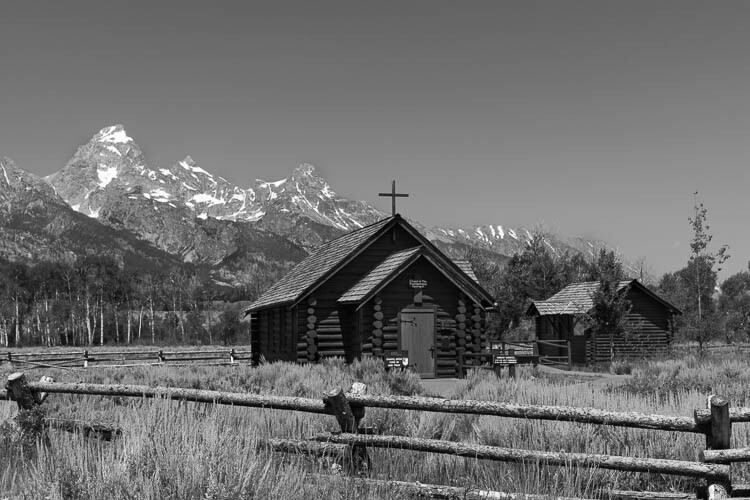
This image was also taken in the mountains, another favorite of mine, was a much more thought out composition. Our tour guide had told us that we would be stopping to see a church with plenty of photographic opportunities. Almost immediately I knew the shot that I wanted.

I set up my tripod ever so perfectly, did a few test shots to make sure my exposure was right-on, and then explored the area, leaving my camera in position until everyone else was back on the bus. Although I knew I would be the last back in my seat, I knew it would be worth the wait. And it most definitely was, for as everyone else was loading on the bus, the scene was almost completely empty. I took three exposures of the scene, bracketing it just in case the light had changed, and got back on the bus.

Are we artists or photographers?

The reason I’m telling you about these two images is not to make you jealous of my amazing adventure with my family. Rather, I tell you about these to get you thinking. You see, since the days of Ansel Adams, there has been a major debate regarding whether or not photographers should be considered artists.

Ansel Adams himself had struggled with this, having been amongst many other photographers in the beginning of the craft who used soft-focus lenses to create images which looked less like reality and more like paintings. Why? Because photography as a form of art was not taken seriously at the time and to make it among other artists, you had to make your images look like they were painted, not photographed.

Do we document or make art?

So, this begs the question: as photographers, are we crafting works of beautiful art? Or are we simply documenting the world around us with some special – yet easily done by others – ability?

Are Photographers Artists? Let's Discuss

One argument that is commonly brought to light against photography being an art form, is that anyone can do it. There is no need for special gear, no apprenticeship is mandated; you do not even need to take a class to learn photography. Most professional photographers haven’t taken a formal education.

But if this is the case, why do we bother honing our skills? What is the point of constantly learning new compositional techniques, new ways of post-processing? Why do we bother to buy “better” camera bodies, new lenses, sturdier tripods, if our craft is not considered a form of art? If anyone can do it, what is the point of buying a $ 4000 Nikon D850 that everybody is drooling over?

Because not everyone can do what we do

Are Photographers Artists? Let's Discuss

Yes, everyone can be a photographer; every random guy on the street can pick up a camera – or use his smartphone – and take a pretty picture of the sunset. Just look on Instagram and you will see what I mean. But that can be said of painters, sketch artists, etc., as well. Everyone can be an “actual artist” as well. I can pick up a paintbrush, slap some paint on a canvas, and call it modern art. I can draw a single line in the center of a 20×30 foot canvas, hang it in a prestigious art gallery, and sell it for millions. It’s been done before, and it will continue to be done. So, the question is, is this still art?

So if you tell me that painting a single stroke on a canvas is art, then you must also allow me to tell you that photography is art. Otherwise, you are saying that everyone can do photography yet not everyone can paint a line, correct?

Are Photographers Artists? Let's Discuss

Photographers as documentarians

There is also the argument that, as photographers, we are simply documenting the world. We are merely at a location at the right time; we are lucky.

But if we are lucky, how can you explain the countless hours we spend sitting in one spot, waiting for the light to hit, only for the photograph to not turn out as we had hoped. And then we go back to that same location and wait even longer, hoping that the light will turn out this time. Then when it doesn’t, we continue to go back until finally, that light works out. Is that truly luck?

Are Photographers Artists? Let's Discuss

Yeah, just like painters we could probably find a way to Photoshop in some light, replace the sky in the scene to something more visually appealing, and then call it a day.

It’s more than just luck

To say, however, that we are lucky with almost all the shots that we obtain only undermines the countless hours, months, years that we have spent attempting to get better at our craft. Studying compositions of the great photographers before us, buying tutorials of the photographers we admire in hopes that they know something we do not – that does not constitute luck.

Yes, as photographers, we rely on chance. We rely on the weather turning out how we had hoped and the scene we are looking for to be found. At the same time, however, we must learn to adapt to our surroundings, and to our situation. If we are to make it as photographers, we must learn that not everything will turn out as perfectly as we had hoped.

Are Photographers Artists? Let's Discuss

And at that point, we can either come back to the location later or find a way to make it work. We must use our creativity to craft a scene that will be just as good, if not better, than the one we had originally planned in our head.

Looking back at the photographs I had taken while out west, I must ask myself, am I an artist?

What does the master say?

I think Ansel Adams had it right when he said:

“A photograph is made, not taken. A photograph is not an automatic recording, neither is it an accident. It is a concept, a vision of the world translated into shades of gray, communicated in terms of simple devotion to the medium – a statement of the utmost clarity and perfection possible…”

Are Photographers Artists? Let's Discuss


Art has always been subjective. It doesn’t matter if you are taking a picture of your cat or a grand vista in Iceland. In my opinion, if you have an opinion, a mood or emotion, that you are trying to convey to the world through your imagery, then you are an artist.

So, the question is, do you consider yourself to be an artist? Let’s discuss in the comments below.

The post Are Photographers Artists? Let’s Discuss by Cody Schultz appeared first on Digital Photography School.


Digital Photography School

 
Comments Off on Are Photographers Artists? Let’s Discuss

Posted in Photography


Moment releases new case and lenses for Apple iPhone X

21 Nov

Moment has launched a new photography case and lenses for the iPhone X, all of them currently listed for preorder on the company’s website. The protective case, which is simply called Photo Case, is black with a canvas or optional walnut wood backing, and is joined by wide-angle, macro, super fisheye, and telephoto lens options.

The lenses attached directly to the Photo Case.

Moment’s system gives the iPhone X—and select other phones—a sort of interchangeable lens system, enabling photographers to quickly attach and remove various lenses to the device as needed. The Photo Case doubles as a slim protective case, featuring microsuede on the inside, a thin rubberized body, and support for an optional wrist strap.

The lenses, meanwhile, are made with glass and feature Moment’s new bayonet system for locking the lens to the case. Moment explains that its lenses are durable due to the use of “aerospace grade metal” and a unique hardening process. The company offers a 12-month warranty for their lenses.

The Moment for iPhone X is available to preorder at the following prices:

  • Photo Case: $ 30
  • Wide Lens: $ 100
  • Superfish Lens: $ 90
  • Macro Lens: $ 90
  • Tele Lens: $ 100

Articles: Digital Photography Review (dpreview.com)

 
Comments Off on Moment releases new case and lenses for Apple iPhone X

Posted in Uncategorized


Sigma releases full-res sample photos captured with 16mm F1.4 DC DN lens

20 Nov

The new Sigma 16mm F1.4 DC DN | Contemporary lens made for APS-C E-Mount and M43 cameras has a lot of crop-sensor shooters very intrigued. Sigma says this lens boasts quality on par with its Art lens lineup, and our own hands-on at PPE 2017 was very positive. But before you order the lens—which ships at the end of this month and costs a very tempting $ 450—you’ll want to check out the gallery below.

Sigma Global has finally released official, full-resolution sample photos captured with the new lens. Despite the lens being made primarily for APS-C E-Mount, Sigma shooter Wataru Nakamura used a Sony A7RII to capture these samples in the camera’s 3:2 crop mode (17.8MP resolution).

Check them out for yourself below, or head over to the Sigma Global website to download the samples yourself:

$ (document).ready(function() { SampleGalleryV2({“containerId”:”embeddedSampleGallery_0548830374″,”galleryId”:”0548830374″,”isEmbeddedWidget”:true,”standalone”:false,”selectedImageIndex”:0,”startInCommentsView”:false,”isMobile”:false}) });
Articles: Digital Photography Review (dpreview.com)

 
Comments Off on Sigma releases full-res sample photos captured with 16mm F1.4 DC DN lens

Posted in Uncategorized


Top 10 sample galleries of the year #5: the Fujifilm X-T20

20 Nov

$ (document).ready(function() { SampleGalleryV2({“containerId”:”embeddedSampleGallery_7251932144″,”galleryId”:”7251932144″,”isEmbeddedWidget”:true,”standalone”:false,”selectedImageIndex”:0,”startInCommentsView”:false,”isMobile”:false}) });

We’re counting down our top 10 most popular sample galleries of 2017, and we’ve at last cracked the top 5 (see the other winners below). Sitting pretty in the #5 spot is a little number we like to call the Fujifilm X-T20.

The little brother of the mighty Fujifilm X-T2, the X-T20 uses the same sensor and image processor, but packed in a smaller, lighter body. We think it’s a beautifully designed mirrorless camera that is also pleasure to use – it even earned a silver award in our review.

We’ve got four sample galleries left to go, and the final four represent some of our absolute favorite products launched this year. Stay tuned!


Top 10 most popular sample galleries of 2017:

#10: Sigma 14mm F1.8 Art
#9: Fujifilm GFX 50S
#8: Nikon D7500
#7: Olympus Tough TG-5
#6: Sigma 85mm F1.4
#5: Fujifilm X-T20
#4: To be revealed on 11/21
#3: To be revealed on 11/22
#2: To be revealed on 11/23
#1: To be revealed on 11/24

Articles: Digital Photography Review (dpreview.com)

 
Comments Off on Top 10 sample galleries of the year #5: the Fujifilm X-T20

Posted in Uncategorized


Treat yourself 2017: the ultimate holiday gift guide for that special person (you)

20 Nov

2017 Treat Yourself Buying Guide

The holidays are all about giving, so why not give back to the most important photographer in your life? That’s right, I’m talking about you.

At this time of year there are plenty of gift guides out there geared toward buying for others, but at the end of the day, your own photographic spirit needs nurturing. Also, camera gear can be pretty pricey and no matter how much they love you, your significant other/siblings/parents/friends might not be able to spring for that $ 1600 item on your wish list.

In this guide, we’ve rounded up a list of gear designed to pamper you and your creative spirit. From the ultimate pocket compacts, to nicer ways of carrying your camera, to the perfect rugged, portable hard drive – we’ve got you covered.

Peak Design Everyday backpack, 20L black

Peak Design Everyday backpack, 20L | $ 260 | PeakDesign.com

Treat yourself to one of the most technical and well-thought-out camera backpacks on the market: the Peak Design Everyday backpack. It comes in both a 20L and 30L capacity.

Weather-proof with plenty of ways to expand its carrying capacity including luggage straps, this bag is also real slick-looking. We’re big fans of the origami-style Flex-Fold dividers used to organize the bag’s interior, and we also appreciate the many interior pockets.

DJI Mavic Pro Fly More Combo

DJI Mavic Pro more combo | $ 1300| DJI.com

There are smaller, cheaper drones than the DJI Mavic Pro out there, (like the DJI Spark) but we recommend treating yourself to the Pro because it offers a great balance of portability, features and image/video quality. The Mavic Pro can shoot 12MP Raw files and 4K video and offers 27 minutes of flight time, 3-axis gimbal stabilization and can fly at up to 40 mph. It’s also pretty easy to pick up and start using, especially in beginner mode, though there is a slight learning curve.

In a sense, it’s the perfect drone for the first-time-flyer, long-time-photographer who wants to shoot more than HD video or JPEGs with their drone. We recommend you spend the extra cash on the controller – using your cellphone alone provides a very limit flight range and mediocre flight experience. But there are few things better for changing up your photographic perspective than owning a flying camera.

Affinity Photo for desktop

Affinity Photo for desktop | $ 50 | Affinity.Serif.com

Affinity Photo for desktop is a nifty piece of editing software that rivals Photoshop, all for a one time payment of $ 50.

In our review of Affinity Photo, we found the software more than capable at handling the majority of our re-touching tasks. Editing is mostly non-destructive and there are tools for batch processing, Raw processing, tone mapping, creating panoramas and focus stacking. Plus, if you’re coming from Photoshop, the learning curve is pretty shallow.

Affinity Photo for desktop is available for both Mac and PC.

Polaroid OneStep 2

Polaroid OneStep2 + i-Type film pack | $ 146 | PolaroidOriginals.com

The ultimate treat yourself: Take a step back from the technical nitty-gritty of this modern digital world and try shooting just for composition – it can do wonders for your creative spirit. To get into this mindset may we suggest one of the coolest instant cameras on the market, the Polaroid OneStep2?

The OneStep2 is a modern rebirth of the classic Polaroid OneStep. The controls on this camera are purposely limited: there’s a shutter button, a flash on button and a self-timer. It shoots Polaroid i-Type film which is similar to the original Polaroid 600 film and substantially larger than the Instax film offered by Fujifilm.

The camera itself is pretty affordable ($ 100), but it’s the film cost that’ll get you – at ~$ 2 a shot it’ll definitely have you shooting decisively. Nothing wrong with that!

Sandisk Extreme 500 portable SSD 500 GB

Sandisk Extreme 500 portable SSD 500 GB | $ 170 | ShopSandisk.com

This tiny portable SSD drive is both drop-proof and weather-proof and it weighs less than 80g. For the traveling photographer with limited space, it’s an invaluable piece of gear – one that won’t fail if dropped or knocked around. It also offers super fast transfer speeds and runs cool and quiet.

So treat yourself and your data to peace of mind and pick up what we consider to be the most sensible rugged hard drive currently on the market.

Ricoh Theta V

Ricoh Theta V | $ 430 | us.Rioch-Imaging.com

360-degree photos and videos are pretty darn cool and the technology required to make decent looking 360/VR content is finally coming down in price. Why not get in on the fun and treat yourself to one of the nicest stand-alone 360-cameras on the market in the form of the Ricoh Theta V?

We’ve found found the Theta V to be both easy-to-use and capable of impressive quality stills and video. It offers 4K video capture and shoots 14MP stills. Connectivity and audio capture have both been improved over the previous model, and the camera itself has a slick, Apple-like design.

Olympus Tough TG-5

Olympus Tough TG-5 | $ 450 | Get.Olympus.com

The budget compact may be dead but the rugged compact is still very much alive. And the Olympus Tough TG-5 is a DPReview favorite. We already recommended it as a great gift option for others, but if you’re into outdoor activities it’ll make a great compact option alongside your main camera. In fact, DPR’s Carey Rose deemed it the ‘best rugged compact you can buy right now,’ based on his shooting experience.

The camera offers a 25-100mm equiv zoom lens and the body is completely sealed, making it waterproof down to 50ft, drop proof from 7ft, crush proof up to 220lb and freezeproof to 14F. It also shoots Raw and is capable of surprisingly good image quality. Other features include 4K video capture and 20 fps burst shooting.

There’s something to be said for a go-everywhere-camera that you don’t have to worry about dropping, breaking or soaking. And there’s none we’d recommend over the Olympus Tough TG-5. Treat yourself!

Sony RX100 V

Sony Cyber-shot RX100 V | $ 950 | Sony.com

Speaking of compacts, the Sony Cyber-shot RX100 V is arguably the most advanced high-end pocket camera to ever exist, jam packed with a dizzying array of technology and features. The creme de la creme of small cameras, for many it is a want-to-have, not a need-to-have. To that we say… treat yourself!

It’s got a useful and sharp 24-70mm equiv. F1.8-2.8 zoom lens and can shoot at up to 24 fps with AF and auto exposure. Plus, it uses an impressive 315-point phase detect AF system. But that’s not all: it’s capable of outstanding 4K video and class-leading stills. The RX100 V also offers built-in Wi-Fi, a pop-up electronic viewfinder and a pop-up flash (read our full review).

The RX100 V has come down a tiny bit in price since launch, but if it’s still too expensive, you should consider some of the other also excellent, but more affordable RX100-series cameras.

Fujifilm X100F

Fujfilm X100F | $ 1300 | Fujifilm.com

We’ve enjoyed using every camera in the Fujifilm X100-series, and the X100F is the latest and greatest iteration. A beautifully-designed, retro-looking camera, the X100F offers a fixed 35mm F2 equiv. lens and tons of direct controls.

The X100F gains a higher-resolution 24MP sensor, an AF joystick and improved AF performance. We especially like the hybrid optical/electronic viewfinder. And unsurprisingly, we gave the X100F a gold award in our review.

In short, we think it’s among the nicest-designed compact cameras around and a great companion for travel, or documenting friends and family. So treat yourself to retro-elegance in this fixed-lens beauty.

Canon 85mm F1.4L IS USM

Canon 85mm F1.4L IS USM | Canon.USA.com | $ 1600

If you’re going to buy a portrait lens, you might as well buy one of the nicest primes released this year. We’re talking of course about Canon’s new 85mm F1.4L IS (see our sample gallery shot with it). Sharp, fast and stabilized, this lens is capably of seriously excellent image quality. It’s also dust and weather-sealed and features a 9-blade aperture.

At $ 1600, it’s priced pretty competitively, but Sigma’s stabilized 85mm F1.4 is also excellent, and somewhat cheaper at $ 1200.

Nikon D850

Nikon D850 | $ 3300 | NikonUSA.com

Perhaps you already shoot Nikon, but maybe you are invested in another DSLR system, or you shoot mirrorless. Regardless of the camera your are currently shooting with, we’d urge you to take a look at the best DSLR currently on the market: the Nikon D850. As we stated in its gold award winning review…

‘Offering an impressive 45.7MP of resolution, 7fps burst shooting, full-width 4K video and a focusing system derived from the flagship D5, it looks as though Nikon’s thrown just about everything they’ve got into the D850, and priced it well to boot. Competitors with similarly specced megapixel counts such as the Sony a7R II and Canon EOS 5Ds R may be cheaper at this point in their lifetimes, but they also fall short of the D850 in a number of ways that may make a difference in the way you shoot.’

If that doesn’t have you convinced the Nikon D850 is the ultimate treat yourself purchase, maybe our sample gallery will.


That’s all the self-gifting advice we have for you this year. We certainly don’t expect you to pick up everything on our list, but hopefully there is something here that’ll make you, or a special someone smile.

Articles: Digital Photography Review (dpreview.com)

 
Comments Off on Treat yourself 2017: the ultimate holiday gift guide for that special person (you)

Posted in Uncategorized