RSS
 

Archive for November, 2017

dPS Ultimate Guide to Nature and Outdoor Photography

08 Nov

Introduction

High on a ridge in the Brooks Range of Northern Alaska, I had an epiphany. It had to do with photography, sort of. Really, it had to do with the world in which we live. You see, I was climbing this steep slope on a little-forgotten drainage in the western portion Gates of the Arctic National Park. There was no sign that anyone had been this way before, and really, there was no reason that anyone would have.

When I eventually topped out on the ridge, late on an August evening, the sun still shining from the northern sky, I found a pillar of stone.
Ultimate guide outdoor nature photography 01

The rock stood 15 or 20 feet high, a narrow obelisk that looked as though it had been planted, or perhaps grown from the earth itself. It hadn’t of course. The stone had been pushed into its delicate position by the constant slow shift of the thawing and freezing ground below.

It struck me, in that moment next to the standing stone, that I was about to be the first person to photograph these rocks. Ever.

In one fell swoop; I realized exactly what it is about photography that I love. It’s seeing things in a way that others have not. Seeing things for the first time. Not just stones on a wild mountaintop, but viewing frequently photographed scenes in a new way. The most photographed landscapes still hold potential for novelty. And creating that novelty in images is one of the great pleasures of the art of outdoor photography.

Ultimate guide outdoor nature photography 02

And here is the rub; good outdoor photography is about creating new images, not just copying what has already been done. If there is one message in this article to remember, that’s it.

A Note on Ethics

Below, you’ll find many of the tips I’ve learned over the years as an outdoor pro; landscape techniques, macro tips, and an introduction to wildlife photography. From exposure to composition, I’ll cover a lot. But one thing I want to note first, and it’s probably the most important thing I’ll mention is this:

Do No Harm!

Ultimate guide outdoor nature photography 03

Outdoor photography is extremely popular. We landscape and wildlife photographers travel across the planet to make images, and our presence is having an impact on the places we visit. It’s our job to ensure that our actions do not damage the resources we photograph.

Here are some guidelines:

Respect other users: What we are doing is no more important than the activities of others. Be respectful of other photographers and non-photographers alike. In some parts of the world, photographers are becoming disliked because of our actions. We cannot allow this to happen. Be kind to others. Your long lens does not give you the right to be a jerk.

Don’t harass wildlife: I once watched a pair of photographers, quite literally, chase a herd of caribou around the edge of a lake in the Alaska Range. The best images of wildlife are natural images, not shots of caribou fleeing across the landscape. If your presence or actions are impacting the behavior of the animals, it’s time to back off.

Note: it may also be dangerous! Animals like elk and moose may look harmless but can do a lot of damage. Likewise, too many tourists have gotten too close to bears (with no barrier) and then if the bear attacks a human it could be put down. Don’t endanger yourself or the animals – keep a safe distance.

Ultimate guide outdoor nature photography 04

Follow the rules: Most of the refuges, parks, and other lands we photograph have rules in place for a reason. As photographers break those for the sake of an image, it hurts the reputation and possible future access for all of us. Know the regulations and follow them.

Leave no trace: The next visitor to your location should have no idea you were they before them.
Landscape Photography

Above, I related the story of finding the bizarre standing stone in Alaska’s Brooks Range. Those kinds of photography opportunities are by far my favorite. I love shooting someplace where few if any others have been or photographed.

But mostly, I like the way a piece of dramatic topography under beautiful light looks. I like how it appears to my eye, and I like how it looks through the viewfinder of a camera. When I manage to make an image that brings back all those feelings of the experience, and when I can relive those moments of outdoor beauty over and over again, then I feel very successful indeed.

Ultimate guide outdoor nature photography 05

Equipment

Landscape photography does not need to be equipment heavy. On many excursions, I may carry only a single camera equipped with a wide-angle zoom lens. But when I really want to work a scene, or my sole mission is to make images, then I’ll carry a few more things. Here is my camera equipment list, and some notes on each item:

  • Full frame DSLR: Though not vital, the full frame sensor is useful for taking advantage of wide-angle opportunities.
  • Wide-Angle Zoom: The 17-40mm f/4 and 16-35mm f/2.8 are probably my most-used lenses for landscape photography.
  • Mid-Range Telephoto Zoom: Like the 70-200mm f/2.8. I like the way this lens and those of similar focal length can isolate parts of the landscape.
  • A Compact or Mirrorless Camera: In my case, this is a Panasonic Lumix GX85. This is a great second camera and when I’m traveling light, it’s my only camera.
  • Wide-Angle, and Mid-Range Zoom Lenses for the Mirrorless Camera: To cover similar focal lengths as my full-frame DSLR (minus the extremely wide, sadly).
  • Tripod: Rarely do I leave this behind.
  • Polarizing Filter: Great for removing glare and reflections.
  • Variable Neutral Density Filter: For long exposure work, a neutral density filter is great. The variable filters allow you to adjust the amount of light coming through into the camera.

Throw in a bag or backpack to carry it all, and this kit will cover about every landscape opportunity you might encounter. While I’m sure each landscape photographer has their own suggestions, additions, or subtractions, these are my necessities.

See an article I wrote recently for another approach to taking less: How to Find More Creativity Through Using Less Gear. Also read: How to Decide What Gear to Pack for a Wilderness Trip.

Composition and Exposure

I always have a difficult time writing about composition and exposure because this is where art becomes a part of the photographic process. Sure, there is a “proper” exposure, in which the highlights aren’t blown out and the shadows retain detail, but a world in which every image was “properly” exposed would be a very boring place.

Ultimate guide outdoor nature photography 06

Instead of what is right, it’s better to understand how your settings will impact your image. Then you can decide for yourself what is best for your situation.

Shutter Speed

The speed of your shutter indicates how long your sensor is exposed to the light coming from your scene. A fast shutter speed will halt motion, while a long one will blur moving objects.

In landscape photography, you may want to freeze the motion of a splashing river or leaves blowing in the wind. Or you may prefer them to blur, providing a sense of that motion. The important thing is to understand how your shutter speed choice will either blur or freeze the subject, so you don’t end up in that dreaded (but all too frequent) in-between.

Ultimate guide outdoor nature photography 07

Aperture

Your aperture plays two roles. It controls how much light is allowed into the camera, and it controls the depth of field.

At a wide aperture, say f/2.8, your lens will allow a lot of light to enter the camera, meaning you can use a faster shutter speed (see above), but it also means you have less depth of field (DOF). Which is to say, that only a narrow portion of your image, from front to back, will be in focus.

A small aperture like f/16 will mean that a longer shutter speed is required to attain the exposure you want, but more of your image will be in focus.

Ultimate guide outdoor nature photography 08

If you want to isolate your subject from your background or foreground then a wide aperture will help you achieve that. However, if you want your image sharp from the foreground to the background, then you need to select a narrow aperture.

Ultimate guide outdoor nature photography 09

Most lenses are sharpest a stop or two down from wide open, so for maximum overall sharpness, consider an aperture around f/8 to f/11.

ISO

The ISO controls the apparent sensitivity of your sensor to light (I say “apparent” because for a bunch of technical reasons that I really don’t care about, raising the ISO doesn’t actually increase the actual sensitivity, just how the camera’s algorithms report the light in the final image – blah, blah, blah). So, in practice, increasing your ISO will allow you to use shorter shutter speeds at higher apertures. Got that?

Ultimate guide outdoor nature photography 10

The drawback is that using a high ISO also tends to create digital noise. However, cameras are getting exceedingly good at controlling noise. With my current equipment, I regularly shoot at ISO 3200, 6400, and occasionally higher without a second thought.

Coming Together – The Exposure Triangle

Those three factors (shutter speed, aperture, and ISO) control the brightness, depth of field, and sharpness of your image. They interact with one another, and you can’t change one without adjusting at least one of the others. If you aren’t familiar with how each of these settings impacts the final shot, then go out and spend a few hours experimenting so you understand the exposure triangle.

Exercise:

Spend an hour shooting in Manual Mode. Adjust the ISO, aperture, and shutter speed. Assess how each change impacts the final image. Did it get brighter? Darker? Sharper? Did moving subjects blur or freeze?

Composition

Ultimate guide outdoor nature photography 14

The Classic

The classic landscape shot entails an interesting foreground object that leads your eye back to a dramatic background. It’s classic because it works. But it’s also a formula that is very easy to get wrong.

Ultimate guide outdoor nature photography 12

In a simplistic form, a landscape image is composed of a combination of lines, layers, and planes. A line can be a visual element, like the trunk of a tree or a winding stream, or it can be implied, in a way that two interrelated elements cause your eye to move back and forth. Either way, lines are the viewer’s path through the frame.

Ultimate guide outdoor nature photography 13

Layers are elements that occur through the depth of the image. These can be any element in the image, grass stems, trees, rocks, rivers, mountains, etc. But they stand alone in successive layers, each a bit further back in the image.

Ultimate guide outdoor nature photography 15

Finally, planes are elements that provide a clear sense of depth. Say, a road disappearing into the horizon, or a river winding away up a mountain valley.

Ultimate guide outdoor nature photography 16

The ways these things interact are what cause an image to be pleasing to the eye, or to fail. In a classic composition, the foreground element and the dramatic background are tied together through these elements and interact in some way. Perhaps this is color, form, juxtaposition, or some other aspect of interest to the viewer.

All these aspects of an image become a pleasurable maze for photographers. With practice, you will begin to understand how to make them relate to one another in a pleasing way.

Landscape Details

Any natural view will have a number of interesting elements held within such as; a flower, a stone, a shadow, splashing water, or distant peaks. A long lens will allow you isolate those details from the surrounding clutter.

I use this technique often with mid-range telephoto lenses. Think of this technique as simplifying an image down to its most fascinating component.

Ultimate guide outdoor nature photography 17

Ultimate guide outdoor nature photography 18

A Note on Focal Length

The focal length of your lens will impact the depth of field of your image. The longer your lens, the shallower your depth of field will be. This makes it very difficult, if not impossible to keep an image sharp from foreground through the background when using a long lens.

That’s why isolating distant details is a great use of a telephoto lens. Compositions with no foreground generally won’t suffer from the compressed depth of field.

Ultimate guide outdoor nature photography 19

With the use of a wide-angle lens, on the other hand, it is much easier to attain a deep depth of field. An aperture that is a stop or two lower will often bring an entire image from foreground to background into focus.

Ultimate guide outdoor nature photography 20

Exercise:

Starting with a mid-range telephoto like a 70-200mm or similar lens, focus on the details of a landscape. Make some photos of these details, moving around to see how the light changes with your angle. Experiment with each.

Once you are comfortable with the details before you, change to a wide-angle and see if you can find pleasing compositions that incorporate the details you just photographed, but also include the surroundings. As you back up to a wide-angle view, think about the lines, planes, and layers within the image and how they interact. Is the result pleasing or chaotic? What can you do to improve it?

Macro Photography: The World Up Close

Through the 100mm f/2.8 macro lens this bright green beetle looked monstrous and surprisingly beautiful. The iridescent carapace practically glittered in the soft light of the overcast day, while the purple highlights of the antennae and around the eyes stood out from the leaf background.

Ultimate guide outdoor nature photography 21

It was a rainy day in the rainforest of southeast Mexico, and my fieldwork had been called off due to the weather. I spent my rare morning off gathering some of the many insects that had congregated overnight on the porch, and a menagerie of beetles, spiders, and katydids now sat beneath upturned jars on the windowsill next to me. One by one, I placed them on a clean green background of a Heliconia leaf and made images.

Ultimate guide outdoor nature photography 22

Ultimate guide outdoor nature photography 23

Equipment

Close-up and macro photography is a specialized discipline, requiring a suite of its own equipment including lenses, flashes, tripod heads, and more. For photographers that specialize in this type of photography, it is a serious investment.
Fortunately, there are a few shortcuts, which can save you from investing hundreds or thousands in macro-specific equipment.

Lenses

Macro lenses allow for a very close focusing distance and are usually equipped with some moderate magnification. 50mm, 100mm, 150mm, and even 200mm are common focal lengths of macro lenses. They tend to be fast, usually around f/2.8 and are pricey pieces of glass.

If you have the budget for it, by all means, invest in a high-end macro lens, but for those of us with more limited funds here are two alternatives:

Extension Tubes

These are exactly what they sound like, simple tubes that go between your camera and the lens. Extension tubes increase the distance between the lens and your sensor allowing a closer minimum focus (but preventing the lens from focusing on distant objects). When applied to a good quality lens, some amazing images are possible.

Lens Reversal

Have you ever turned a pair of binoculars around backward and used them as a magnifying glass? If so, this is the exact same principle.

You take an old, manual lens (focus and aperture), standard or wide-angle lens (never a telephoto), buy a cheap adapter that allows you to attach the front of the lens to your camera, and you get an instant macro. For fifty bucks at a used camera store you can often find a suitable lens, and for another $ 10 or $ 15, you can buy an adapter from Amazon that fits the filter threads on the front of the lens and allows you to click it into your camera. Bingo! Reverse-lens macro created!

Ultimate guide outdoor nature photography 24

Lights

Embrace natural light if you are just starting out in macro photography. Find a place with bright, diffused light, and start there. Once you have a strong grasp on working up close, you may choose to add artificial light.

From ring lights to external flashes, many macro photographers will use artificial light to cleanly illuminate their tiny subjects with studio-like lighting. If you have a flash, and either a remote cable or wireless triggers, you probably have what you need to get started.

Start off by attaching your flash near, or directly onto your lens, so the light falls just a few inches in front of the glass. Shadows are emphasized up close, so you want to minimize the distance between the flash and your lens.

Tripod Heads

A very useful accessory is the macro tripod head. These allow you to move your camera forward and backward very smoothly and precisely without having to adjust the tripod. With a simple twist of a knob, you can slide your camera forward or backward a couple of inches (or millimeters).

In the narrow depth of field world of macro photography, this allows you to focus by changing the camera position rather than the focus on the lens. If you get serious about this kind of photography, it is probably a worthwhile investment.

Read Equipment for Macro Photography – Video Tips.

Beginning Macro Field Techniques

Ultimate guide outdoor nature photography 25

The easiest place to begin with macro photography is a subject that doesn’t move around much, like flowers. Starting with fast-moving insects will be a very frustrating way to learn the process.

Start out in soft, natural daylight, and forget the flashes for now. Choose a cloudy day, or pick a subject you can easily move into a shady spot. Direct sunlight, just as in human portraiture, is often too harsh and contrasty, resulting in burnt-out highlights or blacked out shadows. Once you’ve figured out the process under steady, natural light, you can integrate flash.

Composition

Macro lenses, reversed lenses, and extension tubes all share one common feature: an extremely narrow depth of field. Even with the aperture stopped down, the amount of the image in focus will be measured in millimeters. Because of this limitation, you need to choose your focal point very carefully, it will, after all, be the only thing in focus on your image.

Ultimate guide outdoor nature photography 26

Many times I’ve made images of small subjects only to find out later find later that my focal point was off. By all means, compose creatively, but make sure the important part of your image is in focus. For insects or other small creatures, that almost always means the eye. For flowers, you’ll likely want to focus on the stamens and pistils. Be aware, and focus carefully.

Note on Post-Processing Macro Images

While a full post-processing tutorial of macro photography is outside the scope of this article, be aware there are focus-stacking techniques. Think of this like HDR for depth of field.

In essence, you create a series of images in which you steadily move the focus point through the scene so you end up with a series of photos, each with a different slice in focus. Focus stacking then brings those all together into a single image providing otherwise unattainable depth of field. There are more resources available online about this technique if you’d like to learn more.

Read A Beginner’s Guide to Focus Stacking.

Wildlife Photography

More than any other discipline of outdoor photography, wildlife is the place where we as photographers need to be responsible, cautious, and respectful. Earlier, I related the story of watching a group of photographers chase a herd of caribou.

I dearly wish that had been the only occasion I’ve had to see wildlife photographers acting stupidly, but sadly, my list goes on: a photographer purposely flushing flocks of Sandhill cranes at a wildlife refuge to get flight shots, the abuse of call-back recordings of song-birds which results in nest failures, dangerously close approaches to bears and moose, and on and on.

Ultimate guide outdoor nature photography 27

I just can’t write about wildlife photography without saying this: Good wildlife photography is a game of patience. You cannot make shortcuts by chasing, flushing, baiting, or otherwise harassing your subject and expect to get decent images. So please, please, three times, please! Take the time required to make the image, it will be easier on the wildlife, and I promise your results will be far, far superior.

Equipment

Though lovely images of animals can, and have been, made with every focal length (some of my favorite images are wide-angles), most wildlife photography involves long lenses. My most frequently used lenses for wildlife photography are Canon’s 500mm f4L (often with a 1.4x teleconverter), 100-400mm zoom, and the 70-200mm f/2.8. None of those are cheap, though.

Fortunately, there are a growing number of alternatives on the market. Brands like Tamron and Sigma have introduced big telephotos that, although still pricey, come in way under the prices offered by Canon and Nikon. A year or two ago, out of curiosity, I rented Sigma’s 150-600mm Sport lens and was extremely impressed.

Ultimate guide outdoor nature photography 28

Come to think of it, I strongly recommend you try lenses out before you buy them. Renting is a great, and reasonably priced, option to try out a variety of lenses. Or, if you don’t shoot wildlife often, you can rent a high-end piece of glass for a single trip, without having to dole out thousands on your own lens.

Anyway, back to equipment, here is my wildlife kit:

  • DSLR (or 2)
  • 500mm f/4 lens
  • 100-400mm lens
  • 70-200mm lens
  • 1.4x teleconverter
  • A sturdy carbon-fiber tripod with a gimbal head

Ultimate guide outdoor nature photography 29

Techniques

There is a saying in photography: “If your image isn’t good enough, you aren’t close enough.” This is nonsense. However, getting close to animals, either physically, or by using a long lens, is often the easiest way to create a compelling image. There are many exceptions (see composition below), but proximity does help.

Ultimate guide outdoor nature photography 30

Getting close requires patience. If you approach an animal on foot, your subject will almost always feel threatened and move away. Humans, after all, are predators, and for most species, nothing good happens from getting close to a predator. That leaves a few options.

Go where the animals are accustomed to people

At many wildlife refuges, back gardens, national parks, etc., the animals are used to seeing people or vehicles and will allow you to get much closer (you still need to be cautious particularly around large, or dangerous animals). In such areas, cars can make a great mobile photography blind.

Animals are also often familiar with people around popular trail systems and will pay little attention to passing walkers. You can use these areas to your advantage.

Ultimate guide outdoor nature photography 31

Ultimate guide outdoor nature photography 32

Use a blind

Many wildlife refuges are equipped with photography blinds where you are hidden from view of the wildlife. These are great, pre-established places to shoot. You may even consider building your own backyard blind for photographing your local birds and other wildlife.

Camouflage

I have a sheet of camo fabric that I’ve cut holes into for my camera lens. I sit on the ground, or a low stool, and throw this over my head and tripod. This portable blind serves well, as long as I have the patience to stay still for extended periods of time. It keeps my form obscured, and animals more willing to approach.

Patience

Most of the above techniques also require patience, but simply waiting for the right opportunity is the most straightforward approach to wildlife photography. Find a promising location with good light, and simply wait to see what happens. I bet most of my best images of wild animals have been made this way.

Ultimate guide outdoor nature photography 33

Exposure

I strive for the “proper” exposure in the field. Which, means (if I’m honest) that I leave it up to the camera. Capturing the action, the expression, posture, and the setting are the most important parts of wildlife photography.

I can fiddle with brightness later in the post-processing, but not if I didn’t capture the image from the start. So I recommend, particularly as a beginner, that you do what I do and let your camera do most of the work.

Ultimate guide outdoor nature photography 34

My settings under most conditions with a long lens are something like this: Shutter priority (see below for more on this), ISO 800 (or so), and auto everything else. If for some reason the images aren’t coming out how I want them, I’ll adjust things around, but this is my standard starting point.

Shutter Speed

As with any moving subject, you may opt to strive for sharpness, freezing the motion of the animal, or you may be aiming for a more creative motion blur. I often mix it up, shifting from sharp to blur in just a few seconds. This is why I shoot wildlife primarily in Shutter Priority mode, so I can make that change easily on the fly.

During a recent shoot of a migrating caribou herd, my workshop participants and I had a couple of thousand animals pass by in a single file line. I was constantly changing the shutter speed to get different effects as the caribou trotted past 25 yards away.

I ended up with a huge variety of shots, from crazy blurs to tack-sharp detail. Variety is important.

Ultimate guide outdoor nature photography 35

Ultimate guide outdoor nature photography 36

Composition

Get low! Next time you see a wildlife image that you like, take a look at the position from which it was made. I’ll bet you that the perspective is low, probably at eye level of the subject or below. When I’m photographing birds or small mammals, I’ll often lay flat out on my stomach.

Ultimate guide outdoor nature photography 37

Humans see the world most often from a standing position; it’s how we are accustomed to viewing things. Photos from that perspective, looking down on our subject, aren’t any different than how we normally see the world. In other words, boring.

When you drop down, however, you are now seeing the world in an atypical, and therefore far more interesting way. So get low!

Ultimate guide outdoor nature photography 38

Portraits

The simplest of images is the portrait, with a clean background and a sharp subject. Often these will be under flattering front-light. Many wildlife photographers strive for this type of image, and this type of image alone.

The secret to success in wildlife portraiture is getting close to your subject, and having a setting where the animal can be cleanly separated from its background. A large aperture, like f/4, will help blur the background cleanly. Overcast, soft light or front light is ideal.

Ultimate guide outdoor nature photography 39

Action and Motion

No doubt, a good, clean portrait of a wild animal is a lovely thing and a pleasure to make, but after a time, I find the formulaic view of wildlife rather boring. I like to see behavior, action, and motion in images. These tell a better story, and to me at least, are far more compelling. These kinds of images also require a lot more time in the field.

Let’s face it; wild animals spend a lot of time just chilling out. Birds perch for extended periods bears sleep or graze, and big cats climb trees and lounge. Action is uncommon, which means you have to spend a lot of time waiting for it.

Ultimate guide outdoor nature photography 40

I was photographing at a famous bear-watching spot in Alaska a number of years ago. It was early in the season and the salmon had not yet arrived, but there were bears about, waiting for the fish. I was standing on a viewing platform, watching a single, young Brown Bear standing below a waterfall. There were no fish, and I got the impression he was as bored as I was.

Tourists and other photographers arrived around me, watched for a few moments, took a photo, and then ambled off after a few minutes with nothing happening. I waited.

After more than an hour, another bear appeared down the river and waded up toward the falls. It was of similar age, and size, they might have even been siblings that had been separated for a time. But when the second bear appeared, the bored demeanor of the first changed completely. He grew alert, staring at the intruding bear. Then, almost without warning, the first bear charged the second, throwing sprays of river water into the air as it splashed. The second stood its ground and for a few brief seconds, the two fought. They swatted each other with powerful blows and snapped jaws down on shoulders. It was over in 20 seconds, but I was breathless. No damage had been done to either bear and afterward, the two actually stood side by side, rather companionably, for a long while as they waited for salmon to arrive.

Ultimate guide outdoor nature photography 41

In those 20 seconds, I captured a series of images missed by dozens of photographers who had come and gone, unwilling to be patient.

Wide Angles

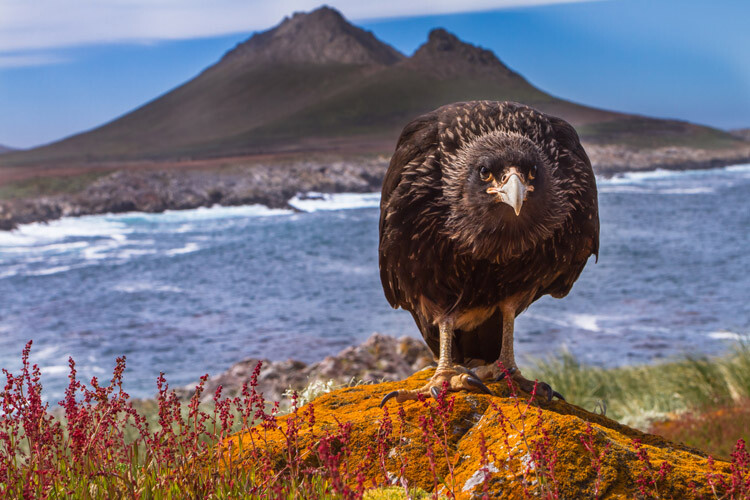
When you have a cooperative or curious subject, few techniques will yield a more compelling result than getting close, and low, with a wide-angle lens. A few years ago, when I was guiding on an expedition cruise through the Southern Ocean and Antarctica, I had several such opportunities.

In the Falkland Islands, a curious Striated Caracara hopped up to have a look at me, while on South Georgia I had a great encounter with a South Polar Skua. The images I made of these two birds are some of my favorites of that journey and perhaps some of my favorite wildlife images.

Ultimate guide outdoor nature photography 42

Wide angles show off not only your subject but also the surroundings and can be extremely effective story-telling images.

The drawback, of course, is that such opportunities are rare indeed. You’ve got to have your subject very close, and that takes time and effort while being prepared when the right opportunity arrives.
Ultimate guide outdoor nature photography 43

To maximize your chances, keep a second camera with a wide-angle lens (heck, even your phone will work) available while out shooting. That way, when a critter draws close and the opportunity for these unique images arrives, you won’t have to fumble with swapping lenses.

Conclusion

As I wrote this lengthy piece on outdoor photography, I felt I could have gone on and on about every single aspect of this discipline. There is just so much to know, and to learn; so many subjects to study, understand, and practice.

Ultimate guide outdoor nature photography 44

It is daunting, but outdoor photography is as much about the journey as anything else. I love making images that work, don’t get me wrong, but I love even more the process of being outside. I love the way a camera makes me more aware of the play of light, and the movement of animals across a landscape.

Photography can be a tool toward a better understanding of the world, but we have to use our cameras with respect and caution. Be mindful of your actions, be careful of our impact, and make beautiful photos. Along the way, you may find your experiences, rather than the final images, to be the most rewarding part. Now go explore.

The post dPS Ultimate Guide to Nature and Outdoor Photography by David Shaw appeared first on Digital Photography School.


Digital Photography School

 
Comments Off on dPS Ultimate Guide to Nature and Outdoor Photography

Posted in Photography


Why Every Photographer Needs a 70-200mm Lens

07 Nov

As photographers, some pieces of advice are universal; the same can also be said for some camera gear. The 70-200mm lens is a staple for a reason, found in pretty much every pro’s camera bag around the world, they are trusted on location from portrait studios to the heart of the Amazon.

So here is why you need one in your kit.

Nikon 70-200mm lens review must have

Optical Performance

Let’s start with the big reason, optical performance. The 70-200mm is a professional lens and features the latest in optical design and quality.

Perfected over the last 30 years they have an excellent edge to edge sharpness, both wide open and stopped down. Featuring the ED elements and the latest lens coatings, they fend off chromatic aberrations and flare very well and produce stunning sharp, contrasty images shoot after shoot.

Focal Length

Short telephotos and wide-angle lenses are fantastic for getting up close into the action or taking the wider view, however, they can often be problematic. If you are trying to photograph wildlife, candid portraits, or anything that you can’t get close to, the 70-200mm lens will come in handy.

Nikon 70-200mm lens review environmental portraits

The reach of the 70-200mm is perfect for so many situations, allowing you to focus in on key subject areas, crop out distracting areas or elements in your frame and just get closer to the action.

The focal length allows you to also give your subject space to move without you having to be right up in their face, while still giving you the scope for those tight shots. It also allows you to be creative in new ways, giving you options to focus on small details within a composition or landscape, all the while not needing to move your feet.

Nikon 70-200mm lens review details

Large Maximum Aperture

The 70-200mm f/2.8 is a fast lens, with the wide aperture being a key reason why so many pros love it. This gives you a number of benefits for shooting on location, once again making this a top quality lens in which to invest.

Benefits

The first benefit is the bokeh (or out of focus areas). The fast f/2.8 aperture means depth of field wide open is very limited. This results in much of the background and foreground dropping into mushy out of focus goodness, helping to keep the viewer’s attention on your main subject.

The large aperture, combined with the telephoto reach of the lens, really allows for the rendering of wonderful out of focus elements. This gives a truly dreamy quality and feeling to the images produced with the 70-200mm lens.

A second benefit of the wide open aperture is that of the low light performance. Having a fast f/2.8 aperture means the lens lets in far more light than slower alternatives. This, in turn, means the camera has more light to work with. So, when the light starts to fade you can still get sharp shots with reasonable shutter speeds without the need to stretch your ISO capabilities.

Another benefit of the fast aperture is the brightness it brings to the viewfinder. If you haven’t used fast lenses before you’ll soon fall in love with the brighter viewfinder experience that comes with the 70-200mm f/2.8. This might not sound like a big deal, but being able to see your composition better allows you to be more focused on selecting what you want in and out of the frame, helping you to hone your compositional skills for better images.

Speed

When working with fast paced action, speed is imperative, and the 70-200mm lens doesn’t disappoint. As a pro spec lens, the 70-200mm offers brilliant AF speed that is a huge benefit when working with erratic subjects on fast paced shoots.

Nikon 70-200mm lens review blazing fast focus

The autofocus, aided by the fast aperture, locks onto subjects quickly and focuses through the range in the blink of an eye (something that certainly can’t be said for all telephoto lenses). The speed of the focus reduces frustration when trying to pick up moving subjects, helping you to focus on composing your shots rather than the frustration of your lens not focusing.

Size and Weight

Some people think the 70-200mm is a large lens, however, that weight and size also have their advantages. The physical length of the lens itself, being around 25cm, provides for good placement of the controls, with the large zoom and focus rings being well spaced on the lens’s barrel.

The length also allows for the inclusion of a tripod mount (collar). This is handy for working with a tripod for better balance and for lowering the stress on the bayonet mount between the camera and lens.

Nikon 70-200mm lens review 01

The size also lends itself to being comfortable for handholding. The wider barrel fits well in the hand, with the weight of the lens balancing well with medium to large camera bodies. The lens is also a little front heavy that means when attached to the camera it helps equal out the balance to a comfortable feel.

Of course, modern versions of the 70-200mm f/2.8 also include the implementation of image stabilization (VR, IS, or OS) helping to once again improve the abilities of this lens when working handheld. The optical stabilization systems help to reduce camera shake by up to 4-stops, meaning even when the light gets low you can work handheld with sharp results. That is something that can really come into its own when on location on a fast moving shoot.

Nikon 70-200mm lens review Close focusing

Build Quality

The 70-200mmm f/2.8 is designed to be used by pros, and it’s constructed like a tank. Metal construction and weather sealing mean it’s built to last while being taken out and abused day in and day out.

Nikon 70-200mm lens review compressing landscapes

My 70-200mm has been everywhere with me and is built to withstand the elements.

The 70-200mm lens is also a fantastic addition to the kit bag for those nature photographers who also have a passion for landscape photography. The focal length is excellent for giving you the reach to pick out sections of a landscape, details within a scene or for compressing layers for flattering images. The 70-200mm offers flexibility for composing, with the telephoto reach helping to compress a scene for flattering perspectives that might not work with a wider focal length.

I’ve had my 70-200mm lens for many years and worked with it in the rain, snow, freezing conditions, as well as the jungle and it’s never skipped a beat. Rugged and reliable, just as you want a working tool to be!

Teleconverters

This lens was also designed with the ability to work with teleconverters in mind. These small optical devices fit between the camera and lens, helping to magnify the image for a greater telephoto effect.

That means that the 70-200mm, when paired with a 1.4x teleconverter, becomes a 105-300mm equivalent or a 140-400mm when paired with a 2.0x converter. This can be very handy if you need some extra reach but don’t want to invest in a super telephoto or you just can’t fit it into your bag.

Nikon 70-200mm lens review reach portraits

Shot at about 280mm using the 1.4x teleconverter.

Going the other way you can also add extension tubes to the 70-200mm to reduce the minimum focusing distance. That results in the ability to get ultra close for some semi-macro images, once again showing the scope for the versatility of this stable lens.

Conclusion

The 70-200mm lens is truly a worthy lens to be part of every photographer’s kit bag. Offering top optics, a fast aperture, excellent speed, ergonomics, and weatherproofing. They are built to last and perform day in, day out.

They are expensive, but as a long-term investment, the 70-200mm f/2.8 is certainly one that every keen photographer should think about making. You certainly won’t regret it.

The post Why Every Photographer Needs a 70-200mm Lens by Tom Mason appeared first on Digital Photography School.


Digital Photography School

 
Comments Off on Why Every Photographer Needs a 70-200mm Lens

Posted in Photography


Leica Thambar-M 90mm F2.2 sample gallery

07 Nov

$ (document).ready(function() { SampleGalleryV2({“containerId”:”embeddedSampleGallery_8206817954″,”galleryId”:”8206817954″,”isEmbeddedWidget”:true,”standalone”:false,”selectedImageIndex”:0,”startInCommentsView”:false,”isMobile”:false}) });

The Leica Thambar 90mm F2.2 is an M-mount version of a classic portrait lens known for its unique soft rendering. We had our hands on a loaner unit for a little while, and put it right to work on the subject matter it’s designed for. See what this modern take on a vintage design can do.

See our Leica Thambar 90mm F2.2
sample gallery

Articles: Digital Photography Review (dpreview.com)

 
Comments Off on Leica Thambar-M 90mm F2.2 sample gallery

Posted in Uncategorized


How to use Filter Masks in Luminar for Powerful Local Adjustments

07 Nov

Luminar is a powerful, full-featured photo editor, with a massive array of features and editing tools. A great deal of its workflow is built around the fairly simple concept of applying filters. It’s much like the way you might edit a photo in Instagram or other similar programs – but you get much more power and control with Luminar.. You can use Luminar to add one or more filters to a picture in order to change properties like color, brightness, saturation, or even add fog effects or convert it to black and white.

However, this is where the similarities between Luminar and simple phone-based editing tools stops. Luminar’s filters are far more than just surface-level adjustments. They can be combined, layered, and customized in infinite combinations for photo editing far beyond what you might be used to in other programs. Add to that the use of filter masks to selectively choose where the edits to a filter are applied, and you have the recipe for a program that can become a very important part of your photography workflow.

How to use Filter Masks in Luminar for Powerful Local Adjustments

Understanding Filters

Luminar is built on a foundation of powerful editing algorithms that let you tweak every aspect of your photos. But unlike some other image editors on the market, it is extraordinarily simple to use the tools available to you. Rather than hundreds of confusing options, tiny buttons, and labyrinthine menus, many of the editing options in Luminar are available within a few clicks as Filters. Or you can access them by opening an image and clicking the “Add Filters” button on the upper-right portion of the user interface.

How to use Filter Masks in Luminar for Powerful Local Adjustments

Clicking “Add Filters” opens a menu that allows you to select from dozens of filters such as Clarity, Color Balance, Soft Focus, Tone, Vignette, and many others. If you’re unsure as to what all these filters actually do, just hover your cursor over one. A brief description will pop up along with a small sample image illustrating the type of editing that filter will do.

How to use Filter Masks in Luminar for Powerful Local Adjustments

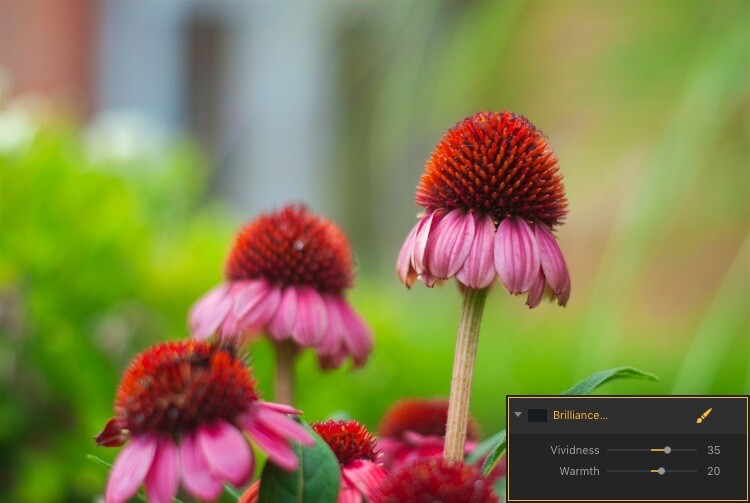
The easiest way to apply one of these is to simply click it and adjust any of the parameters available for that filter. For example, if you click on Brilliance/Warmth, you can adjust two different aspects of the filter; Vividness and Warmth.

How to use Filter Masks in Luminar for Powerful Local Adjustments

A few quick adjustments with a single filter made this bland RAW file go from ho-hum to frame-worthy.

Using Multiple Filters

You can combine as many filters as you want. You can even use layers, just as in Photoshop, to apply one or many filters. Then you can edit all of them at once with options like layer masking, which shows and hides everything on a single layer, and layer opacity.

It may sound complicated, but in actual use, the process is very simple: Load an image, add a filter, adjust the filter, and you’re done. The procedure only starts to get complicated if you want it to, at which point Luminar has a deep enough feature set to accommodate even the most highly demanding photographers.

Controlling the Effects with Filter Masks

Filters are all well and good, but the ace in Luminar’s sleeve is in the way it lets you apply them selectively with filter masks. If you have ever used a filter on Instagram you know that all your edits are applied across the entire image. That can be good but can also be quite frustrating if you only want to edit specific portions of the photo.

That’s where the simplicity and brilliance of Luminar’s approach really shine because you can control exactly where your edits are applied when you use a filter. To illustrate how this process works, I started with this photo (below) of a squirrel that was clearly in need of some editing.

I shot it in RAW in order to give myself the most amount of flexibility when editing the image, but Luminar works fine with JPG files too. Just know that you won’t have quite the same degree of control when editing JPG compared to RAW files.

How to use Filter Masks in Luminar for Powerful Local Adjustments

Apply Global Edits First

Before I started doing selective editing with filter masks, the first thing I did was to use two filters on the entire image. I used the Brightness/Contrast filter to make the picture brighter and then used Highlights/Shadows to lower the highlights a bit.

How to use Filter Masks in Luminar for Powerful Local Adjustments

So far so good, but I wanted to really make the squirrel stand out from the fountain in the background. Next, I added a Color Temperature filter but here I used the Brush icon in the top corner of the filter control box to apply it only to the squirrel.

Add Local Adjustments

This lets you literally paint in the filter adjustment in the same way you might use the Adjustment Brush tool in Lightroom to selectively edit an image. As you’re painting, you can use the toolbar at the top left of your screen to control the size, softness, and opacity of your brush as well as other settings that will feel right at home to most photographers.

How to use Filter Masks in Luminar for Powerful Local Adjustments

Click the Show Mask icon in the top left corner of the Luminar interface to show where you are applying (painting) a filter to the image.

By far, the most useful option here is Show Mask which you can select by clicking the eye icon in the top left, or by pressing the / key on your keyboard. This lets you see exactly where you are applying your adjustments in real-time while you paint. It is highly useful for making sure your edits are only applied where you want them to show up.

You can use the scroll wheel on your mouse to zoom into the image while brushing your filter adjustments. This allows you to fine-tune your editing to be exactly where you want it applied.

How to use Filter Masks in Luminar for Powerful Local Adjustments

With Show Mask enabled your filter adjustments show as red markings on the photo.

Add a Vignette on the Bottom Only

After editing the color temperature of the squirrel I used the Vignette filter. But instead of applying it to the whole picture I brushed it in just on the bottom corners (something users of Apple’s now-defunct image editing program Aperture might remember doing years ago).

How to use Filter Masks in Luminar for Powerful Local Adjustments

The icon in the top left corner of the filter window shows a black-and-white preview of where the mask has been applied. White reveals, black conceals – just like Photoshop. So anything shown in white is where that filter will be showing.

The ability to brush on filter adjustments is a huge game-changer for anyone who is used to the limited brushing options in Lightroom or overwhelmed by the prospect of doing this type of granular editing in Photoshop. And I say this as someone who uses both Lightroom and Photoshop!

Sometimes I just need a quick and simple editing workflow and the more I use Luminar the more it has replaced much of the work I do in those and other programs. To add a bit of icing to the editing cake, Luminar ships with full plugin support for many popular image editing programs including Photoshop and Lightroom. So you can still use those for your traditional workflow while simply hopping over to Luminar if you want to make use of that program as well.

Filter Mask Options

While my favorite aspect of filter making is the ability to brush adjustments precisely where I want them. But there are two other options that can be quite useful depending on the type of editing you want to do. In addition to a brush, you also have the option of applying Luminar filters with a Radial Mask, Gradient Mask, or Luminosity Mask.

Radial Mask

This applies the filter in a circular pattern which can be rotated, expanded, and contracted. It allows you to apply a filter in an even and controlled fashion. It works almost exactly like the Radial Filter in Lightroom. But instead of only letting you adjust the basic exposure, color, sharpness, and noise you can use it to apply any of Luminar’s dozens of filters.

Think of it like the Lightroom Radial Filter but much more powerful and customizable.

How to use Filter Masks in Luminar for Powerful Local Adjustments

The Radial Mask in Luminar can be used with any of its powerful Filters.

Gradient Mask

Similar to the Radial Mask, the Gradient Mask lets you apply a filter smoothly across an entire image while gradually changing the degree to which it is applied. Once again it works just like its Lightroom counterpart but for filters. Once you have either of the Radial or Gradient masks applied you can choose several additional options such as Disable, Invert, Density, and Feather.

How to use Filter Masks in Luminar for Powerful Local Adjustments

Luminosity Mask

This is an option that is somewhat unique to Luminar. Even though you can re-create this type of mask in Photoshop and other programs I have never seen it implemented so easily and smoothly as it is here.

When you enable a filter and click on the brush icon you have the option of creating a mask that applies the filter only to the brightest portions of the image. This is incredibly useful if you want to make changes and edits quickly without zooming in and painstakingly brushing in your adjustments at a granular level.

This feature is especially useful for landscape photographers who frequently have images with a lot of contrast between the lightest and darkest parts of the image. They often need to edit the sky separately from the rest of the image.

Luminosity Mask in Action

As an example of how this works, I have used the following image of a sunrise that I took in Nebraska one chilly winter morning.

How to use Filter Masks in Luminar for Powerful Local Adjustments

I wanted to make adjustments to the sky while also brightening the dark portions, but not have my edits interfere with each other.

The first step was to add a Brilliance/Warmth filter and then generate a Luminosity Mask. That would make sure any changes would be made just to the sky and not the foreground. I confirmed this by showing the Mask Overlay which gave me a clear idea of where the mask was being applied.

How to use Filter Masks in Luminar for Powerful Local Adjustments

I edited the values of the Brightness/Warmth slider to get the sky looking just right, then added a Highlight/Shadow filter to brighten up the foreground. After that, I finished with a Color Temperature filter which I applied only to the ground by using an inverted Luminosity Mask. That ensured it would apply only to the shadows and not the highlights.

The final image gave me a result that would have been much trickier to create in Lightroom, and require a lot of complicated selection editing and layer adjustments in Photoshop.

Note: the new version of Lightroom (Classic) that Adobe just released now has the ability to add a Luminosity mask to local adjustments as well. 

How to use Filter Masks in Luminar for Powerful Local Adjustments

Simply Powerful Editing

The real advantage for me when using Luminar’s Filter Masking is that it’s a way for me to do creative, complex edits to my images in a simple and efficient manner. Some people have asked me if it’s better than Photoshop and Lightroom, and my answer is a rather vague. “it depends”.

I think there is room for all three programs in a photographer’s workflow depending on that person’s individual needs. But there certainly is a lot to be said for how Luminar gives you access to such powerful and highly customizable image filters while making the adjustment process so easy to use.

If you just want to click a few filters and save your image, as you would in Instagram, then you can be on your way in seconds. However, if you want more fine-grain control over which parts of your photos that those filters are editing, then using Filter Masks in Luminar might be the answer you’ve been looking for.

Have you tried Luminar’s filter masking feature? I’m curious to know about your experience and any tips or tricks you might have uncovered. If you have not yet given these tools a chance you might be surprised at the results you can achieve.

Disclaimer: Macphun is a dPS advertising partner.

The post How to use Filter Masks in Luminar for Powerful Local Adjustments by Simon Ringsmuth appeared first on Digital Photography School.


Digital Photography School

 
Comments Off on How to use Filter Masks in Luminar for Powerful Local Adjustments

Posted in Photography


Canon EOS M100 review

07 Nov

Introduction

The EOS M100 is Canon’s newest entry-level mirrorless ILC model. Despite being appreciably smaller (and cheaper) than its higher-end M5 and M6 siblings, it comes with the same 24MP APS-C sensor equipped with excellent Dual Pixel autofocus. It also has Canon’s latest DIGIC 7 processor, as well as Wi-Fi with NFC and Bluetooth for connectivity.

The M100 is aimed squarely at smartphone photographers looking to get their first ‘real’ camera, and its polished touch-centric control scheme reflects this. It’s small, it’s light, and because of the large APS-C sensor, is almost always capable of better photos than any smartphone.

Appropriately given the target audience, there’s even a dedicated ‘Wireless’ button to make it as easy as possible to get your images from the M100 to the wilds of Facebook and Instagram.

Key Features:

  • 24MP APS-C CMOS sensor
  • Dual Pixel autofocus for stills and video
  • DIGIC 7 processor
  • 3″ tilting LCD
  • 6fps burst shooting (4fps with continuous AF)
  • 1080/60p video with digital IS
  • Wi-Fi and NFC with Bluetooth
  • 295 shot-per-charge battery live (via CIPA)

Although smartphones have largely decimated the compact camera segment, the EOS M100 is not without competition from other interchangeable lens cameras, all of which offer image quality above and beyond the typical smartphone camera. Users shopping based on price are likely to also consider the Panasonic Lumix GX850, Olympus PEN E-PL8, Fujifilm X-A3 and even the venerable Sony a6000.

Canon’s color output is a perennial crowd pleaser at the DPR offices. Out-of-camera JPEG. Canon EF 50mm F1.8 STM.
ISO 200 | F5.6 | 1/800 sec

The EOS M100 is among the least intimidating cameras in this group, for new users. It’s got the fewest physical controls, and tapping to focus and manipulate settings on-screen in Auto mode is likely to come naturally to just about anyone who hasn’t been under a rock since the first iPhone came out.

Compared to…

Canon M100 Panasonic GX850 Olympus
E-PL8
Sony a6000 Fujifilm X-A3
Resolution 24MP 16MP 16MP 24MP 24MP
Sensor size APS-C Four Thirds Four Thirds APS-C APS-C
Image stab. Lens-based Lens-based In-camera Lens-based Lens-based
AF system (live view) Dual Pixel Contrast-detect Contrast-detect Hybrid Contrast-detect
LCD 3″ tilting 3″ tilting 3″ tilting 3″ tilting 3″ tilting
Touchscreen Yes Yes Yes No Yes
Burst speed (AF locked) 6.1 fps 10 fps 8 fps 11 fps 6 fps
Video 1080/60p 4K/30p 1080/30p 1080/60p 1080/60p
Wireless Wi-Fi + NFC + BT Wi-Fi Wi-Fi Wi-Fi + NFC Wi-Fi
Battery life 295 shots 210 shots 350 shots 360 shots 410 shots
Dimensions (mm) 108x67x35 107x65x33 115x67x38 120x67x45 117x67x40
Weight 302 g 269 g 357 g 344 g 339g
Typical price w/lens
(11/2017)
$ 599 $ 549 $ 649 $ 548 $ 549

Based on the above table, it’s clear that in the mirrorless interchangeable lens market, this price bracket is getting pretty crowded. There are several different philosophies represented in here. The Sony a6000 has been around for a while but it continues to be a great value proposition. The GX850 is the only camera here to shoot 4K, and is slightly smaller than the M100, but comes with a smaller M43 sensor, which has an impact on still image quality at medium and high ISO sensitivity settings.

Overall, then, is the image quality and user experience of Canon’s most compact ILC enough to make it stand out in this crowd? Let’s find out.

Articles: Digital Photography Review (dpreview.com)

 
Comments Off on Canon EOS M100 review

Posted in Uncategorized


Peak Design unveils redesigned ‘Greatest Hits’: All new Clip, Slide and Slide Lite

07 Nov

Peak Design—the makers of top rated and much loved camera accessories that have raised nearly $ 15 million on Kickstarter since their first got into crowdfunding—have just launched a special ‘greatest hits’ 5-day Kickstarter campaign to fund their latest products: a totally redesigned Capture Camera Clip and revamped Slide and Slide Lite camera straps.

The campaign launched this morning, and already Peak Design is racing towards its funding goal at record speed—which was, after all, the point.

“We wanted to bring these redesigned products back to Kickstarter because our backer community brought them to life in the first place,” says Adam Saraceno, Peak Design’s Marketing Director. “We also wanted to get gear into folks’ hands before the end of the year. These are busy times so we opted to keep our Kickstarter short and sweet.”

Here’s the company’s Kickstarter video, to give you an overview of the new products:

Capture Camera Clip

First up, the one that started it all: The Peak Design Capture Camera Clip. The first product Peak Design launched on Kickstarter, the Capture clip is a staple in many a photographers’ camera bag (or rather ON their camera bag), but the original design needed some love.

Enter former Apple design engineer Max Maloney, who took some time to show us the improvements they’ve made on the Clip at PhotoPlus this year.

The clip has been totally redesigned to be smaller, sleeker, and more functional all at the same time. It now features an all aluminum built (no plastic parts in sight), a lighter and smaller build that should still fit on almost any belt or backpack strap out there, an embeddable grip on the backplate so you don’t have to tighten the thing so much for it to stay in place, and a much sleeker profile that’s less likely to snag on clothing or gear.

Here’s a closer look at the new Clip, including a side-by-side with the old version:

$ (document).ready(function() { SampleGalleryV2({“containerId”:”embeddedSampleGallery_6667050312″,”galleryId”:”6667050312″,”isEmbeddedWidget”:true,”standalone”:false,”selectedImageIndex”:0,”startInCommentsView”:false,”isMobile”:false}) });

The new Capture v3 will cost you a $ 55 pledge (MSRP $ 70). Find out more on Kickstarter.

Slide and Slide Lite

The Capture v3 is probably the most exciting ‘Greatest Hits’ release, but for those of you who love Peak Design’s camera straps, the Slide and Slide Lite revamp is definitely worth looking into.

The Slide (meant for DSLRs) and Slide Lite (meant for mirrorless cameras) are some of Peak Design’s most popular camera straps, and now they’ve been upgraded with updated dual adjusters that keep a lower profile, a new anchor mount for ‘low-profile connection point to bottom of camera’, smooth and durable nylon webbing for easier adjustment, and updated anchor connectors for easier one-handed use.

Here’s a closer look:

$ (document).ready(function() { SampleGalleryV2({“containerId”:”embeddedSampleGallery_4418407189″,”galleryId”:”4418407189″,”isEmbeddedWidget”:true,”standalone”:false,”selectedImageIndex”:0,”startInCommentsView”:false,”isMobile”:false}) });

The Slide and Slide Lite will MSRP for $ 65 and $ 50, respectively, when they hit store shelves, but if you contribute to the Greatest Hits Kickstarter you’ll be able to get them for $ 50 and $ 35. Click here to learn more.


To see check out either of the new products for yourself or contribute to the campaign—which has already raised nearly $ 50,000 in funding in just a couple of hours!—click here. Estimated delivery for all of the new products is December of 2017.

Articles: Digital Photography Review (dpreview.com)

 
Comments Off on Peak Design unveils redesigned ‘Greatest Hits’: All new Clip, Slide and Slide Lite

Posted in Uncategorized


Market report provides interesting insights into camera module industry

07 Nov
Graph: Yole Développement

Market research & strategy consulting company Yole Développement has just released its “Camera Module Industry Market and Technology Trends 2017″ report, and the document includes a number of interesting findings and forecasts that photographers, specially those interested in smartphone photography, should pay attention to.

According to the report, the market for cameras in mobile devices is still the main driver of the camera module industry that reached $ 23.4 Billion in 2016 and is projected to reach $ 46.8 Billion by 2022.

The researchers at Yole Développement also found the manufacturers of autofocus and optical image stabilization systems had to adapt to the large production volumes and low cost requirements of the smartphone makers. This has resulted in a restructuring effort and a move of production capacity from Japan and Korea to China and Vietnam. Companies like New Shiko and TDK have been able to benefit the most from these developments.

In the sub-markets for image sensors and lens sets, the quasi-monopolies of Sony and Largan are about to end as the competition is quickly catching up in terms of technology. Module makers, like market leaders LG Innotek, are hugely dependent on customer loyalty as the loss of a large customer could potentially result in a collapse of the company.

The report also finds that the average cost for mobile camera modules has remained relatively constant. However, with high-end AF- and stabilization systems and and active alignment now being much more commonplace, complexity has increased disproportionally. The current total cost of camera module per phone is pretty much proportional to the number of cameras installed—two cameras cost the manufacturers $ 16, three cameras around $ 24, and those implementing four cameras in their devices have to calculate with a cost of more than $ 30 per handset.

Articles: Digital Photography Review (dpreview.com)

 
Comments Off on Market report provides interesting insights into camera module industry

Posted in Uncategorized


How to Take Interesting Photos in Uninteresting Places

07 Nov

Having spent the past several months traveling extensively to some pretty exciting places, coming back home to small-town suburbia was a rude awakening for me to say the least. I was so used to having interesting subjects – be it people, landscapes, flora and fauna – at my doorstep everyday. I didn’t have to think much about what I wanted to photograph, I could just step outside and find something new and interesting every time.

But once I got home and settled into my routine, I started to experience PW (photographer withdrawal). There really was nothing for me to photograph, right? How many times can I photograph the same bush, the same tree, the same pond and the same ducks?

You see being smack-dab in the middle of American suburbia, this is the extent of my daily views. But then I realized that there are some simple ways to make an uninteresting location a bit more interesting! Here are six tips to help you do that.

#1 Change the way you look at things

Sometimes it’s just about changing perspective. Literally. Let’s say you have pine trees in your neighborhood. Nothing fancy – simple pine trees that are quite abundant in most areas.

Have you ever tried to look at one through a macro lens? Maybe you can capture individual blades of pine needles. How does the tree look when it snows? Can you isolate the snow on the pine needles? How do pine cones look under a macro lens? All of these things provide a potential for interesting photographs. Just change your perspective a complete 360 from what you normally do!

Get in close

Try looking at the same boring thing with a new or different lens. A macro lens or even a close-up filter is a nice way to get up close and personal to an otherwise boring subject.

Pine Tree in ice rain winter - How to Take Interesting Photos in Uninteresting Places

The image on the left is the neighborhood pond in winter. Nothing exciting ever happens there. But this past winter we had an ice storm and the pine tree was covered in ice. It made for some interesting compositions and also very cool macro shots!

Try wide-angle

The opposite of close is to try something that encompasses the whole scene. Using a wide-angle or ultra-wide angle lens to change your perspective of the scene in front of you.

Pine Tree in ice - How to Take Interesting Photos in Uninteresting Places

Here I used a wider angle to try and encompass the whole extent of ice on the tree. I quite like how the ice is hanging off the branches. I almost got frostbite from being outside in this cold but quite worth the shot, don’t you think?

Get the details/textures

Textures are a wonderful way to look at the details in and around an object. The play of color, age and grain make for great abstract imagery.

How to Take Interesting Photos in Uninteresting Places

#2 Experiment with different light

Light is one of the most important elements in photography. Sometimes boring doesn’t have anything to do with the location, but with the quality of the light at the time that you are shooting. If you feel that what you have around you is really uninteresting, try photographing the scene or subject in lighting that is different from what you usually do.

Get your tripod out and try photographing at night with a flash or a long exposure (slow shutter speed) combined with some light painting. Try early morning or golden hour light when the light is softer and the shadows are longer. Or go completely against the norm and try photographing in the harsh midday sun and embrace the play of light and shadows.

How to Take Interesting Photos in Uninteresting Places

Sometimes when the light is just right, I don’t have a model handy, so my dog is the one who poses for me. I just loved the way he was sitting in the light basking in the warmth of the setting sun.

Portraits in shadows - How to Take Interesting Photos in Uninteresting Places

This was a little bit more staged but she just happened to be sitting there when the setting sun entered the house from the left. I positioned her a bit so she was half in the light and half in the shade. No props needed at all – just a willing model and looking for the right or different kind of light.

photos of the setting sun - How to Take Interesting Photos in Uninteresting Places

Sunsets and sunrises are perfect to spruce up your boring location. You just need get outside and photograph that great light!

#3 Simple special effects

This ties into the point above. Using simple tools like a tripod, off-camera flash, gels, etc., can add an element of interest and change to your otherwise boring images.

Some other ideas to try are motion-blur with a really low shutter speed and a fast-moving subject, intentionally missing focus to create an artistic image, panning while tracking a moving object, double exposures, free-lensing, etc.

double exposure photography - How to Take Interesting Photos in Uninteresting Places

I absolutely love double exposures. When all else fails and there is nothing of interest to photograph, I try to combine nature and portraits to create some cool double exposure effect. More often than not, my pet is the only willing and able model!!

How to Take Interesting Photos in Uninteresting Places

#4 Break photography composition rules

We all know the basic rules of compositions such as; the rule of thirds, filling the frame, cropping effectively without cutting body parts, using leading lines and shapes, symmetry and patterns, pay attention to the background, etc. But sometimes when you are not quite feeling motivated and inspired or when you are dealing with an uninteresting background, try breaking some or all these rules to add some interest and drama to your images.

Dramatic Light Food Photos - How to Take Interesting Photos in Uninteresting Places

Most food photographs are always in perfect light on perfect white backdrops. I decided to break some rules and photograph my morning smoothie in the hard afternoon light that was streaming through my kitchen window to get some shadows in the frame and also give a more imperfect look to the blackberries.

How to Take Interesting Photos in Uninteresting Places

I loved the way my neighbor’s tree burst into flowers over the spring. So after much coercion and bribing, my daughter agreed to pose – but she refused to look at the camera. So I covered her eyes, cropped off her arms and create a different kind of portrait with the florals that I loved.

#5 Try some street photography

Street photography is an interesting genre of photography because it involves people and people watching is always fun and entertaining, no matter where you are.

#6 Experiment in post-processing

If none of these ideas inspire you, try to create something fun and interesting in post-processing. My post-processing software of choice is Lightroom. Perhaps you want to try HDR processing for your images, or a black and white theme. You can also use selective blur, gradient filters, and other tools to try sprucing up your images to create something interesting and fun.

How to Take Interesting Photos in Uninteresting Places

If you have been following my work for a while, you know that my style is very light, bright and airy. My images are clean and give a sense of freshness even in my processing. The image on the left is more of my normal style. But for this article and also to show that experimenting with post-processing is another way to overcome boredom, I edited all the images in a more dark and moody style throughout.

How to Take Interesting Photos in Uninteresting Places

Left is how I would normally process this image, and the image on the right is just experimenting with darker, moodier tones. I quite like them both and spend hours playing around with editing styles for this article.

Your turn

I hope these ideas get your creative juices flowing in terms of things to try and experiment with in your photography when you feel your location is uninteresting and boring. Remember, memorable images don’t always happen in cool, popular places – they happen when something simple or mundane tells an interesting story.

The post How to Take Interesting Photos in Uninteresting Places by Karthika Gupta appeared first on Digital Photography School.


Digital Photography School

 
Comments Off on How to Take Interesting Photos in Uninteresting Places

Posted in Photography


Nikon will shut down all sales operations in Brazil at the end of 2017

07 Nov

Just last week, we learned that Nikon was shutting down operations in China, including closing a factory responsible for producing some of the company’s compact cameras and DSLR lenses. But if you thought that was going to be the only closure in the Nikon portfolio this month, think again.

Announced earlier today, Nikon has decided to cease all e-commerce operations in Brazil, where the company ONLY sells its wares via e-commerce. Translation: Nikon will no longer sell cameras, lenses or accessories in the country. Brazilians’ only option will be gray market gear.

The news was announced in a press release that is linked prominently at the top of the Nikon Brazil website. It reads (Google translated and edited for clarity):

As of December 31st, 2017, Nikon do Brasil Ltda. will end the sale of cameras, lenses and photographic accessories in the Brazilian market, currently marketed exclusively through its e-commerce arm, the Nikon Store. The company’s other business segments, including customer service and technical assistance, will continue to operate normally.

The change is part of ‘global scale restructuring’ of the company’s R&D, Sales and Manufacturing, and at least appears to be the first step in pulling out of Brazil entirely. For now, products under warranty and those purchased through the Nikon Brazil Store before December 31st will continue to have access to warranty services and customer service.

Owners of out-of-warranty gear will receive service “where possible” and “based on costs approved by the owners.”

Press Release

Nikon do Brasil Ltda. announces the closure of e-commerce in Brazil

Nikon Corporation is optimizing R & D, Sales and Manufacturing structures in a global scale restructuring.

As part of this process Nikon do Brasil Ltda.—as of December 31st, 2017—will end the sale of cameras, lenses and photographic accessories in the Brazilian market, currently marketed exclusively through its e-commerce arm, the Nikon Store. The company’s other business segments, including customer service and technical assistance, will continue to operate normally.

Products under warranty, including those marketed by Nikon Brazil’s e-commerce through December 31st, 2017, will continue to honor the warranty periods. For out-of-warranty products, where possible, technical assistance will be provided based on costs approved by the owners.

São Paulo, November 6, 2017.

Auster Nascimento
President – Nikon do Brasil

Articles: Digital Photography Review (dpreview.com)

 
Comments Off on Nikon will shut down all sales operations in Brazil at the end of 2017

Posted in Uncategorized


Video: Shooting with a $63,000 100MP monochrome medium format camera

07 Nov

Ted Forbes—photographer and inspirational educator behind The Art of Photography—recently got a chance to try out the Phase One IQ3 100MP Achromatic digital back, and man did it ever leave an impression. In his short video overview above, he dives into the images he captured with this bayer filter-free, monochromatic medium format beast, explaining why he feels this camera is a true ‘gamechanger.’

If that word triggers your gag reflex, you’re not alone, but Forbes isn’t one to throw hyperbole around and he gives good reason (and plenty of examples) for why he believes this digital back is something special. Pay particular attention to what Forbes is able to do using filters and the sensor’s ability to pick up light outside of the visible spectrum.

Check out the full video above to see the camera in action and dive into some sample images, but don’t forget to watch it at the highest possible resolution YouTube and your monitor can handle. You’ll need every available pixel at your disposal.

Articles: Digital Photography Review (dpreview.com)

 
Comments Off on Video: Shooting with a $63,000 100MP monochrome medium format camera

Posted in Uncategorized