RSS
 

Archive for September, 2017

$80,000 vs $3,000: Arri Alexa vs Canon 80D video shootout

26 Sep

These days, capturing professional-looking video no longer requires Hollywood-sized budgets. But does that mean that there’s no longer much advantage to Hollywood-quality gear? Let’s find out. Gene of the YouTube channel Potato Jet pegged his Canon 80D setup against an Arri Alexa setup that costs upwards of $ 80,000 and filmed several scenes with both cameras rigged up side-by-side.

Unlike his previous (very popuplar) iPhone 7 vs Arri Alexa video, this one is a bit more of a fair fight—the sensor area used to shoot most formats on the Arri is much closer in size to the 80D sensor than the iPhone, and one of the cameras isn’t a freaking smartphone.

Of course, the difference between the footage is still immediately obvious—who would have guessed an $ 80K setup would shoot better footage than a $ 3,000 setup?—but the side-by-side comparison is fun and interesting to watch all the same. That’s because Gene doesn’t just point out the differences in the dynamic range and quality of the video from the two cameras, he outlines the pros and cons of using a small light-weight DSLR like the 80D vs a cinematic powerhouse like the Arri Alexa.

Check out the full comparison for yourself up top, and if you want to see more from Gene or consider yourself an amateur filmmaker, definitely subscribe to Potato Jet.

Articles: Digital Photography Review (dpreview.com)

 
Comments Off on $80,000 vs $3,000: Arri Alexa vs Canon 80D video shootout

Posted in Uncategorized


Graphicy Street Scene

26 Sep

Warning: preg_replace(): The /e modifier is no longer supported, use preg_replace_callback instead in /home/forge/content.photojojo.com/content.photojojo.com/wordpress/wp-content/plugins/ozh-better-feed/inc/feed.php on line 134


Photojojo

 
Comments Off on Graphicy Street Scene

Posted in Equipment


Your Wacom tablet won’t work with macOS High Sierra until ‘late October’

26 Sep
Photo by Damian Patkowski

Apple’s newest macOS operating system, macOS High Sierra, launched today. But if you use a Wacom tablet to do your photo editing, you’ll want to hold off on hitting the upgrade button. It seems Wacom tablets won’t work with High Sierra until the end of October.

The disappointing news was broadcast in a tweet published by the main Wacom Twitter account that read, “We will release a Driver update late October for 10.13 High Sierra. The current driver is not compatible.” If you click on the more info link offered in that tweet, you get this slightly more detailed explanation:

Apple has announced 10.13 High Sierra will be released September 25th. Wacom is currently working on a new driver update to support the new operating system. The new Wacom driver will be ready by late October at the latest. Due to nature of the changes in High Sierra, the existing Wacom driver for 10.12 will not work. To continue to use your tablet uninterrupted, Wacom suggests not to upgrade to 10.13 until the new driver is released.

The news is particularly disappointing given that Apple announced High Sierra months ago, and gave developers access to that beta the very same day. And based on the wording of the announcement, the old driver won’t work at all, so upgrading to macOS High Sierra will leave you Wacom-less for at least a couple of weeks—if you rely on a Wacom tablet for your work, you’ll just have to wait.

Keep an eye on this link to know the instant Wacom releases their overdue macOS High Sierra driver.

Articles: Digital Photography Review (dpreview.com)

 
Comments Off on Your Wacom tablet won’t work with macOS High Sierra until ‘late October’

Posted in Uncategorized


How to Use Plastic Wrap to Create Neat Color Special Effects

26 Sep

In this article I’ll show you how to use a common household item, plastic wrap, to make creative images with colored filter special effects.

Plastic wrap (a blanket term for Saran Wrap, Glad Wrap and Cling Wrap) is a clear plastic film typically sold in rolls or boxes with a serrated edge. Usually used for sealing food items like sandwiches to keep them fresh for longer, plastic wrap is an incredibly versatile material. Great for a picnic or practical jokes, it’s also a useful tool for creative photography.

If you’re looking to add something a little different to your portfolio, plastic wrap is a simple, low-cost option. Using a rubber band, a camera, and some markers, you can easily create a colored filter out of plastic wrap – adding an experimental edge to your photographic repertoire.

How to Use Plastic Wrap to Create Neat Color Special Effects

The science

Like many great scientific discoveries, plastic wrap was discovered by accident. Ralph Wiley, a lab worker at The DOW Chemical Company was having trouble washing out a beaker which contained a substance he couldn’t scrub clean. He called the substance “Eonite” named after an indestructible substance created by chemist Eli Eon in the Little Orphan Annie comic book strip. DOW researchers adopted the substance, using it to create a greasy, dark green film they called “Saran” and shared it with the military to spray on fighter jets as a guard against sea spray.

How to Use Plastic Wrap to Create Neat Color special Effects

A very subtle red and blue colored filter adds a little color to this image of a Ferris wheel.

Saran works by polymerizing vinylidene chloride with acrylic esters and unsaturated carboxyl groups to create chains of vinylidene chloride. What does that mean? Simply put, the process results in a film with molecules bound so tightly that very little can penetrate it. The chemists at DOW eventually removed Saran’s green color. They also removed an unpleasant odor the Saran emitted when exposed to oxygen. It was first sold for household use in 1953.

How to Use Plastic Wrap to Create Neat Color special Effects

A surreal green shade created with a plastic wrap filter colored with green marker.

Plastic wrap in art

While handy in the lunchbox or fridge, plastic wrap is also a great material to experiment with creatively. Artists have used plastic wrap in sculpture, painting and as a prop for photography. Many well-known fashion designers have created clothing from layers of plastic cling film for the runway.

Because of its relatively clear composition, plastic wrap is great for forming a barrier between your camera lens and foreign materials. Recently, I applied a layer of Vaseline to plastic wrap stretched over the front of my camera lens. The result was a fine, misty effect without the agony of a greasy camera.

How to Use Plastic Wrap to Create Neat Color special Effects

This image was captured using plastic wrap over the lens with a red section on the upper half and a green colored portion below.

Creating a colored special effects filter

You will need:

  • A piece of plastic wrap at least 30cm in length and width.
  • Camera and lens.
  • Permanent markers.
  • A few rubber bands.

Adding color

To create a colored filter for your camera, first you will need to add some color to your plastic wrap! The easiest way to do this is to stretch the plastic wrap over your lens and color in the plastic within the circle. However, this method is a little risky. If the plastic wrap is pierced, you will end up drawing on your lens or lens protector (cap).

Instead, take your lens cap or lens and place it on the plastic wrap. Trace a circle around the outside. Now you’ll know where you should color your plastic wrap to get full coverage of the lens. To minimize the use of plastic here, you can trace multiple outlines of your lens on the same sheet of plastic wrap as I’ve done below.

How to Use Plastic Wrap to Create Neat Color special Effects

Use the same sheet of plastic wrap to create different effects, making it easier to keep for later and minimizing waste.

Finally, add color to the sectioned-off portion of plastic wrap, make sure you use quality permanent markers. Low-quality texters won’t leave any visible color on the plastic wrap and the ink from non-permanent markers simply slides off the plastic (onto your hands or something worse).

You can color in your circles any way you would like. For a full effect, color in the whole interior of the marked out circle with one or two colors. For a softer gradient, draw a light squiggle. You can color in the center of the circle and leave the perimeter clear, or vice versa. Don’t be afraid to experiment here!

How to Use Plastic Wrap to Create Neat Color special Effects

The effect of a portion of plastic wrap colored entirely green and placed over the front of the lens.

How to Use Plastic Wrap to Create Neat Color Effects

Coloring only the outer perimeter of the plastic wrap filter produces a fish-eye effect.

How to Use Plastic Wrap to Create Neat Color special Effects

Create an eerie atmosphere with a thick layer of red permanent marker.

Time to photograph

When you are happy with the colors of your circles, select one and lay it carefully over the front of your lens. Fix the filter in place with a rubber band, but don’t pull the plastic wrap too tightly or it will split.

When the filter is fixed properly to the lens, it’s time to get photographing. Because your camera will have difficulty focusing with the layer of colored plastic wrap in the frame, you should use manual focus over automatic. Because the filter will cut down the light reaching your sensor, you may also need to increase your exposure time or adjust your aperture accordingly.

Also, be sure to check the rubber band is fitted snugly around your lens. You don’t want it to come flying off, especially when photographing portraits!

How to Use Plastic Wrap to Create Neat Color special Effects

How to Use Plastic Wrap to Create Neat Color Effects

Using colored plastic wrap can add an effect imitating the light leaks produced with partially exposed film.

Finishing up

Once you are happy with your photos, take them back to have a look on your computer. As I mentioned before, the filer may cut down the amount of light reaching your sensor. This could result in photographs that lack contrast. Photoshop is your friend here.

Open your images in Photoshop and adjust the Curves layer to increase contrast. For more intense colors you may also want to adjust the Vibrance and Saturation of the image with the Vibrance and Saturation tool.

How to Use Plastic Wrap to Create Neat Color Effects

Adjust the Curves tool for more contrast in your images.

How to Use Plastic Wrap to Create Neat Color Effects

Adjust the Vibrance and Saturation tool for more intense colors.

Your Turn

Once you’ve got some quirky plastic wrap photos, please share them in the comments below. And remember to keep your filters for later. You never know when you might need them. Fold them down or scrunch them into a loose ball, they last for ages. Have fun.

How to Use Plastic Wrap to Create Neat Color Effects

An apocalyptic scene created with red ink that completely covers the plastic wrap filter.

How to Use Plastic Wrap to Create Neat Color Effects

How to Use Plastic Wrap to Create Neat Color Effects

Loosely fixing colored plastic wrap to the lens, mirrors the view through a window on a rainy day.

Pulling the plastic wrap taut reduces glare.

An image with a slower shutter speed creates light trails as if looking through a window with raindrops on the outside.

The post How to Use Plastic Wrap to Create Neat Color Special Effects by Megan Kennedy appeared first on Digital Photography School.


Digital Photography School

 
Comments Off on How to Use Plastic Wrap to Create Neat Color Special Effects

Posted in Photography


SYMBIOZ: Renault’s Autonomous Car Integrates Into a Matching Residence

26 Sep

[ By SA Rogers in Technology & Vehicles & Mods. ]

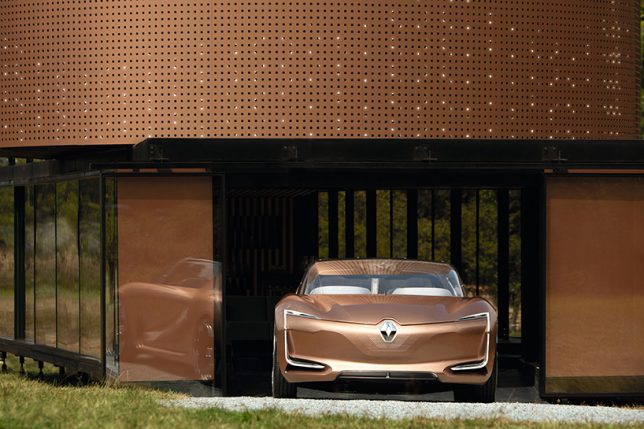
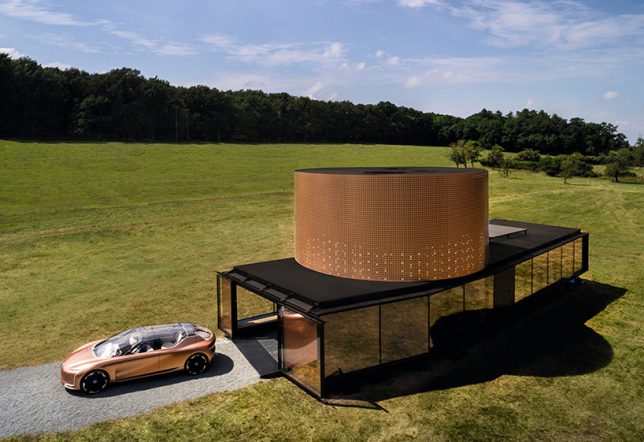
In the future, will our autonomous vehicles simply sit within our homes like a part of the living space, eliminating the need for garages and parking spots? Probably not. At least, not for most of us. Concepts like the new SYMBIOZ car and house combo are clearly made for the richest among us, and it’s not likely that most existing housing will be retrofitted to accommodate our driverless cars, especially since many people will likely use car services instead of owning their own vehicles. But Renault’s concept shows off one vision of how some of us might integrate autonomous cars into our lives in the decades to come.

“The way we use our cars is changing,” says Thierry Bolloré, Renault’s executive vice president and chief competitive officer. “Already a car is more than just a way to get from one place to another. It’s becoming an interactive and personalized space that connects passengers to other cars, people and objects around them. Looking to 2030 we imagine new scenarios with more efficient energy use, connectivity and autonomous driving scenarios that will improve how we live and travel.”

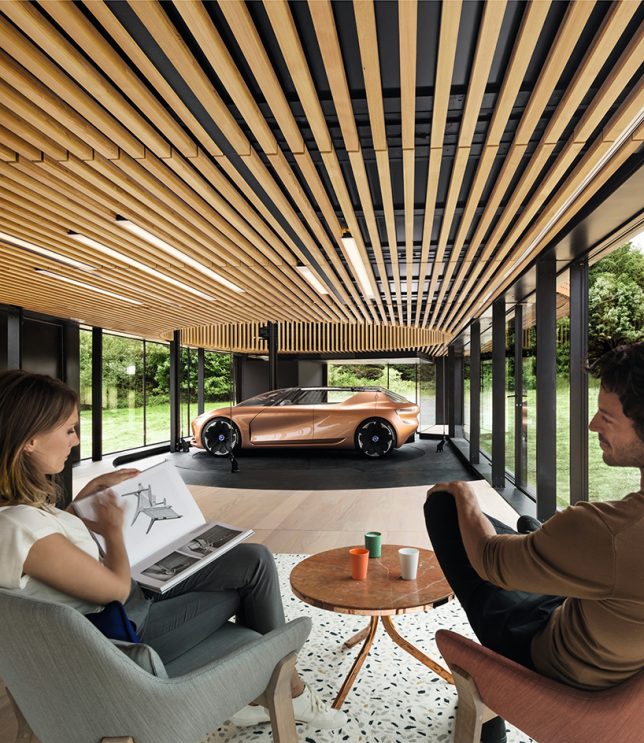
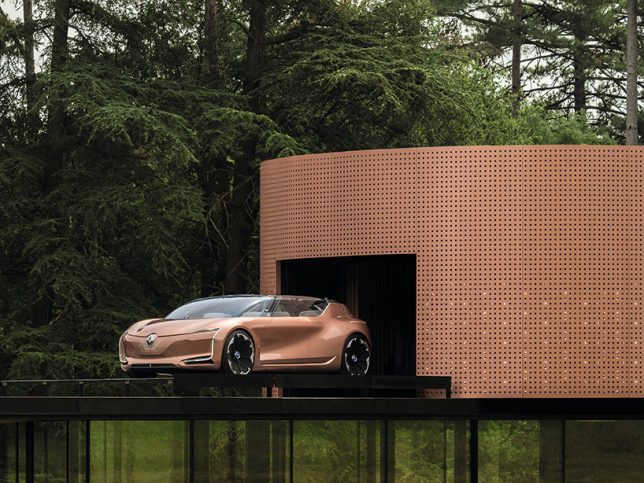
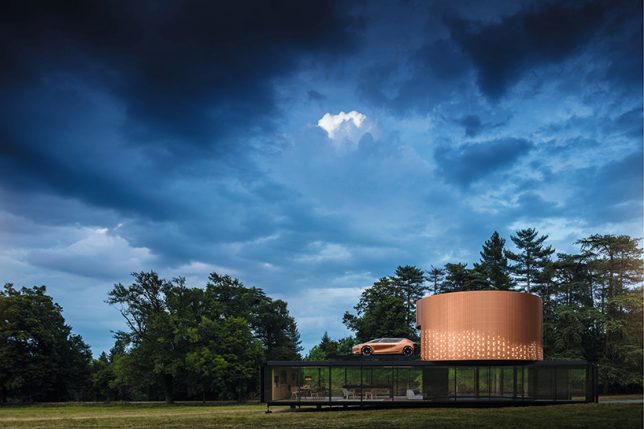
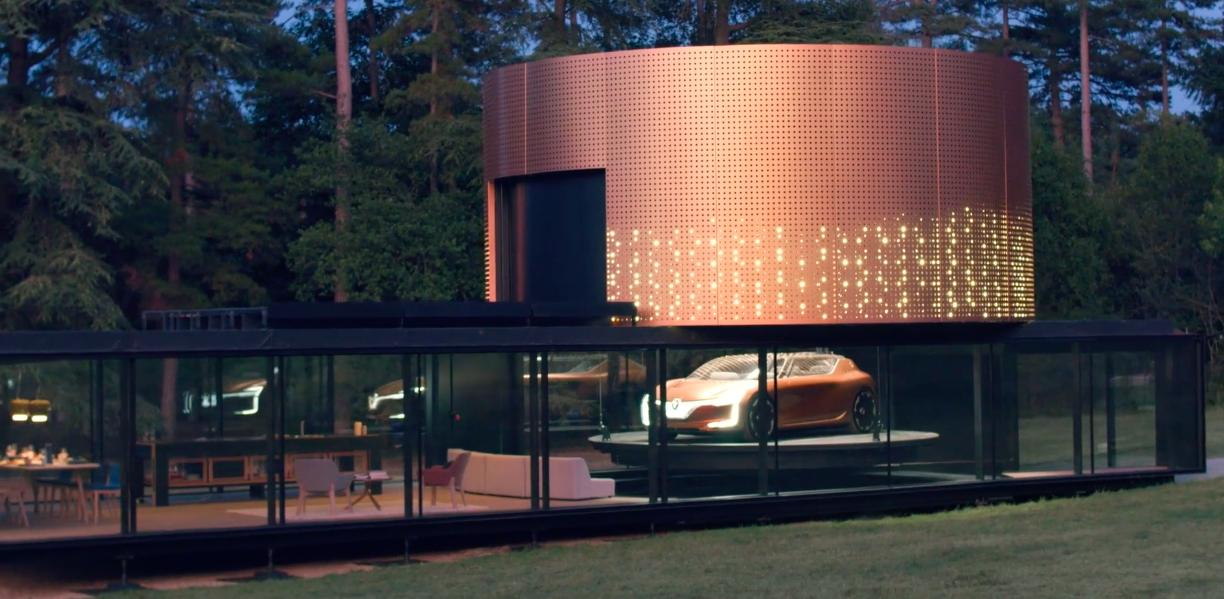
Presented at the 2017 Frankfurt Motor Show, the SYMBIOZ concept envisions the emissions-free,  all-electric car as a room within a room, entering the home to offer additional seating and make the transition between home and travel more comfortable. It’s easy to move objects and children back and forth between the home and the car, and once the car is brought inside, it starts to charge from the home’s energy systems automatically. The car can even act as an energy generator in case the power goes out.

Clean energy means the car won’t bring in nasty exhaust fumes. The car-home combo shows it parking on a special circular pad that can be raised up to the second level on demand, freeing up space below and keeping the vehicle secure. Inside the vehicle, you’ll find a retractible dashboard and front seats that pivot to the back to enable easy conversation between passengers. What do you think – would you take advantage of technology like this, if it were accessible to you?

Share on Facebook


[ By SA Rogers in Technology & Vehicles & Mods. ]

[ WebUrbanist | Archives | Galleries | Privacy | TOS ]


WebUrbanist

 
Comments Off on SYMBIOZ: Renault’s Autonomous Car Integrates Into a Matching Residence

Posted in Creativity


Contest – Win One of 3 Online Photography Courses from New York Institute of Photography

26 Sep

Over the last few years here at dPS, we’ve run some incredibly popular competitions with one of our partners – the New York Institute of Photography – to give away to lucky dPS readers some of their great online photography courses.

Due to popular demand – we’re doing it again this week.

Contest

Win One of THREE Online Photography Courses from New York Institute of Photography

Contest – Win One of 3 Online Photography Courses from New York Institute of Photography

For this contest, NYIP is giving away THREE prizes.

Each will be won by a different dPS reader. Here’s what you could win:

Fundamentals of Digital Photography Course – worth $ 749

This is one of NYIP’s most popular courses. The beginner digital photography course is meant to help you master your digital camera.

  • Learn the basic functions of your camera so you can begin to shoot in manual mode.
  • Professional photographers will show you how to see the world like a photographer.
  • Complete a series of photography projects that help you practice your new skills.
  • Your teacher will work with you, review your photos, and help you improve throughout the program.
  • By the time you finish, you will have the skills and knowledge to take professional-quality photographs.
  • NYIP Graduates are eligible to become certified by the Professional Photographers of America (PPA).
Contest – Win One of 3 Online Photography Courses from New York Institute of Photography

Photo Credit – Dennis Asfour

All students get the benefit of online courses they can work through at their own pace, as well as one-to-one feedback from professional photographers on their work!

Contest – Win One of 3 Online Photography Courses from New York Institute of Photography

How to Win

To win this competition you’ll need to:

Watch the video below and visit the course page HERE:

Leave a comment below and tell us why you’d like to enroll in New York Institute of Photography. Please note: there is a limit of one entry per person.

Do this in the next two weeks and then on October 15, 2017, the team at NYIP will choose the best three answers and we will announce the winners in the following days.

The deadline to enter is October 9, 2017, Midnight PDT. Comments left after the deadline will not be considered.

By “best” – we’re looking for people who understand what NYIP is, what the course offers, and how it suits their needs. There’s no need to write essay length comments to win – but we’re looking to hear what you like about NYIP, the course and how it would help your development as a photographer.

This competition is open to everyone around the world no matter where you live, but there is only one entry per person, please. To enter – simply leave your comment below.

Don’t forget to share this post with your friends!

NYIP logo440x232black

Learn more about New York Institute of Photography here.

Disclaimer: NYIP is a paid partner of dPS.

The post Contest – Win One of 3 Online Photography Courses from New York Institute of Photography by Darlene Hildebrandt appeared first on Digital Photography School.


Digital Photography School
 
Comments Off on Contest – Win One of 3 Online Photography Courses from New York Institute of Photography

Posted in Photography


Calumet UK and Wex Photographic will officially merge tomorrow

26 Sep

Two of the biggest photography retailers in the UK are going to officially merge tomorrow. This marks the culmination of a process that was set in motion way back in March when Calumet owner (and former Bowens owner) Aurelius bought Wex Photographic and announced that the Calumet competitor would merge with its former adversary.

If you visit the Calumet UK website today, you’re greeted by the following message:

“From 26 September, Calumet Photographic Limited UK will be merging with Wex Photographic, offering an improved experience and wider range of products to photographers across the UK,” reads the statement. “Later this week, this website will be closed and moved to www.wexphotographic.com.”

The statement goes on to assure Calumet customers that there will be “minimal disruption” to service, and any outstanding pre-orders, back-orders, or vouchers will be honored under the new brand.

For more information about the merger and how it will (or won’t) affect customers, you can visit this FAQ page on the Wex Photographic website.

Articles: Digital Photography Review (dpreview.com)

 
Comments Off on Calumet UK and Wex Photographic will officially merge tomorrow

Posted in Uncategorized


How to Find Interesting Subjects for Photography in a Boring Place

26 Sep

One of the common complaints I hear about photography is from people who struggle to find interesting things to take photos of. I understand the frustration. Some people are lucky enough to live in photogenic places that other people have to travel to see. But lots of people live in places where it’s genuinely hard to find interesting subjects for photography.

So, what do you do when this happens to you? Here are some ideas to help you find interesting subjects and inspiration.

pink flower - How to Find Interesting Subjects for Photography in a Boring Place

Food photography

Okay, I admit that people taking photos of their brunch with smartphones and uploading them to Instagram is getting old. But don’t let this put you off taking food photos at home. The nice thing about food photography is that it combines two hobbies – cooking (or baking) and photography. If you’re a good cook, it could be the perfect subject you.

There are two sides to food photography. One is the ability to prepare food so that it’s photogenic enough for a photo. The other is to provide the right environment to show the food off at its best.

If you don’t have what you need already that does involve a small investment. Think chopping boards, wooden tables, hand-made plates, and so on.

For lighting, nothing more sophisticated than window light is required. But you can also use it as an opportunity to practice your flash skills. I made this photo below using natural light.

Interesting subject - How to Find Interesting Subjects for Photography in a Boring Place

Flower photography

It’s quite possible that you don’t need to look any further than your backyard for an interesting subject. Most people have flowers in the garden. If you don’t, perhaps you know somebody who does. There may also be a park or botanical garden nearby that provides an interesting selection of flowers to photograph.

To be successful you’ll need to get close to the flowers using extension tubes, close-up lenses or a macro lens. It’s a good way to practice your macro and close-up techniques.

I made this photo in a local park.

flowers - How to Find Interesting Subjects for Photography in a Boring Place

Build a studio

The advantage of photographing food or flowers is that you can set up your photos indoors. There’s no need to worry about the weather or light, as window light is beautiful enough for both types of photography.

But why not take it further and set up an indoor studio? It’s possible to create a studio in the smallest of spaces. If you have any doubts about this then check out Nick Fancher’s book Studio Anywhere. It’s full of ingenious tips and tricks for setting up a studio in the tightest of spaces.

Note you can read more from Nick in these dPS articles:

  • How to Create Dramatic Portraits in Your Garage
  • Making the Most out of the Photography Stuff You Have Already
  • How to Create Dark Moody Low-Key Portraits with Minimal Gear

Get a model

Once set up, you need a subject. We’ve already looked at food and flowers, but you can take it a step further by finding local people to model for you. Whether you’re looking for models or characters, friends and family are a good way to start. Once you’ve got a few shoots under your belt – and the start of a portfolio – you can approach other people to see if they’d be interested in taking part.

I made this portrait using a single Canon Speedlite flash in a 90cm Lastolite softbox.

portrait - How to Find Interesting Subjects for Photography in a Boring Place

Start projects

Feeling inspired yet? My next tip holds the true key to finding interesting subjects in boring places. There’s no better way to become a better photographer than to start a project. They are so good for improving your photography skills that even pros regularly set themselves personal projects.

Projects can be simple, or they can be complex, expensive and time-consuming. But don’t feel intimidated by grand projects – you can get started with a modestly ambitious project.

For example, over the last few years I’ve spent time photographing dancers, craftspeople, artists, musicians, parkour and circus performers. Here’s a photo I made recently of a dancer.

dancer - How to Find Interesting Subjects for Photography in a Boring Place

The reward of these projects has been twofold. On one hand, I’ve made some interesting photos and portraits for my portfolio. On the other, I’ve met lots of new and interesting people and made new friends. I’ve had experiences that I would never have had if I had not created these projects.

Reach out to new people

The great thing about projects is that they give you an excuse to contact people who may be interested in taking part. For example, let’s say you’d like to start a project photographing dancers. There may be local dance schools you can approach or Facebook groups for dancers. You can get in touch, explain your project idea, and ask if anybody is interested in taking part.

The hardest part is getting started. After your first photo shoot, you will have some photos to show other people. Also, the person you photographed might be able to introduce to other people who could be interested in taking part.

Projects are a fantastic way of finding interesting subjects to photograph. I’m sure that wherever you live, no matter how boring it may seem, there are people nearby doing interesting things that could make a great photo project.

I made this portrait of a local singer after getting in touch by email and asking if she’d like to take part in a shoot.

singer - How to Find Interesting Subjects for Photography in a Boring Place

Conclusion

Hopefully, these ideas give you a head start on defeating boredom and finding interesting things to photograph in your area, no matter how boring or uninteresting it may seem.

Do you have any suggestions for finding interesting things to photograph? Please let us know in the comments, I’d love to hear them.


If you enjoyed this article and would like to learn more about the creative side of photography then please check out my ebook Mastering Photography. It shows you how to take control of and be creative with your digital camera, no matter what your skill level!

The post How to Find Interesting Subjects for Photography in a Boring Place by Andrew S. Gibson appeared first on Digital Photography School.


Digital Photography School
 
Comments Off on How to Find Interesting Subjects for Photography in a Boring Place

Posted in Photography


Take Your Photography into Hyperdrive with Zoom Blur Photos

26 Sep

Warning: preg_replace(): The /e modifier is no longer supported, use preg_replace_callback instead in /home/forge/content.photojojo.com/content.photojojo.com/wordpress/wp-content/plugins/ozh-better-feed/inc/feed.php on line 134


Photojojo

 
Comments Off on Take Your Photography into Hyperdrive with Zoom Blur Photos

Posted in Equipment


Lush Life: 12 Verdant Architecture Projects Making Plants a Main Priority

26 Sep

[ By SA Rogers in Architecture & Houses & Residential. ]

Not all architecture incorporating lots of living greenery is doomed to remain an unrealistic rendering, depicting buildings that can’t structurally support the weight of all the soil and water needed to keep full-sized trees alive. Architect Thomas Heatherwick built ultra-strong concrete pillars into his 1000 Trees design, for example. Other buildings take a subtler approach, choosing ivy, potted plants or existing trees rooted in the ground. All of these projects attempt to meld urban architecture with lush gardens in the hopes of cleansing the air, storing CO2 to mitigate climate change and providing enhanced access to green spaces in cities.

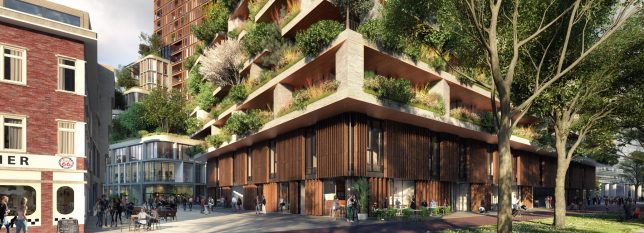
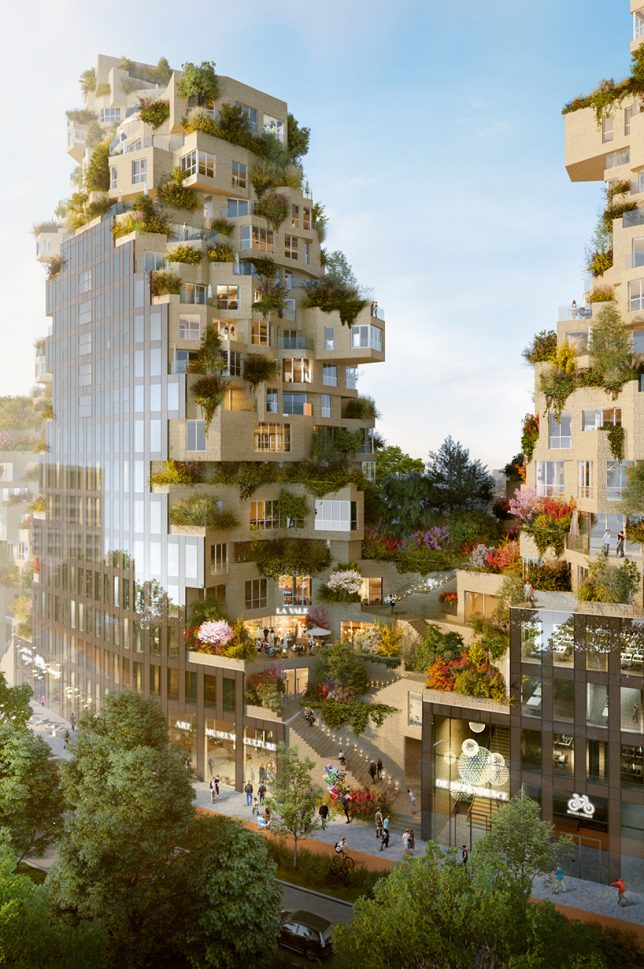
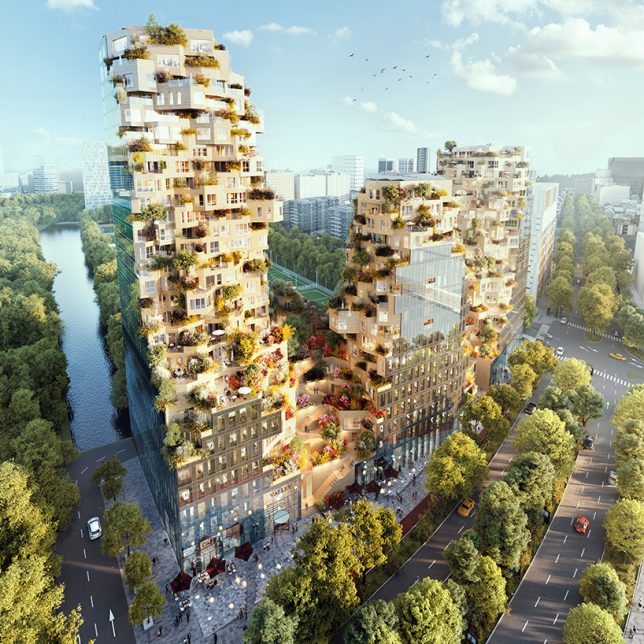
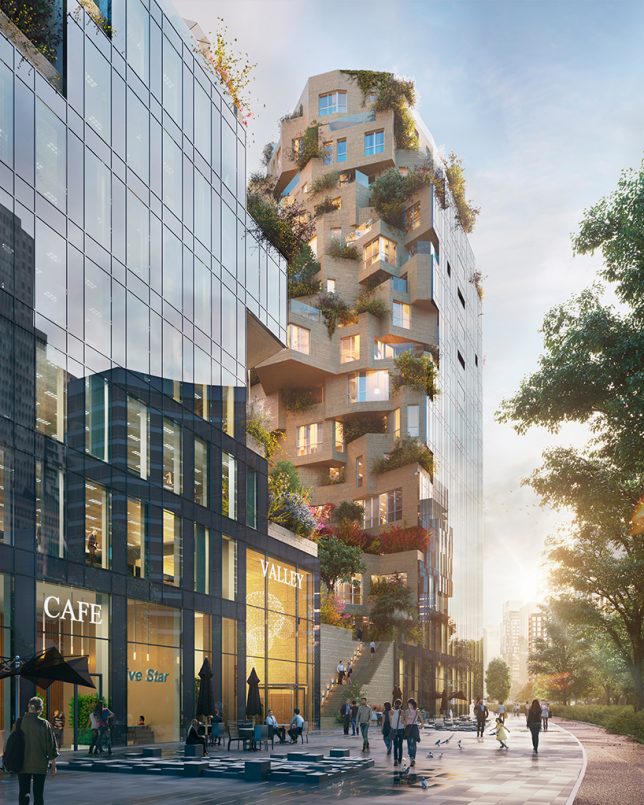
Valley: Green-Terraced Towers by MVRDV in Amsterdam, The Netherlands

Construction began in August 2017 on MVRDV’s ambitious ‘Valley,’ a mixed-use complex of green-terraced towers in Amsterdam’s central business district. ‘Valley’ is notable not only for its unusual offset stacking of volumes , creating an irregular shape, but also for all the greenery it supports. The towers include 196 apartments, 7 stories of offices, shops, restaurants, cultural facilities and a three-story parking lot.

House for Trees by VTN Architects in Ho Chi Minh, Vietnam

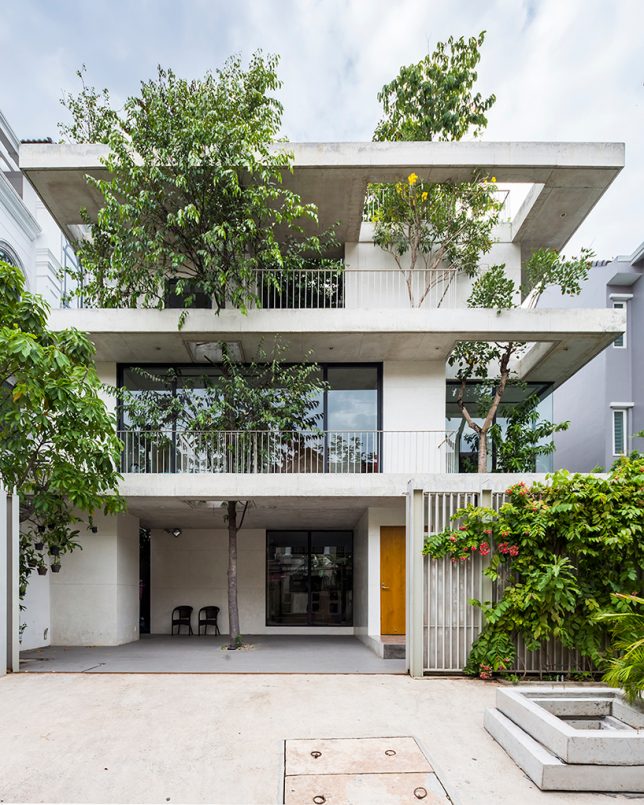
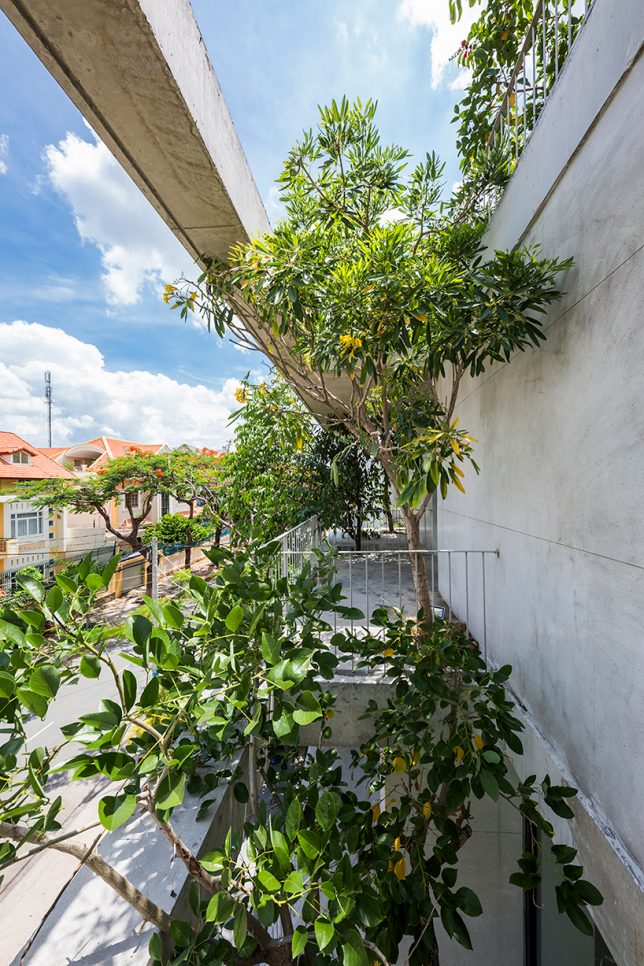
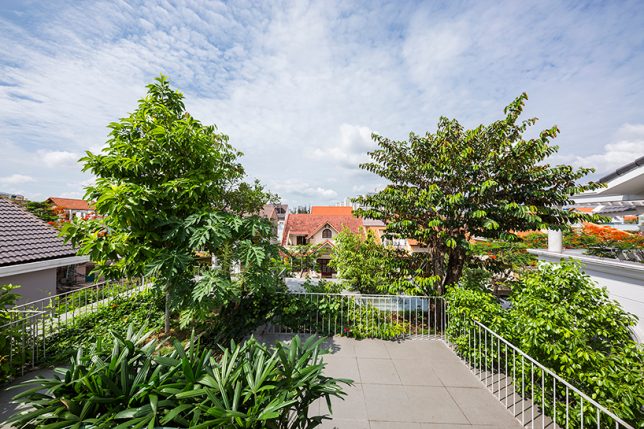
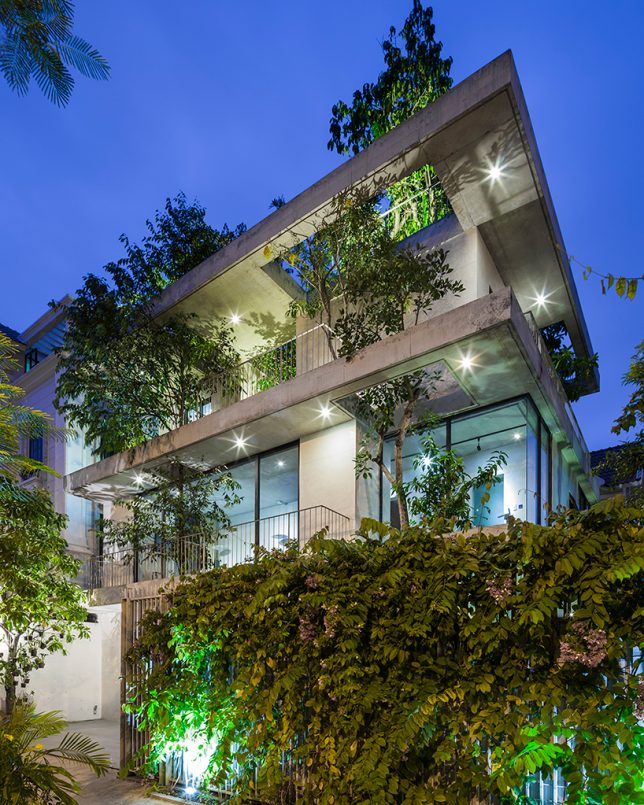
VTN Architects approached ‘House for Trees’ as a way to alleviate the lack of access to green spaces as well as poor air quality found in big cities like Ho Chi Minh. This residential project incorporates trees into its design, envisioned by the firm as a “small park in a dense neighborhood.” The trees are set into deep planter boxes disguised among the concrete volumes of the house, with cut-outs allowing their crowns to rise as high as they like.

Nautilus Eco Resort by Vincent Callebaut in the Philippines

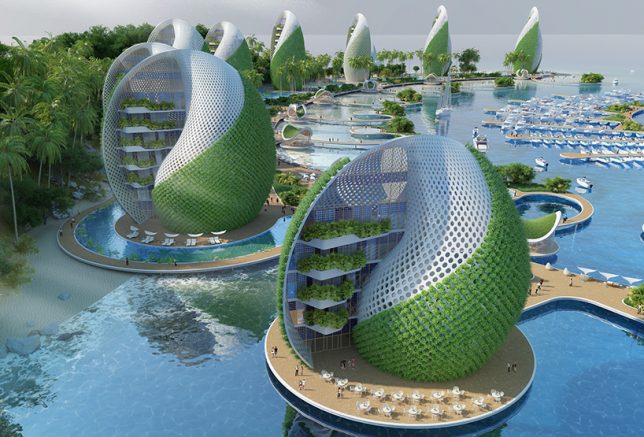
The Nautilus Eco Resort by Vincent Callebaut is designed as a ‘zero emissions, zero waste, zero poverty’ development for the Philippines in response to environmental and social problems in the country, like overfishing, pollution and mass tourism. The project would be built from reused or recycled materials, self-sufficient in producing its own energy and food, and engage volunteer ecotourists in cleaning up plastic waste that washes up onto the area’s beaches. It consists of a series of shell-shaped hotels and apartment towers spiraling around a central island housing a nautical center and scientific research laboratories. The plant walls cool the buildings as they grow food.

Amata + Triptyque Timber Building in São Paulo, Brazil

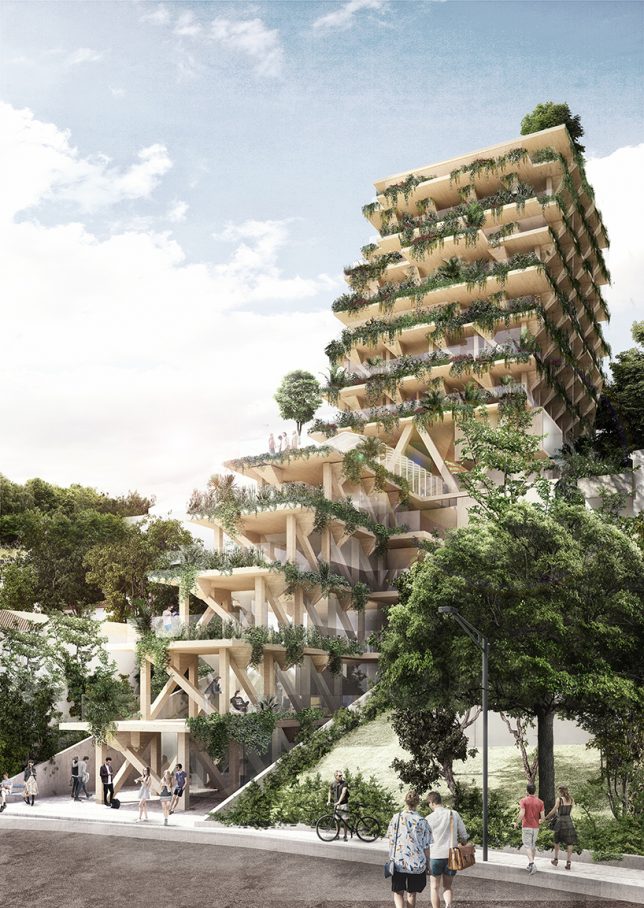
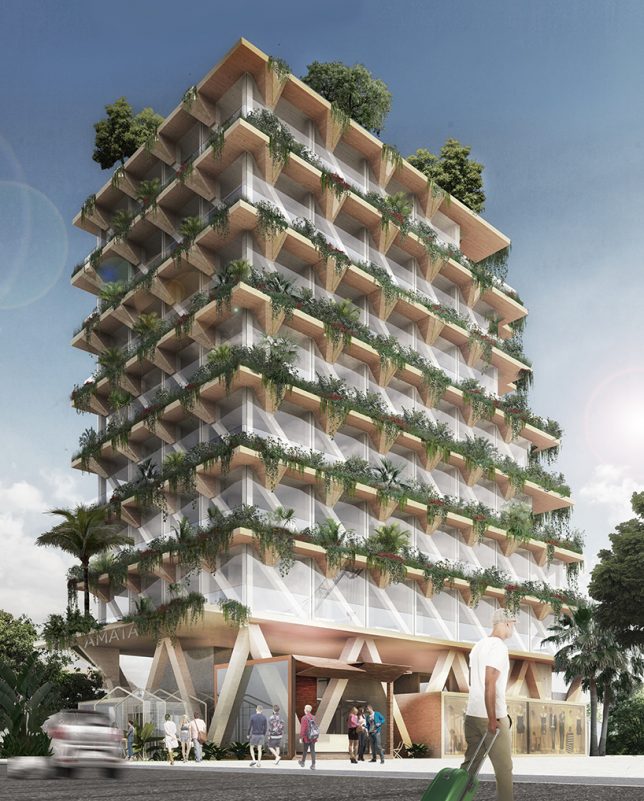
Constructed entirely from Brazilian timber, this building is a collaboration between architecture studio Triptyque and forest management company Amata. The building aims to be a giant carbon sink, contributing towards the fight against climate change. Each square meter of wood is capable of absorbing a metric ton of carbon dioxide from the environment. The 13-story building contains co-working, co-living and dining spaces, the edges of its terraces dripping with living plants.

Next Page – Click Below to Read More:
Lush Life 12 Verdant Architecture Projects Making Plants A Main Priority

Share on Facebook


[ By SA Rogers in Architecture & Houses & Residential. ]

[ WebUrbanist | Archives | Galleries | Privacy | TOS ]


WebUrbanist

 
Comments Off on Lush Life: 12 Verdant Architecture Projects Making Plants a Main Priority

Posted in Creativity