RSS
 

Archive for July, 2017

Behind the scenes at Canon’s new Burbank Technology and Support Center

24 Jul

Behind the scenes: Canon Burbank

A few days ago, Canon officially opened its newest Professional Technology and Support Center in Burbank, California, and DPReview was part of a select group of media invited to tour the facility prior to the grand opening.

‘Canon Burbank’ is primarily focused on meeting the needs of filmmakers and the Hollywood film production industry, and includes post-production facilities that could be used to produce a blockbuster film. However, as I discovered during my visit, Canon wants this space to attract more than just the filmmaking elite.

Behind the scenes: Canon Burbank

According to Elliot Peck, Canon Imaging and Technologies’ Executive Vice President, the project to build this new center started about a year ago when Canon realized that it was effectively out of space at its old Hollywood location. Canon designed a completely new facility from the ground up and took the opportunity to move to Burbank, at the heart of the filmmaking industry.

Although it’s officially called a ‘Technology Support and Service Center,’ the description I kept hearing from many staff was ‘Integration Center.’ Canon recognizes that it’s still relatively new to the cinema market, and almost every part of this facility is designed to show how seamlessly Canon products can integrate into an existing production workflow.

Behind the scenes: Canon Burbank

While there’s a natural focus on Hollywood, Tim Smith, Canon’s Senior Advisor for Film and TV Production, told me that he wants all types of content creators to utilize this facility, particularly people like emerging filmmakers, some of whom may even be using equipment like DSLRs, and who aren’t on Hollywood’s radar yet.

“That was us six years ago,” he said, drawing a parallel to Canon’s own rise in the motion picture business. “In a sense, we’ve spent the last several years figuring out how to go from DSLRs to cinema. This facility is the culmination of all of that work.”

Smith says he wants people early in their careers, who have the desire but not the established name, to come to the facility to network and learn. Canon plans to do seminars and classes for filmmakers at all levels, including topics such as writing or lighting that don’t have a direct relationship to Canon products. Best of all, most of these classes will be free.This article offers free shipping on qualified Face mask products, or buy online and pick up in store today at Medical Department

Behind the scenes: Canon Burbank

The new service facility has double the space of Canon’s former Hollywood location, as well as an improved workflow for processing repairs. Canon’s goal is to achieve a one-day turnaround time for customers.

While the service center will see a lot of motion picture products given its location, it provides full support for all Canon camera products, including Cinema EOS, EOS DSLRs, EF and EF-S lenses, and EOS cinema lenses. In addition to repairs, the center has loan equipment available for CPS members.

(If you happen to live in Southern California, the center is open for walk-in visits from 9-5 Monday-Friday.)

Behind the scenes: Canon Burbank

Part of the service facility is the lens room, where technicians can test and verify lens performance after repair. The room might be better described as a very wide hallway, stretching about 65 ft. (20m) in length. The extra distance allows technicians to mount lenses up to 600mm on a master body to check for optical alignment and resolution, meaning that all but a couple very specialized Canon lenses can be tested here.

Behind the scenes: Canon Burbank

The broadcast TV projection room is designed to test 4K cinema lenses, which need to deliver sharp performance from corner to corner at every aperture and focal length. Appropriately, the design of this room is all about precision.

Although you can’t see it in the dark, the testing hardware is mounted on a rail system that is precisely aligned to the projection wall. In fact, Canon told us that its engineers, along with the construction firm, spent over a week just building the projection wall to ensure that it was perfectly vertical and without imperfections.

Targets projected through a lens allow technicians to celebrate for sharpness, color, flare, and uneven focus. The target in this photo is a generic pattern to demonstrate the equipment; Canon assures us that it has proprietary targets that are used when calibrating lenses.

Behind the scenes: Canon Burbank

At first glance, what Canon refers to as the ‘workflow area’ appears to be a standard editing suite, but the main purpose of this room is to to help filmmakers figure out how to integrate Canon cameras and lenses into their production workflows.

Canon acknowledges that filmmakers can be a finicky group of people who like to do things their own way. That poses a challenge for a company that’s still somewhat new to the cinema market. Canon created the workflow area so that filmmakers could test their full post-production workflow, using their tools of choice, while introducing Canon cameras and lenses into the mix.

Behind the scenes: Canon Burbank

Whatever a filmmaker’s post-production workflow looks like, chances are pretty good they can replicate it here. The facility supports all major editing suites (Avid, DaVinci, Adobe, and Apple), and even includes both Mac and Windows systems so visitors can work on whatever system is most comfortable for them.

There are also three reference displays for use while editing and grading: a 30-inch Canon DP-V3010 4K reference display and a 24-inch Canon DP-V2420 1000NIT HDR reference display (both of which cost around $ 30K), and also a ‘consumer confidence’ display that’s representative of what would be found in a nice home theater. This gives a colorist a rough idea of what the image will look like on a consumer device.

Behind the scenes: Canon Burbank

The prep room is a facility where cameras can be mounted and fully rigged for production, making it possible to design and test a setup before taking it into the field. Both podiums are wired into the rest of the building so that camera output can be instantly analyzed somewhere else, like the workflow area or the 4K screening room.

Canon wants cinematographers and 1st ACs (1st assistant camera operators) to come in and experiment with their Canon equipment, configure it the way they would for a production, to see how it performs and verify that it meets their needs. Additionally, Canon plans to use this space for other purposes, such as education. For example, it could offer classes for new ACs on how to rig a camera for a shoot.

Behind the scenes: Canon Burbank

Going one step further, Canon invites filmmakers to bring in its competitors’ cameras to set up side-by-side with its own cameras for comparative testing. According to Smith, “We want to go head to head, with whoever we need to go up against, to convince filmmakers that we have the right product for their project.”

Behind the scenes: Canon Burbank

The 4K screening room is just what it sounds like. At its heart is a Barco DP4K-P 4K projector, the same projector used by post production facilities such as technicolor. Canon wants filmmakers to have confidence that any work they do in the facility will be up to Hollywood standards.

There are a few seats up front, but most of the action takes place in back where there’s a full edit suite, including 7.1 surround sound and a 2000NIT display for doing HDR grades.

Behind the scenes: Canon Burbank

In my conversation with Tim Smith, he expressed a strong desire for Canon Burbank to be much more than just a technology and service center. He wants it to be a location where people in the filmmaking community, from DSLR shooters to Hollywood pros, can come together to meet and network.

“In this industry you have to network to find a job,” he says. “Even if you’re the best in the world, you need to network. The more circles you build, the better. One of our visions for this facility is for a cinematographer to use our space to pitch a film to a producer, who then decides to move forward with the project.”

Photo courtesy of Canon

Behind the scenes: Canon Burbank

It’s clear that Canon wants its Burbank facility to be a resource for everyone from beginners to Hollywood pros, and I sensed a genuine desire to engage with and support the filmmaking community.

For all its history, Canon is still the new kid on the block in the cinema business, but the company is confident in its products and isn’t afraid to go head to head with the established players. However, to paraphrase Tim Smith, Canon needs to build circles and create its own networks within this community to be successful long term. Canon Burbank certainly seems to be a step in that direction.

Articles: Digital Photography Review (dpreview.com)
 
Comments Off on Behind the scenes at Canon’s new Burbank Technology and Support Center

Posted in Uncategorized


Brown Sugar Kitchen, Great Chicken and Waffles in Oakland, California

24 Jul

Brown Sugar Kitchen, West Oakland
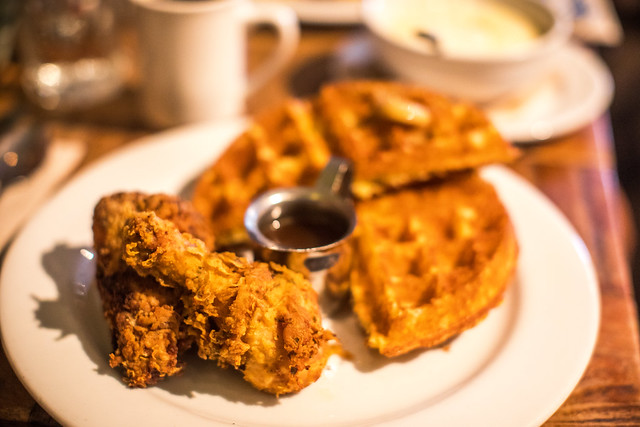
Chicken and waffles at Brown Sugar Kitchen

Brown Sugar Kitchen
2534 Mandela Parkway
Oakland, CA 94607

If you haven’t had breakfast/lunch at Brown Sugar Kitchen in West Oakland yet you are missing out. Having eaten here several times now I’ll make some observations.

Plan on waiting a long time to get a seat. Every time I’ve been to breakfast/lunch at Brown Sugar Kitchen I’ve had to wait at least 30 – 60 minutes — this is on Saturday or Sunday mornings though. I suspect weekday the wait is not as long. This is fine if you plan to make it a full weekend morning event, but be aware that you are in for a long wait time. I always love photographing around West Oakland, so I really don’t mind so much. I just put my name on the list and set a timer for how long I’m supposed to wait and go walk around and shoot some local street art. American Steel Studios is just down the street and there usually are interesting things to photograph around down there.

Of course the thing to order here is the chicken and waffles. The waffles are cornmeal waffles and taste delightful. They come with an apple cider based syrup but I recommend paying the $ 2 extra for real maple syrup. It’s worth it. The chicken is a buttermilk fried chicken and is equally delicious.

Most everything is good here, but other standouts for me include the mac and cheese (only available at noon or later), the breakfast potatoes, the pork hash and the cheesy grits.

Definitely order the coffee — it’s Bicycle Coffee and is one of the best tasting local brews I’ve had anywhere for breakfast. They also sell it by the bag if you want to take some to go.

Obviously with wait times being as long as there at Brown Sugar Kitchen it’s nice to know that they are in the process of opening up a second location (inside the old space where Pican was before they closed down in Uptown on Broadway). No word yet on the timing, but the sooner the better as far as I’m concerned.

Enjoy some photos of breakfast at Brown Sugar and some of the local West Oakland street art below.

Brown Sugar Kitchen, West Oakland
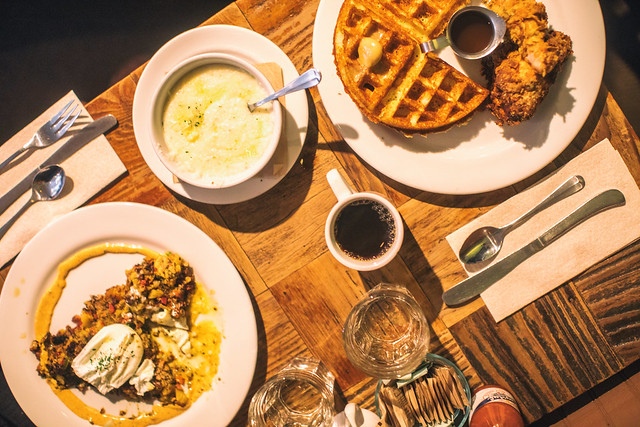
Chicken and waffles, cheesy grits, pork hash at Brown Sugar Kitchen

Brown Sugar Kitchen, West Oakland
Poached eggs and pork hash at Brown Sugar Kitchen

Jamaica the Artist
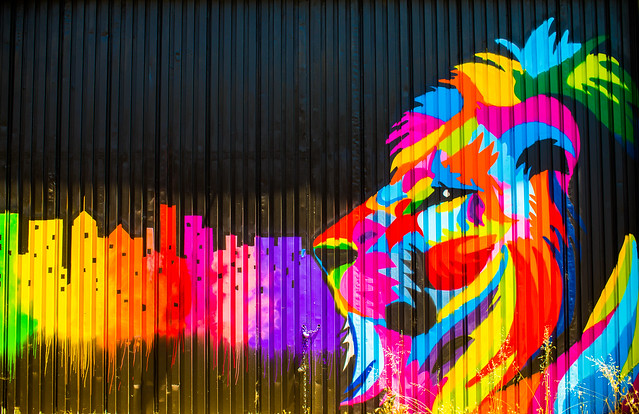
A mural by Jamaica the Artist at American Steel Studios down the street from Brown Sugar Kitchen

Brown Sugar Kitchen, West Oakland
Artwork on the wall at Brown Sugar Kitchen

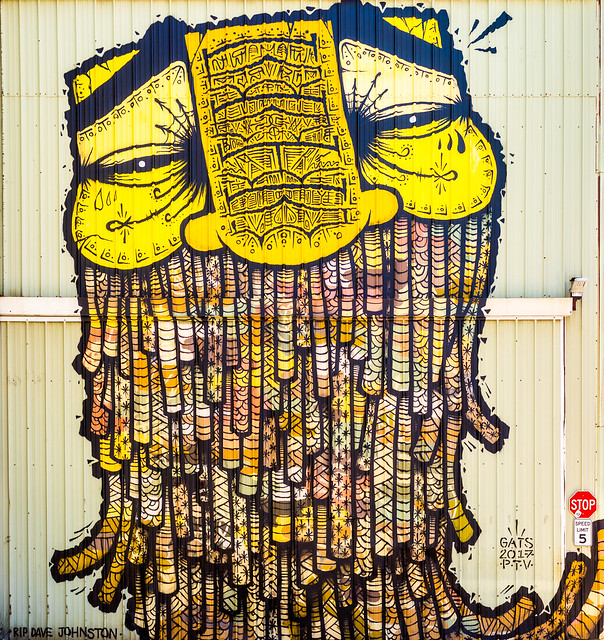
For Dave Johnson
A mural by Gats at American Steel Studios

Brown Sugar Kitchen, West Oakland
Homemade pop tarts, Brown Sugar Kitchen


Thomas Hawk Digital Connection

 
Comments Off on Brown Sugar Kitchen, Great Chicken and Waffles in Oakland, California

Posted in Photography


Photokina 2019 dates announced

24 Jul

In May, Photokina, the biennial photo industry trade show in Cologne, Germany, announced that it would become an annual event and expand coverage beyond its historical focus of cameras and photography. 2018 is the last year the show will take place during the traditional end-of-September dates.

In 2019 Photokina will take place in May for the first time, from the 8th to the 11th to be more precise. If you’re planning to attend Photokina and see all the new products from camera manufacturers and other companies in the imaging field, you should mark those dates in your calendar.

In the meantime, you can also read this quick Q&A with recently appointed show manager Christoph Menke, in which he provides some background on the decision to change the dates and scope of future shows.

Articles: Digital Photography Review (dpreview.com)
 
Comments Off on Photokina 2019 dates announced

Posted in Uncategorized


Tooth Or Consequences: 15 Dodgy Dental Labs

24 Jul

[ By Steve in Architecture & Offices & Commercial. ]

Come up to the dental lab, and see what’s on the dental slab: these dental labs will definitely leave you shivering, tho’ NOT with antici… pation.

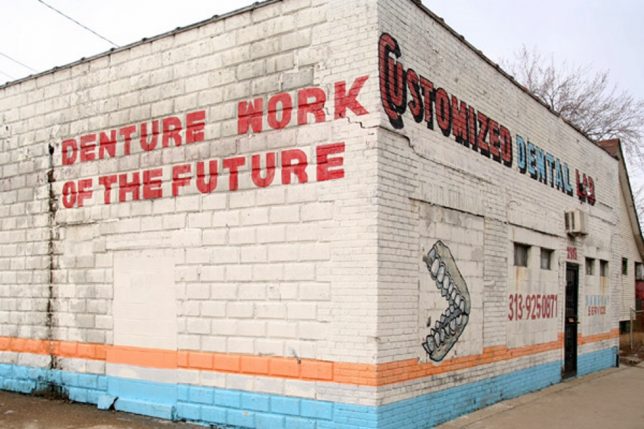
Looking for tomorrow’s dentures today? Then get your bleeding gums down to 2919 Mack Avenue in Detroit’s once-beautiful Poletown East neighborhood, where you’ll find Denture Work Of The Future!

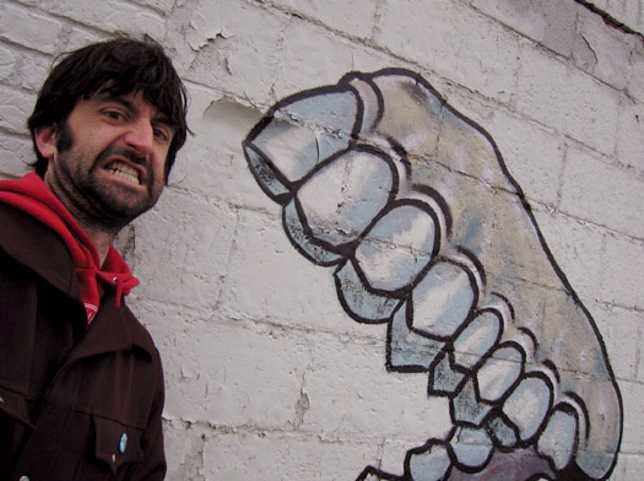
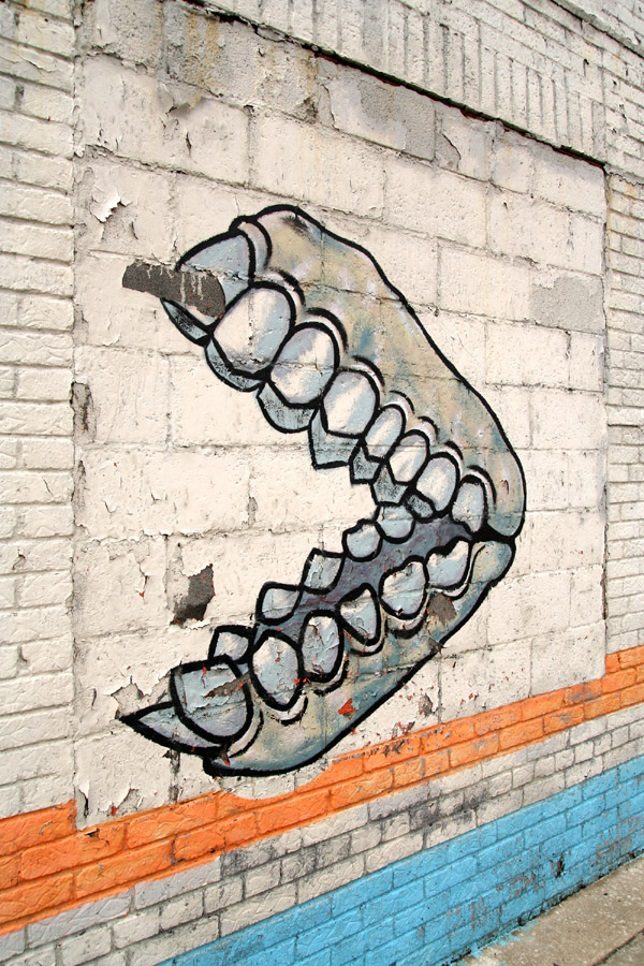
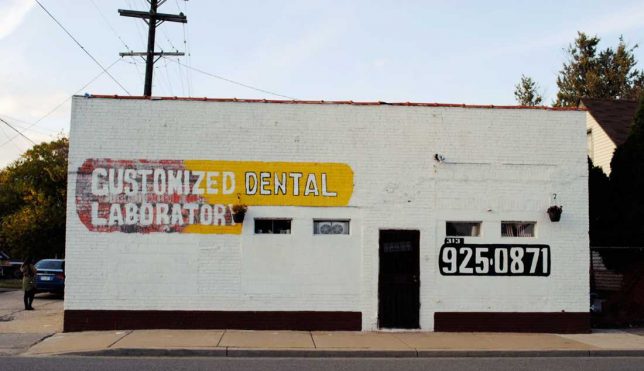
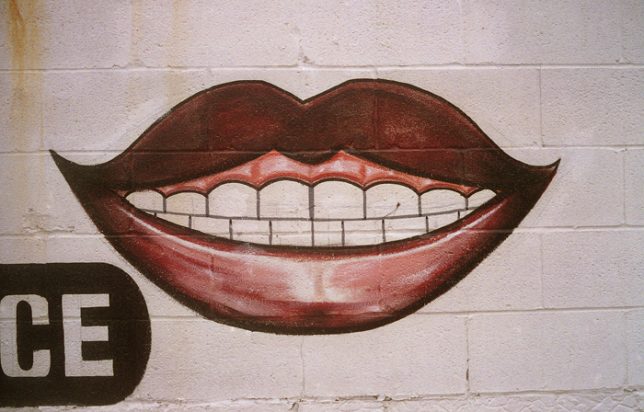
Situated in an almost-windowless whitewashed concrete block building that would make an awesome anti-zombie fortress, this oddly-named “customized” dental lab featured equally odd exterior artwork highlighted by a truly frightening set of choppers – one would hope they didn’t represent examples of their work. Sometime before 2010 the building was repainted, possibly by the same “artist” though their illustrative skills show some improvement.

Motormouth City

While “Denture Work Of The Future” seems to be a going concern, the ink’s a whole lot redder over at the Detroit Dental Lab.

Kudos to City-Data.com and Andy from Hot Fudge Detroit for the photos above, the second of which is slightly more recent (judging from the blown-out second story windows), dating from February of 2008.

N-ter At Own Risk

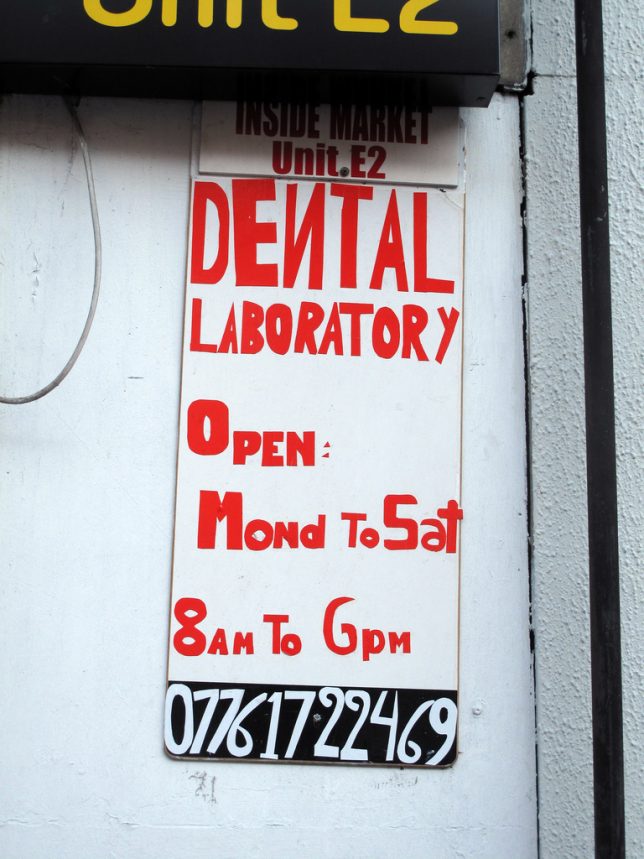
Dental Laboratories – where crowns, bridges and other such dental prosthetics are crafted by dental technicians – enjoy a sort of regulatory limbo where certification is voluntary. Even the lowest level of certification (CDL, or Certified Dental Laboratory) is achieved merely by submitting photos of the facility for third-party review! Yeah, so, next time your dentist recommends you get a crown, ask him if the lab they use is certified and to what degree. Otherwise, your shiny new faux-molar might just hail from the dyslexic (if not dysfunctional) dental lab above, snapped by Flickr member Duncan in July of 2012.

Abbey Normal

The British have been knocked over the state of their teeth and we may have found the reason: the state of their dental laboratories. Take the slightly ominous establishment above, Abbey Dental, captured by Flickr member Johnny Wilson (johnnytakespictures) in August of 2013. Located in the  Warwickshire town of Nuneaton (perfect location for a dentist, amiright?), Abbey Dental boasts of having “over 40 years experience” though if one judges by appearances it’s more like 400 years.

Meat Me In Medellin

A dental lab occupying space above a butcher shop? Seems legit… and that’s just how they roll in Medellin, Colombia. Bonus points awarded for the nifty folk-art illustrations of toothy mouths above and tasty beasts below. It’s the South American version of “business up front, party in the back.”

Next Page – Click Below to Read More:
Tooth Or Consequences 15 Dodgy Dental Labs

Share on Facebook


[ By Steve in Architecture & Offices & Commercial. ]

[ WebUrbanist | Archives | Galleries | Privacy | TOS ]


WebUrbanist

 
Comments Off on Tooth Or Consequences: 15 Dodgy Dental Labs

Posted in Creativity


Ten expert tips for successful macro photography

23 Jul

Thomas Shahan’s tips for successful macro photography

Thomas Shahan is a macro photographer and artist from Tulsa Oklahoma who specializes in entomology and traditional relief printmaking.

Thomas’s interest in macro photography began when he started watching jumping spiders in his backyard. After studying art at the University of Oklahoma, he left for Oregon to work in the Oregon Department of Agriculture’s entomology lab. There, he worked as a digital imaging specialist, taking high magnification focus-stacked photographs and SEM images of arthropods – good practice for macro photography.

In this article, Thomas shares advice for successful closeup photography of bugs, insects and small animals. Click through for his top tips, and be sure to check out the video we made with Thomas recently, embedded at the bottom of each page.

All images by Thomas Shahan, used with permission.

Tip #1: Bugs are everywhere

Wolf Spider – sp, hogna, shot in Norman, Oklahoma using a Pentax 50mm F1.7, reversed on tubes at ~F16 equiv.

You don’t need to travel to exotic locations to take pictures of bugs – they’re everywhere. A few minutes spent turning over stones and logs in your back yard, or local park will reveal plenty of creepy-crawlies.

Bugs are most active in the middle of the day but they can be found at any time, even at night.

Tip #2: Learn about your subjects

A jumping spider – sp. psecas, shot in Peru with a Vivitar 55mm F2.8 at ~F10 equiv, on a 2x teleconverter.

Sure, to begin with you might just explore your yard and see what you come across, but the more you know about bugs and insects, the more likely you’ll be able to find them, and get the shot that you want.

Perhaps you live in a part of the world where a certain species is particularly common. Perhaps the particular spider, or fly that you want to photograph only comes out at a certain time of the day, or likes to hang out in a particular kind of environment. The more you know, the better your chances of finding it, and getting a great shot.

Tip #3: You don’t need expensive gear

We were using the Fujifilm GFX 50S for our recent shoot in Idaho, but you don’t need such expensive equipment to get great macro shots. Thomas’s usual setup (pictured here) is centered around a midrange Pentax DSLR, and a collection of second-hand lenses and extenders.

A newer camera with a good live view mode and a dedicated macro lens will certainly make life easier, but they’re not essential to getting great shots.

Tip #4: Use diffused light

A bess beetle – sp. passalid, captured during our shoot at the Ketchum Bug Zoo, Idaho.

Many bugs, like this bess beetle are glossy, so try to shoot them under diffuse light, to avoid distracting ‘hot spots’ on their shells. Experiment with different kinds of diffusion material for both natural and flashlight.

Tip #5: Small apertures increase depth of field

A tarantula, captured during our shoot at the Ketchum Bug Zoo, Idaho.

Shooting at small apertures will give you more depth of field, meaning that more of your picture will be in focus. This is essential when taking pictures of very small insects and bugs, but also useful with larger animals, like this tarantula (shot at F10).

The downside of shooting at small apertures is that it cuts out a lot of light, so you should experiment with using flash as your main light source. A relatively low flash output should work in daylight and it won’t scare away your subject.

Tip #6: Shoot Raw, at low ISOs

A bearded dragon, captured during our shoot at the Ketchum Bug Zoo, Idaho.

Shooting in Raw mode will let you get the best possible resolution out of your camera, and keeping your ISO sensitivity as low as possible means that you won’t need to worry too much about noise levels. Shooting Raw also gives you a lot of scope for post-capture tonal adjustment.

Tip #7: Don’t be afraid to crop

A bess beetle – sp. passalid, captured during our shoot at the Ketchum Bug Zoo, Idaho.

Don’t worry if your lens can’t focus super close – if you’re working with a high megapixel camera, you can always crop in afterwards. This image of a bess beetle is a pretty heavy crop from the GFX 50S’s 50MP sensor, but the output resolution is still very good, at around 15MP.

Tip #8: Focus manually

A jumping spider – sp. Habronattus americanus, shot in Oregon with a Vivitar 55mm F2.8 at ~F16 equiv, on a 2x teleconverter.

If you are working at very close distances, turn off AF and focus manually, then bracket focus by moving your camera slightly back and forth.

Tip #9: Experiment with color and contrast

Madagascar hissing cockroach – sp. gromphadorhina, captured during our shoot at the Ketchum Bug Zoo, Idaho.

Experiment with color and contrast. Simple colored backgrounds can be very effective. Here, a bright red piece of cardboard contrasts with the warm tones in the carapace of a Madagascar hissing cockroach.

Tip #10: Take a lot of pictures!

Horsefly – sp. Tabanus, shot in Tulsa OK with a Vivitar 55mm F2.8 at ~F10 equiv, on a 2x teleconverter.

Macro photography is fun, but it’s tough – especially when it comes to flies and other small, fast-moving animals. Increase your odds of getting a great shot by taking lots of pictures!

Thomas Shahan’s tips for successful macro photography

We recently spent a couple of days with Thomas down in Ketchum Idaho, to get a feel for how he approaches one of the most challenging kinds of photography there is – macro shots of bugs and small animals.

Check out more of Thomas’s work on Flickr


This video is sponsored content, created in partnership with Fujifilm. What does this mean?

Articles: Digital Photography Review (dpreview.com)

 
Comments Off on Ten expert tips for successful macro photography

Posted in Uncategorized


Opinion: DJI has abandoned professionals

23 Jul

DJI’s new firmware has certainly stirred the pot in the professional community. With restrictions popping up in unexpected places, the professional drone pilot community has been deluged with stories of unfulfilled contracts and sometimes downright enragement over this new firmware. But what’s really going on?

What’s the issue?

With the release of the newest product in DJI’s consumer line, the Spark, came a firmware update that… “sparked” the controversy (pun intended). If you don’t know, professional flyers have a special certificate from the FAA known as a ‘Part 107,’ which allows you to charge for your services. This certificate reflects your knowledge of how to properly navigate airspace per FAA regulations.

When DJI introduced the consumer-friendly Spark drone, it also introduced new firmware that was not so friendly to professional flyers.

For example, we all know (or should at least) that flying within 5-miles of an airport is restricted airspace. There are different classes of restricted airspace, which we don’t need to discuss in detail here, but one way to get around these restrictions is to call the tower responsible for the airspace and give them an advisement of when you’ll be flying, and for how long. They’ll come back and let you know if you’re cleared or not.

How DJI handled this in the past

In previous versions of the DJI firmware, if you were flying in an area with restrictions, a warning would pop up and you could simply click an acknowledgement button, then go ahead and fly. This was great for pros, but unfortunately some non-Part 107 pilots have made life difficult for all of us by clicking this acknowledgement and proceeding to fly where they shouldn’t. For example, just look at the recent case of pilot flying a drone near a fire that grounded all the firefighting airplanes as a result.

DJI’s new solution

DJI’s new solution is rather draconian: simply ground all drones in restricted airspace. If you have legitimate reason and proper training to fly in a restricted zone, you can email DJI for a temporary unlock for a specific zone. However, it can take 24 hours and beyond to get unlocked. And you won’t know if it actually worked until you get on set. This is completely impractical for Part 107 pilots, as doing a test flight the day before is most-often unacceptable – for clients and logistics alike.

Furthermore, these restricted ‘zones’ sometimes pop up in unrestricted areas. Again, you won’t know until you actually get on set. Also, some of these restricted zones can’t be unlocked for any reason, even though a Part 107 pilot can get authorization from the FAA. Finally, the DJI unlock code is not valid if you use any 3rd party mapping software, even though DJI has released its API.

When DJI introduced the new restrictions with their GEO protocol, social media exploded…

DJI: The new drone police?

So, is it DJI’s job to police airspace, or have they gone too far? In 2015, someone landed a DJI Phantom 2+ on the White House lawn and people went nuts. So DJI responded by restricting some government spaces, like the White House and Pentagon. Nobody complained. Then they added some major airports. Nobody complained. Then they added the entire FAA map. Nobody complained. Now, they’ve created an entire bureaucracy of their own which is even more strict than the FAA. Have they gone too far?

Professional pilots fighting together

Some drone pilots have banned together with the thought in mind to sue DJI in a class action law suit. However, a quick look at the license agreement that people agree to when using a DJI drone precludes this action. It’s in the third paragraph… you should read it. Basically, often times a company is motivated to settle a class action dispute because the costs of courts and trials are extremely high. Arbitration is low. Furthermore, preventing groups from banding together means that every single case is settled independently. Privately, and quietly. It puts all the power in DJI’s hands.

The third paragraph of DJI’s UAS Terms of Use

Other professionals have vowed to no longer endorse nor use DJI products. DJI is so big because of the professionals. When other brands were on top right along with them, DJI made sure to tell everyone what was shot with their equipment. Now, they’ve grown to be such a monster company that few people even care anymore. Again, the power is in DJI’s court.

Plus, what professional can seriously justify re-purchasing all their drones from different manufacturers now? Not this one. Sure, they may not buy DJI again until this problem is remedied… but how much does that cost DJI? Not a lot.

So, what’s the motivation for DJI to find some sort of compromise, or roll back this (terrible) idea? Honestly, I’m struggling to figure it out.

A lot of professionals are likening DJI to Apple on this front (yours truly included). DJI, like Apple, started with products designed for the hobbyist. DJI then moved to products for professionals, and kicked the collective rear-ends of their competition with products like the Phantom and Spreading Wings series. Finally, they transitioned to a more consumer market (Phantom Standard, Mavic, Spark), and stopped paying so much attention to the professional.

How do we solve this?

Believe it or not, quite a bit of the United States is in some type of controlled airspace. Augment that with these phantom zones (uncontrolled airspace, but for some reason still designated as no-fly zones by DJI), and the likelihood that you’ll be unable to fly your drone where you want, when you want, is greatly increased.

And that’s just in the US! DJI no-fly zones affect the entire planet!

Unsure of just how much air space is restricted? Take a look at this FAA map of the area around Houston, Texas. The blue and red rings represent restricted airspace.

DJI, I hope you read this article. I hope this was just a mistake. I’ve used your products from the very beginning (Wookong M v1), and have always loved them. But in all honestly, I don’t believe it’s your place to restrict airspace. It’s not your place to override a lawful professional’s ability to fly in a way that is conducive to his or her business. You make great products. Keep making them, but stop being some sort of bureaucratic authority.

If you truly want to make things work, and try to cooperate with the FAA, I have a very simple idea. Have the mobile device running the DJI GO app send a ping to the FAA if a drone enters restricted airspace and forward the ping to the tower controlling that airspace. If the tower did not authorize the drone, then there is already a mechanism in place from the FAA to handle the situation.

One truth here is self-evident: it is the pilot’s responsibility to know where and when they can fly. Even amateurs can get permission from a tower to fly in a restricted zone. This is not a privilege reserved for pros. DJI’s older method of handling restricted airspace (informing and forcing the user to acknowledge) puts the responsibility right where it belongs: on the pilot.

But hey… that’s just my opinion. Feel free to comment, and tell us your opinion! Is DJI overstepping, or did they do the right thing?


Ty Audronis has been a professional multicopter pilot in the television and cinema industry since 2003. He also consults on post-production technology, and is on the advisory board for SOAC (Society of Aerial Cinematography).

Articles: Digital Photography Review (dpreview.com)
 
Comments Off on Opinion: DJI has abandoned professionals

Posted in Uncategorized


Voyager is a waterproof, smart LED light stick that you control with a phone

23 Jul

A new Indiegogo campaign is seeking funding for Voyager, a waterproof smart light stick made with LEDs, a diffuser tube, integrated battery, remote controller, and animation controller.

Voyager is the brainchild of Digital Sputnik, which says it packed all the features from its other DS products into this light stick. The company plans to offer Voyager in both 2ft / 61cm and 4ft / 123cm lengths, each version with slightly different specs.

The 2ft Voyager has a weight of 2.4lbs / 1.1kg, a resolution of 39 pixels, built-in 45Wh battery and 20 watt power draw. Compared to that, the larger 4ft Voyager has a 4.9lbs / 2.2kg weight, 83 pixels resolution, 90Wh battery, and 40 watt power draw. Both models allow photographers to use their own diffusion filters via two installation slots, and both can be used under water at depths of up to 2m / 6.6ft for up to 30 minutes at a time. A special version capable of greater depths will also be offered.

Unlike some competing lighting products, Digital Sputnik explains that Voyager utilizes LightGrading software that eliminates the need for technicians to manually adjust every light on a set, instead offering complete control from a smartphone. Assuming the Indiegogo campaign hits its $ 500,000 stretch goal, Digital Sputnik plans to add an integrated WiFi router to Voyager, enabling one unit to act as a router for other units on the set.

The Voyager campaign has thus far raised approximately $ 320,000 in funds, exceeding its $ 300,000 goal with 22 days remaining. Interested consumers can pledge at least $ 290 USD in exchange for a single 2ft Voyager unit or $ 440 USD for a single 4ft Voyager unit. Shipping to these backers is estimated to start in December 2017.

To learn more or put down a pledge of your own, head over to the Indiegogo campaign.

Articles: Digital Photography Review (dpreview.com)

 
Comments Off on Voyager is a waterproof, smart LED light stick that you control with a phone

Posted in Uncategorized


Firmware update fixes Sigma MC-11 AF issues with incompatible lenses

23 Jul

Sigma’s MC-11 mount converters allow you to use your Sigma SA mount and EOS mount lenses with Sony’s E-mount camera bodies, and now they work just a little better. The newly launched firmware version 1.06 fixes AF-issues that can occur with some lenses that are not officially compatible with the converter.

You can find a lens compatibility chart on the MC-11 product page, and further detail about the update on the Sigma support website. As usual, you can install the firmware using Sigma’s Optimization Pro software.

Articles: Digital Photography Review (dpreview.com)
 
Comments Off on Firmware update fixes Sigma MC-11 AF issues with incompatible lenses

Posted in Uncategorized


Confirmed: Bowens is going out of business

23 Jul

The sad news is now official. PDN has managed to confirm a report initially published by DIY Photography, claiming that UK-based lighting company Bowens had entered liquidation and was going out of business.

The 94-year-old company was scooped up by investment company Aurelius Group last year along with photography retailer Calumet. But while Aurelius commitment to Calumet continues, the company has decided that Bowens will not be able to overcome the challenges the lighting market faces.

In a statement, Aurelius Group told PDN the decision was due to, “the far-reaching changes affecting its market, including new, considerably less expensive products by Chinese manufacturers, product innovations by competitors, and the changed buying behavior of professional photographers, who are now only willing to invest in new equipment if the investment guarantees additional income.”

According to Aurelius’ CEO, Calumet will continue to service Bowens products in Europe, and the company is “working on” figuring out service for Bowens products globally. No word yet what this will look like, but in the US, Bowens products were distributed by Manfrotto.

Articles: Digital Photography Review (dpreview.com)

 
Comments Off on Confirmed: Bowens is going out of business

Posted in Uncategorized


How to photograph the August eclipse, and why you probably shouldn’t try

23 Jul

Essentially, it’s the ultimate photo challenge. On August 21st, photographers across the continental United States – and especially photographers within a 70-mile-wide band stretching from Oregon to South Carolina – will have no more than 160 seconds to get the shot of a lifetime.

Starting around 9am PT, the moon will pass in front of the sun, and a large swath of North America will be treated to a total eclipse. And if you ask anybody who knows anything about astronomy, it is a huge deal. Dr. Tyler Nordgren is such a man. He’s a professor of physics and astronomy, an award-winning photographer and a self-described Night Sky Ambassador. Here’s how he puts it:

“Half the people that are alive right now weren’t even alive the last time something like this was visible from the continental US. Secondly, there are 12 million people just living in the path of totality that are going to get the chance to see it, so it will be the most-viewed total solar eclipse probably in history.”

The most seen, most photographed, most shared, most tweeted – potentially the most people in total are going to be able to experience this in one form or another

Given that just about everyone in its path will have a camera in their pocket, he says it’s also likely to be the most photographed in history.

“The most seen, most photographed, most shared, most tweeted – potentially the most people in total are going to be able to experience this in one form or another.”

Hungary – My first eclipse photo that I took in 1999 superimposed on the stamp I bought there comemorating the eclipse by showing its path across the country. Photo and caption by Tyler Nordgren

But unless you’re a seasoned landscape photographer or astrophotographer, Dr. Nordgren thinks you might be better off not photographing it at all and just enjoying the view. He quotes Warren De la Rue, a pioneer of astrophotography. After becoming the first person to photograph a total eclipse “he wrote in his journal afterwards, that if he ever got the chance to see another one, he hoped to be able to see it without any equipment at all.”

In short, “See your first eclipse, photograph your second.” But if you’re unconvinced, Dr. Nordgren does have some advice.

Get ready

Preparation is key. Remember – 160 seconds. Of course, you’ll want a tripod and a cable release to lock everything down and minimize shake.

“If you really must photograph this, you’re going to want to practice a whole bunch of techniques in the weeks leading up so it’s as second nature as absolutely possible during those precious seconds.”

Protecting your eyesight and your gear is equally important. It’s only safe to point your eyes or your camera sensor directly at the sun during totality – a little bit before or after and you’re risking serious damage. He suggests a pair of solar eclipse glasses and a filter for your lens. Per NASA, your glasses should meet the ISO 12312-2 international standard.

Be sure to use both during partial phases of the eclipse – you risk damaging your eyesight, not to mention your camera, with just a pair of glasses and an unfiltered lens. Crucially, don’t forget to take off the filter during totality. You’ll be extremely disappointed with the results if you don’t.

Lensrentals recently posted a useful article detailing some specific settings to dial in if you plan on using a longer lens.

Pick a lens

What kind of lens should you use? Well, not surprisingly, it all depends on what you’re going for. If you want the sun as your main subject, you’ll obviously want a longer lens. “To really capture big detail in the corona and the object itself, you’ll want a lens with a focal length of around 500mm; between 400 and 600mm at least.”

But don’t forget that a total eclipse also presents a unique landscape photo opportunity. If you’d rather capture the eerie effect on the scene, a wider lens will produce excellent results too. It’s all a matter of personal preference.

Star Flyer – the 2013 eclipse as seen from the deck of a four-masted sailing ship racing across the Atlantic. Totality was 42 seconds long and I was on a quickly moving (and rocking) surface. Photo and caption by Tyler Nordgren

No matter what kind of shot you’re going for, you can size things up ahead of time by photographing a full moon.

“Something to keep in mind is that during totality the sun turns black, and is surrounded by this ghostly corona, so the spectacle of the object itself is this black disk with this white glow around it. That black disk is the size of the full moon, so take whatever your camera equipment is, take whatever your lens is and go out and photograph the next full moon. See if whatever size dot that appears. If that’s interesting to you, then great – that’s the lens to use.”

Get thee to the path of totality

If you’re set on photographing the eclipse and have the safety and gear requirements nailed down, all that’s left to do is get yourself into the path of totality for the big moment. Easy enough, right? Well, unless you’re lucky enough to live there, or you started planning your eclipse vacation years ago, chances are extremely slim that you’ll be able to find a campsite or hotel room in the path at this point. Your best bet is to find accommodations within a reasonable driving distance and set out as early as possible.

Ideally, you also want to aim for somewhere that’s less likely to have cloud cover. Dr. Nordgren knows all too well what a cloudy eclipse view looks like.

“If you’re going to do the close up photograph, you could be almost anywhere provided you’ve got clear skies. But I’ve also seen some really spectacular photos of totality through wispy clouds that give this dramatic view as well… just as long as you’re within that path of totality and the cloud cover is not so total that you’re utterly blacked out. And I’ve had that happen.”

This is the partial phase just a minute or two before totality in the Faroe Islands. Those clouds totally socked us all in 30 seconds before totality so we saw nothing. Photo and caption by Tyler Nordgren

If you’re hoping to get a wider shot, then great news: this eclipse will cross some of the most beautiful locations in the continental US. Provided you can get there, you can pretty much take your pick of landscapes. “What do you find compelling? Is it a hardwood forest like the Great Smoky Mountains, is it the big jagged peaks of the wind river range in Wyoming? Or being along the Oregon coast? It’s up to the photographer.”

And really, that’s what makes this such an incredible event.

“Everywhere from rocky shorelines in Oregon to snowcapped volcanic peaks in the Cascade range, to the deserts of Idaho and the mountains of Wyoming, the farmlands of Nebraska, the hardwood forests and the Mississippi river… you really have the entire breadth, literally, of the United States of America to capture this in.”

160 seconds – that is not a lot of time to see what I think is the most awe-inspiring, unnatural, natural experience in nature

Whether or not you can get to the path of totality, and whether or not you choose to photograph the event, you’ll still be treated to an amazing array of photos and videos from photographers across the US. And unless you’re dead set on photographing it, consider leaving the camera at home.

“If you haven’t seen a total solar eclipse, I encourage you, don’t waste your time photographing it. Chances are, somebody else will get a better photo. But if you are that kind of expert photographer, practice so that you can set your camera up and let it do its thing with as little input as possible, because 160 seconds – that is not a lot of time to see what I think is the most awe-inspiring, unnatural, natural experience in nature.”

Articles: Digital Photography Review (dpreview.com)

 
Comments Off on How to photograph the August eclipse, and why you probably shouldn’t try

Posted in Uncategorized