RSS
 

Archive for July, 2017

dPS Writer’s Favorite Lens: the Nikon 16-35mm F4

12 Jul

The Nikon 16-35mm f/4 lens is the one I use the most – here’s why!

As a full-time photographer, you quickly notice that your camera bag is constantly getting heavier and heavier as you find new equipment or gadgets that you need want. I’m not nearly as “bad” as many other photographers when it comes to purchasing gadgets and gear but I do have two camera systems and several lenses and extra equipment that I use on a regular basis. My main reason for having two systems is to have a lighter camera (the Fujifilm X-T2) for hikes but it’s also comforting to have a backup system in case something happens.

Nikon 16-35mm lens

I frequently get asked about the equipment I use, but the one question that sticks out the most is, “What is your most used or favorite lens?” This question is slightly difficult to answer as I have more than one favorite and it really depends on the situation. For example, if I’m photographing abstract shots I often use a telephoto zoom, while during the night I heavily rely on my ultra-wide angle Nikon 14-24mm. However, by looking at which lens I use the most and have relied upon more than the others, the question isn’t that hard to answer – it’s my beloved Nikon 16-35mm f/4.

Admittingly, when purchasing a Nikon D800 a few years back (which was my first full-frame camera), the Nikon 16-35mm was my lens of choice. For more than half a year it was the only lens I owned for this system. The lens is by far one of the most popular for those who use a full-frame Nikon camera but trust me, it’s not without a reason.

Wide Enough

Nikon 16-35mm

Landscape photography is my main genre of photography. While I’m often attracted to smaller scenes and more intimate shots, the majority of my images are captured with a wide-angle lens as I love photographing grand landscapes. The 16-35mm isn’t the widest lens I own (you’d be surprised how big the difference between 14mm and 16mm actually is) but it’s more than wide enough for most types of landscape photography.

Since it is a wide-angle zoom and not a prime lens, it’s a good option if you’re only able to bring one lens. I often use this lens at 35mm, especially when I’m in the woods and I want to remove unwanted parts from the image. Such was the case with the image below where I zoomed in to remove the blown out sky and tops of the trees.

Distortion is also fairly low with the 16-35mm and even enlarged the image is more or less sharp even in the outer corners. This is something that’s been a common challenge amongst other ultra wide-angle lenses. Vignetting is also close to non-existent even at the widest aperture, which is great for the few times I actually need to use f/4 (quite rare with this lens).

Nikon 16-35mm

Technical Info

If you regularly follow my articles and photography you’ll know that I’m not the most technical person and I rarely spend too much time focusing on the technical aspects of the gear. I’m more focused on the images I can produce with the specific lens and image quality. Anyways, I know many of you are curious about some of these technical aspects so let’s quickly look at the specs:

  • Focal length: 16-35mm
  • Maximum aperture: f/4
  • Minimum aperture: f/22
  • Angle of view: 107° – 63°
  • Closest focusing distance: 0.29 m (1.0 ft.)
  • Filter diameter: 77mm
  • Weight: 680 g/24.0 oz.

Writer's Favorite Lens: the Nikon 16-35mm F4

With a 77mm filter size, this lens is compatible with standard sized square filter systems such as the NiSi V5 Pro Holder (100mm square filters). That means that you don’t need a new filter system in order to use them on this lens. That’s something which is valuable for me personally as carrying more equipment than is actually needed can be exhausting on longer hikes.

Focus and Sharpness

I really love that you can focus almost directly in front of the lens, making it possible to place foreground elements extremely close in order to add extra depth in the images. As a landscape photographer I mostly use manual focus but whenever I’m without my tripod and I use the autofocus on this lens, I’m very satisfied. The lens easily focuses and the image looks sharp even when using a semi-slow shutter speed handheld.

Writer's Favorite Lens: the Nikon 16-35mm F4

Did I mention that it’s sharp? It’s incredibly sharp. In fact, it’s probably the sharpest Nikon lens I have ever tried. Still, several years after purchasing it I’m blown away at times by how sharp the images are when viewing large (zoomed in or 1:1).

The Negatives

I’ve been sitting here for a while trying to think of things I dislike about the Nikon 16-35mm f/4 but there’s honestly not much bad I can say. It’s by far one of the best lenses I’ve ever used and despite it being released in 2010, it’s still considered to be one of Nikon’s flagship lenses.

Writer's Favorite Lens: the Nikon 16-35mm F4

My only negative comment is that f/4 isn’t always enough. For night photography, you want to use the largest aperture possible to capture as many details in the sky as you can. In that case, the Nikon 16-35mm is not the ideal lens. However, we can’t expect everything in one lens, right?

Conclusion

Even though it was the first lens I purchased for my first full-frame camera and is a relatively old lens, it still remains my most used. Unless Nikon comes with a mindblowing update to it, I can’t see myself replacing this lens anytime soon.

The Nikon 16-35mm f/4 will continue to be my most used lens in the time to comes. It’s a lens I highly recommend to anyone wanting to get started with wide-angle photography.

The post dPS Writer’s Favorite Lens: the Nikon 16-35mm F4 by Christian Hoiberg appeared first on Digital Photography School.


Digital Photography School

 
Comments Off on dPS Writer’s Favorite Lens: the Nikon 16-35mm F4

Posted in Photography


Video: How to make a DIY ‘beauty dish’ for $12

12 Jul

Photographer and YouTuber Joe Edelman is a bit DIY obsessed when it comes to portrait gear—from DIY gobos, to a reflector holder, to a portable background stand, he’s created some pretty interesting things. But this poor man’s DIY ‘beauty dish’ might be his most useful creation yet.

A beauty dish, as Edelman explains in the video, is a light modifier that turns a bare bulb flash into a large direct light source with rapid fall off and no hot spot in the center. It creates a fairly harsh light that is unforgiving, but desirable in portrait lighting situations where you really want to carve out your subject’s features.

If you’re a novice you might occasionally want this create this look, but not so much that you’re willing to spend $ 60, $ 70 or $ 80 on a bona fide beauty dish. What’s a poor (literally) photographer to do?

Left: Edelman’s DIY ‘beauty dish’ made from an umbrella and a piece of foam core. Right: sample photo shot with this modifier.

Edelman’s solution is to use a 30-inch photography umbrella, place it strategically close to your subject for faster fall-off, zoom your speedlight as far in as you can, and cut out a 12-inch circle of black foam core to place in the middle.

All together, this hacked-together modifier can cost as little as $ 12 ($ 11 for a 33-inch umbrella, $ 1 for some foam core at your local WalMart).

Sure, it’s not a ‘real’ beauty dish, and maybe you can hack together a more accurate facsimile in your spare time, but it’s portable, takes about 5 minutes to ‘make’ and the results are remarkably similar to a real beauty dish.

Check out the full video up top and then head over to Edelman’s YouTube channel if you want to see more tutorials like this one.

Articles: Digital Photography Review (dpreview.com)

 
Comments Off on Video: How to make a DIY ‘beauty dish’ for $12

Posted in Uncategorized


What is Good Light and How to Use it to Create Beautiful Portraits

12 Jul

Two of the most commonly used and misunderstood phrases thrown around by photographers today are, “It’s all about the light” and “Look at that beautiful light”. But what does that actually mean? How can you use it to make beautiful portraits?

good light portraits

In my early years, I kept hearing photographers online and in person preach about the importance of light yet never clearly explain what good light is and how to actually use it to flatter or minimize a subject’s flaws. Here are a few tips to keep in mind on your next shoot to help understand light and how to use it to make better portraits.

Direction of Light

Before you pick up your camera, stop and look around the scene to see what direction the light is actually coming from which will help you decide what to do with your subject. This might seem really obvious, but once you understand the importance of the direction of light half the battle has been won.

direction of light portraits

For example, when you first walk into a room for an indoor portrait or bridal session the most obvious light source is likely from a window. With window light there are three common lighting scenarios you can create by simply changing your camera and subject position to the light.

Flat Lighting

In this scenario, the window is behind you (you have your back to the window) thus soft light is falling onto your subject. There is no light coming into the lens compared to if you were shooting into the window. Usually the lighting is even and flat with no shadows, provided, of course, that there is no direct sunlight coming through the window.

flat lighting - good light portraits

Here the light was behind the camera providing a nice even light across the groom’s face.

Back Lighting

A backlighting situation is created when you’re shooting into the light (the camera is facing the window). Shooting into the light will cause a lack or loss of contrast in your image, and the background will most likely blow out and be over exposed. You may also choose to shoot this way to purposely eliminate distracting details that maybe outside like a building or car that detracts from the scene.

This is okay if that’s the look you’re going for or you’re shooting a silhouette, but for a portrait it’s usually not the most flattering light.

back lighting silhouette - good light portraits

Here I chose to purposely backlight the bridal party. So the light wasn’t coming directly into the lens and to try and retain some contrast, I simply turned the blinds slightly so the light wasn’t coming directly through the window as much.

Split or Side Lighting

Having your subject next to the window and shooting parallel to it can be a good way to create some shape, tone, and texture by defining highlight and shadow detail in the face and body. It’s also a great way of hiding or highlighting certain features that might be prominent. For example, if your model has blemishes on one side of her face, to hide or minimize this simply place that side of the face in shadow and or crop it out entirely if possible.

side lighting - good light portraits

Here the light was coming from camera left, which also makes her the brightest part of the image compared to the darker back ground. The bride and I were standing parallel to the window.

Light with Intention

To highlight your subject’s face, rather than the torso or arms which are bigger in proportion to the face, simply turn their body away from the light source and turn their face back toward the camera.

Also if you can find a location where the background tone is darker than the subject it will help make the model stand out as the center of interest in your image. This could mean choosing a location in the house which has a darker midrange tone not a white or cream. It’s also most likely going to be out of focus anyway.

good light portraits

Here the light was coming from the window to the right of the bride (from camera view). I asked the bride to turn her body away from the light (to my left, her right) and then bring her face back towards the window. This is how I achieved the shadow detail on her left side of her face and body. I was also shooting from the shadow side or her face.

Quality of Light

Sun light, window light, reflected light, diffused light and back light all have a different quality of light. Direct light sources tend to be harsher and will show skin imperfections easier. Direct midday sunlight can create hard shadows in the eye sockets which can look like dark bags.

If you have to shoot during midday, remember that the light is coming from directly above. So wherever possible find poses to get the models to tilt their heads up towards the sunlight so their entire face is lit to avoid having horrible bags under their eyes.

Look at the quality of light and if it is too harsh like direct sunlight it may be a good idea to introduce some sort of diffuser like a scrim, or get into the shade.

quality of light - portraits

Here I was shooting indoors, but the light coming through the window was too harsh. So I asked my assistant to hold a scrim in the window which created a beautiful even soft quality of light.

Sometimes natural reflectors can be found at the locations where you’re shooting. So if you see a white wall or big white truck and the sun is hitting it, that is now a diffused light source and will be much softer than a direct light source like the sun.

diffuse light portrait

This image was taken outdoors before sunset using a translucent reflector as a diffuser. I asked my assistant to hold the reflector in-between the subjects and myself. This created beautiful, soft, non-direction diffused light on their faces filling in all shadows. The natural sunlight behind them added a nice soft highlight to her hair. You can even see the reflection of the reflector (catch lights) in their eyes.

Conclusion

With all these tips in mind, the most important thing to remember is that all light is not created equally. The best thing I can suggest is to go out and just practice for an hour or so at different times of day with varying light sources to see what works and what doesn’t. This way you’ll have confidence on your next the wedding day or portrait photography shoot.

The post What is Good Light and How to Use it to Create Beautiful Portraits by Andrew Szopory appeared first on Digital Photography School.


Digital Photography School

 
Comments Off on What is Good Light and How to Use it to Create Beautiful Portraits

Posted in Photography


Flat-Pack Mobile Architecture: This Building Will Self-Construct in 8 Minutes

11 Jul

[ By WebUrbanist in Architecture & Offices & Commercial. ]

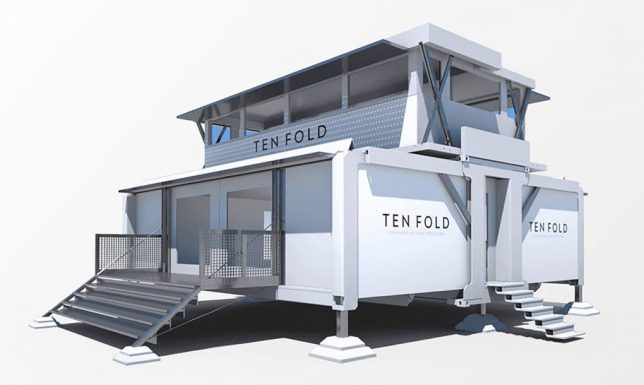
Requiring a single tool and very little power, these self-deploying structures are ready for use in minutes, expanding themselves to multiple times their compact travel size.

Based in the United Kingdom, Ten Fold Engineering’s structures can be packed onto ordinary trucks, conforming to road-worthy dimensions for maximum flexibility.

The company boasts myriad possible uses, from medical clinics and mobile hotels to on-demand offices and private retreats — the sale pitch in the video above is a bit blandly corporate, but the mechanics of the thing unfolding are gorgeous.

Their custom pin-jointed linkages help them open and close easily with minimal energy requirements and using just a single (presumably sonic) screwdriver. They are modular and can be customized with various arrangements of floors, doors, windows and dividers — they can even be shipped with furniture inside.

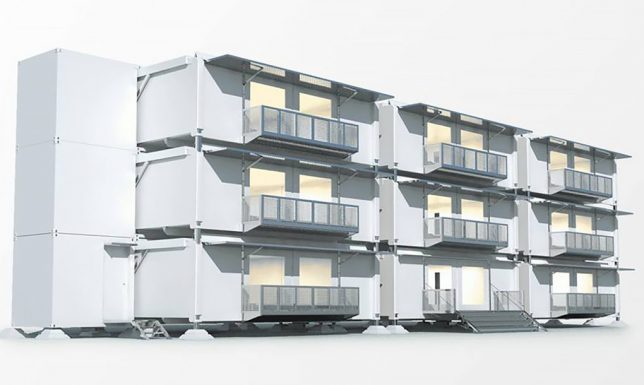
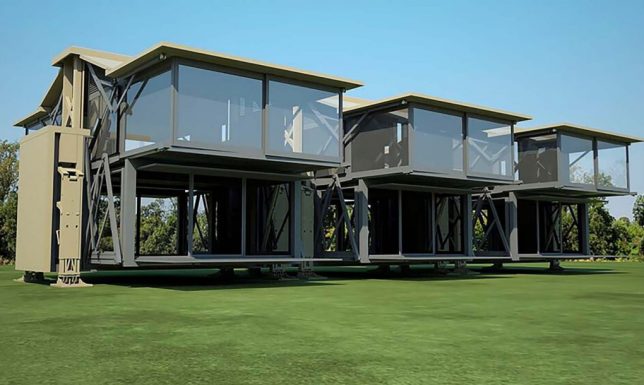
The company is also experimenting with designs for multi-story structures as well as stackable variants, opening up a whole world of possibilities.

Even the designs show an appealing variety of aesthetic possibilities, including dynamic modern looks and spacious expanding ceilings that go a step beyond typical prefab home possibilities.

Thanks to their variable footings, the units can be put up on uneven or sloped ground, stabilizing to sit flat from the perspective of the occupant.

The buildings can go off the grid but also feature optional attachments for solar panels and batteries, presenting an array of potential power possibilities.

At around 700 square feet and $ 130,000 the base models aren’t cheap, but for someone with the urge to roam they make a pretty stylish and comfortable option for a semi-mobile home.

Share on Facebook


[ By WebUrbanist in Architecture & Offices & Commercial. ]

[ WebUrbanist | Archives | Galleries | Privacy | TOS ]


WebUrbanist

 
Comments Off on Flat-Pack Mobile Architecture: This Building Will Self-Construct in 8 Minutes

Posted in Creativity


Do You Need a Photography Resume?

11 Jul

In the photography world, there is a lot of emphasis on having a portfolio, but hardly any attention is ever given to the photography resume. So do you even need a photography resume at all? The question is largely debatable and boils down to the type of photography you are aiming to do. In this post, I’ll highlight some scenarios when you might need a photography resume (along with what to include in it), and when you do not likely need one.

When You Might Need a Photography Resume

In my seven years of working as a freelance corporate photographer, I’ve been asked to present a photography resume only a handful of times. Each time, it was when I was being considered for a part-time or full-time photography role. If you’re applying for a salaried photography position within a company or being listed with a creative agency, this is when you might need a resume.

Do You Need a Photography Resume?

While it’s rare for any commercial client to require a resume for a freelance photography job, it’s still good to have one on hand just in case. But if your target client is non-commercial with a focus on something such as weddings or families, you probably won’t ever need to submit a photography resume.

When You (Probably) Don’t Need a Resume

For most freelance photographers, it’s rare that a client will ask for a resume in order to be considered for a gig. Typically, the emphasis for freelance photo shoots is more on your portfolio and how you handle your correspondence (i.e., email, phone calls, in-person meetings). This is true for both consumer (eg. wedding, family) and commercial (eg. corporate event, headshot) photographers.

Can you imagine a bride asking a wedding photographer for a resume? Or better yet, can you imagine what a wedding photographer’s resume might look like? Having a list of all of the weddings a photographer has ever shot doesn’t matter unless you’re aiming to be a celebrity wedding photographer.

Do You Need a Photography Resume?

Keep a Resume on File

The good news is that resumes aren’t terribly difficult to create, especially with the existence of LinkedIn. For all of the naysayers who don’t find LinkedIn relevant, I admit that it may be more or less useful depending on where you’re located. Here in Seattle, LinkedIn is a very active recruiting tool and social network where you can also store your electronic resume for anyone can see. As a full-time freelance photographer, I think it’s a good thing to have my professional resume seen by as many prospective clients as possible.

What to put on your resume

What should you include on your resume? There are a few staple items that should definitely be included, but the rest of the details depend entirely on why you’re submitting the photography resume in the first place. Personally, I have zero educational background or full-time employment that has anything to do with photography. Yet I still include my education and work experience to show that I have some.

As for my position as a full-time freelance photographer, I list that as my most current work experience. Writing the description for this position was rather awkward at first, but it actually became quite interesting when I put all of the skills I actually perform as a photographer into words. Consider every single part of your photo shoot workflow, from scouting and booking locations to post-production and delivering final photos to your client under tight deadlines. There are a lot of professional skills that go into being a photographer, so detail it out for both yourself and prospective clients. Include the following:

  1. Your name and contact info.
  2. Educational background.
  3. Any relevant experience you have.

Do You Need a Photography Resume?

Focus on Your Portfolio

Instead, what should matter to are these things:

A Curated Portfolio

As a photographer, your portfolio IS your resume. It should contain only your very best work that visually showcases your skills. How many images you choose to include in your portfolio is completely up to you, but generally, 15-20 images per category is a good amount.

Testimonials From Clients

Testimonials are basically your references. They should be short, accurate statements that reflect your process and what your client liked about working with you. Although it’s rare for anyone to actually call and verify your testimonials, they’re still important to include as they give the potential client a glimpse at what others think.

Do You Need a Photography Resume?

By James Royal-Lawson

Client List

Most consumer (wedding, family) photographers won’t need a client list unless the names of the couples and families are recognizable. However, commercial or corporate photographers may want to include a list of notable clients with whom they have worked. Typically, it’s okay to just make a list of client brand names, but you can also include tear sheets (a screenshot or copy of your published final product). This helps prospective clients get an idea of the types of clients and projects you’ve worked with before.

Case Studies

Consider taking your portfolio a step further than the average photographer by including a few case studies. Simply pick your top 3-5 photography clients that you’ve worked with, and include the best 5-10 images to showcase from each project. Use those images along with some personal written commentary that describes how you decided to tackle the photo shoot. Also, consider adding any behind-the-scenes photos or diagrams that show any setup details. Use these case studies to show off how you approach a photo shoot. After all, a prospective client wants to know not only that you can create an image, but what it’s like to work with you.

Do You Need a Photography Resume?

In Conclusion

Depending on your ultimate goal as a photographer, you may or may not ever have to create a photography resume. It depends entirely on what you strive to achieve as a photographer. What are your thoughts on having and using a photography resume?

The post Do You Need a Photography Resume? by Suzi Pratt appeared first on Digital Photography School.


Digital Photography School

 
Comments Off on Do You Need a Photography Resume?

Posted in Photography


New firmware brings USB-power and more to Hasselblad X1D-50c

11 Jul

Hasselblad has released a firmware update for its 50MP X1D compact mirrorless medium-format camera. Firmware version 1.17.0 adds a number of new functions to the camera, including power from USB, an added overlay for the spot metering area, a visual overexposure warning, a grid overlay in video live view and recording, and a clickable white balance icon in live view.

Bug fixes cover a front focus issue that could occur in certain situations, an incorrect “No Card” indication has been fixed, improved USB stability and tethered performance and more.

To install the update, make sure to use a fully charged battery and be prepared for the procedure to take up to 12 minutes to complete. X1D users can download the update on the Hasselblad website after logging on with their credentials.

Articles: Digital Photography Review (dpreview.com)

 
Comments Off on New firmware brings USB-power and more to Hasselblad X1D-50c

Posted in Uncategorized


How to Make Headshots That Glow

11 Jul

I’d like to share a particular technique I use to capture a “glowing subject” effect for headshots. You may be disappointed to hear that, by glow effect, I don’t mean your headshots will literally glow, like in the dark, because they most likely won’t. But that’s okay because this technique is actually better than that and who wants a headshot that literally glows anyway? To the point, when set up correctly, you’ll end up with a subtle, spotlight-like feel on your subject which appears to glow, hence the title of this article.

headshots that glow example

The process

The process consists of a pretty straight forward lighting setup involving the use of different light levels for your key and background light and a fairly long lens. Essentially, you emphasize your subject by allowing light and focus to fall off as it moves toward the background. Here are the details:

To get the effect I use a 70-200mm f/2.8 lens at around 200mm. I recommend a long and fairly fast lens zoomed all the way into the longest focal length. A long (telephoto) lens will compress the scene and keep your subject from appearing distorted and bent, the way a wide lens would. It will also give you a nice, shallow, depth of field.

headshots that glow lens

Background choice

You’ll want to choose your background first before setting up all of your lights. Unless, of course, you enjoy moving them around for the exercise, which I don’t. I often like to add some interest to each headshot by choosing a background that suggests a kind of “on location” environment. I set mine up in the studio, but backgrounds like this can be found almost anywhere.

headshot background

Keep in mind that the background will be soft in the final photo as a result of using the long end of the 200mm lens and a large aperture, so plan accordingly. To find your background you may find it helpful to focus on something close, reframe, and get some shots of your background out of focus just for test purposes.

Also, keep in mind that you’re going to place your subject at least six to seven feet from the background. Make sure you have room to do this while also having the appropriate distance in front of your subject to frame a good headshot at 200mm. To be safe, give yourself 15 feet in front of the subject.

headshots that glow distance to subject

Lighting

After finding a good background, it’s time to set up the lights. First, I’d like to give special thanks to my model, the mannequin, for participating in this demo.

headshots mannequin

Main light

The setup I’m using here is called clamshell lighting, with a rim light or kicker (whichever you prefer to call it, also known as an accent light) added on the side of the face. The main light is above the subject and centered. I most often use an AlienBees B800 light with a beauty dish modifier, softened with a diffusion sock or two. Sometimes I’ll use more than one sock so that I can effectively keep my aperture around f/3.5 or maybe even f/2.8 with no sync-speed issues. If you’d like to sculpt the light further, try using a grid on the beauty dish.

headshots lighting setup

I’ve also used a large octabox in place of the beauty dish. However, I think the beauty dish works well for this particular look. I won’t go into great detail about how to best use a beauty dish, but ideally, you’ll want to line the center reflector up with the subject’s face.

Adjust the light depending on your subject’s bone structure, moving it further up and in for more definition in the cheeks, etc. Typically I have the dish about two feet back from the subject (toward camera) and about a foot overhead, focused down at an angle. Boom the light and beauty dish over the subject with a c-stand or whatever boom arm you may have handy.

Addition lights and reflectors

Next, add a reflector under the subject’s face (right above waist level or just out of frame) to bounce light back up and fill the shadows under the chin. The size of the reflector really comes down to what you’re comfortable using.

headshots reflector

Use a strip softbox with a grid for the rim or kicker light. I’ll place the light a few feet behind the subject and about two feet off to one side or the other, aimed back at the subject. Set this light to an exposure equal to your key light (as low as it goes with an AlienBees B800).

headshots lighting

Lastly, set up a background light. You can use any method of diffusion you have at your disposal for your background light. I try to keep mine fairly soft and even. The trick is to underexpose your background a few stops. By this, I mean a couple of stops under the exposure of your subject.

How many stops is a matter of personal preference. However, you don’t want to go too dark or have an exposure too similar to your subject’s exposure, or you’ll loose the effect. Because the key and rim are already set to the lowest light level, you’re going to want to either use heavy diffusion or put some distance between your light and background. Turning the light away from the background works too. Underexposing the background a couple of stops is a critical part of the process.

headshots background headshots background

Conclusion

That’s it. Don’t forget to thank our model, the mannequin, and you should be ready to go! Or shall I say, ready to glow? Hmmm.

Please post any questions or comments you have in the area below, and remember to share your headshots as well.

The post How to Make Headshots That Glow by Carlisle Kellam appeared first on Digital Photography School.


Digital Photography School

 
Comments Off on How to Make Headshots That Glow

Posted in Photography


LG G6 scores 84 points in DxOMark testing, lags slightly behind closest rivals

11 Jul

DxOMark has published its image quality test results for LG’s current flagship smartphone, the LG G6. The G6 comes with a dual-camera setup that features two 13MP image sensors. In the main camera the sensor is coupled to an F1.8 image-stabilized lens. The secondary super-wide-angle camera comes with a slower F2.4 aperture and has to make do without optical image stabilization. In video mode the G6 can record up to 2160p/30fps footage.

As usual, DxOMark has tested the main camera only and with an overall score of 84 points the G6 is on the same level as last year’s Motorola Moto G Plus or the iPhone 6s. Thanks to excellent exposures, good white balance, vivid color, high levels of detail, and a fast autofocus in bright light the G6 achieves a photo sub-score of 85 points. Negative points include an increase in noise and a reduction in low-contrast detail in lower light.

In video mode the G6 scores 83 points, again thanks to a good performance in brighter conditions. Video footage shows accurate exposure, wide dynamic range, good detail and accurate white balance. Color shading is well under control and the testers liked the efficient stabilization system. You can read the full report on DxOMark.com or find our own comprehensive review of the LG G6 here.

Articles: Digital Photography Review (dpreview.com)

 
Comments Off on LG G6 scores 84 points in DxOMark testing, lags slightly behind closest rivals

Posted in Uncategorized


Nikon reveals full-frame AF-P Nikkor 70-300mm F4.5-5.6E ED VR

11 Jul

After introducing an AF-P 70-300mm telezoom for its crop-sensor DSLRs last year, Nikon is adding a full-frame version to the mix. The AF-P Nikkor 70-300mm F4.5-5.6E ED VR is the first FX Nikkor lens to offer a pulse (stepping) motor, with quieter autofocus ideal for video shooters.

It claims 4.5 stops of stabilization, which is two stops better than 2.5 claimed on Nikon’s website for the current 70-300mm F4.5-5.6. This updated version also provides a shorter minimum focus distance of 1.2m / 3.94ft (compared to 1.5m / 4.9ft), ‘dust and drip resistance,’ a 9-blade aperture and an ED element to reduce chromatic aberration. It also has electronic aperture control for smooth exposure transitions while shooting video and bursts.

The AF-P 70-300mm F4.5-5.6E ED VR will sell for $ 700 with availability to be announced later.

NIKON INTRODUCES NEW FULL-FRAME TELEPHOTO ZOOM LENS: THE AF-P NIKKOR 70-300MM F/4.5-5.6E ED VR

MELVILLE, NY (July 11, 2017 at 12:01 A.M. EDT) – Today, Nikon announced the new AF-P NIKKOR 70-300mm f/4.5-5.6E ED VR, modernizing this popular zoom lens with a myriad of the latest Nikon technologies. The new lens features enhanced Vibration Reduction (VR) image stabilization capability and integrates a stepping motor for fast and quiet AF performance, making it Nikon’s first full-frame AF-P lens. This new NIKKOR lens is a versatile, compact telephoto option for intermediate FX and DX-format photographers looking to capture sports, wildlife, candids, travel and other subjects at long distances, all with stunning clarity.

“This latest lens reaffirms Nikon’s commitment to giving FX-format shooters of all levels the unparalleled quality of NIKKOR glass, with the benefits of our latest optical technologies,” said Kosuke Kawaura, Director of Marketing and Planning, Nikon Inc.

Updated with the Latest NIKKOR Lens Technologies
Whether capturing a baseball game from the bleachers or the sights of a scenic vacation, the new AF-P NIKKOR 70-300mm f/4.5-5.6E ED VR is a versatile lens that helps users capture sharp images and video, even in challenging light. The new AF-P NIKKOR 70-300mm is lighter than its predecessor, despite packing new technologies that help those shooting photos and video achieve stellar results. Enhancements to the lens include:

  • Improved Vibration Reduction (VR) System: The new AF-P NIKKOR 70-300mm lens provides users with up to 4.5 stops* of VR stabilization, to help create sharp photos and smooth video, even in low light or while handheld. Users can choose from either Normal or Sport VR Modes for added stability when shooting from a non-stationary location.
  • Lightweight with Stepping Motor Technology: This AF-P lens uses a stepping motor for fast and quiet autofocus, which reduces the sound of lens operation while recording HD or 4K UHD video. This new technology also contributes to the lens’ reduced weight, making it easy to carry on all-day excursions.
  • Electronic Diaphragm: This lens takes advantage of the fast burst speed of Nikon DSLR cameras, as the Electronic Diaphragm not only provides smooth exposure transitions during video capture, but also helps maintain consistent exposure during high-speed shooting, such as when photographing sports.
  • Get Close: The AF-P NIKKOR 70-300mm lens features a minimum focus distance of only 3.94 ft. (1.2 meters) and a reproduction ratio of 0.25x, letting users get even closer to capture the most extravagant details, even at 300mm.
  • Lens Construction: The lens features dust and drip resistance, along with a metal lens mount for durability. It features a 9-blade diaphragm for a natural, circular bokeh. The lens also features an ED element to significantly reduce instances of chromatic aberration.

Price and Availability
The Nikon AF-P NIKKOR 70-300mm f/4.5-5.6E ED VR lens will have a suggested retail price (SRP) of $ 699.95**, and availability will be announced at a later date. For more information on this new NIKKOR lens as well as the latest Nikon products, please visit www.nikonusa.com.

*Based on CIPA Standard. This value is achieved when FX-format compatible lenses are attached to a FX-format digital SLR camera and zoom lenses are set at the maximum telephoto position.

**SRP (Suggested Retail Price) listed only as a suggestion. Actual prices are set by dealers and are subject to change at any time. Specifications, equipment and release dates are subject to change without any notice or obligation on the part of the manufacturer.

AF-P Nikkor 70-300mm F4.5-5.6E ED VR specifications

Principal specifications
Lens type Zoom lens
Max Format size 35mm FF
Focal length 70–300 mm
Image stabilization Yes (4.5 stops)
Lens mount Nikon F (FX)
Aperture
Maximum aperture F4.5–32
Minimum aperture F5.6–40
Aperture ring No
Number of diaphragm blades 9
Optics
Elements 18
Groups 14
Special elements / coatings 1 ED element
Focus
Minimum focus 1.25 m (49.21)
Maximum magnification 0.25×
Autofocus Yes
Motor type Stepper motor
Full time manual Yes
Focus method Extending front
Distance scale No
DoF scale No
Focus distance limiter No
Physical
Weight 680 g (1.50 lb)
Diameter 81 mm (3.17)
Length 146 mm (5.75)
Sealing No
Colour Black
Zoom method Rotary (extending)
Power zoom No
Filter thread 67.0 mm
Hood supplied Yes
Hood product code HB-82
Tripod collar No

Articles: Digital Photography Review (dpreview.com)

 
Comments Off on Nikon reveals full-frame AF-P Nikkor 70-300mm F4.5-5.6E ED VR

Posted in Uncategorized


The Laowa Magic Shift Converter brings easy lens-shifting to the Sony E-Mount

11 Jul

Venus Optics, the Chinese maker of the Laowa lens brand, has launched the Laowa Magic Shift Converter (MSC). The Magic Shift is designed to be used with Canon or Nikon mount lenses and Sony Full Frame E-mount cameras, and adds shift capabilities to your super-wide-angle lenses.

According to Laowa, the Magic Shift works specifically well with the company’s own Laowa 12mm f/2.8 Zero-D ultra-wide angle lens, which it converts into a 17mm f/4 Zero-D lens with a +/- 10mm shift capability.

Laowa says that, thanks to a patented internal optics system, there is no vignetting even at maximum shift and the impact on image quality is minimal as well. In addition, the MSC comes with a 360° rotation structure which allows photographers to shoot in both horizontal and portrait orientation.

Like conventional shift lenses, the Magic Shift Converter is aimed at architecture photographers, allowing them to compensate for converging parallels when shooting tall buildings or other structures with the lens angled upwards.

The Laowa Magic Shift Converter (MSC) Canon variant is currently available to pre-order on the Venus Optics website and at authorized resellers. Shipping is expected to start in late July/early Aug. The Nikon variant should be available two months later.

Articles: Digital Photography Review (dpreview.com)

 
Comments Off on The Laowa Magic Shift Converter brings easy lens-shifting to the Sony E-Mount

Posted in Uncategorized