RSS
 

Archive for June, 2017

Peak Design Everyday Backpack Review

25 Jun

Peak Design Everyday Backpack 20L/30L
$ 260-290/£204-227 | www.peakdesign.com | Buy Now

I can’t imagine that there has ever been a time when photographers had more camera bag options than we do today. There are more manufacturers, styles and price points than one can count. From generic knockoffs to designer leather, there is a bag out there to carry your camera, lenses and accessories.

But what if you want to carry your camera and some other stuff you need through the day? Maybe you’re a traveler and you want to have a water bottle, a raincoat and some ibuprofen as you hike through Paris? Or what if you are a student who needs a computer, a few books and lunch for a day at school? Or what if you just want to carry your everyday things with you as well as your camera? Well, then your options are a little more limited.

Maybe you’re a traveler and you want to have a water bottle, a raincoat and some ibuprofen as you hike through Paris?

Pulling out dividers in a photo backpack to fit in books, wrapping the camera in a towel and stuffing it in a daypack, or strapping a small camera bag to your hiking pack are all DIY solutions that folks have tried and found unsatisfying. The few options on the market tended to be bulky, difficult to access and frequently under-delivered as far as understanding what non-photo gear someone would want to carry.

In 2015, Peak Design launched its Everyday Messenger on Kickstarter with the goal of creating a bag that would both carry camera gear and the everyday stuff that someone might need for a day of work, school, travel or just living life. Proving that there was a real need for a bag like this, the company hit its funding goal in a single day and would eventually be funded to the tune of $ 4.8 million from over 17,000 backers.

This led Peak Design to start a second Kickstarter in 2016 to fund a backpack design (along with a tote and sling) for those of us who understand that two straps carry weight better than one. Once again, the new designs were funded successfully and the Everyday Backpack in 20L and 30L sizes was released to the public.

Specifications

20L

  • 46 H x 30 W x 17 D cm (18” H x 12” W x 6.75” D)
  • 1350g (2.9 lbs.)
  • Holds up to a 15” laptop

30L

  • 51 H x 33 W x 20 D cm (20” H x 13” W x 7.75” D)
  • 1542g (3.4 lbs.)
  • Holds up to a 16” laptop

The ultralight waxed Kodra synthetic canvas is DWR coated for weatherproofness and comes in a Charcoal gray with red stitching accents or a lighter Ash gray with blue stitching accents and tan leather touchpoints (handles, zipper pulls, etc).

In Use

Many times manufacturers make claims about the design of their products that feel overstated when you are actually using them. I have to say that, for the most part, the design of the Everyday Backpack works just as it was intended to. I took the 20L on a trip to Europe recently and beat the heck out of it – crammed it under airplane seats, stuffed it with groceries, soaked it in epic rainstorms. All the while, I was accessing my gear hundreds of times to take photos at every opportunity. I came away pretty impressed.

Photo courtesy Peak Design

Unlike a majority of camera bags on the market, the Everyday Backpack doesn’t use a system of individual padded dividers to create compartments for your gear. Instead, it uses what Peak Design calls ‘FlexFold’ dividers. This is a system of full-width internal shelves that can be positioned in the bag. The shelves have the ability to fold out of the way to create larger spaces, they also have the ability to fold up and create subdivided spaces. The design is a little difficult to explain in words or photos and your best bet may to just watch this video.

I was surprised at how well these worked generally. I was able to shift from a mirrorless layout to an overnight bag for an unexpected trip and then back again in moments. There are limits, and if you have specific needs you’ll be re-velcroing the shelves as well as folding/unfolding them, but it’s really a clever design overall.

The three main drawbacks I noticed were that the folding subsections could ‘unfold’ if something heavy (such as a lens) was in an adjacent subsection. In addition, since the shelves and subsections are not ‘sealed’ in the way that a padded-divider backpack is, small items like lens caps tend to wander around the bag easily. Finally, this design is not one that will allow you to use every inch of the bag for gear in the way a traditional camera backpack would. The idea is to have your camera get in one part of the bag and other everyday items in another.

The Everyday Backpack has four access points. The top section uses a flap cover that is secured with Peak’s excellent MagLatch closure that allows easy blind one-handed operation. The MagLatch has multiple attachment points allowing the upper section to expand to carry bulky loads or tighten up to make the pack as small as possible.

Then there is a top access computer/tablet/flat-stuff section that sits against your back. The other two access points, the ones you will use most often to access your camera, are dual full-length zipper openings on either side of the bag. The idea is that you slip one shoulder strap off and swing the bag around in front of you horizontally to access your gear.

A very full 30L Everyday Backpack

Overall, access is very well done. I was impressed how the fullness of any one area of the bag doesn’t affect accessing of any other area. The top section can be stuffed with lunch and extra layers of clothing and you can still use the side access to grab your camera or change lenses. This is one of the most crucial aspects in making a successful ‘everyday’ design and it is where many bags fail. One thing to note, however, is that the drawback to this design is that one cannot lay the bag on the ground and flip it open to access every piece of equipment at once. If that is how you tend to work out of your backpacks, the Everyday Backpack may not be for you.

There are a lot of neat design aspects to the Everyday Backpack and it would make a long article much longer to list them all. So in no particular order, here are a few of my favorites. The weatherproof fabric and zippers held up to some truly torrential rainstorms. Built in external lashing straps allow for a surprising amount of useful external carry. I strapped everything from groceries to a jacket to sandy shoes to the outside of the pack. The external side pockets both hide the waistbelt and external lash straps and can hold a water bottle or tripod.

There are a ton of small pockets in the bag for batteries, pens, cords, passports and whatnot. This not only gives you a place for all the little things, but it keeps them from bouncing around the bag or getting crammed together in the bottom. Every strap and handle is done in ‘seatbelt’ material that is soft and strong.

Finally, and particularly important for some folks, there is little about this pack that looks like a camera bag. You may look like a tourist or a student with your daypack on, but nobody is going to peg you as walking around with thousands of dollars in camera gear on your back. At least not until you stop to take their picture.

What didn’t I like? As with any bag, even really good ones, I had a few nitpicks, but I stress that they were all pretty minor. The most significant one was that I thought the shoulder straps could have been better padded. While they are ergonomically curved and have a clever axial rotating attachment system, users may not be impressed if they are used to technical outdoor style pack straps.

While there is a waist belt, it isn’t padded and exists more for stability than for taking weight off of your shoulders.

That said, the straps weren’t uncomfortable, even on long days (and did seem to ‘break in’ after some use). I just feel like a bit more function instead of form could have served better in this area, especially for heavy loads and the 30L size. Likewise, while there is a waist belt, it isn’t padded and exists more for stability than for taking weight off of your shoulders. Good to have, but doesn’t carry much load.

Due to being somewhat narrow, a good thing when moving through crowds, and having a slightly rounded design, the Everyday Backpack doesn’t stand up on its bottom or side particularly well. This isn’t a serious fault, but it is worth remembering that it is likely to flop over when you set it down and that you shouldn’t leave any of the access points open lest things roll out (good advice for any bag, really).

The external side pockets are really useful for both water bottles and things like tripods. However, unless you have long arms, it may be difficult to reach that water bottle while the pack is on. It’s possible, but you end up feeling like a contortionist. Beyond that, anytime you have something in those side pockets, it becomes a lot more difficult to use the side access openings.

I’m a big believer in the idea that how we carry our gear is as important as the gear itself.

Finally, at $ 260, this is an expensive bag. While the market has expanded enough that there is nothing particularly unusual about a $ 260 bag these days, it can still be a difficult decision when a bag costs as much as a nice used prime lens. That said, I’m a big believer in the idea that how we carry our gear is as important as the gear itself. If you don’t enjoy using your bag, you won’t bring your camera. For me, this bag is worth the money.

20L vs 30L

The design of the 20L and the 30L backpacks are virtually identical. The 30L is just a bit, you know, bigger. How much bigger? Well, you can see the numbers published above, and you probably know that 30L is 50% larger by volume than 20L. But in the real world, I think I would put it like this…

The 20L is best for:

  • Mirrorless kits
  • Small DSLRs with compact zooms or primes
  • Squishing into a subway car or through a crowded bar
  • Being a daypack for traveling
  • Airplane travel as your “personal item”
  • Smaller framed people

The 30L is best for:

  • Pro DSLR kits
  • Fast zooms
  • Camera + a bunch of other stuff
  • School bag for textbooks
  • Being an overnight bag
  • Airplane travel as your only carry on
  • Bigger/taller people

These aren’t hard and fast rules, you can configure these bags in a lot of different ways to carry a lot of different things. But if someone was asking me which bag to get to use as an airline ‘personal item’, I’d have to say the 20L as it is right at (or very slightly over) the size limit for many airlines. If someone was telling me they just HAD to have their full-frame F2.8 zooms with them all day long, I’d point them to the 30L. The 30L is bigger on the back and makes squeezing through crowds tougher than the 20L. But if you thought you were going to grab a few groceries on the way home, you’d probably be happy that you had the 30L.

To be honest, if I had to recommend one, I would suggest the 20L. I believe that the smaller less conspicuous size fits more into the intended ‘everyday’ design. At 5’5 I’m shorter than average for a guy, and when I’ve got the 30L on there is no mistaking that I’m wearing a backpack. It’s not like the 20L disappears when I have it on, but it is less bulky and obvious and I find it easier to move through life because of its smaller volume.

You can, and perhaps should, chalk my 20L suggestion up to my body type, but it’s an opinion I have seen echoed by other photographers as well. If you can, try to see both packs side by side before you buy. If that’s not possible, there are some good YouTube videos that compare the two sizes.

What’s the bottom line?

It is hard not to come to the conclusion that the Peak Design Everyday Backpack is the best ‘carry a camera and some other stuff’ pack I have ever used. The flexible storage space, ease of access, non-photo storage options, tough construction and overall form factor come together in a package that is completely usable. It is a solid feeling bag that does what it is designed to do.

Now, nothing on this earth is perfect and the Everyday Backpack is no different. But aside from wishing that the straps were designed differently and acknowledging that the price-point is going to be off-putting for some, most of the rest of my complaints are minor at best. I would happily use this pack across town for the day or across the world for a month. If you are looking for a backpack that you can carry your camera gear along with the rest of your daily life I’m not sure how you would find anything better than the Everyday Backpack.

What we liked:

  • Clever divider system
  • Easy to access some of the things without accessing all of the things
  • Having one area stuffed full doesn’t affect access to other areas.
  • Well thought out organizational system
  • External lash options allow more carry options

What we didn’t like:

  • Expensive
  • Shoulder straps are not the most padded
  • Heavy items can cause subdividers to unfold if nothing under them when pack is slung around sideways
  • May not stand up on its bottom. May not stand up on side.
  • Small things can slip through the dividers easily and move around the pack

Articles: Digital Photography Review (dpreview.com)

 
Comments Off on Peak Design Everyday Backpack Review

Posted in Uncategorized


Hot mess: Remembering the Leica M8

25 Jun
The M8 was Leica’s first digital rangefinder. Smooth, sleek, but distinctly rough around the edges, it nevertheless laid down the basic pattern for the cameras that came after it, while remaining true to its film roots.

I share an anniversary with the Leica M8 – sort of. The M8 was announced in the same week that I started my career as a camera reviewer – September 2006. We were both very green, both a little unsteady on our feet and both decidedly unpolished.

Up to that point, Leica’s experiments with digital had been unconvincing. The clunky Digital Modul R was emblematic of the company’s lack of confidence when it came to digital. Designed to clip onto the back of R8 and R9 film SLR bodies and in effect convert them into digital cameras, the Digital Modul R was a good idea but a bad product. It took two years to actually ship, and when it did, it was extremely pricey, costing more than $ 5000 (and that’s without a camera body on which to mount it).

In the mid 2000s, whether or not Leica would ever bother to risk an digital M-series rangefinder was still an open question. After the much-maligned M51, Leica’s approach to upgrading the M-series in subsequent decades might charitably be described as ‘conservative.’

When it finally arrived, the M8 was a mixture of new technology and traditional rangefinder operation. It featured a 10MP APS-H format CCD sensor, a decent-ish LCD screen and a modern-ish menu system, but it retained the pure rangefinder focusing system and (by and large) the same ergonomics as previous M-series film bodies. And it was not, as Leica’s representatives were at pains to point out, definitely not intended to replace the M7.

Compared to Leica’s long-serving flagship film rangefinder (M7, left) the M8 was slightly bigger, heavier and noticeably cleaner in terms of design, thanks to the omission of the film wind and rewind levers.

For a lot of people, rangefinder shooting is a pain, but if you love it, you love it. While the rangefindery parts of the M8 were for the most part nice and mature, Leica was new to digital, and it showed. The first M8 I used personally, in late 2006, was a buggy mess. Its frame counter was basically just a random number generator, and its battery level indicator wasn’t much better. It also crashed frequently, and had a nasty habit of getting worryingly hot when it was turned off and placed inside a camera bag. These days, Sony trolls like to shout and scream about the a7-series overheating, but you could have fried an egg on that particular M8.2

And then there was the shutter. Leica’s M-series film bodies have rubberized cloth shutters which operate with an almost apologetically quiet ‘snick’ sound. I still shoot with an even older IIIC from time to time and unless you’re standing right next to the camera, its shutter is almost inaudible. By comparison, the M8’s shutter fired with a loud whirring ‘ker-cloink’ which I could never quite get used to. Very un Leica-like.

Not a great picture, but a good illustration of the M8’s ability to render detail. The lack of an AA filter meant that pixel-level output at low ISO sensitivity settings was very crisp.

Another thing I struggled to get used to was the M8’s 1.33X crop. When you look through the viewfinder of a crop-sensor DSLR, the increase in magnification is effectively invisible. You don’t need to mentally convert the field-of-view of an 18mm lens to 28mm equivalent in order to frame your shot accurately, because what you see through the finder is what you get.

Things aren’t so simple with a rangefinder. In a rangefinder, framing is approximate to begin with, and the limits of the frame are indicated by bright lines in the finder, which change depending on the lens you have mounted. Adding a crop factor makes things even more complicated.

Since the 1980s, there have typically been three sets of framelines built in to Leica’s rangefinders, which change to show indicators for pairs of focal lengths: 28mm and 90mm, 35mm and 135mm and 50mm and 75mm, depending on the lens you have mounted. Simple, right?

A rough illustration of the scene through an M8’s viewfinder with a 35mm lens attached. The inner framelines represent the approximate coverage of the 35mm lens (~50mm equivalent on the cropped-sensor M8) and the outer framelines represent 24mm (~30mm equivalent).

Almost all of Leica’s film rangefinders since the 1960s have featured 0.72X magnification finders, which are well-suited to shooting at the 35mm focal length, with 28mm lines (where present) indicated at the extremes of the finder. Of course on an M8, 35mm = 46mm, so Leica had to change the framelines.

But but this is where it gets confusing, because the magnification of the M8’s viewfinder was actually reduced compared to film (i.e., full-frame) cameras, to compensate for the increase in effective focal lengths resulting from the cropped sensor.3 When you attach a 35mm lens, you see framelines covering ~50mm and ~30mm equivalent fields of view. That’s all well and good, but of course rather than the 35mm lens field-of-view being represented by the outer set of lines, as would be the case on a non-cropped film body, they’re the inner set of framelines because of the crop. The outer set of lines is actually for 24mm and the two sets are pretty close together in the finder (see illustration above).

The end result is that with a 24mm or 35mm lens attached, the view through the M8’s finder looks a bit like a deconstructed zebra crossing. Faced with unfamiliar framelines, some experienced M-series users also found themselves second-guessing their effective focal lengths quite a lot when first using the camera. The M8’s framelines were optimized for accuracy at 0.7m, becoming increasingly inaccurate beyond that, which didn’t help matters either.

One of the weirder features of the M8 (and subsequent digital rangefinders) is the design of its memory card / battery compartment. Like the older film models, the entire baseplate must be removed if you want to swap either the battery or memory card. Sure – why not?

Let’s assume though that you’ve familiarized yourself with the unique framelines, you’ve grown used to the grey-on-black-on-grey menu system, you don’t mind removing the entire base of the camera to swap batteries and your M8 isn’t one of the ones that self-immolates. What kind of pictures can it produce? Really nice ones, actually – on the whole.

Although there were definitely better sensors on the market in 2006, the M8 was reasonably competitive in terms of detail and noise levels at low / medium ISO sensitivities, and the lack of an anti-aliasing filter means that images are really, really sharp. Auto white balance has never been a Leica strength, and JPEGs from the M8 tended to look a bit murky, but it was easy enough to get acceptable results from converted Raw files.

$ (document).ready(function() { SampleGalleryGridV2({“galleryId”:”2495158946″,”isMobile”:false}) })

Leica M8 Review Samples

36 images • Posted on Jul 31, 2007 • View album
Sample photoSample photoSample photoSample photoSample photoSample photoSample photoSample photoSample photoSample photoSample photoSample photoSample photoSample photoSample photoSample photoSample photoSample photoSample photoSample photoSample photoSample photoSample photoSample photoSample photoSample photoSample photoSample photoSample photoSample photoSample photoSample photoSample photoSample photoSample photoSample photo

As far as image quality was concerned, there was one major gotcha though, which inexplicably made it past Leica’s experten: infra-red sensitivity. Too much of it, to be specific. The M8 was very sensitive to IR light, which isn’t major issue most of the time, but when it’s a problem, it can be a real show-stopper. As reviewers found out, you’ll mostly see it when shooting green foliage (which sometimes comes out looking too yellow) and black manmade fabrics (which often come out looking distinctly magenta).

Leica’s solution – shipping two screw-in IR filters to all M8 owners for free – was really more of a goodwill gesture, and wasn’t until the introduction of the M9, several years later, that the problem was actually solved.

The M8 was superseded pretty quickly, by the M8.2 in 2008. The M8.2 introduced a quieter shutter, a more discreet black dot, a nicer body covering (the fluffy plastic finish of the M8 was cheap-feeling and icky), more accurate framelines and a badly-needed scratch-resistant coating on the rear LCD.

Partly because it was so quickly superseded, second-hand M8s can be picked up relatively cheaply these days, at least by the admittedly insane standards of previously-owned Leica digital rangefinders. But if you’re really curious about trying one, my advice would be to save a little extra and grab yourself an M8.2 instead.

Read about Leica’s current flagship digital rangefinder, the M10


1. The M5 was a highly advanced and eminently practical camera when it was released in 1971, but an utter commercial failure, and is widely (and probably unfairly) talked about as The Camera That Almost Ruined Leica.

At any rate, the M5 served as an early lesson (it would not be the last) to Leica’s product planners that while a lot of photographers might balk at weird film loading, external light metering, limited close focus capability and eye-wateringly high pricing, just about the only thing that Leicaphiles won’t put up with is change.

2. Author is a professional exaggerator. Do not attempt.

3. This might sound odd, but makes complete sense. Effective focal lengths are increased by the sensor’s crop, so Leica reduced the magnification of the M8’s finder because inevitably, M8 users would be mounting wider lenses to achieve similar fields of view to the ‘classic’ 28/35/50 primes. Hence the addition of 24mm framelines which actually show a 30mm field-of-view (etc.).

Articles: Digital Photography Review (dpreview.com)

 
Comments Off on Hot mess: Remembering the Leica M8

Posted in Uncategorized


Recycling Rockets: Ixion Will Turn Orbital Space Junk into Spacious Habitats

25 Jun

[ By WebUrbanist in Conceptual & Futuristic & Technology. ]

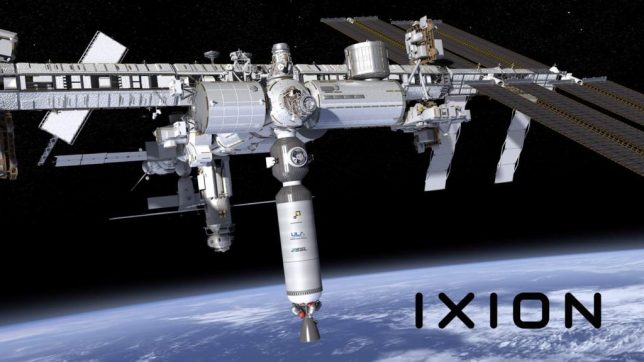
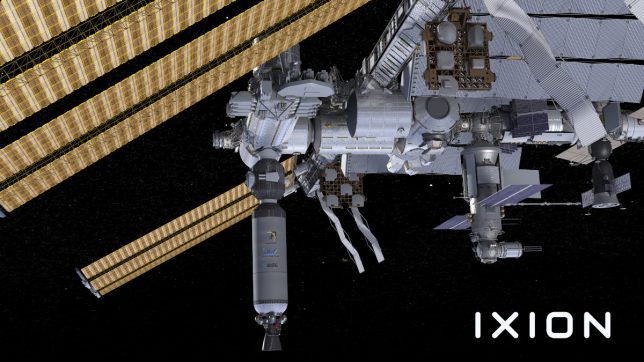
As part of their NextSTEP program, NASA has contracted a space company to turn trash into treasure, converting used rocket sections already being sent into orbit into habitation units rather than letting them drift or be destroyed.

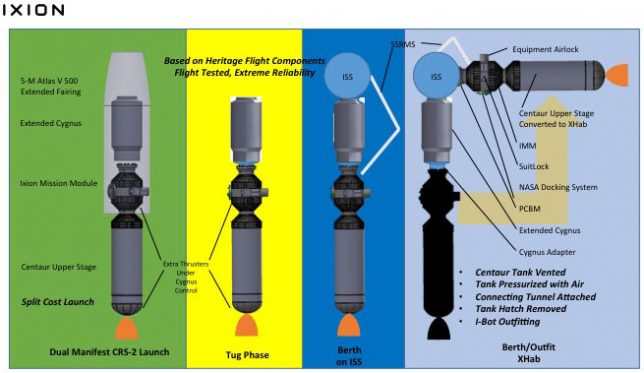
It takes an immense amount of effort and fuel to break out of the Earth’s atmosphere, yet upper stage rocket sections are routinely set adrift or de-orbited, burning up on reentry. Nanoracks believes these can be put to better use — their Ixion project aims to take large fuel-carrying rocket tubes, burn out whatever fuel remains and retrofit them for occupation.

Once the propellant-containing segment is vented in open space, remaining materials will oil off over the course of a few days. Then Nanoracks will fill the void with pressurized air from tanks attached to the outside. Humans (or robots) will take the next step, entering the capsule to add fabric, wiring and whatever else is needed. The design will factor all of these needs in advance, featuring operable hatches and attachment mechanisms as needed.

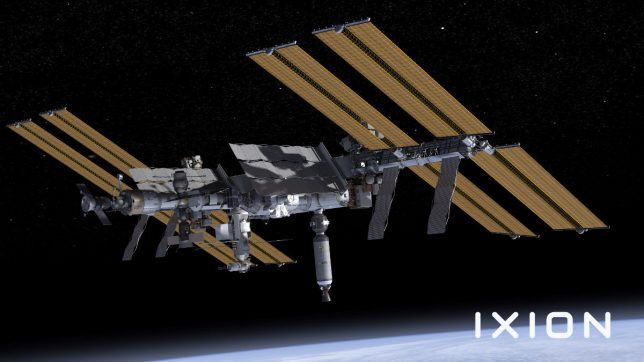
Initially, the plan is to attach these to the International Space Station for testing and to extend their habitable space. Future tubes could be used to form the basis of a commercial station or to serve other functions — the idea, in part, is to get out ahead of the demand, readying this space junk for unknown future applications. And this idea could be just the beginning: robotic space junk collection could eventually put the vast amounts of orbital debris circling the planet to much better use.

Share on Facebook


[ By WebUrbanist in Conceptual & Futuristic & Technology. ]

[ WebUrbanist | Archives | Galleries | Privacy | TOS ]


WebUrbanist

 
Comments Off on Recycling Rockets: Ixion Will Turn Orbital Space Junk into Spacious Habitats

Posted in Creativity


OnePlus 5 2x tele camera uses 1.6x optical in combination with digital zoom

24 Jun

When we shot our sample images with the brand new OnePlus 5 we noticed that the dual-camera’s 2x tele-module did not quite deliver the pixel-level image quality you would expect from the 20MP Sony IMX350 sensor. Images showed low levels of fine detail and looked as if they had been upscaled which would point towards some form of digital zoom implementation.

This has now been confirmed by OnePlus co-founder Carl Pei in a tweet. He clarified that the second lens on the back uses a 1.6x optical zoom and that digital zoom is used to reach the claimed 2x zoom factor. The cropped image is then upscaled to achieve the specified 20MP image size.

The company says it is using its SmartCapture multi-frame technology to make the zoom “lossless” but arguably not everybody would agree with this term. Exif viewers show the focal length of the wide-angle and tele lenses to be 24mm and 36mm equivalent respectively which would mean a 1.5x zoom factor. However, there is a chance Exif isn’t taking the SmartCapture portion of the zoom into account.

Some other dual-cam implementations we have seen, for example on the iPhone 7 Plus are using a 2x optical zoom with a smaller sensor than the main camera. It appears OnePlus opted for the same 1/2.8″ sensor size in both cameras. An optical 2x lens would probably have required a thicker body or noticeable camera bump.

Articles: Digital Photography Review (dpreview.com)

 
Comments Off on OnePlus 5 2x tele camera uses 1.6x optical in combination with digital zoom

Posted in Uncategorized


Video: Sony a9 falls short with Canon 300mm and 400mm lenses attached

24 Jun
<span id=”__caret”>_</span>?<span id=”__caret”>_</span>?<span id=”__caret”>_</span>?<span id=”__caret”>_</span>?<span id=”__caret”>_</span><br />

Sports shooters considering Sony’s speedy a9 have one major hurdle to overcome: glass. There’s a dearth of long, fast primes available to Sony FE shooters, and it seems like using off-brand glass while you wait for Sony to catch up just isn’t a great option.

In this video, photographer Dan Watson of Learning Cameras tried both the Sigma MC-11 and Metabones Mark IV lens adapters to test how well the a9 worked when attached to the Canon EF 300mm F2.8L IS II USM and Canon EF 400mm F2.8L IS II USM.

Watson mainly wanted to test the focusing capabilities, and unfortunately, the results were somewhat disappointing.

Before you dive into the video, it’s worth pointing a few things out. Our own Rishi Sanyal has tested the focus capability of the a9 with adapted lens, and points out a couple of caveats to Watson’s otherwise solid points:

First, the performance of far off-center AF points depends on the lens. While Watson is correct in pointing out that they don’t perform well with long lenses (despite working astonishingly fast with Sony’s own 100-400 F4.5-5.6), they do work well with shorter focal lengths (we’ve had success with a Sigma 85/1.4, Canon 35/1.4, 24-70/2.8, etc.). With these wider lenses, ‘Wide’ area mode will continue tracking subjects to the extremes of the frame.

Second, Sony A-mount lenses adapted with the LA-EA3 adapter do shoot at an impressive 10 fps with autofocus, something we confirmed with the 50/1.4 (as long as you’ve updated the firmware of the adapter).* With the Metabones and Sigma adapters though, as with all Sony FE bodies, only the L drive mode offers continuous focus. And it’s actually only 2.5 fps, not the 5 fps Watson mentions (technically L is 3 fps, but it slows to 2-3 fps with continuous focus).

With that out of the way, Watson’s video is a great resource for seeing how well (or not) the a9 performs when attached to the long, fast Canon primes sports shooters love. And while single-shot focus with central points is speedy and almost 100% accurate with long adapted lenses, the lack of true subject tracking (Lock-on AF modes) or continuous focus at speeds higher than ~2.5 fps (or in video) will probably be a deal breaker for many fast-action photographers.

Once you’ve lost the impressive high speed shooting advantages Sony baked into the a9, you might as well be shooting with any other camera. Moral of the story: stick to Sony glass and hope they keep churning out new lenses at break-neck pace.

You can watch the full demo for yourself up top. And if you’re considering jumping ship from Canon to Sony, keep this information in mind – like all previous Sony bodies, you’ll only have access to the a9’s slowest continuous drive mode when you’re adapting your own glass.


* We’ve not yet confirmed the performance of off-center points with long A-mount glass.

Articles: Digital Photography Review (dpreview.com)

 
Comments Off on Video: Sony a9 falls short with Canon 300mm and 400mm lenses attached

Posted in Uncategorized


Europeana launches 1914 – 1918 thematic collection

24 Jun
Military band, Lorraine 1915, unknown photographer, Max Kranz/Europeana

Europeana, which runs Europeana Photography, the online image archive that includes more than 2 million historical photographs from European collections in 34 countries, is launching the new Europeana 1914-1918 thematic collection, covering World War I.

The collection will be officially launched during the Europeana Transcribathon Campus Berlin 2017 which will be held on 22 and 23 June at the Berlin State Library. At the event teams from three generations and several European countries will compete to digitally transcribe as many World War One documents as possible, and link them to other historical sources such as early 20th century newspapers. Transcribathons are crowdsourcing events and gather people from across Europe and online to create digital versions of handwritten items. Since their launch in November 2016, several million characters and 12,000 documents, from love letters to poems, have been transcribed.

Frank Drauschke, of Europeana 1914-1918 project team says: “Most sources on Europeana 1914-1918 are written by hand, and often hard to decipher. Transcribathon aims to help us ‘polish’ a raw diamond by this making private memorabilia readable online. We utilise the power of our community to transcribe as many private stories and documents from diverse languages and regions of Europe and make them available to the public.”

Articles: Digital Photography Review (dpreview.com)

 
Comments Off on Europeana launches 1914 – 1918 thematic collection

Posted in Uncategorized


Facebook testing ‘profile picture guard’ feature that prevents sleazy photo theft

24 Jun

Facebook’s new ‘Profile Picture Guard’ feature makes your profile photos much harder to steal. Photo courtesy of Facebook

Photo theft is a big problem on Facebook, and the social network is finally doing a little something to combat it. Starting with its users in India, the Silicon Valley company is testing a feature called ‘Profile Picture Guard,’ which prevents other people from saving or even taking a screenshot of your profile pic.

As the headline suggests, Profile Picture Guard is still in the testing phase. In fact, it’s currently only available to users in India, the country that Facebook says inspired the feature.

‘In our research with people and safety organizations in India, we’ve heard that some women choose not to share profile pictures that include their faces anywhere on the internet because they’re concerned about what may happen to their photos,’ explains Facebook. So they designed a little peace of mind.

Here’s a look at how it works:

As you can see, the feature works in four ways. (1) It prevents people from saving, sharing, or (Android only for now) taking a screenshot of your photo. (2) It allows only you and your Facebook friends to tag the photo. (3) It adds a blue border and shield icon to your photo, indicating it’s ‘protected.’ And (4) if you so choose, you can overlay a watermark design across the entire shot.

Combine all 4 deterrents, and its far less likely you’ll find your profile pic on some random website. How much less likely? Facebook did some testing:

‘Based on preliminary tests, we’ve learned that when someone adds an extra design layer to their profile picture, other people are at least 75% less likely to copy that picture.’

Facebook ‘hopes’ to expand the feature to other countries soon. For our part, we hope they expand its scope even sooner. Protecting your profile picture from saving, sharing, and screenshots is a great first step; however, for the photographers out there, this kind of universal feature for all of their photos at once – or perhaps available for individual albums – would be a game-changer.

The ease with which photo thieves can filch photos off of social media sites like Facebook is one of the main reasons photographers choose to stay away. Profile Picture Guard is a small step in the right direction; a broader Picture Guard would be a giant leap.

Articles: Digital Photography Review (dpreview.com)

 
Comments Off on Facebook testing ‘profile picture guard’ feature that prevents sleazy photo theft

Posted in Uncategorized


Getting the shot: macro photos of paint and water that look like CGI

24 Jun

Vibrant colors of acrylic paint billow into clouds inside a water tank. © Photo by Alberto Seveso

Illustrator and photographer Alberto Seveso’s paint photography is out of this world. His images – macro photos of billowing clouds of color – look like they were generated by an animation program. But as he tells DPReview, it’s all very real.

The process itself, says Seveso, is quite easy: just pour varnish or acrylic colors into a water tank and take a burst of photos. Understanding exactly how to do that – what light you need, what works, and just as importantly, what doesn’t work – is the time-consuming part.

‘I spent a lot of time building all the stuff I use to shoot varnish into the water, and it’s still a work in progress,’ Seveso tells DPReview. ‘It’s very important to find the right light and, the hardest part, find the perfect mix between varnish and water and the way to pour this mix into the tank… not too fast not too slow.’

For his pictures, he uses either a Canon EOS 60D or Canon 7D Mark II with a Canon EF-S 60mm F2.8 macro lens attached. The tank is lit by either fluorescent light (personal projects) or higher quality tungsten Fresnel lights (for commercial assignments), two on either side of the tank, placed in front of either a black background or a softbox if he’s shooting on white.

You can see the setup for yourself in the BTS shots below:

$ (document).ready(function() { SampleGalleryV2({“containerId”:”embeddedSampleGallery_9818299609″,”galleryId”:”9818299609″,”isEmbeddedWidget”:true,”standalone”:false,”selectedImageIndex”:0,”startInCommentsView”:false,”isMobile”:false}) });

And here is a video Sony made to show off Seveso’s paint work (and sell some phones and tablets while they’re at it):

Seveso says he was inspired to create this kind of photography in 2009, when he saw ‘something similar but classic,’ probably ink drops in water.

‘I realized there was more to explore, different materials to mix, so I started to experiment with different kinds of liquid like acrylic colors, different types of oils, sparkling water, gels, metallic colors, ice, food coloring, and other things,’ he says. ‘Over the years, I’ve tried to develop a personal approach to this technique, developing the project in a very personal way and trying to focus on the details.’

Translation: macro photography.

These close-up, colorful photographs have become Seveso’s calling card. And what a gorgeous calling card they are.

$ (document).ready(function() { SampleGalleryV2({“containerId”:”embeddedSampleGallery_4295038061″,”galleryId”:”4295038061″,”isEmbeddedWidget”:true,”standalone”:false,”selectedImageIndex”:0,”startInCommentsView”:false,”isMobile”:false}) });

Before we let Alberto go, we asked him one more question. Does he have any advice or tips for people who would like to try this kind of paint photography for themselves?

His answer?

‘Practice,’ he told us emphatically. ‘It takes a lot of practice to understand the exact mix between liquids to get separate colors, details and color filaments – this is perhaps the hardest part.’

To see more of Alberto’s work, visit his website or follow him on Behance, Facebook, and Instagram.

Articles: Digital Photography Review (dpreview.com)

 
Comments Off on Getting the shot: macro photos of paint and water that look like CGI

Posted in Uncategorized


Pricing for Sigma 14mm F1.8 DG HSM and 24-70 F2.8 DG OS HSM Art lenses announced, undercuts the competition

24 Jun

Announced in February, two highly anticipated full-frame lenses from Sigma are finally on their way to consumers. Sigma has also announced pricing – the 14mm F1.8 DG HSM will cost $ 1600; the 24-70mm F2.8 Art will cost $ 1300. In both cases, that’s well below the current asking prices for Canon and Nikon versions of similar lenses.

Sigma says the 14mm in Canon and Sigma mount will ship this month, and the Nikon version will be available in July. The 24-70mm will ship for all three mounts this month. Considering there’s not much time left in June, that’s basically now.

Press release

Sigma Begins Shipping Its 14mm F1.8 DG HSM and 24-70mm F2.8 DG OS HSM Art Lenses

The world’s first and only F1.8 ultra wide-angle full-frame lens for DSLR cameras is available now for $ 1,599.00 USD; the new Sigma Global Vision workhorse zoom lens is available now for $ 1,299.00 USD

Ronkonkoma, NY – June 22, 2017 – Sigma Corporation of America, a leading still photo and cinema lens, camera, flash and accessory manufacturer, announced today the pricing and availability for its new Sigma 14mm F1.8 DG HSM and Sigma 24-70mm F2.8 DG OS HSM Art lenses from its lauded Global Vision line. The ultra-wide angle full-frame 14mm F1.8 Art lens begins shipping in June 2017 for Canon and Sigma camera systems and in July 2017 for Nikon camera systems, for a retail price of $ 1,599.00 USD. The standard zoom full-frame 24-70mm F2.8 Art lens begins shipping in June 2017 for a retail price of $ 1,299 USD.

The Sigma 14mm F1.8 Art, which is the first and only F1.8 ultra wide-angle lens among interchangeable lenses for digital SLRs*, incorporates the same aspherical element as Sigma’s critically acclaimed 12-24mm F4 Art, allowing the lens to deliver a new dimension of visual experience. Boasting outstanding image quality from center to edge, the 14mm F1.8 Art features an 80mm front lens — the world’s largest glass aspherical lens in the industry, offering photographers an ultra-wide prime with virtually no distortion, flare or ghosting. Equipped with a superfast and efficient autofocus system, three FLD (“F” Low Dispersion) elements, and four SLD (Special Low Dispersion) elements to reduce chromatic aberration and coma flare, the 14mm F1.8 Art is suitable for a wide range of photographic needs including astrophotography, architecture and landscape photography.

The 24-70mm F2.8 Art lens, Sigma’s new workhorse standard zoom lens, touts a brand new Optical Stabilizer (OS), Hypersonic Motor (HSM) for highly efficient and fast autofocus, as well as a dust- and splash-proof mount with rubber sealing. The 24-70mm F2.8 Art lens embodies all the technical qualities and finesse that define the high-performance Sigma Global Vision Art series. A popular industry focal range covering a wide array of shooting scenarios, the 24-70mm’s optical design also includes three SLD (Special Low Dispersion) glass elements and four aspherical elements to ensure image accuracy and sharpness. The 24-70mm F2.8 Art aspherical elements use Sigma’s thicker center glass design and highly precise polishing process, delivering stunning images and bokeh effects. The lens’ purpose-built structure boasts a new metal barrel for optimal durability with TSC composite internal moving components designed to resist thermal contraction and expansion.

Both the 14mm F1.8 DG HSM and the 24-70mm F2.8 DG OS HSM Art lenses are available in Canon, Nikon and Sigma mounts. The Sigma and Canon mount lenses work with Sigma’s MC-11 Sony E-mount converter. The Nikon mounts feature the brand new electromagnetic diaphragm.

Sigma 14mm F1.8 DG HSM Art Lens Features and Benefits:

> Sharp, rich image quality

  • Minimized chromatic aberrations: Three FLD (“F” Low Dispersion) glass elements and four SLD (Super Low Dispersion) glass elements help reduce transverse chromatic aberration, which tends to be noticeable in shots taken with ultra wide-angle lenses. The result is outstanding image quality from the center of the image to the edges.
  • Distinctive bokeh effect: Even at the 14mm ultra wide-angle of view, F1.8 brightness makes possible a very shallow depth of field with the subject standing out dramatically against a pleasingly softened background. It’s the unique mode of expression that only a large-diameter lens can deliver.
  • Minimized distortion: Serving as the front lens element, the large 80mm precision-molded glass aspherical lens effectively minimizes distortion. Offering excellent peripheral brightness, this lens delivers outstanding image quality from the center to the edges.

> Offers full-frame coverage

Sigma 24-70mm F2.8 DG HSM OS Art Lens Features and Benefits:

> Superior optical performance

  • Optimal image quality for ultra-high-megapixel DSLRs: This lens offers top performance from the center to the edges of the image thanks to the optical system minimizing coma, which causes points of light to streak, and transverse chromatic aberration, which cannot be corrected via aperture control. The optical system also minimizes distortion, which can be particularly evident in wide-angle shots, resulting in excellent optical performance throughout the zoom range.
  • Expressive bokeh effect every time: At wide-open aperture, this lens offers outstanding photographic expression. The area in focus is extremely sharp, while the background exhibits a beautiful, creamy bokeh effect with only slight spherical aberration. Since large-diameter zoom lenses are often used at wide-open aperture, Sigma has paid close attention to the shape of the bokeh, aiming for artistic circularity.
  • Aspherical Lens Processing Technology: The Sigma 24-70mm F2.8 DG OS HSM Art incorporates an aspherical lens element that helps achieve extremely high resolution. This element is much thicker at the center than the edges, and forming its unusual shape is a feat of manufacturing technology. Moreover, Sigma processes the surface of this aspherical lens element with ultra-precise tolerances that are measured in hundredths of a micrometer. This extremely fine surface allows the Sigma 24-70mm F2.8 DG OS HSM Art to deliver a very natural and smooth bokeh effect, without the visible concentric rings that afflict typical aspherical lens elements.

> Fast and nimble autofocus photography

  • Designed for advanced utility in a wide variety of situations, the optical stabilizer (OS) offers a powerful stabilization effect. The newly designed large hypersonic motor (HSM) offers 1.3 times the torque of its predecessor for exceptionally stable performance.

Sigma Global Vision Line Features & Benefits:

  • Each lens is eligible for user customizable micro-focus and in-home firmware updates with the optional USB Dock and Sigma Optimization Pro software.
  • Each unit is crafted in Aizu, Japan and individually tested for QC and optical performance with the exclusive A1 MTF device.
  • Sigma’s Exclusive Mount Conversion Service allows lenses to be switched between any released mounts (fee-based).
  • Compatible with Sigma Mount Converter MC-11, allowing use of Sigma lenses in Sigma and Canon mounts with the Sony E-mount camera systems.

*As of February 2017

Articles: Digital Photography Review (dpreview.com)

 
Comments Off on Pricing for Sigma 14mm F1.8 DG HSM and 24-70 F2.8 DG OS HSM Art lenses announced, undercuts the competition

Posted in Uncategorized


Flexy Paw treat holder phone clip tantalizes pets for better photos

24 Jun

Taking a photo of a dog or cat can be difficult, but here to help is Flexy Paw, a smartphone attachment that dangles a treat above the device’s camera. The treat serves as a lure to catch the animal’s attention, giving photographers a chance to snap to a photo. Because the attachment clips to the phone, it can be connected to nearly any smartphone, and keeps the user’s hands free to compose and take the photo.

The clip holding the pet treat is attached to a flexible armature, enabling the photographer to reposition it out of the camera’s field of view, as well as move it to one side or the other for posing purposes. Once the photo is snapped, of course, the pet can then be rewarded with the treat.

Flexy Paw is being funded through Kickstarter by Paw Champ, which is seeking $ 39,000 in funds. Backers who pledge $ 16 or more will be rewarded with a single Flexy Paw unit, while $ 32 or more gets backers two units. Shipping to Kickstarter backers is expected to start in November 2017.

Articles: Digital Photography Review (dpreview.com)

 
Comments Off on Flexy Paw treat holder phone clip tantalizes pets for better photos

Posted in Uncategorized