RSS
 

Archive for June, 2017

Heathen’s Gate: Ingenious Overlay Reveals History of Ancient Roman Ruin

02 Jun

[ By WebUrbanist in Culture & History & Travel. ]

monumental

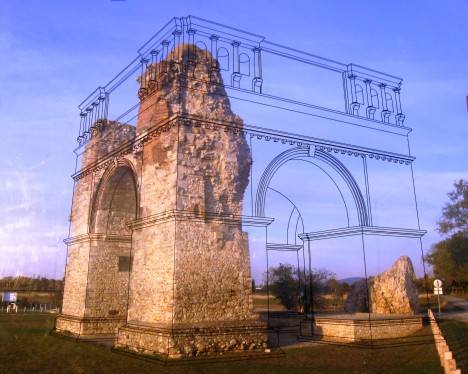
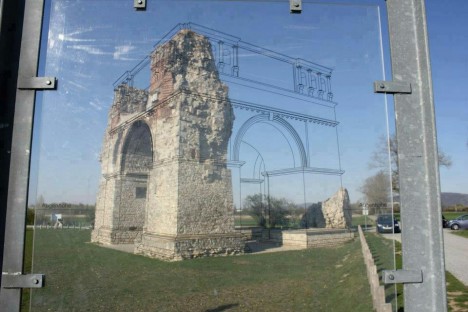
A pane of glass overlaid with a simple line drawing brings crumbling ruins to live at one of Austria’s most famous historical sites, reanimates a ruin near the Open Air Museum Petronell. When a viewer lines up the illustration with the structure, known as Heidentor (Heathen’s Gate), the image completes itself in a compelling yet entirely low-tech fashion.

historical military city

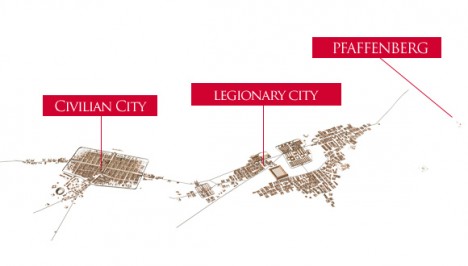
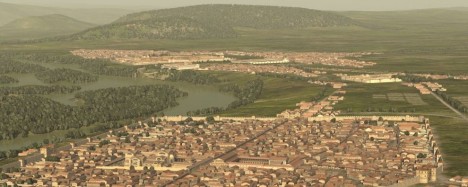
Located just east of Vienna, Carnuntum dates back to the the 1st Century A.D., when Roman soldiers expanded on an existing town 50,000 people to create a military encampment. Between 354 AD and 361 AD a huge triumphal monument was erected next to the camp and city. Contemporary reports suggest that Emperor Constantius II had it built to commemorate his victories.

historical military encampment

“When the remains of Carnuntum disappeared after the Migration Period the monument remained as an isolated building in a natural landscape and led Medieval people to believe it was the tomb of a pagan giant. Hence, they called it Heidentor.”

Preserving ancient historical sites is often a balance between stabilization and restoration; fully restoring can enhance the exterior appearance, but is costly and arguably diminishes the authenticity of a ruin. This approach strikes a balance, much like augmented overlays in digital history apps.

Share on Facebook


[ By WebUrbanist in Culture & History & Travel. ]

[ WebUrbanist | Archives | Galleries | Privacy | TOS ]


WebUrbanist

 
Comments Off on Heathen’s Gate: Ingenious Overlay Reveals History of Ancient Roman Ruin

Posted in Creativity


Western Digital’s new SSDs offer faster speeds and higher capacities

02 Jun

Hard disk manufacturer Western Digital acquired SSD specialist SanDisk last year. Now we are seeing the first fruits of the new relationship in the shape of two new SSD lineups – one under each company’s brand name – that are the first to deploy SanDisk’s new 64-layer 3D NAND chips. According to Western Digital the new chips offer ‘lower power consumption and higher performance, endurance and capacities.’

The new Western Digital Blue and SanDisk Ultra 3D lines are identical in terms of capacity, controllers and performance specs but Western Digital’s lineup includes a device in M.2 2280 format factor, which SanDisk’s doesn’t.

According to the spec sheets performance should be very good. The 256GB versions read at 550 MB/s and write at 525 MB/s. The larger capacity SSDs are even a touch quicker at 550 MB/s and 560 MB/s respectively. And the new SSDs are not only fast but also reliable. Western Digital states the mean time to failure (MTTF) of all devices as 1.75 million hours. If you think the new drives could help fulfill your storage and archiving needs, you’ll be happy to hear they are quite affordable; 256GB drives start at $ 100. Pricing information for the larger 500GB, 1TB and 2TB models is not available yet.

Articles: Digital Photography Review (dpreview.com)

 
Comments Off on Western Digital’s new SSDs offer faster speeds and higher capacities

Posted in Uncategorized


Kodak’s first issue of new ‘limited edition’ Kodachrome magazine now on sale in the US

02 Jun

Late last year Kodak announced that it would produce Kodachrome (sorry, not that Kodachrome), a magazine dedicated to art, culture and all things analog. Today, it has become available for sale to US residents on the company’s website.

The limited run first edition costs $ 20, weighs in at 80 pages and includes features on actress/director Chloë Sevigny, filmmaker Isaac Julien and illustrator Tad Carpenter. The magazine was created by Stranger Collective, a UK-based content agency.

Articles: Digital Photography Review (dpreview.com)

 
Comments Off on Kodak’s first issue of new ‘limited edition’ Kodachrome magazine now on sale in the US

Posted in Uncategorized


Lighting 103: Greg’s Assignment

02 Jun

Abstract: The best way to get a better understanding of light and color is to just do it.

In the last part of our conversation with Greg Heisler, he gave what I think is a very good piece of advice about light and color:

"I think what you have to do to be able to see it, is to shoot it. And then shoot it.

Like, shoot it the clean way, with white light. Then the next way is to shoot it with a warm and a cool. And so you see that. And then muddy up the light a little bit, and then see it that way."

So that's exactly what we're gonna do. Read more »
Strobist

 
Comments Off on Lighting 103: Greg’s Assignment

Posted in Photography


Fractal: A supercell thunderstorm time-lapse years in the making

02 Jun

Chad Cowan is passionate about teaching people the ins-and-outs of storms and extreme weather, as well as how to safely document them. And judging by both his impressive body of work as well as his latest release, Fractal, he certainly seems to know what he’s doing.

So crank the volume and enjoy some samplings from the last six years of Cowan’s storm-chasing across America’s Great Plains.

Articles: Digital Photography Review (dpreview.com)

 
Comments Off on Fractal: A supercell thunderstorm time-lapse years in the making

Posted in Uncategorized


Extended Spring Roll Camera Jacket launches for mirrorless cameras

02 Jun

Japanese company Extended has launched a new protective case for select cameras, the Extended Spring Roll Camera Jacket. This case is compatible with the Leica M series, Leica Q, Fuji X-Pro series, and other similarly-sized cameras. As the product’s name suggests, the Spring Roll protects cameras by wrapping around them; two small snap clasps are used to keep the case closed.

According to the company’s website, Spring Roll measures 155mm x 290mm when open; the lens cover has a 70mm diameter and a 55mm length. Extended Photographic recently launched the Spring Roll Camera Jacket on its website, where it is priced at ¥12,800 / $ 110 USD with shipping to the US being an additional ¥2,000 / $ 18.

Via: LeicaRumors

Articles: Digital Photography Review (dpreview.com)

 
Comments Off on Extended Spring Roll Camera Jacket launches for mirrorless cameras

Posted in Uncategorized


How to Use White Balance as a Creative Tool

02 Jun

White Balance is almost always used to match what colors our cameras detect to the colors we see with our eyes. Our brains are very good at managing how we see color. A sunny day looks warm and bright, but the actual color of the light is skewed heavily blue. Indoors, incandescent lights are notoriously warm (yellow/orange) and though our eyes may detect little of this warmth, you can bet our cameras will. White Balance is how we correct for that difference in light color, and how we can make images appear “natural” which is to say, how our brains detect it.
White Balance as a Creative Tool

Auto White Balance

It’s useful, certainly, but most of us leave it up to the camera to make the decision about White Balance. I know I do. My cameras are almost always set to Auto White Balance. Since I shoot in RAW, any errors that the camera makes can quickly be corrected in post-processing. At this point, I rarely even think about White Balance. But, perhaps I should…

White Balance can be more than a mindless setting of camera functions or a digital slider in Lightroom. Instead, it can be used as a creative tool. Slight changes in White Balance can change the tone and impact of your images. From dramatic color shifts to subtle changes in tonality, it’s time to elevate White Balance into the realm of creative options in photography.

The methods I’ll discuss here can be done either in camera or in post-processing, but it’s easier using the latter since you can see the impact of your choices real time. Although I use Adobe Lightroom, any program that allows you to adjust White Balance will work.

Dramatic Shifts in White Balance

Big shifts in White Balance can completely change the nature of your image. Shifts from cool to warm tones can take the image from looking as though it was made during the blue hour to post-dawn, or even make the weather appear to change.

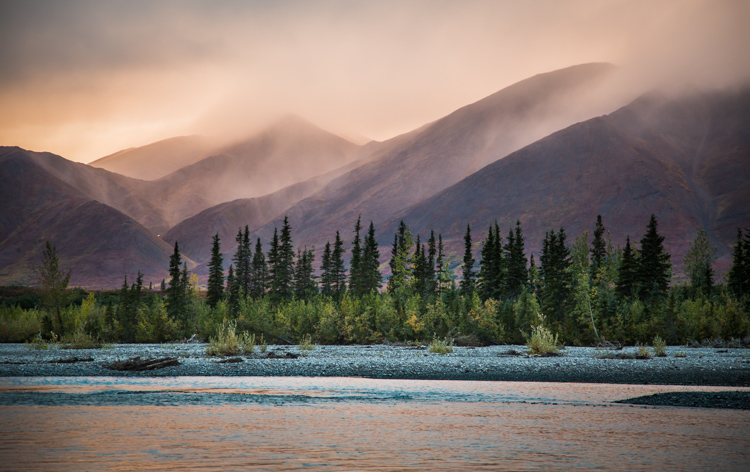
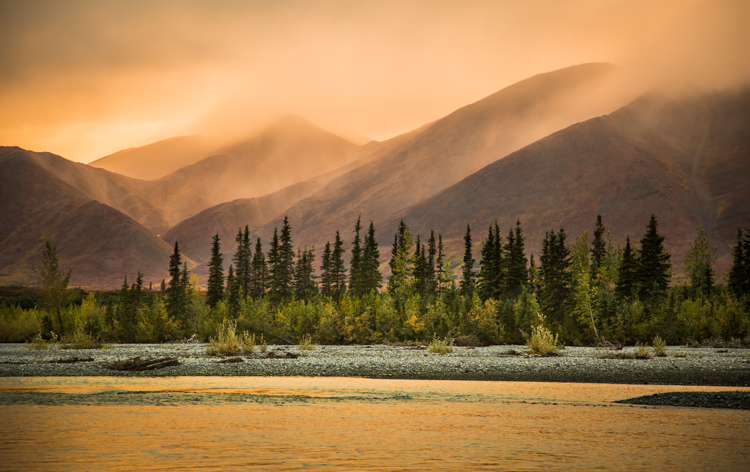
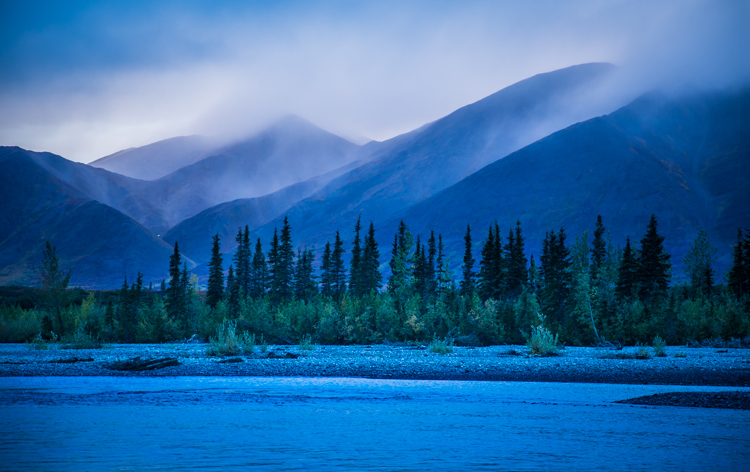
A few years ago I was leading a wilderness/photo tour in the Noatak National Preserve in northwestern Alaska. One evening, an afternoon storm was clearing off the mountains and I went down to the river to make a few images. The light was pink, the rolling clouds and falling rain lit by the low sun.

Below are three versions of the same image with only the White Balance changed. You can see the huge difference made by the shift from warm to cool tones. The bluest image is set 3600K, the warmest to 14750K, and the one somewhere in between is 7000K. In the end, you’ll probably choose an image that is neither overly cool, nor overly warm, but how the White Balance setting changes the feel of the image is worth noting.
White Balance as a Creative Tool

White Balance set to 3600K.

White Balance as a Creative Tool

7000K

White Balance as a Creative Tool

14,750K

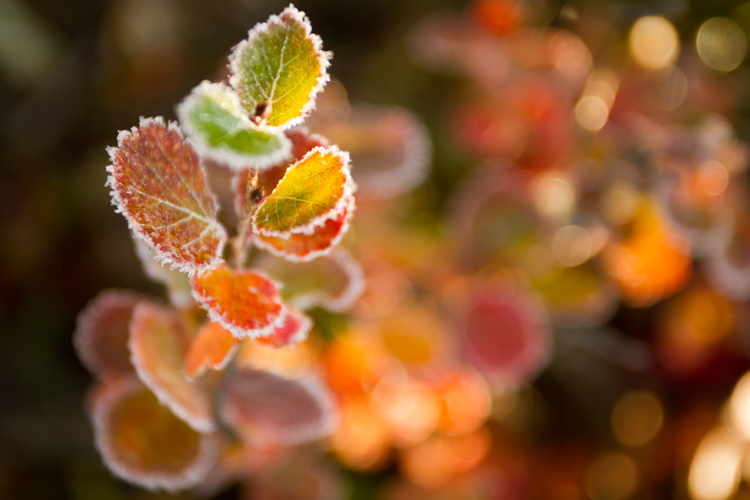
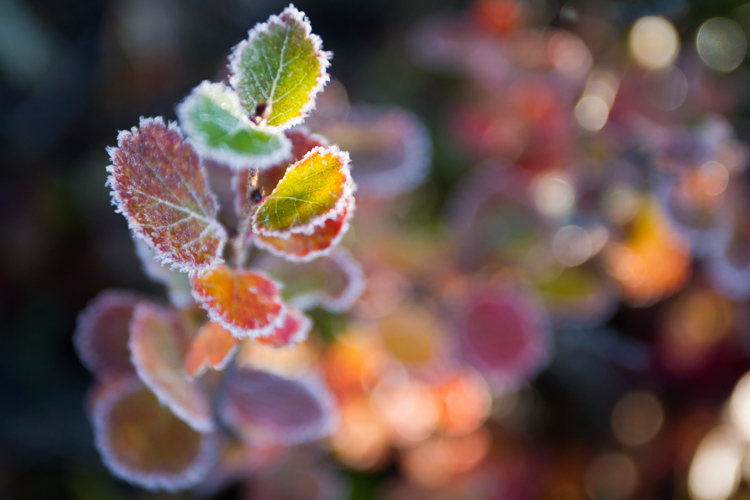
Here is another example using autumn foliage, in this case, a Dwarf Birch in Alaska. The top image is 5050K, very close to what the Auto function on my camera selected, in the second I’ve warmed the image to 9000K. Although I prefer the cooler tones, I could see the second version appealing to editors looking for an autumn spread in a magazine or catalog.
White Balance as a Creative Tool

White Balance set to 5050K.

White Balance as a Creative Tool

White Balance set to 9000K.

Subtle Shifts in White Balance
White Balance as a Creative Tool

White Balance set to 4350K.

White Balance as a Creative Tool

White Balance set to 8700K.

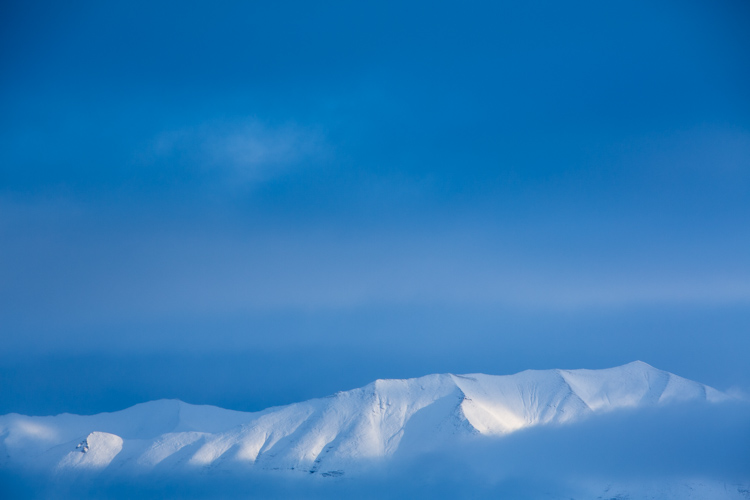
Subtle shifts in White Balance can also be effective, even though differences between images may be less obvious. A change of a few hundred to a couple thousand Kelvin (the K measurement used in White Balance) can make a surprising difference to the impact of an image. In the top photo, I chose a cool setting (4350K) which brings out the cool winter tones. The second is much warmer, set to 8700k, which to me, (aside from being a bit too warm) feels like an evening storm is approaching. Neither is exactly “accurate” to the scene as I saw it, but neither are they necessarily unnatural. I’ll return to this image shortly.

Water

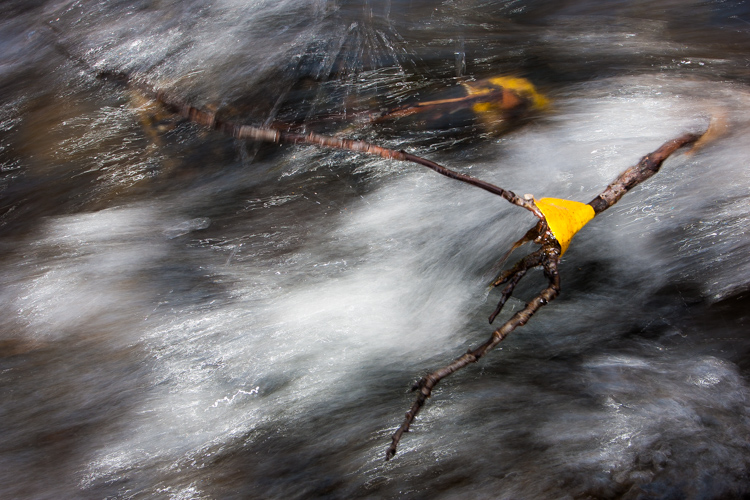
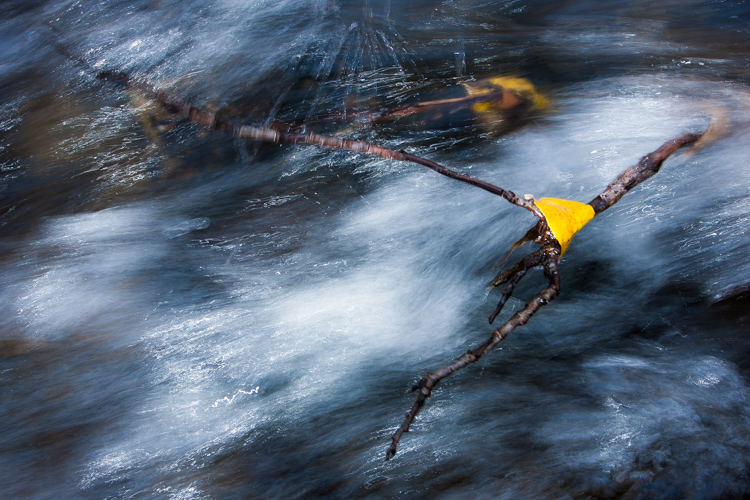
Water strikes most people as a cool substance, and often it looks better when a White Balance with more blue-tone is selected. I made this image on a day with broken clouds, in autumn, in a small mountain range north of my home in Alaska. Tiny patches of the sun were penetrating the yellow, shrubby willows which surrounded this small creek. The yellow leaves and the partially overcast sky gave the scene a notably warm tone which you can see in the top image, set to 4600K (as selected by my camera’s Auto White Balance setting). I think it’s too warm, so just a subtle push to the blue range (4100K) was enough to retain the warm tone in the single yellow leaf but sufficient enough to cool the water.
White Balance as a Creative Tool

White Balance 4600K as chosen by the camera using AWB.
White Balance as a Creative Tool

White Balance adjusted to 4600K in post-processing makes the water feel much cooler.

Sunsets

Sunsets too can benefit from a little creative tweaking of the White Balance. From the bluff above a beach in Homer, Alaska, I made the image below. The cooler-toned toned image was shot using Auto White Balance (4600K), while the second I warmed up to 6000K in processing. I like both versions. So you can see that selecting a White Balance is very much a matter of taste, and how you want your image to come across to your audience. Which version do you prefer?
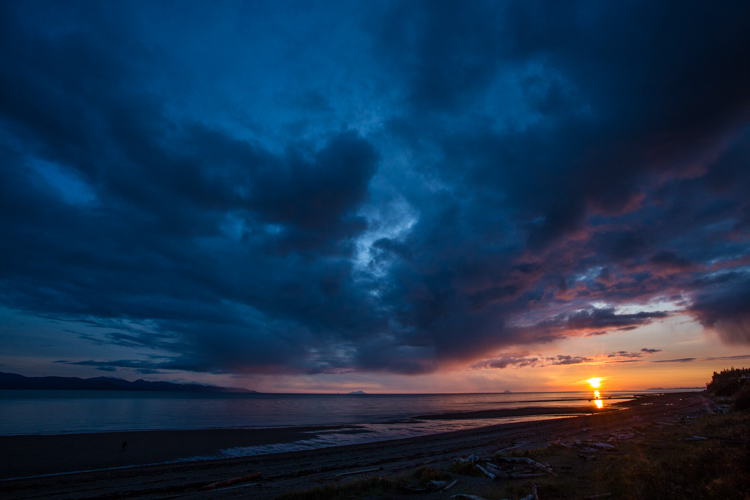
White Balance 4600K as shot using AWB.
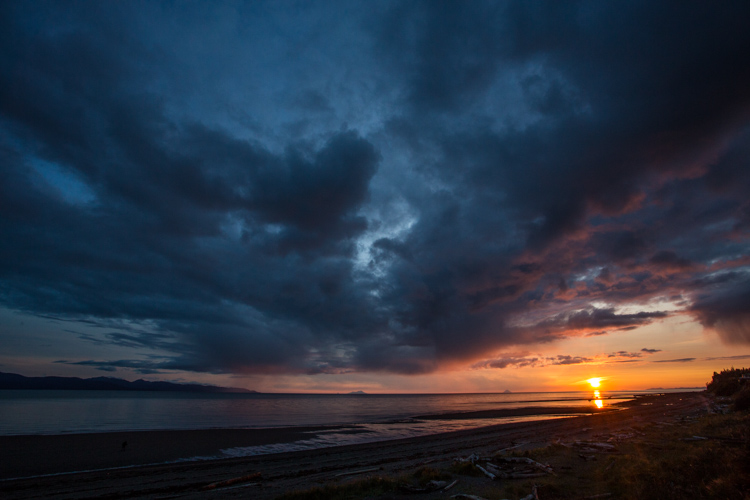
White Balance adjusted to 6000K in post-processing.

Selective Changes to White Balance

The great part about digital post-processing is that you don’t have to choose one White Balance or another, you can mix and match. My choice of software, Adobe Lightroom, allows you to use the Adjustment Brush to grab certain parts of your frame, and independently adjust them from the rest of the image.

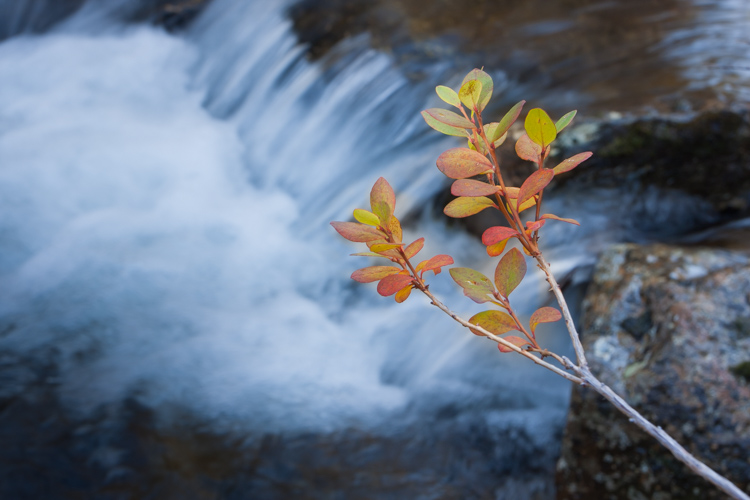
The photo below was made around the same time as the leaf in the stream I discussed earlier. In this case, a global (over the entire image) adjustment made the sprig of autumn colors look too cool and weird, even though the water was about right. So I cooled the whole image off to 3700K, then selected the sprig and bumped the Temperature setting to +35 using the Adjustment Brush.
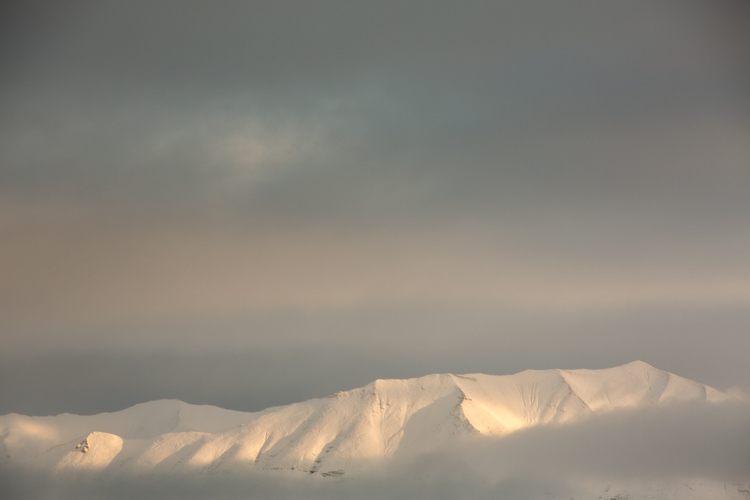
As I was playing with the snowy mountain image I discussed early, I realized I liked neither the blue nor the overly warm version. I thought some combination might work well. So I set the overall tone slightly blue to 5100K and selected just the mountain, where the hint of sunlight was shedding some warmer light and gave that a boost to +23. The result works.
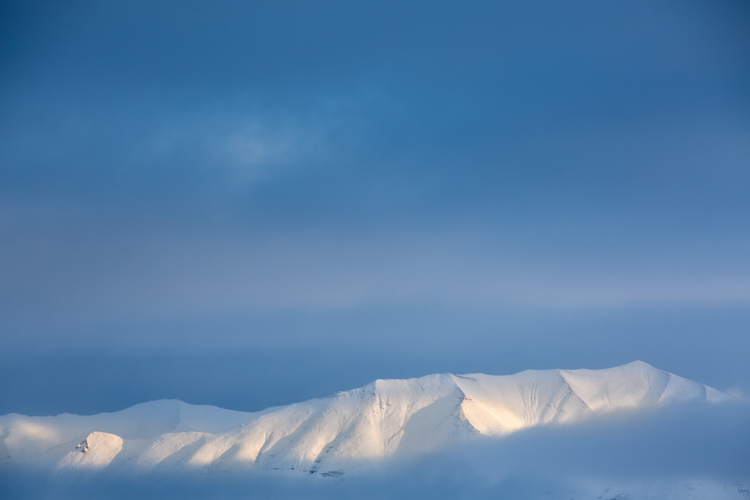
White Balance set to 5100K overall with warmth added to the top of the mountains using the Adjustment Brush.
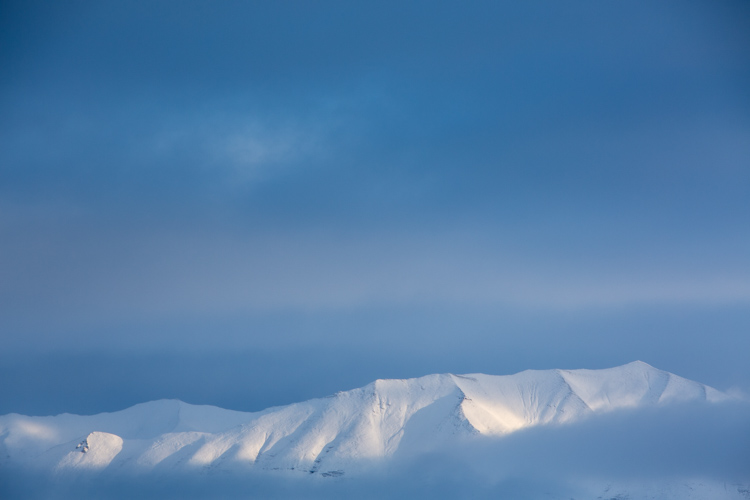
Compare this version which is at 5000K with no extra adjustments on the mountains. See how subtle the difference is? But the version above feels little warmer in the sunlit areas.

White Balance in Black and White

We think of White Balance as strictly related to color, but in fact, it can play an important role in black and white as well. The White Balance used in your final image can impact cont st, and the way different shades of gray are presented in the final image.

To get the full impact, you need to use that White Balance slider in a big way. That means doing big pushes from warm to cool, not little subtle shifts of a few hundred or thousand Kelvin.

Examples

I was on the Alaska Ferry making images on a very gray and rainy winter day when we passed this small speck of an island with a few wind-blown spruce trees growing on it. I knew it was a black and white kind of scene, so I quickly removed the color using Lightroom. When I moved the White Balance to one side or the other it created a big change in the contrast and overall brightness of the photo. The top image is set well to the blue range (3700K) while the second is way over in the warm range (32,700K). You can see how the warm setting removed some contrast and brightened the photo.
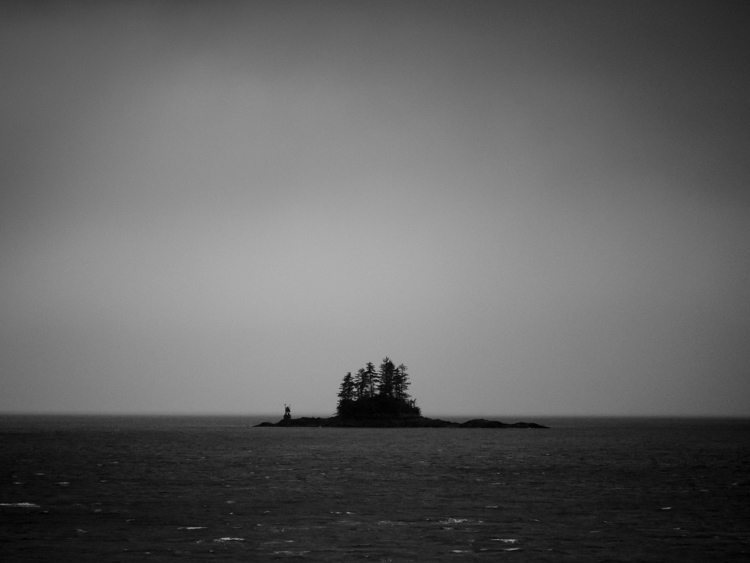
3700K
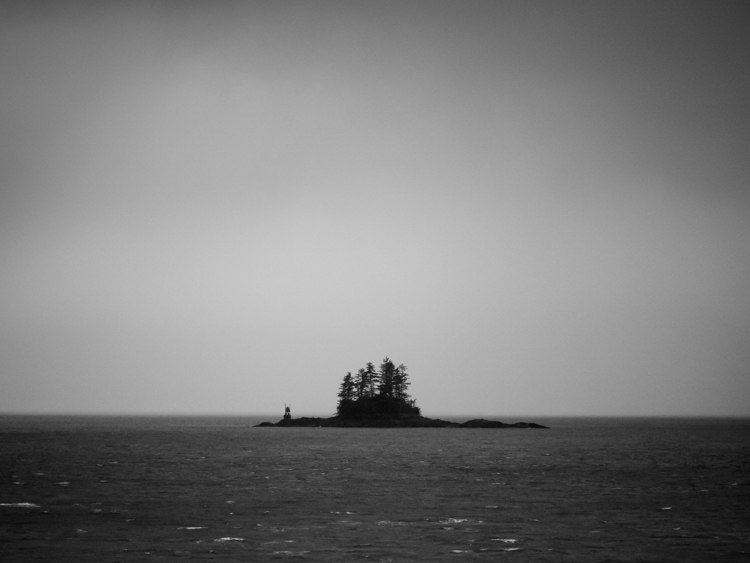
32,700K

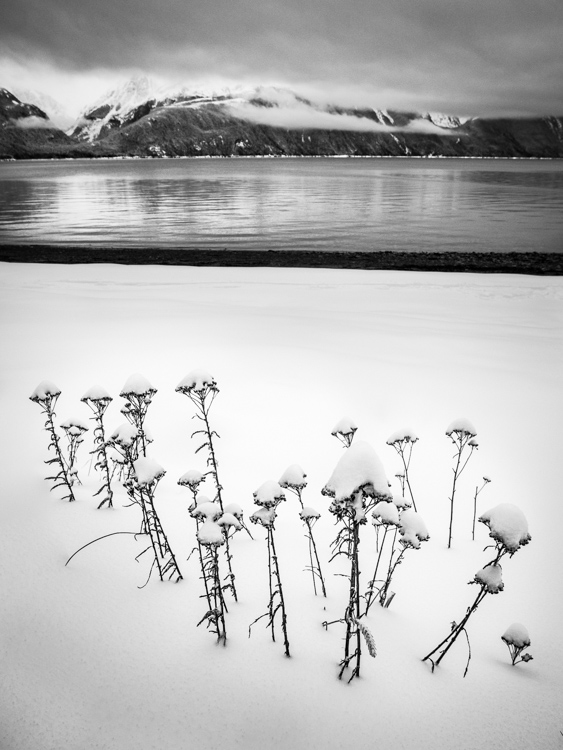
A snowy landscape image on a beach near Haines, Alaska provided another chance to explore how White Balance impacts a black and white scene. The left image is set to 3700K, the right to 35,000K.
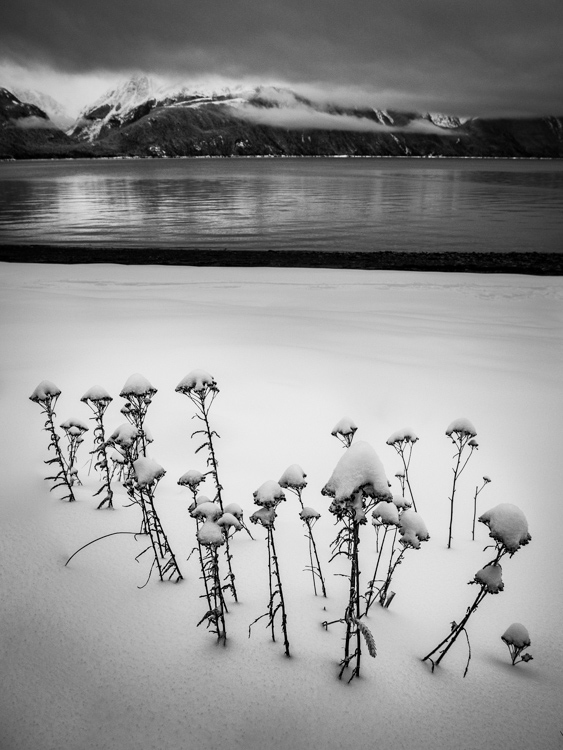
3700K

35,000K

Lastly, is this simple composition of a dew-covered spider web. The top image has high contrast, is dark overall, with clean white dew drops and is set 2000K, (as cool as Lightroom will allow). The second is much grayer, with substantially less contrast, and is as high as Lightroom will allow at 50,000K. There is no question, I prefer the first version. But many images, such as the two examples above depend more on personal taste.

2000K
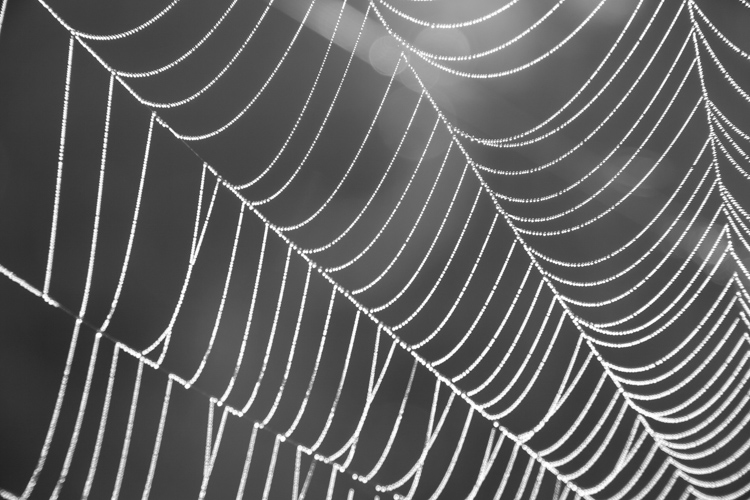
50,000K

Conclusion

It is time to stop thinking of White Balance as strictly a way to accurately present color, and instead, embrace it as a creative tool. Whether it is for dramatic impact, subtle changes, selective adjustments, or even (counter-intuitively) using it in black and white photography – White Balance can play an important part in the outcome of your images. Consider it, use it. Embrace White Balance as more than just a setting.

The post How to Use White Balance as a Creative Tool by David Shaw appeared first on Digital Photography School.


Digital Photography School
 
Comments Off on How to Use White Balance as a Creative Tool

Posted in Photography


5 Surprising Habits That Will Make You a Better Photographer

01 Jun

When you’re learning photography, it seems natural to pay the most attention to the gear and techniques you use to create images. You’ve probably received advice about developing great habits like photographing every day, carrying your camera everywhere you go, trying different compositions, learning processing skills, and backing up your photos. These things are important, no doubt! But there is more to becoming a better photographer than that.

Getting the shot often comes down to being there at the right time, so these tips have to do with getting out in the field and staying out in the field. If you cultivate these surprising habits, you’ll surely become a better photographer.

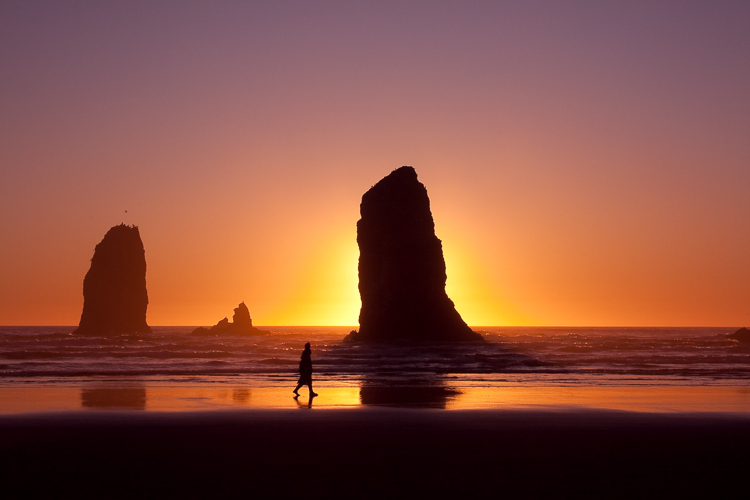
Canon Beach, Oregon, by Anne McKinnell - better photographer

#1 – Research Locations

Before you set off on your photo shoot, doing a little research can go a long way to making better images. First, think about what potential subjects are available. I like to create a Pinterest board and start collecting images I like from the location. Once you get an idea of what is there, how can you create images that are different from what you have seen? Is there a different perspective you want to check out? Or maybe a night shot? Don’t forget to take note of the direction of light in the images you see. Imagine what it would look like at a different time of day.

Once you get an idea of what is there, how can you create images that are different from what you have seen? Is there a different perspective you want to check out? Or maybe a night shot? Don’t forget to take note of the direction of light in the images you’ve seen. Imagine what it would look like at a different time of day.

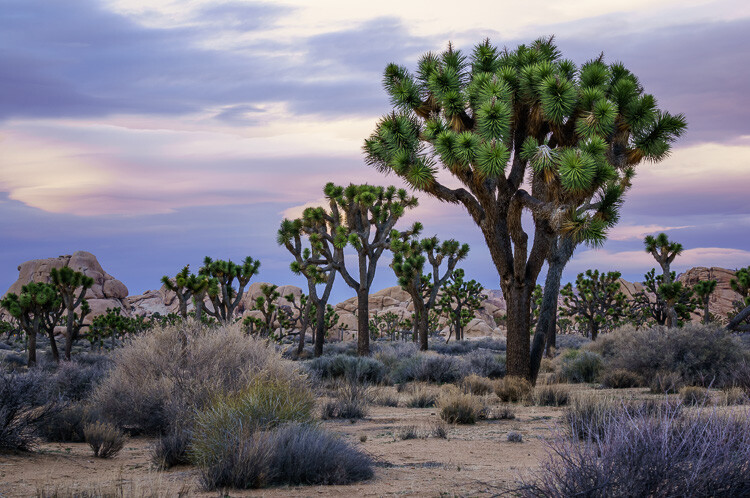
Joshua Tree National Park, California, by Anne McKinnell - habits better photographer

This is the location where the Joshua Trees are the densest in Joshua Tree National Park, California.

The second part of your research should be looking at maps and figuring out where exactly the best subjects are located and how to get there. Is the location close to the road or will you have to hike there? How long will it take?

#2 – Watch the Weather

Keeping a close eye on the weather forecast will dramatically affect your photos. Remember, bad weather is usually a good thing for photography! Storms bring the potential for seeing dramatic clouds, wet leaves, and even rainbows. You’ll get photos with fewer people in them too.

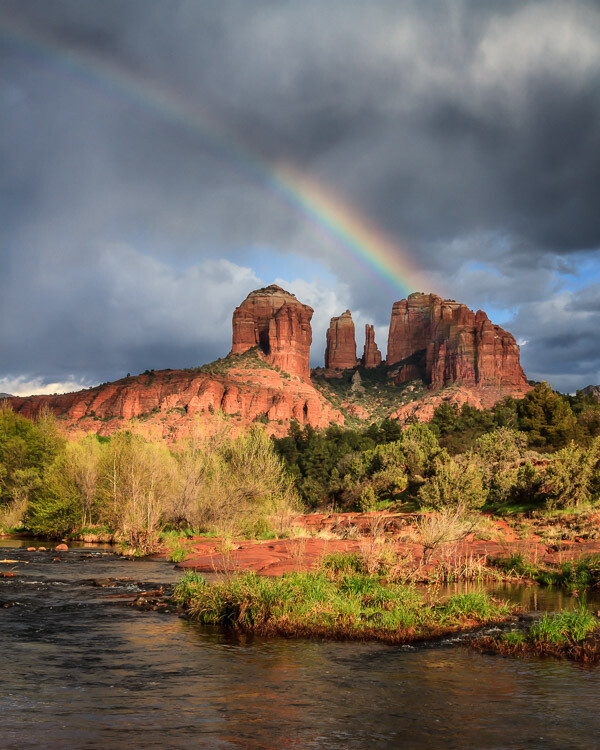
Red Rock State Park, Sedona, Arizona by Anne McKinnell - habits better photographer

Waiting for a break in the weather resulted in this rainbow at Cathedral Rock, Arizona.

When I was visiting Cathedral Rock in Sedona, Arizona, I noticed that there were a lot of people around and it was difficult to get a photo without a lot of tourists in it. Then it started to rain and everyone left. I waited in my truck for 45 minutes during the downpour. Mine was the only vehicle in the parking lot, and when the rain began to die down, I headed out and was rewarded with a beautiful rainbow. I had the location all to myself.

If a clear sky is in your forecast, instead of photographing your scene with a plain blue sky, you might have the potential for a great night shot.

While you’re at it, don’t forget to check when the sun rises and sets and when the moon rises and sets. If you’re going to be on the beach, tides are also important.

#3 – Carry Less Stuff

Whether you choose to go out with your camera and only one or two lenses or switch your whole system to a lightweight mirrorless system, you’ll undoubtedly find that you can hike farther and get to more remote locations with less weight on your shoulders. The potential for finding unique subjects and unique compositions increases the farther away you get from the beaten track.

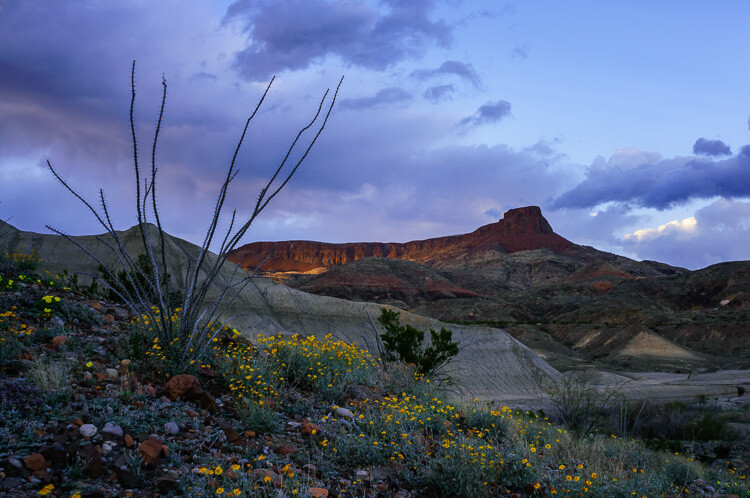
Big Bend Ranch State Park, Texas, by Anne McKinnell - habits better photographer

I don’t think I would have made it this far up the hill if I had carried all of my heavy gear.

#4 – Don’t Forget the Comfort Essentials

Despite the last tip about carrying less stuff, it’s equally essential that you carry the right stuff to allow you to stay out there longer. Anything that makes you uncomfortable in the field will probably cause you to leave earlier than otherwise.

Thirst, hunger, being cold or wet, getting bitten by bugs and looming darkness are just a few things that can make you leave a location too soon. A few things on my “always carry” list are food, water, rain jacket, sweater, bug spray, and a headlamp. These items will get you more potential shots than that extra lens.

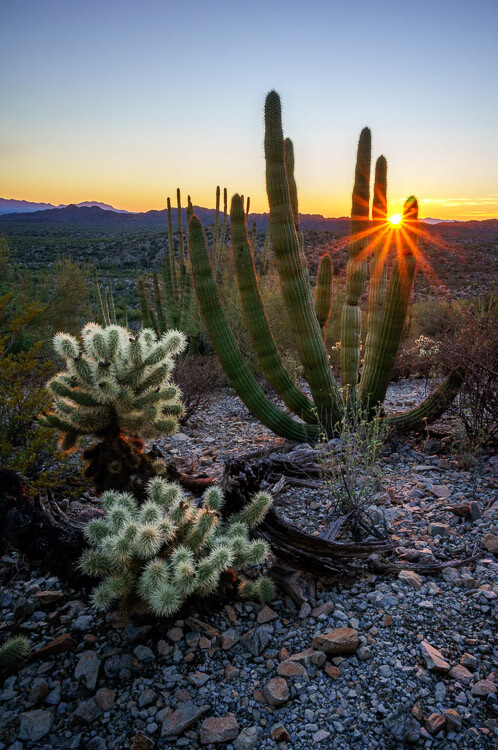
Organ Pipe Cactus National Monument, Arizona, by Anne McKinnell habit better photographer

I probably wouldn’t have this photo if it were not for my trusty headlamp that I used to make my way back through the cacti in the dark.

#5 – Hike With a GPS

Getting lost is one of my fears when I’m out exploring, so I have started hiking with a handheld GPS. It took me awhile to get used to it because it’s not the fancy kind with built-in maps. All I do is mark a waypoint where I park my truck and then it tracks me as I walk. No cell signal or internet required. I can always figure out the direction to get back to my waypoint, or even follow my tracks to go back using the exact route I took to go out. It’s worth it to carry a couple of extra batteries for it too.

Now that I have the GPS, I am more willing to go off the trail and explore new things. It’s a whole new level of freedom!

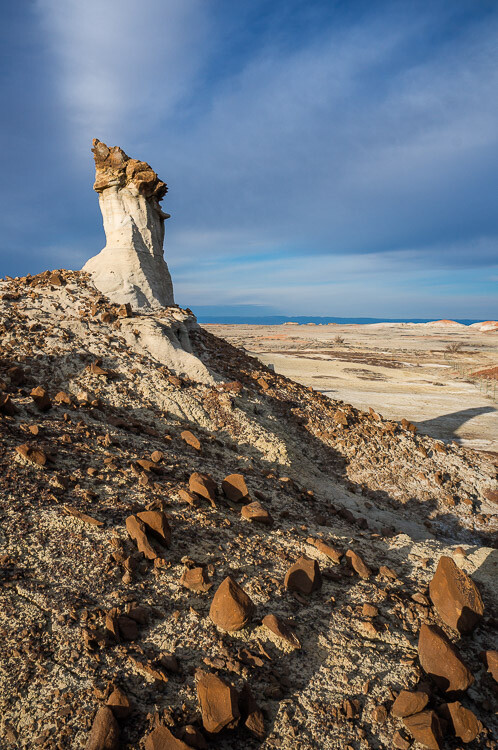
Bisti Badlands, New Mexico, by Anne McKinnell - habits better photographer

At Bisti Badlands, New Mexico, it is very easy to get lost with no trails and strange rock formations in every direction. My GPS was a lifesaver.

Conclusion

These tips should help you figure out where to go when to get there and make sure you are comfortable in the field so you can stay as long as you like to get that special shot. Sometimes photography is a waiting game, but if you are comfortable you can be patient and wait for the magic moment to happen.

The post 5 Surprising Habits That Will Make You a Better Photographer by Anne McKinnell appeared first on Digital Photography School.


Digital Photography School
 
Comments Off on 5 Surprising Habits That Will Make You a Better Photographer

Posted in Photography


New Nikon D3400 and D5600 firmware improves Snapbridge connectivity

01 Jun

In our review of the Nikon D5600 we reported connectivity issues with the Nikon Snapbridge app that allows for automatic image transfer from the camera to your smartphone. It appears these issues might now have been resolved.

Nikon has released firmware updates for the Nikon D3400 and D5600 DSLRs to improve the pairing and connectivity between the Android version of SnapBridge and the cameras. Firmware version 1.12 for the Nikon D3400 and 1.02 for the D5600 are now both available to download and install via Mac OS or Windows PC from the Nikon website. Connectivity issues with the iOS version of the app had already been solved via a previous firmware update.

Articles: Digital Photography Review (dpreview.com)

 
Comments Off on New Nikon D3400 and D5600 firmware improves Snapbridge connectivity

Posted in Uncategorized


Father’s Day Gift Guide for Dads of All Kinds

01 Jun

Maybe you’re shopping for your photo snapping papa, your camera carrying grandad, or your stepdad Ron. Could be that your momma did all the parenting and deserves a second gift this year.

Whoever you like playing catch with, we’ve got just the gift for them! Plus, a $ 10 discount when you spend $ 30 or more with the code LoveDad, through this weekend.

Scroll along to find the best description of your favorite father figure and we’ll tell you the perfect present to pick up for Father’s Day.
(…)
Read the rest of Father’s Day Gift Guide for Dads of All Kinds (0 words)


© laurel for Photojojo, 2017. |
Permalink |
No comment |
Add to
del.icio.us

Post tags:

The post Father’s Day Gift Guide for Dads of All Kinds appeared first on Photojojo.


Photojojo

 
Comments Off on Father’s Day Gift Guide for Dads of All Kinds

Posted in Equipment