RSS
 

Archive for June, 2017

Sea Monsters: Massive Crocheted Sea Urchins Float Over Singapore

14 Jun

[ By SA Rogers in Art & Installation & Sound. ]

Mutant sea urchins seem to have evolved into monstrous, buoyant creatures capable of rising above the surface of the sea, glowing softly against the skyline in Singapore. Made from crocheted lace, these three oversized urchin installations by Choi + Shine invite passersby to pause within them and take in the city through their patterned shells.

Created for this year’s i Light Marina Bay Festival, which focuses on sustainability, The Urchins are hand-crafted and interactive, each one hanging high enough to dwarf even the tallest visitors. Made from UV- and weather-resistant polyester cord stretched on an aluminum frame, the urchins hang from ultra thin cables.

“At night, the mysteriously hovering and glowing large Urchins create a sense of magic as if time has stopped,” says Choi + Shine. “When viewers enter into the Urchins, they will be surrounded by a single layer of glowing, lacy surface, where they can enjoy the detail and texture of the Urchins and see the city, water and the sky through this visual filter.”

“When other viewers see the occupants in the Urchins, the occupants will glow within the lacy room, creating an illusion of ethereal levitation of the occupants, while the occupants become a part of the artwork.”

Share on Facebook


[ By SA Rogers in Art & Installation & Sound. ]

[ WebUrbanist | Archives | Galleries | Privacy | TOS ]


WebUrbanist

 
Comments Off on Sea Monsters: Massive Crocheted Sea Urchins Float Over Singapore

Posted in Creativity


Insane 49-inch monitor from Samsung redefines wide-screen

13 Jun

Samsung has introduced its new CHG90 monitor, which has an impressive 49-inch screen and ultra-wide 32:9 aspect ratio. It features a VA curved display with quantum dot technology, supports 125% of sRGB and 95% of DCI-P3 color spaces, and features HDR ‘picture enhancement technology.’

It’s hard to get a sense of the display’s size from photos, but this youtube video from BWOne is very helpful in that regard.

The resolution may bring a bit of disappointment, however. Most photographers in the market for a new display today are probably focused on 4K or even 5K options, but the CHG90’s resolution is 3840×1080 pixels. (Basically, it’s two 1080HD screens side-by-side.) That won’t provide the high pixel densities many of us are used to, but it does deliver a lot of horizontal real estate.

Samsung makes it pretty clear that this monitor is aimed at gamers, but it got me thinking… would you use a display like this for photo editing? It would be a heck of a way to scroll through my Lightroom library, and I can see hard-core panorama photographers nodding their heads in agreement, but what about the rest of us? What do you think?

Articles: Digital Photography Review (dpreview.com)

 
Comments Off on Insane 49-inch monitor from Samsung redefines wide-screen

Posted in Uncategorized


Shooting experience: how the Nikon D7500 won me over

13 Jun
Initially, the D7500 was going to be my secondary camera for a music festival I was shooting, and the D750 was going to be my primary. But ultimately I ended up using the D7500 more.

The arrival of the Nikon D7500 to our office coincided with one of my favorite annual Seattle events, the Big Building Bash, an all-day music festival held in the city’s industrial SoDo neighborhood.

Ordinarily I shoot music with a Nikon D750 and two primes, which vary depending on the space I’m shooting. I run a small publication – along with a group of contributors – documenting the DIY aspects of Seattle’s music community. This mostly means shooting in small, intimate spaces where multiple camera bodies or big lenses would likely raise an eyebrow or two.

But Big Building Bash is a bit more casual in nature than a show in someone’s living room, so I felt comfortable bringing two bodies. My kit included: The D750 with a 24mm F1.8G as my primary camera and the D7500 with an 85mm F1.8D as my secondary. Switching lenses between the two cameras effectively gave me four (equivalent) focal lengths.

Big Building Bash is a charming little music festival held under the West Seattle Bridge in SoDo’s warehouse district. It is a showcase of Seattle’s best up and coming music, with no real emphasis on a specific genre. This leads to a vast array of acts and shooting scenarios, with the strong sun cutting through highway overpass pillars and the occasional passing train engine only adding to the overall charm.

We got to the festival as the first bands on the schedule were starting to play. With attendees trickling in and the mid afternoon sun shining bright and direct, I started dialing in my preferred camera settings.

AF Fine Tune

I fired a couple of test shots with each camera and noticed that the 85mm on the D7500 was front-focused. No problem, the camera has auto AF Fine Tune. A nifty, though strangely hidden feature that automatically corrects front or back focus. It’s great for primes, but less useful for zooms, as only one adjustment value can be saved. A quick Google search pulled up our own video, revealing how to unlock this feature. Within moments my 85mm was perfectly calibrated. It was time to get shooting!

I found myself switching the two lenses back and forth between my camera bodies. I’d forgotten how much I enjoy shooting with both a crop sensor and full frame body. The reach of the 85mm on the D7500 proved extremely useful and I appreciated also being able to go as wide as 24mm with the D750. However 35mm is probably my favorite focal length, so the 24mm on the D7500 was also a joy to use.

3D tracking

I’m a creature of the night, and adjusting to live music in a bright environment took some brain rewiring. Normally, I dial in all my settings manually including ISO, and shoot using AF-C and a single, manually chosen point (the center point if it’s really dark). Instead, I switched both cameras to Auto ISO and decided to give 3D tracking a go on the D7500.

The D7500, D7200 and D750 all use the same 51-point AF system. But each has a different metering sensor, which is also used for image recognition. The metering sensor in the D7500 is borrowed from the company’s flagship APS-C DSLR, the D500, and is the highest-res of the bunch: ninety times higher than the D7200 and twice that of the D750.

3D tracking allowed me the freedom to frame as I pleased, as long as my subject fell within the AF coverage area.

I’d used 3D tracking before while writing about the Nikon D5 and was impressed by its reliability. The D5 also uses the same resolution metering sensor as the D7500, but with triple the AF points. And while the D750 and D7500 use the same 51-point AF system, the AF area covers far more of the D7500’s APS-C sensor than it does on the full-frame D750. The limited AF area coverage and the generally low light nature of my work are the reasons I do not often use 3D tracking on my personal camera.

The AF coverage on the D7500 is the same as on the D7200. However the metering sensor, used for image recognition, has been substantially upgraded.

And my inexperience using/trusting 3D tracking on anything other than the company’s most expensive body lead me to commit the unholy act of ‘chimping’ several times during the first band. In my defense, I did this just to be absolutely certain I was actually getting sharp, in-focus shots. Thankfully Carey Rose has set the ‘OK’ button on the D7500 to zoom images in playback to 100% on the focus point. This made double checking sharpness quite simple.

This was one of the very first frames I shot on the D7500 using 3D tracking. Once I trusted its capability, I was free to concentrate on composition.

Once I felt I could trust the subject recognition, it didn’t take long to get hooked on using the D7500’s 3D tracking. The camera stuck to my subjects of choice with ease. And the 51-point AF system provided enough coverage so that I could even place subjects close to the edge of the frame.

‘It didn’t take long to get hooked on using the D7500’s 3D tracking. The camera stuck to my subjects of choice with ease.’

Ultimately 3D tracking freed me up from having to think about autofocus and allowed me to simply concentrate on composition and exposure, which in turn lead me to use the D7500 as my primary camera for the duration of the festival. That plus I liked the reach of the 85mm on it.

Drummers with long hair are photographic gold. I used the camera’s 8 fps continuous drive to try and get the perfect frame.

Burst, buffer and tilting touchscreen

I don’t normally shoot in continuous drive mode, but with an 8 fps burst and a super-deep buffer of 50 Raw files or 100+ JPEGs, I figured, I’d give it a try. An eccentric drummer provided the perfect opportunity to fire off a long burst. After looking back through those images, I decided to keep the camera in continuous drive mode for the duration of the festival, figuring I might as well come back with as many photos to choose from as possible.

The tilting touch LCD also proved useful: I use Live View on my D750 occasionally, but moving the AF point with the D-pad is a slow and annoying process. With the D7500 I could simply tap on the area I wanted to focus on. Of course, AF in Live View is contrast detect only, so speeds are a bit sluggish.

I used the tilting touch LCD to frame this shot toward the start of the show. This was the view from the beer garden. Did I mention the D7500 has great weather beer-sealing? Because it does.

Other takeaways

As the festival pressed onward, and I became comfortable with my chosen settings, I slipped into autopilot mode and simply tried to enjoy and photograph as many bands as possible. It wasn’t until hours later, with the sun dropping behind the buildings, that I started to lose my faith in 3D tracking and switched to old-fashioned AF-C using a single point. To be honest, switching back felt downright prehistoric after a full day of near-compositional freedom.

I ended up shooting over 8 hours and in that time I put away 2,542 images (Raw + JPEG) with 3/5 battery still left. Not bad for a camera with a CIPA rated battery life of 950 shots per charge.

This was one of the last frames I shot using 3D tracking. As the band Snuff Redux finished their set, the sun ducked behind the buildings and I switched back to AF-C using one point.

Ultimately, I brought the D7500 along to Big Building Bash thinking I’d get some time to test it for work. But I photographed the show primarily for my own purposes/publication and as such, getting the shot was paramount to testing gear. Still, if nothing else, I figured the D7500 would be a good compliment to my trusted D750. But it turns my D750 was more a compliment to the D7500.

Note: Images in this story are all JPEGs edited and occasionally cropped to taste (no ACR support yet). You can see the original out-of-camera JPEGs in the sample gallery below.

$ (document).ready(function() { SampleGalleryV2({“containerId”:”embeddedSampleGallery_9200575231″,”galleryId”:”9200575231″,”isEmbeddedWidget”:true,”standalone”:false,”selectedImageIndex”:0,”startInCommentsView”:false,”isMobile”:false}) });
Articles: Digital Photography Review (dpreview.com)

 
Comments Off on Shooting experience: how the Nikon D7500 won me over

Posted in Uncategorized


Fujifilm earning report indicates strong sales of X-series, lenses and GFX 50S

13 Jun

Fujifilm’s earnings report for the fiscal year ending in March has been published and contains some interesting information on the company’s line of consumer imaging products. Sales figures of both X-Series cameras and lenses and the GFX medium format system have increased, according to the report.

‘The business of electronic imaging achieved a sales growth due to positive sales of the X-Series of mirrorless digital cameras such as FUJIFILM X-T2 and FUJIFILM X-T20 as well as their interchangeable lenses, and strong sales of the FUJIFILM GFX 50S, a medium-format mirrorless digital camera equipped with a large sized sensor, released in February.’

Overall, the sales of the company’s Imaging Solutions division decreased 3.2% from 352.9 billion Yen to 341.8 billion Yen due to the negative effect of the appreciation of the Japanese Yen in the foreign exchange market. However, operating income went up by 15% from 32 to 36.8 billion Yen, thanks to the sales expansion of digital cameras mentioned above, an increase in sales of high-end instant photo systems and improved profitability in various business categories.

The company is projecting a 2.4% increase in revenue over the next fiscal year for the Imaging Systems business, from 341 billion to 350 billion Yen, with operating income up nearly 17%.

You can read the annual report for yourself here [PDF].

Articles: Digital Photography Review (dpreview.com)

 
Comments Off on Fujifilm earning report indicates strong sales of X-series, lenses and GFX 50S

Posted in Uncategorized


Brutalist Victory: Concrete Skylines Dominate Radical Retro-Future Cities

13 Jun

[ By WebUrbanist in Architecture & Cities & Urbanism. ]

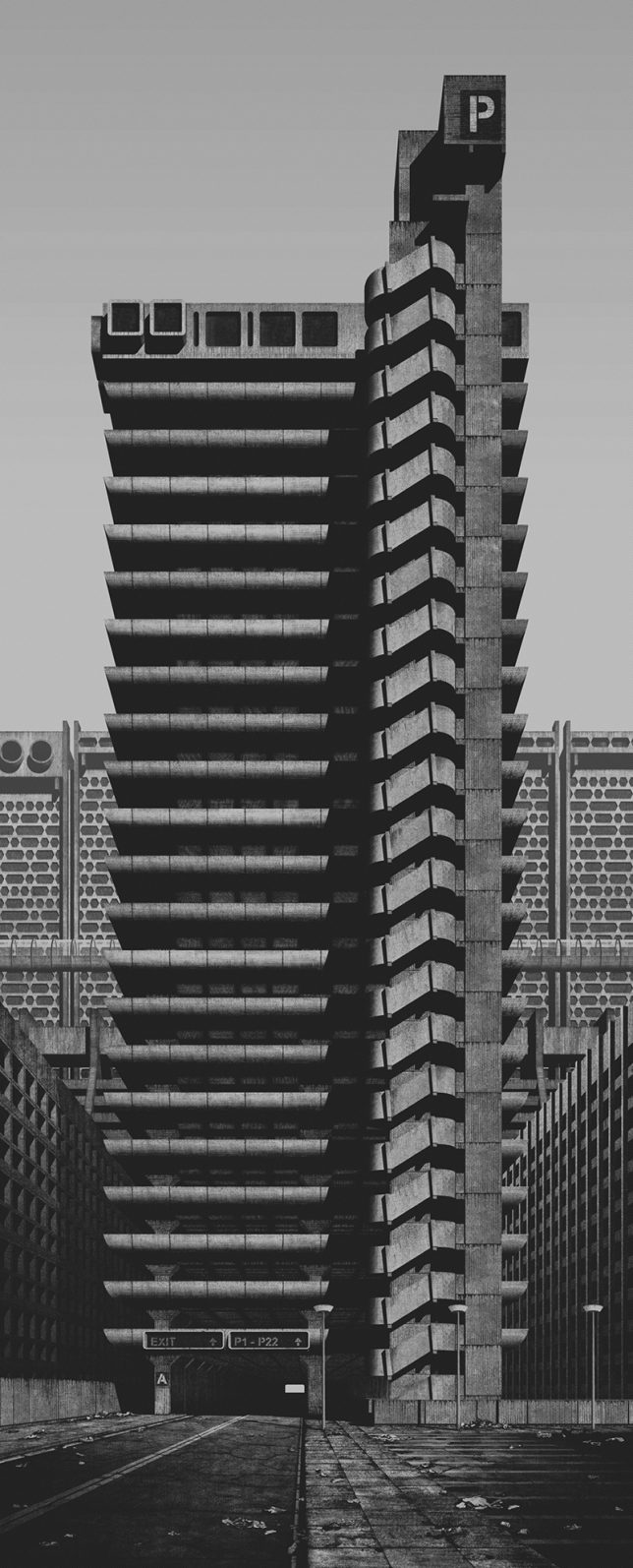
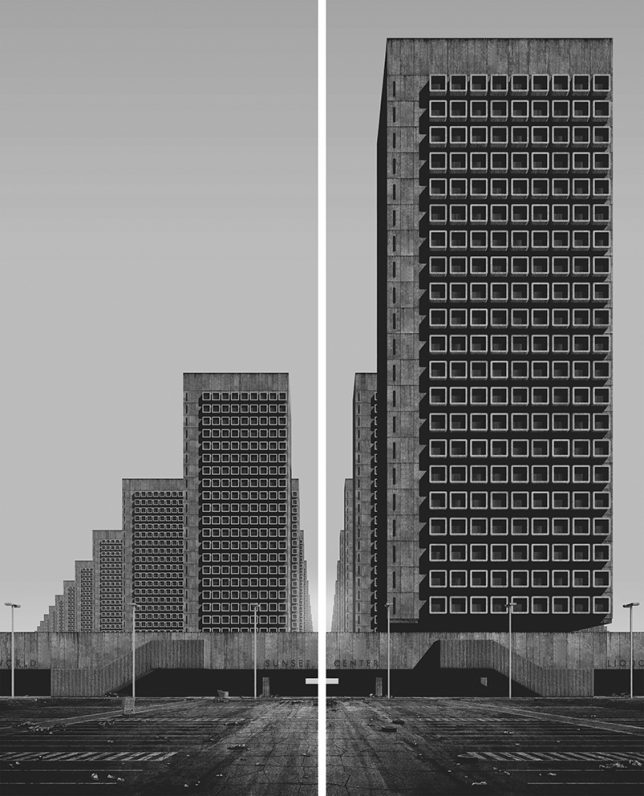
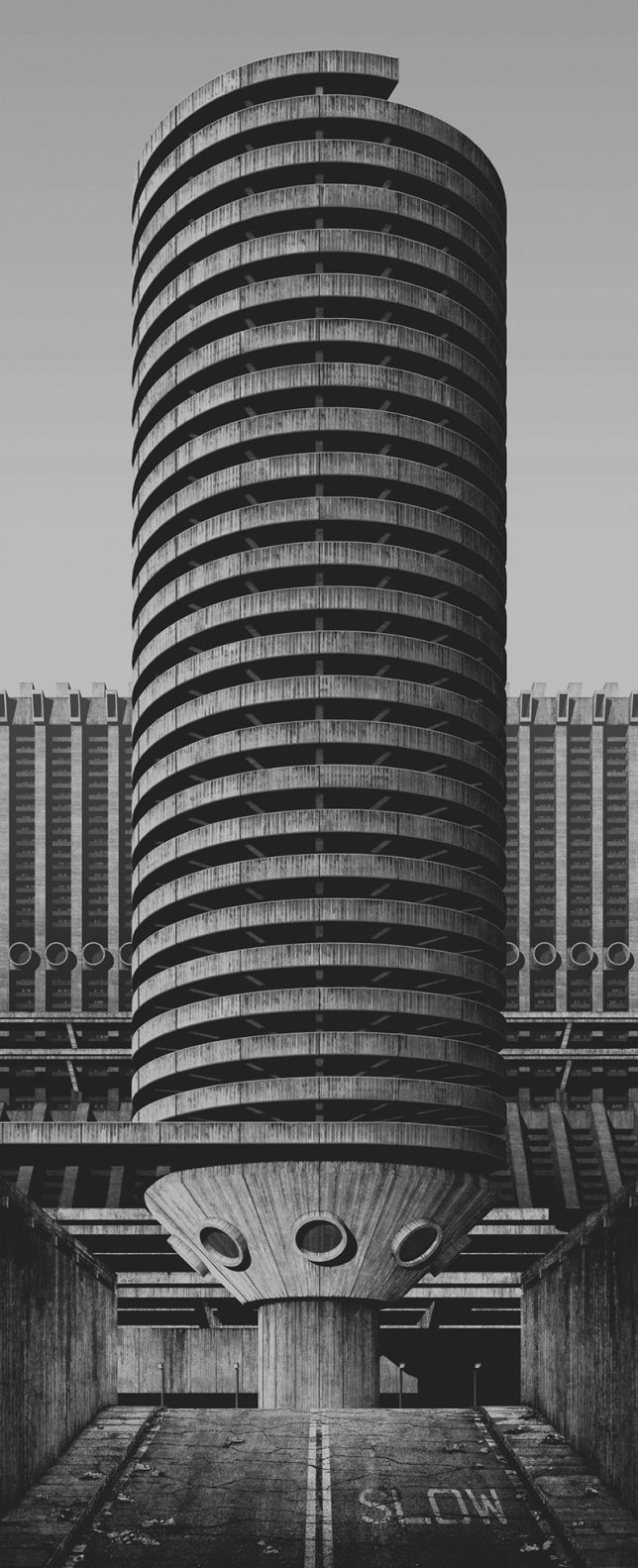
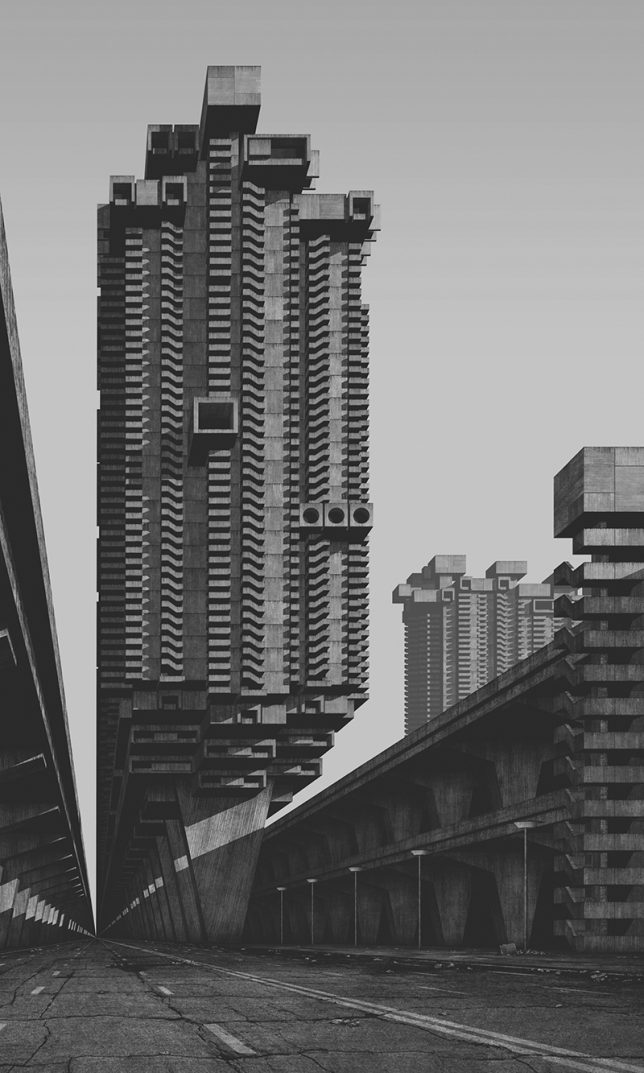
Architectural trends come and go, but some visions are more persistent than others, and Brutalism could have been among them. This artist asks and answers the question: what if concrete monstrosities of the 1960s and 70s had somehow won the war against the steel-and-glass towers that dominate contemporary skylines?

German digital artist Clemens Gritl has built a virtual world around this retro-futuristic vision, dubbed “A Future City from the Past”, populated with extreme forms of concrete idealism. His “super-brutalist” metropolis extrapolates the revolutionary aesthetic of this harsh material, seen for a time as representing social progress and democratic ideals in architectural form.

Through 3D modeling (exhibited as black-and-white 2D images), this series presents something that could have been seen as utopian but inevitably, with Brutalism in hindsight, feels oppressive and dystopian. His renditions are meant to look like products of a past time, capturing Modernist-worthy views of these giant-sized Brutalist creations.

“All buildings and structures are homogenic,” says the artist. “The differentiations of architectural styles and eras are eliminated and replaced by geometric structures, repetition and absolute materiality.”

“Ballard’s novel paints a dark dystopian picture — the architecture of a single residential tower becomes the driving force for mysterious changes of the tenants behaviour. Can the presence of a high-rise structure truly create such a threatening atmosphere and social tension, culminating in murder, decay, destruction and even anarchy?”

Individually, various structures recall Modernist greats as well, like a towering residential complex arrayed on piloti (columns) as envisioned and realized by Le Corbusier. But, like Corbu’s masonry towers for his idyllic cities, the results do not look particularly livable. Perhaps the portrayal is also a little unfair — after all, Corbu at least envisioned these things surrounded by green landscapes.

Share on Facebook


[ By WebUrbanist in Architecture & Cities & Urbanism. ]

[ WebUrbanist | Archives | Galleries | Privacy | TOS ]


WebUrbanist

 
Comments Off on Brutalist Victory: Concrete Skylines Dominate Radical Retro-Future Cities

Posted in Creativity


Photomatix Pro 6 launched with more color control and realistic-looking results

13 Jun
Example picture by Ron Pepper

UK software company HDRsoft has released version 6 of its Photomatix Pro imaging application with the promise of more realistic HDR images and better control of picture characteristics. A key new feature allows users to blend an unedited version of a picture with its HDR counterpart so that the overall effect of the process can be moderated if needed.

The software now includes a tool called Tone Balancer that offers a wider range of choices in the render that assist in making HDR images that look less manipulated than usual, while a new brush tool provided the means to select and adjust color values in local areas. Lens and perspective corrections can also be made in this version with new facilities to deal with distortion, and HDRsoft says it has made the workflow easier to manage and follow.

Photomatix Pro can be used to blend multiple images to create HDR images, and it offers controls for removing ghosted moving objects and to correct small movements in the camera between exposures. It can also be used to optimise the dynamic range of single image files. The package can be used as a standalone application or as a plug-in for Adobe’s Lightroom and costs $ 99 for new users. Owners of Photomatix 5 can upgrade for free, while those using earlier versions can get version 6 for $ 29. A free trial is available. For more information see the HDRsoft website.

Press release

HDRsoft announces the release of Photomatix Pro version 6

The latest version of their software application that helps photography pros and enthusiasts create HDR (High Dynamic Range) photos in a large range of styles, from realistic to artistic.

Key benefits in the new release include:

  • More style choice for realistic results. A new HDR rendering method called Tone Balancer adds more options and presets for realistic looking results. It is well-suited to real estate and natural style landscapes.
  • Refining with more control over color. With the new interactive brush tool, users can make color changes to just parts of the image, by painting over those areas. They can also fine-tune the saturation, hue, and brightness of individual colors in a photo. This control is especially useful for removing color casts and enhancing skies and other image features. Images can also be cropped to easily remove distractions or to improve their composition.
  • Avoiding overdoing it. For a more realistic look, users can blend an original photo with the rendered image, either globally or by using a brush to select specific areas.
  • Removing distortion from your photos. A new distortion correction tool makes it easy to straighten photos that aren’t level and fix perspective issues where lines don’t look parallel when they should. These are particularly helpful features for architectural and landscape photographers.

A more intuitive workflow. Both new and experienced users will find it easier to load their images and develop them in Photomatix Pro with a guided workflow. A user can quickly open their images and move through the development process to achieve their results.

Photomatix Pro merges photographs taken at different exposure levels into a single HDR image with options for automatically aligning hand-held photos and for removing ghosts or visual artifacts when moving objects are present in the scene. Merged images can then be adjusted with a range of precise controls and settings or with one-click presets.

Photographers can quickly get the look they desire from natural-looking results to painterly images, from surreal and dreamy photos to ultra-realistic images with increased details.

Photomatix Pro can also be used to enhance a single photo to boost its shadows and enhance its highlights. The program includes a plugin for Adobe Lightroom for users who want to integrate Photomatix Pro into their Lightroom workflow.

“What’s unique about Photomatix Pro is the full range of styles it offers to render HDR photos, and version 6 makes this even better,” said Geraldine Joffre, HDRsoft Managing Director. “Unlike other apps which rely on one HDR rendering algorithm, Photomatix comes with several. Each algorithm can give an entirely different look with enhancing tones and details or fusing multiple exposures together. Photographers will find it useful to have several alternatives for processing HDR photos as things change with different subjects or lighting conditions.”

AVAILABILITY
Photomatix Pro 6 is available now for $ 99 USD for a single-user license. Customers who purchased Photomatix Pro 5 will receive a free upgrade. Earlier versions of Photomatix Pro can be upgraded for $ 29 USD.

Articles: Digital Photography Review (dpreview.com)

 
Comments Off on Photomatix Pro 6 launched with more color control and realistic-looking results

Posted in Uncategorized


Turning the Black Sea blue: NASA’s image of the day shows phytoplankton bloom

13 Jun
NASA’s image of the day is a composite, taken by the Moderate Resolution Imaging Spectroradiometer (MODIS) on its Aqua satellite. It shows phytoplankton swirling in the currents of the Black Sea. Credit: NASA/Jeff Schmaltz, LANCE/EOSDIS Rapid Response

The Black Sea is one of the largest bodies of water on earth, measuring 168,500 square miles, and it turns out not to be black at all. NASA’s appropriately-named Aqua satellite captured this shot last month, showing the deep blues and turquoise colors of the Sea from an orbital altitude of 438 miles. This is actually a composite image, made up of multiple photographs taken during several passes over the region.

The light-colored swirls are billions of phytoplankton – floating microscopic organisms plated with calcium carbonate.

Read more at NASA.gov

Articles: Digital Photography Review (dpreview.com)

 
Comments Off on Turning the Black Sea blue: NASA’s image of the day shows phytoplankton bloom

Posted in Uncategorized


How water droplets came to life for a Gatorade ad

13 Jun
Image courtesy UNIT9 and Gatorade

Video production outfit UNIT9 pulled off some neat visual tricks in a recent project for client Gatorade. Using a custom-built ‘rain rig,’ precisely timed water droplets fall to the ground in the shape of a figure. Strobes illuminate the droplets and give the effect of freezing them, and frame-by-frame the water figure appears to run, jump and kick right in front of our eyes.

The figure’s movements were informed by motion-capture, and the rain rig had to be timed to turn water pressure on and off at millisecond intervals. The camera, strobes and rig were all synced to work in concert with each other, and each frame was processed to correct for gravitational acceleration of the drops as they fell.

Photo courtesy UNIT9 and Gatorade

Manipulating falling water to this extent hadn’t been done before, so the rig was custom built. It’s a neat piece of innovation that plays with the most basic principle of video capture: string together a certain number of still images every second in front of a viewer’s eyes and they’ll look like a moving image. For a behind the scenes look, check out the video below and visit UNIT9’s website.

Articles: Digital Photography Review (dpreview.com)

 
Comments Off on How water droplets came to life for a Gatorade ad

Posted in Uncategorized


Why would I want an external recorder/monitor?

12 Jun

Not everyone wants to shoot video, so it may seem unthinkable to spend around $ 1000 on an external video monitor/recorder. However, others find it opens up creative challenges every bit as satisfying as stills photography.

The more you shoot video, the more you’re likely to encounter (and find yourself needing) tools that are rarely provided on stills/video cameras. We’ll be shooting with a couple of the more common models over the coming weeks to see how they compare, but first we wanted to give an overview of why you’d even consider using one.

Why would I want an external monitor/recorder?

As the two-part descriptor suggests, there are two main benefits to using an external recorder: to get a bigger, more informative preview as you shoot and to capture better quality footage.

Recording

In terms of recording, the benefits come from a number of factors.

Understandably, most stills/video cameras have processors designed primarily for stills, and they also have to make significant compromises in the name of battery life and thermal management, since video isn’t their primary role. Also, for the most part, they’re designed to produce amounts of data that are manageable by consumers, and at bit rates compatible with (relatively) slow memory cards. This typically means heavily compressed video, usually using what’s known as a GOP (group of pictures) video codec, which only records a full image at select key frames while interpolating the in-between images based on changes between frames. H.264 is a common example of a GOP codec.

“As the two-part descriptor suggests, there are two main benefits to using an external recorder: to get a bigger, more informative preview as you shoot and to capture better quality footage.”

External recorders, by contrast, are dedicated video capture devices built by companies that specialize in video capture. So, while they can’t improve the level of detail that your camera initially captures, they leverage the fact that your camera often captures more detail than can be recorded using the internal codec. As a result, you can capture video with fewer compression artifacts, and usually in formats that work smoothly with major editing software, such as Apple’s ProRes and Avid’s DNxHD and HR.

For example, most cameras output a more detailed 4:2:2 stream over HDMI, rather than the simpler 4:2:0 footage they can themselves capture and compress. Meanwhile the Fujifilm X-T2 will only output Log footage over its HDMI socket. Other cameras, notably Panasonic’s GH4 and 5, will output 10-bit footage and can’t capture their very highest quality footage internally.

External recorders also often support SDI connectors, a more robust type of connection typically used on pro video cameras. The latest recorders support Raw footage over SDI which means the recorder can continue to serve you if you move beyond your current camera.

Camera Frame Rate Codec Bit depth / sub-sampling Bitrate
Panasonic GH5 UHD/24p h.264 10-bit, 4:2:2 400 Mbps
Sony a7S II UHD/24p h.264 8-bit 4:2:0 100 Mbps
Olympus E-M1 Mark II DCI/24p h.264 8-bit 4:2:0 237 Mbps
UHD/24p ProRes 422 10-bit 4:2:2 471 Mbps
UHD/24p ProRes 422 HQ 10-bit 4:2:2 707 Mbps

Similarly, external recorders often have better audio capture capabilities than those baked into the mass-market capture formats used in many cameras. As with the video footage, this is primarily a case of having more space dedicated on the screen, lower levels of compression and a wider range of settings and connectors.

Monitoring

The monitor side of things, there are a lot more benefits than just having a bigger screen to see things with, though this in itself is valuable. The ability to see your scene on a larger screen makes it easier to spot small, distracting objects and check precisely where your focus is set. It can also help you better visualize the way your final footage will look, helping you make creative decisions such as choosing how much depth-of-field you want.

It’s also common for monitors to offer overlays and composition aids. For example, framing guides that show crops for different aspect ratios can be helpful if you intend to publish your work in something other than the camera’s native aspect ratio.

Also, freed from having to share battery power with so many other functions, external monitors can often be run brighter than the rear screen on your camera, making it easier to shoot outdoors.

Boxes full of tools

But just as significantly, external devices often include useful monitoring tools that go beyond those offered in most cameras, both in terms of the range of tools available, and the precision with which they can be configured.

It’s becoming increasingly common for cameras to offer focus peaking, to check where the point of perfect focus is, but zebras, which highlights an area of a certain brightness, are still not universal. External recorders offer these features, often with greater control over their settings. The ability to choose to highlight a typical skintone brightness or everything exposed over 90 or 95% brightness, makes achieving consistent exposure much easier.

Focus peaking is becoming increasingly common on cameras, but external monitors can offer more subtle control over color and threshold, to make it easier to fine-focus.

The other feature common on external recorders that we’ve only seen on a couple of cameras is the ability to apply color and gamma curve correcting look up tables (LUTs) to Log video in real time. This means that you can shoot gradable, but washed-out-looking, Log footage but with a preview that approximates the finished result, so you end up looking at something much more visually meaningful.

‘Scopes

There are a series of exposure and color analysis tools widely used in video production, collectively known as ‘scopes.’ These are very rare on contemporary stills/video cameras, but are hugely useful for assessing your setup.

A waveform display is a tool to help visualize luminance/exposure. It’s common on pro video equipment as well as in video editing software. Rather than a histogram, which just tells you how many pixels hold each brightness value, a waveform tell you where those pixels occur in the image. The waveform diagram shows the brightness values for every column of pixels in the image: dark at the bottom, bright at the top.

Videographers like to use waveforms because it’s easy to visualize both exposure and contrast across the frame. This is particularly helpful for judging exposure at a particular location, such as a subject’s face. It’s also pretty common to have a choice of Luminance or separate R,G,B waveforms (known as an ‘RGB Parade’), for judging color balance and per-channel exposure.

The luma waveforms shown here are representing the ColorChecker on our test scene. There’s a thin, bright peak on the far left, representing the sliver of white that just crept into shot, then there are six columns representing the six columns of color patches on the ColorChecker.
Look closely and you’ll see that the pattern of the left-hand three columns getting progressively shorter continues into the right-hand columns: these are the progressively darker greyscale patches along the bottom of the ColorChecker.

The other common video tool is the Vectorscope, which can be used to evaluate color information in the image, such as hue and saturation. Getting accurate color straight out of camera (as well as matching it between shots) is particularly important when shooting video since Raw video capture hasn’t yet arrived in hybrid cameras. It’s a bit like shooting JPEGs – you only have so much latitude to adjust things in post.

False Color paints regions of the image to reflect their brightness. There’s a fairly standard scale, red for clipped whites, purple for crushed blacks, green for middle grey and pink for skintones.

Finally, one feature we’ve not seen on any camera yet is False Color, which is a little bit like having multiple zebras active at the same time. Most brands use a similar scheme in which tones around middle grey are painted green, one stop above this (the approximate brightness of Caucasian skin tones) is painted pink, near clipping is yellow, clipped is red, near black is blue and crushed black is purple. The result is a riot of color but with a bit of experience, it gives you a very easy way to interpret your exposure.

Workflow benefits

The net effect of these features quickly add up to provide benefits throughout the video workflow. If you can capture footage using a codec favored by your choice of editing software, you can usually speed up the process of importing by avoiding the need to transcode.

Similarly, the use of the fastest memory cards or still-faster SSDs maximizes transfer rates when it comes to transferring large video files to your editing computer. Again, with a project that takes more than a handful of clips, this is a huge time-saver.

Some external devices let you review and tag your clips before you get back to your computer, again speeding up the initial step of organizing your footage.

It’s not all good

As you’d expect, there are disadvantages to using external recorders, too.

Although each of the tools offered make it easier to set your shot up perfectly, this more precise way of working can also risk slowing you down. Also, the added weight and bulk of carrying a second device around with you makes it much harder to run-and-gun with an external monitor.

On top of this, it’s much less likely that you’ll go unnoticed. Even a relatively small monitor/recorder makes your setup look more professional and consequently more obtrusive. This is not the look for Guerrilla film making.

One downside of off-camera recorders is that it’s a bit harder to blend into the scenery and remain unnoticed.

Also, although external devices don’t need to share their battery power with so many other functions, it still takes a lot of power to run a screen and capture and compress video. Even the models with fans tend to run hot and hit their batteries hard, meaning you’ve got more recharging to plan and worry about.

But, given the amount of planning that goes into anything beyond the simple grabbing of clips, this additional consideration isn’t that onerous. For a bit more planning and setup time, an external recorder can help you get the very best out of your camera.

$ 1000 isn’t a trivial amount of money but, for a great many photographers, it’s an amount they’d justify spending on a lens. Just like a lens, an external recorder can help expand the range of things you can do with your current camera. It’s also brand agnostic, so unlike a lens, it’s very likely to work regardless of what camera you buy next, and will help boost the quality of everything you shoot, not just the things you can use a new lens for. And that’s got to be worth it, hasn’t it?

Articles: Digital Photography Review (dpreview.com)

 
Comments Off on Why would I want an external recorder/monitor?

Posted in Uncategorized


Haul For One: U-Haul Adapts & Reuses Abandoned Buildings

12 Jun

[ By Steve in Architecture & Offices & Commercial. ]

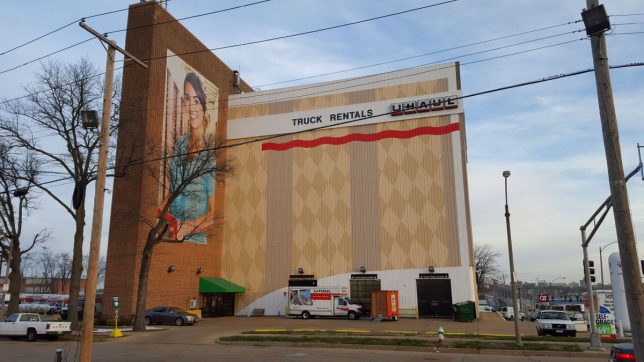
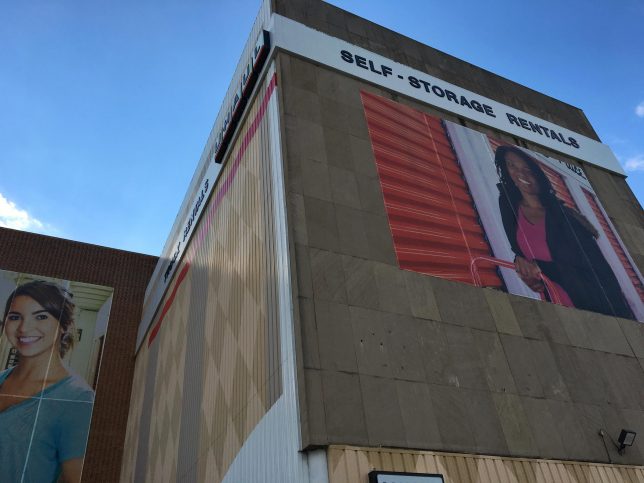
U-Haul company’s commitment to renovate and reuse abandoned buildings is not only economical, it also serves to revitalize post-industrial neighborhoods.

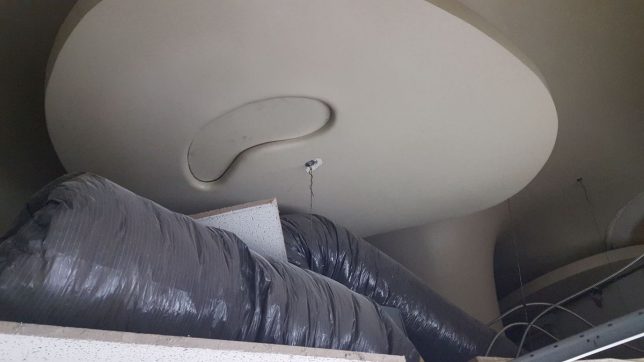
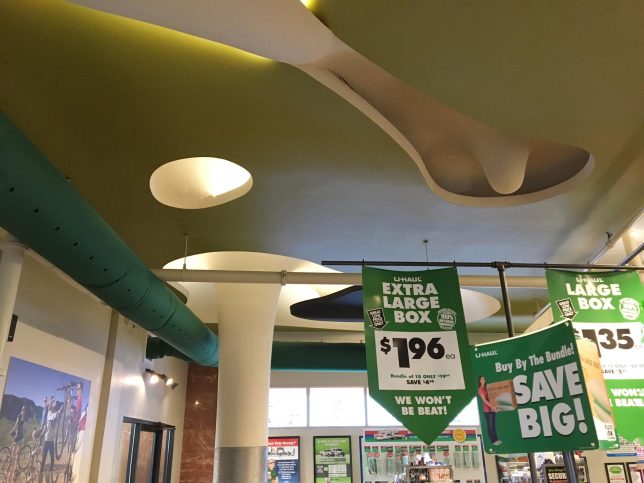
One of U-Haul’s most noteworthy adaptive reuse projects is the former Magic Chef head office building in south St. Louis, Missouri. Built in 1947-48 and designed by architect Harris Armstrong, the building’s lobby featured a beautiful sculptured ceiling created by legendary Japanese-American artist Isamu Noguchi.

Magic Chef sold its St. Louis buildings and factories in the late 1950s and the head office building at 1641 South Kingshighway sat abandoned for about a decade before U-Haul bought it in 1977.

A practical renovation in the early 1990s saw a drop ceiling installed beneath Noguchi’s sculptural ceiling but thanks to U-Haul’s current focus on adaptive reuse and respectful regional marketing, both the building and its unique mid-century lobby ceiling are undergoing a well-deserved renaissance.

Shop The Pig

U-Haul’s corporate sustainability initiatives pay off for both the company and the community in a number of ways including lightening the local carbon footprint, reducing consumption of energy and resources on new construction, and helping cities and towns reduce their inventories of unwanted buildings. Saving historic architecture isn’t always a priority, however. This former Fox Brother’s Piggly Wiggly supermarket in Saukville, Wisconsin is a prime example. The defunct grocery store was converted into the U-Haul Moving & Storage of Port Washington full-service moving and self-storage facility over the summer of 2016.

For St. Pete’s Sake

U-Haul doesn’t have to expend the expense required to beautify their adaptively reused buildings but aren’t you glad they do? Take the U-Haul depot above, located in downtown St. Petersburg, Florida. Formerly a drab, dreary, abandoned rail-connected cold storage building, the structure now boasts a gigantic mural of Tampa Bay wetlands fauna and flora on one side highlighted by an artistically rendered Roseate Spoonbill. Flickr user Mark Evans (st_asaph) captured this uplifting urban scene on February 27th of 2017.

Next Page – Click Below to Read More:
Haul For One U Haul Adapts Reuses Abandoned Buildings

Share on Facebook


[ By Steve in Architecture & Offices & Commercial. ]

[ WebUrbanist | Archives | Galleries | Privacy | TOS ]


WebUrbanist

 
Comments Off on Haul For One: U-Haul Adapts & Reuses Abandoned Buildings

Posted in Creativity