RSS
 

Archive for June, 2017

Architecture for Airheads: 13 Intriguingly Interactive Inflatable Structures

15 Jun

[ By SA Rogers in Art & Installation & Sound. ]

Who can resist a gigantic bubble that’s big enough to climb into? Inflatables aren’t just practical, packing down to surprisingly small packages and then popping right back up into sizable structures, they’re also just plain fun, whether they act as portable temporary architecture, offer bouncing surfaces, react to movement with light and sound or just casually perch on top of buildings like it’s no big deal.

Stage for Oerol Festival by Plastique Fantastique

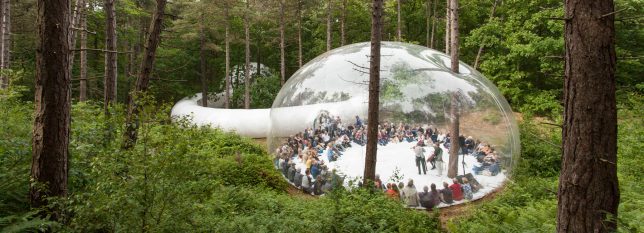
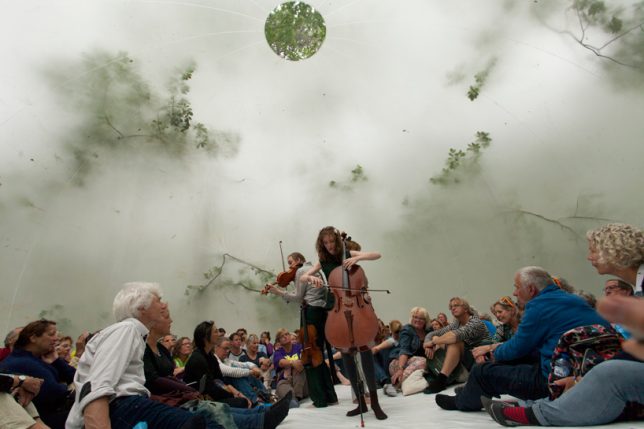
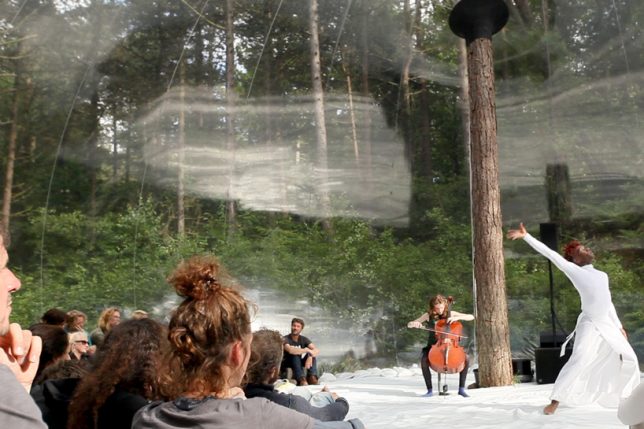
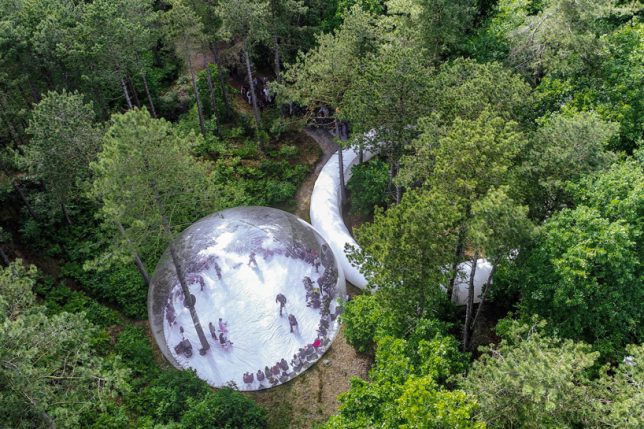
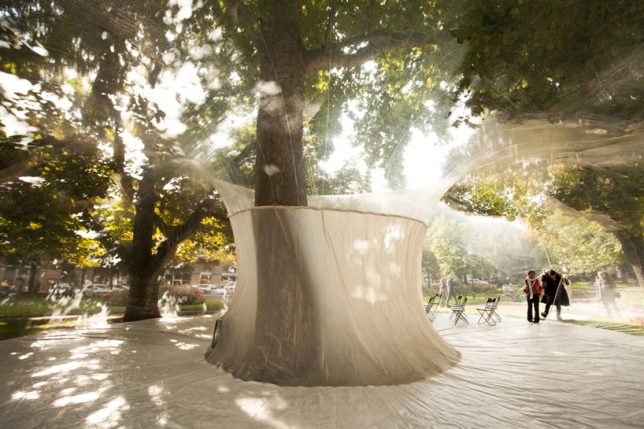
An entire island is used as a stage for events during the Oerol Festival in the Netherlands, and this year, Plastique Fantastique has crafted a special way to enclose some of that space without cutting it off from its surroundings or erecting a permanent structure. This inflatable creation is a transparent orb pierced by a single tree trunk, its skin reflecting the performers as they move

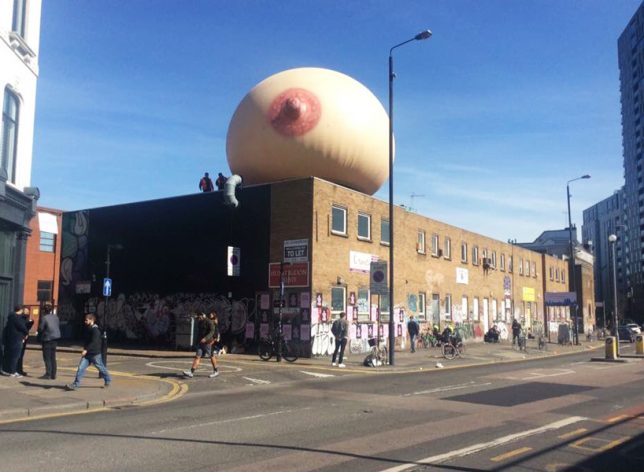
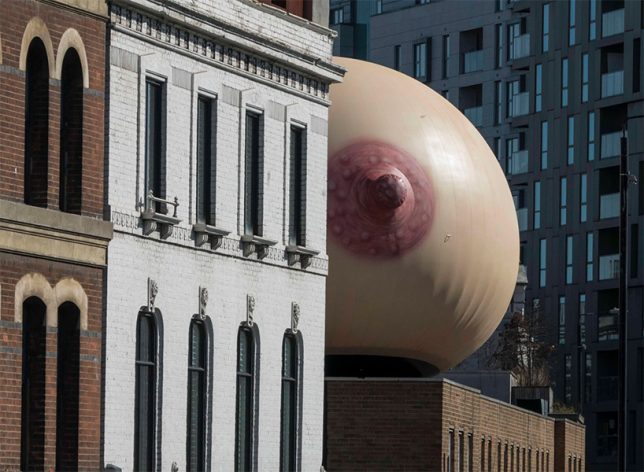
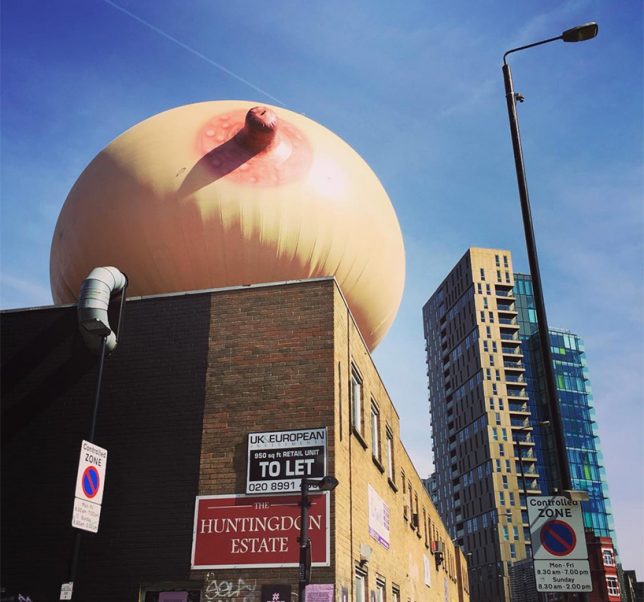
#FreeTheFeed Inflatable Breast Sculpture

A campaign by Mother London to normalize breastfeeding in public, called #freethefeed, placed a gigantic inflatable breast on top of a brick building in the east London district of Shoreditch during Mother’s Day in the UK. For anyone who might be scandalized at such a sight, nearby flyers explained the project’s educational motives. “It’s hard to believe that in 2017, UK mothers still feel watlched and judged when feeding in public, by bottle or breast. This was our Mother’s Day project. A celebration of every woman’s right to decide how and where they feed their children without feeling guilty or embarrassed about their parenting choices.”

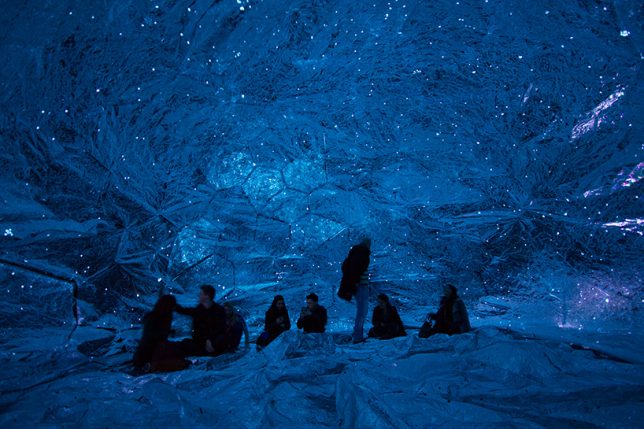
Inflatable Infinity Space

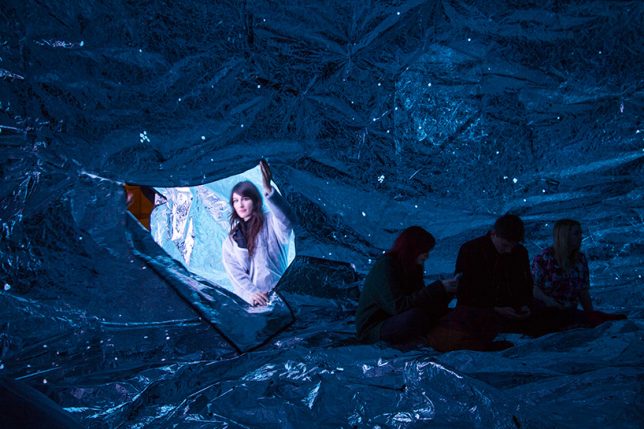
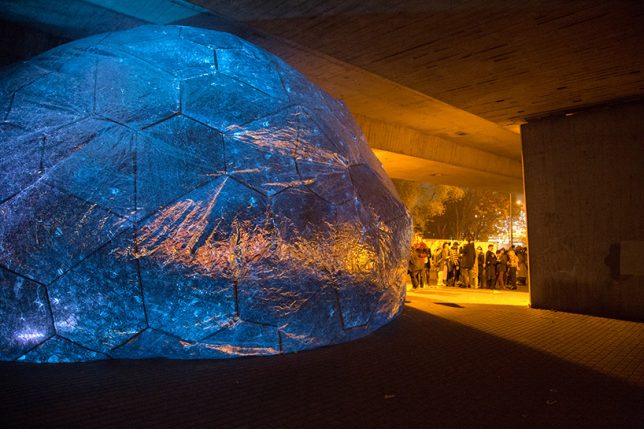
Crinkled metallic fabric creates an inflatable silver sphere in which the cosmos seem to be contained. ‘Osmo’ was created by London-based studio loop.ph for the Light Night Canning Town 2014, placed beneath London’s high-traffic A13 flyover to recreate a stretch of star-filled sky that has been lost to development.

SiloSilo by Plastique Fantastique

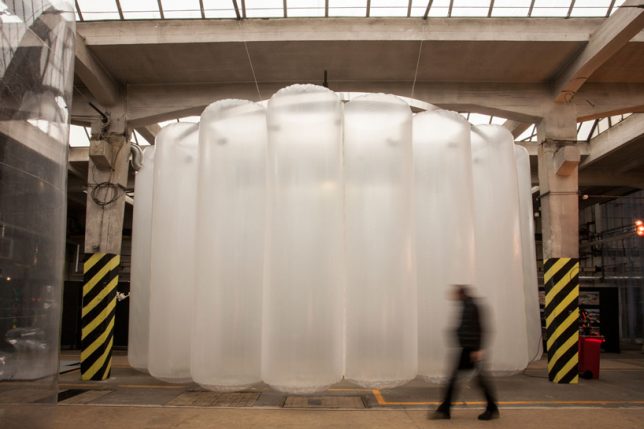
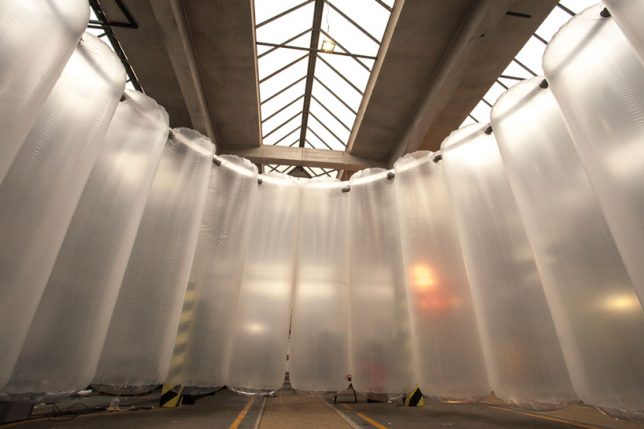
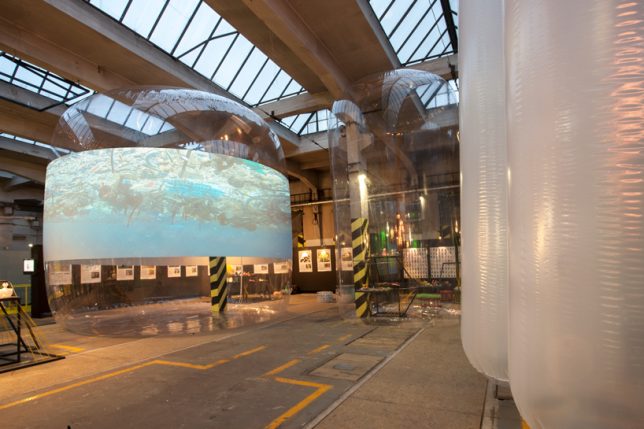
Creating a series of conference spaces and acting as a backdrop for video projection, a bunch of giant inflated cylinders bring awareness to the use of recycled materials as part of the traveling project SiloSilo. For example, a donut-shaped inflatable called ‘MEDUSA,’ which packs down small enough to transport in a box, represents the amount of plastic garbage produced by the city of Pilsen, Czech Republic in just three days.

Inflatable Floating Playground in Dubai

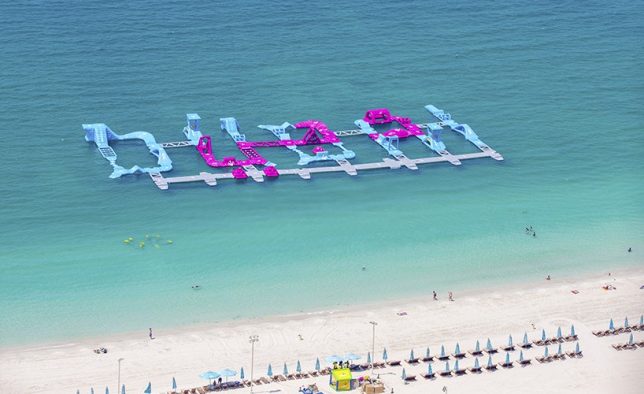
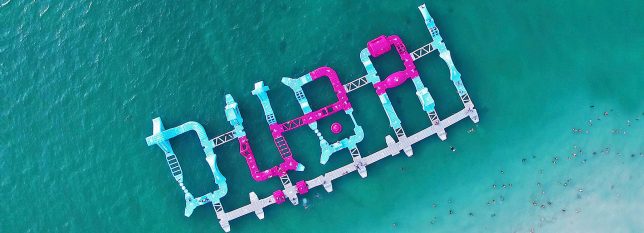
Partiers bounce, jump and dive off a series of inflatable structures spelling out ‘DUBAI’ in the water at Jumeirah Beach residence. The ‘dubaiTAG’ installation by Wibit Sports is made from nearly 100 modular components to create an inflatable waterpark.

Next Page – Click Below to Read More:
Architecture For Airheads 13 Intriguingly Interactive Inflatable Structures

Share on Facebook


[ By SA Rogers in Art & Installation & Sound. ]

[ WebUrbanist | Archives | Galleries | Privacy | TOS ]


WebUrbanist

 
Comments Off on Architecture for Airheads: 13 Intriguingly Interactive Inflatable Structures

Posted in Creativity


5 Quick Tips for Outdoor Macro Photography

15 Jun

Summer is arriving here in northern Europe, and with it, a whole new world of color, vitality, and humming activity. It’s the perfect time to go outside and explore what all the buzz is about! Doing macro photography outdoors can be a very rewarding and pleasant activity, and no, it doesn’t have to be complicated. Knowing some basics will make it more worthwhile, and it might also help you learn even more from your experiences.

Outdoor macro photography 01

So what are the essential steps of enjoying an outdoor macro photography session? There are a lot of excellent resources on macro photography here at Digital Photography School, so I won’t go through the technical aspects in too much detail. Either way, the most important factors for enjoying doing some macro photography outdoors are pleasant weather and an inquisitive mind. So let’s begin!

https://digital-photography-school.com/everything-you-need-to-know-about-macro-photography/ https://digital-photography-school.com/everything-you-need-to-know-about-macro-photography/

1. The gear

The great thing about macro photography is that there’s a wide range of gear that you can use; everything from a complicated setup with microscope lenses and focus stacking to using your mobile phone camera. In between those extremes there are point-and-shoot digital cameras that often come with a surprisingly good macro mode, and SLRs in combination with macro lenses, close-up filters or extension tubes.

5 Quick Tips for Outdoor Macro Photography

Here are some dPS articles on macro gear options:

  • Close-up filters
  • Using extension tubes for macro photography
  • Reverse lens macro
  • Macro lenses
  • Budget alternatives for macro photography

Once you have some kind of setup for macro photography, you’re ready for the next step!

2. Find a subject

What would you like to photograph? The choices outdoors are many and varied. It can be something small or a detail of something bigger. It might be something you’ve researched and planned for a long time or something you just found. This is where your creativity comes in.

5 Quick Tips for Outdoor Macro Photography

I have a thing for ants, so they are always a go-to subject for me.

If you don’t have a specific idea and are looking for inspiration, lying down in the grass on a sunny day and seeing the world from the point of view of a frog might help!

3. Lighting your subject

You have your gear, you have your subject – now all you need for a photograph is some light. Good exposure can be accomplished either by using natural light or an external light source (such as a flash).

5 Quick Tips for Outdoor Macro Photography

This image was made using only natural light. It was taken late in the day in the shade, but the light was still bright enough to capture this sleeping dragonfly.

In one way, using natural light is easier, as you don’t need anything but your camera of choice. In another way, natural light can be quite tricky. Apart from being unreliable, the very nature of macro photography calls for a narrow field of view, which means that the sensor has to receive enough light from a very small area. In short, there has to be a lot of light – especially if you’re trying to capture something that is moving and you have a ridiculously narrow depth of field.

5 Quick Tips for Outdoor Macro Photography

Here, a flash was bounced off a nearby wall to give the scene enough light.

Using an external light source, such as a flash, is an excellent way to control both the amount and the direction of light. Before you begin, though, it’s useful to learn a bit about the basics of flash photography – as with everything, flash photography also has its own challenges. The look and feel of the photo will also be different depending on whether you use natural or artificial light.

4. Stabilize yourself

Remember that the longer focal length you use, the higher the risk is for getting a shaky image. This means that even if you’re photographing a still subject, your shutter speed needs to be fast – or you need to use a tripod. A tripods is a great photography tool in general, but it is especially useful in macro photography, where there might not be enough light due to the setup and the small field of view. Here, a tripod is essential.

5 Quick Tips for Outdoor Macro Photography

It might sometimes feel like the tripod is restricting your movement and making your photography session a bigger deal than what you want it to be. That’s okay! It’s possible to do fantastic macro photography without a tripod; just remember to keep that shutter speed fast.

5. Telling a story

When photographing something that is technically challenging and conceptually extraordinary, it’s easy to forget about the other aspects of photography. But as with photography in general, some of the most interesting macro photographs are the ones that have a story to tell.

Death and birth.

5 Quick Tips for Outdoor Macro Photography 5 Quick Tips for Outdoor Macro Photography

You can create your own tale or just open your eyes to all the small stories that are being told around you, all the time. If you stop to have a look, there is a lot to be inspired by among the small lives that are being led in the great outdoors – whether it’s a remote wilderness or your backyard.

5 Quick Tips for Outdoor Macro Photography

Ants moving to a new colony – sometimes it takes less energy for the colony if workers carry each other to the new location.

Conclusion

These are the factors I try to keep in mind when I’m heading outside to do macro photography. There are many more that can help you create an interesting photograph of the natural world. What are your best tips? I’d love to hear your thoughts and see your creations in the comments below.

The post 5 Quick Tips for Outdoor Macro Photography by Hannele Luhtasela-el Showk appeared first on Digital Photography School.


Digital Photography School

 
Comments Off on 5 Quick Tips for Outdoor Macro Photography

Posted in Photography


How to Use a Prism to Make Creative Photo Effects

14 Jun

In this article, I’ll give you some ideas and tips on how to use a prism to make some really cool and creative photo effects.

How to Use a Prism to Make Creative Photo Effects

Prisms

Have you ever seen the beautiful rainbows dispersed by hanging suncatchers and wondered, how would that look in a photograph? Unfortunately, the small prisms used on most suncatchers don’t fill enough of the camera frame to render a detailed image. But where there’s a will, there’s a way!

Triangular prisms, usually found in college science labs have become an increasingly popular tool for adding beautiful reflections and light to a photograph. Plus, because prisms are small, they are easy to pop in a camera bag, ready for your next shoot.

How to Use a Prism to Make Creative Photo Effects

How to Use a Prism to Make Creative Photo Effects

How to Use a Prism to Make Creative Photo Effects

The physics

You may be familiar with triangular prisms from high-school demonstrations on the characteristics of light. The physics goes something like this – when a beam of light (made up of different electromagnetic waves with varying wavelengths) hits a piece of glass straight-on, the light passes right through it.

However, if the beam of light comes into contact with a glass surface at an angle, the wavelengths bend, which is a phenomenon called refraction. Then, when the beam exits through the other side of the prism, the wavelengths bend again. The amount the light bend depends on the wavelength itself. Red bends at one angle, and violet bends another and so each color is dispersed into the rainbow we see when we look through a prism.

As photographers, we exploit the inherent properties of light whenever we take a photo. The assembly of glass elements in camera lenses directs light from a scene, translating it to the digital sensor. But by adding a prism into the mix (in front of the lens) you can introduce some interesting creative effects to your photographs. Light that would usually meet the outer lens element first, hits the prism, dispersing the light before it’s directed into the camera.

What you will need

  • A camera
  • One triangular prism
  • A lens cloth
triangular prism - How to Use a Prism to Make Creative Photo Effects

A triangular prism like this one is available on Amazon for only a few dollars.

This project only has two ingredients – a prism and a DSLR camera. For this project, I used a triangular prism I purchased on eBay for a few dollars. A prism that can be manipulated with one hand is ideal. My preference is one that is approximately 3″ x 1″ (8cm x 2.5 cm). Keeping a lens cloth close by is useful for fingerprints on the glass that can show up in the image.

How to Use a Prism to Make Creative Photo Effects

How to Use a Prism to Make Creative Photo Effects

How to Use a Prism to Make Creative Photo Effects

Method

Using a prism to create interesting effects in-camera requires a little trial and error and a bit of co-ordination. Holding the prism over the front lens element is the easy part. It’s getting the effect right that’s a little fiddly. I’d recommend using a tripod as it can be a bit vexing having to juggle the camera in one hand and the prism in the other. I would also recommend using Live View to give you an accurate indication of what impact the prism is making, without being blinded by wayward reflections from the sun streaking through your viewfinder.

If you’ve ever shot through glass materials before, you’ll know that your autofocus can really start to struggle. First, focus the camera on your subject using autofocus, then switch to manual focus mode. That way, the subject in the background will already be sharp, without having the camera flail around trying to focus on the prism itself.

Slowly rotate the prism, monitoring the effect on the LCD screen. Angling the prism away from the lens, or changing your position in relation to the sun can also add different effects. Experiment with the distance between the prism and the camera lens too. When you find a reflection in the image you like, take a snap!

Now that you have the basics down, try changing up the prism! I am constantly switching between my triangular prism and a glass wine stopper I chanced upon in an op-shop. The hexagonal prism adds a greater kaleidoscopic effect but tends to distort the image more, so it’s fun to experiment and see what works best.

How to Use a Prism to Make Creative Photo Effects

How to Use a Prism to Make Creative Photo Effects

A wine-stopper I found at an op-shop makes for a great tool in prism photography.

How to Use a Prism to Make Creative Photo Effects

You don’t always need sunny weather for prism photography, this abstract image of a crane was taken on a cold, rainy afternoon.

Your turn

So pick up a glass prism and give this a try. Please share your prism photographs in the comments below.

The post How to Use a Prism to Make Creative Photo Effects by Megan Kennedy appeared first on Digital Photography School.


Digital Photography School

 
Comments Off on How to Use a Prism to Make Creative Photo Effects

Posted in Photography


The first photo shared from a phone just turned 20

14 Jun

Sharing photos from a phone is easy as breathing these days, and we have Philippe Khan to thank for paving the way. In June 1997, he achieved a technological first that would be repeated countless times in the following decades: he shared a digital photo instantly.

It all came together just under the wire in the delivery room where his wife Sonia was in labor with their daughter, Sophie. He connected his Casio QV-10 camera to his laptop, and with a his flip phone rigged up to the laptop by way of a makeshift cable, the system was ready for Sophie’s arrival.

His laptop was connected to a server at home, already configured to send email notifications to friends and family once his photo and text were transmitted. He snapped the photo, and an email with a link to the photo was sent out to 2000 people. There are a lot fewer cables involved in the process today, but basically, we’re doing the same thing in delivery rooms twenty years later. New parents everywhere thank you, Philippe.

Articles: Digital Photography Review (dpreview.com)

 
Comments Off on The first photo shared from a phone just turned 20

Posted in Uncategorized


3 Good Reasons to Use Layers in Photoshop

14 Jun

If you shoot RAW, in general, you will be editing those files in Adobe Camera Raw (ACR), Lightroom or some other RAW editor. This may be all the post editing that you require. However, if you are like me, I finish my editing in Photoshop. Why? Because I use layers and they play an essential part of my workflow.

Layers are definitely where the real magic in Photoshop happens. They were introduced way back in version 3.0. I am a long-time user of Photoshop, so using layers in my workflow is second nature.

How do layers work?

In Photoshop, there are many types of layers. You can add text to your image using a Type Layer. You can duplicate any type of layer. By using a Layer Style, you can add a drop shadow or other effects to your photo. For example, you may want to color correct a portrait image by using a Curves Adjustment Layer.

In this article, I’ll give a brief overview of how layers work and go on to explain why I use the following go-to in my workflow:

  1. Adjustment Layers for non-destructive editing
  2. Layer Masks
  3. Smart Objects

The Layers Panel

Let’s go over to the Layers Panel and I’ll walk you through how layers work. Here is an example of a simple vector image of a mountain range with a sunset. There are six layers stacked on top of one another, that make up the final image. By clicking on the eye icon, you can turn the visibility of each layer off and on.

3 Good Reasons to Use Layers in Photoshop

Different layer types in Photoshop

6 layers stacked on top of each other to form a picture in Photoshop gif

Six layers stacked on top of each other to form a picture in Photoshop

However, in Photoshop, you can do a lot more with layers. You can delete a layer by clicking on it and dragging it to the little trash can at the bottom of the panel. You can also duplicate a layer by dragging it down to the icon beside the trash can, which creates a copy of that layer. A layer can be moved by clicking on it and dragging it up or down the stack. You can reduce the opacity of a layer, thereby allowing some or all of the image layer underneath to show through, depending on how much you reduce the opacity.

3 Good Reasons to Use Layers in Photoshop

Duplicate and delete layers in the Layers Panel using the tools circled in red.

#1 – Adjustment Layers

Without a doubt, when Adjustment Layers were introduced into Photoshop 4.0 it meant that users could unleash the magic of Photoshop by editing non-destructively. Prior to this, you had to duplicate the image first to preserve the original, as edits were permanently made to the layer. Adjustment Laters are key in any photographer’s workflow.

As a precautionary note, Adjustments under Image in the Options Bar is not the same as creating an Adjustment Layer via Layer>New Adjustment Layer. The former will apply edits directly to the layer that you are working on, where as an Adjustment Layer adds a layer above the working one. These edits can be redone or discarded without altering the pixels of your original image.

3 Good Reasons to Use Layers in Photoshop

Applying edits through Image>Adjustments will affect the image permanently.

Working non destructively by adding a New Adjustment Layer via the Layer tab in the Options Bar

Working non-destructively by adding a New Adjustment Layer via the Layer tab in the Options Bar.

Adjustments Panel

As with the Layers Panel, the Adjustment Layers has its very own panel too. The icons represent the 16 different layer adjustments available in Photoshop. Some are used more than others. Adjustment layers apply the correction to all the layers below them, without affecting any of the layers above.

Adjustment Layers has it's own panel with 16 icons representing the different Adjustment Layers

Adjustment Layers has its own panel with 16 icons representing the different options.

Once I do my initial edits in ACR, I’ll finish off my post-processing in Photoshop using Adjustment layers. I like to use Levels, Curves and Selective Color & LUTs to add the necessary contrast and color corrections. As each Adjustment Layer is used and stacked on top of each other, it is essential to reduce the opacity of each layer.

How Adjustments Layers can add colour correction and bring out the details in the image in an non destructive way

How Adjustments Layers can add color correction and bring out the details in the image in a non-destructive way

Different Adjustment Layers such as Levels Adjustment Layer, Curves Adjustment Layer and Selective Color were used on this image.

Different Adjustment Layers such as Levels, Curves and Selective Color were used on this image.

What about areas of your image that don’t require the same amount of editing as other parts?

#2 – Layer Masks

When adding an Adjustment Layer in Photoshop, it applies the adjustment to the whole image. But, sometimes you need to make adjustments to only one area or separate parts of an image. This is where Layer Masks come in handy. When you add a new Adjustment Layer, it automatically adds a white Layer Mask (white reveals and black conceals).

For example, in the image of the waterfall, it was necessary for me to mask the water with each adjustment layer, otherwise, the highlights would have been blown out.

The water in the image on the left had no masks applied when global edits were applied using Adjustment Layers. Masks were used on the image on the left to preserve the highlights of the water.

The water in the image on the left has not had masks applied when global edits were added using Adjustment Layers. Masks were used on the water in the image on the right to preserve the highlights.

In the following image of this landscape in the Dublin mountains, the day was quite overcast. I wasn’t happy with the sky, so I decided to try a different one. By using the Layer masks, I was able to mask out the original sky. I used the Pen Tool for this but you can use the Brush or the Quick Selection Tool and then fill the area with black.

Layer mask applied to hide the original sky and reveal the new sky in the layer beneath.

Layer mask applied to hide the original sky and reveal the new sky from the layer beneath.

The new sky image underneath was put under this layer so that it showed through the mask, similar to a cut-out. I then added more Adjustment Layers to color correct the image so that the new sky looked seamless.

An animated gif to demonstrate the Adjustment Layers to color correct the image and by adding a layer mask to reveal a different sky to the original overcast one.

#3 – Smart Objects

Adobe really defines Smart Objects in a neat nutshell. Smart Objects preserve an image’s source content with all its original characteristics, enabling you to perform nondestructive editing to the layer.

So for photographers, this is fantastic news. Now, when you apply edits to a layer that is a Smart Object, you can transform, scale, rotate, warp, apply filters or layer masks. The quality of the image will not be degraded even though it is a raster image!

3 Good Reasons to Use Layers in Photoshop

An image layer converted to a Smart Object

So how do you convert an image to a Smart Object? It is simple, right click on the layer and select Convert to a Smart Object. You will see a small icon on the thumbnail image that tells you that the layer is now a Smart Object.

3 Good Reasons to Use Layers in Photoshop - smart object

Right click on the layer to reveal a drop-down menu and select Convert to a Smart Object.

If you edit your images in Camera Raw, you can then export the image into Photoshop as a Smart Object. Hold the Shift key and the Open Image button turns to Open Object. This means that at a later date, you can return to Camera Raw to re-edit by double clicking on the layer thumbnail.

How to set in Camera Raw the default setting for images to be exported to Photoshop as Smart Objects

How to set the default in Camera Raw for images to be exported to Photoshop as Smart Objects.

Alternatively, when you have the Camera Raw dialog box open, at the bottom there is what looks like a link on a website. This link actually takes you to the Camera Raw Workflow Options. You can check the box Open in Photoshop as Smart Objects to set that as the default in ACR.

3 Good Reasons to Use Layers in Photoshop - ACR

Click the check box in the Camera Raw Workflow Options dialog box to ensure images are exported out as Smart Objects.

Conclusion

Layers can play an important role in your post-production.

  • You can separate parts of the image and edit them without affecting other parts of the image.
  • Converting your image layers to a Smart Object allows you to move the new image around, edit it, and resize it without affecting the resolution of the original image.
  • You can add multiple layers on top of each other and put them into groups.
  • You can apply filters and effects to layers independently, e.g. drop-shadow, color adjustments, etc.
  • Blend Mode options can change the appearance of each layer
  • You can reduce the opacity on a layer. This is particularly useful when using Layer Adjustments to fine-tune the edit to create a subtle effect.

The main take away from using Layers in Photoshop is that the whole process is working non-destructively.

Now it’s your turn, do you use layers in your post-production process? What are your favorite techniques for using layers? Please share your comments below.

The post 3 Good Reasons to Use Layers in Photoshop by Sarah Hipwell appeared first on Digital Photography School.


Digital Photography School

 
Comments Off on 3 Good Reasons to Use Layers in Photoshop

Posted in Photography


How to Understand the Differences Between Full-Frame Versus Crop-Sensor Cameras

14 Jun

I remember how excited I was to get my first DSLR several years ago. My wife and I had a newborn and wanted to get better shots of our little baby than what a pocket camera could provide. So we soon found ourselves with a new-to-us Nikon D200 that produced stunning images of our precious little boy. The pictures wouldn’t win any prizes, but they were leagues beyond what we could get with our pocket camera or cell phone and that was fine with us.

However, the more I learned about cameras in the coming months, the more I started to think we had made a mistake because our camera was, I discovered, a crop-sensor model. Unbeknownst to us, we had spent hundreds of dollars on what was clearly an inferior camera! Or so I thought at the time. The truth, as is so often the case, is much more nuanced. I’ll explore it a bit in this article so you can understand the practical differences between these two types of cameras and hopefully decide which one is right for you.

How to Understand the Differences Between Full-Frame Versus Crop-Sensor Cameras

This duck is rushing to get the latest full-frame camera he read about on the internet.

Different, not better

Before I get too deep into this article I want to make one thing clear; neither crop, nor full-frame, nor medium format, nor micro-four-thirds are any better than the others. All of them are different, and each format has its strengths and weaknesses (yes, even full-frame cameras have weaknesses!) and each is ideally suited to different types of photography. Moreover, all types of cameras are capable of taking great photos. Even mobile phones, which are basically super-duper-ultra-crop sensor cameras, can take breathtaking award-winning shots that grace not only social media feeds but billboards, walls, and pages of magazines across the world.

The term crop-sensor or full-frame refers solely to the size of the imaging sensor inside a camera. A full-frame sensor is the same size as a piece of 35mm film which was, and still is, the most widely-used type of film in analog cameras. The most common size that the term crop-sensor refers to is known as APS-C, which is the same size as a piece of film from the mid-1990’s Advantix format (also called the Advanced Photo System or APS) invented by Kodak.

How the smaller sensor affects your images

Using a smaller sensor has interesting effects on things like depth of field and apparent focal length of lenses, but it’s not a subjective measure of how good or bad a camera is. Think of it like going to an all-you-can-eat buffet with different sized plates. Shooting with a full-frame camera is like taking a normal size plate to the serving area, whereas using a crop sensor camera is like using a plate that is about 30% smaller. Both will get the job done, and both are great for different types of people. So what’s all the fuss about? Understanding some of the practical differences between these two types of plates…er…cameras will help you know which type is best for you.

So what’s all the fuss about? Understanding some of the practical differences between these two types of plates…er…cameras will help you know which type is best for you.

How to Understand the Differences Between Full-Frame Versus Crop-Sensor Cameras

Crop-sensor versus Full-Frame…it’s not about which is better, but which will suit you better.

ISO performance

For years one of the immutable truths about shooting with a full-frame camera was that it automatically gave you better performance at high ISO values. While this is still mostly true today, it’s also safe to say that for a majority of practical scenarios crop-sensor cameras have picked up the slack and can hold their own fairly well when pitted against their large-sensor counterparts.

If you are looking for the ultimate in high ISO performance though, you might want to ditch that Canon Rebel and start shopping around for a 5D Mark IV or a 1DX. The reason for this discrepancy is due to physics. The pixels, or tiny individual light-sensitive bits on a camera imaging sensor, are usually larger on a full-frame camera.

Bigger buckets

For example, pretend it’s raining and you want to collect some of the water that’s falling freely in your front yard. To do so you set out 24 large buckets (so big you call them mega-buckets) next to each other and wait a few minutes for them to start filling up. Your neighbor, meanwhile, sees your plan and rushes to do the same thing but uses 24 ultra-mega-buckets that are about 30% larger than yours. When the sun comes out and the birds start to sing, who will have collected more water? I’ll give you a hint, it’s not going to be you.

How to Understand the Differences Between Full-Frame Versus Crop-Sensor Cameras

Even though you and your neighbor were both harvesting rainwater with 24 mega-buckets, hers were larger in size and therefore able to collect more water. It’s kind of the same with cameras in that a model like the Nikon D5500 has a 24-megapixel image sensor which is the same as a full-frame Nikon D750. However, since the pixels on the D750 are bigger they are more sensitive to light. So, when there’s not much light available, such as a situation where you may need to shoot at ISO 6,400 or 12,800, they do a better job of collecting the light.

How to Understand the Differences Between Full-Frame Versus Crop-Sensor Cameras

ISO 6400, crop-sensor Nikon D7100. Note how grainy much of the dark areas look, and the somewhat desaturated feel of the bright colors.

How to Understand the Differences Between Full-Frame Versus Crop-Sensor Cameras

Shooting the same scene with a full-frame Nikon D750 yields much better results, with less overall noise and cleaner colors.

Technology advances

This analogy quickly breaks down when you consider the advances in modern technology. Most crop-sensor cameras today significantly outshine their forebears from just a few years ago when shooting at ISO 3200 or 6400. The Fuji X-T1, a modern crop-sensor camera, is about equal to the full-frame Canon 5D Mark III in terms of high ISO performance. Granted the latter is a few years old and has since been bested by other full-frame cameras, but still, the point remains that today’s crop-sensor cameras are no slouch when it comes to shooting at high ISO values.

However, if you want the absolute best in terms of high ISO sensitivity, a modern full-frame camera is usually going to be your best bet. It’s not a zero-sum game though, and there are many other practical considerations to think about. Lastly, just because a camera can shoot at ISO 25,600 doesn’t mean it’s the right one for you.

Cost and Size

There is a principal of mathematics known as modus ponens which is used as a way of showing a certain thing to be true because it follows a logical progression. Basically, it’s a formal way of saying that one thing P naturally implies Q. If P is true, then Q must also be true.

Camera Size

When we apply this rule to photography we can immediately see one disadvantage of cameras with larger sensor sizes. It goes like this; full-frame sensors are larger than cropped image sensors (i.e. condition P). Larger sensors need larger camera bodies in order to compensate for the increase in sensor size (i.e. condition Q). Therefore, cameras with larger sensors are larger than cameras with smaller sensors. Quod erat demonstrandum.

How to Understand the Differences Between Full-Frame Versus Crop-Sensor Cameras

The sensor in a full-frame camera is much larger than the sensor in a crop-frame camera. Therefore, the camera itself needs to be larger too.

Price – $ $ $

Thus, we can see another key difference between cameras with various sensor sizes, and it’s something to keep in mind when considering which type of camera to buy. Image sensors range from the size of a tic-tac breath mint to that of a postage stamp, to a potato chip, and even larger when you consider highly specialized imaging devices like those used at NASA. These image sensors are not cheap to manufacture, which is why full-frame cameras can easily cost twice as much as their crop-sensor counterparts. If you go all the way up to medium format, with sensors that are significantly larger than full-frame, you can easily spend $ 10,000, $ 20,000, or more on the camera alone, without any lenses.

How to Understand the Differences Between Full-Frame Versus Crop-Sensor Cameras
Crop-sensor cameras like the Nikon D3300 or the Canon Rebel T6i are smaller, less expensive, and also more portable than their full-frame counterparts. If you’re shopping for a camera, don’t need crazy-high ISO performance, and also don’t want to empty your pocketbook in the process, then a crop-sensor or micro-four-thirds camera (which has a sensor that’s about 25% as large as a full-frame camera) will suit you quite nicely.

However for many photographers, the size of their camera is of little concern, and they don’t mind the increase in size, weight, and cost that comes with venturing into the full-frame territory. Just know that bigger isn’t always better, especially because along with bigger sensors comes bigger lenses that are required to fit on them as well.

Lens Size and Selection

When considering a camera system, whether crop-sensor or full-frame, it’s not just the size of the camera that you will need to keep in mind but the size and price of the accompanying lenses as well. Lenses designed for smaller sensors are generally smaller and less expensive than lenses for full-frame cameras. A 70-200mm f/2.8 lens for full-frame cameras, which is fairly standard for many photographers, can easily cost upwards of $ 1500. Whereas a similar piece of glass like the Sigma 50-100mm f/1.8 lens for crop-sensor cameras will set you back about $ 1000. It’s even better when you look at the micro four thirds system, where lenses are significantly smaller and often less expensive than comparable full-frame models.

How to Understand the Differences Between Full-Frame Versus Crop-Sensor Cameras

The classic 70-200mm f/2.8 lens. Designed for full-frame cameras, it’s a fantastic lens that will give you great photos but it’s also expensive and heavy. Similar lenses for cameras with smaller sensors are smaller, lighter, and often cheaper.

However, one advantage of going with a full-frame system is the sheer quantity and variety of lenses that you have available at your disposal. Since all 35mm film cameras ever made are full-frame, you can use most of those lenses on modern cameras and sometimes you don’t even need an adapter. Many modern full-frame cameras are capable of autofocusing with older lenses too, making it easy to find high-quality glass that will suit your needs if you don’t necessarily need to buy brand-new. There is a growing selection of lenses for crop-sensor cameras, particularly in the micro-four-thirds ecosystem. But if you need access to the largest possible array of lenses than a full-frame camera might just be your best bet.

Lens Performance: Depth of Field and Focal Length

At this point, it might sound like I’m less than enthusiastic about full-frame cameras, but I promise you that’s not the case. I shoot with both crop-sensor and full-frame gear. There is a reason why full-frame cameras and lenses are highly sought-after despite their larger size, heavier weight, and greater cost. Most glass made for full-frame systems costs more and weighs more because it is higher quality. They also produce superior results compared to some of the cheaper lenses for smaller cameras. (Note that I said most, not all. Certainly, there are many outstanding lenses for APS-C and micro-four-thirds cameras. But it’s safe to say that lenses made for full-frame cameras are, for the most part, going to produce outstanding results.)

There’s also the fact that when shooting full-frame you get the benefit of a shallower depth of field. For example, portrait photographers often prefer shallow depth of field. When shooting with a large sensor and a 70-200mm f/2.8 lens you can get results that are difficult to replicate with crop-sensor gear. The math is a bit tricky, but shooting a subject at 200mm with an aperture of f/2.8 on a full-frame camera gives very different results than using a crop-sensor camera.

Examples

How to Understand the Differences Between Full-Frame Versus Crop-Sensor Cameras

Shot with a 200mm lens on a full-frame camera.

I shot the photo above at 200mm with my full-frame camera, but it would have been quite different if I shot it on my crop-sensor camera. A 200mm lens behaves like a 300mm lens when mounted on an APS-C camera. That means I would have had to move much farther back to get this same composition and therefore would have significantly increased the depth of field. The background would not have been as blurry, and the pillar behind the boy would have been more in focus as well.

85mm lens on full-frame versus crop-sensor

Here’s a photo that I took with my crop-sensor D7100, using an 85mm lens at f/4.

How to Understand the Differences Between Full-Frame Versus Crop-Sensor Cameras

85mm lens at f/4 shot with a crop-sensor camera.

After I took that picture I put the same 85mm lens on my full-frame D750 and while standing in the same spot, took the following image:

How to Understand the Differences Between Full-Frame Versus Crop-Sensor Cameras

85mm lens at f/4 on full-frame, same physical position as the first picture.

It looks like I zoomed out, but in fact, I was using the exact same lens but on a full-frame camera. To get a picture like the one I shot initially, I had to move forward which then changed the background elements and also gave me a shallower depth of field with a background that was more out of focus.

How to Understand the Differences Between Full-Frame Versus Crop-Sensor Cameras

85mm lens at f/4 shot on a full-frame camera.

The reason this happens is that with the former you are getting a picture that accurately reflects a lens’s true focal length, whereas on a crop sensor camera you are seeing a cropped version of what the lens sees.

Wide-angle

This picture of the Edmond Low Library on the Oklahoma State University campus was taken with my 35mm lens on my Nikon D7100 (crop-sensor).

How to Understand the Differences Between Full-Frame Versus Crop-Sensor Cameras

35mm lens at f/4 on a crop-sensor camera.

I took the next picture sitting in the exact same spot on the library lawn, using literally the exact same 35mm lens mounted to my full-frame Nikon D750.

How to Understand the Differences Between Full-Frame Versus Crop-Sensor Cameras

35mm lens at f/4 on a full-frame camera.

Nothing changed here except the camera on which the lens was mounted. The shot of the library on my crop-sensor camera is, in a very real sense, a cropped version of what you see on a full-frame camera. The implications of this are profound since it means a 35mm lens on a crop-sensor body actually behaves more like a 55mm lens. (The exact value varies just a bit depending on whether you shoot Nikon or Canon, which each use a slightly different crop factor.)

Implications – how it affects you

So what are the practical implications of this phenomenon? It means that if you are primarily interested in landscape, architecture, or other shots that are suited for wider focal lengths, a full-frame camera will generally be a good choice. However, if you like to shoot wildlife or sports, a crop-sensor camera can give you a lot of extra reach with your lenses and effectively transform a 300mm telephoto lens into a 450mm birdwatching, goal-scoring powerhouse.

How to Understand the Differences Between Full-Frame Versus Crop-Sensor Cameras

I like to do close-up photography on my full-frame D750 not because it’s objective a better camera, but because there are specific features about it that I like for this type of photography.

The Final Word

After examining various differences between crop and full-frame cameras, I hope it’s clear that neither one is inherently better. Both are uniquely suited to different types of photographic tasks.

I’m always eager to hear from the dPS community on topics like this though, and if you have thoughts you would like to share on this issue please leave them in the comments below. Which system do you use and why? Are you satisfied, or are you considering switching from one format to another?

Do you have any questions after reading this article? Post a reply and in the meantime, no matter what type of camera you have, remember to get out there and use it to take pictures you enjoy.

The post How to Understand the Differences Between Full-Frame Versus Crop-Sensor Cameras by Simon Ringsmuth appeared first on Digital Photography School.


Digital Photography School
 
Comments Off on How to Understand the Differences Between Full-Frame Versus Crop-Sensor Cameras

Posted in Photography


Impossible launches special edition Polaroid 600 and metallic frame color film

14 Jun

Impossible has released a special edition of its Polaroid 600 instant camera with a two-tone black and white design. The new model is an online-shop exclusive and will set you back $ 179 in the US or €149 in Europe.

In addition, the company has revealed the Metallic Frame Edition color film pack for 600-type cameras which places your analogue instant photos into shimmering foil frames of different colors. Each photo in the pack of eight features a different colored metallic frame, including gold, blue, purple and pink. The Metallic Frame Edition film pack is $ 24.49 in the US and €21.00 in Europe. More information is available on the Impossible website.

Press Release:

CAPTURE THE MAGIC OF SUMMER WITH IMPOSSIBLE

Impossible curate a selection of instant cameras and vibrant frames that will help you capture the essence of summer

Summer is the perfect time to go outside and start shooting. As the weather gets warmer and the days get longer, there’s no better time to get armed with an instant camera and film from Impossible, to help you chase the magic of summer light. Shooting with instant film is all about slowing down, producing something tangible that can be shared – taking time out from the world of all things digital. Impossible now offer a range of styles for both beginners and avid photographers alike, this carefully curated selection of vivid frames and classic Polaroid® cameras will allow you to leave reality behind for just a moment and escape into the hazy hot days, and long balmy nights.

ALL THE COLORS OF THE RAINBOW, BUT METALLIC.
The latest release in our popular colorful frame series, Impossible has created the Metallic Frame Edition color film pack for 600-type cameras, placing your analog instant photos in a range of shimmering foil frames. Each photo in the pack of eight film features a different colored metallic frame, from gold and blue to purple and pink. You never know which color you’ll get next, making this the perfect pack for creating instant photos with a touch of chance this summer. Films priced at £18.99/€21.00/$ 24.49

IT’S ALL ABOUT MINT AND PINK THIS SUMMER.
Expanding Impossible’s Special Edition film series, this release has been specially created for use with Polaroid® 600 type and Impossible I-type cameras. First up, Impossible offers the original format color instant film in a bold and blushed Hot Pink that’s perfect for summer days and hazy nights. This is countered by the cooler tones of the Mint frame edition which provides an ideal palette for seaside scenes and nature photography.This release continues in the spirit of summer, allowing you to create unique and fresh photos for every occasion this season. Films priced at £18.99/€21.00/$ 24.49

A CLASSIC CAMERA WITH A MONOCHROME TWIST.
Offering a monochrome twist to the original Polaroid® camera, Impossible’s special edition Polaroid® 600 Two-Tone Black & White elevates the playful point-and-shoot classic with a custom black & white finish. Stand out from the crowd this summer and make real photos with a Polaroid® camera you’ll want to take everywhere, every day, for every occasion. 600 type is the perfect camera for anyone who’s just getting started with instant photography. Cameras priced at £129.00/€149.00/$ 179.00
http://www.impossible-project.com

Articles: Digital Photography Review (dpreview.com)

 
Comments Off on Impossible launches special edition Polaroid 600 and metallic frame color film

Posted in Uncategorized


Camtraptions launches PIR Motion Sensor

14 Jun

Camtraptions has launched a new camera trap sensor that is designed for taking photographs of rare and nocturnal wildlife. The sensor can be deployed and left in place for weeks or even months at a time. It also allows for setup and triggering of flash guns or other light sources.

Camtraptions, founded by wildlife photographer Will Burrard-Lucas, has been creating sensors for DSLR camera trap photography since 2014. Over the last three years, the company has gathered feedback from its users in order to develop a new sensor that is easier to use than previous versions and offers a number of innovative features for both still photography and video shooting.

$ (document).ready(function() { SampleGalleryV2({“containerId”:”embeddedSampleGallery_6002295627″,”galleryId”:”6002295627″,”isEmbeddedWidget”:true,”standalone”:false,”selectedImageIndex”:0,”startInCommentsView”:false,”isMobile”:false}) });

The new sensor comes with a weather-proof housing and adjustable ‘blinkers’ that limit the sensor’s field of view to offer better control over composition. It can be either strapped to a tree or mounted on a small tripod next to an animal trail or other focal points for wildlife.The Camtraptions sensor is compatible with Canon, Nikon and Sony cameras, with more camera brands to be supported in the near future. The sensor can be pre-ordered now for £150 ($ 191) at Camtraptions.com where you’ll also find more information and product videos.

Press release

Press Release: Professional Camera Trap Photography Made Easy

12 June 2017, London, UK – Camtraptions has reinvented the camera trap sensor, making it easier than ever before to take high-quality photographs of rare and nocturnal wildlife.

A camera trap can be left out for long periods of time, just waiting for the moment that an animal enters its field of view. The camera trap sensor then detects the animal and automatically triggers the camera. Multiple camera traps can be deployed at once and left in place for weeks or even months at a time in order to capture images of extremely rare or elusive animals. Placing a camera in advance of the animal turning up also gives the photographer time to set up attractive, studiolike lighting in order to take creative images of nocturnal wildlife.

Camtraptions has been creating sensors for DSLR camera trap photography since 2014. The original Camtraptions PIR motion sensor broke new ground by making it easy for anyone to turn an old DSLR camera into a high-quality camera trap for photographing wildlife.

Photographers have used the Camtraptions sensor to win awards in some of the world’s most prestigious competitions. Richard Peters, for example, used the Camtraptions sensor to take his image “Shadow Walker”, which won the Urban category of Wildlife Photographer of the Year and was also the overall winner in the GDT European Wildlife Photographer of the Year competition.

Over the last three years, Camtraptions has gathered feedback from its users and taken the collective experience of camera trappers around the world to develop a new sensor that is easier to use than ever and introduces a number of innovative features for both still photography and video shooting.

The new sensor incorporates a rugged weather-proof housing and adjustable “blinkers” that limit the sensor’s field of view to provide greater control over the composition of the final image. It is very discreet and can be either strapped to a tree or mounted on a small tripod next to an animal trail or some other focal point for wildlife.

Will Burrard-Lucas, founder of Camtraptions and a wildlife photographer himself, said “we launched the new sensors to our existing customers last month and the first batch sold out in a couple of days. Our second batch of sensors will start shipping next week. People are already using the new sensor to photograph polar bears in the Arctic, tigers in India, jaguars in South America, lions in Africa and cougars in the US. Many people are also using the new sensors closer to home, to take creative images of wildlife in their own backyards. For me the most rewarding part is seeing the wonderful images of the natural world that our customers are getting.”

The Camtraptions sensor is compatible with Canon, Nikon and Sony cameras, with more camera brands to be supported in the near future. The sensor can be preordered now for £150 at Camtraptions.com.

Articles: Digital Photography Review (dpreview.com)

 
Comments Off on Camtraptions launches PIR Motion Sensor

Posted in Uncategorized


First pictures from the new Nikon 8-15mm fisheye

14 Jun

$ (document).ready(function() { SampleGalleryV2({“containerId”:”embeddedSampleGallery_8691561182″,”galleryId”:”8691561182″,”isEmbeddedWidget”:true,”standalone”:false,”selectedImageIndex”:0,”startInCommentsView”:false,”isMobile”:false}) });

Nikon Ambassador Joshua Cripps was lucky enough to get hold of one of the company’s new lenses recently, for a shoot in Patagonia. Joshua took the new AF-S Fisheye NIKKOR 8-15mm F3.5-4.5E ED, along with his D810, to the southern area of the country. There, he shot the mountains, lakes and glaciers that make Patagonia such a popular location with photographers.

The sun setting over as mountain in southern Patagonia. Photo by Joshua Cripps, used with permission.

While many people avoid fisheye lenses on the (mistaken) assumption that they will always create unnaturally distorted images, Joshua found that with practice, the 8-15mm can be used to create very naturalistic compositions, with the benefit of a much wider field of view than would be possible with a conventional wide-angle lens.

As well as stills, he also used the new 8-15mm to create some time-lapse video.

Read Joshua Cripps’ first impressions of the Nikon 8-15mm fisheye

Articles: Digital Photography Review (dpreview.com)

 
Comments Off on First pictures from the new Nikon 8-15mm fisheye

Posted in Uncategorized


Silkypix adds clarity tool and compatibility with Sigma dp Quattro series

14 Jun

Ichikawa soft laboratory has included compatibility with the X3F Raw file format of the Sigma dp Quattro series of cameras in the latest version of its Silkypix software application. Developer Studio 8 allows owners of the dp 1, dp 2 and dp 3 Quattro cameras to process the Raw files produced by their unique Foveon sensors.

The version 8 of the application also adds a clarity slider tool for the first time, as well as an updated control slider for noise reduction. Those who like hard copies of their images will be able to take advantage of a new soft-proofing function that displays pictures as they will be printed, and some general improvements to the user interface are said to make using the program more straight forward for everyone. Focus peaking is another new feature, and now a single license permits the software to be activated on up to three computers.

The application costs 16200 Japanese Yen (approx. $ 150) for new purchasers but those with existing licenses from software bundled with cameras can upgrade for a smaller fee.
For more information and to download Developer Studio 8 see the Silkypix website.

Press Release

SILKYPIX Developer Studio 8

RAW Photography Software for Windows and macOS Released

Ichikawa soft laboratory Co., Ltd. (Mihama-ku, Chiba-city, Chiba, Japan : Representative Director Yoshikuni Ichikawa) announces the release of SILKYPIX Developer Studio 8, the latest version of the RAW photo software series for Windows and macOS. It is immediately available on the ISL Online Store.

About SILKYPIX Developer Studio 8
SILKYPIX Developer Studio 8 is the standard version of the SILKYPIX Developer Studio series that includes adjustment of exposure, white balance and contrast, as well a correction tools such as dust removal and lens aberration.
In addition, it incorporates the advanced image processing engine as SILKYPIX Developer Studio Pro8, achieving higher image quality in high color separation performance, excellent noise reduction and more.

SILKYPIX Developer Studio 8 Key Features

Clarity Adjustment
Tone adjustment tools now include a clarity parameter to adjust the luminance level of each pixel based on information from surrounding pixels. Increasing clarity enhances details of the subject in a photo that may otherwise have muted features. Decreasing clarify results in a soft ambience with a soft focus. Clarity adjustment is a powerful tool for achieving desirable results especially in women and children’s portraits.

Soft proofing
Utilizing ICC profiles, SILKYPIX Developer Studio 8 includes a soft proof display that simulates the appearance of a photo as it may appear when printed. With this new feature, printing mistakes can be prevented, and printing result closer to the intent of the photographer can be obtained.*1
*1 It must be an environment where the monitor is color managed

Focus Peaking
Focus peaking detects the parts focused, based on from adjacent pixels in the image, and to display them with colors added to those parts. Focus peaking is extremely useful for analyzing the area of focus when the photo was taken.

One License for Three Computers
SILKYPIX Developer Studio 8 is used by photographers that utilize multiple devices including desktops, laptops and tablets running either Windows or macOS. Now each license can be used on a total of three devices in any combination of operating system.

Supports SIGMA dp Quattro series X3F file (RAW format)*2 (only supported with 64-bit)
SILKYPIX Developer Studio 8 has supported the SIGMA dp Quattro series X3F file (RAW format) equipped with Foveon X3®*3 sensor. With the SILKYPIX image engine color expression and various adjustment tools, the range of possibilities for creative expression in the SIGMA dp Quattro series X3F file (RAW format) expands.
Supported Cameras: SIGMA dp0 Quattro, dp1 Quattro, dp2 Quattro, dp3 Quattro
*2 It is compatible with SILKYPIX Developer Studio 8 series or later.
*3 Foveon X3® is a registered trademark by Foveon Inc.

New function / Improvement list
Tone – Clarity slider addition
Dodge / Color Burn (HDR) – Dodge and Color Burn can be individually adjusted
Noise reduction – Neat noise slider addition
Display warning – Soft proofing addition
Warning indication – Focus peaking addition
Preview display Select background color
Choose Rating Display / Non-display under the thumbnail display
Improved User Interface
One License Can Be Used on Three Computers

Articles: Digital Photography Review (dpreview.com)

 
Comments Off on Silkypix adds clarity tool and compatibility with Sigma dp Quattro series

Posted in Uncategorized