RSS
 

Archive for May, 2017

Think Tank Photo updates TurnStyle sling bags and adds wheels to StreetWalker series

26 May

Bag and accessories manufacturer Think Tank Photo has updated two of its ranges, adding more internal space and a rolling option to the StreetWalker series and a new waist strap to the TurnStyle sling-type bags.

All three of the existing StreetWalker backpacks have been enlarged to create more depth in the interior compartments so they can carry more kit, and particularly large bodies with wide-ranging zoom lenses still attached. The series also now features a version with wheels and a retractable handle in the StreetWalker Rolling Backpack V2.0, which can operate as a backpack or a rolling case.

The company has also revamped its Turnstyle series of sling bags, adding a new waist strap to hold the bag securely when the user is taking pictures. There are three sizes of bag, and each is now available in grey or blue.

The StreetWalker Rolling Backpack V2.0 costs $ 299.75 while the Turnstyle bags are priced $ 74.75 , $ 84.75 and $ 99.75 for the 5, 10 and 20 versions. For more information see the Think Tank Photo website.


Press release

Think Tank Photo Releases New StreetWalker® Rolling Photo Backpack
and Upgrades Classic StreetWalker® Series Backpacks

Santa Rosa, Calif. – Legendary durability and award winning comfort have made Think Tank Photo’s StreetWalker® series one of the most sought-after products in the photographic world. Now Think Tank announces the new StreetWalker Rolling Backpack V2.0, featuring the ability to switch from a backpack to a roller. Also released are upgraded versions of all three classic StreetWalker backpacks. Photographers get the same comfort and quality as the original series but with new features such as increased depth for modern DSLR systems, and dedicated pockets for both tablets and smartphones.

The new StreetWalker Rolling Backpack V2.0 is so spacious, it will fit two DSLR
bodies with lenses attached (including a 200-400mm f/4), and a 15” laptop. The StreetWalker HardDrive V2.0 backpack fits two bodies with lenses attached or a gripped body with a 200–400mm f/4 attached, a 15” laptop and a 13” tablet. The StreetWalker Pro V2.0 backpack fits two bodies with lens attached or a 400mm f/2.8 unattached, and a 10” table. And, the StreetWalker V2.0 backpack fits one gripped DSLR with 70–200mm f/2.8 attached, one standard DSLR with 24–70mm f/2.8 attached, a 16–35mm f/2.8, and a 10” tablet.

“With the release of the new StreetWalker Rolling Backpack and the new versions of the three classic StreetWalker backpacks, we made three of the best pro-level backpacks in the photo industry even better,” said Doug Murdoch, Think Tank Photo’s CEO and lead designer. “The one thing we’ve heard over and over since they first launched is how comfortable and durable they are.

Now, with the hybrid rolling backpack and the upgraded core backpacks, we’ve integrated even more photographer feedback to expand their functionality.”

KEY FEATURES

StreetWalker Rolling Backpack V2.0

  • Comfortable harness system allows you to roll the bag or carry it on your back
  • Dedicated laptop compartment that holds up to a 15” laptop
  • Fits two bodies with lenses attached including a 200–400mm f/4
  • Specially designed interior to maximize gear for carry-on, meets most U.S. and International airline carry-on requirements
  • Reinforced telescoping handle with rubberized touch points
  • Tripod mount on front panel
  • Dedicated smartphone pocket fits today’s large phones with a 5.5” (14cm) screen size
  • Lockable YKK® RC Fuse zipper sliders (lock not included)
  • Two side water bottle pockets and two side zippered pockets
  • YKK® RC Fuse zippers, ballistic nylon, high-density velex and closed cell PU foam are the highest quality materials in the industry
  • Custom-designed, high-performance, 80mm wheels with sealed ABEC grade 5 bearings for quiet rolling
  • Seam-sealed rain cover included
  • User-replaceable retractable handle, wheels, wheel housings, feet and kick plate extends product life
  • Adjustable dividers allow a customized fit for your DSLR or Mirrorless gear
  • Hypalon reinforced rear panel for increased durability
  • Shoulder harness pockets, D-rings, daisy chain and adjustable sternum strap

Think Tank Photo’s Upgraded TurnStyle V2.0 Camera Bags Offer Greater Stability

Santa Rosa, Calif. – Ideal for a casual day of shooting with a DSLR or Mirrorless system, Think Tank Photo’s slim, body-conforming TurnStyle V2.0 sling bag allow photographers to move and shoot freely. The updated version of this popular series offers a new stabilizer strap that holds the bag steady while actively shooting or tucks away when not in use. Think Tank’s sling bags’ design promotes easy rotation for rapid access to gear and accessories.

The TurnStyle 5 fits a mirrorless body plus two to four lenses, and an eight-inch tablet. The TurnStyle 10 fits a standard size DSLR plus one to two lenses, and an eight-inch tablet. The TurnStyle 20 fits a standard size DSLR plus one to three lenses, and a 10” tablet. These new version releases come in the traditional Charcoal and in a new color, Indigo Blue.

“This new version of our popular TurnStyle sling bags reinforces their reputation as the ideal ‘grab and go’ camera bag,” said Doug Murdoch, Think Tank Photo’s CEO and lead designer. “One thing we’ve learned from serving professional photographers for so long is that they always need one, pre-conformed gear kit that gives them access to their core gear. The TurnStyle is that bag.”

KEY ADDITIONAL FEATURES

  • Slim, contoured, body-conforming design with a wide shoulder strap provides a very comfortable fit
  • Lightweight materials and construction
  • Breathable 320G air-mesh back panel keeps your back cool during long days
  • Easily accessible front organizer pocket for batteries, memory cards or other small accessories
  • Rear internal pocket holds documents
  • Fully customizable interior dividers
  • Seam-sealed rain cover included in dedicated pocket

MATERIALS

Exterior: All fabric exterior is treated with a durable water resistant coating while fabric underside is coated with polyurethane for superior water resistance, YKK® RC Fuse zippers, 420D velocity nylon, 550D polyspun, 320g air mesh, nylon webbing, 3-ply bonded nylon thread.

Interior: Removable closed-cell foam dividers, P210D, polyurethane backed velex liner, 2x polyurethane coated 210T seam-sealed taffeta rain cover, nylon binding tape, 3-ply bonded nylon thread.

Articles: Digital Photography Review (dpreview.com)

 
Comments Off on Think Tank Photo updates TurnStyle sling bags and adds wheels to StreetWalker series

Posted in Uncategorized


Hidden Stories: 3D-Printed, Architect-Designed Rings Tell Looping Tales

26 May

[ By WebUrbanist in Design & Products & Packaging. ]

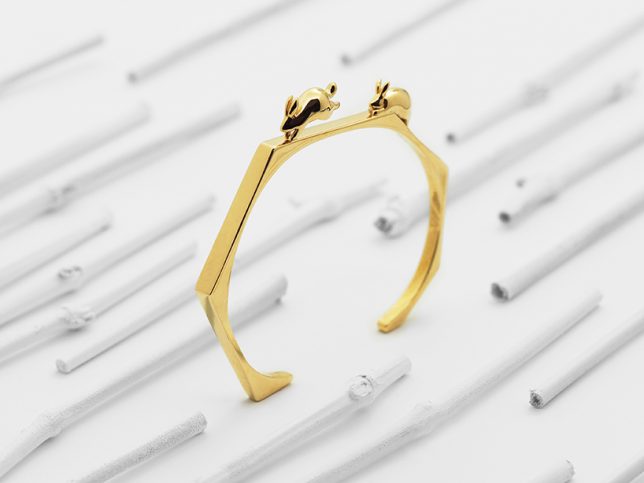
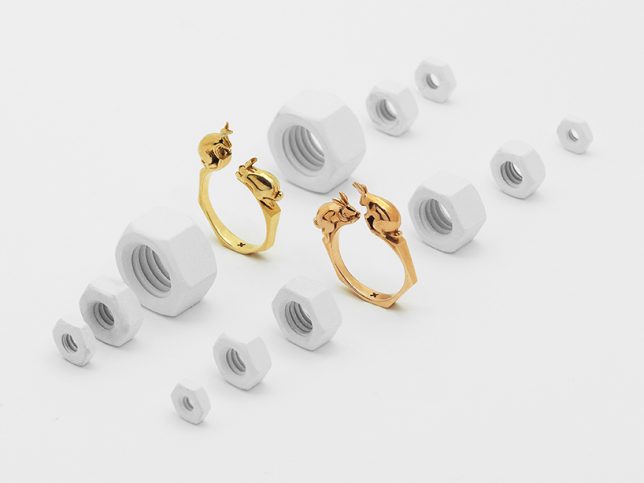
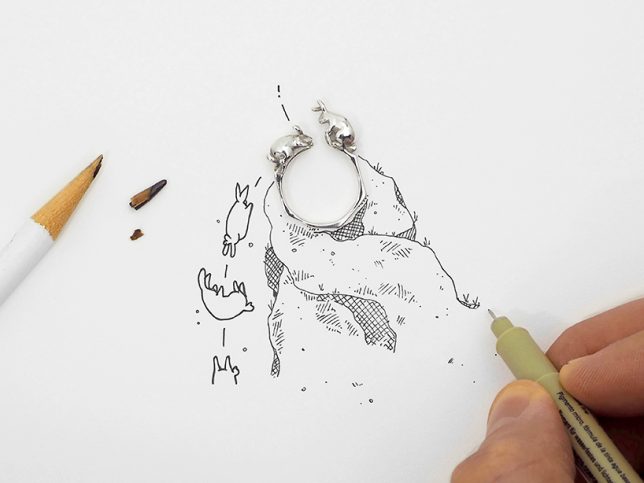
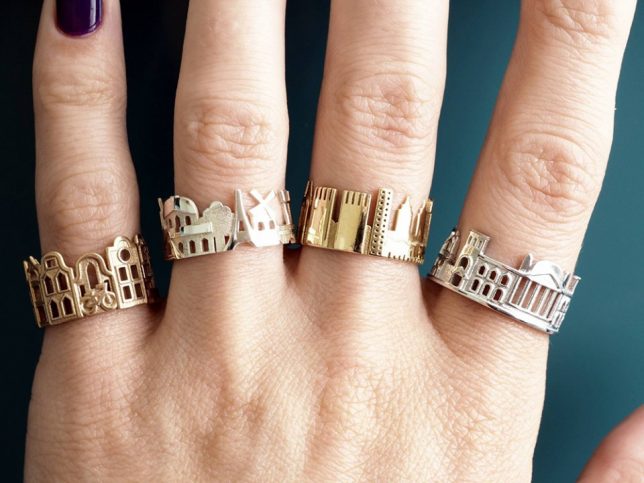
Most jewelry tells some kind of a story (about its origin if nothing else) but these pieces are a bit more explicit, featuring tales of structures, characters and actions in miniature built environments.

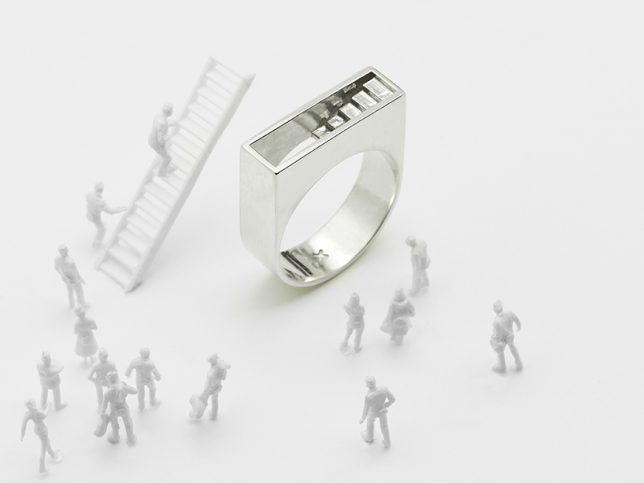
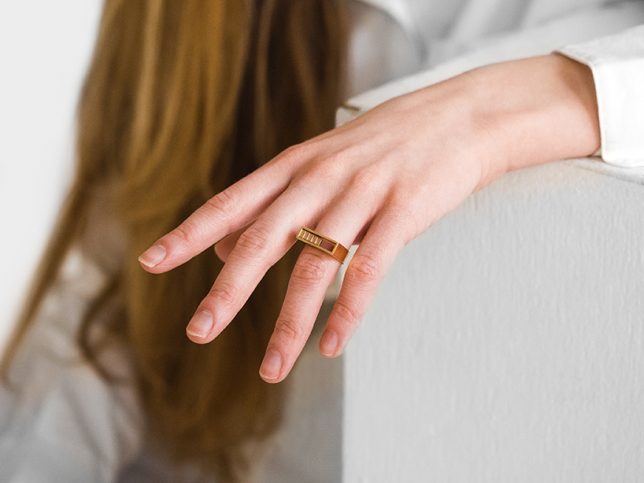
Architectural designer Artur Dabrowsk produces rings, cuffs, necklaces and bracelets that revolve “around the concept of ‘depth’ in terms of formal language (shadow lines, composition, depth of field) as well as in meaning (details, storytelling).”

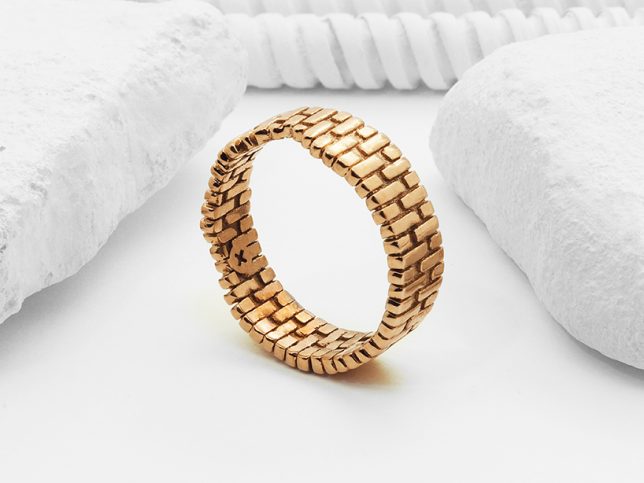
Whether he is crafting mysterious staircases to nowhere or endlessly looped brick arches, each piece involves careful attention architectural detail (including theoretical structural load calculations) and is available in brass, bronze or silver.

The brick ring specifically goes back to his days in architecture school — “there is something very tactile and nostalgic that give [bricks] both timeless function and meaning,” says the designer.

“I was raised in a brick clad apartment building in Brooklyn,” he explains, “so I associated the brick wall as a shelter for my introverted childhood. The arch became a metaphoric portal through which I could turn the corner, open up, and express myself while still proud of my introverted self.”

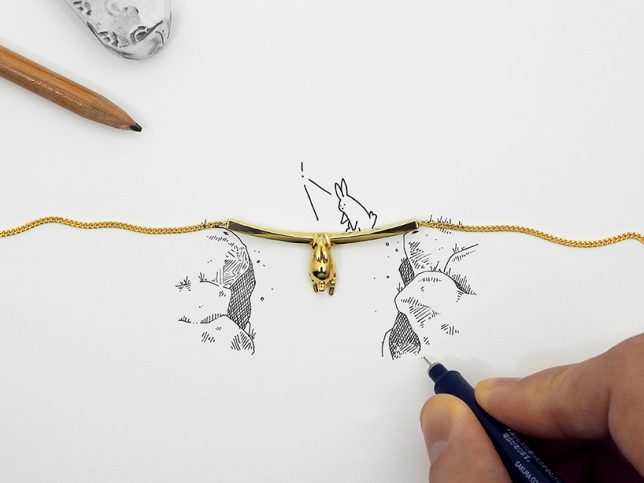
Dabrowsk also has a thing for rabbits, which are something he has sketched idly for a long time and has since started to include as characters in his tiny built environments. “I started drawing them in the margins of my notebooks during grade school and personify them to express thoughts, situations or feelings I was having.”

“I think the imagery of it being personified is playful — the rabbit is cute, hops around, eats, multiplies… and lives naively in this world.” Even here, though, he is conscious of real-life conditions – the suspended rabbit above hands from what would, in reality, be the bare minimum load-support beam across an abyss.

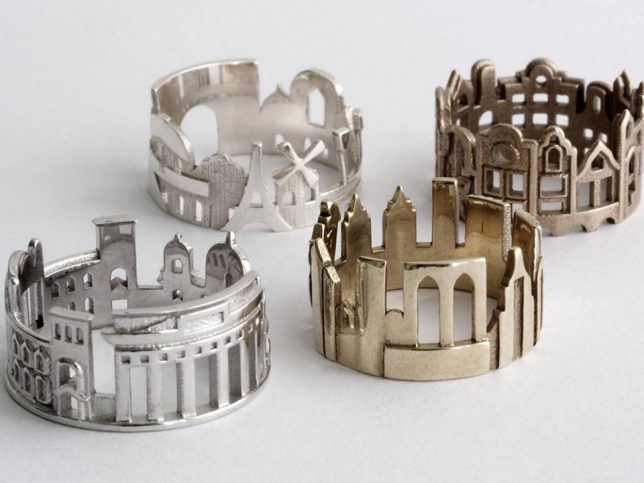
Fans of architectural jewelry should also take a peak at this series of wearable skylines, featuring famous scenes and settings (though in a more two-dimensional format) from around the world.

Share on Facebook


[ By WebUrbanist in Design & Products & Packaging. ]

[ WebUrbanist | Archives | Galleries | Privacy | TOS ]


WebUrbanist

 
Comments Off on Hidden Stories: 3D-Printed, Architect-Designed Rings Tell Looping Tales

Posted in Creativity


A prototype of the Leica Noctilux-M 50mm Edition 0.95 can be yours for $25K

26 May

As if $ 13,950 wasn’t enough to pay for a special edition lens, the Leica Store in San Francisco is offering a prototype of the Noctilux-M f/0.95 ASPH ‘Edition 0.95’ for $ 24,995. The Edition 0.95 is already a limited run version of the ‘standard’ $ 11,000 version of the lens, that comes finished in Leica’s new anodized high-gloss black instead of black paint.

There are only 95 of the ‘Edition 0.95’ lenses worldwide, which have unpainted engravings, but it isn’t clear how many Prototype B models exist. Needless to say, we’d hope there are fewer than 95.

The store’s website says that this specific model has the words ‘Prototype B’ in white paint on its underside, and that it will come with a matte black lens cap instead of the usual glossy one. Despite the store only having one example of this lens, thrill seekers can still add ten or more to their virtual shopping basket.

For more information see the San Francisco Leica Store website.


Store information

Leica Noctilux-M 50mm f0.95 ASPH. “Edition 0.95” Prototype B

The Noctilux 0.95 Edition is one of the most unique noctilux lenses ever to roll off Leica’s production lines in Wetzlar. Built to resolve past the capabilities that are known in any other fast primes or even the faculties of human vision, the Noctilux is a legendary benchmark of photographic optical engineering. This special “0.95 Edition” is limited, respectively, to 95 units world wide and stands visual representation of the elegantly unique images the Noctilux creates. Featuring the same optical design as the regular Noctilux 50mm 0.95 ASPH this special edition has an added bit of elegance. The exterior of the “0.95 Edition” features Leica’s newly developed high-gloss anodized aluminum surface. The markings on the lens are left unpainted except one, the 0.95 f-stop mark.

This lens will be available in extremely limited quantities worldwide, and Leica Store SF/Camera West Boutiques will have very limited stock. If you have any questions concerning the availability of this lens please feel free to contact us directly at sales@leicastoresf.com or call 415.801.5066.

This specific lens is a prototype of this already rare blend of Leica and S.T. Dupont craftsmanship. This could very well be one of the most collectible 0.95 Noctilux’s on the market today. The Prototype reads “prototyp B” the the back side of the barrel, and features a matte black cap instead of the glossy cap that comes with other 0.95 edition lenses.

Articles: Digital Photography Review (dpreview.com)
 
Comments Off on A prototype of the Leica Noctilux-M 50mm Edition 0.95 can be yours for $25K

Posted in Uncategorized


Sony provides firmware updates for ten E-mount lenses and LA-EA3 adapter

25 May

Sony has issued firmware updates for ten of its E-mount lenses and the LA-EA3 adapter. The updates address a variety of bugs and stability issues. You can view details and download the update for your operating system by clicking on the Drivers & Software button on the linked product pages below:

  • 70-200mm GM 
  • 70-200mm G 
  • 24-240mm G 
  • 28-70mm G 
  • 24-70mm Zeiss 
  • 16-35mm Zeiss 
  • 50mm f/1.8 
  • 24-70mm GM 
  • 50mm Zeiss 
  • 85mm GM 
  • LA-EA3 adapter

Articles: Digital Photography Review (dpreview.com)
 
Comments Off on Sony provides firmware updates for ten E-mount lenses and LA-EA3 adapter

Posted in Uncategorized


Jinbei Studio Flash Units Recalled for Electrocution Risk

25 May

The Swiss government last month issued a recall for ten models of Jinbei studio flash units. While the recall notice has made the rounds on message boards, I am frankly surprised that photo media outlets have not picked this up. Read more »
Strobist

 
Comments Off on Jinbei Studio Flash Units Recalled for Electrocution Risk

Posted in Photography


Tutorial – How to Use the Lightroom Map Module

25 May

The Lightroom Map Module lets you add your photos to a map so you can search and organize them by location. It’s quite a cool feature, so let’s take a look at the best ways to make use of it.

1. Using the Lightroom Map module if your camera has built-in GPS

Photos taken with a camera or mobile that has built-in GPS are the easiest to work with in the Lightroom Map module. As long as GPS is enabled, the camera saves the exact location an image was shot in the photo’s EXIF data. Lightroom reads the data when you import the photos and automatically adds them to the map.

For example, I made this photo using an iPhone SE.

Lightroom map module

Lightroom automatically reads the GPS coordinates embedded in the photo’s EXIF data. The yellow square marks the spot where the photo in the filmstrip was taken.

Lightroom map module

Note: Lightroom uses Google maps and an internet connection is required for the Map module to work.

2. If you have a secondary GPS unit

Some camera manufacturers make GPS units that you can connect to the camera body. If you have one of these it does exactly the same as a built-in GPS unit. It embeds the camera’s coordinates in the EXIF data of your images. That data is then read by Lightroom when you import the photos.

3. If you have an app or sports device that records your movements in a GPS file

Most mobile phones have built-in GPS. You can download apps that record your route and let you export that information in a GPS tracklog (extension type .gpx) file that you can import into Lightroom. Some fitness devices like sports watches and fitness bands have the same functionality.

The effectiveness of this depends on how often the app or device records your location. If your camera has built-in GPS, for example, the location of the camera is always recorded accurately as the camera takes a GPS reading when you press the shutter.

When you use an app to do so, the app doesn’t record your location continuously. Instead, it takes a reading every few seconds. This creates a set of dots that can be joined together to show your approximate route. It’s how apps that record walking routes or running times work. That means that you can’t rely on this method for pinpoint precision, but it does help you with an approximate location.

The screenshot below shows a series of photos taken on a Canon camera that does not have GPS. The location information came from a .gpx file generated by a tracking app on my phone.

Lightroom map module

4. If your camera doesn’t have GPS but your mobile phone does

Here’s an easy method to add GPS data to your photos if you have a mobile phone with built-in GPS. All you have to do, whenever you take a photo with your camera, is remember to take an additional photo with your mobile phone. You can import these into Lightroom and add them to the same Collection. Once you have done so, simply drag the photos taken with your camera, those without GPS data, to the locations on the map indicated by the photos that do have GPS data (those taken with your phone).

Here’s a landscape photo I took in northern Spain.

Lightroom map module

Here’s another that I took with my mobile phone.

Lightroom map module

This screenshot shows exactly where I took the photo with my mobile phone.

Lightroom map module

The other photo in the Collection was made with my Fujifilm X-T1 camera, which doesn’t have GPS. I added location data to the Fuji image by dragging it onto the icon representing the location of the photo taken with my mobile phone at the same spot. The yellow icon now displays the number 2 to indicate that there are two photos in that location with the same GPS coordinates, as seen in the Lightroom Map Module below.

Lightroom map module

Lightroom automatically adds the GPS coordinates to the photo’s EXIF data.

Lightroom map module

This method requires the most effort and relies on you to remember to take a photo with your phone whenever you take one with your camera. This isn’t always practical and is most suited for landscape photography, where you have the time to take an additional photo with a mobile phone.

Conclusion

The Lightroom Map module is an often under-utilized but surprisingly useful tool. Using these ideas you can add Gcoordinatestes to any photo, even those taken by a camera without GPS. In years to come, you can find out exactly where your photos were taken, even if you can’t remember. It makes revisiting your favorite locations a much easier and more enjoyable task.

Do you have any questions about the Lightroom Map Module? Please let me know in the comments below.


Would you like to learn about Lightroom’s under-appreciated features? Then check out my Mastering Lightrooom ebooks and start getting more out of Lightroom now.

The post Tutorial – How to Use the Lightroom Map Module by Andrew S. Gibson appeared first on Digital Photography School.


Digital Photography School

 
Comments Off on Tutorial – How to Use the Lightroom Map Module

Posted in Photography


Facebook Live: Sony a9 impressions so far

25 May

The new Sony a9 landed in our office a few days ago, and we’ve been using it non-stop. Editors Rishi Sanyal and Carey Rose hosted a Facebook Live discussion to share their early impressions about the camera so far, as well as to answer live questions from our audience.

We apologize in advance for some audio difficulties. We’ll fix it for next time!

Articles: Digital Photography Review (dpreview.com)
 
Comments Off on Facebook Live: Sony a9 impressions so far

Posted in Uncategorized


How Including People or Manmade Objects in Your Landscapes Can Add a Sense of Scale

25 May

My natural instinct as a landscape photographer has always been to keep people and manmade objects out of my images. I want to create images of nature that are pure and free (or at least appear to be free) of human interference. That said, over the past few years, I have started to backtrack on this a bit, especially when the camera fails to show the true scale of a landscape. In this article, I’ll share a small collection of images from my portfolio that include situations where allowing people or objects into the scene made the image a success.

Add a manmade object to show size

Na Pali Coast Sunset Sony A7RII and Sony 16-35 f/4 | ISO 500, f/4.5, 1/800th.

Here is (quite possibly) the most beautiful and rugged stretch of coastline on Earth, the Na Pali Coast of Kauai. I’ve photographed it from land, sea and air and still there is just no way to truly capture how incredible it is in person. On my most recent trip to the Garden Isle, I took my workshop group on a sunset cruise up to photograph whales and the Na Pali Coast.

As we were taking in the incredible scenery, I noticed one of the many helicopters that tour the coastline cutting through the scene. Using my Sony FE 16-35 f/4 lens, I framed a shot with the helicopter (flying right to left) on the right side of the frame (it’s the tiny little white spot) with plenty of space on the left side to see where it was headed. Take away the helicopter and it’s still an incredible scene, but without the helicopter, there’s just no way to accurately communicate how massive these cliffs are.

Use tourists to show scale

Balanced Rock Sunset Sony A7 and Canon 16-35 f/2.8 | ISO 100, f/11, 1/20th.

One of the easiest to reach landmarks in Arches National Park (located in Moab, Utah) is Balanced Rock. You just drive to the parking lot, and you’re pretty much there. But to get the sunset in the background, you’ll need to walk to the other side.

As our group was getting into position for what was turning out to be a beautiful sunset, a tourist climbed right up onto the rocks and started taking selfies. Ugh. Well, instead of getting upset, I decided to make lemonade out of the lemons and yelled over to him, asking if he’d mind throwing his hands up in the air. We were able to get a shot showing just how huge this sandstone rock formation really is, and the pose of the tourist turned out quite nice.

Go with the flow

Grand Canyon Lookout Sony A7RII and Sony 16-35 f/4 | ISO 100, f/7.1, 1/10th.

Like the previous image, sometimes you just have to go with the flow. As Bruce Lee so famously said, “Be water, my friend.”

As the sun set over Grand Canyon National Park in Arizona, I was in position to walk away with some really nice shots of the pink glow over the canyon. And just like in Moab, I saw a tourist walk right into the frame as I was about to press the shutter. This time though, he was much closer to the camera and as luck would have it, he was dressed in a cowboy hat, boots, and a leather backpack. Perfect! I never said a single word to this guy, he just stood there looking out over the canyon holding onto the tip of his cowboy hat. I assume he posing for someone else, but I was plenty happy to steal a few frames for myself.

Add yourself into the shot

Delicate Arch Beneath the Milky Way Sony A7S and Sony 16-35 f/4 | ISO 4000, f/4, 30 seconds.

You can’t always have people walk into your frame at the perfect time, wearing clothing that perfectly matches the location you’re photographing. Sometimes you have to take matters into your own hands, as I did here at Delicate Arch in Arches National Park.

My workshop group and co-instructor Mike were down inside the “bowl” beneath the arch and I stayed up top to light paint the arch for them during their 30-second exposures. We had walkie-talkies and Mike would give me a countdown to begin painting the arch in different ways. Since I couldn’t really concentrate on getting any of my own shots, I set my Sony A7S on a tripod, put it in time-lapse mode and just hoped to come out with one or two shots at the end of the night.

In the image above, that light shining under the arch is yours truly. I was standing beneath it, wearing a headlamp, so the students could get a silhouette of me looking up at the arch. After the shot, I looked over toward my camera (not on purpose though) and the direct light caused a starburst effect. This turned out to be my favorite image I’ve taken at this location by far. Not bad for the “set it and forget it” method!

Conclusion


Sometimes there just isn’t a good way to transfer a three-dimensional landscape to a two-dimensional photograph. Things always get lost in translation to some extent. At the end of the day, we are part of nature and if including a human or manmade object into an image help give the viewer a more accurate sense of scale, I say go for it.

The post How Including People or Manmade Objects in Your Landscapes Can Add a Sense of Scale by James Brandon appeared first on Digital Photography School.


Digital Photography School

 
Comments Off on How Including People or Manmade Objects in Your Landscapes Can Add a Sense of Scale

Posted in Photography


Prynt Pocket, a pocket-sized photo printer for iPhone, is now available

25 May

Prynt, the company that launched a phone case/printer through the crowdfunding website Kickstarter in 2015, has released its next-generation mobile printer, the Prynt Pocket. With Prynt Pocket, users can print a photo directly from their iPhone by inserting the handset into the printer, then snapping a photo. The related Prynt app also offers an augmented reality feature that plays a video within the physical photo print.

Prynt Pocket utilizes Zink inkless photo paper and has a removable paper cartridge that holds up to ten sheets at a time. Once Pocket is attached to an iPhone, users can snap a photo and then make edits using the Prynt app, including adding stickers and text, and adjusting the lighting. The printer takes about half a minute to produce a photo.

Unlike some competing instant cameras and mini printers, the Prynt app also leverages augmented reality to give users something a bit more modern and technical: 10-second looping videos that play when a Prynt photo is viewed using the company’s mobile app. The (optional) video is recorded when the photo is taken and is uploaded to the cloud, where it is then utilized whenever someone views the photo with the Prynt AR app feature. 

Prynt Pocket is available from Prynt’s website now for $ 149.99. A 40-pack of photo paper retails for $ 19.99.

Press Release:

Meet the Prynt Pocket — The Device that Transforms your Phone into the Smallest and Coolest Instant Camera

Now small enough to fit in the palm of your hand, Prynt’s second generation device is the easiest way to print and share life’s everyday moments while on-the-go

SAN FRANCISCO, CA — (Marketwired) — 05/23/17 — Prynt, the company leading a new era of instant photography, today announced Prynt Pocket, a device that transforms your phone into the smallest and coolest instant camera. Small enough to fit in the palm of your hand, Prynt Pocket attaches directly to your phone, and lets you capture, print and share life’s everyday moments — from spontaneous to special occasions — while on-the-go. The Prynt Pocket also has innovative video capabilities for next-gen storytelling, giving you the option to embed augmented reality videos into your photos and bring them to life in a Harry Potter-like way. Check out the video.

The phone in our pocket serves as our camera, photo album, and the way we share our lives digitally. But with the thousands of photos stored on our phones, there’s never been an easy way to print those photos, so they become lost in our phones and rarely looked at again. Prynt is changing this and giving everyone — from teens and millennials to young parents — the ability to turn their phone into an instant camera. Printing photos from your phone is now just as instant and exciting as posting a photo on Instagram or Snapchat.

“We are thrilled to bring Prynt Pocket to market after the success we have had with the Prynt Case,” said Clément Perrot, co-founder and CEO of Prynt. “There is nothing cooler than being able to print a photo straight from your phone, and when you add in the augmented reality video feature, that takes photo sharing to a whole new level. By turning a phone into an instant camera, everyone gets to experience the shared enjoyment of reliving fun and spontaneous moments through a printed photo.”

Using Prynt Pocket is easy. Simply attach it to your phone and you’re ready to print. Once you’ve taken a photo, you have the option to record a 10-second video that will be hidden within that photo. Before printing, the Prynt app enables you to edit and enhance your photo with fun, creative filters, text and memes. Then, whoever has a physical copy, can use the Prynt app to scan the photo and watch it come to life. Whether a marriage proposal, surprise announcement or selfie video, Prynt Pocket adds magic to any moment.

The ultra-portable Prynt Pocket, Prynt comes in three colors — cool grey, graphite and mint — making it a fashion-forward accessory that fits any lifestyle. It uses inkless paper for vibrant, long-lasting, tear and smudge resistant photos. The paper has adhesive backing so you can peel and stick your photos anywhere — whether on an inspiration board, scrapbook or your desk at work. Through the Prynt app, users can also share their photos and video creations across all social channels, as well as print their favorite Instagram, Snapchat, etc. pictures directly from their phone.

Prynt Pocket is now available for purchase on www.prynt.co/, Amazon.com and UrbanOutfitters.com for $ 149. In early June, it will also be available at Best Buy, with additional retailers to be introduced. Prynt Pocket is compatible with the iPhone 7 Plus, iPhone 7, iPhone SE, iPhone 6s Plus, iPhone 6s, iPhone 6 Plus, iPhone 5s, iPhone 5, and will be available for Android later this year.

Articles: Digital Photography Review (dpreview.com)

 
Comments Off on Prynt Pocket, a pocket-sized photo printer for iPhone, is now available

Posted in Uncategorized


Bamboo Architecture: 14 Sustainable and Spectacular Organic Structures

25 May

[ By SA Rogers in Architecture & Public & Institutional. ]

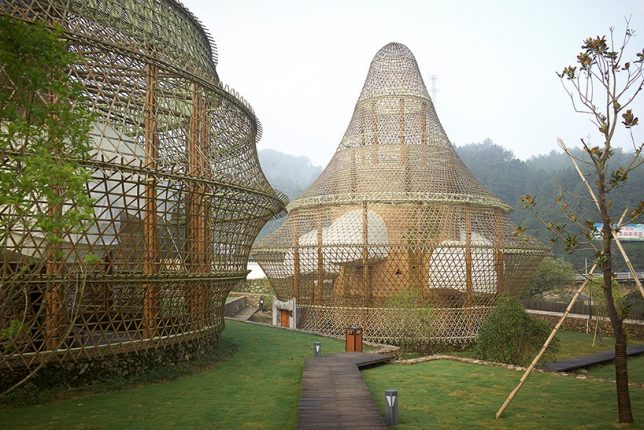
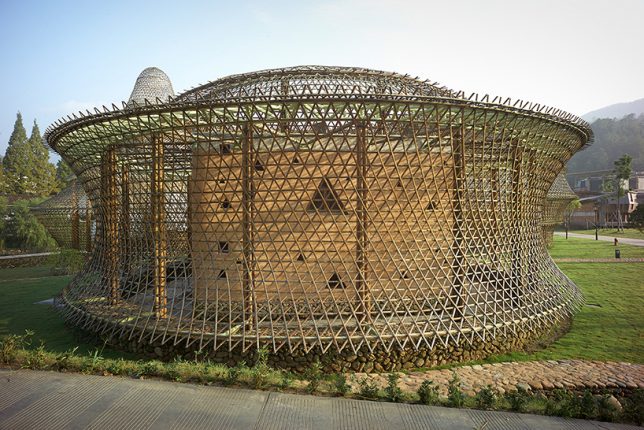
Extraordinarily flexible yet strong, the fast-growing grass known as bamboo serves as a versatile medium for architectural projects with sculptural flair, especially when it’s bent or woven. These examples of artistic bamboo structures show off the material’s potential and hint at how it could play a role in futuristic yet sustainable architecture and infrastructure in the years to come.

5 Incredible Structures at the Bamboo Architecture Biennale

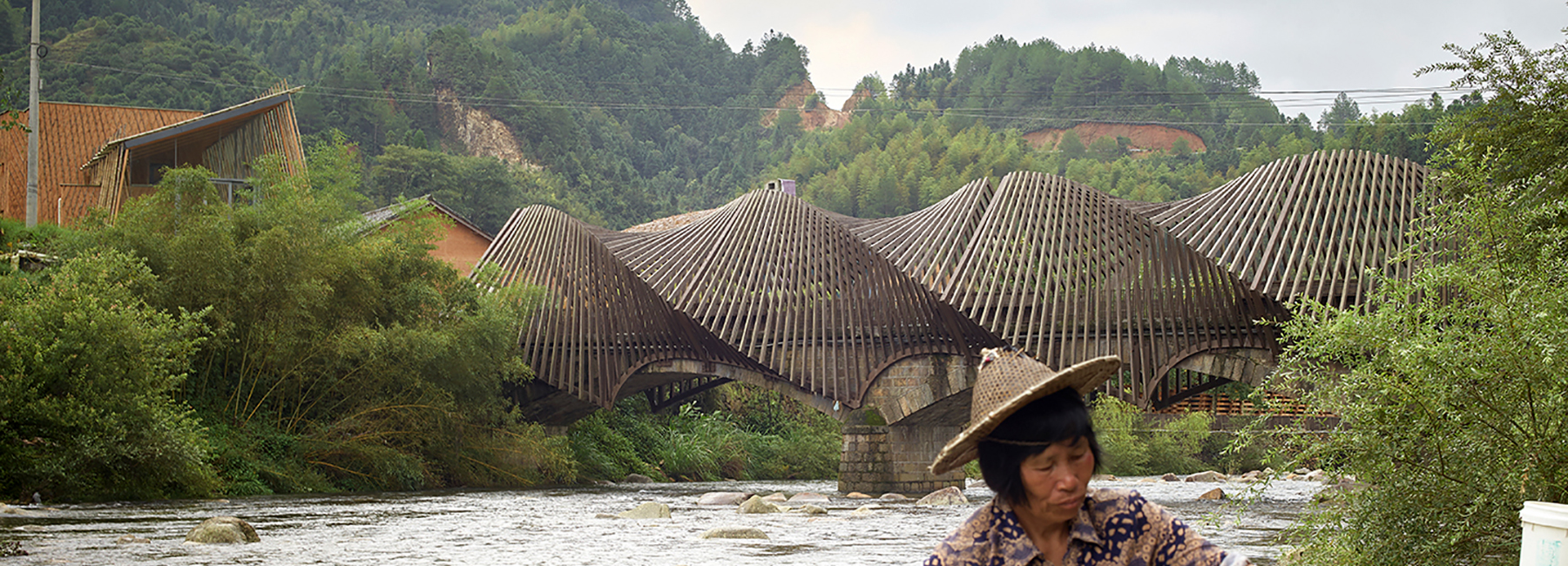
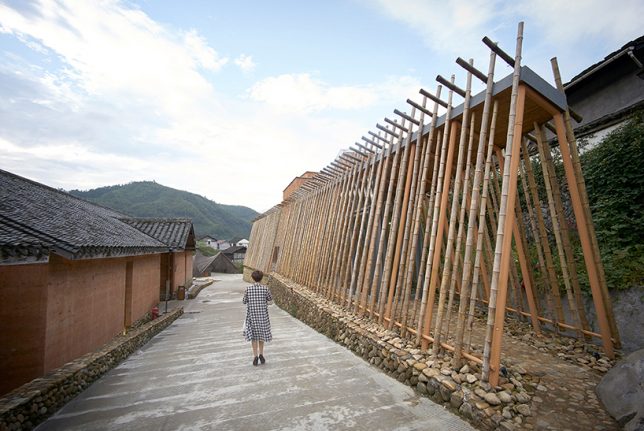
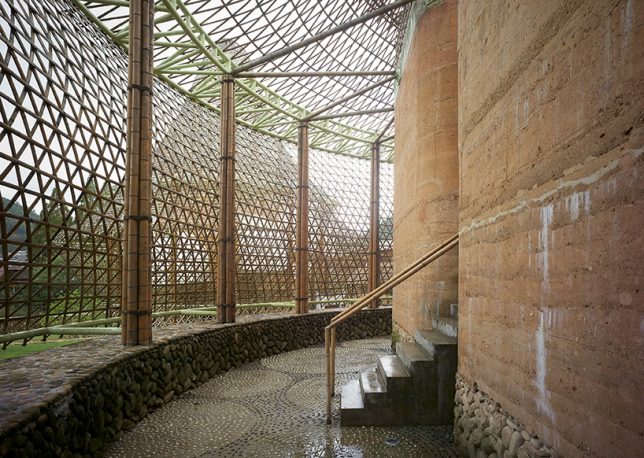
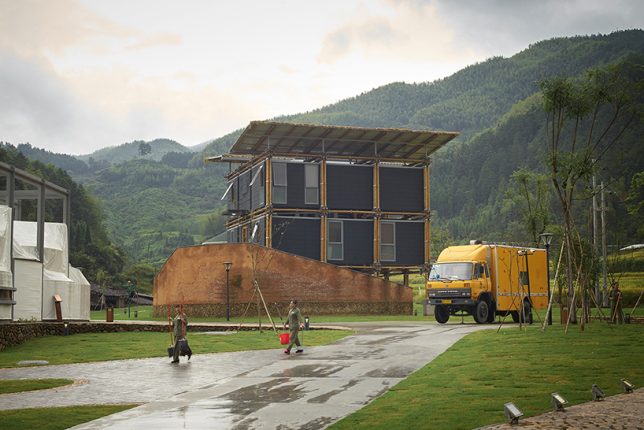
At the first annual Bamboo Architecture Biennale in 2016, which was held in the village of Baoxi, China, 12 architects demonstrated different methods of bamboo construction, including Kengo Kuma, Simon Velez, Anna Heringer and Vo Trong Nghia. Each of the pavilions serves a certain purpose, like Kuma’s ceramics museum and Heringer’s youth hostel. The bamboo bridge (pictured top) by Ge Quantao is especially impressive.
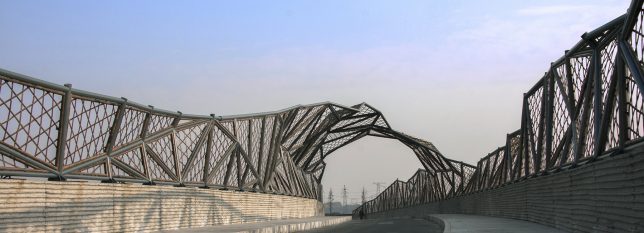
Wuxi Harbor Bridge by Mimesis Architecture Studio

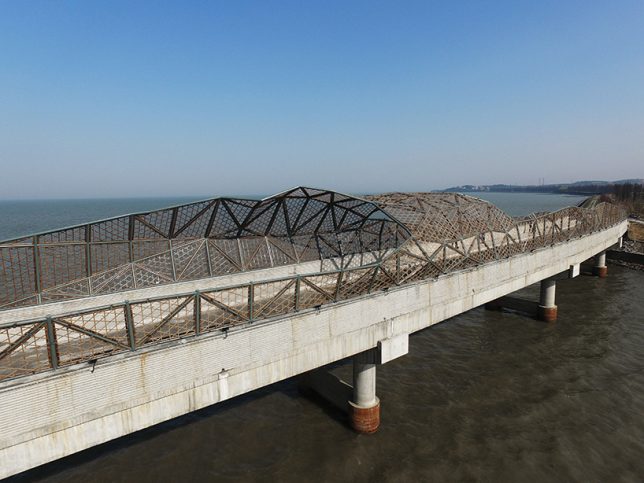
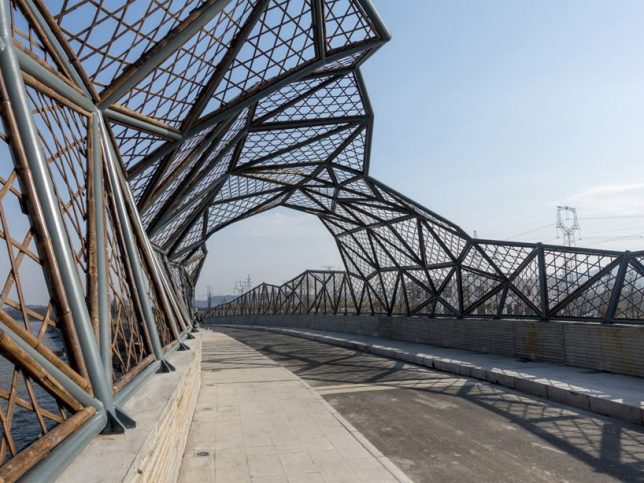
Mimesis Architecture Studio shows how beautifully bamboo can augment structures made from other materials via the Wuxi Harbor Bridge, using it as formwork for the handrails of the deck and to create carbonized bamboo nets along the top of the bridge. These nets are weatherized and strong, not to mention easy and cheap to replace.

Green Ladder: Temporary Pavilion by Vo Trong Nghia

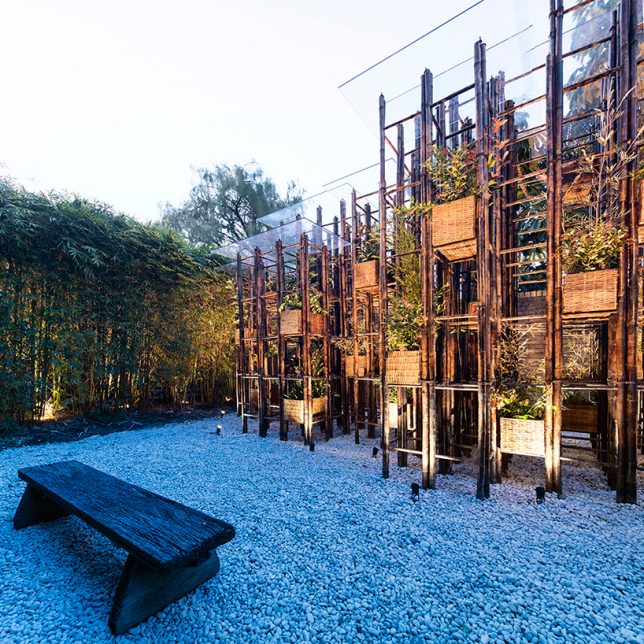
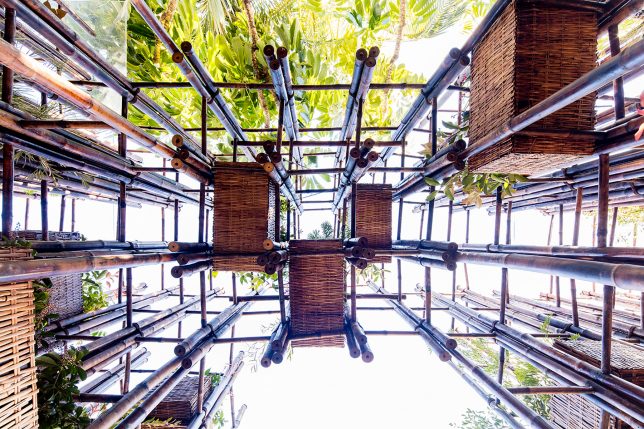
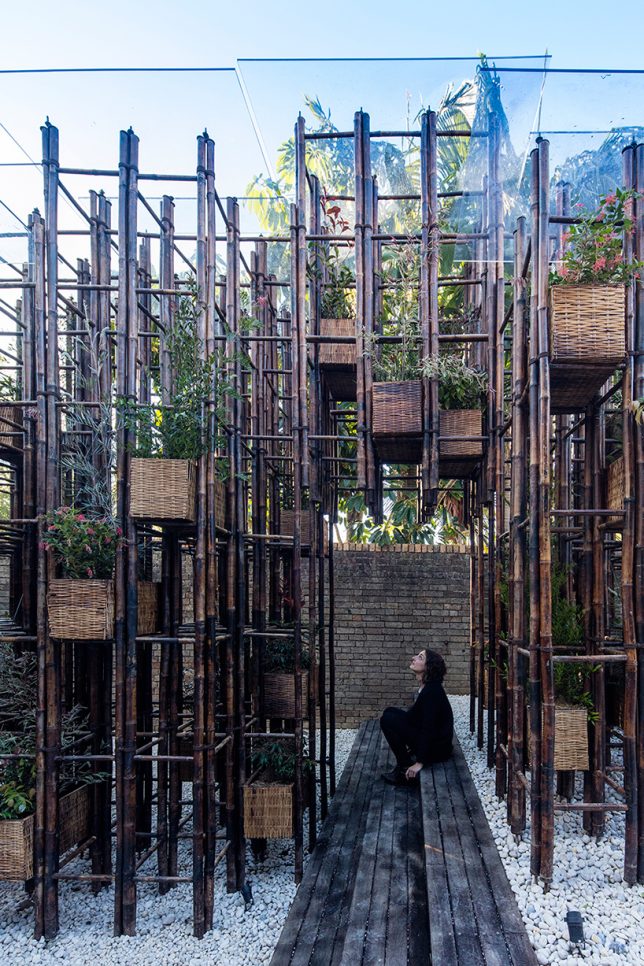
Bamboo poles create a grid-like network supporting planter pots to bring nature back to the city in this pavilion by Vo Trong Nghia. The project aims to raise awareness about the importance of access to nature in cities, especially in vietnam, where green spaces are increasingly rare.

Reconstruction of the Universe: Pavilion by Sun Xun

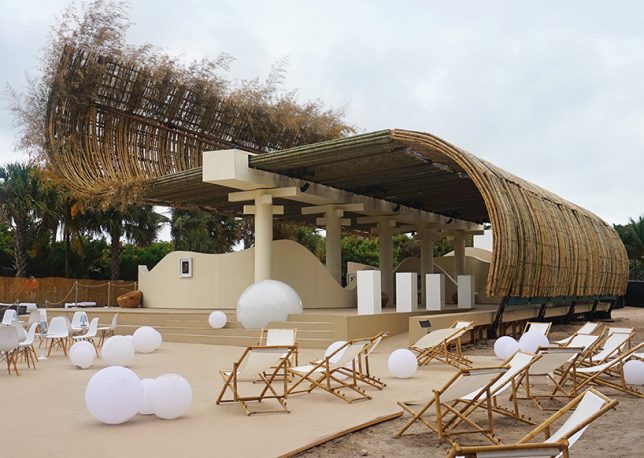
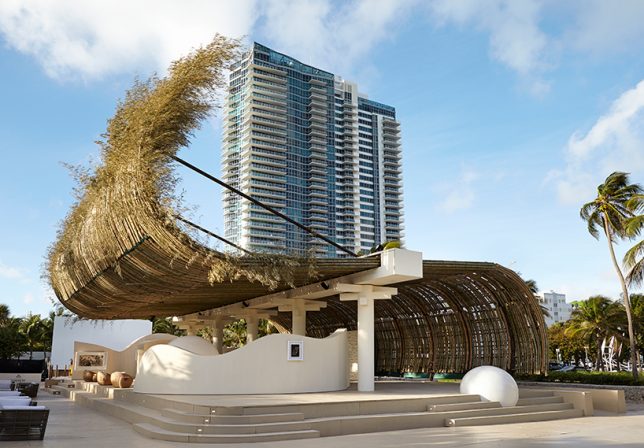
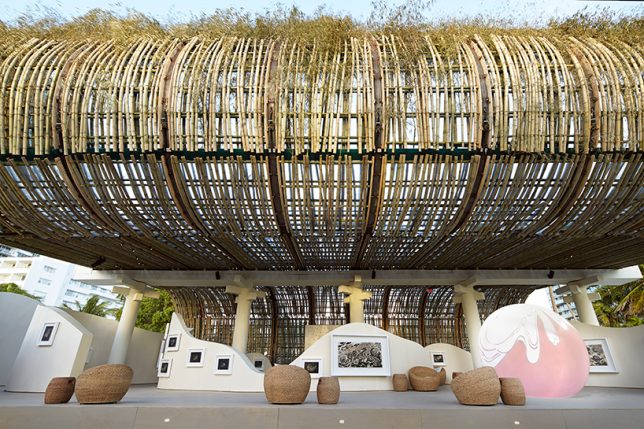
Bamboo curls up and over an outdoor space to act as a shade-providing roof in this project by Chinese artist Sun Xun and Swiss watchmaker Audemars Piguet for Art Basel. It’s made of 1300 madame timber bamboo poles, facing the ocean.

Next Page – Click Below to Read More:
Bamboo Architecture 14 Sustainable And Spectacular Organic Structures

Share on Facebook


[ By SA Rogers in Architecture & Public & Institutional. ]

[ WebUrbanist | Archives | Galleries | Privacy | TOS ]


WebUrbanist

 
Comments Off on Bamboo Architecture: 14 Sustainable and Spectacular Organic Structures

Posted in Creativity