RSS
 

Archive for May, 2017

Video: Portrait pro Tamara Lackey on self-doubt

27 May

Self-doubt and/or self-consciousness can get in the way of your photographic goals, especially when it comes to making pictures of people. Fortunately Nikon ambassador USA and portrait photographer Tamara Lackey has sound advice on the subject. Instead of seeking to overcome your self-consciousness, embrace it and use it as a tool to bring out authentic expression in your images. How? Watch the lecture and find out.

Articles: Digital Photography Review (dpreview.com)

 
Comments Off on Video: Portrait pro Tamara Lackey on self-doubt

Posted in Uncategorized


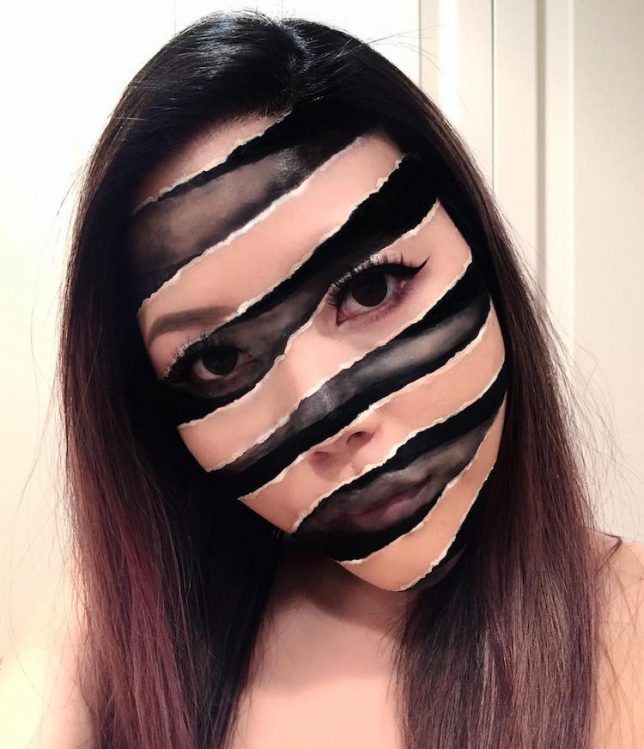
Trippy Transformations: Makeup Artist Creates Unreal 3D Illusions

26 May

[ By SA Rogers in Art & Drawing & Digital. ]

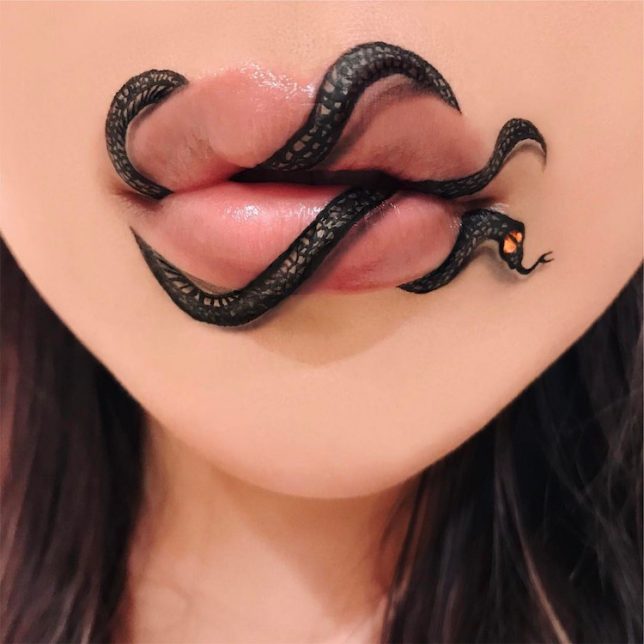
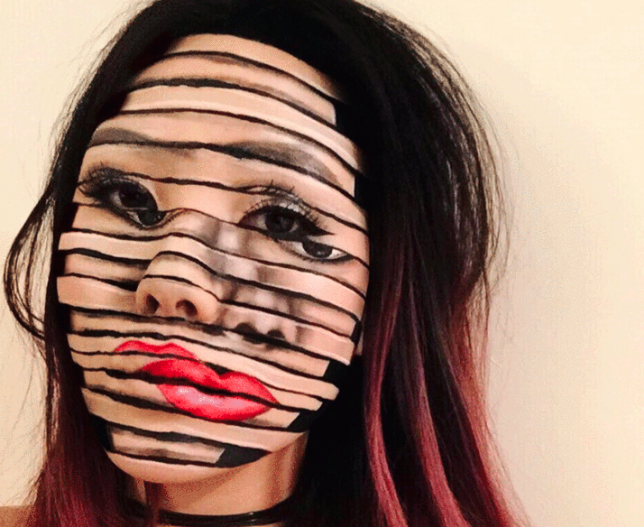
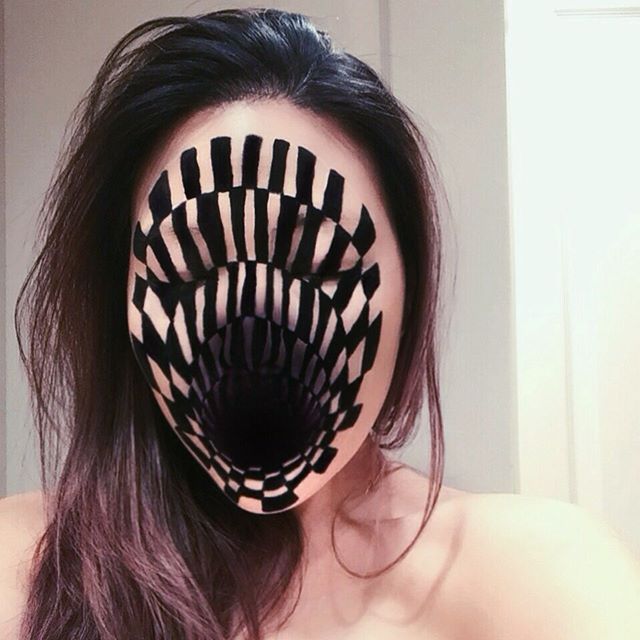
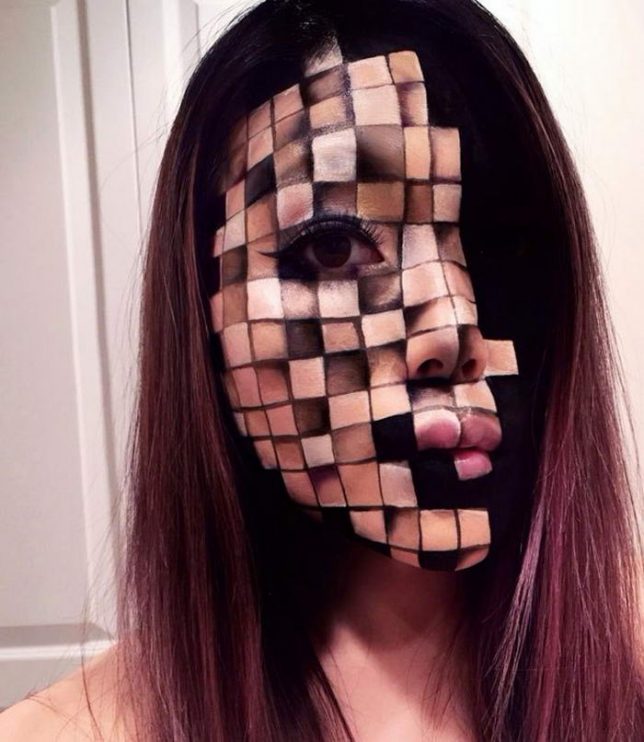
Makeup artist Mimi Choy slices, disjoints, stretches, blurs and otherwise radically transforms her own face in stunningly realistic optical illusions using nothing but makeup. No templates, prosthetics or Photoshop go into the creation of her surreal photos – she freehand them all, often using standard cosmetics from brands like MakeupForever and Kryolan theater makeup. The Vancouver, Canada-based artist shows off her trippy looks on Instagram alongside her more standard everyday makeup looks.

Mostly using herself as a canvas for her optical illusions, Mimi says, “To be honest, I never thought anybody would be interested in following my bizarre late-night creations a few years ago because it wasn’t ‘on trend.’ But I continued because illusion art is challenging and I like having to push limits each time. Later on, I realized it’s not about creating looks that are ‘popular’ or would guarantee likes/follows, it’s about creating our own trend and breaking barriers.”

Mimi says she rarely even has a specific plan in mind when she starts painting – she just goes for it, and allows the result to come about spontaneously. Check out her Instagram @mimles for lots more wild and intricate makeup creations.

Share on Facebook


[ By SA Rogers in Art & Drawing & Digital. ]

[ WebUrbanist | Archives | Galleries | Privacy | TOS ]


WebUrbanist

 
Comments Off on Trippy Transformations: Makeup Artist Creates Unreal 3D Illusions

Posted in Creativity


Go surfing in VR with Kelly Slater

26 May
What’s it like to ride the waves with champion surfer Kelly Slater? This VR video from Teton Gravity Research gives you a taste. Director Taylor Steele gave Slater a VR camera in hopes that it would let the audience ‘feel right there with us.’ (The actual surfing part starts around 1:30.)
Note: you may need to use the Google Chrome browser in order to watch in VR.

Articles: Digital Photography Review (dpreview.com)

 
Comments Off on Go surfing in VR with Kelly Slater

Posted in Uncategorized


Fujifilm releases firmware updates for several cameras and software products

26 May

Fujifilm has released firmware updates for its camera models X-T2, X-Pro2, GFX 50s, X-T20, X100F and X-T1. The links below include download links for the updated camera manuals and full details about the updates:

  • Fujifilm X-T2 Firmware ver. 2.10
  • Fujifilm X-Pro2 Firmware ver. 3.10
  • Fujifilm GFX 50s Firmware ver. 1.10
  • Fujifilm X-T20 Firmware ver. 1.01
  • Fujifilm X-T1 Firmware ver. 5.20
  • Fujifilm X100F Firmware version 1.01

In addition Fujifilm has provided updates to several of its software products:

  • Tethered Shooting Software HS-V5 for Windows Ver.1.6
  • Tethered Capture Plug-in for Adobe Photoshop Lightroom Ver.1.6 (Windows / Macintosh)
  • Fuji X Aquire + PC AutoSave

Articles: Digital Photography Review (dpreview.com)

 
Comments Off on Fujifilm releases firmware updates for several cameras and software products

Posted in Uncategorized


Instagram is testing a feature that will let you hide/archive photos

26 May

Some Instagram users are noticing a new feature that enables the archiving of old posts, removing them from public view without going so far as to delete them. The company has confirmed this feature’s existence to TechCrunch, explaining that the new archival option enables Instagrammers to view – and, if desired, restore – their old posts whenever they’d like.

Users with access to the feature, which is currently in testing and only available on a limited basis, can find it by tapping the ‘…’ menu button on an Instagram post. Doing so reveals an ‘Archive’ option; tapping this removes the image from public view. To view archived posts, users can tap a small clock icon located in the upper right corner of their profile page. Instagram plans to expand the feature’s availability ‘over the next few months.’

Via: TechCrunch

Articles: Digital Photography Review (dpreview.com)

 
Comments Off on Instagram is testing a feature that will let you hide/archive photos

Posted in Uncategorized


2017 Roundup: Consumer Long Zoom Compacts

26 May

Bridge and travel zoom cameras are two of the very few categories of compact cameras to survive the smartphone. Whether it’s a travel zoom, which puts a 25X-30X zoom into your pocket, or a bridge camera which offers even more zoom, phones just can’t compete.

While there are now enthusiast-level long zoom cameras with 1″-type sensors, such as Sony’s Cyber-shot RX10 series and Panasonic FZ1000/FZ2500, there are still plenty of more budget-friendly models, though their smaller sensors don’t offer the image quality or depth-of-field control of the pricier models.

The following cameras are included in our roundup:

  • Canon PowerShot SX60 HS
  • Canon PowerShot SX730 HS
  • Nikon Coolpix P900
  • Panasonic Lumix DC-FZ80/FZ82
  • Panasonic Lumix DMC-FZ300
  • Panasonic Lumix DC-ZS70
  • Sony Cyber-shot HX90V
  • Sony Cyber-shot HX400V

Of those eight cameras, three are pocket-sized and offer 30X-40X zooms. The other five are bridge (SLR-style) cameras with focal lengths ranging from 600mm to an unbelievable 2000mm (35mm-equivalent).

And with that, let’s take a look at some consumer-level travel zoom cameras!

Articles: Digital Photography Review (dpreview.com)

 
Comments Off on 2017 Roundup: Consumer Long Zoom Compacts

Posted in Uncategorized


Arsenal is artificial intelligence for your DSLR or mirrorless camera

26 May

A new product being funded on Kickstarter, Arsenal, aims to simplify the process of capturing images using a DSLR or mirrorless camera by utilizing artificial intelligence. The system is composed of a hardware component sits on the hotshoe and connects to the camera’s USB port, as well as mobile apps for iOS and Android that communicate via WiFi or Bluetooth to the main unit. Among other things, Arsenal chooses ideal camera settings for a particular scene based on what it has learned from thousands of similar existing photographs.

Arsenal was created by engineer and photographer Ryan Stout as a way to quickly shoot ‘amazing images’ in any condition, and without having to manually adjust the camera’s settings. The related mobile app provides total control over the camera, as well as one-tap access to an AI assistant – trained from a database of millions of photographs and their metadata – that chooses optimal settings based on the scene in front of the camera. The software then goes on to refine its chosen settings based on 18 environmental factors. It even takes vibrations into account, thanks to its highly sensitive accelerometer.

Photographers are given a live preview of the scene through the mobile app, as well as manual control over aperture, ISO, and shutter speed. You can focus by tapping on your phone’s touchscreen as well, or tap multiple points and Arsenal will ensure they’re all focused. Arsenal also supports advanced camera functions, like automated photo stacking for HDR images, focus stacking, long exposures without the need for ND filters, and time lapse creation. The resulting Raw files are saved directly to the camera.

Images on your camera can be viewed, even at 100%, directly in the app. From there you can instantly share to social media using your phone’s social sharing capabilities. You can even rate images and enter Lightroom compatible notes, and they’ll all show up upon import.

Arsenal supports cameras from Canon, Nikon, Fujifilm, and Sony; photographers can input their own camera on this page to see whether it is supported. The camera assistant is currently being funded through Kickstarter, where the $ 50,000 goal has been exceeded with nearly a quarter-million in funding. Backers can get a Kickstarter Exclusive Arsenal by pledging at least $ 150; shipping is estimated to start in January.

Our gallery below explains more about Arsenal’s features. View full-screen for captions.

$ (document).ready(function() { SampleGalleryV2({“containerId”:”embeddedSampleGallery_4614991868″,”galleryId”:”4614991868″,”isEmbeddedWidget”:true,”standalone”:false,”selectedImageIndex”:0,”startInCommentsView”:false,”isMobile”:false}) });

Via: Kickstarter

Press Release:

Arsenal, leaving stealth mode, unveils AI-powered camera hardware on Kickstarter

Intelligent camera assistant wirelessly controls DSLR and Mirrorless cameras from a smartphone, uses machine learning to find optimal settings in any conditions.

BOSEMAN, MT—May 23, 2017—Arsenal, a camera technology startup, today announced the world’s first intelligent camera assistant powered by machine learning. The new hardware and software product, launched on Kickstarter, enables photographers to wirelessly control their cameras and quickly perform advanced techniques.

Arsenal’s artificial intelligence (AI) is powered by a series of machine learning algorithms trained on a database of millions of photographs and their metadata. By comparing new scenes with its database and adjusting based on environmental variables, Arsenal enables photographers to get the perfect shot every time.

“Today’s cameras have amazing optics, but they do very little to actually help you take a good photo,” said Ryan Stout, Arsenal’s founder and CEO. “You can go spend a thousand dollars and out-of-the-box it will take worse photos than your smartphone. Arsenal changes that by making your existing camera smarter.”

Arsenal will serve the growing market for Digital Single Lens Reflex (DSLR) and Mirrorless cameras. Its initial product will be compatible with dozens of popular models made by Canon, Nikon, Sony, and Fuji.

In addition to its AI capabilities, Arsenal gives photographers control over their camera from up to 100 feet away. Users can adjust settings, watch a live preview, and trigger the shutter remotely from their smartphone.

Arsenal also simplifies several advanced photographic techniques. Arsenal will perform photo stacking (the process of combining multiple photos for more dynamic range or sharper focus), long exposures, and timelapses. In each case, the resulting RAW files are saved directly on the camera.

The Arsenal app also includes powerful photo review capabilities. Users can wirelessly browse the photos on their camera’s card and view individual RAW files in full resolution. Photos can then be shared directly to Instagram, Snap, and Facebook.

The Arsenal system, which is currently being tested in the field, consists of two parts: an ultralight hardware device that sits on top of a user’s camera, and an iOS/Android mobile app. The app wirelessly communicates with the device via wifi or Bluetooth, which in turn controls the camera via a micro-USB connection.

Backers of Arsenal’s Kickstarter campaign will be the first to receive the product, which is scheduled to ship in January 2018.  

For more information on Arsenal, the intelligent camera assistant, visit https://witharsenal.com.

Articles: Digital Photography Review (dpreview.com)

 
Comments Off on Arsenal is artificial intelligence for your DSLR or mirrorless camera

Posted in Uncategorized


Video: Kai Wong’s first impressions of the new DJI Spark drone

26 May
 
DJI’s latest drone is here and it is tiny, stabilized and reasonably priced. A floating selfie stick of sorts, the DJI Spark is likely to appeal to a wide array of casual users and enthusiasts. So is it any good? Kai Wong spent some time testing out a prototype of the Spark prior to its release, and seems impressed with the video quality and stablization. Have a watch for specifics and some insightful commentary, as well as a bit of humor.

Articles: Digital Photography Review (dpreview.com)

 
Comments Off on Video: Kai Wong’s first impressions of the new DJI Spark drone

Posted in Uncategorized


Some Annoying Things About Photography and Cameras

26 May

Photography gave me a creative outlet in life, and I owe so much to it. It’s my form of escape and a way to relax. It pushes me to explore new places and it gets me out the door. I love it dearly.

That being said, there’s a lot about photography that annoys the heck out me, and here’s a list of everything I can’t stand. As a side note, I hope you don’t mind that I illustrate this article with some zen photography instead of pictures of the things that annoy me. That would just get my heart rate up too high.

Disclaimer: This article is meant to be tongue-in-cheek and have some fun. Don’t take it at all seriously, please!

Everything that annoys me about photography and cameras

Buttons

Have you seen a Nikon camera these days?? Most people will never need half of those buttons in their lifetime. Can’t they invent a camera that only needs a few buttons? Where is Apple when you need them?

But seriously, I wish more camera companies put extra time into thinking about ergonomics, design, and making everyday use more pleasant rather than trying to pack each camera with new unneeded features just to lure people into an upgrade.

Everything that annoys me about photography and cameras

Lens dust

Last time I changed lenses, I was literally in a vacuum chamber and still a piece of dust got stuck smack in the middle of the sensor. And is there anyone who can clean it easily near me? Nope, because Nikon stopped making repair parts available in order to shut down third party repair companies. So not only do I have to send my Canon camera to the factory for small repairs because my local shops couldn’t stay in business without the Nikon business, but I can’t even find someone locally to quickly clean my sensor.

Yes, I know I can do it myself, but I’d rather have someone trained so that I don’t screw something up.

Everything that annoys me about photography and cameras

Filters

Remember that time when you thought you needed all these expensive filters to be a good photographer? While you do need a few filters, everyone goes overboard at some point and now has a filter graveyard drawer.

Everything that annoys me about photography and cameras

Megapixels

We don’t need more megapixels Sony! Our computers and external hard drives can barely keep up. Instead, give us better ergonomics, better ISO, faster focusing, and better dynamic range. Which brings me to the next point.

Everything that annoys me about photography and cameras

Small cameras with big lenses

What’s the point in a tiny mirrorless camera with a massive 20-pound lens? Is it impossible to make that 24-70mm lens that everyone uses just a little bit smaller? Please take the money from the megapixel blitzkrieg department and put it into the making lenses smaller department.

Everything that annoys me about photography and cameras

Tripods

Why are all $ 300 tripods designed to fail after a year of use? I can’t imagine how much money the Planned Obsolescence Manager at Crap Tripod Inc. makes. We all learn this the hard way. We suffer until we get fed up and spend way too much money on a Gitzo that lasts us the rest of our lives and makes us really happy.

Everything that annoys me about photography and cameras

People walking in the way of your shot to get a closer shot

You’re pretending you don’t see me. I’ve been here for an hour. I’m a peaceful man, but I will strangle you with my remote shutter cord and break this tripod over your skull (not really, I’m just kidding!). Oh wait, it’s a Gitzo. This Gitzo will break your skull and then continue to work perfectly fine.

Everything that annoys me about photography and cameras

Neck pain

Please don’t carry your tripod over your neck. Use a backpack sometimes instead of a shoulder bag. Pick one lens before you go out the door instead of five. Stretch. Your body will thank you in 20 years when you’re not walking around like the Hunchback of Notre Dame.

Everything that annoys me about photography and cameras

Taking an iPhone photo of some sweaty person at a party with overhead lighting and them thinking it’s going to be amazing because I’m a photographer

I’m not Saint Theresa – I can’t perform miracles. Now stop trying to look like a duck.

Everything that annoys me about photography and cameras

People saying, “Isn’t everyone a photographer these days?”

You know, photography is a way for all types of people in all walks of life to find a creative outlet, and there’s a vibrant community of so many fun and interesting people that are drawn to it. But whether you meant it or not, that statement has a demeaning and devaluing undercurrent to it. All of us are completely different as photographers, just as anyone with a pen will write in a completely different way. Just because this amazing community is growing, does not mean that photography should be devalued.

Everything that annoys me about photography and cameras

When we’re traveling and I can’t skip out on all the fun stuff to take photos

You mean I have to go to a nice dinner at a fun looking place on the water with someone that I love dearly? What the heck – I want to go walk down this dirty alleyway for the next hour to take some moody photographs!

Everything that annoys me about photography and cameras

Conclusion

What things annoy or make you angry about photography or your gear? Please share in the comments below.

The post Some Annoying Things About Photography and Cameras by James Maher appeared first on Digital Photography School.


Digital Photography School

 
Comments Off on Some Annoying Things About Photography and Cameras

Posted in Photography


How to Understand Your Camera’s Light Meter and Get the Exposure You Want

26 May

Regardless of how you shoot, and whichever shooting mode you prefer to use, there is one item that remains constant – the light meter. Somehow, either you or your camera has to know how much light in on your scene in order to determine the optimal combination of aperture size, shutter speed, and ISO sensitivity to get the photo you want. This tool, which may not seem all that relevant to new photographers, is called a light meter.

Understanding what your camera’s light meter does and how it works is critical to advancing your skills and helping you get the shots you really want. Hopefully, this article will help you get a grip on it.

How to Understand Your Camera's Light Meter and Get the Exposures You Want

An analogy to help you understand the light meter

Before I get into a discussion about how the light meter works, think about the last time you cooked some meat on the grill. Whether it was a steak, some pork chops, or even just a couple hamburgers – you likely had a vision in your mind of what the finished product would be.

For backyard chefs like me who aren’t very good at this sort of thing, we have to use a meat thermometer to make sure our food is properly cooked. There’s always the question of where to put the thermometer to check and see if the meat is done. Or, in photography terms, check to see if the meat is properly exposed. You can touch it to the surface, poke it through to the middle, or insert the thermometer at various points around your dinner in order to get a good overall reading.

Each method would work for a different scenario, but it all depends on what you are cooking and how you want the finished food to turn out.

How to Understand Your Camera's Light Meter and Get the Exposures You Want

Your camera’s light meter is like measuring the temperature using a meat thermometer. Placement is crucial for an accurate reading.

How the camera light meter works

When you point your camera at a scene you also need a way of measuring the incoming light so you know how much of it there is and what settings you (or your camera) need to control in order to get the shot you want. It’s just like measuring the temperature of your food with a thermometer to make sure it’s done properly.

Most cameras today use a process called TTL Metering, which stands for through-the-lens. It means that your camera examines the light coming in through the lens and evaluates the brightness of the scene. Then you, or your camera, can adjust the settings in order to make sure your photo is exposed how you want. You may not ever notice the light meter at work or even see that it’s there at all unless you shoot in Manual Mode. But trust me, it’s constantly monitoring the light whether you know it’s working or not.

View the metering scale in Manual Mode

To see the light meter doing its thing, put your camera in Manual Mode and look for a series of dots or vertical lines at the bottom of your camera’s viewfinder.

How to Understand Your Camera's Light Meter and Get the Exposures You Want

In Manual Mode, look at the bottom of the screen in your viewfinder. Notice the scale with zero in the middle. That is the light meter at work.

The number scale at the bottom of the image above is an example of a camera’s light meter, and the tiny little triangle shows whether the picture is properly exposed or not. In this case, the triangle is at 0, which means the image is neither under or overexposed, but changing the aperture, shutter speed or ISO would make the triangle move up or down the line accordingly and result in a picture that is either a little too bright or a little too dark.

What part of the scene is the camera measuring the light from?

While that is all well and good, it’s only part of the story because it doesn’t explain how your light meter actually functions. Is it looking at all the incoming light or just some of it? Where in the frame is it looking as it measures the light? Understanding the answers to these questions is the key to unlocking the power of your camera’s light meter, and it all has to do with what’s known as metering modes.

How to Understand Your Camera's Light Meter and Get the Exposures You Want

Measuring the Light

Most cameras today have a few basic ways of measuring the incoming light:

  1. Matrix or Evaluative Metering – the camera looks at the light in the entire scene and averages it, (Nikon puts a bigger emphasis on the area where your lens is focused as well). Nikon calls this Matrix Metering, Canon calls it Evaluative.
  2. Center-Weighted Average Metering – looks at the light of the entire scene and averages it, but with emphasis on the center of the frame. Nikon and Canon both call this Center-Weighted Average Metering.
  3. Partial Metering – this measures the light only in a small portion of the center of the frame (about 8-12% of the scene). This is a Canon metering mode, Nikon does not have one similar.
  4. Spot Metering – measures the light only in a small area around the central autofocus point (about 1.5-3% of the frame). Nikon and Canon both call this Spot Metering.

Other camera manufacturers have different names for these modes, but suffice it to say the way in which your camera measures incoming light can have a huge impact on whether your photo is properly exposed. As an example, here are three shots that were taken with different metering modes.

Image #1, taken with Matrix (Nikon) or Evaluative (Canon) Metering.

Image #2, taken with Center-Weighted Metering.


Image #3, taken with Spot Metering.


Reflective versus incident metering

There’s another aspect of light metering that comes into play when setting up a shot. It has to do with how TTL metering works as opposed to a handheld light meter.

Reflective metering

The former, (the type of metering used in DSLRs), works by measuring the amount of light that comes through the lens. But the problem with that is that unless you are pointing your camera directly at the light source, the light being measured is actually bouncing off your subject first.

All the colors we see in the world around us get their hues and tonal values by absorbing every color of light except for what is bounced off of them. As many of us learned in grade school, light is made up of a spectrum of colors including red, orange, yellow, green, blue, indigo, and violet. A green tree leaf absorbs every color of light except for green. A red car absorbs every color except for red, and so on.

reflective metering - camera light meter

When your camera measures incoming light, it’s looking at the amount of light being bounced off your subject, not the amount of light actually hitting your subject. This has huge implications and can dramatically affect your exposure. In the illustration above, the subject is wearing clothes that absorb most colors of light except for blue, which means there is still a great deal of light being bounced off him and sent to the camera. However if the child changes clothes things can change a great deal.

reflective metering dark subject - camera light meter

In the illustration above, even though the amount of light hitting the boy has not changed, the camera will read the scene much differently because he is now wearing a dark shirt and pants. The camera will think it needs more exposure to compensate for what it thinks is less light on the scene, and the overall image will be overexposed as a result.

Here’s a real-world example of how this works:

reflective metering - camera light meter

Nikon D7100, 200mm, f/2.8, 1/8000th of a second.

In the photo above, so much light was being reflected off the girl’s white shirt that my camera had a hard time metering the scene properly. Much of the sunlight was bouncing off the shirt and coming directly back to my camera, so it responded by using a very fast shutter speed and low ISO value in an effort to make sure the shirt was properly exposed. Unfortunately, the rest of the scene was underexposed as a result.

Nikon D7100, 200mm, f/2.8, 1/1500th.

This was a few seconds later in the exact same spot, and all I did was have her put on a brown shirt. With much of the light from the sun being absorbed by the dark color of her outfit, my camera created a much brighter exposure by using a slower shutter speed. Not as much light was being captured by the TTL metering system so the camera thought more light was required for a good exposure.

Incident metering

This phenomenon can be particularly troublesome if you are shooting a wedding; grooms often wear dark tuxedoes whereas brides will usually be dressed in dazzling whites, which can really throw off your camera’s TTL metering system. The solution is to use an external handheld light meter, such as the Sekonic L-308S-U, which actually measures the amount of light falling on the subject.

Handheld light meter for incident light metering (light falling on the subject).

In the image above you can see that the meter shows you need an aperture value of f/16, shutter speed of 1/125th of a second, and ISO 100 in order to get a properly exposed scene. These numbers will likely be different from what the camera’s TTL system measures because some light will invariably be absorbed by the subject, which is why an external system like this can be so useful.

Here’s how the diagram from earlier would look if the setup involved an external handheld incident light meter.

incident metering - handheld light meter

You will often see wedding photographers using a light meter such as this in order to get a more accurate reading of how much light is hitting the wedding party during formal photos. This is especially true if they’re using a system of flashes or external speedlights because they need to know how much extra light the scene will require or tolerate.

When shooting a wedding it is quite common for the bride to wear a white dress, which reflects a great deal of light, and the groom to wear a dark tuxedo which absorbs almost all light. This can wreak havoc with a TTL metering system, and an external light meter is a great way to address the problem.

light metering - camera light meter

Conclusion

The overall goal here is to understand how the light meter in your camera functions. This, in turn, will help you know how you will need to alter the exposure settings to get the shot you want.

I hope this article has been helpful in explaining how the light meter works, how light is reflected off your subjects, and why your camera may not see a given scene quite like you expect it to. Ultimately it’s important to remember that there is no one correct way of metering a scene. Any of the metering modes and methods will work as long as you know what you are shooting and what type of results you are trying to achieve.

Knowing the difference between the various metering modes and types, and understanding how light is measured as it hits your camera can help you get the shots you want. None of these methods are any better or worse than the other, but each one has its own strengths and weaknesses. The more you know about how all of this works the better equipped you will be to get precisely the photographs you want.

The post How to Understand Your Camera’s Light Meter and Get the Exposure You Want by Simon Ringsmuth appeared first on Digital Photography School.


Digital Photography School

 
Comments Off on How to Understand Your Camera’s Light Meter and Get the Exposure You Want

Posted in Photography