RSS
 

Archive for May, 2017

Sony releases short film showing off Xperia XZ Premium super-slow motion mode

12 May

Sony Mobile has released the first super-slow-motion short movie that has been completely recorded on a smartphone. All of the movie’s scenes were recorded by 120 amateur videographers from 21 countries on the Tróia peninsula near Lisbon, Portugal. The footage was shot under the direction of award-winning director Chris Cairns and using the new Motion Eye mode of the Sony Xperia XZ Premium smartphone that is capable of capturing moving images at 960 frames per second.

Articles: Digital Photography Review (dpreview.com)

 
Comments Off on Sony releases short film showing off Xperia XZ Premium super-slow motion mode

Posted in Uncategorized


So you think you need to buy a RED camera

12 May

Have you thought about getting a RED Cinema Camera? Sure, they’re pretty amazing tools, but do you really need one? Cooper over at Cooper films gives you some questions to ask and some good advice to consider before taking the plunge.

Articles: Digital Photography Review (dpreview.com)

 
Comments Off on So you think you need to buy a RED camera

Posted in Uncategorized


Good training: iFixit director of communications pays tribute to a repair-focused mom

12 May
 Kay Kay on the right, her mother Caroline on the left. (picture courtesy of Kay Kay Clapp)

iFixit’s Kay Kay Clapp has a lot to thank her mother for, not least her insistence that children should learn how to repair things. While Kay Kay’s dad was traveling for work, her mom became a master at fixing and patching clothing and broken household items. 

Not every mom would want their 8 year-old daughter tackling dry wall repair, but as Kay Kay says, ‘it’s empowering to learn how to fix things yourself’. Her early training paid off – as director of communications for iFixit, Kay Kay puts her passion for fixing things to good use every day.

Caroline Clapp – we salute you.

Read Kay Kay’s full article at iFixit

Articles: Digital Photography Review (dpreview.com)

 
Comments Off on Good training: iFixit director of communications pays tribute to a repair-focused mom

Posted in Uncategorized


Fantasea FRX100 V underwater housing released for Sony RX cameras

12 May

Fantasea has announced the launch of its new FRX100 V Housing, an underwater housing unit designed for the Sony Cyber-shot RX100 III/IV/V cameras. The housing offers protection from water, as well as elemental nuisances like sand and dust, and is rated for depths as low as 60m / 200ft. In addition to being shock-resistant and durable thanks to its injection-molded polycarbonate shell, the housing features a double O-ring seal, support for lighting accessories, and a removable anti-glare hood for using the camera’s LCD.

FRX100 V Housing users are able to access all of the Sony camera’s functions and controls, according to Fantasea, which says they are all ‘clearly marked’ on the housing. A special mount is included for attaching lighting accessories, and there’s also removable connection point for a double fiber optic cable. Operators have access to a dedicated video control button, and there’s likewise a removable flash diffuser.

Fantasea states that each underwater housing unit is equipped with a Moisture Detector installed inside, as well as a port cover and hand strap. The housing is available to purchase from Fantasea now for $ 530.

Via: PhotographyBLOG

Articles: Digital Photography Review (dpreview.com)

 
Comments Off on Fantasea FRX100 V underwater housing released for Sony RX cameras

Posted in Uncategorized


Google releases list of Street View-ready certified 360-degree cameras

12 May

Google has released a list of 20 360-degree cameras that are available or will be launched over the coming months that have been certified according to Google’s new ‘Street View ready’ standard. This means they can be used in conjunction with the Street View app to create content for the Google Street View platform. 

The cameras meet one of four new “Street View ready” standards, allowing users to choose the way of uploading 360-degree content that is most suitable for them.

  • Street View mobile ready: 360 cameras that can publish Street View directly from a mobile app, without requiring a desktop workflow

  • Street View auto ready: 360 cameras tailored for vehicle-based collection with the highest accuracy

  • Street View vr ready: 360 cameras or systems that collect geometry in addition to generating sets of connected 360 photos

  • Street View workflow ready: Publishing tools (sometimes bundled with cameras) that can upload to Street View accounts

You can see the list of certified cameras in the graphic at the top of this page. More information on the Street View ready standards is available on the Google developer website. Many of the cameras in the list will be on show at Google’s Street View Summit in Tokyo, Japan this week.

Articles: Digital Photography Review (dpreview.com)

 
Comments Off on Google releases list of Street View-ready certified 360-degree cameras

Posted in Uncategorized


How to Get Your Photos Featured in a Photo Magazine

12 May

Your Instragram feed is flawless. You’ve got the likes, followers, fans even … what’s next?

It’s time to make the jump from your personal digital stream to the big time.

Get your work published in a real live magazine!

We spoke with Megan Breukelman, the Editor-in-Chief of Atlas Magazine – only a super inspirational digital fashion magazine + website focused on the promotion of the next generation of fashion creatives, nbd. JK, BIG HUGE DEAL.

She dished on why you would want to be published, how to even start your quest, and tips for getting accepted by your dream magazines.
(…)
Read the rest of How to Get Your Photos Featured in a Photo Magazine (772 words)


© laurel for Photojojo, 2017. |
Permalink |
No comment |
Add to
del.icio.us

Post tags:


Photojojo

 
Comments Off on How to Get Your Photos Featured in a Photo Magazine

Posted in Equipment


Panasonic Lumix DC GX850 review: Lean selfie machine

11 May

The Panasonic Lumix DMC-GX850 (known as the GX800 and GF9 in some regions) is the brand’s most compact interchangeable lens camera (as of Spring 2017) and uses the same 16MP Four Thirds sensor as several of its siblings. Sold kitted with a 12-32mm collapsible zoom, stand-out features include a 180-degree flip-up touch LCD, Panasonic’s excellent Depth-from-Defocus AF and 4K video capture.

At its core the GX850 represents a combining of Panasonic’s style-oriented GF-line with the ultra-compact-oriented GM-line and replaces both the GM5 and GF8. However, its most similar sibling currently on the market is the larger, EVF-sporting GX85.

Key features:

  • 16MP Four Thirds MOS sensor
  • 4K/30/24p video capture
  • 4K Photo mode for 8MP stills at 30 fps
  • 5 fps bursts with continuous AF
  • 3″ 1.04M-dot touch LCD flips ups 180 degrees
  • Wi-Fi

Panasonic’s core customer for this camera is the casual user seeking a carry-everywhere-cam for documenting friends or family. This user is someone who prefers a selfie-screen to an EVF and favors ease-of-use and compactness. Since this ‘lifestyle’ camera buyer is likely to use the camera for a range of different types of photography, we’re going to see how it performs in a range of situations.

The rivals

Though the GX850 is Panasonic’s most entry-level camera, this segment of the mirrorless market has a lot of strong contenders to choose from. We’ve compared it to several of its most direct competitors below:

  Panasonic GX850 Panasonic GX85 Fujifilm X-A3 Fujifilm X-A10 Olympus E-PL8 Canon M10
MSRP w/ kit lens $ 550 $ 800 $ 600 $ 500 $ 650 $ 600
Sensor 16MP Four Thirds 16MP Four Thirds 24.2MP APS-C 16MP APS-C 16MP Four Thirds 18MP APS-C
Image stabilization Lens-only 5-axis in-body + lens Lens-only Lens-only 3-axis in-body + lens Lens-only
AF system Contrast-detect Contrast-detect Contrast-detect Contrast-detect Contrast-detect Hybrid AF
Viewfinder n/a 2.76M-Dot 0.7x n/a n/a n/a n/a
Screen 3″ 1.04M-dot 180° tilting touch 3″ 1.04M-dot tilting touch 3″ 920k-dot 180° tilting touch 3″ 1.04M-dot 180° tilting
(no touch)
3″ 1.04M-dot 180° tilting touch 3″ 1.04M-dot 180° tilting touch
Number of control dials 1 2 2 2 1 1
Hotshoe No Yes Yes No Yes No
Burst rate w/ AF-C 5 fps 6 fps 6 fps 6 fps 3.5 fps 4.6 fps
Video 4K/24/30p 4K/24/30p 1080/60/24p 1080/30/24p 1080/30p 1080/30/24p

CIPA battery life

210 290 410 410 350 255
Dimensions 106.5 x 64.6 x 33.3 mm 122 x 71 x 44 mm 116.9 x 66.9 x 40.4 mm 117 x 67 x 40 mm 115 x 67 x 38 mm 108 x 67 x 35 mm
Weight 269 g 426 g 290 g 331 g 357 g 301 g

As you can see from the chart, the two areas the GX850 has an advantage over its direct competitors include 4K video capture and size/weight.

The number of control dials is definitely a differentiator in this class. The GX850 has just one, located slightly awkwardly on the back. This view also shows its USB-charging and HDMI port.

Social, portrait and pet photography

The camera’s small size, touch capability and selfie screen make it an appealing choice for casually snapping images of friends, family and pets.

The default exposure behavior in its full auto mode, which is called Intelligent Auto (iA), tends to be sensible: the camera tries to maintain a shutter speed that is one over the focal length or greater. However, if the camera senses subject movement in iA mode, it will automatically increase the shutter speed, at the expense of ISO sensitivity. And if the shutter speed drops too low because of a lack of light, the camera will warn you that the shot might have blur due to camera shake. The GX850 never deploys the pop-up flash though, unless the user does. 

‘The default exposure behavior in Intelligent Auto mode tends to be sensible’

When shooting moving subject like kids or pets indoors, the GX850 does not always choose a fast enough mode to freeze the action, even if it senses movement. One way around this is to switch the camera into ‘Sport/Action’ mode, represented by a tiny running figure on the dial. However this mode still won’t always provide a fast enough shutter speed, but should be a better option than any of the other auto settings.

This is a good camera for casual photos of friends. And if you take the time to process the Raw files, as we’ve done here, you can get some great results. Photo by Dan Bracaglia

Face Detection is turned on by default out of the box (when using the iAuto mode) and is quite useful for documenting fellow human beings. In most cases, when Face Detect is engaged, the camera will lock focus on the most prominent person in one’s frame. Of course if the face is too small, obstructed, or there simply is not enough light, this mode will occasionally fail. And if no face is detected, the camera defaults to its 49-point area mode, which tends to focus on the nearest or most central object. 

Most users of this camera will leave it in JPEG mode and be totally satisfied. However to get the most out of the GX850, we recommend shooting Raw. The above image was processed through Adobe Camera Raw and ‘pops’ significantly more than the out of camera JPEG. In general, we found JPEG color to be a tad washed out, and skin tone color can occasionally look a little off.

You want a selfie screen? You’ve got a selfie screen.

Selfie screens are par for the course in this entry level class of camera. By default, when you flip the screen up, the camera uses a 3 sec timer before a photo is taken, and a countdown is displayed to prepare you for the decisive moment (this can be switched off).

There are also several ‘beautifying’ filters that can be applied to make your selfie sing, including a ‘Soft Skin’ and a ‘Slimming Effect’ filter. Both of these are adjusted via sliders ranging from 0-10. There is also a background defocus option that simulates a shallow depth-of-field. These options are fun to try, but mostly pretty silly.

As selfie, with no beautifying effects applied. A selfie with ‘Slimming’ and ‘Soft Skin’ set to 10/10.

Sharing images with the GX850 is also fairly straightforward. There are multiple ways to connect the camera to one’s device (you’ll need to download the Panasonic Image App first), though sadly the camera does not offer NFC to make life easier for Android users.

The first time you connect you’ll need to pull up Wi-Fi in the main menu, located at the bottom of page 1 in the ‘wrench menu,’ and select ‘Wi-Fi Function.’ There you can generate a local Wi-Fi network and connect your smart device. The app also allows you to control the camera remotely.

Sometimes you just have to share that delicious plate of pancakes with the world. The GX850 makes zapping photos from the camera to your smart device fairly painless, once you set up the connection. Photo by Allison Johnson.

Articles: Digital Photography Review (dpreview.com)

 
Comments Off on Panasonic Lumix DC GX850 review: Lean selfie machine

Posted in Uncategorized


MUJI Huts: $27,000 Japanese Timber Micro-Homes Finally for Sale this Fall

11 May

[ By WebUrbanist in Architecture & Houses & Residential. ]

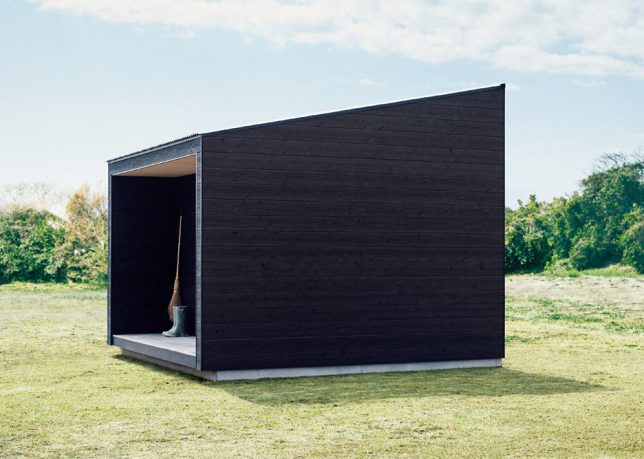
Japanese makers of minimalist household goods and apparel at MUJI began designing and developing a series of small prefab homes a few years back, one of which is now slated to hit the market later this year.

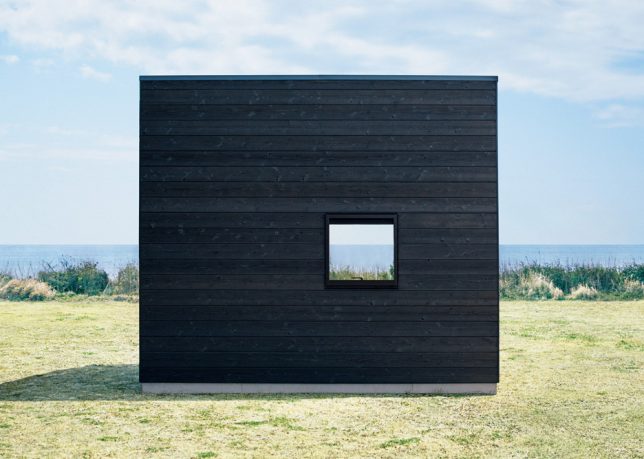
At just under 100 square feet, the first model to hit the sales floor is a simple but elegant module wrapped in charred timber with floor-to-ceiling fenestration on one side. This traditional blackened-wood cladding technique helps finish the wood, protecting it from fire and decay.

Inside, bright wood paneling and solid walls on three sides make for a cozy interior and flexibility to situate the structure facing choice scenery. The smooth floor is designed to be easily cleaned for those trekking in and out. Outside, a small covered deck extends the space.

The relatively low cost (around $ 27K USD) includes both materials and labor (construction) costs. The structure is intended to serve any function needed, from weekend getaway or supplemental room to autonomous housing unit for fans of simple homes and small-space living.

“It’s not as dramatic as owning a house or a vacation home, but it’s not as basic as going on a trip,” explains MUJI. “Put it in the mountains, near the ocean, or in a garden, and it immediately blends in with the surroundings, inviting you to a whole new life.”

Share on Facebook


[ By WebUrbanist in Architecture & Houses & Residential. ]

[ WebUrbanist | Archives | Galleries | Privacy | TOS ]


WebUrbanist

 
Comments Off on MUJI Huts: $27,000 Japanese Timber Micro-Homes Finally for Sale this Fall

Posted in Creativity


Looking back: Canon’s eye-controlled focus

11 May
The Canon EOS 5 (known as the EOS A2/A2E in the Americas) was the world’s first SLR camera with eye-controlled focus.

Over the past few years, we’ve become spoiled by a lot of great autofocus technologies like face detection, tap-to-focus, and subject tracking. But before we had those things, we had Canon’s eye-controlled focus, a technology that made its appearance in film SLRs, but which never quite made the jump to digital cameras.

For those unfamiliar with eye-controlled focus, let me provide a quick primer. The system made its debut way back in 1992 on the EOS A2E, and remained part of the Canon system until the EOS Elan 7NE in 2004. It promised ‘focus where you look’ functionality, meaning you could activate your AF point of choice just by looking at it.

As I recall, there were generally two sets of users when it came to this technology: those for whom it worked, and those for whom it absolutely didn’t. There weren’t many in between.

Even today, whenever we review a Canon camera, someone will post a comment expressing a desire for Canon to bring back eye-controlled focus. And I have to admit, I’m right there with them. I have great memories of it.

The Canon EOS Elan IIE, introduced in 1995, had a 3-point autofocus system with eye-controlled focus.

I got my first taste of eye-controlled focus on the EOS Elan II E, and instantly fell in love with it. In fact, I liked using it so much that I switched from a Nikon to a Canon system. The ability to focus by eye was just too much to resist.

I later upgraded to the EOS 3 – still one of my favorite cameras of all time – which had a much more advanced 45-point AF system. Eye control on the EOS 3 was more sophisticated than on the Elan II E: it had a calibration procedure that involved looking at selected AF points in a prescribed manner, allowing the camera to tailor its response to your eye. Supposedly, if you repeated the calibration process under different conditions, performance would improve over time.

The EOS 3 also had the ability to store three registers of calibration data. This was especially useful for glasses wearers because you could use one register to calibrate for your naked eye, and another to calibrate while wearing glasses or contact lenses.

Did it work? It depends on who you ask. Even around the DPReview office, you’ll find opposing views. In my experience, the system didn’t always land on the exact AF point that I wanted to use, but it usually landed close enough that it wasn’t an issue. At least that’s the way I remember it.

But as we all know, memories can be selective. I sometimes wonder if eye-controlled focus was as good as I remember it being, or if those memories are just a result of nostalgia for a bygone technology. To find out, I pulled those old Canon cameras out of a closet and put them to the test.

The Canon EOS 3, introduced in 1998, had an advanced 45-point autofocus system with eye-controlled focus.

The Elan II E worked just as well as I remembered it, performing at about 90% accuracy in my hands. However, it’s worth noting that this camera had a fairly rudimentary 3-point AF system, with well-isolated AF points. Basically, the camera just had to figure out which third of the viewfinder you were looking at to pick the correct AF point.

The EOS 3 was a bit of a different story. Its 45 AF points were crowded close together, requiring a higher degree of precision when reacting to eye movement. I could reliably get it to focus on the general region of the viewfinder I was looking at, but not with the degree of accuracy I remember.

With a bit of practice, I’m sure I could improve my success rate a bit, which is probably why I remember the system working better than it does in my hands today. Alternatively, it’s nostalgia. To be honest, I’m not sure which it is.

Unlike the Elan IIE, whose autofocus points were very far apart, the EOS 3’s 45 autofocus points were packed very close together. This made it more difficult to activate a single, specific AF point by eye. (Diagram from the EOS 3 Instruction Manual.)

So, would I exchange today’s modern AF systems for eye-controlled focus? Not a chance. Features like face detection (and even eye detection) actually solve the ‘where to focus’ problem in many cases, and features like subject tracking would be hard to give up.

However, I still love the idea of eye-control focus and believe it would have a useful place on today’s cameras. There are times when I’m moving focus points around with a joystick or D-pad and find myself thinking ‘I wish I could just look at my subject and focus.’

Technology has advanced a lot in the past couple decades. When eye-controlled focus was introduced in 1992, Microsoft was just launching Windows 3.1, and CERN was still rolling out this new thing called ‘ The World Wide Web.’ In that context, I’m sure a modern eye-controlled focus system could be much more effective, and work for a higher percentage of users, than one introduced during the film era.

So here’s my plea to Canon: Please consider bringing back eye-controlled focus!

I suspect that many of you reading this used eye-controlled focus at some point. How did it work for you? Would you like to see it added to modern AF systems? Or, am I completely off my rocker, chasing down a useless technology that should never see the light of day again? Let me know in the comments.

Articles: Digital Photography Review (dpreview.com)

 
Comments Off on Looking back: Canon’s eye-controlled focus

Posted in Uncategorized


Beautiful photos from 1942 show the making of the New York Times

11 May

$ (document).ready(function() { SampleGalleryV2({“containerId”:”embeddedSampleGallery_4390151446″,”galleryId”:”4390151446″,”isEmbeddedWidget”:true,”standalone”:false,”selectedImageIndex”:0,”startInCommentsView”:false,”isMobile”:false}) });

Publishing has come a long way since the mid twentieth century. What was once a herculean task putting together each individual page of a newspaper has largely been replaced by click-and-save web publishing.

So when we came across a curated set of images on Mashable, pulled from the Library of Congress, we were instantly mesmerized by the beauty and complexity of a daily paper’s production. These images were all shot during the course of one night of production in the New York Times’ Manhattan office in the Fall of 1942. The photographer, Marjory Collins, worked for the War Information office.

What’s particularly interesting about these images, aside from the daunting physical labor required to publish, is the stories of the day. September 1942 was smack in the middle of World War II and news in that day’s paper focused on fighting in both Europe and the Pacific.

See all the full gallery of images here.

Articles: Digital Photography Review (dpreview.com)

 
Comments Off on Beautiful photos from 1942 show the making of the New York Times

Posted in Uncategorized