RSS
 

Archive for March, 2017

PDN announces its 30 emerging photographers of 2017

08 Mar

$ (document).ready(function() { SampleGalleryV2({“containerId”:”embeddedSampleGallery_3599555540″,”galleryId”:”3599555540″,”isEmbeddedWidget”:true,”standalone”:false,”selectedImageIndex”:0,”startInCommentsView”:false,”isMobile”:false}) });

PDN has announced its annual list of 30 emerging photographers to watch, chosen from a pool of almost 300 photographers. To qualify, photographers must have been working professionally for five or less years. Among the photographers included in the list PDN Senior Editor Conor Risch sees themes that reinforce the importance of finding meaningful personal work, and the value of creative problem solving to keep clients coming back. 

Take a look above at a few of our favorite images from these emerging photographers, and visit PDN’s 30 2017 site to see the full list.

Articles: Digital Photography Review (dpreview.com)

 
Comments Off on PDN announces its 30 emerging photographers of 2017

Posted in Uncategorized


2016 CIPA data shows compact digital camera sales lower than ever

08 Mar

Last month, the Camera & Imaging Products Association (CIPA) released its 2016 report detailing yearly trends in camera shipments. Using that data, photographer Sven Skafisk has created a graph that makes it easy to visualize the data, namely the major growth in smartphone sales over the past few years and the apparent impact it has had on dedicated camera sales.

The chart shows smartphone sales achieving a big spike around 2010, the same time range in which dedicated camera sales reached its peak. Each following year has represented substantial growth in smartphone sales and significant decreases in dedicated camera sales, particularly in the compact digital cameras category. 

Per the CIPA report, total digital camera shipments last year fell by 31.7% over the previous year. The report cites multiple factors affecting digital camera sales overall, with smartphones proving the biggest factor affecting the sales of digital cameras with built-in lenses. The Association’s 2017 outlook includes a forecast that compact digital cameras will see another 16.7-percent year-on-year sales decrease this year.

Skafisk’s graph below shows the massive divide between smartphone sales and camera sales – be prepared to do some scrolling.

Via: PetaPixel, CIPA

Articles: Digital Photography Review (dpreview.com)

 
Comments Off on 2016 CIPA data shows compact digital camera sales lower than ever

Posted in Uncategorized


Food photography with Ashley Rodriguez and the Canon EOS M5

08 Mar

Baking and taking photos share some fundamental similarities – with all of the right ingredients and some technical know-how, you can make magic happen. We recently joined food photographer Ashley Rodriguez and pie expert Kate McDermott for a bit of both with the Canon EOS M5, the company’s flagship mirrorless camera.

The EOS M5’s 24MP APS-C sensor, Dual Pixel AF and tilting touch screen gave Ashley plenty of flexibility working in Kate’s kitchen. And did we mention there’s pie? Take a look at the EOS M5 in action.

Read our full Canon EOS M5 review

See more videos at our YouTube Channel


This is sponsored content, created in partnership with Canon. What does this mean?

Articles: Digital Photography Review (dpreview.com)

 
Comments Off on Food photography with Ashley Rodriguez and the Canon EOS M5

Posted in Uncategorized


Nikon fixes bugs and adds compatibility for WT-7 Wi-Fi transmitter

08 Mar

Nikon has issued new firmware for its D810, D810A, D750, D7200 and D500 DSLR cameras that fixes a number of issues and which will allow those that can’t already to operate with the company’s WT-7 wireless transmitter. The transmitter itself also has new firmware to accommodate the added models, and to improve the reliability of its connection with SnapBridge on iOS 10.2 devices.

As well as equipping the D810, D810A, D750 and D7200 for life with the WT-7 the firmware attends to a number of bugs in the cameras, as marked below.

D500

  • Fixed an issue that resulted in unreliable connections between the camera and the iOS 10.2 version of the SnapBridge app.

D810

  • The WT-7 wireless transmitter is now supported.

Fixed the following issues:

  • Multiple exposures were not recorded correctly.
  • Incorrect histograms would be displayed for some images viewed in the RGB histogram display during playback.
  • If On was selected for Auto distortion control, distortion would appear at the edges of photos taken with NEF (RAW) + JPEG fine selected for Image quality and Medium selected for JPEG/TIFF recording > Image size.
  • Photos taken immediately after lenses were exchanged would not be recorded at the correct exposure.
  • The protect icon did not display correctly.
  • If On was selected for Auto distortion control, the camera would stop responding when the user attempted to take pictures with NEF (RAW) + JPEG fine selected for Image quality, Small selected for NEF (RAW) recording > Image size, and RAW primary – JPEG secondary selected for Secondary slot function.
  • Shutter speeds for the electronic front-curtain shutter would sometimes be faster than 1/2000 s.
  • Pictures would sometimes not be recorded.

D750

  • The WT-7 wireless transmitter is now supported.

Fixed the following issues:

  • Incorrect histograms would be displayed for some images viewed in the RGB histogram display during playback.
  • If On was selected for Auto distortion control, distortion would appear at the edges of photos taken with NEF (RAW) + JPEG fine selected for Image quality and Medium selected for Image size.
  • The option chosen for Custom Setting f5 (Customize command dials) > Change main/sub in CUSTOM SETTINGS MENU group f (Controls) would not be saved when Save settings was selected for Save/load settings in the SETUP MENU.
  • Pictures would sometimes not be recorded.

D7200

  • The WT-7 wireless transmitter is now supported.

Fixed the following issues:

  • If On was selected for Auto distortion control, distortion would appear at the edges of photos taken with NEF (RAW) + JPEG fine selected for Image quality and Medium selected for Image size.
  • Pictures would sometimes not be recorded.
  • Optimal exposure would sometimes not be achieved in photos taken in live view using a lens with electromagnetically controlled aperture (type E and PC-E lenses).
  • WT-7
  • Fixed an issue that resulted in unreliable connections between the camera and the iOS 10.2 version of the SnapBridge app.

For more information visit the support pages of the Nikon website.

Articles: Digital Photography Review (dpreview.com)

 
Comments Off on Nikon fixes bugs and adds compatibility for WT-7 Wi-Fi transmitter

Posted in Uncategorized


Urban Planet: How the Whole World Would Fit into a Single City or Structure

08 Mar

[ By WebUrbanist in Architecture & Cities & Urbanism. ]

life in one city

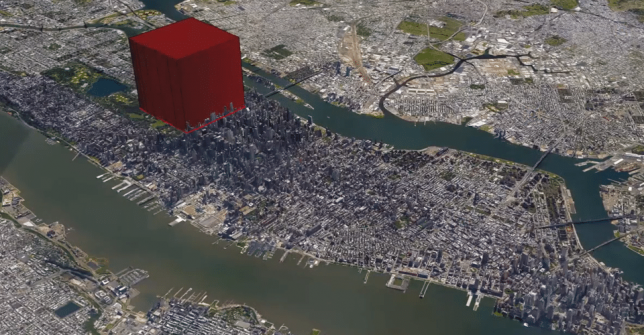
Cities often feel like dense and crowded places, and it is hard to imagine everyone on Earth living in urban environments let alone a single city or even (yes, it’s possible) one gigantic megastructure. In a series of videos, filmmaker Joseph Pisenti asks: what if everyone lived in one city? Then he takes it further with: what if everyone lived in just one building?

It sounds like an absurd proposition, but our planet’s population of billions could, in fact, but contained in a relatively small amount of space if needed (perhaps in case of a worldwide evacuation to space?). Images of single cities in the videos show places that already have populations in a single frame larger than countries like, say, Australia have spread across an entire continent.

A few billion cubic meters in a structure set on, say, Manhattan, could uncomfortably house the human race. It would be twice the height on the world’s largest building, but we would fit if we had to.

As the video series unfolds, its creator gets increasingly realistic with respect to actual needs for people beyond simply space to exist, imagining a world where we all could actually live on a small part of South America. Hopefully, of course, it will never come to this, but as sea levels rise it’s good to know we have options (and fun to engage in these thought experiments, regardless). By the time you finish watching this series, however, you may find you would rather simply escape it all:

Share on Facebook


[ By WebUrbanist in Architecture & Cities & Urbanism. ]

[ WebUrbanist | Archives | Galleries | Privacy | TOS ]


WebUrbanist

 
Comments Off on Urban Planet: How the Whole World Would Fit into a Single City or Structure

Posted in Creativity


Adobe Camera Raw 9.9 launches with new camera and lens profile support

08 Mar

Adobe has announced the release of Camera Raw 9.9 for Creative Cloud subscribers, adding expanded lens profile and camera raw support. In addition to the new support, ACR 9.9 fixes a trio of bugs, including a ‘rare crash’ associated with JPEGs, a bug that affected Lens Profile Auto Matching when used with Zeiss Batis 85mm lenses, and an Upright bug issue.

The latest version of Camera Raw adds support for the following cameras:

  • Canon PowerShot G9 X Mark II
  • Casio EX-ZR3200
  • Fujifilm GFX 50S
  • Fujifilm X100F
  • Fujifilm X-A10
  • Fujifilm X-T20
  • Leica M10
  • Olympus E-M1 Mark II
  • Panasonic DC-FZ80
  • Panasonic DC-GF9
  • Panasonic DC-GH5
  • Panasonic DMC-TZ82
  • Phase One IQ3 100MP (“S” compression mode not supported)

The update also adds support for another 28 lens profiles, including the iPhone 7 lenses, the DJI Mavic Pro FC220, several Nikon F and Canon EF lenses, and more. The full list can be found here. Existing Camera Raw users can update to the new version by selecting the ‘Help’ menu in the application, then ‘Update.’

Via: Adobe Blog

Articles: Digital Photography Review (dpreview.com)

 
Comments Off on Adobe Camera Raw 9.9 launches with new camera and lens profile support

Posted in Uncategorized


Flickr rolls out neural-network-based Similarity Search

08 Mar

Flickr has announced a new feature called Similarity Search, a deep neural network-based discovery engine that is designed to uncover a wider range of related image results than is possible under the current search system. It lets users search for a photo and use the results to dig deeper for additional similar photos.

Powered by Yahoo’s computer vision technology, this new function expands the depth and level of search results, and not coincidentally, will derive additional advantages to users of Flickr’s 13 billion-plus photo database. To use similarity search, just hover over a photo on the search result page to reveal a three-dot (“…”) Similarity Pivot button at the upper right corner. That exposes a menu giving you the option to search for additional similar photos.

Neural networks are used to map raw pixels of a photo into relevant tags. Credit: Flickr

This spells more potential exposure for both aspiring and professional photographers, where search results can go far beyond anything that may be obvious, popular or trending. Similar to a web searching or browsing experience, users will likely encounter a wider array of different, unexpected, and hopefully valuable results to choose from without having to conduct increasingly elaborate text searches.

‘One of those major problems is that of discovery,’ said Clayton Mellina, Flickr’s software developer engineer, in the blog post explaining the new tech. ‘We understand that the value in our photo corpus is only unlocked when the community can find photos and photographers that inspire them, so we strive to enable the discovery and appreciation of new photos.’

Points nearer to the query image are semantically similar; points further away are not. Credit: Flickr

What is similarity?

While similarity can mean the same person or thing or color or style, Flickr goes into deep neural network territory with semantic similarity — similarity based on the content of photos to help users discover new images and better use Flickr’s tools to find what they’re looking for from its huge database. Flickr has some experience with neural networks and already uses them for object recognition, NSFW prediction, and aesthetic quality. In addition, neural networks power Flickr’s style filters, which allow filtering by styles like ‘minimalist’ or ‘patterns.’
 

Because visual searching often does not translate well to text, the new Similarity Pivot button now gives users a way to more deeply explore visual concepts. ‘With similarity, we are understanding the photo abstractly with specific aspects that are related to the visual experience and layout of the scene,’ Mellina said.

Similarity search rolls out today to all Flickr users, and results will be available immediately. Mellina says that the Flickr collection is still in the process of being indexed, but that indexing should be completed by the end of this week. 

Similarity search will reveal only public photos, so there should be no security issues, Mellina says.

Articles: Digital Photography Review (dpreview.com)

 
Comments Off on Flickr rolls out neural-network-based Similarity Search

Posted in Uncategorized


Cinetics announces new Lynx camera slider and motion control system

07 Mar

Cinetics has announced Lynx, its next generation camera slider and motion control system for photographers and filmmakers. It claims that Lynx is designed to set up and use quickly and easily, incorporates advanced motor control for very precise camera slides, pans, and tilts, and also allows users to program and operate the system through a mobile app.

The company is turning to Kickstarter for preorders, following successful Kickstarter campaigns for other products.

Lynx will be available in three kits: a Base Slider kit, which allows for manual moves, a Motorized Slider kit, which adds a slider motor and controller, and a Three Axis Slider kit, which adds motorized pan and tilt head.

A $ 499 Kickstarter pledge will secure you the Basic Slider Kit, a $ 999 pledge will get you the Motorized slider kit, and a $ 1499 pledge put you in line for the full Three Axis Slider kit. Final non-Kickstarter pricing was not announced.

$ (document).ready(function() { SampleGalleryV2({“containerId”:”embeddedSampleGallery_1450207459″,”galleryId”:”1450207459″,”isEmbeddedWidget”:true,”standalone”:false,”selectedImageIndex”:0,”startInCommentsView”:false,”isMobile”:false}) });

Press Release

Cinetics Announces Lynx: Camera Slider and Multi Axis Motor Control System That Masters Timelapse and Video Moves

Fourth Kickstarter Campaign Offers World Class Motion Control System Made Possible by Feedback and Support from Engaged Customer Base

Austin, TX. – March 07, 2017 – Cinetics, designers and manufacturers of lightweight and portable cinematic systems for videographers and filmmakers, is adding a next generation product to its arsenal of motion control, dolly, and tripod systems for photographers, filmmakers and videographers. Lynx™ is an ultra-smooth camera slider and multi axis motor control system that masters the art of timelapse and is capable of making precision video moves. Following the overwhelming success and community support of three previous Kickstarter campaigns, Cinetics will once again turn to Kickstarter for preorders of Lynx and offer its loyal community of photographers, filmmakers, and videographers a discount on the new system.

“Lynx is our 4th motion control project, and it’s our very best. It’s a compact camera slider built with input from an amazingly engaged customer base,” explains Justin Jensen, founder of Cinetics. “It’s a ready-to-run, three axis motion control kit that sets up quick and easily, is strong, fast and quiet, and can be driven by a mobile app. We are confident that Lynx will consistently perform as well as other, more expensive, compact motion control systems on the market.

Lynx is manufactured using the finest materials and incorporates the latest in motor control technology to enable precise, quick and quiet slides, pans and tilts. A beautifully-designed mobile app allows easy and intuitive remote system control while its joystick design and accelerometer controls take live camera movement to an entirely new level. Lynx is designed for fast and easy set up, can run preset programs or be configured creatively to perform complex moves for incredible cinematic results.

Lynx is available in three primary kits: Base Slider, Motorized Slider and Three Axis Slider.

The Lynx Base Slider allows users to create manual video moves. The motor control can be added to the slider at any time.

The Lynx Motorized Slider kit includes the manual slider plus the slider motor and controller for a complete linear motion control system.

The Lynx Three Axis Slider includes the complete Lynx motorized slider and motorized pan and tilt head.

Articles: Digital Photography Review (dpreview.com)

 
Comments Off on Cinetics announces new Lynx camera slider and motion control system

Posted in Uncategorized


Cinetics Lynx motion control system review

07 Mar

As an astronomer and visual artist, I use the arts to communicate science. My main way of doing this is through a series of Science & Symphony films that get presented with orchestras in concerts around the world. Since 2008 I have been shooting time-lapse sequences of the night sky and incorporating them into many of these films. My stills and sequences of observatories in Chile, the U.S., and the South Pole have also been featured in many science documentaries.

One way of giving time-lapse sequences a more cinematic look is by using a motion control system. These programmable systems move your camera with high precision as you shoot your scene. I have used several of them since 2008, so I was quite happy to preview this brand new system introduced by Cinetics. 

The Cinetics Lynx is a light, portable and compact (yet sturdy) system that lets you program precise three-axis moves for video, stop motion, and time-lapse sequences. Its main components (slider, motors and motion controller) have their own soft cases for easy portability. You can even carry the slider preassembled in its own case to save time when working in the field. The standard length of the slider is 24 inches (61 cm), but the system comes with an additional set of carbon fiber rails, stored in their own carrying case compartment, for a total extended length of 48 inches (122 cm). The total weight of the system is under 13 lb (5.9 kg).

The Lynx motion control system at its standard 24-in (61 cm) length. (Photo courtesy of Cinetics)

It’s apparent that a lot of thought was put into designing a system that takes only minutes —and a single hex key— to assemble. Extending the slider with the second set of rails and replacing the belt with a longer one takes approximately 5 minutes. The slider comes with a set of built-in legs to rest it on the ground or against a wall (when inclining it). The legs spread out at a series of pre-determined positions, which avoids having an uneven slider.

The motor units are very compact and each one requires a single screw to install. The motion controller can be attached to the pan motor via an ingenious snap-on attachment and the system battery is conveniently housed inside the motion controller. These two features avoid the need for installing additional support accessories and contribute to the simplicity and compactness of Lynx. 

Motion controller snapped onto the pan motor. (Photos courtesy of Cinetics) Pan and tilt motors with motion controller. 
Slider and adjustable legs. Slider motor.

When assembled to the 24 inch length, the system can easily be installed on a single tripod without the unit tipping over, even when the camera is at either end of the slider. My first test in the  studio was to see how the system behaved using a single but sturdy tripod/head configuration. I used a Gitzo systematic tripod and ball head with hydraulic lock.

Despite the sturdiness of the system, images taken at either extreme of the slider – when mounted on a single tripod – may need to be rotated slightly in order to align them. For a load of 5.7 lb (2.6 kg) the images needed to be rotated ±0.6 degrees with respect to an image taken at the center of the slider. This can be corrected in post-processing by key framing image rotation and letting software interpolate the rotation angles.

I extended the Lynx slider to its 48in. length and took it to the Chicago Lakefront to shoot for a new film I’m producing. With two Gitzo carbon fiber tripods easily attached, I leveled the slider, and proceeded to program the system. Lynx includes an Arca-Swiss style camera plate to quickly set your camera and, on the Cinetics website, you can choose from a comprehensive list of cables to control the shutter.

The Lynx system extended to 48 inches (122 cm) in length and supported by two Gitzo carbon fiber tripods. The leveling tripod on the left has an adjustable center column while the other one has a ball head. These make leveling or inclining the slider fairly easy. Location: Sundial Plaza, Adler Planetarium, Chicago

Once set up, it’s easy to program the motion controller. You simply slide the camera to the first position, adjust the pan and tilt as desired, and save the position as your first keyframe. Then, you slide it to the second position, adjust the pan and tilt, if necessary, and set your next keyframe. Once the beginning and ending keyframes are established, you can program the parameters for your time-lapse sequence, including duration between keyframes (time), shutter speed, and the interval between shots.

The Lynx motion control system at its standard 24-in length (61 cm). From L to R on the slider: slider motor, tilt motor, pan motor with controller snapped on and a Nikon D5 with an Arca-Swiss style camera plate.

The controller’s display shows you the total number of resulting shots. One thing that impressed me about the Lynx motion controller is that it not only lets you set up at least 5 keyframes, but it lets you program a different set of sequence parameters between each pair of keyframes! For example, you could program sets of keyframes in order to progressively change the exposure and interval times throughout a time-lapse – useful if you know that the lighting conditions are going to change during the sequence.

There are two motion modes available: shoot-move-shoot (S-M-S) mode and continuous mode. In S-M-S mode the camera is moved only between shots. In continuous mode, however, photographs can be taken as the system moves. This is useful for taking video or time-lapse sequences that incorporate motion blur. You also have the option of ramping up and down the motion speed when shooting video and time-lapse in continuous mode. (The S-M-S time-lapse mode has a built-in ramp, but unfortunately, it is not adjustable at this point.) Each segment of the programmed motion can have its own kind of motion. For example, you can have an S-M-S segment followed by one with continuous motion. 

Once you have programmed a motion you have the ability to save it as a preset for later recall. When you’re ready to start the sequence simply choose Run, step back, and voilà!

Finally, you also have the ability of continuing a sequence by reversing the motion (called bounce) as many times as you want. This is a great feature, but I wish it were possible to bounce the motion after a sequence has started, since this is something you might decide to do once shooting is in progress. Other systems let you do this, and also give you the ability to tell the camera to continue shooting even after it has reached the last keyframe.

Another thing I would like to see in a future software update is the ability to quickly preview the entire run in continuous mode. Even when the intent is to take a time-lapse sequence one could quickly preview the motion by shooting video and tweaking the motion, if necessary.

501 one-second exposures (F4, ISO 100 at 18mm) with an interval of 2 seconds during a total shooting time period of 16.7 minutes. Since these scenes were shot during the changing illumination conditions of the blue hour, the white balance and exposure values were keyframed and interpolated using Lightroom and LRTimelapse. All sequence images were taken with a Nikon D5 and Nikkor 14-24mm f/2.8 and rendered as 24-fps videos. (ISO 100, F4, at 18mm)

I decided to use the Lynx to take a time-lapse sequence by centering the field of view on Henry Moore’s sundial in Chicago, moving my camera from the left all the way to the right end (over a period of 17 minutes), while panning my camera to the left so I could keep the sundial at the center of the frame. The combination of slide and pan resulted in the illusion of the camera moving along an arc around the sundial when the displacement motion was actually along a line.

I then set up a time-lapse of Anish Kapoor’s Cloud Gate (the reflective sculpture nicknamed The Bean) in Millennium Park. Have in mind that the farther your main subject is from the camera, the harder it will be to notice parallax (the displacement in the apparent position of an object viewed along two different lines of sight).

The Lynx system extended to 48 inches (122 cm) in length and supported by two Gitzo carbon fiber tripods. Location: Millennium Park, Chicago

Nevertheless, for the particular composition I had in mind, I avoided getting too close to the sculpture. I slid and panned the camera to the right while tilting it up (in order to end up with less ground and more blue-hour sky) over a period of 20 minutes. Taking advantage of the dark blue that remained in the sky, I also placed the system right in front of Cloud Gate and simply tilted the camera up over a period of 8.4 minutes.

For the first sequence of Cloud Gate at Millennium in Chicago, I combined 604 one-second exposures with an interval of 2 seconds over a period of 20 minutes. I programmed Lynx to slide, pan, and tilt.  (D5 and Nikkor 14-24mm F2.8; ISO 125, F4, at 16mm).

For the second Cloud Gate sequence, I took 254 one-second exposures with an interval of 2 seconds over a period of 8.5 minutes, and simply tilted the camera upward (D5 and Nikkor 14-24mm F2.8; ISO 400, F4.5, at 16mm).

Note that the Lynx system can be used vertically or inclined, though when inclined you can only point the camera along the direction of the slider if you want to avoid an unleveled horizon. If, for example, you wanted to shoot perpendicular to the direction of an inclined sliding motion then you would need a leveling wedge (not included) to compose your shot.

One has the option of programming the Lynx motion controller via Bluetooth with a smartphone app. Having two options for programming the unit is very welcome but, surprisingly, I thought that programming the controller using the app was less straightforward and somewhat confusing, but the app’s GUI was re-designed after I tested it. There’s definitely room for improvement in future versions of the Lynx app. Having said that, I like that on the app one can control the exposure values to a fraction of a second and use the smartphone’s IMU (a combination of accelerometers and gyroscopes) to slide the cart.

In conclusion, the Lynx is a light, portable, and sturdy three-axis motion control system that can be set up very quickly. Its relatively light weight and compact design lets you carry it around in the field very easily, and its smooth and precise motion can be programmed with multiple keyframes. I can definitely recommend this motion control system and I look forward to future firmware and app updates.

Pros:

  • Light and compact
  • Quick and easy set up
  • Lets you program at least 5 keyframes, each with independent set of parameter values and motion modes
  • Ability to save presets

Cons:

  • Leveling wedge is not included

Updates I’d like to see:

  • Ability to preview motion in continuous mode
  • Ability to edit parameters in saved presets
  • Ability to adjust ramping on S-M-S time-lapse mode
  • During a sequence in progress, ability to decide what to do once the camera has reached the last keyframe

José Francisco Salgado, PhD is an Emmy-nominated astronomer, science photographer, visual artist, and public speaker who creates multimedia works that communicate science in engaging ways. His Science & Symphony films have been presented in 175 concerts and lectures in 15 countries.

José Francisco is a seasoned night sky and aurora photographer and filmmaker. If you would like to view, photograph, and learn about the Northern Lights then you can inquire about his Borealis Science & Photo Tours in Yellowknife, Canada.

You can follow him on: Flickr, Instagram, 500px, Facebook,  and Twitter

Articles: Digital Photography Review (dpreview.com)

 
Comments Off on Cinetics Lynx motion control system review

Posted in Uncategorized


Fujifilm X-T20 sample gallery

07 Mar

Fujifilm’s X-T20 is the little brother to the company’s excellent X-T2 mirrorless camera, retaining the same sensor and image processor. See how the the image quality looks in our real-world sample gallery.

$ (document).ready(function() { SampleGalleryStripV2({“galleryId”:”7251932144″}) })

Sample photoSample photoSample photoSample photoSample photo

Articles: Digital Photography Review (dpreview.com)

 
Comments Off on Fujifilm X-T20 sample gallery

Posted in Uncategorized