RSS
 

Archive for January, 2017

Landscape shooter Lisa Bettany shares her story of healing through photography

27 Jan


$ (document).ready(function() { SampleGalleryV2({“containerId”:”embeddedSampleGallery_7608234858″,”galleryId”:”7608234858″,”isEmbeddedWidget”:true,”standalone”:false,”selectedImageIndex”:0,”startInCommentsView”:false,”isMobile”:false}) });

Lisa Bettany is a renowned landscape photographer whose career began as she was recovering from a traumatic injury. Born in Canada, she was a competitive figure skater until the age of 21 when she suffered a back injury while skating. Years into her recovery it was still extremely difficult to walk and sit up, but when she acquired a camera things started to change for the better. One day at a time she ventured farther and farther from home, increasing each trip minute by minute, growing stronger and learning the art of photography. For her, learning photography was very much a journey from darkness into light, and nothing has slowed her down since then.

You can read the inspiring account of how her career started and the success she’s achieved as a pro photographer over on Resource Travel. You can also take a look at a few of her images above.

Has photography helped you achieve things that previously seemed impossible? Tell us in the comments below.


Articles: Digital Photography Review (dpreview.com)

 
Comments Off on Landscape shooter Lisa Bettany shares her story of healing through photography

Posted in Uncategorized


Hasselblad CEO Oosting to leave next week

27 Jan

The CEO who oversaw Hasselblad’s dramatic turn of fortunes over the past two years is to step down within the next week. Perry Oosting is widely credited with extracting the company from one of the worst periods in its 75-year history by finding new investors and helping to modernize the brand’s produce offering with the H6D and X1D cameras.

Oosting was a member of Hasselblad’s Supervisory board before taking the helm in January 2015. After a long period of creative stagnation and persistent rumors of financial crisis and hostile take-overs, not to mention some very poor branding decisions, Hasselblad made some real progress under Oosting and surprised the world with the first handheld medium-format mirrorless system last year when it launched the X1D.

Oosting leaving the company comes against a background of rumors that DJI has quietly become a majority shareholder. The Chinese drone manufacturer took a ‘strategic’, but minority, stake in Hasselblad in October 2015 – a move that provided the funds needed to launch the H6D and to develop the X1D. However, the massive uptake of the new mirrorless camera system took the company by surprise and rumors suggest Hasselblad had to look to DJI for further investment so it could upscale production to meet demand.

That the company has appointed an interim CEO suggests that Oosting’s departure wasn’t part of a long-term plan – had it been a smoother transition would have been arranged. However, as much as Oosting is seen by some as Hasselblad’s ‘knight in shining armor’ products like the H6D and the X1D must have been on the drawing board and at some stage of planning before he took over, so the company still has the staff to continue along the current path. Paul Bram, who is to stand in as CEO, is already an advisor to the supervisory board, has been involved in decisions around the new direction and has some history with the company, while Ove Bengtson, who was the hands-on guy during the development of the new products, is still the company’s product manager.

Hasselblad hasn’t had much luck with managerial direction over the last ten or so years. It was CEO Larry Hansen who instigated the disastrous rebranding exercise with Sony that spawned the Lunar, and Ian Rawcliffe who worked under Dr. Hansen and became CEO when Hansen was removed suddenly and quietly at the end of 2014. Rawclifffe lasted a year.

With a full order book for the X1D and many previous R&D staff back within the company Hasselblad must now be in a more healthy position than it has been since it only sold film cameras. The challenge of course will be to deliver the pre-ordered X1D units, develop the X series of lenses and maintain the H series at the same time – while still expanding the range of products on offer. I’m told that production of the X1D is now well on track, and was in fact at an all-time high only yesterday.

DJI certainly knows how to create a successful business from its base and factory in China. How that experience will translate for a Swedish factory and ideology, and whether they will be hands-on or hands-off, we shall have to wait and see.

Press release

Hasselblad announces change of management structure

Gothenburg, January 2017

Hasselblad, the leader in high-quality professional medium format cameras today announced that Perry Oosting, CEO, will step down from his role by the end of this month.
Having guided Hasselblad to stability, strong sales as well as the partnership with aerial camera company DJI, CEO Perry Oosting has accomplished what he was asked to achieve and has decided to step down from his operational responsibilities and return to a role as advisor to the board.

“We would like to thank Mr Perry Oosting for his extraordinary efforts. Under his leadership a foundation for future growth is established and the company has extended its customer base substantially,” said the Supervisory Board.

“In the beginning of 2015 I was asked to take the role as CEO to secure sustainable growth and prepare the business for the next steps in its development. During 2016, we launched several new products and a complete new electronic platform. The market reaction to the strategic direction and its products were overwhelming. I would like to thank all involved and foresee a bright future for the team of Hasselblad.” said Perry Oosting.

The Board of Directors has, effective as of Feb 1, appointed Paul Bram, currently Advisor to Hasselblad, as Interim CEO.

“We are happy to announce Mr Paul Bram as an interim CEO. Paul is coming from his position within Hasselblad as Advisor and has a vast leadership experience from his time at Ericsson and Gambro,” said the Supervisory Board.

“I am honoured to take on the role as interim CEO for this iconic and much-loved company. Hasselblad represents outstanding quality, passion for fine art and pioneering technology. Over the coming months we will continue the started path and strategic direction, including accelerating R&D and software development in Gothenburg, Sweden. Going forward I am immensely proud to be part of this continuing journey. ” said Paul Bram.

Articles: Digital Photography Review (dpreview.com)

 
Comments Off on Hasselblad CEO Oosting to leave next week

Posted in Uncategorized


Study finds consumers are ready to embrace selfies as a tool

27 Jan

For some, selfies are a form of self-expression. Others find them annoying. But one thing is certain: they won’t go away anytime soon. A Sony-commissioned study has found that the top ten future uses for smartphone cameras will include banking, shopping, healthcare and dating. The study finds that over a third of consumers would feel more secure if banks used selfies as passwords and a quarter would prefer to see their general practitioner via a selfie or video call than in-person.

The study was undertaken by futurologist organization Futurizon with the market research company OnePoll who conducted data research and surveyed 6500 people across the UK, Germany, France and Spain.

The report identified the top ten ways consumers believe selfies could be used in the next five years:

  1. Dating: Taking a selfie with your date to find out what they really think
  2. Medical: Over a quarter of people would prefer to see their GP via a selfie or video call, in the first instance
  3. Banking for the selfie generation: Nearly half of 25-34 year olds would feel more secure if accessing their bank through a ‘selfie password’
  4. In leisure: Around half of thrill-seekers would like to try a ‘selfiecoaster’ – a rollercoaster that puts you in control of capturing your experience on the ride
  5. In a gym / fitness: selfies that work with AI (Artificial Intelligence) to capture body monitoring e.g. testing heart rates and even suggesting how to improve on technique and how accurately a move is being performed
  6. Made to measure clothes: taking a 3D body image for made-to-measure clothes
  7. In retail: using your smartphone camera to try on different outfits suited to your body shape, at the touch of a button
  8. Social currency: paying for entry to the cinema or a tourist attraction through a selfie
  9. Robots: Using your smartphone to control drones or robots to take selfies from other or extreme locations
  10. Home: Using selfies to secure and access our homes and cars

Dr Ian Pearson, Futurologist and creator of the Future of Selfies report said, “The results clearly show that selfies are well on their way to transitioning from frivolous fad to technological phenomenon, and provide food for thought to a number of industries. The potential is huge, and it will be exciting to watch this unfold over the coming years.”

Most of the selfie applications described above seem technologically possible today. So, if there’s a market for them, we’ll probably be able to use them at some point in the short to medium term.

Would you be interested in using selfies in any of the ways listed above? Let us know in the comments. 

Articles: Digital Photography Review (dpreview.com)

 
Comments Off on Study finds consumers are ready to embrace selfies as a tool

Posted in Uncategorized


Lighting 103: How to Safely Gel a Speedlight

27 Jan

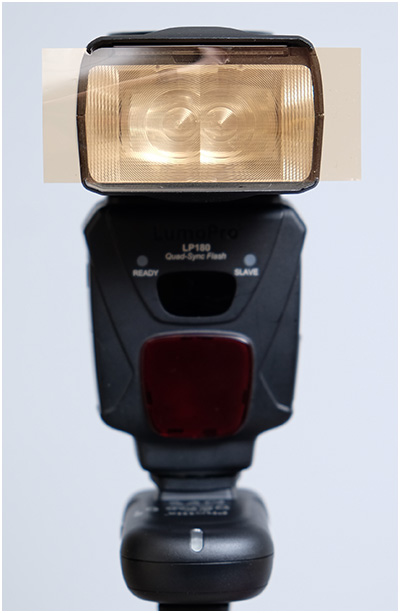
Do you work mostly with speedlights? If so, congratulations. Gelling your lights is going to be quick, easy and cheap. The fresnel lens on your speedlight (where the light comes out) is only about 3-4 square inches. And that is all you are ever going to need to gel on a speedlight.

As far as how to attach the gel, you have several choices and all are simple. But there are also a few things to watch out for, unless you want your gel to be permanently heat-welded to your flash. Read more »
Strobist

 
Comments Off on Lighting 103: How to Safely Gel a Speedlight

Posted in Photography


3 Handy Lightroom Features I Discovered by Accident

27 Jan

When I first started to dabble in photography, I knew very little about post-processing. I used Picasa to edit my photos. It’s free and easy to use. I experimented with the different settings and created some pretty interesting images (they weren’t very good). Needless to say, I had no idea what I was doing.

This was the extent of my early post-processing attempts. I created collages in Picasa.

This was the extent of my early post-processing attempts. I created collages in Picasa.

Self-learning methods and benefits

Like many of you, I am a self-taught photographer. My degree is in English Literature, and photography was something I dabbled in as a hobby. I learned photography by reading books, participating in online forums and through trial and error. It’s been a long hard road but it’s been well worthwhile.

I learned most of my post-processing by watching YouTube videos. It has become one of my favorite ways to learn. There’s some inspirational stuff available that you can use to teach yourself all kinds of different skills. It’s a lot of fun, and the benefit of learning in this way is that you can go at your pace.

This type of learning is perfect for my lifestyle, and I’m sure for many of you the same factors apply. It always amazes me what we can teach ourselves when we put our minds to it. Check out this video. Sean Tucker experiments with landscape photography and discusses how important it is to continue to learn and push ourselves.

Three Lightroom Features Discovered by Accident

Now that we are on the path to self-directed learning I would like to share with you three Lightroom shortcuts, hacks, tricks, or whatever you want to call them, that I learned completely by accident. I just pushed buttons to see what would happen. By just experimenting, the results paid off. I learned some very efficient ways to manage my post-processing workflow, and I want to share them with you.

Accidental Discovery #1 – the Alt key

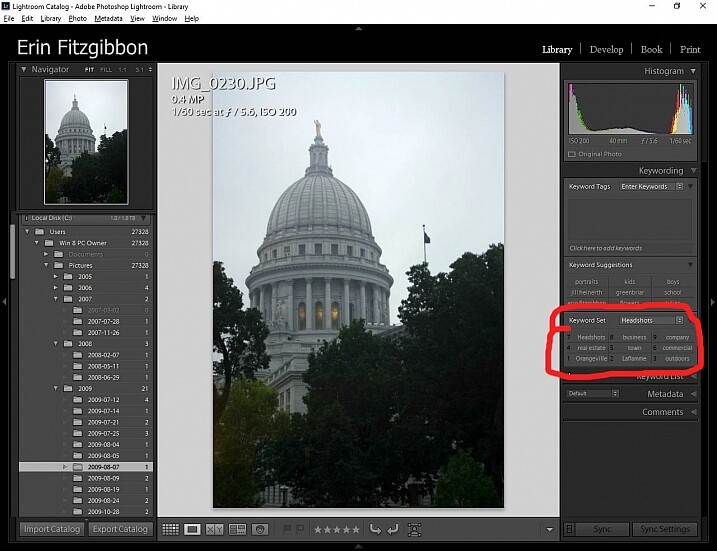
By simply pushing buttons I discovered some pretty cool functions. If you hold down the Alt key while in the Library module, little numbers appear by each keyword. You can then simply hit the number, and the module will tag your images with that keyword. Brilliant!!!

If you create a set keywords, this little trick becomes even more useful. The keyword set is then added to your images by simply typing in the correct number.

Alt key Lightroom Library module

This little discovery saves me loads of time.

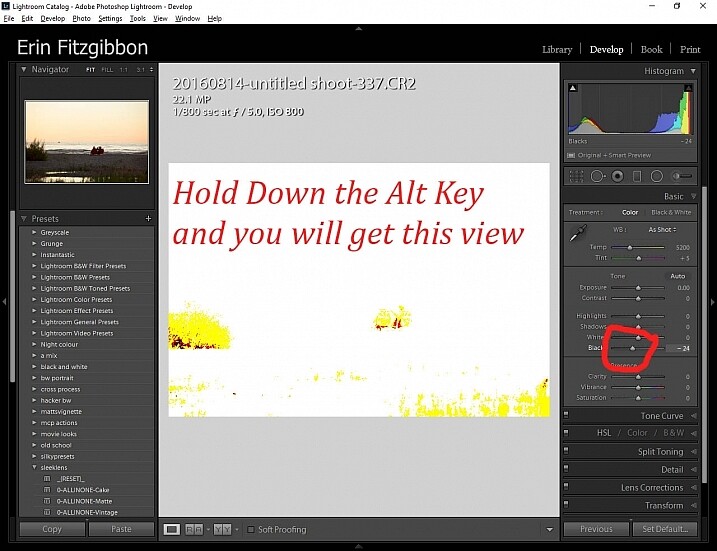
In the Develop module, the Alt key is very useful when setting black and white points in your images. Hold down the Alt key while hovering your cursor over the Blacks slider. The image will go completely white and as you move the slider from side to side (move it left to darken or add black) you will be able to see when the blacks begin to clip in your image.

This is a great way to adjust your image and super easy to see (and adjust) how much contrast range it will have. You can use the same principle to adjust the white points in your image. Give it a try. It’s one of the first steps I take when editing my work.

Note: It’s okay and even desired to have some blacks clipping in your image, but ideally you want to keep any whites from doing so. Clipping means areas with no detail in that tonal range.

Alt key Lightroom Develop module black point slider.

Here’s a screen shot of the black point slider.

Accidental Discovery #2 – Navigator Window

The Navigator window is very useful when you need to zoom in. This is probably really obvious and silly to those who have formal Lightroom training. Before discovering this little trick, I would zoom in and out applying the adjustment brush to small sections of the image. It was very tedious.

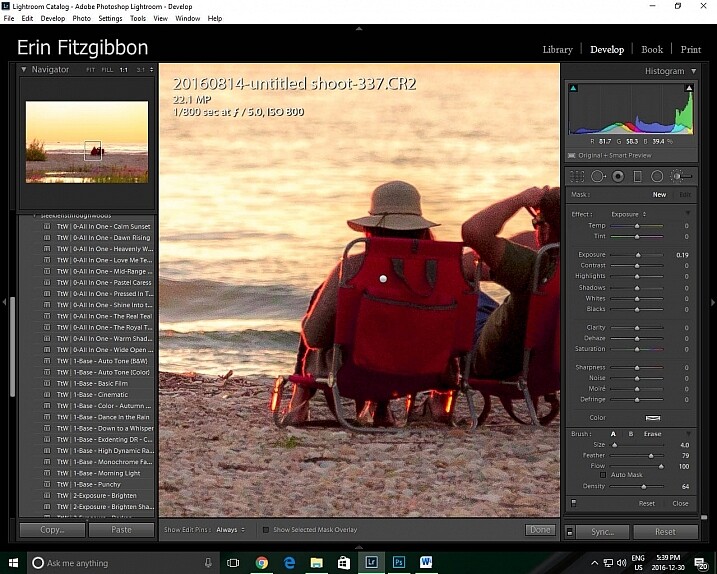
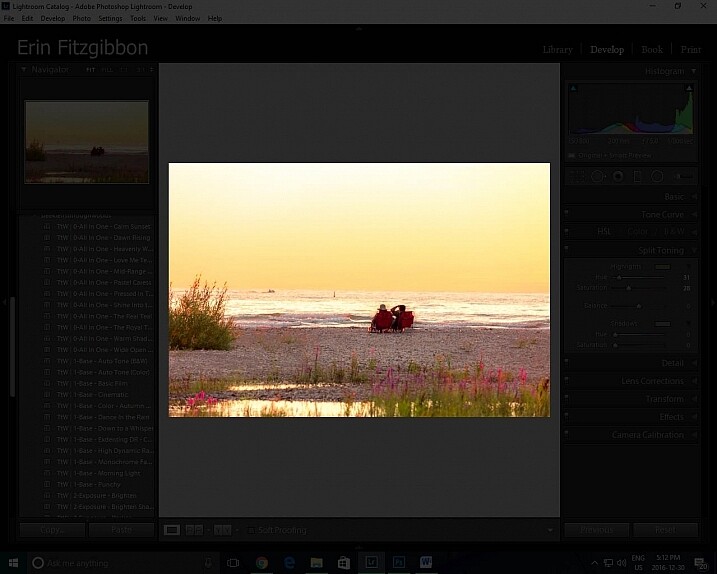
Then one day I discovered that if I click the 1:1 button on the Navigator (preview) window and then slide the square around on the screen, I could apply the adjustment brush without the tedium of closing the adjustment brush and moving out to the full-screen view.

Lightroom features 1:1 preview window

When I need to apply the same brush to several different areas of an image I click on the 1:1 feature and slide around the image making adjustments.

Accidental Discovery #3 – Lights Out in the Library

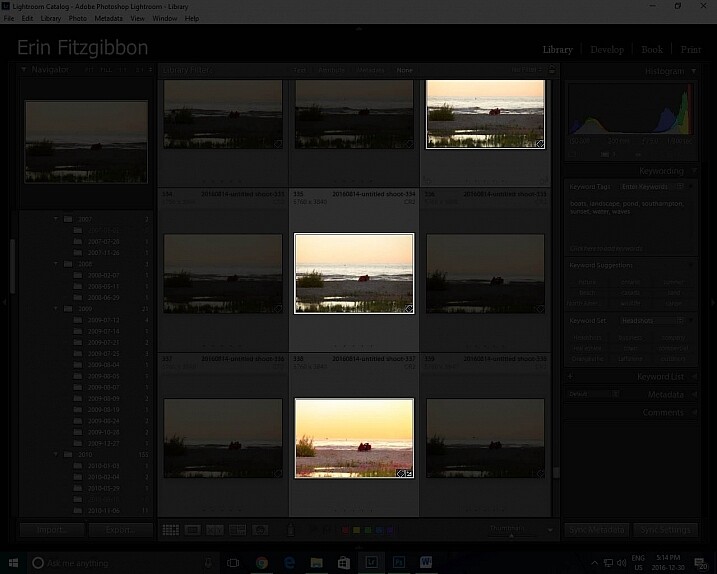
It took me a little while to figure out this trick. Again, I was just experimenting and pushing buttons. I had learned to use the Lights Out feature in the develop module.  When you press the letter L on your keyboard, it dims the surrounding panels so that you can focus more on the image at hand (press L again for total black around your image, and once more to return to normal). This same tool works well in the library module. I now use the “Lights Out” feature to isolate specific images. Simply select the images you wish highlight then hit the “L” button. It’s a neat little trick.

This same tool works well in the library module. I now use the Lights Out feature to isolate specific images. Simply select the images you wish highlight then hit the “L” button. It’s a neat little trick.

Lightroom features Lights Out in Library module

I use this feature to help me analyze an image before I decide it’s finished.

Lightroom features Lights Out in Library module

Look how easy it is to isolate specific images in the library module.

Conclusion

Experimentation is never a bad thing. We live in an age when we are lucky to have so many resources available to us. The internet is a true cornucopia of opportunity. Don’t be afraid to try different things. You really can’t break the program.

Sure there have been times when I have had to call Adobe and ask for assistance because I’ve pushed some button and haven’t been able to reset the program, but those times have been very few and far between.

Let me know about some of the tricks you use when post-processing. I’m sure there’s so much out there I still need to learn and I’m hoping you can add to my list of discoveries. What have you taught yourself about post-processing or using Lightroom in general? Please share in the comments below.

googletag.cmd.push(function() {
tablet_slots.push( googletag.defineSlot( “/1005424/_dPSv4_tab-all-article-bottom_(300×250)”, [300, 250], “pb-ad-78623” ).addService( googletag.pubads() ) ); } );

googletag.cmd.push(function() {
mobile_slots.push( googletag.defineSlot( “/1005424/_dPSv4_mob-all-article-bottom_(300×250)”, [300, 250], “pb-ad-78158” ).addService( googletag.pubads() ) ); } );

The post 3 Handy Lightroom Features I Discovered by Accident by Erin Fitzgibbon appeared first on Digital Photography School.


Digital Photography School

 
Comments Off on 3 Handy Lightroom Features I Discovered by Accident

Posted in Photography


LenzO underwater housing for iPhone 7 is rated for 100 meters

27 Jan

Sure, your iPhone 7 Plus can probably stand up to a little water, but if you’d like to dive deep you might not want to press your luck. That’s why ValsTech is seeking funding for a new LenzO underwater housing designed for the iPhone 7 and iPhone 7 Plus. As with the iPhone 6/6s version, the iPhone 7 housing is rated for depths down to 100m / 328ft, and features an optical dome lens, total phone control while under water, a selfie lens, and dual tripod mounts. Unlike the previous LenzO housing, though, the iPhone 7 variety is also buoyant.

LenzO is designed for recording videos and snapping photos underwater, and includes different color correction filters to compensation for various bodies of water. The case has a wake/sleep button for the phone, a camera start/stop trigger, swing arm actuators and a secure seal latch.

The underwater housing doesn’t require any special camera apps. Users can easily toggle between photo, video, panorama, and slow-mo modes while using the housing.

ValsTech is offering Kickstarter backers one LenzO for iPhone 7 housing for pledges of at least $ 230. The planned retail price will be about $ 400. Shipments to backers are estimated to start this upcoming April, and will be available globally.

Via: Kickstarter

Articles: Digital Photography Review (dpreview.com)

 
Comments Off on LenzO underwater housing for iPhone 7 is rated for 100 meters

Posted in Uncategorized


Hopes of Kodachrome relaunch put on ice

27 Jan
Photo by pittaya via Flickr. Used under CC license

Hold your horses, all you would-be Egglestons: Kodachrome probably isn’t about to make a comeback. In all the excitement about the re-launch of Ektachrome, the Chief Marketing Officer of Eastman Kodak said that the company was going to look into bringing back the iconic filmstock.

The problem was, it was the wrong Kodak. Now, in an interview with TIME.com, a senior representative from Kodak Alaris, the UK-based company that owns the Kodak stills film division, says it’s unlikely, given the need for specialist processing.

Dennis Olbrich, president of the imaging, paper, photo chemicals and film division at Kodak Alaris is quoted as saying ‘I would love for it to be Kodachrome, obviously. But it’s a very difficult proposition to get that whole infrastructure back in place.’

He did stress that the company was still interested in re-launching older filmstocks, though. ‘We’re already starting to evaluate what other films we could bring back and whether it would make sense to do it,’ he said.

Kodak Alaris acquired the stills film division as part of a settlement with Kodak’s UK pension scheme, during its restructuring under the US’s Chapter 11 bankruptcy protection process. US-based Eastman Kodak manufactures the film on the UK company’s behalf and still sells cine film and filmstocks for the movie industry.

Articles: Digital Photography Review (dpreview.com)

 
Comments Off on Hopes of Kodachrome relaunch put on ice

Posted in Uncategorized


Some Options for Backing Up Your Photos Online

27 Jan

Backing up your data is an essential part of your photography workflow. While many photographers still advocate for using physical external hard drives, there are also many online services where you can store your images. In this article, I will go over the pros and cons of several popular sites to backup your photos online. Please note that these photo solutions are constantly changing their features, so always check with them directly to verify any details.

Photo backups versus photo sharing sites

Some Options for Backing Up Your Photos Online

It’s important to note the differences between a designated photo backup services and photo sharing websites. Traditional photo backup services such as Backblaze and CrashPlan focus purely on backing up data and can be set to backup an entire computer or hard drive. This is good in the sense that you can have everything you’ve ever created on your computer saved to the cloud. However, these backups end up being extremely large files and they take extra time to retrieve. So if you need to constantly and quickly access your backed up photo data, it may not be wise to rely solely on these types of providers.

Photo sharing sites, on the other hand, are not meant to be comprehensive backups of your entire computer. Many of these sites impose limits on the types and sizes of files that can be uploaded. Thus, photo sharing websites are best used to upload, store, and share edited photos.

How I backup my photos

My advice is to have a backup for your backup. As a professional photographer who shoots primarily in RAW, I have terabytes of data to store, but I don’t generally need frequent access to those original files. I opt for CrashPlan to do automatic backups of my RAW images, in addition to storing them on external hard drives.

Charles Wiriawan

Image By Charles Wiriawan – external hard drive method of backing up.

My photography business is such that I constantly need to dig up old high-resolution photos to present to clients, and CrashPlan doesn’t give me easy, immediate access to those files. So I save edited, high-resolution copies of every photo I take and upload them to SmugMug. This way, I have quick access to the photos and can easily prepare an online gallery to share and sell images to clients. I also have Google Photos set to do automatic online photo backups anytime I save a new JPG image to my computer. In the end, I have four ways of backing up my photos.

Backup Services

These are comprehensive backup and cloud storage solutions meant to hold large amounts of data. Set them to automatically backup your entire computer or hard drive, and practically any file type or size will be accommodated. On the plus side, these backup solutions are pretty affordable for what they offer. However, it can take a long time to backup huge files, and file restoration can also take a bit of time.

Backblaze

One of the most popular backup solutions, Backblaze can automatically backup an unlimited amount of data from a single computer (note; it will connect and backup external drives as well). There’s no restriction on file type or size, and there’s only one pricing plan. It costs $ 5.00 per month or $ 50 USD per year for a Backblaze account. You can even pre-pay $ 95 for a 2-year plan. It’s an affordable and reliable solution for making sure everything on your computer is backed up.
Some Options for Backing Up Your Photos Online backblaze

CrashPlan

Virtually the same as Backblaze, CrashPlan also offers automatic computer backups. The main difference is that CrashPlan offers several different subscription plans. Included in the free plan is an automatic backup to a local hard drive or another computer. If you want to backup your data to CrashPlan’s cloud, the cost is $ 5 per month to backup one device for unlimited cloud storage and mobile file access. To add an extra device (as many as 10), the Family Plan is available for $ 12.95 per month.

crashplan Some Options for Backing Up Your Photos Online

Amazon Cloud Drive

At $ 11.99 a year for unlimited photo storage (or free for Amazon Prime members), Amazon offers competitive cloud storage solutions, but at some expenses. The main downside to Amazon Cloud at the moment is its lack of features when compared to other more established solutions. For example, a desktop client must be used to upload files larger than 2GB, there are no automatic backup features, and stored files are not automatically updated. Given these underdeveloped features, Amazon Cloud Drive at this moment seems more like an off-site hard drive rather than a true backup solution.

amazon-online-photo-backup

Microsoft OneDrive

Formerly known as SkyDrive, OneDrive is Microsoft’s cloud storage solution that works with Windows, Mac, iOS, and Android devices (but still no Linux). Base plans include a generous 15GB of free storage. Paid plans start at $ 1.99 a month for an extra 100 GB, or $ 6.99 for 1TB of space. The main downsides are a slow upload and download speed, a 10GB size limit per file, and the need to have a Microsoft, Outlook, or Xbox Live account in order to access OneDrive. This may be a hurdle for those who don’t use any Microsoft or Windows products.

onedrive-online-photo-backup

Google Photos

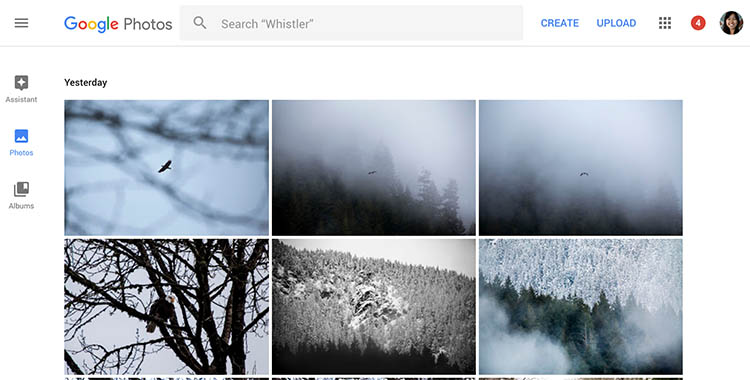
The photo storage solution offered by Google takes a slightly different approach than that of Dropbox or Flickr. Google Photos offers unlimited backup of a wide variety of file formats (including RAW images). You can also set automatic backups to occur whenever a new photo is taken on your mobile device or saved to your computer. However, all photos and videos must be under 16 megapixels or 1080p HD video.

If you upload larger files under the unlimited plan, your files will be compressed to fit these maximum size requirements. The only way to upload original, full resolution images is to opt for a plan with limited storage. In a way, this makes sense. You pay for more storage space if you need it.
google-photos-online-photo-backup

Photo Sharing and Image Hosting Websites

These websites were not originally meant to be comprehensive backup solutions. However, many photographers have begun using them as such. Most of these websites have limitations when it comes to data storage or file types that you can upload. Thus, they may not be the best all-around backup solution for your photos, depending on your needs.

Dropbox

One of the most popular tools to backup photos online is Dropbox. It exists in the form of a mobile app, website, and desktop app and allows you to store all types of media including photos, documents, videos, and other files. Anything you add to Dropbox can be immediately accessed anywhere when you log in via the corresponding website or app.

Using the free version gives you 2MB of storage space, but you can purchase additional space. Dropbox made an attempt at pushing an automatic photo backup feature in the form of Dropbox Carousel. However, this app along with Dropbox’s email app Mailbox shut down in early 2016. Thus, it’s questionable if they will make future investments into further feature development.

dropbox-online-photo-backup

Flickr

Yahoo’s venerable photo solution, Flickr, has withstood the test of time and continues to be popular among amateur and professional photographers. Even with a free account, you get 1TB of photo storage space. However, you cannot get more than 1TB of space, even with a paid Flickr Pro account. Instead, the paid account just removes ads and gives you access to your account stats. While Flickr isn’t the best for sharing photos with clients, it does give you the option to license and sell your photos.

The main downside to Flickr has to do with file size limits. Uploaded photos cannot be more than 200MB and videos must be 1GB or less in size. Additionally, RAW images cannot be uploaded.

flickr-online-photo-backup

SmugMug, Zenfolio, and Photo Shelter

These three paid photo-sharing websites are popular for presenting and selling photos to clients:

  1. SmugMug
  2. Zenfolio
  3. PhotoShelter

However, the push for offering unlimited photo storage has elevated these sites into becoming viable ways for photographers to backup images. All three sites also offer components that help you build your photography website. SmugMug and Zenfolio are among the most affordable, while PhotoShelter is more expensive.

In Conclusion

So which photo backup solution is best for you? It truly depends on what media you are looking to backup, how often you will access it, and your budget. Whichever solution you choose, remember to always have a backup for your backup. Also, please remember that these services are constantly offering new promotions and features. The information in this article may change, so always check directly with the provider to verify details.

How do you backup your photos? Let us know in the comments below.

googletag.cmd.push(function() {
tablet_slots.push( googletag.defineSlot( “/1005424/_dPSv4_tab-all-article-bottom_(300×250)”, [300, 250], “pb-ad-78623” ).addService( googletag.pubads() ) ); } );

googletag.cmd.push(function() {
mobile_slots.push( googletag.defineSlot( “/1005424/_dPSv4_mob-all-article-bottom_(300×250)”, [300, 250], “pb-ad-78158” ).addService( googletag.pubads() ) ); } );

The post Some Options for Backing Up Your Photos Online by Suzi Pratt appeared first on Digital Photography School.


Digital Photography School

 
Comments Off on Some Options for Backing Up Your Photos Online

Posted in Photography


A Couple of Overviews of the New Nikon D3400

26 Jan

Last fall an update to the D3300 was released, the new Nikon D3400. I looked around and was able to find a couple of videos that go over the features and how it compares to the D3300, and also to the relatively new Canon T6.

The Nikon D3400 Review by Chris Winter

In this video photographer, Chris Winter goes over the features in the Nikon D3400 as compared to upgrades from the D3300, and some pros and cons. He mentions the new Nikon app Snapbridge as one of them, which allows you to receive photos to your smartphone directly from the camera without wifi.

Nikon D3400 versus the Canon T6

This next video compares the Nikon D3400 and the Canon T6 in several areas. See which one Chris rates on top:

  • Size and weight
  • LCD screens
  • Menus
  • Wireless integration
  • Video
  • Battery life
  • Burst mode
  • Autofocus

Field test of the Nikon D3400

In this last video you can see the D3400 in use in the field in more practical situations, and how it performs.

Which camera is for you?

So if you are looking for an entry-level DSLR the Canon T6 or the Nikon D3400 might be for you. Have you given them a look? Which fits your needs and why? Tell us your thoughts in the comments below.

  • Shop for the Nikon D3400 on Amazon.com or on B&H Photo
  • Shop for the Canon T6 on Amazon.com or on B&H Photo

Note: The D3400 also made this list: The 19 Most Popular DSLRs Among our Readers

googletag.cmd.push(function() {
tablet_slots.push( googletag.defineSlot( “/1005424/_dPSv4_tab-all-article-bottom_(300×250)”, [300, 250], “pb-ad-78623” ).addService( googletag.pubads() ) ); } );

googletag.cmd.push(function() {
mobile_slots.push( googletag.defineSlot( “/1005424/_dPSv4_mob-all-article-bottom_(300×250)”, [300, 250], “pb-ad-78158” ).addService( googletag.pubads() ) ); } );

The post A Couple of Overviews of the New Nikon D3400 by Darlene Hildebrandt appeared first on Digital Photography School.


Digital Photography School

 
Comments Off on A Couple of Overviews of the New Nikon D3400

Posted in Photography


Clone Wars: How Star Architect Frank Lloyd Wright Inspired the Design of Naboo

26 Jan

[ By WebUrbanist in Architecture & Public & Institutional. ]

naboo-architecture

Much of the magic of the Star Wars films derives from the fantastic landscapes and exotic built environments that serve as backdrops for its intergalactic tales of empires and rebellions. But when world-makers like George Lucas create these places, they often draw on real architects and architecture for inspiration, including the last and largest work of starchitect Frank Lloyd Wright.

democratic-design-star-wars

Located north of San Francisco, the Marin County Civic Center consists of a massive rotunda housing a public library, offset by a strong vertical spire and long Hall of Justice (a classic Wright move to emphasize and juxtapose both horizontals and verticals). These same features can be found in the heart of Naboo, a Mid Rim world (near the Outer Rim Territories) featured across a series of Star Wars films.

marin-count-city-civic

royal-palace

As with their cinematic counterparts, Wright’s structures for Marin were designed to relate to the landscape – curved blue roofs pick up on the tones of the sky above while beige/pink walls tie into the earthen surroundings. Arched supports and the voids they create at different scales are also immediately recognizable as similar between the original Terrestrial architecture and its echos in Star Wars scenes.

civic-center-design

views-of-naboo

For Wright as well as Lucas, there is an underlying idea at work in the design: a combining of grandeur worthy of civic architecture but also an aspiration toward something democratic, beautiful but accessible. The settings are also similar: complex and lush landscapes, fitting a similar vision found in both the architect’s and filmmaker’s works: a focus on working architecture into natural settings rather than envisioning dense cities. Lucas has directly acknowledged a debt to Wright for inspiring the architecture found in the Star Wars franchise, but has yet to announce whether he will be working on a sequel story: some of us are still waiting on Starchitecture Wars.

Share on Facebook


[ By WebUrbanist in Architecture & Public & Institutional. ]

[ WebUrbanist | Archives | Galleries | Privacy | TOS ]


WebUrbanist

 
Comments Off on Clone Wars: How Star Architect Frank Lloyd Wright Inspired the Design of Naboo

Posted in Creativity