RSS
 

Archive for January, 2017

Vanishing Points: Simple Architectural Drawing Hack Puts Art in Perspective

05 Jan

[ By WebUrbanist in Art & Drawing & Digital. ]

trickshot

Architectural drawings have long used geometrical tricks to convey scale, depth, distance and other three-dimensional aspects of realities on two-dimensional surfaces. In a two-vanishing-point drawing, the artist aligns their ruler with a point on one side or the other and draws a line along the edge (or employs another modular straight-edging tool).

drawing-hack

The same came be accomplished much more quickly, however, using this simple technique: pin a flexible string to both points along the horizon line and slide a hook along the center. The results will naturally be a bit less than precisely linear, but for many architectural artists a wavy line is typical or even desired (it gives the piece a less rigorously complete look).

four-point-perspective

Of course, it will only work for a traditional two-point perspective – in cases where the artist wants to include a third vanishing point (for instance, to emphasize verticals in looking up at a skyscraper or create a fish-eye effect) a straight-edge is still required. That, or a free-handed approach based on a picture, presumably the basis of the drawing above.

Share on Facebook


[ By WebUrbanist in Art & Drawing & Digital. ]

[ WebUrbanist | Archives | Galleries | Privacy | TOS ]


WebUrbanist

 
Comments Off on Vanishing Points: Simple Architectural Drawing Hack Puts Art in Perspective

Posted in Creativity


Open source Lightroom plugin Focus Point Viewer highlights active focus points

05 Jan

Joshua Musselwhite, an underwater photographer and software developer, has launched a free, open source Adobe Lightroom plugin called Focus Point Viewer. With this plugin, Lightroom users can view the active focus point of their photos, a feature similar to the one offered by now-defunct plugin Show Focus Points. 

Musselwhite details his new software on Reddit’s photography subreddit, where he explains that Focus Point Viewer was created as a way to easily see whether the focus points in his underwater images were the ones he had intended to use. The software is currently only mapped for his camera, a Nikon D7200, but because it is made freely available anyone can take the time to map the plugin to their own camera.

Explaining how to perform the mapping, Musselwhite said:

You’ll need to map each of the focus points. The best way I knew how to was take 51 photos at each focus point and determine the x,y pixel location for each from the top left using photoshop. I searched and searched for a focus point map for my camera but couldn’t find any … The process is a little time consuming, but it only takes a couple of hours, and is described how in the README file in Github.

The Github README file with the full explanation can be viewed here, and the entire project is available here. Musselwhite has also shared a small gallery showing both the focus points in action and the metadata submenu.

Via: PetaPixel

Articles: Digital Photography Review (dpreview.com)

 
Comments Off on Open source Lightroom plugin Focus Point Viewer highlights active focus points

Posted in Uncategorized


Extreme Architecture: 15 Structures Built to Withstand the World’s Coldest Places

05 Jan

[ By SA Rogers in Architecture & Public & Institutional. ]

extreme-cold-architecture-main

You might say that the kinds of built structures you find in either Antarctic research stations or the coldest permanently inhabited place on Earth (located in Russia) are polar opposites: some are high-tech, capable of elevating themselves above the accumulating snow or departing to warmer climes via helicopter, while others are as humble as it gets. But people have learned how to survive in these harsh places, whether by keeping coal fires burning around the clock or burrowing into the earth for warmth, and even polar bears have some secrets to share with architects on surviving amidst all that ice.

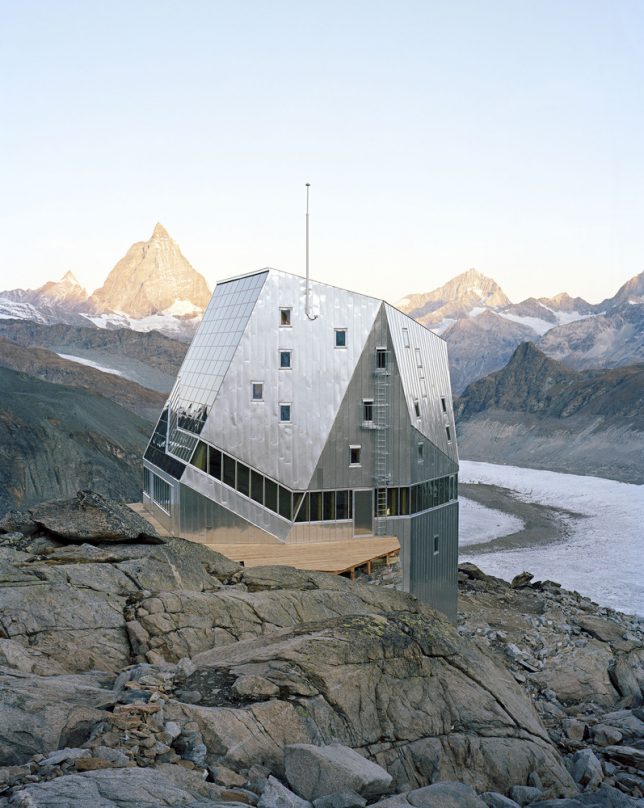
Monte Rosa Hut, Switzerland

extreme-cold-architecture-monte-rosa-hut-1

extreme-cold-architecture-monte-rosa-hut-2

extreme-cold-architecture-monte-rosa-hut-3

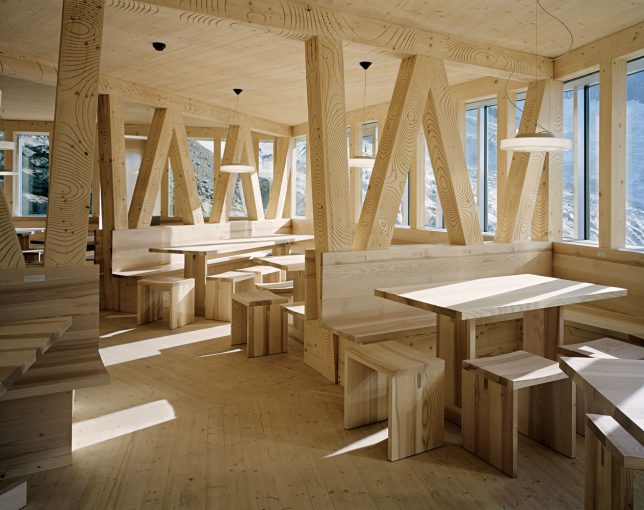
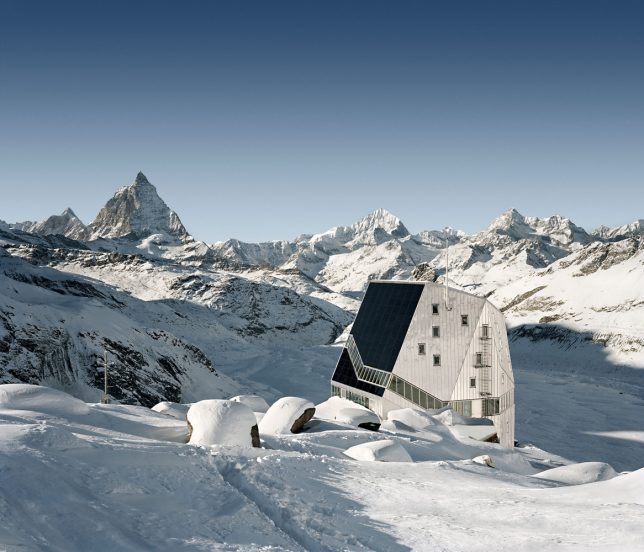
This five-story wooden structure on Switzerland’s Corner Glacier by Bearth & Deplazes Architekten has an exterior look befitting its environment, making it seem morel like a research facility than an ‘alpine hut’ for adventurers.

Memu Meadows Experimental House, Hokkaido, Japan

extreme-cold-architecture-meme-meadows-1

extreme-cold-architecture-meme-meadows-2

extreme-cold-architecture-meme-meadows-3

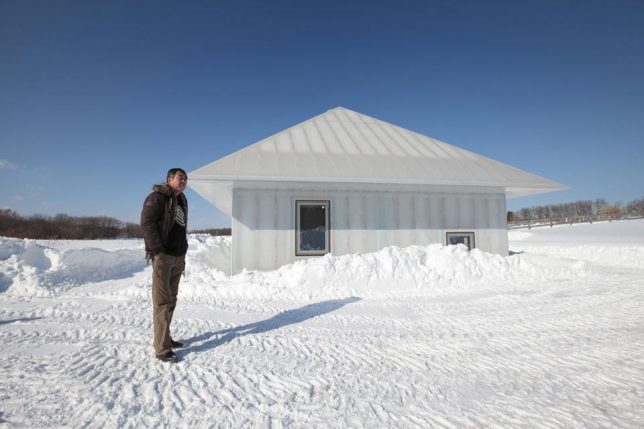
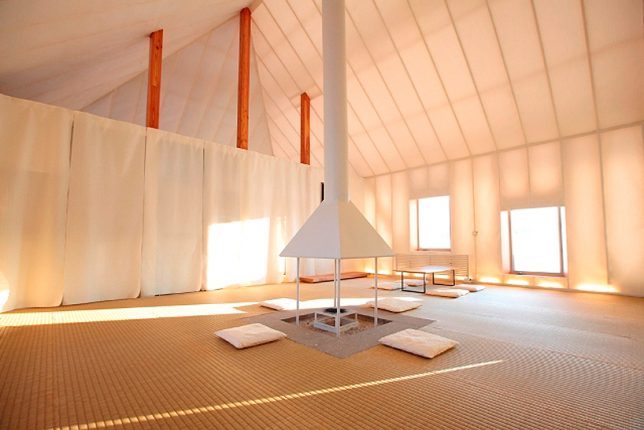
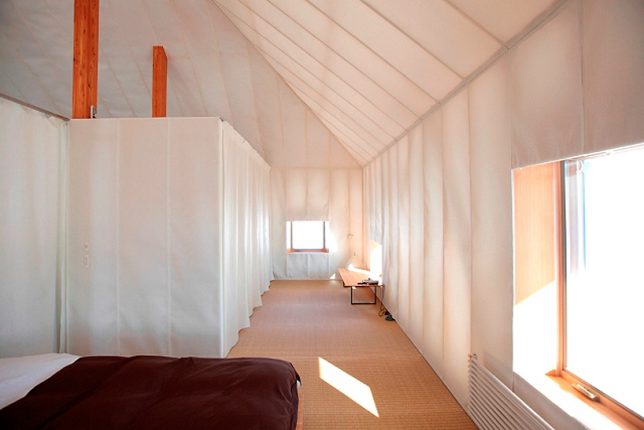
An experiment by architect Kengo Kuma, the translucent ‘Memu Meadows’ house was designed to test the limits of domestic architecture in extreme cold conditions. It’s a modern spin on the traditional homes of the indigenous Ainu, whose buildings used bamboo grass exteriors to hold in the heat of a central fireplace that remains burning all the time. Kuma’s version replaces grass with insulation and polycarbonate cladding but remains cheap and accessible, and allows the house to glow like a lantern after dark.

Halley VI, World’s First Mobile Research Station, Antarctica

extreme-cold-architecture-halley-vi-1

Ocean Waves Crashing on Seawall

extreme-cold-architecture-halley-vi-4

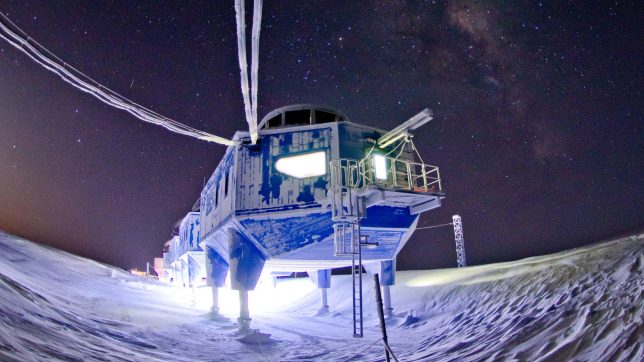
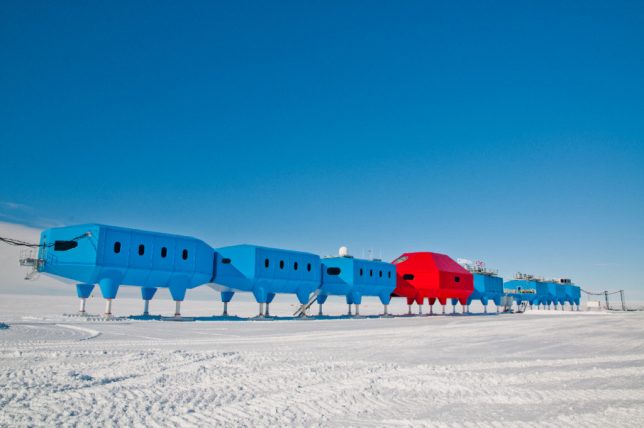
Halley VI by Hugh Broughton Architects stands up to some of the most extreme conditions on earth, serving as a mobile home base for Antarctic expeditions. It’s located on the floating Brunt Ice Shelf and can be transported on its ski-like feet, while hydraluic rams allow it to be raised above the snow as it accumulates. Seven interlinking blue modules offer offices, bedrooms, labs and energy plants while the central two-story red module contains social space for 16-32 crew members.

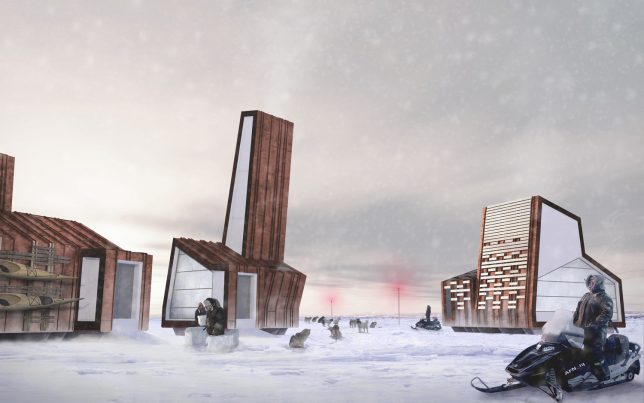
Arctic Adaptations: Concepts Reflecting Indigenous Canadian Traditions

extreme-cold-architecture-arctic-adaptations

extreme-cold-architecture-arctic-adaptations-2

Canada commissioned Lateral Office to curate its Nunavut-inspired exhibition at the 2014 Venice Biennale, entitled ‘Arctic Adaptations: Nunavut at 15.’ The project proposes how architecture could improve the development of cohesive communities even as the environment and the world around them rapidly changes.

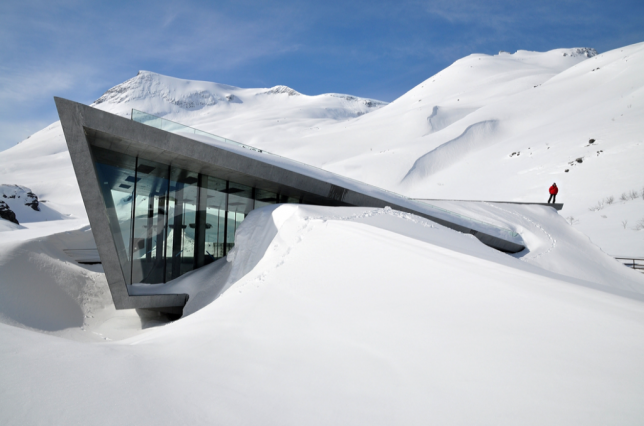
Trollstigen Tourist Route, Norway

extreme-cold-architecture-trollstigen-1

extreme-cold-architecture-trollstigen-2

extreme-cold-architecture-trollstigen-3

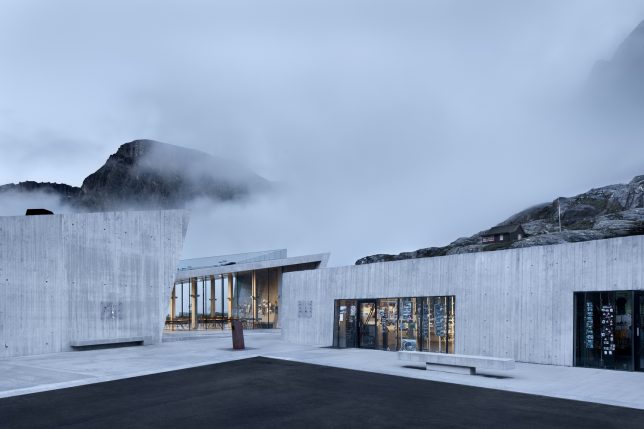
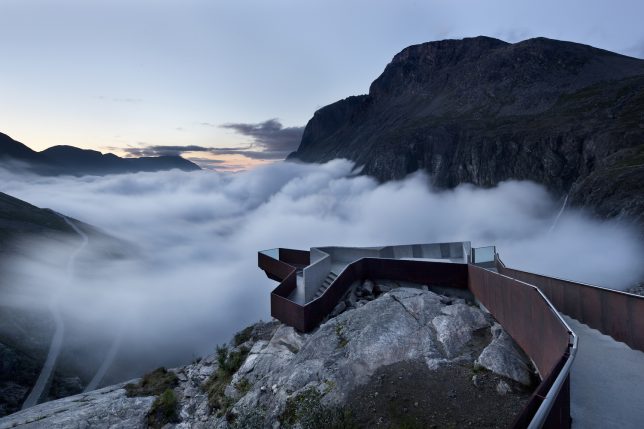
Set along the Trollstigen national tourist route in Norway, this visitor center and overlook by Reiulf Ramstad Architects gazes out onto a mountain pass that’s lush and green in the summer and formidably snowy in the winter. The overlook is particularly dramatic when the snow starts to accumulate.

Next Page – Click Below to Read More:
Extreme Architecture 15 Structures Built To Withstand The Worlds Coldest Places

Share on Facebook


[ By SA Rogers in Architecture & Public & Institutional. ]

[ WebUrbanist | Archives | Galleries | Privacy | TOS ]


WebUrbanist

 
Comments Off on Extreme Architecture: 15 Structures Built to Withstand the World’s Coldest Places

Posted in Creativity


Nikon brings its D5600 DSLR to the US

04 Jan

$ (document).ready(function() { SampleGalleryV2({“containerId”:”embeddedSampleGallery_5883354817″,”galleryId”:”5883354817″,”isEmbeddedWidget”:true,”standalone”:false,”selectedImageIndex”:0,”startInCommentsView”:false,”isMobile”:false}) });

Nikon’s D5600 digital SLR, announced globally in November of last year, is now coming to the US. The D5600 builds on the strengths of its predecessor, adding ‘SnapBridge’ (Wi-Fi + Bluetooth + NFC), improved touchscreen operation and a time-lapse feature.

The D5600 will be sold in several kits. It will be available body-only for $ 699, with the AF-P 18-55mm F3.5-5.6G lens for $ 799, with the 18-140mm F3.5-5.6G lens for $ 1199, and with the 18-55 and AF-P 70-300mm F4.5-6.3G lenses for $ 1149. All of these kits will be available this month.

IGNITE THE ARTIST WITHIN: CAPTURE CREATIVELY, SHARE EASILY WITH THE NEW NIKON D5600

The Nikon D5600 is a Compact Creative Companion that Delivers Stunning Clarity, Impressive Performance and the Ability to Share via Nikon SnapBridge 

LAS VEGAS, NV (January 4, 2017 at 10:01 A.M. EST / 7:01 A.M. PST) — Today, Nikon Inc. announced the U.S. availability of the compact and lightweight Nikon D5600, a connected DSLR camera for those ready to step up their photography and unleash their inner artist by creating captivating images that deserve to be shared. The 24.2-megapixel D5600 features Nikon SnapBridge1, which allows users to easily and automatically transfer images directly from their camera to a compatible smart device, making it simple to share amazing images with friends and family. 

“The Nikon D5600 is the latest camera in Nikon’s popular D5000 series — a camera line that represents a stepping stone for photographers who want to further explore their creative boundaries,” said Kosuke Kawaura, Director of Marketing and Planning, Nikon Inc. “Now with Nikon SnapBridge, users can easily upload and share images with their friends and family, showcasing what and who they love. With the introduction of Nikon’s D5600, Nikon demonstrates our commitment to providing an attainable and highly capable camera option for photographers of all skill levels.”

The Nikon D5600 offers users the creativity and performance benefits of DSLR photography, including amazing image quality, the ability to isolate foreground from background, full manual controls, incredible low-light performance and a class-leading autofocus (AF) system. For those looking to travel the world or capture their child’s birthday party, the Nikon D5600 offers a full suite of creative effects, robust features and controls, a touchscreen Vari-angle LCD monitor and enhanced video features.

  • Seamless Connectivity Through Nikon SnapBridge: Nikon SnapBridge makes it easier than ever to share photos wirelessly through Bluetooth® Low Energy (BLE) technology2. By establishing a constant connection between the Nikon D5600 and a compatible smart device, images can be sent from the camera automatically, ready to share. SnapBridge also makes it possible to seamlessly upload images to the cloud (Nikon Image Space) via compatible smart device. Additionally, SnapBridge connectivity allow users to shoot remotely or easily transfer movies to a compatible smart device by leveraging the camera’s built-in Wi-Fi3
  • Performance that Keeps Pace with Creativity: The 24.2-megapixel high-resolution CMOS sensor helps deliver excellent image quality and sharp images with color and clarity that blow away images taken with a mobile device, while the EXPEED 4 image processor offers powerful performance and prolongs battery life. Continuous shooting at 5 frames-per-second (fps) and a 39-point autofocus system helps capture fleeting moments and fast moving subjects with ease. The Nikon D5600 is a great companion for those looking to capture and share life’s special moments, especially when combined with the distinct perspective of NIKKOR lenses.
  • Amazing Low-Light Performance: The Nikon D5600 also provides users the capability to shoot in challenging light with an expanded wide 100-25,600 ISO range. The ability to use higher shutter speeds with minimal illumination gives users the tools to capture brighter, sharper images.
  • Creative Features: From down to a child’s perspective to a shot above a crowd, it’s easy to compose from any angle with the 3.2-inch 1.037k-dot touchscreen Vari-angle LCD. Various in-camera shooting and special effects modes, manual controls and a new time-lapse mode allow users to take creativity to a new level and help capture a special moment with ease.

Price and Availability

The Nikon D5600 will be available in the U.S. in January 2017 for the suggested retail price (SRP)* of $ 799.95 with the AF-P DX NIKKOR 18-55mm f/3.5-5.6G VR lens. It will also be available in a two-lens kit option, including the AF-P DX NIKKOR 18-55mm f/3.5-5.6G VR and AF-P DX NIKKOR 70-300mm f/4.5-6.3G ED lenses, for $ 1,149.95 SRP*. Additionally, the Nikon D5600 will be sold as a body only for $ 699.95 SRP* or with a AF-S DX NIKKOR 18-140mm f/3.5-5.6G ED VR lens for $ 1,199.95 SRP*. For more information on the Nikon D5600 as well as the latest Nikon products, please visit www.nikonusa.com.

Nikon D5600 specifications

Price
MSRP €820 body only, €930/£800 w/18-55 AF-P, €1090 w/18-105, €1140/£990 w/18-140
Body type
Body type Compact SLR
Body material Composite
Sensor
Max resolution 6000 x 4000
Other resolutions 4496 x 3000, 2992 x 2000
Image ratio w:h 3:2
Effective pixels 24 megapixels
Sensor photo detectors 25 megapixels
Sensor size APS-C (23.5 x 15.6 mm)
Sensor type CMOS
Processor Expeed 4
Color space sRGB, Adobe RGB
Color filter array Primary color filter
Image
ISO Auto, 100 – 25600
White balance presets 12
Custom white balance Yes
Image stabilization No
Uncompressed format RAW
JPEG quality levels Fine, Normal, Basic
File format
  • JPEG (Exif v2.3)
  • Raw (Nikon NEF, 12 or 14-bit)
Optics & Focus
Autofocus
  • Contrast Detect (sensor)
  • Phase Detect
  • Multi-area
  • Center
  • Selective single-point
  • Tracking
  • Single
  • Continuous
  • Touch
  • Face Detection
  • Live View
Autofocus assist lamp Yes
Manual focus Yes
Number of focus points 39
Lens mount Nikon F
Focal length multiplier 1.5×
Screen / viewfinder
Articulated LCD Fully articulated
Screen size 3.2
Screen dots 1,037,000
Touch screen Yes
Screen type TFT LCD monitor
Live view Yes
Viewfinder type Optical (pentamirror)
Viewfinder coverage 95%
Viewfinder magnification 0.82×
Photography features
Minimum shutter speed 30 sec
Maximum shutter speed 1/4000 sec
Exposure modes
  • Auto
  • Program
  • Shutter priority
  • Aperture priority
  • Manual
Scene modes
  • portrait
  • landscape
  • child
  • sports
  • close up
  • night portrait
  • night landscape
  • party/indoor
  • beach/snow
  • sunset
  • dusk/dawn
  • pet portrait
  • candlelight
  • blossom
  • autumn colors
  • food
Built-in flash Yes (Pop-up)
Flash range 12.00 m (at ISO 100)
External flash Yes (Hot-shoe)
Flash modes Auto, On, Off, Red-eye, Slow sync, Rear curtain
Flash X sync speed 1/200 sec
Drive modes
  • Single frame
  • Continuous (low, high)
  • Quiet shutter release
  • Self-timer
  • Interval timer
Continuous drive 5.0 fps
Self-timer Yes (2, 5, 10 or 20 sec)
Metering modes
  • Multi
  • Center-weighted
  • Spot
Exposure compensation ±5 (at 1/3 EV, 1/2 EV steps)
WB Bracketing Yes (3 frames in either blue/amber or magenta/green axis)
Videography features
Resolutions 1920 x 1080 (60p, 50p, 30p, 25p, 24p), 1280 x 720 (60p, 50p)
Format MPEG-4, H.264
Microphone Stereo
Speaker Mono
Storage
Storage types SD/SDHC/SDXC
Connectivity
USB USB 2.0 (480 Mbit/sec)
HDMI Yes (mini-HDMI)
Microphone port Yes
Headphone port No
Wireless Built-In
Wireless notes 802.11b/g/n with Bluetooth 4.1 LE and NFC
Remote control Yes (MC-DC2 (wired), WR-1/WR-R10 (wireless))
Physical
Environmentally sealed No
Battery Battery Pack
Battery description EN-EL14a lithium-ion battery & charger
Battery Life (CIPA) 970
Weight (inc. batteries) 465 g (1.03 lb / 16.40 oz)
Dimensions 124 x 97 x 70 mm (4.88 x 3.82 x 2.76)
Other features
Orientation sensor Yes
Timelapse recording Yes
GPS Optional
GPS notes Optional GP-1/GP-1A

Articles: Digital Photography Review (dpreview.com)

 
Comments Off on Nikon brings its D5600 DSLR to the US

Posted in Uncategorized


Pulse: Extreme weather in black and white

04 Jan

Mike Olbinski has captured some pretty amazing footage over the past year; you may remember this video that we posted back in October and this one from July. Needless to say, he had a busy 2016. For his latest project, he decided to do something a bit different by presenting the entire 4K time-lapse film in black and white.

This type of treatment definitely comes with its own set of challenges, but we think it showcases the drama and unpredictability of thunderstorms in a refreshing way. Make sure to enjoy this one in HD with volume turned up and the lights turned down.  

Song by Tony Anderson: “The Way Home” (Licensed through The Music Bed)

Articles: Digital Photography Review (dpreview.com)

 
Comments Off on Pulse: Extreme weather in black and white

Posted in Uncategorized


18 of the Most Popular Portrait Articles on dPS in 2016

04 Jan

Earlier this week we shared some other popular articles from 2016. Check those out here:

  • Top Gear Related Articles of 2016
  • 15 of the Most Popular Landscape Photography Articles of 2016

To continue on with the best of, let’s take a look at portrait articles. Here are some of the most-read to help you with your portrait photography.

18 of the Most Popular Portrait Articles on dPS in 2016

  1. 11 Steps for Basic Portrait Editing in Lightroom; A Beginner’s Guide
  2. How to Avoid Fake Smiles in Your People Photography
  3. Good Crop Bad Crop; How to Crop Portraits
  4. How to Make Colors Pop in Your Portraits; Without Using Photoshop
  5. 24 Portrait Lighting Setups [Cheat Sheet]
  6. How to Pose and Angle the Body for Better Portraits
  7. How to Create Awesome Portrait Lighting with a Paper Bag an Elastic Band and a Chocolate Donut
  8. 5 Tips for Taking Better Portraits in Nature
  9. How to Use Portrait Angles More Creatively: A Visual Guide
  10. How to Find Great Backgrounds for Outdoor Portraits
  11. 5 Secrets for Finding Great Indoor Portrait Locations
  12. 10 Tips for Doing Your First Family Portrait Session
  13. How to Do a One Light Portrait Setup and Use it as Your Back-up Plan
  14. Tips for Taking Candid Portraits of People
  15. Comparing a 24mm Versus 50mm Lens for Photographing People
  16. 8 Tips to Help Make People Comfortable for Their Portrait Session
  17. Photographing People: To do Styled Portraits or Not?
  18. 10 Tips to Help You Create Unique Storytelling People Photos
portraits_makingtheshot_1200x628px

You can also look at our ebook by dPS author Gina Milicia – Portraits Making the Shot. Or grab the entire portrait collection by Gina including hours of video training for 76% off(until 31st Dec only!). Click here for the ebook or here for the bundle.


googletag.cmd.push(function() {
tablet_slots.push( googletag.defineSlot( “/1005424/_dPSv4_tab-all-article-bottom_(300×250)”, [300, 250], “pb-ad-78623” ).addService( googletag.pubads() ) ); } );

googletag.cmd.push(function() {
mobile_slots.push( googletag.defineSlot( “/1005424/_dPSv4_mob-all-article-bottom_(300×250)”, [300, 250], “pb-ad-78158” ).addService( googletag.pubads() ) ); } );

The post 18 of the Most Popular Portrait Articles on dPS in 2016 by Darlene Hildebrandt appeared first on Digital Photography School.


Digital Photography School

 
Comments Off on 18 of the Most Popular Portrait Articles on dPS in 2016

Posted in Photography


Some of the Best Beginner Photography Tips of 2016

04 Jan

Earlier this week we shared some other popular articles from 2016. Check those out here:

  • Top Gear Related Articles of 2016
  • 15 of the Most Popular Landscape Photography Articles of 2016
  • 18 of the Most Popular Portrait Articles on dPS in 2016

Now it’s time to take a look at some photography basics. These are some of the best beginner photography tips we ran on dPS in 2016. If you just got your camera recently, or even for Christmas, these will be a good place for you to dig in and get started.

some-of-the-best-beginner-photography-tips-of-2016

  • How To Find Your Lens’ Sweet Spot: A Beginner’s Guide to Sharper Images
  • How to Understand the Mysteries of ISO for Beginners
  • Beginner’s Guide to Water Droplet Photography
  • Histograms for Beginners
  • How to Photograph Sun Flares: 14 Tips for Beginners
  • A Beginner’s Guide to Doing Black and White Photography
  • 5 Tips for Getting Started with Wildlife Photography for Beginners
  • 13 Snow Photography Tips: A Beginner’s Guide
  • Beginner’s Guide to Doing DSLR Video Clips
  • An Exercise to Learn and Practice Shutter Speed at Home
  • 12 Common Newbie Photography Mistakes to Avoid
  • 10 Things Nobody Tells Photography Newbies
  • Common Photography Mistakes Newbies Make and How to Avoid Them
  • Camera Modes Explained for Newbies
  • How to Overcome 6 Common Newbie Photography Fears
  • How to Use Exposure Compensation to Take Control of Your Exposure
  • How to Use the Zone System to Learn about Metering and Exposure Compensation
  • Do These 5 Quick Exercises to Learn What Your New Camera Can Do
  • Your Next Purchases After You Get a New Camera


nutsbolts_1200x628px

You can also check out our ebook for beginners: Photo Nuts and Bolts.

OR our online course Photo Nuts and Bolts here.

day-05-nut and bolts

That’s a lot of reading for you. Tomorrow I’ll dig up some post-processing tips if you think you’re ready to tackle that subject.

googletag.cmd.push(function() {
tablet_slots.push( googletag.defineSlot( “/1005424/_dPSv4_tab-all-article-bottom_(300×250)”, [300, 250], “pb-ad-78623” ).addService( googletag.pubads() ) ); } );

googletag.cmd.push(function() {
mobile_slots.push( googletag.defineSlot( “/1005424/_dPSv4_mob-all-article-bottom_(300×250)”, [300, 250], “pb-ad-78158” ).addService( googletag.pubads() ) ); } );

The post Some of the Best Beginner Photography Tips of 2016 by Darlene Hildebrandt appeared first on Digital Photography School.


Digital Photography School

 
Comments Off on Some of the Best Beginner Photography Tips of 2016

Posted in Photography


Most-Read Post-Processing Articles of 2016

04 Jan

This week we have shared some other popular articles from 2016. Check those out here:

  • Top Gear Related Articles of 2016
  • 15 of the Most Popular Landscape Photography Articles of 2016
  • 18 of the Most Popular Portrait Articles on dPS in 2016
  • Some of the Best Beginner Photography Tips of 2016

most-read-post-processing-articles-of-2016-on-dps

Now, I’m going to shift gears to talk about post-processing. From 2016 here are some of the most-read articles on post-processing including Lightroom, Photoshop, and other options.

Lightroom

lightroom-logo-1024x1024

  • Lightroom Quick Post-Processing Tips for Landscape Photography
  • 11 Steps for Basic Portrait Editing in Lightroom; A Beginner’s Guide
  • 5 Lightroom Develop Module Secrets Revealed
  • 4 Steps to Make Your Images Pop in Lightroom
  • Total Beginner’s Guide to Lightroom; Step by Step
  • 13 Steps for Editing Street Photography in Lightroom from Start to Finish
  • How to Make Your Photos Shine Using Clarity, Sharpening, and Dehaze in Lightroom
  • 4 Key Lightroom Sliders That Will Supercharge Your Photos
  • 5 Tips for Using the Lightroom Adjustment Brush Tool
  • The 6 Most Important Things You Need to Know about Lightroom’s Develop Module
  • Step by Step How to Make a Moody Desaturated Image in Lightroom
  • Understanding the HSL Panel in Lightroom for Beginners
  • Step by Step How to Use HDR Merge in Lightroom
  • 4 Batch Processing Techniques to Speed Up Your Workflow in Lightroom
  • Solving the Biggest Newbie Confusions with Lightroom by Phil Steele
  • How to Use Lightroom’s Transform and Crop Tools to Improve Composition
  • How to Size and Export Images from Lightroom for Facebook and Print
lightroom-presets.jpg

Have a look at our dPS Lightroom preset packs here.

Or our Lightroom Mastery online course.

Or our Lightroom Mastery online course.

Photoshop

  • adobe_photoshop_cs6_icon-svgHow to Create a Silky Water Effect in Post-Processing without Using Filters or a Tripod

  • How to Cut Out the Subject From the Background in Photoshop
  • How to Enhance Urban Night Photographs Using Luminosity Masks in Photoshop
  • How to Create a Dramatic Cinematic Style Portrait Using Photoshop Color Grading
  • Getting Started with Layer Masks in Photoshop; a Beginner’s Tutorial
  • How to Enhance Portraits Using Gray Layers to Dodge and Burn in Photoshop
  • How to Create Bokeh In-camera and Using Photoshop
  • 3 Quick Photoshop Edits You Need to Know
  • 2 Simple Methods for Adding Color to Your Images Using Photoshop
  • How to Make a Little Planet Using Photoshop
  • How to Use Adobe Camera Raw and Photoshop to Make Your Landscape Images Pop
  • How to Blend in Adjustments Using Layer Masking in Photoshop
  • How to Use the Channel Mixer in Photoshop to Change Colors in Your Images
  • 3 Methods for Converting to Black and White Using Photoshop

Both (ACR) or Other

  • An Overview of Google’s Nik Collection Filters for Post-Processing
  • 4 Quick Ways to Add a Vignette to Your Images in Post-Processing
  • Lightroom CC and Photoshop CC Keyboard Shortcut Cheat Sheets
  • Software Review: Macphun Creative Kit 2016
  • The 5 Best Google Nik Color Efex Pro 4 Filters and How They Can Amplify Your Images
  • Top 5 Nik Collection Filters to Improve Your Landscape Photos
  • How to Sharpen Your Photos using Lightroom and Nik Efex

We also had a good discussion about whether or not you should process your photos here: To Process or Not To Process? Let’s Discuss.

googletag.cmd.push(function() {
tablet_slots.push( googletag.defineSlot( “/1005424/_dPSv4_tab-all-article-bottom_(300×250)”, [300, 250], “pb-ad-78623” ).addService( googletag.pubads() ) ); } );

googletag.cmd.push(function() {
mobile_slots.push( googletag.defineSlot( “/1005424/_dPSv4_mob-all-article-bottom_(300×250)”, [300, 250], “pb-ad-78158” ).addService( googletag.pubads() ) ); } );

The post Most-Read Post-Processing Articles of 2016 by Darlene Hildebrandt appeared first on Digital Photography School.


Digital Photography School

 
Comments Off on Most-Read Post-Processing Articles of 2016

Posted in Photography


Happy New Year 2017 from the dPS Team

04 Jan

The team at dPS including myself, all the writers, management, web guys, customer support, and everyone that makes dPS run – would all like to wish you a Happy New Year!

Jeff Krause

By Jeff Krause

We’re honored to provide you with quality photography articles, tips and tricks and informative review and tutorials each and every day.

Here’s to a new year full of education, inspiration, entertainment and hopefully a little photography! ? See you on the flip side.

Cheers, the dPS Team

happy-new-year-2017

googletag.cmd.push(function() {
tablet_slots.push( googletag.defineSlot( “/1005424/_dPSv4_tab-all-article-bottom_(300×250)”, [300, 250], “pb-ad-78623” ).addService( googletag.pubads() ) ); } );

googletag.cmd.push(function() {
mobile_slots.push( googletag.defineSlot( “/1005424/_dPSv4_mob-all-article-bottom_(300×250)”, [300, 250], “pb-ad-78158” ).addService( googletag.pubads() ) ); } );

The post Happy New Year 2017 from the dPS Team by Darlene Hildebrandt appeared first on Digital Photography School.


Digital Photography School

 
Comments Off on Happy New Year 2017 from the dPS Team

Posted in Photography


Top Street and Travel Photography Tips of 2016

04 Jan

This week we have shared some other popular articles from 2016. Check those out here:

  • Top Gear Related Articles of 2016
  • 15 of the Most Popular Landscape Photography Articles of 2016
  • 18 of the Most Popular Portrait Articles on dPS in 2016
  • Some of the Best Beginner Photography Tips of 2016
  • Most-Read Post-Processing Articles of 2016

In this last annual round-up, I have gathered some of the top street, and travel photography articles of the year for you, and as a bonus some other miscellaneous topics as well. We will be back to our normal schedule of two articles per day tomorrow.

top-street-and-travel-photography-tips-of-2016

Street photography

  •  23 Quick Tips for Street Photography or Your Next Photo Walk
  • The Uncomfortable Truth About Street Photography
  • 13 Steps for Editing Street Photography in Lightroom from Start to Finish
  • An Introduction to Street Photography for New Photographers
  • How to Choose the Best Lens for Travel and Street Photography
  • 7 Common Mistakes That Newbie Street Photographers Make
  • How the Square Format Can Enhance Your Street Photography
  • 8 Advanced Street Photography Tips to Get You to the Next Level
  • Pros and Cons of a Telephoto Lens for Street Photography?
  • 9 Tips for Creating Great Street Portraitsultimate-street-photo-guide

Ultimate Guide to Street Photography – free PDF download

Remember you can also get the dPS The Ultimate Guide to Street Photography here. Download it as a free PDF to keep with you as a reference when you go out shooting.

Travel photography

  • 7 Travel Photography Mistakes to Avoid
  • Travel Photography Simplified: 4 Changes that Made me a Better Photographer
  • 7 Common Mistakes That Could be Ruining Your Travel Photos
  • How to Use a Travel Photography Shot List to Come Home with Better Photos
  • My Favourite Travel Lens; The Tamron 28-300mm
  • 10 Tips To Help You Capture Sellable Travel Stock Photos
  • Travel People Photography – Tips and Pitfalls
  • 10 Tips For Food Photography When Travelling
  • 6 Tips for How to be a Culturally Sensitive Travel Photographer
  • 7 Reasons Why a Tripod is a Travel Photographer’s Best Friend
  • How to Travel Safely with Your Camera Gear
  • 5 Lessons Learned While Using a Kit Lens for Travel Photography
snapntravel-1-1.jpg

Also available is our SnapnTravel ebook. Get it here.

Other topics

  • Behind the Scenes of Marvellous Macro Insect Imagery
  • Quick Overview of How to do Macro Photography
  • Macro Photography on a Budget: An introduction to Close-up Filters
  • How to Get Stunning Macro Photos with Your Mobile Phone
  • Tips for Abstract Macro Photography; Using Texture and Light
  • 5 Must-Have Lenses for Wedding Photographers and Why
  • 4 Easy and Unique Ways to Light and Photograph Wedding Rings
  • Wedding Photography; Just How Specialized is it?
  • 10 Fundamental Tips for Newbies in the Wedding Photography Business
  • 10 Tips for Photographing Great Headshots
  • How to Edit Corporate Headshots in Lightroom
  • The Secret to Finding the Hero Angle in Food Photography
  • 5 Tips for More Professional-Looking Food Photography
  • 8 Tips for Food Photography Newbies
  • How to Take Cool Food Photos in Your Refrigerator
  • 10 Ideas to Instantly Improve Your Photography Composition
  • 6 Advanced Composition Techniques to Improve Your Photos
  • 4 Steps to Creating Images With More Meaningful Composition

leannecole-exhibiting-your-artwork-31

googletag.cmd.push(function() {
tablet_slots.push( googletag.defineSlot( “/1005424/_dPSv4_tab-all-article-bottom_(300×250)”, [300, 250], “pb-ad-78623” ).addService( googletag.pubads() ) ); } );

googletag.cmd.push(function() {
mobile_slots.push( googletag.defineSlot( “/1005424/_dPSv4_mob-all-article-bottom_(300×250)”, [300, 250], “pb-ad-78158” ).addService( googletag.pubads() ) ); } );

The post Top Street and Travel Photography Tips of 2016 by Darlene Hildebrandt appeared first on Digital Photography School.


Digital Photography School

 
Comments Off on Top Street and Travel Photography Tips of 2016

Posted in Photography