RSS
 

Archive for December, 2016

So you got a brand new camera? Here’s what you need next

27 Dec

So you got a camera for Christmas?

If you’re an experienced shooter with more gear than you know what to do with, then this article isn’t for you. But if you just got your first camera, then welcome!

Getting your first camera is an exciting experience, but it can also be a bit overwhelming. This helpful starter guide will answer some of your questions and give you a pretty good idea of what accessories you should buy next to make the most of your new kit.

Cards

Most cameras don’t ship with a memory card, but even if you have one it’s a good idea to get an extra as a backup, or to store more photos. SD cards, which are about the size of a postage stamp, are the most common variety. Some higher end cameras may use CF cards, so verify what type your camera uses. How much space do you need? 16GB or 32GB cards are normally a safe bet, though 64GB might be better if you plan to shoot a lot of video.

Speaking of video…. Video recording generally requires faster cards than shooting still photos. In most cases an SD card with a UHS Class 3 rating should be sufficient, though some newer cards also include a ‘V’ rating for video, such as V30 or V60. Your camera’s manual should tell you what speed you need.

Finally, stick with a reputable company such as SanDisk, Lexar, Kingston, PNY, or Transcend. Every photographer has a had a card fail at some point, and it’s a bit scary, but you can minimize the risk by sticking with companies that have a reputation for producing excellent quality cards.

Batteries

Most cameras only come with one battery and some don’t even come with a wall charger, so we recommend investing in an extra battery or two. USB charging is handy sometimes, but the addition of a spare battery and a wall charger lets you charge two batteries at once. This is a smart purchase if one is available for your camera as an accessory. 

Tripod

You’ll definitely want a tripod if you want to create long exposures, star photography or time-lapses. They’re also great for that family self-portrait in front of the Christmas tree!

Tripods are generally constructed of composite plastic, aluminum, carbon fiber or a combination of those materials. Carbon fiber tripods are the lightest option, but they’re also the most expensive, so an aluminum tripod is an excellent option. 

Tripod legs normally collapse down in two different ways; lever locks and screw locks. Lever locks tend to stay the cleanest and are the easiest to use, so we would recommend sticking with that option. The most common tripod heads (the point where your camera connects to the tripod) are ball-heads, pistol grip and pan-and-tilt heads. Ball-heads are our go-to choice because they allow for a great deal of flexibility with respect to positioning the camera in a number of different orientations.

A tripod we like for all-around use and travel is the MeFoto Classic series. If you want to go super lightweight and flexible, check out Joby’s line of GorillaPods, or read our comparison of tabletop-sized tripods.  

Phone app

Almost every new camera now includes Wi-Fi, so make sure to download the mobile app that works with yours. Mobile apps make it easy to transfer JPEG files to your phone for easy sharing on Facebook, Instagram or your favorite social media outlet. Some apps even allow you to control your camera’s settings and to take photos remotely. Keep in mind that turning on these features could impact your camera’s battery life. Many cameras have a dedicated button to activate Wi-Fi, but if not, your manual will tell you how.

Remote control or cable release

Many modern cameras offer nearly full control wirelessly through a mobile app, but you can also purchase a remote control or cable release to take photos. A remote control gives you a wireless way to snap the shutter and take an image, something that will come in handy for those who love to take selfies, family portraits or photograph events.

A cable release is connected to your camera via a cord. It’s an excellent option if you plan to shoot landscapes or long exposures (like stars) because it gives you the freedom to take your hands off of your camera to reduce the risk of vibration during slow shutter speeds. It will also give you the option to use the camera’s ‘Bulb’ mode which will allow for exposures that are longer than 30 seconds to be taken with ease. 

Card reader

Although most cameras today offer file transfer via Bluetooth, Wi-Fi, or a USB connection to a computer, we still recommend picking up an external card reader. Technology like Wi-Fi is great when you’re just transferring a few photos to your phone, but a card reader is much faster when it comes time to transfer photos of your entire vacation to the computer. Using a card reader will also allow you to keep using your camera while you copy photos.

The majority of card readers on the market offer both CF and SD compatibility in one unit, and you can even find some readers that offer three or even four card format options in one compact unit. Another option is to get a card reader that attaches directly to your tablet or smartphone, making it easy to share pictures with your friends quickly.

Strap

This may sound like a small upgrade, but it can make your shooting experience a lot more comfortable. Most cameras include a basic neck strap, but you can buy straps made from more comfortable materials, such as neoprene or leather, as well as straps that go beyond hanging around your neck, such as shoulder or wrist straps.  

A comfortable camera strap can make all of the difference in the world when you’re carrying around your camera for long periods of time, and gives you the opportunity to customize your kit and make it your own. Peak design and Black Rapid are two companies that make quality, versatile straps, and the Cecilia strap pictured here is a great option for comfort and style.

Camera bag

Need to carry your camera around? You’ll probably want a bag. But don’t just choose any bag; you’ll want one that’s specifically designed to provide padding for cameras and lenses.

Bags come in all shapes and sizes, ranging from backpacks and messenger bags, to bags specifically designed to not look like camera bags. Figure out what type of bag will best meet your needs and go from there. Some of our favorites include, Mindshift, Crumpler, Peak Design, Kelly Moore, Lowepro and Tamrac. 

Maintenance items

The list of accessories that you can buy for your camera is a mile long, but there are a handful of items that will be really useful for maintaining your camera:

  • A blower is great for removing dust particles and for drying your lens in wet or rainy conditions
  • A lens brush can help you to remove fine particulate such as dust from the front of your lens without leaving residue 
  • Microfiber cloths can be a life-saver if you happen to leave a finger print on your lens or viewfinder while you’re out shooting
  • A small bottle of lens cleaner is a great item to have on hand if your lens should happen to get dirty
  • Q-tips can also be useful for cleaning your camera and/or lens should they get dirty

A microphone

Are you planning to use your camera for video in addition to still images? If so, you may want to pick up an accessory microphone. All cameras that shoot video have built-in microphones, but in most cases sound quality is average at best (and likely won’t measure up to the quality of your camera’s video). Models such as the Røde Video Mic GO or the Sennheiser MKE 400 fit into your camera’s flash mount for easy use while shooting.

Editing and organization software

How will you store your photos? You’ll probably want some software on your computer to do things like organize your photos, do some basic editing, or even create fun projects such as collages. The good news is that the built in Photos apps on both Windows and Mac computers can do most of this already. If you want to get a bit more adventurous, consider either Adobe Photoshop Elements or Adobe Lightroom, which provide much more advanced photo editing tools. Don’t feel like you need the full version of Adobe Photoshop, however. It has great name recognition, but you really only need it for very advanced editing.

Another option is to sign up for a cloud storage account, such as Amazon Prime Photos, Google Photos, Apple iCloud or Dropbox. Cloud storage gives you a safe way to store all your photos in one place, accessible from anywhere, and you won’t lose them if your computer crashes. Some services, like Google Photos, also make it very easy to share your photos across social media. 

Articles: Digital Photography Review (dpreview.com)

 
Comments Off on So you got a brand new camera? Here’s what you need next

Posted in Uncategorized


Book and Bed Hostel: Your Dream to Sleep in a Library Came True

27 Dec

[ By SA Rogers in Boutique & Art Hotels & Travel. ]

book-and-bed-hostel-7

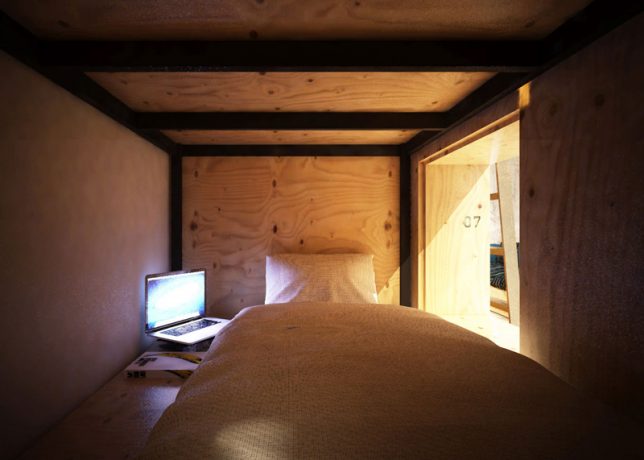
Every true bibliophile has gazed up at the seemingly endless shelves of books in a good bookstore or library and imagined gathering up a stack, finding a quiet nook and turning in for the night. In Japan (where else?) you can actually do just that in a library-themed hostel, though you might be too excited about your reading materials to get much sleep. The Book and Bed Hostel by Suppose Design Office features semi-private sleeping nooks built right into the bookshelves, so you can climb out and look for more books as often as you want.

book-and-bed-hostel-3

book-and-bed-hostel-6

The hostel has two locations – Tokyo and Kyoto – with rates starting at just $ 40 (4,445 yen) per night. In the true spirit of a hostel, everything is set up dorm style with shared bathrooms and nothing but curtains separating you from your neighbors, but considering the theme of the place, you probably don’t care. Book and Bed isn’t really about enjoying privacy or getting a good night’s sleep.

book-and-bed-hostel-1

The Tokyo location features over 1,700 titles to choose from, stacked on floor-to-ceiling shelves. Climb the library ladders to reach the highest ones, and check out the featured books that have been hung from the ceiling as decor. Each sleeping nook is fitted with a backlight and an outlet, and there’s wifi, though you’ll probably be too busy reading to use it.

book-and-bed-hostel-2

The Kyoto hostel is located just steps from many popular local attractions, like the Yasaka Shrine and the Nanzenji Temple. There’s a special selection of Kyoto-centric books in both English and Japanese. Both hostels offer striped robes and totes reading ‘Have a Book Day’ for purchase as souvenirs. You can see more photos on the Book and Bed Tokyo Instagram account.

book-and-bed-hostel-4

“Book and Bed is an ‘accommodation bookshop.’ The perfect setting for a good nights sleep is something you will not find here. There are no comfortable mattresses, fluffy pillows nor lightweight and warm down duvets. What we do offer is an experience while reading a book (or comic book.) An experience shared by everyone at least once: the blissful ‘instant of falling asleep.’ It is already 2am but you think just a little more… with heavy drooping eye lids you continue reading only to realize you have fallen asleep.”

book-and-bed-hostel-9

“Dozing off obliviously during your treasured pastime is the finest ‘moment of sleep,’ don’t you agree?”

Share on Facebook


[ By SA Rogers in Boutique & Art Hotels & Travel. ]

[ WebUrbanist | Archives | Galleries | Privacy | TOS ]


WebUrbanist

 
Comments Off on Book and Bed Hostel: Your Dream to Sleep in a Library Came True

Posted in Creativity


City of Ice: 20 Photos of China’s Amazing Annual Snow Sculptures

26 Dec

[ By SA Rogers in Art & Sculpture & Craft. ]

city-of-ice-illuminated-2015-jarod-carruthers

Dozens of large-scale snow and ice sculptures are once again on display in Harbin, capital of northeast China’s Heilongjiang Province, for the Sun Island International Snow Sculpture Art Expo. By day, the massive sculptures depicting folklore, mythology, classical art, cartoon characters and castles almost blend into their icy surroundings like natural formations, and after dark, everything is illuminated with a rainbow of glowing lights. Here are some of the festival’s most impressive sculptures that visitors have captured over the years.

Wild Hair Statue, 2012

city-of-ice-hair-statue-cdschock

Harbin has long, cold winters with temperatures dropping to -36 degrees Fahrenheit, making it cold enough to pack snow very tightly, mold it into place and expect it to stay put. Otherwise, statues with elements like this hair would be difficult to make (photo by cdschock.)

Illuminated Ice Architecture, 2009

city-of-ice-illuminated-architecture-2009-ian-carvell

The annual winter festival is the largest ice and snow festival in the world, drawing international participants to show off their sculpting skills. The ‘Ice and Snow World’ portion, featuring full-sized buildings made from blocks of 2-3 inch thick ice, is best experienced after dark (photo by Ian Carvell.)

Goddess Statue, 2016

city-of-ice-goddess-statue

Each year, the event has a ‘trial run’ between December 22nd and January 4th, officially open to the public between January 5th and February 25th. Every year has a different theme, with 2016’s revealed to be “The Wonderland in the Land of Snow, The Grand View in the World of Ice and Snow.” Not clear on what that means, but we’ll find out when photos are released in early 2017 (photo by Time Travelo.)

Snow Sphinx, 2013

city-of-ice-snow-sphinx-la-priz

city-of-ice-sphinx-la-priz-2

Maybe it’s not quite as large as the original, but this ‘snow sphinx’ photographed by Priscilla Dorresteijn is impressive nonetheless.

Illuminated Ice City at Dusk, 2015

city-of-ice-illuminated-2015-jarod-carruthers

The combination of reflective ice and snow with colored lights creates a pastel scene at dusk (photo by Jarod Carruthers.)

Massive Santa, 2009

city-of-ice-snow-santa-morgann

city-of-ice-santa-ran-zxzzy

This large-scale Santa is downright mountainous, looming over life-sized snow sculptures of architecture and trees (photos by Morgann and rdog)

Next Page – Click Below to Read More:
City Of Ice 20 Photos Of Chinas Amazing Annual Snow Sculptures

Share on Facebook


[ By SA Rogers in Art & Sculpture & Craft. ]

[ WebUrbanist | Archives | Galleries | Privacy | TOS ]


WebUrbanist

 
Comments Off on City of Ice: 20 Photos of China’s Amazing Annual Snow Sculptures

Posted in Creativity


Chris’ Gear of the Year part two: Canon 16-35mm F2.8L III

26 Dec

The Canon 16-35mm F2.8L II USM has been a workhorse for landscape photographers like myself for many years. Although I use this lens nearly every time I head out to shoot a location, I do have sort of a love-hate relationship with it. The corners are always fairly soft and never seem to get sharp (even after you stop the lens down) and chromatic aberration can be an issue as well (it can be removed through post processing, but at a slight cost to sharpness). Coma is also a pretty big issue with this lens, which makes it a less than desirable choice for astrophotography, but I’ve always made do and corrected those issues through post-processing.

This lens has impressive corner sharpness and amazing sunstars at very early apertures compared to its predecessor. Seattle, WA.

Photo by Chris Williams

Canon 5DSR, Canon 16-35mm F2.8L III, 16mm, F11, 1/160, ISO 100

There was always one thing that prevented me from moving on to a wide-angle that outperformed the Canon lens in terms of sharpness, vignetting and CA: the sun star. The sun star that the Canon lens produces is simply jaw-dropping and there are even Photoshop actions that you can purchase to replicate it. That’s one of the main reasons that I decided to purchase the lens in the first place and one of the main reasons that I never moved on.

This is an example of the type of sun star that the Canon 16-35mm F2.8L II produced. This lens is capable of taking some beautiful images, but it definitely did have its faults. This was taken in the Columbia Hills of Washington state.

Photo by Chris Williams

Sony a7r, Canon 16-35mm F2.8L II

When Canon released the 16-35mm F4L USM a few years back, I have to admit, I was extremely excited because I was hoping that it would lead to the release of an updated version of the 16-35mm F2.8L. Finally, after years of waiting, the Canon 16-35mm F2.8L III was announced in Fall 2016.

In this sample image you can see how well the lens handles coma at 16mm shot wide open at F2.8; this is a huge improvement over the previous iteration of the lens.

Photo by Chris Williams

Canon 5DMK IV, Canon 16-35mm F2.8L III, 16mm, 1.6sec, F2.8, ISO 100

All of the major issues that plagued the previous iteration of the lens have been largely addressed by Canon. The CA is almost non existent, the distortion was handled gracefully and the corner sharpness has improved dramatically at 16mm and beyond. In fact the best performance occurs when the lens is shot wide open at 16mm. Coma was a fairly major issue in the previous iteration of the lens and Canon has reduced it a great deal; so much so that this lens is now an excellent alternative to a fast prime lens for astrophotography. I knew Canon had the engineering to fix the issues with the optics, but one of the biggest questions that remained was; how did the sunstar fair?

Canon 16-35mm F2.8L III USM Sunstar

Canon 5D Mk IV, 35mm, 1/100, F20, ISO 100

Canon 16-35mm F2.8L II USM Sunstar

Canon 5D Mk IV, 35mm, 1/100, F20, ISO 100

I was actually pleasantly surprised by the sun stars that the new lens produces. It’s much more symmetrical and much cleaner in terms of flare than the previous iteration of the lens. The rays themselves are very clean and defined and very pleasing to the eye. Aesthetically pleasing sun stars are also achieved at much earlier apertures in the updated lens (as early as F10), which can minimize the effects of diffraction. All-in-all we see the changes as improvements, but it really comes down to personal preference. 

Sun star aside, I’ve owned the Canon 16-35mm F2.8L II for a number of years and the performance wide open has always been a major point of frustration for me, especially in terms of coma, CA and corner sharpness. The update that was made to this lens addresses all of these points and corrects the major issues seen in its predecessor, and it’s really quite impressive. The lens is a bit soft in the corners at the long end, but once it’s stopped down it does sharpen up quite nicely at focal lengths at and beyond 24mm. The bottom line is that Canon really threw down the gauntlet with this one to get it right and the results speak for themselves. This lens really is a feat of engineering. They always say the third time is the charm, and I couldn’t agree more. 

See our Canon 16-35mm F2.8L III
sample gallery

Articles: Digital Photography Review (dpreview.com)

 
Comments Off on Chris’ Gear of the Year part two: Canon 16-35mm F2.8L III

Posted in Uncategorized


Our favorite gear, rewarded: DPReview Awards 2016

26 Dec

DPReview Awards 2016

Here at DPReview we handle a lot of gear. This year, plenty of amazing cameras, lenses, accessories and other products came through our doors, and we hope you’ve enjoyed reading about them as much as we’ve enjoyed writing about and testing them.

Last year, for the first time, we decided to get together as a team and discuss what we thought was the best gear of the year in multiple categories. This year we sat down again and made a list, checked it twice, then talked about it. And then talked about it some more, and then made a shortlist. And then we talked about it again, argued a bit, and finally voted, ranking our choices by first, second and third preference.

After all that, we’re pleased to announce the results. Click through the slides above to learn which products made our list of the best gear of 2016.

If you’d like to have your say, make sure to vote in this year’s Reader’s Poll for best product of 2016, which will be running through December 31st. 

Best accessory

Shortlist:

  • DJI Osmo+
  • Domke Chronicle Bag
  • Fuji Instax Share SP-2
  • Western Digital MyPassport WD Wireless Pro

Runner up: Western Digital MyPassport WD Wireless Pro

There were a lot of new accessories released this year, but the Western Digital Wireless Pro in particular impressed us, which is why it’s the runner-up for this category. A great choice for photographers working in the field, it features its own Wi-Fi network, a built-in SD card slot, excellent battery life and dedicated Android and iOS apps.

Winner: Fuji Instax Share SP-2

It wasn’t even close, the second generation Fuji Instax Share SP-2 printer was our favorite accessory of 2016. Why? Because there’s just nothing quite like holding a physical image in your hands. Faster and sleeker than the original and with more printing options, the SP-2 can easily link up with Fujifilm cameras or print from a compatible phone or tablet.

Best mobile / VR Product

Shortlist:

  • Apple iPhone 7 Plus
  • DJI Osmo Mobile
  • Google Pixel XL
  • Panono 360 camera

Runner up: iPhone 7 Plus

This category includes a wide range of products, from smartphones to hand-held gimbals, all of which have one thing in common: they are non-traditional cameras. The Apple iPhone 7 Plus is this year’s runner-up with its innovative dual lens design. It offers photographers the choice between a 28mm F1.8 and a more portrait-appropriate 56mm F2.8 (35mm equiv.) lens.

Winner: Google Pixel XL

The Google Pixel XL won this category by a wide margin and for good reason: It has an outstanding camera – so good that it received the highest DxOMark score of any smartphone ever. And features like Raw capture, on-sensor phase detect AF and the HDR+ mode only add it to its appeal. Plus, it’s the first product compatible with Google Daydream VR headset.

Best prosumer camera drone

Shortlist:

  • Autel X-Star Premium
  • DJI Mavic Pro
  • DJI Phantom 4 Pro
  • DJI Phantom 4

Runner-up: DJI Phantom 4 Pro

The DJI Phantom 4 Pro is a tour de force of just how much modern technology can crammed into a small, prosumer drone. It stands out in its class thanks to a 20MP 1″-type sensor that captures 4K/60p video, support for h.265 recording, 20MP Raw stills, photographer-friendly features like 14fps burst shooting and exposure bracketing, and an impressive collision avoidance system.

Winner: DJI Mavic Pro

The DJI Mavic Pro sets a new standard for portability among prosumer camera drones; it’s hard to believe just how compact it is until you see it in person. In fact, you could easily fit it inside a camera pack (with plenty of room left for other gear), a purse, or even a large pocket in your cargo shorts (wearing cargo shorts is not endorsed by DPReview staff).

Don’t let the Mavic’s size fool you though – it has the same camera as the original Phantom 4, captures 4K/30p video, 12MP stills with DNG Raw support, and boasts a top speed that exceeds that of the Phantoms.

Best zoom lens

Shortlist:

  • Canon EF 16-35mm F2.8L III USM
  • Olympus M.Zuiko Digital ED 12-100mm F4 IS Pro
  • Sigma 12-24mm F4 DG HSM Art
  • Sigma 50-100mm F1.8 DC HSM Art

Runner-up: Olympus M.Zuiko Digital ED 12-100mm F4 IS Pro

Every year, more lenses are released than cameras, and this year the competition was especially tough. A lot of great zoom lenses were released in 2016 and of our shortlist of four, two belong to Sigma’s well-regarded ‘Art’ series. But the Olympus M.Zuiko Digital ED 12-100mm F4 IS Pro just pulled ahead of both of them to take the runner-up spot in this category.

Winner: Canon EF 16-35mm F2.8L III USM

Winner by a considerable margin of votes among the DPReview staff was the Canon EF 16-35mm F2.8L III USM. Canon is really on a roll with its high-end L-series, and the new version of the 16-35mm F2.8 is stunning. If you’re a Canon shooter looking for a high quality wide-angle zoom, the 16-35mm F2.8 III is as good as it gets.

Best prime lens

Shortlist:

  • Nikon AF-S Nikkor 105mm F1.4E ED
  • Olympus M.Zuiko Digital ED 25mm F1.2 Pro
  • Sigma 85mm F1.4 DG HSM Art
  • Sigma 30mm F1.4 DC DN | C

Runner-up: Nikon AF-S Nikkor 105mm F1.4E ED

If competition was fierce among zoom lenses this year, if anything it was even fiercer in the prime lenses category. New releases from several manufacturers really raised the bar, and Nikon’s excellent new 105mm F1.4 portrait lens took the runner-up spot in a very tough field.

Winner: Sigma 85mm F1.4 DG HSM Art

Realistically, as soon as we sat down to discuss which lens should win this category, there was only one serious contender. Winner by a convincing margin among DPReview staff was Sigma’s 85mm F1.4 DG HSM Art. Its big, it’s heavy, and it makes gorgeous pictures. If you’re a fan of the 85mm focal length for portraiture, the Sigma 85mm F1.4 Art is worth serious consideration. 

Best compact camera

Shortlist:

  • Canon PowerShot G7 X Mark II
  • Panasonic Lumix DMC-LX10
  • Sony Cyber-shot RX100 V
  • Sony Cyber-shot RX10 III

Runner up: Sony Cyber-shot DSC-RX100 V

There was some tough competition in this category, thanks partly to Sony, which seems set on maintaining its breakneck pace of new product announcements. The latest compact camera in Sony’s RX100-series is the best yet. We argued a lot about which camera should win in this category, and offering incredible speed, hybrid AF and excellent 4K video, the RX100 V took the runner-up spot.

Winner: Panasonic Lumix DMC-LX10

The winning position is occupied by the Panasonic Lumix DMC-LX10, thanks to its combination of small size, excellent lens and overall image quality. As well as great-looking stills, the LX10 is also capable of excellent 4K video, and hits an attractive price-point compared to the best of its competition.

Best consumer stills/video camera of the year

Shortlist:

  • Panasonic Lumix DMC-FZ2500
  • Sony a6500
  • Sony RX10 III

Runner up: Panasonic Lumix DMC-FZ2500

In this category, we’re looking for the best products for stills and video shooters who need one camera to do it all. This category spans compact, fixed-lens cameras up to 4K-capable ILCs, but our shortlist contained only the latter type of camera – testament to the advances that have been made in this category.

Panasonic’s Lumix DMC-FZ2500 takes the runner-up spot in this category this year, thanks to its impressive 4K feature set and video-friendly ergonomics, coupled with excellent still image quality.

Winner: Sony Cyber-shot RX10 III

The Sony Cyber-shot RX10 III is one of the most impressive products to come through the doors of DPReview Towers in 2016. Although bulky and costly, this 1″ sensor compact can reach places that ILCs just can’t. A stunningly sharp 24-600mm lens, coupled with a class-leading 1″-type BSI-CMOS sensor and excellent 4K and HFR video features meant that DPReview staff were unanimous in voting the RX10 III the best consumer stills / video camera of 2016.

Best entry-level ILC

Shortlist:

  • Fujifilm X-A3
  • Nikon D3400
  • Panasonic Lumix DMC-GF8
  • Yi M1

Runner-up: Nikon D3400

Although it might seem less interesting than other market segments, the entry-level ILC market is critical for manufacturers, who need to persuade new photographers to join their system, and get on the upgrade path. This year saw some excellent entry-level ILCs released, and the Nikon D3400 took the runner-up spot. Small, unflashy and easy to use, the D3400 is a great beginners’ camera and a good entry-point into the wider Nikon system.

Winner: Fujifilm X-A3

The winner of this category is the Fujifilm X-A3. While not as feature-laden as its higher-end X-series peers, the 24MP, WiFi-equipped X-A3 is a great camera for someone just starting out in photography. It offers plenty of scope for beginners to grow, without being confusing or intimidating to use.

Best mid-range ILC

Shortlist:

  • Canon EOS M5
  • Canon EOS 80D
  • Panasonic Lumix DMC-G85
  • Sony a6300

Runner Up: Sony a6300

2016 was a pretty good year for enthusiast photographers, and there was stiff competition in the mid-range ILC category this year. In the end, half of our shortlist was made up of Canon EOS products, but both the EOS M5 and EOS 80D lost out to the Sony a6300, which took runner-up spot.

Winner: Panasonic Lumix DMC- G85

I guess we just gave it away, but the winner of this year’s title of best mid-range ILC is the Panasonic Lumix DMC-G85, which narrowly pipped the a6300 to take the winning spot. There’s not much that this compact Micro Four Thirds camera can’t do, and we love it for its versatility and excellent 4K video.

Best high-end ILC

Shortlist:

  • Canon EOS 5D Mark IV
  • Fujifilm X-T2
  • Nikon D500
  • Olympus OM-D E-M1 II

Runner up: Fujifilm X-T2

It was a two-horse race in this category, with two products way out in front of the rest of the pack (do horses run in packs?). The Fujifilm X-T2 came a close second place to take the runner-up spot in this category. DPReview staff praised its portability, ergonomics and image quality.

Winner: Nikon D500

With a convincing number of votes among DPReview staff, the Nikon D500 took the winning spot in our best high-end ILC category this year, as a near unanimous first choice. The D500 is one of our favorite ever DSLRs, and in a very competitive market segment it stands as a stunningly capable all-rounder.

DPReview innovation award

Shortlist:

  • Olympus OM-D E-M1 II
  • Sigma 85mm F1.4 DG HSM Art
  • Sony Cyber-shot RX100 V
  • Sony Cyber-shot RX10 III

Runner-up: Sony Cyber-shot RX100 V

We created this category last year to recognize products that we feel raised the bar for innovation in their product class. We narrowed down our selection to a shortlist of products, all of which are either cameras or lenses. Runner-up in this category is the Sony Cyber-shot RX100 V, in recognition of the incredible amount of technology that Sony has packed into this tiny camera.

Winner: Olympus OM-D E-M1 II

Just pipping the RX100 V to the post is the Olympus OM-D E-M1 II. We’re still not entirely sure how Olympus packed as much technology into the E-M1 II as it did, but the end result is an incredibly powerful stills and video hybrid camera. As well as ultra-fast capture rates and effective in-body stabilization, the E-M1 II is also built for use in the harshest of conditions. 

DPReview product of the year, 2016

Shortlist:

  • Nikon D500
  • Olympus OM-D E-M1 II
  • Sigma 85mm F1.4 Art
  • Sony Cyber-shot RX100 V

Runner-up: Olympus OM-D E-M1 II

In our discussions about overall best product of 2016, four products kept coming up. In different ways, we were highly impressed by all of the four products in our shortlist, all of which arguably represent the state of the art in their particular market segments, and any one of which could easily have won. In the end, we had to make a final decision. You’ll be able to find out the winner in the next slide, but our runner up for this year’s DPReview Award for product of the year is the Olympus OM-D E-M1 II.

Winner: Nikon D500

What the E-M1 II is for mirrorless ILCs, the D500 is for DSLRs. Although it lacks a really credible 4K video mode, the D500 is nevertheless an impressive all-rounder, combining some of the best elements of the flagship Nikon D5 with a (relatively) compact APS-C form factor, and a 1.5X focal length increase which is extremely handy for sports and wildlife photography. If you’re looking for a versatile, pro-grade DSLR which will still be current in years to come, the Nikon D500 is about as good as it gets. The Nikon D500 is our product of the year, 2016.

As we approach the end of the year, we’d like to take this opportunity to thank all of you for your support, and your feedback. For a chance to vote for your own favorite product of 2016, our final Reader’s Poll is still open, and can be found here. Voting closes at midnight on Jan 31st (PT).

Articles: Digital Photography Review (dpreview.com)

 
Comments Off on Our favorite gear, rewarded: DPReview Awards 2016

Posted in Uncategorized


Google Sunroof: Search to Save Money With Home Solar Power

26 Dec

[ By WebUrbanist in Architecture & Houses & Residential. ]

google sunroof

Google has rolled out a search engine with a specific target in mind: your house, more specifically how much area of your roof could be covered in solar panels, what that would save you and where you can look for companies to install a system for you.

Interested homeowners can input their addresses and get realistic illustrations of how many solar panels would fit and what their potential cost savings on energy bills are likely to be.

google solar savings calculation

A complex data comprising everything from your home’s location and orientation to the presence of shade from adjacent trees or buildings – but this set is broken down into simple information for users.

google solar energy savings

Google, of course, is well-positioned to make this Sunroof tool effective, combining its Google Maps and Earth data that can sort out not just the footprint of a building but its 3D space too, and thus shadows. It also has all of the other information at hand, like average temperatures, sun exposure, cloud cover.

new google solar energy

Users of the tool can tinker with variables, but ultimately are given a recommended installation that maximizes the potential output and thus puts more back in homeowner pockets long-term. For now it is limited to the San Francisco Bay Area, Boston and a few other locations, but they have plans to expand around the country.

Share on Facebook


[ By WebUrbanist in Architecture & Houses & Residential. ]

[ WebUrbanist | Archives | Galleries | Privacy | TOS ]


WebUrbanist

 
Comments Off on Google Sunroof: Search to Save Money With Home Solar Power

Posted in Creativity


Kamerar ZOOM is a lens attachment for the iPhone 7 Plus dual-camera

26 Dec

With the 28 and 56mm equivalent lenses of its dual-camera, the iPhone 7 Plus offers more flexibility in terms of focal length than most smartphones. If that’s still not enough, the Kamerar ZOOM is now the first lens attachment designed for the iPhone’s dual-camera. 

The system includes two lens attachments that slide into a special case and over the iPhone’s built-in camera lenses. One combines a fisheye lens for the iPhone’s wide-angle camera with a tele-converter for the 56mm lens. The other improves the macro capabilities of both lenses.

In the product images the tiny lenses and the attachment don’t have the same premium look as some of the high-end smartphone lenses, for example from Moment or Zeiss. However, at only $ 45 plus import duties the Kamerar Zoom could be an inexpensive way of widening the creative potential of the iPhone 7 Plus even further. It can now be ordered on the Kamerar website. 

Articles: Digital Photography Review (dpreview.com)

 
Comments Off on Kamerar ZOOM is a lens attachment for the iPhone 7 Plus dual-camera

Posted in Uncategorized


Strange Manger: The World’s Weirdest Nativity Scenes

26 Dec

[ By Steve in Art & Sculpture & Craft. ]

nativity-scene-1a

No room at the inn? No kidding – the denizens of these strange nativity scenes would get even the kindest innkeeper flipping the switch on the No Vacancy sign.

nativity-scene-1b

The Modern Nativity Hipster Nativity Set throws tradition out the window and recasts the original nativity in a modern mold. “We started joking about how religions would be different if their sacred texts were set in modern times,” explains creator Casey Wright, who whipped up the concept while enjoying a few beers with his buddies. How hipster-ish is The Modern Hipster Nativity Set? Well, Joseph sports a man-bun and wears a denim shirt while he takes a selfie with Mary, who’s holding a coffee from a certain popular java purveyor as she puckers up with her best duck-face.

nativity-scene-1d

nativity-scene-1c

Meanwhile, the fashionably sunglassed Three Wise Men roll in on Segways bearing gifts bought online at Amazon. The shepherd captures the miraculous event for posterity by posting it on Instagram using the hashtag #babyjesus. Clean green electric power for his tablet provided via solar panels on the manger’s roof because global warming.

That Ain’t Kosher

nativity-scene-9a

nativity-scene-7b

Y’know, we liked The Last Supper a lot better when Leonardo da Vinci painted it but hey – not everyone’s a vegetarian. Flickr user quik86 uploaded this iconic image of a baking bacon and sausage nativity back in December of 2010 but some things never get old, especially when they’re smothered in bacon.

Kitty Nativity

nativity-scene-3a

nativity-scene-3b

For over ten years, sisters Annette and Sue Amendola have been setting up a classic nativity scene outside their home in Red Hook, Brooklyn. The scene itself wasn’t out of the ordinary… at least it wasn’t until a bunch of stray cats arrived and made it their own.

nativity-scene-3c

The clowder of kittehs was first attracted by food the Amendola sisters would leave out but then stayed to enjoy the replica manger’s comfy bales of hay. “When the figurine of baby Jesus does finally appear on the hay bale,” explains Annette, “the cats usually push him right off to take their rightful spot.” Cats: doing the devil’s work since 0 AD.

Praise Cheeses

nativity-scene-10a

We’ve got your cheesy nativity scene right here, highlighted by a Babybell Jesus and an Emmental angel personifying Oh Hole-y Night. Not suitable for the lactose intolerant.

Next Page – Click Below to Read More:
Strange Manger The Worlds Weirdest Nativity Scenes

Share on Facebook


[ By Steve in Art & Sculpture & Craft. ]

[ WebUrbanist | Archives | Galleries | Privacy | TOS ]


WebUrbanist

 
Comments Off on Strange Manger: The World’s Weirdest Nativity Scenes

Posted in Creativity


Sony launches Cyber-shot HX350 with 50x zoom outside US

26 Dec

$ (document).ready(function() { SampleGalleryV2({“containerId”:”embeddedSampleGallery_6475505384″,”galleryId”:”6475505384″,”isEmbeddedWidget”:true,”standalone”:false,”selectedImageIndex”:0,”startInCommentsView”:false,”isMobile”:false}) });

Sony has launched the Cyber-shot HX350 in European markets, offering a 50x zoom lens and 20.4MP BSI CMOS sensor like its HX300 predecessor. In fact, very little has changed compared to the previous model – as best we can tell, it adds an up-to-date BIONZ X processor, lock-on AF and a new blue ‘Zeiss’ badge on the same 24-1200mm equiv. F2.8-6.3 lens.

It continues to offer a built-in EVF, optical image stabilization, 3″ tilting 921k-dot LCD, 1080/60p video recording and 10 fps burst shooting. Sony Germany lists the HX350 at €449 with availability in January 2017.

Press Release:

That’s so close! The compact 50x super zoom Cyber-shot™ HX350 is big on imaging power

  • ZEISS® Vario-Sonnar T* lens with 50x optical zoom and 100x Clear Image Zoom[i] for awesome close-ups
  • Shoot like a pro with manual controls and electronic viewfinder in a compact DSLR-style body
  • Back-illuminated Exmor RTM CMOS sensor with 20.4 effective megapixels and BIONZ X image processing engine
  • Optical SteadyShot and Intelligent Active Mode for smooth, stable stills and Full HD movies
  • Sharp, speedy focus of moving subjects with Lock-on AF and DMF (Direct Manual Focus)

From expansive landscapes to exotic wildlife and family portraits: every scene’s covered with the Cyber-shot HX350 high-zoom camera from Sony.

Discerning photographers graduating from smartphone snaps will love the mix of easy-to-use features and DSLR-inspired styling. Fitting beautifully in your hand, the HX350 packs big camera performance into a compact body – for limitless creative possibilities with a fixed lens.

You’re good for any shooting situation, with the ZEISS® Vario-Sonnar T* lens offering a huge 50x optical zoom range – corresponding to 24mm wide angle to 1200mmsuper telephoto (equivalent in 35mm format).Clear Image Zoom doubles maximum magnification to a breathtaking 100xi, bringing distant buildings, people and animals jaw-droppingly close.

Camera shake is the enemy of high-zoom shooting, as any pro knows. Optical SteadyShot cuts handheld wobbles for crisper stills, rapidly shifting a group of lens elements to correct for the slightest hand tremors. Intelligent Active Mode keeps Full HD videos equally sharp and blur-free with Sony’s proprietary frame analysis technology.

Enthusiasts will be impressed by the high-resolution back-illuminated Exmor R CMOS sensor with 20.4 effective megapixels and speedy BIONZ X image processing engine. Even if you’re shooting handheld indoors or in low light, you’ll value crisp, low noise images and pristine Full HD video footage.

The easy to use Cyber-shot HX350 is loaded with serious shooting options. There’s a manual ring for smooth adjustment of zoom/focus, plus an easily-accessible mode dial and custom button for quick adjustment of favourite settings. And with full P/A/S/M controls, you’ve got all the exposure options you need to craft stunning pictures and Full HD videos. Movie-makers will also welcome the extra detail of a 24p shooting mode that gives footage that authentically cinematic look.

The choice is yours when it comes to framing shots with confidence. Look through the camera’s high-contrast electronic viewfinder – just like you’d expect on a DSLR – or switch to the manually tiltable 7.5cm (3.0-type) LCD with 921k dot resolution.

Extra shooting refinements include Motion Shot Video that traces your tennis serve or golf swing as a split-second series of superimposed images. After shooting, connect the camera to your 4K television for a big, beautiful view of your photos. Support for TRILUMINOS™ Colour on compatible BRAVIA™ TVs ensures still shots bursting with vivid, vibrant colours.

[i] At optical wide-end

Sony Cyber-shot DSC-HX350 specifications

Price
MSRP €450
Body type
Body type SLR-like (bridge)
Body material Composite
Sensor
Max resolution 5184 x 3456
Image ratio w:h 1:1, 4:3, 3:2, 16:9
Effective pixels 20 megapixels
Sensor photo detectors 21 megapixels
Sensor size 1/2.3" (6.17 x 4.55 mm)
Sensor type BSI-CMOS
Processor BIONZ X
Color space sRGB
Color filter array Primary Color Filter
Image
ISO Auto, 80-3200 (up to 12800 in Multi-Frame NR mode)
Boosted ISO (maximum) 12800
Image stabilization Optical
Uncompressed format No
JPEG quality levels Fine, standard
File format
  • JPEG (Exif v2.3)
Optics & Focus
Focal length (equiv.) 24–1000 mm
Optical zoom 41.7×
Maximum aperture F2.8–6.3
Autofocus
  • Contrast Detect (sensor)
  • Multi-area
  • Center
  • Selective single-point
  • Single
  • Continuous
  • Face Detection
  • Live View
Autofocus assist lamp Yes
Digital zoom Yes (2x)
Manual focus Yes
Normal focus range 1 cm (0.39)
Macro focus range 1 cm (0.39)
Screen / viewfinder
Articulated LCD Tilting
Screen size 3
Screen dots 921,600
Touch screen No
Screen type TFT LCD
Live view Yes
Viewfinder type Electronic
Viewfinder coverage 100%
Viewfinder resolution 201,600
Photography features
Minimum shutter speed 30 sec
Maximum shutter speed 1/4000 sec
Exposure modes
  • Program
  • Aperture Priority
  • Shutter Priority
  • Manual
Scene modes
  • High Sensitivity
  • Night Scene
  • Handheld Twilight
  • Night Portrait
  • Landscape
  • Portrait
  • Soft Skin
  • Anti Motion Blur
  • Beach
  • Snow
  • Fireworks
  • Advanced Sports Shooting
  • Gourmet
  • Pet Mode
Built-in flash Yes
Flash range 8.50 m (at Auto ISO)
External flash No
Flash modes Off, auto, fill, slow sync, advanced, rear sync
Drive modes
  • Single
  • Continuous
  • Self-timer
  • Bracketing (Exposure, WB)
Continuous drive 10.0 fps
Self-timer Yes (2 or 10 sec, portrait)
Metering modes
  • Multi
  • Center-weighted
  • Spot
Exposure compensation -2–3 (at 1/3 EV steps)
WB Bracketing Yes
Videography features
Format MPEG-4, AVCHD
Modes
  • 1920 x 1080 @ 60p / 28 Mbps, AVCHD, MTS, H.264, Dolby Digital
  • 1920 x 1080 @ 60i / 24 Mbps, AVCHD, MTS, H.264, Dolby Digital
  • 1920 x 1080 @ 60i / 17 Mbps, AVCHD, MTS, H.264, Dolby Digital
  • 1920 x 1080 @ 24p / 24 Mbps, AVCHD, MTS, H.264, Dolby Digital
  • 1920 x 1080 @ 24p / 17 Mbps, AVCHD, MTS, H.264, Dolby Digital
  • 1440 x 1080 @ 30p / 12 Mbps, MP4, H.264, AAC
Microphone Stereo
Speaker Mono
Storage
Storage types SD/SDHC/SDXC + Memory Stick Pro Duo
Connectivity
USB USB 2.0 (480 Mbit/sec)
HDMI Yes (micro-HDMI)
Microphone port No
Headphone port No
Physical
Environmentally sealed No
Battery Battery Pack
Battery description NB-BX1 lithium-ion battery & charger
Battery Life (CIPA) 300
Weight (inc. batteries) 652 g (1.44 lb / 23.00 oz)
Dimensions 130 x 93 x 103 mm (5.12 x 3.66 x 4.06)
Other features
Orientation sensor Yes

Articles: Digital Photography Review (dpreview.com)

 
Comments Off on Sony launches Cyber-shot HX350 with 50x zoom outside US

Posted in Uncategorized


Fresh out of the box: getting started with your first interchangeable lens camera

25 Dec

Fresh out of the box: Getting started with your first ILC

For the more established and experienced photographers of the internet, I will borrow the dedication page to Mark Z. Danielewski’s “House of Leaves:”

This is not for you.

This article is for your elderly neighbor, your young nephew or niece, or anyone whose photographic journey up to now begins and ends with a smartphone.

If this describes you, then hello. Welcome. You, budding photographer, have decided to embark on a new hobby, or an extension of something you’ve enjoyed on a mobile device, and this holiday season you have purchased (or been gifted) an interchangeable lens camera of your very own. You may not  know why exactly you wanted or needed one – or even that some cameras come with lenses that detach in the first place.

Let’s unravel the basics here, so you can get from the box-opening to the picture-taking as quickly and as free from headaches as possible.

Opening the box

In most interchangeable lens camera kits, you will have the following:

  • Camera body
  • Lens (or two)
  • Charger
  • Battery
  • Neck strap
  • Software CD (how quaint)
  • User manual
  • Warranty registration card

The first thing to do is to remove the charger and set the battery on to charge. No point in being frustrated at not being able to take photos because of a low battery.

The second task is to remove the camera and lens, remove the body cap from the camera and the back-end cap from the lens (it will be on the end with a metal or plastic mount with electrical contacts – the front of the lens will likely have the brand name and some other writing on it), and attach them.

There will be red or white markings denoting where to line the lens up relative to the camera, and normally, you’ll turn it clockwise to lock it in – with Nikon lenses, however, you rotate the lens counter-clockwise to attach it.

Get Strapped

Now is also a great time to attach the included camera strap, because nothing is quite so effective at ruining complicated electronics and optics as an accidental tumble onto cement (it happens to the best of us). Also, very few cameras actually come with memory cards these days, so you’ll want to go pick one up – no need to go crazy, a decent 16GB memory card will be plenty for casual shooters, and should be affordable.

Lastly, instead of throwing out that warranty card, fill it out. Cameras are complicated, and should you encounter any strange issues of yours that aren’t directly your fault, the warranty will help you out there.

You can also add your camera to your homeowners’ (or renters’) insurance policy, which may cover theft, accidental damage, or more.

Let’s take some pictures

Okay, now that you’ve sat staring at your camera for a while and have killed the time by reading a couple more online reviews on it, let’s put the charged battery in and actually turn the thing on.

You’ll be prompted to go through and set the date and time, which is advisable – when you go to put the photos on your phone, computer or the internet, the ‘date taken’ is a common method of keeping your images organized. If you notice any odd (read: buggy) behavior from the camera, go ahead and check the manufacturers’ website to see if there have been any firmware updates – and they’ll have easy instructions for installing them.

Which mode?

Keep the camera in fully ‘Automatic’ mode, which is usually the only option on the mode dial that’s green (the ‘Mode Dial’ will usually have P, A, S, M options among other icons such as a floating head for the ‘portrait’ preset, some small mountains for ‘landscape,’ and so on). On Olympus cameras, there’s a setting called i.Auto on the mode dial, and on Fujifilm cameras, you’ll want to flip the ‘Auto’ switch, or on the lower-end models, go to ‘SP+’ mode.

The half press

Unlike a smartphone, most interchangeable lens cameras provide you with a two-step process for taking a single picture. You’ll want to press the shutter button (it should be logically placed under your index finger while you hold the camera) very lightly – we call this a ‘half-press.’ What this does is signal to the camera that you’re intending to take a picture, at which time it will focus on whatever is in front of you, and it will pick an exposure (it will decide how bright to make the resulting image). Press the shutter down all the way now, and you’ll be greeted with some sort of shutter noise indicating that a photo has been taken. Yeehaw!

Flash

Many interchangeable lens cameras have flashes that you, the user, must pop up yourself if you wish to use them. General rule of thumb? If your photos are coming out too dark, too blurry or too grainy, pop up the flash. The camera should know to use it when it’s popped up and you’re in an automatic mode.

On some cameras, such as Nikon and Canon models, the camera will choose for you whether to pop the flash up or not. They’re often wrong about this, particularly with subjects that are very far away (the flash isn’t that powerful). However, if you are shooting a photograph of a person on a bright day with the sun overhead, the flash pop will fill in some shadows on your subject’s face – this is called ‘Fill Flash,’ and it’s usually a good thing. The flash can also handy if you’re trying to take family photos indoors and are getting blurry or grainy results.

In any case, those flash-happy Canon and Nikon models have a setting right next to the ‘Auto’ setting on the mode dial, that looks like a crossed-out lightning bolt. That’s the same automatic mode as before, but the camera will refrain from popping up the flash at all.

Easy as that

What’s next? Well, start taking pictures. They can be of anything, don’t worry about it. Take photos of things you find pretty, or funny, or just because you like them. Cats! Always take pictures of cats.

Experiment with putting your subject slightly off-center (look up the Rule of Thirds for more on this – though it’s more of a guideline than an actual rule). It’s a common temptation to zoom in to a subject, instead of using your feet to actually get closer – experiment with both. Think about fun places to go in your own town that you can bring your camera to – a friend’s barbecue, or the zoo, a park, a museum (check photography rules beforehand, though). Be sure and keep the front of your lens clean, preferably with a microfiber cloth – you’ll inevitably get fingerprints and dust on it, which is fine, but they can make everything look a bit hazy.

When you get a little more comfortable, start thinking about using lines to lead a viewer’s eye through the scene. Pay attention to contrast between light and shadow, and look out for interesting textures. There’s tons of free resources on the internet to help you out here.

The most important thing you can do with that spiffy new camera, though? Just use it and have fun

Articles: Digital Photography Review (dpreview.com)

 
Comments Off on Fresh out of the box: getting started with your first interchangeable lens camera

Posted in Uncategorized