RSS
 

Archive for November, 2016

LensRentals tests the Nikon 70-200mm F2.8 FL ED

22 Nov
Sarah McAlexander, Lensrentals.com, 2016

Our friends at LensRentals have acquired a supply of Nikon’s new 70-200mm F2.8E FL ED AF-S VR. Nikon’s PR department has been making big claims about this third generation of its workhorse zoom, so Roger Cicala et al. have done us all a kindness by putting it on their optical bench and publishing the results. 

While he finds a bit of sharpness gained at the wide and long end of the range, Cicala is most impressed with performance at 135mm, calling it ‘night and day’ compared to its predecessor. 

Take a look at the full blog post for all of the test results, and yes – even a comparison against Canon’s 70-200mm F2.8L IS II USM.

Articles: Digital Photography Review (dpreview.com)

 
Comments Off on LensRentals tests the Nikon 70-200mm F2.8 FL ED

Posted in Uncategorized


On Assignment: Alley Cat

22 Nov

When Indian photographer (and Strobist reader) Nayan Khanolkar first graced the halls of Lighting 101 as a newb in 2010, he hardly could have known what just the next few years would have in store for him.

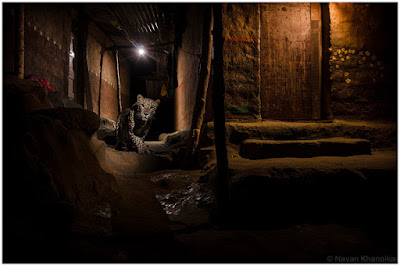
Fast forward to 2016, when he finds himself setting up his Nikon D7000 and a few speedlights in a local alley in suburban Mumbai to capture one of the apparently free-roaming leopards that frequent the area.

Curiosity piqued? Good. Read on…Read more »
Strobist

 
Comments Off on On Assignment: Alley Cat

Posted in Photography


DIY Photography Hacks and Accessories You Can Make at Home

22 Nov

Everyone loves buying new gear, but not the bills that go with it. So why not try making some of your own accessories? Here are three videos that will give you some ideas for DIY photography hacks you can make at home.

some-diy-photography-hacks-and-accessories-you-can-make-at-home

This first one is from the guys over at COOPH (Cooperative of Photography). They present for you:

9 Easy Tricks and Hacks to Up Your DIY Photography Game

I won’t give it all away, you have to watch the video. But they make some pretty cool stuff including a bokeh wall, a shower curtain diffuser, and a pinhole camera.

6 DIY Filters from Sony

Sony brings us six ways to make DIY filters to soften and shape the light. These are fun!

And finally, . . .

7 Tricks everyone with a camera should know

googletag.cmd.push(function() {
tablet_slots.push( googletag.defineSlot( “/1005424/_dPSv4_tab-all-article-bottom_(300×250)”, [300, 250], “pb-ad-78623” ).addService( googletag.pubads() ) ); } );

googletag.cmd.push(function() {
mobile_slots.push( googletag.defineSlot( “/1005424/_dPSv4_mob-all-article-bottom_(300×250)”, [300, 250], “pb-ad-78158” ).addService( googletag.pubads() ) ); } );

The post DIY Photography Hacks and Accessories You Can Make at Home by Darlene Hildebrandt appeared first on Digital Photography School.


Digital Photography School

 
Comments Off on DIY Photography Hacks and Accessories You Can Make at Home

Posted in Photography


Art Hacker: Famous Masterpieces Recreated with Painted Human Bodies

22 Nov

[ By SA Rogers in Art & Photography & Video. ]

liu-bolin-guernica

Chinese body painting artist Liu Bolin explores the concept of ‘art hacking’ through reinterpreting two of the world’s most famous paintings with human figures as canvases, and manipulating image search results on Google and Baidu to replace the originals with his own. Dozens of painstakingly painted human bodies faithfully recreate both Leonardo da Vinci’s Mona Lisa and Pablo Picasso’s Guernica with all subjects remaining perfectly still to complete the illusion for a photo.

liu-bolin-guernica-detail

The two works of art are juxtaposed with an image depicting the devastating Tianjin explosion at a container storage station in 2015, and large-scale prints of the three photographs are currently on display at Klein Sun Gallery as part of the Art Hacker exhibition. Neon signs hung throughout the space display URLs so visitors can see the internet ‘hacking’ aspect of the show.

liu-bolin-mona-lisa

liu-bolin-mona-lisa-2

Bolin is best known for his ‘disappearing acts’ carried out through camouflaging himself and additional models into urban environments around the world. This is his first foray into the digital realm, but the questions he raises in his work continue to work within similar themes.

liu-bolin-tianjin-explosions

liu-bolin-tianjin-explosions-detail

“Recreating the imagery of human suffering and devastation of war symbolized in the painting Guernica, Liu Bolin’s relives the history of the Spanish civil war, making a plea for humanity and freedom,” says the Klein Sun Gallery in a statement about the exhibition. “In Mona Lisa (2016), Liu Bolin imbeds himself into the masterpiece as well as its historical legacy. Touching upon the fact that the world was stolen from the Louvre more than 100 years ago, Liu Bolin aims to reenact the ‘disappearing and reappearing’ of the work through techniques behind the network.”

“Provocatively challenging the viewer to question what is above and beneath the surface, the work intends to reflect upon the complex relationship between the past and present, the reality and the illusion, as well as individuality and history.”

Share on Facebook


[ By SA Rogers in Art & Photography & Video. ]

[ WebUrbanist | Archives | Galleries | Privacy | TOS ]


WebUrbanist

 
Comments Off on Art Hacker: Famous Masterpieces Recreated with Painted Human Bodies

Posted in Creativity


Panasonic Lumix DMC-LX10/LX15 Review

22 Nov

The Panasonic Lumix DMC-LX10 (LX15 in some markets) is a 20MP large-sensor compact with a bright (F1.4-2.8), 24-72mm equivalent zoom lens. Which is to say, it’s a very capable pocket camera. And, being a Panasonic, it has video specs and clever video-based features to back up its stills capabilities.

Panasonic’s LX cameras have always had the enthusiast in mind, built around larger-than-average sensors with short but bright lenses and as many direct controls as can sensibly be fitted onto a pocketable camera body. They helped reinvigorate the enthusiast compact sector and prompted a series of imitators before the much larger sensor of Sony’s RX100 rendered them irrelevant.

Key specifications

  • 20MP 1″-type CMOS sensor
  • 24-72mm equivalent F1.4-2.8 zoom
  • 7 fps continuous shooting with autofocus
  • 4K video at up to 30p
  • 5-axis, digital and optical stabilization in 1080 video
  • 4K Photo mode
  • Post Focus and Focus Stacking modes

The LX10 is Panasonic’s first direct response to the big-sensored Sonys. The company has already built an excellent series of compacts that address every other niche you can think of: the long zoom stills/video FZ1000 and FZ2500, a large sensor ZS100 version of their well respected travel zoom series, and a larger sensor photographer’s camera, the LX100. But the LX10 is a head-to-head competitor for Sony’s pocket wonders.

The approach is a little different: unlike the RX100 III and IV, the LX10 doesn’t have a viewfinder. Instead, it offers a touchscreen interface and a screen that can be tilted upwards. In many respects, the LX10 is a logical post-1″ successor to the last of the smaller sensor models: the LX7.

The camera also offers Panasonic’s 4K Photo mode, which offers a series of ways of specifying when the camera should capture a video clip from which stills can then be extracted. It also has Panasonic’s Post Focus mode that captures a video clip of the camera racking focus, so you can choose to grab the frame with optimal focus, after the fact.

Compared with its peers

The LX10 means there are now three brands building small cameras with 1″-type sensors and short, bright zooms (and Nikon promising a comparable ‘DL’ model at some point). We’ve also included the LX10’s big brother, the LX100 in this comparison, just to show what you get if you have room to carry its additional size.

  Panasonic
LX10
Sony
DSC-RX100 IV
Canon G7X
Mark II
Panasonic
LX100
MSRP $ 699 $ 999 $ 699 $ 899
Sensor area 116 mm2 116 mm2 116 mm2 180 mm2
Lens range (equiv) 24-72mm 24-70mm 24-100mm 24-75mm
Aperture range F1.4-2.8 F1.8-2.8 F1.8-2.8 F1.7-2.8
Control dials Aperture ring
Command dial
Lens ring (stepless)
Four-way/dial

Lens ring
(stepped/
stepless)
Exposure Comp
Four-way/dial

Aperture ring
Shutter dial
Exposure Comp
Lens ring (stepless)
Four-way/dial
Viewfinder No  2.36M-dot No 2.76M-dot
equiv.*
Rear screen Tilt up
Touchscreen
Tilt up/down Tilt up/down
Touchscreen
Fixed
Video capability 4K/30p
1080/120p**
4K/30p
1080/120p
1080/60p 4K/30p
1080/60p
Built-in ND Filter No Yes
(Auto for stills)
Yes
(Auto for stills)
No
Flash Built-in pop-up (bounceable) Built-in pop-up
(bounceable)
Built-in pop-up
(bounceable)
Clip-on hotshoe flash
Battery life (CIPA) 260 280
(230 with EVF)
265 300
(270 with EVF)
Dimensions
mm (in)
105 x 61 x 42
(4.1 x 2.4 x 1.7)
102 x 58 x 41
(4.0 x 2.3 x 1.6)
106 x 61 x 42
(4.2 x 2.4 x 1.7)
115 x 66 x 55
(4.5 x 2.6 x 2.2)

*The LX100 uses a field-sequential display that updates red, green and blue information in sequence and, as such, does not require three dots to make up each three-color ‘pixel.’
**1080/120p is a dedicated high speed video mode, with limited control.

Equivalent apertures

The chart below breaks down the equivalent aperture for each camera, as you work your way through the zoom range. Our article here explains the concept of equivalence, but at a high level all you need to know is that the lower the line is on the graph below, the blurrier the backgrounds you’ll be able to get and, typically, the better the overall low-light performance.

LensEquivalentApertures([“Equivalent focal length (mm)”,”Panasonic LX100″,”Sony RX100 IV”,”Canon G7 X II”,”Panasonic LX10″], [[24,3.7434,”Panasonic LX100 at 24mm: F3.7″,4.90909090909091,”Sony RX100 IV at 24mm: F4.9″,4.90909090909091,”Canon G7 X II at 24mm: F4.9″,3.8181818181818183,”Panasonic LX10 at 24mm: F3.8″],[25,3.9636,”Panasonic LX100 at 25mm: F4.0″,5.454545454545455,”Sony RX100 IV at 25mm: F5.5″,null,””,4.0909090909090917,”Panasonic LX10 at 25mm: F4.1″],[26,4.1838,”Panasonic LX100 at 26mm: F4.2″,6.0000000000000009,”Sony RX100 IV at 26mm: F6.0″,null,””,4.90909090909091,”Panasonic LX10 at 26mm: F4.9″],[27,4.404,”Panasonic LX100 at 27mm: F4.4″,null,””,null,””,5.454545454545455,”Panasonic LX10 at 27mm: F5.5″],[28,4.6242,”Panasonic LX100 at 28mm: F4.6″,6.8181818181818183,”Sony RX100 IV at 28mm: F6.8″,null,””,6.0000000000000009,”Panasonic LX10 at 28mm: F6.0″],[29,null,””,null,””,null,””,6.8181818181818183,”Panasonic LX10 at 29mm: F6.8″],[30,4.8444,”Panasonic LX100 at 30mm: F4.8″,null,””,null,””,null,””],[31,null,””,null,””,null,””,7.6363636363636367,”Panasonic LX10 at 31mm: F7.6″],[32,null,””,7.6363636363636367,”Sony RX100 IV at 32mm: F7.6″,6.0000000000000009,”Canon G7 X II at 32mm: F6.0″,null,””],[34,5.0645999999999995,”Panasonic LX100 at 34mm: F5.1″,null,””,null,””,null,””],[37,5.2848,”Panasonic LX100 at 37mm: F5.3″,null,””,null,””,null,””],[39,null,””,null,””,6.8181818181818183,”Canon G7 X II at 39mm: F6.8″,null,””],[41,5.505,”Panasonic LX100 at 41mm: F5.5″,null,””,null,””,null,””],[44,5.7252,”Panasonic LX100 at 44mm: F5.7″,null,””,null,””,null,””],[52,6.1655999999999995,”Panasonic LX100 at 52mm: F6.2″,null,””,null,””,null,””],[54,null,””,null,””,7.6363636363636367,”Canon G7 X II at 54mm: F7.6″,null,””],[70,null,””,7.6363636363636367,”Sony RX100 IV at 70mm: F7.6″,null,””,null,””],[72,null,””,null,””,null,””,7.6363636363636367,”Panasonic LX10 at 72mm: F7.6″],[75,6.1655999999999995,”Panasonic LX100 at 75mm: F6.2″,null,””,null,””,null,””],[100,null,””,null,””,7.6363636363636367,”Canon G7 X II at 100mm: F7.6″,null,””]])

Just as the specs suggest, the LX10’s lens is broadly similar to that of the Sony RX100 III and IV. It’s 2/3EV brighter at first but by 30mm equivalent they’re both already down to F2.8 (F7.6 equiv). So although it should offer a similar performance to its big brother, the LX100, at wide angle, the bigger camera maintains an advantage across the rest of its zoom range.

Articles: Digital Photography Review (dpreview.com)

 
Comments Off on Panasonic Lumix DMC-LX10/LX15 Review

Posted in Uncategorized


How to do Light Painting by Rotating the Camera

22 Nov

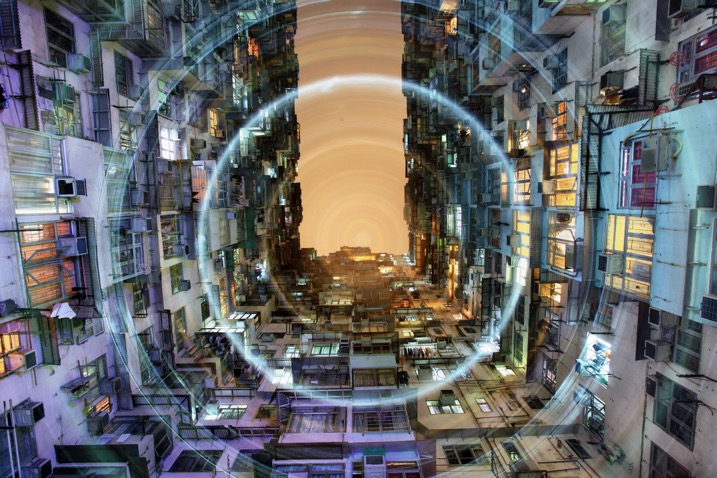
Circular lines are a great way to draw your viewer into the photo. The animation artists knew what they were doing with the Looney Tunes design. A similar effect is possible in photography through a process known as kinetic light painting. This technique involves moving the camera around in front of stationary lights, creating a pattern in your photo. If you use camera rotation you can create circular light lines.

rotation-light-painting11

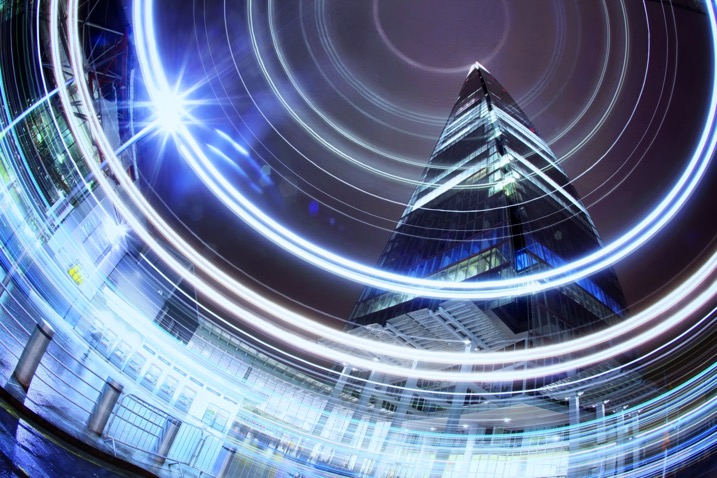
This photograph in Hong Kong has been taken many times now, the use of rotation during the long exposure gives the photo a different aesthetic.

How to take rotation light painting photos

  1. Scout a location which has lots of light, you are looking for tall buildings or big architectural structures.
  2. Set up the camera on a tripod, looking straight up. You can set the camera at an angle between 45 degrees to straight up. The worm’s eye view works very well for this technique.
  3. Choose a wide-angle lens, or even a fish-eye for this photo. A kit lens will work but use the widest focal length.
  4. Now compose your photograph, and focus the image. Use an angle finder or live view to help you do this.
  5. Make a mental note of the position of your camera on the tripod, if your tripod head shows the number of degrees of rotation jot this number down. The aim is to rotate the tripod head, starting and finishing in the same position.
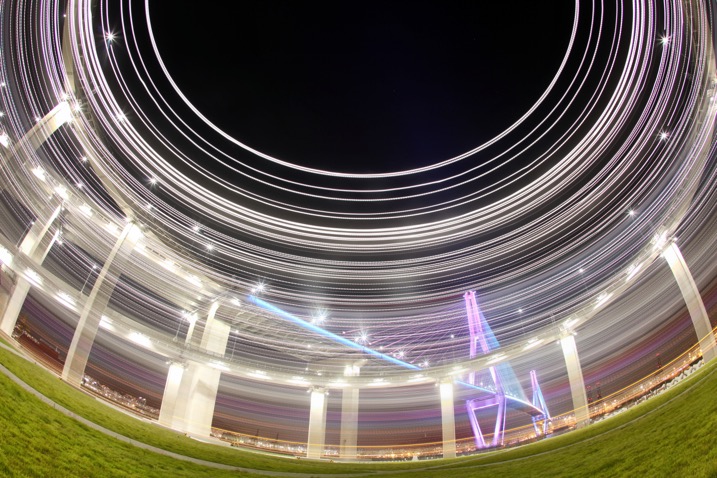
A bridge in Busan is photographed using a fish-eye lens in conjunction with kinetic light painting. A shallower angle was used here, perhaps around 45 degrees.

A bridge in Busan is photographed using a fish-eye lens in conjunction with kinetic light painting. A shallower angle was used here, perhaps around 45 degrees.

A bridge in Busan is photographed using a fish-eye lens in conjunction with kinetic light painting. A shallower angle was used here, perhaps around 45 degrees.

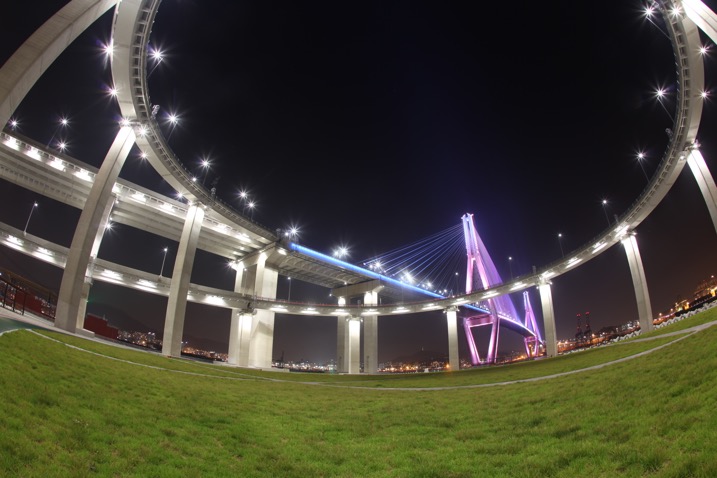
The same scene without the rotation.

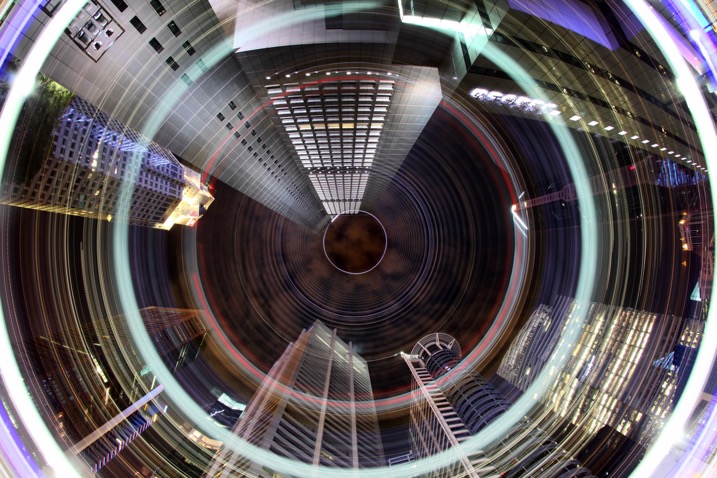
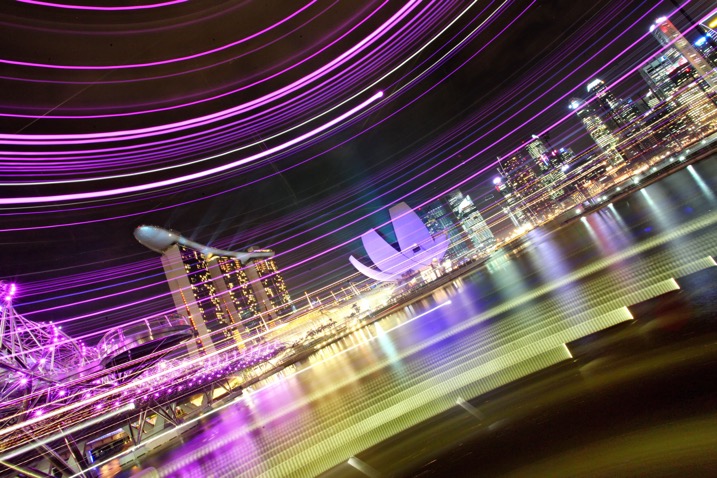
The CBD area of Singapore has many locations where a worms eye view looks good. The light rotation adds an extra element to this photo.

The CBD area of Singapore has many locations where a worm’s eye view looks good. The light rotation adds an extra element to this photo.

  1. Set the camera to expose for 30 seconds, and adjust the aperture and ISO to get the correct exposure value in the photo. The exposure value should be 0 or +1, this is because you’ll lose some of the light exposing the buildings during the light painting.
  2. Use the camera’s self-timer to start the exposure, and set it to 10 seconds.
  3. Start to rotate the camera around the axis of the tripod just before the exposure begins. The rotation has to me smooth, and last for between two and five seconds.
  4. Make sure you finish the rotation at the same position where you started by watching the degrees of rotation on your tripod.
  5. The camera then has around 25 seconds to capture the structures in your scene.
Using a more horizontal angle allows you to paint light through the scene, again this is a unique way of capturing the iconic Singapore skyline.

Using a more horizontal angle allows you to paint light through the scene, again this is a unique way of capturing the iconic Singapore skyline.

If you prefer to see how this is done visually, watched the video below:

Why use circular light painting?

Those who like long exposure will know about light painting, though not everyone is familiar with kinetic light painting. Getting great photos requires a bit of experimentation, hence the need to try out new techniques from time to time.

Kinetic light painting is a great way of creating dynamic photos, which have a futuristic feel. The image you take is likely to be from a worm’s eye view, in an urban setting. Therefore using a technique that adds lights and patterns to your scene can look good. You will also find that many people have already taken photos from the most popular locations. So techniques like this allow you to give your photo a different slant.

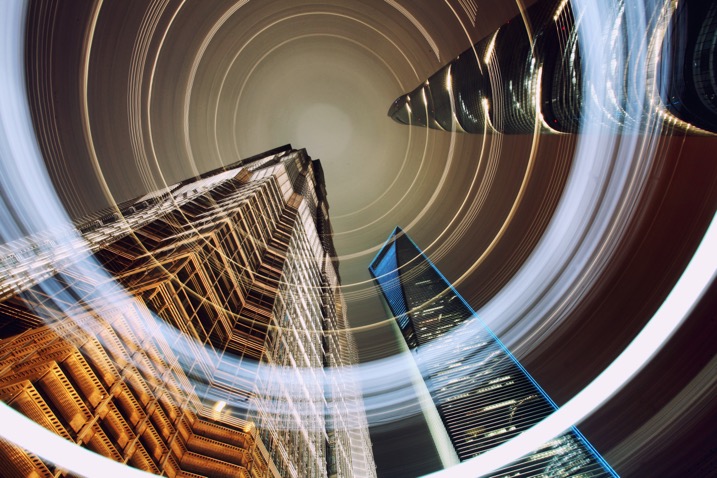
rotation-light-painting13

The light patterns in this photo have given this scene a lot of energy. A slightly shallower angle than straight up was used here.

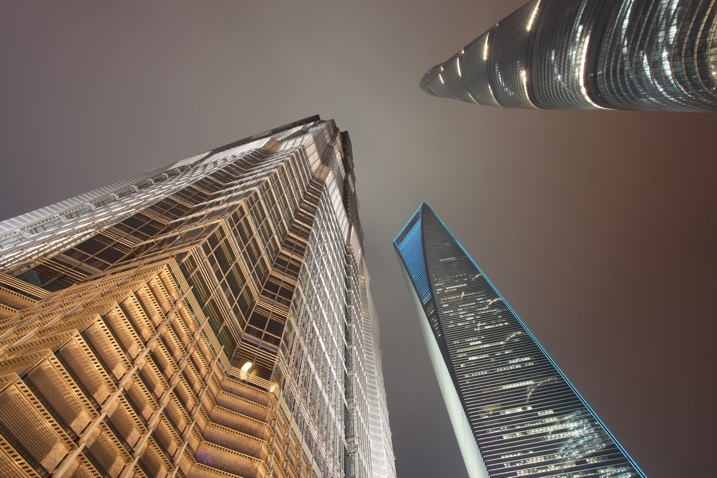
rotation-light-painting12

This is a worm’s eye view of the same skyscrapers in Shanghai, without using any light painting.

rotation-light-painting04

Where can I try this technique?

The best place to try this type of technique is near skyscrapers, though if you don’t have any near you then tall apartment buildings can work as well. Any tall architectural structure that’s lit could work for you, as long as you can get underneath it, and it shows in the frame with a wide angle lens.

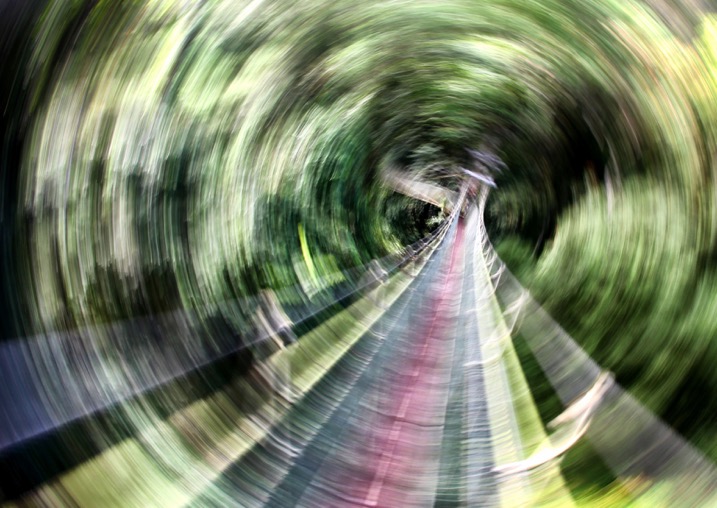
You don’t live in the city? No problem you can head to your nearest forest and use the trees in place of skyscrapers. If you use trees the shot will be daytime, and you’ll be painting the sunlight shining through the leaf canopy. There may be too much light during the day to make a long exposure; therefore consider using an ND filter to reduce the amount of light coming into the camera.

It's possible to use this technique under, or in this case in a leaf canopy. This is the Jungle at Mulu national park, Malaysia.

It’s possible to use this technique under, or in this case in, a leaf canopy. This is the Jungle at Mulu national park, Malaysia.

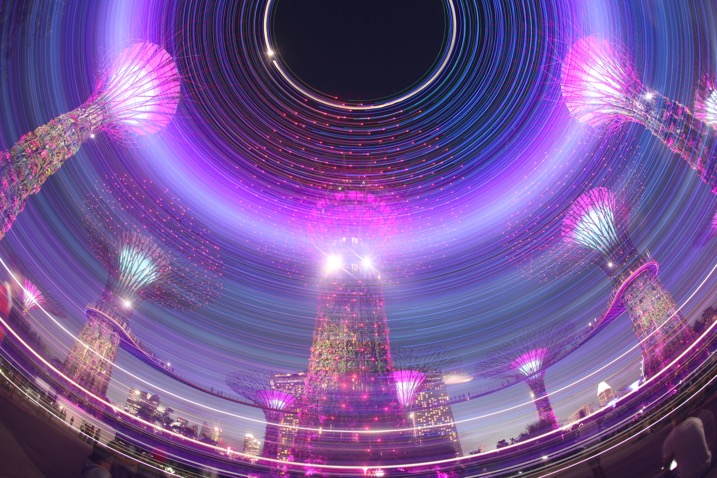
Another photo from the super trees in Singapore, this time aiming strait up.

Another photo from the super trees in Singapore, this time aiming straight up.

rotation-light-painting01

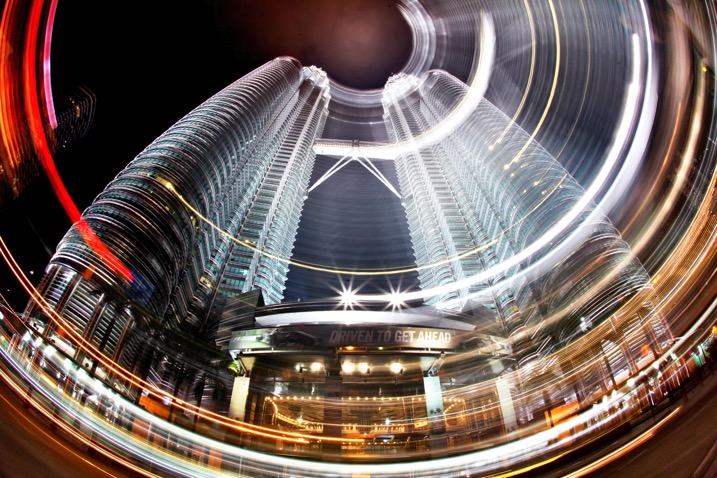
Malaysia’s Petronas twin towers, partial rotation.

Get kinetic, and get light painting!

It’s a great idea to experiment with photography. Trying out long exposure techniques such as this one will only improve your work. It can help you to get unique images that other people won’t have seen; therefore you’ll generate a lot more interest in your work. Having a tripod, and access to a city is really a prerequisite of a style like this one. I look forward to seeing your work. If you have any other idea’s of how you can light paint using your camera please share them in the comments section below.

I look forward to seeing your work. If you have any other idea’s of how you can light paint using your camera please share them in the comments section below.

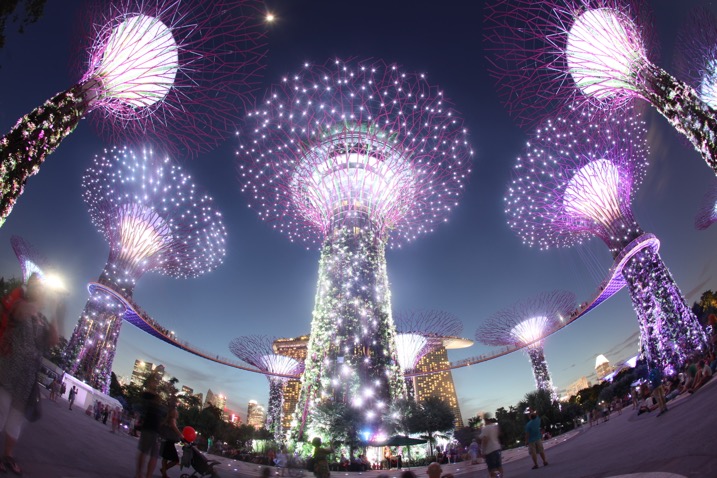
Scene without rotation.

Scene without rotation.

The super trees found in Singapore's garden by the bay make a great subject for kinetic light painting as they have so many lights.

The super trees found in Singapore’s garden by the bay make a great subject for kinetic light painting as they have so many lights.

googletag.cmd.push(function() {
tablet_slots.push( googletag.defineSlot( “/1005424/_dPSv4_tab-all-article-bottom_(300×250)”, [300, 250], “pb-ad-78623” ).addService( googletag.pubads() ) ); } );

googletag.cmd.push(function() {
mobile_slots.push( googletag.defineSlot( “/1005424/_dPSv4_mob-all-article-bottom_(300×250)”, [300, 250], “pb-ad-78158” ).addService( googletag.pubads() ) ); } );

The post How to do Light Painting by Rotating the Camera by Simon Bond appeared first on Digital Photography School.


Digital Photography School

 
Comments Off on How to do Light Painting by Rotating the Camera

Posted in Photography


GoPro compensates Karma drone users with free HERO5 cam for recall

22 Nov

At the beginning of November action-cam maker GoPro announced a recall of its new Karma drone after a small number of the approximately 2500 units sold lost power during operation. GoPro stressed that even those users whose drones appeared to be operating normally should stop using them immediately. 

Now at least US buyers of the Karma will receive some sort of compensation for going through the troubles of returning the drone and having to find a replacement. GoPro is offering American Karma buyers a free HERO5 Black action cam once they return the drone and all accessories. Presumably, apart from making customers happy, this move should also speed up the return process and ensure as many of the faulty drones as possible make it back to GoPro. The company says it is planning to start shipping the Karma again as soon as the issue is resolved.

Articles: Digital Photography Review (dpreview.com)
 
Comments Off on GoPro compensates Karma drone users with free HERO5 cam for recall

Posted in Uncategorized


The City is a Canvas: 31 Murals Transforming Urban Spaces

22 Nov

[ By SA Rogers in Art & Street Art & Graffiti. ]

colorful-street-art-main

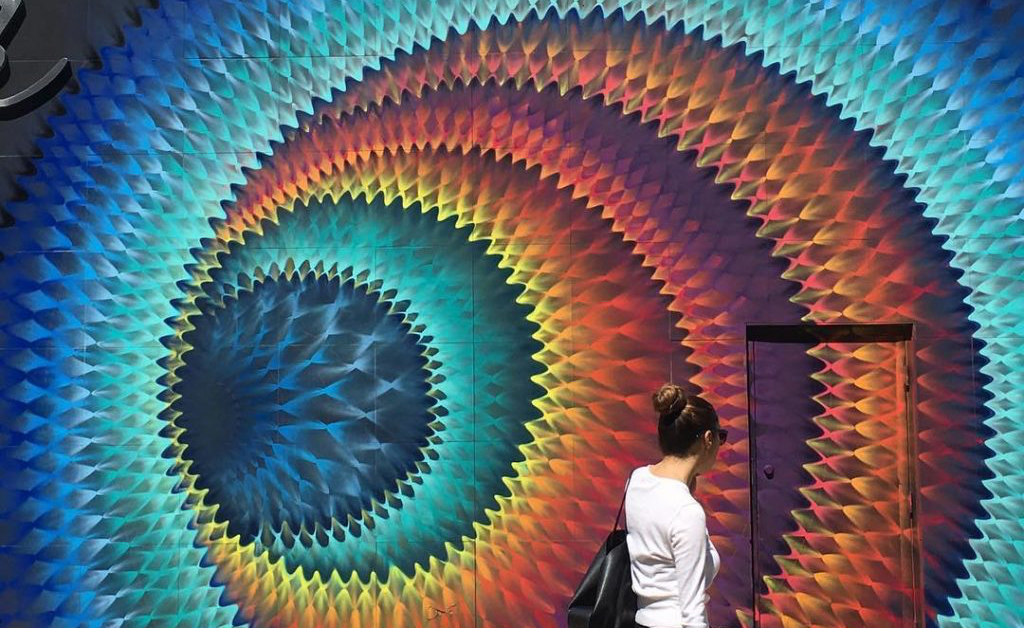
Psychedelic portals beckon you to enter another dimension, sea monsters lurk at the bottom of the stairs and illustrated figures playfully interact with urban infrastructure in works of art that bring color, levity and natural imagery to urban environments.

Sea Monster Stair Steps by Skurk

interactive-street-art-sea-monster-1

interactive-street-art-sea-monster-mural-2

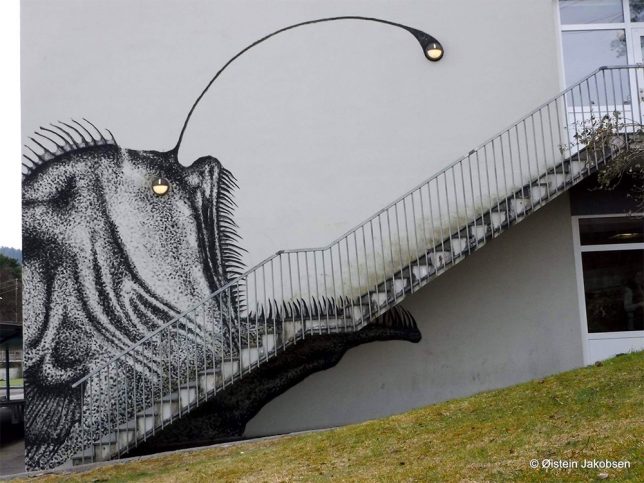
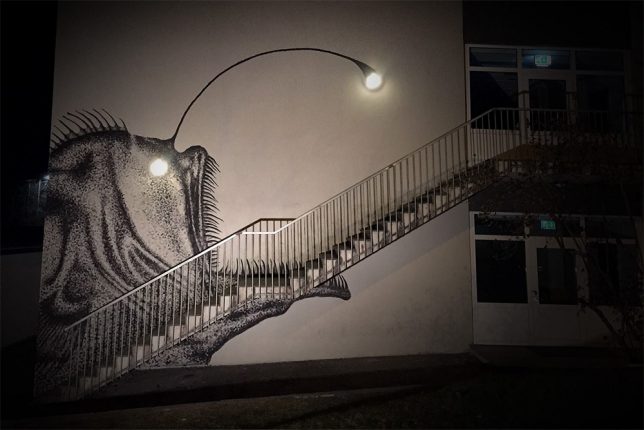
The creepy sea creature lurking at the base of these stairs is enough to make anyone nervous, even in broad daylight – but just wait until the sun goes down. Street artist Skurk used two existing lamps affixed to the building’s exterior as the eye and lure of an anglerfish to terrifying and delightful effect.

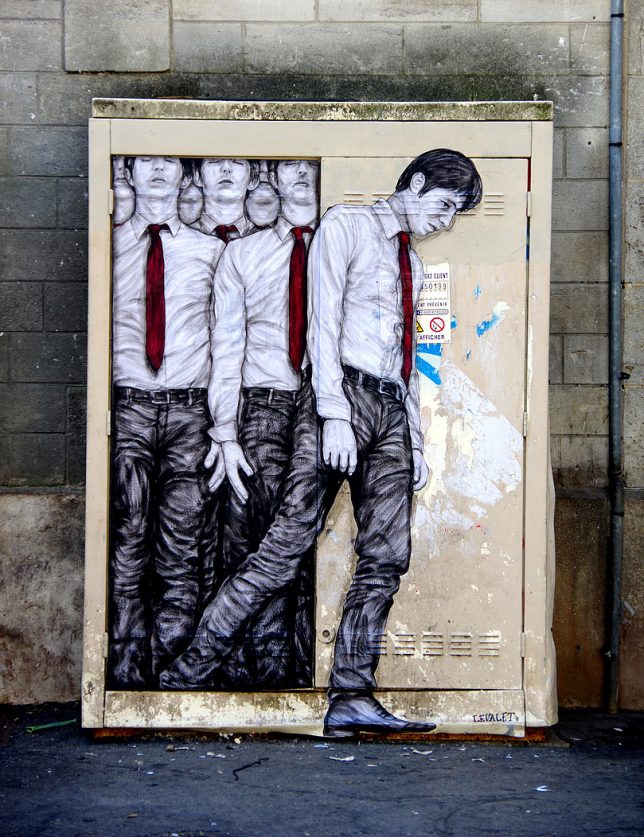
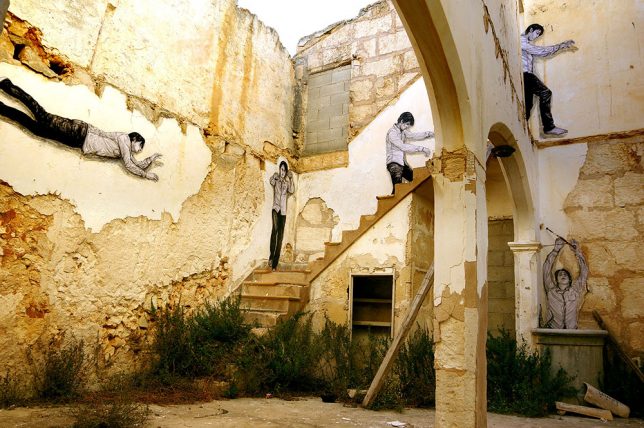
Site-Specific Wheatpastes by Levalet

street-art-levalet-1

interactive-street-art-levalet-2

interactive-street-art-levalet-3

interactive-street-art-levalet-4

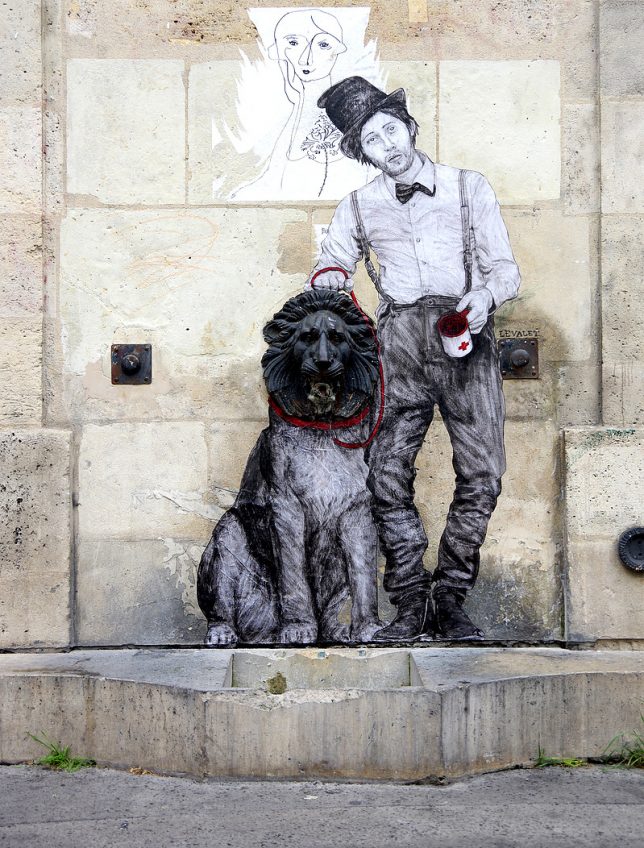
Paris-based artist Levalet (Charles Leval) works with existing textures, colors and fixtures in urban environments to create playful site-specific works of art. Some are playful, some are a bit disturbing, but all of them pair sketched human and animal figures with fountain heads, drains, windows, utility boxes, staircases and other elements of the city.

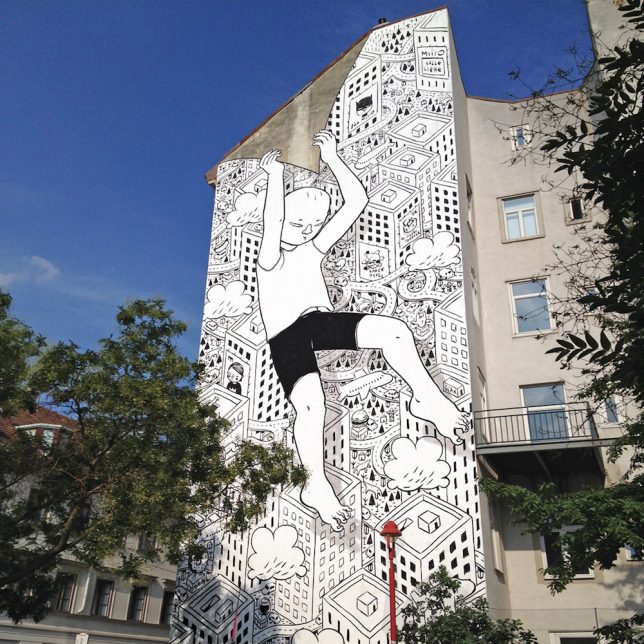
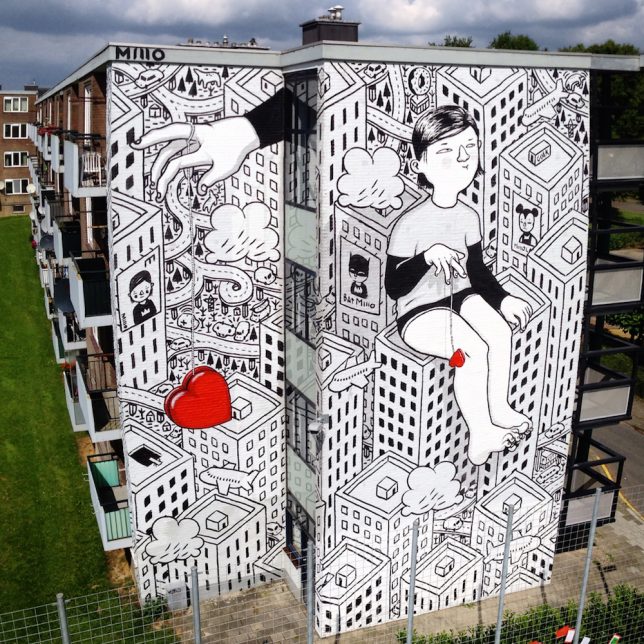
Massive Murals in Italy by Millo

interactive-street-art-millo-2

interactive-street-art-millo-3

interactive-street-art-millo-4

An illustrative black-and-white style accented by carefully chosen splashes of bold color characterizes the ground-to-roof murals painted onto buildings by Italian street artist Millo.

Giant Bees by Matthew Willey

interactive-street-art-bees-1

interactive-street-art-bees-2

interactive-street-art-bees-4

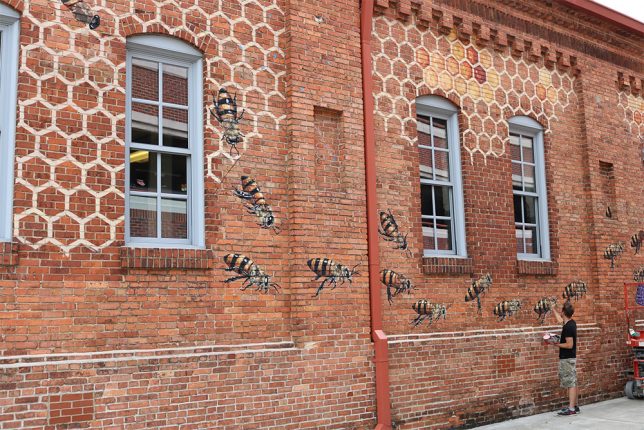
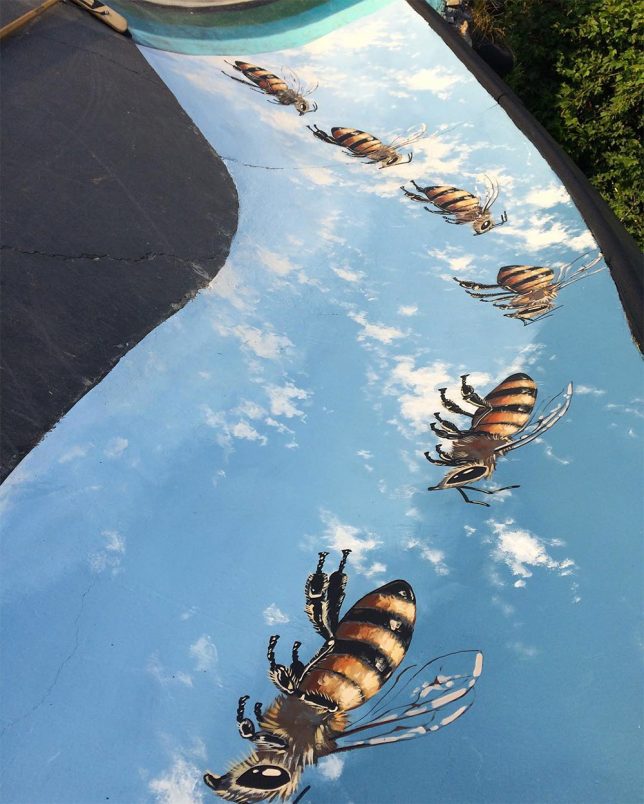
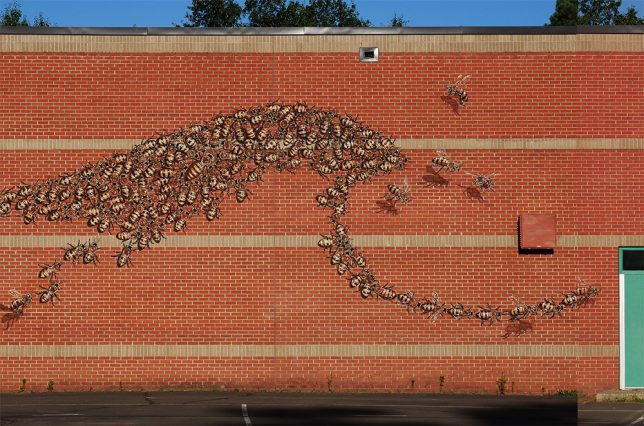
50,000 bees now adorn surfaces around the world as part of the Good of the Hive Initiative, a project by artist Matt Willey aiming to raise awareness about the plight of the honey bee. Willey traveled all over the globe to paint a few dozen bees at a time in each location, with the goal number representing how many bees it takes to sustain a healthy hive.

Next Page – Click Below to Read More:
The City Is A Canvas 31 Murals Transforming Urban Spaces

Share on Facebook


[ By SA Rogers in Art & Street Art & Graffiti. ]

[ WebUrbanist | Archives | Galleries | Privacy | TOS ]


WebUrbanist

 
Comments Off on The City is a Canvas: 31 Murals Transforming Urban Spaces

Posted in Creativity


Manfrotto launches stylish Windsor Collection bags

22 Nov

Manfrotto has launched its new Windsor Collection, a series of camera bags including the Windsor Backpack, Windsor Messenger (small and medium sizes) and the Windsor Reporter. All four bags are designed to carry camera gear in ‘flawless style,’ with the backpack being the largest of the bunch and the Messenger S bag being the smallest.

The Manfrotto Windsor Backpack can accommodate a DSLR with an attached 70-200mm F2.8 lens and two extra lenses, as well as a 15″ laptop, a tripod (via external leather straps), and various accessories. In contrast, the Windsor Reporter is a shoulder bag large enough for a DSLR with an attached 24-70mm lens and two other lenses.

The Windsor Messenger S, meanwhile, is large enough to hold a compact system camera with a standard lens, according to Manfrotto, plus one or two other lenses, or an entry-level DSLR plus ‘multiple lenses’ and a tablet. The medium-sized Messenger can accommodate a medium DSLR with an attached 70-200mm F2.8 lens and two or three other lenses, plus a tablet.

All four bags feature similar styles and materials, including a water repellant coating, the Manfrotto Protection System for protecting gear from bumps and leather trim. All four bags are available now, with the Windsor Backpack priced at $ 170, the small Windsor Messenger at $ 120, the medium Messenger $ 140, and the Windsor Reporter at $ 130.

Press release

Manfrotto Launches Lifestyle Windsor Camera Bags

Four stylish models suitable for different equipment configurations

Upper Saddle River, N.J. (November 17, 2016) – Manfrotto, a leading global innovator and manufacturer of premium photo, video and lighting support products and accessories, announces the launch of the Manfrotto Windsor Collection, a stylish addition to their Lifestyle camera bag offering. The Windsor Collection features genuine leather trim, premium water-repellent fabric and metal details. The interior of each model is enhanced with a tartan pattern lining. This collection was designed for photographers who enjoy traveling in comfort while having their equipment within easy reach.

Key features:

  • Superb quality photography carrying solutions
  • Carry gear safely, comfortably and in timeless style on field trips
  • A variety of models to hold different equipment configurations
  • The perfect bags to explore with – even when not taking pictures

The new Collection caters to a variety of photographic styles:

The Manfrotto Windsor Camera and Laptop Backpack for DSLRs – a perfect choice for field trips, this bag features a removable padded internal compartment which holds a medium DSLR with up to a 70-200 mm lens attached and two additional lenses. Equipment is always at hand through the quick-access side opening, so no shot is missed. All delicate essentials stay safe in the top compartment. The internal photography insert can be removed to turn what is a camera backpack into a traditional one. A padded compartment fits a 15” laptop and two adjustable leather straps on the front of the bag keep a tripod secured.

The Manfrotto Windsor Camera Reporter Bag for DSLRs is a shoulder bag designed to keep photography gear safe in flawless style. It fits a medium DSLR with a 24-70 lens attached, an additional 70-200 mm lens and up to two standard lenses. When photography is not on the agenda, it remains a perfect bag for everyday use. With plenty of pockets, it keeps personal items and a 13” laptop securely organized. It also features a hidden side pocket to store a water bottle and two adjustable leather straps on the front of the bag which can keep a tripod secured. An adjustable shoulder strap and shoulder pad provide additional comfort.

The Manfrotto Windsor Camera Messenger for Compact System Cameras come in two sizes, Medium and Small. The Medium size fits a medium DSLR with up to a 70-200 mm lens attached and two to three additional lenses. A 15” laptop is kept safe in its own padded compartment. The Small size holds a Premium Compact System Camera with a 24/70 lens and two additional lenses. It features a safe compartment for a tablet. All personal items can be safely stored on the inside and outside zippered pockets. The adjustable shoulder strap and the shoulder pad provide additional comfort. A zippered top opening gives you the ability to access your gear in the fastest way possible.

All four models are engineered with internal dividers, providing maximum protection for photographic equipment and other electronic devices. Lenses and accessories are kept safe in the special protection areas at the heart of the bags. The dividers can easily be configured to accommodate varying photography equipment requirements.

Model #’s:

MB LF-WN-BP Lifestyle Windsor Backpack $ 169.99
MB LF-WN-RP Lifestyle Windsor Reporter $ 129.99
MB LF-WN-MM Lifestyle Windsor Messenger M $ 139.99
MB LF-WN-MS Lifestyle Windsor Messenger S $ 119.99

For additional information about Manfrotto, visit manfrotto.us. Follow Manfrotto on Facebook at facebook.com/ManfrottoSchoolOfXcellence, on Twitter @manfrotto_us or instagram.com/manfrottoimaginemore.

Articles: Digital Photography Review (dpreview.com)

 
Comments Off on Manfrotto launches stylish Windsor Collection bags

Posted in Uncategorized


Fotodiox introduces full automatic Nikon to Sony E adapter

22 Nov

Accessory manufacturer Fotodiox has introduced a new adapter that allows Nikon lenses to operate with a full range of automatic functions when hosted on a modern Sony E-mount camera body. The Fusion Smart AF Adapter accepts Nikon G AF-I and AF-S and provides connections between the lens and a Sony compact system camera body so that the user can enjoy autofocus as well as the ability to automatically stop down the lens and to trigger vibration reduction in lenses that have it. The adapter uses power from the camera to drive the lens, and EXIF data is passed back from the lens to be recorded in the image file created by the camera.

The company says that the adapter works best with Sony’s latest bodies that feature phase detection autofocusing systems, such as the a7R II. The adapter works with bodies that use contrast detection but the AF is a lot slower.

As Nikon uses a physical lever to close the iris of its lenses Fotodiox has used a motor within the adapter to handle that function so lenses that have no aperture ring don’t have to used wide open all the time. This also means that metering works without the user having to manually stop the lens down and that the camera’s semi-automatic exposure modes to operate.

The Fotodiox Fusion Smart Adapter costs $ 370. For more information visit the Fotodiox website.

Press release

Fotodiox Pro Announces Nikon to Sony FUSION Adapter for Full Function Control

Fotodiox Pro, creator and distributor of several lines of specialty solutions for videography, cinematography and photography, has announced their new Nikon to Sony FUSION Lens Adapter. Available now on Fotodioxpro.com, the Nikon to Sony FUSION Adapter allows photographers to mount Nikon lenses onto Sony cameras and maintain electronic communication between the two, delivering decades of legendary Nikon imaging expertise to the hands of full frame or APS-C Sony E-Mount camera users.

“The Nikon to Sony FUSION Adapter is truly the first of its kind, and we couldn’t be more excited to share it with our customers,” said Bohus Blahut, marketing director for Fotodiox Pro. “What makes it such a breakthrough is the presence of FUSION Drive – a built-in motor that physically moves the lens’ internal aperture control lever. Nikon lenses are notorious for maintaining mechanical aperture control while many other functions are electronic, but FUSION Drive, which we built for the very first time for this Nikon to Sony FUSION Adapter, solves that issue.”

By installing the Nikon to Sony FUSION Adapter on a full frame or APS-C Sony E-Mount camera, Nikon AF-I and AF-S lenses gain auto-focus, full aperture control for Auto / Aperture Priority / Program AE modes, EXIF data transmission (on compatible models) and image stabilization (on compatible models). The Nikon to Sony FUSION Adapter is also compatible with fully manual vintage Nikon F lenses as a manual adapter.

Photographers are advised that the FUSION Adapter is designed to work best with newer Sony cameras that have “Phase Detection Auto Focus”, such as Sony a7, a7II, a7rII, a6000, a6300 and a6500 cameras. The Nikon to Sony FUSION Adapter’s performance will be significantly slower with older Sony cameras that rely solely on “Contrast Detection Auto Focus”.

Articles: Digital Photography Review (dpreview.com)

 
Comments Off on Fotodiox introduces full automatic Nikon to Sony E adapter

Posted in Uncategorized