RSS
 

Archive for October, 2016

The Sony a99 ll will be available on time – but in very short supply

27 Oct

Sony has announced that its a99 ll full-frame SLT camera will go on sale on November 25th as expected, but it will not be able to supply nearly enough to meet demand straight away. The company has issued a statement saying that domestic demand has ‘significantly’ exceeded the Japanese company’s sales plans and that customers should expect some delay in the delivery of ordered cameras.

The 42MP camera offers a top shooting rate of 12 fps and features a combined phase detection and contrast detection AF system that the company says provides speed, accuracy and improved tracking. The camera was the surprise launch of Photokina this year, as many assumed Sony had abandoned its SLT cameras in favor of the more popular mirrorless models.

It seems even Sony has been caught off-guard by the demand of the a99 ll, and if there are to be delays in the Japanese market there will almost certainly be delays in the rest of the world. The a99 ll is due to be priced at ¥388,880/$ 3200/£3000/€3500. For more information see the Sony website.

Articles: Digital Photography Review (dpreview.com)

 
Comments Off on The Sony a99 ll will be available on time – but in very short supply

Posted in Uncategorized


An array of Canon 400mm F2.8L II lenses is helping astronomers discover new galaxies

27 Oct
The Dragonfly Telephoto Array. Photo by Pieter van Dokkum

When Astronomer Pieter van Dokkum was looking for ways to study galaxies, he turned to the equipment he was familiar with as an amateur photographer. Thanks in part to some advanced optical coatings, he and his research team have been able to discover previously unseen galaxies.

In 2011, van Dokkum and fellow professor and astronomer Roberto Abraham, were discussing ways to find a way to get a better look into the very diffuse cosmic light that’s scattered by traditional telescopes like Hubble. Van Dokkum’s thoughts turned to his consumer imaging equipment, and some claims Canon was making about its then-recently-released 400mm F2.8L II. 

Introduced in August the previous year, the 400mm F2.8L II offers what Canon calls ‘a SubWavelength Structure Coating (SWC), which uses microscopic cone-shaped structures smaller than a wavelength of visible light’ to reduce internal reflections and scattered light. This kind of coating would theoretically help collect enough light to study galaxies with low ‘surface brightness’, and sure enough, it did. Says van Dokkum: ‘We compared their performance to those of the best reflecting telescopes, and found that they produce almost an order of magnitude better suppression of the wings of the point spread function – probably in part because of the SWC coatings.’ In short, the 400mm F2.8L II fit the bill.

More lenses were acquired and the Dragonfly Telephoto Array was born (clustering lenses allows researchers to increase the effective aperture of the system). Van Dokkum and Abraham started with eight lenses, and now operate two mounts with a total of 48 lenses.

Custom connectors, as well as off-the-shelf components like Intel Compute Sticks help drive Dragonfly. Photo by Pieter van Dokkum

You won’t find a Canon EOS 5DSR behind anywhere on the array, though. Each lens is attached to its own science-grade 8MP CCD camera, and has a custom astronomical filter slotted in. There’s a custom-built connector between each camera and the lens that can drive focus, and an Intel Compute Stick attached to each camera takes care of data recording and some processing. It’s all controlled by a central computer that can carry out commands like ‘auto-observe Mars’ and ‘expose 900 seconds’. 

The array has helped examine much-observed heavenly bodies like the Coma Cluster, where they’ve been able to identify what the research team has dubbed ‘ultradiffuse galaxies.’ They continue to discover more of these galaxies with the help of Dragonfly, and aim to keep learning about their variety and formation. 

Articles: Digital Photography Review (dpreview.com)

 
Comments Off on An array of Canon 400mm F2.8L II lenses is helping astronomers discover new galaxies

Posted in Uncategorized


Google acknowledges lens flare issue on Pixel camera, promises software fix

27 Oct

Since the Google Pixel and Pixel XL smartphones have become available for purchase, there have been several reports about the camera of the devices, despite stellar scores in the DxOMark ranking, being very prone to lens flare with the sun at a certain angle to the camera lens. Now a group of affected Reddit users has described the problem in the Google Product Forum and got a quick reply from a Google employee:

‘First, for some background — flare is a property of ALL camera lenses. It comes in a ton of different shapes and sizes and can even be used for creative effect — good and bad :-). The shape, color, amount, etc. of flare is related to dozens of different parameters of the lens structure and inclement light. However, we have seen reports about this “halo/arc flare”. This is the specific kind of flare that appears as a bright/low-contrast arc in the corners of the frame.
 
You can expect a software update in the next few weeks that will improve the effects of this issue. We’re working on some algorithms that recognize the halo/arc flare, characterize it mathematically, and then subtract it from the image. 🙂 You will need to use HDR+ to see the benefits of this software.’
 
So it appears Google is planning to solve a hardware problem with a software solution and bake an algorithm, that mathematically removes the flare from the image, into the Pixel camera’s HDR mode. This means the measure will only be effective when shooting in this mode and it remains to be seen if there is any impact on noise and/or image detail in the affected areas of the image. We will certainly have a closer look at the Pixel’s flare behavior in our own test of the device.

Articles: Digital Photography Review (dpreview.com)

 
Comments Off on Google acknowledges lens flare issue on Pixel camera, promises software fix

Posted in Uncategorized


How to Correct Skin Tones Using Lightroom’s Color Curves

27 Oct

Lightroom gives you a million and one ways to complete most photo edits. Having options is important. No two photos are alike, so no two edits are alike either. In this article, I’ll show you how to correct skin tones using Lightroom’s color curves.

There are times when the best way to edit color in general, and skin tones in particular, is to use Lightroom’s Color Curves. After reading this tutorial, you’ll be able to; measure RGB skin tone numbers to give you a general idea of which edits your photo needs, and correct the color issues using Lightroom’s Color Curves

skin-tones-Lightroom-curves-13.jpg

Finding the color numbers

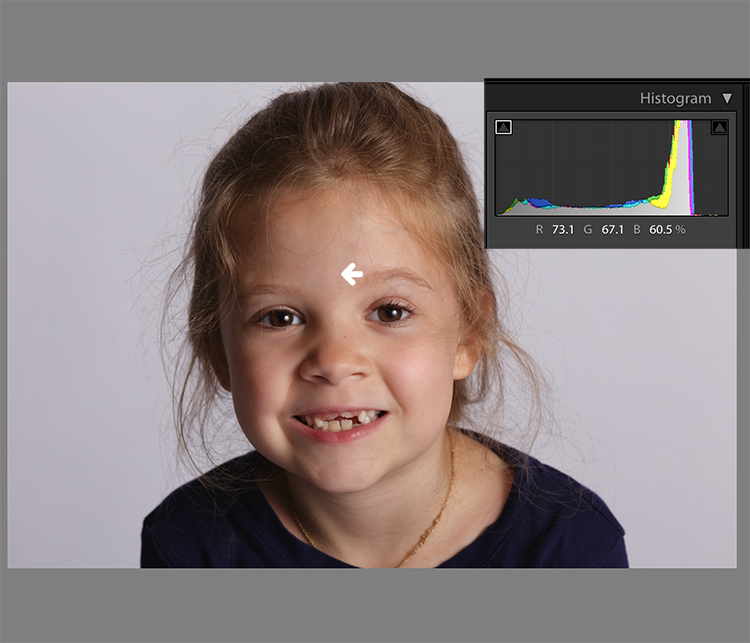
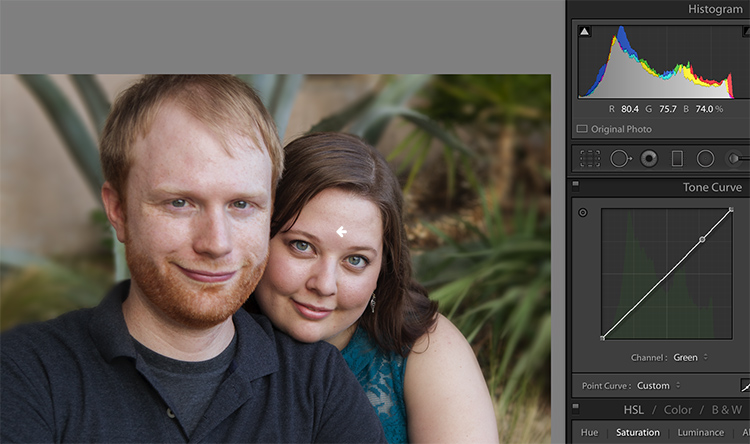
The image below is a photo that came out of the camera with a pretty good white balance and skin tone. Do you see the numbers under the histogram? Those are Red, Green and Blue (RGB) numbers.

Skin tones Lightroom curves 01

You can display the RGB numbers for your photos too. In Lightroom’s Develop module, hover your cursor over the area you want to measure. Look under the histogram for the corresponding RGB measurements.

These measurements tell us that the pixels next to the arrow in the screen shot had the following measurements:

  • Red: 73.1%
  • Green: 67.1%
  • Blue: 60.5%

RGB numbers are usually measured on a scale of 0-255, unless you are working in Lightroom. In Lightroom, you generally see them on a percent scale. 0% is the darkest value for any color, it’s so dark that there is no visible detail in that area. 100% is the brightest, and is so bright that no detail is visible.

Analyzing the color numbers

When analyzing RGB numbers for skin tone, look for the following indicators:

  • Red should be higher than Green. Green should be higher than Blue. This pattern is universal to all skin tones, regardless of age or ethnicity.
  • Each color should have at least a 2% difference, usually more, between it and the next number. Do you know how to identify a pure gray? That is a pixel that measures exactly the same in its Red, Green and Blue numbers. So skin whose RGB numbers are very close to each other is going to look gray. Not very appealing, right?
  • If any colors measure 94% or above, you probably have overexposure to deal with.
  • If any colors measure 6% or below, you probably have underexposure to deal with.

The RGB numbers in the photo above are consistent with expectations. This means that the skin is within “proper range” of a well-exposed photo with good white balance.

What do to with bad numbers?

What happens, however, if your photo doesn’t look so good straight out of camera?

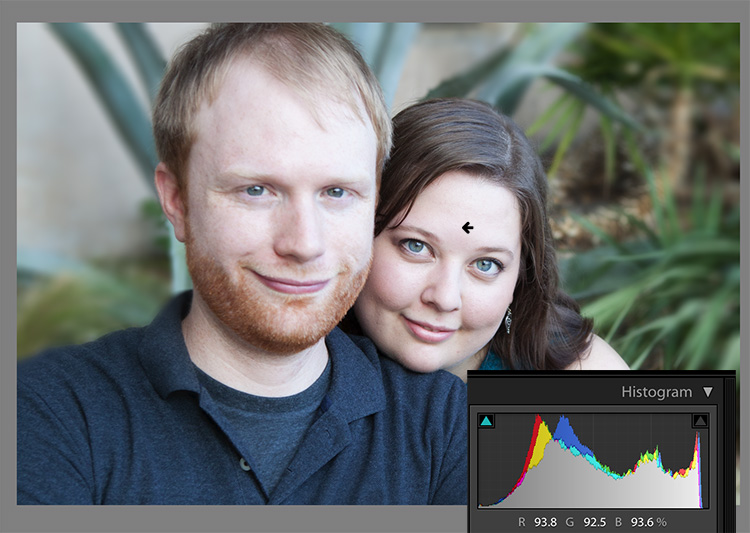
Skin tones Lightroom curves 02

In this photo, the measurement point was just next to the arrow on her forehead. The numbers read: Red 93.8%, Green 92.5%, and Blue: 93.6%.

Anytime you see a photo with skin tones that measure like this, your eyes are going to tell you that something is off before the numbers do. The benefit of using the numbers is that they give you the direction to which your edits for the image need to go.

The numbers in this photo cause concern because:

  • Anything higher than 94% or so in Lightroom is bright enough that your image, if you print it, might not render good detail in those areas. That means that these areas are too bright.
  • Blue is higher than Green. Red should always be the highest and Blue the lowest otherwise the skin tone will appear cold.
  • The RGB numbers are too close together – they are approaching gray. This skin in this photo is lifeless as a result.

Correcting the skin tones

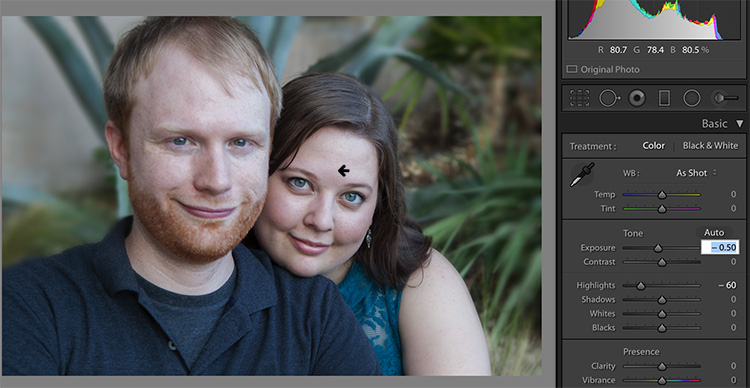
To fix this image, you would start by tweaking exposure. Proper exposure is a huge component of proper skin color. In fact, it’s often impossible to assess skin tone issues correctly without correcting exposure first.

A little-known bit of Lightroom awesomeness is that it’s easy to correct exposure while keeping an eye on the RGB numbers. In the Develop module, double click in the numeric entry field for Exposure so that the number is highlighted. Next, hover your cursor over the area of skin you are measuring without clicking. Use the up or down arrows on your keyboard to change exposure until a more appropriate measurement for the Red value appears under the histogram.

Skin tones Lightroom curves 03

Adjust Highlights (or Shadows, Whites, or Blacks) in the same way. Activate the numeric input field for editing then hover the cursor over the arrow you want to measure. Use the arrow keys on your keyboard to increase or decrease the adjustment.

Exposure for this photo is better with the adjustments you see above, but color is still off. When the RGB numbers are as close together as you see here, it’s often better to use Color Curves than the White Balance sliders to fix the issue.

Using Color Curves instead of White Balance Sliders

Color Curves has two major advantages over the white balance (WB) sliders.

You might have noticed already that Lightroom measures three colors (red, green and blue) for each pixel. However, the White Balance sliders don’t allow for editing the most important component of skin color – red. But, you can edit Red tones using Lightroom’s Color Curves.

The other big benefit of using Color Curves is that you can adjust colors in limited parts of the tonal range. For instance, if you reduce yellow in an image using the Temperature slider in the White Balance section, you are reducing yellow globally (everywhere in the image equally). Using Color Curves, however, you could reduce yellow only in the shadows, without taking away the yellow that properly belongs in the mid tones and highlights of an image.

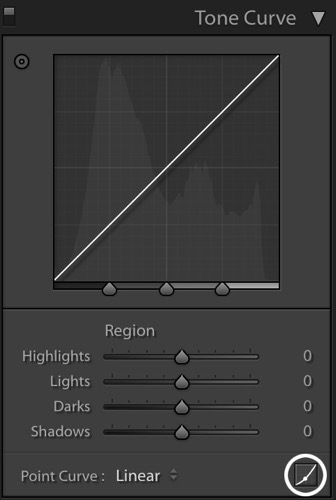
To find Color Curves in Lightroom, scroll down to the Tone Curve section. By default, it shows you the parametric curve, which looks like this:

Skin tones Lightroom curves 04

Click on the small button in the lower right corner of the Curves panel to access the Point Curve. (It’s circled in the screen shot above.)

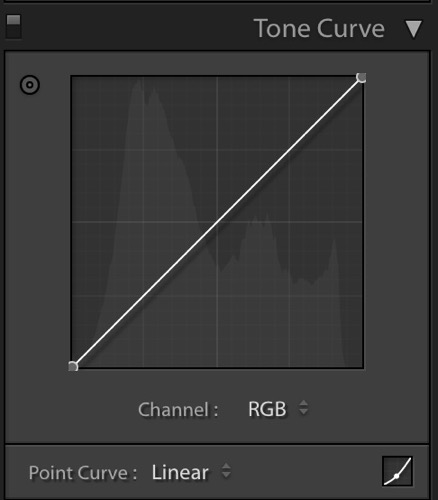
Now you are looking at the Point Curve interface:

Skin tones Lightroom curves 05

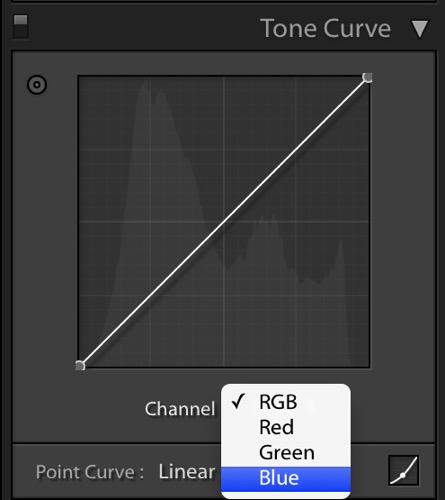
Using the Channel drop down menu, select the color you’d like to adjust.

Skin tones Lightroom curves 06

Which color channel to edit?

At this point, you may be wondering about adjusting colors other than red, green, and blue. For instance, what if your photo has too much yellow or orange? Think about it like this.

Each of the three colors measured in Lightroom has an opposite:

  • Red is the opposite of cyan
  • Green is the opposite of magenta
  • Blue is the opposite of yellow

Reducing any one of those colors using Color Curves, increases that color’s opposite. In other words, reducing blue is the same as increasing yellow.

Looking at the Curves panel, do you see the histogram behind the straight line? When you click and drag the straight line to create a curve, this tells Lightroom to adjust the pixels corresponding to that part of the histogram.

Say, for instance, that you wanted to add blue to the mid tones of an image. You would select the Blue channel and click the line in the middle of the histogram, where the midtones live. Dragging the line up would add blue to the bright parts of your photo’s tonal range.

Dragging up increases the color the channel is named after – blue, in this case. If it increases blue, that means that it’s also decreasing blue’s opposite, yellow.

Skin tones Lightroom curves 07

Dragging down decreases the color the channel is named after.

skin-tones-lightroom-curves-08b

Using the Targeted Adjustment Tool for Curves

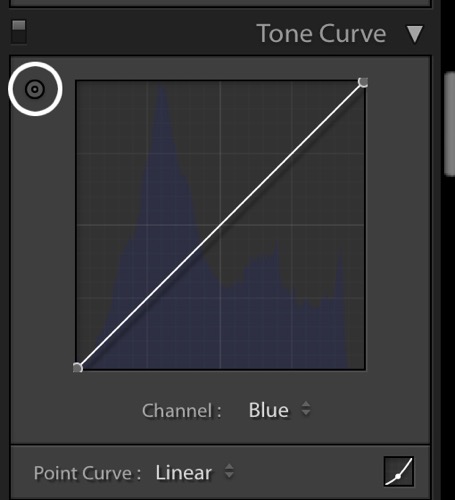
That’s the way it works in general. But you can get much more precise color control by using Lightroom’s Targeted Adjustment Tool. Click on the button at the top left corner of your Curves panel to activate it (circled below).

Skin tones Lightroom curves 08

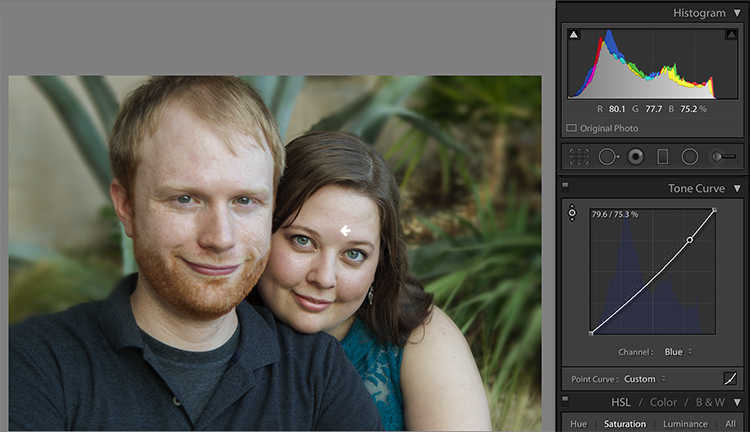
Hover this tool over the spot you’re using to measure the skin tone in your photo, but don’t click! Use the up and down arrows on your keyboard while keeping an eye on the RGB numbers beneath your histogram until the both the appearance of the photo and the RGB numbers improve.

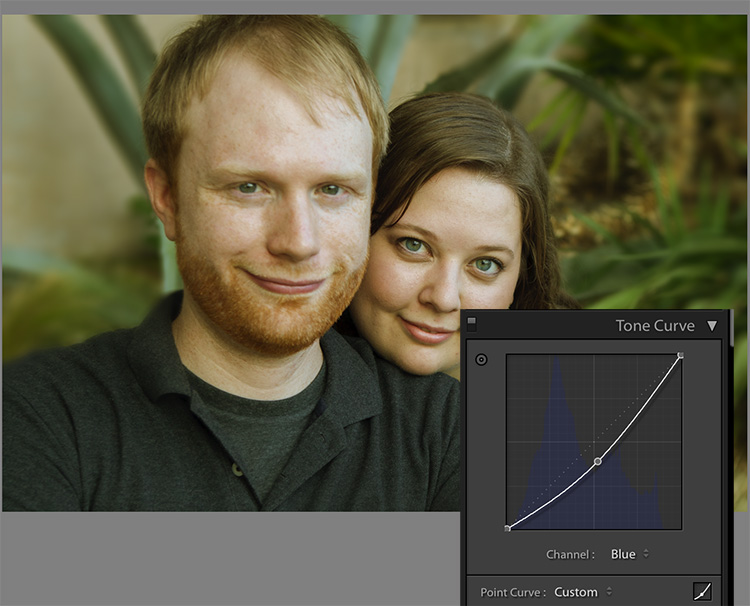
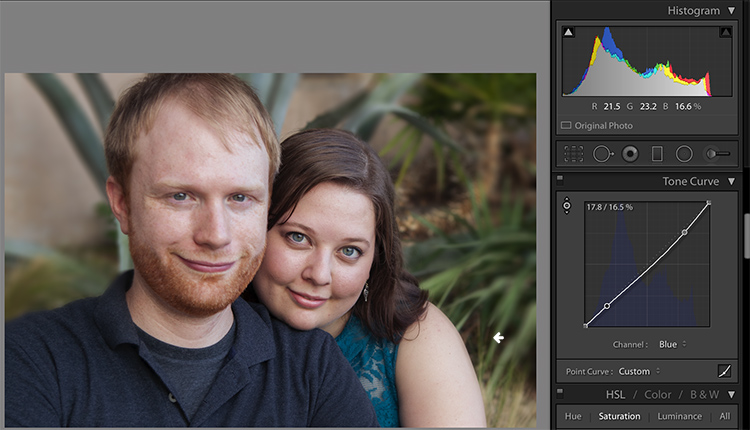
Moving the blue curve down, as in the screenshot below, provides better separation between the Green and Blue measurements. It also gives the photo the warmth it’s lacking.

Skin tones Lightroom curves 09

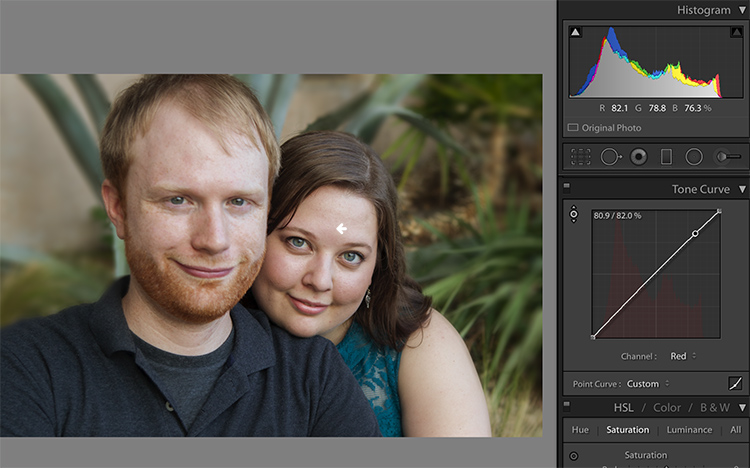
If the image still lacks vibrance, as this one does, move to the Red curve and increase the Red channel. Adding a touch of red is the best way to counteract gray skin.

Skin tones Lightroom curves 10

Next, decreasing green (to add magenta) makes the skin color, as well as the corresponding RGB numbers, look just about right.

Skin tones Lightroom curves 11

Tweaking things

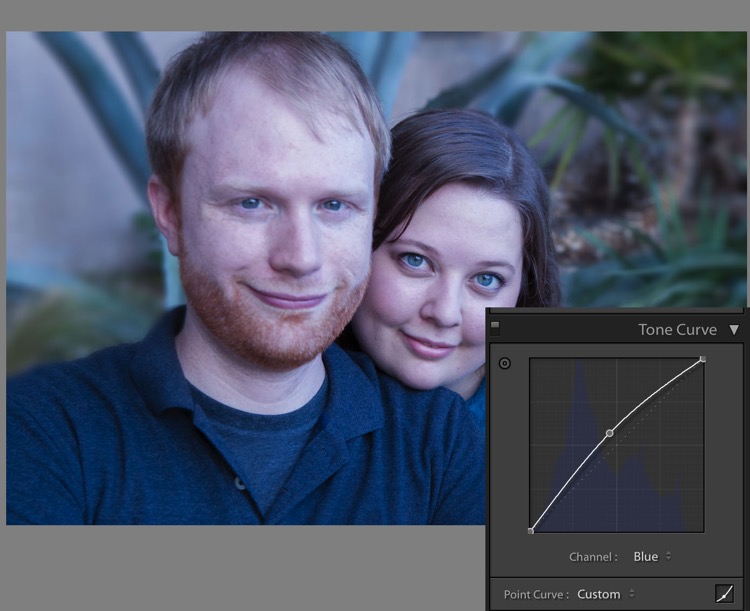
However, the warmth of the plants behind them is overpowering the subjects. To downplay it, return to the Blue channel.

Using the Targeted Adjustment Tool, add Blue to the the shadows by hovering over a dark area of the photo and hitting the up arrow on your keyboard.

Skin tones Lightroom curves 12

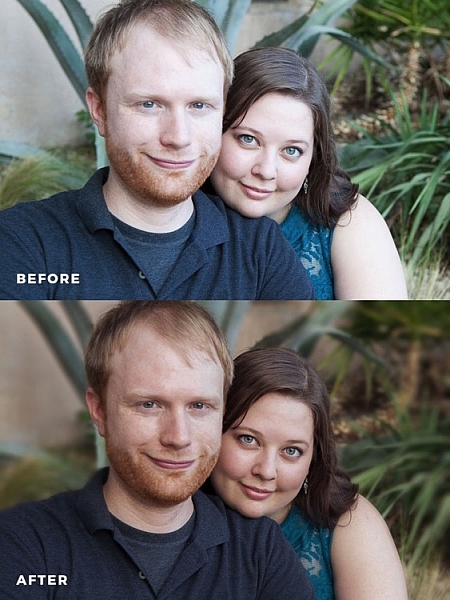
Compare the original and edited photos here:

Before

Before

After

After

Editing your own images with Color Curves and RGB numbers

Keep the following tips in mind when editing your own images.

#1 – First, a big caveat to anyone who has heard that using RGB numbers to edit will solve all skin tone problems! There are as many proper RGB measurements as there are people in the world. As you study RGB numbers, let trends in the numbers and generalities guide your edits, but don’t try for an exact numeric match.

#2 – Measure skin tones in the middle range of brightness. Look for mid-tones rather than bright highlights or deep shadows. Also avoid measuring on cheeks, the end of the nose, or other areas that are usually redder than others.

#3 – In general, when I’m editing photos, I look for tones in these ranges:

  • Red is highest > Green is middle > Blue is lowest – always.
  • The Red channel is usually between 70% and 90%. Very light skin can be as high as 94%. Very dark skin can go as low as 40-50%.
  • The Blue channel is usually between 30% and 80%.
  • It’s not possible to generalize how many percentage points difference should be between Red and Green, or Green and Blue. However, skin that has warmer tones will have less Blue in proportion to Red and Green.

#4 – Small movements of your tone curve impact your image dramatically. Don’t go overboard!

Conclusion

Studying the patterns in the RGB numbers of your photos is a great way to develop your editing eye. Everyone has photos that aren’t quite right. Analyzing the relationship between the numbers and the appearance of the photo will help you get to the point where you can eyeball a photo’s needs without referring to the RGB numbers at all.

Any questions? We could talk about this topic all day. Comment below and tell me what you think.

googletag.cmd.push(function() {
tablet_slots.push( googletag.defineSlot( “/1005424/_dPSv4_tab-all-article-bottom_(300×250)”, [300, 250], “pb-ad-78623” ).addService( googletag.pubads() ) ); } );

googletag.cmd.push(function() {
mobile_slots.push( googletag.defineSlot( “/1005424/_dPSv4_mob-all-article-bottom_(300×250)”, [300, 250], “pb-ad-78158” ).addService( googletag.pubads() ) ); } );

The post How to Correct Skin Tones Using Lightroom’s Color Curves by Erin Peloquin appeared first on Digital Photography School.


Digital Photography School

 
Comments Off on How to Correct Skin Tones Using Lightroom’s Color Curves

Posted in Photography


Microsoft Surface Studio morphs the photographer’s desktop into a studio

27 Oct

$ (document).ready(function() { SampleGalleryV2({“containerId”:”embeddedSampleGallery_6194580448″,”galleryId”:”6194580448″,”isEmbeddedWidget”:true,”standalone”:false,”selectedImageIndex”:0,”startInCommentsView”:false,”isMobile”:false}) });

Microsoft today expanded its Surface lineup, announcing the ‘world’s thinnest LCD monitor’ but in an exciting form factor: a touch-based all-in-one desktop PC with a 28″ 4.5K PixelSense display. The 4500 x 3000 3:2 display sports 13.5 million pixels, and at 192 PPI almost approaches the 218 PPI figure of the 5K Retina iMac, but with 10-point multi-touch capabilities. Like the 5K iMac, the display’s color gamut extends to DCI-P3 (25% larger than sRGB), something photographers routinely editing and printing will appreciate. Microsoft is calling the 10-bit display ‘TrueColor’.

But the real story here is the touch-based, pen-enabled display. Wacom Cintiq: take a hike. Apple iMac: mice and Wacom pens are so yesterday. The Surface Studio literally combines these devices into one, allowing you to draw directly on the surface with the precision Surface Pen. With a simple push of the screen, you can adjust the angle of the display down to a 20-degree orientation – then use it like a drafting table. And the new Bluetooth Surface Dial radial accessory will allow you to change settings, like the color you’re drawing with or brush size, on-the-fly. The display and dial sense each other, and with time and adoption we expect to see all sorts of creative solutions emerge that integrate the capabilities of the display, dial and pen. 

The new Microsoft Surface Studio is a powerful all-in-one desktop with a 28″ 4.5K wide-gamut PixelSense display touting touch, pen and dial capability. It easily folds down to drafting table-esque low angle for easy drawing and image editing.

A number of apps at launch, like Paint 3D and Sketchable, will support enhanced capabilities with the dial and pen, and we expect creative applications, like Adobe’s Creative Suite, to quickly follow suit, particularly because Microsoft has made it easy for developers to do so. Microsoft’s approach with Windows 10 and its hardware products prioritizes a unified app experience across all devices. With one operating system, app developers simply build new UI layers on top of existing apps, meaning less work for developers (than building a whole new app for, say, iOS) and, perhaps more importantly, a consistent user experience: Photoshop on the Surface is just like Photoshop on a desktop PC, but with an added pen/touch layer. 

Microsoft’s approach prioritizes a unified app experience across all devices. 

To keep the display on the Surface Studio thin, Microsoft put a lot of the guts of the Surface Studio in the base, and the specs are impressive. Three configurations ranging from $ 2,999 to $ 4,199 are available, all using Intel’s 6th generation Quad core i5/i7 processors with 8, 16, or 32GB RAM. Every Studio comes with a dedicated nVidia discrete GPU, with the lower two configurations using the GTX 965M with 2GB GDDR5 memory, and the highest configuration using the GTX 980M with 4GB GDDR5 memory. There are a number of connectivity options, including 4 USB 3.0 ports, SD card reader, Mini Displayport, Bluetooth 4.0, 802.11ac Wi-Fi, Gigabit ethernet, and Xbox Wireless. A 5MP/1080p Windows Hello capable front-facing camera is built in, as are 2.1 Dolby Audio speakers, and dual microphones.

Microsoft also announced three new Surface Book models with Performance Bases, touting 6th generation Intel Core i7 processors and more than twice the graphics processing power of the original Surface Book.

Windows 10 Creators Update promises ease of creation, sharing and experiencing 3D models and mixed reality (with accompanying VR headsets).

Microsoft is pushing their Surface solutions as tools for creatives, with a big focus on 3D. To that end the Windows 10 Creators Update, slated for early 2017 release, updates a number of apps to allow users to work seamlessly with 3D models, including ones they can generate themselves by scanning real-world objects with their phone. The popular Paint app will now be Paint 3D, and over the next year the popular Microsoft Office suite will also gain 3D capabilities. The Creators Update also promises ease of creation, sharing and experiencing mixed reality. Microsoft announced that HP, Lenovo, Dell, Acer and ASUS will ship the first VR headsets capable of mixed reality through the Creators Update.

Microsoft’s newly announced products are available for pre-order today, and early adopters of the Surface Studio will get a free Surface Dial. For more coverage and details on today’s launch event, head over to Microsoft’s dedicated site on the launch event.

Press Release:

NEW YORK — Oct. 26, 2016 Microsoft Corp. on Wednesday unveiled a broad vision to empower a new wave of creativity with a major update coming to more than 400 million Windows 10 devices and the introduction of Surface Studio, Surface Dial and a more powerful Surface Book.

Expanding the Surface family, Surface Studio is a new class of device that transforms from a workstation into a powerful digital canvas, unlocking a more natural and immersive way to create on the thinnest LCD monitor ever built.1 With a stunning ultra-HD 4.5K screen, Surface Studio delivers 63 percent more pixels than a state-of-the-art 4K TV. Surface Studio works beautifully with pen, touch and Surface Dial — a new input device designed for the creative process that lets you use two hands on the screen to compose and create in all new ways.

Launching as a free update in early 2017, the Windows 10 Creators Update will enable anyone to create, share and experience in 3-D and mixed reality, connect people faster to those they care about most, and empower every gamer to be a broadcaster. And with the Creators Update, Microsoft Edge will be the first browser to fully embrace 3-D.

“At Microsoft, our mission is to empower every person and every organization on the planet to achieve more,” said Satya Nadella, CEO, Microsoft. “With Windows 10, Microsoft Surface and the medium of Mixed Reality, we aim to empower the builders, the makers and the creators with the tools to create, collaborate and express themselves in new ways.”

Surface Studio turns your desk into a creative studio

Surface Studio is a new class of device designed for how people naturally create and bring ideas to life. The 28-inch PixelSense™ Display immerses the user in 13.5 million pixels of pure, true-to-life color, and the Zero Gravity Hinge allows the screen to effortlessly adjust to each stage of the creative process. When the screen transitions from Desktop Mode to Studio Mode, it sits at a 20-degree angle, the same angle as a standard drafting board, making it ideal for sketching, writing and designing.

The 6th Generation Intel® Core™ processors accelerated by a discrete NVIDIA® GeForce® GPU deliver smooth and immersive graphics performance and the power to run professional programs such as Siemens’ NX™ software,2 taking people through their workflow from end to end. Now architects can sketch their ideas with the Surface Pen, put them into production using powerful 3-D modeling software, and review and mark up plans with a client, all on one device.

Surface Studio starts at $ 2,999 estimated retail price (ERP) USD. It is available for pre-order today in the U.S. through Microsoft Stores, MicrosoftStore.com and BestBuy.com, and will begin shipping in limited quantities this holiday with broader availability in early 2017.

Surface Dial — a new spin on creativity

Surface Dial is a new peripheral designed for the creative process. It integrates with Windows 10 to work with Surface for a faster and more intuitive way to scroll, zoom and navigate. The Dial also enables a set of unique experiences exclusive to Surface Studio. When you place the Dial directly on the screen, it brings up a set of digital tools specific to the app that is open, allowing people to more seamlessly move through their workflow. For example, with Surface Dial, artists can change the color or the size of their brush tip as they paint without ever moving the pen away from the screen. The combination of Dial, pen and touch creates a more immersive and tactile way for people to create in digital environments. Partners like BlueBeam Inc.,2 Drawboard,2 Mental Canvas,2 Siemens PLM Software,2 Silicon Benders,2 Smith Micro Software, Inc.2 and StaffPad have already optimized their software to take advantage of the new experiences Surface Dial provides.

Surface Dial is available for pre-order today in the U.S. through Microsoft Stores, MicrosoftStore.com, select Best Buy locations and at BestBuy.com, and will be available for $ 99 ERP USD starting Nov. 10.

The most powerful Surface Book yet

Microsoft also introduced Surface Book with Performance Base, making the most powerful laptop in its class even better. The three new Surface Book models feature 6th Generation Intel® Core™ i7 processors and pack more than twice the graphics processing power as the original Surface Book. Plus Surface Book with Performance Base brings 16 hours of battery life3 into the same sleek, versatile design people love. With Surface Book with Performance Base, engineers can spin 3-D CAD models with thousands of parts, designers and developers can render large files quickly, and gamers can play more of their favorite games. No other laptop combines similar battery life, performance and pixels in as lightweight a package.

Surface Book with Performance Base starts at $ 2,399 ERP USD. It is available for preorder today at Microsoft Stores,4MicrosoftStore.com and select retailers in the U.S., Canada, Australia and New Zealand, and is available starting Nov. 10.

The Windows 10 Creators Update

Empowering everyone to create, share and experience in 3-D

With the Windows 10 Creators Update, Microsoft unveiled a comprehensive vision across hardware and software to bring 3-D to everyone.

Microsoft introduced a new way to bring your ideas to life with Paint 3D. Building on the popularity of Microsoft Paint, with more than 100 million monthly users on Windows, Paint 3D will be your all-new, easy-to-use 3-D art studio. The company also introduced the new online community Remix3D.com, connecting creators and creations around the world. Remix 3D will enable all-new scenarios for creators, including the ability for Minecraft players to share their 3-D creations broadly with the Remix 3D community.

To inspire a new wave of creativity, Microsoft is partnering with Trimble to bring the 3-D modeling program Sketchup — and its millions of creators and creations from 3D Warehouse — to Remix3D.com.

To further demonstrate the possibilities of 3-D in Windows 10, Microsoft showed how easy it is to use your phone to capture a real-world object in 3-D — like a sand castle from your family vacation — to save, personalize and share as a 3-D memory or photo. To bring your ideas to life, Microsoft is also adding support for 3-D in Word, Excel and PowerPoint over the next year, which means with the Windows 10 Creators Update, Office features will work seamlessly with 3-D models.

Everyone is welcome to start creating and sharing in Paint 3D today by joining the Windows Insider Program at insider.Windows.com. To learn more about 3-D in Windows 10, go to http://www.Remix3D.com.

Empowering everyone to experience mixed reality

Mixed reality blends the virtual world with the real world to change the way people create, communicate, learn and play across virtual reality, augmented reality and everything in between. To demonstrate the possibilities of mixed reality, the company showed a proof of concept together with Houzz — a leader in home renovation and design. Using the Microsoft Edge browser on HoloLens, Houzz users could preview products in their own home before they buy. Microsoft Edge was the first browser to bring inking to the web, and will be the first browser to fully embrace 3-D.

The Creators Update will be the most powerful and affordable way to experience mixed reality. Microsoft announced that HP, Lenovo, Dell, Acer and ASUS will ship the first VR headsets capable of mixed reality through the Creators Update. Coming in 2017, these accessories will contain built-in sensors to enable inside-out, six-degrees of freedom for simplified setup and to more easily move around your home as you experience virtual worlds —no markers required.

Less powerful VR accessories today start at over $ 500 ERP USD. With the Windows 10 Creators Update, the new VR accessories will work with affordable laptops and PCs and start at just $ 299 ERP USD.

Windows 10: the best platform for 4K gaming and in-game broadcasting

Gaming has exploded in popularity as both spectator entertainment and as a sport. The Windows 10 Creators Update will make it easy for every gamer to create and enjoy live game streams and customized eSports tournaments on the fastest, most reliable multiplayer network, Xbox Live.5

The Creators Update will include Beam system integration on Xbox One and Windows 10 for interactive broadcasting and viewing of gameplay on Xbox Live, with even more features yet to be announced. And with interactive broadcasting, you don’t just watch your favorite streamer play, you interact in real time right along with them.

The Creators Update will also bring the power of user-generated tournaments via Arena on Xbox Live, where anyone can define the rules of competition, invite friends and track tournament progress seamlessly across devices, whether it’s on Windows 10 or Xbox One.

Plus, with a Windows 10 gaming PC, you’re able to play games like “Forza Horizon 3,” “Gears of War 4” and more in 4K,6 the highest possible visual fidelity that this holiday’s biggest blockbusters can deliver.

A faster way to connect and share with people who matter most

With the Windows 10 Creators Update, Microsoft is putting the people you care about most at the center of your experience — right where they belong — with Windows MyPeople. Now, with the Windows 10 Creators Update, your most important friends, family and co-workers will be instantly accessible across any Windows PC.

With MyPeople, you can pin your favorite contacts to the Windows task bar and easily drag and drop any document, photo or video right on top of the contact for easy sharing. Get unique notifications, called “Shoulder Taps,” from your most important people and easily open and see an integrated view of emails, IMs, shared documents and more, all in one place. The Windows MyPeople experience will be integrated across Universal Windows Platform (UWP) apps for easy sharing.

More to come

Windows Insiders will be able to preview the Windows 10 Creators Update through the Windows Insider Program at https://insider.Windows.com. 3-D and mixed reality for everyone, in-game broadcasting and MyPeople are just some of the new experiences coming to the Windows 10 Creators Update in early 2017. Additional productivity, creativity, security and gaming features will also be included and announced soon.

Microsoft (Nasdaq “MSFT” @microsoft) is the leading platform and productivity company for the mobile-first, cloud-first world, and its mission is to empower every person and every organization on the planet to achieve more.

1 Average cross-section thickness across entire display

2 Sold separately

3 Surface Book with Performance Base features 16 hours of battery life for local video playback.

4 Where available

5 Network claim: Independent IHS Markit study, June/July 2016. Tested on Xbox One versus PlayStation 4 on top five selling games with matchmaking; results may vary, not an endorsement. Visit xbox.com/betternetwork.

6 Games sold separately. 4K functionality available with supported games, monitors and graphics chips. Check PC to determine graphics chip compatibility.

Articles: Digital Photography Review (dpreview.com)

 
Comments Off on Microsoft Surface Studio morphs the photographer’s desktop into a studio

Posted in Uncategorized


Chronos 1.4 is a $2500 camera that can shoot at 21,650 fps

27 Oct

Late last month, a homemade camera dubbed Chronos surfaced alongside the claim that it can shoot at speeds up to 21,650 fps. The camera was notable not only for its ultra-high-speed shooting capabilities, but also its comparitively affordable $ 2500 price tag. The camera was the subject of a recent YouTube video showing off its various features and functionalities.

Chronos 1.4 is the brainchild of engineer David Kronstein, who first demonstrated the camera’s hardware and recording capabilities with a production-level prototype under his YouTube handle ‘tesla500.’ The camera can record 1,057 fps at 1280 x 1024, and up to 21,650 fps at lower resolutions. Kronstein lists the pre-production camera features as the following:

  • 1.4 Gigapixel per second throughput
  • 1280 x 1024 at 1050 fps
  • Lower resolutions at higher speeds
  • 8, 16, or possibly 32GB RAM
  • Storage on SD card, USB drive, SATA hard drive
  • Raw video saving
  • No PC needed for operation
  • AC Adapter or battery (1.75 hour per charge)

You can see a full review of the camera in Taofledermaus’s new video below. Per his video, it seems the current plan is to launch the camera on GoFundMe rather than Kickstarter in the next month or so, but details on that are still slight at this time.

Via: PetaPixel

Articles: Digital Photography Review (dpreview.com)

 
Comments Off on Chronos 1.4 is a $2500 camera that can shoot at 21,650 fps

Posted in Uncategorized


Shooting Festivals and Events – Tips for Travel Photographers

26 Oct

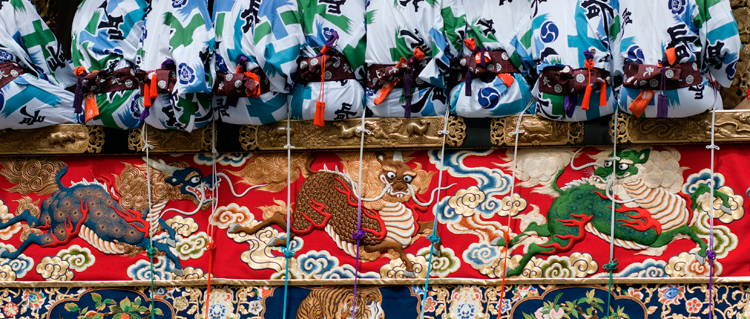
Festivals, fairs, and carnivals are a great visual opportunity for any travel photographer because they provide us with a glimpse into the local culture. I remember working in the Gion Matsuri festival in Japan. While one can say that Japan is super modern and hi-tech, the festival allowed me to see a different, more traditional side of the place – from the local food to the clothing.

festivals and events travel photographer

Here are some tips that will allow you to make the best out of your next festive event

Before you go

Build your next vacation around a festival. Why not schedule your next trip or family vacation around a festival? Not only can festivals and local events give lots of great visual opportunities, but a festival can be a good experience for your non-photographing partners as well. Thus, you can combine a family vacation with your love of photography at the same time and place.

How to find your next festive vacation

Choose your destination according to your schedule. If you know that you can take some time off in the summer, Google “best festivals in July and August” and Mr. Google will offer some great ideas – from a music festival in England to a tribal festival in Papua New Guinea. Now, all you have to do is to choose.

Or, choose your schedule according to your destination if you already decided on your next destination. If possible, try to choose the time and season according to a local festival or event.

festivals and events travel photographer

Booking and planning your trip

Book your trip as early as possible. Well-known festivals and fairs tend to attract huge groups of visitors from all around the world. Everything from booking a flight ticket to getting a good hotel can be extremely expensive or even impossible. So, do your best to book everything well in advance.

Choose smart lodging. While traveling, time is everything and as a cultures photographer, you want to maximize your time by selecting a smart lodging. Don’t waste your time and money on a hotel which is far from the main attractions. Be on the streets with first light, before the crowds.

Get the event schedule. Knowing when and where to be is important for every photographer, but this is a must if you are working around a moving festival (like a parade). If possible, look for the event schedule online, and be sure to double check it with a local (like a receptionist at your hotel or a local taxi driver) upon your arrival.

festivals and events travel photographer

On location

Get there before the crowds. To get yourself a spot in the first row, you will need to be there as early as possible. It might feel a bit boring or like a waste of time, but this is essential if you want to photograph the action and not just the backs of people’s heads.

Get a good vantage point

Find an off-public vantage point. Get creative and find yourself a (legal) way to avoid the hustle of the street (and standard imagery) by getting to a high vantage point. Scout a location – balconies or windows that can give you a better perspective on the event, and seek the owner’s approval in advance.

Build your own vantage point. I saw this technique while working on that story on the Japanese festival in Kyoto. To get a higher vantage point, the local photographers brought small ladders and stools that allowed them to shoot the action without thousands of heads in their frame. This is a smart and extremely practical idea.

festivals and events travel photographers

Be safe

Watch yourself and your gear. Besides being a paradise for pickpockets, some festivals and events can get pretty wild and even violent (I never got so many elbows and punches as I had in India). Avoid getting into a situation that might get too crowded or dangerous!

This recommendation is relevant for any significant event, but from my experience, mostly in festivals which are religious in nature.

Back home

Create a diverse set of images. While sorting and editing your work, try to make your set of images as diverse as possible. Showcase the event from different points of view; high vantage points, portraits, day and night, food, local arts and crafts, etc.

festivals

Approach organizers and pitch your work. Sending your work to the event organizers can be a great way to get published, and it may get you a ticket for the non-public areas at next year’s festival. In a case of a traditional festival, you can always send your images to the local embassy and offer them to use your work.

Here is my list of some of the best festivals for photographers. You may want to add some of these to your list.

Well known festivals

Kumbh Mela festival India

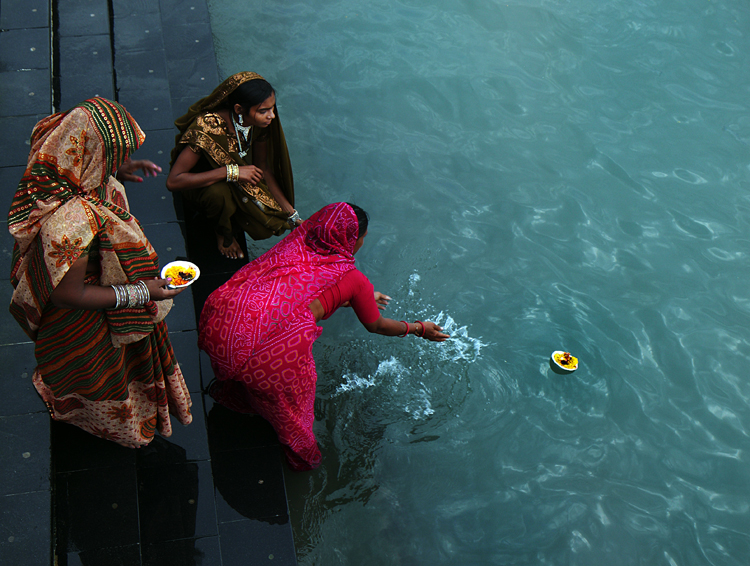
The Indian Kumbh Mela festival is the largest religious gathering in the world, with millions of people coming to bath in the holy Ganges River.

  • When: Every 12 years, with the next one on 2022.
  • Where: Haridwar, Allahabad , Nashik-Trimbak and Ujjain in India.

Kombh Mela festival India

Dia de Muertos Mexico

The Dia de Muertos, or the Day of the Dead, is a unique and photogenic festival which takes place in Mexico. On that day, locals believe that their dead will return to earth and are preparing for the event. After preparing food and offering, the locals will visit the cemetery, decorating the graves with candles and flowers, making it both spooky and very photo worthy.

  • When: The beginning of November.
  • Where: Throughout Mexico.

Songkran festival Thailand

In this festival, which is the Thai New year, you will need to find a solution to cover your camera, because you are going to get wet. Very wet! In the Thai culture (and in many other cultures as well) water are considered as a purifying source and this festival is the largest water fight in the world. Along with great food, music, and dancing in the streets, it is the Thai culture as its best.

  • When: 13-15th of April
  • Where: Throughout Thailand.

8.jpg

Hanami – Japan

If you thought that Japanese people could be a little crazy sometimes, wait until you meet them at cherry blossom time. Local picnics, karaoke singing, and amazing natural sight of the white cherry flowers, making it a local event to experience.

  • When: Depending on temperature and location on the island, but aiming for late March will be the best.
  • Where: Throughout Japan

Kombh Mela festival India

Less well-known festivals

Damadihana – Madagascar

Turning of the bones. A Malagasy tradition in which local families, take out the remains of their ancestors from the family graves and wrap them in new cloth. Dancing with the remains to the sound of local music is part of this morbid festival.

  • When: Throughout the second half of the year.
  • Where: Highlands of Madagascar.

Argungu Fishing Festival – Nigeria

This festival take place every year in the Northern part of Nigeria. The main event is a competition where thousands of men and women jump into the river with limited time to catch the largest fish, using only traditional tools or their hands.

  • When: February or March.
  • Where: Northern Nigeria.

Kombh Mela festival India

German Christmas market

Maybe not as exotic as the other events on this list, but the Christmas markets in Germany are an experience not to be missed. Local art stalls, outstanding food, music, and everything from the unique design of the stalls to the lights illuminating the streets, is so visually interesting!

  • When: November and December.
  • Where: Throughout Germany.

Conclusion

Do you have any other festival or event photography tips to share? Or maybe you know of some other great festivals to add to this list. Please share in the comments below.

googletag.cmd.push(function() {
tablet_slots.push( googletag.defineSlot( “/1005424/_dPSv4_tab-all-article-bottom_(300×250)”, [300, 250], “pb-ad-78623” ).addService( googletag.pubads() ) ); } );

googletag.cmd.push(function() {
mobile_slots.push( googletag.defineSlot( “/1005424/_dPSv4_mob-all-article-bottom_(300×250)”, [300, 250], “pb-ad-78158” ).addService( googletag.pubads() ) ); } );

The post Shooting Festivals and Events – Tips for Travel Photographers by Oded Wagenstein appeared first on Digital Photography School.


Digital Photography School

 
Comments Off on Shooting Festivals and Events – Tips for Travel Photographers

Posted in Photography


Parasitic Art: 11 Installations Taking Over Buildings Like Organic Growths

26 Oct

[ By SA Rogers in Art & Installation & Sound. ]

parasitic-art-1

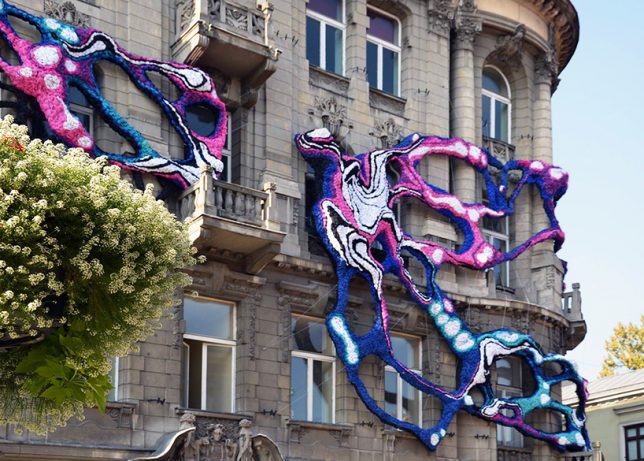
Some art just can’t be contained, even by the buildings that house it, expanding beyond these constrictions like alien appendages to burst through windows, wrap around columns and slink onto the sidewalks below. Inorganic materials take on the qualities of living things, manifesting as artificial parasitic growths as they cling to the facades of buildings in architectural installations that take on lives of their own.

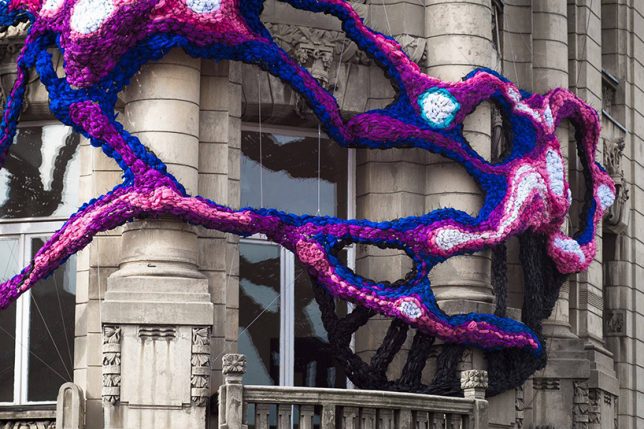
Hyperbolic Installation by Crystal Wagner, Poland

parasitic-art-2

parasitic-art-3

parasitic-art-4

An alien-like growth wraps itself around the corner facade of a historic building in Lodz, Poland, stretching tentacle-like appendages in shades of vivid pink, blue and purple. The site-specific work by Crystal Wagner is made from woven strips of plastic.

Wood Tentacles by Henrique Oliveira

parasitic-art-wood-4

parasitic-art-wood-3

parasitic-art-wood-2

Wooden forms expand to fill entire interior spaces, taking over light root systems to push through windows and doorways and into the streets, or in one case, to act as a secret system of interior tunnels. Artist Henrique Oliveira of Brazil typically installs his organic sculptures in gallery spaces, but one particular work has it bursting out of the confines of Casa dos Leoes in Porto Alegre.

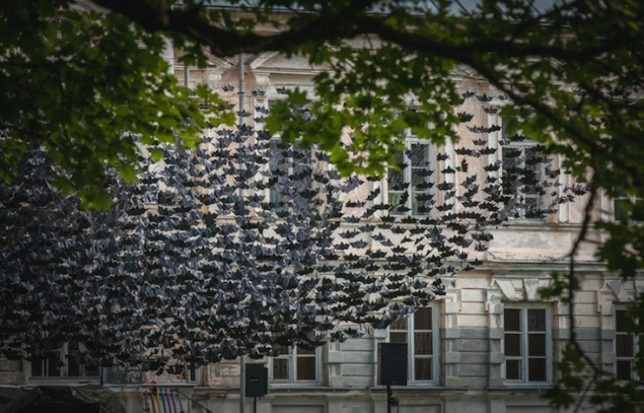
10,000 Bats on the Nature Concert Hall

parasitic-art-bats

parasitic-art-bats-2

parasitic-art-bats-3

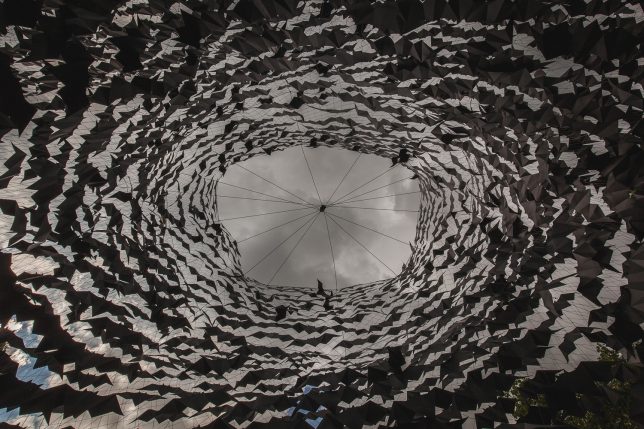
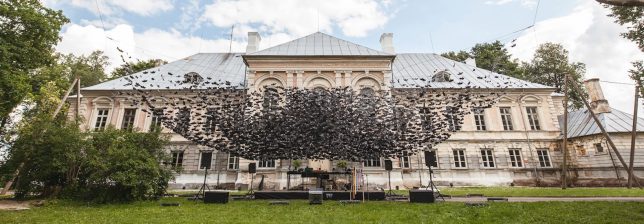
Thousands of bats stream straight out of the front door of the Nature Concert Hall at Zalenieki Manor in Latvia, forming a surreal cloud on its lawn. Architecture firm DJA took inspiration from the unpredictable formations found in nature when assembling the congregation of 10,000 paper bats, which create a tunnel effect when viewed from below.

Vortex by 1024 Architecture, Bordeaux, France

screen-shot-2016-10-25-at-9-36-26-pm

screen-shot-2016-10-25-at-9-37-33-pm

screen-shot-2016-10-25-at-9-36-45-pm

screen-shot-2016-10-25-at-9-37-42-pm

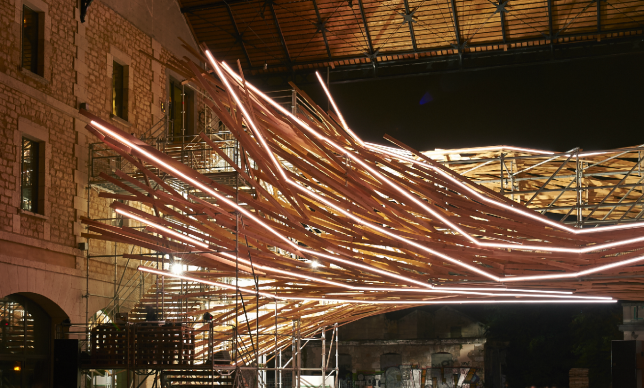
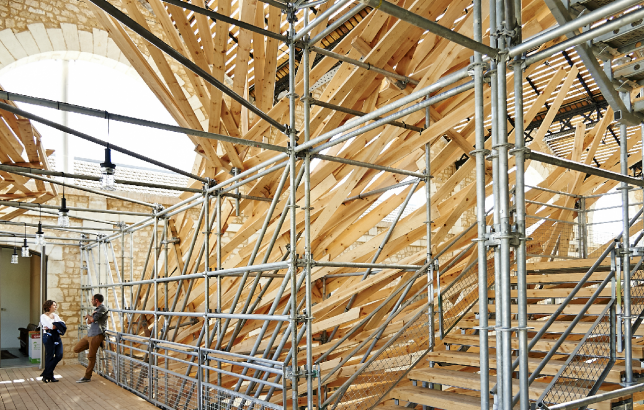
Strips of wood have taken it upon themselves to escape one building and grip the exterior of another, streaming toward it in a manner suggestive of autonomy. ‘Vortex’ is a generative light sculpture by 1024 Architecture almost completely made of scaffolding, installed on the Darwin Ecosystem Project’s green building in Bordeaux, France. “Merging organic materials with new technologies, this hybrid architectural artwork wraps around and embraces the footbridge between the complex’s two buildings, revealing and enhancing the venue’s dynamic energy while working as a live visualizer of energy consumption.”

Biografias by Alicia Martin, Madrid

parasitic-art-books-1

parasitic-art-books-2

parasitic-art-books-3

An ornate second-floor window seems to vomit thousands of books onto the sidewalk below in this installation by artist Alicia Martin, as if they, too, are hoping to escape the building. The effect is enhanced by the movement of the pages as they’re blown by the wind. Martin has created similar site-specific installations in buildings all over her home country of Spain.

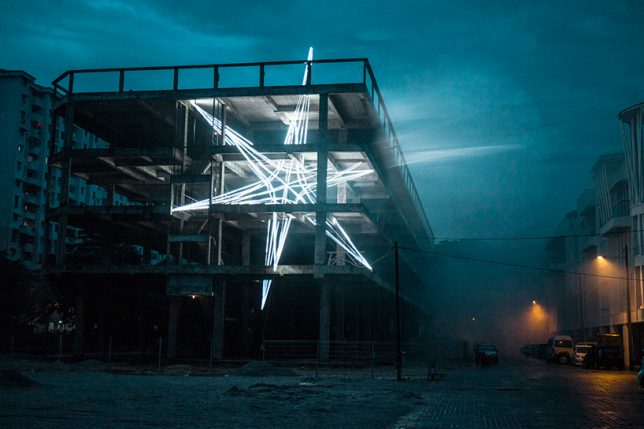
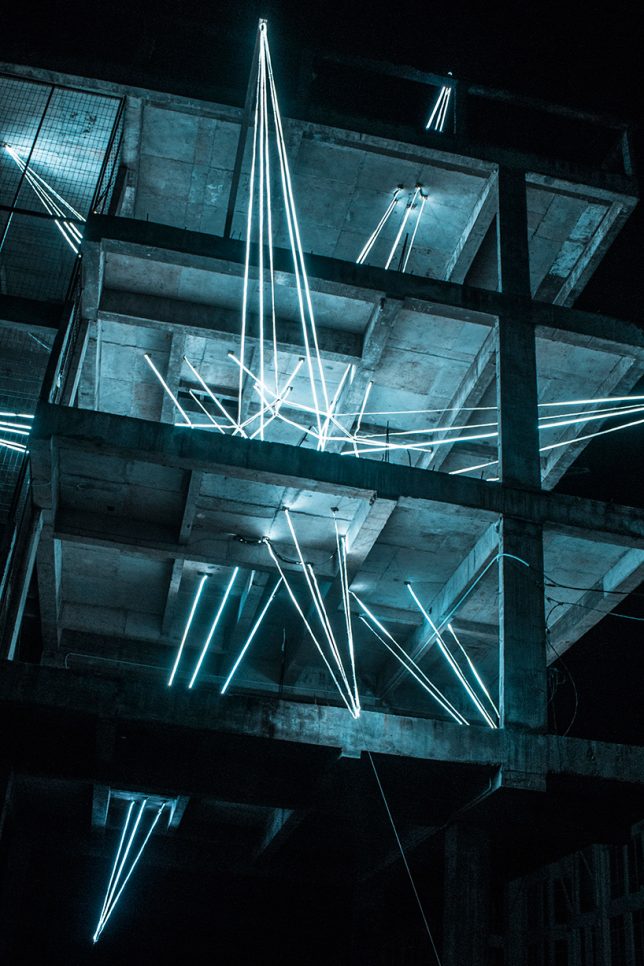
Glowing Star in an Unfinished Building by Jun Ong

parasitic-art-star

parasitic-art-star-2

Like some kind of alien life form that started out tiny and suddenly expanded, impaling an entire building upon itself, this five-story star made of light by Jun Ong suggests rapid growth that could not be contained. The artist envisions the LED sculpture as a physical manifestation of a glitch.

Next Page – Click Below to Read More:
Parasitic Art 11 Installations Taking Over Buildings Like Organic Growths

Share on Facebook


[ By SA Rogers in Art & Installation & Sound. ]

[ WebUrbanist | Archives | Galleries | Privacy | TOS ]


WebUrbanist

 
Comments Off on Parasitic Art: 11 Installations Taking Over Buildings Like Organic Growths

Posted in Creativity


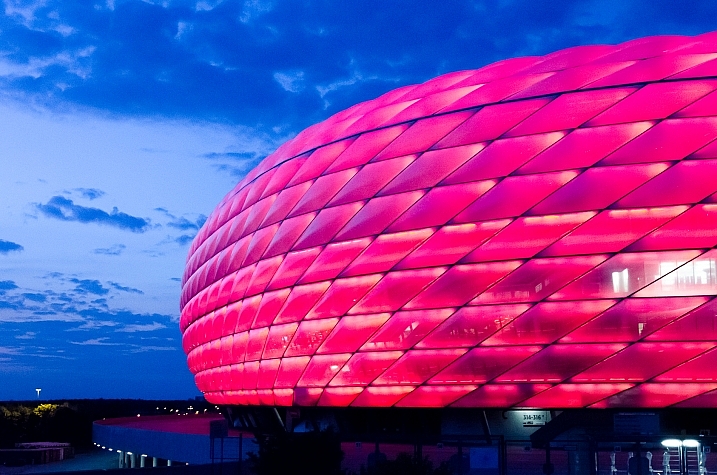
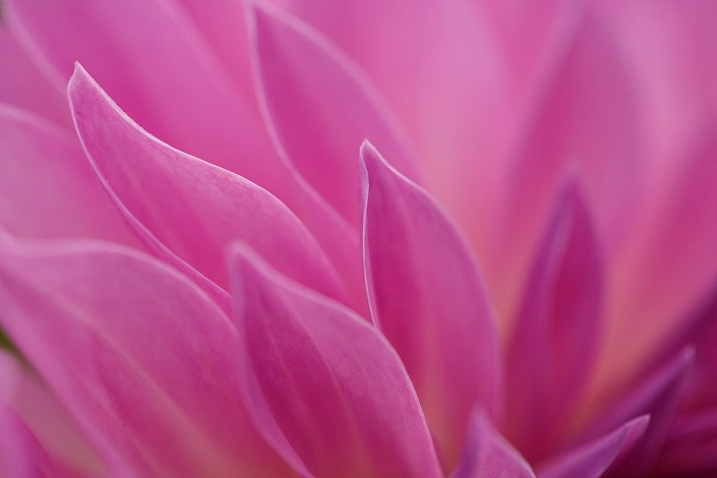
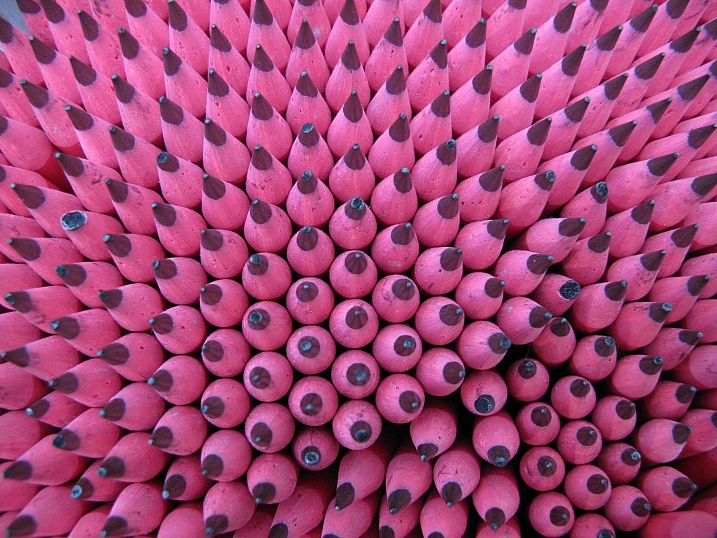
In The Pink – 19 Rosy Colored Images

26 Oct

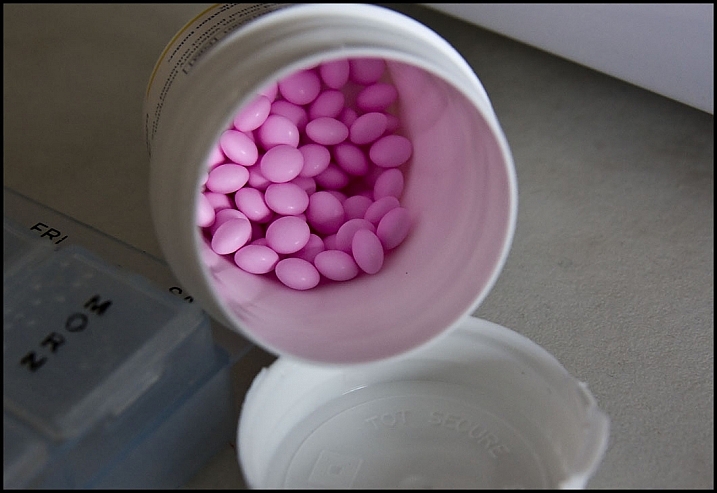
Rose colored glasses, in the pink, tickled pink, pinkie finger and a pink elephant. This color can represent a lot of things. Here are some examples by different photographers who found unique pink subjects to shoot.

Nuwandalice

By Nuwandalice

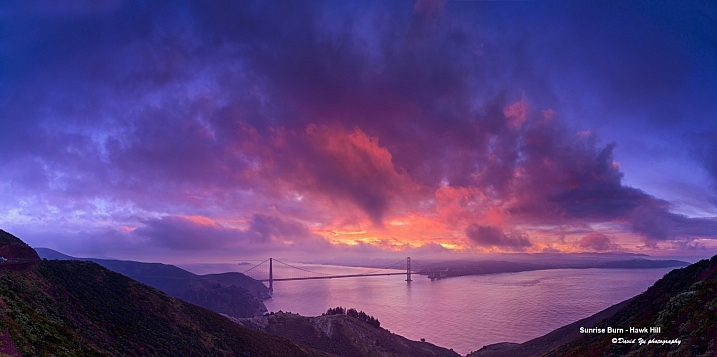
David Yu

By David Yu

Brian McHugh

By Brian McHugh

SurprisePally

By SurprisePally

Javcon117*

By Javcon117*

Katie Dalton

By Katie Dalton

Liliana

By Liliana

Howard Ignatius

By Howard Ignatius

Shimelle Laine

By Shimelle Laine

Paimei01

By paimei01

Louise Leclerc

By Louise Leclerc

*Ann Gordon

By *Ann Gordon

Ram Yoga

By Ram Yoga

Marchnwe

By Marchnwe

Duncan C

By duncan c

Ian D. Keating

By Ian D. Keating

John Verive

By John Verive

Chris Kennedy

By Chris Kennedy

Patrik Nygren

By Patrik Nygren

googletag.cmd.push(function() {
tablet_slots.push( googletag.defineSlot( “/1005424/_dPSv4_tab-all-article-bottom_(300×250)”, [300, 250], “pb-ad-78623” ).addService( googletag.pubads() ) ); } );

googletag.cmd.push(function() {
mobile_slots.push( googletag.defineSlot( “/1005424/_dPSv4_mob-all-article-bottom_(300×250)”, [300, 250], “pb-ad-78158” ).addService( googletag.pubads() ) ); } );

The post In The Pink – 19 Rosy Colored Images by Darlene Hildebrandt appeared first on Digital Photography School.


Digital Photography School

 
Comments Off on In The Pink – 19 Rosy Colored Images

Posted in Photography


‘It’s about sharing your beautiful experience’: Nikon Photokina interview

26 Oct

Photokina 2016 gave us a chance to speak to Nikon about the models it’s showing, where the market is going and the challenges it faces.

It was a relatively quiet show for Nikon, with three KeyMission lifestyle cameras taking up as much space as the recently announced D3400 and 105mm F1.4 lens. We took the opportunity to speak to Naoki Kitaoka, Department Manager, Marketing Department and Masahiko Inoue, Group Manager, Marketing Group 2, to see how the company sees the market. Please note the following interview has been slightly edited for clarity and flow.

What’s the key mission of KeyMission?

We started by asking whether they foresaw DSLRs and other dedicated cameras returning to being the niche product they were at the end of the film era and where KeyMission fits in:

‘We don’t want to change our policy,’ said Kitaoka: ‘We will keep offering the best DSLR to the customer. On the other hand, smart devices are getting popular: almost everyone has one or two or three devices in their pocket. In the mobile era, we have to offer new solutions that are fit for the mobile era. We want to be the end to end solution for consumers. The KeyMission is one of our solutions I think.’

The KeyMission range, including the KeyMission 360 are aimed at ‘immediate immersive storytelling,’ the company says.

KeyMission, then, is intended as a way of bringing Nikon’s expertise to new customers, Inoue explains: ‘Our competence is high quality imagery. So we will continue to keep that our core competence and apply it into the KeyMissions.’

‘For instance, the lens in the KeyMission 360 has a very wide angle of view. But this kind of category needs the size to be wearable. Using our competence and some new techniques, we managed to keep the quality and realize the miniaturization.’

‘It’s a very wide-angle view. Very fast lens: F2.0. Very bright and very wide, normally that kind of lens is larger optical design but we try to do the miniaturization.’

As well as image quality and size, simplicity is another aim for the camera, says Kitaoka: ‘It is not just an action camera. With the KeyMission series, we are bringing to market the ultimate tools for immediate immersive storytelling. They also demonstrate the role Nikon technology can play in the exciting new field of VR.’

‘The concept is about sharing your beautiful experience.’ Inoue concurs.

This means making it easy to share a wide variety of content types, Kitaoka says: ‘We believe every single model, every single customer has a different image of sharing. We have expanded the categories we cover to include KeyMission so you can find your best camera, from KeyMission to DSLR. Additionally, different types of consumers with different purposes need different types of cameras for every mission. We don’t want to interrupt your adventure.’

The value of sharing

This need for simple sharing underpins the company’s plan to introduce a version of its SnapBridge sharing system across its entire model range: ‘Easy means setting up between camera and smartphone,’ says Kitaoka: ‘We launched the WMU app so we had kind of experience for this setup process. We tried to improve, to make the setting easier. But still some of you might feel it’s quite difficult. Now three or four steps are needed to connect camera to mobile phone. We are trying to reduce steps from four to one, and finally zero.’

‘Now three or four steps are needed to connect camera to mobile phone. We are trying to reduce steps from four to one, and finally zero’

The company has chosen the technology it thinks will help. ‘We use Bluetooth Low Energy so it can realize smart link,’ says Kitaoka. There’s a benefit to this technique, despite its low bandwidth, he explains: ‘If we use Bluetooth you can use Wi-Fi at the same time. Once you can shoot your story and then camera automatically sends your story to smartphone. Your Wi-Fi can stay connected to the internet: you don’t need to switch Wi-Fi from the camera to Internet. We wanted to make your steps easier.’

The future of Nikon 1

Moving on, we asked about the future of the Nikon 1 series and what role it now plays in expanding Nikon’s audience. Despite a dearth of releases, the cameras featured prominently on Nikon’s booth and both men spoke positively about the system’s future.

‘The Nikon 1 concept is fit for some customers,’ says Kitaoka: ‘For now we’ll keep Nikon 1 as usual.’ The sudden focus on KeyMission doesn’t take away from this, he explains: ‘as I told you before, the action category getting popular. [The] market [is] always changing so we launched KeyMission series to expand our customers.’

It’s been nearly two-and-a-half years since Nikon last released a Nikon 1 V-series body but we’re told the system is still part of the company’s plans.

Inoue elaborates: ‘Some manufacturers have tried to enter the DSLR market with their mirrorless camera or something. Our standpoint is different. Because our product mix covers full-frame and APS-C DSLR and the Nikon 1, these three product categories mean we offer to the full lineup and we receive each customer’s good reactions.’

‘And then we’re not seeing cannibalization between the DSLR and the Nikon 1: the customer is completely different.’

Totally different, but with an overlap

While this distinction is clear for the J and S models, we wondered whether this also applied to V series customers. ‘The J, S and V models are different categories, says Kitaoka: ‘the V series is sort of special, people they well know about DSLR, what is a photograph, they understand these ideas.’

The smaller size of the cameras provides a benefit for these customers, Kitaoka explains: ‘Sometimes you get work from a client that requires you to travel for the job and maybe go back to shoot more. In that kind of situation, sometimes the photographer doesn’t get enough money from their clients to carry their whole equipment because of the baggage costs of the airline.’

‘V3 helped them a lot. The telephoto lenses are smaller. Just in case, they use V series for second camera at the same time, so they can reduce the size of their systems.’

‘One of the most important features of the V series is the high frame rate and accuracy of autofocus. It’s fit for professional photographers’ demand. It’ll never be the main camera for a photographer but it can help them a lot.’

Neither man would be drawn on whether Nikon intends to concentrate on one of these 1 series user groups over the other. ‘We really recognize the mirrorless type of camera, the possibility and we always study [the market],’ says Inoue: ‘but sorry, we won’t be able to comment on future products.’

1V vs DL

On the topic of future products, we also weren’t able to get clarification on when to expect the much-delayed DL compacts, so we asked how these users were distinct from the Nikon 1 V series customer:

‘DL’s concept and target is users of the D800 series,’ says Inoue: ‘Of course the D800 is a very nice camera but the DL… Anytime and anywhere [you can] take a high quality picture by using the DL. It’s a very good second camera for that kind of user. Therefore the switching and the menu, the GUI, is in accordance with the DSLR equipment. That kind of DSLR customer can use the DL without any stress. Even the power switch is in the same position as on DSLR. Zooming dial right here.’

There’s still no news on when Nikon’s delayed DL series of 1″-type sensor compacts will arrive.

‘[They] borrow technology from Nikon 1 and DSLR. Of course the one inch sensor, on-sensor phase detection autofocus and high frame rate continuous shooting, everything from the Nikon 1, but the high quality images and the user interface and the Picture Quality control from our D series. Also the lens quality. You know, the DL has fast lenses with the nano crystal coating, but in a compact type of camera. This is the first time we’ve used that kind of technology in a DSC.’

Who uses video?

Finally, and continuing the theme of making models for more than one type of customer, we asked about the importance and challenges of video for Nikon.

‘There are two types of high end users [using video]’ explains Kikaota: ‘those who started [their careers] shooting still pictures, but also there are a lot of customers who started with video. In our company we have two types of customer. It’s difficult to make one solution to fit for both of them.’

‘I think that line between movie photographer and stills photographers has gone. The client wants to you to shoot the both of them at the same time to reduce costs’

Shooting video with current cameras can often be quite complicated, we suggested. ‘[This] complicated operation is fit for the customer they started shooting from video. On the other hand there are professional [stills] photographers: they are not yet used to using video, their demand is easy operation. So there are two types of people. It’s a big problem.’

‘We are trying to make a solution fit for both of them. One solution is Flat Picture Control. Flat Picture Control is well suited for the professional photographer, who started shooting pictures and now find they have to shoot some video, too.’

‘They are not necessarily so familiar with video editing or modifying video. With Flat Picture Control they can understand from stills point of view.’

‘Now we have an exact solution right now, but we will keep considering [whether to make] a separate product or [if it should] go into the one product.’

Nikon recognizes the challenge of adding video features that both stills and video shooters will appreciate.

‘I think that line between movie photographer and stills photographers has gone. The client wants to you to shoot the both of them at the same time to reduce the costs.’

Kitaoka then expanded on the demands they’re hearing from customers: ‘First of all, quality of the movie is a basic demand so we have to answer that, second frame rate, then lens quality and autofocus, also, [the challenges of] movie AF and still AF totally different.’

‘Movie autofocus needs to be smooth, sometimes fast, sometimes slower, depends on the situation. Movie shooters want to [be able to] choose high speed autofocus or natural speed autofocus.’

‘Actually we equip the autofocus system fit for the movie but a lot of people [are finding it difficult to use] autofocus between still photo and movie. But we keep trying to [provide the] best movie autofocus in [our] DSLRs and across every single category.’

Articles: Digital Photography Review (dpreview.com)

 
Comments Off on ‘It’s about sharing your beautiful experience’: Nikon Photokina interview

Posted in Uncategorized