RSS
 

Archive for September, 2016

iPhone 7 Plus dual-cam only offers stabilization in wide-anlge lens, report says

12 Sep

According to a report by Ming-Chi Kuo of analyst firm KGI that was obtained by MacRumors, the iPhone 7 Plus dual-camera is equipped with optical image stabilization in the 28mm equiv. wide-angle lens, but not in its longer 56mm equiv. lens. In the report, KGI claims that optical image stabilization will likely make it into the tele lens with the next upgrade of the device in 2017 via a ‘voice coil motor’ upgrade:

“Note that for the dual-camera of iPhone 7 Plus, wide-angle CCM is equipped with optical image stabilization (OIS) VCM, while telephoto CCM only comes with general VCM. We believe the focus of the dual-camera upgrade will be equipping telephoto CCM with OIS CCM, so as to significantly enhance optical and digital zoom quality.”

In the same report KGI predicts that for the foreseeable future the dual-camera feature will remain exclusive to the larger iPhone Plus model which is expected to represent 30-40% of all iPhone sales. 

Apple limiting certain camera features to the larger model is not without precedent. In the iPhone 6 and 6s generations only the Plus devices were equipped with optical image stabilization. With the 7th generation this has now trickled down to the standard model and we would expect the same thing to happen with the dual-camera at some point in the future. 

During the launch presentation Apple did not mention a lack of OIS in the tele lens. In practical terms this would mean that, when shooting with the tele module,  the camera has to use higher ISO values in lower light to avoid camera shake. That said, we’ll have to wait for a review model to find what this means for image quality.

Articles: Digital Photography Review (dpreview.com)

 
Comments Off on iPhone 7 Plus dual-cam only offers stabilization in wide-anlge lens, report says

Posted in Uncategorized


How to Use Angle of Light in People Photography for Added Punch

12 Sep

This may be something that you have already heard from landscape photographers. It is very important to be aware of the angle of the light (where does the light come from) to be able to get the best of a scene, and the best exposure for your image. Also, when using a polarizing filter, it is more effective when used at a 90 degrees angle to the sun for better blue sky results.

Angle of light – people photography

But when it comes to people photography I couldn’t find a lot mentioning the angle of light online. So here is what I think about it.

Keep the light behind you

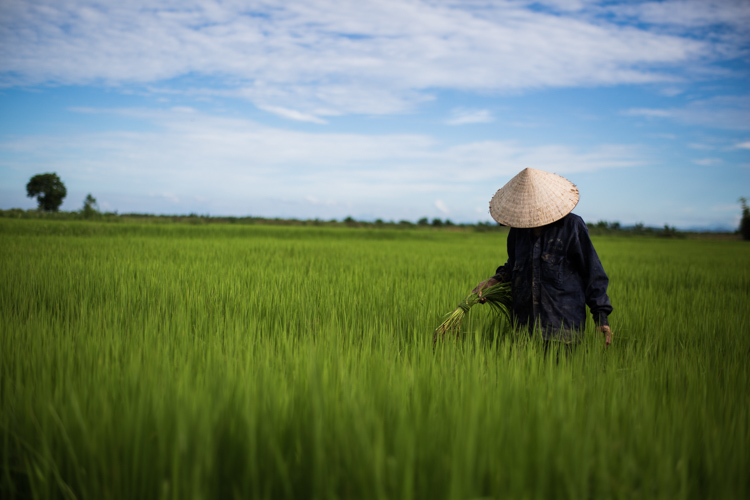
When photographing people, it is also very important to be aware of the direction of the light. As I mention when teaching about composition, you should try, as much as possible, to keep the light behind you (or avoid facing the light). If the light remains behind you, the general exposure has more chance of being better, avoiding under and over exposed elements in the image.

JB 4997

Keeping the light behind you ensures a better general exposure through the whole image. Hoi An, Vietnam.

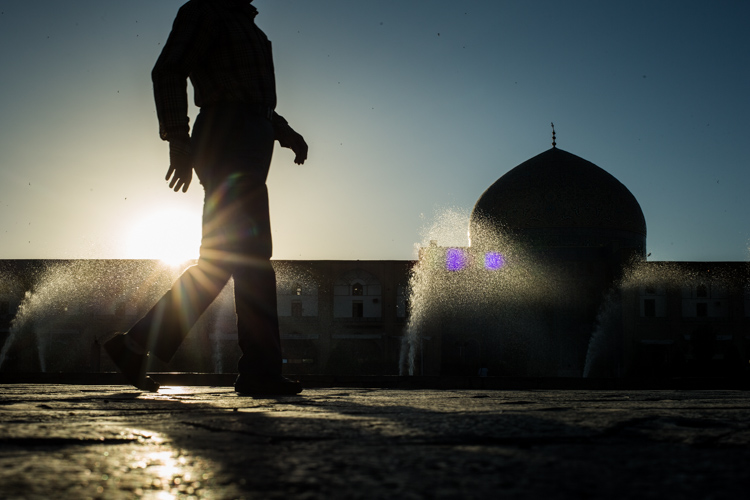
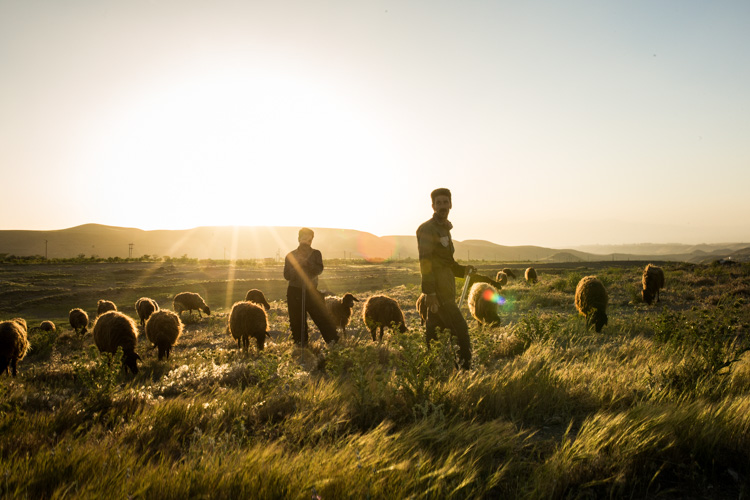
When facing the light, there are two options when it comes to people photography. You can either create a silhouette of your subjects while exposing for the brighter background. Or you can try to find a middle exposure, thus avoiding over exposing your background too much and keeping some details on the subject. This last method works very well in the early morning and late afternoon.

JB 8191
A silhouette created by directly facing the light. Isfahan, Iran.

The third option would be to expose for your subject and completely overexposing your background. I personally do not believe it looks that good though.

JB 6890

Finding a middle exposure between background and subject while facing the light works very well in the early morning and late afternoon. Kandovan, Iran.

Side light is magic

But when you put the light at a 90-degree angle, there is something magic that happens. When the light is softer and more colorful (at sunrise and sunset) it is possible to come up with some type of semi-silhouetted images. The part of your subject exposed to the light will be exposed correctly. The other part will be much darker (still preserving some details). That is going to create a more contrasty image, with a little more punch.

If you take an image which is slightly overexposed, there are no blacks in it and the histogram is slightly shifting to the right. As soon as the exposure goes down, some darker pixels will appear and add contrast to the image, making it instantly more powerful.

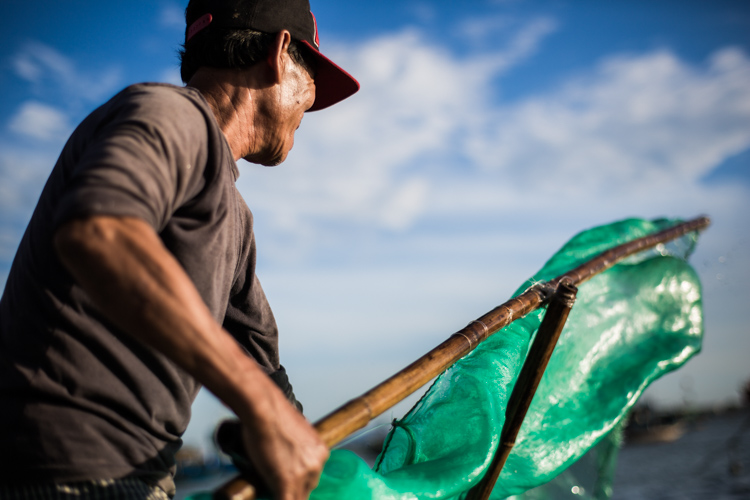
This is what a 90 degrees light will do to your subject: shadowing part of it and adding contrast and power to the image.

JB 4802

The light being on the right side, the back of this man is underexposed (in shadow), thus creating more contrast in the image. Hoi An, Vietnam.

For close-up portraits, the angle of the light has some superb effects on skin tones. Mostly when the tones are darker and more keen to reflect the light, this angle will enhance these tones. Because, as mentioned above, a part of your subject (the part which is not directly into the light) will be darker, the brighter parts will be enhanced.

Let’s compare

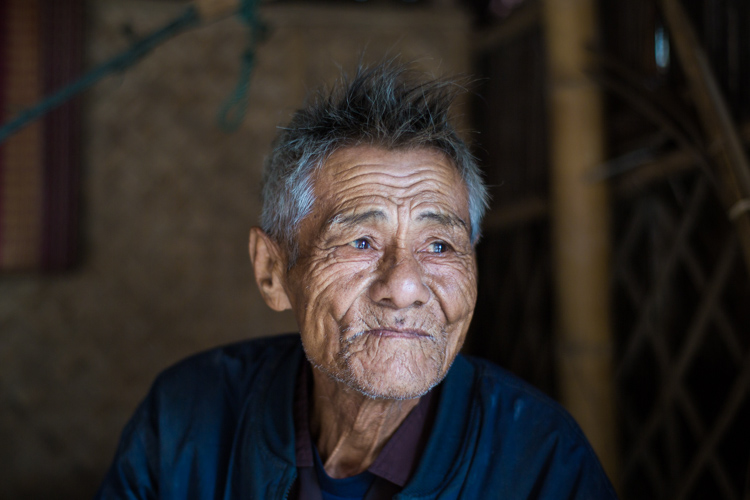
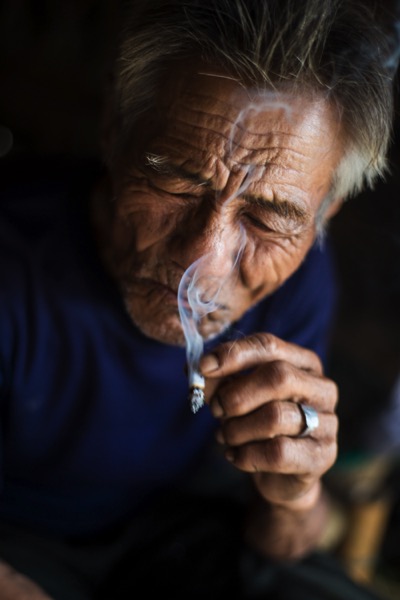
Here are two images of the same man, taken two minutes apart from each other. As you can see in the first one, the light is more even throughout the picture.

JB 2969

In this second image, there are some much darker areas on the left, adding contrast and punch to the image. The details on the skin tones are also much more interesting.

JB 4933

I hope that gives you some ideas for using the direction or angle of light to add punch to your people photography. Know where the light is coming from and make a conscious choice how to use it to your advantage.

Please share your people photos in the comments below.

googletag.cmd.push(function() {
tablet_slots.push( googletag.defineSlot( “/1005424/_dPSv4_tab-all-article-bottom_(300×250)”, [300, 250], “pb-ad-78623” ).addService( googletag.pubads() ) ); } );

googletag.cmd.push(function() {
mobile_slots.push( googletag.defineSlot( “/1005424/_dPSv4_mob-all-article-bottom_(300×250)”, [300, 250], “pb-ad-78158” ).addService( googletag.pubads() ) ); } );

The post How to Use Angle of Light in People Photography for Added Punch by Etienne Bossot appeared first on Digital Photography School.


Digital Photography School

 
Comments Off on How to Use Angle of Light in People Photography for Added Punch

Posted in Photography


KitSplit: Shoot with Super Fancy Gear for Very Little Moola

12 Sep

We’re ‘bout to get you all geared up for photo-snapping funmazement.

We’ve teamed up with KitSplit for a great giveaway! (We’re kinda mad we can’t win ourselves).

Win $ 100 in Photojojo gizmos and $ 100 in gear rental from KitSplit.

What’s a KitSplit? We’re glad you asked. Read along for complete giveaway rules and a formal introduction to our pals, the KitSplitters.

(…)
Read the rest of KitSplit: Shoot with Super Fancy Gear for Very Little Moola (833 words)


© laurel for Photojojo, 2016. |
Permalink |
No comment |
Add to
del.icio.us

Post tags:


Photojojo

 
Comments Off on KitSplit: Shoot with Super Fancy Gear for Very Little Moola

Posted in Equipment


Science City: Futuristic Research Complex to Vitalize Egyptian Desert

12 Sep

[ By WebUrbanist in Architecture & Public & Institutional. ]

science city egypt

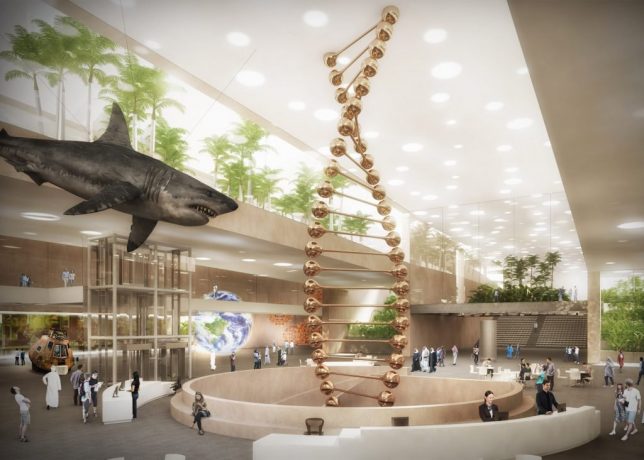
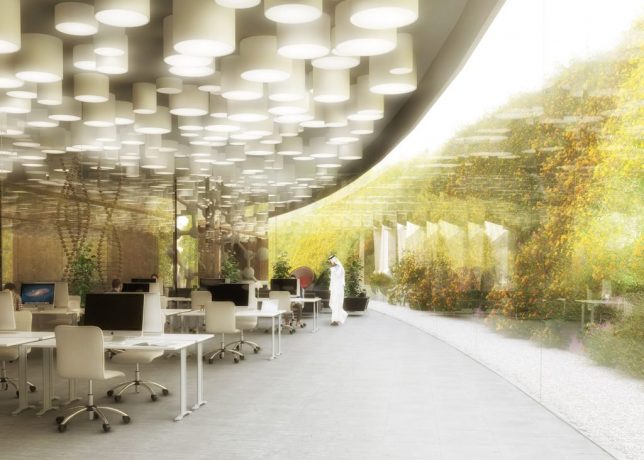
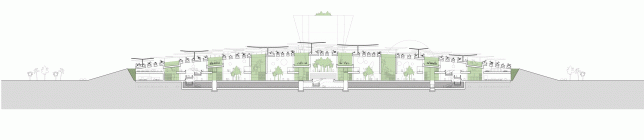
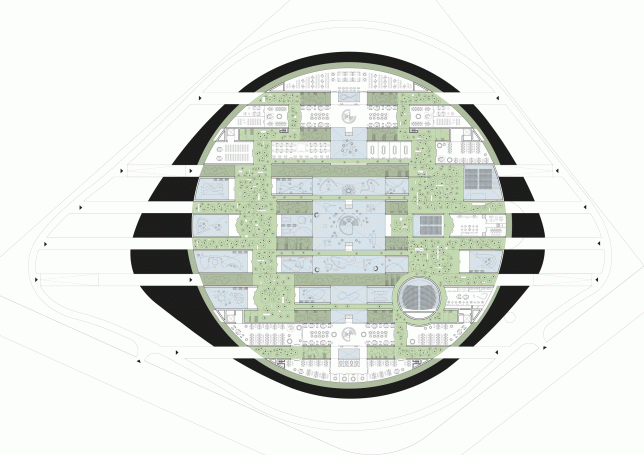
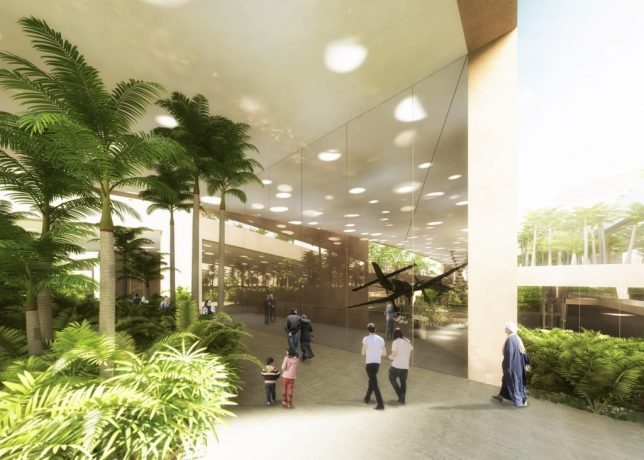
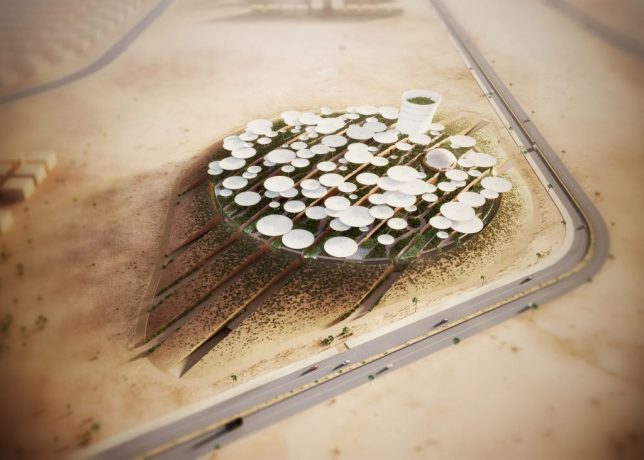
A new 125,000-square-foot science complex to be built outside Cairo will combine research, learning and museum facilities in a future-focused structure designed by competition-winning architects.

science side view

Architects Weston Williamson+Partners beat Zaha Hadid Architects to secure the role of lead designer on this forward-thinking Science City complex. Their plans include a planetarium, observation tower, workshop rooms and conference facilities in addition to spaces dedicated to scientific research and development.

science city displays

science center interior

The competition brief called for a future-oriented, state-of-the-art interactive science museum for the new century, and “a set of buildings and spaces that must be inspiring on the outside and motivating and exciting on the inside to visitors and employees alike” – it attracted nearly 500 submissions from architects around the world.

science plan view

science city section

science master plan

The circular footprint is filled with umbrella-shaped protrusions serving to define spaces and paths while providing shelter from the Egyptian heat. While currently located in a semi-remote location, the design is intended to form part of a larger regional master plan for redefining and expanding Egypt’s capital city.

science exterior

futuristic science complex

Of their victory, the architects said: “We are proud to have won. Needless to say that Egypt has a unique cultural heritage, but we were also attracted by the ambition of the project, clearly expressed through the brief. We look forward to developing the design and creating something worthy for Egypt’s future generations.”

Share on Facebook


[ By WebUrbanist in Architecture & Public & Institutional. ]

[ WebUrbanist | Archives | Galleries | Privacy | TOS ]


WebUrbanist

 
Comments Off on Science City: Futuristic Research Complex to Vitalize Egyptian Desert

Posted in Creativity


Review: Inexpensive Time Lapse with the YI 4K Action Camera

12 Sep

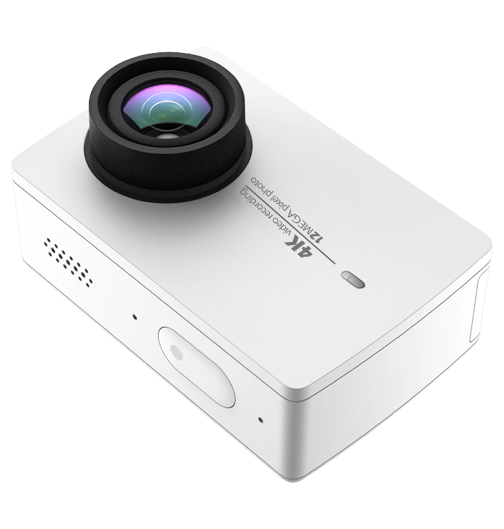
While this is essentially a review of a small action camera, that produces both stills and video, I’m going to focus on using the little YI 4K Action Camera, to kickstart your love of time lapse photography.

YI Technology – YI 4K Action Camera

Time lapse photography can produce stunning results that can inspire you to travel, to capture behind the scenes of your photographic projects, even as a great way to capture your holidays. Your week at the beach might only last a few minutes as a time lapse (as opposed to a couple of hours of video to make your friends sit through!) However you use it, there’s no denying it’s fun to use, and fun to try.

p15

Gear for time lapse photography

So, time lapse with amazing results requires a bit of gear, right? A camera that allows you to adjust your shutter and aperture. A trigger that allows you to set your camera to capture the time lapse, either indefinitely or for a certain period of time. If you want to take it further, you might look at something that allows you to have movement in your time lapse, rather than a static shot, just to add interest. (more on that, next article)

That being said, can you create a good enough looking time lapse, to start your journey into this fun and creative style of photography with an action camera? That’s the question I set out to find an answer to, with this latest hardware review.

I have a GoPro, it’s great! It’s the Hero4 Black, and it does time lapse, but it’s actually pretty expensive! Expensive enough, with some accessories and a spare battery, that you might actually consider just getting an entry level dSLR!

I also have a very brilliant Sony Action Cam 4K. Again, a spare battery and you’re up over half a grand. So, looking at options, I once again find myself wading into the “not really brand name” manufacturers of the lesser known! Enter YI Technology YI 4K Action Cam. There are a handful of reviews popping up online for this little camera, and most I’ve read or watched are positive. I’m not going to talk about the whole video side of the unit much, though it produces decent quality 4K footage for the price tag. This review is all about the camera’s time lapse ability.

p13

The specs in brief are as follows:

  • Main Processor – Ambarella A9SE chipset, includes a 800 MHz dual-core. Cortex-A9 ARM CPU and a high-performance digital signal processing (DSP) subsystem with a 32-Mpixel image sensor pipeline (ISP), and an advanced H.264 encoder capable of 4K resolution.
  • Image Sensor – SONY IMX377, 1/2.3″, 12 megapixels CMOS image sensor with Exmor R ability.
  • LCD Screen – 2.19″, 640×360 resolution touch screen, 330PPI, 250cd/m2 brightness, 30FPS, 160° FOV, 16:9.
  • Lens – Lens f/2.8 aperture / 155° wide-angle lens, 7G, f=2.68mm.
  • Wi-Fi – Broadcom BCM43340 Dual-band 5GHz /2.4GHz, built-in (802.11 abgn), offers 30Mbps download speed.
  • Weight – 3.4 ounces camera + battery (96.4 grams).
  • Size – 65 x 42 x 30 mm.

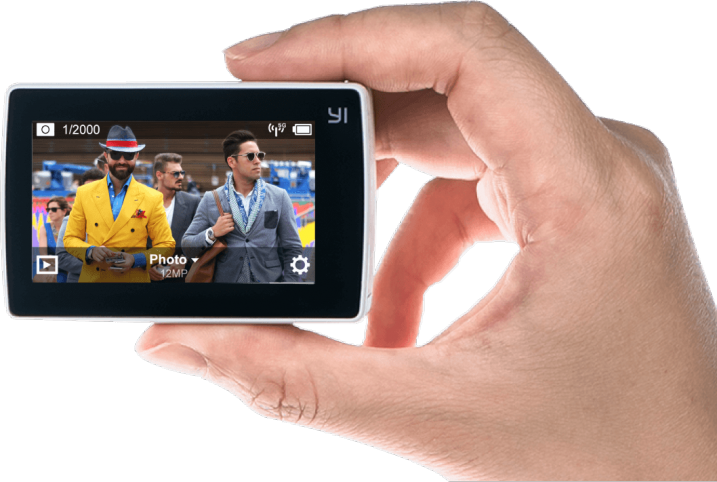
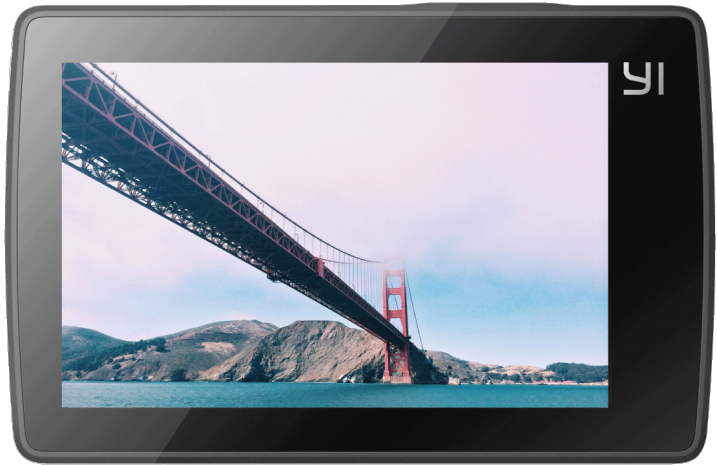
Said to have a Gorilla Glass rear touch screen, and I’ve got to say, that it’s actually useable! Responsive and clear, and also quite good at playing back your Time Lapse sequence on the camera.

Yi-4K-ActionCam-Review-Time-Lapse-Simon-Pollock-Gtvone

What’s it like to work on your time lapse creation with the YI 4K?

It’s actually very simple, there’s a touch screen rear display (as per above) and you simply tap it, select time lapse (either photo or video version of time lapse), dial in some adjustment, and press the go button! Now, the unit saves the time lapse in one of two formats, you may have noticed I said “Photo or Video time lapse” above, which is basically the output you get when you select either. In video time lapse mode, you get a single file at the end of your sequence, with photo time lapse you get the time lapse movie as the individual images.

There are benefits to both. With the video version of the sequence, you get a simple video at the end, that you can directly upload and share with your friends. The downside of this is that if you get a dodgy image (bird flies across, a drastic light change, etc.) in the middle of your time lapse, with the photo version you can simply delete the offending frame and you’re good to go. In video mode, you would need to edit that frame out with a video editor of sorts. Keeping in mind you may lose a little continuity in your time lapse if you delete more than a couple of frames, and you’ll see jumps.

I’ve made a quick example. At 1:03 in this video mode time lapse, someone over my back fence switched on their outside light and the white balance (auto, in video time lapse mode) jumped a gate and ran off into the hills! Take a look, you’ll see what I mean. It’s only 4 frames and I could edit it out, but left it in to show you what I mean. In photo time lapse mode, you can preselect the white balance and this wouldn’t have happened. My sweet darkening purples changed to blue.

Does the YI 4K work as an entry level time lapse camera? Absolutely it does, and with better specs than the current GoPro Hero 4 Black, it’s a decent little all-round package if you want something less expensive to document your photoshoots with too.

Conclusion?

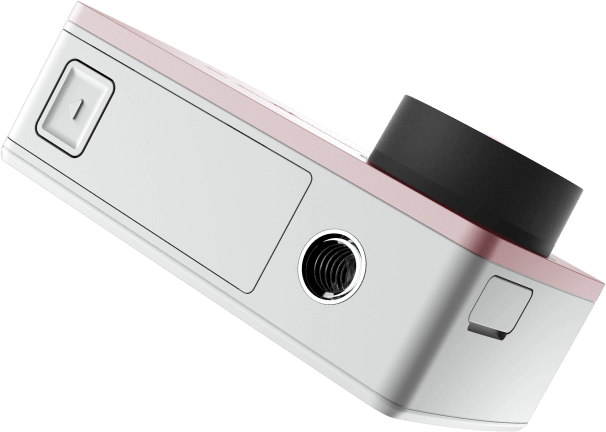
I really enjoyed using the YI 4K as I call it. It’s easy to use, produces a good result, and is very well priced for what you get. One other thing I really like is the inclusion of a 1/4 20″ metal tripod mount in the bottom of the camera. So, you can stick a tripod plate on it, or screw it straight onto a light stand for use on set, or just to get your YI4K up high for a time lapse.

I’m not about to bin my GoPro or Sony Action Cam, but there is rumoured to be a GoPro 5 dropping sometime very soon – we shall see how they stack up.

p6

What I like about the YI 4K Action Camera:

  • Simple iOS app to change all settings on the YI 4K.
  • Good quality images from an Action Cam.
  • Multiple options for time lapse (Video / Stills).
  • Fantastic touchscreen included in device by default.
  • Good battery life.
  • Tripod mount on the camera.

What I’d like to see improved:

  • More standard accessories

I’m not really thinking I should give this a star rating as I’ve really only used it for time lapse, but if I were to give it a rating, it’d have to be a 4.5 out of 5 I think! Good job, YI Technology.

googletag.cmd.push(function() {
tablet_slots.push( googletag.defineSlot( “/1005424/_dPSv4_tab-all-article-bottom_(300×250)”, [300, 250], “pb-ad-78623” ).addService( googletag.pubads() ) ); } );

googletag.cmd.push(function() {
mobile_slots.push( googletag.defineSlot( “/1005424/_dPSv4_mob-all-article-bottom_(300×250)”, [300, 250], “pb-ad-78158” ).addService( googletag.pubads() ) ); } );

The post Review: Inexpensive Time Lapse with the YI 4K Action Camera by Sime appeared first on Digital Photography School.


Digital Photography School

 
Comments Off on Review: Inexpensive Time Lapse with the YI 4K Action Camera

Posted in Photography


Why Shooting with the Joyful Abandon Approach Can Improve Your Photography

12 Sep

A few months ago I was at a keynote speech given by a famous photographer and workshop leader (you’d know him). He had a lot of great advice to give, but one thing that he said still bugs me. He told us a story about one of his students who, at the end of a wildlife workshop, exclaimed that he’d captured over 8,000 images. In his keynote speech, this famous photographer laughed at his student for shooting so much, since he himself had only shot 800 images.

W5A4762Joyful Abandon B

Shooting with a goal

I never like it when a workshop leader pokes fun at his students but, as he explained further, his reason for telling us the story was a pretty good one. As a workshop leader he would always set a daily goal. He would decide ahead of time what he wanted to capture and then he’d focus on making those images. He coached his students to work that way too.

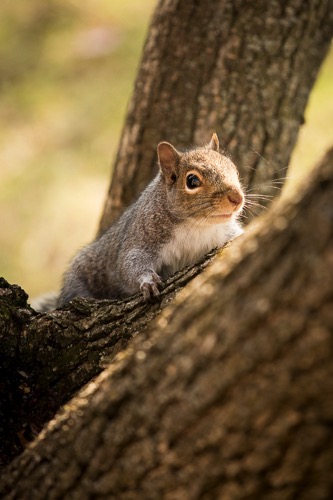
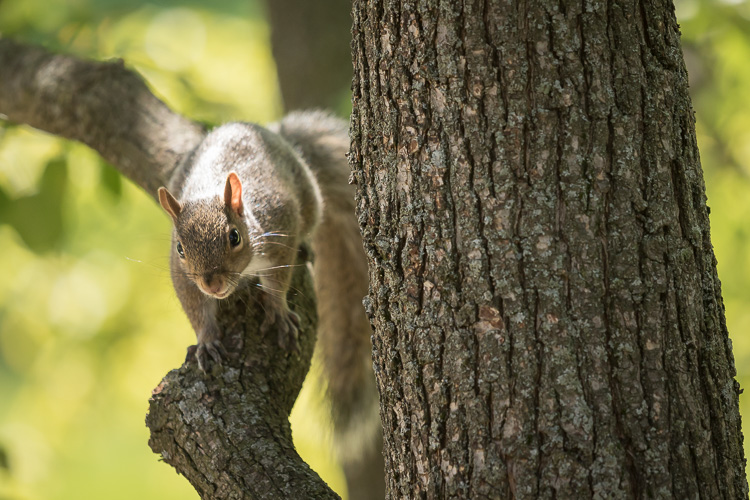
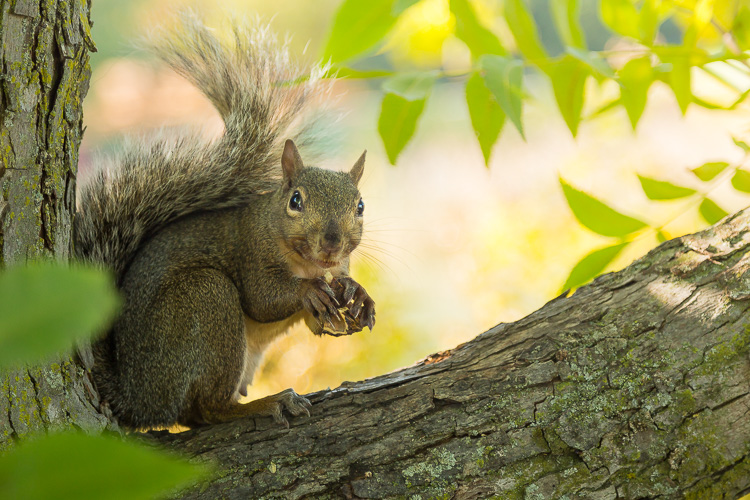
I love the idea of setting a goal and having a vision. Setting goals is part of how we improve our photography. Every fall the squirrels descend upon my backyard tree and gorge themselves on nuts. During this time of year, I stealthily make images of the little rascals. I don’t shoot aimlessly when I work on this project. My on-going goal is to capture soft golden light, creamy blurred backgrounds, sharply focused eyes and engaging expressions. Squirrels move fast and I’m neither as speedy nor as stealthy as I’d like to be. I shoot a lot of frames when I work on this project.

W5A2808Joyful Abandon A

1F8B8628Joyful Abandon B1

But…

You knew there was a but, right? The singular vision of this workshop photographer might not work for all of his students. As great a teacher as he is, the first morning you head out together, you probably won’t have enough information to have an instant vision of the work you want to make during the workshop. You might even struggle as you climb the steep learning curve of wildlife photography – and you may shoot a lot as you learn.

Plus, shooting with a goal doesn’t equate to less shutter clicks, it equates to more focus. You might need even more shutter clicks than you usually do, depending on the goal you’ve set yourself.

MG 9090Joyful Abandon C

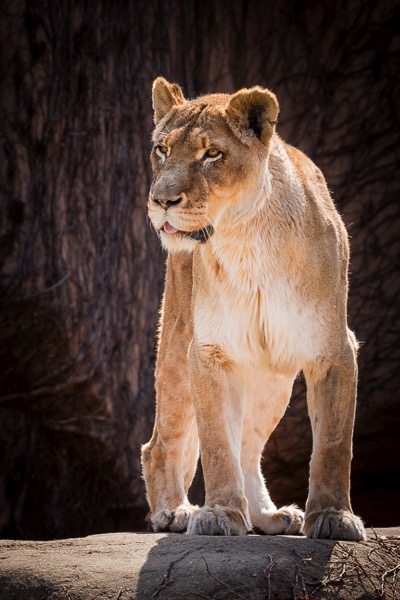
This big cat, photographed at Lincoln Park Zoo in Chicago, is one of the few images I’ve made there that I’ve been pleased with. Most of my images from the zoo don’t fulfill my vision. This one does because the she-lion is engaging with another lion (out of the frame). Her eyes are sharply focused and the background is not only blurred, but it frames her beautifully, and emphasizes her coloring.

I easily shot several hundred images of this lion one afternoon, to get this single image. Shooting my backyard squirrel project helped me define a vision of how I wanted this image to look, but it still took me a lot of frames to reach my goal.

Developing authentic vision

The way the keynote speaker made fun of his student for “over-shooting” bothers me because shooting wildlife images from inside a jeep or blind, elbow to elbow with four other workshop photographers, while steadying a super zoom lens, isn’t exactly easy stuff. Once you start to learn the technical aspects of this type of shooting, your authentic vision might kick in as early as Day 2 or 3 of your workshop. If it takes you all week to get comfortable with wildlife shooting techniques, your vision might not kick in until well after you get home.

Personally, that delayed vision is why I encourage photographers to shoot with what I call the joyful abandon approach. I especially recommend the joyful abandon approach when you’re visiting somewhere you’ve never been, or learning to shoot in a new way. Imagine that you do finally fully develop your vision well after you’ve finished your wildlife workshop. Won’t you want a huge pool of images to ensure that you have the raw materials to realize your vision?

IMG 065320131104Joyful Abandon D

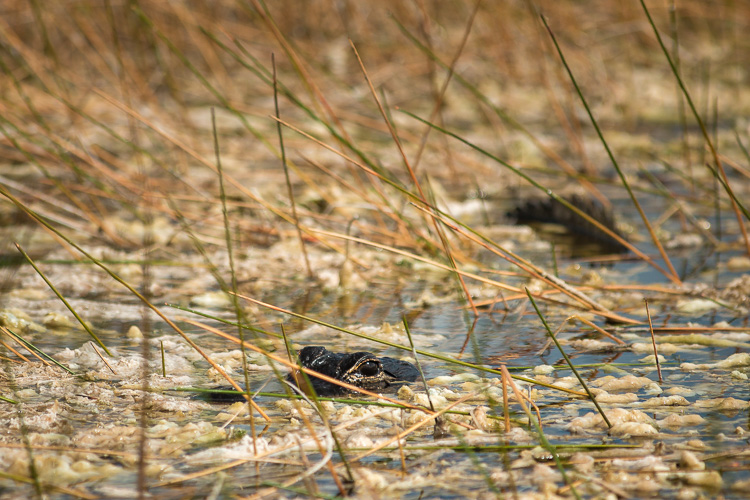
I’ve traveled to Florida dozens of times but up until a few years ago, I’d never visited the Everglades, or ridden in an airboat. Even with an amazing guide explaining the ecosystem and gliding the boat slowly up to known alligator dens, it was a technically difficult shoot. With the movement of the boat and the reeds, my camera struggled to grab focus where I aimed.

The result? I shot. And shot. And shot some more. I’m grateful for all that shooting, since this is the one image I walked away with (above). It has that blurred golden background I love and – key for me when I shoot wildlife – that engaged expression, and tack-sharp focus on the eye.

Build your portfolio

You may never again have a chance to return to that wildlife workshop location, but your workshop leader does. He has the luxury of going annually with his students. He can take years to develop vision, shoot with measured patience, and build a portfolio of the 25 best wildlife images anyone has ever seen.

You, on the other hand, should shamelessly fill memory cards so that when you arrive home, you have access to a massive database of images that might yield 200 shareable gems. It will take work to cull those images and get to those gems, but it’s worth it, isn’t it?

Since your workshop leader has been on this type of shoot over and over, all that familiarity gives him increased comfort, and that increased comfort opens the portal for him to be more focused, and more creative, while shooting fewer frames. Plus, he already owns all of those classic wildlife images that you’ll still want to bring home. He has the luxury of pressing that shutter button once every 15 or 30 minutes. You don’t. You have work to do and a portfolio to build.

W5A4327Joyful Abandon E

W5A4341Joyful Abandon E1

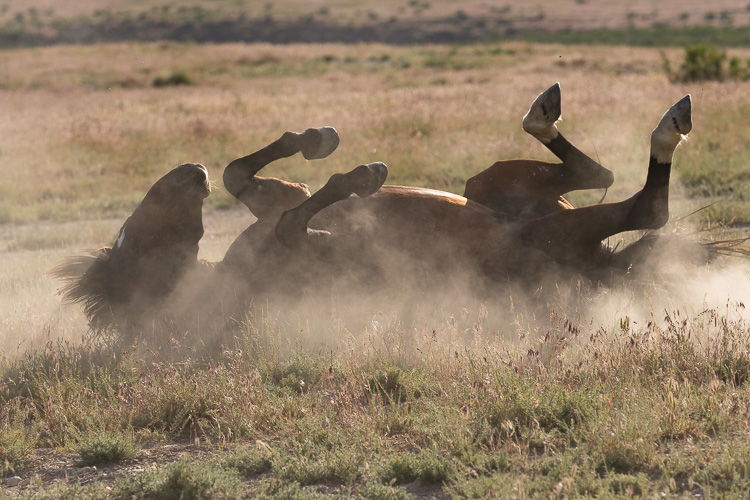
A wild horse rolling in dust is a classic, portfolio-building wildlife image. Over the years, I’ve easily shot a thousand frames of rolling horses, but for me, this is “the one.” The experience I’ve gained from shooting with joyful abandon taught me just where to stand and how to compose my image. To maximize the dust and light beams, while capturing all four legs in the air, a well-defined face, and a highlighted mane.

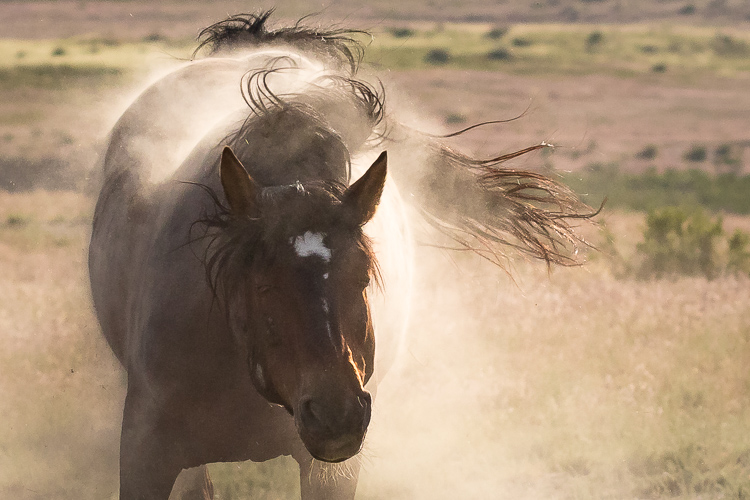
I continued to shoot as this horse lumbered back up to his feet and was rewarded with a glorious, dusty shake too.

Keep shooting with joyful abandon

While I’m using a wildlife workshop as an example, since that was this keynote speaker’s specific remark, this idea of shooting with joyful abandon really applies to any opportunity to shoot, anywhere, even if you’re not on a workshop.

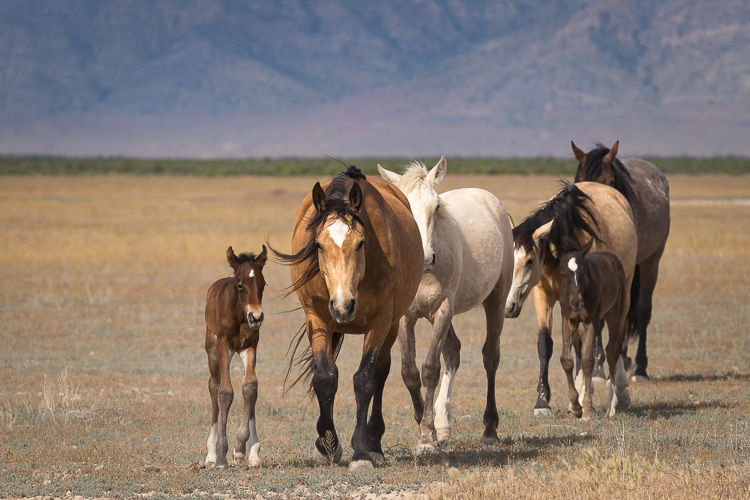
Whenever I travel to a new-to-me wild horse range, I carry massive amounts of memory cards and storage, and I shoot with absolute gleeful, joyful abandon. When I have a chance to return to that same wild horse range, I still have stacks of memory cards and storage, plus a more informed, authentic vision of the images I’d like to capture. I continue to shoot with joyful abandon and I promise you, over the course of a week, I’ll shoot far more than 800 frames.

W5A4799Joyful Abandon F

1F8B2291Joyful Abandon F1

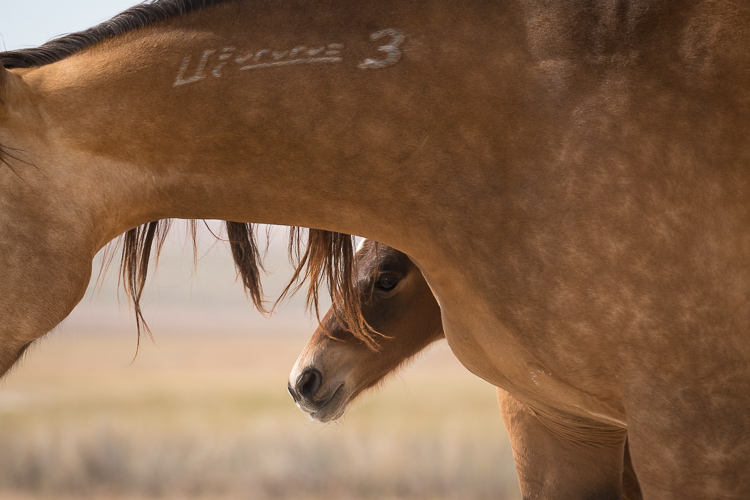
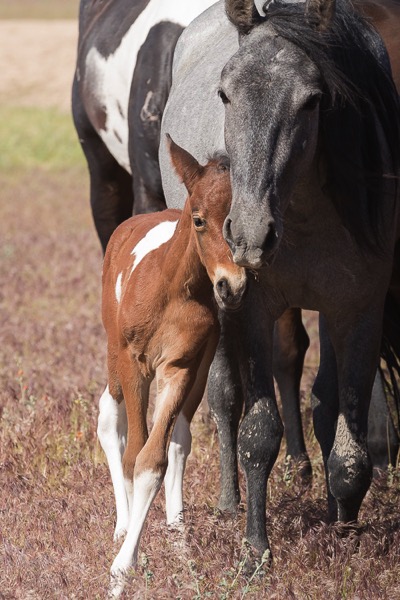
Making images isn’t just about how many frames we shoot, or how many keepers we get, it’s also about the process. Every single frame you shoot is part of your process, and that process helps you develop your unique vision. Whether that vision is focusing on the big picture or honing in on small details, or documenting grand moments or capturing subtle tender ones like these foals with their mothers, shooting with joyful abandon will help you achieve it.

The shooting with joyful abandon approach is how I’ve developed my vision – and how I continue to develop it and stay passionate about shooting. How do you develop your vision and fuel your passion for photography?

W5A4782Joyful Abandon G

googletag.cmd.push(function() {
tablet_slots.push( googletag.defineSlot( “/1005424/_dPSv4_tab-all-article-bottom_(300×250)”, [300, 250], “pb-ad-78623” ).addService( googletag.pubads() ) ); } );

googletag.cmd.push(function() {
mobile_slots.push( googletag.defineSlot( “/1005424/_dPSv4_mob-all-article-bottom_(300×250)”, [300, 250], “pb-ad-78158” ).addService( googletag.pubads() ) ); } );

The post Why Shooting with the Joyful Abandon Approach Can Improve Your Photography by Lara Joy Brynildssen appeared first on Digital Photography School.


Digital Photography School

 
Comments Off on Why Shooting with the Joyful Abandon Approach Can Improve Your Photography

Posted in Photography


Devoted: 12 Weird & Unusual Election Polling Places

12 Sep

[ By Steve in Culture & History & Travel. ]

weird-polling-place-1aa

Voting in elections is one of our most cherished democratic rights but where we vote – and who the candidates are – can leave a lot to be desired.

weird-polling-place-1b

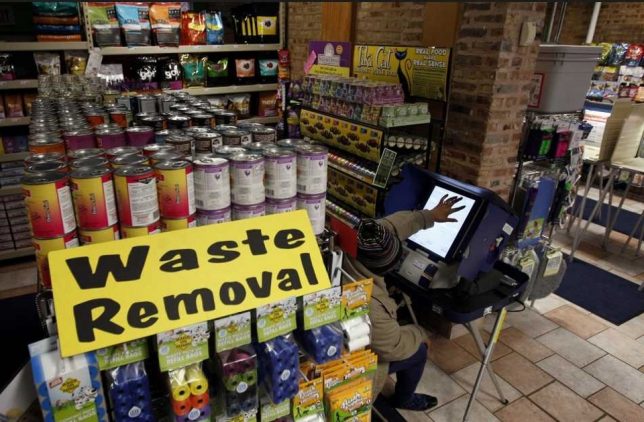
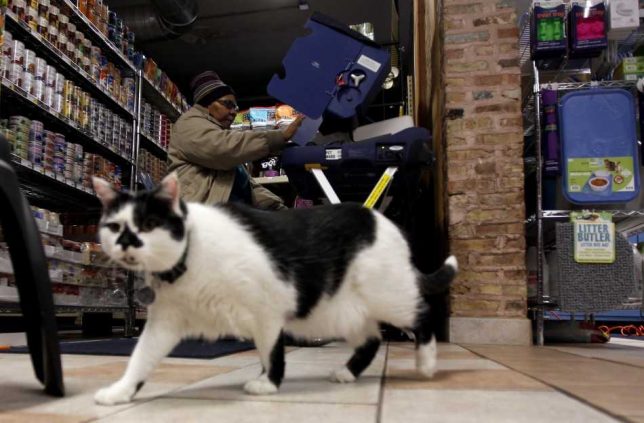
Polling places (or “polling stations”, as they’re known in the UK) are by their nature temporary establishments typically situated in schools or community centers. Sometimes, however, alternative voting locations must be set up when conveniently located suitable buildings are not available. Take the example above – the Urbanimal Pet Store in Chicago, IL – where local resident Barbara Hunter exercises her democratic rights while Oreo the cat exercises his legs.

A Grave Matter

weird-polling-place-2a

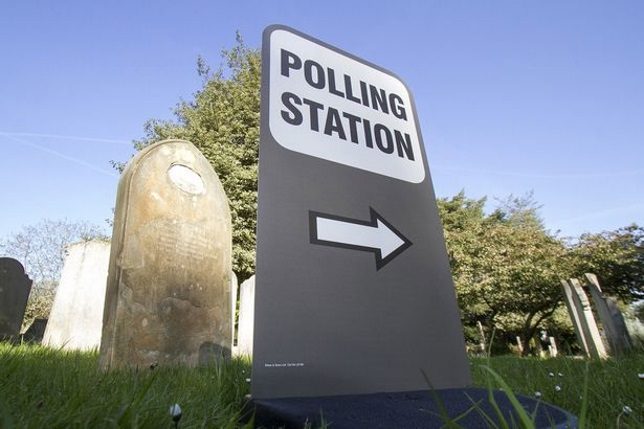
OK, so Chicago is notorious for its “deceased voters” but it’s not the only pace where those who’ve passed on can pass judgement on candidates. Here’s a polling station sign in the Wimbledon Church graveyard that looks eerily like the nearby tombstones. We wouldn’t be surprised if some nearsighted oldster leaves a bouquet of flowers at its base.

Election Re-Turns

weird-polling-place-3a

weird-polling-place-3b

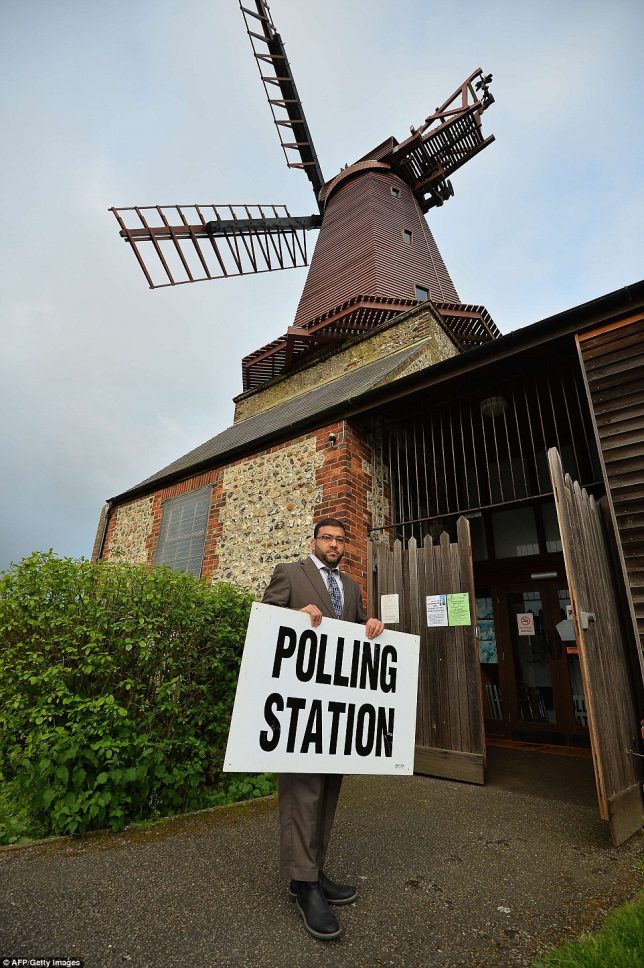
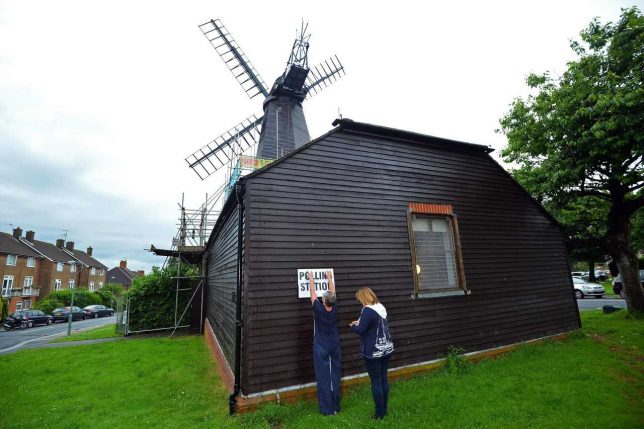
Sure, most politicians are full of hot air and most voters are fed up with the windbags by the time election day finally rolls around. Well, what goes around comes around in Brighton, UK where returning officer Ahmed Jamee and volunteer assistants open a polling station set up inside the historic West Blatchington Windmill.

Political Life Finds A Way

weird-polling-place-feature-4a

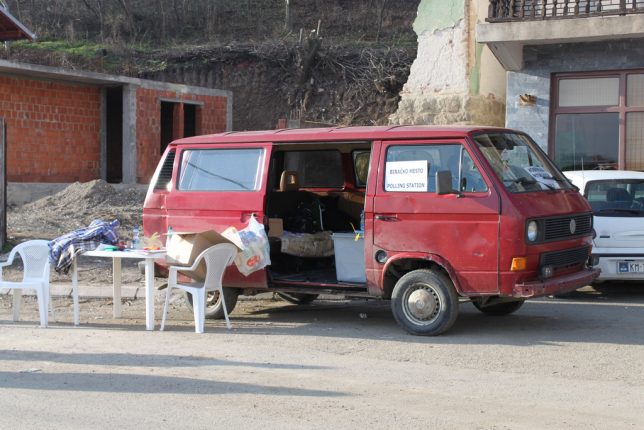
One would hope the owner of this slapdash voting station in Mitrovica-North, Kosovo doesn’t have “Free Candy” scrawled on the other side of his van. Kudos to Flickr user Mitra Nazar for showcasing this small and conveniently mobile Balkan polling station in December of 2010.

Next Page – Click Below to Read More:
Devoted 12 Weird Unusual Election Polling Places

Share on Facebook


[ By Steve in Culture & History & Travel. ]

[ WebUrbanist | Archives | Galleries | Privacy | TOS ]


WebUrbanist

 
Comments Off on Devoted: 12 Weird & Unusual Election Polling Places

Posted in Creativity


Spectacular editors’ picks from early 2016 National Geographic Nature Photographer of the Year entries

11 Sep

Editors’ picks: National Geographic Nature Photographer of the Year 2016 

Photo by Nancy Elwood/2016 National Geographic Nature Photographer of the Year
The Eye Of A Gator 

National Geographic’s 2016 Nature Photographer of the Year competition is underway, and like many of the subjects depicted in entries, the competition is looking mighty fierce. National Geographic’s editors have highlighted some standout early entries, but there’s still time to enter – the competition closes November 4.

You can see a few of the incredible entries here – head to the competition website for more.

Editors’ picks: National Geographic Nature Photographer of the Year 2016

Photo and caption by Nancy Elwood/2016 National Geographic Nature Photographer of the Year

The Eye Of A Gator

As I was sitting on the bank of the wetlands, watching a pair of anhingas prepare their nest, when one flew right down in front of me to fish. I quickly focused on her and out of the water came a wonderful fish brunch.

Editors’ picks: National Geographic Nature Photographer of the Year 2016

Photo and Caption by Christopher Markisz/2016 National Geographic Nature Photographer of the Year

Moonlightning

Lightning strikes lower Manhattan as a summer storm approaches a moonlit New York City skyline.

Editors’ picks: National Geographic Nature Photographer of the Year 2016

Photo and Caption by Kym Illman/2016 National Geographic Nature Photographer of the Year

Curious Lions

Using a wide-angle lens (16mm) on our remote-controlled camera buggy results in the background being smaller in shot and appearing further away. We fire the camera shutter using the same remote-control transmitter that we use to drive the buggy, allowing us a range of a couple of hundred meters although we rarely sit more than fifty metres away from camera.

Editors’ picks: National Geographic Nature Photographer of the Year 2016

Photo and Caption by Takashi/2016 National Geographic Nature Photographer of the Year

UFO formation

A baby cloud had born at dawn. The baby cloud had grown bigger and bigger than before. When it came the time of the morning glow, It had grown to many huge lenticular clouds. It looked like UFO formation.

Editors’ picks: National Geographic Nature Photographer of the Year 2016

Photo and Caption by Flamine Alary/2016 National Geographic Nature Photographer of the Year

Mist and Wind

Early this morning we were on our way for hiking at the Bruce Peninsula National Park. The sun was rising, it was misty, eerie and we did not see very far away when suddenly these wind turbines appeared out of the mist. It was quite spectacular.

Editors’ picks: National Geographic Nature Photographer of the Year 2016

Photo and Caption by Lidija Kamansky/2016 National Geographic Nature Photographer of the Year

Daybreak at Monument Valley

A storm was rolling in from the west and the few of us gathered for sunrise were watching and hoping that day would break before the rains came. The moment the sun peeked above the horizon, we were hit with incredible winds and sideways driving rain. My husband jumped behind me to block the blowing sand and to try to shelter me from the wind. I kept shooting as the skies lit up, while gripping the tripod to keep it steady. This image is the result of those efforts from this memorable sunrise!

Editors’ picks: National Geographic Nature Photographer of the Year 2016

Photo and Caption by Jassen T. /2016 National Geographic Nature Photographer of the Year

Fossil Fuel Galore

“A quarter century ago, scientists warned that if we kept burning fossil fuel at current rates weíd melt the Arctic. The fossil fuel industry (and most everyone else in power) ignored those warnings, and what do you know: The Arctic is melting, to the extent that people now are planning to race yachts through the Northwest Passage, which until very recently required an icebreaker to navigate.” New York Times, May 12, 2015. Midway-Sunset is currently the largest oil field in California. Aerial.

Editors’ picks: National Geographic Nature Photographer of the Year 2016

Photo and Caption by Li Liu/2016 National Geographic Nature Photographer of the Year

Beauty Beyond Disaster

The Soberanes Fire, located south of Carmel and Point Lobos, started Friday morning 07/22/2016. By Saturday night, the fire covered the entire mountain. The sky was illuminated by the golden glow of the forest fire. I hiked down towards a cliff by the beach. Because the wind was blowing south and slightly east, the sky to the southwest was clear. I witnessed the most spectacular sight I have ever seen, the Milky Way glowed above the raging wildfire. Beauty rose beyond disaster.

Editors’ picks: National Geographic Nature Photographer of the Year 2016

Photo and Caption by Kyon. J/2016 National Geographic Nature Photographer of the Year

Through

It was amazing to capture China’s beautiful mountains in such magnificent morning rays coming through.

Editors’ picks: National Geographic Nature Photographer of the Year 2016

Photo and Caption by Kim Aikawa/2016 National Geographic Nature Photographer of the Year

Swamp Raccoon

While looking for alligators at a swamp in Louisiana, this beautiful little creature wanders out of the murky waters right into the morning light, pausing just long enough to capture.

Editors’ picks: National Geographic Nature Photographer of the Year 2016

Photo and Caption by T. King/2016 National Geographic Nature Photographer of the Year

Jellyfish

Jellyfish

Editors’ picks: National Geographic Nature Photographer of the Year 2016

Photo and Caption by Hugh McCrystal/2016 National Geographic Nature Photographer of the Year

Wildebeest Migration

This is a photo of Wildebeest during migration in the Serengeti.

Editors’ picks: National Geographic Nature Photographer of the Year 2016

Photo and Caption by QIAN WANG/2016 National Geographic Nature Photographer of the Year

Let’s picnic

Yellowstone National Park, west thumb geyser basin, a perfect spot for picnic, and I mean not for human.

Editors’ picks: National Geographic Nature Photographer of the Year 2016

Photo and Caption by Aaron Baggenstos/2016 National Geographic Nature Photographer of the Year

Bear Hug

Brown Bears, Katmai National Park, Alaska

Editors’ picks: National Geographic Nature Photographer of the Year 2016

Photo and Caption by Yh Lee/2016 National Geographic Nature Photographer of the Year

Bull Race

Pacu Jawi, or bull race, is held in Indonesia where bulls are coupled, with the jockey standing on the plow harnesses attached to each bull, running a short distance of about 100 feet. Whichever pair runs the fastest in a straight fashion fetches the highest price (as they are deemed the best workhorse in plowing the paddy fields for harvesting).


Which images are your favorites? Let us know in the comments.

Articles: Digital Photography Review (dpreview.com)

 
Comments Off on Spectacular editors’ picks from early 2016 National Geographic Nature Photographer of the Year entries

Posted in Uncategorized


One week left to enter the USA Landscape Photographer of the Year Competition!

11 Sep

$ (document).ready(function() { SampleGalleryV2({“containerId”:”embeddedSampleGallery_3908548057″,”galleryId”:”3908548057″,”isEmbeddedWidget”:true,”standalone”:false,”selectedImageIndex”:0,”startInCommentsView”:false,”isMobile”:false}) });

There’s just a week left to enter the 2016 USA Landscape Photographer of the Year Competition! 

The USA Landscape Photographer of the Year Competition was founded in 2013 by Charlie Waite, one of the world’s most respected landscape photographers, and this year, the competition is bigger than ever. With a top prize of $ 15,000, the contest spans five main categories, ‘Environmental Value’, ‘My USA’, ‘Black & White’, ‘Classic View’, and ‘Urban’.

In addition to these five categories, DPReview is partnering with the competition to create a new award – ‘Life in the Landscape’, which will be judged by DPReview’s editors and writers. An additional special award, ‘Wild Landscape’ is sponsored by Future Publishing.

The competition is divided into two main classes – the USA Landscape Photographer of the Year Award and the Young USA Landscape Photographer of the Year Award. To enter Young USA Landscape Photographer of the Year, you must be 18 or under on the closing date of September 15, 2016. There are 7 categories within each of the two classes and up to 20 images may be entered across some or all of these categories, and photographers can enter the same image in more than one category and / or special award.

To enter a single image costs $ 10, while $ 30 allows you to enter up to 5 images, and $ 45 allows you to enter up to 20 images. Entrants for the Young USA Photographer of the Year Award pay a flat fee of $ 10 for up to 20 images.

The deadline for entry is September 15th. 

Enter the competition

Articles: Digital Photography Review (dpreview.com)

 
Comments Off on One week left to enter the USA Landscape Photographer of the Year Competition!

Posted in Uncategorized


ImageRights – Finding and Pursuing Copyright Infringement of Your Images

11 Sep

PWC-Image-Rights-11Image Rights (imagerights.com) is a middleman for those of us not in tune with the various legal systems, as they pertain to unauthorized use of our images. It’s an opportunity to go after copyright infringement (entities who use your photo work without your permission) and effectively hire a lawyer in a number of countries. It’s also a discovery service to find out where you images are being used.

It’s not perfect, and does not pertain to every case of copyright infringement, but it is a useful tool for those with a lot of online images. This article is an overview of the service, as an in-depth how-to would be very lengthy.

How it Works

Getting Started

Let’s take a look at the dashboard of Image Rights.
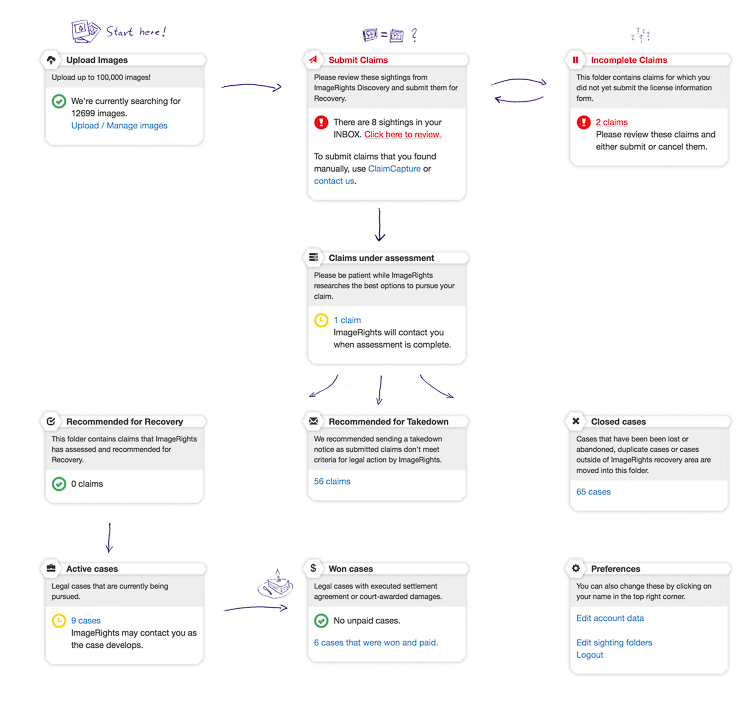
PWC-Image-Rights-01

I like that Image Rights (IR) uses a simple flow diagram to help me visualize what goes where, and what comes next. Images are uploaded by you (upper left), then when a discovery happens (upper middle) there are some options. Starting with the Inbox, you are shown all the current matches for your images. It is then up to you to filter the noise form the signal.
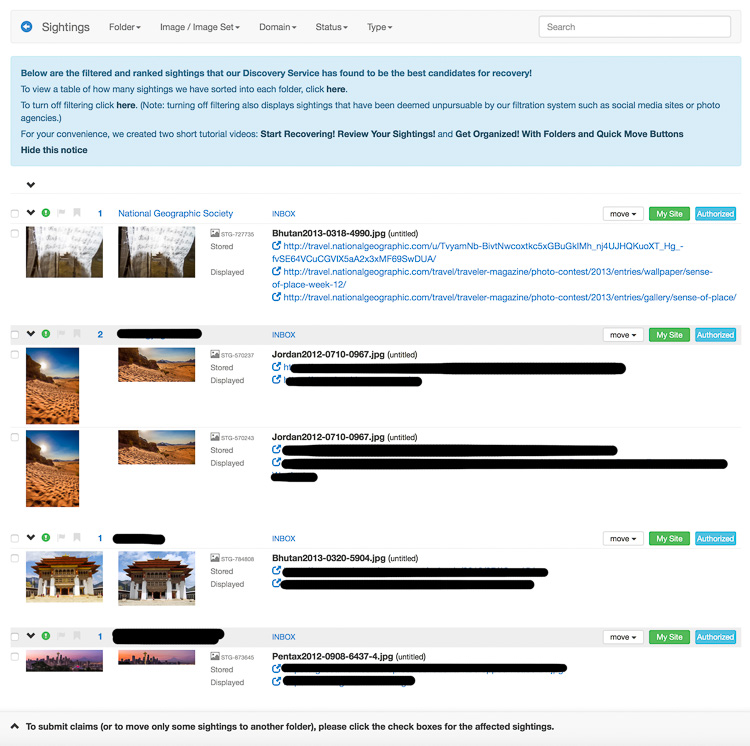
PWC-Image-Rights-02-Edit

I have redacted the names to protect the (potentially) innocent or guilty, except for National Geographic. I left them up there so you can see the details. That was a photo I entered in their contest, so I know that is an authorized use of my image.

IR gives you a link to where the image is stored (it will also show you items that are hot-linked) and where it is used. At this point, you click through the links to see if the image is actually used on the site (sometimes it no longer exists) and if it really is yours.

Opening a Case

Clicking the check box next to an image means you want to open a case to start an investigation. Doing so brings up the Prepare Case screen (see below).
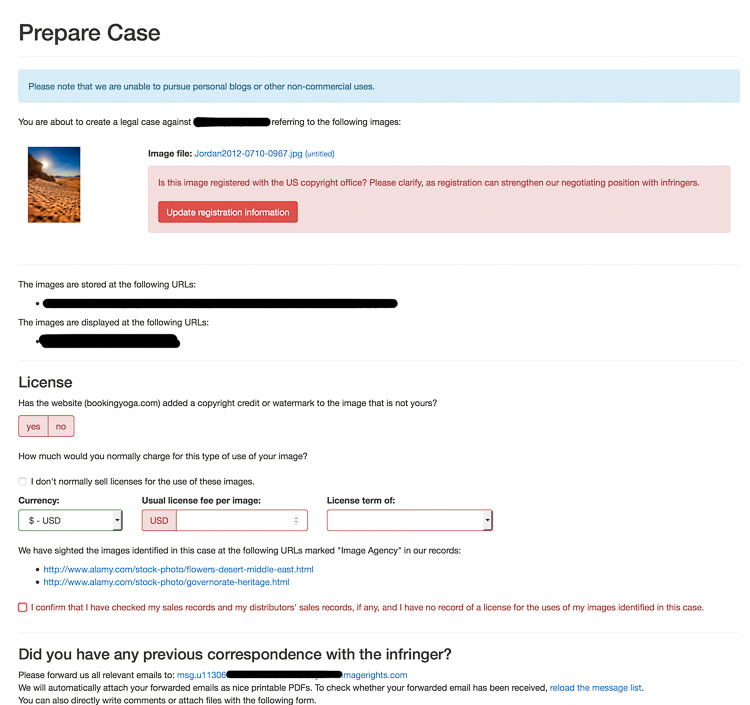
PWC-Image-Rights-03

Here is your chance to triple check the image use, let IR know if the image is registered with the US Copyright Office (USCO), and give them details of your normal fees.

Down at the bottom is where you finish your submission and provide more details. I often have images show up from articles posted here on dPS, that are scrapped by a number of disrespectful sites. I will mention the total number of images and their use. Real people read these comments, and they help clarify all the details to prevent too much back and forth during the discovery phase.
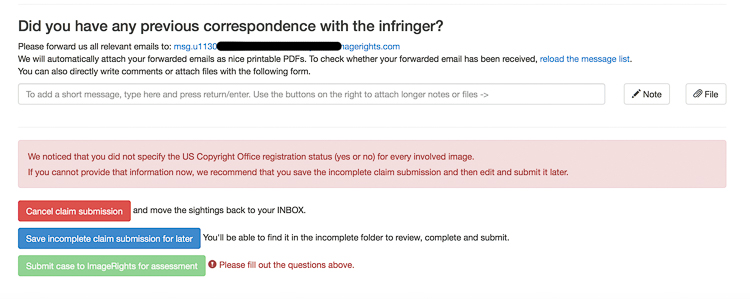
PWC-Image-Rights-04-Edit

Once you click Submit, then poof! Away it goes to be reviewed.

Sorting the Wheat from the Chaff

Getting back to the Inbox for a moment, there are more options than just opening a case. Take a look at the drop down offered next to each item.
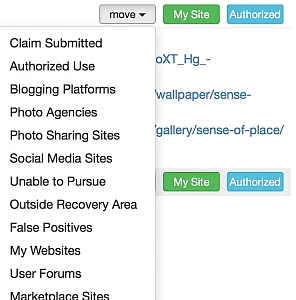
PWC-Image-Rights-05

The Sightings Folders explains each of these.
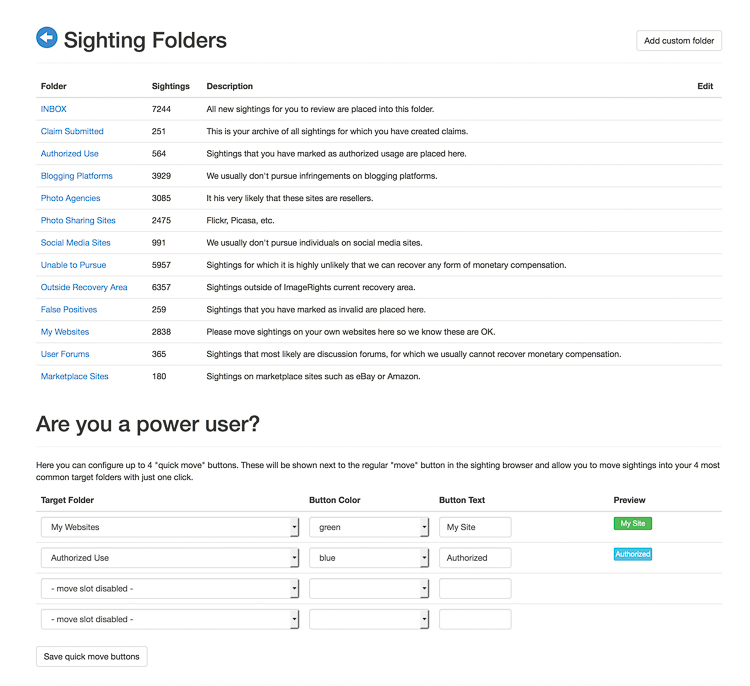
PWC-Image-Rights-06

Those are my real world numbers after using the service for 18 months, along with explanations that most of these things will not be followed up by IR. I use the Authorized and My Site options often, as IR will find my images here on dPS, as well as other sites where I write. This is why they have the “Power User” section at the bottom of that screen; to help you create Quick Move buttons if you find you are clicking the same things over and over again.

Where it Goes Next

Back to the dashboard:

PWC-Image-Rights-01

After submission, your claim will be assessed by real people at IR, then it will be taken on one of three paths.

  1. Case Closed: Various reasons can close a case. Often this is because the claim is outside of countries where IR has legal relationships.
  2. Takedown: The case may have merit, but recovery prospects look low, or no firm will take on the case. These items are moved to “Recommended for Takedown”. These are up to you to complete and sometimes recovery of a fee is still possible on your own.
  3. Recommended for Recovery: this is where you hope your case will end up. You will receive an email asking you what you want to do. Here, the law firm has given input to IR about how much should be asked from the infringer and you are given options to pursue or not.

If you agree to the terms, the case will move to the active stage, and the law firm will being their lawyering activities to attempt to recover a fee from the infringer. I have seen cases sit open for 6-12 months. My oldest is now 16 months. Sometimes it takes a while.

Winning, or Not

In an over-simplified view of the site, cases that are open will either be won or lost. Sometimes they are closed because of no action.

If you win, yay! IR will send you an email, and a note will be added to your case describing how much was recovered and what your cut will be. Payments can take a month or two to filter through.

What Does it Cost?

ImageRights has three basic levels of service.
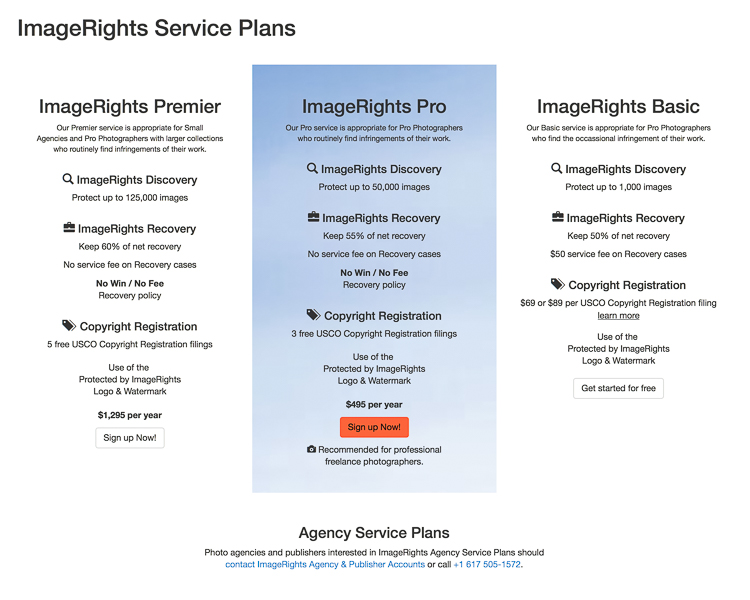
PWC-Image-Rights-07

The basic level allows you to upload 1000 images, costs $ 50 each time you open a case, and allows you to keep 50% of any money recovered from infringers.

The Pro level allows you to upload 50,000 images, costs $ 495/year and gives a 55% payout. It also comes with three free USCO registrations (more on that in a minute).

The Premier level allows you to upload 125,000 images, costs $ 1295/year, pays out 60%, and comes with five USCO registrations.

How Photographers can Use ImageRights

The most obvious use of IR is to find out who is using your images, and if you choose, make them stop and/or pay for the use of your image.

As their Basic service is free and includes up to 1000 images, it’s a good way to kick the tires and see if the service is useful to you. Be prepared for a bit of noise at first as the crawlers are given your fresh files. Also, if you have some common photos of icons (e.g. The Taj Mahal) be prepared for some false positives.

In the past year I have recovered more money using IR that I have sold via Alamy, my stock photography host. That stat is also common among the my friends who use the service, and also sell stock photos.

I have also found it is a good way to build your CV and electronic tear sheets. One of my clients uses my images in their advertising and is allowed to distribute them to re-sellers of their service for advertising. I can see where the images are used and potentially find new clients who are in need of similar images.

Copyright Registration

IR also has a useful USA copyright registration feature. You can register up to 750 images at a time in one process.

PWC-Image-Rights-08-Edit

You can do this in the Images area, by selecting individual images you wish to register, then clicking “Register” at the top. Or you can start a registration from the USCO Registration tab, which will eventually loop you around to selecting individual items.
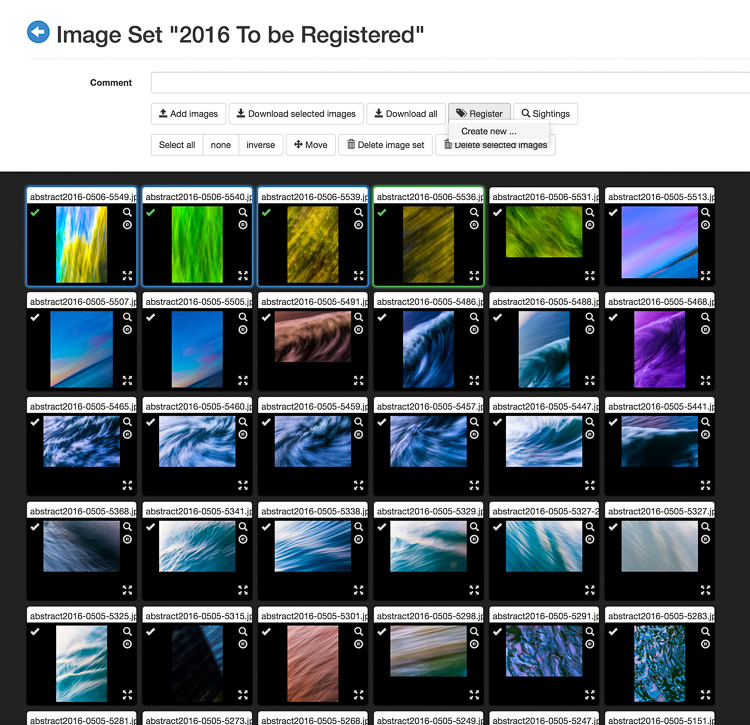
PWC-Image-Rights-09

The fee is $ 89 ($ 55 of which is the USCO fee) for Basic members and the other tiers each get a number of registrations free. You will receive a certificate in the mail, and an email with all the file names listed. IR will also remember which items are in process, or have finished registration, when it comes to opening cases. They will even put this data into the metadata of your image file if you use Lightroom!

Lightroom Publishing Service

Lastly, IR has a Lightroom Publishing Service which is a godsend for those of us addicted to the Adobe world of image edits. Create folders in the service just like you would in any other service and then publish them to the site.
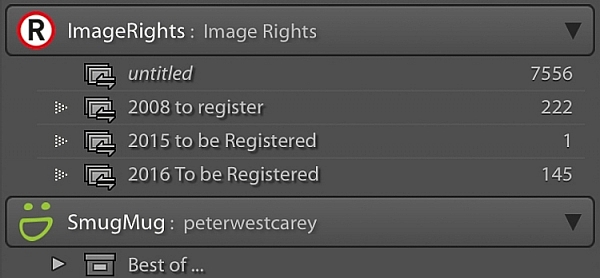
PWC-Image-Rights-10

IR then scours the Internet looking for new matches. Plus, if you register any images with the US Copyright Office, that information will be shown in the image metadata inside Lightroom.

Limits of the system

First, there are the countries where IR has no partner legal firm. China, Colombia, Mali; these are some of the many countries without well-defined, and fair copyright protection systems.

Second, there are many uses which just aren’t worth a lawyer’s time to pursue. Blogs, image share sites, and social media platforms are a few of the instances where the payout, or lack of a chance of payout, means no firm will take your case. You are still free to pursue action yourself though.

Also, the bots that run the checks don’t catch everything. Other services like TinEye and Google Image Search are useful in finding other cases of infringement. IR does have a feature called ClaimCapture that let’s you manually enter an infringement in order to purse, so using other search sites is helpful.

People can also simply fail to respond and often there is little you can do. I had a law firm, of all people, blatantly (website banner) use one of my images without permission. They were contacted by IR’s law firm and I noticed the image was promptly removed, but they simply ignored future requests for payment. Knowing that the cost of taking another firm to court would outweigh the benefit, this case was closed after a year of non-response.
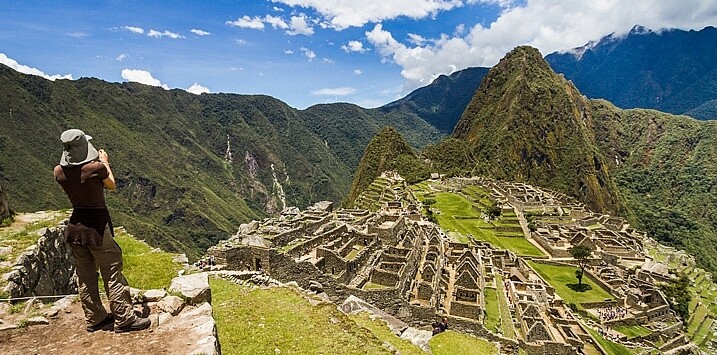
Most-stolen-image-rights

This is my most found image, it’s been taken and used on 15 sites without my permission.

How much time does it take

There is a learning curve at first, for sure. I spent maybe an hour a day at first, or after I uploaded a major amount of images. But like anything, I started seeing what was actionable and what was just not worth it. Now it is about 10 minutes a day, as things are more calm. At first it is a lot of work until you start seeing the types of sites taking your images. I notice Russian or Chinese or Nepali sites and I know I have no chance of recovery, so I put them in the “no chance for recovery” type piles instead of taking the time to submit them, only to have IR reject them. That part is just learned from doing. But it was certainly worth it for me as for pay out.

Conclusion

It’s not a perfect system. If you opt for the Pro plan there is risk of not seeing a return. So far it has worked okay for me, but it’s not like I will retire on all the illegal use of my photos. I like that it gives me some recourse when there is an obvious infringement (like Yahoo using my photo and removing my copyright). It also highlights sites where a Digital Millennium Copyright Act takedown notice is needed. Lastly, it is a relatively easy way to register your images with the US Copyright Office.

Do you do anything to protect your stock photography? What services or methods do you use? If you do photography as a hobby, it may not be worthwhile for you to go to all this trouble. But if you make a living from your images you may want to look into ImageRights.

googletag.cmd.push(function() {
tablet_slots.push( googletag.defineSlot( “/1005424/_dPSv4_tab-all-article-bottom_(300×250)”, [300, 250], “pb-ad-78623” ).addService( googletag.pubads() ) ); } );

googletag.cmd.push(function() {
mobile_slots.push( googletag.defineSlot( “/1005424/_dPSv4_mob-all-article-bottom_(300×250)”, [300, 250], “pb-ad-78158” ).addService( googletag.pubads() ) ); } );

The post ImageRights – Finding and Pursuing Copyright Infringement of Your Images by Peter West Carey appeared first on Digital Photography School.


Digital Photography School

 
Comments Off on ImageRights – Finding and Pursuing Copyright Infringement of Your Images

Posted in Photography