RSS
 

Archive for September, 2016

Park Like a Girl: Women Frustrated with Pink “Ladies” Parking Places

19 Sep

[ By Steve in Culture & History & Travel. ]

ladies-parking-1

Sexism or security – why not both? Pretty pink women-only parking spaces show once again that best intentions can bring about unintentional consequences.

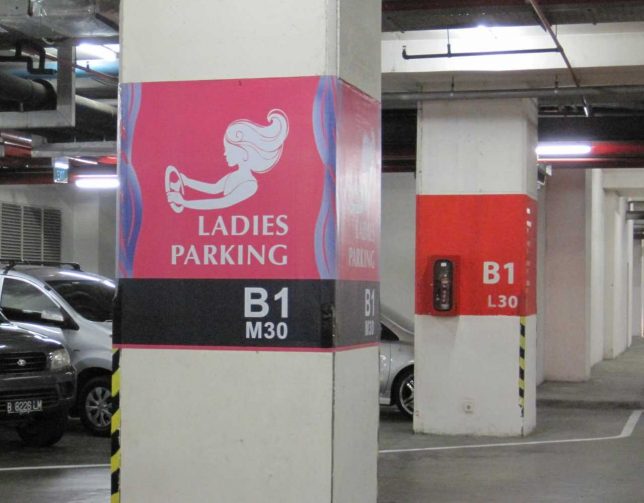
A curious fact about designated women-only parking is that many of the most obvious examples can be found in developing nations – societies not exactly known for egalitarianism and women’s rights. Travelers from First World countries who notice these “pink paradises” are often bemused by both the concept and the location, as is the case with Canadian blogger Maiya of Hungry Woman Eats who snapped the Ladies Parking section at the Gandaria City Mall in Djakarta, Indonesia.

Shanghai Surprise

ladies-parking-9a

ladies-parking-9b

ladies-parking-9c

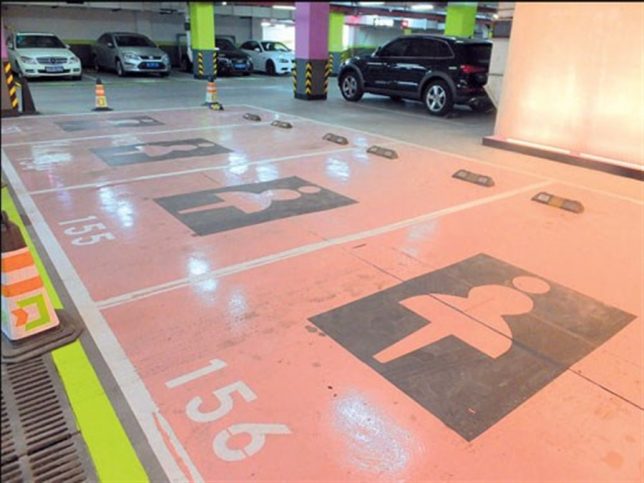
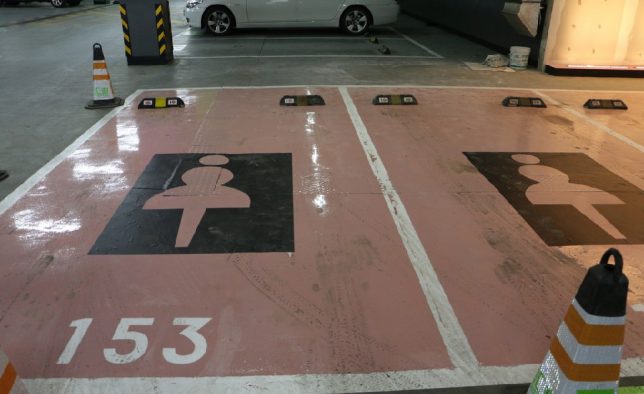
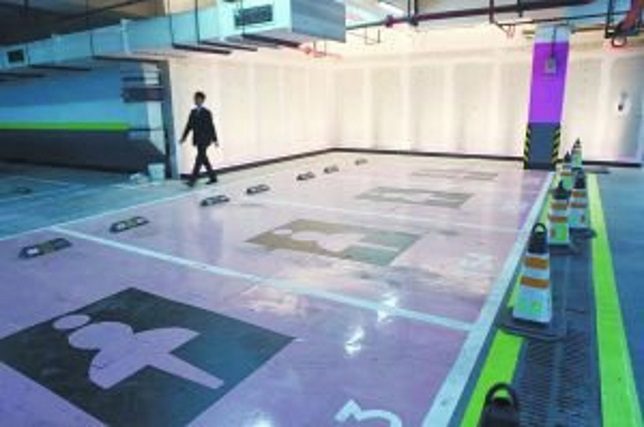
Women-only parking has come under fire, however, from (among others) women’s rights groups who are offended by the pink paint, cutesy signage and (in some cases) the extra width allotted to each space. Some men are peeved as well, including a netizen who posted on xinmin.cn “Isn’t it a kind of discrimination against men drivers? Some men may be less skilled at parking than women.” Hurt feelings aside, who’s taking the fall for the glossy floors of these women-only parking spaces at the Wandu Center in Shanghai, China? You try navigating that slick expanse on a rainy day, loaded down with shopping bags, and wearing stilletto heels.

One Tire Over The Line

ladies-parking-3

Without the benefit of a distance-shot, we’ll just have to assume this rather stark and (mainly) sexism-free Ladies’ Parking sign at a Brescia, Italy rest area denotes at least two parking spaces reserved for the fairer sex. We’ll refrain from commenting on the above driver’s parking technique, however, and make no allusions to their gender. Kudos to photographer Stefano Bolognini, who visited the location – that may even be HIS poorly parked car – in 2007.

Turkish Delight

ladies-parking-4a

ladies-parking-4b

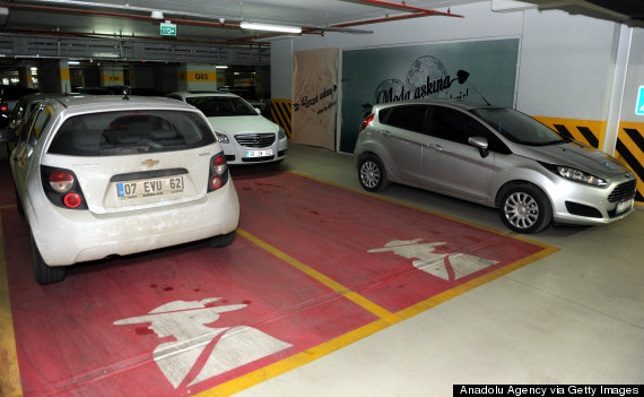
Why did ladies’ parking get the works? That’s nobody’s business but the Turks’… and business must be very good indeed at the MarkAntalya Mall in Antalya, Turkey. Not content with working up a couple of pink parking spots just for show, the mall has designated a whopping 450 parking spots for women, most of them selected for their convenient location to mall entrances. It’s “positive discrimination” in action – their words, not ours.

Next Page – Click Below to Read More:
Park Like A Girl Women Frustrated With Pink Ladies Parking Places

Share on Facebook


[ By Steve in Culture & History & Travel. ]

[ WebUrbanist | Archives | Galleries | Privacy | TOS ]


WebUrbanist

 
Comments Off on Park Like a Girl: Women Frustrated with Pink “Ladies” Parking Places

Posted in Creativity


8 Steps to Getting Your Photography Business Noticed

19 Sep

Photographers, photographers everywhere! It seems in this social media age, new digital photographers flood the industry every day. These “professionals” boast low prices and high quality. There’s nothing wrong with that, but how do you get your work to stand out from the pack? What makes your images different than Johnny Photographer who was given a DSLR for Christmas along Continue Reading

The post 8 Steps to Getting Your Photography Business Noticed appeared first on Photodoto.


Photodoto

 
Comments Off on 8 Steps to Getting Your Photography Business Noticed

Posted in Photography


Wise Words: Famous Photography Quotes and Their Relevance Today

19 Sep

In the early years of my study, I remember leaning over the photography department work bench, trying not to look disheartened, as my lecturer scribbled notes on the glossy finish of yet another proof sheet in red marker. +1, -5, underexposed, out of focus, crop, the irrefutable question mark with an arrow pointing to a light leak of frustratingly mysterious origin, or worse – the dreaded RESHOOT.

At the time, I was frustrated with my inconsistency both behind the camera and in the darkroom. My tutor’s favorite saying, “Your first 10,000 photographs are your worst” formed in my mind an image of piles and piles of failed photographs stacked up like an impassable mountain before me.

Filmexample2megankennedy

Light leak from a film camera.

It was only later in my career that I realized that what my teacher was saying was not a criticism, but her way of encouraging me to take advantage of the opportunity that the worst 10,000 provided. A foundation for the photography I hoped to produce in the future. Without those 10,000 duds my photographic feet would be steeped in the muddy waters of ambition with no way to see my visions through to a complete body of work.

Those initial 10,000 photos – many of which I have kept stacked in visual diaries and negative sheets to look back on fondly – provided a solid launching pad for my photographic practice and the impetus to advance. Nowadays I find myself delving into the words of photography masters for inspiration, tried and true technical advice, and occasionally a kick in the butt when motivation is lacking.

Henri Cartier-Bresson

“Your first 10,000 photographs are your worst”

Beingaware megankennedy

Be aware and ready for anything.

The inventive work of Henri Cartier-Bresson in the early 1930s opened up the creative possibilities of photography forever. Though he is known for his mastery of street photography, Cartier-Bresson was also known for his patience. The mythology of Cartier-Bresson’s “decisive moment” suggested that most of the photographs he took from the very start of his photographic career were taken with a single shot, at the precise instant of opportunity. In reality however, Cartier-Bresson honed his skill by making the most of a potential moment, sometimes shooting 20+ images of one scene. His single greatest images were preceded by the first 10,000 images that fell by the wayside.

Elliott Erwitt

“I always make it a point to carry a camera with me at all times…I just shoot at what interests me at that moment”

In photography, the whole world is a canvas. The special agony reserved for an unarmed photographer witnessing the perfect shot pass before their eyes, is something we have all experienced. Making a habit of always carrying a camera with you (beyond a camera phone, everyone has those!) is rewarding, and makes sure you will never suffer the regret of wishing you had.

Keepyourcameraonyou megankennedy

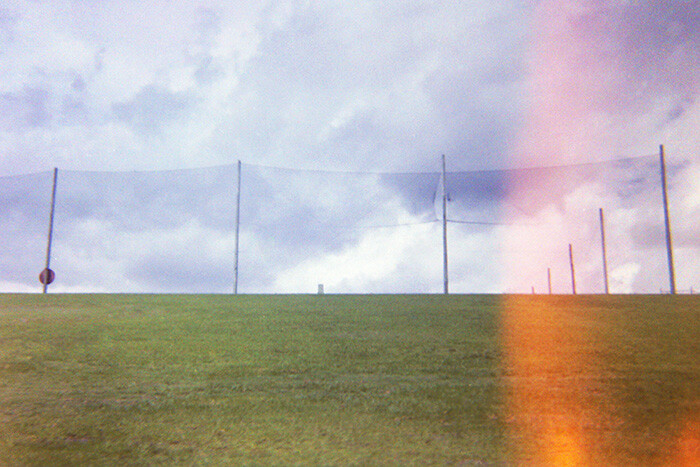
I personally keep a disposable (play) camera with me if my larger camera is too bulky. Not only do the plastic disposables ease the anxiety of being camera-less, they afford a less formal quick-draw camera for street photography. They also provide a refreshing aesthetic, and the occasional surprise. I always enjoy the odd incidental light-leak mark, a quirk of cheaper cameras that adds a real incidental feel to the image. Another upside is disposable cameras are inexpensive and (speaking from experience) they are also a bit bouncier if you drop them.

Robert Mapplethorpe

“The more pictures you see, the better you are as a photographer.”

Rainy shoots in the wilderness, urban exploration, and late night post-processing, means that often photography can be a lonely experience. But taking the time to check out other photographer’s work – from the past and present – can be a great way to get motivated and to immerse yourself in the photography headspace. Studying other artists’ work and dissecting their techniques can help you improve your own work or allow you to ease up a little and be open to experimentation.

If you usually take photographs of bustling subjects with loud, vibrant colors, try focusing on black and white minimalism for a change. Asking for advice, or perhaps even sharing your own insights, is a great way to build relationships with fellow photographers too.

Newthings megankennedy

Mary Ellen Mark

“Learning how to use different formats has made me a better photographer. When I started working in medium format, it made me a better 35mm photographer. When I started working in 4×5, it made me a better medium-format photographer.”

Taking the time to shake up your photographic practice is not only a liberating experience but an educational one. As memory cards get bigger, faster, and larger, the temptation to shoot rapid-fire and hope for the best is strong. When shooting with a film camera, however, you are restricted by the limited number of frames on the roll as well as developing costs. As a result, you will immediately start thinking much more about composition, subject matter, movement, and the technicalities of composing the shot correctly in terms of exposure, aperture, ISO, etc.

Filmexample megankennedy

Shoot with film for a different experience.

Taking the time to step back and focus on your craft will no doubt improve your technique and help you to slow down and reconnect with the process of capturing a great photo.

Imogen Cunningham

“Which of my photographs is my favorite? The one I’m going to take tomorrow.”

While it can be exhausting at times, maintaining the hunger for new and better photographs is what drives us photographers to keep going. We’re never satisfied, we never stop learning, and we never stop shooting. As with any artistic endeavor, creativity comes in waves. But to ride the good waves you’ve got to keep surfing.

Keep striving for that great shot, and when you get it, strive for the next one. You never know what’s coming, so be prepared!

Beprepared megankennedy

Ansel Adams

“You don’t take a photograph; you make it.”

The word take is often used to describe the process of capturing an image. But the difference between assuming an image is simply there to be taken and taking control of the image are two completely different things.

We all unconsciously make decisions about how to take a photo in terms of location, weather, time of day, etc., based on what catches our eye. So we are already exerting a lot of control over our photography. By being more aware of detail, the formal technique and execution of a photograph will invariably result in better considered and aesthetically pleasing images, which at the very least saves time on editing later.

Wisewords2 megankennedy

Do you have any favorite quotes from photographers past or present? What can we take from them and apply to our own photography? Please share your thoughts in the comments below.

googletag.cmd.push(function() {
tablet_slots.push( googletag.defineSlot( “/1005424/_dPSv4_tab-all-article-bottom_(300×250)”, [300, 250], “pb-ad-78623” ).addService( googletag.pubads() ) ); } );

googletag.cmd.push(function() {
mobile_slots.push( googletag.defineSlot( “/1005424/_dPSv4_mob-all-article-bottom_(300×250)”, [300, 250], “pb-ad-78158” ).addService( googletag.pubads() ) ); } );

The post Wise Words: Famous Photography Quotes and Their Relevance Today by Megan Kennedy appeared first on Digital Photography School.


Digital Photography School

 
Comments Off on Wise Words: Famous Photography Quotes and Their Relevance Today

Posted in Photography


Use These Few Lightroom Sliders To Make Your Image Pop

19 Sep

One of the most used tools in Lightroom to bring attention to the subject is the vignette tool. However, unless you are very subtle with the vignette tool it will be very obvious what you did to the image to make the subject pop. If you overdo it, the vignette tool will leave a distinct dark circular frame near the Continue Reading

The post Use These Few Lightroom Sliders To Make Your Image Pop appeared first on Photodoto.


Photodoto

 
Comments Off on Use These Few Lightroom Sliders To Make Your Image Pop

Posted in Photography


4 Value Speedlight Modifiers that Won’t Break the Bank

18 Sep

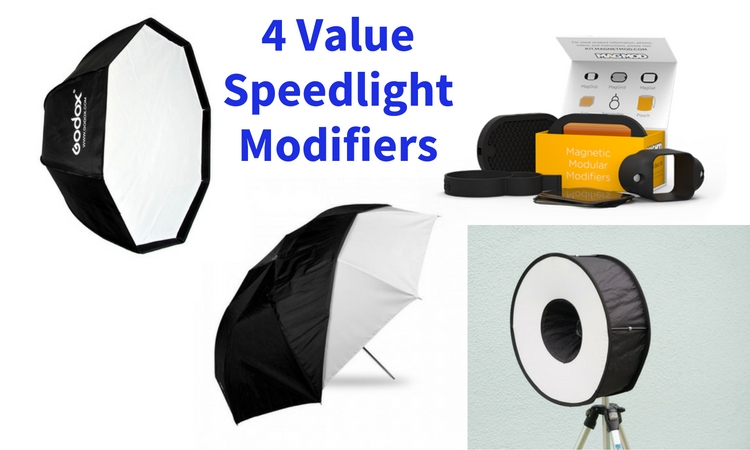
Cheap generally means nasty. But in this article, we’re going to look at four different light modifiers that give you a range of looks that definitely fit in the value category.

4 Value Speedlight Modifiers

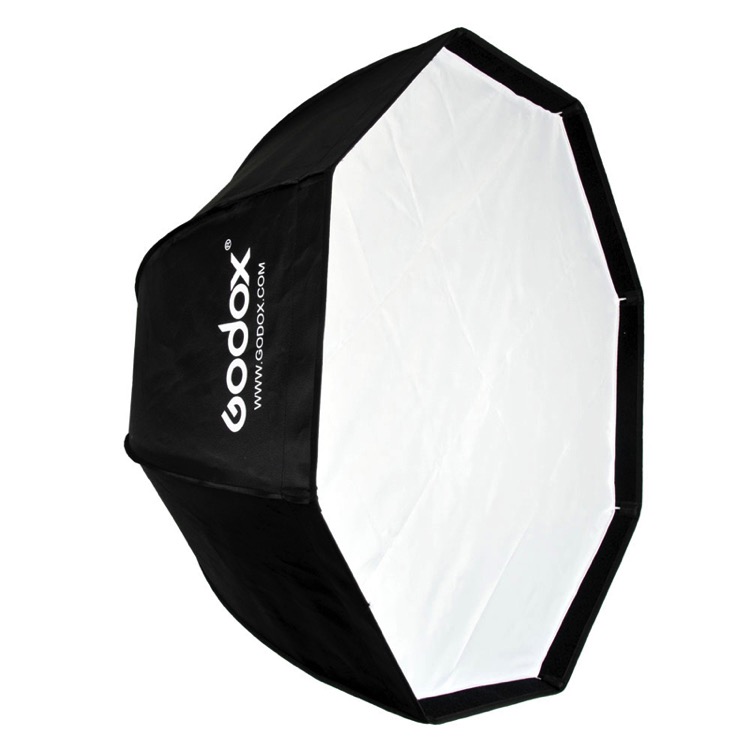
#1 – The Godox 120cm Octagon Softbox

This modifier is a 48″ Octagon Softbox that uses an umbrella shaft to mount to a speedlight. The flash aims into the silver backing, meaning that it’s an indirect source. This gives one layer of softening, and because the flash faces away from the subject, there’s less of a hotspot that with a direct flash Octabox.

The single diffusion panel provides a second level of softness, making for a big beautiful light. There are plenty of similar looking Octaboxes on eBay or Amazon, but the Godox branded ones have one huge advantage: fibre glass rods. Usually the rods are u-shaped metal spines. These provide you with good strength while bending, but very little lateral strength. A blast of wind which knocks the softbox off or over will bend or break a metal rod. Fibre glass, on the other hand, has strength in all directions, making it more resilient.

Godox 120CM Octabox speedlight modifier

Bonus: You can bend the closed Octabox to make it fit into a suitcase. This is easily my most used location light modifier because I can vary the softness and coverage using distance. As the softness of the light depends on the relative size on the modifier to the subject, close means softer, and farther away, the light gets harder. Being four feet in size, it’s super soft in close.

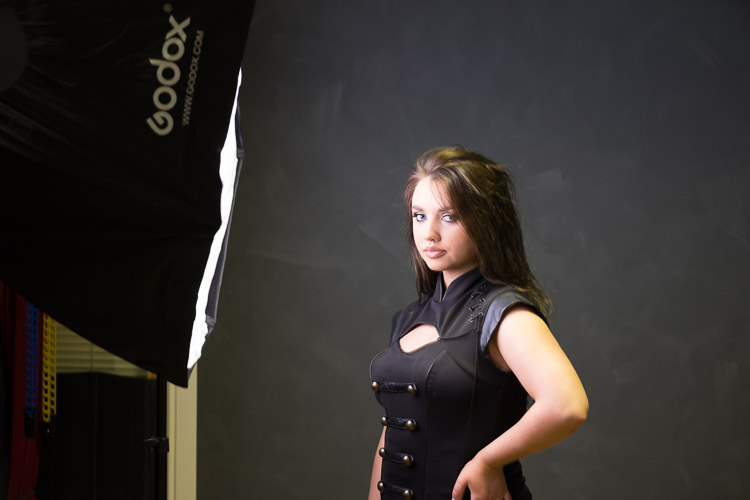
Here’s a typical setup I use with this modifier and the resulting photo. Shot as an example in the studio.

Value speedlight modifiers godox bts

Value speedlight modifiers godox image

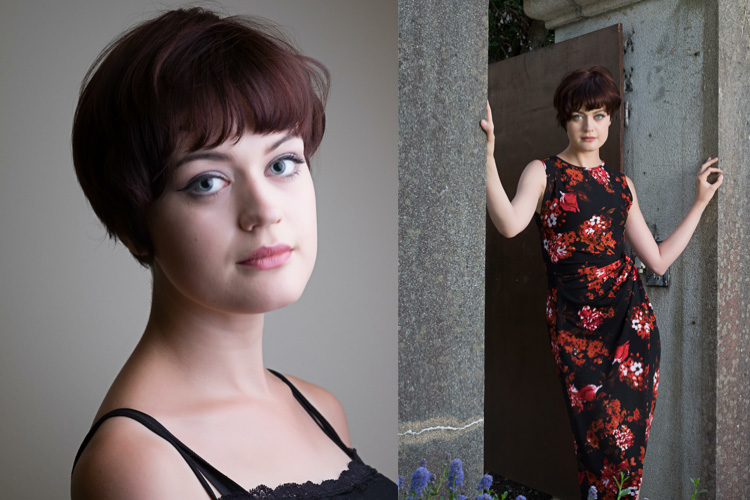
Here’s a few more example shot on location:

Value speedlight modifiers godox 2

Value speedlight modifiers godox 3

Depending on the Octabox model you order, you can get it with a grid. This helps make the light more directional. By blocking the light going out the sides, it pushes the light forward. You may have situations where you need to stop spill (on the ground or background), and a grid really helps with that.

#2 – The Meking Ring Flash

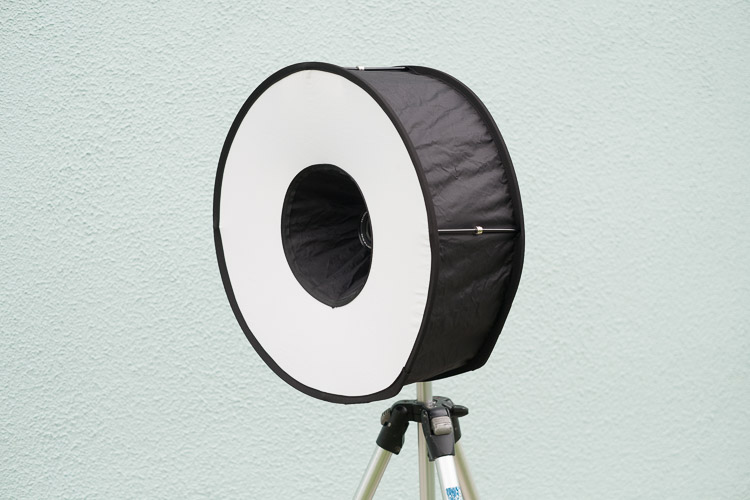
There are a number of ring flash adapters for speedlights. None are perfect, but I really like this $ 30 modifier, the Meking Ring Flash. Firstly, it folds down really compact, so you can always have a modifier with you. Secondly, you get a really soft quality from this, providing a more flattering light. Thirdly, you’re not obliged to use it on camera, you can easily use it as an off camera light, either as a key light or as a fill.

Value speedlight modifiers meking 1

To use it, expand the ring, then push the magnetic separators together, pushing the two sides apart. Finally, mount the ring softbox to your flash using the retained velcro strap.

Here are some examples of  the ring flash use. Notice the shadow that surrounds our model, as well as the classic donut cathchlights in the eyes.

Value speedlight modifiers meking 2

Below I’ve used the softbox off camera, in a hotel foyer. This is two separate photos combined into one image.

Value speedlight modifiers meking 3

#3 – Westcott Double Fold Umbrella

Umbrellas are the staple diet of most speedlight beginners. The Westcott Double fold umbrella offers a little more than a basic one. For a start, it can be used as both a bounce  and shoot-through umbrella.

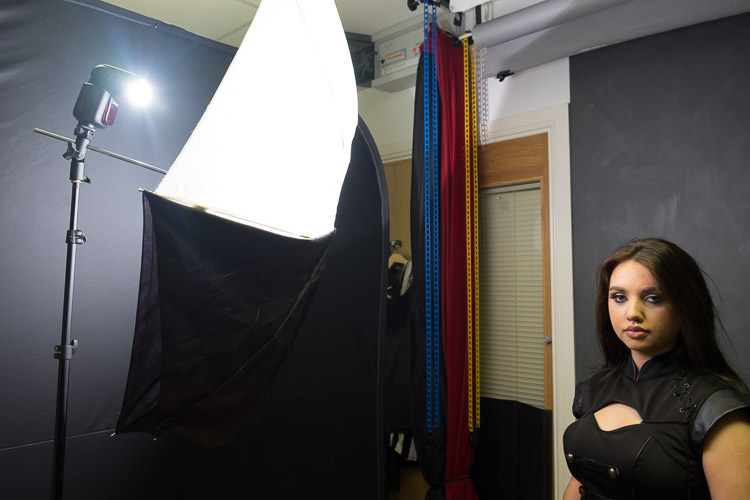
Using it as a bounce umbrella allows the light to focus a little and is good when the scene is larger and you need the light to fill in but still be out of camera view. You’d use it as a shoot-thru to get really close to your subject for big, soft light. The black backing can stay half on (see image below) to prevent spill onto clothes, making this a really versatile, compact, light modifier.

41G7gGhZ3YL

Here’s the standard bounce look. It’s similar in setup to the Godox (which is effectively a silver bounce umbrella with a layer of diffusion).

Value speedlight modifiers westcott 1

Turning the umbrella around, and removing half the black covering creates this look (below):

Value speedlight modifiers westcott 2

It’s much softer, but notice that the bottom part of the photo is darker. This is because the black covering is blocking light going to her body and clothes. It’s a great tip which comes from the inspirational Joe McNally, for when then clothes are distracting in a portrait. If it’s not clear, here’s what the umbrella setup looks like.

Value speedlight modifiers westcott 4

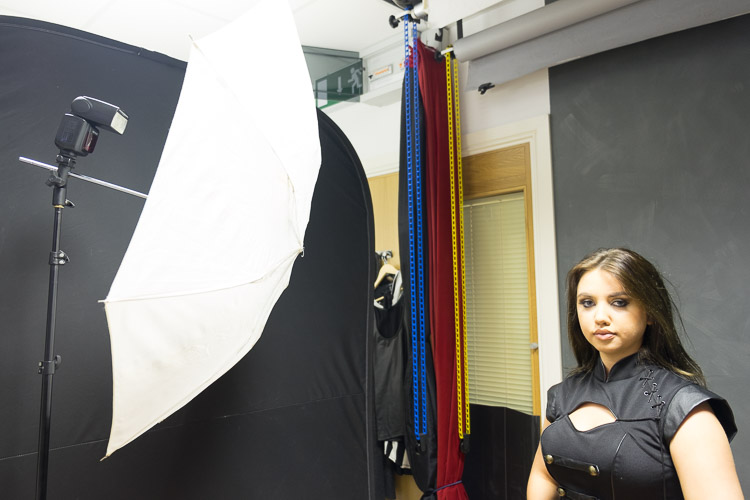
The final look from the umbrella is using it as a shoot-through. This means removing the black covering altogether.

Value speedlight modifiers westcott 3

As you can see, it’s really soft, and floods everywhere (especially compared to the bounce umbrella). Here’s the setup for this.

Value speedlight modifiers westcott 5

Notice light spills everywhere with this setup which may work for light or high key portraits. If you want more light control use it as a bounce umbrella with the black cover on.

#4 – MagMod Basic Kit

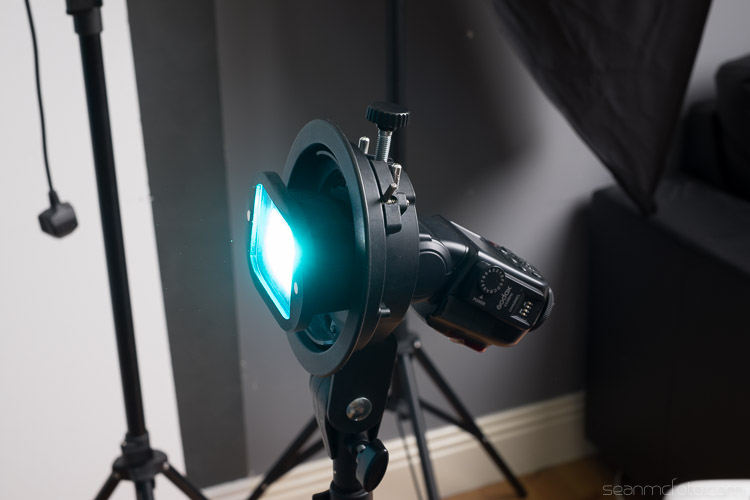
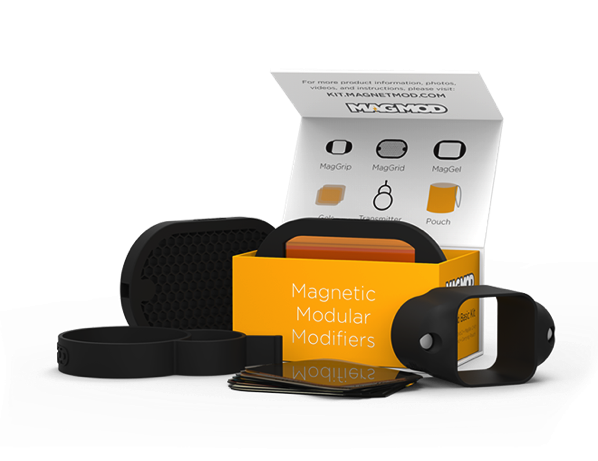
MagMod is a Kickstarter based company whose products use strong rubber and even stronger magnets to make attaching speedlight modifiers a thing of ease. Rather than use annoying velcro, you stretch the MagGrip around your flash to hold the modifiers. You can see a MagGel on a MagGrip in my article How to use Lighting Gels to Change Your Background Color and in the image below.

Changing-your-background-with-gels-magmod

There’s a whole range of MagMod accessories, but the basic kit comes with a grid and a gel holder, along with rigid gels for the holder. These rigid gels are a blessing. A regular gel is essentially a coloured sheet of acetate, so it folds and crumples easily. The rigid nature of the MagGels makes them easy to swap in and out of the holders. There are a variety of colors available. You get a basic set of color correction and ND gels with the kit, but there’s also the Creative and Artistic sets for a larger range of options.

The MagGrids are great for restricting light, letting you aim it with a huge degree of control.

Value speedlight modifiers magmod 0Here’s a shot done with a bare speedlight:

Value speedlight modifiers magmod 1

Here’s the same speedlight with a MagGrid attached. Notice how tight the light is around the model, more like a spotlight.

Value speedlight modifiers magmod 2

Here’s the Aqua MagGel from the Artistic series gels. I’ve set the white balance to daylight to keep the colour correct.

Value speedlight modifiers magmod 3

Combining the modifiers

The beauty of these light modifiers is you can mix and match them to make really creative light.

To achieve the image below, place your on flash on camera, with the Aqua MagGel attached. Next, put the Meking Ring Flash over it to create a soft aqua-colored fill light. Then, place a MagGrid on a second flash and aim it tight on the model’s head. The grid light washes out the gel from her face, but in the shadow areas, the gels fills in for a cool look.

It’s almost like the image has been post-processed for color, but it’s actually done in-camera.

Value speedlight modifiers magmod 4

Another look you can get is a high key portrait. First, set up the Westcott as a shoot-through umbrella on a boom, between you and the model. You’re shooting below the umbrella. For the background, set up the Godox Octabox facing the camera, behind your model. Use a reflector to bounce the light back up to the model for a perfect high key portrait.

Value speedlight modifiers mixed

All in all, this gear is under $ 200 (total if you buy them all) and will give you a good range of creative lighting setups. Even just one of them would make a great addition to your speedlight arsenal.

Do you have any other good value light modifiers you’d like to share? Please do so in the comments below.

googletag.cmd.push(function() {
tablet_slots.push( googletag.defineSlot( “/1005424/_dPSv4_tab-all-article-bottom_(300×250)”, [300, 250], “pb-ad-78623” ).addService( googletag.pubads() ) ); } );

googletag.cmd.push(function() {
mobile_slots.push( googletag.defineSlot( “/1005424/_dPSv4_mob-all-article-bottom_(300×250)”, [300, 250], “pb-ad-78158” ).addService( googletag.pubads() ) ); } );

The post 4 Value Speedlight Modifiers that Won’t Break the Bank by Sean McCormack appeared first on Digital Photography School.


Digital Photography School

 
Comments Off on 4 Value Speedlight Modifiers that Won’t Break the Bank

Posted in Photography


Opinion: The EOS M5 is Canon’s best ever mirrorless camera, and a big disappointment

18 Sep
Canon’s EOS M5 is a small, lightweight but powerful APS-C format mirrorless camera, which uses the same sensor and on-sensor phase-detection autofocus system as the EOS 80D.

By Barnaby Britton, Editor – DPReview.com

What a long, strange trip it’s been. Eight years have passed since Panasonic unveiled the Lumix DMC-G1, the world’s first DSLR-style mirrorless camera, and for much of the intervening time, Canon has appeared content to let its competitors lead the charge away from traditional DSLRs. In that time, mirrorless cameras have gotten faster, their sensors have gotten bigger and the introduction of 4K video has created a new class of genuine ‘hybrid’ products that have carved out a distinct technical niche compared to their DSLR forebears. 

Then-Chief Executive Masaya Maeda of Canon – pictured at the Photokina tradeshow in Germany, in September 2014. Mr Maeda has since been promoted to President and Chief Operating Officer at Canon Inc. 

In 2014, Canon’s then-Chief Executive Masaya Maeda promised us a serious mirrorless offering ‘in the very near future’, but until now, the closest Canon has come to delivering on this promise was the EOS M3. Canon has never seemed to know how to market the EOS M series*, and insisted at launch that the M3 would not be available in the USA even as Maeda claimed he was telling the his global divisions to “sell it!” Six months later, they finally decided that perhaps they should.

Now, a year after the EOS M3 belatedly entered the US market, we have the EOS M5 – the ‘4’ having being skipped over, possibly in deference to a rather inconsistently applied Japanese superstition. The EOS M5 is a fine product, and one that I think arguably represents Canon’s most sure-footed move in the non-professional space for years. But it is also a massive disappointment.

All Dual Pixel, all the time

Let’s start with the positives. The EOS M5 basically takes the still and video imaging pipeline from the EOS 80D, and puts all of that hardware into a smaller, lighter body with full-time live view. The 80D’s sensor is good – it’s not market leading, but it’s better in some respects than the sensors used in the 70D and 7D II – and despite the equal pixel count, better also than the 24MP sensor that found its way into the EOS M3.

I called out ‘full-time live view’ as a positive because perversely, one of the highlights of the EOS 80D’s handling experience is its behavior in live view mode, when on-sensor Dual Pixel autofocus comes into play. With the EOS M5, it’s all Dual Pixel, all the time, but without having to hold the camera out at arm’s length. All of this, plus the full-time touch-screen adds up to a really, really nice handling experience.

A schematic of Canon’s Dual Pixel CMOS AF sensor structure. The top layer illustrates the light-gathering micro-lenses and conventional Bayer-type color filter array. The lower layer shows how each pixel is split into two photo-diodes, left and right, which are colored blue and red respectively.

So why is the M5 such a letdown? Because this is the camera that Canon should have released at least two years ago, when Dual Pixel AF was first introduced in the EOS 7D II, and when the company still had a chance to really ring the changes in the mirrorless market.

We know that Dual Pixel autofocus is a serious differentiator, and if you’ve been paying attention to our coverage of Canon’s various high-end DSLRs for the past couple of years, you do too. And the M5’s touch interface is lovely. But unless they’ve held and used the EOS M5 (and with more chance of finding a Lapras** on the streets of your town than a dedicated brick and mortar camera store, a lot of people’s first experience of holding a new camera is taking it out of the box), DPAF isn’t the kind of function that’s necessarily going to grab the attention of a potential buyer. Like – say – 4K video might. Or a super high frame-rate mode, or slow-motion movie capture. 

This is the camera that Canon should have released two years ago

The EOS M5’s spec sheet suddenly becomes a lot more impressive if you comb through your memories of the APS-C market segment for the past couple of years, and mentally delete all of the entries under ‘Sony’***

Of course as we all know, specs aren’t the whole story. Luckily for Canon, handling and performance go a long way. The M5 probably shoots fast enough and well enough for most photographers, its 1080p video probably looks basically fine,**** and it’s very nice to use. Although recent Sony cameras have been loaded with an almost unbelievable amount of technology, shooting with one, whether it be an Alpha or a Cyber-shot can sometimes feel unpleasantly like playing chess against a supermarket self-checkout machine*****. Canon at least knows how to make cameras pleasant and uncomplicated to use, while many Sonys still feel like they were designed by the same user interface team responsible for this. If you don’t remember Sony’s late-to-market iPod competitor, don’t feel bad – nobody else does either.

In fact, despite its comparatively pedestrian feature set, given the choice, I’d take an EOS M5 out with me over a Sony Alpha any day of the week. But I really believe that this shouldn’t be an either / or thing.

I don’t think that photographers should be required to choose between a sensible, well-designed but feature-limited camera or a cutting edge, highly advanced but annoyingly fiddly one. For videographers who started out on EOS DSLRs this is a particularly irksome choice.

The Samsung NX1 was ahead of its time when it was released in late 2014, and even now, its spec sheet is remarkably competitive. One of our favorite cameras of the past decade, the NX1 was quietly killed off by Samsung, along with the rest of the NX lineup, late last year. 

Behind my nagging feeling of anticlimax with the M5 is a principle, which is this: Companies that take risks, and deliver new technology to as many people as possible should be given credit. And companies that do not should be held to account. Take the Samsung NX1 – an APS-C format camera so far ahead of its time that even now it has arguably yet to be bettered. In short, it was a vastly more capable camera than it probably needed to be. As such, the NX1 (which benefitted from an aggressive and effective series of firmware updates) encapsulated the best qualities of the company that made it, just as its premature discontinuation, along with the rest of the NX line, could be said to reflect the worst.

Companies that take risks, and deliver new technology to the market should be given credit

The EOS M5 is undoubtedly Canon’s best mirrorless camera yet, and at least in terms of core stills photography it should prove competitive against cameras like the Sony a6300. But as a former Canon user and a long-time Canon watcher, I can’t help feeling let down.

The Canon T90 from 1986 (left) and 1992’s EOS 5 (A2E in the USA). Both incredibly innovative, game-changing SLRs in different ways. And both released a very long time ago.

Canon, after all, is the company that first put a microprocessor into an SLR. It cemented autofocus as a professional feature, not a gimmick, and later created the first multi-point AF systems. Canon introduced optically stabilized SLR lenses, too. It was Canon that gave us the first large-format CMOS imaging sensor, the first sub-$ 1000 DSLR, and the first practical full-frame digital camera******. Hell, arguably the first practical digital cameraCanon is the company that created the still-gorgeous T90. And Eye-Control autofocus, for heavens’ sake, which – granted – didn’t always work, but still feels like science fiction******* even today.

How many of those innovations date from within the past ten years? Not one.

Before you jump to the comments section and start flaming me, I’m not saying that Canon has stopped doing cool things. That’s a common refrain of habitual Canon brand-bashers on DPReview, and one that I don’t agree with. Apart from anything else, it’s perfectly logical that in a maturing market, paradigm shifts will occur with less frequency. And let’s be fair here – Canon can, and does, innovate. If you take a look at Canon’s camera and lens lineup from PowerShot to Cinema EOS, it’s clear that the company is capable of formidable technical achievement.

For all that, many of Canon’s biggest contributions to the consumer digital imaging market in recent years have taken the form of iterative refinement, not wholesale reinvention. And in my personal opinion, this is a shame. Because reinvention used to be what Canon did better than anyone else.


* It’s a Pokemon thing. Ask your kids, assuming you can locate them. 

** Early press briefings on the EOS M were memorable for the unwavering insistence on the part of Canon’s PR team that the M was being marketed primarily to women and smartphone camera upgraders.

*** I write this in the full knowledge that there are some of you who do exactly that.

**** We shot an entire video with the EOS 80D earlier this year. It’s fine.

***** Try it. The machine will persist in maintaining that you didn’t make your last move, when you definitely did, and after going back and forth a few times making you pick up your piece and put it down again it summons a teenager to assist you. 

****** No, I’m not counting either the Kodak DCS-14n or Contax N Digital.

******* Eye Control AF was introduced in the EOS 5, in 1992, almost a quarter of a century ago. I like to think that if Canon had persisted with development we could be shooting with mind-controlled cameras by now. 

Articles: Digital Photography Review (dpreview.com)

 
Comments Off on Opinion: The EOS M5 is Canon’s best ever mirrorless camera, and a big disappointment

Posted in Uncategorized


Tokina launches FiRIN mirrorless lens series with 20mm F2.0 FE MF

18 Sep

Tokina has today introduced a new prime lens that is specifically designed for Sony E-mount mirrorless full-frame cameras. The 20mm F2.0 FE MF is the first lens in the new FiRIN mirroless lens series and combines a fast aperture with a wide angle of view and manual focus.

“This is an exciting first step into the mirrorless market for Tokina,” says Kenko Tokina USA President, Yasu Suga. “The all-new design delivers a sharp edge-to-edge image and greatly reduces exposure fall-off for a crisp, clear image. The lens is manual focus with manual aperture control but transmits distance and aperture information to the lens allowing the camera to utilize the 5-axis Image Stabilization, Manual Focus Assist, and other features that require electronic lens communication. I am happy to report that our engineers in Japan are hard at work designing more lenses for the FiRIN mirrorless series; the future is bright.”

The lens comes with a wide focus ring for easy manual focusing and the aperture ring can be “clicked” for stills photography and “de-clicked” for smoother operation when shooting video. Electronic contacts allow for communication with the camera. The lens will officially be unveiled at the Photokina trade show in Cologne, Germany, next week. We expect more information on pricing and availability to be released then as well.


Press release:

NEW TOKINA FíRIN 20mm F2 FE MF

HUNTINGTON BEACH, Calif., Sept. 13, 2016 /PRNewswire/ — Tokina USA introduces the fast aperture, full-frame 20mm F/2.0 FE MF prime camera lens. This lens marks the initial offering of FiRIN, a new mirrorless lens series. This new lens series from Tokina is designed for a photography market that is rapidly adopting mirrorless camera systems as a standard. The FiRIN 20mm f/2.0 lens is a bright, wide-angle lens that is compatible with Sony E-Mount cameras.

“This is an exciting first step into the mirrorless market for Tokina,” says Kenko Tokina USA President, Yasu Suga. “The all-new design delivers a sharp edge-to-edge image and greatly reduces exposure fall-off for a crisp, clear image. The lens is manual focus with manual aperture control but transmits distance and aperture information to the lens allowing the camera to utilize the 5-axis Image Stabilization, Manual Focus Assist, and other features that require electronic lens communication. I am happy to report that our engineers in Japan are hard at work designing more lenses for the FiRIN mirrorless series; the future is bright.”

The FiRIN 20mm f/2.0 features a wide focus ring for smooth manual control, an aperture ring that can be “clicked” and “de-clicked” on demand for cinema and photo use, and electronic contacts for maximum communication with the camera. The lens will be unveiled at Photokina 2016 in Cologne, Germany. The Kenko Tokina booth is located in Hall 5.2, stand C020.

Tokina 20mm F2 FE MF specifications

Principal specifications
Lens type Prime lens
Max Format size 35mm FF
Focal length 20 mm
Image stabilization No
Lens mount Sony FE
Aperture
Maximum aperture F2
Minimum aperture F22
Aperture ring Yes
Number of diaphragm blades 9
Optics
Elements 13
Groups 11
Special elements / coatings Multi-layer coatings
Focus
Minimum focus 0.28 m (11.02)
Maximum magnification 0.1×
Autofocus No
Full time manual Yes
Focus method Internal
Distance scale Yes
DoF scale Yes
Physical
Weight 490 g (1.08 lb)
Diameter 62 mm (2.44)
Length 69 mm (2.72)
Sealing No
Colour Black
Filter thread 62.0 mm
Hood supplied Yes
Tripod collar No

Articles: Digital Photography Review (dpreview.com)

 
Comments Off on Tokina launches FiRIN mirrorless lens series with 20mm F2.0 FE MF

Posted in Uncategorized


Binational Megacity: Master Plan Designed to Span US-Mexico Border

18 Sep

[ By WebUrbanist in Architecture & Cities & Urbanism. ]

border city plan

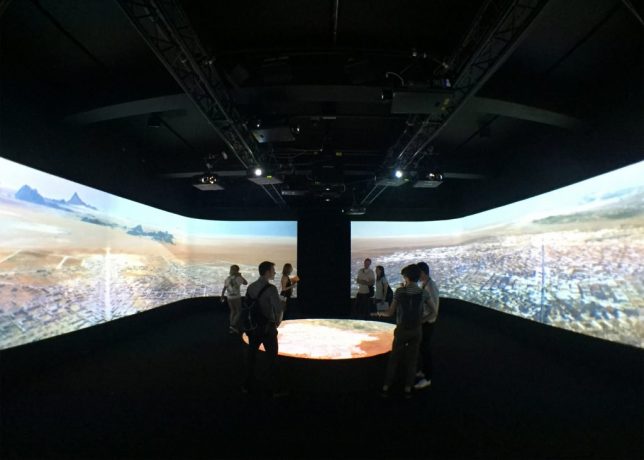
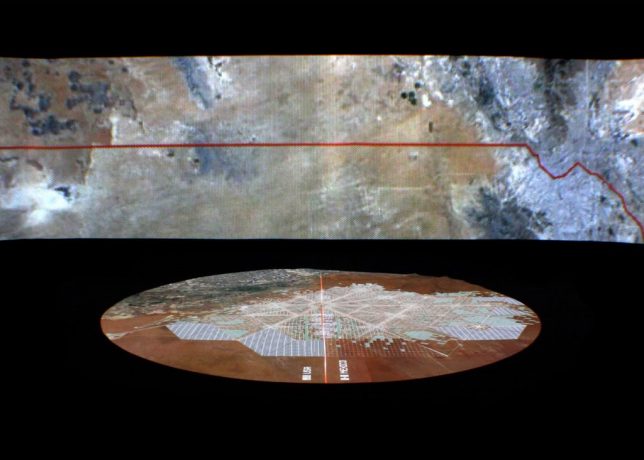
Border City is being designed as a bridge between nations, a novel approach to creating international unity at a time when some politicians call for building walls. Proposed by architect Fernando Romero of the firm FR-EE at the London Design Biennale, this visionary project is to be developed along a region of border covering parts of Texas, New Mexico and Chihuahua.

futuristic border city

The plan is centered around an extant border crossing and aligned with other crossings in the area as well. It may sound far-fetched, but Romero is already negotiating with private land owners in the region as well as developers and investors. He hopes to make the city a reality within a decade.

border city design

Romero believes our existing concept of borders is “primitive” and sees and urgent need to move past binary understandings of such divides. Already, many global centers of economic activity are centered not around cities but rather clusters of metropolitan areas, often along national borders.

border city map

“This is a long-term vision, a vision that is not about building walls but about thinking more ambitiously about the mutual relationship [between two countries] and about what borders really mean between countries” said the architect. It is also a reflection of current reality, where there already “exists a very strong mutual dependency of economies and trades.”

border city installation

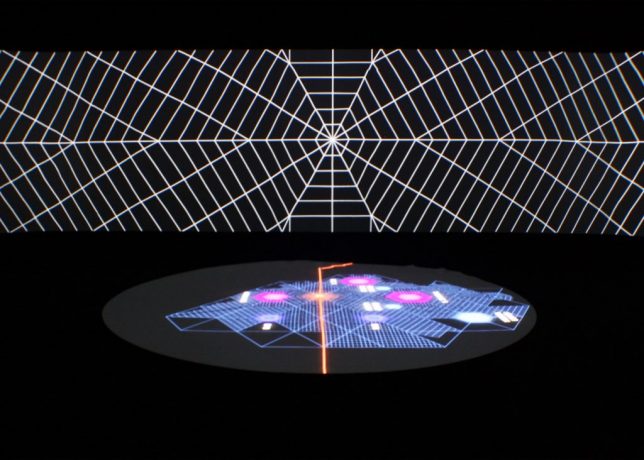
The urban plan consists of interconnected hexagonal-shaped grids, each with their own center and linked to existing transportation corridors and border crossings. If his proposal is fully realized, the city could even become a special economic zone (see also: Hong Kong and Andorra) that would enjoy semi-independent governance.

border city room

Even without that kind of designation and semi-autonomy, however, there would still be big benefits to residents and businesses in terms of easy access between countries due to optimized transit and city planning. Many “twinned” border cities along the Rio Grande have already benefited from close ties despite extant borders, despite the lack of centralized and ground-up plans to optimize connectivity.

border city utopia

“What you’re seeing here is the first binational city to be designed from zero between the United States and Mexico,” said Romero. “This is one of the most active borders in the world in terms of commerce and traffic of goods but also in terms of human activity and employment.”

Share on Facebook


[ By WebUrbanist in Architecture & Cities & Urbanism. ]

[ WebUrbanist | Archives | Galleries | Privacy | TOS ]


WebUrbanist

 
Comments Off on Binational Megacity: Master Plan Designed to Span US-Mexico Border

Posted in Creativity


How to Prepare Your Images for Print and Display

18 Sep

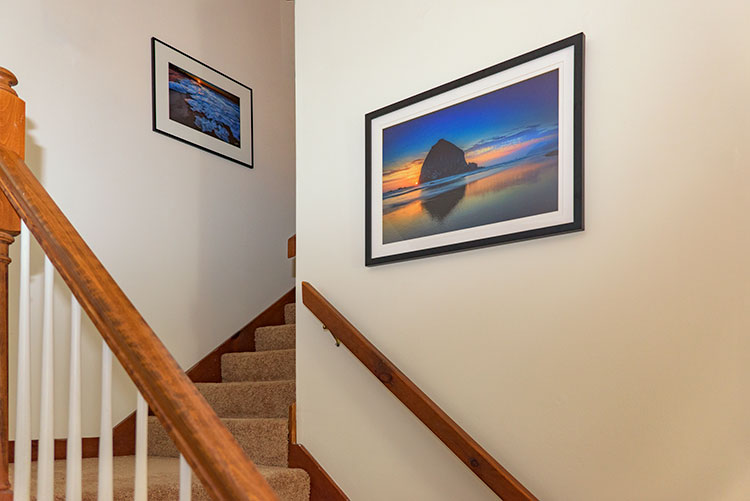
If you’re into photography at some point you’ve probably had the desire to print and display your work. Whether it be for exhibition in a gallery or local community center, to hang on your own wall, or to give a print as a gift to a friend or loved one, you want to present your work in the best way possible. Treating it as the piece of art that it is. Displaying your printed work can sometimes result in a lot of angst, due to problems printing, decisions with regards to matting and framing, and finally, lighting.

Displaying Your Images

Many photographers believe an image isn’t fully realized until it has been printed and hung.

“The negative is the equivalent of the composer’s score, and the print the performance.” – Ansel Adams

While situations, intentions, and desires may vary from one photographer to the next, here are a few things to consider when preparing an image for print and display.
home-display-of-prints

Monitor Calibration

Before you even choose which route to go with in terms of printing your images, you have to address the biggest issue facing photographers today – monitor calibration.

The settings you have applied to your computer screen can drastically affect the way the image looks on screen. And while you may have edited the image to look fine onscreen, when you go to print it, there is a very good chance your printed output will look nothing like what you saw when editing. To solve that issue, you have to match your screen to a known standard. One that sets the color and brightness so that what you see on screen will translate to what comes back from the photo lab, or out of your printer.

Calibrating Your Monitor

Unless your monitor is properly calibrated, you can’t be sure that the vibrant colors you see on screen will be the same as those seen in a print.

There are several available options for monitor calibration, but they all do the same thing. They get your monitor set to a known state that the printing engine can translate to similar output. In other words, what you see onscreen is what you get out of the printer or lab! Finally, it’s important to realize that the lighting under which your print will be displayed will affect the way the image looks. Too cool lighting will make it look bluer, while fluorescent lighting will make it greener, and tungsten lighting will warm the tones.

Finally, it’s important to realize that the lighting under which your print will be displayed will affect the way the image looks. Lighting that is too cool will make it look bluer, while fluorescent lighting will make it appear greener, and tungsten lighting will add warm the tones.

Type of Print

Obviously, if you plan to display one or many of your images, the first thing you need to do is have it printed. You have several options available, and while none are wrong, some are better than others. The simplest option, in terms of work for you, is to use a photo lab or print service. If you like more control, you can choose to print the images yourself on your own photo quality inkjet printer. Even then, there are things to consider.

Making Prints

When you do decide to print an image, you have several choices to make, include what process to use, what media to print on, and how it should be finished.

There are two main printing methods prevalent today, depending on where you go for your prints of digital images:

Inkjet prints:

Inkjet prints are produced by placing tiny drops of ink on paper or canvas to produce an image. Professional inkjet printers tend to have more colors than consumer models, with high-end printers now featuring up to 12 different color inks to create a richly colored image.

Inkjet printers use inks that fall into one of two categories; pigment or dye-based inks. Pigment inks are made of tiny particles that sit on top of the paper, while dye-based inks are absorbed into the paper. Pigment inks are archival and can last up to 200 years or more in the proper conditions (under museum-quality lighting and framing). Pigment-based inks are more expensive but also suffer two main drawbacks. First, pigment based inks can suffer from metamerism, which appears as a shift in the color when viewing the print at an angle. The second drawback is that pigment-based inks are not as vibrant as dye-based ones. Dye-based inks tend to fade more quickly, though some are rated to last up to 75 years or more in proper conditions. Professional printers will usually use pigment-based inks.

Digital C-Print (Lightjet):

This method of printing involves using a laser to expose chromogenic paper, which is then processed in chemicals, similar to a traditional photographic print. It’s a continuous tone print, unlike inkjet which produces tiny dots of ink on the paper to create the image. The laser produces true photographic quality with continuous gradations and tones. Kodak Endura and Fuji Crystal Archive are the two most popular papers used in this process, and both produce archival prints that will last up to 200 years under proper conditions.

Displaying Your Work

While it’s fun to show off your images online, there is nothing quite like having one of your images printed and framed.

Choosing a Lab

Labs offer some decided advantages over printing images yourself. When choosing a lab, you want to find one with a reputation for good quality control and customer service. I’ve found getting recommendations from other photographers to be incredibly helpful when looking for a lab.

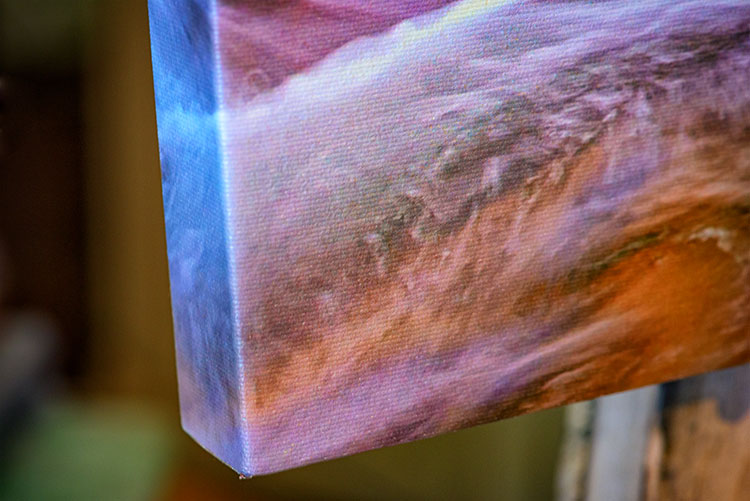
Other things you’ll want to consider are their products. Do they print using the method you want? Do they offer the sizes you want? Do they print on media other than photo paper, such as canvas, acrylic, or metal? What kinds of finishing options do they offer? Is the canvas gallery wrapped? Do they offer mounting or framing? Do you want or need those services? Answer those questions, knowing what you want or need, and that should give you a good answer as to whether the lab will fulfill your needs.

Answer those questions, knowing what you want or need, and that should give you a good answer as to whether the lab will fulfill your needs.

Displaying the Print

If you choose to go with a print on metal, acrylic, or canvas, once the print is made, you probably won’t have much else to do. These options are generally finished and require no framing, though a decorative frame can be added to canvas if desired. If you’ve printed on paper, you still have a little work to do.
canvas-wrap

Matting

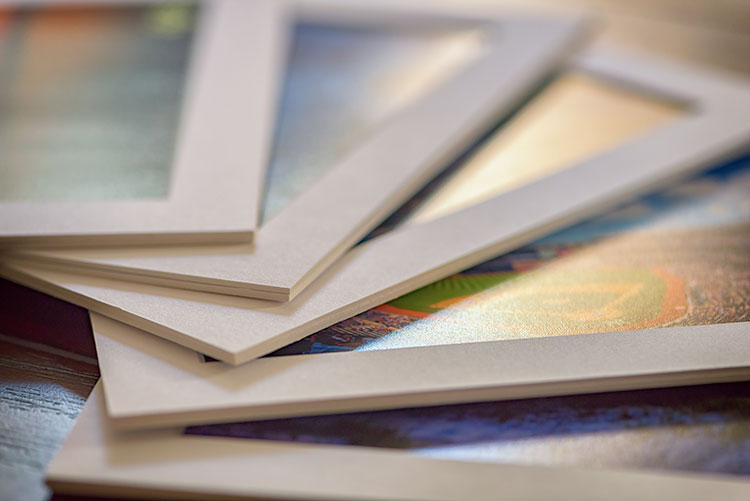
Paper prints, to be properly displayed, need to be matted and framed. You can find various qualities of mat board, using terms such as “Buffered pH Neutral” or “Acid-Free”. These are basically the same thing, meaning the acid has been removed from the paper to avoid harming the prints. Acid-free mats have a protective lifespan of about 7-12 years.

The next grade of mat board is known as “conservation grade acid-free” or sometimes “museum rag”, which is what you’d want to use for a serious art display in a gallery. In addition to removing the acid, another component harmful to paper, called lignin, is also removed from the mat board. Conservation mats that are acid and lignin free have a protective lifespan of 50 years or more. Conservation grade mats aremore expensive than simple acid-free ones.

Which type of mat should you choose? It really depends on your purpose. If you’re planning to display the print as art in a gallery and possibly for sale, conservation grade mats are the best choice. This helps add value to the print by preserving it, and lets the buyer know you are serious about your work and their potential investment in it. If the use is something less important, such as a temporary display that won’t be for sale, you can certainly save some money and go with a simple acid-free mat.
matted-prints

Framing

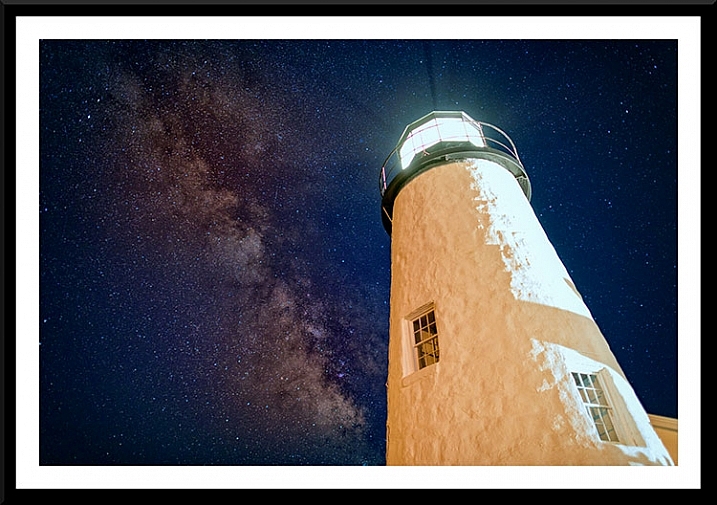
Framing prints can present you with some difficult choices, depending on where the print will be hanging. Since you never know where someone may hang a print, for galleries and art shows I suggest a simple, understated black frame, that lets the image breathe and speak for itself.
Framed Print

A matt and frame finish off an image and complete the piece for hanging.

One of the big mistakes I see new photographers and artists make when showing work in a gallery or exhibition is framing their work in overly ornate or colorful frames. When an art buyer purchases a new piece of art, if it is framed already, that frame becomes part of the consideration. By keeping the frame simple and understated, it allows the buyer to view the art neutrally without considering the frame. They won’t feel the frame has to be married to the image and can feel free to consider their own framing choices.

If you want to get really serious about the frames you use, you’ll want to use museum quality framing. Like conservation mats, it is designed to preserve the print for as long as possible. Museum quality framing includes UV filtered glass to reduce the UV rays from the sun that are a print’s worst enemy and keep it from fading. It should include conservation matting as described above, and will have a final layer of archival backing to further protect the print.

The Finishing Touch
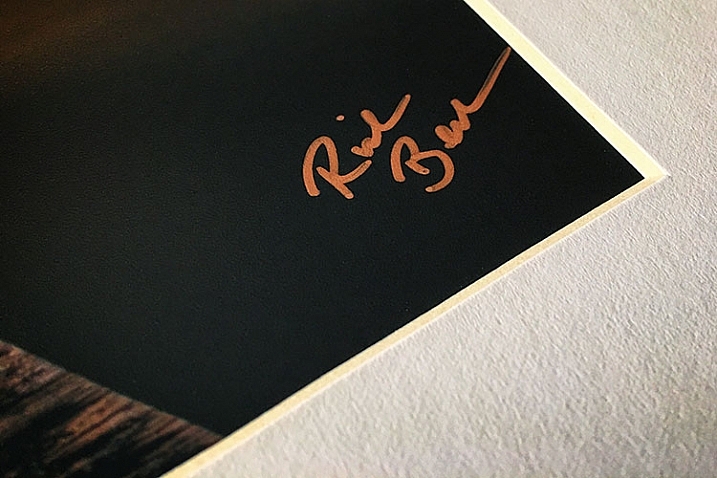
Signing Your Prints

An artist should always sign his or her work, on the print, in the corner.

As with any artwork, you should always, without fail, sign your images. Signing your images signifies that you created the image, personally took responsibility for it from capture to print, and lets whoever is hanging the print on their wall know who created it. It adds value for art collectors.

There is always some debate, it seems, but I will go on the record as saying that it is always the print that should be signed, and never the mat. The mat can be removed, and thus, so can your signature. Choose either the bottom left or bottom right corner and sign your prints with a neat, clear signature that identifies the image as your own. Again, you’ll want to use archival ink that won’t harm the print, in a color that will stand out. For darker prints, silver or gold metallic works nicely, while for lighter colored prints, a black ink will suffice. I prefer the Deco Color Liquid Fine Paint Markers to sign my prints, canvases, metal prints, and acrylics. There are several thicknesses available so you may want to experiment to find what works best for you.

artist-pen

Your photos are meant to be seen, not just take up space on a hard drive! So take these tips and start showing your images off. What are your favorite tips for displaying photos?

googletag.cmd.push(function() {
tablet_slots.push( googletag.defineSlot( “/1005424/_dPSv4_tab-all-article-bottom_(300×250)”, [300, 250], “pb-ad-78623” ).addService( googletag.pubads() ) ); } );

googletag.cmd.push(function() {
mobile_slots.push( googletag.defineSlot( “/1005424/_dPSv4_mob-all-article-bottom_(300×250)”, [300, 250], “pb-ad-78158” ).addService( googletag.pubads() ) ); } );

The post How to Prepare Your Images for Print and Display by Rick Berk appeared first on Digital Photography School.


Digital Photography School
 
Comments Off on How to Prepare Your Images for Print and Display

Posted in Photography


Petzval 58mm real-world samples

18 Sep

Lomography’s second riff on a historic lens design, the Petzval 58 offers the same swirly bokeh effect as the original 85mm variation at a shorter focal length. It’s been given the same brass treatment as the first lens and also uses the Waterhouse aperture system with interchangeable plates, but introduces a Bokeh Control Ring to adjust the strength of the swirly bokeh effect. Funded via a wildly successful Kickstarter campaign, the Petzval 58 made its way to our office. Take a look and see what the latest Petzval can do.

Articles: Digital Photography Review (dpreview.com)

 
Comments Off on Petzval 58mm real-world samples

Posted in Uncategorized