RSS
 

Archive for July, 2016

How to Use Your On-Camera Speedlight to do Bounce Flash Effectively

26 Jul

An on-camera flash (or speedlight) is the tool many photographers own, but few know how to use. Every day I see this amazing piece of equipment go to waste, slamming harsh light into a subject, when it could be caressing it with soft, directional illumination. The flash is a sculptor’s chisel, not a sledgehammer. You just need to know some basic technique.
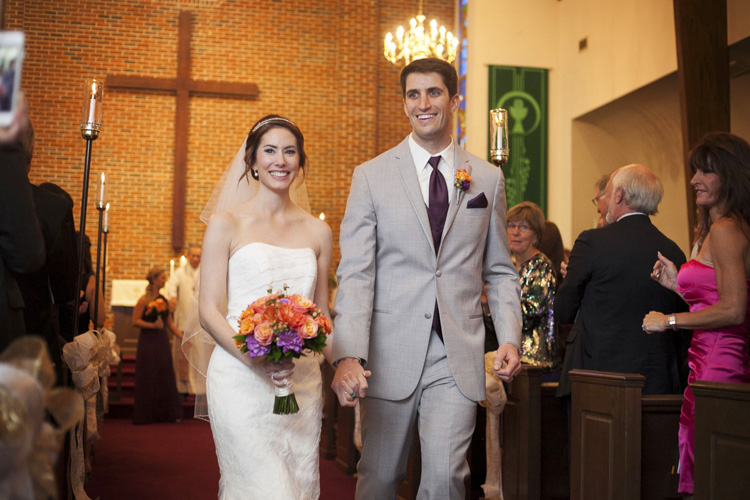
Photo6

In the 400-plus weddings I’ve photographed over the years, much of what I shoot indoors is lit with a speedlight. I have a trunk full of studio lights that I’ll set up and use sometimes at events, but more often than not, I end up preferring the photos from my little on-camera flash (not to be confused with the built-in one). You can create beautiful light bouncing your flash off of walls, ceilings, mirrors, professional wrestlers or herds of sheep.

Let me illustrate with a few examples, using my favorite model, my wife Karen. Every photo below is taken with the same lens (50mm), shutter speed (1/180), and aperture (f/4). We also don’t move at all. We are about 10 feet in front of a gray paper backdrop, white walls to the left and right are about seven feet away. The ceiling is also white. The only thing that changes in these photos is that I am spinning my flash head into different positions.

WHAT NOT TO DO

Photo1

In our first example, I’ve photographed Karen with direct flash. (She is laughing because she thinks I’m incompetent for having my flash in that position).

This is harsh, flat light. There is a nasty shadow on the background. This is the opposite of bounce flash, and typically a last resort flash position. Let’s move on.

A SLIGHT IMPROVEMENT

Photo2

Here I’ve improved things a bit by bouncing my flash off the ceiling. This has softened the light, but it is still coming from overhead, creating unattractive shadows under her eyes, and a lack of catchlights. We can do better!

LOOKING GOOD

Photo3

Here I’ve pointed my flash to the side, so it bounces off the wall to my left, giving me some softness and better directionality and volume of light. I think this is a keeper!

WHAT HAPPENED HERE?
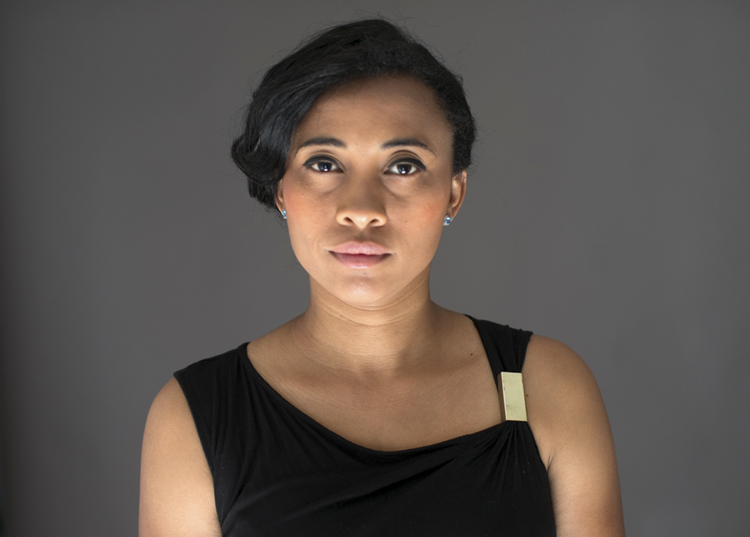
Photo4

Just for fun, I turned my camera upside down here and pointed the flash at the floor, so the light is coming up from below. We call this Franken-light (monster lighting). Not something you are going to do a lot, but if you ever get hired to photograph a vampire, this is a good one to have in your toolkit.

All of these photos illustrate the two main factors I think about when shooting bounce flash: light direction and light quality (softness).

LIGHT DIRECTION

This just refers to the direction the light is coming from, something that is very easy to control with a bounce flash. If you point your flash up at the ceiling, it will hit your subject coming from above. If you bounce your light off a wall to the right, the light will come back from the right, etc.

Photo5

Check out this simple portrait of a wedding guest (above). She was looking to her right in the photo, so I bounced the light off a wall on that side to get some beautiful light into her face. If the next person I want to photograph is facing the other way, all I have to do it spin my flash 180 degrees and bounce it off the opposite wall. This sort of versatility is wonderful when shooting live events.
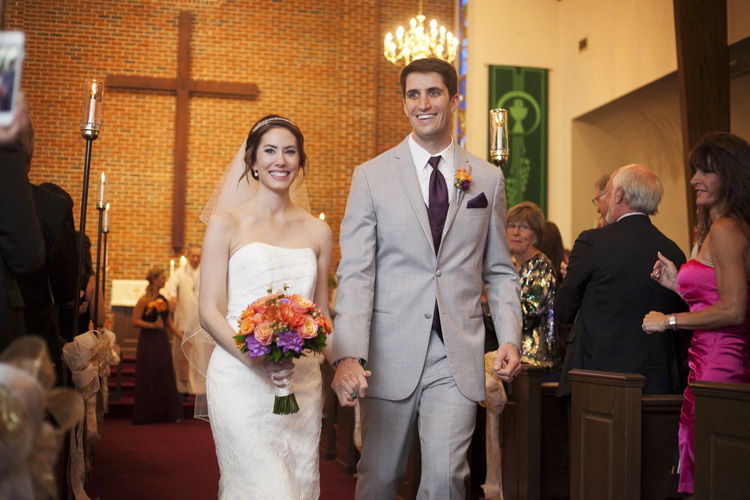
Photo6

In this photo of a just married couple walking down the aisle, I bounced my flash off a wall to the left again, to get some wonderful light on them. If you look at the people in the background, you can get an idea of the ambient illumination in the room.

The nicest light often comes more from the side than from above. If you fire your flash 90 degrees to your left, the light will come back from the left at 90 degrees. Incidentally, this is a similar angle to the great light you can get at dusk and dawn.

LIGHT QUALITY (SOFTNESS)

The softness of your light is mainly affected by the size of your light source. With bounce flash that is the section of wall or ceiling illuminated by your flash. I think this is the hardest concept for people to get with bounce flash. Just think of your light source as the surface that is illuminated by your flash (rather than the flash itself).

The bigger the light source, the softer the light. In other words, the larger the area you cover with your flash, the softer the light coming back. To cover a larger area with bounce flash, simply move farther from your bounce surface, to allow the light from the flash to spread out more. A lot of flashes also allow you to zoom the flash head in and out, creating a narrower or wider beam (a wider beam allows the flash to spread out faster, and vice versa).
Bounce sample 1

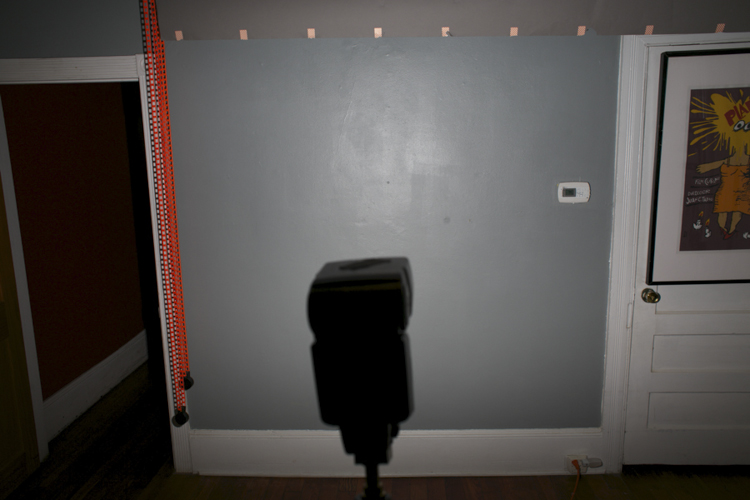
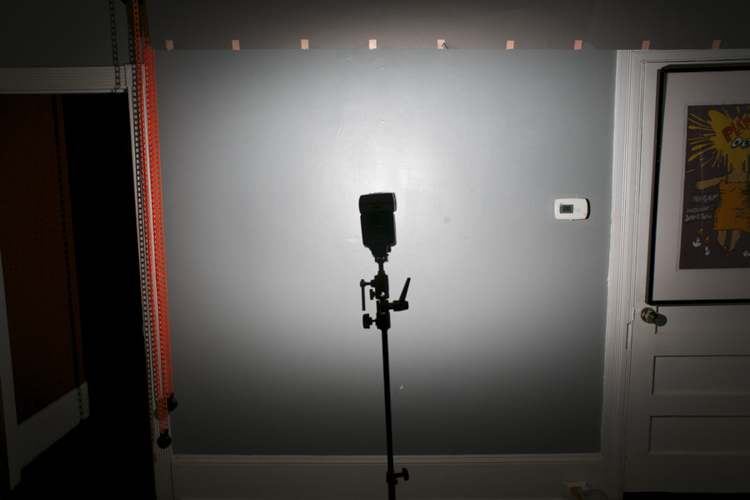
This can be a little hard to visualize, so I’ve taken a couple of photos to help illustrate how it works. In the first photo (above), I have my flash head zoomed all the way out, to create the widest beam possible. I then fired it at a wall in my studio about 10 feet away. As you can see, the flash lights up most of the wall. This would makes for some nice soft light bouncing back towards us.

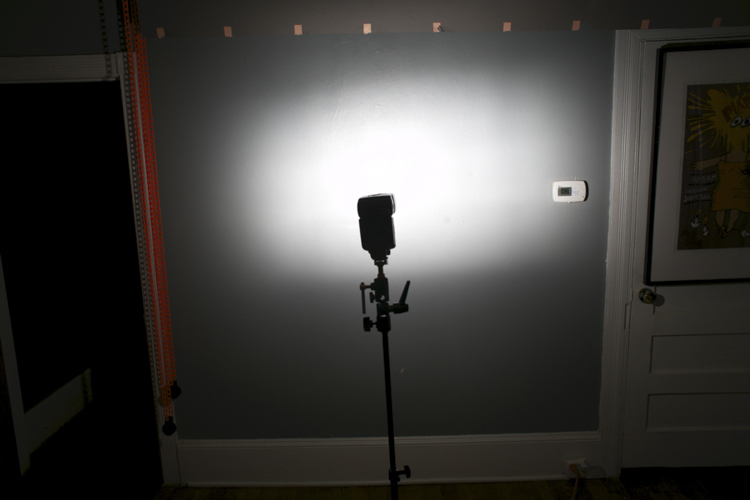
In the second photo (below), I have moved my flash closer to the wall with the same amount of zoom. As you can see, it is lighting up less wall now, meaning the light source is getting a bit smaller (more harsh/hard – less soft).
Bounce sample 2

In the third photo, I’ve kept the flash in the same position, but zoomed in the flash head all the way. So the light source is now smaller still (the area on the wall which is reflecting light is the light source).
Bounce sample 3

What you may not realize is that you can send your light all the way across a massive hotel ballroom, for example, and have it come back nice and soft. In the photo below of adoring parents listening to a wedding speech, the light from my flash is traveling 20 or 30 feet to the wall and back. The farther it goes, the more it spreads out, and the softer the resulting light. Beautiful!

Photo7

POWER ISSUES AND TRICKY LOCATIONS

Now there is a limit to your flash power, and therefore, to how far away you can be from your bounce surface. Fortunately with digital cameras it’s easy to do some quick tests to see what you can get away with.

For example, let’s say you find yourself in a huge convention space photographing the keynote speaker at the annual prune sellers convention. The lighting in the room is from horrible overhead spotlights, and if you don’t improve upon it you’ll never get another job from this plum client. So you try bouncing your flash off a wall to the speaker’s left, but your flash just isn’t powerful enough. Your image is underexposed and your camera batteries are straining to recharge the flash.

In this situation, you can try a couple of different things to fix your problem:

  1. Ramp up your ISO as high as you can.
  2. Open your aperture up as much as possible.
  3. Zoom your flash head in as far as it will go, to narrow the light beam you are firing at the wall.

If nothing works, you may have to resort to shooting direct flash, but that should be a last resort.

Off course you won’t always be in white-walled rooms, but you can usually find something to bounce off if you look around. White ceilings and dark wood walls? Bounce off that ceiling (but try to point your flash slightly to one side or the other to give some better directionality to your light). You can also bounce off of darker surfaces. If the surface isn’t black, that means it is still reflecting some light and you can bounce a flash off it.

I’ve bounced off of everything from brick to wood paneling, though admittedly these surfaces do suck up a lot of your flash output and drain your batteries faster, so they aren’t ideal (they will also add a color cast to your image).

When I walk into a space where I’m going to use bounce flash, I immediately look around and think about what my bounce surfaces (light sources) could be. I’ll identify the surfaces that look good (generally light colored/reflective things), and position myself so I can use them to my advantage.

Let’s look at some more examples:

Photo8

This wedding couple is having their first dance at the Peabody Library in Baltimore, a very large space that doesn’t even have complete walls to bounce off, just columns, because of the way the library stacks are arranged. But I cranked my ISO up to 4000 and was able to bounce my flash and get some nice light for the photo.
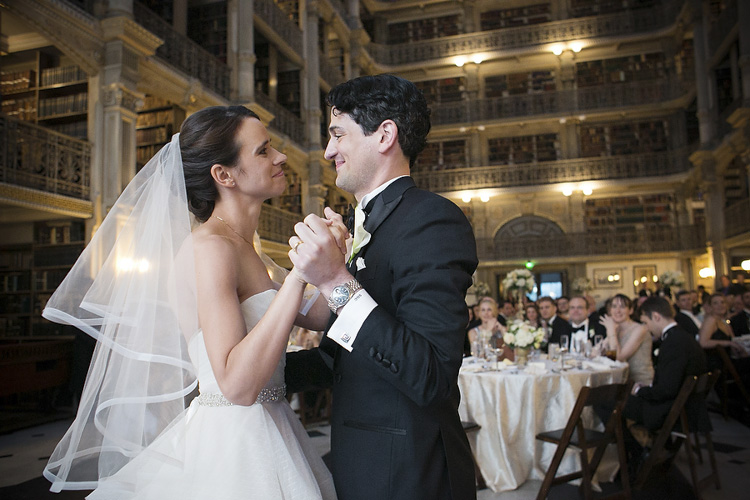
Photo9

I’ve also included a photo above showing the entire space so you can get a better idea what I was dealing with.

Photo11

This sleepy little girl was photographed at a wedding reception at a country club in Virginia. I bounced my flash off a wall about 30 feet to my left, and got a little help from the purple lighting in the background.
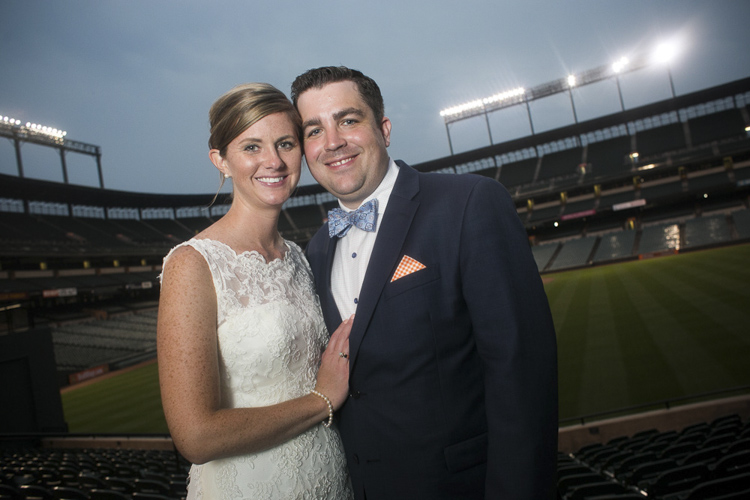
Photo12

This wedding portrait was made at night at Camden Yards baseball stadium in Baltimore. This was outside and there was nothing to bounce a flash off, so I had an assistant hold a white reflector behind me to camera left, and I bounced my flash into that.

As I write this article, I’m sitting in a dark restaurant with a black ceiling, dark walls, dark carpet and dark furniture. It’s a real light-sucking pit, but there are a bunch of framed photos on the wall, and also a mirror. I’m pretty sure I could bounce a flash off of those and get some decent light if I needed to.

You can get really good at bounce flash fast. Once you are aware of the possibilities, it’s just a matter of experimenting, and refining your technique. Look around your environment and ask yourself what you can use as a bounce surface. Look at your subject and think, “Where do I want the light to come from?”

Then experiment, point your flash to the right, to the left, behind you. Before you know it, you’ll be a bounce flash master!

Please share your bounce flash tips and images in the comments below.

googletag.cmd.push(function() {
tablet_slots.push( googletag.defineSlot( “/1005424/_dPSv4_tab-all-article-bottom_(300×250)”, [300, 250], “pb-ad-78623” ).addService( googletag.pubads() ) ); } );

googletag.cmd.push(function() {
mobile_slots.push( googletag.defineSlot( “/1005424/_dPSv4_mob-all-article-bottom_(300×250)”, [300, 250], “pb-ad-78158” ).addService( googletag.pubads() ) ); } );

The post How to Use Your On-Camera Speedlight to do Bounce Flash Effectively by Dennis Drenner appeared first on Digital Photography School.


Digital Photography School

 
Comments Off on How to Use Your On-Camera Speedlight to do Bounce Flash Effectively

Posted in Photography


First impressions review: Lenovo Moto Z Force shows promise

26 Jul

The Moto Z Force is Lenovo’s brand new, top-of-the-line smartphone. Currently exclusive to the Verizon network in the US as the Moto Z Force Droid Edition, we expect an international launch of the device in the near future. 

The device packs a 21MP image sensor with a 1.12 µm pixel size, an F1.8 aperture, on-sensor phase detection, laser-assisted AF and an optical image stabilization system into its camera module. The camera app offers full manual control and the Moto Z Force can save DNG Raw files with third party apps, such as Manual Camera.

The metal and glass body is just under 7mm thin and comes with a shatterproof 5.5″ Quad-HD AMOLED display and a beefy 3,500 mAh battery. The Android 6.0.1 Marshmallow OS is powered by a Qualcomm Snapdragon 820 chipset and 4GB of RAM. Mobile photographers will also appreciate the microSD-slot for easy storage expansion. 

In addition, Moto Z Force users can select from several Moto Mods accessory modules which connect to the back of the device magnetically and via 16 connection points. So far there are the InstaShare projector, a JBL Soundboost 6 Watt speaker and a 2220 mAh battery pack. The Moto team has promised more Moto Mods for the future and according to rumors, one of them could be a camera grip. For now we’ll have to make do without the latter, but that hasn’t stopped us from shooting with the brand new Moto device. Read on for our first impressions. 


Image Quality

In bright light conditions the Moto’s 21MP sensor resolves a good deal of detail. Under close inspection some smearing of fine detail and textures is noticeable, but on the other hand luminance noise is very well controlled. During our brief testing, exposure was reliable but in very bright scenes, such as the one below, the image processing’s strong contrast can results in some clipped highlights. That said, overall the Moto Z Force does well in these conditions.

 ISO 50, 1/760 sec

Color tends to be quite saturated, but neutral and without any notable casts. This includes bright red tones which many smartphone cameras struggle with, especially under strong illumination.

 ISO 50, 1/452 sec

At higher ISOs the camera finds a good compromise between noise reduction and detail retention. The ISO 320 shot below was captured in a fairly well-lit interior space and shows very good edge detail. 

 ISO 320, 1/33 sec

The ISO 500 shot below shows some more luminance noise in the mid-tone areas of the frame but the noise pattern has a fairly fine grain and is not too intrusive. Chroma noise is well under control and the image still shows a very good amount of fine textures and detail.

 ISO 500, 1/25 sec

The Moto Z Force maintains good exposure and color down to very low light levels. The challenging lighting conditions in the shot below lead to some channel clipping in the illuminated stage area, but overall the scene is captured very nicely. The slow shutter speed of 1/10sec results in some blur on moving subjects but the optical image stabilization does a very good job at counteracting camera shake. 

 ISO 1250, 1/10 sec

Special modes

The Moto Z Force comes with Motorola’s usual HDR mode which does an efficient job of protecting the highlights in high-contrast scenes, such as the one below. Using the standard auto exposure mode, some clipping occurs on the light colored elements in the frame. Using HDR mode, image clipping is noticeably reduced. Shadows are lifted very slightly but overall the image still looks pleasantly natural.

 ISO 50, 1/1468 sec, standard exposure
 HDR exposure

Night mode is not a new feature for Moto devices but the latest incarnation works in a slightly different way than before. In low light scenes the camera automatically triggers multi-frame capture which produces clean images but struggles with moving subjects, which often show pronounced motion blur. On the new device, night mode now saves a standard exposure in addition to the night mode image, allowing the user to pick the version which best suits their purposes.

The sample images below both report ISO 1000 and a shutter speed of 1/10sec in the EXIF data. However, as you can see at close-up view they look very different. The multi-frame night mode image on the left is cleaner but shows motion blur, even on slow-moving subjects. The accompanying standard exposure shows better edge definition on moving subjects but noticeably higher levels of luminance noise. 

Night mode Standard exposure
100% crop 100% crop

In video mode the Moto Z Force is capable of recording both 1080p Full HD and 4K footage. The combination of digital and optical stabilization keeps things steady and allows for smooth panning. The 1080p video below shows similar tonal characteristics to the still images and decent detail but very occasionally we found the lens refocusing for no obvious reason.

The 4K video mode offers noticeably better detail for those who need it. It also allows users to grab 8MP video stills for those occasions when the full 21MP still resolution is not needed.

First impressions 

With its solid build, large high-resolution screen and metal frame the Moto Z Force looks and feels like a premium device. The Snapdragon 820 chipset under the hood ensures the performance of the Android operating system matches the device’s high-end exterior and the 3,500 mAh battery lets you shoot, edit and share images for a long time away from a power outlet.

The camera module’s 21MP captures a good level of detail and offers plenty of scope for cropping. There are the usual signs of smearing of fine textures at base ISO, but in low light the camera finds a good balance between noise reduction and detail retention. In addition, night mode lets you pick between a clean multi-frame image that works best for static scenes, and a standard exposure that shows more noise but is capable of freezing at least some motion. 

Colors are mostly quite saturated and contrast is strong which can lead to some highlight-clipping in high-contrast scenes. However, HDR mode does a very efficient job of protecting highlight detail, and in addition the Moto Z Force allows for the capture of DNG Raw files with third party camera apps, such as Manual Camera. This allows you to apply your very own mix of contrast, saturation, noise reduction and other image parameters in post processing. Add the camera app’s full manual control into the mix, plus the potential of a camera-grip add-on module in the nearer future, and the Moto Z Force is one of the year’s most interesting mobile photography products thus far.

Articles: Digital Photography Review (dpreview.com)

 
Comments Off on First impressions review: Lenovo Moto Z Force shows promise

Posted in Uncategorized


Beyond Chernobyl: 15 Design Concepts for a Post-Nuclear World

26 Jul

[ By SA Rogers in Art & Drawing & Digital. ]

Screen Shot 2016-07-25 at 8.51.52 AM

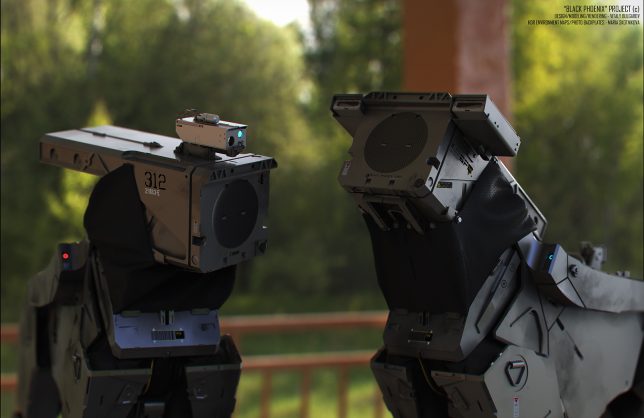
30 years post-Chernobyl and 5 years after Fukushima, we still haven’t figured out how to deal with lingering radiation in the wake of a nuclear disaster or come up with a foolproof way to protect ourselves from similar incidents in the future. Nuclear disaster-focused concept designs address everything from repopulating Chernobyl and safeguarding against radiation-poisoned seafood from Japan to living in a dystopian post-apocalyptic future where mechanical dogs scout the streets.

Self-Contained Fallout-Absorbing City for Chernobyl

nuclear pripyat-self-contained-city

nuclear pripyat-city-in-a-box

nuclear pripyat-aurora-skyscraper-design

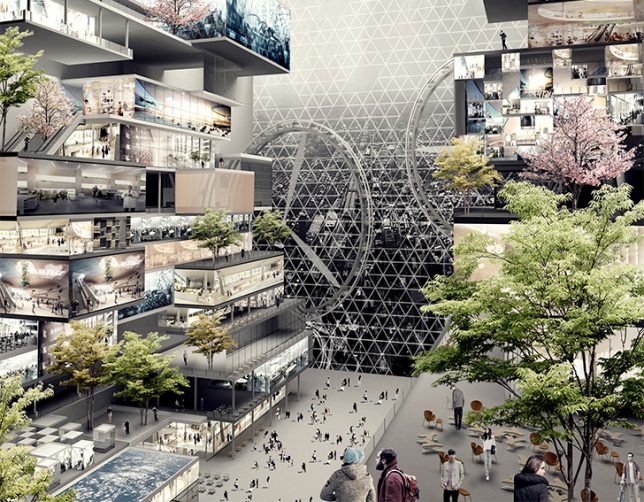
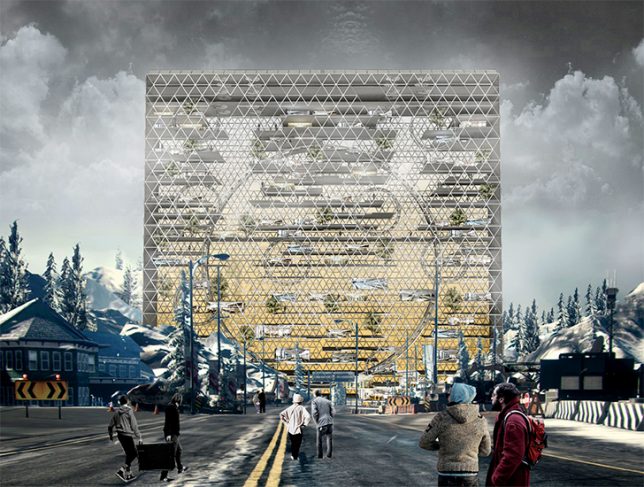
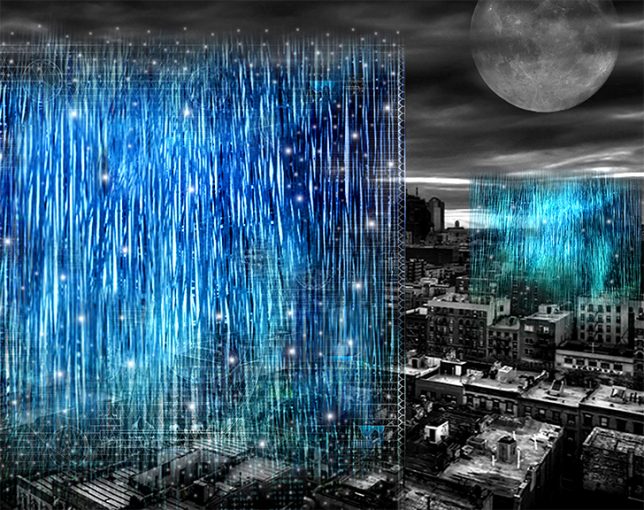
People are beginning to resettle the post-Chernobyl nuclear wasteland surrounding Pripyat, Ukraine whether radiation reaches safe levels or not, and this skyscraper concept is an attempt to minimize harm, creating a sort of self-contained oasis among the fallout. The skin of the building essentially acts as an anti-radiation force field, and the ‘Unexpected Aurora’ building itself filters air and water and harvests solar energy.

HAL Exoskeleton Turned Radiation Suit

nuclear HAL suit 2

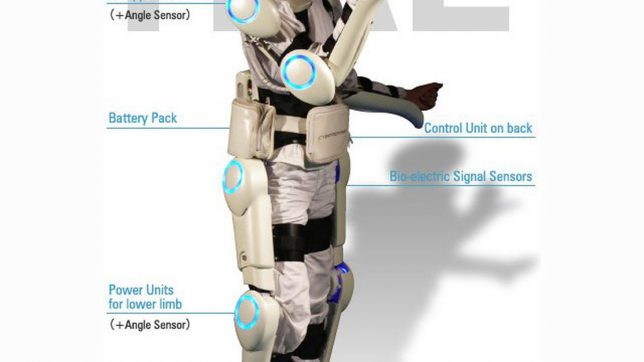
Originally designed to help people with muscle diseases, the Hybrid Assistive Limb (HAL) suit got a post-Fukushima upgrade to make it a radiation-proof suit for emergency responders. A typical anti-radiation tungsten vest weighs up to 132 pounds, making it very difficult to wear for long periods, but the HAL exoskeleton supports its weight, reducing fatigue and allowing greater access to hazardous sites.

Revitalization of the Chernobyl Zone

nuclear chernobyl revitalization

nuclear chernobyl revitalization 2

nuclear chernobyl revitalization 3

nuclear chernobyl revitalization 4

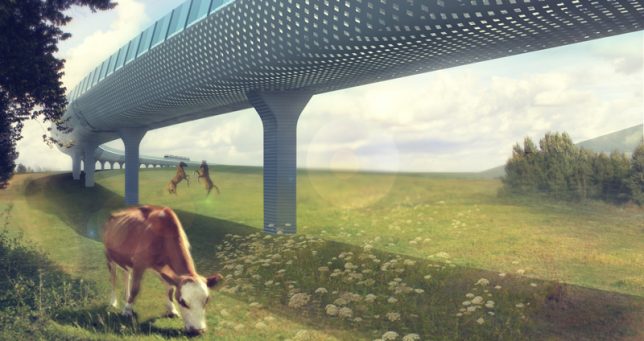
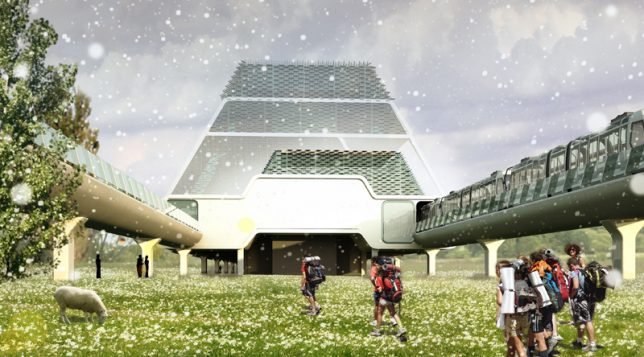
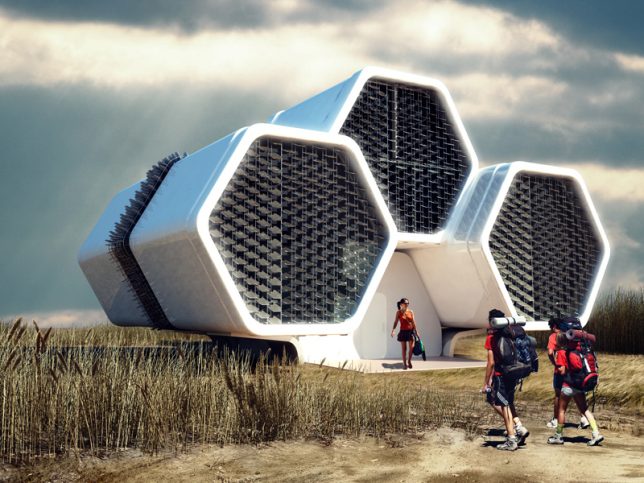
Another proposal for repopulating the Chernobyl exclusion zone seeks not to be entirely self-contained, but act as a framework for further development of human activity in the area, with a mono-railroad as its backbone. This rail line leads to modular train stations with emergency shower cabins and a decontamination zone, as well as honeycomb-shaped modular housing and observation towers. The development accommodates stubborn residents and curious tourists alike, providing plenty of opportunities to observe Pripyat in its new form.

Fukushima Plates Detect Radiation

nuclear radiation plate

nuclear radiation plate 2

nuclear radiation plate 3

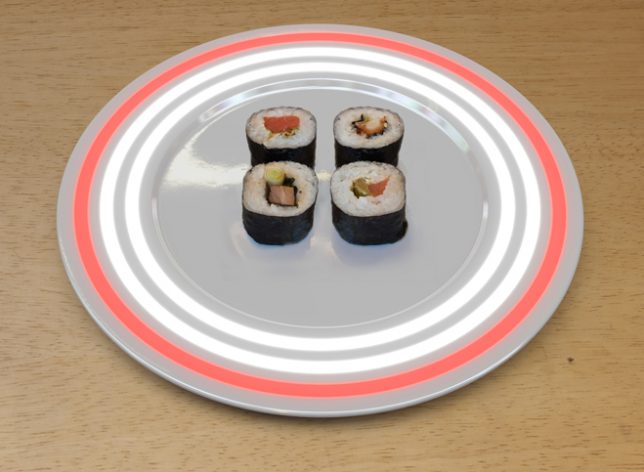
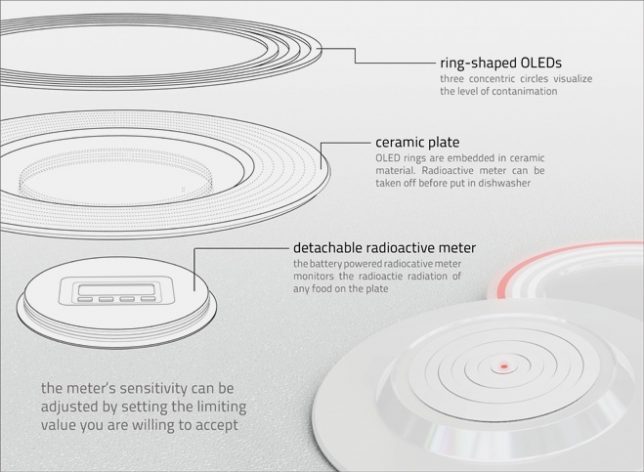
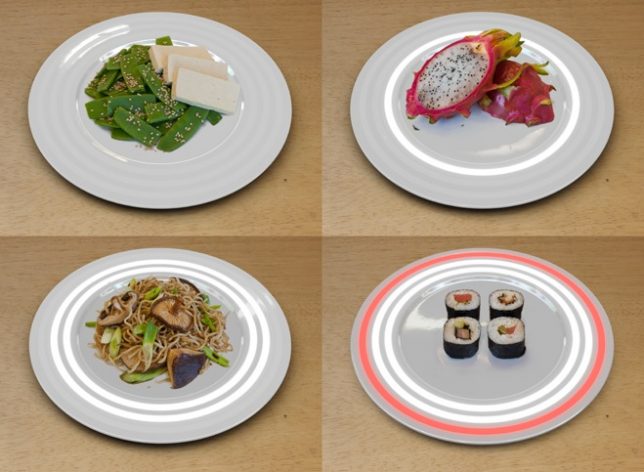
After the Fukushima disaster in Japan, a lot of sushi lovers questioned whether seafood imported from the region was safe, hence this concept by German designer Nils Ferber. There’s a radiation meter built right into each plate, with LED lights to warn you if your food is dangerously radioactive. One glowing white light tells you your food contains low levels of radiation, two white lights advise caution while a large red ring tells you it’s not safe to eat. “In a society that sacrifices reason to profit, security becomes a luxury for those who can afford it,” says the designer. “The plate might become an indispensable tool of survival in the future.”

Mech Suits, Chernobyl Patrol + More by Vitaly Bulgarov

chernobyl black phoenix main

Screen Shot 2016-07-25 at 8.52.41 AM

nuclear bulgarov 1

nuclear bulgarov

nuclear bulgarov 4

nuclear bulgarov 3

nuclear bulgarov 5

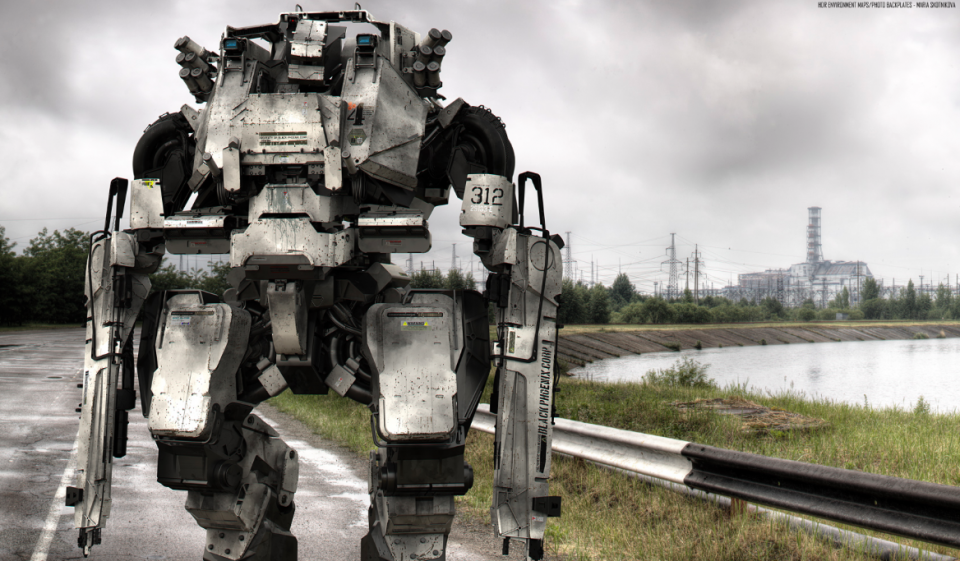
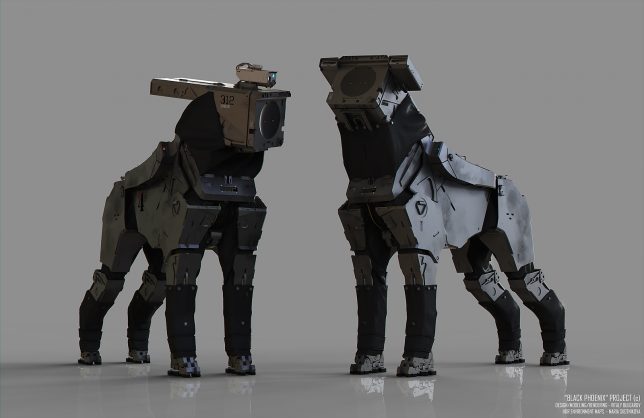
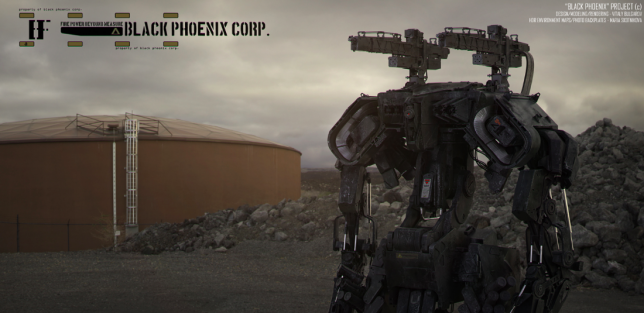
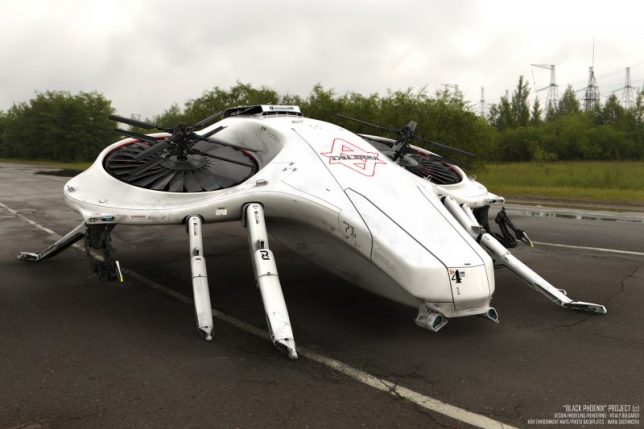
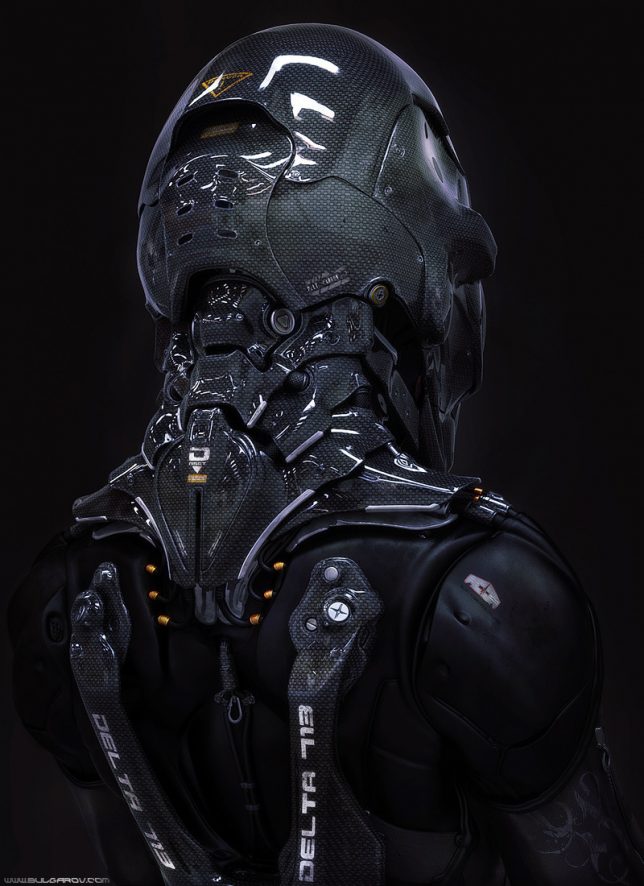
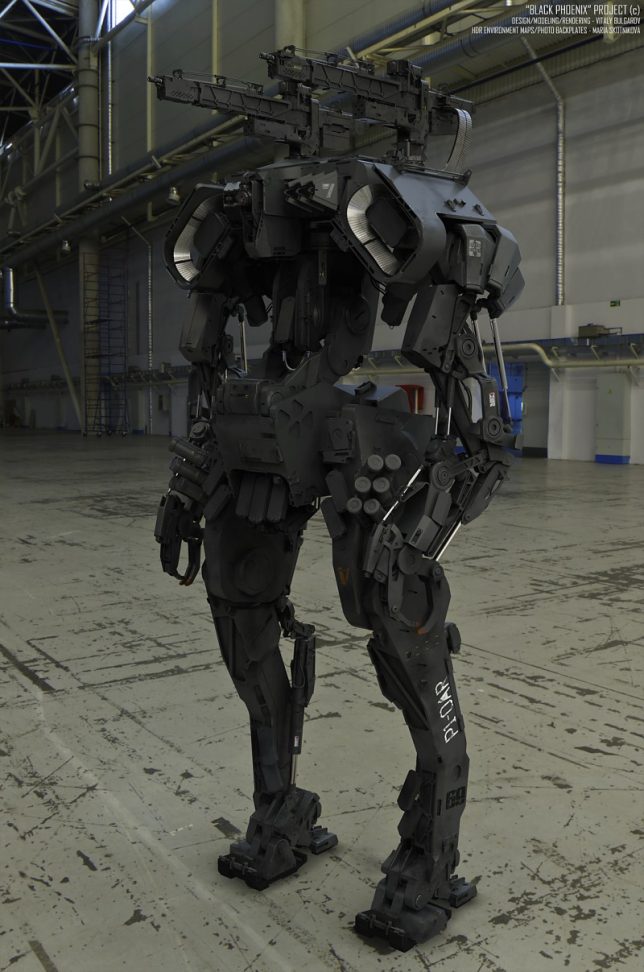
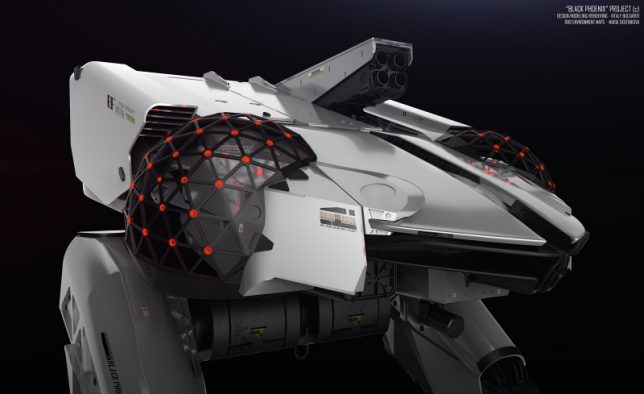
Moscow-based concept designer Vitaly Bulgarov presents a series of digital proposals for ‘The Black Phoenix Project: Chernobyl Patrol,’ ranging from semi-civilian drones to advanced weaponry systems. The artist works for game developer Blizzard and created this 3D visualization as a demonstration on speeding up the process of creating concept art with design software like Brush and SoftImage XSI. The mech designs include robotic Scout Dogs, an ‘Arachnid Tank,’ a missile-launching ‘Public Protector,’ infantry bots and an ambulance/rescue robot, and they’re clearly oriented toward a post-apocalyptic, war-torn scenario in Chernobyl rather than just dealing with radiation.

Next Page – Click Below to Read More:
Beyond Chernobyl 15 Design Concepts For A Post Nuclear World

Share on Facebook


[ By SA Rogers in Art & Drawing & Digital. ]

[ WebUrbanist | Archives | Galleries | Privacy | TOS ]


WebUrbanist

 
Comments Off on Beyond Chernobyl: 15 Design Concepts for a Post-Nuclear World

Posted in Creativity


Venus Optics to launch ‘world’s widest F2.8 rectilinear lens’

26 Jul

Chinese optical manufacturer Anhui ChangGeng Optical Technology Company Limited, or Venus Optics, is preparing to introduce a 12mm lens that it claims will be the world’s widest F2.8 lens with fully corrected distortion. Going under the Laowa brand name the lens will be called Laowa 12mm F2.8 Zero-D and will be officially announced on July 30th via a Kickstarter campaign.

Venus Optics says that the lens has almost no distortion, hence the ‘Zero-D’ in the name, and has loaned a test unit to a blogger Nicky Bay who has a preview with images on his website. The lens will be manual focus only, will feature an aperture range of F2.8 to F22 and is due to have a seven-bladed iris with clicking stops. The company is also said to be launching a Magic Shift adapter, according to Bay, that allows +/-10mm of shift while converting the lens to a 17mm focal length. The converter will be for Sony E-mount users only.

Specification published on the Laowa Facebook page.

Of course, this isn’t the world’s first rectilinear 12mm with a fast aperture, as F2 and F1.4 12mm lenses exist for the Micro Four Thirds system, and there are Zeiss F2.8 and F2 Samyang 12mm lenses for APS-C sensors, but this lens is designed for full-frame cameras.

The lens, which will be made in Canon EF, Nikon F, Sony A, Sony E and Pentax K mounts, is expected to retail at $ 949, but supporters of the Kickstarter campaign will be able to get one from $ 649. The Magic Shift will cost $ 300 and a square filter adapter will be $ 50.

For more information on Venus Optics see the company website. 

Articles: Digital Photography Review (dpreview.com)

 
Comments Off on Venus Optics to launch ‘world’s widest F2.8 rectilinear lens’

Posted in Uncategorized


Glittering Wave-Shaped Concert Hall Placed Atop Old Warehouse Building

26 Jul

[ By SA Rogers in Architecture & Public & Institutional. ]

herzog de meuron concert hall 1

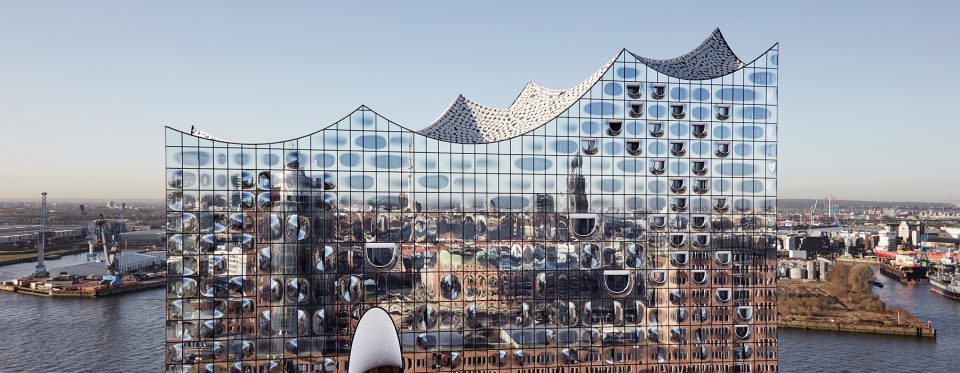
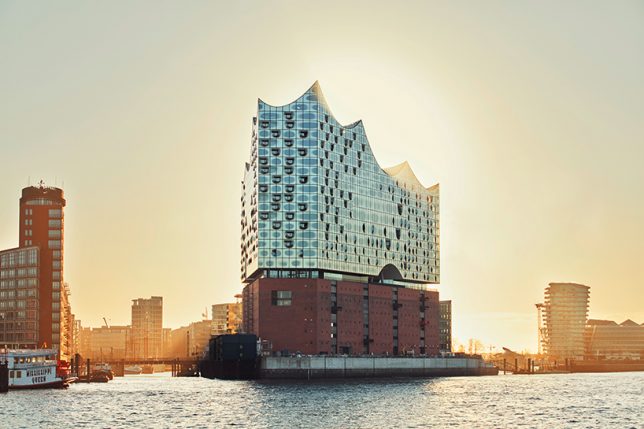
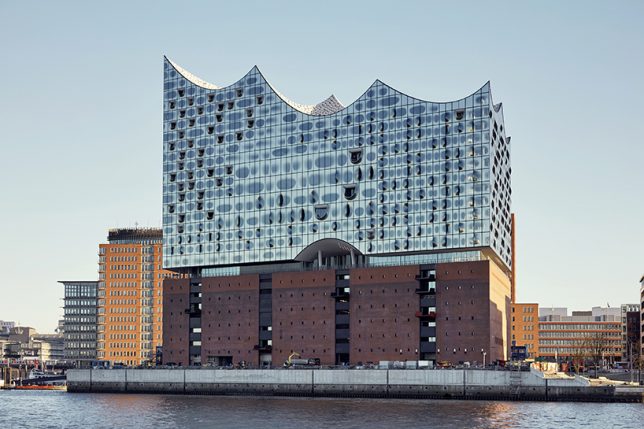
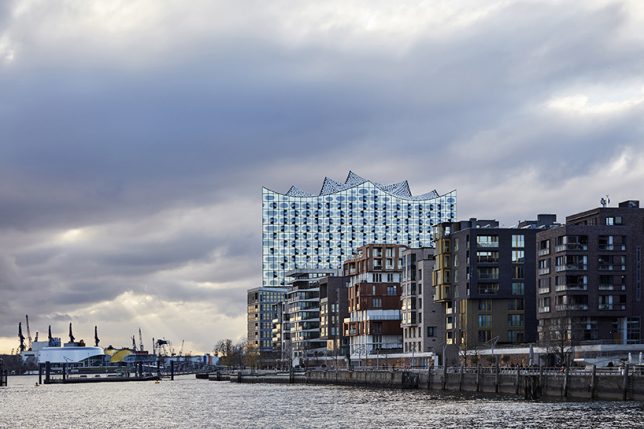
German concertgoers are so excited about the stunning new Elbphilharmonie building in Hamburg by architecture firm Herzog & De Meuron, they’re already snapping up tickets for the first events scheduled after its inauguration on January 11th, 2017. The glittering wave-shaped addition is a bold ultramodern example of adaptive reuse, delicately hovering over an existing brick warehouse building to assist with soundproofing its 2,100-seat arena. The project is finally nearing its completion after nearly a decade of construction, with all of its interior fittings set to be in place in time for its handover to its operators on October 31st, 2016.

herzog de meuron concert hall 2

herzog de meuron concert hall 4

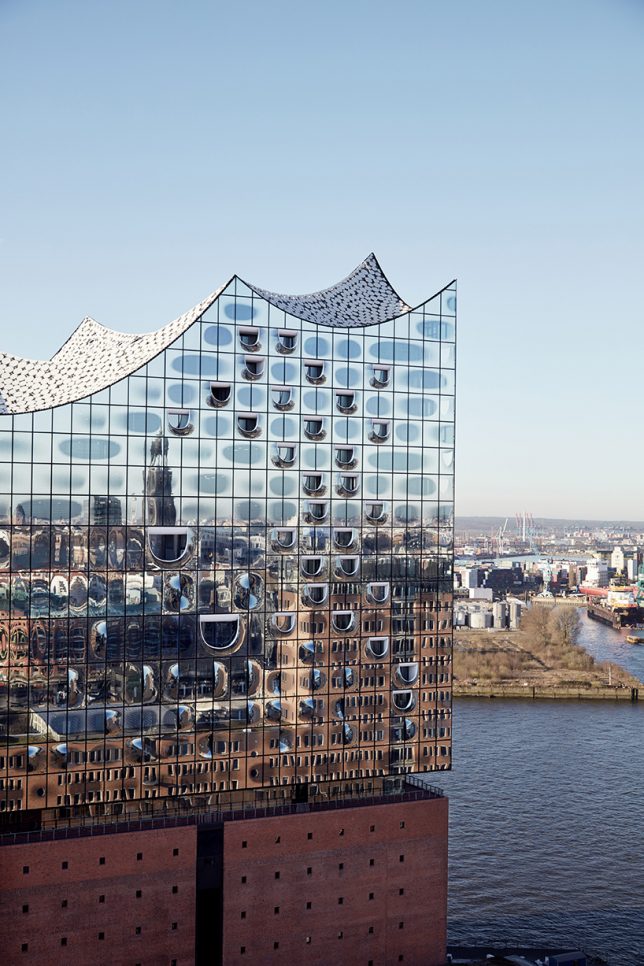
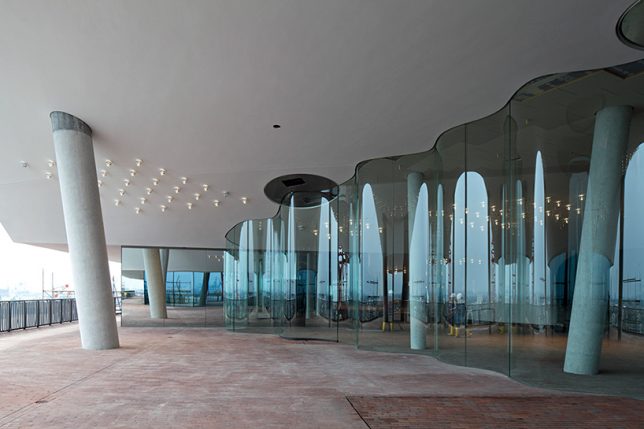
With anticipation building for such a long time, it’s a good thing the final result is so impressive. Located in Hamburg’s Hafencity quarter on a peninsula jutting out onto the River Elbe, the complex not only mimics the adjacent surface of the water, it literally mirrors it with 1,100 panes of reflective cladding punctuated by convex elements and D-shaped windows reminiscent of fish mouths. Reflective basalt grey dots prevent the structure from overheating and add to the shimmering effect.

herzog de meuron concert hall 3

herzog de meuron concert hall 5

The complex also houses a 250-room hotel, 45 private apartments, two additional concert halls and a public viewing area with panoramic vistas of the waterfront. Reusing the old building pays tribute to the neighborhood’s industrial past even as Hafencity – a new urban redevelopment scheme that enlarges the Hamburg City Center by 40 percent – blossoms as a cultural hub. The scheme is seen as a blueprint for Hamburg’s development into the 21st century, reestablishing it as a modern maritime city.

interior 2

interior

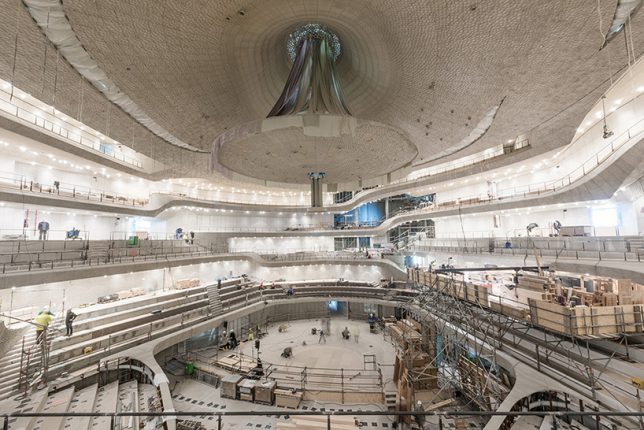
Inside, the careful selection of state-of-the-art materials helps explain the long delay in construction, as an organically textured white ‘skin’ made of dense gypsum-fiberboard panels enhances acoustics and makes the space even more visually expansive. Other details, like a flowing glass wall on the panoramic ‘plaza,’ continue the aquatic theme.

Share on Facebook


[ By SA Rogers in Architecture & Public & Institutional. ]

[ WebUrbanist | Archives | Galleries | Privacy | TOS ]


WebUrbanist

 
Comments Off on Glittering Wave-Shaped Concert Hall Placed Atop Old Warehouse Building

Posted in Creativity


Leica introduces silver version of the APO-SUMMICRON-M 50mm F2 ASPH

26 Jul

German camera manufacturer Leica has announced that it is to introduce a version of its premium f/2 standard lens for the M system finished in anodised silver. Until now the lens, which was first announced in 2012, has only been available in a black finish. Leica claims this manual focus 50mm is the best quality lens it produces for the M system, which perhaps goes some way to explaining its $ 7795/£5600 price tag.

The new silver version of the lens however will cost a little extra, at $ 7995/£5900.

The lens is classed in the company’s ‘fast and compact’ series, and uses eight elements in five groups including three APO elements and two that have what the company describes as a ‘high refractive index’. The lens weighs 10.58oz/300g and measures 1.85in/47mm in length and 2.09in/53mm in diameter.

The new silver APO-SUMMICRON-M 50mm f/2 ASPH will be available at the end of the month. For more information visit the Leica website.


Press release

LEICA APO-SUMMICRON-M 50mm f/2 ASPH.

Sharpest ever standard lens now available in silver anodised finish

Leica Camera has today announced that the APO-Summicron-M 50mm f/2 ASPH. is now available in a silver anodised version. Thanks to its meticulous optical design, high quality materials, and sophisticated manufacturing and finishing process, this high-performance lens is considered to be the reference lens among standard focal lengths.

With its combination of exceptional sharpness and imaging performance that captures and resolves even the finest details, the APO-Summicron-M 50 mm f/2 ASPH. is characterised by extremely high contrast rendition from corner to corner of the image – at maximum aperture and throughout the aperture range. The use of a floating element in its design ensures that this is also maintained at close shooting distances.

Eight lens elements are employed to achieve this outstanding optical performance. Three of the lenses are made from glass types with anomalous partial dispersion or apochromatic correction, and two have a high refractive index. The specially-formulated glass employed is based on original developments from the former Leitz glass laboratory, and the use of this particular glass requires extensive effort and many years of experience. Thanks to continuous advancements in optical technology, processes have since been refined and perfected to achieve the best possible image quality.

As with all other Leica lenses, the Leica APO-Summicron-M 50 mm f/2 ASPH. was designed and developed by Leica specialists in Wetzlar and represents the perfect combination of optical and technical expertise. Exceptionally reliable with enduring value, and with the ‘Made in Germany’ quality guarantee, the lens is manufactured from the finest materials and is meticulously assembled by hand. This combination of cutting-edge technology and precise manufacturing procedures ensures consistent excellence at all times.

Pricing and availability

The Leica APO-Summicron-M 50 mm f/2 ASPH. (silver anodised) is scheduled to be available at the end of July 2016 at a suggested retail price of £5,900 including VAT.

Articles: Digital Photography Review (dpreview.com)

 
Comments Off on Leica introduces silver version of the APO-SUMMICRON-M 50mm F2 ASPH

Posted in Uncategorized


5 Tips for Getting Started with Wildlife Photography for Beginners

26 Jul

There is just something about the natural world that seems to touch us humans to the very core of our being, especially when it involves wildlife of any form. When we hear the words “wildlife photography”, wide open planes of the African Savannah with herds of zebras, wildebeests and antelope come to mind.

But that is just one part of the natural world pie! Don’t get me wrong, visiting Africa and going on safari are really high on my bucket list of places to visit and things to photograph, but I get equally excited when I am hiking in a national park that is frequented by bears, bison, eagles and pronghorn deer. There are several brilliant wildlife photographers out there, and every image they produce has a jaw-dropping reaction from most of their fans and followers. If you spend some time and really study their work, you will notice a consistent method to their approach. There are some simple basic guidelines that budding wildlife photographers can follow to creating their own Kodak moments!

Here are a few things to keep in mind for a safe, productive, and exciting wildlife photography trip.

1 – Research and planning

Memorable Jaunts Getting started with wildlife photography-5

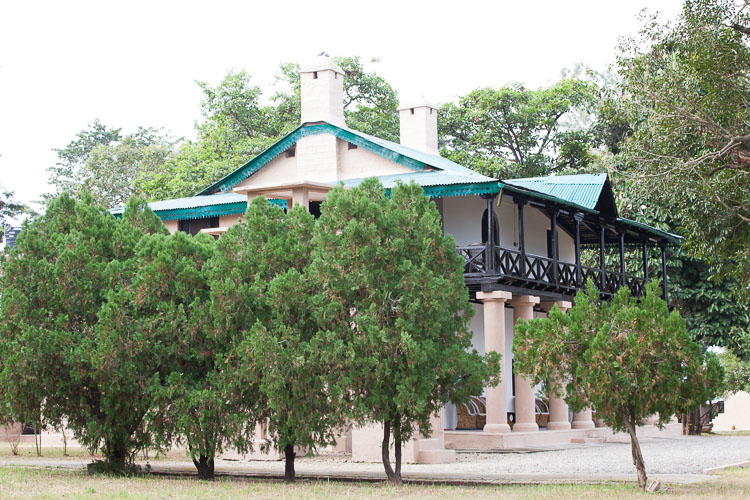
I spent three hours of the afternoon exploring the wonderful forest lodge at Jim Corbett National Park in India because the park roads closed in the afternoon hours to allow animals to move about freely in the jungle without the noise created by countless jeep safaris – something that is not mentioned in most guide books.

Traveling itself is one of those tasks that needs an incredible amount of planning and research. So it is no surprise that when you are planning a wildlife photography expedition, you need to add a lot more to the mix. Scope out the best places to photograph animals, the best time of day, travel times to and from, as well as any permits and paperwork needed, well ahead to time to avoid any disappointments once you get to the location.

Memorable Jaunts Getting started with wildlife photography-15

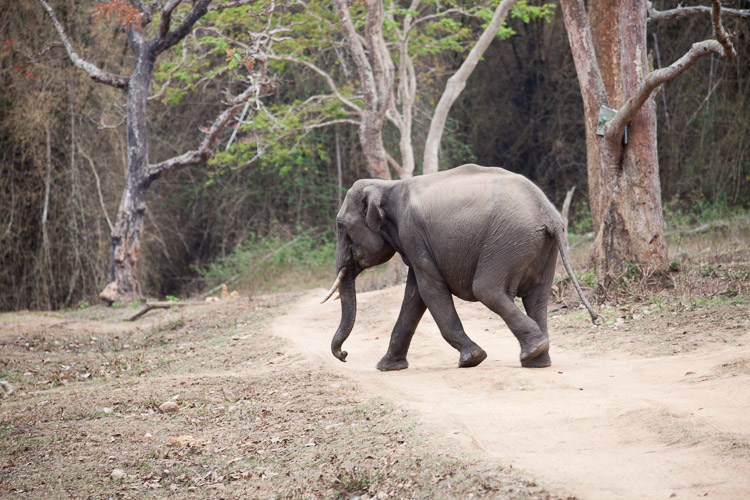
Once we were back in the park on our safari, I was able to see this juvenile elephant walk across the path on his way to the deep jungle.

2 – Selecting the right gear

This is a very important part of any photographic expedition and quite possibly an article in itself. Choosing the right gear for your wildlife excursions is key. A lot of factors will determine what lens and cameras you need to carry with you.

Are you primary going to be traveling in a car? If so, you could bring more than one camera, and a long telephoto lens. Are you going hiking/camping, and will you be constantly on the move while looking for animals? If so, then maybe you’ll need to limit yourself to one camera, and a medium telephoto lens to reduce your load. Is there a possibility for you to get up-close and personal with the animals? Then, carry a smaller focal length like an 85mm or 50mm lens.

Are you planning on photographing landscapes too? You may need a wide angle lens if so. Will you have access to your computer frequently? If not, you may need a portable external hard drive to backup your images. How many batteries do you need?

As you can tell, having a plan for where, and what you are looking to photograph, is really critical in determining what gear you pack.

Memorable Jaunts Getting started with wildlife photography-3

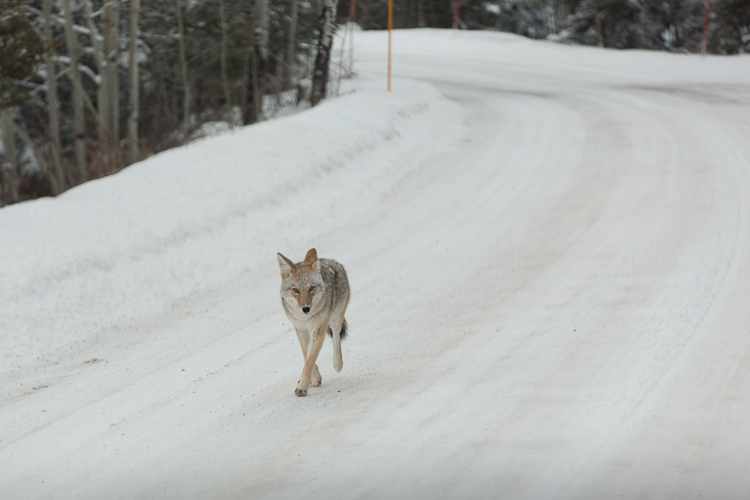
Driving around in Yellowstone National Park one December morning found me face to face with this coyote (above) – who was simply enjoying his morning run. I was too surprised to remember the appropriate lens choice, camera setting, etc. I just took the snap, and while it may not be technically perfect, it is one of my favorite images. Just look at the trot in his paws.

Memorable Jaunts Getting started with wildlife photography-8

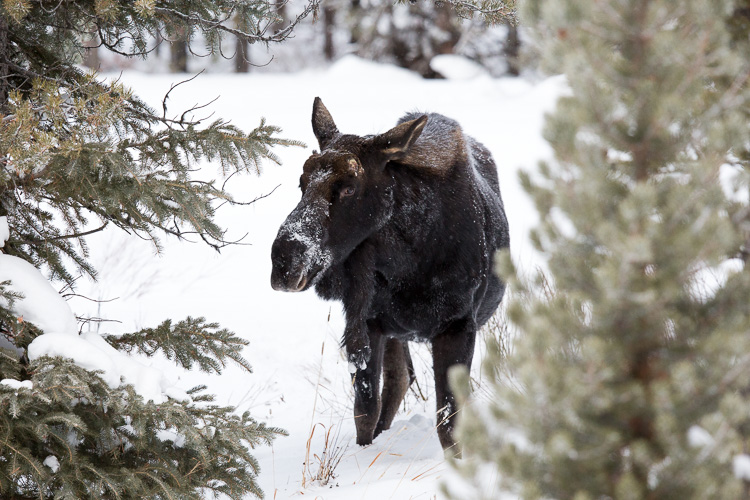
On the other hand, a photographic expedition into Yellowstone National Park a few days later gave me a chance to use a 400mm super telephoto lens to capture this moose feeding along the hillside.

3 – Safety

When doing wildlife photography, it is very important to keep safely in mind. It doesn’t matter if you are going on safari, or hiking alone in national parks. Wild animals by nature are unpredictable, and it would behoove us to remember that we are in their space, and we need to be respectful of that.

Rules and guidelines in wilderness areas are there for a reason – your safety and security. Make sure you follow them so that you, or others around you, don’t get hurt or injured. Whenever possible, travel in a group, or at least with one other person. There is security in numbers, and that can work to your advantage.

Seek help from experts who have made the journey before you and listen to their advice. Hiking a nesting area or denning area is never a good idea, for a reason! Take care of your gear. Especially if you are away in remote locations, you don’t want to be careless and risk your gear malfunctioning just when you need it. Dust and dirt are difficult to clean when you are out in the field.

Memorable Jaunts Getting started with wildlife photography-10

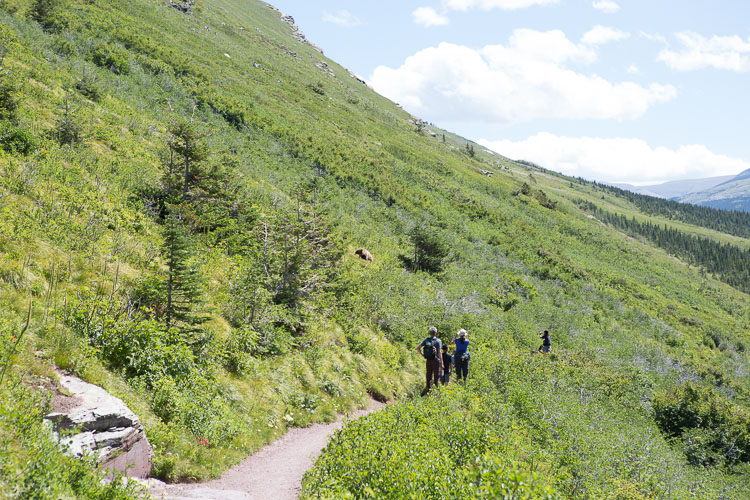
On a 10 mile alpine hike in Glacier National Park in Montana, USA, the only gear I could comfortably carry was my 24-70mm lens and I was able to snap this picture. Not the closeup I really wanted, but this conveys a message unlike any closeup shot I could have gotten. Bonus points for spotting what everyone was looking at!

4 – Practice and patience

Wildlife photography, like most other genres, needs a lot of practice, and an even greater amount of patience. People spend hours and hours to get the perfect shot – often in less than perfect conditions like the cold, rain, and even overnight in a bind waiting for the sunrise shot. So depending on what you are looking to photograph, be prepared to be patient and wait it out.

Practicing is a little harder to accomplish unless you happen to live close to a national park or wildlife frequented area. A good alternative may be to spend time at the local zoo and try to capture photographs of animals there. A lower cost alternative to testing out your gear as well as playing around with settings.

You could also try this – Guide to Attracting Critters to Your Garden for Backyard Wildlife Photography

Memorable Jaunts Getting started with wildlife photography-12

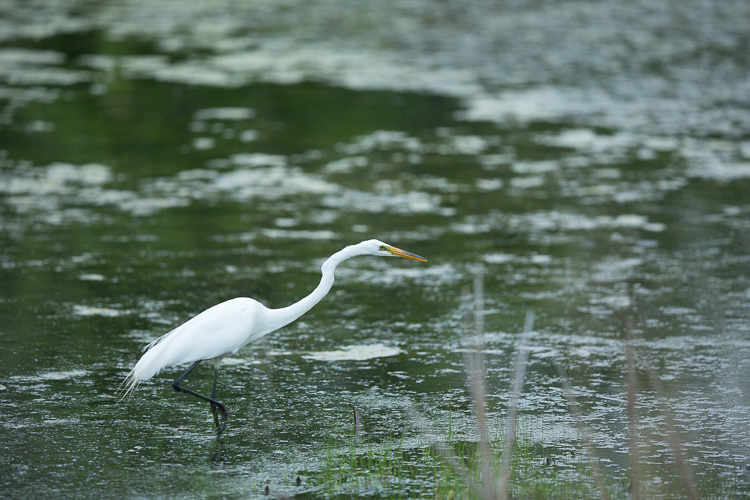
A pond close to my house is a watering hole for many birds during the spring and summer months. I am always out there practicing trying to get a clear shot of these cranes feeding. Perhaps one of these days, lady luck will be on my side!

5 – Enjoy the experience beyond the camera LCD

I don’t know about you, but I absolutely hate experiencing my vacation through the back of my camera. My life is quite busy and hectic with kids, family, and a full time business. Vacations are always a welcome, and much needed break to get away from it all, and time to do the things we all enjoy.

Yes, I absolutely want to capture moments through my camera, but I also want to be physically, and emotionally present with my family. I am just as happy seeing that exotic bird or that elusive wild animal with my own eyes, as I am getting a shot of it – I don’t need to prove it to the world!

Memorable Jaunts Getting started with wildlife photography-9

While we were hiking in Glacier National Park in Montana, we saw a wolverine – yes, we truly did! About 10 minutes after this photo was taken, the path turned really narrow with a steep incline, so I did the most sensible thing I could do, and put the camera away. A few minutes after that, we saw a brown patch of fur run along the path! A ranger later confirmed that a wolverine was frequenting the area we had just hiked. Yes, I have no photographs to prove it, but I have the most wonderful memory of seeing one of the rarest (to see) animals in the wild! Wolverines are a shy species, so don’t expect to see one out in the wild. They live in dens made out of snow tunnels, rocks and boulders and can be found in remote forests and tundra.

What are some of the most interesting wild animals you have photographed? Share your experiences in the comments below.

googletag.cmd.push(function() {
tablet_slots.push( googletag.defineSlot( “/1005424/_dPSv4_tab-all-article-bottom_(300×250)”, [300, 250], “pb-ad-78623” ).addService( googletag.pubads() ) ); } );

googletag.cmd.push(function() {
mobile_slots.push( googletag.defineSlot( “/1005424/_dPSv4_mob-all-article-bottom_(300×250)”, [300, 250], “pb-ad-78158” ).addService( googletag.pubads() ) ); } );

The post 5 Tips for Getting Started with Wildlife Photography for Beginners by Karthika Gupta appeared first on Digital Photography School.


Digital Photography School

 
Comments Off on 5 Tips for Getting Started with Wildlife Photography for Beginners

Posted in Photography


Adobe ACR 9.6.1 update supports Fujifilm X-T2

26 Jul

Adobe has updated its Camera Raw application to make it compatible with Raw files created by Fujifilm’s new X-T2 camera. The latest version, 9.6.1, also fixes some reported bugs that prevented the opening of uncompressed DNG files that had been converted from Fuji X-E2 RAF format files, and an issue that meant panoramas couldn’t be created from two HDR DNG images.

This version of Camera Raw, and the fixes that it brings, are available now to users of Photoshop CC and the Creative Cloud application.

For more information and to download the update see the Adobe Lightroom Journal blog.

Manufacturer information:

Camera Raw 9.6.1 now available

Camera Raw 9.6.1 is now available through the update mechanism in Photoshop CC and the Creative Cloud application. Our focus with this release was to fix reported customer issues.

Thank you for all your feedback and passion for Camera Raw.

Bugs Fixed in Camera Raw 9.6.1

  • Uncompressed DNGs files converted from Fuji X-E2 RAF source images were are unable to be read
  • Errors that preventing customers from creating a panorama from two HDR DNG source images.

New Camera Support in Camera Raw 9.6.1

  • Fujifilm XT-2

Installation Instructions

Please select Help>Updates to install the update. See Keeping Photoshop & Camera Raw up-to-date.

Please note – If you have trouble updating to the latest ACR update via the Creative Cloud application, please refer to the following plugin installation:

http://helpx.adobe.com/x-productkb/multi/camera-raw-plug-in-installer.html

DNG Converter Links: Win | Mac

Articles: Digital Photography Review (dpreview.com)

 
Comments Off on Adobe ACR 9.6.1 update supports Fujifilm X-T2

Posted in Uncategorized


Branco Ottico creates world’s biggest contact print at 24 square meters

26 Jul

Do you lie awake at night wondering how big the world’s largest contact print is? Wonder no more. It turns out Branco Ottico, an Italian photography group, created the largest contact print in the world during Phototrace Florence in September 2015. The project involved a 24 square meter (about 258 square feet) photo negative stitched onto an equally large sheet of canvas, and enlisted the help of strangers who placed their hands on the print for the nearly 13-minute exposure.

Their efforts resulted in a successful – and massive – cyanotype print. According to the group’s website, the print now holds a Guinness World Record. The whole process has been documented in the newly published video below. Additional photos of the project are available on the group’s Instagram.

Via: PetaPixel

Articles: Digital Photography Review (dpreview.com)

 
Comments Off on Branco Ottico creates world’s biggest contact print at 24 square meters

Posted in Uncategorized


Flickr ownership changes hands as Verizon acquires Yahoo

25 Jul

Telecomm giant Verizon will acquire Yahoo and its web properties, including Flickr and photo blogging site Tumblr, for $ 4.83 billion. It seemed possible that Yahoo might sell its photo-sharing sites separately, as the company announced in March that it was accepting bids for its web properties. Today’s announcement confirms that both Flickr and Tumblr will remain a part of Yahoo as it changes hands to Verizon.

Verizon owns AOL and Huffington Post, a point that Yahoo CEO Marissa Mayer spins as a positive for her company’s outlook. In a statement published on Yahoo today, Mayer emphasized that joining forces with AOL could help strengthen Yahoo’s mobile offerings.

Regulators must approve the sale before it can be finalized, which is expected to be early next year.

Articles: Digital Photography Review (dpreview.com)

 
Comments Off on Flickr ownership changes hands as Verizon acquires Yahoo

Posted in Uncategorized