RSS
 

Archive for June, 2016

After 176 years, Indian photography studio closes its doors

22 Jun
Bourne & Shepherd Studio, Kolkata, India. Photo by Biswarup Ganguly. Used under CC 3.0

A studio in India, founded by British photographers Charles Shepherd, Samuel Bourne and William Howard in 1840 will close its doors after 176 years in operation. Considered the oldest continuously operating photographic studio, Kolkata-based Bourne & Shepherd’s current owner cites the recent major changes in photographic technology as a reason for the closure.

The studio was known for its portraiture, producing images of religious figures and government officials, from the British Raj era onward. Speaking to Indian publication The Hindu, a former employee explains that the shift to digital made it difficult for the studio to survive, saying ‘How can you expect that a studio can operate in this generation where everyone is clicking photos from their mobiles and digital cameras?’

Though the studio will no longer be in operation, the current owner says that he’ll continue to maintain the shop’s collection of historic photos and equipment.

Articles: Digital Photography Review (dpreview.com)

 
Comments Off on After 176 years, Indian photography studio closes its doors

Posted in Uncategorized


Adobe updates PhotoShop CC with content-aware crop, face-aware liquify

22 Jun

Photoshop CC 2015.5 introduces a couple of editing tools that have been showcased recently by Adobe, as well as a new selection and masking workspace. 

Face-aware liquify uses facial recognition to identify facial features, offering slider adjustment tools to change the shape of a nose or a mouth, for instance. Content-aware crop aims to fill in blank canvas space around an image resulting from a horizon adjustment, for example, applying the same logic as the existing content-aware fill tool. In addition to these new retouch tools, users will find a new selection and masking workspace, making it easier to isolate elements of an image with tools like refine edge brush. 

With this update, Adobe claims that Photoshop CC will open documents faster and performs with better overall responsiveness. Specifically mentioned is content aware fill, which Adobe claims will be ‘up to 3X faster with even better results.’

Subscribers can update to Photoshop CC 2015.5 starting today.

Articles: Digital Photography Review (dpreview.com)

 
Comments Off on Adobe updates PhotoShop CC with content-aware crop, face-aware liquify

Posted in Uncategorized


Learn Ansel Adams’ Biggest Secret for Stunning Photography – Visualization

22 Jun

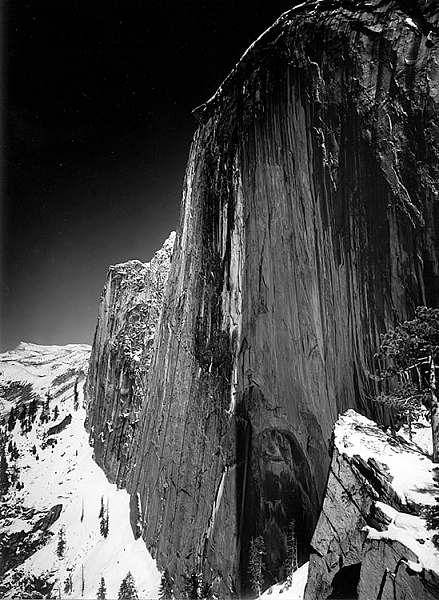
Ansel Adams is the most widely known photographer in history, you don’t need to look very far to see one of his images. Would you like to know the whole key to Ansel Adams’ stunning photographs?

This is a photograph of half dome in Yosemite taken in 1927 by Ansel Adams

Monolith, The Face of Half Dome, by Ansel Adams (Image courtesy Ansel Adams Illumes and The Ansel Adams Gallery)

In this this video interview with his son, Michael Adams, you will hear about his breakthrough as a photographer, when he went from merely recording an image, to being an artist who interpreted the image to tell the story he wanted.

As you’ll hear, Ansel had his breakthrough when he climbed up to take a photograph of Half Dome, the iconic monolith in Yosemite, California. The moment he realized that the yellow filter just wasn’t going to convey what he saw and felt, he changed to a red filter which expanded the tones of the image and brought out the darkness of the sky, thereby creating the mood he had visualized.

Ansel said, the whole key lies in first visualizing the image you want, rather than just snapping away.

By first forming the image or idea in your mind’s eye, you can then set about to capture it. His son Michael summed it up with, “He knew what he wanted and he got what he wanted.”

These are Ansel’s’ key points that you can practice to continually improve your photography:

  • Look at the external event, and then visualize what you want it to look like, clearly and decisively.
  • Try to make the photograph of what you saw and felt.
  • Train yourself to see what the camera sees by comparing what you see, with what it looks like in the camera.
  • Practice your craft and do your homework so you can make the photograph you desire by going through these steps to capture what you visualized.
  • Placing the camera: Find the best point of view of the lens.
  • Make a proper lens selection.
  • Decide on your depth of field and set your aperture.
  • Control your exposure and later, the development.

As he said, with practice this becomes automatic and instinctive. Put Ansel’s advice into action and let me know your results in the comments below.

googletag.cmd.push(function() {
tablet_slots.push( googletag.defineSlot( “/1005424/_dPSv4_tab-all-article-bottom_(300×250)”, [300, 250], “pb-ad-78623” ).addService( googletag.pubads() ) ); } );

googletag.cmd.push(function() {
mobile_slots.push( googletag.defineSlot( “/1005424/_dPSv4_mob-all-article-bottom_(300×250)”, [300, 250], “pb-ad-78158” ).addService( googletag.pubads() ) ); } );

The post Learn Ansel Adams’ Biggest Secret for Stunning Photography – Visualization by Marc Silber appeared first on Digital Photography School.


Digital Photography School

 
Comments Off on Learn Ansel Adams’ Biggest Secret for Stunning Photography – Visualization

Posted in Photography


Sony warns against use of unauthorized third-party apps

22 Jun

Sony Japan has issued a brief statement about the use of third-party apps, advising camera owners that it cannot guarantee non-authorized software will work as advertised. The statement also seems to suggest that using them will void a camera’s warranty. 

The advisement refers to unauthorized firmware, camera apps, and scripts made available by websites other than Sony’s. This includes things like the STG Uploader app that enables Sony cameras to upload directly to Google Photos, and a recently publicized hack that removes video recording limits from some Sony cameras. 

Google’s translation doesn’t make it totally clear whether Sony is saying the whole camera’s warranty will be voided, or rather if any repairs necessitated by third-party firmware will not be covered by the warranty. We’ve reached out to Sony for clarification.

Via: Photo Rumors

Articles: Digital Photography Review (dpreview.com)

 
Comments Off on Sony warns against use of unauthorized third-party apps

Posted in Uncategorized


Neglected Riverside Steps Revived with Form-Fitting Sunbed Seats

22 Jun

[ By WebUrbanist in Art & Installation & Sound. ]

no studio chairs

Designed to help citizens of Wroclaw, Poland, reclaim neglected parts of their city this site-specific “microinstallation” provides comfortable urban furniture for an otherwise hard-to-occupy staircase.

no studio bridge

Developed by No Studio for DoFA (AKA the Lowersilesian Festival of Architecture), padded bed-chair combinations made for sitting and lounging were placed along public steps near an historic bridge.

no studio context

no studio waterfront

The normal stairs are not only made of uncomfortable concrete, but they are spaced for walking, not sitting, making it uncomfortable to spend time in any position other than standing at and leaning against the riverside railing.

no studio lounging

no studio seats

Visitors, who would normally pass by with few excuses to stop, were suddenly encouraged to have a seat in the sun, all thanks to rather simple but fit-for-function works of urban seating.

no studio sloped sun

no studio microinstallation

Part practical project, the endeavor also reflects an subtle thesis: small and low-cost moves can radically transform our experience of public open spaces.

no studio deck

vertical museum projects

No Studio aims to turn temporary changes into memorable experiences and lasting inspiration: “We create spaces, design for a while and a little longer. We have fun working on serious things. We try to solve problems rather than create monuments.”

Share on Facebook


[ By WebUrbanist in Art & Installation & Sound. ]

[ WebUrbanist | Archives | Galleries | Privacy | TOS ]


WebUrbanist

 
Comments Off on Neglected Riverside Steps Revived with Form-Fitting Sunbed Seats

Posted in Creativity


Plugin allows direct Instagram posting from Lightroom

21 Jun

Despite its success and millions of users, many people still think of Instagram as an image sharing platform for teenagers to post selfies and pictures of their breakfast. In reality, Instagram is full of inspiring photography as many professional photographers and talented amateurs have discovered the platform as a viable tool for promoting themselves and their work.

Problem is that, despite more and more ‘serious’ photographers using it, Instagram remains a mobile platform and posting pictures that have been taken with a non-connected camera and edited on a computer typically involves some third-party uploading tool or image transfer to a mobile device for upload. 

Now a new Lightroom plugin makes things considerably easier, at least for those users who rely on Adobe’s editing and image management software. LR/Instagram lets you post images to Instagram directly from Lightroom. Once installed you can authorize one or more Instagram accounts. Images are uploaded by dragging them into a publish collection and before you do so you can add hashtags or captions or crop your images to an aspect ratio that is supported by Instagram. By default images are auto-padded with a white border.

The plugin can be downloaded and installed for free from the LR/Instagram website but the developers ask for a $ 10 contribution via registration in the Lightroom Plugin Manager if you like the tool.

Articles: Digital Photography Review (dpreview.com)

 
Comments Off on Plugin allows direct Instagram posting from Lightroom

Posted in Uncategorized


All about that lens: Sony Cyber-shot RX10 III review

21 Jun

Introduction

The Sony DSC-RX10 III is an enthusiast-oriented bridge camera with a 24-600mm equivalent F2.4-4 lens and 20MP 1″-type stacked CMOS sensor. That sensor and the BIONZ X image processor are shared with the RX10 II and Sony RX100 IV, and offer great dynamic range and high ISO performance as well as 4K video and a range of high-speed video capture modes.

The RX-series has always been designed as much for video shooting as well as stills shooting in mind, and the RX10 III doesn’t change that. The real story of the RX10 III lies within its massive zoom lens. The RX10 III may look similar to the RX10 II when you look at them individually, but once you see them together, it’s immediately apparent just how much Sony tweaked the design of the III to accommodate the threefold increase in zoom power. The body and grip are ‘chunkier,’ and the weight has increased as well. Overall, the two are more siblings than twins.

Key Features

  • 20MP 1″-type stacked CMOS sensor
  • 24-600mm equivalent F2.4-4 Zeiss Vario-Sonnar T* lens
  • Bionz X processor
  • 4K video capture
  • Ultra slow-motion video capture
  • Tilting screen and high-resolution OLED electronic viewfinder with 2.35m dots
Straight-out-of-camera JPEG, cropped to taste. 124mm equivalent | F4 | 1/3200 sec | ISO 100. Photo by Carey Rose

There will be those people that buy the RX10 III straight away, simply because it zooms more than x camera. But it’s worth asking yourself if you really need 600mm of reach – because if you aren’t really sure you do, then you probably don’t. But as you’ll see later on, the RX10 III’s lens is so good that it might be worth it to you even if you only use the extreme reach occasionally.

Let’s also put that ‘extreme reach’ into some perspective here. The RX10 III’s 600mm zoom might seem to pale in comparison to a Nikon Coolpix P900, which packs a 24-2000mm zoom – but puts it in front of a much smaller sensor. The Sony and the Canon PowerShot G3 X attempt to strike a balance between image quality and size with their 1″-type sensors, and the image quality compared to smaller sensor solutions speaks for itself. Larger sensor = more light = better quality.

Straight-out-of-camera JPEG. 41mm equivalent | F5 | 1/1000 sec | ISO 100. Photo by Jeff Keller

Now, whether or not you want to use all this reach will vary greatly depending on the types of photography you enjoy. But it’s worth noting that long telephoto focal lengths, just like very short (wide angle) focal lengths, can take some practice to get good photographs with. Just because you can zoom closer in to an object doesn’t necessarily coincide with an increase in the quality of your photos or the video clips you capture.

With all that out of the way, let’s look a little closer at what this lens can do.

600mm

The RX10 III’s lens zooms in so far it’s almost amusing. It takes between three and four seconds for the lens to rack through the full zoom range. It also takes noticeably longer for all that glass to extend for power up than either the Panasonic FZ1000, which has less reach, and Canon G3 X, which has a much more compact lens at the expense of a slower maximum aperture.

Shooting at 600mm equivalent can offer up some interesting compositional choices, while the available 20MP make additional cropping a viable option if you could’ve used even more reach. But check out that heat haze, even early in the day! Processed and cropped to taste from Raw. 600mm equivalent | F4 | 1/1000 sec | ISO 250. Photo by Carey Rose

So while the lens makes the camera a little slow to start up and adds some bulk, in use it is very sharp throughout the zoom range, irrespective of distance to your subject (atmospheric conditions notwithstanding). Before using the RX10 III, I simply wouldn’t have thought images from a 1″-sensor superzoom camera could look this detailed. This model commands a $ 300 MSRP premium over the RX10 II, but in this case, it seems you get what you pay for.

The 72cm focus distance at maximum zoom won’t get you true super macro photos, but you’ll probably find that it focuses close enough. The lens also renders bokeh very nicely. Processed to taste from Raw. 600mm equivalent | F4 | 1/1000 sec | ISO 320. Photo by Carey Rose

Key features compared

  Sony RX10 II Sony RX10 III Panasonic FZ1000
MSRP $ 1199 $ 1499 $ 899
Sensor 20MP 1″-type stacked CMOS 20MP 1″-type stacked CMOS 20MP 1″-type CMOS
ISO range (native) 100-12800 100-12800 125-12800
Lens (35mm equivalent) 24-200mm F2.8 24-600mm F2.4-4 25-400mm F2.8-4
Built-in ND filter Yes No No
Min. focus distance 3cm 3cm 3cm
AF system Contrast detect Contrast detect Contrast detect
AF points 25-pt 25-pt 49-pt
EVF resolution 2.36m-dot 2.36m-dot 2.36m-dot
LCD 3″ 1.23M-dot tilting 3″ 1.23M-dot tilting 3″ 921k-dot fully articulated
Burst rate 14 fps 14 fps 12 fps
Video 4K/30p 4K/30p 4K/30p
Wi-Fi Yes, with NFC Yes, with NFC Yes
Battery life (CIPA) 400 shots 420 shots 360 shots
Weather sealing Yes Yes No
Dimensions 129 x 88 x 102mm 133 x 94 x 127mm 137 x 99 x 131mm
Weight 813 g 1051 g 831 g

As you can see, besides the lens and a modest increase in both size and battery life, the RX10 III is all but identical on the inside to the RX10 II. The older, less expensive Panasonic FZ1000 loses out in a few areas like battery life and weather sealing, but it is still a competitive machine in many ways (so long as you don’t need 600mm, that is).

While Sony touts the RX10 III’s lens as having a 9-bladed aperture for better out-of-focus renderings (compared to 7 blades on the Mark II), it lacks the built-in ND filter that was present on the previous model. This was especially helpful for shooting video under bright daylight. Of course, since the front of the lens is threaded, you can always add your own ND, but having the option at the press of a button would be a lot more convenient.

Because of the large-ish AF area the RX10 III defaults to, it will sometimes miss focus very slightly. Here, it backfocused onto the singer’s high-contrast hair instead of her face. But I’d have no problem using this for web publishing. Processed and cropped to taste from Raw. 600mm equivalent | F4 | 1/320 sec | ISO 6400. Photo by Carey Rose

Beyond that omission, the RX10 III offers all that made the RX10 II such a compelling camera. The sensor offers great performance, the 4K and high frame rate video is detailed and of good quality, and the body is weather-sealed. But unfortunately, the fact that the RX10 III shares so much with its predecessor also means that you get the standard Sony UI woes as well as a contrast detection-only autofocus system that works fine for static subjects, but struggles with low contrast subjects and at telephoto distances, where phase-detection would help the camera minimize hunting.

If you’re not shooting fast action all the time, the RX10 III has a lot of potential as a family vacation camera, an all-in-one photo and video solution for a journalist in a tightly staffed newsroom, or documentary photography where you can’t necessarily get close to your subject.

So without repeating everything that we’ve already covered on the RX10 II, let’s look chiefly at how the RX10 III differentiates itself by virtue of its optics.

Processed and cropped to taste from Raw. 375mm equivalent | F5.6 | 1/100 sec | ISO 200. Photo by Carey Rose

Sony RX10 III overview video

In case you missed it (or prefer video), here’s an overview video we produced at the launch of the RX10 III back in March, 2016.

Articles: Digital Photography Review (dpreview.com)

 
Comments Off on All about that lens: Sony Cyber-shot RX10 III review

Posted in Uncategorized


Macro Photography on a Budget: An introduction to Close-up Filters

21 Jun

close-up-filters-flower

Have you ever seen some stunning pictures of insects, where you can clearly see each individual element of their compound eyes, or looked through your Instagram feed marveling at photos of flowers where you can see the tiniest detail on each individual petal? If so, welcome to the wonderful world of macro photography, one in which the little things in life are not only celebrated, but magnified to glorious proportions, and even the most mundane objects around us can take on beautiful otherworldly qualities when examined under near-microscopic detail.

This particular type of photography is not only stunningly beautiful but often prohibitively expensive, at least for the casual hobbyist. A good macro lens can easily set you back several hundred dollars, and that’s not counting the accessories like a good tripod, a ring flash, and other gear that is liable to turn this past-time into a debt-inducing money pit. Thankfully there are several good alternatives like extension tubes and lens-reversing rings to aid you in your quest for beautiful macro photography, but my personal favorite is one of the cheapest options available: close-up filters.

close-up-filters-anthers

This image, and all the other macro-style shots in this article, were not taken with an expensive macro lens but with a $ 35 set of close-up filters I screwed on to my 50mm lens.

A true macro lens is designed to create true 1:1 (life-size) replications of very small things on the image sensor of your camera. If you have a coin that is 2cm diameter, a high quality macro lens will be able to take a photograph of that coin wherein it is literally the same size on your camera’s image sensor. Taking these types of photographs requires a host of light-bending optical gymnastics on the part of your lens. In the process there are almost always tradeoffs in image sharpness and overall light-gathering ability, which is why macro lenses cost so much money, because they contain special glass elements to minimize any optical imperfections.

Close-up filters rely on a very simple, very old, idea to make it possible for any normal camera lens to focus on objects that are, as their name implies, very close to your lens. All lenses have a minimum focusing distance, which is as close as you can get to an object and still have it be in focus. A +2 filter will make it possible for a lens with a minimum focusing distance of 1 meter to now focus on something .3 meters away. A +10 filter would decrease the minimum focusing distance to .09 meters. The math is slightly complicated, but suffice it to say the higher the number on your filter, the closer your lens will be able to focus.

close-up-filters-leaf-droplet

Close-up filters are also very inexpensive and you can often find a set with three or four filters for under $ 40 that will work with your lens.

A close-up view of close-up filters

So what is a close-up filter? Simply put, it’s basically a magnifying glass that you screw onto the front of your camera lens. Just like their investigative counterparts wielded by famous fictional detectives through the ages, close-up filters rely on a single curved piece of glass that bends light in such a way as to enlarge whatever you are viewing. Don’t let the nomenclature confuse you; nothing is being filtered, but light is being altered before it enters your camera lens, in the same way that a magnifying glass alters light to make objects appear bigger.
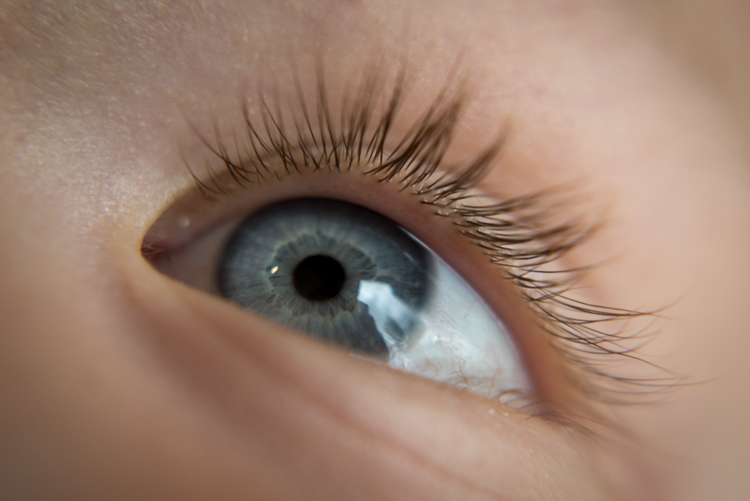
close-up-filters-eye

The set of filters required to take a photo like this costs about the same as a movie and a large popcorn.

Limitations

Using close-up filters is a great way to get started with macro-style photography, but they have some very important limitations that you need to be aware of to start. First of all, they only do one thing, which is shorten the minimum focusing distance of your lens. You can’t use them for normal photography, since all you will see when you attach one to your lens is either a big blob of blur, unless you focus on something very close to your camera. It’s the same phenomenon that happens when you hold a magnifying glass at arm’s length instead of right next to your face, and it severely limits the usefulness of close-up filters.

True macro lenses work for a variety of photographic situations, and due to their high-quality construction are generally much sharper than non-macro lenses, which make options like the Canon 100m f/2.8 or Nikon 105mm f/2.8 so highly praised. Screwing an inexpensive close-up filter on the front of your camera might let you get fun shots of flowers, but it will in no way equal the astounding optical properties of a true macro lens.
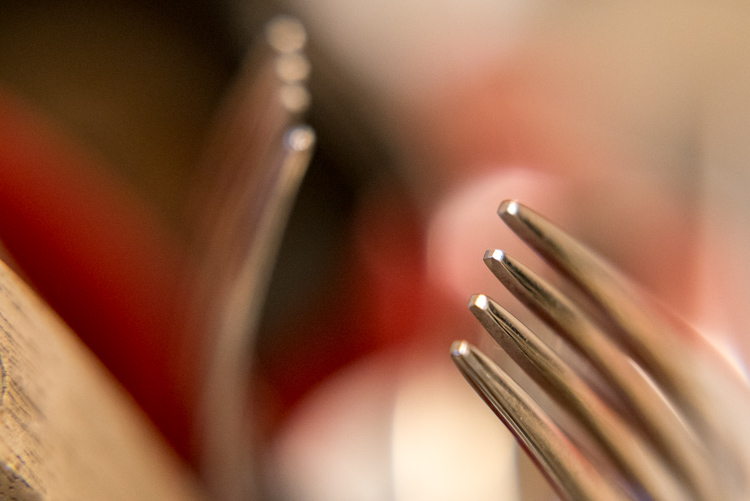
Even something as mundane as forks sitting in a dish rack can turn into a work of art when viewed up close.

Even something as mundane as forks sitting in a dish rack, can turn into a work of art when viewed up close.

Another downside of close-up filters is that the images you create with them are not at all the same as what you can get from dedicated macro gear. Photos are generally much softer, will usually exhibit unpleasing artifacts like chromatic aberration, and don’t allow you to have the same pleasing background blur that you would get without the filters attached. Finally, while macro lenses will let you focus on objects that are very close as well as far far away, close-up filters will only let you focus on subjects that are right next to your lens. All these limitations might sound important, but they’re really not that big of a deal. Once you learn to work around them you can get some stunning images from your camera using close-up filters.
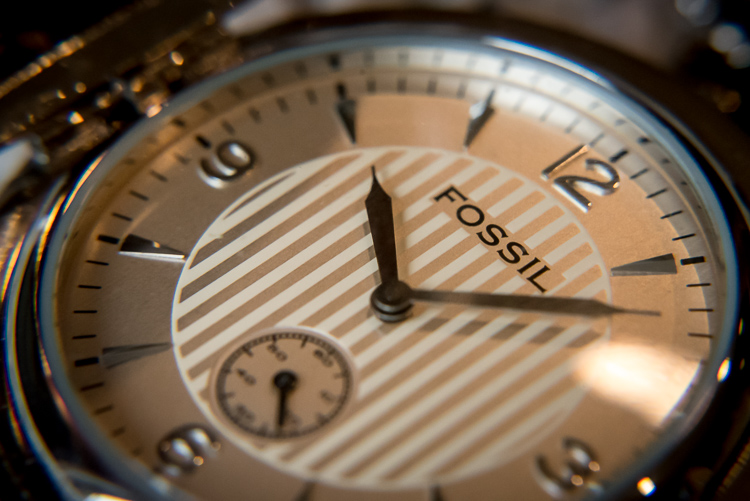
Close-up filters are nowhere near as sharp and optically brilliant as a true macro lens, but they can still produce some pretty good results.

Close-up filters are nowhere near as sharp and optically brilliant as a true macro lens, but they can still produce some pretty decent results.

Advantages of close-up filters for macro photography

After spending so much time pointing out the flaws with close-up filters you may wondering why you would want to even bother with them in the first place. As I mentioned earlier they are an incredibly inexpensive way to dip your toe into the waters of macro photography, and the results you can get from such a simple piece of glass will likely be far beyond what you ever thought possible shooting with your normal gear. The photo below of a yellow lily was taken with a standard 50mm lens and a +10 close-up filter, which is a fairly standard, inexpensive option. It’s not at all uncommon to find sets that include +1, +2, +4, and +10 filters all in one package that costs $ 40 or less.

An un-cropped image taken with +10 and +2 filters attached to a 50mm lens. Note the severe blue fringing on the edge of the petals, which is the result of using filters instead of a true macro lens.

An un-cropped image taken with +10 and +2 filters attached to a 50mm lens. Note the severe blue fringing on the edge of the petals, which is the result of using filters instead of a true macro lens.

After I shot that picture I took the filters off my lens and took another photo of the same flower as close as my lens would allow. As you can see there is a dramatic difference between the two images and even though the top picture is not as sharp as an image taken with a dedicated macro lens, the results are perfectly fine for someone just looking to dabble in this type of photography, without spending much money.

The exact same flower. Without the filters, this was as close as my lens would focus.

The exact same flower. Without the filters, this was as close as my 50mm  lens would focus.

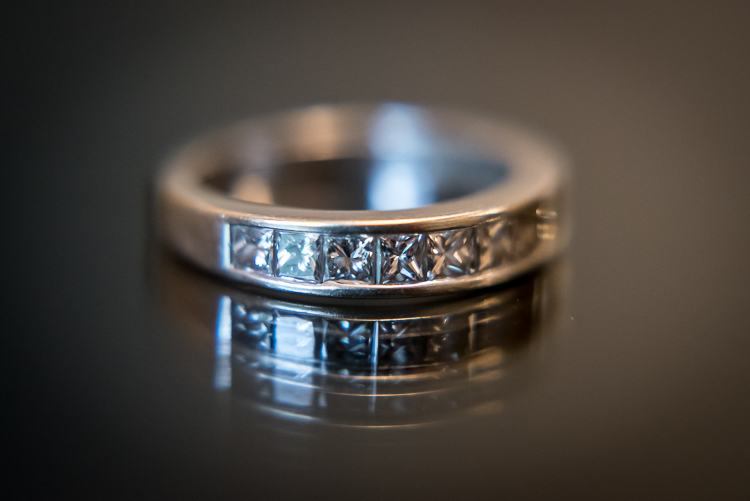
Another fun feature of filters is that most of them can be stacked on top of each other, to get even greater magnification. To make the jewelry images below I used three filters on my 50mm lens: a +10, +4, and +2 all screwed into each other, and attached to the lens itself. I set the ring down on an iPad that was turned off to get a little bit of reflection, and while the result is not something I would use in a catalog or on a billboard, it’s more than enough to suffice for my needs.
close-up-filters-ring

It might look fancy, but the gear required to take this photo was pretty basic and inexpensive.

Unlike other faux-macro solutions, like reversing rings or some of the cheaper extension tubes, close-up filters still allow you to use autofocus. Even so, you might get best results if you focus manually or use focus bracketing to make sure you get just the right shot. Finally, one of my favorite aspects of close-up filters is how small and portable they are. I like to keep a +10 and +4 in my camera bag and if I find myself in a situation that would be good for some macro shots it’s fast and easy to screw one on, take a few shots, and put it back in my bag.

Are pictures taken with close-up filters as sharp and detailed as one would require for them to be printed in a magazine? No, not by a long shot. For truly brilliant close-up photos you need the right gear like a macro lens, but hopefully you can see why close-up filters, despite their limitations, do a decent job of getting you halfway there.

This insect is about the size of a quarter but it appears exquisitely detailed and larger than life when photographed with a close-up filter.

This insect is about the size of a quarter, but it appears exquisitely detailed and larger than life when photographed with a close-up filter.

Choosing the right close-up filters

Since close-up filters do not involve a lot of complicated technology and contain no moving parts, it’s hard to go wrong when looking for a set to buy. However there are a few considerations that you need to keep in mind.

First, look for a set of filters that fit your lens. Check the thread size of your lens by looking for the  symbol for the Greek letter phi  and the numbers immediately before or after it will be the size you need (look inside the back of your lens cap). Common sizes are 52, 55, or 58mm, but depending on your individual lens it could be quite different so make sure to find the size that fits your lens before you buy any filters.

Next it’s a good idea to get filters that are made from metal and glass, not plastic. Filters with a higher build quality are easier to screw on and off, less likely to get scratched, and may even include special anti-reflective coatings. You can sometimes find brand name options made by the big manufacturers like Canon and Nikon, but I get plenty of good results with third-party filters from companies like Hoya or Polaroid, and the results are just fine and they cost a fraction of the price as their officially-branded counterparts.
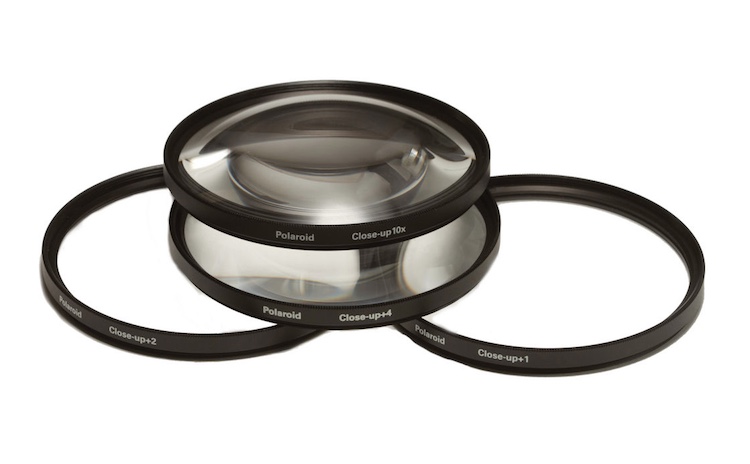
A set of close-up filters filters like this will help you get macro-style images without breaking the bank.

A set of close-up filters filters like this will help you get macro-style images without breaking the bank.

I hope this article has helped you learn a bit more about this inexpensive but quite practical solution for taking macro-style shots. Do you have any experience shooting with close-up filters? Are you the kind of photographer who prefers to shoot with actual macro lenses? I’d be interested in hearing your thoughts in the comments below, and please feel free to share your favorite macro photos.

googletag.cmd.push(function() {
tablet_slots.push( googletag.defineSlot( “/1005424/_dPSv4_tab-all-article-bottom_(300×250)”, [300, 250], “pb-ad-78623” ).addService( googletag.pubads() ) ); } );

googletag.cmd.push(function() {
mobile_slots.push( googletag.defineSlot( “/1005424/_dPSv4_mob-all-article-bottom_(300×250)”, [300, 250], “pb-ad-78158” ).addService( googletag.pubads() ) ); } );

The post Macro Photography on a Budget: An introduction to Close-up Filters by Simon Ringsmuth appeared first on Digital Photography School.


Digital Photography School

 
Comments Off on Macro Photography on a Budget: An introduction to Close-up Filters

Posted in Photography


Western Digital announces My Passport Wireless Pro

21 Jun

Western Digital has announced its new My Passport Wireless Pro hard drive, a Wi-Fi enabled portable storage device designed for photographers and videographers who want to backup, access, and edit photos or video in the field without using a computer. In addition to Wi-Fi, the drive includes an integrated SD card slot and a USB port that can be used to connect external devices, such as a CFast or XQD card reader. It can also be plugged directly into a computer for standard operation.

This is the second generation of Western Digital’s My Passport Wireless series. The company told us that they received a lot of feedback from photographers following the product’s initial release in 2014, and that much of that feedback has been incorporated into the new Pro edition. The Pro version includes a faster SD card slot with transfer rates up to 75MB/s, up from 10MB/s, as well as upgraded 802.11ac Wi-Fi with speeds up to 20MB/s, improved from 9MB/s. It also features a larger 6400mAh battery, compared to 3400mAh on the original model, which WD says can last up to 11.5 hours in the field, including 6 to 8 hours of operation under ‘hard use.’ Unfortunately, the USB port for connecting external devices appears to be of the USB 2.0 variety.

WD has also made improvements to the product’s companion My Cloud app for iPad. The company told us that while photographers loved the ability to view images stored on the drive from an iPad, they didn’t want to be restricted to using a proprietary app. The updated app makes it possible to export photos to the camera roll for easy sharing or editing with other iOS apps. It also integrates with Adobe’s Creative Cloud, facilitating transfer of photos directly to a user’s Creative Cloud account.

Finally, WD told us that about 50% of customers using the original product used it primarily as a device to stream content. To better support these users the company has added a PLEX media server to the device.

We recently received a demo unit from Western Digital and look forward to taking it for a spin (pun intended). We look forward to letting you know how it works.

The My Passport Wireless Pro comes in two capacities: a 2TB model which lists for $ 229.99, and a 3TB model which lists for $ 249.99. The company also announced a new My Cloud Pro Series NAS device, which you can read about in the press release below.


Press Release:

My Passport Wireless Pro and My Cloud Pro Together

Provide Fast, Reliable Back-up and Transfer While on a Remote Shoot or in the Studio

IRVINE, Calif. – June 21, 2016 – Western Digital Corporation (“Western Digital”) (NASDAQ: WDC), a global storage technology and solutions leader, today introduced the WD Pro Series: My Passport® Wireless Pro Wi-Fi® mobile storage and My Cloud® Pro Series network attached storage (NAS). Designed specifically for the creative community, the WD Pro Series enables seamless transfer of content between devices, with classic WD reliability and speed, regardless of whether users are on a remote shoot, in the studio or editing at home. The products use the My Cloud mobile app – the new version of the app will be launched with the My Passport Wireless Pro and My Cloud Pro Series and be compatible with the Adobe® Creative Cloud®. In addition, both the My Passport Wireless Pro and My Cloud Pro Series devices are also compatible with the Plex™ Media Server and My Cloud OS 3 software for easy editing, streaming and sharing of content.

“Portability, reliability, capacity, speed and interoperability are crucial for creative professionals, whose very livelihoods rely on the strength of the technology they use to store their life’s work,” said Sven Rathjen, vice president of marketing for content solutions at WD. “We created the WD Pro Series as a comprehensive, feature-rich storage solution designed to fit seamlessly into their workflow, regardless of where the work actually happens, so storage, transfer, back-up, editing and even streaming options are readily available.”

My Passport Wireless Pro

My Passport Wireless Pro Wi-Fi mobile storage lets creative professionals and enthusiasts leave the laptop behind when on a shoot. Using the direct Wi-Fi connection, creators can automatically backup files from compatible cameras, as well as save, edit and transfer work seamlessly from up to eight other devices connected to the drive. Tethered connections are also available for faster transfers and include a built-in SD card reader as well as a USB 3.0 port.

Available in capacities up to 3TB, the My Passport Wireless Pro device also features up to 10 hours of battery life* and a built-in battery pack that can even be used to charge phones and other devices like digital or video cameras.

To ensure creative professionals can continue to work while in the field, My Passport Wireless Pro devices include compatibility with Adobe’s Creative Cloud for mobile photo and video editing, as well as compatibility with Plex Media Server, which is capable of playing up to four streams of content while on-the-go.

My Cloud Pro Series network attached storage

When the shoot is over and it’s time for editing or studio work, the My Cloud Pro Series NAS device takes the reins seamlessly. Offering up to 32TB of storage, the My Cloud Pro Series NAS are optimized to import from cameras/memory card readers and other USB storage with a simple one touch backup button. Simply connect your cameras and compatible USB storage devices, press a button, and your new files are easily backed up/imported.

In addition to giving creative professionals and enthusiasts a reliable place to store their files, this fast, high capacity drive features a hardware accelerated video processor. Its powerful transcoding capabilities mean the My Cloud Pro Series NAS can ingest, edit, store and stream content to and from popular formats, including 4K video. These capabilities compliment a robust, integrated application suite, which includes compatibility with Plex Media Server for storing and optimizing media libraries and compatibility with Adobe’s Creative Cloud for editing and finalizing them.
The My Cloud Pro Series NAS gives the creative community significantly more control while they are away from their workstation, using WD’s My Cloud app and MyCloud.com remote access, and despite its professional caliber, is still easy to set up and use.

Pricing and Availability

My Passport Wireless Pro Wi-Fi mobile storage is available today in the WD store at wdstore.com and at select retailers, including Amazon.com and distributors. My Passport Wireless Pro storage has a Manufacturer’s Suggest Retail Price (MSRP) ranging from $ 229.99 up to $ 249.99 depending on capacity. The My Passport Wireless Pro storage will offer a 2-year limited warranty. Terms and conditions of WD’s limited warranty may be found on the WD website.

My Cloud Pro Series NAS devices are also available at Amazon.com, B&H and the WD Store. Manufacturer’s Suggested Retail Price (MSRP) begins at $ 399.99 up to $ 1,649.99 depending on configuration and capacity. The My Cloud Pro Series will also offer a 2-year limited warranty for diskless models and 3-year limited warranty for populated models. Terms and conditions of WD’s limited warranty may be found on the WD website.

About Western Digital

Western Digital Corporation (NASDAQ: WDC) is an industry-leading provider of storage technologies and solutions that enable people to create, leverage, experience and preserve data. The company addresses ever-changing market needs by providing a full portfolio of compelling, high-quality storage solutions with customer-focused innovation, high efficiency, flexibility and speed. Our products are marketed under the HGST, SanDisk and WD brands to OEMs, distributors, resellers, cloud infrastructure providers and consumers.

*Based on streaming HD 720p, 3 Mbps video to one device over Wi-Fi 2.4 GHz single band only. Actual battery life depends on file size, type, format, bitrate, devices connected, Wi-Fi connectivity, settings and other factors.

Articles: Digital Photography Review (dpreview.com)

 
Comments Off on Western Digital announces My Passport Wireless Pro

Posted in Uncategorized


Rumor has it: Galaxy S8 to come with dual-cam, iPhone 7 won’t have one

21 Jun

Another week, another dual-camera rumor. According to Chinese sources the Samsung Galaxy S8, which is expected to launch in early 2017, will come with a UHD screen for better performance with virtual reality applications. That would make it only the second device from a major manufacturer to feature such a high screen resolution, after the Sony Xperia Z5 Premium. The same sources say the S8 will also come with a dual-camera setup that will be made by Samsung subsidiary SEMCO. Apparently, this move is a reaction to the possible inclusion of a dual-camera in at least one version of the upcoming Apple iPhone 7 series, expected to launch in September this year. 

But the plot thickens! If another rumor is to be trusted, there won’t actually be any dual-cam iPhone 7 models this year. It appears an anonymous employee of Apple’s production contractor Foxconn has said that plans for a dual-cam iPhone 7 Plus have been cancelled due to ‘immature technology.’ There is also a possibility that sensor maker Sony would not be able to provide the required number of sensors due to yield issues and production lines that have been damaged by a recent earthquake.

It would certainly be interesting to see Samsung’s and Apple’s take on this new type of camera design but we’ll have to wait at least another few months before we’ll find out what, if anything, they can come up with. In the meantime you can have a closer look at the LG G5 and Huawei P9 which both have dual-cam modules and are available for purchase already.

Articles: Digital Photography Review (dpreview.com)

 
Comments Off on Rumor has it: Galaxy S8 to come with dual-cam, iPhone 7 won’t have one

Posted in Uncategorized