RSS
 

Archive for June, 2016

Brain Food: Vending Machines Offer Books Instead of Snacks

23 Jun

[ By SA Rogers in Design & Products & Packaging. ]

book vending machine 1

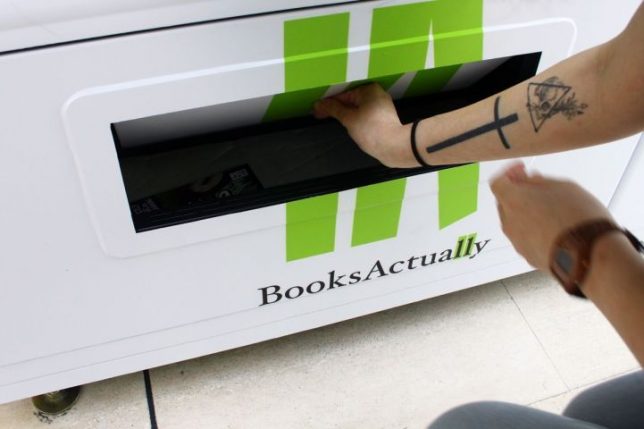
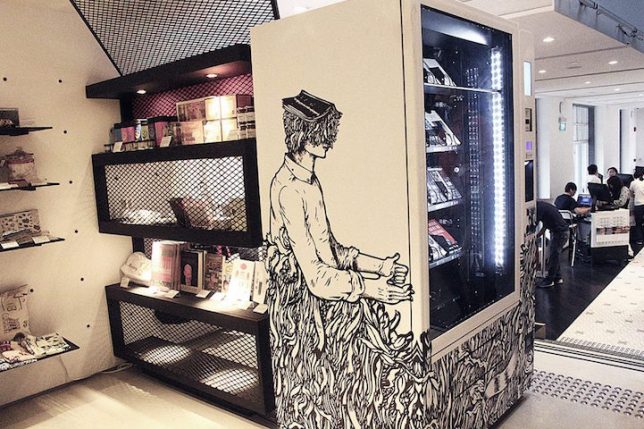
You can buy all kinds of weird things from vending machines these days – from live crabs to blue jeans to gold bars – but this new iteration is more entertaining than most, and it’ll certainly keep you busy longer than a bag of Skittles. Peruse the covers of a curated selection of books through the glass of these BooksActually vending machines in Singapore for a new distraction on demand. If only this idea caught on everywhere, maybe we’d spend a bit less time standing around staring at our phones.

book vending machine 6

Two of the machines are now ready for reading enthusiasts in high-traffic areas, including the National Museum of Singapore and the Singapore Visitor Center. Fittingly for these locations, the selections appear to be Singapore-centric, including books by local authors as well as helpful guides for tourists. Each machine contains about 150 books with up to 22 titles, and the outsides of the machines are painted by local artists to indicate what’s inside.

book vending machine 3

“The whole idea is about accessibility and eyeballs,” says Kenny Leck, owner of BooksActually. “There are not enough bookstores in Singapore… these vending machines could be a visual touchpoint. You may not buy [a book] but we’ll let you know these exist. And from there, there could be more possibilities. We start with visual awareness: books where you see a local author’s name. The ultimate place we want to put them are at train stations.”

book vending machine 5

Of course, book vending machines aren’t entirely new, though they’re far more popular in Asia than they are stateside. The first book-dispensing machine, called the Penguincubator, was installed in London way back in 1937. An Irish company called ‘A Novel Idea’ installed a machine at London’s Heathrow airport, but went out of business. It’s kind of hard to pick out a book when you can’t even read the back cover, but the concept could work with highly recognizable beach-read-type titles that are about the equivalent of junk food for your brain, anyway.


Share on Facebook


[ By SA Rogers in Design & Products & Packaging. ]

[ WebUrbanist | Archives | Galleries | Privacy | TOS ]


WebUrbanist

 
Comments Off on Brain Food: Vending Machines Offer Books Instead of Snacks

Posted in Creativity


Rare Nikon 1200mm F11 pops up on eBay

23 Jun

A seller on eBay is offering up a Nikon 1200mm F11 super telephoto lens, dating back to the 1970s. A separate AU-1 focusing unit attaches to the lens and drives focus, and is included for the seller’s asking price of $ 5,750. Naturally, the lens features a revolving tripod socket, since your chances of getting sharp images while handholding it would be slim-to-none. 

If $ 5,750 is a little steep but you’re itching to add a super telephoto prime to your vintage lens collection, the seller is currently accepting offers and claims the lens is in ‘nearly mint’ condition. If you do buy it, could you send us some sample photos for fun? 

Articles: Digital Photography Review (dpreview.com)

 
Comments Off on Rare Nikon 1200mm F11 pops up on eBay

Posted in Uncategorized


Hands-on with Hasselblad X1D

23 Jun

Hands-on with Hasselblad X1D

One of the most remarkable things about the Hasselblad X1D is its size. It is smaller than the average DSLR and only just as big as the larger Micro Four Thirds camera bodies – which is quite something for a medium format camera. The general design is sleek and the echoes of Hasselblad’s V system are clear in the square face around the lens mount.

Hands-on with Hasselblad X1D

Obviously the star of the show is the 50-million-pixel CMOS sensor. It is the same 43.8×32.9mm sensor that is used in the 50c backs for the H6D, as well as the Pentax 645Z and Phase One’s IQ3 50 backs. In this body it looks gigantic and it really fills the whole of the area behind the mount. Hasselblad says that nothing has been done to the sensor physically, but that internal processing has allowed the top ISO setting to be increased to 25,600.

Hands-on with Hasselblad X1D

The back of the camera is pretty minimalist – the buttons have been kept quite small and they’re arranged down the side of the screen. The EVF boasts XGA resolution and feels large, crisp and detailed – even in the artificially-lit conference room in which these photographs were taken. 

Hands-on with Hasselblad X1D

Hasselblad has adorned the X1D with the same orange shutter release button that the H6D has, which helps to link the two products together. It seems a little jazzy for a medium format product, but the relationship between the X1D and the modular H6D is significant as they share a working platform, a sensor (in the 50c at least) and a similar user interface.

Hands-on with Hasselblad X1D

This main menu screen is just like that used in the H6D. Users can customise the features displayed by pressing the ‘add’ icon and then choosing a function from the menu to keep on the home screen. This is useful not only for setting your general personal preferences, but also for prioritising certain functions and features to suit the nature of a particular job.

Hands-on with Hasselblad X1D

Touching an item on the display creates a scrolling drop-down menu that can be navigated either by touching the value you want or by using the physical dials to scroll the options. Activating the main mode dial brings up an icon of the dial so you don’t have to look at the top of the camera. That would just be lazy if you are shooting using the back screen, but it’s very convenient when your eye is to the finder.

Hands-on with Hasselblad X1D

The main mode dial rests in a recessed position. When you want to make an adjustment, a press on the dial makes it pop out of the body so that it can be rotated. It perhaps doesn’t pop out quite far enough as it can be a little tricky to get a grip of. The main on/off button sits behind the mode dial.

If there is one message that Hasselblad really wants to get across, it is that this camera is hand-made in Sweden. Equally, Hasselblad representatives with whom we spoke were at pains to stress that the X1D was designed and manufactured in-house and that Fujifilm isn’t involved in any way.

Hands-on with Hasselblad X1D

Interestingly, Hasselblad has chosen to use a Nikon compatible hotshoe on the X1D, so users have a collection of Nikon branded units to couple with the camera as well as Nikon ‘fit’ models from the independent manufacturers. Metz used to be the company’s flash partner.

As with the Hasselblad H6D, the X1D has a top flash sync speed of 1/2000sec. The lenses have shutters in them, so every shutter speed offered by the camera can be used with flash without the loss of power that typically comes with high speed flash sync modes.

Hands-on with Hasselblad X1D

The base plate is pretty plain apart from a tripod socket and the lever for the battery release. Although the lens (the 45mm f/3.5 in this case) has a thick barrel, it doesn’t extend beyond the base so the camera can sit flat on a table top with the lens fitted.

There is no sign of connections for a battery grip, but we suppose that would defeat the object of having a small system.

Hands-on with Hasselblad X1D

Hasselblad has used a 3200mAh lithium ion cell, but the company couldn’t say how many shots we should expect from a single charge yet as the power saving modes and consumption controls haven’t been finalised in these early bodies.

Hands-on with Hasselblad X1D

Dual flaps on the left hand side of the camera open to reveal twin SD card slots. It offers a microphone socket and a second socket for audio monitoring as well as Mini HDMI and USB 3 for tethered shooting and image download.

The flaps are protected with O rings to ensure the ports are splash proof, and the whole camera is sealed against weather and dust.

Hands-on with Hasselblad X1D

The main rear screen looks big in comparison to the camera body, but it’s only the standard 3in size. It is clear and responsive – though the firmware is still very early on the bodies I got to try.
The shooting display screen is clear and designed in large print – and each item can be activated for adjustment by touching the display.

The menu screens and displays are controlled via a series of swiping motions, much as we are used to in smartphones. While the live view display is active, as shown here, a swipe down from the top of the screen pulls down the information display that also delivers direct and quick access to exposure controls. It all feels pretty slick and well thought out.

Hands-on with Hasselblad X1D

A new range of lenses called XCD has been announced to go with this new body. They are hardly small, but they are a good deal smaller than the company’s H series lenses and considering the decent maximum apertures they’re not too thick across the diameter. In the 45mm (shown here) the rear element is set back into the lens quite a long way to make up for the short distance between the lens mount and the sensor.

While two new lenses have been announced so far – the 45mm f/3.5 and the 90mm f/3.2 – the company informally announced a 30mm that will be shown in September at Photokina, in Cologne Germany.

Articles: Digital Photography Review (dpreview.com)

 
Comments Off on Hands-on with Hasselblad X1D

Posted in Uncategorized


4 Mistakes Beginning Landscape Photographers Make

23 Jun

Even the most famous photographers started out as beginners. Nobody is a master after day one, and learning is a big part of the process. However, nobody likes to appear as a beginner or an amateur, we all want to create images that looks more professional than just a snapshot.

There are certain mistakes that makes it very obvious that you’re a beginner, and if you want to gain some exposure online, these mistakes might turn people away. Here are four mistakes beginning landscape photographers make and you can can avoid them.
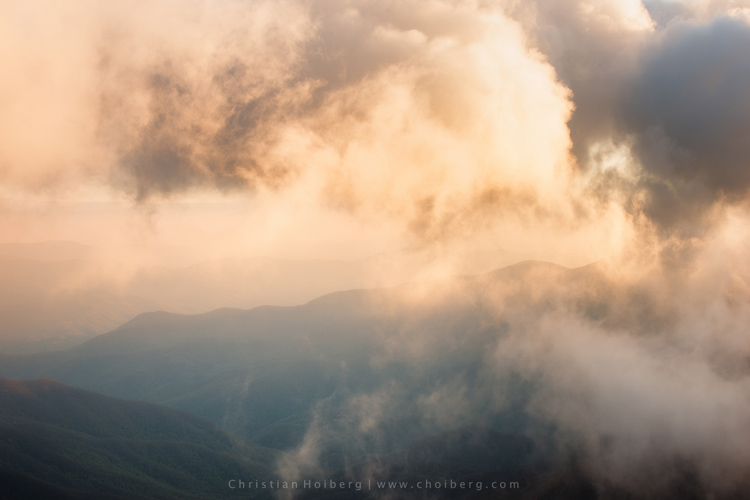
An example of when a spirit level is important to see if the horizon is straight.

An example of when a spirit level is important to see if the horizon is straight.

Mistake #1 – Uneven or crooked horizon

In many photographers’ opinions, there are few things more annoying than viewing landscape images with a uneven or crooked horizon. I see so many images with great potential that are ruined because of this issue. The reason we find this annoying is that the composition is severely weakened with an uneven horizon. Instead of using the composition to lead the eye towards the subject, the horizon will grab your attention and lead the eye straight out of the image.

I know many photographers struggle, or simply forget, to straighten it. This may be because they are so excited to capture the image that they forget to look at it (hi mom!) or because they just don’t know how. Still, straightening the horizon is a huge step towards improving your landscape photography.

Luckily there are a few simple tools to fix this problem, both in the field and in the post-production stage.

In the field: Use a spirit level

If you’ve ever done any sort of construction, this should be a tool you likely know well. But did you know it’s also a highly valued tool amongst photographers?
IMG_7941

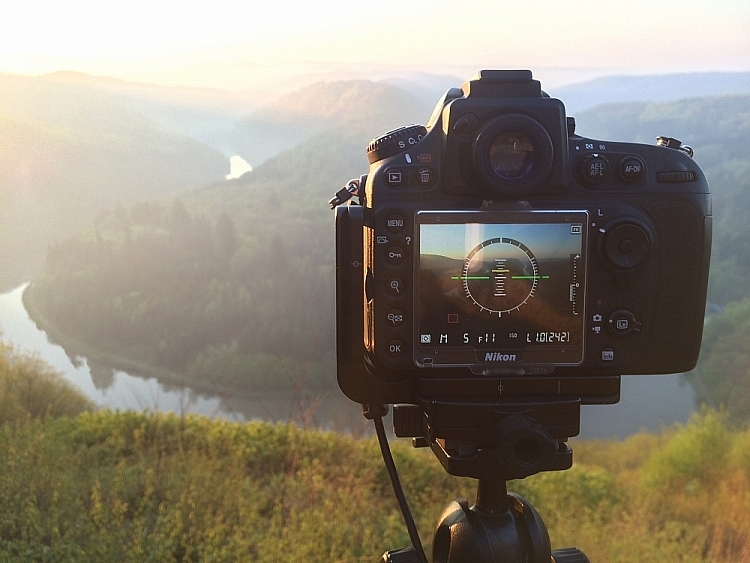
It’s becoming more common, even for mid price-range cameras, to have a built-in spirit level. Nikon names it Virtual Horizon, and Canon has the Electronic Level. Personally, I use the Virtual Horizon for all my compositions when the camera is mounted on a tripod (which is 99% of the time). This tool shows you a spirit level on the camera’s LCD screen, so you need to be working in Live View. Note: Keep in mind that using Live View will drain your battery much quicker.

Even though a Virtual Horizon or Electronic Level is becoming more common, there are still many cameras that don’t have this feature, and there are those who prefer the old school method: using a spirit or bubble level on top of the camera. This small and handy tool can be found in most photography stores, and shouldn’t cost more than a few dollars (see photo right).

In post-production: Fix it in Adobe Lightroom
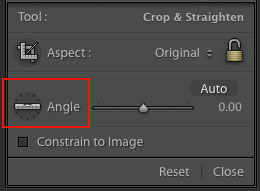
spirit-level-LRIf you weren’t able to get a straight horizon in the field, there’s also a easy method to fix it in post-production.
Adobe Lightroom has a great tool called Straighten. You can find this by going into Develop  > Crop Tool (the keyboard shortcut is R). You then see a spirit level followed by the word Angle (outlined in red on the right).

There are three methods to easily straighten your shot using the crop tool:

  1. Click Auto and see how Lightroom does at straightening the image. It usually does a pretty good job so try that first, you can also undo it if it’s not right and try the other methods.
  2. Select the spirit level and drag a line along the horizon. Adobe Lightroom will then automatically straighten the image according to the data you gave it.
  3. Manually insert amount of straightening you need, or drag the point back and forth until you’re pleased.

Mistake #2 – Being stuck in Automatic Mode
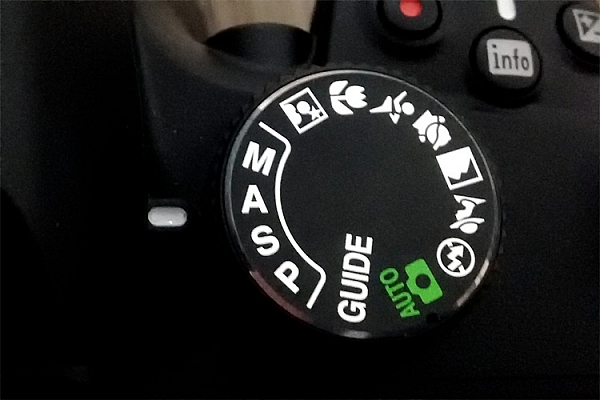
Mode DialWhile Automatic Mode may have its benefits for those who just bought their first camera, the sooner you stop using it the better. I always recommend mainly using Manual mode, even though both Shutter Priority and Aperture Priority are acceptable for beginners.

There are several reasons you want learn how to manually control the camera, and understand how the settings work together. Even though the camera does a decent job exposing the image correctly, it doesn’t take the image quality into consideration. In other words, the aperture and ISO will rarely be optimum if you wish to get a sharp result.

I know it may seem scary in the beginning, and I still remember how I tried to understand the basics when I was starting out, but I guarantee you it’s worth the extra effort. When you can use the ideal settings, the final result will be much better.
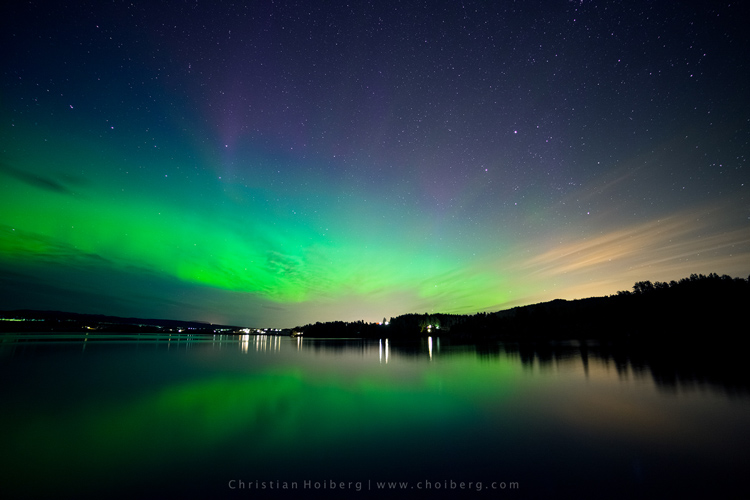
It would be nearly impossible to get an image like this in Automatic Mode

It would be nearly impossible to get an image like this in Automatic Mode

Mistake #3 – Not using a tripod

Besides the camera itself, a tripod is the most important tool for landscape photography. While some may complain that it’s not practical to travel with, trust me when I say –  there’s an ocean of opportunities when you begin using a tripod.

Not only will your images become noticeably sharper, you will also be able to do certain techniques that aren’t possible without a tripod (such as long exposure photography). Let’s look at some of the advantages of using a tripod for landscape photography:

  • You’re able to achieve longer exposures without getting blurred images.
  • You don’t need to use a high ISO to keep the image sharp. Keep the ISO low and use a longer shutter speed instead.
  • You can carefully make your composition and keep it for many images.
  • Since the camera stays in the same spot you can take multiple images and stack them later (for things like: HDR, time-lapse or techniques to remove people).
  • You’re able to keep the image straight by using Live View, and carefully adjusting the tripod.
  • The amount of motion is reduced so your images become sharper.
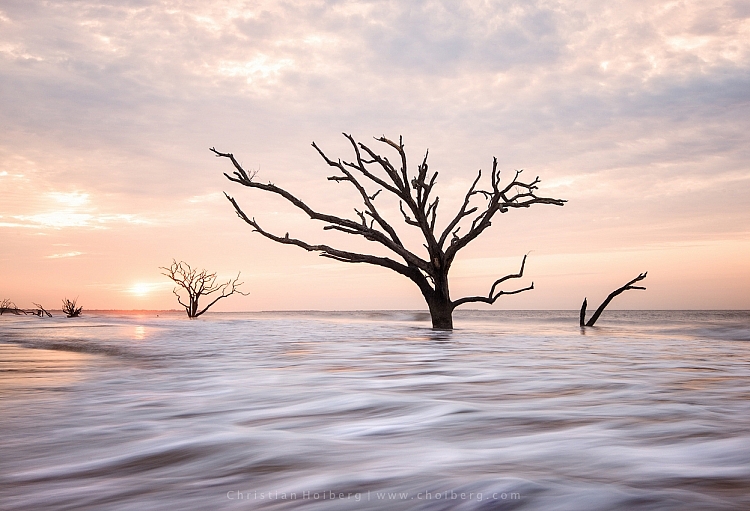
Using a tripod makes it possible to have a longer shutter speed

Using a tripod makes it possible to have a longer shutter speed to make images like this.

You don’t need to blow your wallet on the most expensive tripod on the market, but I do recommend getting something that’s more durable than the $ 20 one at the electronics shop. A solid tripod will last for a long time and might save you money in the long run. A sturdy tripod is more flexible to work with, and it’s still gonna do a good job even in windy conditions.

Mistake #4 – Shooting during the daytime

I know I might start some discussion with this point, but good landscape images are not taken during daytime. In landscape photography, light is everything.

You might have heard about the Golden Hour, at times referred to as the Photographer’s Hour. The time around sunrise and sunset is when the sun’s position in the sky is ideal for photography. The low light gives a soft and golden glow to the landscape.

Bird flying through a stormy sunset at Liencres, Cantabria.

Bird flying through a stormy sunset at Liencres, Cantabria.

During midday the light is harsh, and very few images looks good in these conditions. If you want to improve your landscape photography you need to go out and photograph during sunrise and sunset. Daytime is perfect for scouting locations or sleeping.

As always, there’s a few exceptions to the rule:

  • Commercial travel photography: If you’re photographing for tropical hotels and resorts, they do need sunny pictures, as this is what attracts tourists.
  • Cloudy days can be okay for photographing waterfalls.

Read also: 5 Reasons Why Bad Weather Days are the Best Times for Photography and 5 Ways to Create Dramatic Landscape Photos at Midday for other ideas.
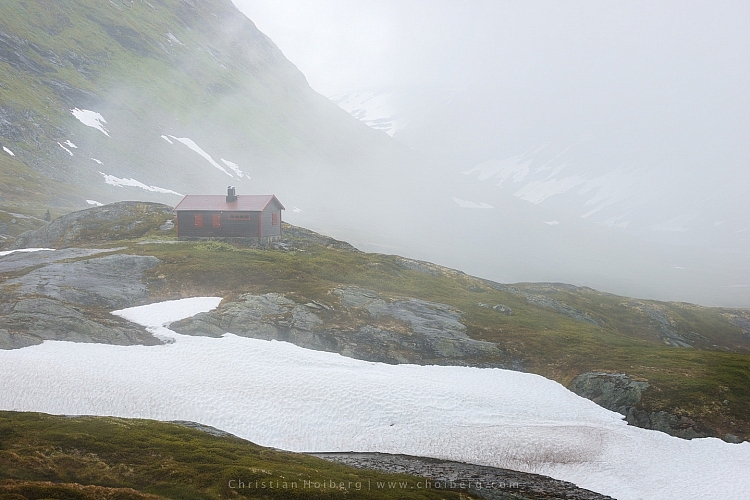
Jotunheimen-Cabin-Fog

An example of when shooting during daytime works

Are you guilty of these four landscape photography mistakes? Have you made any other mistakes that had a negative impact on your photographs? Please share your thoughts in the comments below.

googletag.cmd.push(function() {
tablet_slots.push( googletag.defineSlot( “/1005424/_dPSv4_tab-all-article-bottom_(300×250)”, [300, 250], “pb-ad-78623” ).addService( googletag.pubads() ) ); } );

googletag.cmd.push(function() {
mobile_slots.push( googletag.defineSlot( “/1005424/_dPSv4_mob-all-article-bottom_(300×250)”, [300, 250], “pb-ad-78158” ).addService( googletag.pubads() ) ); } );

The post 4 Mistakes Beginning Landscape Photographers Make by Christian Hoiberg appeared first on Digital Photography School.


Digital Photography School
 
Comments Off on 4 Mistakes Beginning Landscape Photographers Make

Posted in Photography


Samsung Gear 360 camera costs $350 in US with limited availability at VidCon

23 Jun

Samsung has announced a limited launch of its Gear 360 camera, which was first revealed earlier this year at Mobile World Congress in Barcelona. The camera is available in the United States for $ 349.99 at VidCon, an online video convention in Anaheim, California; it will be available on a wider basis ‘later in the year,’ but Samsung did not provide a specific date.

The Samsung Gear 360 camera features a pair of 15MP cameras with F2.0 lenses housed in a round body. When used together, the cameras record 360-degree videos at 3840 x 1920 pixels, as well as spherical still images. The camera also allows users to record content with only one camera for 180-degree content. For now at least, the Gear 360 camera only works with the latest Samsung mobile devices, including the Galaxy S7 and S7 edge, Galaxy S6, S6 edge, and S6 edge+, and the Galaxy Note 5.

In addition, the company has renamed Samsung Milk VR app for viewing 360-degree content to simply ‘Samsung VR,’ and has opened up the platform to user-generated content. Finally, Samsung has unveiled a new initiative called Samsung Creators. Under the initiative, Samsung is working with indie filmmakers and others to develop 360-degree content for its own virtual reality platform. Samsung Creators has a competition planned for July in which ten winners will be selected for their VR content spanning ten categories: Music, Auto, Science and Tech, Gaming, Travel, Fashion, Culinary, Cause-related, 4D and Sports.


Press release:

NEW YORK – June 22, 2016 – Today Samsung Electronics America, Inc. launched Samsung Creators, a new initiative that empowers storytellers, partnering with them to generate content across a variety of audiences and channels to show everyday creators what’s possible with Samsung VR technology.

“We want to bring the power of VR technology directly to the people,” said Samsung Electronics America’s Chief Marketing Officer Marc Mathieu. “To help creators learn and perfect the art of VR storytelling, we’ve built an entire VR ecosystem that pushes beyond the frame and empowers them to develop unforgettable, immersive stories, and inspires us all to do the same.”

At VidCon—and, beyond—Samsung Creators will provide seminars and classes, putting VR capabilities in the hands of filmmakers and influencers, further accelerating this new medium. Leading into VidCon, Samsung Creators is working with Casey Neistat to spotlight emerging creators from YouTube and push the creative boundaries of 360 video storytelling. This special curation of content will premiere at VidCon.

In July, Samsung Creators will launch a competition, challenging aspiring, indie filmmakers and creators to develop VR / 360 content, using Samsung’s VR products. Ten winners will be chosen, one from each of the following ten categories: Music, Auto, Science and tech, Gaming, Travel, Fashion, Culinary, Cause-related, 4D and Sports.

For more information about Samsung Creators, please visit www.samsungcreators.com.

Samsung VR and Samsung Gear 360 Updates

In addition, today Samsung launched Samsung VR– formerly known as Samsung Milk VR – which now supports user generated content. Creators can load their own 360-degree videos to the Samsung VR platform for sharing and for the first time view them in Samsung Gear VR. For more information about uploading content to Samsung VR, please visit https://samsungvr.com.

Samsung Gear 360 also launched in the U.S. today, an affordable, high-resolution camera developed for storytellers to create their own 360-degree videos for mobile viewing and VR content for Samsung Gear VR, powered by Oculus. The Gear 360 is priced at $ 349.99 in the United States and will be available for purchase on a limited basis during VidCon in Anaheim, California. Details about additional availability will follow later in the year. For more information about Gear 360, please visit www.samsung.com/gear360.

With these announcements, Samsung delivers the first end-to-end VR ecosystem that enables creators to shoot, stitch and share like never before.

About Samsung Electronics America, Inc.
Headquartered in Ridgefield Park, NJ, Samsung Electronics America, Inc. (SEA), is a recognized innovation leader in consumer electronics design and technology. A wholly owned subsidiary of Samsung Electronics Co., Ltd., SEA delivers a broad range of digital consumer electronics, IT and home appliance products. Samsung is the market leader for HDTVs in the U.S and one of America’s fastest growing home appliance brands. To discover more of the award-winning products you love with Samsung, please visit www.samsung.com and for the latest Samsung news, please visit news.samsung.com/us and follow on Twitter @SamsungNewsUS.

About Samsung Electronics Co., Ltd.
Samsung Electronics Co., Ltd. inspires the world and shapes the future with transformative ideas and technologies. The company is redefining the worlds of TVs, smartphones, wearable devices, tablets, cameras, digital appliances, printers, medical equipment, network systems, and semiconductor and LED solutions. For the latest news, please visit the Samsung Newsroom at news.samsung.com.

Articles: Digital Photography Review (dpreview.com)

 
Comments Off on Samsung Gear 360 camera costs $350 in US with limited availability at VidCon

Posted in Uncategorized


The FAA finalizes commerical drone use rules, is fine with your drone photography business

23 Jun

The FAA has finalized a rule regarding commercial use of drones, and the organization is a-okay with individuals profiting from aerial photography – provided that operators follow some guidelines.

The update to Federal Regulations has been available for public comment since February 2015, and has now been finalized to provide guidance for commercial UAS (unmanned aircraft system) use. The guidelines are much the same as when they were first proposed, stating that your drone and everything attached to it must weigh less than 55lb/25kg, and the pilot must remain within line of sight of the aircraft.

Flying over crowds is a no-no, unless everyone in the crowd is participating in the shoot or under a reasonable amount of cover. As initially proposed, drone operators must be at least 16 and have a ‘remote pilot certificate’ or be under direct supervision of someone who has one.

The rule goes into effect in August 2016, so you’ve got plenty of time to study up and get your certificate.

Articles: Digital Photography Review (dpreview.com)

 
Comments Off on The FAA finalizes commerical drone use rules, is fine with your drone photography business

Posted in Uncategorized


Looking Beyond Land: 12 Floating Galleries, Schools & Cemeteries

22 Jun

[ By SA Rogers in Architecture & Offices & Commercial. ]

jellyfish barge main

Even without the threat of rising sea levels, we’ve got land scarcity issues in nearly every major city, prompting engineers and architects to look towards the rivers and seas as settings for floating structures that could support not just housing and restaurants but also farms, movie theaters, schools and even cemeteries.

Floating Movie Theater: Pavilion of Reflections

floating pavilions reflection 2

floating pavilion reflection 3

pavilion of reflections 2

pavilion of reflections

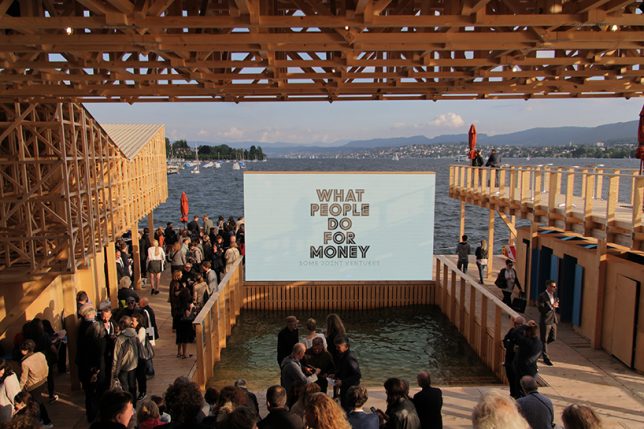
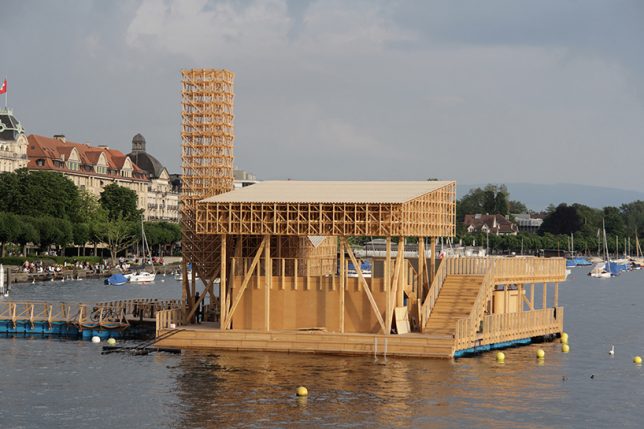
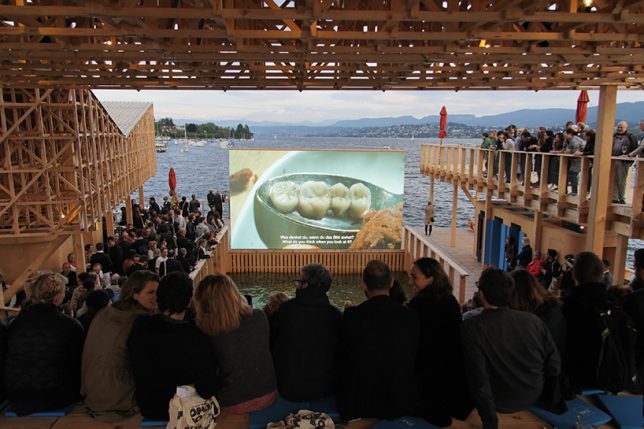
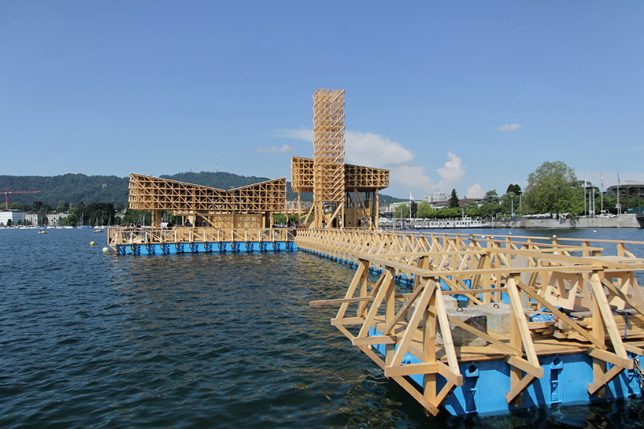
Assembled on Lake Zurich for the contemporary art biennial Manifesta 11, ‘Pavilion of Reflections’ is an open-air floating cinema with an integrated swimming pool that dips right into the lake. In the daytime, it functions as an urban island, while at night , the LED screen lights up and spectators take their seats to watch a series of documentaries.

Floating Hawker Center: Solar Orchid for Singapore

floating pavilion solar orchid

floating pavilion solar orchid 2

floating pavilion solar orchid 3

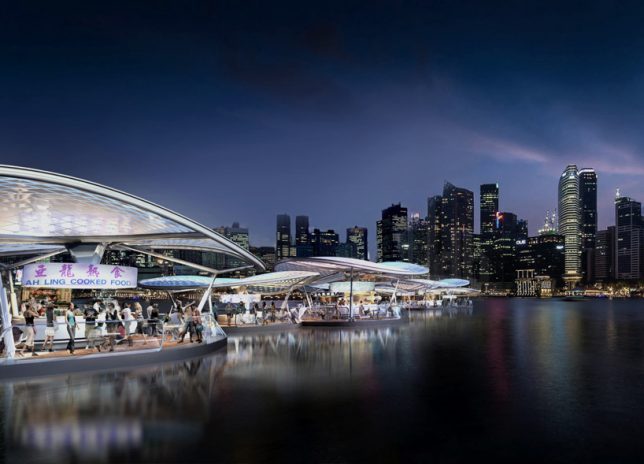
Singapore’s traditional hawker culture of food and retail street carts extends out onto the water with the Solar Orchid by SPARK Architects. The self-contained, solar-powered pods encourage interaction with the harbor while reinterpreting the nation’s traditional pastime. Each individual pod accommodates cooking stalls with built-in exhaust, water, electrical, gas, waste collection and water recycling services as well as places for diners to sit.

Floating Eternity Cemetery for Hong Kong

floating pavilion cemetery 1

floating pavilion cemetery 2

Hong Kong has a bit of a corpse burial problem, as they run out of land space even for their efficient hillside cemeteries and skyscraper vaults. Could a floating cemetery island that’s able to move from one port to the next throughout the region offer a solution? It’s certainly a novel idea. The Floating Eternity Cemetery by BREAD Studio leaves the land for the living with an exterior looping wall housing urns and central space for ceremonies. Families can come aboard at certain times of year to honor their dead, making it a special, shared experience, before the offshore cemetery moves along again.

Floating Swimming Pool: Baltic Sea Park

floating pavilion baltic 3

floating pavilion baltic 1

floating pavilion baltic 4

When you run out of land for parks, build them on the water. This way of thinking is spreading across the world, from New York City to Estonia, envisioned as the home of this ‘Baltic Sea Park’ by kilometrezero. The circular pavilion honors thousands of years of history and cultural exchange on the Baltic Sea, and connects buildings on land to a floating structures that acts as a dock for a changing series of floating pavilions. In the summer, the protected circle of water within it becomes a giant swimming pool.

Next Page – Click Below to Read More:
Looking Beyond Land 12 Floating Galleries Schools Cemeteries

Share on Facebook


[ By SA Rogers in Architecture & Offices & Commercial. ]

[ WebUrbanist | Archives | Galleries | Privacy | TOS ]


WebUrbanist

 
Comments Off on Looking Beyond Land: 12 Floating Galleries, Schools & Cemeteries

Posted in Creativity


Why Engagement Photos are a Good Investment for You and Your Clients

22 Jun

Over the past several years, engagement photos (also known as e-sessions or pre-wedding photoshoots) have become quite the norm among couples who are engaged to be married. It is probably one the first things newly engaged couples discuss and plan out. There is a lot of debate about the need for engagement photos from a couple’s point of view – are engagement photos really required, and what purpose do they serve especially if the duration between the engagement and the wedding is very short?

As a wedding photographer, I believe having engagement photos prior to the wedding is almost as important as the wedding day photos. Here are some of the reasons why I recommend engagement photos to all my wedding clients.

Memorable Jaunts DPS Article on tips for engagement photos-5-2

To help them get comfortable in front of the camera

Most people are quite uncomfortable at the thought of having their picture taken by a professional photographer, especially if they have never had photos taken before, like ever! They feel uncomfortable and awkward and don’t quite know how to relax, how to pose, or how to display emotions. Limbs tend to get stiff, bodies becomes rigid, and forced smiles cause the jaw to lock up.

This awkward and uncomfortable feeling is usually reflected in the photos. An engagement shoot can help eliminate this discomfort. It is an opportunity for clients to practice being in front of the camera, and get used to the idea of being intimate with their significant other in the presence of another person.

03Memorable Jaunts DPS Article on tips for engagement photos-1

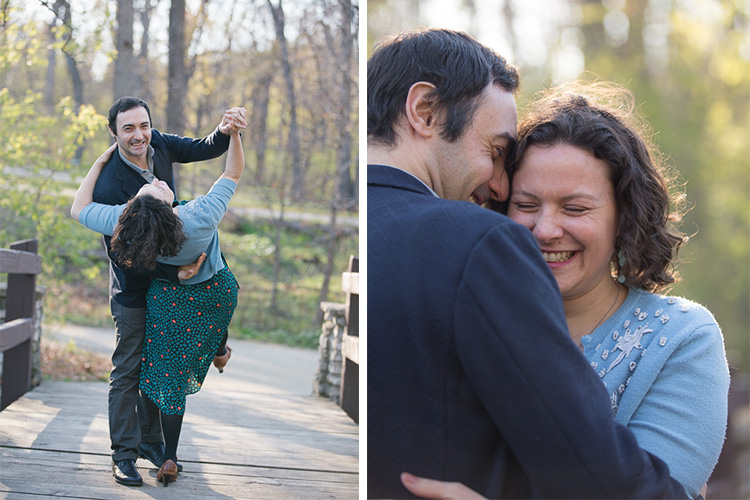
These clients came to me for wedding photos, and were very clear that they were not at all comfortable being in front of the camera. I suggested an engagement photo session as a way to get to know me and my style, as well as for me to get to know them. All through the shoot, my only direction was to be comfortable with each other, and spend time together. By the end of the session, they had a good sense of my style and my direction, as well as got pictures together in a more casual setting than the wedding.

To help them get to know you, the photographer

In addition to helping clients get comfortable in front of the camera, the engagement shoot is also a great time to get familiar with you, the photographer. Every photographer has a different style of directing and photographing people, and this is a great opportunity for them to get comfortable with your process. Most engagement shoots last an hour or two, sometimes longer depending on the couple and you, and this gives both parties plenty of time to interact, socialize, and chat with each other. This also works on the flip side, where you also get to know the couple. As photographers, we are often looking to understand and learn the relationship dynamics of our clients – how they interact as a couple and what is their comfort level in front of the camera. This way it will help you know how to get the best moments and interactions on the wedding day.

Documenting the relationship

Wedding photos capture one of the most important moments of a couple’s life together. But often, the stress and tension of planning the perfect wedding, and the perfect day, gets in the way of capturing authentic imagery of their relationship. The engagement shoot is a great opportunity to highlight the true personality of a couple in a more relaxed and natural environment. A good tip for both you and your clients is to choose a location that is comfortable, and is a meaningful reflection of the client’s personality. This add a personal touch to the photos, and showcases them in a relaxed environment, that is a true reflection of their personality as a couple.

02Memorable Jaunts DPS Article on tips for engagement photos-1

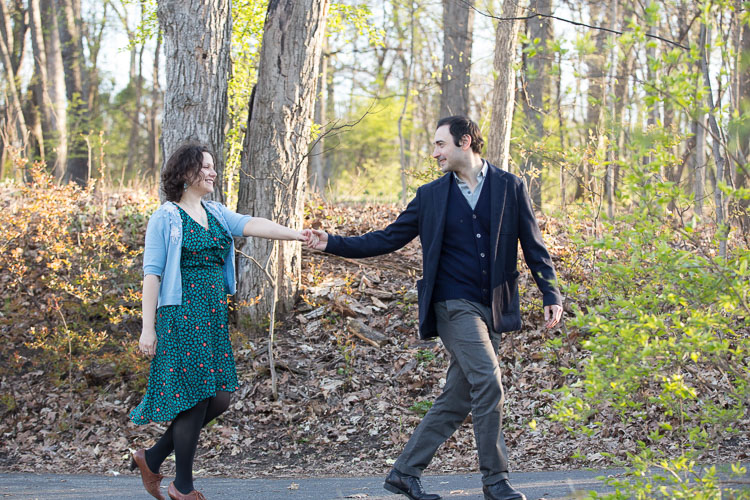
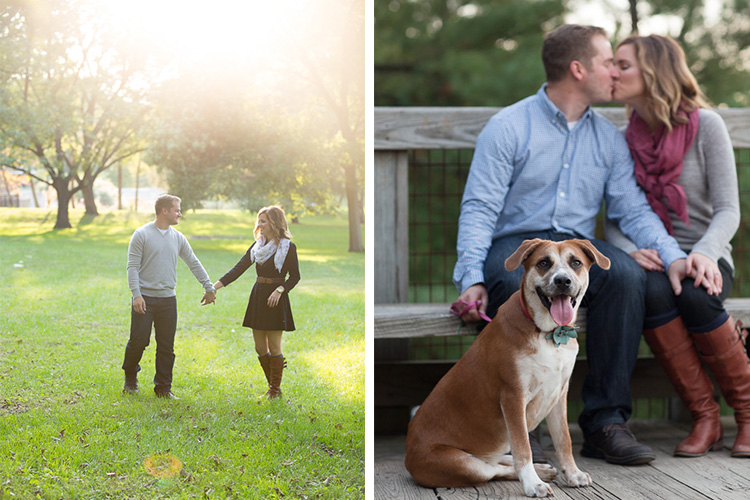
These clients choose a location that meant something special to them. They had also recently adopted a pet and wanted to include her in their photos, as they consider her as part of the family. I let my clients completely dictate the setup for this photoshoot, and simply documented their life as true to who they are as a couple.

Uses for the engagement photos

Most clients who choose engagement or pre-wedding photos tend to use the photos as save the date cards, guest sign-in books, wedding website setup, or even placing them around the wedding reception area as part of the reception decor. This gives their wedding guests a chance to get to know the couple more intimately.

01Memorable Jaunts DPS Article on tips for engagement photos-1

This couple already had a wedding photographer, but wanted engagement pictures as part of their wedding decor. Since they both love the outdoors and it was a fall evening, we decide to do a themed engagement photoshoot that showcased their personality.

Quality time together as a couple

This is probably one of the most important reason to have an engagement session. The wedding planning process can be very stressful and taxing, with a million different things to plan and coordinate. The engagement session is a time for couples to take a step back from the wedding planning process to be together, be playful, and just be themselves. A welcome break for most folks! As wedding and engagement photographers, it is our responsibility to ensure that our clients have a stress-free, relaxed time during their engagement session.

Are you a wedding photographer that recommends engagement photos for your clients? What are some of the reasons you like them? Feel free to share your experiences and images in the comments below.

googletag.cmd.push(function() {
tablet_slots.push( googletag.defineSlot( “/1005424/_dPSv4_tab-all-article-bottom_(300×250)”, [300, 250], “pb-ad-78623” ).addService( googletag.pubads() ) ); } );

googletag.cmd.push(function() {
mobile_slots.push( googletag.defineSlot( “/1005424/_dPSv4_mob-all-article-bottom_(300×250)”, [300, 250], “pb-ad-78158” ).addService( googletag.pubads() ) ); } );

The post Why Engagement Photos are a Good Investment for You and Your Clients by Karthika Gupta appeared first on Digital Photography School.


Digital Photography School

 
Comments Off on Why Engagement Photos are a Good Investment for You and Your Clients

Posted in Photography


Medium-format mirrorless: Hasselblad unveils X1D

22 Jun

$ (document).ready(function() { SampleGalleryV2({“containerId”:”embeddedSampleGallery_7396048523″,”galleryId”:”7396048523″,”isEmbeddedWidget”:true,”standalone”:false,”selectedImageIndex”:0,”startInCommentsView”:false,”isMobile”:false}) });

Hasselblad is making good on its promise to launch something big. Today it introduces the X1D, a medium-format mirrorless camera with a 50MP CMOS sensor. With dust and weather-sealing the X1D isn’t afraid to step outside of the studio, and offers a 100-25600 ISO range and is capable of 1080/30p HD video. Its hot shoe is compatible with Nikon Speedlights and the camera can sync with flashes at its maximum shutter speed: 1/2000 sec.

Not surprisingly, the X1D uses a new lens mount, accepting XCD lenses. Two have been announced at launch: a 45mm F3.5 and a 90mm F4.5, with more to follow ‘shortly’ including a 30mm around Photokina. An H lens adapter will also be offered to extend support to Hasselblad’s existing H lens system.

The X1D offers a 3″ 920k-dot touch screen and a built-in XGA electronic viewfinder. Wi-Fi and GPS are built-in, and the camera includes dual SD card slots. The X1D and its battery weigh in at 725g, which Hasselblad points out is half the weight of your typical medium-format camera.

The Hasselblad X1D will be priced at $ 8995/£5990/€7900 body-only. A kit with 45mm F3.5 lens will cost $ 11,290, and bundled with both lenses the X1D will cost $ 13,985. The XCD 45mm F3.5 will cost $ 2,295 separately; the XCD 90mm F4.5 will cost $ 2695. Hasselblad plans to offer demos of the system in July, with delivery to customers in August.


Press release:

Hasselblad announces groundbreaking X1D
The world’s first compact mirrorless digital medium format camera

Hasselblad is proud to introduce the groundbreaking X1D – weighing less than half that of a conventional digital medium format camera, the mirrorless 50MP camera is a game changer in the world of photography.

Inspired by the brand’s iconic design heritage, the camera is ergonomic and compact, offering a handling experience unlike any other. Handmade in Sweden, the X1D combines Scandinavian sensibility with beautiful performance.

Like the iconic V System, the X1D seamlessly combines portability with excellent optical quality for which the brand is renowned. Hasselblad has ingeniously introduced mirrorless technology to digital medium format for the first time ever, creating a precision performance camera that can sit in the palm of your hand. The 50MP CMOS sensor captures the finest details with true natural colours.

Commenting on the announcement Perry Oosting, Hasselblad CEO noted: “The X1D marks a pivotal point in Hasselblad’s rich 75-year history. This camera makes medium format photography available to a new generation of Hasselblad users, while pushing the existing limits of photography to new heights.”

A completely new family of dedicated autofocus lenses has been developed to support optical quality and portability, offering a wide range of shutter speeds and full flash synchronisation up to 1/2000th second.

Weighing just 725g and including HD video, Wi-Fi and built-in GPS, the X1D is a trusted partner and ideal travel companion. The robust exterior is dust and weather proof, providing durability to take with you wherever you go.

The X1D has been created with passionate photographers in mind, opening up Hasselblad to a new generation of creatives. Ideal for those who want to create the highest quality medium format images with a straightforward and easy to use camera that can fit in the palm of your hand.

The Hasselblad X1D is priced at 7,900 EUR / 8,995 USD / 5,990 GBP
Prices stated are exclusive of VAT

Hasselblad X1D specifications

Price
MSRP $ 8995/£5990/€7900
Body type
Body type Rangefinder-style mirrorless
Sensor
Max resolution 8272 x 6200
Image ratio w:h 4:3
Effective pixels 51 megapixels
Sensor photo detectors 53 megapixels
Sensor size Medium format (44 x 33 mm)
Sensor type CMOS
Color space sRGB, AdobeRGB
Color filter array Primary color filter
Image
Custom white balance Yes
Image stabilization No
Uncompressed format RAW + TIFF
File format
  • JPEG (Exif v2.3)
  • Raw (3FR format)
  • TIFF
Optics & Focus
Autofocus
  • Contrast Detect (sensor)
  • Multi-area
  • Center
  • Selective single-point
  • Tracking
  • Single
  • Continuous
  • Touch
  • Face Detection
  • Live View
Manual focus Yes
Focal length multiplier 0.8×
Screen / viewfinder
Articulated LCD Fixed
Screen size 3
Screen dots 920,000
Touch screen Yes
Screen type TFT LCD
Live view Yes
Viewfinder type Electronic
Viewfinder coverage 100%
Viewfinder resolution 2,360,000
Photography features
Minimum shutter speed 60 sec
Maximum shutter speed 1/2000 sec
Exposure modes
  • Program
  • Aperture priority
  • Shutter priority
  • Manual
Built-in flash No
External flash Yes (Nikon compatible)
Flash X sync speed 1/2000 sec
Continuous drive 2.3 fps
Self-timer Yes
Metering modes
  • Multi
  • Center-weighted
  • Spot
Videography features
Resolutions 1920 x 1080 (30p, 25p)
Format H.264
Microphone Stereo
Speaker Mono
Storage
Storage types Dual SD/SDHC/SDXC slots
Connectivity
USB USB 3.0 (5 GBit/sec)
HDMI Yes (mini-HDMI)
Microphone port Yes
Headphone port Yes
Wireless Built-In
Wireless notes 802.11b/g/n/ac
Physical
Environmentally sealed Yes
Battery Battery Pack
Battery description 3200 mAh li-ion battery
Weight (inc. batteries) 725 g (1.60 lb / 25.57 oz)
Dimensions 150 x 98 x 71 mm (5.92 x 3.86 x 2.81)
Other features
Orientation sensor Yes
GPS BuiltIn

Articles: Digital Photography Review (dpreview.com)

 
Comments Off on Medium-format mirrorless: Hasselblad unveils X1D

Posted in Uncategorized


Come Join Me—and Greg Heisler—in Columbus, Ohio This August!

22 Jun

Just a quick heads-up for any of you who may live within striking distance of Columbus, Ohio. (And if that’s not you, no need to keep reading. It’d just piss you off.)

So MidWest Photo, the folks that brought us the LumoPro LP180 and a bunch of other cool things, are moving to new digs in Columbus. And they are having two days of festivities on August 6th and 7th.

There is lots of stuff going on: speakers, classes, vendors, giveaways, etc. And it’s all free.

I’ll be speaking on both days. Saturday the 6th will be on my hybrid “dad/photographer” approach to traveling. And Sunday’s presentation will be on learning to completely rethink and reshape your approach to photography. Each is a completely different talk, and both are geared towards the full range of photographers—from enthusiast to pro.

But better yet, Greg Heisler is also speaking on Saturday. In fact, I am following Greg on Saturday. You can imagine how thrilled I am.

If you have never heard Greg in person, I highly recommend it. I guarantee you you will learn some stuff. Especially in a small venue environment like this. As for following him onstage, I highly do not recommend that.

And since it is all free, it’ll only cost you gas money. (And face paint if you are going to see Greg.) Kidding. Mostly. But that would be awesome.

Heads-up: it requires registration, because seating is limited. And this will certainly fill. So if you are up for it, make sure to register ASAP for one or both days, here.

Come out and meet us!

Cheers,
David
Strobist

 
Comments Off on Come Join Me—and Greg Heisler—in Columbus, Ohio This August!

Posted in Photography