RSS
 

Archive for June, 2016

Sandisk launches 128GB capacity memory stick with USB-C and A connections

07 Jun

Memory manufacturer SanDisk has announced a new series of portable flash drives that feature a retractable, reversible connector that allows users to pair the stick with both USB Type-C and Type-A devices. The company suggests the dual compatibility of the Ultra Dual Drive USB Type-C will make it easier for smartphone users to transfer images and data from the phone to a computer, as well as offering a solution for expanding the storage memory of the device.

SanDisk claims the USB sticks have a maximum read speed of 150MB per second but says that the write speed is dependent on the device it is connected to. Android users can download the SanDisk Memory Zone app that features a convenient interface for transferring files between the phone and the external storage areas. The flash drives come in capacities from 16GB to 128GB and have a five year warrantee.

  • 16GB $ 19.99/£10
  • 32GB $ 29.99/£13
  • 64GB $ 39.99/£21
  • 128GB $ 69.99/£39

For more information see the SanDisk website.


Press release:

SanDisk Mobile Storage Portfolio Expanded with Faster, Higher Capacity USB Type-C Flash Drive

New SanDisk Ultra® Dual Drive USB Type-C™ offers hassle-free transfer between smartphones and next-generation USB-C™ devices

Western Digital® Corporation (NASDAQ: WDC), a global storage technology and solutions leader, today expanded its line of SanDisk-branded mobile storage solutions with the new SanDisk Ultra Dual Drive USB Type-C flash drive. The newest generation drive features a new retractable design, faster speeds and higher capacity, giving consumers the ability to quickly and easily free up space and transfer content between their smartphones and today’s USB-C devices1.

“With its reversible connector, impressive speeds, and multi-purpose potential, USB Type-C is a game-changer,” said Dinesh Bahal, vice president of SanDisk product marketing, Western Digital. “More Type-C devices are entering the market and through our Type-C mobile drives, we can offer consumers a complete line of mobile storage solutions. The new SanDisk Ultra Dual Drive USB Type-C flash drive now provides more than twice the capacity and offers the flexibility to quickly and conveniently move photos, videos and files between devices, as well as the freedom to expand device capacity.”

Now available in up to 128GB*, the sleek, new SanDisk Ultra Dual Drive USB Type-C includes one reversible USB Type-C connector and one standard USB (Type-A) connector, enabling users to easily free up space on a smartphone or tablet, or transfer files between smartphones, tablets and computers and next-generation devices. The drive also now delivers high-speed USB 3.1 performance of up to 150MB/s2 – offering users phenomenal speeds when moving their photos, videos and files to a computer.

“By 2020 we expect that 44 percent of all mobile phones sold worldwide will include a USB-C connector, that’s about 800% growth over the next four years,” said Ken Hyers, director, Wireless Device Strategies, Strategy Analytics. “At this rate of anticipated growth, we expect to see more and more solutions like the SanDisk Ultra Dual Drive USB Type-C flash drive that offer consumers a way to move and access their content between devices with varying connectors.”

The SanDisk Ultra Dual Drive USB Type-C flash drive also works with the SanDisk® Memory Zone app for Android™, giving users an easy way to manage and back up content on their device. The app, which is available for free through the Google Play™ Store3, auto-launches upon insertion of the drive into a compatible device, allowing immediate access to the user’s content.

The SanDisk Ultra Dual Drive USB Type-C flash drive complements the company’s suite of SanDisk brand USB Type-C flash memory solutions which range from USB drives to portable SSDs.

Pricing and Availability
The SanDisk Ultra Dual USB Type-C Flash Drive features a five-year warranty4, and is now available worldwide at Amazon and other leading retailers. The new offering comes in capacities of 16GB, 32GB, 64GB and 128GB with U.S. MSRPs of $ 19.99, $ 29.99, $ 39.99 and $ 69.99, respectively.

Articles: Digital Photography Review (dpreview.com)

 
Comments Off on Sandisk launches 128GB capacity memory stick with USB-C and A connections

Posted in Uncategorized


How Limitations Can Help You Grow as a Photographer

07 Jun

142

Have you ever said to yourself, “If only I had that lens, or this camera I’d be an amazing photographer”? Or maybe you’ve thought that if only you had more time or money, your dreams of being the photographer you want to be, would finally be realized. Many times as photographers we will have limitations put on us. Sometimes we may set those limits on ourselves, and sometimes they are limits that can’t be helped. Either way, we can use those limitations to our advantage and become better photographers because of them.

Set aside those “if only” thoughts. Push away those feelings of inadequacy. Don’t let those limitations hinder your progress as a photographer. Once we have gone through some of those limitations that can help you grow, you might even decide to limit yourself on purpose sometimes, just for the challenge.

185

I don’t have an expensive camera

Do expensive cameras make a difference? Of course they do. There’s a reason some cameras cost more than others. However, the person behind the camera matters a whole lot more. If you’re looking at your favorite photographer’s work and thinking that their camera is amazing, you may be right. Their camera is possibly amazing, but the reason you love their photos isn’t because of their camera, it’s because of what they do with that camera.

If you constantly think that you can’t do what you want to because your camera isn’t fancy enough, then you’re probably right. With that kind of thinking, you’ll always be waiting for the next purchase before you even try to get better. If you can convince yourself that your camera is good enough, smart enough, and doggone it, people like it, then your photos will change with your perspective. Find out what your camera CAN do, instead of lamenting about what it can’t do. Pull out your camera’s user manual, and practice until you’ve truly worn out your camera. You might decide to get the next big thing then, or you might have fallen in love with your camera so much that you wouldn’t dream of trading it in for a newer model.

143

I don’t have the right lens

Want to know a secret? For a long time I used my kit lens, and a 50mm f/1.8 on my first camera body. That’s it. I made those lenses work for me, and I learned how to get the most out of them. Want to know another secret? Now I use a 50mm f/1.4 and 85mm f/1.4, and that’s it. Nothing else, ever. I’ve looked at other lenses, and thought about them a lot, but when it comes down to it, I really feel like I don’t want any other lenses.

I’ll often go through an entire session with only one lens on my camera body. I feel more free to concentrate on what’s going on in front of me, and capturing what I want. I’m completely comfortable and familiar with my lenses, and I know exactly what they can do. I don’t waste time switching to another lens, and risk getting dirt on my sensor. Your lens of choice may be different from mine, and that’s okay. If you are photographing other things besides portraits, you may very well need a different lens from what I have.

However, you don’t need EVERY lens. Figure out how to make the lens (es) you have work for you. Challenge yourself to work with the constraints of a 50mm prime, or even a kit lens. You might realize that you don’t need that expensive new lens after all.

1202

I don’t have ALL the equipment

It’s exciting to dream about all the photography equipment you could buy. All the different flashes, reflectors, tripods, timers, camera bags, diffusers, and straps are calling to your wallet, begging you to buy them all. Money is a real issue for me, and likely for many of you, too. If it’s not something that you are going to use on a regular basis, see if there are ways that you can work without it.

There are many DIY ideas that will stretch your creativity. You might find that you can make beautiful photos, even without all the extra equipment. Sometimes having a limit to what you are able to purchase can make your creativity grow, because creativity is free. You can use it abundantly without hurting your budget one bit. Cameras don’t care if they’re stored in a bag you’ve had for years, that is worn on the corners (at least that’s what my camera tells me).

194

I don’t have any pretty locations available nearby

Wouldn’t it be great if we always had beautiful waterfalls and trees and majestic mountains right there to photograph? Unfortunately life doesn’t work that way. I live in a place that is actually truly spectacular, but when I first moved here, I was quite underwhelmed. It’s one of those places that takes time to appreciate, and sometimes certain camera angles to hide the parts that aren’t so photogenic. Look at your surroundings with new eyes, and you might find that you actually have a lot of gorgeous views. You’ll not only be able to make some beautiful photos, but you’ll be happier with your life and surroundings.

Sometimes you might be at a location that you must shoot then and there, and there’s not much to choose from. A back deck at high noon can work in a pinch. This is where your creativity and resourcefulness can come in handy. Hone those skills, and you will find that you are never at a loss for great locations.

169

I don’t have enough training or knowledge

Every photographer has had to say this at some point, we all have to start somewhere. If you are turning down opportunities to take photos, or scared to try something new because you’re afraid you don’t know enough, you’re selling yourself short. The worst that could happen is that you could learn what not to do.

Find every opportunity to practice and learn. Don’t let a lack of knowledge stop you from trying, instead, let it motivate you to learn more. While you are in the process of learning, remember the saying, “Fake it until you make it”. If you pretend that you know what you are doing, that fake confidence can pull you through, and you’ll gain more real confidence for the future.

***However, I must insert a warning here. Don’t agree to be the sole photographer for a very important once in a lifetime event, like a wedding, if you aren’t knowledgeable and prepared enough. You’re welcome.

293

I don’t have good weather today

Suck it up and get out there. That may sound harsh, but unless the weather is going to ruin your camera, give it a try. Some of my favorite sessions have been in the wind, in light rain or snow, or in freezing temperatures. If you always seek out comfortable conditions, you won’t stretch yourself to find new ways to deal with things. You’ll miss out on some very compelling shots, because you won’t be forced to make something less than ideal work to your advantage. You might get dirty, cold, wet, hot, or sunburned. Don’t limit yourself when conditions aren’t perfect.

158

I don’t have time

Quality over quantity will help you here. Instead of thinking you have to take 1000 frames at a time, challenge yourself to capture something great in 10 frames. Instead of spending two hours on one session, see if you can get a handful of truly great images in fifteen minutes. Sometimes when we have more time, we don’t end up with more great photos, we just end up with a whole lot of mediocre photos. Use your time constraints to help you focus on capturing exactly what you want, and not wasting time with thoughtless clicking. Use the little time you have to your advantage, and make every click count. Read: 6 Tips on How to Make More Time for Photography

Summary – let’s hear from you

What limits do you think are holding you back? Could you find a way to make those limits benefit you and make you a stronger photographer? Change your perspective on your limits, and see if you can make your photography growth limitless.

How have you found limitations have helped, rather than hindered your own growth as a photographer? Have you tried any limitation exercises on purpose? If so please share your actions and results in the comments below.


Editor’s Note: This is one of a series of articles this week that are Open for Discussion. We want to get the conversation going, hear your voice and opinions, and talk about some possibly controversial topics in photography.

Give us your thoughts below on the article above on limitations and watch for more discussion topics this week.

See all the recent discussion topics here:

  • 7 Commonly Accepted Photography Beliefs Debunked
  • Is HDR dead? Some dPS Writer’s Thoughts on this Controversial Topic
  • How to Find your Personal Photographic Style
  • Why You May be Failing to Reach Your Potential as a Photographer
  • To Process or Not To Process? Let’s Discuss
  • How much do you process your images? – a dPS POLL
  • Does the Camera Matter? SLR versus Mirrorless versus Smartphone
  • Natural Light Versus Artificial Light: Which is Better?

googletag.cmd.push(function() {
tablet_slots.push( googletag.defineSlot( “/1005424/_dPSv4_tab-all-article-bottom_(300×250)”, [300, 250], “pb-ad-78623” ).addService( googletag.pubads() ) ); } );

googletag.cmd.push(function() {
mobile_slots.push( googletag.defineSlot( “/1005424/_dPSv4_mob-all-article-bottom_(300×250)”, [300, 250], “pb-ad-78158” ).addService( googletag.pubads() ) ); } );

The post How Limitations Can Help You Grow as a Photographer by Melinda Smith appeared first on Digital Photography School.


Digital Photography School

 
Comments Off on How Limitations Can Help You Grow as a Photographer

Posted in Photography


Urban Human Habitats: 13 Compact Concepts for Growing Cities

07 Jun

[ By SA Rogers in Architecture & Cities & Urbanism. ]

compact cities coastal cliffs 1


How will various cities around the world adapt to rapid population growth while maintaining quality of life and responding to their unique environments and cultural context? In some cases, new ideas for maximizing urban density require building new cities from the ground up, while others reclaim industrial areas and depressed suburbs or simply keep building higher and higher into the sky. These proposals – some fanciful, others currently under construction or completed – represent a diverse variety of urban growth solutions, each with its own pros and cons.

Lush Pedestrian-Oriented Vision for Singapore

PARKROYALonPickering_Ext-ViewofSkyTerraceFromClubLounge02_(c)PatrickBingham-Hall

ParkRoyal_Dwg-GardenDown_(c)WOHA


PARKROYALonPickering_Ext-DistanceStreetViewFromAcrossUrbanPark_(c)PatrickBingham-Hall

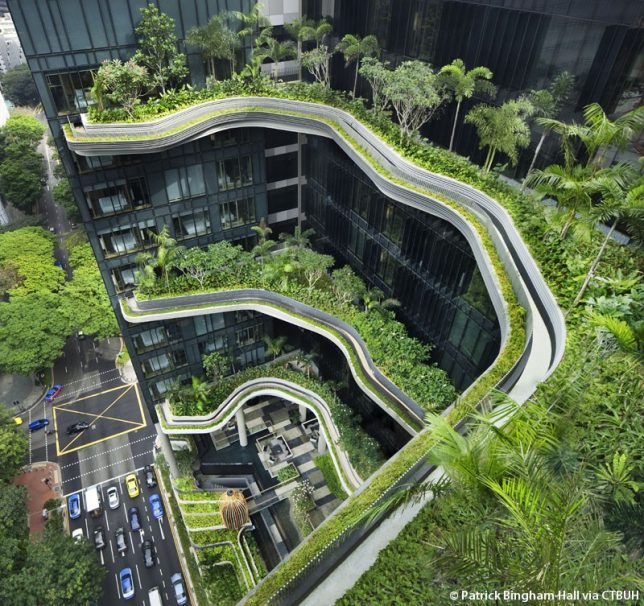
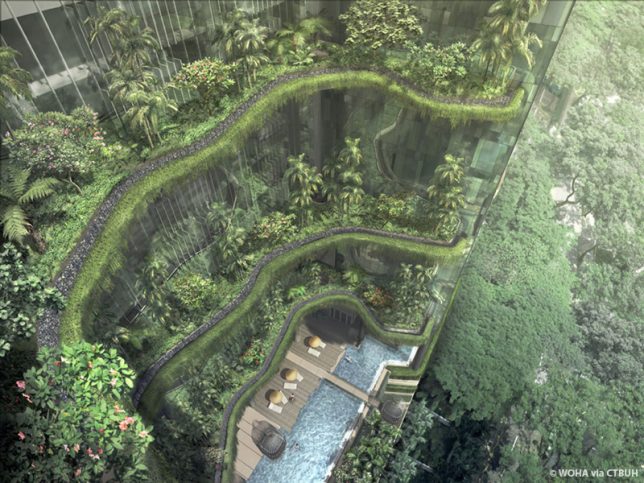
The ‘PARKROYAL on Pickering’ is a pedestrian-oriented elevated neighborhood for Singapore with lush greenery planted on nearly every level and a porous layout encouraging daylight, cross-breezes and free circulation between the various elements of the structure. The 2015 winner of the Urban Habitat Award by the Council on Tall Buildings and Urban Habitat (CTBUH), the Parkroyal was praised for being “intelligently influenced by both its environmental and cultural context.” A contoured podium draws inspiration from terraced landscapes like rice paddies, and a series of columns resembling trees makes the entire building seem to hover above the street, establishing a shaded pedestrian thoroughfare on the ground level. By stretching upward, the building design with all of its integrated greenery adds 215% new green space to the plot area, proving that increasing density in cities doesn’t have to mean losing parks and gardens.

Cities Carved Into Coastal Cliffs

compact cities coastal cliffs 1

compact cities coastal cliffs 2

copact cities coastal cliffs 3

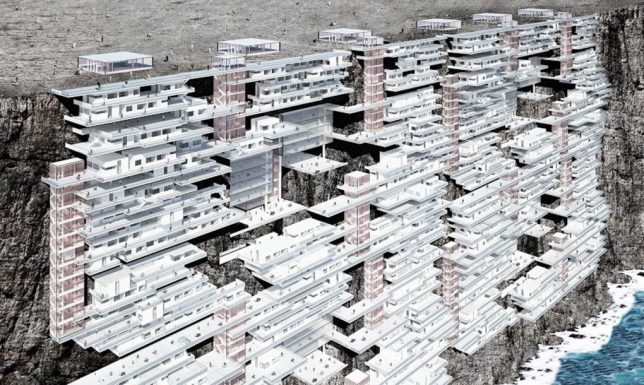
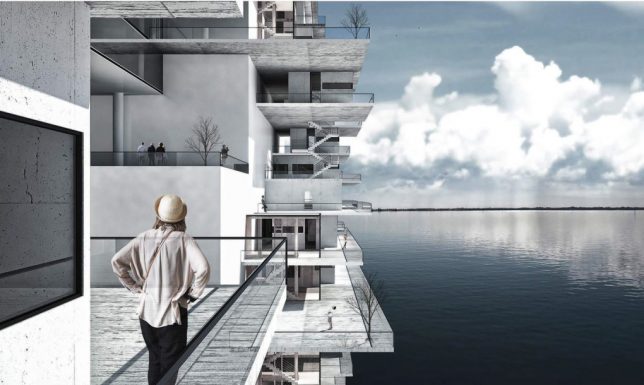
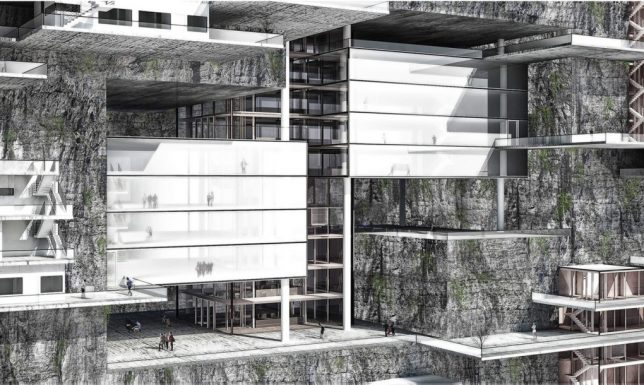
The ‘Living on the Edge’ project imagines building new cities right into coastal cliffs around the world, forming new urban environments. While it would seem like expanding human developments into areas that are currently in their natural state isn’t exactly desirable (not to mention the threat of rising seas), the designers contend that making use of these spaces high above the water level would be better than allowing currently-existing cities to keep sprawling outside their urban boundaries into surrounding forests and agricultural land.

Shop-Top Neighborhood in Beverly Hills

compact cities MAD 1

compact cities MAD 2

compact cities MAD 3

As multiple functions compete for space in crowded cities, the answer is often to build tall structures full of apartments that sacrifice the classic suburban neighborhood feel for density and walkability. But what if we could have both? 8600 Wilshire by MAD Architects places a relatively traditional neighborhood complete with green spaces and trees right on top of a retail block in Beverly Hills. The clustered white glass villas offer 18 residential units in the form of a ‘hillside village,’ with the houses appearing opaque from the street but facing the inner courtyard with transparent facades.

High-Density Urban Development Inspired by Chinese Mountains

compact cities shanshui 1

compact cities shanshui 2

compact cities shanshui 3

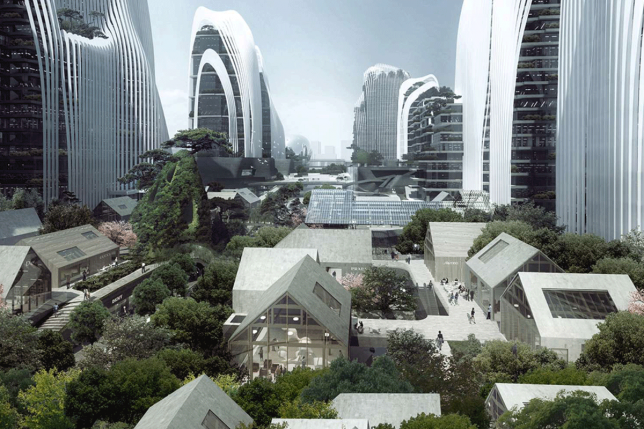
Another MAD project “treats architecture as a landscape,” integrating waterfalls, trees and gardens into a high-density urban development with curvaceous structures mimicking traditional Chinese paintings of mountain ranges. ‘Shan-shui City’ is a concept that can be applied to all sorts of building projects, and MAD aims to make use of it in both all-new construction projects in China and as supplements to existing cities. They will apply it to a mixed-use urban development that’s half a million square meters in size, and new plaza development in Beijing’s central business district.

Next Page – Click Below to Read More:
Urban Human Habitats 13 Compact Concepts For Growing Cities

Share on Facebook


[ By SA Rogers in Architecture & Cities & Urbanism. ]

[ WebUrbanist | Archives | Galleries | Privacy | TOS ]


WebUrbanist

 
Comments Off on Urban Human Habitats: 13 Compact Concepts for Growing Cities

Posted in Creativity


Festival Friendly: The Canon G7 X Mark II at Sasquatch! 2016

07 Jun

Canon G7 X Mark II at Sasquatch! Music Festival

The Sasquatch! Music Festival, which takes place at the Gorge Amphitheater in the town of George in eastern Washington State, is loud, expensive, crowded, beautiful and dirty. Leaving behind the ‘expensive’ part, that about sums up why this is the fourth year I’ve attended, and why I’ve brought a camera (or three) with me each time.

The first year I went, I attended chiefly for the music (i.e., for fun). But having seen friends cover it for college publications ‘back in the day,’ I decided I had to bring a camera just to document the absolute spectacle of it all. So for that year, I had a friend with a real press pass smuggle my D700 in for me along with a couple of lenses. Ever since, I’ve been hooked, though with less smuggling – the following two years were all X100 classic all the time (100% kosher with the official rules), though that eventually resulted in some big pieces of dirt stuck in my hybrid viewfinder.

Going bananas – I was excited to see the G7 X Mark II has a screen that now tilts downward as well as upward, for easier shooting above the crowd. Of course, constant jostling from the crowd meant I still had some cropping to do to get the composition I wanted. Good thing there’s 20MP on tap. Processed and cropped to taste from Raw. F2.5 | 1/100 sec | ISO 1000 | 40mm equiv. Photo by Carey Rose.

This year, I was hoping to bring the Nikon D5 to further supplement our recent review, but the festival has gotten stricter with its ‘big camera’ policy (DPR was, shockingly, denied a press pass). And since this was a personal trip more than anything else, I didn’t want my expensive festival wristband cut off for breaking some rules. Luckily, the Canon G7 X Mark II had just arrived the day before my departure – with a capable 1″ CMOS sensor, a fast zoom lens with a useful range and sturdy metal build, what better festival camera could I have brought?

Taking the good with the bad – the G7 X Mark II’s lens can produce some nice sun stars, but at F11, you’re running into sharpness-ruining diffraction territory. With such a good amount of dynamic range available from the Raw file, I’d still take this image over a cellphone JPEG any day. Processed and cropped to taste from Raw. F11 | 1/200 sec | ISO 125 | 24mm equiv. Photo by Carey Rose.

Getting to know the Mark II

Despite my shooting full-frame Nikons for personal work, I’ve always had a soft spot for Canon compacts (my first digital camera ever was a PowerShot A75). Having extensively used the G5 X (which is, beneath its skin, very similar to the original G7 X), it’s clear that the G7 X Mark II is more refining than revolutionizing in a lot of ways. That’s not necessarily a criticism.

Sure, the sensor and lens are essentially unchanged from the Mark I to the Mark II; the sub-par continuous autofocus performance still encourages ‘Single-AF and recompose’ behavior, and the rear controls are still a little fiddly. But even so, Canon has managed to take what was already an engaging compact camera and make it appreciably better.

The view from Terrace Camping at The Gorge with the G7 X Mark II at maximum zoom. Processed and cropped to taste from Raw. F4 | 1/1250 sec | ISO 125 | 100mm equiv. Photo by Carey Rose

The ‘cons’ list of the original G7 X review contains a number of not-insignificant criticisms we had with Canon’s first foray into the 1″-sensor compact market. But when I looked at them, and then compared them to the Mark II model, I was pretty surprised.

Specifically, this new model features increased battery life, 8 fps continuous shooting even in Raw, an option for 24p video, smoother menu operation, re-damped front and exposure compensation dials (and the front dial can even be de-clicked, if you like) and in-camera Raw processing. Plus, the more standard Canon GUI has been refined. In all, more than half the previous ‘cons’ list has been taken care of (with many thanks to the DIGIC 7 processor). That’s not too shabby.

Festival-friendly features

The new, more-robust screen mechanism on the G7 X Mark II tilts both upward and downward to make working at odd angles a breeze, with responsive touch-to-focus functionality to boot. Processed to taste from Raw. F1.8 | 1/320 sec | ISO 200 | 24mm equiv. Photo by Carey Rose.

What isn’t all that eye-catching from a spec sheet or press release point-of-view – yet makes a very real difference in the real world – is the new grip on the front of the Mark II. It adds very little bulk, but does absolute wonders as far as how this camera feels in the hand. I had a thin neck strap on it, but if I just wanted to grab the camera for a quick snap, the grip inspired some confidence.

Perhaps most crucially for this sort of trip was the appreciably increased battery life on the Mark II, plus the new USB charging option. In the past, I’ve not always been a fan of USB-only charging, but when camping and using communal USB power banks, it made perfect sense and meant that I rarely needed to swap in the second battery I carried with me.

The G7 X Mark II won’t let you turn backgrounds into butter at moderate distances, but for more casual documentary and portrait work, some context can be useful. Also, I promise this isn’t just an informercial for cheap beer. Processed to taste from Raw. F2.2 | 1/320 sec | ISO 250 | 38mm equiv. Photo by Carey Rose.

As stated earlier, the 20MP sensor in the G7 X Mark II is the same as its predecessor, which is to say, it’s a peach. The Raw files are very malleable, and they respond well to pushes and pulls (though you might need a touch of noise reduction).

Speaking of noise reduction, the default JPEG noise-reduction on the Mark II is a little heavy-handed, though as is typical of Canon cameras (even compacts), the colors are great. As a matter of personal preference, I still like processing out Raws (even when shooting for fun – I’m a nerd), but wirelessly transmitting the above-average JPEGs from the G7 X Mark II to my phone for posting to social media was quick and easy.

Even at high ISO values, the G7 X Mark II’s Raw files retain a fair amount of flexibility. F2.8 | 1/200 sec | ISO 4000 | 100mm equiv. Photo by Carey Rose.

Lastly, the video mode on this camera might not be 4K, but the image stabilization is incredibly effective, making casual shooting look far nicer than it has any right to.

Not-so-festival friendly

So while the G7 X Mark II ended up being a near-ideal companion for most of the long weekend, there were still a couple of things I had to keep in mind.

Press pass – Sasquatch! style. Straight-out-of-camera JPEG – click through to the full-size to see the noise reduction robbing detail on his palm, even at base ISO. F2.8 | 1/400 | ISO 125 | 28mm equiv. Photo by Carey Rose.

The build quality of the Mark II is very, very good – but there are no claims of weather-sealing. Remember how I said Sasquatch! was dirty? Between high-speed gusts of dusty wind and large quantities of people carrying large quantities of beer, I ended up treating the Mark II pretty carefully. I didn’t actually experience any issues with dust (or liquid) intrusion, but like I said – I was being careful.

Straight-out-of-camera JPEG with some spectacularly rich red tones. F2.8 | 1/400 sec | ISO 125 | 24mm equiv. Photo by Carey Rose.

And while the tilting touchscreen is very good and very responsive, it can be hard to see in bright sun – especially when it’s covered in sunscreen-y fingerprints and dust. At least that new grip means it’s easier to hold the camera with one hand and shield the screen with the other.

Lastly, Canon’s ‘auto lighting enhancer’ works a little less effectively than competing models in high-contrast scenes, giving an awful lot of weight to preserving highlight detail at the expense of overall underexposure of your scene – and in JPEGs, that means a potential loss of shadow detail that you can’t get back.

In the G7 X Mark II’s dust-filled natural habitat, at least for that weekend.

The wrap

The updates Canon has brought to the PowerShot G7 X Mark II cement it, for me, as an impressively engaging photographers’ compact. The improvements to overall responsiveness finally make the camera feel as premium in general operation as it feels in your hand. The autofocus performance still doesn’t quite match up to the improved burst speed (and the autofocus modes are still a little confusing), but being able to shoot at 8fps will help you catch moments that you might have missed with its predecessors’ 1.1fps burst speed in Raw.

The real story for me is that I still brought two other cameras along ‘just in case’ – a Ricoh GR and my trusty D700 – and I used the G7 X Mark II for over 90% of the photographs I took, with no regrets.

Until next year. Processed to taste from Raw. F1.8 | 1/60 sec | ISO 4000 | 24mm equiv. Photo by Carey Rose.

More real-world G7 X Mark II samples from Sasquatch! 2016

$ (document).ready(function() { SampleGalleryGridV2({“galleryId”:”8985678033″,”isMobile”:false}) })

Canon G7 X Mark II Real-world Samples Gallery

69 images • Posted on Jun 3, 2016 • View album
Sample photoSample photoSample photoSample photoSample photoSample photoSample photoSample photoSample photoSample photoSample photoSample photoSample photoSample photoSample photoSample photoSample photoSample photoSample photoSample photoSample photoSample photoSample photoSample photoSample photoSample photoSample photoSample photoSample photoSample photoSample photoSample photoSample photoSample photoSample photoSample photoSample photoSample photoSample photoSample photoSample photoSample photoSample photoSample photoSample photoSample photoSample photoSample photoSample photo

Articles: Digital Photography Review (dpreview.com)

 
Comments Off on Festival Friendly: The Canon G7 X Mark II at Sasquatch! 2016

Posted in Uncategorized


Leica releases audio and S-lens adapters for SL mirrorless

06 Jun

$ (document).ready(function() { SampleGalleryV2({“containerId”:”embeddedSampleGallery_2220794024″,”galleryId”:”2220794024″,”isEmbeddedWidget”:true,”standalone”:false,”selectedImageIndex”:0,”startInCommentsView”:false,”isMobile”:false}) });

Leica has announced the availability of a pair of adapters for its SL full frame mirrorless camera that will allow users to fit lenses from the S medium format system and to use microphones and headphones when shooting video. The Leica S-Adapter L opens the camera to 16 lenses from the S system including the company’s collection of leaf-shutter lens. While this doesn’t add any focal lengths that aren’t available via the existing SL zooms it will allow access to wider apertures for some and will also save existing S users having to buy extra lenses.

The new audio adapter uses the camera’s USB port and provides a pair of 3.5mm jack sockets for connecting a microphone and audio monitors for those shooting video with the SL.

The Leica S-Adapter L is available now and will be priced at £950, while the audio adapter AA-SCL4 will be on sale at the end of the month for £120. US pricing has yet to be announced.

For more information visit the Leica website.

Press release

Leica announces availability of Leica S-Adapter L and forthcoming release of Audio Adapter for the Leica SL

– Leica S-Adapter L enables S-lenses to be used with the Leica SL
– Leica AA-SCL4 Audio Adapter available end of June

Leica Camera has today announced that the Leica S-Adapter L for the Leica SL mirrorless camera system is now available. This adapter further extends the range of lenses that can be used with the Leica SL to include those of the Leica S medium format camera system.

The S-Adapter L allows the use of 16 Leica S-Lenses with focal lengths from 24 to 180mm (including six central shutter lenses), in addition to the system’s own lenses, the Vario-Elmarit–SL 24-90mm f/2.8-4 ASPH. and the Leica APO-Vario-Elmarit-SL 90-280mm f/2.8-4. The exceptionally fast S-Lenses are the result of more than 100 years of experience and expertise in optical design and precision engineering. Combining traditional Leica quality with cutting edge technology, they achieve uncompromising imaging quality in virtually all photographic situations, in the studio and on location.

Furthermore, the outstanding compatibility of the Leica SL-System grants photographers access to almost every Leica lens ever made. For example, Leica T lenses can be mounted on the Leica SL without an adapter, the M-Adapter T (already available) enables the use of almost all Leica M-Lenses with the Leica SL, while the R-Adapter L (available Q3/2016) will provide access to an entire range of Leica R-System lenses.

Leica AA-SCL4 Audio Adapter

Another new addition to the range of accessories and equipment for the Leica SL camera system is the AA-SCL4 Audio Adapter, which is scheduled to be available at the end of June 2016.

Pricing and availability

The Leica S-Adapter L is available now from Leica stores and authorised Leica dealers in the UK at a suggested retail price of £950 including VAT. The AA-SCL4 Audio Adapter, available at the end of June 2016, will have an SRP of £120 including VAT.

Additional information can be found at uk.leica-camera.com

Articles: Digital Photography Review (dpreview.com)

 
Comments Off on Leica releases audio and S-lens adapters for SL mirrorless

Posted in Uncategorized


Samsung announces ruggedized Galaxy S7 Active

06 Jun

Samsung has announced a ruggedized “Active” version of the standard Galaxy S7.  The Active comes with the same IP68 rating for water resistance as the standard device, but adds the MIL STD-810G standard and a shatterproof display to the mix, making the S7 Active resistant to the occasional drop. 

The beefy 4000 mAh battery is another notable change compared to the standard S7’s 3000 mAh variant but most other internal components remain unchanged. Like on the Galaxy S7 the Android OS is powered by a Qualcomm Snapdragon 820 chipset and 4GB of RAM. Versions with 32 or 64GB of internal storage are available and a microSD-card can add up to another 256GB. For added security a fingerprint reader is on board and, important for mobile photographers, there are no are no changes in the camera department either.

Images are captured on a 1/2.6″ 12MP sensor with 1.4 µm pixel size and on-sensor phase detection. The aperture is a very fast F1.7 and the focal length 26mm equivalent. The camera is capable of recording 4K video and at the front a 5MP/F1.7 module should be capable of capturing decent self-portraits.

At least for now the Galaxy S7 is exclusive to AT&T in the US. It will be available from June 10 and cost you $ 26.50 or $ 33.31 a month, depending on your plan. The Galaxy S7 Active looks like a good options for those who like shooting with their phone during outdoor activities and the like, let’s hope Samsung will make it available through additional channels sometime in the nearer future.

Articles: Digital Photography Review (dpreview.com)

 
Comments Off on Samsung announces ruggedized Galaxy S7 Active

Posted in Uncategorized


How to Straighten Crooked Images Fast Using Lightroom

06 Jun

If you’re like me, it’s so easy to get focused on trying to take great shots that you forgot to make sure your images are straight, and not crooked. Not some crazy tilt, mind you – just a slight tilt. So slight that when you notice it in your images, it just looks weird. A more dramatic tilt and we’ll just call it art. But this slight tilt is just enough to drive you crazy and cost us a lot of extra time editing your images.

Well I am here to report that I have found a quick and easy way to fix this tilt fast using Lightroom. So easy, that you can even automate it so that Lightroom fixes it for you.

So if this tip interests you, keep reading to find out how:

Image01

Take a look at the image above. Good shot, right? Photographically I think I did well with the image, but it’s crooked! I can’t give this image to my client like this, it needs to be straightened first.

Lens Corrections Panel

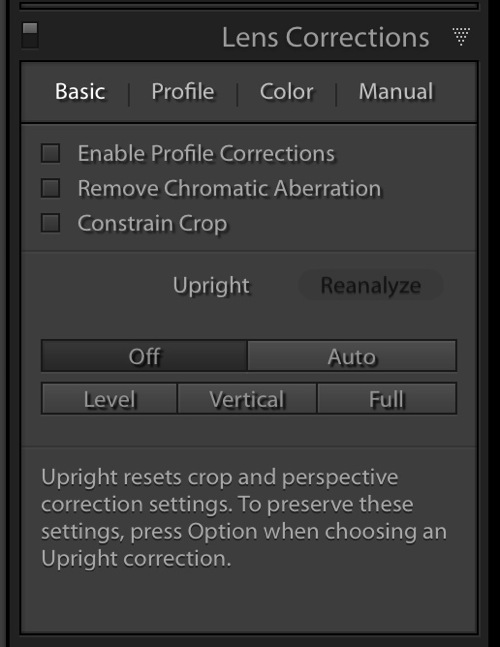
Beginning with Lightroom version 5 the Basic tab was introduced inside of the Lens Corrections panel. This tab gives you the easy to use Upright Mode buttons, which are powerful tools used to fix perspective issues with your images. The perspective issue that I always seem to be dealing with is crooked images.

Image02

There are several Upright Mode buttons, but the one I want to show you in this article is the Level button. When clicked, this button works to straighten your images based on the lines present inside them. Obviously if there are no strong vertical or horizontal lines in the image, this button won’t work. But if there aren’t strong lines, who’s to say it’s crooked in the first place, right?

Images appear crooked to our eyes because of the strong lines within an image, therefore the Level button works great at straightening those images quickly, without much difficulty. Instead of going into the crop tool and manually rotating the image slightly to straighten it, I can go to the Lens Corrections Panel instead and click the level button to straighten this image very quickly.

I also like to have the Enable Profile Corrections check box checked as well as the Constrain Crop check box. These make sure Lightroom is straightening with as much information as possible.

Image03

Automating Your Upright Adjustments

Now here is the trick. When done properly, you can create a Lightroom preset, or sync your Level adjustment across any number of images, and have Lightroom analyze and adjust each image independently based on each image’s needs and requirements.

What this means is you can have Lightroom straighten all of your crooked images with the click of a couple of buttons!

Syncing

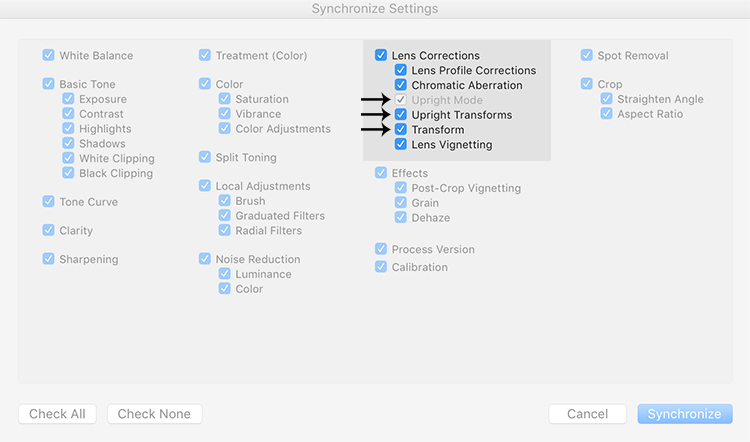
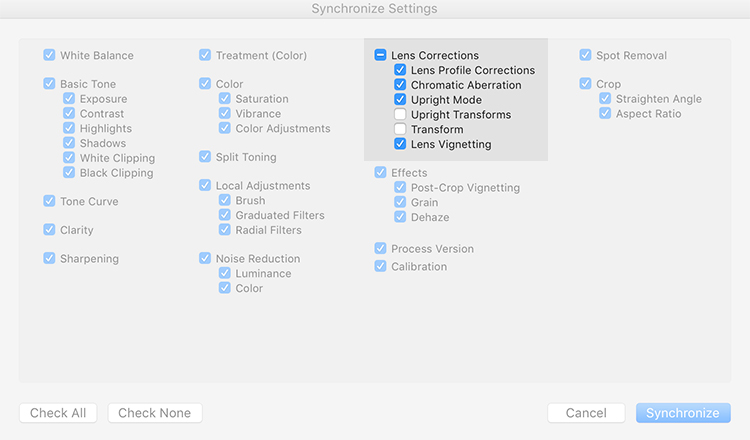
In the Sync dialog box under Lens Corrections check box, there are three check boxes you want to be concerned with: Upright Mode, Upright Transforms and Transform.

Image04

These three boxes determine how Lightroom is going to handle your straightening – whether to analyze each image independently or simply copy the same settings from one image to the next.

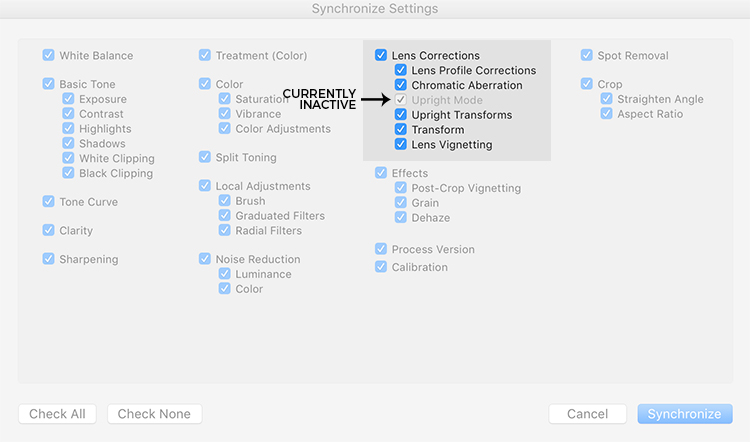
If all three are checked, Lightroom will simply apply the same setting to all of the images, something you do not want because each image requires specific straightening based on its own lines. You’ll notice that Upright Mode is grayed out, telling you that it isn’t active.

Image05

To do what you want, which is to have Lightroom analyze each image independently and straighten it based in its own needs, you want to ONLY have a check mark in the Upright Mode box. The other two are left blank (see below).

Image06

By doing it this way, Lightroom will fix your crooked images, according to the amount of straightening that each image specifically needs.

How cool is that?

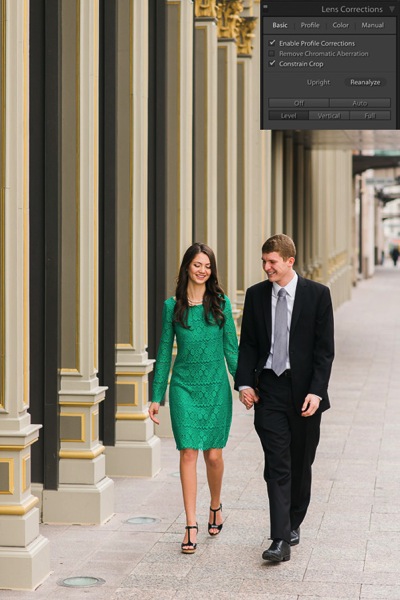
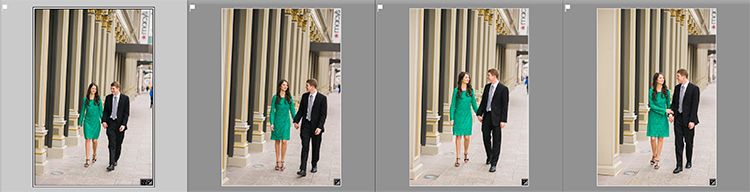
Take a look at the images below. I took many shots in a sequence of the couple walking, and I want to straighten each one individually. Before learning this technique, I had to straighten each image individually – but not anymore.

Image07

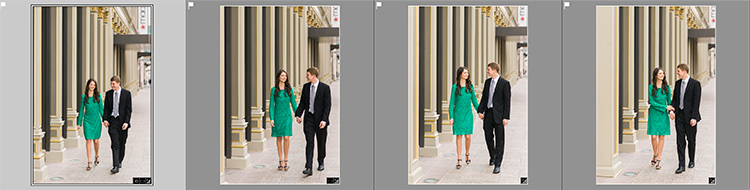
Once I fix the first image using the Level button in the Lens Corrections panel, I can then sync the Upright Mode across all of the other crooked images, and each will be analyzed and fixed according to what it needs (even if they are all different amounts).

Image08

Look at that. All of my images were fixed with a few clicks. I don’t want to belabor the point here, but I constantly shoot crooked and this little trick saves me hours of tedious straightening over the course of a year.

Making a LR Preset

You can also automate this process by creating preset. You do this by first straightening an image with the Level button found in the Lens Corrections panel of the Develop Module.

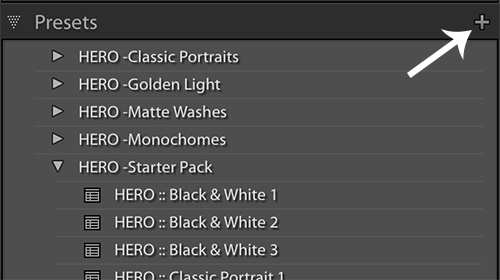
Then, at the top of Presets panel clicking the (+) plus button to create a new LR preset.

Image09

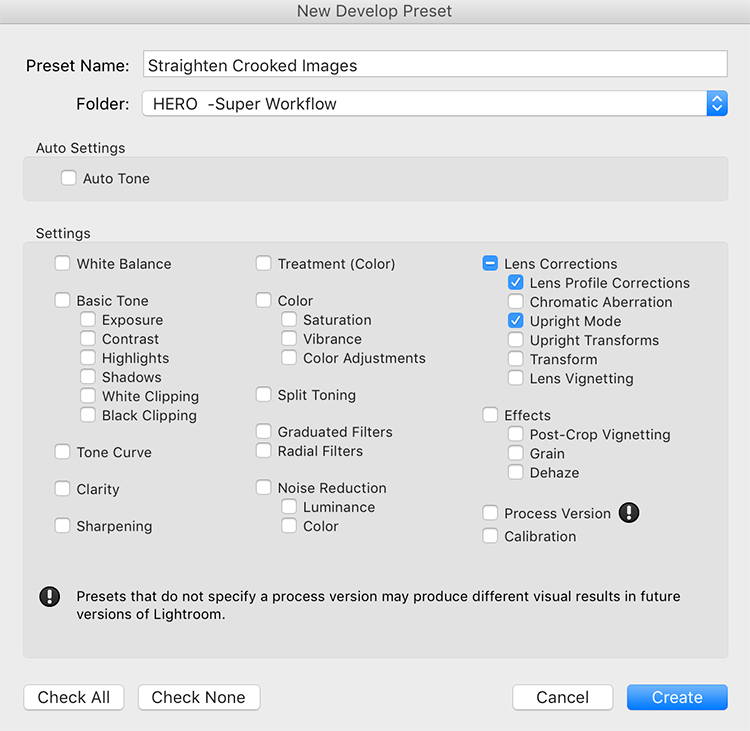
This will bring up the New Develop Preset dialog box where you choose which settings you want in your preset, the folder you want to store it in, and what name you want to give it. Name your preset something that you will remember, put checkmarks in the Upright Mode checkbox and the Lens Profile Corrections checkbox and hit Create.

Image10

Now, when you have crooked images you can hit this preset and almost magically, your images will be straightened compared to the strong lines in the image.

Image11

Give it a shot, I think you will find yourself using this technique quite often to straighten your images quickly.

Image012

Image013

googletag.cmd.push(function() {
tablet_slots.push( googletag.defineSlot( “/1005424/_dPSv4_tab-all-article-bottom_(300×250)”, [300, 250], “pb-ad-78623” ).addService( googletag.pubads() ) ); } );

googletag.cmd.push(function() {
mobile_slots.push( googletag.defineSlot( “/1005424/_dPSv4_mob-all-article-bottom_(300×250)”, [300, 250], “pb-ad-78158” ).addService( googletag.pubads() ) ); } );

The post How to Straighten Crooked Images Fast Using Lightroom by Kelly David Sansom appeared first on Digital Photography School.


Digital Photography School

 
Comments Off on How to Straighten Crooked Images Fast Using Lightroom

Posted in Photography


Natural Light Versus Artificial Light: Which is Better?

06 Jun

Light is the backbone of photography. Without light, there are no photos. After all, the word photo means light. However, which type of lighting is best: natural or artificial? There are a lot of proponents for either camp, but this article will try and dissect the argument from both perspectives, and give you a chance to add your opinion at the end.

Natural Light

natural-light-versus-artificial-light-2689

The arguments in favor of natural light are many, which means it’s not difficult to see why it is attractive to many photographers.

The pros of natural light

Cost

Natural light costs nothing to make use of; there are plenty of gadgets and accessories available, such as reflectors and diffusers, that do help to maximize results, but even without them, it is easy enough to get beautiful results using natural light, without spending any money. This apparent lack of a financial entry barrier makes it much easier for most photographers to immediately assume a preference for natural lighting.

Learning Curve
natural-light-versus-artificial-light-0729

Learning how to see, manipulate and utilize light, whether natural or artificial, is the most critical skill set for a photographer to learn. Fortunately, these break down into many individual skills that can be learned one at a time. In terms of natural light, a lot of these skills are easy to learn and put into practice. For example, you can read a tutorial on using an area open shade to diffuse and soften the light, then put it into immediate practice ten minutes later.

Another thing to keep in mind here is that cameras are designed for use in natural light first. So, a new photographer working their way through the technical basics of their camera, such as metering, aperture and shutter speed, is almost certainly learning with natural light, thereby improving both their camera and lighting skills simultaneously.

Semantics

This point may seem a bit strange, but I have seen it crop up in various conversations, and it does affect some people’s perceptions. We live in a world that is currently obsessed with the word natural. It seems difficult to go more than five minutes without seeing words like organic, all-natural and free from. Of course, most of this applies to food and health products, but the mindset and lifestyle that go with it have become so expansive, that it has seeped into all manner of other aspects in our lives. Whether or not you buy into that sort of thing, try to ask yourself what sounds better and more appealing: natural or artificial? This may not seem rational in terms of photography (an inorganic, mechanical medium), but the appeal is more of an emotional one, and more often than not, emotion trumps rationale.

The biggest concern here is one of marketing. A photographer who refers to themselves as a natural light photographer may very well simply be attempting to appeal to the quite large demographic that holds value over that kind of thing.

The cons of natural light

natural-light-versus-artificial-light-0962While natural light has its advantages, it is not without its own set of shortcomings.

Unpredictability

While the sun is a near constant during daylight hours, the availability of light is only one factor that needs to be taken into account. Clouds and other weather conditions are just a couple examples of things that will alter specific qualities of the light you are trying to work with. Softness, intensity, and color can all change in a split second at the whim of mother nature. If you are attempting to work towards a specific goal, these changes can be a nightmare.

Night

After sunset, what do you do if you’re in a situation where you still want (or need) to take photographs. If you’re relying solely on natural light, the answer is: not a whole lot. Many photographers have no problem with this limitation; however, try to imagine what you can achieve with just another hour or two a day working towards your photography.

Environment

natural-light-versus-artificial-light-2691

Aside from its effect on light, shooting outdoors means you are at the constant mercy of the weather. Cold temperatures, rain, snow, and wind can all make for some uncomfortable experiences for both you and your subjects or clients.

If you’re photographing in areas open to the public, you may be subject to the whims of passers-by. This can lead to an unwelcome audience, or even worse, hecklers. Believe me when I relate, that nothing kills the general mood of a session for both the subject and the photographer faster than excessive and undue attention from strangers.

These environmental problems can often be solved by finding an indoor location and using window light. While the effects of weather and other people are gone, this solution is not without its own limitations. Window light, while often beautiful for photography, can be quite dim and may require slower shutter speeds than you might like for portrait photography. A lack of space is also a common problem when shooting indoors.

Artificial light

natural-light-versus-artificial-light-3213

Like natural light, artificial light, whether strobes, flashguns or continuous lighting, has its own set of advantages and shortcomings.

The pros of artificial light

Convenience

By owning an artificial lighting solution, you have the means to take photographs at any time day or night, indoors or out, and the weather has no effect on you. If for some reason you want to do food photography at midnight, by all means, go for it.

If you own a set of flashguns (speedlights), they are not only convenient, but portable as well, and can be taken just about anywhere and set up with ease.

Versatility

With studio strobes and the like, the sheer number of ways that they can be used for a vast array of creative results is their strongest selling point. These range from simple one light setups that mimic natural light, to complicated setups with seven or more lights.

Control

Another great strength of studio lighting is the control it offers you over your final photograph. By controlling every bit of light in your scene, artificial lighting negates the unpredictability that you get with natural light. If you want a particular look or mood, all that you have to do is set up the lights, and take photos until you have your results. There’s no worry that a cloud will move in and block your light.

Reliability
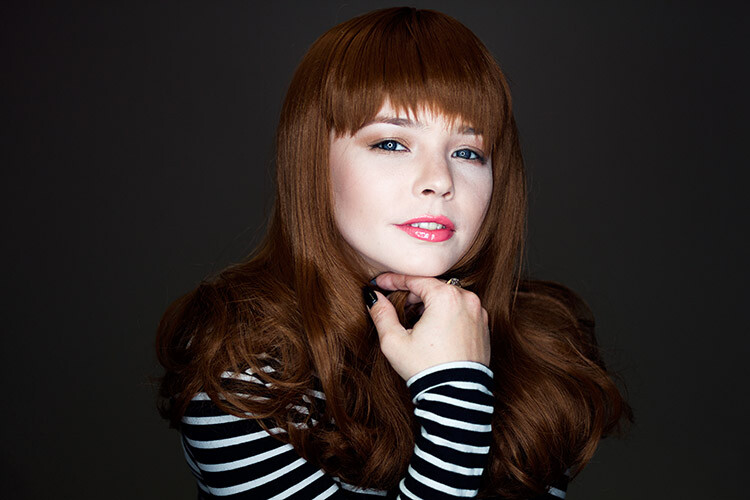
natural-light-versus-artificial-light-4689

Apart from removing the environmental issues associated with natural light, studio strobes and flashguns are quite reliable. Most models in the moderate price range, and above, are very well made. This means that the power output, as well as color output, is consistent every time it fires. This a huge advantage over the fast changing conditions of natural light.

The cons of artificial light

Cost

natural-light-versus-artificial-light-4563Probably the most off-putting aspect of studio lighting is cost. It doesn’t matter whether you choose studio strobes, flashguns (speedlights), or continuous lighting; decent quality lighting equipment does not come cheap and a good set, along with modifiers, can easily cost over $ 1000. With natural light being a free and capable resource, it’s easy to understand why so many photographers steer clear of artificial lighting.

Learning Curve

Another initial disadvantage of studio lighting is the amount of knowledge you have to gain, in order to start using it. It’s very possible to accidentally take a beautifully lit photo in natural light. With artificial light, that’s next to impossible.

A lot of photographers, me included, would probably gladly tell you how atrocious their first attempts with studio lighting were. To get good results, you have to spend an enormous amount of time reading and practicing. This involves things like new aspects of aperture and shutter speed in relation to flash, qualities of light, effects of modifiers and the dreaded inverse square law.

So, which is better?

In my opinion? Neither and both are better.

It depends on the job at hand. Both are just tools to be used at each photographer’s discretion. After all, nobody walks into a newly built house and waxes lyrical about the type of hammers that were used. Good photography is good photography, no matter how it was made. If something screams out to be lit with natural light, then natural light is better. Likewise with artificial light.

Each method is capable of stunning results and I would rather have a full toolkit to use for every opportunity, than miss out on something because I restricted myself from using the right tool for the job.


Editor’s Note: This is one of a series of articles this week that are Open for Discussion. We want to get the conversation going, hear your voice and opinions, and talk about some possibly controversial topics in photography.

Give us your thoughts below on the article above on natural versus artificial, and watch for more discussion topics this week.

See all the recent discussion topics here:

  • 7 Commonly Accepted Photography Beliefs Debunked
  • Is HDR dead? Some dPS Writer’s Thoughts on this Controversial Topic
  • How to Find your Personal Photographic Style
  • Why You May be Failing to Reach Your Potential as a Photographer
  • To Process or Not To Process? Let’s Discuss
  • How much do you process your images? – a dPS POLL
  • Does the Camera Matter? SLR versus Mirrorless versus Smartphone

googletag.cmd.push(function() {
tablet_slots.push( googletag.defineSlot( “/1005424/_dPSv4_tab-all-article-bottom_(300×250)”, [300, 250], “pb-ad-78623” ).addService( googletag.pubads() ) ); } );

googletag.cmd.push(function() {
mobile_slots.push( googletag.defineSlot( “/1005424/_dPSv4_mob-all-article-bottom_(300×250)”, [300, 250], “pb-ad-78158” ).addService( googletag.pubads() ) ); } );

The post Natural Light Versus Artificial Light: Which is Better? by John McIntire appeared first on Digital Photography School.


Digital Photography School

 
Comments Off on Natural Light Versus Artificial Light: Which is Better?
Posted in Photography


World’s Biggest Indoor Vertical Farm Near NYC to Use 95% Less Water

06 Jun

[ By WebUrbanist in Architecture & Offices & Commercial. ]

aerfarms rows

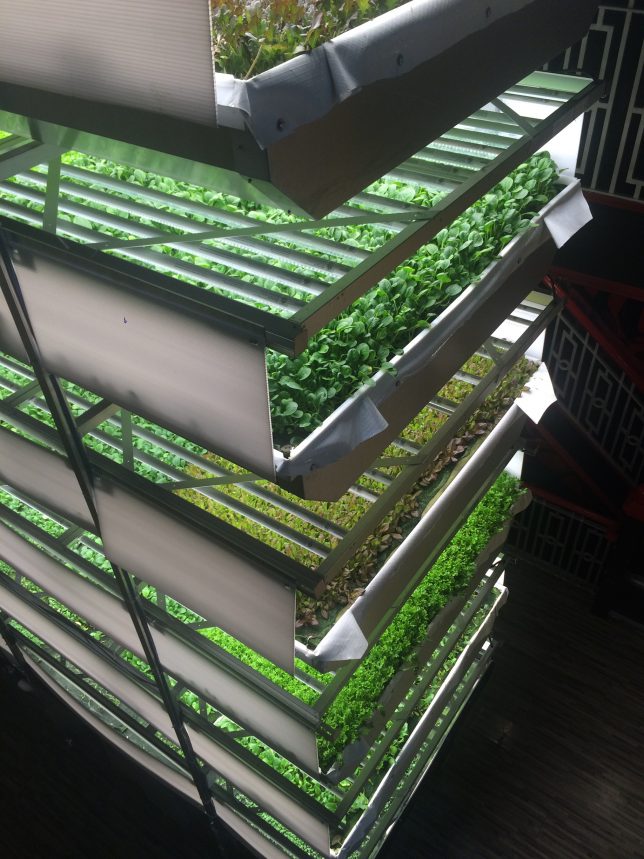
AeroFarms is on track to produce 2 million pounds of food per year in its 70,000-square-foot facility in Newark, under construction about an hour outside Manhattan. Their efficient operation, based on previous experience at similar but smaller facilities, can accomplish this astonishing output “while using 95% less water than field farmed-food and with yields 75 times higher per square foot annually.”

aerofarms facade

This new facility is comparable in efficiency to what is currently the world’s largest vertical farm in Japan, but nearly three times the size. Staggering its crops is part of the success behind AeroFarm’s strategy at their new and existing locations – at a given facility they are able to switch between 22 crops per year. Their all-season growth works with specialized LED lights and climate controls all without the need for sunlight or soil.

aerofarms diagram

“We use aeroponics to mist the roots of our greens with nutrients, water, and oxygen.,” explains AeroFarms. “Our aeroponic system is a closed loop system, using 95% less water than field farming, 40% less than hydroponics, and zero pesticides.” Smart pest management and highly-detailed data feedback loops help keep the system operating at peak efficiency and provide opportunities for iterative improvement, respectively.

aerofarms shelves

“Our passion is great tasting food and sharing our harvest with the world. In Newark, New Jersey, we are growing and selling into the New York Metro area. There has been tremendous demand for our locally grown, delicious, produce, and we have farms in development in multiple US states and on four continents. There has never been a greater need for safe, dependable, nutritious food, and we are scaling quickly to transform agriculture around the world.”

aerofarms students

First Lady Michelle Obama recently visited the Garden State and toured a nearby school, planting seeds in a rooftop garden and sharing healthy snacks with students involved in a youth program as young AeroFarmers.

Share on Facebook


[ By WebUrbanist in Architecture & Offices & Commercial. ]

[ WebUrbanist | Archives | Galleries | Privacy | TOS ]


WebUrbanist

 
Comments Off on World’s Biggest Indoor Vertical Farm Near NYC to Use 95% Less Water

Posted in Creativity


Cows Of A Different Color: The Moooving Art Project

06 Jun

[ By Steve in Art & Installation & Sound. ]

moooving-art-1a
The Moooving Art project in Shepparton, Australia, promotes the region’s dairy industry via dozens of fiberglass cows creatively painted by local artists.

moooving-art-1e

moooving-art-2b

moooving-art-2a

The Moooving Art Project was established in 2002, inspired in part by the very successful “Merry Moos” campaign featured at the Shepparton agricultural show. So what’s the deal with Shepparton and cows, you might ask?

moooving-art-1d

moooving-art-1b

In a nutshell, Shepparton is the largest town in the Goulburn River valley, located just over 100 miles (175 km) north-northeast of Melbourne in Victoria, Australia. The region is Australia’s largest producer of dairy products and the aim of the project is to celebrate the positive impact the cow-driven industry has made on the local economy. Flickr user rotheche snapped some of these “outstanding in their field” designs in April of 2009.

moooving-art-10a

Though most of the models sport the standard bovine pose, a few feature out-of-the-ordinary modifications. Fancy some relaxing on the above “Cowch” whilst enjoying a sunny summer’s day down under?

Next Page – Click Below to Read More:
Cows Of A Different Color The Moooving Art Project

Share on Facebook


[ By Steve in Art & Installation & Sound. ]

[ WebUrbanist | Archives | Galleries | Privacy | TOS ]


WebUrbanist

 
Comments Off on Cows Of A Different Color: The Moooving Art Project

Posted in Creativity