RSS
 

Archive for May, 2016

Unconventional COVR Photo case launches for iPhone SE

05 May

$ (document).ready(function() { SampleGalleryV2({“containerId”:”embeddedSampleGallery_3828535285″,”galleryId”:”3828535285″,”isEmbeddedWidget”:true,”standalone”:false,”selectedImageIndex”:0,”startInCommentsView”:false,”isMobile”:false}) });

The COVR Photo iPhone case promotes shooting from an unconventional angle. Rather than holding your phone with the screen facing toward you, a prism in the case redirects the camera’s angle of view so the user can hold the phone as they would a remote control. Previously available for the iPhone 5/5S and 6/6S, it’s been released for the iPhone SE.

The app that is used with the device has also been improved to allow control of contrast, brightness and manual focusing, as well as a square shooting option and a burst mode.

The guiding principle behind the device’s design is that it allows more comfortable one-handed operation of the iPhone. Because the user points the ‘wrong’ part of the phone towards the subject, it isn’t obvious that a picture is being taken. The inventor, photo journalist Thomas Hurst, says that the design lets parents take more natural pictures of their children. He claims it is also useful for street photography and photo documentary work.

The device consists of a rigid case that snaps around the iPhone and a sliding prism with a lens unit that can be pushed over the phone’s camera unit or pulled back for ‘normal’ shooting. An app converts the image so that it doesn’t appear upside down on the screen.

The COVR Photo lens case for the iPhone SE costs $ 59.95 and comes in black, white, blue and purple. The case is also available for the iPhone 5/5S and 6/6S.

For more information visit the COVR Photo website.


Press release:

COVR Photo Releases App and New Case for iPhone SE

COVR the world with the only case that allows for one-handed iPhonography

As the only iPhone case with a built-in lens and custom app, COVR Photo is pleased to announce its case for the new iPhone SE. COVR Photo is the only case that allows users to take photos and videos while holding the phone one-handed and from a horizontal angle, like holding a TV remote.

“As a professional photographer for 20-years, I know how difficult it can be to capture a timeless moment,” said COVR Photo Founder, Thomas Hurst. “COVR came from a desire to help my wife easily capture the natural moments of our four children with the camera she always had with her – her smartphone.”

He adds, “COVR is the first smartphone case with a sliding lens built directly into it – so it’s always with you, at your fingertips, ready to help all of us capture the spontaneity of life with of our family, friends, and loved ones.”

Accompanying the new iPhone SE case, COVR Photo has just launched an updated app. In addition to adding manual contrast and brightness adjustment, the new app also features a “burst” mode, improved social media sharing, square camera mode and manual focus abilities.

The iPhone SE COVR case is available online now in black for $ 29.95 and $ 24.95 for white, blue and purple. Along with the case for the new iPhone SE, COVR Photo also offers cases for the iPhone 5/5S and iPhone 6/6S.

Parents, grandparents, professionals, photo-enthusiasts and travelers around the world use COVR to take photos and videos from a unique angle to capture once-in-lifetime moments using just one hand.

The case features include:

  • Patented sliding feature– Allows users to shoot using the COVR case similar to a remote control, or slide the COVR lens back and take pictures or videos with the regular iPhone camera lens.
  • Built-in Lens– COVR Photo is the only iPhone case with a built-in lens.
  • Protective case– Shock absorbent rubber core and a hard outer shell provides durability and protection without the bulk and weight.
  • Mobile app– The free COVR Photo app complements the COVR case by redirecting pictures through the COVR Photo lens as well as allows users to adjust focus, exposure and formatting.

Based out of Renton, Wash., COVR Photo was founded in 2014 by award-winning photojournalist Thomas Hurst. Designed with a high-quality prism, COVR Photo sits at just under a half inch tall, fitting comfortably in most pockets.

About COVR Photo: Created by photographer, Thomas Hurst, COVR Photo produces revolutionary products to equip and inspire people to document the world around them through photographs and videos. To learn more, visit covrphoto.com.

Articles: Digital Photography Review (dpreview.com)

 
Comments Off on Unconventional COVR Photo case launches for iPhone SE

Posted in Uncategorized


Six Essential Steps to Taking Great Photographs

05 May

Whether you have been creating photographs for years, or only for few weeks, your goals and dreams are to create great photographs that everyone will admire. You may notice this is not an easy task, and I’m sure that most of the time you experience more disappointments than successes. But don’t worry, I have for you six essential steps that will help you speed up the process, and give you confidence on your journey to these elusive great photographs.

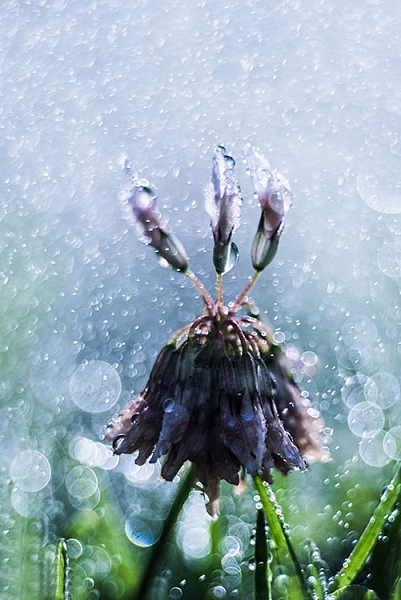
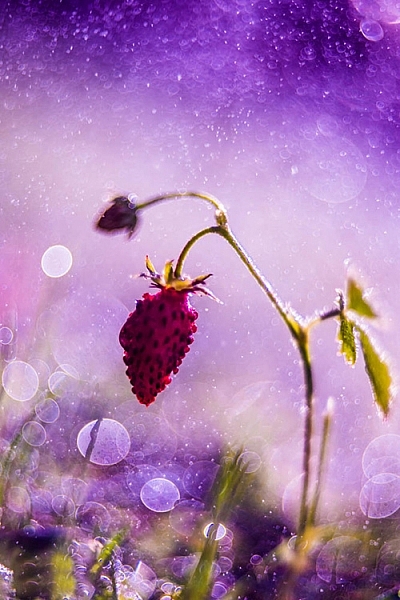
Step 5 - Organise by eva polak

Step 1 – See

Seldom does a photograph succeed because of unusual technique or exotic equipment. Most of the time it succeeds for one simple reason – the photograph was well seen. So, to create great photographs we just need to learn to see better.

Unfortunately this isn’t as easy as it sounds. There’s more to seeing than just looking. It requires time and patience. Begin by concentrating on the objects before you; see how light strikes those objects; see colour, see quality and direction of light, see contrast, see texture, lines,forms and shapes, see details.

The strength of a photograph is directly related to how well, and how carefully you see things around you.

Step 1 - See by eva polak 2 Step 1 - See by eva polak

Step 2 – Feel

Feeling has to do with the emotions generated by a place or subject. Sometimes you need to just sit and absorb your surroundings. Listen to the wind and the birds. Smell the flowers. Feel the rough texture of the trunk you sit on. If you are photographing an animal, watch its movement and behaviour. If you are photographing people, listen to their words, and try to understand their feelings expressed by body language. You can’t photograph the smell of flowers, the sound of birds, or the feelings of a person, but the emotions generated by them can guide you in finding the essence of the scene or subject.

Step 2 - Feel by eva polak 2 Step 2 - Feel by eva polak

Step 3 – Think

This is the most important step in the process. Strong images begin in the mind, not in the camera. Before you begin photographing ask yourself, “Why am I about to take this photo?”

Think about how you will use that sensual input and combine it with your camera, the lighting, and the mood. Is the lighting the best? Would soft, overcast light work better? What about angle of view? High angle? Low angle? Which lens will give the effect you are after? What about shutter speed and aperture?

Answering all these questions is very easy when you have a clear idea of why you want to take an image. Your choices will be completely different when you want to just record your holiday, as opposed to capturing the warm glow cast over the scene by the evening light.

Step 3 - Think by eva polak 2 Step 3 - Think by eva polak

Step 4 – Isolate

Many good shots have been spoiled through poor composition. We tend to concentrate our attention on the subject of a photo, remaining oblivious to what is going on beyond. Make a habit of spending just a second or two before pressing the shutter, checking the viewfinder for any unwanted elements. Get rid of those chaotic objects in the picture. Simplify. Isolate only those elements that convey the message you are trying to express. Emphasize the strong lines, shapes, patterns, textures or colours – but not all of them at once. Be bold and decisive. Ask yourself why. What does it contribute to the overall image? Can you make it stronger by isolating even more? Would you hang that picture on your wall? If not, why not?

Step 4 - Isolate by eva polak Step 4 - Isolate by eva polak_2

Step 5 – Organize

Having isolated carefully, you now need to organize or arrange the elements in the strongest possible way. Where should you place the subject in the frame? In the centre? If so, why? The arrangement may be too boring or static, or on the other hand, it may convey a sense of peacefulness. Or should you put the subject near the edge of the frame? What about the picture orientation itself? You have a choice of creating a vertical or a horizontal image. Which is best for the subject? Vertical orientation tends to emphasize vertical lines or the height of things. Horizontal orientation can give emphasis to sweeping panoramas or the movement of subjects. When you make these choices, always by guided by the message that you are trying to express.

Step 6 - Experiment by eva polak Step 6 - Experiment by eva polak_2

Step 6 – Experiment

Digital photography makes it easy to experiment because you have instant feedback on the LCD screen. Look for new ways to portray familiar subjects. Don’t always photograph the same kinds of scenes in the same ways. Be creative, try different lenses or compositions or angles of view. Play with light. Investigate, explore, observe, evaluate. Don’t be afraid to make mistakes, and above all, have fun!

googletag.cmd.push(function() {
tablet_slots.push( googletag.defineSlot( “/1005424/_dPSv4_tab-all-article-bottom_(300×250)”, [300, 250], “pb-ad-78623” ).addService( googletag.pubads() ) ); } );

googletag.cmd.push(function() {
mobile_slots.push( googletag.defineSlot( “/1005424/_dPSv4_mob-all-article-bottom_(300×250)”, [300, 250], “pb-ad-78158” ).addService( googletag.pubads() ) ); } );

The post Six Essential Steps to Taking Great Photographs by Eva Polak appeared first on Digital Photography School.


Digital Photography School

 
Comments Off on Six Essential Steps to Taking Great Photographs

Posted in Photography


MindShift Gear’s Multi-Mount Holster bags offer five wearable configurations

05 May

$ (document).ready(function() { SampleGalleryV2({“containerId”:”embeddedSampleGallery_5331517593″,”galleryId”:”5331517593″,”isEmbeddedWidget”:true,”standalone”:false,”selectedImageIndex”:0,”startInCommentsView”:false,”isMobile”:false}) });

MindShift Gear has launched four Multi-Mount Holsters for photographers in need of a versatile bag that can accommodate a DSLR or mirrorless camera, a lens, and a few accessories. The Multi-Mount Holster 10 is the smallest of the four, with the Multi-Mount Holster 20, 30, and 50 being incrementally larger while retaining the same general design and features.

The entire line of Multi-Mount Holsters can be used in five different configurations: as a belt around the waist, over the shoulder, over the chest, in front on a harness and as a fanny pack. Each holster has a Stabilizer Strap System for securing the bag into the chosen configuration while helping distribute weight. All four models feature a seam-sealed rain cover and interior weather-block under the zippered lid. The Multi-Mount Holster 30 and 50 also have an expandable front pocket.

Other notable features include a removable LCD screen protector, YKK zippers with an anticorrosion coating and enamel finish, a 420D nylon exterior with a ‘Durable Water Resistance’ finish, a security loop in the main compartment for securing a camera, and a clip-on point for water bottles on the shoulder strap. The 30 and 50 models can also hold keys, memory cards, and more in the front pocket.

Each bag offers the following capacities:

Multi-Mount Holster 10 ($ 89.99)

  • Holds one large (un-gripped) Mirrorless body and one standard zoom lens or prime
  • Holds one compact DSLR (Rebel, 3300 or 5300 series) and one lens
  • Compatible Lenses: Prime lens; Kit Lens; 16-85mm (Canon or Nikon) with hood REVERSED; 16-35mm f/2.8 (Sony)

Multi-Mount Holster 20 ($ 99.99)

  • Holds one standard-size DSLR (5DM3 or D810) and one standard zoom lens or two primes
  • Holds one large (un-gripped) Mirrorless body and one standard zoom lens or two primes
  • 16-35mm f/2.8 with hood EXTENDED (Canon); 16-35mm f/4 VR with hood EXTENDED (Nikon); 24-70mm f/2.8 with hood REVERSED (Canon or Nikon); 17-55mm f/2.8 with hood REVERSED (Canon or Nikon)

Multi-Mount Holster 30 ($ 109.99)

  • Holds one standard-size DSLR (5DM3 or D810) and one standard zoom lens
  • Holds one gripped DSLRs (1Dx or D4s) and one standard zoom lens
  • 24-70mm f/2.8 with hood EXTENDED (Canon or Nikon); 70-200mm f/2.8 with hood REVERSED (Canon or Nikon); 300mm f/4 with hood REVERSED (Canon or Nikon); 80-400mm f/4 AF-S/G with hood REVERSED (Nikon)
  • Front pocket holds SB-910 (Nikon Speedlight); 600 RT (Canon Speedlite)

Multi-Mount Holster 50 ($ 119.99)

  • Holds one gripped Pro DSLR (Nikon D3/D4 series or Canon 1D/1Ds/1DX series) and one standard zoom lens
  • Holds one standard DSLRs with L-bracket (Nikon D800/D700) and one standard zoom lens
  • 24-70mm f/2.8 with hood EXTENDED (Canon or Nikon); 70-200mm f/2.8 with hood REVERSED (Canon or Nikon); 300mm f/4 with hood REVERSED (Canon or Nikon); 80-400mm f/4 AF-S/G with hood REVERSED (Nikon)
  • Front pocket holds SB-910 (Nikon Speedlight); 600 RT (Canon Speedlite)

Articles: Digital Photography Review (dpreview.com)

 
Comments Off on MindShift Gear’s Multi-Mount Holster bags offer five wearable configurations

Posted in Uncategorized


5 Tips for Thinking Out of the Box to Inspire Your Photography at Home

05 May

Have you ever felt like the inspiration well is running dry ?

You carry your camera with you everywhere you go, day in and day out, but you just don’t see Kodak moments any more? If you know that feeling, than you must have been around shutters and lenses for some time now, and can’t wait to see something new.

Wait no more! here are some ideas that will inspire you, and help you get rolling again.

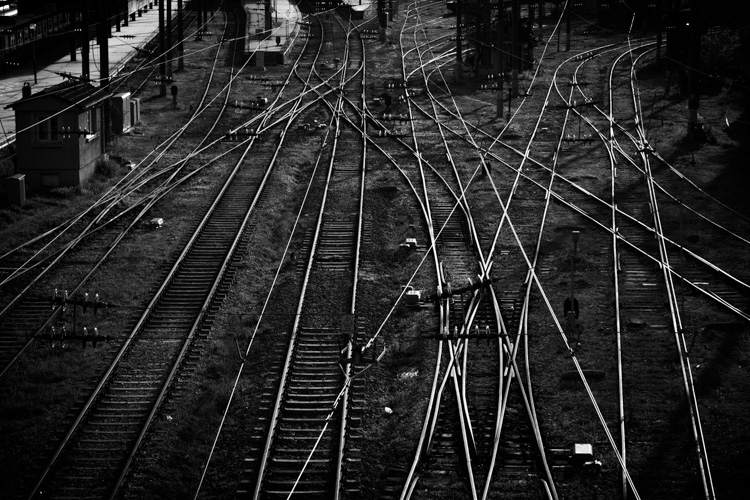
Istanbul railway station

1 – Understanding the box in order to think out of it

Photography can be a very technical act; operating your camera in a scientific way, following exact rules that will bring the wanted results. Or it can be the act of an instant emotional reaction to the world, you see a moment and click, you grabbed just it before it’s gone forever, thinking can be done afterwards. Both ways are good and every photographer is captivated by a different mix of both.

Thinking out of the box requires a box to begin. If you find yourself uninterested in doing things that you already know and have done, that is your box. Underneath it is the magic that made you grab the camera for the first time, the thing that got you excited when you held your eye to the viewfinder. On your first encounters with the camera you fell in love with a simple magic that the camera can do, it is now the time to go back to that magic and do it all over again.

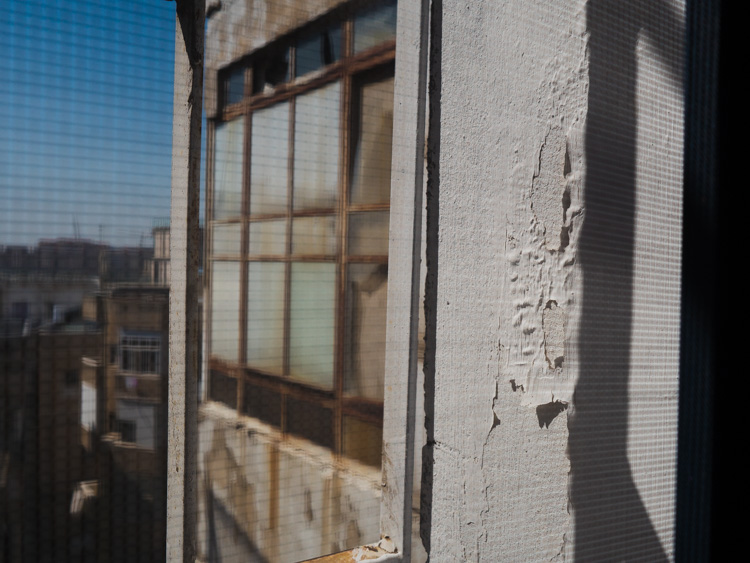
The hunt for an interesting texture photo while on a short brake from computer work, led me to this photo out of my studio’s window.

texture out of the window at home

2 – The routine dichotomy

Routine is often thought to be a major enemy of creativity. You walk by the same corner every day for years, and you get used to it so much that you stop seeing its potential to make great photos. On the other hand, routine is the frame in which you create. Once you get used to the background noise, you can pay attention to the little changes in light, color, and small details that are never the same as the day before.

Make routine your friend by focusing your attention on smaller details every time you walk by the same scene. Look out of your window at different hours of the day, over and over again until new details start popping up in your viewfinder.

look for details out of your window

3 – Shoot without a camera

You may put the blame for the drought on your camera, and go look for the latest pixel beast to get you all excited again, or you can try something new, you can try seeing pictures without a camera.

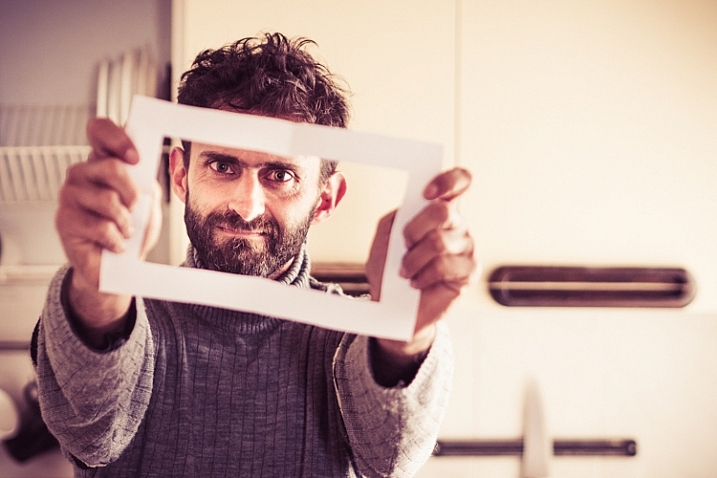
As you do things during your day, try to imagine what they would look like in different photos, with different focal lengths or different exposure values. You may also look at things through a paper cut frame. Hold the frame at a different distance from your eye to zoom in and out, think of your composition, and move on.

Using your imagination instead of a camera will ignite a new spark in the way you see photography. Then, next time that you want to take a photo, you will see it before even having the camera up to your eye.

think-out-of-the-box-photo

4 – The Dead End

Back in the days before smartphone and GPS, you had to find your way around when driving in a new place, and once you faced a dead end street, you had to u-turn and find a new way. That’s when you had to be creative and come up with an inventive solution. That leads to thinking out of the box.

That survival skill is still there and can be kicked in by defining small boundaries in which you photograph, limiting yourself to taking pictures in uncomfortable conditions. For example, do portraits with just a wide angle lens, or look for triangle shapes only with a telephoto lens. Creating dead ends for your photography will force you to find creative solutions, which will lead to new and exciting photographs of the same old world.

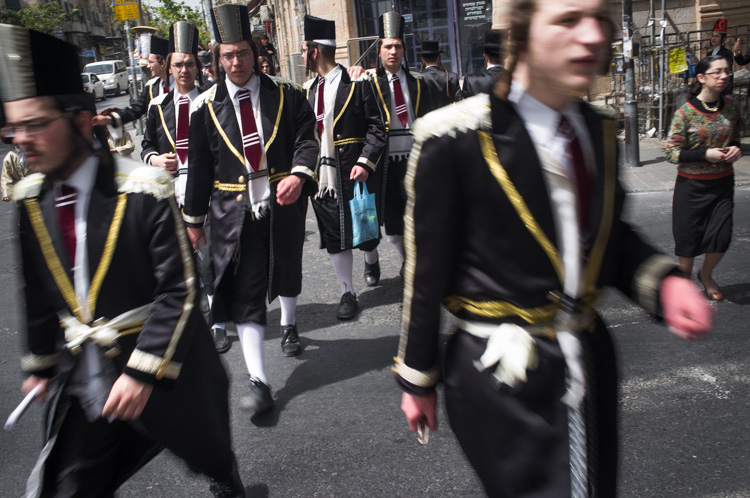
The Fuji X100's fixed lens has made me cross the street to get closer to this group of boys and created a strong feeling of speed. Photo by Ouria Tadmor

The Fuji X100’s fixed lens has made me cross the street to get closer to this group of boys and created a strong feeling of speed.

5 – Experiment with home made light

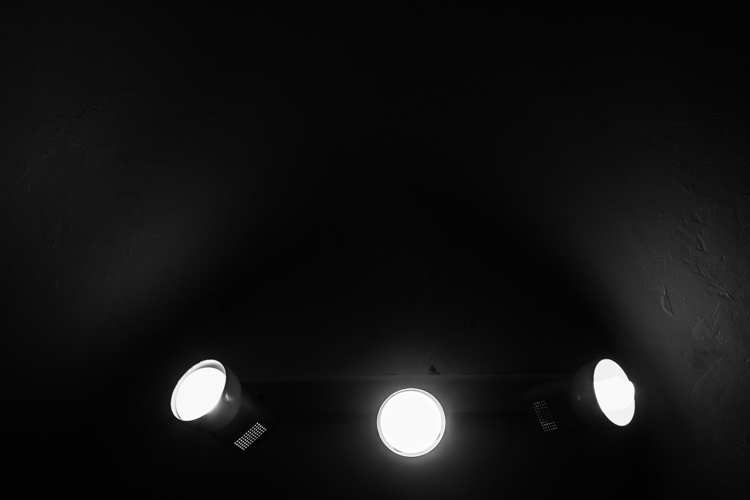
In your home there are many different light sources that would make a good starting point for a photo session, they can be the subject of your photo and the light source at the same time. When you start from the light source and challenge yourself to see where you can go with it, you challenge your creative mind to take a different path than the more common way of seeing something you want to photograph, and thinking how to light it. Mastering this thinking technique can be of use later when you might need to photograph a subject that is not talking to you, just go for the light.

Home lights as photo inspiration

Conclusion

It is not always possible to stay creative and inspired in photography, but the innovative side of your brain can be kept in shape by repeating these small exercises regularly, at home with any type of camera. Do so and you are promised to come home with better photos next time you go on a photographic vacation.

googletag.cmd.push(function() {
tablet_slots.push( googletag.defineSlot( “/1005424/_dPSv4_tab-all-article-bottom_(300×250)”, [300, 250], “pb-ad-78623” ).addService( googletag.pubads() ) ); } );

googletag.cmd.push(function() {
mobile_slots.push( googletag.defineSlot( “/1005424/_dPSv4_mob-all-article-bottom_(300×250)”, [300, 250], “pb-ad-78158” ).addService( googletag.pubads() ) ); } );

The post 5 Tips for Thinking Out of the Box to Inspire Your Photography at Home by Ouria Tadmor appeared first on Digital Photography School.


Digital Photography School

 
Comments Off on 5 Tips for Thinking Out of the Box to Inspire Your Photography at Home

Posted in Photography


Elinchrom launches new EL-Skyport Plus system to include hotshoe flashes in wireless lighting networks

05 May

$ (document).ready(function() { SampleGalleryV2({“containerId”:”embeddedSampleGallery_9814466852″,”galleryId”:”9814466852″,”isEmbeddedWidget”:true,”standalone”:false,”selectedImageIndex”:0,”startInCommentsView”:false,”isMobile”:false}) });

Swiss studio flash manufacturer Elinchrom has launched the next generation of its Skyport wireless triggering system that allows photographers to include hotshoe flash units in their lighting set-ups. The EL-Skyport Plus system includes a newly designed transmitter that has a swivelling head that the company says helps to optimize reception, while the new receiver features a hotshoe mount for triggering ‘almost any’ brand of hotshoe flash.

The units work via 2.4Ghz radio communications, have a range of 656ft/200m and offer 16 channels with four groups.

The EL-Skyport Transmitter Plus costs $ 89.99 and the kit that includes the transmitter and the hotshoe receiver costs $ 139.99.

For more information visit the Elinchrom website.


Press release:

The Latest Evolution of the Skyport

Introducing the New EL-Skyport Plus System

The next generation Skyport is here and allows you to take full control of your flashes from the palm of your hands.

The EL-Skyport Plus follows the successful launch of the EL-Skyport Transmitter Plus HS for Canon® and Nikon®, for those shooters requiring Hi-Sync. The new EL-Skyport Plus system is compact and robust, using readily available AA batteries. The Skyport Plus offers an extended range of up to 656 feet (200 m) and controls the power of all Skyport enabled Elinchrom flash units. With eight individual frequencies and the choice of standard and speed protocols, there are 16 frequency options, each with four groups. The EL-Skyport Transmitter Plus is compatible with almost every camera. The transmitter head folds down for reduced profile and easier subject viewing while shooting.

Compatible with Most Flash Systems
The EL-Skyport Receiver Plus will trigger almost every flash system and features a built-in hot shoe to trigger speedlights, while enabling them to also be conveniently mounted onto a lighting stand.
When used in conjunction with a Skyport HS Plus Transmitter, most speedlights set at full power can also be incorporated into Hi-Sync applications (using high shutter sync speeds to freeze motion and control ambient light).

“Elinchrom has long prided itself on providing as much control as possible to its photographers. The new Skyport Plus continues that tradition by allowing shooters to take and maintain complete control no matter what they are shooting. When it comes to Living Light, no company does it better than Elinchrom.” said Jan Lederman, MAC Group President.

The Elinchrom Skyport Plus system is retro compatible with the existing Skyport Speed system, and forward compatible to the additional frequencies offered by the latest Elinchrom ELB and ELC units.

EL-Skyport Plus To Go Contents
* EL-Skyport Transmitter Plus contains:
* EL-Skyport Transmitter Plus
* 2.5 mm to PC sync cord
* Wrist strap
* 2-year warranty

EL-Skyport Universal Plus set contains:
* EL-Skyport Transmitter Plus
* EL-Skyport Receiver Plus
* 2.5 mm to PC sync cord
* 3.5 mm to 3.5 mm sync cord
* 3.5 mm to 6.35 mm adapter
* Wrist strap
* 2-year warranty

Articles: Digital Photography Review (dpreview.com)

 
Comments Off on Elinchrom launches new EL-Skyport Plus system to include hotshoe flashes in wireless lighting networks

Posted in Uncategorized


Dynamic Architecture: 13 Buildings with Moving Parts

04 May

[ By Steph in Architecture & Houses & Residential. ]

moving buildings villa girasole 2

Entire Italian villas spin in circles on wheels, solar-powered shades follow the sun, rooms zoom up into the air on telescopic stilts and windowless facades lift up on one end like shoebox mousetraps, all at the push of a button. These dynamic houses, apartment buildings, pavilions and offices have all sorts of moving parts, transforming as if of their own accord to change the views or keep the interiors cool.

Phalanstery Module

moving buildings phalanstery 1

moving buildings phalanstery 2

phalanstery module 3

phalanstery module 4

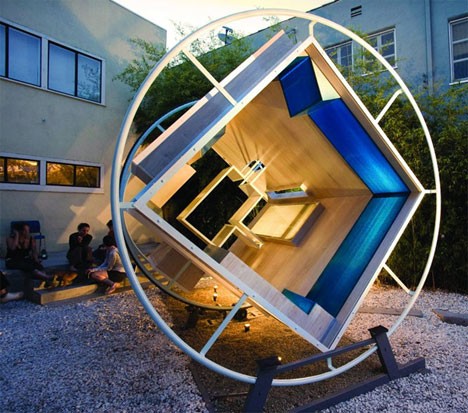
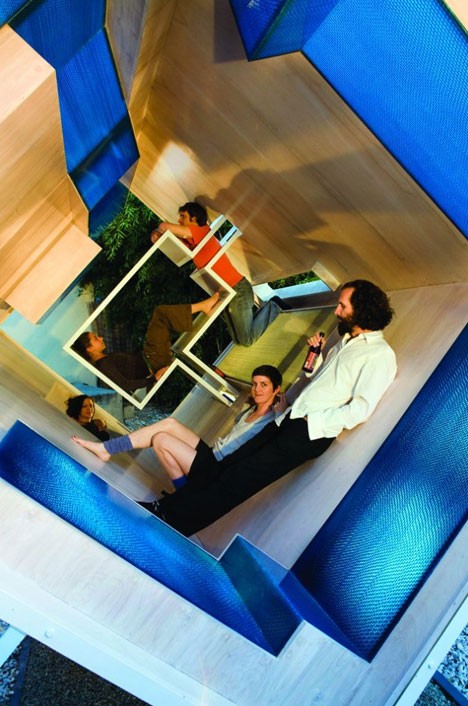
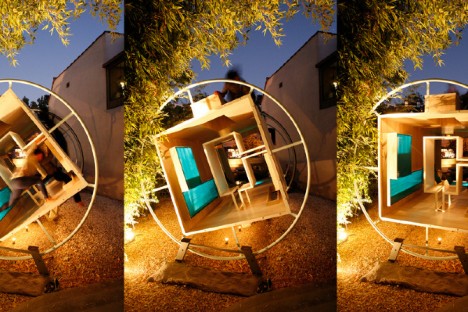
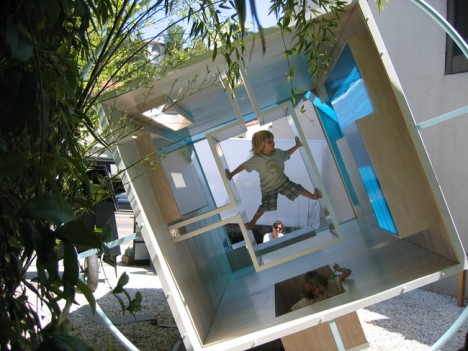
Envisioned as a house for zero-gravity, where all surfaces are treated equally, the Phalanstery Module rotates a full turn per hour, with one of the surfaces becoming parallel to the ground every fifteen minutes. Say the creators, “In the middle of every 7.5 minute conversation, two people are bound to collide. Architectural program and activities become overpowered by the instinctive interpretations of our bodies against measurable dimensions.”

Sharifi-Ha House
moving buildings sharifi-ha

moving buildings sharifi-ha 2

moving buildings sharifi-ha 3

moving buildings sharifi-ha 4
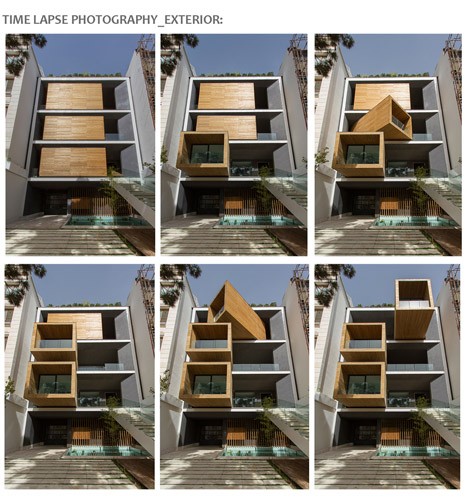
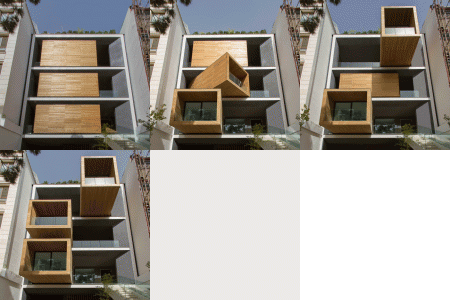
At the push of a button, three wooden volumes tucked inside a main structure turn their glass-capped ends in various directions. The residents of the Sharifi-Ha House by next office i Tehran can choose whether they want these particular rooms to be shaded or illuminated by the sun, as well as the view they prefer. Rotated fully out of their containing spaces, they telescope out over the driveway.

Villa Girasole
moving buildings villa girasole

moving buildings villa girasole 2

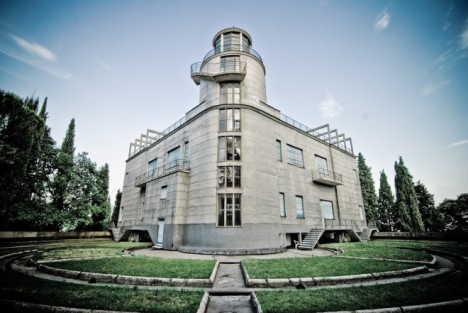
Set on wheels and rails, northern Italy’s Villa Girasole rotates to follow the sun as it arches across the sky throughout the day, just like its namesake, the sunflower. Built in the 1930sby a wealthy engineer the two-story house rotates from a 42-meter-tall tower at the center, moving about 4 millimeters per second. It takes 9 hours and 20 minutes for it to rotate a full turn.

La Caja Oscura
moving buildings caja oscura 1

moving buildings caja oscura 2

moving buildings caja oscura 3

moving buildings caja oscura 4

moving buildings caja oscura 5

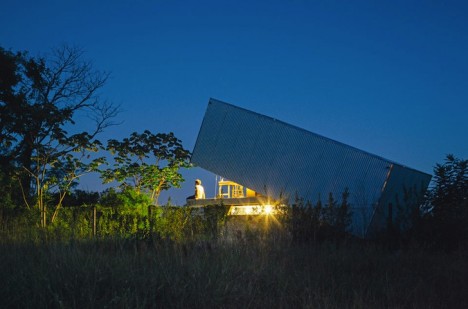
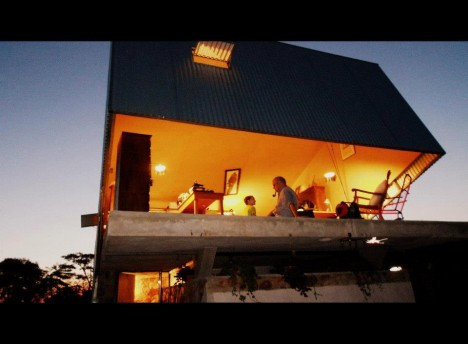
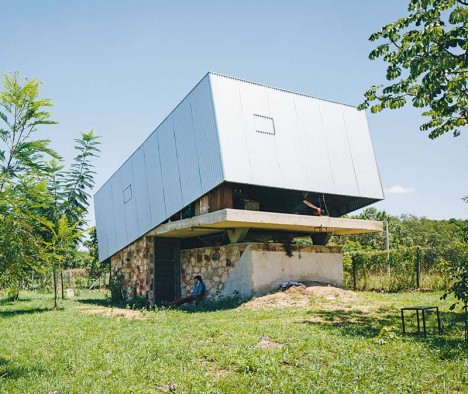
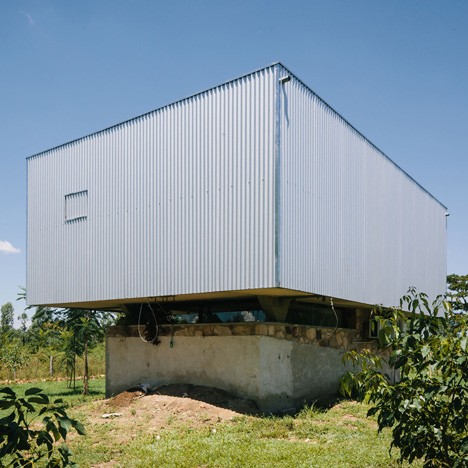
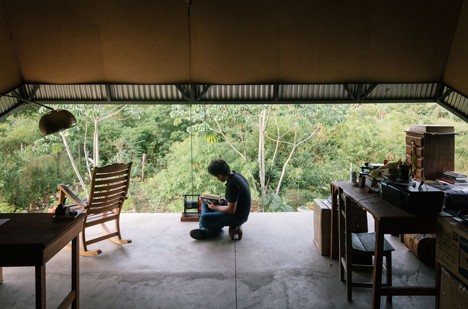
From afar, this house looks like a giant shoebox mouse trap, one end tilted up to reveal an elevated concrete slab. The windowless exterior moves up and down to either open the interior to the elements, or seal it off completely when the owners are gone. Designed by architect Javier Corvalan as the vacation home of a filmmaker, the house transforms with a manual winch. When closed, a pinhole allows the entire structure to function as a camera obscura, projecting an upside-down image of the landscape outside onto the interior walls.

Next Page – Click Below to Read More:
Dynamic Architecture 13 Buildings With Moving Parts

Share on Facebook


[ By Steph in Architecture & Houses & Residential. ]

[ WebUrbanist | Archives | Galleries | Privacy | TOS ]


WebUrbanist

 
Comments Off on Dynamic Architecture: 13 Buildings with Moving Parts

Posted in Creativity


Canon catching up? Canon EOS-1D X II tested in our studio

04 May

Announced back in February, the Canon EOS-1D X Mark II has at long last made its way through our door. We’re just itching to get it out and put its 20.2MP sensor and 14 fps burst rate to work shooting some fast action to see what its AF system can do, but first we put it through our slate of studio image quality tests.

Like the EOS 80D there’s a big improvement in the camera’s dynamic range. Canon’s move to a design using on-chip analog-to-digital conversion allows less noise is added before the signal is converted into digital values, meaning it’s easier to distinguish between captured information and background noise. In turn, this means more malleable Raw files with more useful information available when you try to process them.

In our standard studio tests, the findings were slightly less positive. The JPEG engine seems to use the same sharpening parameters as the 50MP EOS 5DS R, which ends up being rather heavy-handed when applied to 20MP levels of detail capture. High ISO performance, once a Canon strength, drops a little behind its better rivals.

Raw Dynamic Range

Exposure Latitude

In this test we look to see how tolerant of pushing exposure the EOS-1D X II’s Raw files are. We’ve done this by exposing our scene with increasingly lower exposures, then pushed them back to the correct brightness using Adobe Camera Raw. Examining what happens in the shadows allows you to assess the exposure latitude (essentially the dynamic range) of the Raw files.

Because the changes in this test noise are primarily caused by shot noise and this is mainly determined by the amount of light the camera has had access to, the results are only directly comparable between cameras of the same sensor size. However, this will also be the case in real-world shooting if you’re limited by what shutter speed you can keep steady, so this test gives you an idea of the amount of processing latitude different formats give.

$ (document).ready(function() { ImageComparisonWidget({“containerId”:”reviewImageComparisonWidget-49568559″,”widgetId”:351,”initialStateId”:2428}) })

The Canon EOS-1D X Mark II shows very similar amounts of noise to the excellent sensor in the Sony a7R II up until a 3EV push, with the Canon dropping behind after a 4EV push. It’s a similar story against the likes of the Nikon D750$ (document).ready(function() { $ (“#imageComparisonLink2429”).click(function() { ImageComparisonWidgetLink(2429); }); }) or D810$ (document).ready(function() { $ (“#imageComparisonLink2430”).click(function() { ImageComparisonWidgetLink(2430); }); }). This means that the darker shadows in a processed image would be slightly cleaner in images from these cameras, after contrast adjustments or a less extreme push.

However, this performance is noticeably better than the Canon EOS 5DS R$ (document).ready(function() { $ (“#imageComparisonLink2432”).click(function() { ImageComparisonWidgetLink(2432); }); }) and, significantly, better than the 1D X II’s most direct rival: the Nikon D5$ (document).ready(function() { $ (“#imageComparisonLink2433”).click(function() { ImageComparisonWidgetLink(2433); }); }).

ISO Invariance

A camera with a very low noise floor is able to capture a large amount of dynamic range, since it add very little noise to the detail captured in the shadow regions of the image. This has an interesting implication: it minimizes the need to amplify the sensor’s signal in order to keep it above that noise floor (which is what ISO amplification conventionally does). This provides an alternate way of working in situations that would traditionally demand higher ISO settings.

Here we’ve done something that may seem counter-intuitive: we’ve used the same aperture and shutter speed at different ISO settings to see how much difference there is between shooting at a particular ISO setting (and using hardware amplification) vs. digitally correcting the brightness, later. This has the advantage that all the shots should exhibit the same shot noise and any differences must have been contributed by the camera’s circuitry.

$ (document).ready(function() { ImageComparisonWidget({“containerId”:”reviewImageComparisonWidget-36973092″,”widgetId”:349,”initialStateId”:null}) })

You can see the EOS-1D X II’s full results here. As you may have inferred from the Exposure Latitude tests, the EOS-1D X II isn’t entirely ISO invariant – the camera is adding enough downstream read noise such that you can’t use a lower-than-normal ISO and selectively brighten the image later – to protect highlight information – without some noise cost.

To put this in perspective, though, the camera’s files appear much more flexible than those of the Canon EOS 5DS R$ (document).ready(function() { $ (“#imageComparisonLink2434”).click(function() { ImageComparisonWidgetLink(2434); }); }), which itself was a big step forward from the EOS 5D Mark III$ (document).ready(function() { $ (“#imageComparisonLink2435”).click(function() { ImageComparisonWidgetLink(2435); }); }). So, while they’re not a match for the likes of the Nikon D750$ (document).ready(function() { $ (“#imageComparisonLink2436”).click(function() { ImageComparisonWidgetLink(2436); }); }) or the latest Sony sensors, the 1D X II is a step forward for Canon, and performs better than the Nikon D5$ (document).ready(function() { $ (“#imageComparisonLink2437”).click(function() { ImageComparisonWidgetLink(2437); }); }) in this regard. In fact this test slightly under-represents the Canon’s performance, since the D5’s ISO 6400 result is better to start off with: to start off ahead but then fall behind the Canon, the Nikon must be adding more noise at low ISOs.

Articles: Digital Photography Review (dpreview.com)

 
Comments Off on Canon catching up? Canon EOS-1D X II tested in our studio

Posted in Uncategorized


Peak Design launches smaller ‘Everyday Messenger 13’ bag

04 May

$ (document).ready(function() { SampleGalleryV2({“containerId”:”embeddedSampleGallery_9158310248″,”galleryId”:”9158310248″,”isEmbeddedWidget”:true,”standalone”:false,”selectedImageIndex”:0,”startInCommentsView”:false,”isMobile”:false}) });

Peak Design has launched a more compact version of its Everyday Messenger bag designed to hold a 13″ laptop. The bag maintains the same Everyday Messenger design, but offers it in a lighter 42oz/1.2kg (versus 47oz/1.33kg) package with two FlexFold dividers instead of three.

The Everyday Messenger 13 has a 6L to 14L capacity, whereas the original bag — now called the Everyday Messenger 15 — has an 8L to 18L capacity and room for a 15″ laptop. Though perhaps better suited for smaller mirrorless kits, the Everyday Messenger 13 can accommodate up to a full-frame DSLR with three lenses and assorted accessories.

Other Everyday Messenger 13 features include a MagLatch, a pair of dedicated Capture clip attachment points, a front access panel, upper zipper, 2″ padded shoulder strap, removable waist strap, a tablet sleeve that is separate from the dedicated laptop pocket, a pair of side pockets, Hypalon-reinforced and bar-tacked stress points, a waxed outer shell, and water-resistant exterior zippers.

The Everyday Messenger 13 is priced at $ 219.95, and the Everyday Messenger 15 is priced at $ 249.95. Both are available now through Peak Design’s website.

Articles: Digital Photography Review (dpreview.com)

 
Comments Off on Peak Design launches smaller ‘Everyday Messenger 13’ bag

Posted in Uncategorized


Feature Shoot announces Emerging Photography Award winners

04 May

$ (document).ready(function() { SampleGalleryV2({“containerId”:”embeddedSampleGallery_1073019103″,”galleryId”:”1073019103″,”isEmbeddedWidget”:true,”standalone”:false,”selectedImageIndex”:0,”startInCommentsView”:false,”isMobile”:false}) });

Feature Shoot has announced five winners in its 2016 Emerging Photographer Awards. Now in its second year, the awards hope to help jumpstart the careers of budding photographers, and entries are accepted from around the world. The five winners’ photos will be exhibited at United Photo Industries in Brooklyn next month. Each winning photographer also receives $ 500 cash, a Lomo’Instant Montenegro Camera and a Cecilia camera strap.

Take a look at some of the winning images above, and learn more about the competition at emergingphotographyawards.com.


Press release:

Developed: Five Emerging Photographers
Opening: June 2, 2016? 6:00-9:00 PM
United Photo Industries
16 Main St, #B, DUMBO, Brooklyn, New York

Spanning the globe and various genres within the medium, Developed: Five Emerging Photographers highlights some of the most surprising and excellent work produced by rising stars within the photographic world.

New York – April 28, 2016 Feature Shoot is proud to present the Second Annual Feature Shoot Emerging Photography Awards exhibition, showcasing the work of five diverse and exceptional fine art, documentary, and portrait photographers from around the world.

The Feature Shoot Emerging Photography Awards are given annually to a set of photographers whose voices are unique. The prize and subsequent exhibition, featuring five artworks from each winning artist, are geared not only towards jumpstarting the careers of promising new photographers but also towards contributing to fresh and forwardthinking discourse within the international photographic community.

This year, our jury of leading industry experts – Jessie Wender, Senior Photo Editor at National Geographic Magazine? Sarah Sudhoff, photographer and Director/Owner at Capsule Gallery? Kevin Wy Lee, photographer and Founder of Invisible Photographer Asia (IPA)? Liz Lapp, curator and Content Manager at Yahoo – selected five photographers from an estimated 1,000 submissions. The exhibiting photographers will be Marlena Waldthausen, Camille Michel, Mariya Kozhanova, Lissa Rivera, and Kimberly Witham.

Marlena Waldthausen was chosen for her intimate series Brothers, chronicling the lives and close relationship between two deaf twins, one of whom is also entirely blind, living in Germany. 

Camille Michel‘s series The Last Men tells the ancient tale of the Inuit fishermen of Uummannaq, Greenland, who are gradually losing their ties to the land in an increasingly globalized community. 

Mariya Kozhanova focuses her lens on Russian youth, who in a precarious political climate, have clung to and become a part of the Japanese subculture of anime cosplay.

Lissa Rivera was selected for Beautiful Boy, a series confronting gender roles and aesthetics, made in collaboration with her romantic partner after he told her about his habit of donning women’s clothes in college.

Kimberly Witham’s winning project On Ripeness and Rot takes inspiration from Dutch Golden Age paintings, incorporating fresh fruit and roadkill to create beautiful and disarming still lifes that speak to mortality, loss, and rebirth.

Articles: Digital Photography Review (dpreview.com)

 
Comments Off on Feature Shoot announces Emerging Photography Award winners

Posted in Uncategorized


5 Camera Bag Hacks to Help You Curb the Temptation of Buying More

04 May

There has been quite a parade of camera bags launched on the market recently. Peak Design’s latest in their line of products with the Everyday Messenger Bag, achieved an incredible target on Kickstarter.

Check out Simon Ringsmuth’s review of the bag. ThinkTank Photo followed with the Lily Deanne bag, in the same price league but targeted more for women. Another Kickstarter venture by Progo gear successfully launched their carry-on/camera backpack in January of this year.
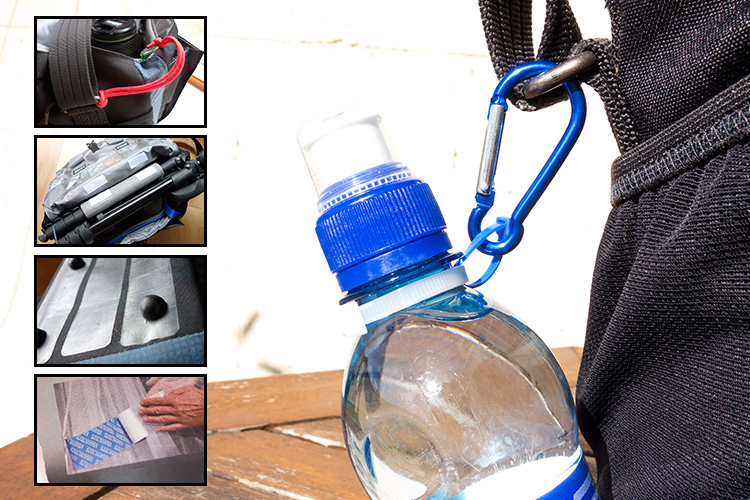
title

5 Hacks to curb the temptation to buy another camera bag

But, this article isn’t about reviewing yet another camera bag. Instead, it got me thinking no matter what camera bag that you may have, one fit doesn’t suit all. I’ll admit, I have a weakness for camera bags. There is such a vast array of camera bags on the market to suit every photographer’s needs. The types range from shoulder bags, backpacks, and rolling cases, to name just a few. However, when choosing a bag, the following factors should be considered:

  • Materials: I have a preference for man-made, hi-tech materials like ballistic nylon as opposed to natural fabrics, such as cotton or leather – simply because they are lighter and generally offer better water resistance.
  • Protection: Obviously, you want the best protection for your gear. This will mean a bag that has sufficient padding on the inside, and a material on the outside which protects against inclement weather. This can be the inherent material that the camera bag is made from, or a waterproof cover which you can pull over the bag if it rains.
  • Capacity: This will be very subjective to the type of photographer you are. A travel photographer’s gear and bag(s) will be in sharp contrast to a photographer on a fashion shoot in a studio.
  • Comfort: This is a very important factor. If you have to carry your bag at all, it should feel comfortable, and you shouldn’t really be aware of it. If you are, it’s a nuisance.

I do like features on so many different bag, and I wish that the sum of all these features were all rolled into one bag. But I am asking a lot here. So I thought, rather than buying another bag, why not customize or hack a bag that you already own?

Here’s my five hacks that may help you curb the temptation to go out to buy another camera bag – at least for now:

#1 Tent repair tape

The bottom of my camera bag isn’t really at all abrasion resistant, or waterproof. This was an initial concern for me when I was buying the bag. Most camera bags should, in my opinion, offer some degree of ruggedness to ensure the bottom of your camera bag will be protected for a number of years.

However, in the end, I decided to buy it, as it ticked most of the boxes for the type of bag I wanted. I came up with my own solution to safeguard the underneath part of the bag for general wear and tear.
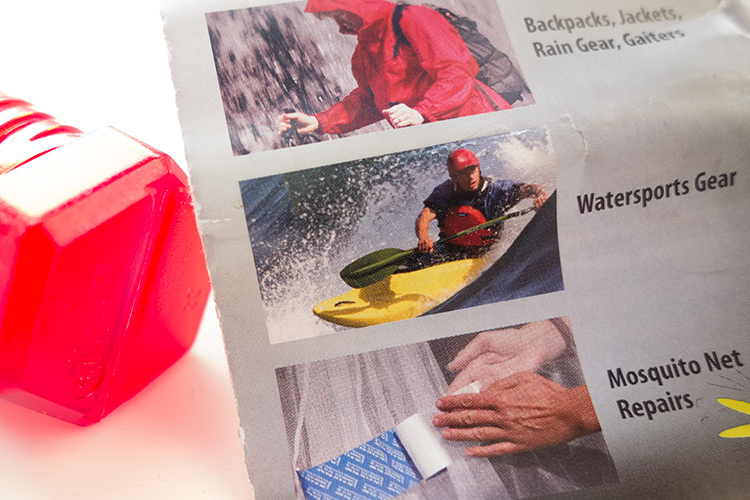
Tent Repair Tape – found in most camping outdoor retail outlets.
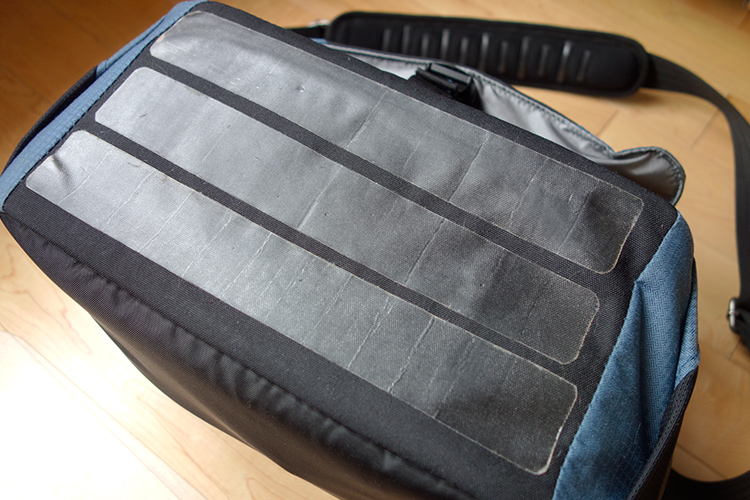
I cut 3 strips of the tent repair tape to suit the dimensions of my camera bag.

Cut strips of tent repair tape the same length as your bag and apply them length ways across the bottom. This tape is super strong and waterproof. I also added feet to the bottom, like you would see on most bags, not just camera bags. I have a neat way to add feet to the bottom of your bag, without taking away from the aesthetic look. See #5 below for more details.

Tip: By putting another layer of cell foam dividers flat across the inside bottom of your camera bag helps to give more padded protection. I seem to have gathered a collection of these over the years!
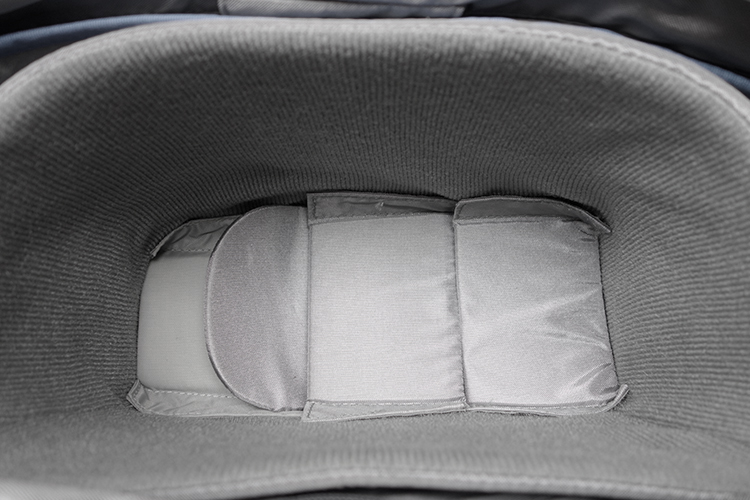
Inside-padded-insert

I added another layer of spare foam cell pads at the bottom of my already padded insert.

#2 Carabiner Rings

These aluminium rings are so versatile for attaching extra accessories, that you simply can’t fit inside the bag. For example, side pockets are great for adding a flash gun or a drink bottle. But, what if your camera bag doesn’t have a side pocket?

This solution should work for any type of drink bottle. You will need two cable ties, one longer than the other. Secure the longer one around the neck of the bottle and the smaller one acts as a ring to attach to the carabiner, which is then looped around one of the metal rings on the bag’s strap.
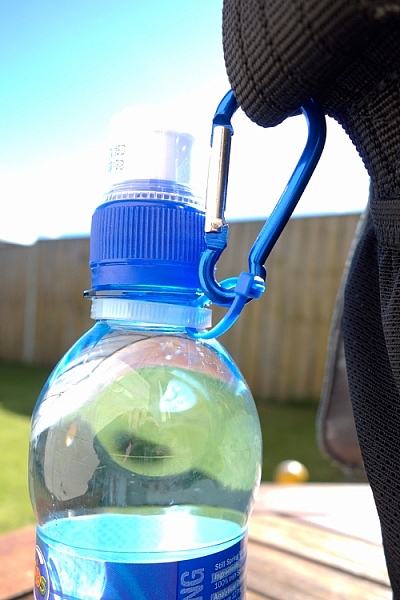
carabiner-water-bottle

Water bottle attached to the camera strap, via the metal ring using two cable ties.

Tip: Water bottles can also serve as an extra weight to stabilize your tripod.

#3 Paracord

I wish every camera bag would come with at least two key fob straps. Of course, I don’t use mine for keys. Key fob straps are great for attaching the likes of SD/CF memory card wallet holders or other items that you may need to hand, without looking like a badger who is burrowing out of his nest.
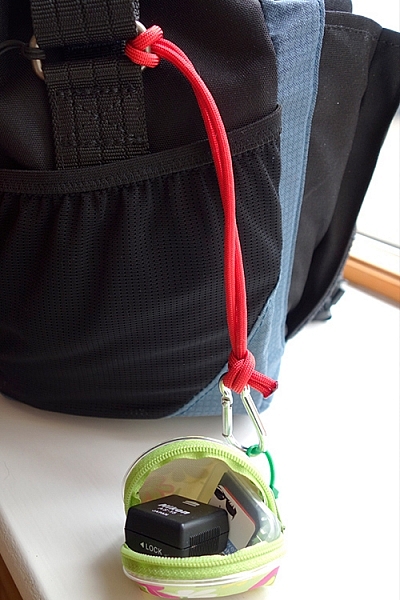
My hotshoe adaptor and spare SD card attached to my paracord strap, which also doubles up as a wrist camera strap.

My hotshoe adaptor and spare SD card attached to my paracord strap, which also doubles up as a wrist camera strap.

This is a very simple method to add an extra key fob strap to any bag. Measure a length of a Paracord, in my case 27 inches. Tie both ends together. You will need to burn the ends of the cord, after the knot, to stop it from fraying. Loop one end around the bag’s strap ring on the outside and secure a plastic carabiner to the other end. See photo.

I used a plastic carabiner, as I don’t particularly like metal rings inside my camera bag. I have my business cards secured in their holder, attached to the carabiner. These are quick and easy to hand. No foraging around in your bag for what seems like an age looking for them!
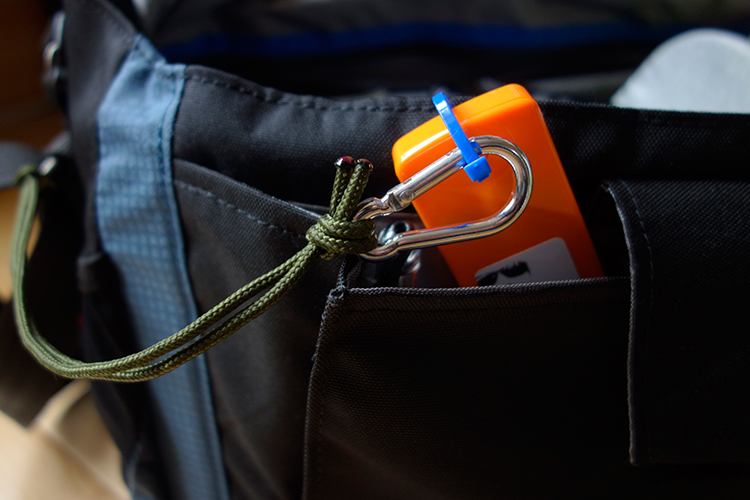
A key fob strap made from paracord, using a plastic carabiner (even though it looks aluminum) attached to my business cards.

Tip: This strap can also double up as a camera wrist strap. See my other article for this tip and other DIY hacks.

#4 Insulation Foam Sleeves

I like the option to be able to carry my travel tripod with me, as it also doubles up as a light stand. But there isn’t a designated tripod holder on this type of bag. However, as it has a big front flap. I came up with this idea of using a foam insulation sleeve.
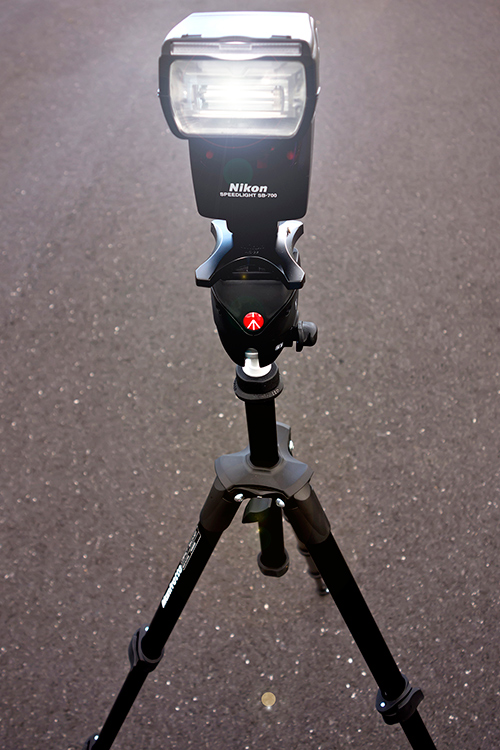
My travel tripod which I also use as a light stand.

These Economiser Polyethylene Pipe Insulation sleeves can be purchased at most DIY stores. Their function is to insulate heating pipes. I bought this 1/2″ Cosy Sleeve, 1 Metre length (3′ approx.) for less than $ 2.00 USD. It has a pre-cut slit down the length. To cut to the desired length is simple and quick.
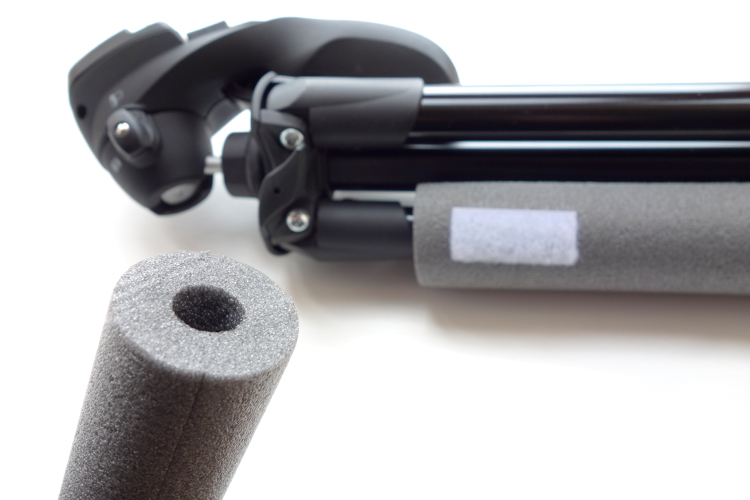
Foam insulation sleeve for heating pipes, found in DIY stores.

Place the sleeve around one of the tripod legs. Cut two small strips of self-adhesive velcro strips and stick them onto the foam sleeve and then under the front flap of the bag. The tripod is resting on top of the removable padded insert. When the front flap is closed, the sleeve acts as a cushion to keep it place.
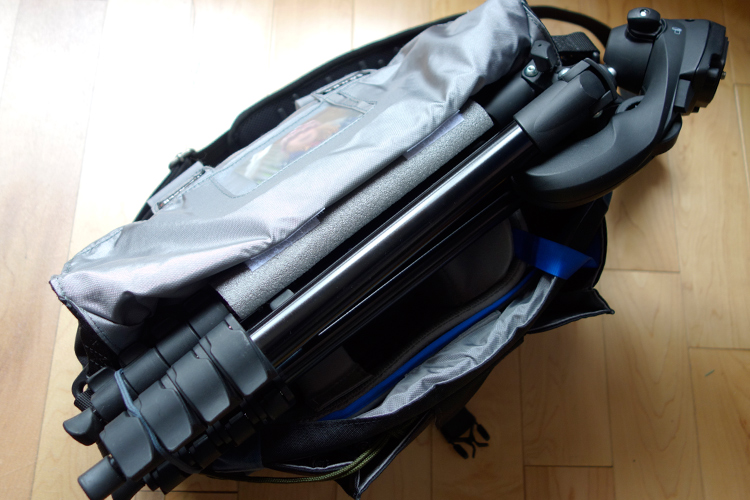
Foam insulation sleeve attached to one of the tripods legs. Velcro adhesive strips are used to secure to the underneath part of the front flap.
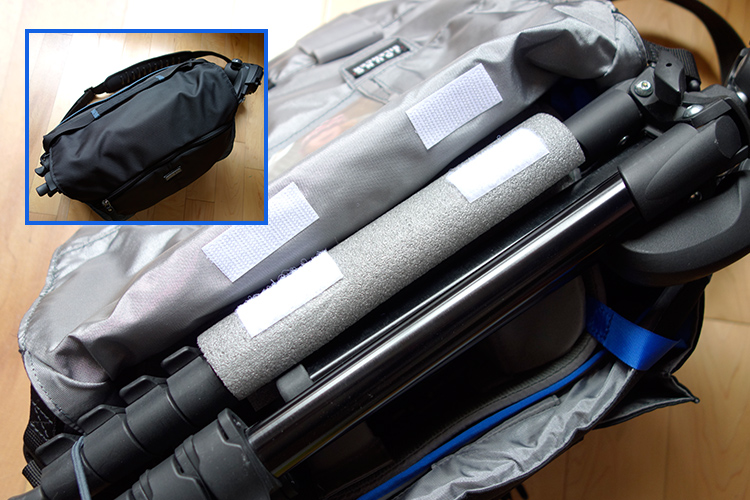
The tripod felt very secure, as it is resting on the inner padded insert, and when it is closed the sleeve acts as a cushion for a snug fit.

Tip: the foam sleeve can also be left on the tripod while in use to act as a cover (nicer on fingers in cold weather).
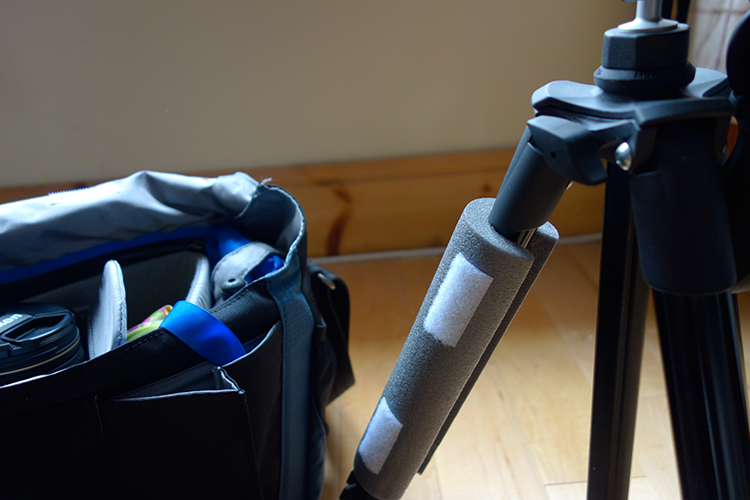
The foam sleeve can be left on the tripod when in use to act as a cover.

#5 Sugru

If you haven’t come across this product before, it’s simply brilliant, a DIYer’s dream. The company’s tagline is, “Mouldable glue that turns into rubber”. The methods or ways that it can be applied as fixes or hacks, are only limited to your own imagination.

You can create your own rubber feet for the bottom of your camera bag, to protect it against general wear and tear. I used a three pack ($ 13.50 for 3 packs) of pitch black Sugru to create these feet. Roll each one into a ball, and with a sharp kitchen knife, then cut each ball in half. Allow these to cure (set) for a day or two. In order to secure the feet to the bag, you will need some extra Sugru. (You can buy 8 packs for $ 22, which works out cheaper than 2 x 3 packs).
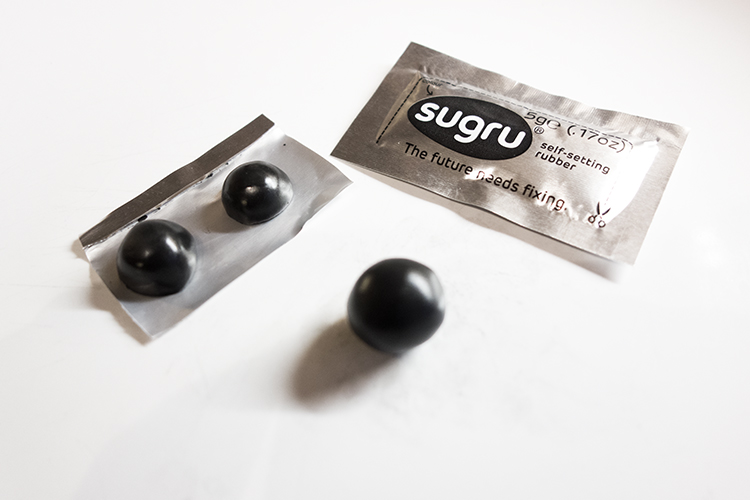
Sugru-balls-rubber-feet

Rubber feet moulded from Sugru, for underneath my camera bag as added protection.
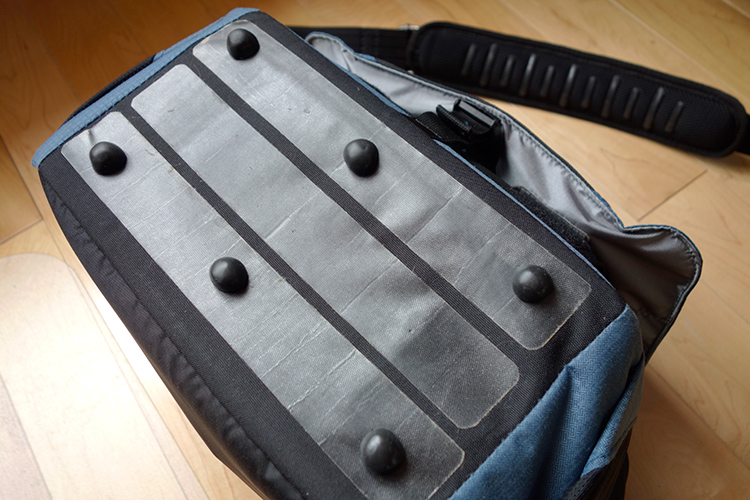
Sugru-rubber-feet-attached-to-bag

The rubber feet attached to my camera bag along with the tent repair tape.

Here’s another tip for using Sugru. If your camera bag strap has a cushion pad but no silicone strips to prevent it from sliding off your shoulder, or they have simply worn away, you can make your own by rolling out strips of Sugru and stick them firmly on to the pad.

Do you any other camera bag hack ideas that you would like to share? Leave a comment below.

Disclaimer: I was not approached or sponsored by any of the companies mentioned in this article. All opinions are by the author.

googletag.cmd.push(function() {
tablet_slots.push( googletag.defineSlot( “/1005424/_dPSv4_tab-all-article-bottom_(300×250)”, [300, 250], “pb-ad-78623” ).addService( googletag.pubads() ) ); } );

googletag.cmd.push(function() {
mobile_slots.push( googletag.defineSlot( “/1005424/_dPSv4_mob-all-article-bottom_(300×250)”, [300, 250], “pb-ad-78158” ).addService( googletag.pubads() ) ); } );

The post 5 Camera Bag Hacks to Help You Curb the Temptation of Buying More by Sarah Hipwell appeared first on Digital Photography School.


Digital Photography School
 
Comments Off on 5 Camera Bag Hacks to Help You Curb the Temptation of Buying More

Posted in Photography