RSS
 

Archive for March, 2016

Understanding the HSL Panel in Lightroom for Beginners

02 Mar

Understanding the HSLPanel for Beginners

There are many things involved in post-processing an image, that might seem a little bit daunting at first. That doesn’t mean that they are difficult to learn, or hard to understand. The HSL panel in Adobe Lightroom (or similar editing software that uses Adobe Camera Raw), tends to bring about feelings of anxiety, when it comes to making sense of all those sliders. Some photographers choose to pretend it doesn’t even exist, just because it looks a little complicated. Nothing could be further from the truth!

Simply put, those three little letters stand for Hue-Saturation-Luminance. What makes the HSL panel so powerful, is that it allows you to control different colors independently. HSL adjustments will enable you to brighten, or emphasize specific saturations, and control the hue of only certain colors. Like working with black and white? Then you should definitely make use of the HSL panel, and take your black and white conversions to a whole new level. Let’s get started!
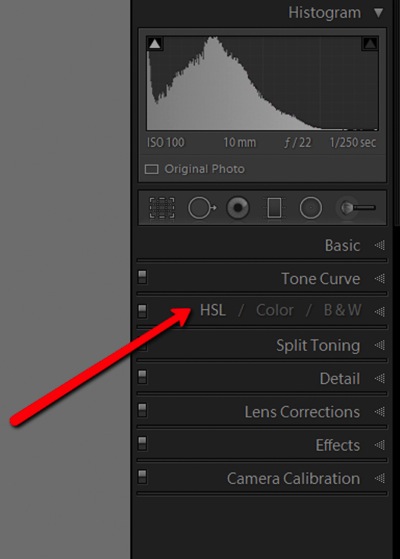
HSL Dropdown

We’ve already talked about what the letter HSL stand for, so now let’s break it down, so that you will really understand how each one affects your image.

H – What is hue?

Admittedly, trying to discern the functional difference between the words hue and color, can form a little bit of a gray area (haha color humor). But generally, we think of hue in terms of the shade of a color on a gradient and is dependant on the wavelength of the light reflected. Don’t worry, that’s about as scientific as we will get.

Let’s say that I see a flower out in a field. The flower has beautiful yellow petals. What shade of yellow are the petals? Are they actually yellow, or are they maybe a dark yellow with a little bit of orange? Maybe a brighter, more greenish yellow? This subtle gradient of color is what we might describe as hue, and it varies infinitely across the color wheel. Controlling the hue of the colors in your image is a great way to bring realism to your photo, or even depart from it using psychedelic alternatives to the actual colors within the scene.

S – What is saturation?

Saturation is much simpler to comprehend. When we talk about saturation, we are referring to the intensity of a color. Saturation can play a central role in controlling the mood of a photograph. Highly saturated colors generally convey brighter emotions, whereas muted, desaturated color can lend a sense of brooding or sadness. What the HSL panel allows you to do is control the saturation of only the colors you choose, which will really expand your creative range.

L – What is luminance?

This may very well be the most easy part about HSL to understand, and requires the least amount of explaining. Luminance is simply the reflective brightness of colors. It is extremely useful when there are certain colors within the image that you feel should be either darker, or brighter. This comes in handy, especially when working with black and white images (converted from color), but more on that in just a moment.

There are a couple of ways to configure the HSL panel, but I prefer to leave each adjustment section open while I work. True, it takes up a fair amount of space in the develop module, but it also let’s me make quick adjustments as I go without switching back and forth between the dedicated hue, saturation, and luminance panels.
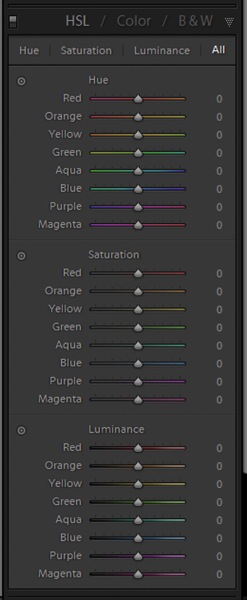
HSL All

Adjusting specific saturations

Let’s say you have an image that you want to bring out only certain colors. You can do this by using the saturation slider. An easy way to select the color you want to adjust, is by using the color picker. It eliminates the guesswork of deciding what color is actually which. In this case I want to increase the saturation, brightness, and hue of the leaves, without affecting the blues of the background.
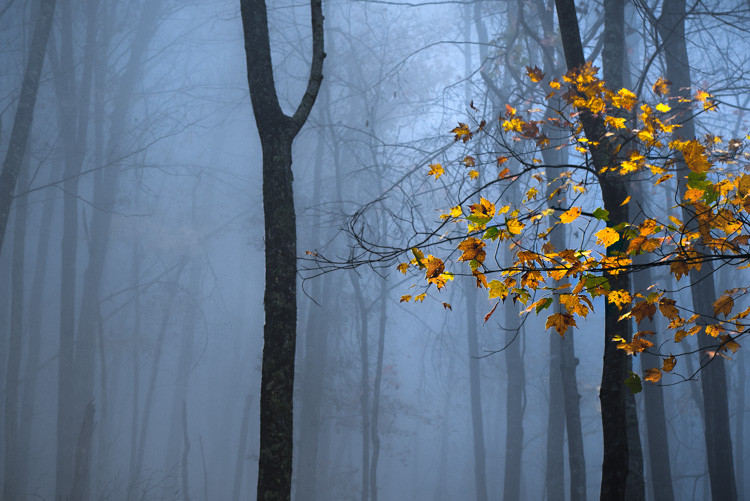
Original Image

Find the saturation section of the HSL panel, and select the picker tool (see red arrow below to locate it).
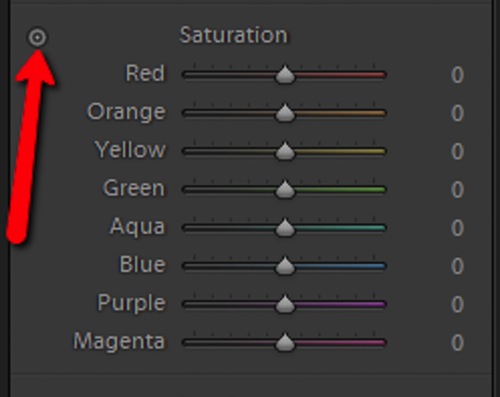
Color Picker

Hover over the color you want to saturate or desaturate. Notice that this will subtly highlight the corresponding color values in the saturation section of the HSL panel. Then simply click and hold while you drag up or down.
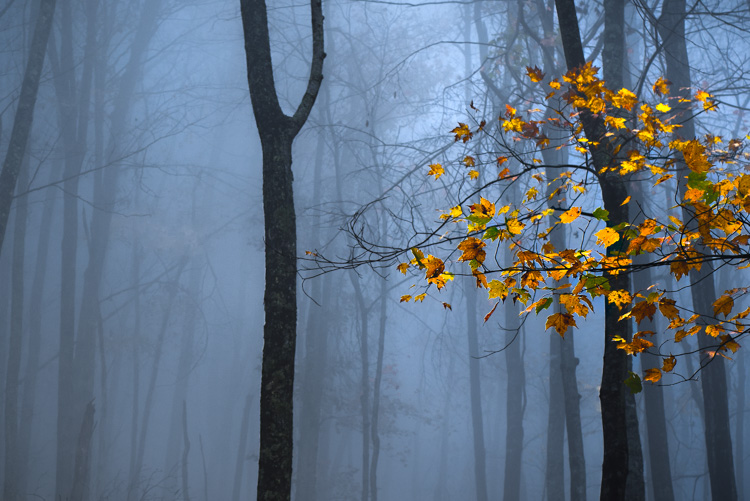
Saturation Image

The change here is barely perceptible for the time being, but after some more adjustments, it will be obvious.

Adjusting specific luminance

Next, we will make the leaves a little bit brighter, so that they stand out from the blue background even more. They mainly consist of oranges and yellows. Go to the luminance section, and again select the color picker tool. This time it will control the brightness of the selected color.

Click and drag (up to lighten, down to darken).
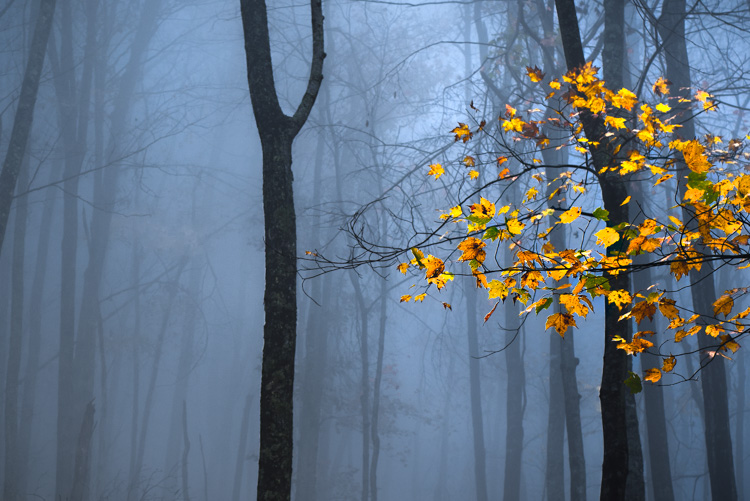
Luminance Image

Adjusting specific hues

I like saving the hue adjustments for last, because it’s easier (for me at least) to decide the final color tone, after it has reached the desired brightness and saturation. For this picture, I want to make the leaves more orange than yellow in hue. As above, locate the hue adjustment section and the color picker and then…you guessed it, click and drag.
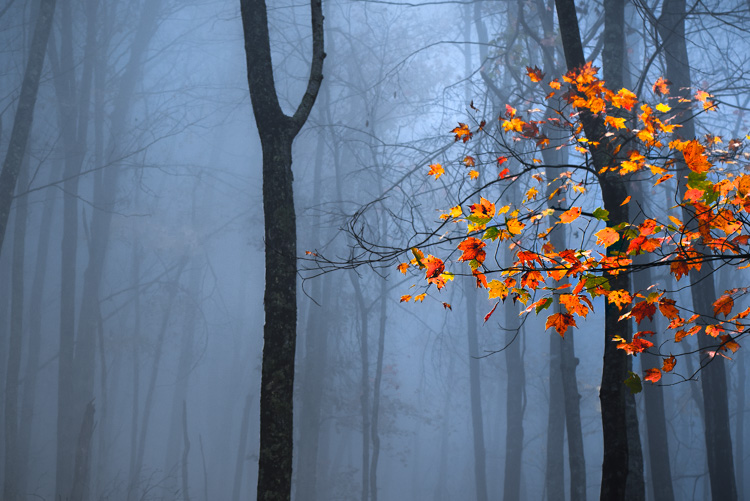
Hue Image

After you finish, make sure to go back and perform any fine tuning using the sliders, in order to get everything just right.
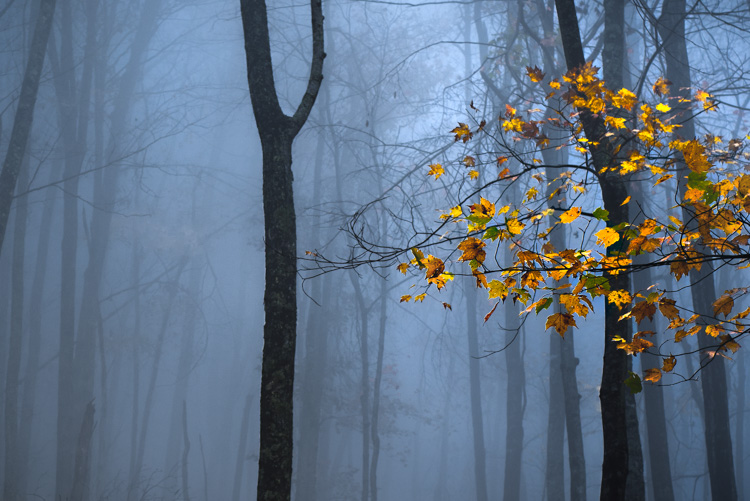
Original Image

Before adjustments

Final Image

After – final image

HSL with Black and White

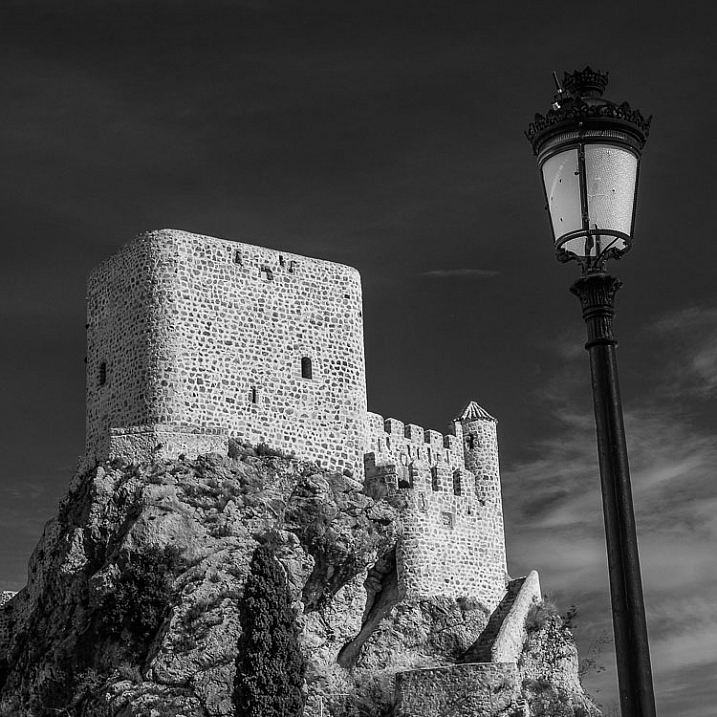
When it comes to black and white, the HSL panel can work wonders. Of course, seeing as the image is black and white, there won’t be any effect on the hue or saturation of the colors. Rather, Lightroom gives you a completely different set of controls, which is virtually a stand-alone luminance adjustment panel.
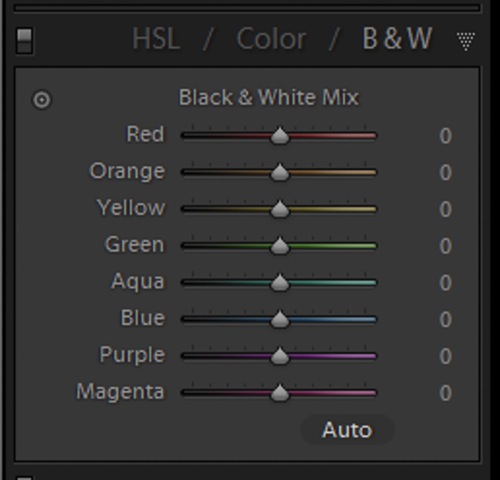
BW Panel

Even though you are working with a monochromatic image, the color information is still stored, so the program knows what color was there, before the conversion to black and white. Keep in mind, this does not apply to images shot in non-RAW format (like JPG) using your camera’s black and white setting, or images which you previously converted to grayscale in Photoshop. Doing so removes all the color information from the image file, making the option for working with individual color luminance in Lightroom unavailable.

By being able to selectively adjust the brightness of each color, you will now be possible to adjust the luminance of your black and whites very creatively. This way, you can really control the contrast and mood of your image much better and easier. Adjusting the luminance of certain colors, within a converted black and white image, can drastically change the way the photo appears to the viewer. Here is color image after being converted to black and white.
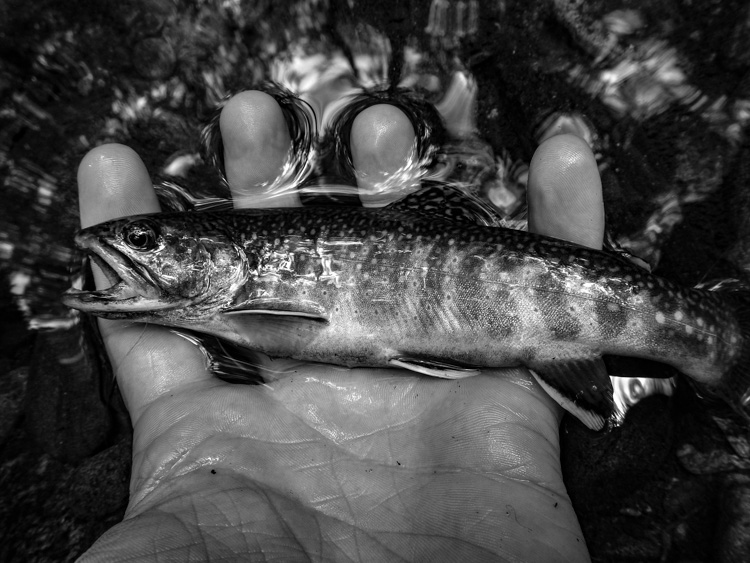
Black and White

Here you see the same image, after some selective adjustments in the black and white section of the HSL panel.
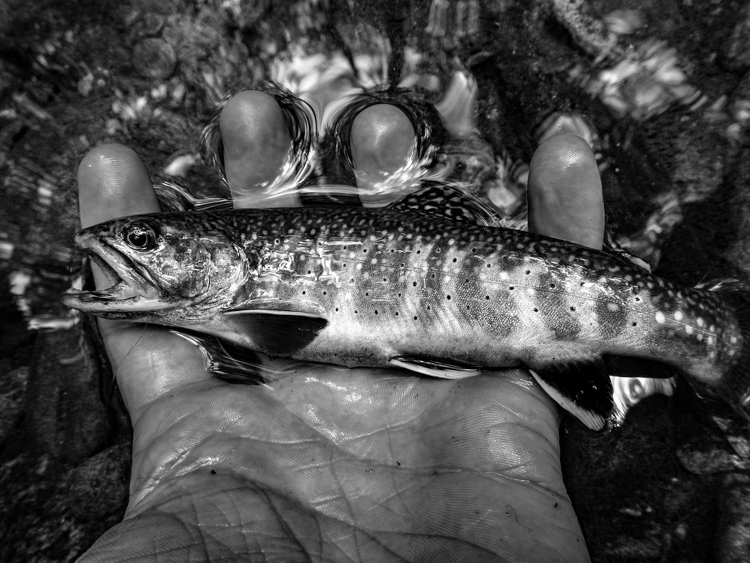
HSL Black and White 2

Working with the HSL panel may look overwhelming, but once you understand how each adjustment affects your photo, it becomes a lot less scary. By being able to adjust the hue, saturation, and luminance of colors, independently of one another, will allow to take a huge amount of creative control over your post-processing. Don’t be reluctant to experiment with HSL and have fun with your photography!

Have you used the HSL panel before? What other tips or tricks to you have for using it? Please share in the comments below.

googletag.cmd.push(function() {
tablet_slots.push( googletag.defineSlot( “/1005424/_dPSv4_tab-all-article-bottom_(300×250)”, [300, 250], “pb-ad-78623” ).addService( googletag.pubads() ) ); } );

googletag.cmd.push(function() {
mobile_slots.push( googletag.defineSlot( “/1005424/_dPSv4_mob-all-article-bottom_(300×250)”, [300, 250], “pb-ad-78158” ).addService( googletag.pubads() ) ); } );

The post Understanding the HSL Panel in Lightroom for Beginners by Adeel Gondal appeared first on Digital Photography School.

Digital Photography School

 
Comments Off on Understanding the HSL Panel in Lightroom for Beginners

Posted in Photography


Oil-Painted Van Gogh Film Features 12 Paintings Per Second

02 Mar

[ By WebUrbanist in Art & Drawing & Digital. ]

loving1

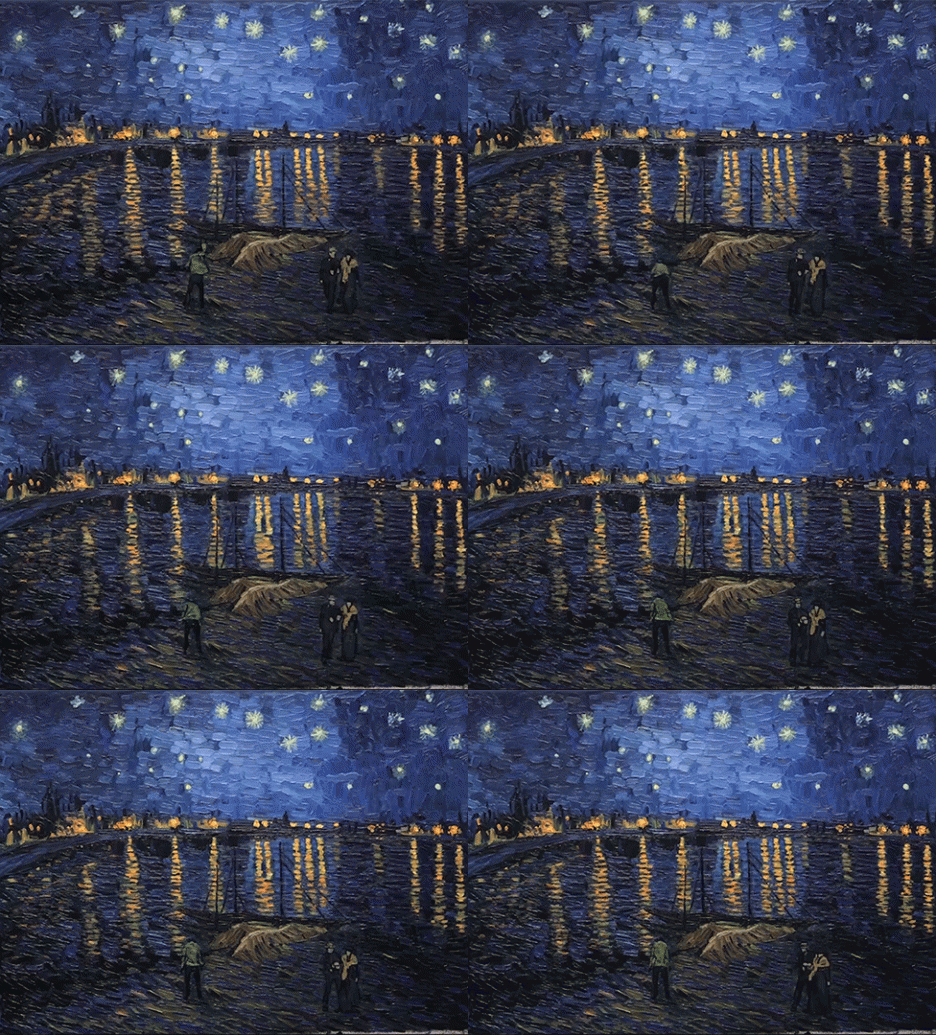
It took over 100 artists to paint this full-length movie, the first of its kind: a work where every frame was hand-painted, then combined into an epic animation about, in the style and using the techniques of Van Gogh (oil and canvas).

This first trailer of Loving Vincent shows the brushstroke style anyone familiar with the artist’s world will immediately recognize. The movie is about Vincent’s life, death and works, an honest look at what was anything but a carefree existence. His own work also shows up throughout, 120 of his masterpieces in total, smoothly transitioned into the frames as the narrative unfolds around them.

loving2

loving3

A great deal of care went not only into the planning process, but also the execution so that each frame is both original and unique but transfers seamlessly to the next, despite the number of painters involved.

filmmaking loving vincent

Produced by Oscar-winning studios BreakThru Films and Trademark Films, production is still in progress in Gdansk, Poland, but this sneak peaks suggest it will be well worth the prices of admission (h/t Colossal).

loving vincent painters

loving vincent frame

More from the filmmakers: “Loving Vincent is an investigation delving into the life and controversial death of Vincent Van Gogh, one of the world’s most beloved painters, told by his paintings and by the characters that inhabit them. The intrigue unfolds through interviews with the characters closest to Vincent and through dramatic reconstructions of the events leading up to his death. Every frame in the Loving Vincent movie is an oil painting on canvas, using the very same technique in which Vincent himself painted.”

Share on Facebook


[ By WebUrbanist in Art & Drawing & Digital. ]

[ WebUrbanist | Archives | Galleries | Privacy | TOS ]


WebUrbanist

 
Comments Off on Oil-Painted Van Gogh Film Features 12 Paintings Per Second

Posted in Creativity


Sand and sun: Sony a6300 real-world samples

02 Mar

The Sony a6300 has some sizable shoes to step into. With a 24MP CMOS APS-C sensor, 8 fps continuous shooting with live view, 425-point on-sensor phase detect AF system and 4K video capture it looks like a solid update to the a6000, at least on paper. Eager to get our hands on a fully functional model, we joined Sony in Miami for some shooting opportunities. From bright white beaches to the intense action of a parkour gym (that’s a real thing), we’ve just started putting the a6300 to the test. Check out some preliminary samples. 

Articles: Digital Photography Review (dpreview.com)

 
Comments Off on Sand and sun: Sony a6300 real-world samples

Posted in Uncategorized


Topaz Labs DeNoise 6 adds standalone option, batch processing, camera profiles

02 Mar

Topaz Labs has released DeNoise 6, the latest version of its noise-removal software. This latest installment can be used as a standalone application in addition to functioning as a plugin for host software like Adobe Lightroom and Photoshop; it also adds batch image processing as well as profile presets for dozens of camera models.

Topaz Labs announced the software update last week and is offering it to new customers at a discounted $ 49.99 rate until March 20, after which the regular $ 79.99 price tag will apply. Existing DeNoise customers can update to version 6 for free. DeNoise 6 is available for 64-bit Mac OS X and Windows systems.

Via: Topaz Labs Blog

Articles: Digital Photography Review (dpreview.com)

 
Comments Off on Topaz Labs DeNoise 6 adds standalone option, batch processing, camera profiles

Posted in Uncategorized


CP+ Canon interview: ‘important to increase development speed’

02 Mar
Mr. Go Tokura, Group Executive ICP Group 2, Image Communications Products Operations, Canon Inc. Pictured at the CP+ show in Yokohama Japan, 2016. 

As well as reporting on the newest gear, we use the opportunity of visiting the CP+ show in Japan to sit down and talk to senior executives from the major camera and lens manufacturers. This year, we were fortunate enough to spend some time with Mr Go Tokura of Canon. 


Canon has had a big year with the launch of the enthusiast-focused EOS 80D and the professional EOS-1D X Mark II. Can you summarize your strategies for catering to these two different market segments?

With regard to the 1D X Mark II, this is an Olympics year.  In years when the Olympic Games are held, one of our objectives is to launch a flagship model within our DSLR lineup to try to capture the professional user market. So this is a big objective in terms of strategy.

As for the 80D, we have entry-level DSLR models under the Rebel brand and the 80D is the level just above – designed to ensure that users can maximize its features in the best way possible. That’s in terms of price, operability, usability and that sort of thing. In recent years the entry-level market segment has been weakening, but the level above that, where we’re targeting advanced amateur users, is becoming an increased focus. The 70D is doing well and is quite popular among our users, and for that reason we expect a lot of interest in the 80D.

Some of our readers were disappointed that the 80D does not include 4K video. Why did you decide not to include this feature?

As you know, in our DSLR lineup we incorporate both video functions and traditional stills DSLR functions. Among our DSLR users we’re still seeing a strong emphasis on the stills photography function. 

We’re promoting our DSLRs as providing both stills and video features – the best of both worlds, you might say. However with regard to the 80D, the main emphasis was to maximise the stills side of the camera. Then, with the aim of increasing the user base, we add movie features to this established stills shooting feature set.

The EOS 80D offers an easy-to-use video feature set, and its new 18-135mm kit lens is compatible with Canon’s new inexpensive Power Zoom unit for convenient handling in video mode. But it’s not 4K-capable, and as yet, no camera in Canon’s sub-pro DSLR lineup is, either.

Do you think there is space in the enthusiast DSLR market for a more capable video camera? Which maybe does offer 4K?

We are considering this and we recognize that this is a feature which might be in demand in the future.

Do you think that Dual Pixel AF will ever be equal to conventional phase-detection DSLR focus, and if so, when will this happen?

It’s very difficult to predict timing, of course, but we want to make Dual Pixel AF surpass conventional phase-detection in terms of performance. 

Dual Pixel AF is a technology which has huge potential for mirrorless cameras. A lot of our readers are still very hopeful for future Canon enthusiast mirrorless models. Is there anything that you would like to say to them?

Obviously I can’t be particularly concrete when talking about our future product planning, but this is something that we are looking at. Something that is under consideration. There are some features, such as AF, which have not yet caught up with DSLRs, so given the current state of affairs it would be a little unrealistic to say that we will suddenly start offering a professional mirrorless camera. There’s still a performance gap that needs to be addressed. 

If we assume that at some point in the future Canon will create an enthusiast or professional mirrorless camera, what are your benchmarks?

This is just my personal opinion. In my view there are two key features that have to be addressed. The first is autofocus, particularly tracking of moving subjects. The other is the viewfinder. The electronic viewfinder would have to offer a certain standard. If those two functions were to match the performance of EOS DSLR camera performance, we might make the switch.

Tremendous progress has been made in electronic systems.  However in terms of AF, pro-level AF functions, and the range of shooting situations that professional photographers can respond to, there’s still a gap between DSLRs and mirrorless systems.

The Canon EOS M3 is Canon’s most convincing mirrorless camera to date, but it isn’t the model that a lot of Canon users have been hoping for. According to Mr Takura, autofocus and electronic viewfinder performance has to improve before Canon will consider launching an enthusiast-focused mirrorless product. 

When I spoke to Mr Maeda last year he told me that he was focused on increasing the speed of product development at Canon. Have you seen a change?

I can’t give any concrete details here but this is a goal that we’re working to achieve. 

The reason I ask is that it seems that compared to the past, the entry-level ILC market seems to be moving rather slowly right now, whereas in terms of development speed, the enthusiast and semi-pro ILC market is moving quite quickly. 

Yes, I agree. For this reason, it’s becoming increasingly important that we do increase development speed.  That’s why it’s considered a very important objective that we’re continuing to address.

What is your strategy for growth in this changed market? What do you need to do to differentiate?

One of the differences between us and our competition is the EF lens lineup. We have a very broad base of EF lens users and we don’t want to do anything that would sacrifice their loyalty, so it’s a very high priority for us to satisfy their needs and meet their demands. 

With regard to the overall market, maybe there’s a lack of vigor and it could be viewed as shrinking. Looking at the compact camera market, the bottom end is dropping considerably and the competition is smartphones. Smartphones offer a very easy, convenient way of taking photos. However in the high-end compact segment, at the high end there are cameras that offer functions and performance that smartphones cannot compete with and here we’re seeing growth. So in the compact market, offering features that smartphones cannot compete with is a way of differentiating and invigorating the market. 

You mentioned loyalty. How important is it to you to continue to update older models via firmware even perhaps after end of life?

Of course we’d like to provide every level of support we can, even to users of older models. Should an opportunity arise we’ll obviously offer firmware updates so that they can get the most out of the models that they have purchased. However a lot of the performance depends on the hardware itself. There is only so much you can get out of older or out of date hardware. There are new devices incorporated in newer models which make possible improved performance, so there’s a kind of tradeoff. Unless newer hardware is introduced, sometimes it’s not possible to get the performance.

One of the areas where we’ve been pleased to see improvement from Canon is in sensors. What are your priorities in terms of sensor development in the future?

Increasing resolution and increasing sensitivity are ongoing objectives and that’s not going to change, but on top of that, as I’ve mentioned there’s an emphasis on merging stills and movie functions. So two priorities for future sensors are lower power consumption and increasing processing speed. 

The Canon EOS-1D X Mark II is a significant, albeit iterative upgrade to the 1D X. We should expect new flagship models in Olympic years, says Mr Tokura. 

As you develop semi-professional lines like the EOS 5D and 1D-series, where are you most focused in terms of improvement?

When we look at a model that we want to upgrade, we don’t take a single item of specification and choose to work on that and not other aspects. We try to improve all features to the same degree. The EOS 5DS however was an exception. Resolution was increased markedly, off the charts compared to anything we had done before. But that’s the exception. Usually we won’t try to boost any one feature over and above the rest of the feature set.

Our approach when it becomes time to launch the next generation of the EOS-1D X or the 5D, is that we try to raise performance across the board as best we can.

Editor’s note:

I last spoke to Mr Tokura in 2014, and although Canon has been pretty busy in the two years since then, when it comes to the big picture it might appear that not much seems to have really changed. The company still lacks a convincing mirrorless camera, as competitors like Sony continue to set a faster and faster pace of technological development at the semi-pro end of the ILC market.

But at least we have a clear sense of what it would take for Canon to make a ‘switch’ to mirrorless. Although Mr Takura acknowledges that the technology has advanced a lot, he still sees autofocus and the experience of using an electronic viewfinder as being the two key areas where mirrorless cameras lag behind DSLRs. Whether you agree with him or not, the implicit promise that Canon intends to improve Dual Pixel AF to the point where it rivals the best professional DSLR autofocus systems should be very exciting. 

Canon is big enough that it doesn’t need to worry too much about being left behind quite yet (Mr Takura’s point about Canon EF users is a good one – there are more than 100 million EF lenses out there, something that Sony certainly cannot boast) but I do sense a shift, of sorts, in my conversations with Canon representatives in recent months. Mr Maeda, who in conversations with us has stressed the importance of speeding up product development, is moving up inside the company. More than ever, his influence is, I think, being felt quite keenly by the managers that report to him. When I asked Mr Takura whether increasing development speed was still a priority, he answered with a knowing smile. It’s very clear that yes – it most definitely is. 

Articles: Digital Photography Review (dpreview.com)

 
Comments Off on CP+ Canon interview: ‘important to increase development speed’

Posted in Uncategorized


Modular Skyline: Pixelated Skyscraper Takes Shape in Bangkok

02 Mar

[ By WebUrbanist in Architecture & Offices & Commercial. ]

pixelated tower

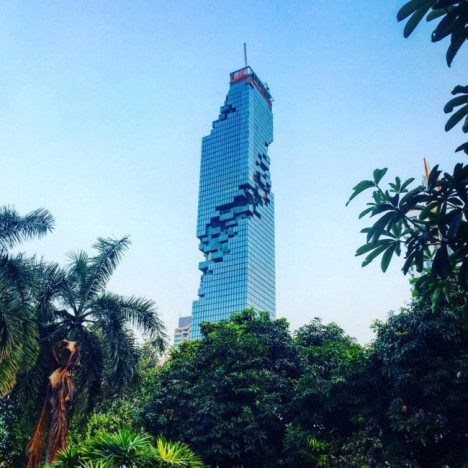
A joint project of Büro Ole Scheeren and the Office for Metropolitan Architecture, this skyscraper nearing completion in Bangkok, Thailand, features shifted box elements that break up its surface to create balconies and terraces.

deconstructivist skyscraper bangkok

Located downtown, the 77-story building features hundreds of apartments, a hotel and other mixed-use functions, including, plazas, shops, bars and restaurants. It is also the tallest building in the city. Originally scheduled for completion in 2010, the structure will now be finished this year (recent photographs above and below by Simon Rawlings, benstinyplanet and tsa.p).

modern glass tower deconstructed copy

Renderings below illustrate the street-level entrances, an aerial perspective and close-up views of the pixelation effects, as well as showing how the design evolved from concept to reality (as compared to photographs of its current state above).

pixelated tower renderings

pixelated tower detail

From the architects: “The design moves beyond the traditional formula of a seamless, inert, glossy totem, and instead actively engages the city: MahaNakhon’s pixilated and carved presence embraces and connects to the surrounding urban fabric rather than overpowering it.”

pixelated tower from above

“Its glittering stacked surfaces, terraces and protrusions will simultaneously create the impression of digital pixilation and echo the irregularity of ancient mountain topography.”

Share on Facebook


[ By WebUrbanist in Architecture & Offices & Commercial. ]

[ WebUrbanist | Archives | Galleries | Privacy | TOS ]


WebUrbanist

 
Comments Off on Modular Skyline: Pixelated Skyscraper Takes Shape in Bangkok

Posted in Creativity


My New Favorite Lens: The Fujinon 35mm F1.4 R

01 Mar

Before I switched to Fujifilm I was a Canon EOS user. My favorite camera was the EOS 5D Mark II and my favorite lens the 85mm f/1.8. I liked that lens because it was ideal for portraits, and for close-ups revealing details.

When I switched to Fujifilm I expected the Fujinon 56mm f/1.2 lens, the closest equivalent (on an APS-C crop sensor camera) to the 85mm, to become my new favorite. It’s a great lens, especially for portraiture. But, to my surprise, the humble 35mm f/1.4 lens, bundled with the X-Pro 1, has become my new favorite.

Favorite lens 35mm Fujinon f1.4

At first I was a little puzzled as to why. With Canon I owned a 50mm lens, and while I tried to use it in practice, it didn’t get used much. It was more of an experimental lens – I used it with extension tubes, and reversed for experimental close-up and macro photography. Occasionally I used it while out shooting, but always ended up preferring either the 85mm (short telephoto) or a wide-angle.

So what happened with the 35mm f/1.4 lens (which has the same angle-of-view, and is a normal lens for an APS-C camera)? I think, a number of things happened.

  • The 35mm suits the X-T1, the camera I use most of the time, very well. The camera feels well balanced, and is light enough to carry around all day.
  • This camera and lens combination is ideal for taking candid photos of people, without being too far away (losing the sense of intimacy and closeness) or having to get too close to fill the frame (where I would be getting close enough to bother people). People may notice me with it, but they don’t seem to be worried by it.
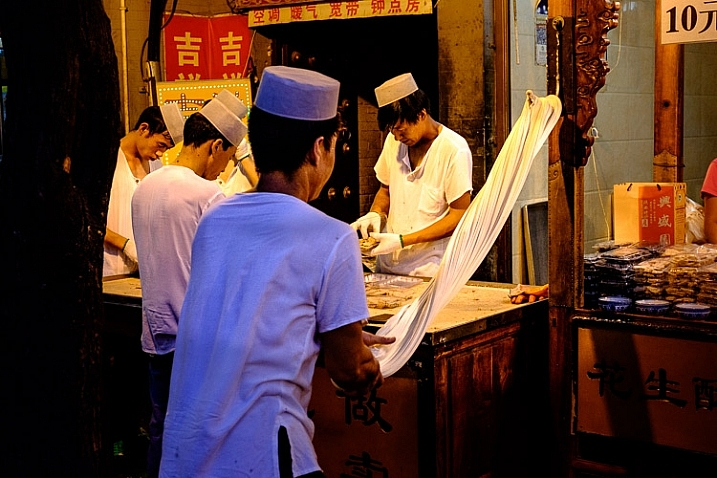
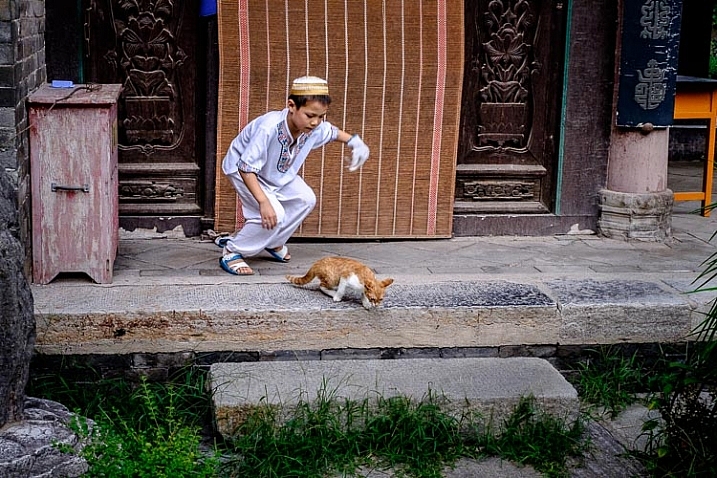
  • It’s an ideal focal length for environmental portraiture. I used it the 35mm lens a lot during a recent trip to China, where I had a lot of fun photographing people. It allows me to capture a scene with people in it, without revealing too much (always a danger with wide-angle lenses) or too little (as can happen with short telephotos).

These two photos are great examples.

Favorite lens 35mm Fujinon f1.4

Favorite lens 35mm Fujinon f1.4

Another thing I like about the 35mm lens, is that it focuses quite close to the subject, allowing me to move in close for detail shots without having to use a close-up lens or extension rings. The 85mm lens that I used with my Canon camera didn’t focus quite so closely, and I had to use a 500D close-up lens (filter) with it for close-up photography. Here’s an example.

Favorite lens 35mm Fujinon f1.4

One of the benefits of a mirrorless camera system, with an APS-C sensor, is that the lenses are smaller and lighter than those made for camera systems with full-frame models. The 35mm lens is small (it’s only 55 mm long) and light (it only weighs 187 grams, 6.5 ounces). Compare those dimensions to a 35mm f/1.4 lens made for a full-frame camera and you’ll see what I mean (Canon’s 35mm f/1.4 is 20.46 oz., or 580 grams).

That wide aperture comes in very useful when shooting in low light, or if you want to use a wide aperture for creative effect. This lens gives me the best of two worlds – small size and wide aperture. This photo, taken at f/1.4, ISO 6400, shows how useful a wide aperture is in low light.

Favorite lens 35mm Fujinon f1.4

Another benefit of this lens is that I can take photos that aren’t affected by converging verticals. With wide-angles, even moderate ones, any slight tilt of the camera results in converging verticals. Vertical lines are crooked rather than straight. It’s not necessarily a bad thing, but sometimes I prefer the straightness and order, imposed by the 35mm lens. This candid photo shows the point – with a 35mm lens it was easy to frame the photo and make sure the pillar (and the other verticals) were straight.

Favorite lens 35mm Fujinon f1.4

The focal length also works very well when I shoot in the square format. There is something a little magical about the results, and I have been using it a lot for that lately. Here is a photo I took recently in Spain.

Favorite lens 35mm Fujinon f1.4

Your turn

Have you used the Fujinon 35mm f/1.4 lens? Or indeed any other normal or standard lens? Let us know what you like, or dislike, about these lenses in the comments. It will be interesting to hear what you think.


Mastering Lenses photography ebookMastering Lenses

My new ebook Mastering Lenses: A Photographer’s Guide to Creating Beautiful Photos With Any Lens shows you how to get the best from the lenses you own already. A comprehensive guide to exploring the creative potential potential of wide-angle, normal and telephoto lenses, it’s also the ultimate buying guide for readers thinking about purchasing a new lens for their camera. Please click the link to learn more or buy.

googletag.cmd.push(function() {
tablet_slots.push( googletag.defineSlot( “/1005424/_dPSv4_tab-all-article-bottom_(300×250)”, [300, 250], “pb-ad-78623” ).addService( googletag.pubads() ) ); } );

googletag.cmd.push(function() {
mobile_slots.push( googletag.defineSlot( “/1005424/_dPSv4_mob-all-article-bottom_(300×250)”, [300, 250], “pb-ad-78158” ).addService( googletag.pubads() ) ); } );

The post My New Favorite Lens: The Fujinon 35mm F1.4 R by Andrew S. Gibson appeared first on Digital Photography School.


Digital Photography School

 
Comments Off on My New Favorite Lens: The Fujinon 35mm F1.4 R

Posted in Photography


Panasonic Lumix DMC-ZS100 / TZ100 real-world sample gallery

01 Mar

The Panasonic Lumix ZS100 made its debut in early January, offering a sizable 25-250mm equivalent zoom range to complement its 1″-type sensor. With a built-in viewfinder it certainly looks to be travel-ready, so we’ve taken it across land and sea to gather some initial sample images. While Adobe Camera Raw support isn’t available yet, we’ve made a few in-camera Raw conversions and will update this gallery when support arrives. 

Articles: Digital Photography Review (dpreview.com)

 
Comments Off on Panasonic Lumix DMC-ZS100 / TZ100 real-world sample gallery

Posted in Uncategorized


Mad for Vintage Motorcycles: 14 Vespa-Inspired Designs

01 Mar

[ By Steph in Design & Furniture & Decor. ]

vespa inspired sculpture 3

Synonymous with carefree cool classic Italian design, the Vespa has a timeless, iconic look that’s instantly recognizable even when translated to chairs, jewelry, alarm clocks, pizza cutters and uncanny animal-motorcycle hybrid sculptures. These vintage Vespa-inspired designs often re-use salvaged parts from discarded motorcycles, while some just make use of the simple, streamlined silhouette.

Scooter Chair by Bel & Bel
Vespa inspired chair 1

vespa inspired chair 2

vespa inspired chair 3

vespa inspired chair 4

Made from real, original 1980s parts of the Italian scooter, these chairs by Spanish firm Bel & Bel translate Vespa’s aesthetics for a new purpose. The chair features functioning lights, soft tread silent wheels, imitation leather cushions and hydraulic pistons in the base for height adjustment.

Vespa Scooter Ring by Paul Michael Design
vespa inspired ring 1

vespa inspired ring 2

vespa inspired ring 3

This fun design from Paul Michael lets you wear a Vespa on your finger. Get it in sterling silver for $ 300 or go all out with palladium and a real diamond for $ 2,295.

Zero Vespa Segway
vespa inspired segway

vespa inspired segway 2

Segways are inherently dorky, but if only this version would catch on, they’d at least be a lot more pleasing to look at. From the same design group that created the Vespa Chair, there’s the Zero, a scooter with two electric-powered wheels and a computer-controlled gyroscopic stabilizing system. Hand-built to order, it reaches a top speed of 12mph and can climb hills of up to 30 degrees.

Skootcase
vespa inspired skootcase

vespa inspired skootcase 2

vespa inspired skootcase 3

Considering how many kids try to ride their parents’ wheeled suitcases at the airport or down the sidewalk, the Skootcase is actually pretty practical. The fully-functional scooter doubles as a child’s carry-on sized suitcase, with a sturdy tow strap so you can pull them along when you’re rushing to catch your flight.
Vespa-Inspired Rocking Horse
vespa inspired rocking horse

vespa inspired rocking horse 2

This awesome Vespa-inspired rocking horse was a one-of-a-kind gift for the designer’s grandson Diego.

Next Page – Click Below to Read More:
Mad For Vintage Motorcycles 14 Vespa Inspired Designs

Share on Facebook


[ By Steph in Design & Furniture & Decor. ]

[ WebUrbanist | Archives | Galleries | Privacy | TOS ]


WebUrbanist

 
Comments Off on Mad for Vintage Motorcycles: 14 Vespa-Inspired Designs

Posted in Creativity


5 Killer Reasons Why Photographers Need Social Media

01 Mar

fashion-photography-blog-social-media-for-photographers

Hey there everyone,


This is Ed a.k.a Edrenalin, the editor of FashionPhotographyBlog.com, here to bring you insights from the inside.


After all of my client’s photography businesses I’ve helped improve, one thing is common across each and everyone one of them, they wanted to have a presence online and they wanted to be on social media. That’s understandable since that’s where all the major businesses across every industry is moving towards. However, when I asked them why they wanted to be on social media and what they wanted social media to do for them, they couldn’t answer the question. At the end of the day, they felt that they needed to be on social media because everyone else told them they had to.


So how can you work towards your social media objectives if you don’t know what they are in the first place? Don’t despair though, because if you are thinking similarly in this way, then you are not alone. It is a common misconception amongst photographers and creatives based on the encounters that I’ve come across. I’m going to share with you what I share with them to help clear up the reasons why you should consider incorporating social media in your own marketing strategies for your photography business.


Top 5 reasons why photographers need social media today


1. Social media accounts proves that there is a real person behind the photography business and that you didn’t just “open shop” yesterday. The accounts establish that the business has history and participates in dialogue and that you are active online.


2. Google now is starting to incorporate social signals from your social media accounts as a factor in their SEO algorithms to determine the relevancy and engagement of your website when deciding to show your website on the search results pages. The weight social signals has in this algorithm is unknown and is locked away in the unbreakable vaults of Google however, I can confirm that it is now a factor.


3. Your target audience can see social proof based on what others are saying about your photography business in your social media accounts such as in your comments and reviews section.


4. Potential business partners and magazine editors, might want to see how engaged are your followers. If they do business with you or publish your work, then you publish the news on your social media accounts, they might want to know how many people following you would actually know about it and get eyeballs to their brand.


5. Not everyone will know your website address, before they know about your business. With social media you are able to engage with your target audience in other social networks and hang out where they hang out. Here’s a question, how many people visit your website every day? and now how many people visit Facebook every day? which is the greater number?


The concept behind social media marketing is that you are participating in discussions with communities of these larger social networks, “borrow” them from these established networks and introduce them to your photography business.  


If there is one thing that you can do to improve your business this year, is to get onto social media for your business to increase the online presence for you.


Do you like this article? Want to read more articles like this? Then please SHARE this article on social media. If you have any comments or questions please feel free to put them in the comment section below. 


Fashion Photography Blog

 
Comments Off on 5 Killer Reasons Why Photographers Need Social Media

Posted in Uncategorized