RSS
 

Archive for February, 2016

CP+ 2016: Hands-on with new Sigma SD cameras and lenses

25 Feb

CP+ 2016: Firing up the Quattro – Hands-on with new Sigma SD cameras and lenses

Sigma announced several new products at CP+ 2016, including two new cameras. The interchangeable lens SD Quattro And SD Quattro H represent a new departure for the company in two senses – both are mirrorless cameras, and the ‘H’ features an APS-H format sensor. More conventional are a new 50-100mm F1.8 DC HSM Art zoom and 30mm F1.4 DC DN Contemporary prime for mirrorless cameras.

CP+ 2016: Firing up the Quattro – Hands-on with new Sigma SD cameras and lenses

Ergonomically, the new SD Quattro and Quattro H are far more conventional than the DP-series compact cameras in Sigma’s lineup. But both still handle very differently to most other mirrorless interchangeable lens cameras. They’re boxier, for one thing, with a distinctive body shape, and a viewfinder that’s much further to the right than the majority of DSLRs and EVF-equipped mirrorless models. 

The 2.3MP viewfinders in Sigma’s new cameras are sharp and detailed, although our preliminary impressions of the cameras’ hybrid autofocus systems aren’t terribly encouraging. We’re hoping that the slow, hesitant AF that we experienced is a symptom of these early, pre-production cameras because in most other respects the new models handle very well. 

CP+ 2016: Firing up the Quattro – Hands-on with new Sigma SD cameras and lenses

That being said, the cameras are comfortable to hold, and feel like ‘premium’ products, as we’d expect from Sigma at this point. This view highlights the unusually deep lens throat, which protrudes a good inch or so from the front of the main camera body. Here, we’ve attached a (Sigma mount, of course) 50mm F1.4 ‘Art’, and the total package handles (and balances) very well. 

Ergonomically, the SD Quattro and SD Quattro H are identical. The only difference is the size of their sensors. Sigma claims that the Foveon sensors inside the SD Quattro and SD Quattro H offer resolutions equivalent to 39 and 51MP respectively, in conventional Bayer terms. 

CP+ 2016: Firing up the Quattro – Hands-on with new Sigma SD cameras and lenses

The new cameras are being launched alongside a new flash – the EF-630. Compatible with ‘with most well-known digital SLR cameras’ (and the Sigma SD Quattro / H) the EF-630 has a guide number of 63, and the articulating head can zoom to cover focal lengths from 24-200mm. 

CP+ 2016: Firing up the Quattro – Hands-on with new Sigma SD cameras and lenses

We don’t normally get too excited by flashguns but the EF-630 is an unusually solid-feeling, well-made unit. As well as on-camera use it can also be triggered wirelessly.

CP+ 2016: Firing up the Quattro – Hands-on with new Sigma SD cameras and lenses

As well as a new flash, the SD also gets a new dedicated grip. The grip adds duplicated vertical controls and can incorporate two batteries. It also converts the SD Quattro’s unconventional body shape into a more traditional flat-sided form. Booooring…

CP+ 2016: Firing up the Quattro – Hands-on with new Sigma SD cameras and lenses

Not at all boring is the new 50-100mm F1.8 DC HSM Art, which provides a 75-150mm focal length range on the APS-C format DSLRs for which it’s designed. Offering a fast maximum aperture and standard ‘Art’-series construction quality the 50-100mm is solid, heavy and luxuriously engineered. 

CP+ 2016: Firing up the Quattro – Hands-on with new Sigma SD cameras and lenses

With enthusiast APS-C format DSLRs enjoying something of a resurgence in the past couple of years, we suspect there are a lot of Canon EOS 7D Mark II and prospective Nikon D500 owners who will be very excited by this lens. The 50-100mm features three FLD (F Low Dispersion) glass elements, one SLD (Special Low Dispersion) glass element, and one high-refractive index, high-dispersion glass element. We expect this lens to deliver great results and we’re keen to see how it performs. 

CP+ 2016: Firing up the Quattro – Hands-on with new Sigma SD cameras and lenses

At the other end of the size and weight scale is he 30mm F1.4 DC DN Contemporary. A small, lightweight prime for mirrorless cameras, the 30mm F1.4 is available in two versions – one for Micro Four Thirds (shown here) and another for Sigma’s APS-C mirrorless E-mount cameras. We were able to use both versions briefly at CP+ and we’re especially impressed by how fast the lens can focus. Eventually, we’d love to see Sigma make a version for full-frame mirrorless (you’ll get heavy vignetting if you put the E-mount version on an A7-series camera). 

The 30mm F1.4 will ship in mid-March at an MSRP of $ 339, while the 50-100mm F1.8 is expected in late April priced at $ 1099.

CP+ 2016: Firing up the Quattro – Hands-on with new Sigma SD cameras and lenses

Sigma’s final CP+ announcement was the Mount Converter MC-11, which lets you attach Sigma’s most recent lenses (in either Canon or Sigma mount) on full-frame or APS-C E-mount bodies. The MC-11 adapter is able to support phase detection AF with adapted lenses, and makes use of both camera and lens stabilization when present.

Effectively an own-brand version of Metabones Canon EF to FE adapters, the MC-11 (sort of) answers a long-standing complaint of Sony A7-series owners about the lack of full-frame Sigma lenses for their chosen platform. Pricing and availability has yet to be announced. 

Articles: Digital Photography Review (dpreview.com)

 
Comments Off on CP+ 2016: Hands-on with new Sigma SD cameras and lenses

Posted in Uncategorized


History Repeating: Olympus PEN-F Review

25 Feb

The original Olympus PEN-F first hit the streets in 1963. Built around the half-frame film format, it quickly gained a following thanks to its beautiful, yet simple design and small size. Getting 70 images to a roll of film probably didn’t hurt, either. Now, 53 years later the PEN-F is back.

The digital reincarnation of the 35mm film Olympus PEN-F does not replace the current digital PEN flagship E-P5, rather it slides in next to it as the ‘premium’ option in the PEN family. The reason being that unlike digital PENs before it, the F has something much more OM-D-like: a built-in 2.36 million dot OLED electronic viewfinder. The F also boasts the highest output resolution of any Olympus body to date, boasting a 20MP Four Thirds sensor (probably the same one we’ve seen in the Panasonic Lumix DMC-GX8).

Released specifically to appeal to street shooters and the design conscious looking for a capable camera with retro-styling and rangefinder-like controls, the PEN-F has a lot going for it.

Olympus PEN-F features:

  • 20MP Live MOS Four Thirds format sensor
  • 5-axis image stabilization with automatic panning detection
  • 2.36 million dot OLED electronic viewfinder
  • Up to 10 fps continuous shooting (20 fps with electronic shutter)
  • Highly customizable interface, twin controls
  • Fully articulating 1.04 million dot, 3″ LCD touchscreen
  • 50MP High-res Shot mode
  • 1/8000 sec top mechanical shutter speed (1/16,000 with e-shutter)
  • 1080/60p video recording

All of the above come packaged in a machined aluminum and magnesium body, with no visible screws anywhere. A faux-leather wrap encircles the PEN-F and the body itself is both well-weighted and has a very solid feel to it. 

With many of the same guts as the OM-D EM-5 II and sleek rangefinder-style looks (reminiscent of Fujifilm’s X100 series cameras), the most direct Micro Four Thirds competitor to the PEN F is the Panasonic GX8, which also uses a 20MP chip. Other close competitors include the Sony a6000, a6300 and the Fujifilm X-E2S – all of which are APS-C format cameras. Of course, the PEN-F also has to compete against alternatives within the OM-D series as well.

To help us to better understand how the PEN-F fits into the market place as a whole, we chatted with Eric Gensel, a technical specialist with Olympus. He breaks down exactly how the PEN-F fits in Olympus’ lineup, who the target-audience of the camera is and what went into the design process:

Compared to its siblings

Many of the highlight features of the PEN-F aren’t new. In fact a lot of the key spec is shared with other recent Olympus releases. However, some functions have been improved upon. For instance, thanks to its 20MP sensor, the Pen F is capable of higher resolution in multi-shot mode compared to the OM-D E-M5 II, up to 80MP in Raw mode (50MP in JPEG). It also features a dedicated creative control knob on the front, as well as four customizable shooting modes, accessed via the locking exposure mode dial.

It’s hard to see the PEN-F as a large step forward given how many of its core features are inherited from other models, but it offers a handling experience that is unique in Olympus’s lineup. Is the PEN-F more than just a pretty face? Let’s dig in.

 
Olympus PEN-F
Olympus OM-D
E-M5 II
Olympus PEN E-P5
Pixel count 20MP 16MP 16MP
Image stabilization 5-axis 5-axis 5-axis
Stabilization (CIPA) 5 stops 5 stops 4 stops
Max shutter speed

1/8000
(1/16000 electronic)

1/8000
(1/16000 electronic)
1/8000
On-sensor PDAF No No No
Continuous shooting
(without /with AF)
10 fps / 5 fps 10 fps / 5 fps 9 fps / 5 fps
Flash Clip-on
Tilt/bounce/rotate
Clip-on
Tilt/bounce/rotate
Pop-up flash
Viewfinder Built-in 2.36M-dot LCD
1.23x mag
Built-in 2.36M-dot LCD
1.48x mag
Optional VF-4 accessory EVF w/ 2.36M-dot LCD and 1.48x mag
Max video res/rate 1080/60p 1080/60p 1080/30p
Max bitrate 77Mbps 77Mbps 20Mbps
Mic socket No Yes No
Rear screen

Fully articulating 3″ touchscreen
1.04M-dots

Fully-articulated
3.0″ touchscreen
1.04M-dots
Flip up/down
3.0″ touchscreen
1.04M-dots
Wi-Fi Yes Yes Yes
Environmental sealing? No Yes No
Battery life (CIPA) 330 310 330
Weight 427 g 469 g 420 g
Dimensions 125 x 72 x 37mm 124 x 85 x 45mm 122 x 69 x 37mm

Pricing and availability

The Olympus PEN-F will be available at end of February – early March 2016, and will hit the streets at a body-only price of $ 1199. It ships with the FL-LM3 flashgun seen in the image at the top.

If you're new to digital photography you may wish to read the Digital Photography Glossary before diving into this article (it may help you understand some of the terms used).

Conclusion / Recommendation / Ratings are based on the opinion of the reviewer, you should read the ENTIRE review before coming to your own conclusions.

We recommend to make the most of this review you should be able to see the difference (at least) between X, Y, and Z and ideally A, B, and C.

This article is Copyright 1998 – 2016 and may NOT in part or in whole be reproduced in any electronic or printed medium without prior permission from the author.

Articles: Digital Photography Review (dpreview.com)

 
Comments Off on History Repeating: Olympus PEN-F Review

Posted in Uncategorized


CP+ 2016: Hands-on with Nikon DL Compacts

25 Feb

CP+ 2016: Hands-on with Nikon DL Compacts

DPReview is at the CP+ 2016 show in Yokohama, Japan, where Nikon announced three new compact cameras. The ‘DL’ range is distinct from the established Coolpix and 1-series lineups, and consists of three cameras built around the same 20MP 1″-type sensor. We headed straight to Nikon’s booth to get hands-on time with the DL18-50, DL24-85 and DL24-500.

CP+ 2016: Hands-on with Nikon DL Compacts

The DL24-85 is (we suspect) going to be the most popular of the three cameras, at least for the average DPReview reader. The 24-85 in its name designates a 24-85mm equivalent focal length range. This is a useful everyday focal range for general shooting and the lens is fast enough for low-light work and some control over depth-of-field for portraiture.

CP+ 2016: Hands-on with Nikon DL Compacts

This is the DL18-50 is ergonomically virtually identical to the DL24-85 but offers a considerably wider and shorter lens which covers an equivalent focal length range of (you guessed it) 18-50mm. The maximum aperture range of both cameras is identical, at F1.8-2.8. This wider range should make it more suitable for landscape and street photography fans, and just personally, I’m really looking forward to taking it hiking.

CP+ 2016: Hands-on with Nikon DL Compacts

The lenses of the DL18-50 (shown here) and the DL24-85 can be zoomed either in steps, using the ring around the lens barrel, or via a small W-T rocker switch around the shutter release. Having a step zoom is very handy for some situations (it’s a real time-saver in the DPReview studio, for one thing).

The frontmost dial is a focus dial, but it is unclear whether it can be customized to perform other functions. We’d fully expect this to be the case, but Nikon has been a little ambiguous on this point (and the cameras we handled for these images were in Japanese). As soon we can, we’ll try to get clarity. 

CP+ 2016: Hands-on with Nikon DL Compacts

The DL18-50’s lens offers Nikon’s Nano Crystal Coating, which should help when it comes to flare resistance – an important factor with such a wide-angle lens. 

CP+ 2016: Hands-on with Nikon DL Compacts

Ergonomically the DL18-50 and DL24-85 recall the Nikon Coolpix A, crossed with some of Panasonic’s compact zoom cameras, like the LX100. Both feel solid and well-built and the various control points move positively and aren’t too small for comfortable use. Nikon is clearly attacking the same market with these new 4K-capable cameras as Sony is with the Cyber-shot RX100-series, and we’re very keen to see how they compare in the studio. 

CP+ 2016: Hands-on with Nikon DL Compacts

Unlike Sony’s Cyber-shot RX100-series, the DL18-50 and DL24-85 offer touch-sensitive rear OLED screens. And they tilt outwards, too, as well as upwards to 180 degrees for selfies. Although we’re basing our impressions on very brief use of prototype cameras, the screens seem responsive to the touch, and are certainly nice and constrasty. Which is good news because the DL18-50 and DL24-85 lack built-in viewfinders. Instead, you’ll need an optional EVF (price still TBC) which adds versatility, and of course, cost. 

The DL24-85 will cost $ 649 and the wider DL18-50 will set you back $ 849.

CP+ 2016: Hands-on with Nikon DL Compacts

The largest and most expensive ($ 999) of the three new DL cameras is the DL24-500 which offers an equivalent focal length range of 24-500mm. Like the smaller DLs it offers 4K video capture, up to 60fps continuous shooting and enthusiast-focused ergonomics, but inevitably it is much larger to accommodate that longer lens.

The lens is slower, too, offering a maximum aperture range of F2.8-5.6. That’s the price you pay for the greater versatility of the longer zoom range. 

CP+ 2016: Hands-on with Nikon DL Compacts

The other reason why the DL24-500 is physically larger than the DL18-50 and DL24-85 is its built-in EVF, which sits above the lens axis in classic ‘bridge’ camera style. To the left of the viewfinder hump is a small cap over the DL24-500’s microphone jack. This is an unusually prominent position for a mic jack and reflects the importance of video in the camera’s feature set. All three DL-series cameras shoot 4K, but ergonomically, the DL24-500 is definitely the better suited to filmmaking. 

CP+ 2016: Hands-on with Nikon DL Compacts

All three cameras offer Nikon’s ‘Dual Detect Optical VR’ vibration reduction, but this is especially useful in the DL24-500, with its longer, slower lens. We have high hopes, too for its autofocus system which is inherited from the 1-series (and shared with the DL18-50 and DL24-85) which combines 105 phase-detection and 171 contrast-detection AF points in a hybrid system that should be extremely competitive with cameras like Sony’s Cyber-shot RX10 II and the Panasonic Lumix DMC-FZ1000.

CP+ 2016: Hands-on with Nikon DL Compacts

Hybrid AF has been a major selling point of Nikon’s 1-series since its inception and promises fast and accurate subject tracking, certainly compared to pure contrast-detection focusing systems. All three DL-series compacts can shoot at up to 20 fps with autofocus. Impressive stuff, assuming the hit-rate is decent.

CP+ 2016: Hands-on with Nikon DL Compacts

The screen on the back of the DL24-500 is touch-sensitive, just like its smaller DL cousins, but fully articulating. All three cameras offer plenty of manual control including a physical exposure compensation button which spans an unusually wide +/-5EV (visible on the upper right of the camera’s top-plate in this view). 

CP+ 2016: Hands-on with Nikon DL Compacts

The DL24-500 offers twin control dials, one on the top-plate (to the left of the exposure compensation dial) and one on the rear, around the conventional 4-way controller. This view also shows off the large EVF housing and generous eye-cup. 

CP+ 2016: Hands-on with Nikon DL Compacts

So what do you think? We’re pretty impressed, especially by the DL24-85 and DL18-50, and it’s nice to see Sony getting some genuine competition in a market segment that has been dominated by RX100-series cameras. All three DL compacts have a lot to offer (the DL24-500 might finally give the Panasonic Lumix DMC-FZ1000 a run for its money in terms of autofocus performance) and we’re really keen to see how all three perform when shipping samples become available. 

Articles: Digital Photography Review (dpreview.com)

 
Comments Off on CP+ 2016: Hands-on with Nikon DL Compacts

Posted in Uncategorized


SLR Magic’s Anamorphot-Cine 1.33x lenses now shipping with revised specification

25 Feb

Lens manufacturer SLR Magic has announced ‘significant’ changes to the optical and mechanical specification of its Anamorphot-Cine 1.33x anamorphic lenses, which it says are now available. The lens set was first shown at IBC (the International Broadcasting Convention) at the end of last year, but the company says the latest versions have crucial differences – although they don’t say exactly what those differences are. SLR Magic says that the lenses can now be calibrated by lens technicians outside of Hong Kong. 

The PL-mount anamorphics can be adapted to fit Canon EF, Sony E, Nikon F and Micro Four Thirds cameras, and will come in 35mm T2.4, 50mm T2.8 and 70mm T4 focal lengths. The 35mm lens covers Super 35mm, while the 50mm and 70mm are good for full frame cameras. The lenses are designed to stretch the 16:9 frame by 1.33x to create a 2.35:1 widescreen aspect ratio so that filmmakers don’t need to crop off the top and bottom of their 4:3 footage. 

Currently prices are only available in Hong Kong dollars, so the US prices shown are straight conversions using today’s exchange rate. 

  • SLR Magic ANAMORPHOT-CINE 35mm T2.4  HK$ 46,680/US$ 6008
  • SLR Magic ANAMORPHOT-CINE 50mm T2.8  HK$ 50,550/US$ 6506
  • SLR Magic ANAMORPHOT-CINE 70mm T4     HK$ 50,550/US$ 6506

A demonstration of the lenses’ capabilities with the Panasonic GH4 and Sony a7S can be seen in the short film ‘Feel’ above. For more information about the company visit the SLR Magic website. 


Press release:

Hong Kong, China (Feb 22th, 2016) – SLR Magic is proud to announce the SLR Magic ANAMORPHOT-CINE 1.33x PL lens set for filmmakers which could be adapted to EF/F/mFT/E-mount via adapter. The production version has changed significantly in both optical and mechanical specification compared to the lenses shown at IBC 2015. For absolute precision, the lenses could now be calibrated by a lens technician from abroad rather than having both the camera and lenses to be calibrated in Hong Kong.

Please enjoy our short film, “FEEL”, taken by our volunteers with the new 1.33x SLR Magic Anamorphot-CINE lenses power driven by the Movcam Wireless Focus System on the Panasonic GH4 and Sony A7s recorded with the Atomos Ninja Assasin 4K recorder/monitor.

The lenses are immediately available for order in Hong Kong

Lens Type: Anamorphic lens
Squeeze factor: 1.33x
Objective front filter thread: ?82
Mount: Titanium PL compatible with optional SLR Magic EF/F/mFT/E-mount
Titanium adapter.
Lens Coating: Multi Coated
Close Focus: 3’6
Weight (oz./g): 38.1/1,080
Length (cm): 13.5
Diameter (cm): 10
Image Circle: S35 for 35mm T2.4 (5.5K on DRAGON), FF for 50mm T2.8 (8K on WEAPON), and 70mm T4 (8K on WEAPON)

These lenses are available for order now. Above prices are for local pick up only.  For shipment overseas, please contact us by email to get local reseller prices.

Selected lenses would be on demo at the BVE Expo in London, UK from October

23-25 in the Atomos booth K30. For a demo, participants may email support@slrmagic.com in advance.

Articles: Digital Photography Review (dpreview.com)

 
Comments Off on SLR Magic’s Anamorphot-Cine 1.33x lenses now shipping with revised specification

Posted in Uncategorized


Graffiti to Go: Vibrant Murals on a Fleet of Freighters

25 Feb

[ By Steph in Art & Street Art & Graffiti. ]

street art freighters 1

The drive along Spain’s highways just got a lot more colorful for thousands of motorists lucky enough to glimpse one of ten semi-trucks decorated with murals by artists like Javier Arce, Okuda San Miguel, Daniel Muñoz and Marina Vargas. A total of 100 artworks are planned for the ‘Truck Art Project,’ a cultural program bringing vivid street art stylings to public places where they normally wouldn’t be seen. Entrepreneur and art collector Jaime olga, who owns the distribution company Palibex, organized the project in collaboration with Iam Gallery Madrid.

street art freighters 3

street art freighters 10

street art freighters 5

The coolest thing about this project is that the beauty isn’t just on the outside. While it would be great to see freight vehicles offer up their boring, unbranded flanks to artists all over the world as they go about their routes (somebody get on that!), this project takes the concept a step further by offering exhibitions inside, becoming mobile galleries bringing art to small towns and rural areas. That means it’s not just big city dwellers who get to experience it – exposure that could inspire a future generation of artists.

street art freighters 9

street art freighters 2

street art freighters 4

“The initiative thus becomes a living showcase of the latest trends in painting, drawing and street art in our country (although the ambitious program intends to show further multidisciplinary involving other techniques such as photography, music or film,) away from the white cube and destined to a receiver that is not the usual contemporary art in contexts that are also favorable.”

street art freighetters 7

street art freighters 8

street art freighters 6

Lots more pictures, and information about each individual artist, can be found at the Truck Art Project website.

Share on Facebook


[ By Steph in Art & Street Art & Graffiti. ]

[ WebUrbanist | Archives | Galleries | Privacy | TOS ]


WebUrbanist

 
Comments Off on Graffiti to Go: Vibrant Murals on a Fleet of Freighters

Posted in Creativity


9 Steps to Get Over Your Fear of Off-Camera Flash

25 Feb

fastflash_bookIf you want to learn more about using flash for creating portraits, pick up Gina’s brand new dPS ebook: Fast Flash for Portrait Perfection. Now on sale for an introductory price for a limited time only.


For the first three years as a professional photographer I suffered a severe case of Photophobia and Photoaugliaphobia. I tried to cover it up by saying things like, “I’m a natural light photographer” or “I really don’t like the aesthetics of flash photography”. In reality I was scared to death of using flash. I just couldn’t wrap my head around the concepts and science behind it.

Fear: False Evidence Appearing Real

  • Photophobia – Fear of light
  • Photoaugliaphobia – Fear of glaring lights

Each shoot I went on that involved flash was accompanied by a sleepless night, with dreams about turning up to the shoot naked (anxiety dream) and just the thought of having to use flash, also had a mild to moderate laxative effect on me.
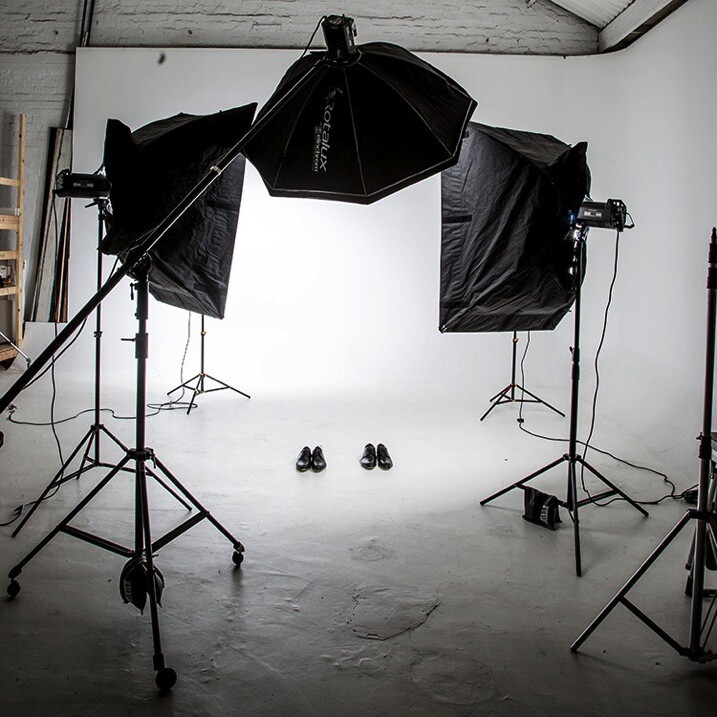
Fearflash main

I managed to work out a system where if I shot at f/8, with the flash dialled in to a particular spot, I would end up with a shot that looked half decent. I had a few successful shoots (and by that I mean there was a detectable image on the film, often blown out by two stops) and was feeling pretty confident about my high-tech – stand here, shoot at f/8, and don’t change anything on the dial – approach to flash photography.

I started getting cocky and developed a “geez you’re good you should do this for a living” strut. In my mind, I’d mastered flash. Sure it wasn’t amazing, but I’d convinced myself that I was pretty good at it.

Then everything changed. I botched a few big jobs in a row; a wedding, where only one frame turned out, a corporate shoot where the flash overexposed the logo, and a historic family portrait where 200 members of the same family flew in from around the world to be in one place together. I set the camera to the wrong shutter speed. The only record of the event is now a faded memory.
Gear 11

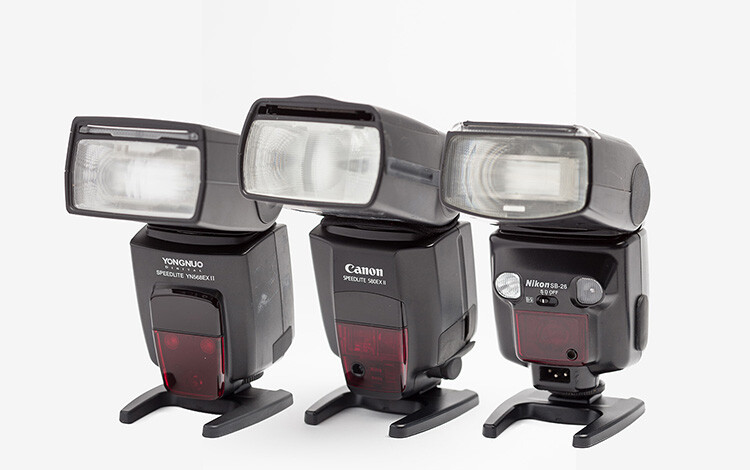
I blamed Flash. It was the common denominator – it’s unreliable, difficult to use, and completely stupid. Why bother, I’m a natural light photographer and I don’t need this in my life.

I then started to go through all the stages of grief:

  • Denial – this isn’t my fault right? Flash did it. It’s stupid, right?
  • Anger – what do you mean this is my fault?? Are you kidding me?
  • Bargaining – dear God/Universe/Oprah please make this go away. I will never eat Nutella again.
  • Depression – I suck at photography, what was I thinking? Who do I think I am?
  • Acceptance – I suck at photography, what was I thinking? Who do I think I am?

Probably the toughest, and most grown-up thing I did as a professional photographer, was to face up to the fact that I sucked at flash photography. I needed to develop a learning style, a protocol that would help me understand flash, learn how to use it well, and stop being afraid of it.
PG 51 manual mode

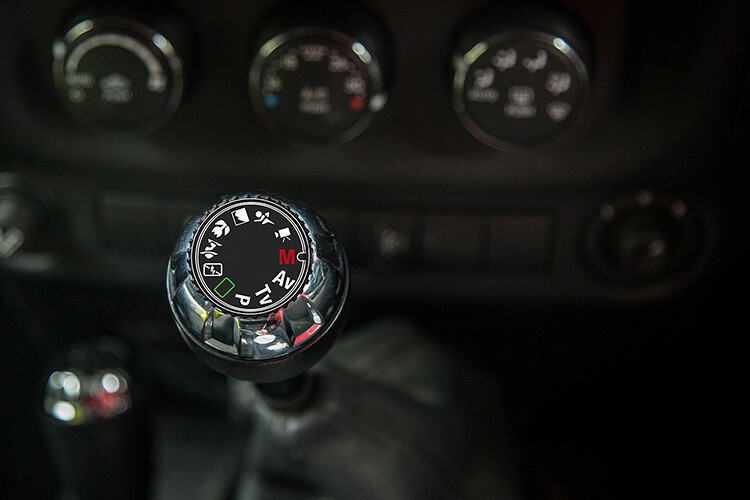
Learning a new skill can be overwhelming at first. I can still remember learning to drive stick shift, and bunny hopping my father’s car around the block, stalling at every red light and being frustrated at the number of things I needed to remember. At the time, I thought there was no way I could possibly remember how to do everything. But, little by little, day by day, I started to overcome the shock of the new, and driving became second nature.

I think the reason that many photographers become frustrated with flash, is because they are working with lighting styles, and modifiers that are too complicated and involve too many variables. Most of us are impatient. We want to get to the “good stuff” right away. But the danger is that you never really understand the subtle differences between each lighting style and modifier.

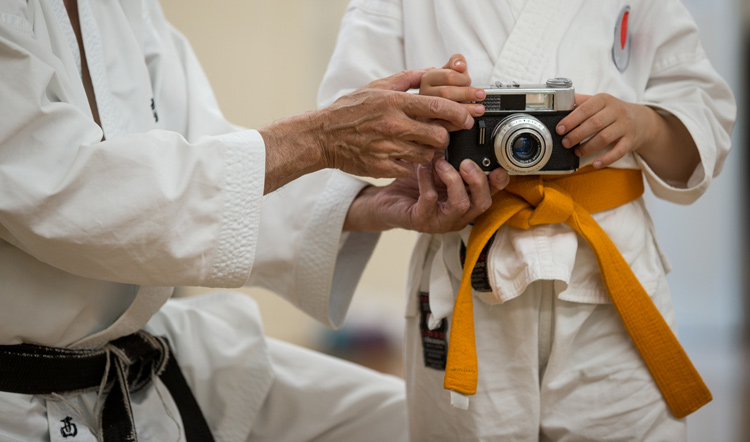
When it comes to teaching flash photography, I like to implement what I call, The Bruce Lee Protocol. Bruce Lee was a master in martial arts, whose training requires participants to master each level, or belt, before they move on to the next. If a white belt in Karate attempted to break a plank of wood with a roundhouse kick, they would probably end up breaking their foot.
Fearflash 2b

We all want to skip straight to the black belt, but doing this before we’re ready usually ends with tears.
Taken for: Japan Karate Association Australia (JKA)

It took me many years to realize that owning every single light modifier and photography gadget, was not going to make me a better photographer. The one thing that would improve my photography was deciding on one lighting style and modifier, and working with it until I felt I’d mastered it.

I use one light with the same modifier for 80% of my fill-flash photography. I can vary the look of my shots by the way I expose my images, and where I position the light. If you’re just starting out, I recommend that you buy only one modifier and one light, then work with that setup until you’re confident, and happy with your style. Here is my stepped approach to learning how to light with flash based on The Bruce Lee Protocol.

The Bruce Lee Protocol to Learning Flash

Just like training for a black belt, I believe it’s a great idea to stay on one level, until you feel 100% ready to move on to the next. A white belt in Karate would never attempt to break a plank of wood in half with a roundhouse kick , a newbie to lighting shouldn’t attempt to work with a beauty dish before they have mastered working with an umbrella.

Step One: White Belt – Laying the foundation

I think it’s a great idea to ease into lighting, by starting with daylight. Work with hard light, soft light, flat light, and contrasty light, until you are confident you can notice the subtle differences.

Step Two: Yellow Belt – Easing into a new way of thinking

Start by adding fill-flash to your images, using flash on-camera, set to auto. This will give you the confidence to continue working with flash. The next stage is to introduce flash on-camera modifiers, to soften and shape the light.

Step Three: Orange Belt – Expanding your knowledge
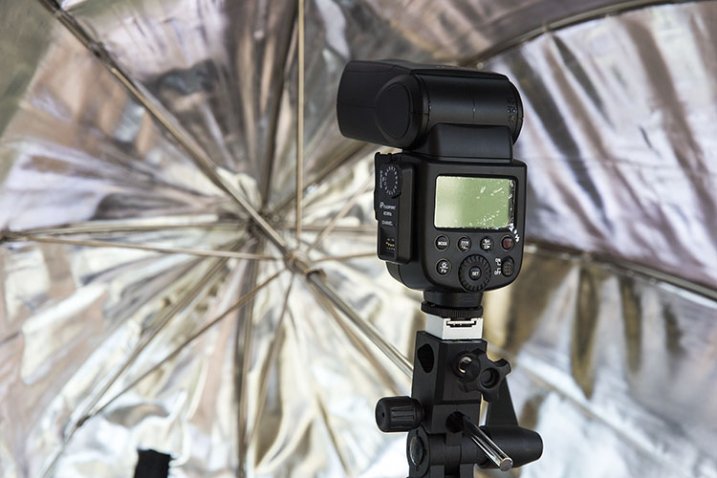
FlashPoint Li-on zoom flash and commander set

Umbrella light is a great choice for a fill-light. It closely resembles daylight, making it perfect for lighting large areas. Because the light is very soft and spreads everywhere, this is the easiest light shaper to work with, making it an ideal light modifier to start learning.

Step Four: Green Belt – Developing your skills

Once you have gotten the hang of working with umbrellas, try adding reflectors to your shot, and focus on balancing the daylight and flash.

Step Five: Blue Belt – Confidence

It’s time to ditch the Umbrella and move up to softboxes, umbrellas boxes and octaboxes.

The umbrella box is the most convenient light modifier, because it combines the simplicity of an umbrella, with the control of a softbox. The box design eliminates the complications of using this modifier outdoors. Umbrella boxes are also cheaper than softboxes, so they’re a great choice for your first serious light modifier.
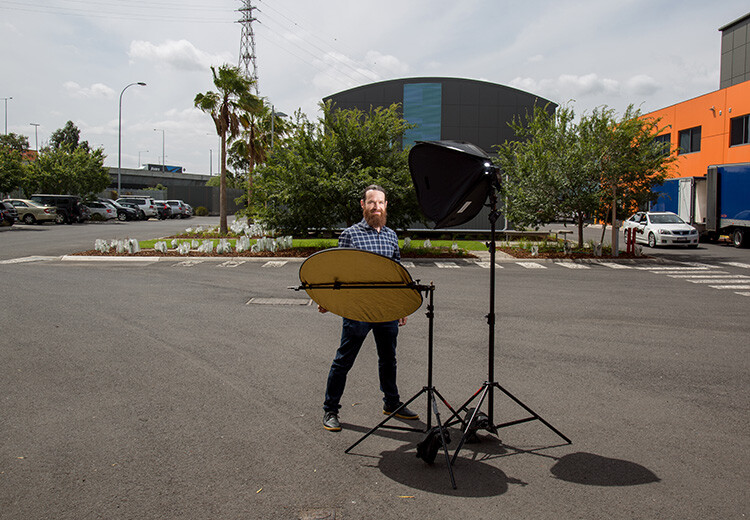
Head 5 200

Softboxes create a soft light that is more contained than that from an umbrella. This makes it a better choice of light modifier if you want to light only certain areas of your image. They are completely enclosed, and are a much better light modifier to use outside, as they are less likely to blow around in windy conditions.

Step Six: Purple Belt – Getting serious now

Once you have mastered soft light, it’s time to start experimenting with hard light. Hard light is tricky to work with, because there is very little room for error. Hard light modifiers include beauty dishes and grid spots.

If you’ve done all the work, adding a beauty dish or grid spot to your lighting setup, will be much easier to manage at this stage.
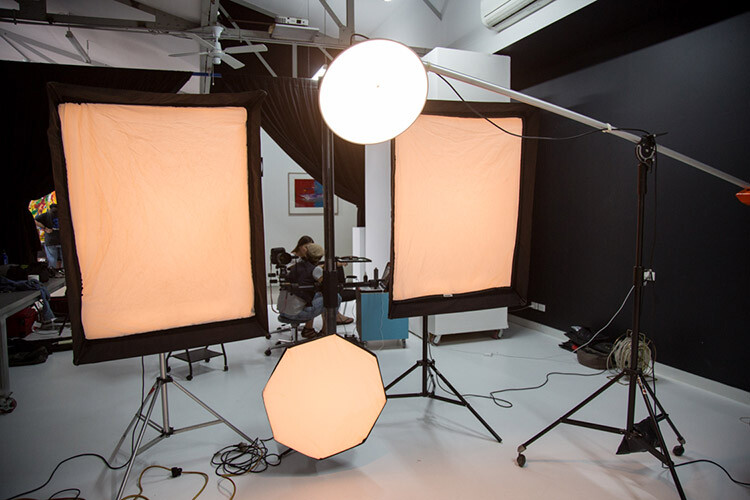
Fearflash 1

Step Seven: Brown Belt – Bringing everything together

Now you are ready to work with hard and soft light at the same time. The hard light, like a beauty dish or grid spot, can be used as the main light, and the soft light becomes the fill.

Step Eight: Red Belt – Developing your own style

Once you’ve mastered each of the lighting styles individually, and know how to work with them together, you can focus your attention on developing a lighting style that is unique to you.

Step Nine: Black Belt – Enlightenment

A black belt in lighting comes with the realization that we never really stop learning. Most of the best photographers in the world will admit that they are yet to master their craft, and the more they know, the more they realize they have yet to learn.

One of my greatest highlights of the past few years, has been watching the students I have taught overcome their fear of flash, and seeing their styles evolve and develop.

Here are some of my favourite examples of their work, and the steps they took to create these images.

Lisa McTiernan

Lisa McTiernan

Off-camera flash has scared me for a while now. Finally! Simple, easy to understand info, that even after one go has opened up a whole new world for my photography. Gina Milicia you’re my hero. Legit.

I wanted a moody vibe for this shoot in an empty concrete carpark. I wanted the shot to look like it was lit by the fluorescent lights on the walls and ceiling, and not by my speedlight. After setting the exposure for the ambient light, I bounced the flash (with the diffusion dome) off the ceiling at an angle to soften, and bounce it back onto my subject’s face and upper-body to highlight his red shirt. I set the flash to 1/16 power, and adjusted the level until I got the look that worked. Exposure: 1/100th, f/5.6, ISO 500, 27mm lens.

Kristi Louise Herd

Kristi Louise Herd

www.herdstarphotography.co.uk ( weddings only for now) www.flickr.com/photos/herdstar

This is from a photo shoot I did with an aspiring model, it was my first night shoot and my first using flash. Before I did the shoot I read and re-read your ebook, Portraits, Lighting the Shot. Tricks I learned from you became invaluable. I used the trick with the phone to focus, as the light was pretty dim. It worked fantastic, and the softbox, which I had never used before, was held just above and sightly to the left of the model (I had seen this again in a diagram from your ebook). Camera settings: Nikon D750 f/4.2, 1/30th, ISO 800, focal length 112mm. I would never have achieved this shot without learning from you Gina Milicia.

Erica Rampant

Erica Rampant

Hi Gina, I asked a few weeks ago about placement for lighting for a milk bath shoot. Here is the result! It was taken with a Nikon D610, 50mm Sigma Art lens, ISO 100, f/2.2, 1/160th of a second.

This is my friend Antonette, she just gave birth to a healthy baby boy and I was there to photograph it. She had a home birth and her baby was born in water! I’m still a new photographer and have only been shooting for five months, but have been listening to you, and learned so much!

Natalie Ord
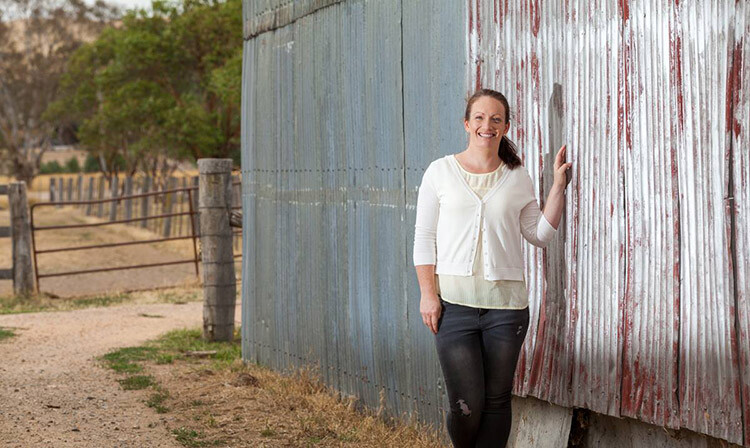
Natalie Ord

This is a shoot a recently did for a client. The day was windy, overcast, and I had limited time. I needed to portray the client as friendly, accessible, and show that she is rural-based, so it was important for me to get the background exposed right. I couldn’t have done that without using off-camera flash.

Settings were 1/320th, ISO 250, f/7.1, using PocketWizards, a Canon Speedlite 600EX without a softbox, as it was windy and I didn’t have anyone to hold the stand, shot on my 70-200mm f/2.8L with a Canon 5D MkII.

Gary Lun
 

Gary-Lun-3

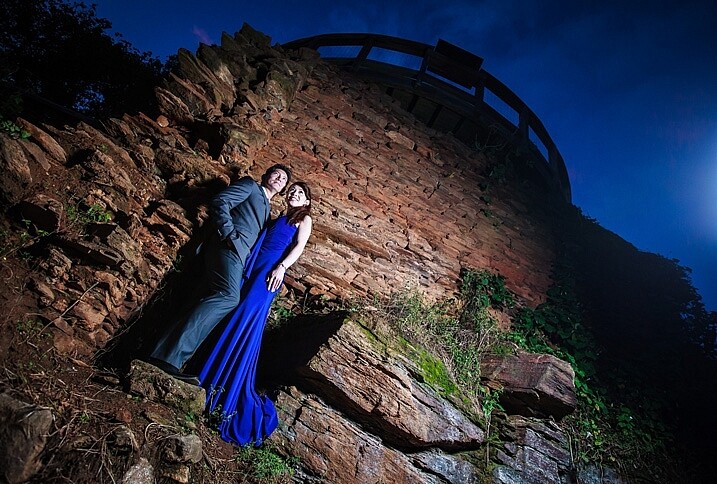
Canon 5D MkII with Canon 16-35mm f2.8 at 18mm, f/4.5, 1/125th, ISO 1600. Flash was Yongnuo YN560III at 1/8 power, positioned at camera right. Softbox was using SMDV SpeedBox-60.

Quick story: I was doing an engagement shoot at a typical location in town for many photographers. It was packed with photographers that day! Anyway, in order to get a unique photo I knew I must use flash. So I waited until all other photographers were gone, because the sun is going down (since most of them were using natural light), took my flash out, asked the couple to stand near something with texture, and took the shot.

Phil Enn
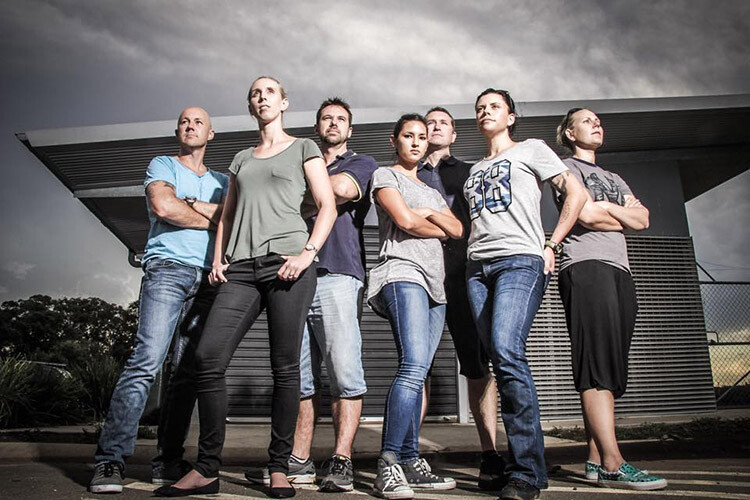
Phil Enn

Canon 7D, 17-85mm at 17mm, f1/6, ISO 200, six speed lights held in a bunch, off to camera right.

Andrew McNamara

Andrew McNamara

Canon 5D MkII, 24-70mm at 24mm, f/9.0, ISO 100, 1/50th with a camera-mounted Canon 480exII Speedlite. As stated in the original story, shot from inside a training element for the Southern Cross Search Dogs photoshoot. I had a diffuser on the flash, just for the safety of the dogs eyes, and bounced it just a little.

P.S. I’m one of those people who are afraid of flash so this was a big step!

Rahim Mastafa

Rahim Mas
Inspired by one of your ebooks, I used one studio strobe as a key light to the front of him, and a speed light as a kicker, over his shoulder on the backrest. Settings were: f/2, 1/1500th, ISO 100, Sony a77, 50mm lens.

Matt Zahn

Matt Zahn

This was part of my self portrait challenge. Since it was nighttime, and obviously no natural light to shoot with, I attempted to create the illusion that this was natural light coming through a window. I used my Canon 430exII Speedlite on my T5i. I slid a home-made snoot over the end, and used some electrical tape to create some of the shadows. This shot was taken at 1/400th, f/5.0, ISO 400. I also placed a gold reflector to camera left, behind me.

Scott Stokhaug
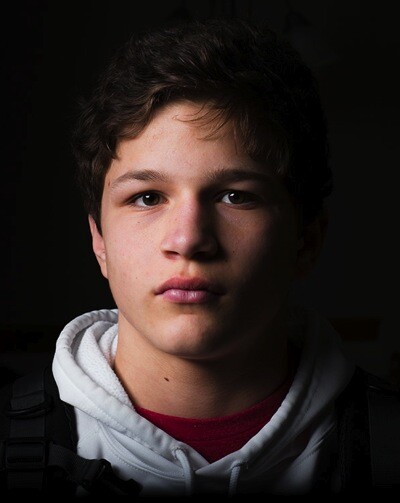
Scott Stockhaug

With the help of your ebook, Flashfast for Portrait Perfection, I made a minimal investment to get that speedlight off my camera, and open many new doors! This photo is my Rembrandt lighting, along with black background that was shot in my home, in broad daylight, with no backdrop. I love this technique!

Next step

So where are you on The Bruce Lee Protocol steps? Do you have a fear of flash? Have you overcome and mastered it already? Please share with us where you are, and what you’ve done to conquer your fears.


fastflash_bookIf you want to learn more about using flash for creating portraits, pick up Gina’s brand new dPS ebook: Fast Flash for Portrait Perfection. Now on sale for an introductory price for a limited time only.

googletag.cmd.push(function() {
tablet_slots.push( googletag.defineSlot( “/1005424/_dPSv4_tab-all-article-bottom_(300×250)”, [300, 250], “pb-ad-78623” ).addService( googletag.pubads() ) ); } );

googletag.cmd.push(function() {
mobile_slots.push( googletag.defineSlot( “/1005424/_dPSv4_mob-all-article-bottom_(300×250)”, [300, 250], “pb-ad-78158” ).addService( googletag.pubads() ) ); } );

The post 9 Steps to Get Over Your Fear of Off-Camera Flash by Gina Milicia appeared first on Digital Photography School.


Digital Photography School

 
Comments Off on 9 Steps to Get Over Your Fear of Off-Camera Flash

Posted in Photography


Intelligent Design? 14 Strikingly Modern Places of Worship

25 Feb

[ By Steph in Architecture & Public & Institutional. ]

modern church ribbon 3

Dramatic and sculptural, monolithic as a stone monument or light as a bridal veil, these churches, chapels and meditation rooms eschew conventional architectural typologies for places of worship, prioritizing the way the structures make visitors feel while they’re inside. Some emphasize a connection to nature, while others encourage internal reflection or symbolize the act of marriage with unexpected visual metaphors.

Minimalist Chapel
modern minimalist chapel

modern minimalist chapel 2

modern minimalist chapel 3

modern minimalist chapel 4

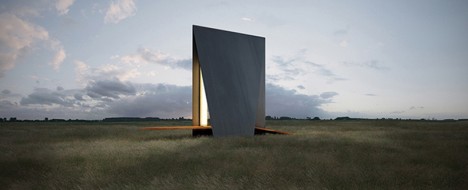
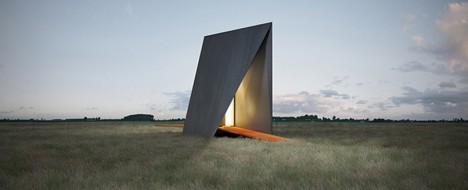
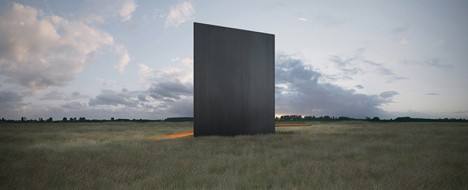
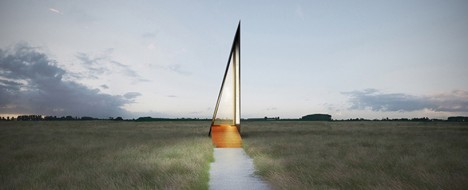
Reinterpreting the stark, minimalist works of sculptor Richard Serra in architectural form, this blade-like chapel rises from the flat grasslands of Serbia, offering a space for meditation. Stockholm-based architect Predrag Vujanovic creates a strong perpendicular line contrasting the landscape with just two main elements: the folded steel of the roof, and the cortex steel sheets making up the ramp.

Ribbon Chapel
modern church ribbon 1

modern church ribbon 2

modern church ribbon 4

modern church ribbon 5

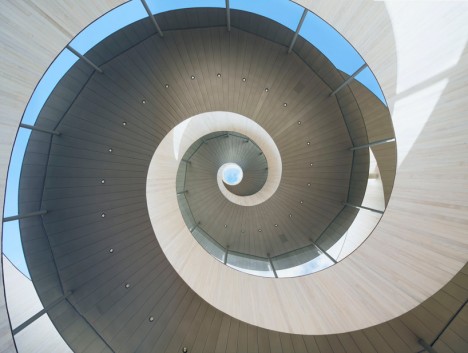
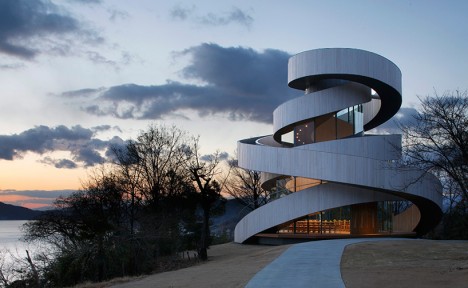
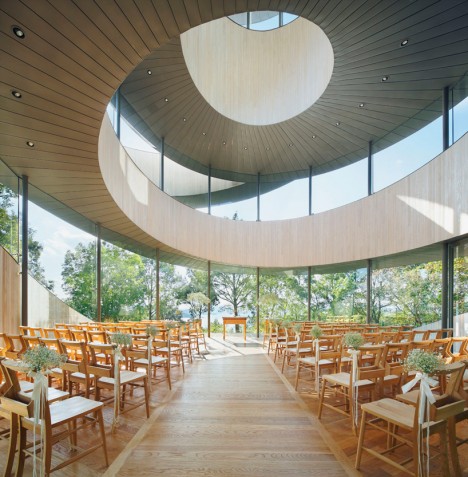
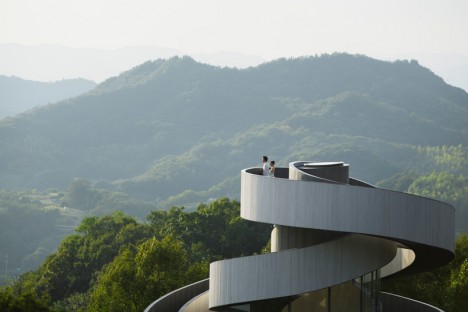
Japan’s most striking wedding chapel consists of two separate stairways that spiral up to the sky, joining into an observation platform looking out onto the sea at the pinnacle. The space beneath is glassed in to create an airy interior fitting up to 80 guests. From the center of the nave, one can look straight up into the oculus skylight framed by the spiral of the ramp.

Kamppi Chapel of Silence
modern kamppi chapel

modern kamppi chapel 2

modern kamppi chapel 3

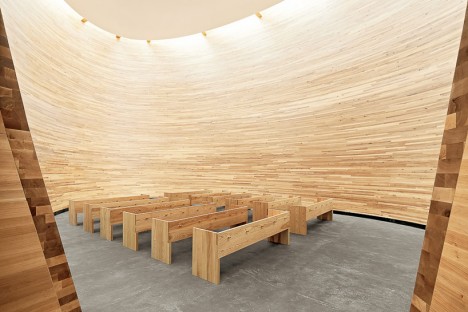
Solid wood and windowless, this egg-shaped chapel on the southern side of busy Narinkka Square in Helsinki, Finland offers a quiet place of refuge. CNC-cut, glue-laminated sections of timber create the curving walls of the striking space, leading the eye upward to the void between the perimeter and the roof, where sunlight streams in.

St. Voile Chapel
modern st voile

modern st voile 2

modern st voile 3

modern st voile 4

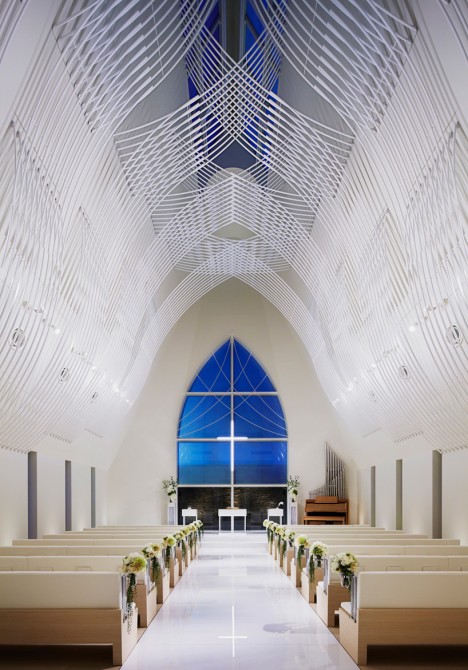
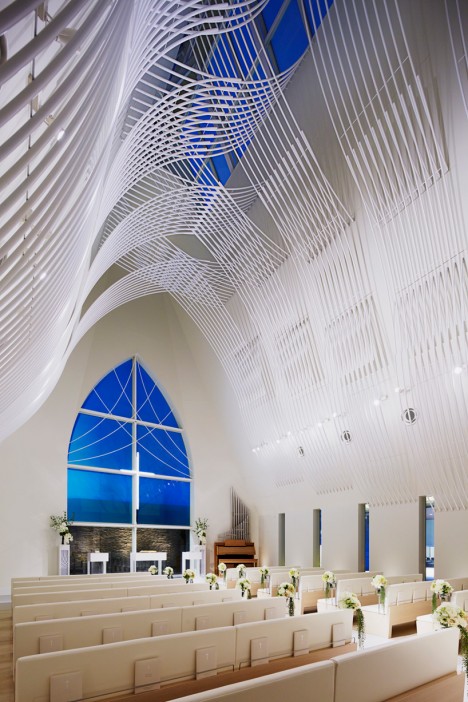
A series of white pipes climb the walls of the St. Voile Chapel by Kasahara Design Work, interweaving in flowing organic patterns as a visual metaphor for marriage. Located on the banks of Niigata’s Shinano River, the chapel is largely defined by the play of daylight on these interior lines, which streams in through a pair of skylights at the pinnacle of the steep and narrow roof.

Gratitude Open Chapel
modern open chapel

modern open chapel 2

modern open chapel 4

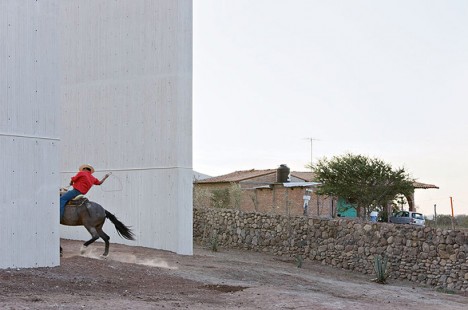
Set against the landscape of Lagunillas, Mexico like a series of four monumental stones, the simple white elements making up ‘Gratitude Open Chapel’ by Tatiana Bilbao + Dellekamp Arquitectos don’t actually form an interior space at all, but rather an outdoor gathering place for pilgrims making the holy ‘Ruta del Peregrino’ route.

Next Page – Click Below to Read More:
Intelligent Design 14 Strikingly Modern Places Of Worship

Share on Facebook


[ By Steph in Architecture & Public & Institutional. ]

[ WebUrbanist | Archives | Galleries | Privacy | TOS ]


WebUrbanist

 
Comments Off on Intelligent Design? 14 Strikingly Modern Places of Worship

Posted in Creativity


Sigma introduces EF-630 multi-function flash

24 Feb

Sigma has announced a more powerful external flash for DSLRs, the EF-630. It updates the existing EF-610 flash units by covering a 24mm to 200mm focal range (as wide as 17mm with the built-in Wide Panel), with an auto zooming function. Based on Sigma’s naming conventions it’s safe to assume the EF-630 offers a guide number of 63. It’s also able to tilt upward by 90°, left/right by 180° and downward by 7°. It offers TTL exposure control, high-speed sync and slave mode for use with other flashes. 

No pricing or availability is given for the EF-610.


Press release:

Sigma Introduces Electronic Flash EF-630 Multifunctional External Flash

Boasts TTL exposure control, high-speed sync, wireless flash functions, rear-curtain sync, auto-zoom, and wide-angle illumination coverage and more

KANAGAWA, JAPAN — February 23, 2016 – Sigma Corporation of America, a leading DSLR lens, camera, flash and accessories manufacturer, has just announced the Sigma Electronic Flash EF-630, a multifunctional flash designed to work with current digital SLR cameras. Offering greater output of light, the EF-630 features TTL exposure control, high-speed sync, wireless flash functions, auto-zoom and bounce-flash, amongst additional features that make it ideal for many types of photography.

“Lighting is one of the most important factors when it comes to creating a beautiful image, and can be the difference between capturing the perfect moment and missing it entirely,” comments Mark Amir-Hamzeh, president of Sigma Corporation of America. “The EF-630 has all the features advanced photographers look for in a flash and is the perfect companion to the DSLR.”

The Sigma EF-630 flash automatically adjusts for focal lengths of 24mm to 200mm focal length, making it ideal for wide angle and super-zoomed shots alike. For ultra-wide angle shots, photographers can utilize the built-in Wide Panel to cover an angle of up to that of a 17mm lens.

Compatible with most well-known digital SLR cameras, the EF-630 features auto TTL exposure control, as well as remote control operation through the TTL wireless flash function, where the camera lens calculates the correct exposure automatically for perfect lighting. For multi-flash setups, photographers can use the Slave Flash Function to trigger additional flashes. To achieve a softer look, photographers can bounce light off of a white wall, ceiling or reflector by tilting the EF-630’s flash head upwards by as much as 90°, or swiveling left or right by 180°. For close-up shots, the flash head can also be titled down by 7°.

The FP Flash function of the EF-630 makes flash photography possible at shutter speeds greater than the normal sync speed, which is typically limited at shutter speeds up to 1/250 second for most cameras. The FP Flash function for high shutter speeds is necessary when setting a larger aperture to limit depth of field when shooting in daylight, as high shutter speeds are used to balance the daylight and the flashlight at any shutter speed. To capture natural motions, the Rear-curtain Sync mode allows the flash to be triggered immediately before the rear-curtain of the shutter closes, recording blurred trails behind a moving subject rather than in front.

Additional EF-630 features:

  • Intuitive user interface: dot matrix LCD screen for improved menu visibility, D-Pad and dial settings controls, and easy one-click disengage function improve ease of use
  • Modeling flash function: check for intense reflections and shadows before capturing the shot
  • AF assist light: accurate auto-focus in low light conditions
  • Auto Power-off: flashgun automatically powers off after a period of non-operation to conserve battery life
  • Manual flash power level control: manually sets the flash power level from 1/1 to 1/128

The new EF-630 Flash can be updated with the latest software from a workstation or laptop using the Sigma Optimization Pro software and Flash USB Dock (sold separately).

Articles: Digital Photography Review (dpreview.com)

 
Comments Off on Sigma introduces EF-630 multi-function flash

Posted in Uncategorized


12-bit Versus 14-bit RAW – Which is Right for You?

24 Feb

So you’ve done the research, read the articles, browsed through your photos, and decided it’s time to make the leap from shooting in JPG to shooting in RAW, in order to get the most quality possible out of your photos. Congratulations, and welcome to the fold!

Things are nice over here in RAW land, we have cookies too. Now that you’ve firmly decided once and for all to shoot in RAW, you can stop thinking about file formats and get back to making beautiful images, right? Well, sort of. Turns out there’s yet another layer to this cake, that adds yet one more twist to the mix: RAW compression formats.

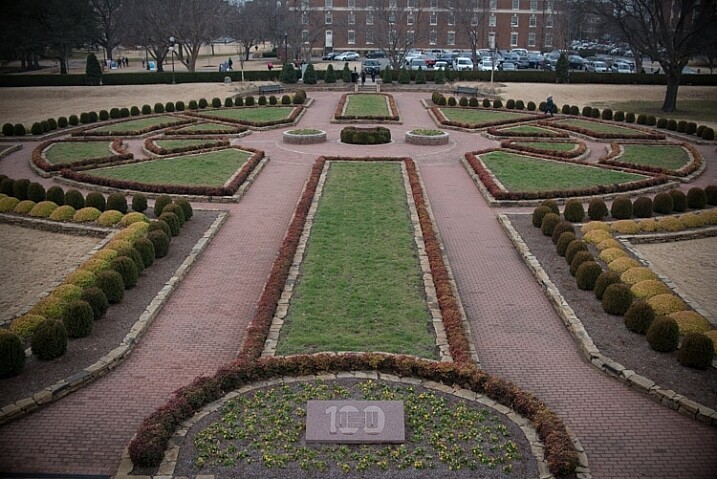
raw-formats-compared-sunrise-corrected

“What?!” I can hear you saying now. “What’s a compression format? And why does it matter? Can’t I just shoot in RAW and be done with it?” Well yes, and no.

For starters go grab your camera, caress it gently, and rest assured that you have in your hands a very capable imaging device, that would have been the envy of every photographer in the world 10, or even five years ago. You don’t have to understand everything about RAW, JPG, and other formats, as long as you’re getting out there and taking photos that you like. But, if you would like to know more about how all this works, then by all means, read on. You might want to sit down and grab a cup of coffee, because things are about to get a bit tricky.

How RAW format works

When you take a photo with any camera (DSLR, mirrorless, point-and-shoot, or even your smartphone) a massive amount of color information is captured by the camera’s image sensor, and sent to a computer chip that analyzes it, and ultimately saves it to your memory card as a picture. If you shoot in JPG, a great deal of that data is discarded to save storage space, and facilitate easier sharing. But, if you shoot in RAW, most of that color data is retained, which results in you having much more flexibility to edit each picture in a program like Lightroom or Photoshop, but also results in file sizes that can be quite large and not at all conducive to emailing or posting on social networks. Many cameras allow you to choose different types of RAW formats such as:

  • JPG – Every camera offers this format which stores 256 tonal values for each color, but compresses the file in such a way that a significant portion of the photo data is discarded. This format is ideal for photographers who do not do much editing in Photoshop or Lightroom, and the file sizes are much smaller than RAW, which makes them very easy to share.
  • 12-bit RAW lossy compressed – This format stores 4,096 tonal values for each color (red, green, and blue) per pixel, but then throws away some information it deems unnecessary, using an algorithm to compress the file, so it’s a bit smaller and takes up less space on your memory card. Most of the discarded data is on the right side of the histogram, which makes sense, since digital cameras typically capture much more information in the mid-tones and highlights to begin with. Thus, there is a great deal more leeway when performing a lossy compression algorithm, since it is removing some data from a part of the image where there is so much to begin with, that removing a little will not matter to most users.
  • 12-bit uncompressed – Also stores 4,096 tonal values for each color, but does not throw out any data to shrink the file size.
  • 14-bit lossy compressed – This format stores 16,384 tonal values for each color (way more than 12-bit – 12-bit mean:s 2 to the power of 12 or 2x2x2x2x2x2x2x2x2x2x2x2, 14-bit is 2 to the power of 14) but also discards some data it deems gratuitous, in order to compress the file so it’s a bit smaller.
  • 14-bit uncompressed – The best option most cameras offer (though some ultra-high-end models do have 16-bit RAW files, but they usually cost more than a new car) stores 16,384 tonal values for each color per pixel and does not throw any away, giving you the highest possible amount of information, to work with in post-production.
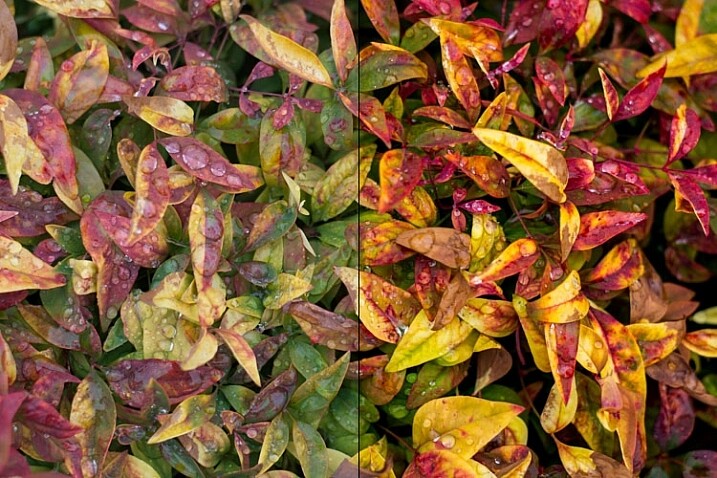
The original photo (left) was somewhat bland and flat, and shooting in RAW gave me the flexibility I needed to properly edit this into an image I really liked.

The original photo (left) was somewhat bland and flat, and shooting in RAW gave me the flexibility I needed to properly edit this into an image I really liked (right).

Looking at this data the answer seems clear, right? Just shoot in 14-bit uncompressed RAW because it’s obviously better! Well again, yes and no.

Due to the increase in the amount of data offered by a 14-bit file, the resulting RAW images take up much more space on your memory card and computer, and are much slower to load in a program like Lightroom or Photoshop. If you shoot with a high-megapixel camera like the Nikon D800, Sony A7Rii, or Canon 5DS, you can easily get RAW files approaching 100MB each. That is great when you need it, but can be quite a burden if you decide that all the extra data is not always worth the tradeoff in storage space.

Another issue that comes into play when comparing formats is whether the increased data actually does give you more flexibility when editing the image. Of course it does in theory, but in practice, having 16,384 tonal values for each color could be a bit of overkill for most people. If you generally get your exposure correct in camera, then you may not need the sheer quantity of data provided by a 14-bit uncompressed RAW format file.

Real-life examples

Some camera makers have other RAW formats, such as sRAW and mRAW, that actually decrease the pixel count of your images, while still giving you the flexibility of a RAW file. But, at the end of the day, one thing is clear – shooting in RAW will always give you significantly more freedom to edit your images than shooting in JPG. The question then becomes, which RAW format to use?

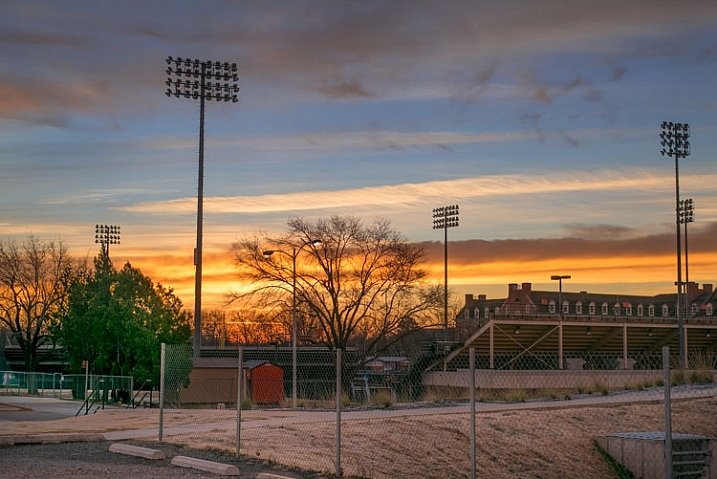
There are benefits and drawbacks to each one, but all RAW types allow you to have an extraordinary degree of flexibility in post-production, compared JPG. Like almost everything in photography, there is no single correct answer to the question, and it is largely dependent on your shooting style and needs as a photographer. To see how this plays out in a real-life scenario, here’s a picture I took, overlooking the Formal Gardens at Oklahoma State University.

f/4, 35mm, ISO 100

35mm, f/4, 1/350 second, ISO 100

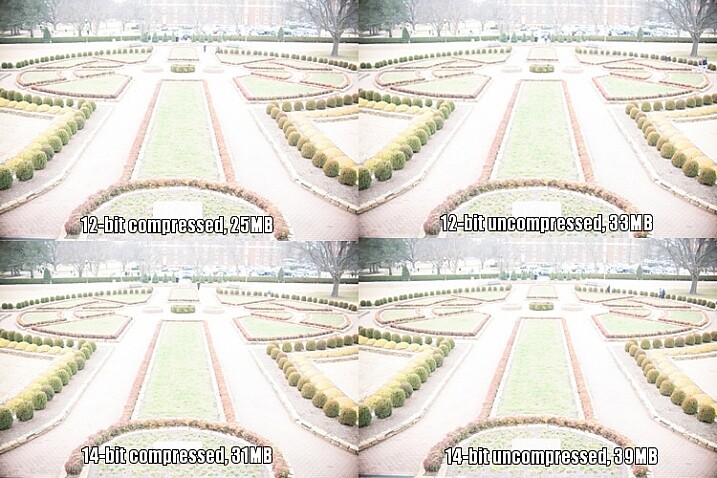
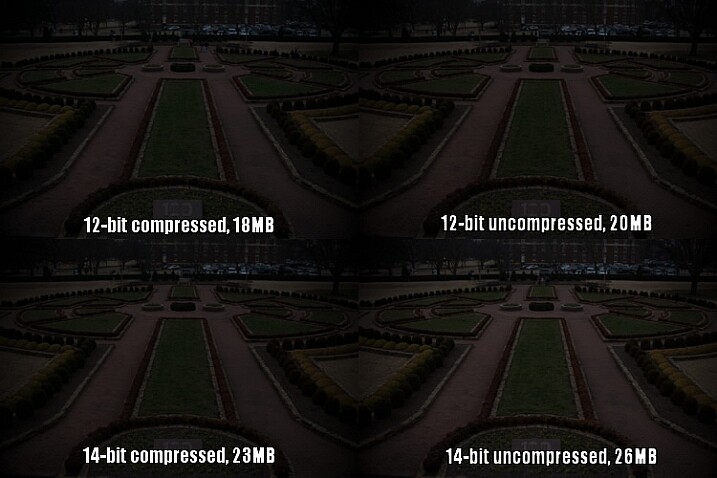
I re-shot the same picture using massive over- and under-exposures using four different RAW formats, then corrected them in Lightroom. Shooting these photos as JPGs would have resulted in unusable images, but RAW gives you so much extra information, that you can often salvage parts of a picture that would have been entirely lost otherwise. RAW is useful for much more than fixing overexposed pictures, but it’s in extreme circumstances like this that the real differences between the 12-bit, 14-bit, compressed, and uncompressed formats, would be most likely to show up.

This first set of images has been intentionally overexposed by three stops, by leaving the aperture at f/4 and ISO at 100, but increasing the shutter speed to 1/30 second.

raw-formats-compared-garden-overexposure-compared

Overexposed intentionally by three stops, to test which format offers the most in terms of highlight recovery.

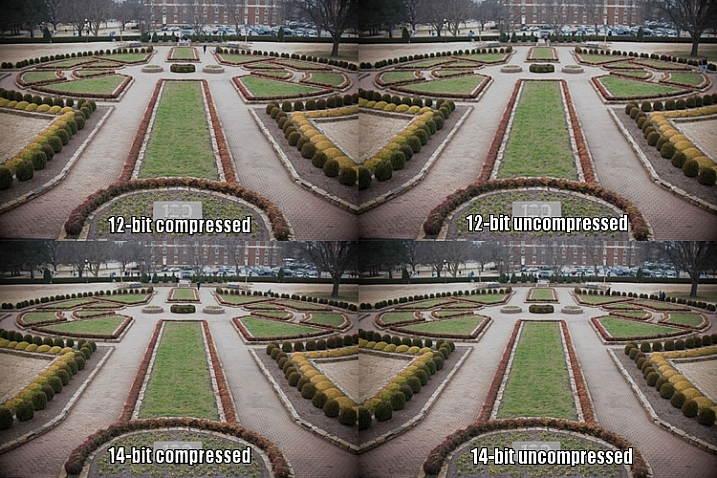
I then used Lightroom to bring the exposure values back down by three stops, for a correctly exposed image. Some data has been lost due to clipping, where things are so overexposed there is literally nothing left to recover, but for each picture I was able to get a decent image, useful for comparison purposes. I still wouldn’t use these in an actual production environment, but it does give you an idea of how flexible the RAW format really is.

raw-formats-compared-garden-overexpoure-fixed-compared

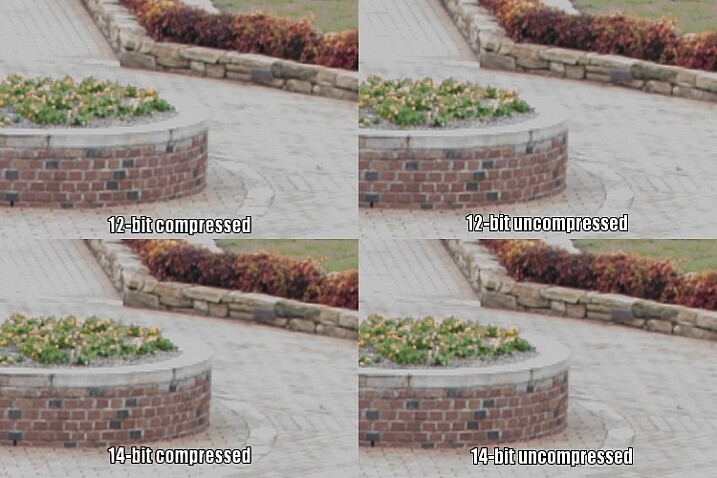
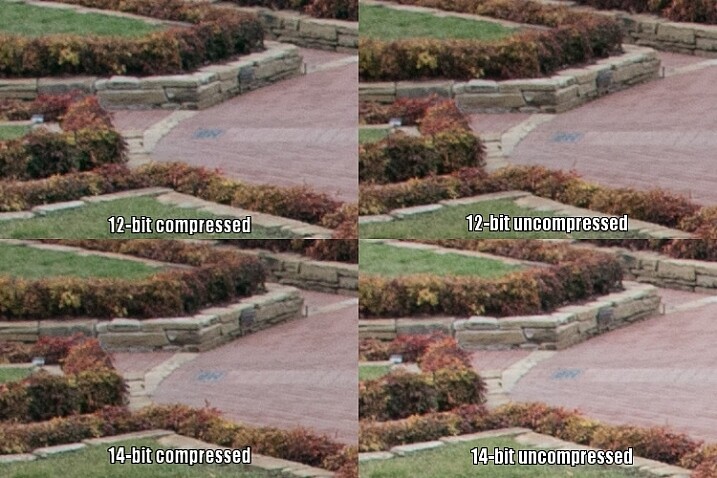
All images look virtually identical, but that’s not too unexpected given that these are minuscule thumbnails of 24-megapixel images. To get a better understanding of how the RAW compression formats compare, here is a 1:1 crop of the same section of each photo.

raw-formats-compared-garden-overexpoure-fixed-compared-crop

Upon close inspection, all four RAW formats appear to offer similar functionality when recovering highlight data.

Notice much of a difference? I don’t. That’s not to say there isn’t any difference, just not one that’s discernible to the human eye.

Since the initial 14-bit uncompressed file is more than 50% bigger than a 12-bit compressed image (39MB versus 25MB) there is clearly a lot more data to work with, but as this test illustrates much of that is not likely to matter a whole lot in practical terms. The biggest difference I can see is not due to lossy compression but bit rate, as both 14-bit files show just a few more clearly-defined bricks in the sidewalk, to the right of the planter.

However, keep in mind this is a 1:1 crop of a 24-megapixel image. You’re looking at about 94,000 pixels in each section above, out of nearly 25 million, or about .04% of the total image. If you have to zoom in this far to see any noticeable differences between 12-bit and 14-bit RAW files, that were overexposed by three whole stops to begin with, then to me it does not offer a significantly compelling reason to shoot 14-bit RAW most of the time.

To continue with the comparison, here’s the same picture underexposed by three stops in camera, by increasing the shutter speed to 1/3000 second.

raw-formats-compared-garden-underexposure-compared

Underexposed by three stops to test shadow recovery.

Since almost no data was clipped, which I could tell by looking at the histogram, adjusting the exposure by three stops in Lightroom results in an image that is virtually identical to the correct one at the top of this article. Taking another look at the 1:1 crops below, yields a similar result as the first test.

raw-formats-compared-garden-underexpoure-fixed-compared-crop

Once again, all four RAW formats appear to be on par with each other for recovering detail in the shadows.

The results here are remarkably similar to the overexposure test, and remember that these pictures have been severely underexposed before correcting them in post. The differences between the corrected images you see above are negligible, and the much smaller 12-bit compressed file gives results that are almost identical to the 14-bt uncompressed.

So, which format should you use?

While you can’t draw a universal conclusion from just one test, this example does illustrate that shooting in 12-bit compressed RAW still gives you plenty of data to work with, when editing your images. As I mentioned at the top of the article, some data is literally thrown away when shooting with a lossy compression format, but in most situations it’s nothing you are likely to notice. Only in extreme circumstances, such as when you want to do massive highlight or shadow recovery, or if a photo has been severely over or under-exposed, are you likely to notice any practical benefits from shooting in 14-bit RAW.

However, if you are the type of photographer who wants the most possible data in each picture, and continually pushes your camera to its limits, I would recommend capturing as much information as possible (i.e. shooting in 14-bit) and retaining every last chunk of it (shooting uncompressed).

Even when shooting for clients I use 12-bit RAW because it gives me more than enough color information to edit my shots.

Even when shooting for clients I use 12-bit RAW because it gives me more than enough color information to edit my shots. I could use 14-bit RAW, but for my purposes I have found that I simply don’t need to.

A notable caveat here is that the test I performed was just one example, and it’s entirely possible that a different scenario would have done a better job at illustrating the differences in terms of the different RAW formats. When doing this I tried to pick something that was generally representative of a typical photographic scenario, and not a situation that was far outside the realm of what most people would encounter when taking pictures. If I had over or under-exposed by four or five stops, or shot at higher ISO values, perhaps there would be some significant differences in terms of what each format has to offer, and I don’t want to draw any large-scale conclusions from just one small set of data.

What this test does illustrate is that even though 12-bit compressed RAW contains less photographic information than its higher bit rate counterparts, enough important data remains to give you plenty of wiggle room, if you need to do extreme corrections in post-production.

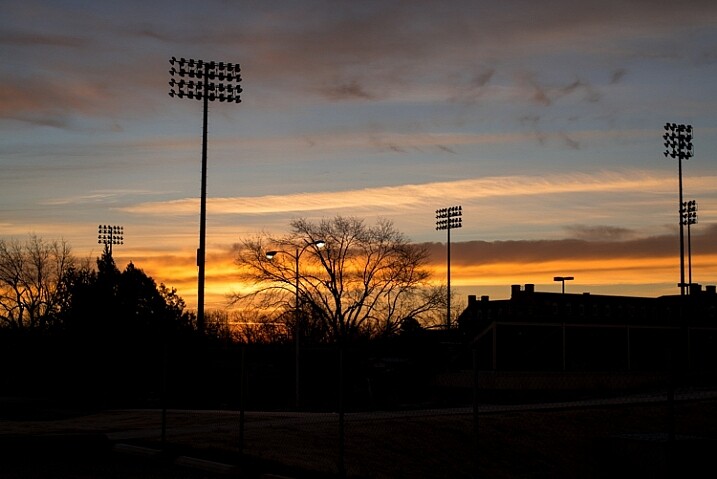
The original uncorrected version of the image at the top of this article, shot in 12-bit compressed RAW.

The original uncorrected version of the image at the top of this article, shot in 12-bit compressed RAW.

I generally don’t like to give advice when it comes to photography, life, jobs, or matters of the opposite sex, but I have shot with many types of RAW formats for a few years, and feel entirely comfortable shooting in 12-bit compressed. I do all my pictures this way, even paid jobs for clients, and have never had a circumstance in which a bad picture would have been salvageable if I had only shot in 14-bit uncompressed.

In my experience (which, I admit, is not the same as a professional photographer who makes his or her living taking pictures) there are plenty of other factors that matter just as much, such as: choosing the right lens, nailing your focus, composing your shot, knowing when and how to use external lights, and a host of other things that are more important than eating up your memory cards with 14-bit uncompressed RAW files. If your pictures regularly, and consistently, require the type of extreme editing that can only be saved by heavily editing a 14-bit uncompressed RAW file, I’m going to go out on a limb and say there are probably other things that you need to work on to improve your photography, besides choosing the right file format.

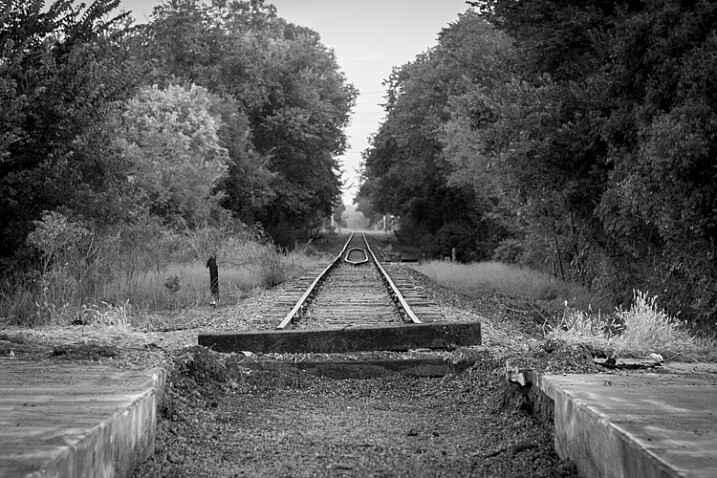
Even black and white photographers can get a lot of benefits from shooting in RAW.

Even black and white photography can benefit from using the RAW format due to the additional data available in each individual pixel.

Of course it should be noted that the RAW format is beneficial, not just for fixing images that are way too bright or dark. RAW files give you significant flexibility when editing the colors of an image, and allow you to bring out more natural skin tones, get the deep rich blues hidden in a dull gray sky, find the intricate details of a flower petal that would be lost in a JPG, and perform all sorts of other edits that have nothing to do with making a dark photo a little brighter. Any RAW format is better than none, if you’re the kind of person who likes to edit your images after you take them, but if you want a nice balance between having lots of data while still keeping file sizes down, 12-bit compressed will most likely suffice just fine.

What about you? I’m curious what your experiences have been with compressed and uncompressed RAW. Perhaps you’re the kind of photographer who shoots in JPG and doesn’t bother messing with processing afer the fact. I’d like to hear about your experiences in the comments below, especially if you have found times when shooting 14-bit uncompressed RAW has come in handy. The more information we have to work with, the better informed we will all be as photographers.

googletag.cmd.push(function() {
tablet_slots.push( googletag.defineSlot( “/1005424/_dPSv4_tab-all-article-bottom_(300×250)”, [300, 250], “pb-ad-78623” ).addService( googletag.pubads() ) ); } );

googletag.cmd.push(function() {
mobile_slots.push( googletag.defineSlot( “/1005424/_dPSv4_mob-all-article-bottom_(300×250)”, [300, 250], “pb-ad-78158” ).addService( googletag.pubads() ) ); } );

The post 12-bit Versus 14-bit RAW – Which is Right for You? by Simon Ringsmuth appeared first on Digital Photography School.


Digital Photography School

 
Comments Off on 12-bit Versus 14-bit RAW – Which is Right for You?

Posted in Photography


ISO, Aperture, Shutter Speed Guide for Product Photography

24 Feb

Who said you have to be a professional photographer to take a good picture—but wait, a great product image requires more than just lights, aim and shoot! When you are shooting products to sell on your ecommerce store, you want to achieve the best results possible. A remarkable product image can give your online store a professional look that tells Continue Reading

The post ISO, Aperture, Shutter Speed Guide for Product Photography appeared first on Photodoto.


Photodoto

 
Comments Off on ISO, Aperture, Shutter Speed Guide for Product Photography

Posted in Photography