RSS
 

Archive for January, 2016

Panasonic Lumix DMC-ZS100 / TZ100 puts 1″ sensor and 10x zoom in your pocket

08 Jan

$ (document).ready(function() { SampleGalleryV2({“targetContainerClass”:”sampleGalleryImageViewerContainer”,”galleryId”:”0465782891″,”isEmbeddedWidget”:true,”selectedImageIndex”:0,”startInCommentsView”:false,”isMobile”:false}) });

Panasonic has announced the Lumix DMC TZ100 / ZS100, the first compact superzoom camera to include a 1″-type sensor. Despite having a sensor four times larger than most travel zoom cameras, the ZS100 manages to incorporate a 25-250mm equivalent zoom into a very small body. It also finds room for a built-in viewfinder and two full control dials. It shoots 4K video and incorporates a host of features based on that capability, many of which utilize its touchscreen rear LCD. The camera will be available from March 2016 at a cost of around $ 699.


Press Release:

The new LUMIX DMC-ZS100 – Raising the bar for compact travel cameras

Panasonic’s latest compact camera includes a 1-inch sensor and 4K functions for outstanding performance and usability on the go

Las Vegas, NV (January 5, 2016) – Panasonic has today launched the new LUMIX DMC-ZS100, a premium  compact travel camera that boasts performance typically associated with expensive interchangeable lens models. Despite the camera’s small size, the latest addition to the LUMIX ZS range combines a host of features and a powerful 10x zoom to make it the perfect travel companion for even the most demanding photographers and videographers.

A large 1-inch MOS sensor, one of the biggest of any camera in its class, combines with Panasonic’s Venus engine to capture consistently bright and beautiful images wherever your travels take you. And with innovative features such as 4K Photo and Post-Focus, it’s never been easier to capture the exact frame that you visualized when looking through the lens. What’s more, with simple control and connectivity, you can share your adventure with friends and family at the press of a button.

Capture you travels in outstanding quality
The 1-inch sensor’s large pixels are capable of capturing more light, resulting in shots that look crisp, clear and natural, even when photographing at high ISO, such as at dusk and dawn. The Venus engine also provides unrivalled color accuracy for a travel camera – the unique hues, saturation and luminosity of a multi-colored sunset, for example, are individually processed and carefully adjusted to reproduce breathtakingly authentic results.

The LUMIX DMC-ZS100 is the first in its series to incorporate a F2.8-5.9 LEICA DC lens, which allows you to achieve true-to-life images with stunning depth of field. The lens also features a versatile 10x zoom range of 25mm-250mm (35mm camera equivalent), making it ideal for photographing birds and other elusive wildlife.

In addition to stunning photo quality, the camera also provides 4K video recording capability that fits easily into your pocket. The LUMIX DMC-ZS100 offers smooth, high quality video recording in 4K 3840×2160 at 24 and 30 fps in MP4; as well as high-resolution Full HD 1920×1080 60p videos in MP4. With four times the resolution of Full HD, the resulting 4K video brings the sights and sounds of your travels to life, just as you remember capturing it.

Achieve professional quality results, every time
As well as recording high resolution videos, the camera’s 4K capability also enables you to capture accurate photos like never before. For the first time in a travel camera, Panasonic’s 4K Photo function allows you to extract an 8-megapixel still from 4K video (30fps) with total control and precision, so even fleeting moments of action, such as the exact moment you hit the water diving into the sea, can be captured and enjoyed for a lifetime.  

Another new addition to the LUMIX ZS range is the Post-Focus feature, which allows you to choose the focal point of any picture, even after it’s taken. The LUMIX DMC-ZS100’s 0.1s Light Speed Auto Focus and Depth from Defocus (DFD) capability combine to calculate the distance between the camera and the subject, capturing optimal focus for 49 individual areas within each frame. Once the photo is taken, you can then manually select the exact area you want to focus on – from the minutiae of your subject’s eye, to an individual bird as a flock takes flight. What’s more, from a single photo you can export multiple shots with different focal points.

In complete control of your creativity
With such a wide array of advanced functions and controls, the LUMIX DMC-ZS100 has been designed for fast and practical usability. The Live View Finder (LVF) features 1,166K-dot resolution, as well as LVF AF that detects when you’re about to take a shot. The camera also provides extensive manual controls so you can put your photography skills to the test, including dedicated physical rings and dials for settings such as zoom, aperture, shutter speed, manual focus and ISO level.

Share your memories
Once you’ve captured an array of beautiful photos and video, the LUMIX DMC-ZS100 makes it fast and simple to share them with friends and family. Combining Wi-Fi and QR code connectivity, it is easy to connect the camera to a smartphone or tablet, allowing you to post to social media almost as soon as they’ve been recorded.

Additional features

 • 3.0inch 1,040k dot touch screen
 • 5 AXIS HYBRID O.I.S and Level Shot functions
 • 10fps burst photo mode (full resolution – 5fps with AF)
 • Face / eye tracking AF
 • In-camera RAW data development
 • Wide Panorama function
 • Full wireless control and photography via the Panasonic Image App

The DMC-ZS100 will be available at www.shop.panasonic.com  and valued channel partners at the end of March in both silver and black for $ 699.99.

Panasonic Lumix ZS100 specifications

Price
MSRP $ 699 / £549
Body type
Body type Compact
Body material Metal, composite
Sensor
Max resolution 5472 x 3648
Image ratio w:h 1:1, 4:3, 3:2, 16:9
Effective pixels 20 megapixels
Sensor photo detectors 21 megapixels
Sensor size 1″ (13.2 x 8.8 mm)
Sensor type CMOS
Processor Venus Engine
Color space sRGB
Color filter array Primary color filter
Image
ISO Auto, 125-12800 (expands to 80-25600)
White balance presets 5
Custom white balance Yes (4 slots)
Image stabilization Optical
Image stabilization notes Hybrid 5-axis available in movie mode
Uncompressed format RAW
JPEG quality levels Fine, standard
File format
  • JPEG (Exif v2.3)
  • Raw (Panasonic RW2 format)
Optics & Focus
Focal length (equiv.) 25–250 mm
Optical zoom 10×
Maximum aperture F2.8 – F5.9
Autofocus
  • Contrast Detect (sensor)
  • Multi-area
  • Center
  • Selective single-point
  • Tracking
  • Single
  • Continuous
  • Touch
  • Face Detection
  • Live View
Autofocus assist lamp Yes
Digital zoom Yes (4X)
Manual focus Yes
Normal focus range 50 cm (19.69)
Macro focus range 5 cm (1.97)
Number of focus points 49
Screen / viewfinder
Articulated LCD Fixed
Screen size 3
Screen dots 1,040,000
Touch screen Yes
Screen type TFT LCD
Live view Yes
Viewfinder type Electronic
Viewfinder coverage 100%
Viewfinder magnification 0.46×
Viewfinder resolution 1,166,000
Photography features
Minimum shutter speed 60 sec
Maximum shutter speed 1/16000 sec
Exposure modes
  • Program
  • Aperture Priority
  • Shutter Priority
  • Manual
Scene modes
  • Clear Portrait
  • Silky Skin
  • Backlit Softness
  • Clear in Backlight
  • Relaxing Tone
  • Sweet Child's Face
  • Distinct Scenery
  • Bright Blue Sky
  • Romantic Sunset Glow
  • Vivid Sunset Glow
  • Glistening Water
  • Clear Nightscape
  • Cool Night Sky
  • Warm Glowing Nightscape
  • Artistic Nightscape
  • Glittering Illuminations
  • Handheld Night Shot
  • Clear Night Portrait
  • Soft Image of a Flower
  • Appetizing Food
  • Cute Dessert
  • Freeze Animal Motion
  • Clear Sports Shot
  • Monochrome
Built-in flash Yes
Flash range 8.00 m (at Auto ISO)
Flash modes Auto, Auto/Red-eye Reduction, Forced On, Forced On/Red-eye Reduction, Slow Sync., Slow Sync./Red-eye Reduction, Forced Off
Continuous drive 50.0 fps
Self-timer Yes (2 or 10 secs, 3 shots @ 10 sec)
Metering modes
  • Multi
  • Center-weighted
  • Spot
Exposure compensation ±5 (at 1/3 EV steps)
AE Bracketing ±3 (3, 5, 7 frames at 1/3 EV, 1/2 EV, 1 EV steps)
Videography features
Resolutions 4K/UHD (3840 x 2160 @ 30p/24p), 1920 x 1080 @ 60p/60i/30p/24p, 640 x 480 (30p)
Format MPEG-4, AVCHD
Microphone Stereo
Speaker Mono
Storage
Storage types SD/SDHC/SDXC card
Connectivity
USB USB 2.0 (480 Mbit/sec)
HDMI Yes (microHDMI)
Microphone port No
Headphone port No
Wireless Built-In
Wireless notes 802.11b/g/n
Remote control Yes (via smartphone)
Physical
Environmentally sealed No
Battery Battery Pack
Battery description Lithium-ion battery & charger
Battery Life (CIPA) 300
Weight (inc. batteries) 312 g (0.69 lb / 11.01 oz)
Dimensions 111 x 65 x 44 mm (4.37 x 2.56 x 1.73)
Other features
Orientation sensor Yes
GPS None

Articles: Digital Photography Review (dpreview.com)

 
Comments Off on Panasonic Lumix DMC-ZS100 / TZ100 puts 1″ sensor and 10x zoom in your pocket

Posted in Uncategorized


Hands-on with the Panasonic Leica DG Vario-Elmar 100-400mm F4-6.3 lens

08 Jan

Hands-on with the Panasonic Leica DG Vario-Elmar 100-400mm F4-6.3 lens

Panasonic has just announced the Leica DG Vario-Elmar 100-400mm F4-6.3 Leica DG Vario-Elmar lens for its LUMIX G range of Micro Four Thirds System cameras. We’ve gone hands-on with the high-end, super-telephoto zoom that sports the longest focal length available for the MFT system. 

Hands-on with the Panasonic Leica DG Vario-Elmar 100-400mm F4-6.3 lens

With a whopping 35mm-equivalent focal length range of 200-800mm, the Leica DG Vario-Elmar 100-400mm affords the longest focal length available for the MFT system. This should make it a boon for photographing birds, wildlife, and landscapes – without breaking your back due to weight and size.

Hands-on with the Panasonic Leica DG Vario-Elmar 100-400mm F4-6.3 lens

In fact, as you can see here, the 100-400mm Leica lens is quite hand-holdable, which is remarkable for the 800mm equivalent reach the lens provides. Naturally, the small size and weight do come at a cost: with an equivalent maximum aperture of F8 and F12.6 on the 200mm and 800mm equivalent ends, respectively, subject isolation and noise performance on a MFT camera won’t be the same as what you might get with a full-frame 800mm F5.6 lens. Which, by the way, would run you $ 13k and weigh your pack down an extra 10 pounds. This lens weighs a modest 985g, or ~2.2 lbs in ‘Merican.

Hands-on with the Panasonic Leica DG Vario-Elmar 100-400mm F4-6.3 lens

Can you spot the difference from the last image? It’s subtle, but in this shot we’ve extended the integrated shift-away lens hood that reduces sun glare. The hood just snaps back and forth, which makes it quite convenient – no need to take the hood off, flip it around, and reattach it.

Additionally pictured here is the Unlock <–> Lock ring which allows you to lock the zoom, so the barrel doesn’t extend inadvertently.

Hands-on with the Panasonic Leica DG Vario-Elmar 100-400mm F4-6.3 lens

Here’s the lens at its shortest, zoomed out to 100mm. Focal length demarcations are provided for 100, 150, 200, 250, 300, 350, and 400mm.

There’s a focus range limiter which allows you to limit focus to subjects only beyond 5m. A direct AF/MF switch allows you to shut off AF, and a Power O.I.S. switch allows you to engage or disengage the the image stabilization system. If you’re using a DMC-GX8 you can use both the optical image stabilization in the lens and the built-in sensor-shift stabilization to provide incredibly effective vibration reduction.

Hands-on with the Panasonic Leica DG Vario-Elmar 100-400mm F4-6.3 lens

Here we’ve extended the lens to its maximum telephoto setting: 400mm. While the lens extends quite a bit at this setting, it still remains very hand-holdable. Impressively, the lens sports a durable, gapless construction so unwanted dust or light rain shouldn’t damage it. As such, the lens is described as weather sealed.

Hands-on with the Panasonic Leica DG Vario-Elmar 100-400mm F4-6.3 lens

A convenient, two-part tripod mount is integrated into the lens. It’s a rotatable mount that allows for quick and easy swapping between landscape and portrait orientations. Unlock the tripod mount screw with your left hand and…

Hands-on with the Panasonic Leica DG Vario-Elmar 100-400mm F4-6.3 lens

… speedily turn the mount 90º for portrait orientation shooting.

Hands-on with the Panasonic Leica DG Vario-Elmar 100-400mm F4-6.3 lens

Under the hood, this lens packs some impressive features. Among them: a 9-blade aperture for smooth out-of-focus highlights, and a 240 fps drive AF linear motor with high speed and precision for fast focus. With the correct lens profiles, we hope Panasonic cameras with Depth from Defocus (DFD) technology will be able to focus this lens quickly for fast-paced shooting.

Focus is also silent, which means you can use autofocus during filming without the focus drive ruining your soundtrack.

Hands-on with the Panasonic Leica DG Vario-Elmar 100-400mm F4-6.3 lens

And that’s not all. The lens is constructed of 20 elements in 13 groups, with one aspherical and a number of extra low dispersion elements to ensure minimal flaring and other optical artifacts. The lens also boasts an impressive minimum focus distance of 1.3m, yielding 0.25x magnification (0.5x equivalent).

The lens, which is made in Japan, will be available in mid-April for $ 1799.99.

Articles: Digital Photography Review (dpreview.com)

 
Comments Off on Hands-on with the Panasonic Leica DG Vario-Elmar 100-400mm F4-6.3 lens

Posted in Uncategorized


Nikon’s New D5 and D500 Push the Boundaries of DSLR

08 Jan

Nikon D5 and D500 Push the Boundaries of DSLR

CES 2016 saw the announcement of two important DSLRs from Nikon, including an update to its flagship line, as well as an almost mythical product many had given up hope of ever seeing: a true D300 replacement.

The newly announced D5 is Nikon’s top-of-the-line professional DSLR, with a 20.8MP full frame sensor capable of shooting at up to 12fps with AF and 14fps without (with the mirror locked up). The headline feature, though, is arguably the new 153 point AF system with 99 cross-sensors. AF tracking with this new system will also benefit from the doubling in resolution of the RGB metering sensor used for scene analysis, and the D5 is the first Nikon camera capable of 4K video.

The biggest news though may be the long-awaited replacement of the D300S. The 20.9MP APS-C D500 is Nikon’s ‘best enthusiast DX offering’, and the term ‘enthusiast’ might be an understatement. With continuous shooting speeds of 10 fps and a 200 shot buffer for Raw images, the camera is aimed squarely at action and fast-paced photographers who don’t mind the smaller sensor, or even benefit from its extra reach. It features the same 153-point AF system and 180k-pixel RGB metering sensor of the D5, along with the EXPEED 5 processor. It can also capture 4K/UHD video and also features ‘SnapBridge’, a constant connection to a smartphone using Bluetooth.

Join us as we take a closer look at the technologies inside these cameras.

Nikon D5 and D500 Push the Boundaries of DSLR

Let’s start with the AF module, which is shared between both the D5 and D500. Here is the Multi-Cam 20K in all its glory. It’s a major step up from the Multi-Cam 3500FX module, variants of which were found in the D4s, D810, and D750. Up from 51 total AF points with 15 central cross-sensors, the module in the D5 and D500 offers 153 phase-detect points with 99 cross-sensors spread across much of the frame. 

The improvements don’t stop there though: the module has its own dedicated processor, to deal with the computationally intensive information coming from 153 AF points cross-referenced with the scene analysis system (more on that later). The center AF point is now sensitive down to -4 EV. All 152 other points are sensitive down to -3 EV, much like the D750 and D7200, albeit now with an even wider spread of points.

If Nikon’s claims are true, we can expect formidable AF performance in low light from the D5 and D500 – possibly the best from any DSLR. Although we’ve previously found Sony’s a7S to focus in at nearly -5 EV, its contrast-detect AF, and associated hunting, made it quite slow in practice. -4 EV phase-detect AF on a DSLR should be seriously impressive because it will likely be far more decisive than mirrorless, contrast-based systems. Additionally, cross-type sensors tend to perform better in low light and with low contrast subjects: cross-sensors are able to make focus measurements from subjects containing both horizontal and vertical detail (or, at least, detail that has either a horizontal or vertical component to it). In low light or backlit situations, where lowered contrast already makes it difficult to distinguish subject detail, sensors looking along multiple axes for detail to ‘lock on’ to simply have a higher chance of success than sensors that can only ‘see’ detail with a, say, horizontal component.

Nikon D5 and D500 Push the Boundaries of DSLR

Here’s the spread of AF points across the frame in the D5. The new AF module appears to provide more AF coverage across the frame than any previous Nikon full-frame camera (and likely any full-frame DSLR), though not quite as much coverage of phase-detect points as Sony’s recent Alpha 7R II mirrorless full-frame.

55 of the points are user-selectable, indicated by squares. The AF points indicated by dots are essentially assist points, used by the camera if your subject moves to or simply happens to fall in between the user-selectable points. We’ll get to why these assist points are still incredibly useful in a bit. 35 of these 55 points are cross-type: the outermost two sections of 10 points each as well as the central section of 15. This is more clearly demarcated in the next slide.

Nikon D5 and D500 Push the Boundaries of DSLR

Here’s what you get by putting the designed-for-full-frame Multi-Cam 20000 module inside the APS-C D500. The AF points stretch out to the literal edges of the frame. Red points indicate cross-sensors. While Canon’s nearest competitor, the 7D Mark II, comes quite close to this level of coverage – with all cross-sensors to boot – it doesn’t quite match it.

But it’s not even these headline features that excite us the most. It’s details such as the addition of an automated system for applying AF fine tune that have really caught our eyes. We’ve written before about how mirrorless cameras, with their direct measurement of focus (rather than a secondary sensor, acting as a proxy) tends to be more accurate when it comes to fine-focusing, especially when using fast lenses. However, we’re not alone in proposing the idea of using DSLR’s often slow, but highly precise live view autofocus to help make it easier to correct for the cumulative errors that can undermine dedicated sensor phase detection systems. Patents have been issued yet this is the first time we’ve seen it implemented in a final product. Automating the process means far more photographers may actually calibrate their lenses for more accurate focus. Furthermore, the reality of DSLR AF is that the optimal calibration values can depend on lighting, environmental factors, wide or tele end of zoom, and subject distance; hence, automating the process will realistically allow users to calibrate more often for any given scenario. Sadly, there’s no indication that calibration values can be saved for different focal lengths or subject distances (a la Sigma lenses via their USB dock), nor is there any mention of higher precision central points that give the latest Canon cameras’ central AF point nearly mirrorless-levels of precision.

We’ve not yet had a chance to use the D5/500’s automated AF fine tune but you can be sure it’ll be one of the first things we try when one gets into our studio.

Nikon D5 and D500 Push the Boundaries of DSLR

Remember that ‘scene analysis system’ the AF system cross-references with information from the 153 AF points? It’s enabled by essentially a whole separate image sensor in the DSLR whose sole job is to analyze the scene to understand how to expose and focus it. Now with 180,000 pixels in the D5 and D500, this sensor has doubled in resolution compared to the D4s, D810, and D750.

Confused by how this works? Let’s break this down. Your smartphone or mirrorless camera projects light from the lens directly onto the imaging sensor, which can ‘see’ the scene to focus and expose it properly, even find faces or other subjects and track them no matter where they move to in the frame. DSLRs have it much tougher – all the light entering the lens is being diverted either upward to the optical viewfinder, or downward to a dedicated AF module with its phase-detect sensors that understand only distance. Some of that light going to the viewfinder is itself diverted to a metering sensor, which determines appropriate exposure. Some time back, DSLR manufacturers replaced this rudimentary metering sensor with an actual RGB 2D array or, essentially, an image sensor.

While years ago this image sensor started at a measly 1,005 pixels in the D300, it did enable rudimentary subject tracking (‘3D tracking’ in Nikon terms), since the sensor provided some color and spatial information about the subject underneath any AF point, which the camera could combine with an understanding of subject distance from the phase-detect AF sensors to understand where your subject of interest is at any given moment. Today, cameras like the D750 and D810 provide uncanny subject tracking with their 91,000-pixel metering sensors – able in many cases to track even objects as specific as a human eye. Nikon DSLRs are the only DSLRs we’ve tested to-date that are capable of the level of class-leading tracking precision you see in the videos linked above (Canon’s newer DSLRs do well with distant subjects well isolated with respect to depth, but lag behind in more demanding applications requiring higher precision). Hence, a doubling in resolution of the metering sensor is likely to further Nikon’s lead in this arena. Furthermore, metering applications also benefit from the increased resolution: as the flowchart above indicates, numerous features like face exposure, fill-flash, Active D-Lighting, and highlight-weighted metering will experience increased accuracy. 

Nikon D5 and D500 Push the Boundaries of DSLR

Click on the button at the upper right of the image to view this entire slideshow in fullscreen for a better view.

So what exactly does this 180,000-pixel RGB metering sensor ‘see’ such that it can aid the camera in finding faces and tracking subjects? We’ve taken the liberty of doing some guesswork to simulate a ‘worst case’ representation of how a 180k-pixel sensor might ‘see’ a typical scene being photographed.

If we assume that the 180k figure refers to the total number of red, green and blue pixels, then we can surmise that there’s only, at best, 60k pixels of true spatial information for any given color. For a 3:2 aspect ratio, that’s about 300×200 pixels. So we’ve taken an image and reduced it to 300×200, then blown it back up for ease of viewing. That’s what you see above.

In reality, the metering sensor is likely to ‘see’ a bit more resolution, since the above only represents the spatial resolution of any one color channel (or 3 R, G, and B pixels combined). Even still, you can get an idea of how the sensor can detect faces, and even understand what was underneath your selected AF point when you initiated focus in order to track it even if it moves to a position underneath a different AF point. With such increases in resolution of the scene analysis system, we wouldn’t be surprised if DSLRs one day were capable of eye detection.

Nikon D5 and D500 Push the Boundaries of DSLR

Click on the button at the upper right of the image to view this entire slideshow in fullscreen for a better view.

Compare the last image to this one (use the left/right keys on your keyboard for ease): a 213×142 pixel representation of the same image that simulates the spatial resolution of any one color channel for the 91,000-pixel RGB metering sensor in previous full-frame Nikon DSLRs. It’s not hard to imagine how even with this level of understanding of a scene, previous Nikon full-frames were able to track quite well. But every bit of resolution helps increase precision of tracking, so while the image above isn’t a huge step down from the last image representing what the new 180k-pixel sensor sees, there’s still a significant difference.

Nikon D5 and D500 Push the Boundaries of DSLR

Click on the button at the upper right of the image to view this entire slideshow in fullscreen for a better view.

The 180k-pixel metering sensor is a huge step up from previous DX offerings from Nikon, which only featured – at best – a 2,016-pixel RGB metering sensor. The 90-fold increase in metering sensor resolution should bring a level of subject tracking to the DX format never before seen.

Above is a 55×37 pixel representation of our previous image – and this time that’s a sort of ‘best case’ representation of what cameras like the D7200’s scene analysis system ‘saw’. Instead of showing you what any one color channel sees, we’ve decided to show you what 2k pixels in total looks like, as one-third of this resolution is a pixelated, unintelligible mess. In other words, this image represents only a 30x drop in resolution compared to our previous 180k-pixel representation, and so likely underestimates the increased performance the scene analysis system in the D500 is likely to exhibit compared to previous DX offerings (which still performed surprisingly well for their low resolution metering sensors).

Nikon D5 and D500 Push the Boundaries of DSLR

Another feature enabled by the RGB metering sensor is flicker reduction. While this is only available in video on the D5, the D500 is capable of waiting until the right moment to fire the shutter under flickering light, so as to achieve and maintain proper exposure. Although Canon has been offering this since the 7D Mark II, it’s the first time we’re seeing this feature in a Nikon camera.

Nikon D5 and D500 Push the Boundaries of DSLR

It’s worth emphasizing here something Nikon clearly emphasized in their press conference: one of the true advantages of a DSLR over current mirrorless cameras is the lack of viewfinder lag and the true view of the scene – at least in between mirror blackouts – compared to the typical stop-motion sequence of last-shot images most mirrorless cameras exhibit during fast bursts. This simply makes it easier to follow action with an optical viewfinder than with a mirrorless camera, which is why in the video screenshot above, the photographer was able to maintain the center AF point over his subject with the D5, while missing the subject with the ‘mirror-less’ camera example on the left. It’s worth noting though that Nikon’s own 1-series cameras provide a live feed even during continuous shooting, which actually circumvents this shortcoming of mirrorless (hint: that’s how mirrorless cameras will undoubtedly address this issue in the future).

DSLRs have also been optimized to make quick phase-detect AF measurements in between those quick mirror blackouts, allowing cameras like the D5 and Canon’s 1D X to acquire AF almost instantaneously even during 12 and 11 fps bursts. Impressive to say the least. That’s not to say mirrorless cameras aren’t catching up – in good light, Samsung’s NX1 can often successfully continuously refocus at 15 fps. Which means, yes, we do have to call out Nikon for suggesting that all mirrorless cameras have ‘soft and slow AF’: we can’t help but wonder if in that particular video sequence, the Sony Alpha series camera were left in AF-S, as cameras like the a7R II can, in fact, successfully refocus on approaching subjects (and when it can’t, the box doesn’t remain green as it does in the out-of-focus example in the Nikon press conference video – unless the focus mode is left in AF-S).

Regardless, though, with mirrorless cameras you’re still left with the issue of difficulty in following the subject without a live view during bursts.

Video: Matt Granger

Nikon D5 and D500 Push the Boundaries of DSLR

Another feature that really helps fast-paced photography is direct access to AF point selection. The D500 is the first DX-format Nikon to sport a dedicated AF-selection joystick, pictured right below and to the left of the AF-ON button. In fact, short of the D4/D5-series of cameras, it’s the only Nikon camera to feature this joystick. Cameras like the D750 and D810 dedicate their D-pads (pictured here above the ‘info’ button) to AF point selection, which works well, but never felt as fast as Canon’s dedicated AF-selection joystick. So the joystick is a welcome addition.

And if we understand correctly, the D500’s touchscreen LCD can also be used to directly access AF point selection. We first saw this on the D5500, where in OVF shooting you could dedicate the right half of the touchscreen to AF point selection. This made it really easy to use your thumb to instantly jump over to any AF point instantaneously, without your eye ever leaving the viewfinder. It’s actually faster than using a dedicated joystick, and we’re hoping to see similar functionality in the D500. The D5 does not retain this functionality with its touchscreen, though.

Speaking of fast AF point selection, those fond of the ‘focus and recompose’ technique should take note: turn on Nikon’s ‘3D tracking’ in AF-C, place your selected AF point over your subject, half-press and hold the shutter button, then recompose. This is probably the fastest way to select a different AF point: by having your camera do it automatically using Nikon’s industry leading subject tracking. If your subject falls outside of the AF area, just let the camera track it all the way out to the nearest AF point, then hold down the AF joystick (‘sub-selector’) to lock AF, and continue recomposing.

Nikon D5 and D500 Push the Boundaries of DSLR

Speaking of ergonomic improvements, notice anything different near the shutter button? That’s right, you no longer have to re-assign the movie button to ISO, because there’s now a dedicated ISO button! This is a boon for one-handed shooting: previously, I’d always reassign the movie record button to ISO so I could change ISO setting during one-handed shooting (since the ISO button is usually on the left side of Nikon DSLRs).

It’s also worth pointing out the button next to the ISO button: the dedicated exposure compensation (EC) button. Common to most higher-end Nikons, this button is really not to be overlooked. It means easy, consistent access to exposure compensation no matter what shooting mode you’re in, including M mode with Auto ISO. Certain competitors without dedicated EC dials or buttons make it it quite difficult to bias brightness in M mode with Auto ISO engaged (looking at you: 1D X, which will make you sacrifice the SET button for EC or make you pull your eye away from the viewfinder to use the Q menu to adjust EC in M mode).

Nikon D5 and D500 Push the Boundaries of DSLR

Not to be overlooked is the new SB-5000 Speedlight: the company’s new flagship flash. Its standout feature is its ability to operate and trigger via radio frequency, a first for Nikon’s line of portable flashes. This brings the Nikon system in-line with what Canon has offered for some time now, and also obviates the need for 3rd party accessories.

Nikon claims that when the flash is paired with the WR-R10 Wireless Remote Adapter set and a D5 or D500, the flash will operate without a direct line of sight at a range of up to approximately 98 feet (30 meters). With that same combination, the flash will be able to control up to six groups or 18 Speedlights. We expect Nikon CLS features like TTL, Manual power, Groups, and Flash Exposure Compensation settings will be accessible via the camera menu system. 

This is a significant addition to Nikon’s flash line-up, not only for the radio-triggered control it brings during applications where line-of-sight isn’t feasible or practical, but also because pairing flashes to the WR-R10 is arguably preferable to pairing to the outdated SU-800 commander (which is so dated that it attaching it to your camera disables Auto ISO). 

Also new for the SB-5000 is a redesigned cooling system promising improved consecutive firing times before cool-downs, and 120 continuous shots at 5-second intervals. Controls are updated with an ‘i’ button for frequently used settings, and the flash head maintains tilt-and-rotate capability.

Nikon D5 and D500 Push the Boundaries of DSLR

The D5 and D500 are Nikon’s first 4K capable cameras, but 4K comes with some severe limitations. On the D5, recording is only available for 3 minutes at a time (29:59 for the D500), and both cameras record 4K UHD (no DCI 4K) with a heavy crop factor. It’s nearly a 1.5x crop factor (nearly Super 35) on the full-frame D5, while the D500 experiences an even larger crop factor for 4K, pictured in red above (the yellow rectangle outlines the DX/Super 35 area on the D500, compatible with Full HD).

All in all – and perhaps we’re being a bit cynical – we’re not terribly excited about the inclusion of 4K on the two cameras. Yes 4K can be a pretty handy thing to have (and the uses for it will only increase as more people buy 4K capable displays), but there are numerous hints that these cameras aren’t making the most of it. Aside from the heavy crop factors above, lack of oversampling and almost certain presence of rolling shutter will likely limit the usefulness of 4K video from these cameras. Furthermore, the continued absence of focus peaking to aid manual focus or zebra warnings to help set exposure are starting to look like major oversights. And, although we’d love to be surprised, we’re concerned that Nikon’s continued adherence to the less efficient 8-bit H.264 compression system and its reluctance to publicize bitrates means the in-camera capture won’t be as exciting as the headline specs suggest. That said, there’s always the option to output 4K over HDMI to an external recorder, so it might find some use for more dedicated video shooters – if a good signal is sent over HDMI.

Nikon D5 and D500 Push the Boundaries of DSLR

On a more positive note, there are some solid additions to video on these cameras, like Active D-Lighting (ADL). We’ve always found Nikon’s ADL to be quite effective at reducing exposure to retain highlights, while boosting deeper tones to retain shadows. And ADL does a nice job of this global contrast reduction while attempting to preserve local contrast using its advanced tone-mapping algorithms.

This can be computationally intensive though, so has not been available previously in video. With the new EXPEED 5 image-processing engine, though, ADL is available in movies at resolutions up to 1080p.

For incredibly high contrast scenes, when ADL’s highest setting may not be enough to tame the scene’s extreme contrast, you can use the Flat picture profile and grade your footage later.

Nikon D5 and D500 Push the Boundaries of DSLR

On the D500, the EXPEED 5 processor even enables electronic vibration reduction (VR) in videos up to 1080p. Electronic VR can correct for horizontal and vertical movement, as well as rotation. This helps stabilize video footage, particularly when combined with optical VR in lenses.

The combination of electronic (or ‘digital’) and optical VR or IS (image stabilization) is something we tend to see more of in mirrorless cameras, like Olympus’ E-M5 II or the latest 1″-type sensor compacts from Canon and Sony. It’s great to see in a DSLR form-factor.

There’s no mention of this feature in the D5, though.

Nikon D5 and D500 Push the Boundaries of DSLR

Then there’s that continuously-connected wireless system. Snapbridge sounds very impressive – making use of the low-energy Bluetooth standard to maintain a connection between the cameras and a smart device so that images can be transferred without having to constantly re-establish connections. Our experiences suggest that the easier a feature is to use, the more likely we are to use it and the more likely we are to appreciate its benfits (something that often crosses our minds when DSLR shooters tell us they don’t use video on their camera). 

And in our connected age, there’s no excuse for camera manufacturers to not facilitate ease of image management and sharing. DSLRs have it a little tough in this regard: they’re not running the full-blown OS smartphone cameras have access to, which means that apps and ecosystems are limited in scope. But we’ve seen smartphone connectivity evolving in DSLRs, and we’re all for it. We’ll be curious to test out how SnapBridge functions on the D500.

Articles: Digital Photography Review (dpreview.com)

 
Comments Off on Nikon’s New D5 and D500 Push the Boundaries of DSLR

Posted in Uncategorized


Sony introduces new XQD and SD cards

08 Jan

Sony has announced new XQD and SDXC UHS-II memory cards at CES. This comes on the heels of Nikon’s announcement of the D5 and D500, both of which can utilize the relatively recent XQD format. The XQD-M series offers read speeds up to 440MB/sec and write speeds up to 150MB/s, and is available in 32, 64 and 128GB capacities. The new SF-M series of SD cards support up to 260MB/sec read and 100MB/sec write speeds. Sony also offers a new XQD/SD combination card reader. No pricing or availability is given yet.


Press release:

Sony Enhances Ultra High-Speed Media Offerings with New XQD & SD Cards, Ideal for High-End DSLR Cameras, and World’s First XQD/SD Card Reader

Fast and Reliable, New High-Performance Media Options Provide More Flexibility and Convenience for the Changing Demands of Today’s Professional Photographers and Videographers

Park Ridge, N.J., January 6, 2016 – Sony is expanding its lineup of memory card options for professionals to include newer and faster XQD and SD media, as well as card readers for the XQD and SD formats, and an XQD USB adapter, all designed to support the latest high-performance DSLR cameras like Nikon D5 or D500.

Sony’s XQD-M series provides users ultra-high data transfer speeds of up to 440MB/s (read) and 150MB/s (write) for stable burst shooting, and the ability to backup 64GB of data in approximately 3 minutes, when using Sony’s newest card reader technology. The XQD format’s unique and robust structure, featuring card thickness and pin protection, and a tough, reinforced outer case is made for reliable use.

In addition, Sony’s newest SD cards, SF-M series, are UHS-II supported cards optimized for digital imaging devices including professional, DSLR and mirrorless cameras.  With high-speeds up to 260MB/s (read) and 100MB/s (write), SF-M series contributes quick data transfer to and from a PC with Sony’s new UHS-II supporting card reader, which maximizes SF-M series’ performance.

Both new media offerings are extremely dependable and durable, dust-proof, X-Ray proof, anti-static and magnet proof to protect the most sensitive photo and video content.  Downloadable File Rescue Software aids in the recovery of photos and videos that may have been deleted, including RAW images, MOV files and 4K XAVC-S video files.

“As digital imaging cameras become more advanced, capturing larger high resolution files, the demand increases for faster and more efficient ways to manage photo and video data, giving shooters peace of mind they’ll never miss a critical shot,” said Darin Scott, President of Sony’s AMEG, Americas Media and Energy Group.  “These latest media options allow files to be transferred and backed up even more seamlessly and efficiently, offering users the flexibility and convenience to embrace workflows that frequently require the need for content in real-time.”

In conjunction with the new card options, Sony is introducing the world’s first XQD/SD card reader, model MRW-E90, which supports reliable, ultra-high speed data transfer to a PC from all XQD series and UHS-II SD cards, eliminating the need for multiple adapters and readers.  The new card reader also supports SuperSpeed USB (USB3.1 Gen. 1). Sony developed the E90 together with Sony’s XQD and SD cards, which optimizes reliability and ensures the cards will be well matched, offering professionals the best performance.

QDA-SB1 is a USB XQD adapter compatible with the M and G Series XQD cards. The adapter is streamlined to occupy only one USB port, and comes with an extension USB cable.

In addition to the new XQD-M series,  Sony offers XQD-G series which is able to record up to 200 frames in continuous burst shooting with the latest high-speed cameras including models like Nikon’s D5*.

*(FX format 14bit lossless compressed RAW mode. For details, visit http://imaging.nikon.com/lineup/dslr/index.htm)

Thus, Sony continues enhancing its memory cards ideal for high-performance digital imaging devices to fulfill the wider variety of need from customers.

Planned availability and pricing for the new media technologies for professional use is to be determined.

For more information on Sony’s media lineup, please visit www.sony.com/promedia.

Articles: Digital Photography Review (dpreview.com)

 
Comments Off on Sony introduces new XQD and SD cards

Posted in Uncategorized


How 10 Minutes a Day with Your Camera Will Help Make You a Better Photographer

08 Jan

How to make sure that the camera is your tool, so taking photos can be your passion.

9990207

Spend 10 minutes with your camera every day

Have you ever found yourself standing in front of an awesome moment trying to decide which camera setting to choose?
Try the following tips for just 10 minutes a day with your camera, and soon enough you will forget it’s even there. The camera will become a natural extension of your eye and hand, and will not be an issue when you see a photo you want to take.

This self-tutoring plan is based on natural human curiosity, and on the fact that muscle memory can do a better job than brain memory in performing manual tasks, such as setting the desired shutter speed. Once you have created a link between your vision, and the finger that turns a dial, or presses a button on your camera, it will stay in that finger’s muscle memory for good. Then, next time you think about that function, it will happen magically by itself.
Here are some examples for 10 minute exercises to do with your camera. Take them as inspiration for making some of your own.

9720526

Explore your camera like a toddler

A toddler is crawling and exploring, seeing new bits and pieces of the world, then stands up and making a new step every day, walking while seeing things from a higher vantage point. You can do the same with your camera if you allow yourself to touch and turn dials, push buttons, or change menu settings without a specific goal. Do that on a daily basis, not in a moment before you need to capture an exciting event. Practice this until you feel safe to take a wrong turn on your camera’s menu, and remember there is always a way back in, by using “Reset Menu”.

DSF9376

One Day, One Button

The secret for fast learning is in keeping it simple. The human brain is really good at learning and performing one process at a time. So if you choose one variable, and focus your attention on it for the whole 10 minutes, it will burn into your brain and stay there.

The place to start is the shutter release button. For 10 minutes, work on different ways to half press it, then fully depress it, and then retrieve your finger tip back to half press. This is better done in front of a mirror, so you can look at your index finger while it’s working. Start at a fast shutter speed and adjust it slower after each shot. When your photos become blurry, try again until the movement of your finger tip is unnoticeable. You’ll start to see that you can shoot hand-held using slower shutter speeds with every minute of practice do you. This will help you discover your lower limit for shooting hand-held.

20100413OT0864 copy

Repeat

Even an experienced professional musician plays repeating scales for few hours a day, before the real work begins. If you repeat your camera’s operation in a simple, yet systematic way, you will feel the difference from day one. Unlike the musician, it will only take you 10 minutes a day to create a change.

For example try standing on a busy street corner following passing cars with your camera (panning), taking some shots with a slow shutter speed. Try to blur the surroundings and keep the car as sharp as possible. For 10 minutes do just that, and explore different ways to hold and move your camera along with the passing car. Shoot at different shutter speeds every time, building your eye-arm-finger connection to work together for the simple task over and over again. Do only that, and nothing else on those 10 minutes.

DSC 5930

Belz Mazzos20120328002

Take your camera everywhere with you

Your body language tell everyone around you about your feelings. The moment you feel uncomfortable, others around you can tell, and then they will feel the same.

SofiaOT4115

The way you are perceived by others, reflects your confidence with your camera. Try taking the camera on your shoulder while going to the supermarket or post office for errands. After about 10 minutes of being out doing daily chores with your camera, you will forget it’s even there, and will project that to others around you. Then you can start taking photos everywhere.

Summary

If you let yourself play with your camera for just 10 minutes a day, you’ll feel different and see the results right from day one. Remember that you learn your camera in order to forget it’s there, so you can focus on your photos.

Do you have any other ideas or tips for using your 10 minutes a day? Please put them in the comments section below.

googletag.cmd.push(function() {
tablet_slots.push( googletag.defineSlot( “/1005424/_dPSv4_tab-all-article-bottom_(300×250)”, [300, 250], “pb-ad-78623” ).addService( googletag.pubads() ) ); } );

googletag.cmd.push(function() {
mobile_slots.push( googletag.defineSlot( “/1005424/_dPSv4_mob-all-article-bottom_(300×250)”, [300, 250], “pb-ad-78158” ).addService( googletag.pubads() ) ); } );

The post How 10 Minutes a Day with Your Camera Will Help Make You a Better Photographer by Ouria Tadmor appeared first on Digital Photography School.


Digital Photography School

 
Comments Off on How 10 Minutes a Day with Your Camera Will Help Make You a Better Photographer

Posted in Photography


CameraLends Peer-to-Peer equipment sharing service launches iPhone app

08 Jan

CameraLends.com, a peer-to-peer camera gear sharing service that was established in 2013, has just launched a mobile app. The service allows for private rental of cameras, lenses and accessories of all types. Read more

Articles: Digital Photography Review (dpreview.com)

 
Comments Off on CameraLends Peer-to-Peer equipment sharing service launches iPhone app

Posted in Uncategorized


Grave Footings: Modern Bridge Built on Thousands of Headstones

08 Jan

[ By WebUrbanist in Travel & Urban Exploration. ]

graveyard coastal bridge foundation

When the tide is low in the Delaware River, an unlikely sight emerges from the water: gravestones in various states of decay, serving to bolster the columns of a bridge spanning above.

graveyard coastal ivew

The Betsy Ross Bridge is a modest continuous-truss structure most people drive across without giving it a second thought to the graveyard remnants below. Its otherworldly source materials, however, can be seen both along the riverbanks in the foundations of the bridge itself.

gravestone banks riprap stone

The Monument Cemetery in Philadelphia held the remains of 28,000 people before it was condemned by the city and given over to Temple University. The land was turned into a parking lot in the 1950s, 8,000 bodies moved to new marked graves and 20,000 unclaimed corpses shifted to a mass burial site.

gravestone foundation water

The limestone and granite grave markers, however, represented a significant and useful resource, well suited to erosion-reducing riprap and column-footer foundations for and around a nearby bridge connecting New Jersey and Philly. Some were ground into rubble or have since eroded, but on the surfaces of many of these stones remain names, dates and other details still visible to those who would seek to unbury their past (images by K. Scott Kreider).

Share on Facebook


[ By WebUrbanist in Travel & Urban Exploration. ]

[ WebUrbanist | Archives | Galleries | Privacy | TOS ]


WebUrbanist

 
Comments Off on Grave Footings: Modern Bridge Built on Thousands of Headstones

Posted in Creativity


Far-reaching: Panasonic Lumix DMC-ZS100 / TZ100 hands-on preview

07 Jan

Panasonic Lumix DSC-ZS100 / TZ100 basic specs

Panasonic is using CES 2016 to announce the latest two models in its series of travel zoom cameras (known as the TZ series in most of the world or ZS in North America). While one of them is a logical replacement for the existing models, the TZ100/ZS100 is a genuinely more advanced thing altogether, squeezing a 1″-type sensor into a body only slightly larger than we’ve become used to from cameras in this category.

Traditionally travel zooms have used small sensors (~29mm2) to allow the inclusion of long lenses in a small overall package. Impressively, the ZS100 fits a much larger sensor (~116mm2) while still offering a useful zoom range and sensibly-sized form factor. The larger sensor offers better image quality, which has prompted Panasonic to offer a maximum ISO of 12800 on the ZS100, with an extended setting of 25600.

ZS100 / TZ100 Lens

The ZS100 has a 10X zoom, offering a 25-250mm equivalent reach – just enough range to classify it as a proper superzoom. And, in all honesty, probably enough for most applications for many people: we suspect the push beyond 80x zooms has as much to do with being able to boast a bigger number on the store shelves than because contemporary consumers find themselves needing so much more zoom than they used to.

The ZS100’s lens starts out as a very respectable F2.8 maximum aperture but very quickly slides towards the F5.9 that you’re limited to at full zoom. By 50mm equivalent it’s already dropped to F4 (F11 equiv., given the crop factor), and it’s at F5.1 (F13.9 equiv.) by the time you get to 100mm equivalent – this isn’t about to offer you shallow depth-of-field portraits. The camera does use Panasonic’s Depth-from-Defocus system that interprets subject distances based on an understanding of its lens characteristics – we’ve found this system to support surprisingly effective at subject tracking on previous cameras.

Viewfinder specs

The ZS100 has a 1.166M-dot equivalent viewfinder. That word ‘equivalent’ makes clear that the finder features a field-sequential design, updating red, green and blue information one after the other, rather than including separate color elements at each ‘pixel’ position. The 0.2″ finder is pretty small which the optics don’t do much to rescue. On the plus side it does include an eye sensor to allow automatic switching when you come to use it.

Using the viewfinder pulls the battery life down to 240 shots per charge from the otherwise pretty typical 300 shots per charge.

Higher-end ambitions

It’s not just the sensor that suggests the ZS100 is the most serious travel zoom in the series so far. It features two full control dials, a full-sized dial on the top plate of the camera as well as a ring around the outside of the lens. It also gets a touchscreen (something even the flagship LX100 doesn’t have) that can be used either just to point-and-shoot or to reposition the the AF point while shooting through the viewfinder.

In addition, the ZS100 has four customizable buttons, along with five touchscreen slots that can be customized for more fast access.

One thing that detracts from its higher-end ambitions is the camera’s construction: the camera feels rather lightweight an insubstantial. This is only an impression, of course: we have no way of knowing how durable the build quality is at this point. What’s certain, though, is that it doesn’t have the reassuring heft that we usually encounter in cameras costing this much.

4K capabilities for both movies and stills

As you’d expect from Panasonic, the ZS100 offers 4K video recording and a host of features based around it. As well as the video recording itself: UHD capture at up to 30p (25p for the TZ version), the camera offers a range of photo features derived from the video feed. 

There’s the now-familiar 4K Photo mode of course, which records short clips of video so that you can grab individual frames from it, including an option that captures the 30 frames before and after you hit the shutter. Then there’s post-shot focus, which shoots video while racking focus from the nearest to the further object it can find in the scene, so that you can choose the perfectly focused shot. The ZS100 is the first Panasonic camera to have a dedicated button for the mode.

4K Live Cropping

New to the ZS100 are two as-you-shoot video options that benefit from the camera’s 4K capabilities. The first is the option to crop a 1920 x 1080 region from 4K video then produce a stabilized pan across the rest of the 4K frame. The other gets the camera to zoom in on a 1920 x 1080 region of the frame, as the video runs (akin to the ‘Ken Burns effect’). These effects are easily achieved in most high-end editing software but their inclusion in the ZS100 means they can be generated in-camera and incorporated into video clips cut together using less expensive or free software.

Wi-Fi

Just to top it all off, the the ZS100 includes Wi-Fi and in-camera Raw conversion, allowing images to be fine-tuned before passing them off to your smart device. Panasonic’s ‘Image App’ allows remote control of the device and all the other things you’d expect of a contemporary connected camera.

The only thing that’s missing is an NFC antenna – between the cost of the hardware and the fact that Apple won’t let iOS owners utilize NFC for anything so frivolous as camera connection, Panasonic chose to use on-screen QR codes to communicate the necessary connection credentials to other devices.

A more conventional offering

Alongside the ZS100/TZ100, Panasonic has also announced the ZS60, which will be known as the TZ80 outside North America. This model is much more in keeping with the travel zoom models Panasonic has built before (a subset of the market it pioneered).

The ZS60 uses a small 18MP CMOS sensor, allowing it to pack a 24-720mm equivalent zoom into a small package. The downsides are that it’s never a terribly fast lens (F3.3-6.4, or F18-35 in equivalent terms) and it loses the ZS100’s large thumb dial on the top plate, making do with a smaller combined dial/four-way controller. Beyond this, the features it offers are broadly similar to the ZS100 (including 4K video capture), just with a lower maximum ISO setting and no electronic shutter mode. It will sell for around $ 450.

Panasonic ZS100 / TZ100 in context

It’s been two-and-a-half years since Sony introduced the first compact with a 1″-type sensor and redefined what is possible from a compact camera. Since then, as you might expect, the number of 1″-type compacts have continued to expand. Up until now it’s been possible to choose from pocketable cameras with short zooms or much larger cameras with more reach, what there hasn’t been is something offering a little of both. The ZS100 finally fills this gap: a small camera with a big sensor and a long zoom. The cost is that rapidly dropping aperture as you zoom, of course.

The small, field sequential viewfinder is the other other compromise that stands out on the ZS100 but that seems more likely to hit the $ 699 price point, rather than just a size concern. To put this price in perspective, it’s the same as the launch price of Canon’s G7 X, $ 100 less than the viewfinder-touting Canon PowerShot G5 X and Sony Cyber-shot DSC-RX100 Mark III, all of which have considerably shorter (but brighter) lenses.

Articles: Digital Photography Review (dpreview.com)

 
Comments Off on Far-reaching: Panasonic Lumix DMC-ZS100 / TZ100 hands-on preview

Posted in Uncategorized


CES 2016: Live from the Nikon press conference

07 Jan

Update: Thats a wrap! Thanks for following along. Keep an eye on our Twitter for more updates from the show this week and follow the links below for more on these launches from Nikon.


Aside from teasing its D5 professional DSLR last month, Nikon is keeping its latest products close to its vest. We’re in the audience at the company’s CES press event and you can follow along in real-time below. And don’t forget to leave your thoughts in the comments at the bottom of the page! 

Tweets by @dpreview

// Articles: Digital Photography Review (dpreview.com)

 
Comments Off on CES 2016: Live from the Nikon press conference

Posted in Uncategorized


Your Next Purchases After You Get a New Camera

07 Jan

Buying camera gear can be a daunting task, especially if you’re just starting out with photography basics. If you recently got your hands on a new camera, chances are you’ll need a few extra accessories before you’re ready to start shooting like a pro. So, before you start snapping away, go through this checklist and make sure you consider adding a few extra accessories to your photography kit, before taking it out for a spin. As a heads up, this article is written assuming you have a new digital (not film) camera.

new camera accessories

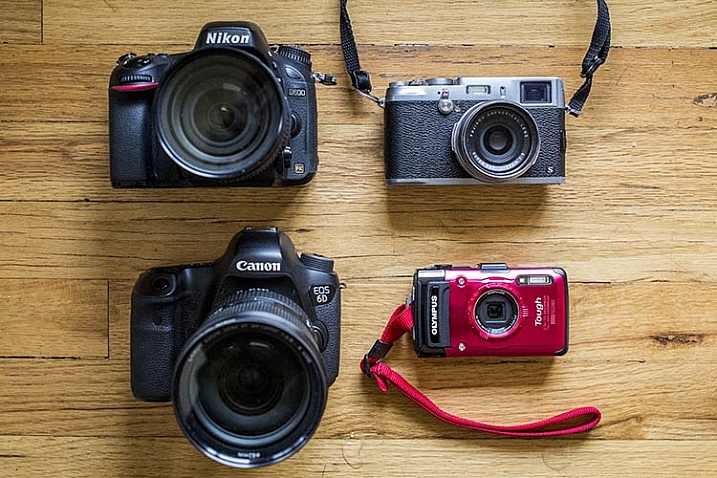
The two cameras on the right are interchangeable lens cameras; the two on the right are not.

1. Extra Lenses

The very first thing you’ll want to do is take a close look at your camera and determine whether or not it is an interchangeable lens camera. If your camera can change lenses, it is considered one, and you will definitely want to think about adding a lens or two to your kit. However, if your camera’s lens cannot be removed, skip this section and move on.

When evaluating which camera lenses to get first, it’s generally not a bad idea to start out with the kit lens that is usually sold with a new interchangeable lens camera (SLR or Mirrorless). These kit lenses are considered starters, and they are inexpensively priced and versatile. Most kit lenses are zooms, meaning you can take a close-up, or wide-angle shot, by simply twisting the zoom ring on the lens.

new camera accessories

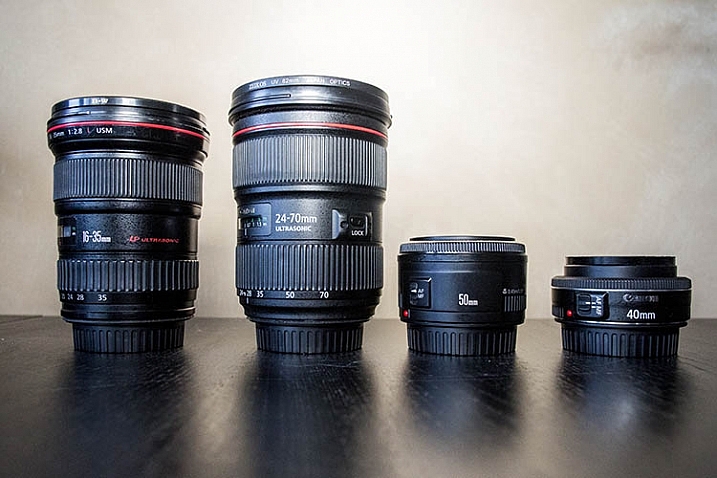
The two lenses on the left are zooms; the two lenses on the right are primes.

Another lens alternative, that most beginning photographers don’t usually know about off the bat, are prime lenses. They only have one focal length, meaning you have to physically move yourself to zoom in, or out, of a photo. The benefits of shooting with prime lenses are numerous including:

  • Quality: Most primes are slightly higher quality, and have crisper images than those taken with zoom lenses.
  • Size: Prime lenses are smaller, more compact, and weigh less than zooms.
  • Price: Prime lenses are usually pretty reasonably priced, compared to zooms of the same quality (maximum aperture).

If you’re considering purchasing a prime lens to accompany your kit lens, start out with a 35mm or 50mm lens. In terms of composition, 35mm (on an APS-C or cropped sensor) is the closest focal composition of the human eye, meaning it will allow you to capture more or less the same amount of a scene that your eye sees. The only downside to 35mm lenses is that they tend to be a bit bulky and expensive, which is why the 50mm is often a preferred alternative at a fraction of the size and price.

As a beginner shopping for prime lenses, ignore the different f-stops (i.e. f/1.4, f/1.8, f/2) specified for each lens and simply purchase the cheapest prime lens that fits your budget. Lenses hold their values well over time, so you can always sell it later when you’re ready to upgrade.

2. Memory Cards

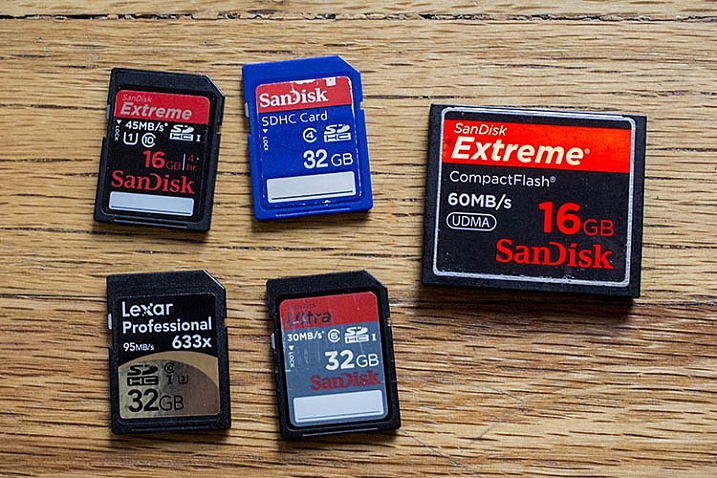
Before you can shoot anything with your new camera, you need memory cards to store all of your photos on your camera. There are a number of different memory cards available, with the most common being the SD (Secure Digital card) and the CF card (Compact Flash card). Be sure to check your camera’s manual, and make sure you buy the right type of memory card. As a beginner, start out with 16GB or 32GB memory cards, and have at least two on you just in case. Also, keep an eye out for sales on memory cards, and stock up when prices are low. You can never have too many!

new camera accessories

SD memory cards are on the left. The large card on the right is a CF (compact flash) card.

3. Memory Card Case and Reader

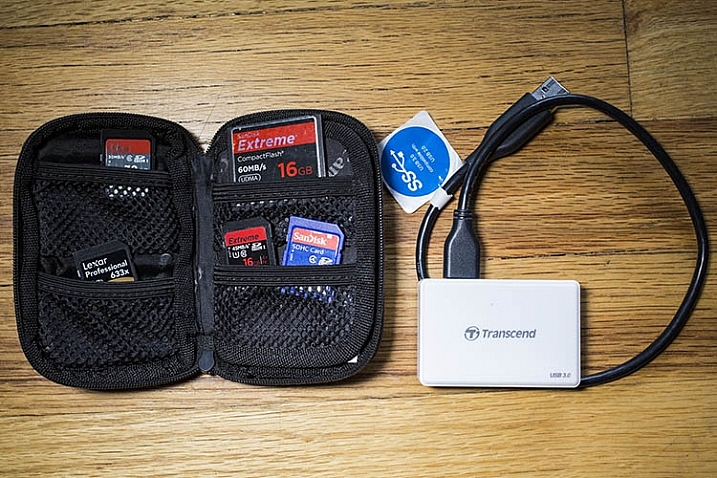
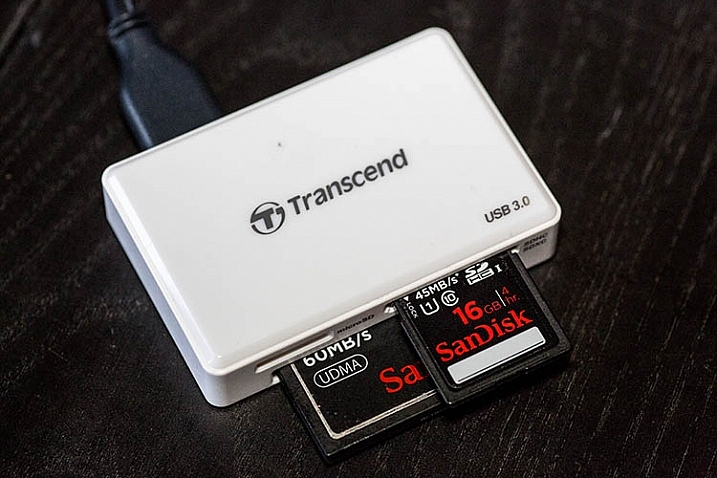
After you purchase memory cards, consider also adding a case or wallet, dedicated to storing and organizing your extra memory cards, as well as a card reader to transfer images from your camera to your computer. Many laptops have built-in memory card readers, but these will generally only accept SD cards. Also, I’ve destroyed many of a memory card by incorrectly inserting SD cards into my laptop, so I always use a card reader. They’re inexpensive, compact, and can even transfer over several memory cards at a time.

new camera accessories

new camera accessories

A memory card reader in action.

4. Ergonomic Camera Strap

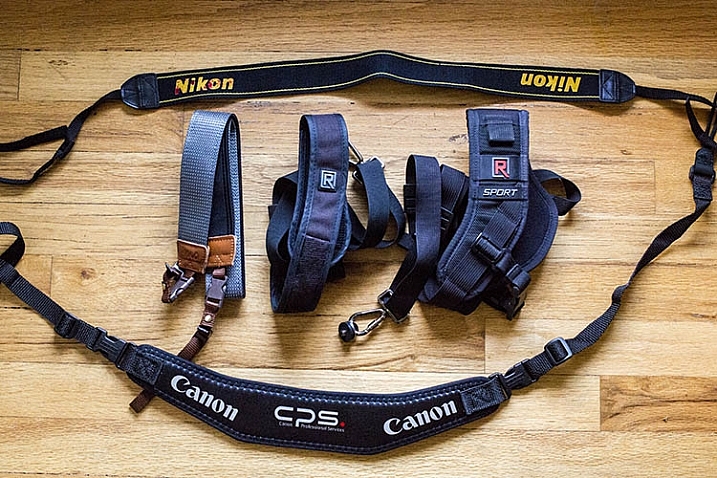
While every brand new camera will come with its own default camera strap, there is also a variety of others available that can help you carry your camera in a flexible, stylish manner. One of the most popular alternative straps is the camera sling, which rests comfortably on your shoulder and keeps your camera hanging closer to your hip, rather than dangling around your neck in front of your chest. There are also rugged, sturdy camera wrist straps if you prefer keeping your camera at arm’s length.

new camera accessories

5. Adobe Creative Cloud Lightroom subscription

Just like all of the items previously mentioned in this article, there’s certainly no shortage of photo editing software choices. But if you’re just starting out, you may as well start with the industry standard for photo editing: Adobe Lightroom.

Considerably more user-friendly than Photoshop, Lightroom doesn’t let you do a ton of photo manipulations like putting your dog’s head on your cat’s body, but it does give you a plethora of tools to process your images. While Lightroom used to cost an arm and a leg, the new Creative Cloud subscription gives you unlimited access to the latest and greatest version, for a low monthly fee. Lightroom is used by pros and hobbyists alike, so if you plan to get serious about photography, take the time to learn how to edit photos in Lightroom.

Over to you

There are certainly plenty more recommended accessories for beginning photographers. You can see a list of the favorite photography gadgets of our dPS writers here.

Would you add any others to the list? Let me know in the comments below.

googletag.cmd.push(function() {
tablet_slots.push( googletag.defineSlot( “/1005424/_dPSv4_tab-all-article-bottom_(300×250)”, [300, 250], “pb-ad-78623” ).addService( googletag.pubads() ) ); } );

googletag.cmd.push(function() {
mobile_slots.push( googletag.defineSlot( “/1005424/_dPSv4_mob-all-article-bottom_(300×250)”, [300, 250], “pb-ad-78158” ).addService( googletag.pubads() ) ); } );

The post Your Next Purchases After You Get a New Camera by Suzi Pratt appeared first on Digital Photography School.


Digital Photography School

 
Comments Off on Your Next Purchases After You Get a New Camera

Posted in Photography