RSS
 

Archive for January, 2016

Layer Chair: Mod Slots Let You Swap Out Panelized Acrylic Decor

10 Jan

[ By WebUrbanist in Design & Furniture & Decor. ]

layer chair

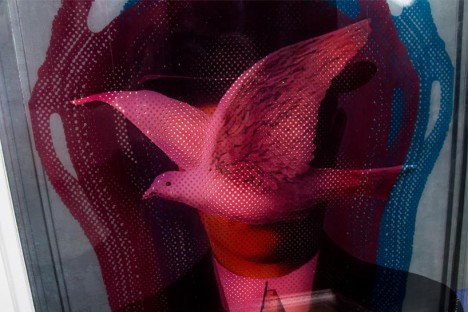
Treating the seat and back as blank slates for expression, the Layer Chair allows its owner to slip in and slide out works of art and design, transforming the look of the furniture on demand.

layer hologram pop art

layer print insertion

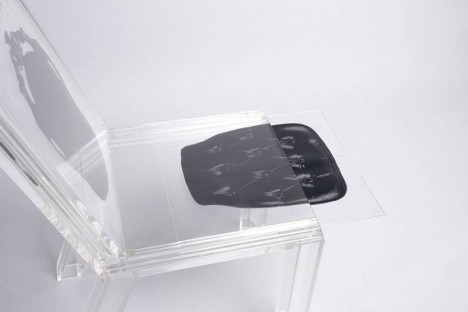
The clear acrylic framework “allows for a see-through structure. Both the back and the base of the chair have a void where the user can fit three different layers of printed or colored acrylic, or even wood, glass, or any other material that comes in mind.”

layer chair mod effect

layer chair diy mod

The approach by South Korean graphic and industrial designer Sohyun Yun is intended to address aesthetic limitations of traditional chairs, which are locked into a single style or look. Instead, through layers, this seat is visually refreshed through user-driven modifications.

layer normal seat use

layer seat insert

Anything is possible, from pairing a hologram back with an Andy Warhol seat print, to slotting in more conventional looking pieces and parts aligned with other furniture looks and styles.

layer custom chair color

layers sliding into place

layer simple colors seat

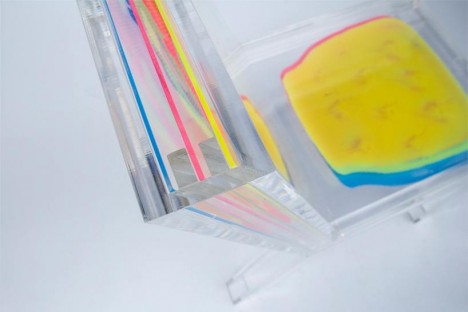
The layers also allow for experimentation and playful interactions between sheets, since their patterns can be partial and/or semi-opaque. A number of layers come with the initial object, but others can be created or bought by users as well.

Share on Facebook


[ By WebUrbanist in Design & Furniture & Decor. ]

[ WebUrbanist | Archives | Galleries | Privacy | TOS ]


WebUrbanist

 
Comments Off on Layer Chair: Mod Slots Let You Swap Out Panelized Acrylic Decor

Posted in Creativity


Week in Review: 2016 CES edition

09 Jan

Week in Review: 2016 CES edition

CES isn’t always a blockbuster show for photography, but Nikon fixed that for us this year. Welcome to 2016, the year of the long-awaited D300 replacement. But that wasn’t all – a few hours before Nikon trounced all over the other show announcements, Olympus took the wraps off a 300mm F4 Pro lens, Panasonic put a 1″ sensor into a travel zoom camera and Kodak brought back Super 8. If this week was any indication of how the rest of 2016 will go, then we’ll be needing a lot more of the ‘Just Chill’ anti-energy drinks that Dan brought into the office last week.

Nikon D5/D500

We knew that Nikon had a professional grade full-frame camera coming, so while we weren’t surprised to see the D5 announced at CES, we were not expecting the D500. Possibly the longest-awaited successor to a popular model ever, the D500 replaces the D300S after six years – long after many enthusiast Nikon photographers had given up hope of ever seeing it.

Like the D5, the D500 uses a 20MP CMOS sensor and 153-point AF system. But being an APS-C format camera, that AF array stretches almost to the edges of the frame. Both the D5 and D500 are hugely impressive and we look forward to getting them in our studio very soon.

Nikon KeyMission 360

Nikon had quite a few ‘firsts’ this week, including the introduction of its first 360-degree camera. Despite a name that reminds of Tom Cruise movies, the KeyMission 360 looks enticing. Fully rugged and capable of 4K video, the KeyMission uses two lenses on opposite sides of the camera to create immersive video and stills. We weren’t able to get any closer to it than this and were told that the design is ‘not quite final yet.’ For now it’s just a mysterious figure behind glass and a super intense name.

Panasonic Lumix DMC-ZS100/TZ100

Joining the ever-expanding ranks of 1″-type sensor compacts is the Panasonic Lumix DMC-ZS100. With its 25-250mm equivalent field of view it provides more reach than the RX100s without the substantial size gains seen in the likes of the company’s own DMC-FZ1000 or Canon’s PowerShot G3 X. Throw in an EVF and Panasonic has a little travel cam ready to accompany you on your next journey.

Samsung

We’re still hoping for some signs of life from Samsung’s NX series but it’s looking pretty grim. We expected the scene at the company’s CES booth to be heavy on VR, high-tech refrigerators and gadgets like the new Galaxy TabPro S, but we’d hoped for at least a glimpse of their camera lineup on the tech world’s biggest stage but nope, not a peep at the press conference and not a single NX1 at the booth.

Maybe, argues staff writer Dan Bracaglia, it’s time to open up your smart fridge, crack open a cold beverage and pour it out for Samsung’s mirrorless line. And that’s a real shame.

Olympus M.Zuiko PRO 300mm F4

When we were briefed on the Olympus M. Zuiko PRO 300mm F4 we were told about the amazing tolerances used when making this lens. This quote isn’t verbatim, but it went something like ‘If the front element is a football field, we are removing inconsistencies the size of a human hair.’

This geeky attention to detail has always been characteristic of Olympus, and the sharpness of the 300mm is a testament to the manufacturer’s hard work. Combine that with a 600mm equivalent prime that can feasibly be used handheld, and we have one impressive tube of metal and glass on our hands. Check out our sample gallery to witness the sharpness for yourself.

Kodak Super 8

Slated for a Fall 2016 release date, the Kodak Super 8 was among the most surprising products we saw at CES this year. It’s not entirely clear how, but the Super 8 still shoots Super 8 film cartridges (which Kodak will process and digitize for you) while allowing you to preview your cinematic masterpiece by way of a flip-out LCD monitor.

A built-in handle/microphone, an array of ports and a versatile C-mount round out the package. Sure, Kodak is leaning pretty heavily on nostalgia-fueled hype surrounding the format and being stingy with actual details on the Super 8 itself, but we still can’t wait to get our hands on a production model.

Week in Review: 2016 CES edition

One does not simply walk into the Las Vegas Convention Center during the first week of January. Prepping for and surviving CES is like an athletic event, never-ending networking happy hour and a Sunday at Ikea all wrapped into one. For several days in a row. So here’s a shout out to Dan and Dale, the DPR staffers who were our eyes and ears on the ground at the show this year. Thanks for hauling your laptops and camera gear through the convention hall for days on end, taking lots of notes and photos, and eating boxed press lunches while sitting on the floor. We owe you a couple of Just Chills.

Articles: Digital Photography Review (dpreview.com)

 
Comments Off on Week in Review: 2016 CES edition

Posted in Uncategorized


Histograms for Beginners

09 Jan

When the digital revolution came to photography it brought with it a plethora of advantages for photographers: making vast quantities of images with no increase in cost; seeing the photo immediately after you make it; changing ISO with each shot; and the advent of the digital darkroom; to name a few.

One of the most important benefits of digital photography is one that can be a little intimidating for new photographers – the histogram. But there’s no reason to shy away from it – it’s actually pretty easy to use once you understand how it works. The histogram is simply a graphical representation of the tonal range of your photo that helps you evaluate the exposure.

Before digital photography, we had to wait until we developed the film to know for sure whether we got a good exposure when we made an image. Now, by using the histogram, this information is at your fingertips before you take the shot (in cameras with Electronic Viewfinders), after you take the shot, and during post-processing as well.

How to Read Your Histogram

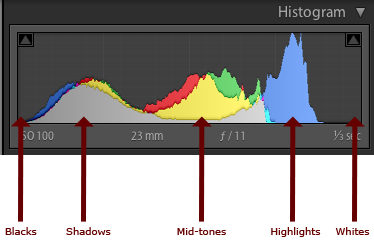
It’s easy: the blacks are on the left, the whites are on the right, all the mid-tones are in between.

histogram-info

The most important thing to know about the histogram is that a spike on the right, that touches the edge of the graph, is a problem. That means that there is a portion of your image where the highlights are “blown out”, or completely white with no detail. The reason this is such a big problem is that an area that is blown out contains no data at all, so you will not be able to do anything in post-processing to adjust it. This only applies if the spike touches the edge of the graph. If it spikes before the edge, that’s okay.

If there is a spike on the left edge, it means part of your image is completely black. You may want to use your exposure compensation to adjust the exposure to the right to make it brighter. But remember that having part of your image completely black, especially for a night shot, is okay.

There is no such thing as a perfect histogram. It’s just a graphical representation of the tonal range in your image. It’s up to you, as the artist, to decide what to do with this information. Having solid blacks and bright tones (provided they are not blown out) is not necessarily a bad thing.

Let’s take a look at some examples of how histograms will look for different types of images.

Histogram Examples

High Key Scene

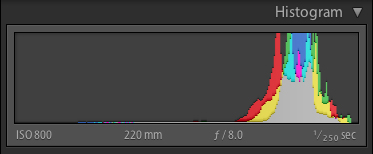
When you have a scene that is high key, it has a lot of bright tones, and not so many mid-tones or blacks. When you are photographing a scene that you want to be high key, your histogram should be stacked up on the right side – but not going up the right edge. If you want your scene to be high key, but your histogram is showing a lot of mid-tones, your whites are probably going to come out looking more gray than you would like.

Pelicans at the Salton Sea, California

A high key or light toned scene

histogram-swans

Histogram for the image above showing mostly light tones

Low Key Scene

A low key scene is one that is dark, which you would expect when photographing at night. In this case, your histogram will be stacked up on the left side. You may have a spike on the left edge, which indicates solid blacks.

Star Trails in Guadalupe National Park

A low key or dark scene will have mostly tones on the left side of the histogram.

histogram-stars

Histogram for the image above showing a dark scene.

High Contrast Scene

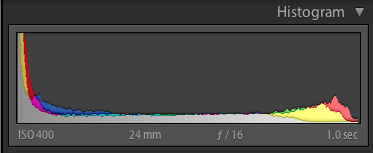
A high contrast scene is one where there are lots of very dark, and very bright tones, and perhaps not so many tones in between. In this case, your histogram will show data on the left and right, and not so much in the middle.

Fountains of Bellagio

High contrast scene. Extreme brights and extreme darks with little in the middle.

histogram-fountain

Histogram of high contrast scene above.

Low Contrast Scene

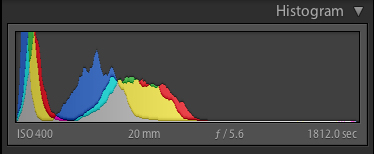
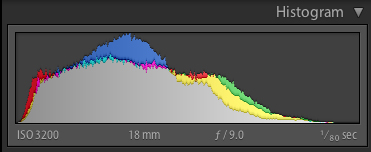
A low contrast scene has a lot of mid-tones, and few and bright tones. Your histogram will have a bell shape.

Butchart Gardens

histogram-garden

Again, it’s up to you as the artist to choose what to do with this information. You have to decide whether the information in the graph is what you want or not. It’s just another tool in your arsenal, to help you transform your artistic vision into a photograph.

If you’re not happy with your histogram, use your exposure compensation to adjust the exposure by making the image darker or lighter. Or, you may choose to affect the light on the scene instead by using a flash, a reflector, or a diffuser. The choice is yours.

Understanding the Colour Histogram

You’ve probably noticed in the examples above that the histogram not only shows the tones in grayscale, but it also shows you colours. Yes, it’s possible to blow out a colour! If there is one particular colour that is very bright in the scene, sometimes that colour will become so saturated that you loose detail. This commonly happens with red flowers for example.

Red Flower with Bee

histogram-flower

To combat this, you can slightly desaturate the colour in post processing to bring back some of the detail in the flower petals. The histogram above shows the increase in red tones towards the brighter end of the scale.

When to use the Histogram

In the field, you can use the histogram in conjunction with Live View to see it before you make an image (or turn it on if you have a camera with an Electronic Viewfinder like many mirrorless models offer). You can also see it afterwards when you review the photo on your LCD screen. Either way, it’s critical that you use the histogram to check your exposure while you’re in the field. That way you have an opportunity to make another exposure while you are still on scene.

Don’t rely on your LCD to give you feedback about exposure. It’s great for checking composition and focus, but not exposure. That’s because the brightness of your LCD has nothing to do with the brightness of your image, since you can adjust the brightness of your LCD. For example, you can brighten it so you can see it more easily outside on a sunny day. But then if you don’t change the brightness back again and you look at it at night your images are going to appear super bright, when they actually are not.

The histogram is also available to you while post-processing your image. Use it to see where adjustments need to be made and to ensure that you don’t create areas that are too bright or too dark while processing your images.

I hope that gives you a better understanding of how to use this handy tool. If you have any questions about histograms please put them in the comments below.

googletag.cmd.push(function() {
tablet_slots.push( googletag.defineSlot( “/1005424/_dPSv4_tab-all-article-bottom_(300×250)”, [300, 250], “pb-ad-78623” ).addService( googletag.pubads() ) ); } );

googletag.cmd.push(function() {
mobile_slots.push( googletag.defineSlot( “/1005424/_dPSv4_mob-all-article-bottom_(300×250)”, [300, 250], “pb-ad-78158” ).addService( googletag.pubads() ) ); } );

The post Histograms for Beginners by Anne McKinnell appeared first on Digital Photography School.


Digital Photography School

 
Comments Off on Histograms for Beginners

Posted in Photography


10 Winter Miles of Stand Up Paddling on South Platte River

09 Jan

January 3, 2016. First SUP paddle of the year with Rob Bean. We paddled 10 miles on the South Platte River from highway 58 to Kuner. Great weather, river flow ~900 cfs at Kersey, several bald eagles and hundreds of ducks. There are no portages on this river section since we started just below the Plumb Ditch Dam (the second diversion dam if you paddle from Evans).

We started from a gravel bar under the new bridge on highway 58 – a right river shore with parking on a wide shoulder, a shorter, steeper route with barbed wire fence on the upstream bridge site. Downstream bridge site may be more convenient without the fence, but with a little longer walk. You can reach the bridge by turning into the new highway 49 at traffic lights from Colorado highway 34 between Evans and Kersey.

Rob posted his pictures on facebook. They actually show much better our launching site.

Start at gravel bar under the new highway 58 bridge

Start at gravel bar under the new highway 58 bridge

Somewhere on the river around Kersey

Somewhere on the river around Kersey

Ducks, ducks, and more ducks. Hundreds of them.

Ducks, ducks, and more ducks. Hundreds of them.

winter SUP paddling on South Platte River

Finishing 10 mile trip at Kuner

A little bit icy  landing at landing (left shore upstream of the bridge)

A little bit icy landing at Kuner (left shore upstream of the bridge)

Related posts:
South Platte River below Denver – river guide
Starting 2015/16 Winter Paddling Season on South Platte River
Paddling SUP on South Platte River from Kersey to Kuner
South Platte River from Wildcat to Evans by SUP


paddling with a camera

 
Comments Off on 10 Winter Miles of Stand Up Paddling on South Platte River

Posted in Photography


Panasonic adds Leica 100-400mm F4-6.3 tele-zoom to Micro Four Thirds lens lineup

09 Jan

$ (document).ready(function() { SampleGalleryV2({“targetContainerClass”:”sampleGalleryImageViewerContainer”,”galleryId”:”2215321511″,”isEmbeddedWidget”:true,”selectedImageIndex”:0,”startInCommentsView”:false,”isMobile”:false}) });

Panasonic is adding a high-end super telephoto zoom lens to the Micro Four Thirds lineup: the Leica DG Vario-Elmar 100-400mm F4-6.3 ASPH. This lens has the longest focal length of any MFT lens, and Panasonic promises fast autofocus thanks to its 240 fps AF drive speed.

This lens is equivalent to a whopping 200-800mm when attached to a Micro Four Thirds body and features much-needed ‘Power’ optical image stabilization to keep things steady. It has has one aspherical, one UED, and two ‘regular’ ED elements, as well as a nine-bladed circular aperture. The minimum focus distance is 1.3m, with a magnification of 0.25x. 

A cool feature of this lens is its compact tripod collar which rotates with the camera body, taking the buttons with it. The collar has a tripod screw mount built into it, into which a longer (included) ‘foot’ can be added if additional clearance is need. The zoom lock is built into the lens barrel, as is a small pull-out lens hood (a full-sized hood is available as an optional accessory). The 100-400mm is also sealed against dust and moisture.

The Leica DG Vario-Elmar 100-400 F4-6.3 will be available in early April at a price of $ 1799.99.


Press release:

Panasonic Launches LUMIX G 100-400mm Telephoto-Zoom, LEICA DG VARIO-ELMAR Lens

Las Vegas, NV (January 5, 2016) – Panasonic has today introduced a new telephoto lens for its LUMIX G range of Micro Four Thirds System cameras – the LEICA DG VARIO-ELMAR 100-400mm F4.0-6.3 ASPH. Telephoto-Zoom (H-RS100400) with Power Optical Image Stabilization (O.I.S.).

Small, light and highly durable, the latest addition to Panasonic’s range of interchangeable lenses is perfectly suited for photographing birds and other wildlife in all types of environments.

The lens is constructed of 20 elements in 13 groups and incorporates a number of aspherical and extra low dispersion elements to assure best quality and avoid flaring. The advanced construction of the new Telephoto-Zoom leads to highest quality standard earning the LEICA Logo for a LUMIX Lens once again.

Outstanding image quality and Telephoto-Zoom performance

Elegantly designed with a metallic black finish, the new 100mm-400mm LEICA DG VARIO-ELMAR lens from Panasonic provides superb image rendering across the entire zoom range. The lens’ 200-800mm focal length (35mm equivalent) and 0.5x Magnification capability provide highly detailed shots from distance, as well as stunning close up capability– ideal for subject matter regardless of shape and size.

In order to capture steady, vibration free images across the entire zoom range, the lens also incorporates Power O.I.S. to keep unwanted shaking under control and ensure pictures look crisp and clear. 

The 100mm-400mm lens is also suited to a variety of photographic styles – with nine diaphragm blades providing a circular aperture to produce a smooth and beautiful bokeh.
 
Smaller and lighter than other Telephoto-Zoom lenses

When compared with conventional super telephoto DSLR lenses, the latest addition the LUMIX G line up offers outstanding mobility – perfect if you’re travelling and don’t want to pack too much. Similarly, the lens also boasts a durable, gapless construction so you no longer have to worry about unwanted dust or light rain damaging your equipment.

In addition to the lens’ practical size and weight, a compact, two-part tripod mount has also been incorporated to enable faster conversion between landscape and portrait orientation. While conveniently and speedily turning to the 90° angle, the levers for Focus Limiting, Power O.I.S. and the manual focus switch remain right at your fingertips as they do not move when you turn the lens. 

The lens also incorporates an integrated, hide-away hood to help you capture that perfect shot, without having to worry about sun glare.

Stunning 4K video capability

Panasonic’s new LEICA Telephoto-Zoom lens is perfectly suited for 4K video recording with its construction assuring the best contrast and colors. Furthermore the Telephoto-Zoom incorporates Panasonic’s high speed and precise 240 fps AF-motor. Due to the modern design, filming can also be conducted silently, so you can get up close to the subject without drawing attention.

As well as high resolution video, the lens’ 4K capability also enables you to take photos like never before. Panasonic’s 4K Photo function – found on LUMIX G cameras including the LUMIX DMC-G7 – lets you extract an 8-megapixel still from 4K video (30fps) easily right on the camera’s screen with a simple fingertip touch.

Key features:

  • Longest focal length for Micro Four Thirds
  • Compatible with Dual Image Stabilization
  • 240fps AF Drive
  • Zoom ring lock
  • Weather Sealing
  • Integrated Quick Shifting Tripod Mount
  • Integrated shift-away lens-hood

Panasonic Leica DG 100-400mm F4.0-6.3 ASPH specifications

Principal specifications
Lens type Zoom lens
Max Format size FourThirds
Focal length 100–400 mm
Image stabilisation Yes
Lens mount Micro Four Thirds
Aperture
Maximum aperture F4.0 – F6.3
Minimum aperture F22.0
Aperture ring No
Number of diaphragm blades 9
Aperture notes Circular blades
Optics
Elements 20
Groups 13
Special elements / coatings 1 aspherical ED, 1 UED, 2 ED elements
Focus
Minimum focus 1.30 m (51.18)
Maximum magnification 0.25×
Autofocus Yes
Motor type Micromotor
Full time manual Yes
Focus method Extending front
Distance scale No
DoF scale No
Focus distance limiter Yes
Physical
Weight 985 g (2.17 lb)
Diameter 83 mm (3.27)
Length 172 mm (6.75)
Sealing Yes
Colour Black
Zoom method Rotary (extending)
Power zoom No
Zoom lock Yes
Filter thread 72.0 mm
Hood supplied Yes
Tripod collar Yes

Articles: Digital Photography Review (dpreview.com)

 
Comments Off on Panasonic adds Leica 100-400mm F4-6.3 tele-zoom to Micro Four Thirds lens lineup

Posted in Uncategorized


Nikon’s New D5 and D500 Push the Boundaries of DSLR

09 Jan

Nikon D5 and D500 Push the Boundaries of DSLR

CES 2016 saw the announcement of two important DSLRs from Nikon, including an update to its flagship line, as well as an almost mythical product many had given up hope of ever seeing: a true D300 replacement.

The newly announced D5 is Nikon’s top-of-the-line professional DSLR, with a 20.8MP full frame sensor capable of shooting at up to 12fps with AF and 14fps without (with the mirror locked up). The headline feature, though, is arguably the new 153 point AF system with 99 cross-sensors. AF tracking with this new system will also benefit from the doubling in resolution of the RGB metering sensor used for scene analysis, and the D5 is the first Nikon camera capable of 4K video.

The biggest news though may be the long-awaited replacement of the D300S. The 20.9MP APS-C D500 is Nikon’s ‘best enthusiast DX offering’, and the term ‘enthusiast’ might be an understatement. With continuous shooting speeds of 10 fps and a 200 shot buffer for Raw images, the camera is aimed squarely at action and fast-paced photographers who don’t mind the smaller sensor, or even benefit from its extra reach. It features the same 153-point AF system and 180k-pixel RGB metering sensor of the D5, along with the EXPEED 5 processor. It can also capture 4K/UHD video and also features ‘SnapBridge’, a constant connection to a smartphone using Bluetooth.

Join us as we take a closer look at the technologies inside these cameras.* Pro tip: you may find viewing this slideshow easier if you hover over and click the ‘fullscreen’ button at the upper right of the slide, and use left/right keys to leaf through the slideshow.


* Some of the information in these slides come from Nikon’s technology digest on the D500, here.

Nikon D5 and D500 Push the Boundaries of DSLR

Let’s start with the AF module, which is shared between both the D5 and D500. Here is the Multi-Cam 20K in all its glory. It’s a major step up from the Multi-Cam 3500FX module, variants of which were found in the D4s, D810, and D750. Up from 51 total AF points with 15 central cross-sensors, the module in the D5 and D500 offers 153 phase-detect points with 99 cross-sensors spread across much of the frame. 

The improvements don’t stop there though: the module has its own dedicated processor, to deal with the computationally intensive information coming from 153 AF points cross-referenced with the scene analysis system (more on that later). The center AF point is now sensitive down to -4 EV. All 152 other points are sensitive down to -3 EV, much like the D750 and D7200, albeit now with an even wider spread of points.

If Nikon’s claims are true, we can expect formidable AF performance in low light from the D5 and D500 – possibly the best from any DSLR. Although we’ve previously found Sony’s a7S to focus in at nearly -5 EV, its contrast-detect AF, and associated hunting, made it quite slow in practice. -4 EV phase-detect AF on a DSLR should be seriously impressive because it will likely be far more decisive than mirrorless, contrast-based systems. Additionally, cross-type sensors tend to perform better in low light and with low contrast subjects: cross-sensors are able to make focus measurements from subjects containing both horizontal and vertical detail (or, at least, detail that has either a horizontal or vertical component to it). In low light or backlit situations, where lowered contrast already makes it difficult to distinguish subject detail, sensors looking along multiple axes for detail to ‘lock on’ to simply have a higher chance of success than sensors that can only ‘see’ detail with a, say, horizontal component.

Nikon D5 and D500 Push the Boundaries of DSLR

Here’s the spread of AF points across the frame in the D5. The new AF module appears to provide more AF coverage across the frame than any previous Nikon full-frame camera (and likely any full-frame DSLR), though not quite as much coverage of phase-detect points as Sony’s recent Alpha 7R II mirrorless full-frame.

55 of the points are user-selectable, indicated by squares. The AF points indicated by dots are essentially assist points, used by the camera if your subject moves to or simply happens to fall in between the user-selectable points. What makes these assist points particularly useful in a Nikon? Nikon’s industry-leading 3D tracking, which’ll select any one of them for you automatically if your subject happens to move, or you recompose, such that it falls under one of these assist points (in AF-C ‘Auto’ and ‘3D’ modes, that is). The video below shows how 3D tracking can be used on a D750 to precisely track an eye, so those wondering how 153 points might be useful, well, imagine this sort of performance but even more precise, with wider AF point coverage.

35 of these 55 points are cross-type: the outermost two sections of 10 points each as well as the central section of 15. This is more clearly demarcated in the next slide.

Nikon D5 and D500 Push the Boundaries of DSLR

Here’s what you get by putting the designed-for-full-frame Multi-Cam 20000 module inside the APS-C D500. The AF points stretch out to the literal edges of the frame. Red points indicate cross-sensors. While Canon’s nearest competitor, the 7D Mark II, comes quite close to this level of coverage – with all cross-sensors to boot – it doesn’t quite match it.

But it’s not even these headline features that excite us the most. It’s details such as the addition of an automated system for applying AF fine tune that have really caught our eyes. We’ve written before about how mirrorless cameras, with their direct measurement of focus (rather than a secondary sensor, acting as a proxy) tends to be more accurate when it comes to fine-focusing, especially when using fast lenses. However, we’re not alone in proposing the idea of using DSLR’s often slow, but highly precise live view autofocus to help make it easier to correct for the cumulative errors that can undermine dedicated sensor phase detection systems. Patents have been issued yet this is the first time we’ve seen it implemented in a final product. Automating the process means far more photographers may actually calibrate their lenses for more accurate focus. Furthermore, the reality of DSLR AF is that the optimal calibration values can depend on lighting, environmental factors, wide or tele end of zoom, and subject distance; hence, automating the process will realistically allow users to calibrate more often for any given scenario. Sadly, there’s no indication that calibration values can be saved for different focal lengths or subject distances (a la Sigma lenses via their USB dock), nor is there any mention of higher precision central points that give the latest Canon cameras’ central AF point nearly mirrorless-levels of precision.

We’ve not yet had a chance to use the D5/500’s automated AF fine tune but you can be sure it’ll be one of the first things we try when one gets into our studio.

Nikon D5 and D500 Push the Boundaries of DSLR

Remember that ‘scene analysis system’ the AF system cross-references with information from the 153 AF points? It’s enabled by essentially a whole separate image sensor in the DSLR whose sole job is to analyze the scene to understand how to expose and focus it. Now with 180,000 pixels in the D5 and D500, this sensor has doubled in resolution compared to the D4s, D810, and D750.

Confused by how this works? Let’s break it down. Your smartphone or mirrorless camera projects light from the lens directly onto the imaging sensor, which can ‘see’ the scene to focus and expose it properly, even find faces or other subjects and track them no matter where they move to in the frame. DSLRs have it much tougher – all the light entering the lens is being diverted either upward to the optical viewfinder, or downward to a dedicated AF module with its phase-detect sensors that understand only distance. Some of that light going to the viewfinder is itself diverted to a metering sensor, which determines appropriate exposure. Some time back, DSLR manufacturers replaced this rudimentary metering sensor with an actual RGB 2D array or, essentially, an image sensor.

While years ago this image sensor started at a measly 1,005 pixels in the D300, it did enable rudimentary subject tracking (‘3D tracking’ in Nikon terms), since the sensor provided some color and spatial information about the subject underneath any AF point, which the camera could combine with an understanding of subject distance from the phase-detect AF sensors to understand where your subject of interest is at any given moment. Today, cameras like the D750 and D810 provide uncanny subject tracking with their 91,000-pixel metering sensors – able in many cases to track even objects as specific as a human eye. Nikon DSLRs are the only DSLRs we’ve tested to-date that are capable of the level of class-leading tracking precision you see in the videos linked above (Canon’s newer DSLRs do well with distant subjects well isolated with respect to depth, but lag behind in more demanding applications requiring higher precision). Hence, a doubling in resolution of the metering sensor is likely to further Nikon’s lead in this arena. Furthermore, metering applications also benefit from the increased resolution: as the flowchart above indicates, numerous features like face exposure, fill-flash, Active D-Lighting, and highlight-weighted metering will experience increased accuracy. 

Nikon D5 and D500 Push the Boundaries of DSLR

Click on the button at the upper right of the image to view this entire slideshow in fullscreen for a better view.

So what exactly does this 180,000-pixel RGB metering sensor ‘see’ such that it can aid the camera in finding faces and tracking subjects? We’ve taken the liberty of doing some guesswork to simulate a ‘worst case’ representation of how a 180k-pixel sensor might ‘see’ a typical scene being photographed.

If we assume that the 180k figure refers to the total number of red, green and blue pixels, then we can surmise that there’s only, at best, 60k pixels of true spatial information for any given color. For a 3:2 aspect ratio, that’s about 300×200 pixels. So we’ve taken an image and reduced it to 300×200, then blown it back up for ease of viewing. That’s what you see above.

In reality, the metering sensor is likely to ‘see’ a bit more resolution, since the above only represents the spatial resolution of any one color channel (or 3 R, G, and B pixels combined). Even still, you can get an idea of how the sensor can detect faces, and even understand what was underneath your selected AF point when you initiated focus in order to track it even if it moves to a position underneath a different AF point. With such increases in resolution of the scene analysis system, we wouldn’t be surprised if DSLRs one day were capable of eye detection. And while we fully expect the D5/500 to be capable of tracking an eye, it’ll only do so in ‘3D tracking’ mode once you’ve ‘told’ the camera where the eye of interest is by initiating focus with your focus point over it. We’ll be curious to see if the automatic face detection in ‘Auto’ area mode prioritizes eyes of faces. 

Nikon D5 and D500 Push the Boundaries of DSLR

Click on the button at the upper right of the image to view this entire slideshow in fullscreen for a better view.

Compare the last image to this one (use the left/right keys on your keyboard for ease): a 213×142 pixel representation of the same image that simulates the spatial resolution of any one color channel for the 91,000-pixel RGB metering sensor in previous full-frame Nikon DSLRs. It’s not hard to imagine how even with this level of understanding of a scene, previous Nikon full-frames were able to track quite well. But every bit of resolution helps increase precision of tracking, so while the image above isn’t a huge step down from the last image representing what the new 180k-pixel sensor sees, there’s still a significant difference.

And remember, Nikon already led the industry with its previous 91,000-pixel RGB sensor, even performing better at subject tracking than the Canon 5DS and 7D Mark II with their 150,000-pixel RGB+IR metering sensors. Hence, we expect the doubling in metering sensor resolution to further widen the gap in performance between Nikon and all other DSLRs, potentially making the Nikon platform the best for applications that benefit from continuous subject tracking (barring any missteps on Nikon’s part). Continuous eye tracking on a Sony a7R II is still likely to give the D5/500 a run for its money, but general subject tracking of any subject, even to aid ‘focus-and-recompose’ by having the camera automatically select an appropriate AF point to stick to your subject as you recompose, will likely remain unparalleled on these Nikons compared to any other camera. 3D tracking’s ability to combine scene analysis with the distance information reported by every AF point on the phase-detect sensor makes for subject tracking that I, personally, find indispensable shooting candid portraits or weddings and events in a more photojournalistic style: I ‘define’ my subject by initiating focus on it, and the camera retains focus on it no matter how I recompose or where the subject moves to as long as I keep the shutter button half-depressed.

Nikon D5 and D500 Push the Boundaries of DSLR

Click on the button at the upper right of the image to view this entire slideshow in fullscreen for a better view.

The 180k-pixel metering sensor is a huge step up from previous DX offerings from Nikon, which only featured – at best – a 2,016-pixel RGB metering sensor. The 90-fold increase in metering sensor resolution should bring a level of subject tracking to the DX format never before seen.

Above is a 55×37 pixel representation of our previous image – and this time that’s a sort of ‘best case’ representation of what cameras like the D7200’s scene analysis system ‘saw’. Instead of showing you what any one color channel sees, we’ve decided to show you what 2k pixels in total looks like, as one-third of this resolution is a pixelated, unintelligible 32×21-pixel mess (from this forum discussion). In other words, the image above represents only a 30x drop in resolution compared to our previous 180k-pixel representation, and so likely underestimates the increased performance the scene analysis system in the D500 is likely to exhibit compared to previous DX offerings (which still performed surprisingly well for their low resolution metering sensors).

Nikon D5 and D500 Push the Boundaries of DSLR

Another feature enabled by the RGB metering sensor is flicker reduction. While this is only available in video on the D5, the D500 is capable of waiting until the right moment to fire the shutter under flickering light, so as to achieve and maintain proper exposure. Although Canon has been offering this since the 7D Mark II, it’s the first time we’re seeing this feature in a Nikon camera.

Nikon D5 and D500 Push the Boundaries of DSLR

It’s worth emphasizing here something Nikon clearly emphasized in their press conference: one of the true advantages of a DSLR over current mirrorless cameras is the lack of viewfinder lag and the true view of the scene – at least in between mirror blackouts – compared to the typical stop-motion sequence of last-shot images most mirrorless cameras exhibit during fast bursts. This simply makes it easier to follow action with an optical viewfinder than with a mirrorless camera, which is why in the video screenshot above, the photographer was able to maintain the center AF point over his subject with the D5, while missing the subject with the ‘mirror-less’ camera example on the left. It’s worth noting though that Nikon’s own 1-series cameras provide a live feed even during continuous shooting, which actually circumvents this shortcoming of mirrorless (hint: that’s how mirrorless cameras will undoubtedly address this issue in the future).

DSLRs have also been optimized to make quick phase-detect AF measurements in between those quick mirror blackouts, allowing cameras like the D5 and Canon’s 1D X to acquire AF almost instantaneously even during 12 and 11 fps bursts. Impressive to say the least. That’s not to say mirrorless cameras aren’t catching up – in good light, Samsung’s NX1 can often successfully continuously refocus at 15 fps. Which means, yes, we do have to call out Nikon for suggesting that all mirrorless cameras have ‘soft and slow AF’: we can’t help but wonder if in that particular video sequence, the Sony Alpha series camera were left in AF-S, as cameras like the a7R II can, in fact, successfully refocus on approaching subjects (and when it can’t, the box doesn’t remain green as it does in the out-of-focus example in the Nikon press conference video – unless the focus mode is left in AF-S).

Regardless, though, with mirrorless cameras you’re still left with the issue of difficulty in following the subject without a live view during bursts.

Video: Matt Granger

Nikon D5 and D500 Push the Boundaries of DSLR

Another feature that really helps fast-paced photography is direct access to AF point selection. The D500 is the first DX-format Nikon to sport a dedicated AF-selection joystick, pictured right below and to the left of the AF-ON button. In fact, short of the D4/D5-series of cameras, it’s the only Nikon camera to feature this joystick. Cameras like the D750 and D810 dedicate their D-pads (pictured here above the ‘info’ button) to AF point selection, which works well, but never felt as fast as Canon’s dedicated AF-selection joystick. So the joystick is a welcome addition.

And if we understand correctly, the D500’s touchscreen LCD can also be used to directly access AF point selection (don’t quote us on this yet though). We first saw this on the D5500, where in OVF shooting you could dedicate the right half of the touchscreen to AF point selection. This made it really easy to use your thumb to instantly jump over to any AF point instantaneously, without your eye ever leaving the viewfinder. It’s actually faster than using a dedicated joystick, and we’re hoping to see similar functionality in the D500. The D5 does not retain this functionality with its touchscreen, though.

This brings me to a point I’ve made for some time to manufacturers now: why not just replace the AF joystick and area where your thumb rests with an AF touchpad? It could be relatively small, but with a 1:1 mapping to selectable AF points such that – over time – your thumb would learn to quickly jump to, or near, any desired AF point. For enhanced precision of selection, make the touchpad pressure sensitive and have different pressures activate different granularity of AF point movement. Want to avoid accidentally shifting the AF point? Allow the user to adjust pressure sensitivity of the touchpad. The possibilities are limitless with some good hardware and some clever programming.

Speaking of fast AF point selection, those fond of the ‘focus and recompose’ technique should take note: turn on Nikon’s ‘3D tracking’ in AF-C, place your selected AF point over your subject, half-press and hold the shutter button, then recompose. This is probably the fastest way to select a different AF point: by having your camera do it automatically using Nikon’s industry leading subject tracking. If your subject falls outside of the AF area, just let the camera track it all the way out to the nearest AF point, then hold down the AF joystick (‘sub-selector’) to lock AF, and continue recomposing.

Nikon D5 and D500 Push the Boundaries of DSLR

Speaking of ergonomic improvements, notice anything different near the shutter button? That’s right, you no longer have to re-assign the movie button to ISO, because there’s now a dedicated ISO button! This is a boon for one-handed shooting: previously, I’d always reassign the movie record button to ISO so I could change ISO setting during one-handed shooting (since the ISO button is usually on the left side of Nikon DSLRs).

It’s also worth pointing out the button next to the ISO button: the dedicated exposure compensation (EC) button. Common to most higher-end Nikons, this button is really not to be overlooked. It means easy, consistent access to exposure compensation no matter what shooting mode you’re in, including M mode with Auto ISO. Certain competitors without dedicated EC dials or buttons make it it quite difficult to bias brightness in M mode with Auto ISO engaged (looking at you: 1D X, which will make you sacrifice the SET button for EC or make you pull your eye away from the viewfinder to use the Q menu to adjust EC in M mode).

Nikon D5 and D500 Push the Boundaries of DSLR

Not to be overlooked is the new SB-5000 Speedlight: the company’s new flagship flash. Its standout feature is its ability to operate and trigger via radio frequency, a first for Nikon’s line of portable flashes. This brings the Nikon system in-line with what Canon has offered for some time now, and also obviates the need for 3rd party accessories.

Nikon claims that when the flash is paired with the WR-R10 Wireless Remote Adapter set and a D5 or D500, the flash will operate without a direct line of sight at a range of up to approximately 98 feet (30 meters). With that same combination, the flash will be able to control up to six groups or 18 Speedlights. Photographer Todd Owyoung confirms that Nikon CLS features like TTL, Manual power, Groups, and Flash Exposure Compensation settings are all accessible directly via the camera menu system as it essentially always has with Nikon’s sensible flash system design. Just with the added power of radio control, now. And with Nikon’s extensive button customization, this will all be accessible with just one button press.

The SB-5000 is a significant addition to Nikon’s flash line-up, not only for the radio-triggered control it brings during applications where line-of-sight isn’t feasible or practical, but also because pairing flashes to the WR-R10 is arguably preferable to pairing to the outdated SU-800 commander – which is so dated that it attaching it to your camera disables Auto ISO. That said, we really hope to see an radio-controlled update to the SU-800 commander, since the WR-R10 remote adapter doesn’t have an IR/red AF assist beam, which I personally find indispensable for dance floor photography at weddings where I typically only use off-camera flash anyway and, therefore, prefer not to waste the weight of a full-blown flash on my hotshoe.

Which reminds me: I don’t mind the lack of a built-in flash one bit on the D500 (or D5 for that matter), as I’ll take the bigger pentaprism box and its increased viewfinder magnification (or space for a higher resolution metering sensor) over an on-board flash that I’ll never use compared to the bounce or off-camera flash of a Speedlight.

Nikon D5 and D500 Push the Boundaries of DSLR

The D5 and D500 are Nikon’s first 4K capable DSLRs, but 4K comes with some severe limitations. On the D5, recording is only available for 3 minutes at a time (29:59 for the D500), and both cameras record 4K UHD (no DCI 4K) with a heavy crop factor. It’s nearly a 1.5x crop factor (nearly Super 35) on the full-frame D5, while the D500 experiences an even larger crop factor for 4K, pictured in red above (the yellow rectangle outlines the DX/Super 35 area on the D500, compatible with Full HD).

All in all – and perhaps we’re being a bit cynical – we’re not terribly excited about the inclusion of 4K on the two cameras. Yes 4K can be a pretty handy thing to have (and the uses for it will only increase as more people buy 4K capable displays), but there are numerous hints that these cameras aren’t making the most of it. Aside from the heavy crop factors above, lack of oversampling and almost certain presence of rolling shutter will likely limit the usefulness of 4K video from these cameras. Furthermore, the continued absence of focus peaking to aid manual focus or zebra warnings to help set exposure are starting to look like major oversights. And, although we’d love to be surprised, we’re concerned that Nikon’s continued adherence to the less efficient 8-bit H.264 compression system and its reluctance to publicize bitrates means the in-camera capture won’t be as exciting as the headline specs suggest. That said, there’s always the option to output 4K over HDMI to an external recorder, so it might find some use for more dedicated video shooters – if a good signal is sent over HDMI.

And then there’s autofocus in video, where Nikon DSLRs tend to fall well behind the competition. Lack of any form of on-sensor phase-detect AF, even available in Canon’s nearest D500 competitor the 7D Mark II, means that AF in video is essentially unusable.

Nikon D5 and D500 Push the Boundaries of DSLR

On a more positive note, there are some solid additions to video on these cameras, like Active D-Lighting (ADL). We’ve always found Nikon’s ADL to be quite effective at reducing exposure to retain highlights, while boosting deeper tones to retain shadows. And ADL does a nice job of this global contrast reduction while attempting to preserve local contrast using its advanced tone-mapping algorithms.

This can be computationally intensive though, so has not been available previously in video. With the new EXPEED 5 image-processing engine, though, ADL is available in movies at resolutions up to 1080p.

For incredibly high contrast scenes, when ADL’s highest setting may not be enough to tame the scene’s extreme contrast, you can use the Flat picture profile and grade your footage later.

Nikon D5 and D500 Push the Boundaries of DSLR

On the D500, the EXPEED 5 processor even enables electronic vibration reduction (VR) in videos up to 1080p. Electronic VR can correct for horizontal and vertical movement, as well as rotation. This helps stabilize video footage, particularly when combined with optical VR in lenses.

The combination of electronic (or ‘digital’) and optical VR or IS (image stabilization) is something we tend to see more of in mirrorless cameras, like Olympus’ E-M5 II or the latest 1″-type sensor compacts from Canon and Sony. It’s great to see in a DSLR form-factor.

There’s no mention of this feature in the D5, though.

Nikon D5 and D500 Push the Boundaries of DSLR

Then there’s that continuously-connected wireless system. Snapbridge sounds very impressive – making use of the low-energy Bluetooth standard to maintain a connection between the cameras and a smart device so that images can be transferred without having to constantly re-establish connections. Our experiences suggest that the easier a feature is to use, the more likely we are to use it and the more likely we are to appreciate its benfits (something that often crosses our minds when DSLR shooters tell us they don’t use video on their camera). 

And in our connected age, there’s no excuse for camera manufacturers to not facilitate ease of image management and sharing. DSLRs have it a little tough in this regard: they’re not running the full-blown OS smartphone cameras have access to, which means that apps and ecosystems are limited in scope. But we’ve seen smartphone connectivity evolving in DSLRs, and we’re all for it. We’ll be curious to test out how SnapBridge functions on the D500.

We’ve covered a bit of ground in this slideshow, so if we were to sum up our overall thoughts on these cameras, they’d be as follows: we’re impressed that Nikon has taken a tried-and-true system and improved significantly on it. Nikon has addressed shortcomings, like lack of cross-type AF sensors, radio-controlled flash, buffer depth and burst speeds in DX format, as well as added some serious goodies: unprecedented AF frame coverage, low light AF ability, and automated focus calibration. Combine these with best-in-class object tracking in continuous AF, and the high performance sensors we typically see from Nikon that offer class-leading ISO performance and dynamic range, and we potentially have some industry-leading DSLRs on the horizon.

Articles: Digital Photography Review (dpreview.com)
 
Comments Off on Nikon’s New D5 and D500 Push the Boundaries of DSLR

Posted in Uncategorized


Weekly Photography Challenge – Panoramic Photos

09 Jan

Panoramic or ultra wide views of scenes are popular and work well for many different subjects.

David Yu

By David Yu

David Yu

By David Yu

Weekly Photography Challenge – Panoramic Photos

If you have never done a panoramic photo now it your chance to try it. The simplest way to create one is to just crop a regular image into one that is really long and narrow. Make sure the subject fits the format and you aren’t cutting off anything important to the composition.

The other, more complex way to make a pano is to shoot a series of images and stitch them together, usually using Photoshop. We have a few articles here on dPS on how to do that if you need some tips:

  • How to do Landscape Panoramic Photography
  • How to Shoot Panoramic Photos
  • Getting Started in Panoramic Photography (beginner)
  • Step By Step How to Make Panoramic HDR Images (advanced)
  • HDR Vertorama Photography – How to Create Mind-bending Images (advanced)
  • Step by Step Using Merge to Panorama in Lightroom (beginner)
Guy Lejeune

By Guy Lejeune

David Kingham

By David Kingham

Stavros Markopoulos

By Stavros Markopoulos

Jeff Wallace

By Jeff Wallace

Vonderauvisuals

By vonderauvisuals

Inefekt69

By inefekt69

Share your images below:

Simply upload your shot into the comment field (look for the little camera icon in the Disqus comments section) and they’ll get embedded for us all to see or if you’d prefer upload them to your favourite photo sharing site and leave the link to them. Show me your best images in this week’s challenge. Sometimes it takes a while for an image to appear so be patient and try not to post the same image twice.

Howard Ignatius

By Howard Ignatius

Chuck Coker

By Chuck Coker

Don Whitaker

By Don Whitaker

Linus W

By Linus W

googletag.cmd.push(function() {
tablet_slots.push( googletag.defineSlot( “/1005424/_dPSv4_tab-all-article-bottom_(300×250)”, [300, 250], “pb-ad-78623” ).addService( googletag.pubads() ) ); } );

googletag.cmd.push(function() {
mobile_slots.push( googletag.defineSlot( “/1005424/_dPSv4_mob-all-article-bottom_(300×250)”, [300, 250], “pb-ad-78158” ).addService( googletag.pubads() ) ); } );

The post Weekly Photography Challenge – Panoramic Photos by Darlene Hildebrandt appeared first on Digital Photography School.


Digital Photography School

 
Comments Off on Weekly Photography Challenge – Panoramic Photos

Posted in Photography


Activeon launches Solar X action camera that’s powered by the sun

09 Jan

A solar-powered action camera that can take 70% of its charge from the sun in just 30 minutes has been announced by Activeon. The Solar X uses a 16MP CMOS sensor to shoot a combination of stills and video footage, and can supplement its two-hour internal battery with four hours of additional charge from a pair of solar panels mounted on its detachable charging case. In Burst Speed Charging mode the case takes half an hour to get the battery from flat to 70%, and then it takes a further half an hour to get it to 100%. 

The Solar X uses a 2″ touch screen for its menu system, as a viewfinder and for viewing footage recorded. Video can be recorded in what the company calls 2160p 4K resolution, but at a rate of 15 frames per second. The camera can manage six frames per second in stills mode, and users will have control of white balance, ISO and exposure values. The camera can also detect when it is mounted upside down. Built-in Wi-Fi allows the Solar X to be controlled via a smartphone app, and the company will launch an automatic cloud service for its users. 

The Activeon Solar X will be available from March at around $ 430. 

For more information see the Activeon website. 

Articles: Digital Photography Review (dpreview.com)

 
Comments Off on Activeon launches Solar X action camera that’s powered by the sun

Posted in Uncategorized


DIY Loft Kits Bridge the Gap Between Furniture & Architecture

09 Jan

[ By Steph in Design & Furniture & Decor. ]

loft kit 1

Add 160 square feet to your tiny, high-ceilinged apartment without consulting an architect or getting a permit thanks to DIY loft kits that fall somewhere between a renovation and the lofted beds you can snag at IKEA. A company called Expand Furniture makes the process of creating a mezzanine level as easy as installing a large piece of furniture, with models ranging from a bed platform to a entire extra room.

loft kit 2

loft kit 5

The three kits don’t come cheap, ranging from about $ 1,500 to over $ 4,000, but they’re still less pricey than permanent additions, and don’t require owning your apartment or getting your landlord’s permission to remodel. The DIY Loft Bed Kit has enough room for a mattress, nightstands and a bit of free floor space, and takes just four hours for two people to set up.

loft kit 3

loft kit 4

loft kit 6

The modular Vancouver DIY Loft T8 Kit is height- and width-adjustable, and you can add on all sorts of accessories, like stairs of varying steepness, skylights and a variety of guard rails. The priciest kit, the New York DIY Loft T15, is large enough to be used as an entire elevated bedroom or office. All of the kits ship flat-pack from North American warehouses.

loft kit 7

loft kit 9

desk

table

Expand Furniture also offers a range of impressive transforming items for compact spaces, including murphy beds, pop-up coffee tables and bookcases that flip around to reveal either a fold-down work surface or a mattress, all in one slim unit. The website is full of fun stuff for small-apartment-dwellers to fantasize about purchasing, if only they had $ 8,000 to drop on a king-sized bed hidden behind a sofa.

Share on Facebook


[ By Steph in Design & Furniture & Decor. ]

[ WebUrbanist | Archives | Galleries | Privacy | TOS ]


WebUrbanist

 
Comments Off on DIY Loft Kits Bridge the Gap Between Furniture & Architecture

Posted in Creativity


Top 5: Hands-on with Nikon D500

08 Jan

Top 5: Hands-on with Nikon D500

CES 2016 has turned into a big event for Nikon thanks to the release of the company’s new D500 and D5 DSLRs. We were able to get some hands-on time with both cameras, and it’s fair to say that we’re impressed with what we’ve seen so far.

Fans of Nikon’s performance-oriented APS-C cameras have been imploring the company for years to release an update to the well regarded D300s. (OK, maybe ‘imploring’ is the wrong word – shouting, demanding, and even begging may be more accurate.) The wait is finally over, and Nikon has come through with the long anticipated D500, a camera sure to appeal to those who have waited so long.

Standout features include a 20.9MP APS-C (DX) sensor, a significantly overhauled autofocus system, 10 fps shooting, and 4K/UHD video recording.

Top 5: Hands-on with Nikon D500

One of the obvious questions many have asked is ‘What happened to the D400?’ Nikon tells us that since this camera shares much of the same underlying technology and performance characteristics with the D5 that it made more sense to align the names of the two cameras as well. Bad news: if you’ve been waiting for the D400 it looks like you’re not going to get it. Good news: you can get a D500 instead. 

As you would expect, the D500 feels very solid in your hands and there’s no doubt this camera is intended to be a workhorse. The top and rear of the camera are magnesium alloy, while the front is made of carbon fiber. Nikon claims it has the same level of weather sealing as the D810.

Video shooters will be excited to learn that the camera shoots 4K/UHD (3840×2160) video at up to 30p internally. Additionally, it can output uncompressed video over HDMI (we’re still waiting for confirmation of the bitrate) and it’s even possible to do both simultaneously should you require it. To keep your shots steady, the camera includes 3-axis (horizontal, vertical, rotation) electronic VR in video that should work with any lens, but that particularly benefits when combined with optical VR in certain Nikkor lenses to yield incredibly stabilized video footage – with X, Y, roll, pan and tilt corrections in total. These 5-axes of stabilization we tend to see more in competitive mirrorless offerings, such as in the E-M5 II, or with the slew of 1″-type compacts we saw recently from Sony and Canon. So it’s encouraging to see in a more dated form factor like the DSLR. We haven’t yet had a chance to test this last feature in person but it’s definitely on our to-do list as soon as we get a chance.

In addition to the HDMI port for uncompressed video out, there are also microphone and headphone jacks as well as a USB 3.0 connection.

Top 5: Hands-on with Nikon D500

The bright viewfinder provides 100% coverage at 1.0x magnification and is a good match for the new 153-point AF system. In fact, it’s the same AF system that you’ll find on the D5. Since the AF system was developed for a full frame camera it provides coverage that extends almost to the edges of the frame. Of those 153 AF points, 99 are cross-type for enhanced precision. 

Another feature Nikon added to the camera (which we really want to test when we get hold of a production sample) is ‘Auto AF Fine-Tune.’ It’s designed to use the live-view image on the sensor to auto calibrate the phase detect autofocus system for any particular lens. We’ve been looking forward to this type of feature for years since in theory should greatly ease the process of micro-adjusting lenses.

Top 5: Hands-on with Nikon D500

The D500 gives you much, though not all, of the performance of the D5 in a smaller, crop-sensor body. For example, it can shoot 10 fps with a 200 shot raw buffer. To do this it utilizes the same EXPEED 5 image processing engine as the D5. In our hands-on test we were impressed with continuous shooting. Even the sound of the shutter firing at 10 fps is somehow satisfying, and that 200 shot raw buffer is… awesome.

Top 5: Hands-on with Nikon D500

The D500 includes dual card slots, including one XQD and one SD card slot. If you want to get the maximum performance out of the camera you’ll want to use XQD cards, which have higher write speeds (and come at a higher cost).

To get photos off the camera you can, of course, copy files from the card(s). However, the D500 also includes Nikon’s new SnapBridge technology that utilizes a bluetooth connection between the camera and a smart device, such as a mobile phone. Once paired, SnapBridge provides an ‘always on’ connection to the camera and supports features such as automatic upload of images and the ability to embed GPS data from a phone into EXIF data. Also, thanks to NFC it’s possible to perform ‘tap to connect’ procedure to pair a device. This is similar to the system Samsung has implemented on recent NX cameras and we’re looking forward to using SnapBridge on the Nikons.

Top 5: Hands-on with Nikon D500

The rear control layout should feel very familiar to Nikon users – there aren’t a lot of surprises here. The 3.2 inch touch screen is very bright and works well. We had no problem using it even under the bright, glaring lights of convention center booths and demo areas.

Top 5: Hands-on with Nikon D500

Similar to the rear control layout, the top plate should feel familiar to high-end Nikon users.

The D500 also includes a built-in time-lapse feature. The camera can create 4K time-lapse sequences in-camera, and can utilize auto-ISO to create smooth transitions during capture.

Top 5: Hands-on with Nikon D500

MB-D17 battery

The D500 is powered by Nikon’s EN-EL15 battery, the same one used on many other Nikon models including the D750, D810, and D7200. We’re always happy to see this type of consistency across models as we hate having to carry a bag full of mismatched batteries around with us.

On the D500 this battery can power the camera through 1240 shots according to CIPA standards. In addition to the internal battery, Nikon has also produced a grip. The MB-D17 battery/grip provides an extra battery and duplicated controls for vertical shooting.

Top 5: Hands-on with Nikon D500

The 3.2 inch, 2.4 million dot rear touch screen extends from the body and flips up and down – a great feature for getting those low to the ground or overhead shots. It’s both bright and sharp.

Top 5: Hands-on with Nikon D500

Unlike the D300s, the D500 does not feature a built-in flash, making it one of the few features to disappear from the D500’s feature set, compared to its nominal predecessor. While we’re disappointed to see the flash omitted, Nikon assures us that they’ve made the change in order to achieve the maximum level of durability and weather sealing. Of course, the D500 is compatible with Nikon Speedlights, including the newest radio controllable flash, the SB-5000.

Overall, we’re very impressed with what we’ve seen in the D500. It may have been a long wait for those wanting to upgrade from the D300s, but we think the wait was worth it. This is a camera that has the technical chops and rugged build that should provide top-notch performance and stand up to almost anything you can throw at it. It’s also a great companion body for those who use a D4s – or maybe even a new D5 – for times when small size or long telephoto reach is critical.

The D500 is scheduled to ship in March and will be available for $ 1999.95 body only or $ 3069.95 with Nikon’s 16-80mm F2.8E ED VR lens.

Articles: Digital Photography Review (dpreview.com)

 
Comments Off on Top 5: Hands-on with Nikon D500

Posted in Uncategorized