RSS
 

Archive for September, 2015

Fragile Cloud: 100,000 Illuminated Balloons Fill Indoor Market

02 Sep

[ By WebUrbanist in Art & Installation & Sound. ]

cloud installation art project

Pulsing with light and life, this incredible art installation provides Covent Garden, a glass-topped marketplace, with a kind of artificial interior skyscape. Created for the London Design Festival, you can watch a time-lapse video of its construction below.

cloud art architecture detail

The ‘Invasions’ of Charles Pétillon are well known for popping up in cramped spaces, photographed, then removed, but this project is scaled far larger than his conventional pieces, is much more public and is also his first work outside of France.

cloud art white balloons

cloud art light night

Over 100 feet long, this amorphous cloud organically weaves its way through a realm of historical brick and metal detail, a shockingly light, bright and fragile intrusion into a sharp-cornered combination of architecture and engineering.

cloud art from above

cloud art amorphous project

cloud art viewers

“The balloon invasions I create are metaphors”, explains Charles Pétillon. “their goal is to change the way in which we see the things we live alongside each day without really noticing them. with ‘heartbeat’ I want to represent the market building as the beating heart of this area – connecting its past with the present day to allow visitors to re-examine its role at the heart of london’s life.”

Share on Facebook


[ By WebUrbanist in Art & Installation & Sound. ]

[ WebUrbanist | Archives | Galleries | Privacy | TOS ]


WebUrbanist

 
Comments Off on Fragile Cloud: 100,000 Illuminated Balloons Fill Indoor Market

Posted in Creativity


GoPro adds Trim + Share feature to mobile app

02 Sep

GoPro has added a Trim and Share feature to its mobile app and some of its camera models, allowing users to pull short clips from video footage and share the finalized video. The feature is available now in the latest version of the GoPro mobile app, and is offered on the HERO4 Black + LCD BacPac, HERO4 Silver, and the HERO+ LCD. Read more

Articles: Digital Photography Review (dpreview.com)

 
Comments Off on GoPro adds Trim + Share feature to mobile app

Posted in Uncategorized


DxO ONE on its way to Europe

02 Sep

DxO has announced that its ONE camera is coming to Europe this October. The ONE, which is shipping this month to US customers, features a 1″-type 20.2MP CMOS sensor, 32mm equivalent F1.8 lens and an integrated lightning connector for use with an iPhone or iPad. Read more

Articles: Digital Photography Review (dpreview.com)

 
Comments Off on DxO ONE on its way to Europe

Posted in Uncategorized


How to Choose a Black and White Plug-In

02 Sep
Best black and white plug-ins

Photo converted to black and white in Topaz B&W Effects 2.

While Lightroom and Photoshop are sophisticated, advanced Raw converters and image editing programs, there are still many things that they don’t do as well as third party applications. One of these is converting photos to black and white. But, there are so many plug-ins available that it can be difficult to know which one to buy. This guide will help you decide.

Why buy plug-ins?

A common theme with black and white plug-ins is that they contain many more ways to emphasize texture than Lightroom and Photoshop. This is important with black and white, as texture is an important part of the composition. In Lightroom and ACR (Adobe Camera Raw) you can use the Clarity slider to emphasize texture, but it’s a blunt instrument compared to the options available in these plug-ins.

Another feature of most of these plug-ins is that they come with an extensive set of presets that you can use as a starting point for your black and white conversion. Just browsing through the presets and seeing what you can do to your photos will inspire you.

Some presets imitate old printing processes such as cyanotypes and wet plate photography. Others emulate black and white films, some of which are no longer available.

Silver Efex Pro 2
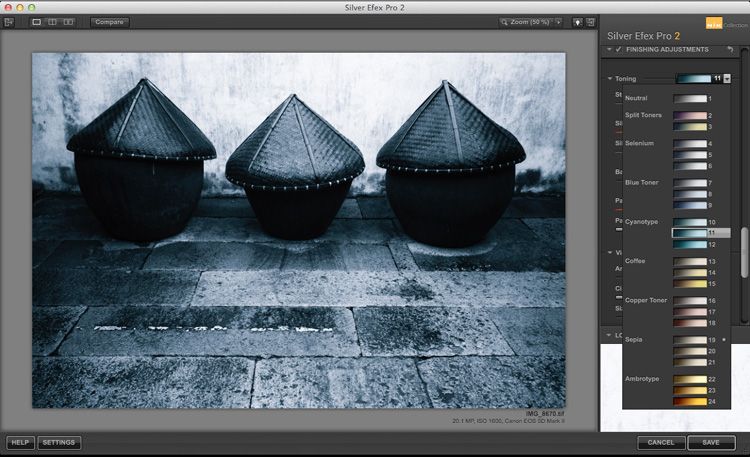
Best black and white plug-ins

Split toning in Silver Efex Pro 2.

Silver Efex Pro 2 is made by Nik software and regarded by many photographers as the ultimate black and white conversion plug-in. You can buy Silver Efex Pro 2 along with the other applications in the Nik Software range in a bundle for $ 149. While you can’t buy Silver Efex Pro 2 as a stand-alone application, it also means that you get the rest of Nik software range included with it.

Who is Silver Efex Pro 2 for?

Silver Efex Pro 2 is for the professional, or advanced hobbyist photographer, who wants to take black and white processing to the ultimate level. If you are serious about black and white photography, you will love this plug-in.

Reasons for buying Silver Efex Pro 2:

  • It has more options than Lightroom or Photoshop. There are more ways of adjusting tonal values, toning images, and adding borders. The Structure, Fine Structure, Dynamic Brightness and Soft Contrast sliders in Silver Efex Pro 2 provide a lot of ways to enhance texture, an important element of many black and white images.
  • It has a good workflow. The History in Silver Efex Pro 2 makes it easy to see where you’ve been and where you are going with your black and white conversion.
  • It comes with a number of good presets that help you obtain good black and white conversions right away.
  • It mimics black and white film grain. If you are interested in creating images that look like they were taken with film, Silver Efex Pro 2 lets you imitate the grain structure of 18 commonly used black and white films.
  • It has the standard Before and After view. It also has a Split View that I rather like. You can move the red dividing line to see more of one version or the other (see below). You can also zoom-in to view the differences in fine detail.
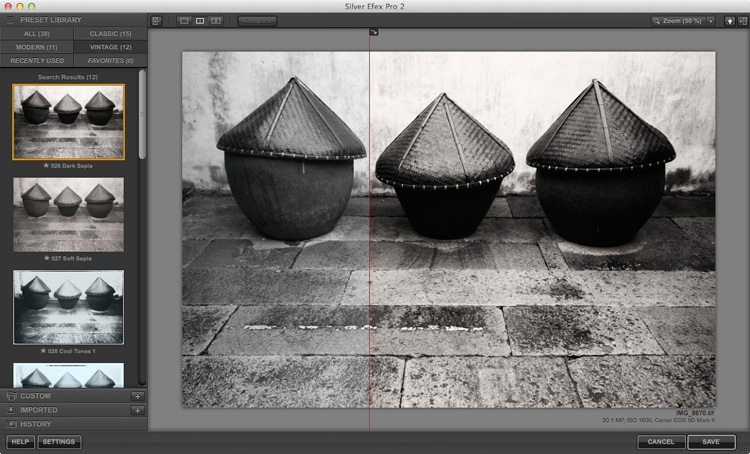
Best black and white plug-ins

Exposure

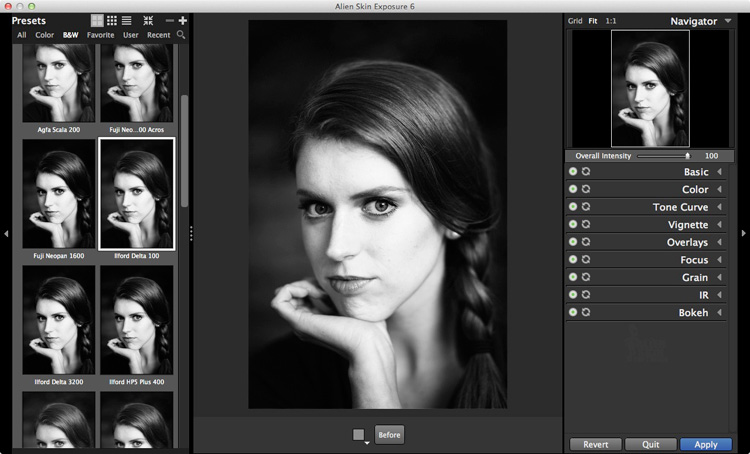
Exposure by Alien Skin Software is a plug-in designed to give your digital photos an analog look. It comes with hundreds of black and white and colour presets that imitate the look of film and antique processes. Alien Skin Software are not merely imitating though – a lot of research has gone into replicating the grain structures of all the film types featured in their software. Where the film wasn’t available, they used photo archives.
Best black and white plug-ins

Just like Silver Efex Pro 2, the presets are a starting point, and tools are provided to make adjustments, including an Intensity slider that lets you fade the effects created by the plug-in. You can create and save your own presets for future use.

Who is Exposure for?

Exposure is for photographers who want to mix the look of analog photography, with the speed and convenience of digital. If you yearn to make your photos look like they were shot with film rather than a digital camera, then this is a good plug-in to use.

Exposure is used by a lot of photographers to create effects that you can’t create in Lightroom, or would take a long time in Photoshop. While it seems mainly pitched at portrait, fashion and wedding photographers, you can apply the filters to virtually any type of photo. It’s a lot of fun to use.

Reasons for buying Exposure:

  • It lets you emulate the look of black and white film. There are over 20 film presets (plus variations) that let you apply an analog look to your digital photos.
  • Exposure is for colour as well as black and white. While this isn’t a concern if you are only interested in the plug-in for black and white conversions, there are some beautiful colour presets and film emulations to use.
  • It lets you add creative borders, light leak effects and scratches to your photos.
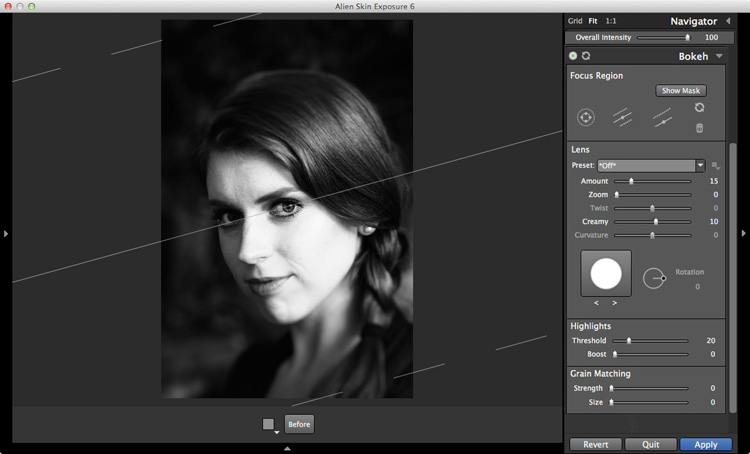
  • Exposure lets you add sophisticated lens blur effects to your images, emulating the look created by using specialist lenses such as tilt-shifts and Lensbaby optics (see bel0w).
  • It has an easy to use batch processing tool that makes processing multiple images very quick and easy.
Best black and white plug-ins

Perfect Black & White

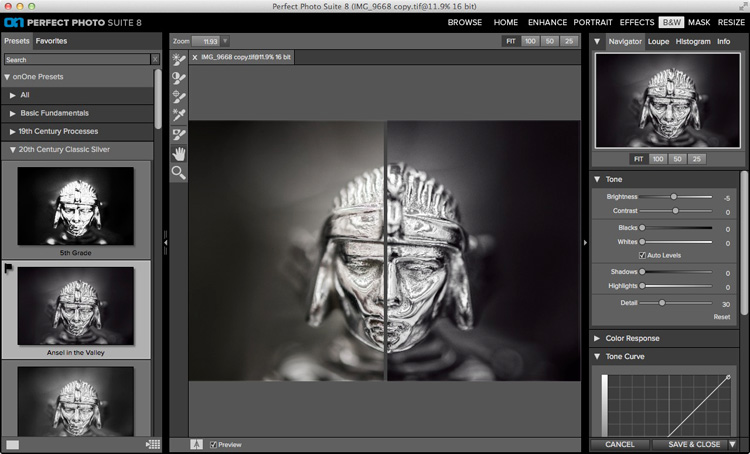
Perfect Black & White comes as part of OnOne Software’s Perfect Photo Suite. There are six modules within the suite, giving you the use of the additional ones if you buy it.

Another benefit of Perfect Photo Suite is that it comes with built-in layers. When you convert a photo to black and white it is placed on a layer with an Opacity slider that lets you merge it with the original colour image. While this feature is of limited use for black and white conversions, it may come in handy with the other programs included in the suite.
Best black and white plug-ins

Who is Perfect Black & White for?

This software is ideal for the photographer who wants to experiment with black and white photography and take advantage of the other programs that come with the suite. You will only appreciate the power and potential of this software by using it and experimenting with all the tools.

Reasons for buying Perfect Black & White:

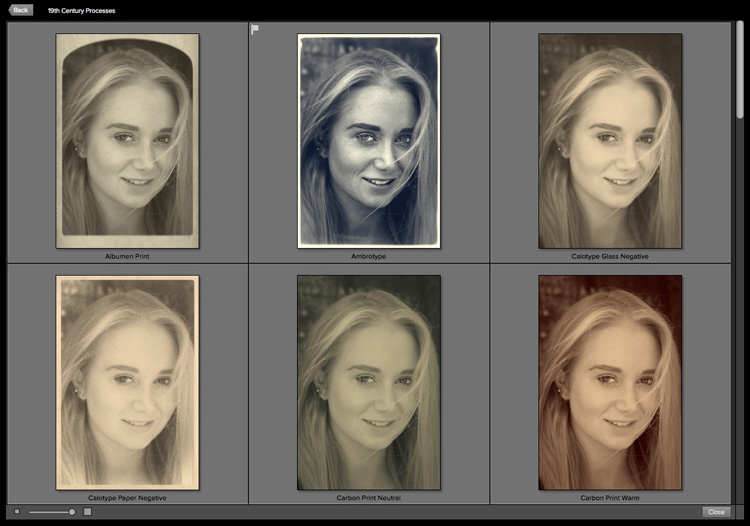
  • It has presets that emulate old photographic processes such as 19th century processes such as the Albumen Print and Ambrotype (see below).
  • There is a good selection of creative borders that you can add to your images.
  • The Sharpening options in it are more advanced than those in Lightroom and Photoshop. There are three types of sharpening to choose from: High Pass, Progressive and Unsharp Mask. High Pass is the most aggressive, while the others let you apply Sharpening in a more subtle fashion.
  • It works in conjunction with the other modules in Perfect Photo Suite. For example, you can use Perfect Portrait to retouch portraits before (or after) converting them to black and white. Or Perfect Resize to enlarge your photo files to a suitable size for making large prints. Or add textures to your photos using layers.
Best black and white plug-ins

Some of the antique process presets available in Perfect Black & White.

B&W Effects 2

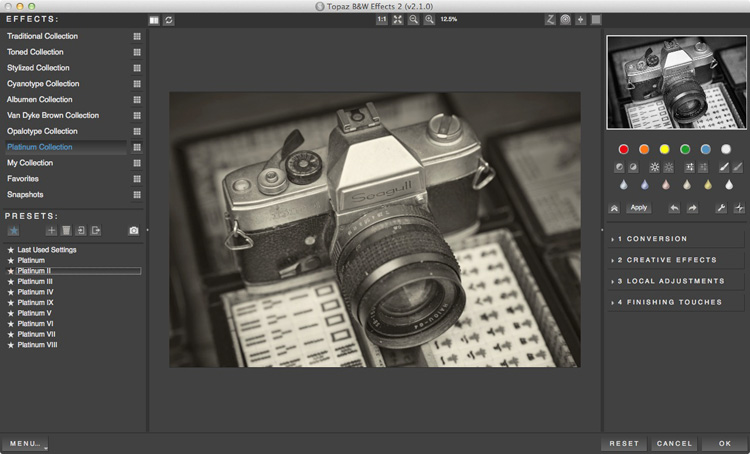
B&W Effects 2 is a Lightroom plug-in made by Topaz Labs. The main strength of this plug-in is its strong collection of presets, many of which imitate old processes. There are over 200 to choose from, and many of them have an interesting look which you don’t get from the presets in the other plug-ins mentioned here.
Best black and white plug-ins

Who is B&W Effects 2 for?

B&W Effects 2 is for photographers who want to take advantage of its extensive preset range as a basis for creative black and white conversions. The Snapshots feature gives you a history function that most of the other plug-ins lack, albeit one that you have to activate yourself by taking Snapshots at important points in the processing stage. B&W Effects 2 is also good at increasing detail in mid-tone areas and bringing out texture, an important part of a good black and white conversion.

Reasons for buying B&W Effects 2:

  • Lots of presets for emulating old printing processes. Have you ever wanted to try out cyanotype, albumen, van dyke brown, opalotype or platinum printing? The cost and impracticality associated with these processes puts them out of reach of all but dedicated enthusiasts. But B&W Effects 2 has all these and more.
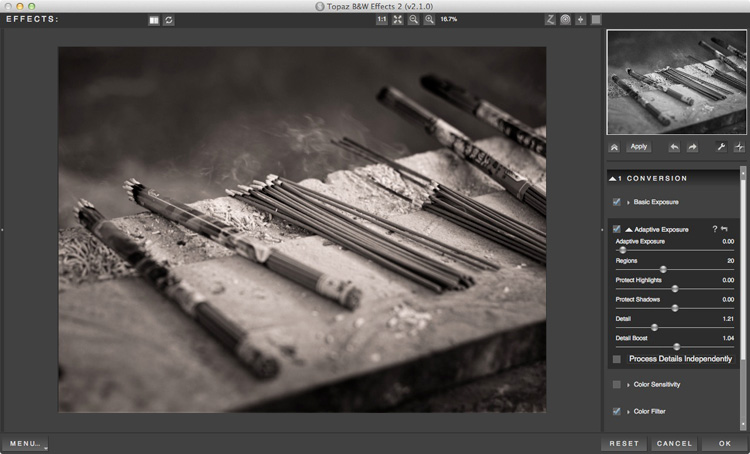
  • It uses Adaptive Exposure technology to add mid-tone contrast in a way that can’t be replicated in Lightroom or Photoshop. It works by analyzing the image, breaking it into regions and applying the adjustment to each region individually. The best way to appreciate what this tool can do is to try it out for yourself.
  • The Detail and Detail Boost sliders bring out details and texture, completing the work done by the Adaptive Exposure sliders. You’ll be amazed by how much detail and texture you can bring out with these sliders.
Best black and white plug-ins

DxO FilmPack

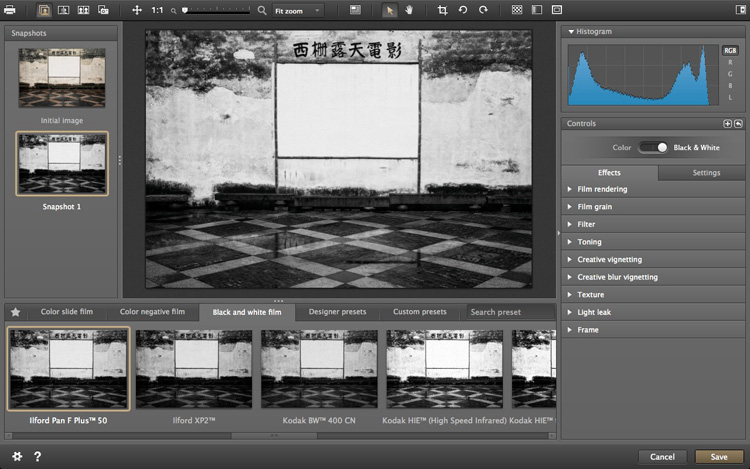
All the plug-ins we’ve looked at so far include some sort of film simulation, but DxO have taken it a step further with their FilmPack plug-in. According to their website, DxO FilmPack lets you, “Perfectly reproduce the quality, style, colours, and grain of the most famous analog films.”

Like Exposure, DxO FilmPack works in both colour and black and white.
Best black and white plug-ins

Who is DxO FilmPack for?

DxO FilmPack is for photographers who want to process their digital images so that they look as if they were taken on film. But it goes further than that, and offers a variety of creative effects that you will find useful in creating emotive monochrome images.

Reasons for buying DxO FilmPack:

  • Lots of film emulation presets, based on an analysis of the films themselves.
  • Features shared by most of the plug-ins listed here – the ability to add borders and textures, toning, light leaks effects and creative blur.

Tonality Pro

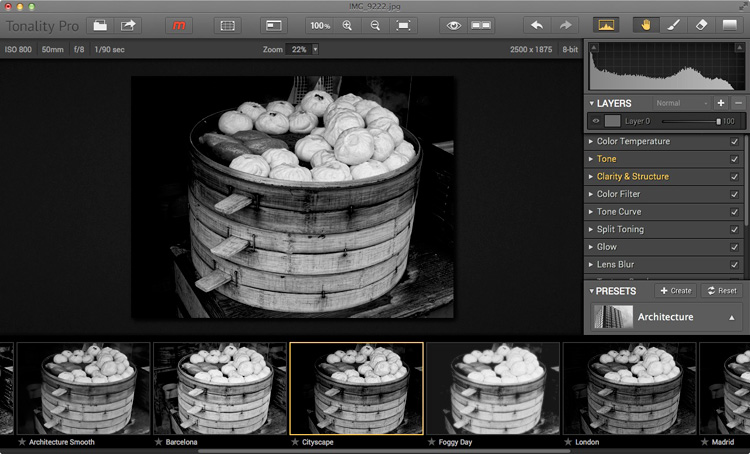
MacPhun is a company that makes plug-ins for Apple Mac computers (sorry Windows users!). Tonality Pro is a relatively recent addition to its stable of software and even though it will only be of interest to some of our readers I’ve included it here because it is a very good piece of software.

MacPhun’s aim with Tonality Pro was to create the best black and white plug-in available. I’ll leave it up to others to decided whether they have achieved that, but there’s no doubt it’s a powerful application with lots of useful tools for converting your photos to monochrome.
best-black-white-plugins-10

Reasons for buying Tonality Pro:

  • Tonality Pro has over 150 presets. There is also an Opacity slider that lets you control the strength of the preset, so you can make the effect as strong or subtle as you wish.
  • Tonality Pro has layers. None of the other presets mentioned here do, except for Perfect Black & White (and then not within the plug-in itself). Layers mean that you can apply an effect to your photo, then use brush mode to create a mask so the effect is applied selectively. Layers add a level of creative potential that allows you to use the plug-in’s tools with nearly unlimited freedom.
  • The clarity and structure tools help you emphasize texture and bring out detail in a way which simply isn’t possible in Lightroom or Photoshop.

Your turn

For me, one of the best things about plug-ins is that they give you a chance to play. They open up new ways of processing that you may not have considered before. Above all they are fun, give you chance to get creative, and find new ways of expressing yourself.

So, here’s a challenge. Download the trial version of one of these plug-ins. Then have a play with some of your favourite images and see what you can do with them. Does the new software give you some creative options that you had never considered before? Let us know how you get on in the comments.


Mastering Lightroom: Book Three – Black & White
Masterlng Lightroom: Book Three – Black & White by Andrew S GibsonMy ebook Mastering Lightroom: Book Three – Black & White goes into the topic of black and white in depth. It explains everything you need to know to make dramatic and beautiful monochrome conversions in Lightroom, including how to use the most popular black and white plug-ins. Click the link to visit my website and learn more.

googletag.cmd.push(function() {
tablet_slots.push( googletag.defineSlot( “/1005424/_dPSv4_tab-all-article-bottom_(300×250)”, [300, 250], “pb-ad-78623” ).addService( googletag.pubads() ) ); } );

googletag.cmd.push(function() {
mobile_slots.push( googletag.defineSlot( “/1005424/_dPSv4_mob-all-article-bottom_(300×250)”, [300, 250], “pb-ad-78158” ).addService( googletag.pubads() ) ); } );

The post How to Choose a Black and White Plug-In by Andrew S. Gibson appeared first on Digital Photography School.


Digital Photography School

 
Comments Off on How to Choose a Black and White Plug-In

Posted in Photography


Sigma 35mm f/1.4 Art Lens Review

02 Sep

When it comes to off-brand (or third party) camera gear, do you feel a bit skeptical? I was in the same boat for my entire photography career, choosing to invest exclusively in Nikon gear when I was a Nikon shooter, then all Canon when I switched over for the Canon 5D Mark III. “You get what you pay for” is what all of my photography colleagues would tell me, and I was an avid believer until this past summer when I invested in my first ever off-brand camera lens: the Sigma 35mm f/1.4.

Dubbed Sigma’s true flagship lens, the 35mm f/1.4 debuted in 2012 as the very first addition to the Art category, in Sigma’s newly announced lens categories. This shiny prime lens entered a crowded market in which Canon, Nikon, and Sony all have competitive offers, but Sigma’s version comes in at a fraction of the price, which is one of its most attractive features. So in this case, does the adage, “you get what you pay for” truly apply?

Sigma 35mm f/1.4 lens review

Let me preface this article by stating that this is the very first 35mm prime lens that I’ve owned, so I cannot make true comparisons between Sigma’s lens and that of other manufacturers, but I took it through several test runs to see how it held up. These were my findings.

Main Features

Sigma’s 35mm fixed lens is equipped with a fast f/1.4 maximum, and f/16 minimum aperture. It has quiet, quick Hypersonic Motor (HSM) focusing with manual override and a 0.3m (one foot) minimum focal distance – no image stabilization is included. The lens has mounts for all major DSLR camera types including Canon, Nikon, Sony, and Pentax, and it works on both full frame and APS-C (crop sensor) cameras. Out of the box, the lens comes with front and rear caps, a lens hood and a warranty and instruction guide, all packaged within a nicely padded, zippered nylon case. Brand new, this lens retails for $ 899, significantly less than other versions made by Canon and Nikon, which run upwards of $ 1,300.

Pros

Fast, accurate autofocusing speed

On the technical side of things, this lens performed impressively well. Even when shooting at f/1.4, all images produced by this lens were super sharp. Autofocusing speed was pretty fast and accurate, even when attempting to use this lens in an action setting like the concert below.

Sigma 35mm f/1.4 lens review

Little to no visible distortion

After spending some time with the Canon 24mm f/2.8 prime lens that produces quite a bit of barrel distortion, I was pleasantly surprised to find that the Sigma 35mm has pretty much no visible distortion. Although bear in mind that lens distortion can be easily fixed in post production using Photoshop’s lens Correction filter (or Lightroom’s Lens Correction panel).

Sigma 35mm f/1.4 lens review

Cons

Mostly plastic build

Perhaps the first thing that struck me about this lens when I first interacted with it what its sleek, yet mostly plastic build. Compared to Canon and Nikon versions that are made of a mix of metal and plastic, this mostly plastic Sigma lens felt like it may not hold up very well in the long run. The Sigma seems to live up to its Art lens designation with the feeling that this lens would hold up better being used for artistic purposes, more so than run and gun type of shooting.

Larger and heavier than Canon/Nikon equivalent

Despite being made of mostly plastic, the Sigma also feels pretty heavy (23.5 oz./ 665g), and it is indeed slightly heavier than its Nikon (21.2 oz / 600g) and Canon (20.5 oz. / 580g) equivalents.

Sigma 35mm f/1.4 lens review

Overall Take

While I loved capturing the world through a sharp 35mm prime lens, it was difficult to get over this lens’ size. The 35mm is known as a classic lens in photojournalism and street photography, and yet due to its size and plastic build, it was questionable if the Sigma 35mm f/1.4 could hold up well over time, especially in on-the-go style photography. As a result, I have to agree with my photography colleagues that you’d get what you pay for over time.

Investing in the more expensive Canon 35mm f/1.4 would be worth the extra expense ($ 899 for the Sigma, $ 1479 for the Canon) just because the L lens designation ensures a higher quality, more durable lens. As an additional option, the slower Canon 35mm f/2 comes with image stabilization and is priced lower at $ 599.99, so that may be a better budget option. And a final, even cheaper alternative might be to add 5mm to the lens focal length by going for the Canon 40mm f/2.8 pancake lens, the smallest and cheapest ($ 149 USD) of them all.

Basically, splurge for the Sigma 35mm f/1.4 and enjoy comparable, superior optics to the Canon and Nikon equivalents, but what you save in money might cost you later when testing the long-term durability of this lens.

Sigma 35mm f/1.4 lens review

googletag.cmd.push(function() {
tablet_slots.push( googletag.defineSlot( “/1005424/_dPSv4_tab-all-article-bottom_(300×250)”, [300, 250], “pb-ad-78623” ).addService( googletag.pubads() ) ); } );

googletag.cmd.push(function() {
mobile_slots.push( googletag.defineSlot( “/1005424/_dPSv4_mob-all-article-bottom_(300×250)”, [300, 250], “pb-ad-78158” ).addService( googletag.pubads() ) ); } );

The post Sigma 35mm f/1.4 Art Lens Review by Suzi Pratt appeared first on Digital Photography School.


Digital Photography School

 
Comments Off on Sigma 35mm f/1.4 Art Lens Review

Posted in Photography


Making the grade: Firmware brings log gamma to GH4 and new Panasonic GH4R gets unlimited recording

02 Sep

Panasonic has announced the Lumix DMC-GH4R, a variant of the GH4 that offers a Log gamma curve and unlimited 4K video recording. There will also be a paid-for firmware update adding the V-Log L Photo Style to the GH4 – a super-flat tone curve designed to capture the maximum dynamic range for greater flexibility while color grading. Read more

Articles: Digital Photography Review (dpreview.com)

 
Comments Off on Making the grade: Firmware brings log gamma to GH4 and new Panasonic GH4R gets unlimited recording

Posted in Uncategorized


Open Competition: Redesign the World’s Largest Temporary City

01 Sep

[ By WebUrbanist in Architecture & Cities & Urbanism. ]

back rock center camp

Creating a one-of-a-kind opportunity for urban designers and aspiring planners, Black Rock City is soliciting fresh layouts from anyone who wishes to contribute. Winners selected by the BRC Ministry of Urban Planning will be featured in an upcoming publication but will also influence the future shape of this surreal city.

black rock aerial view

As the home of the Burning Man Festival, BRC is unique not only due to its intermittent existence, rising from the desert for just one week every year, but also because of its density and size, with 75,000+ annual residents making their home in less than 2 square miles.

black rock circular layout

The fact that the place is rebuilt anew with each iteration means lessons learned one year can be applied the next, while the absolutely flat desert landscape makes for effectively endless possible layouts. Likewise, the architecture that populates the place is highly varied and ever-evolving, reflecting the radical changes in temperature from day to night and the ever-present threat of rain and dust storms.


black rock city early

While critics and ‘citizens’ alike have strong feelings and differing views about other aspects of the gathering, once attendees have arrived they effectively become residents of a grand urban experiment. Reliant on streets and other public infrastructure, everyone fills into the grid, from individual campsites (often on the fringes) to large theme camps (arrayed primarily around a central circular Esplanade) and core communal functions (generally near the entrance).

fractal pattern

These designs, past through present, reflect the need for clear navigation within the city as well as the desire to foster density and (through that) community interactions, all while maintaining critical services at key places or appropriate intervals.

brc design idea

While leeway is given for creative variation, submitters to the contest are similarly encouraged to reinforce density and interactivity, through fractal patterns or other applicable configurations and shapes. Far-fetched, implausible or even physically impossible entries will still be considered, however, even if they cannot be incorporated in a near-future plan.

brc 99

The shape of the city has changed significantly over time, but certain elements like the centrality of The Man have remained largely the same. Tall relative to its surroundings and aligned with axes of the city, it serves to help orient people (particularly at night) while also providing a central locus around which activity revolves. While it was initially arrayed closely around it, the city pushed back from The Man over the years, creating a broken circle with views to and beyond this center figure.

brc move over time

As the city grew in size, its location also shifted, pushing it deeper into the wide-open desert. However, since 1999, major changes have been fewer and farther between – a fact that may change with the right submission to this competition.

black rock city urbanism

More on the origins of the competition: “We founded the Black Rock City Ministry of Urban Planning with the goal of enabling people to share and discuss ideas for the spatial and geometric possibilities for Black Rock City and regional events, and to give architects and urban designers a platform to participate more directly in this process. Design competitions such as this are a familiar format in these trades, and as such, are an efficient way to get lots of ideas on the table for consideration.”

brc 2015

Types of and evaluation criteria for submissions: “(1) Individual design elements : boulevards, roundabouts, street lights, all of the things that are part of a cityscape that can be incorporated into larger scale plans. Have an idea for a park, or a winding boulevard? Submit this as a design element. (2) Conforming city plans : these are large scale city plans that make adaptations to the existing time + named street coordinate system without altering the fundamental character of the plan. The objective with this type of plan is to make aesthetic or practical improvements to what’s already in place, for example by adding pedestrian boulevards (think Las Ramblas in Barcelona). (3) Non-conforming city plans : here we explore BRC, or a regional event city, as an imagined or science fictional space, and invite people to submit radically new configurations for the city.” (Images via Burning Man, Duncan Rawlinson and Jonathan LaLiberty).

Share on Facebook


[ By WebUrbanist in Architecture & Cities & Urbanism. ]

[ WebUrbanist | Archives | Galleries | Privacy | TOS ]


WebUrbanist

 
Comments Off on Open Competition: Redesign the World’s Largest Temporary City

Posted in Creativity


1. September 2015

01 Sep

Das Bild des Tages von: S. Dekind

Scheldelaan-©-S-Dekind-20008471534

Im Ausblick: Litauische Passbilder, New Orleans vor und nach Katrina, Deutschland Ostwest.
kwerfeldein – Fotografie Magazin | Fotocommunity

 
Comments Off on 1. September 2015

Posted in Equipment


Take Better Pics Through Windows

01 Sep

The windows of high rise buildings offer the best city views. Capturing that view, without reflections that make the city look like it’s under alien attack, can be a frustrating venture.

QT Luong, a photog famous for capturing all 59 US National Parks in large format, offers up some advice on avoiding window pain.

We love his “oh duh” tip of cleaning the window as well as the more advanced advice like ensuring the window is shaded from sunlight, using a rubber hood or dark cloth to make a seal with the window and removing your polarizing filter. Techniques that work well for DSLR and phone cameras alike!

Photo by QT Luong


© Erin for Photojojo, 2015. |
Permalink |
No comment |
Add to
del.icio.us

Post tags:


Photojojo

 
Comments Off on Take Better Pics Through Windows

Posted in Equipment


BSI Boss? Sony Alpha 7R II added to studio scene

01 Sep

Sony’s Alpha 7R II breaks a lot of new ground in terms of photographic technology. Its 42MP chip is the first full-frame backside-illuminated sensor, and it’s bolstered by a 5-axis stabilization system. We’ve been testing its autofocus and low light capabilities, and now we’ve put it in front of our studio test scene. Find out if a BSI sensor gives it an edge over its peers. Read more

Articles: Digital Photography Review (dpreview.com)

 
Comments Off on BSI Boss? Sony Alpha 7R II added to studio scene

Posted in Uncategorized