RSS
 

Archive for September, 2015

Image Size and Resolution Explained for Print and Onscreen

17 Sep

One of the most confusing things for a new photographer is understanding image size, resolution, and printing. I’ll try and explain what these things mean, and how to make the best choices depending on what you want to do with your photos.

Megapixels and photo size
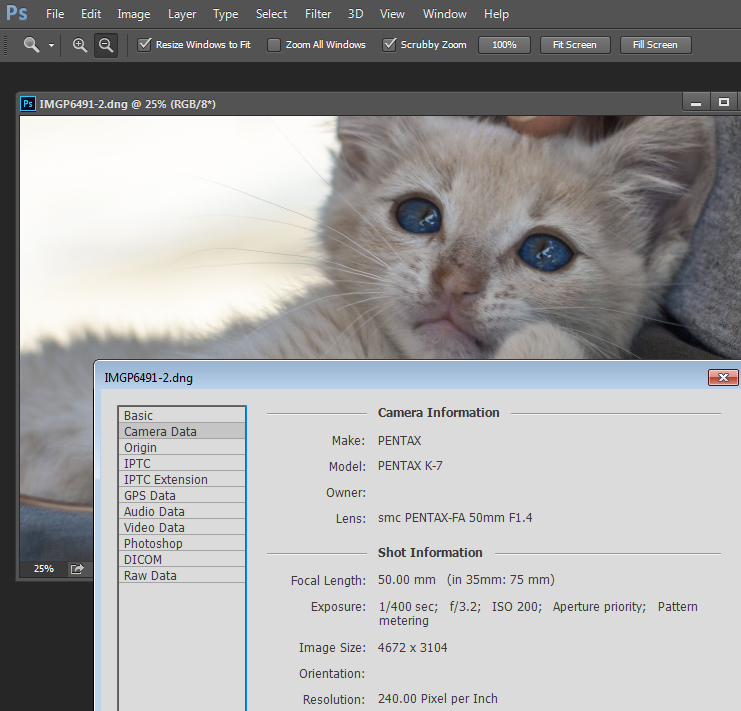
Find information about a photo using File > File Info

As a photographer you will already have confronted the term megapixel when you first purchased your camera. While technically a megapixel is equal to 1,048,576 pixels, in reality, camera manufacturers round this number to 1,000,000 when stating how large an image the camera will capture.

So, my camera, for example, is stated to capture 14.6 megapixel images which is around 14,600,000 pixels per image (14.6 x 1,000,000). This information tells you nothing about the actual pixel dimensions of the image – it only tells you the total number of pixels that comprise the image.

My camera, like most dSLRs, captures images with an aspect ratio of 1.5. So the ratio comparing the number of pixels along the long edge of the image, to the short edge is 3:2. Each full size raw image is 4672 x 3104 pixels in dimension. So, by multiplying the number of pixels along the width by those of the height (4672 x 3104 = 14,501,888) we get the actual number of pixels in the image. You and I might call this 14.5 MP but the camera manufacturer rounds this up and calls it a 14.6 MP camera.

You can check the width and height of an image using your photo editing software. In Photoshop, with the image open, choose File > File Info > Camera Data. The image above shows this information dialogue box.

A pixel itself is a single picture element, and for our purposes it’s the smallest element that your photo can be divided into. A pixel can be only one color, and a photograph is made up of a grid of thousands of pixels, each of varying colors that together make up your image. You can see these pixels if you open a photo inside a photo editing program and zoom in until you see single blocks of color (like below). Each of these is a pixel.
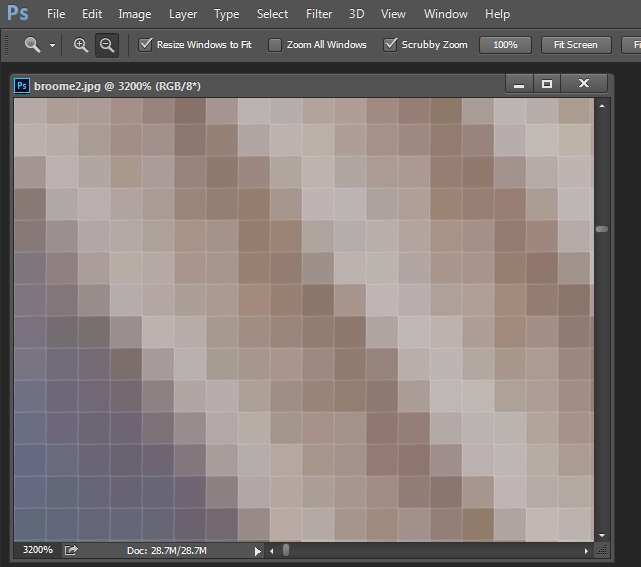
An image of pixels in a photo

Why size is important when printing

When you’re printing an image you may encounter the term ppi or pixels per inch. Most printing services, and indeed your own printer, will require a certain density of pixels in the image (ppi) to be able to render an print that looks good, with smooth color transitions so you can’t see each individual pixel. Typical printing ppi values range from 150 to 300 ppi, although some high-end magazines may require images which are 1200 ppi.

So, for example, if you want to print an image 4 x 6 inches at 300 ppi, then you need a file that has at least 4 x 300 (1200) pixels along its short side and 6 x 300 (1800) pixels on the long side. So, it needs to be at least 1200 x 1800 pixels in size.

To print an 8 x 10 inches at 300 ppi use the same math – multiply the printed image width and height in inches each by 300 pixels. The result is 2,400 x 3,000 pixels, which is the size image you need to print an 8 x 10 at 300 ppi.

When cropping and sizing an image for printing, you’ll need to know what ppi the image should be – your printer manual or the printing service should be able to tell you this. This is a screenshot from the MpixPro.com website showing their Optimal and Minimum image sizes for standard print sizes. Their printer outputs at 250 ppi (but can handle 100 ppi images) – other services may differ – so always check before preparing your images:
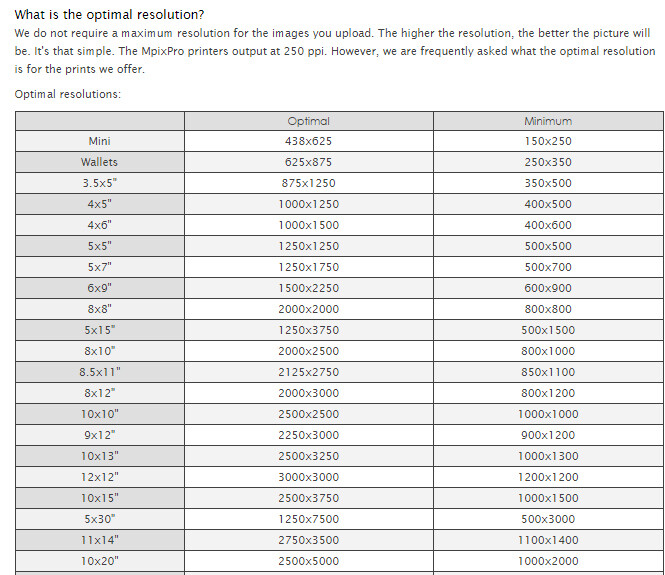
Print size required for MpixPro printing

Use the crop or resize feature in your software to size the image to the desired width and height, and the ppi resolution. Here an image cropped to a size of 3000 x 2400 pixels is being adjusted from 72 ppi to 300 ppi in preparation for printing at 300 ppi. There is no resampling required as the image is already the correct dimension and only the resolution requires adjusting.
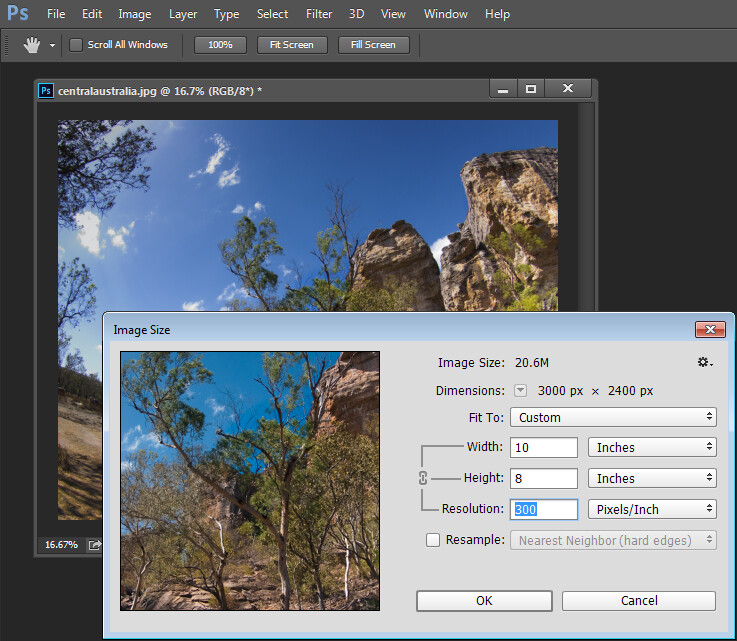
Adjusting resolution in a photo without resampling it

Photoshop, like other applications, will also crop an image to a fixed size and resolution if you type these value into the tool options bar when you have the Crop tool selected (see below). If your image is smaller than the typed dimensions then the image will be enlarged using the default resampling method as it is cropped. While it isn’t generally advisable to enlarge images – provided the image is already close in size to the desired size, enlarging it a little bit generally won’t cause a noticeable loss of quality.
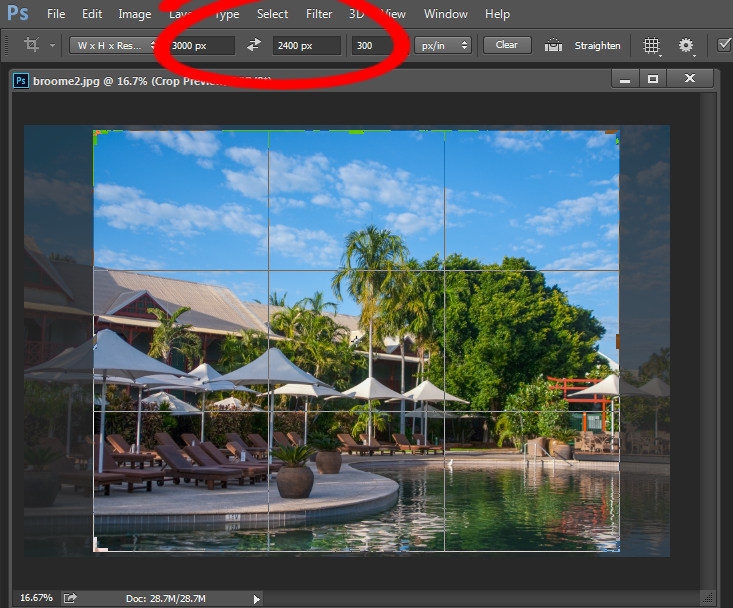
Crop an image in Photoshop setting size and resolution

Sizing for screen

When it comes to displaying images on the screen you need far less pixels than you do for printing. This is because the density of pixels on the screen is far less than what is required for printing. So, for example a typical monitor is 1920 by 1080 pixels in size so, to fill the monitor you only need an image that is 1920 by 1080 pixels in size. That’s about the same size image you need for a 4 x 6 print at 300 ppi, yet this size image displays perfectly on a 23 inch diagonal monitor.

googletag.cmd.push(function() {
tablet_slots.push( googletag.defineSlot( “/1005424/_dPSv4_tab-all-article-bottom_(300×250)”, [300, 250], “pb-ad-78623” ).addService( googletag.pubads() ) ); } );

googletag.cmd.push(function() {
mobile_slots.push( googletag.defineSlot( “/1005424/_dPSv4_mob-all-article-bottom_(300×250)”, [300, 250], “pb-ad-78158” ).addService( googletag.pubads() ) ); } );

The post Image Size and Resolution Explained for Print and Onscreen by Helen Bradley appeared first on Digital Photography School.

Digital Photography School

 
Comments Off on Image Size and Resolution Explained for Print and Onscreen

Posted in Photography


On Assignment: Studio in the Wild

17 Sep
Photos ©Jonny Armstrong

Jonny Armstrong is a photographer who is used to the idea of being stood up. In fact, in his field of work it happens most of the time. A research scientist, his work includes photographing lit portraits of wild animals in their natural habitats.

Read more »
Strobist

 
Comments Off on On Assignment: Studio in the Wild

Posted in Photography


Paris Safari: Projected Wildlife Gets Chic in the City

17 Sep

[ By Steph in Art & Street Art & Graffiti. ]

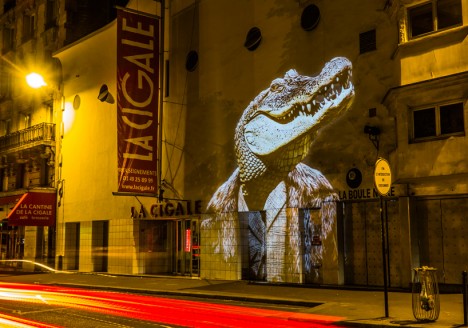
paris wildlife 4

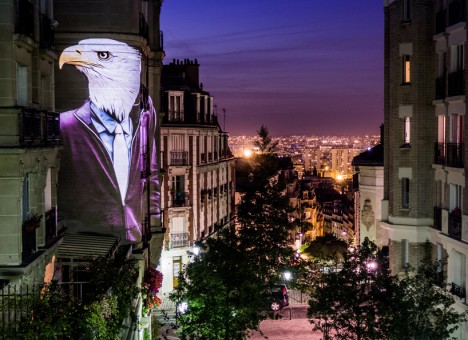
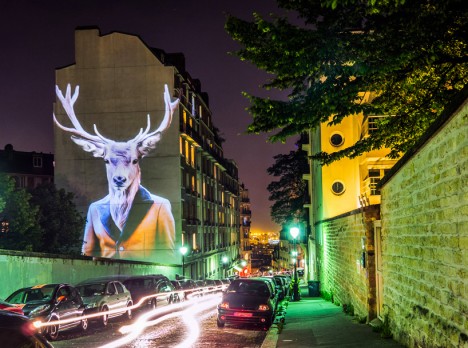
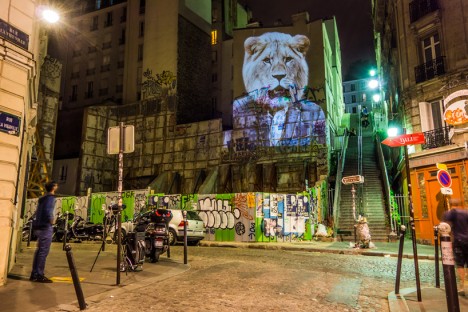
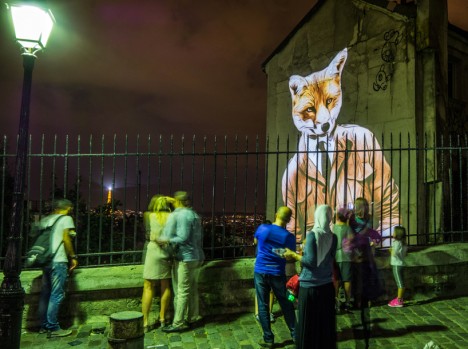
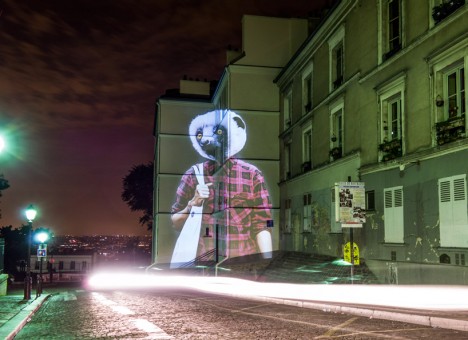
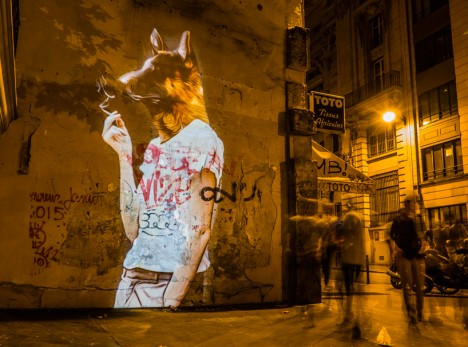
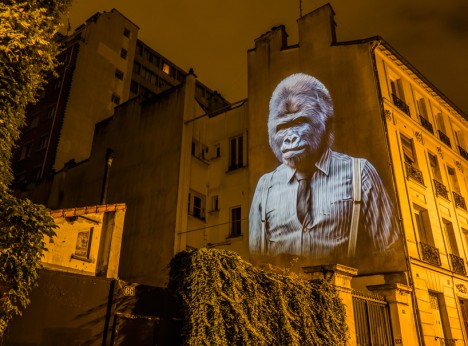
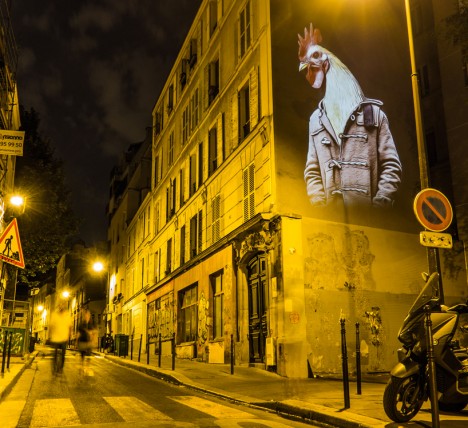
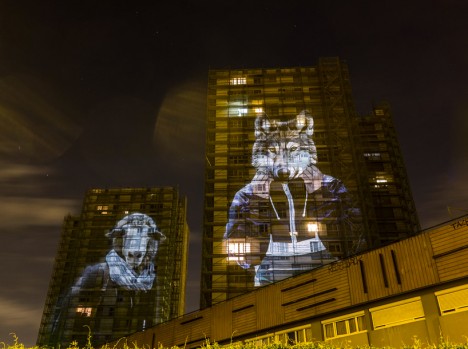
Soaring up to six stories in height, these lemurs, deer, gorillas, eagles and other carefully clothed creatures projected onto buildings all over Paris are mocking your fashion choices. The exotic animals – which certainly can’t be found in the streets of the city otherwise – might seem like just a bit of fun, or a statement on the lack of nature in urban environments, but the creator of the project has something a little deeper to say.

paris wildlife 1

paris willife 5

paris wildlife 6

Artist Julien Nonnon has spent all of September beaming his creations onto building facades after the sun sets, in a mix of street art and video mapping. For ‘Safari Urbain,’ Nonnon developed his own tools to project the images anywhere from life size to the full height of towering apartment buildings.

paris wildlife 11

paris wildlife 9

paris wildlife 10

Some of the animals are clad in three-piece suits, others in plaid flannel shirts or hoodies, echoing the fashions seen among the human passersby who stop to gaze up at them. The point, says Nonnon, is calling attention to how we contradict ourselves with what we choose to wear, wishing to be unique while simultaneously marking ourselves as part of a clearly defined group in an attempt to fit in.

paris wildlife 2

paris wildlife 3

paris wildlife 7

“The bestiary coming right out of fashion magazines, questions our behavior… In our way of dressing, we express our vision of the world, while indirectly revealing our social position and financial power. Fashion is nothing other than a means of communication, of integration and belonging to a group.”

Share on Facebook


[ By Steph in Art & Street Art & Graffiti. ]

[ WebUrbanist | Archives | Galleries | Privacy | TOS ]


WebUrbanist

 
Comments Off on Paris Safari: Projected Wildlife Gets Chic in the City

Posted in Creativity


3 Posing Tips for Young Siblings

17 Sep

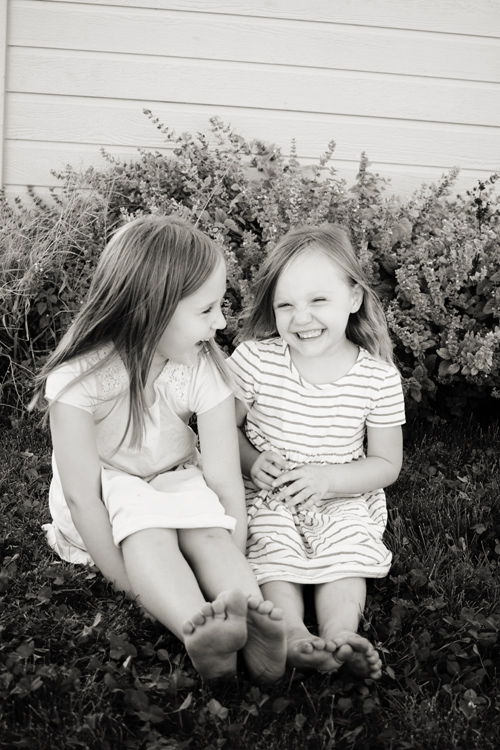
posing-young-siblings-1

Have you ever tried to pose an elementary-age set of siblings, only to have one or more of them dissolve into a crying mess before you’re able to capture a single frame? When it comes to posing young siblings, I’ve discovered that things run more smoothly when I take a slightly more relaxed approach to posing, and I’ve compiled a few posing tips that will hopefully help you capture meaningful photos of young sibling groups a little more easily.

1. Get them close together

posing-young-siblings-2

Over the past few years, I’ve noticed that when I’m photographing groups of siblings, the favorite images are almost always ones in which the kids are closer together than they might usually sit, or stand, in day-to-day life. So now I usually begin every session that involves young siblings by asking them to hug each other, or put their arms around each other. If one sibling is very young, I have them sit down with the younger sibling on the older one’s lap. It’s a simple direction, but one that young children understand, and it really makes a big impact.

These images are most often family favorites, and are usually the ones that I see gracing Christmas cards and photo canvases in their living room. Most parents usually request at least one photo of both kids looking at the camera and smiling, and this is also where I most often try to fulfill that request.

posing-young-siblings-3

However, as a mom I can tell you without a doubt that the amount of time that elementary age siblings will stay this close together before they start bickering or crying is usually pretty limited, and it’s in your best interest as a photographer to have them move on to something different before they totally dissolve into chaos. So, get them close, and then pay attention – if you notice that either sibling starts getting a little aggressive with their love, and starts squeezing the other sibling’s waist or neck, it’s time to move on to something else.

2. Give them something to do

posing-young-siblings-4

Once it’s time to move on from hugging, I usually give the kids a small instruction that will keep them close together, but will also keep their hands occupied at the same time. For example, in the above photo I asked my girls to stand back-to-back, and hold hands. This kept them close physically, but also prevented some of the aggressive tickling that was starting to happen just before the photo was taken. I also often ask kids to stand facing me and hold hands, which achieves the same effect, and seems to be a favorite among parents as well.

posing-young-siblings-5

Another thing to try is to have the kids lay down. I usually keep a few quilts in the back of my car for this exact purpose, and you would be surprised how quickly this simple suggestion can calm rambunctious kids down and allow them (and you) to refocus. Once they’re laying down, try asking them to look up at you, hold hands, close their eyes, give each other butterfly kisses, or to touch their noses together. Again, pay attention to both the subtle, and not-so-subtle, cues that either child may be giving that they are ready to move on to something new.

3. Let them be themselves

posing-young-siblings-6

As nice as it is to have a perfect photo of everyone looking at the camera and smiling, I also know that some of my favorite images of my own girls are the ones in which their personalities really shine through. So, give the kids you’re photographing an opportunity to show you their personalities as well! Ask them to sing for you. Ask them to pose like their favorite superhero or princess. Tell them a knock-knock joke, then ask them to tell you one. I’ve yet to meet a kid who wasn’t totally game to give me a silly face, and usually the most genuine smiles and laughs quickly follow the silliest of photos.

posing-young-siblings-7

You can also combine tips 2 and 3 – give them a small suggestion like “sit on the ground with your feet touching each other”, and then sit back and watch the way that they interact with each other naturally. Hand them each a flower or a leaf, and ask them to tell you a story about it. These are great opportunities to capture images that are more candid, while still allowing you as the photographer to have a bit of control in terms of posing.

Sometimes, I cycle through some variation of these tips two or three times in the course of a session, and I’ve found that the variety is really helpful in preventing the kids from getting restless and bored. Overall, the key to posing young siblings is realizing that you simply can’t approach posing in the same way that you would with senior portraits or formal wedding portraits. Elementary age kids simply won’t hold a pose that they find to be the slightest bit awkward or uncomfortable, no matter how good it might look. Instead, give young siblings gentle direction that allows them to relax and be themselves, and watch their little personalities shine!

googletag.cmd.push(function() {
tablet_slots.push( googletag.defineSlot( “/1005424/_dPSv4_tab-all-article-bottom_(300×250)”, [300, 250], “pb-ad-78623” ).addService( googletag.pubads() ) ); } );

googletag.cmd.push(function() {
mobile_slots.push( googletag.defineSlot( “/1005424/_dPSv4_mob-all-article-bottom_(300×250)”, [300, 250], “pb-ad-78158” ).addService( googletag.pubads() ) ); } );

The post 3 Posing Tips for Young Siblings by Meredith Clark appeared first on Digital Photography School.


Digital Photography School

 
Comments Off on 3 Posing Tips for Young Siblings

Posted in Photography


Modern Wooden Architecture: 16 Fresh Takes on Timber

17 Sep

[ By Steph in Architecture & Cities & Urbanism. ]

wooden architecture metropol parasol 4

Wood may be most closely associated with cabins, stick-frame housing and other conventional forms of architecture, but a new wave of architects is adapting its usage for this century and beyond, using it as a primary material for large commercial structures, pavilions, energy-saving facades and even skyscrapers. Lightweight, flexible and renewable, wood is having a moment in modern architecture, transcending its rustic origins as one of the world’s most ancient building materials.

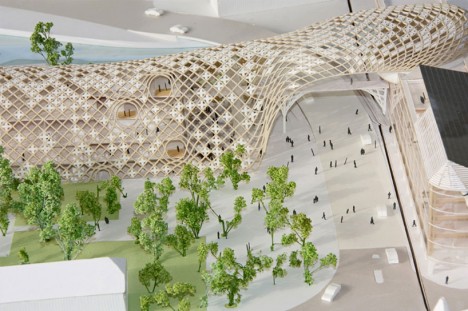
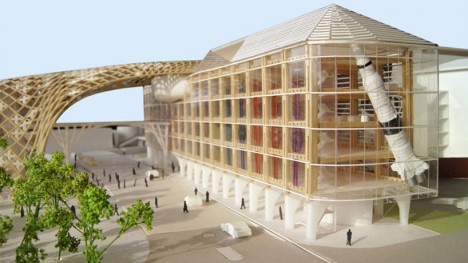
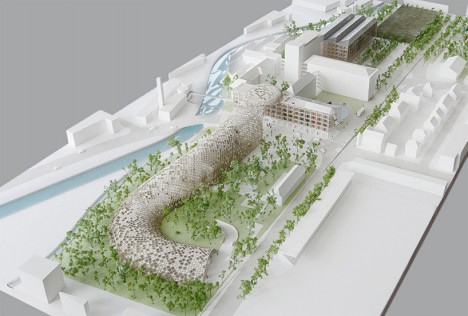
Curving Timber Shell for Swatch Headquarters by Shigeru Ban
wooden architecture swatch 1

wooden architecture swatch 2

wooden architecture swatch 3

wooden architecture swatch 4

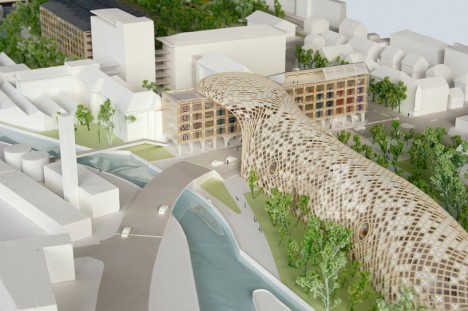
A sinuous timber shell structure stretches between buildings owned by sister companies under the Swiss watch giant Swatch umbrella in this concept by Shigeru Ban. Connecting older buildings with new ones and forming semi-enclosed public spaces, the new addition will act as the company’s headquarters. Large pale crosses dot the lattice in a nod to the company’s brand identity.

Metropol Parasol by J. MAYER H. Architects
wooden architecture metropol parasol 1

wooden architecture metropol parasol 2

wooden architecture metropol parasol 3

wooden architecture metropol parasol 4

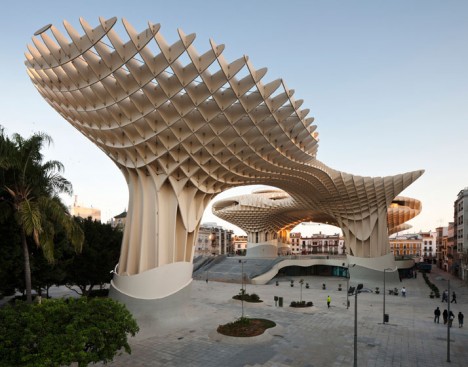
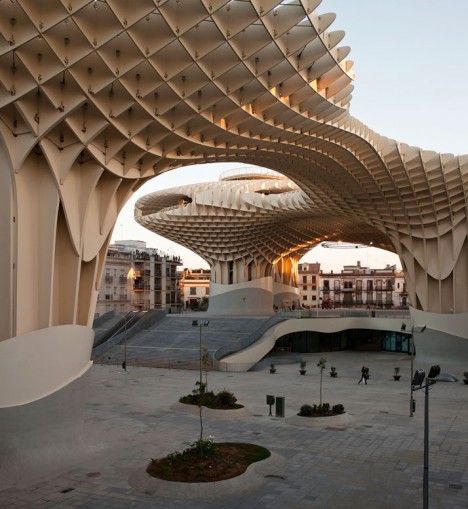
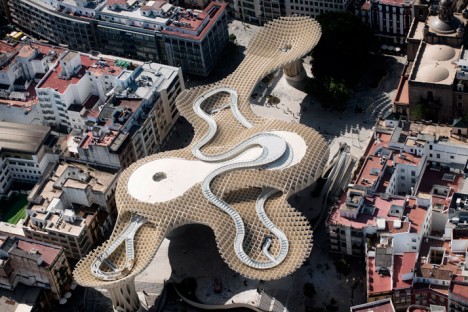
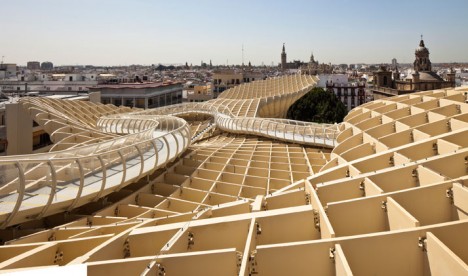
“Realized as one of the largest and most innovative ended timber-constructions with a polyurethane coating, the parasols grow out of the archaeological excavation site into a contemporary landmark, defining a unique relationship between the historical and the contemporary city,” says J. Mayer H. Architects of their creation Metropol Parasol. The waffle-like structure in Seville, Spain incorporates the archaeological site as well as a farmer’s market, bars and restaurants over 18,000 square meters. The parasols form plazas and also offer an elevated rooftop walkway from which to view the city.

Contemporary Hillside Home by Jose Ulloa Davet + Delphine Ding

wooden architecture hillside home 1

wooden architecture hillside home 2

wooden architecture hillside home 3

wooden architecture hillside house 5

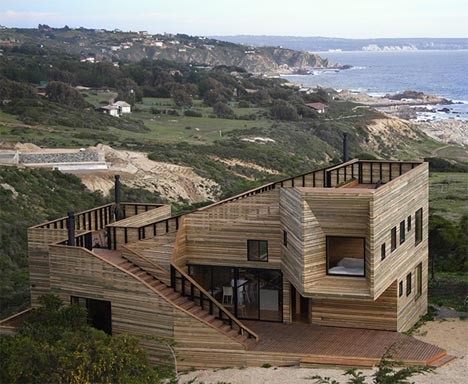
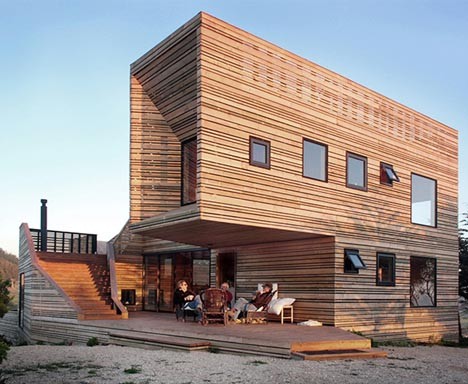
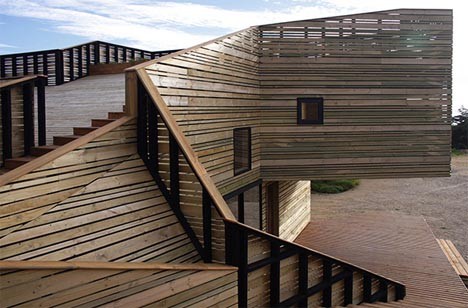
This mountain home in Tunquen, Chile is anything but a rustic cabin despite its raw timber construction, with a path snaking its way from ground level all the way up onto the roof. Conceived as both a private space and a platform for outdoor activities, the “Metamorfosis” house is raw and modern at once, providing breathtaking views of the scenery.

Space Lab by Kohki Hiranuma Architect & Associates

wooden architecture space lab 1

wooden architecture space lab 2

wooden architecture space lab 3

wooden architecture space lab 4

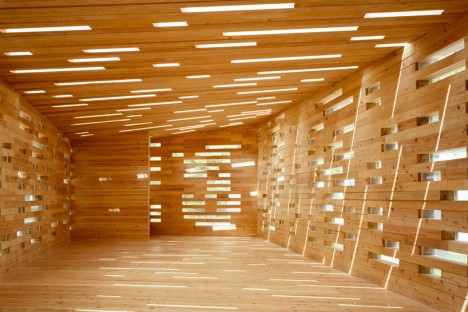
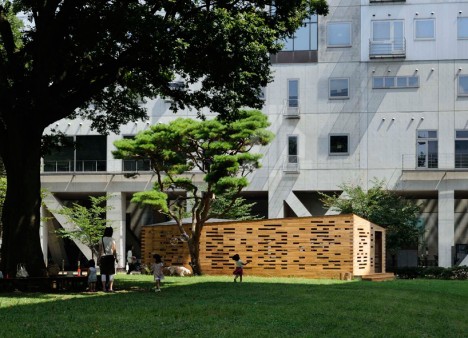
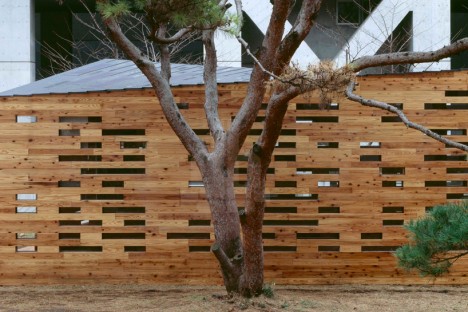
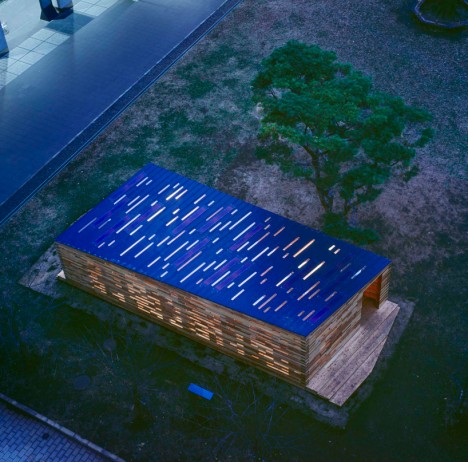
Stacked cedar planks alternate with glass to create an irregular pattern of light inside the ‘Space Lab,’ a temporary structure at the University of Tokyo made of discarded wood. The experimental space makes a statement on the use of diminishing resources and will also investigate the strength of this construction method over four years. “This ‘Azumaya” architecture of today does not separate inside and outside, and is expected to be variably used for a promotion of domestic materials to just a resting space. And finally this architecture, which utilizes domestic thinned materials, shows one way of regeneration the balance of nature we have destroyed.”

Woven Lattice Dessert Shop by Kengo Kuma + Associates
wooden architecture lattice 1

wooden architecture lattice 2

wooden architecture lattice 3

wooden architecture lattice 4

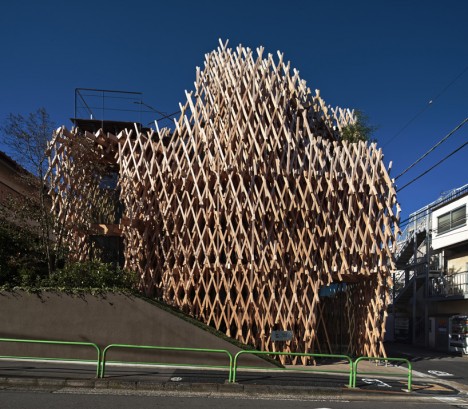
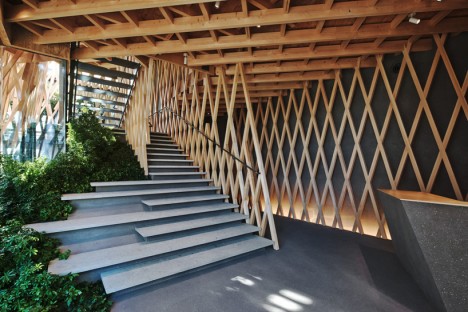
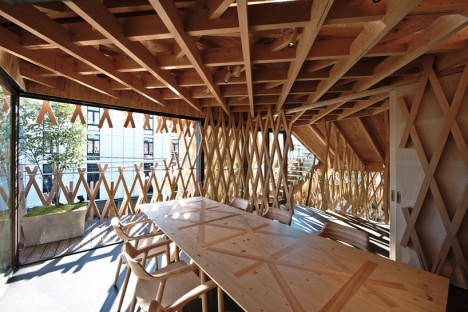
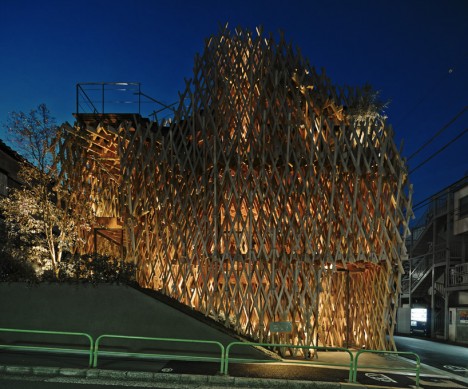
Thin, criss-crossing timber beams create the effect of a dense forest in this latticed wooden facade on a dessert shop in Tokyo by Kengo Kuma + Associates. The basket-like arrangement ploys an ancient Japanese construction technique called ‘jiigokugumi,’ which joins the individual pieces of wood together without using glue or fasteners.

Next Page – Click Below to Read More:
Wooden Architecture In The Modern World

Share on Facebook


[ By Steph in Architecture & Cities & Urbanism. ]

[ WebUrbanist | Archives | Galleries | Privacy | TOS ]


WebUrbanist

 
Comments Off on Modern Wooden Architecture: 16 Fresh Takes on Timber

Posted in Creativity


Nikon D5200 and D7100 firmware updates removes noise during video capture, fixes bugs

17 Sep

Nikon has released firmware updates for both the D5200 and D7100 cameras,. Bth new versions of the firmware reduce horizontal line noise in videos recorded at 1280×720/60p and 1280×720/50p. In addition, firmware v. 1.03 fixes select bugs affecting both models. Read more

Articles: Digital Photography Review (dpreview.com)

 
Comments Off on Nikon D5200 and D7100 firmware updates removes noise during video capture, fixes bugs

Posted in Uncategorized


Can a Sony RX10 II keep up with a Nikon D5500 on the soccer field?

17 Sep

The RX10 II is an extremely versatile camera and so far, it has impressed us with its ability to perform well in most scenarios. But what about sports photography? We decided to bring it to the soccer field and pit it against a DSLR to see if it could keep up. The results? Find out here


Articles: Digital Photography Review (dpreview.com)

 
Comments Off on Can a Sony RX10 II keep up with a Nikon D5500 on the soccer field?

Posted in Uncategorized


Fox Talbot’s historical Mousetrap camera leaves UK for first time, heads to Tokyo

16 Sep

One of the first cameras to make a permanent photographic image has left the UK for the first time to be part of an exhibition hosted by the Japan Camera Museum in Tokyo. The so-called Mousetrap camera, used by William Henry Fox Talbot in his early experiments in creating the negative process in the 1830s, is the centre-piece of an exhibition entitled Kingdom of Elegance, Mahogany and Brass which shows off early cameras from the UK’s photographic industry. Sponsored by The British Embassy, the exhibition displays cameras owned by the Royal Photographic Society, the National Media Museum of the UK and a private collector called Kobayashi Yas.

Articles: Digital Photography Review (dpreview.com)

 
Comments Off on Fox Talbot’s historical Mousetrap camera leaves UK for first time, heads to Tokyo

Posted in Uncategorized


16. September 2015

16 Sep

Das Bild des Tages von: Jörg Marx

Sehr dunkler Buchenwald.

Im Ausblick: Dirty Harry, Zweihundertfünfzigmillionen Pixel und 5 deutsche Modefotografen
kwerfeldein – Fotografie Magazin | Fotocommunity

 
Comments Off on 16. September 2015

Posted in Equipment


Q&A: Gearing up for the National Football League with sports photographer Otto Greule

16 Sep

As the National Football League season sweeps in, sports photographers across the United States take to the stadiums to create iconic images. In a Q&A below, veteran sports photographer Otto Greule shares insider knowledge & outstanding imagery to give insight into his fast-paced, visual craft.

Articles: Digital Photography Review (dpreview.com)

 
Comments Off on Q&A: Gearing up for the National Football League with sports photographer Otto Greule

Posted in Uncategorized