RSS
 

Archive for September, 2015

Airnef brings desktop Wi-Fi transfer to Nikon users

18 Sep

A DPReview community member and forum moderator has created a free desktop application designed to help Nikon users wirelessly transfer files from their cameras to their computers. Compatible with OS X, Windows and Linux, Airnef is an open-source utility that works with Nikon’s external Wi-Fi adapters as well as cameras with built-in Wi-Fi. Read more

Articles: Digital Photography Review (dpreview.com)

 
Comments Off on Airnef brings desktop Wi-Fi transfer to Nikon users

Posted in Uncategorized


3 Fun Ways to Enhance Your Landscape Images in Photoshop

18 Sep
title-day-moonlight

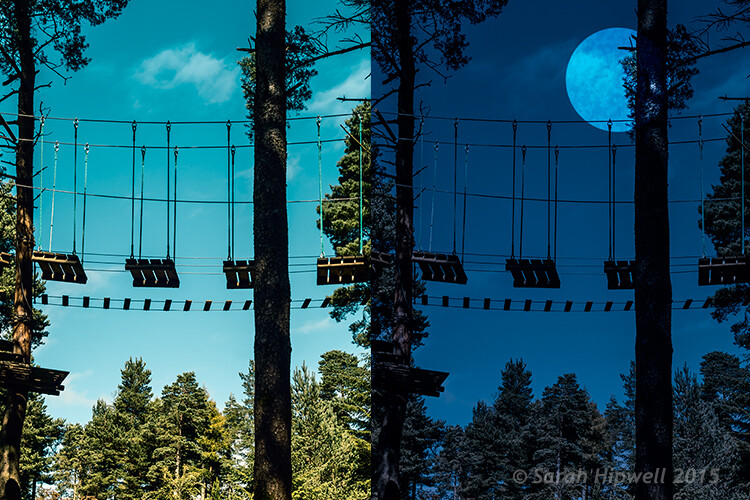
Turning Day into Night using Color Lookup and easy-to-do moon in Photoshop.

As the theme for this month is on landscape photography, I thought I would share three fun ways to add features to your landscape images that already come embedded in Photoshop as presets. Let’s take a look at the first one.

#1 The Rainbow

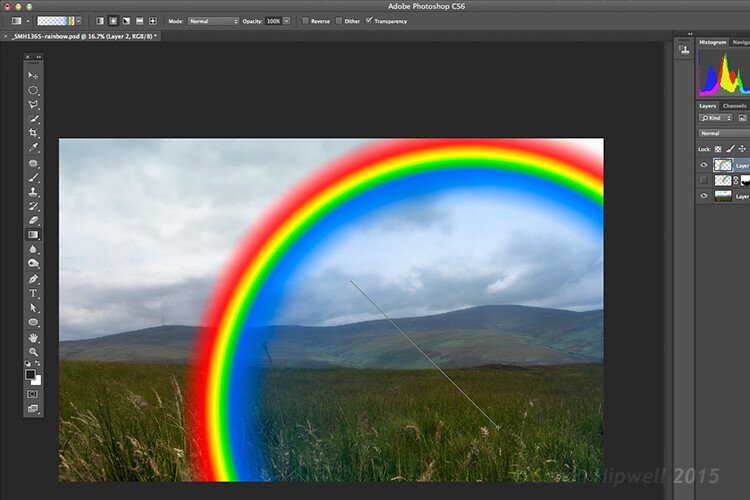
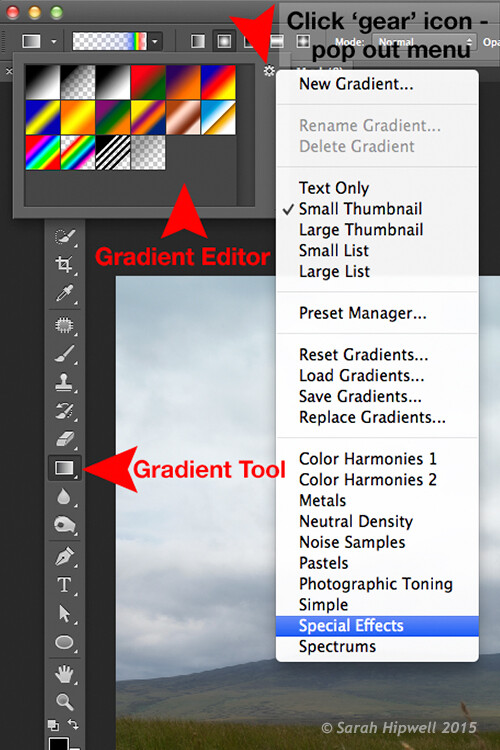
Open an image that you want to add the rainbow to. Click on the Gradient tool, then click on the Gradient box in the Options bar to bring up the Gradient Editor dialog box.

Click on the gear icon at the top right corner of the Presets section and another pop-up menu appears. Choose Special Effects near the bottom of the list. When you click on it, a dialog box appears asking you to replace the current default gradients with the ones that you are loading. Click Ok. It contains only five presets, the last one being Russell’s rainbow is the one I’m going to use. Click ok, then go back up to the Options bar and click on Radial Gradient.

Gradient-editor-pop-out-menu-special-effects

The rainbow preset is in the Gradient Editor under Special Effects.

Make sure you have a new layer over the image that you are using. Start at the bottom of the image and drag upwards at a 45 degree angle and release. Depending on the size of the rainbow that you want, you can press CMD Z to undo and restart again (see image below). At first, it looks way too extreme and unrealistic, but using the free transform tool (CMD+T), resize and rotate and place it into position.

Creating-rainbow-using-rainbow-effect

With Russell’s rainbow preset selected and the gradient changed to radial. Click on a low part of the image and drag upwards at an angle to create the rainbow.

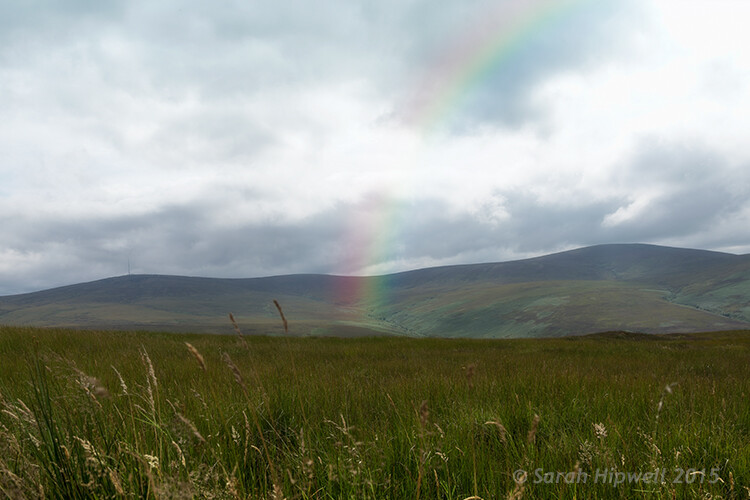
Change the layer blend mode to Screen. You can see the rainbow appears behind and in front of the clouds. Add a layer mask and with a big soft brush, soften the end of the rainbow where it hits the ground. I also converted the layer to a Smart Object and applied a Gaussian Blur. I then Lowered the Fill and Opacity to get an almost translucent effect. Voila, a real simple but effective rainbow.

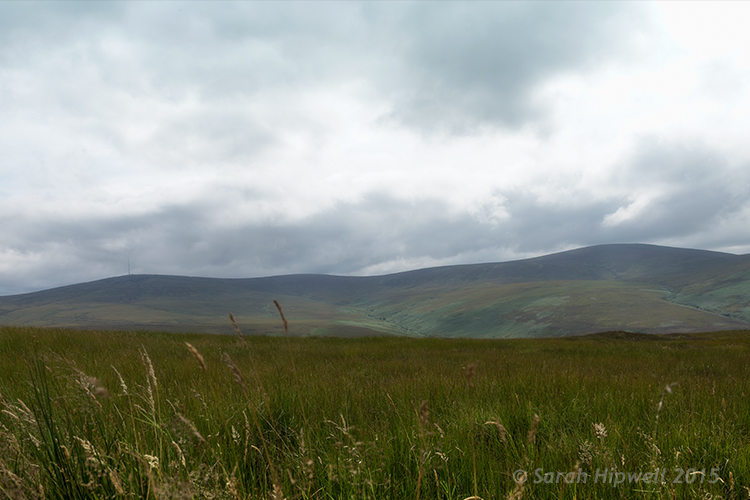
mountain-view

The original image without the rainbow.

mountain-view-rainbow

The rainbow effect added to the image.

Rainbows happen when sunlight and rain combine in a very specific way. And this brings me to the next preset…

#2 Rain

This particular preset is not as effective as the other two. I think a custom rain brush would be better, nevertheless, it does an okay job.

Depending on the image that you use, it is better to have an image with clouds rather than a clear blue sky. I desaturated this image by using a hue/saturation adjustment layer and I also added a vignette to give it more drama.

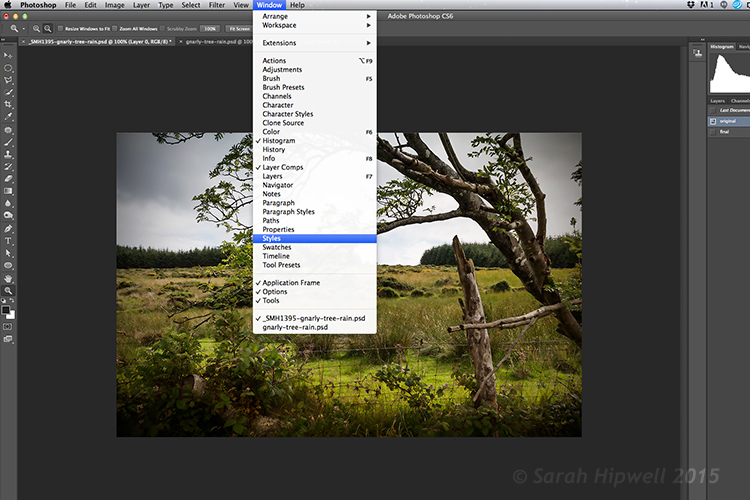
If you go up to Window in the menu bar and open up the Styles panel, or the Adjustments panel has a Styles tab to its right. Over to the far right corner is an arrow, click on this icon and a pop out menu appears. Choose Image Effects from near the bottom. Similar to the Gradient Editor, a dialog box appears asking you to, “Replace current styles with the styles from Image Effects?” Click Ok. The Rain style is down near the bottom.

Window-Styles

The Styles Panel is located under Window in the Menu bar.

arrow-icon-styles-panel

You’ll see this arrow icon to the far right corner of the Styles Panel. Click on tit and a pop-out menu appears (right).

pop-out-menu-styles-image-effects

This is the pop-out menu. The rain preset is located in the Image Effects.

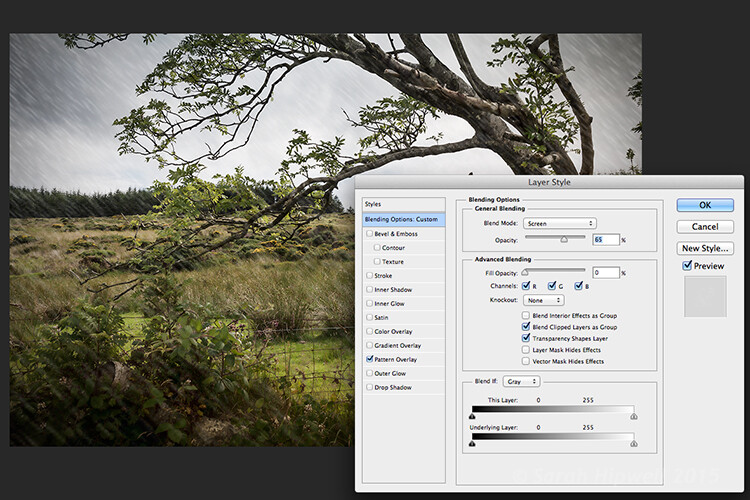
But first, create a new layer over the image that you have opened. Name this layer, Background rain. Fill it with 50% gray. Now click on the rain style. It creates a Pattern Overlay. At first, you just see small white diagonal slashes against a gray background. Change the blend mode to Screen. Then click anywhere to the right of this gray layer to bring up the Blending Options Layer Style dialog box. All you need to do here is bring the Fill opacity under Advanced Blending down to zero. Click Ok. Now you see just the the rain, the gray color is gone.

Layer-style-blending-options

This is the Layer Style Blending Options dialog box where you set the Fill Opacity to zero to get rid of the gray background. You could also reduce the Fill Opacity in the Layers panel.

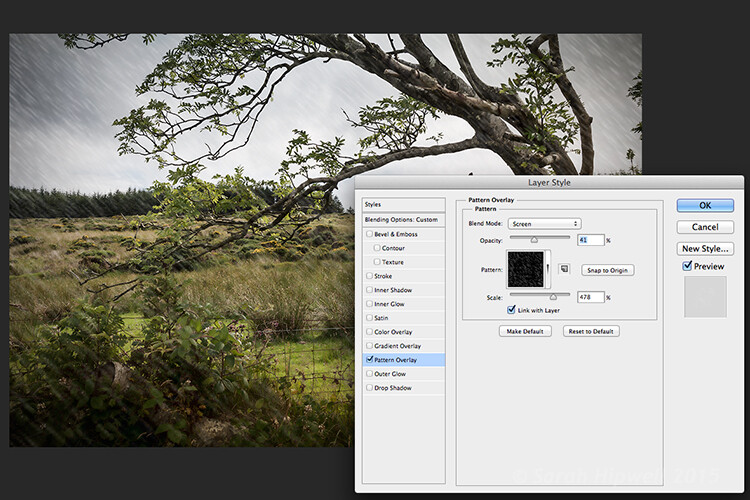
You need to alter the size of the rain, it needs to be smaller as if it’s in the background. Double-click just underneath the layer where it says Effects>Pattern Overlay, this brings up the Pattern Overlay Layer Style dialog box. As you move the scale slider to the right or left, you can see the rain increasing or decreasing in size. I chose 207% and reduced the opacity to 52%. Click Ok. I added a layer mask, and with gradient tool, I masked away the rain at the bottom (you can equally use a soft brush to mask instead). I reduced the Opacity on this layer to 85%.

Layer-style-pattern-overlay

This is the Pattern Overlay where you can adjust the size of the rain by using the scale slider, and its opacity, quick and easily.

I created another layer and named this Foreground rain. I repeated the same steps as above but I changed the scale of the rain. I wanted the rain to appear bigger. So again double click on the Effects>Pattern Overlay to open the Pattern Overlay Layer Style dialog box. Increase the scale to 478% and reduce the opacity to 41%. Click Ok. I then reduced the Opacity on this layer to 65%. This gives the rain a bit more depth and adds a more realistic effect.

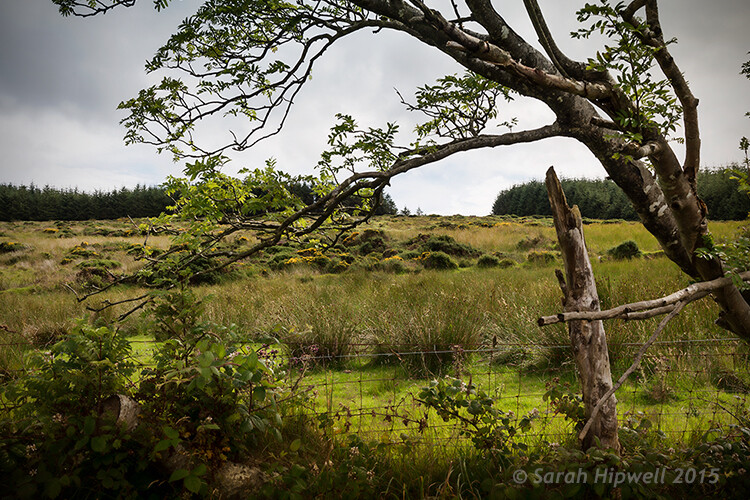
field

Original image taken with no rain.

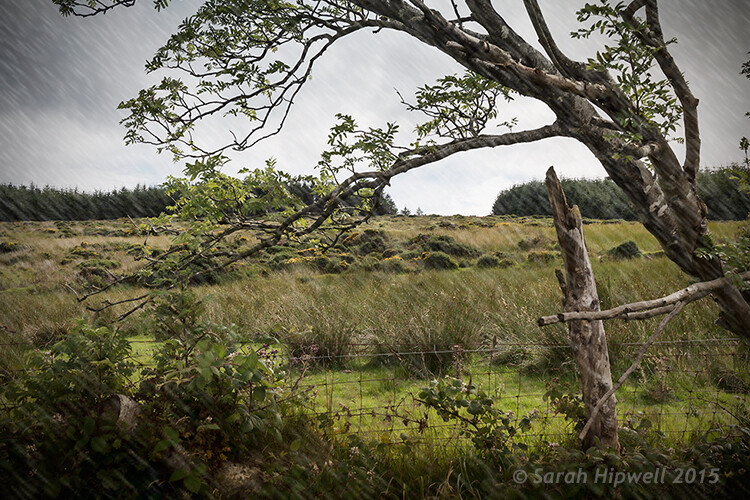
Rain-in-field

Rain applied using the rain preset in the Styles panel. I also desaturated and added a vignette to the image before adding the rain.

#3 Day to Night

Now for the third effect. This is a really quick and easy way to turn a photo from day into night with a preset already in Photoshop (CS6). Go up to Layer>New Adjustment Layer>Color Lookup. Where it says 3DLUT File, click on the tab beside it and a pop-up menu with different effects appears, scroll down to Moonlight.3DL. These presets are known as lookup tables, or LUTs, they’re mainly found in the film industry.

For added effect, I’m going to add a moon. Create a new layer, Go to your eclipse tool and hold down the Shift key and draw a circle, roughly 200px. Fill it with white. Deselect (CMD+D). Go up to Filter>Filter Gallery>Artistic>Sponge. Choose the Brush tool set to: Size 7, Definition 3 and Smoothness 5. Click Ok. Move the moon near the top of the tree. I reduced the size a little by using the Free Transform Tool (CMD+T). Change the blend mode to overlay. Duplicate this layer and reduce the Opacity to 55%. See image below.

title-day-moonlight

I hope you enjoyed these fun and quick techniques using these presets found in Photoshop. Do you use presets or other plugins? Please share in the comments below.

googletag.cmd.push(function() {
tablet_slots.push( googletag.defineSlot( “/1005424/_dPSv4_tab-all-article-bottom_(300×250)”, [300, 250], “pb-ad-78623” ).addService( googletag.pubads() ) ); } );

googletag.cmd.push(function() {
mobile_slots.push( googletag.defineSlot( “/1005424/_dPSv4_mob-all-article-bottom_(300×250)”, [300, 250], “pb-ad-78158” ).addService( googletag.pubads() ) ); } );

The post 3 Fun Ways to Enhance Your Landscape Images in Photoshop by Sarah Hipwell appeared first on Digital Photography School.


Digital Photography School

 
Comments Off on 3 Fun Ways to Enhance Your Landscape Images in Photoshop

Posted in Photography


Epson introduces Wi-Fi Direct PictureMate PM-400 mini-inkjet printer

18 Sep

Epson has announced the PictureMate PM-400, a new addition to its PictureMate range of miniature inkjet printers. It features Wi-Fi Direct and is able to print from smartphones and tablets wirelessly even without a Wi-Fi hotspot. Read more

Articles: Digital Photography Review (dpreview.com)

 
Comments Off on Epson introduces Wi-Fi Direct PictureMate PM-400 mini-inkjet printer

Posted in Uncategorized


Finding Balance Between Photography and Friends When Travelling

18 Sep

If there is one common thing that gets photographers fired up and excited, it’s the prospect of travel. Just like most other artists, you need your creative fire stoked and it’s hard to beat a walkabout to some exotic foreign land (or even a Cow Safari).

The new surroundings, different cultures, or new experiences are the perfect excuse to charge your batteries, clean your lenses and format those memory cards (you do format your cards before you use them, right?).
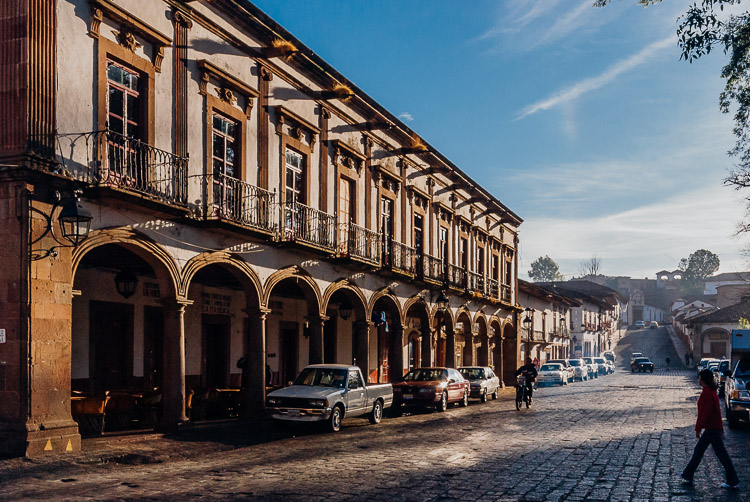
Colonial architecture in a historical Mexican town

Exotic lands just might be the ideal catalyst to get the creative juices flowing.

If you’re wandering out into the world solo, you have full photographic freedom to choose where you go and how much time you spend there. However, you may often find yourself with accompaniment on these excursions in the form of friends, your significant other, or family. The more obsessive of a shutterbug you become, the more challenges you are going to face, in order to strike a balance between being selfish for your own passions, and trying to appease everyone.

I can’t tell you how many times I’ve wandered off into the photographic zone, and inadvertently ignored my traveling companion. Once I realize, I glance around thinking they probably abandoned me, only to see them half asleep on a bench or standing hands on hips, not looking happy.

If your travel partner (s) are as psyched about photography as you are, read no further, you have it made. Unfortunately this isn’t usually the case so we need to muster up some diplomacy to keep things running smooth.

The trade-off

While traveling, whether with a significant other or friends, one method that will help you reach that middle ground is to make a conscious effort to take photos of them along the trip, in exchange for you being able to wander around a little more, or spend some extra time shooting. Of course this doesn’t necessarily have to be a spoken exchange, but often it will just work out this way.
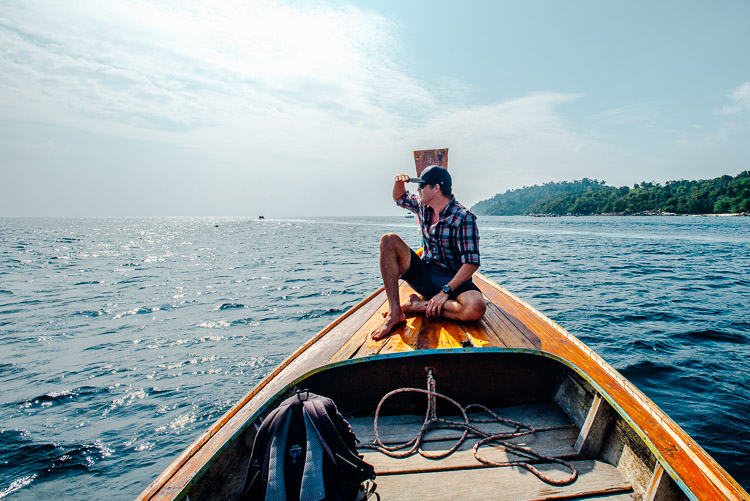
Capture photos of traveling companions

Capturing some fun shots of your traveling companions goes a long way towards striking the balance between photography and sharing the experience.

To make this work well, you need to actually put some time, effort, and thought into the shots. You can’t just snap a quick shot of them by the doors of an old church, then spend an hour on various compositions of the doors themselves. Get a remote flash and use it off-camera to get some nice lighting and flattering portraits. Have them pose in interesting positions and underexpose some shots to create cool silhouettes.

The concept is to not only get some memorable shots of them in the exciting places you’re traveling to, but to engage them in your process, and make them feel like they’re not traveling alone.

Careful planning

Although a big part of traveling is embracing surprises and the discovery of new things, a little diligence in planning can help you get the shots you want without sacrificing your relationships.
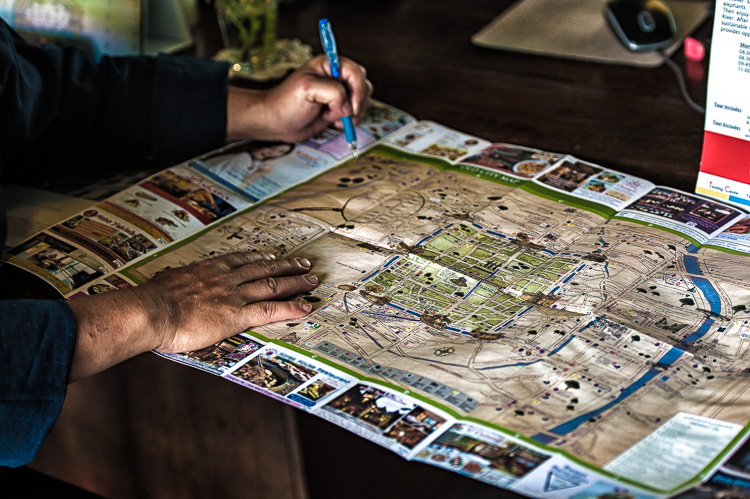
Using a city map to plan the day

A little forethought and planning can help make adventures run smoother.

If you think ahead about the places you want to photograph and when the light will be best, you can work up an itinerary that can flow more smoothly without waiting around for the light. Want a sunset shot on the coast or golden hour light for that cityscape panorama? Think about planning for dinner on the water, and showing up a little early or find a rooftop bar for a drink.

There are apps that can help you with this planning such as Stuck On Earth or even Google Earth.

Breathing room

While traveling or going on vacation with others can be a blast, there’s nothing wrong with splitting up sometimes. Especially on long trips, it can be a strain on relationships to spend every waking moment together, and a couple hours of solo-exploring can be a nice respite.
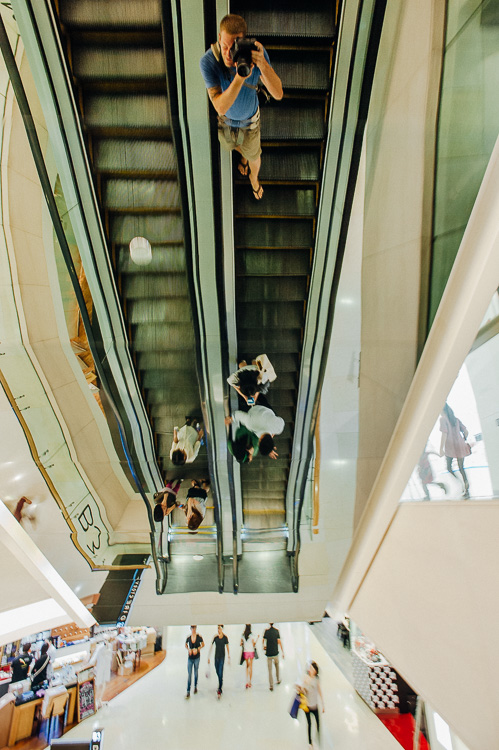
Solo adventure

A few hours of splitting up to pursue varying interests can work wonders.

Again, if you can figure out how to plan this ahead of time, all the better. Maybe there is some cool architecture near a shopping mall or an outdoor market that can provide activities for all involved.

Go with the flow

Then there is, of course, the path of least resistance. If you are willing to sacrifice the time-consuming or contrived shots, you can always wing it and see what happens. This is also the default position you might find yourself in anyways – after all, plans are made to be broken.

This approach can also be a good exercise in picking up your pace, and developing a keener eye. Maybe this entails ditching the tripod at the hotel, and venturing out with only one lens (tragic, I know). Be resourceful instead; find a firm surface and use the self-timer for dark shots, and use a zoom lens or challenge yourself to rely on a fixed focal length lens for your compositions.

Life is all about compromises. It’s important to keep in mind that not everyone shares the same passions, and you should do your best to try and see the situation through your travel partners’ eyes.

“Learn the wisdom of compromise, for it is better to bend a little than to break.”

googletag.cmd.push(function() {
tablet_slots.push( googletag.defineSlot( “/1005424/_dPSv4_tab-all-article-bottom_(300×250)”, [300, 250], “pb-ad-78623” ).addService( googletag.pubads() ) ); } );

googletag.cmd.push(function() {
mobile_slots.push( googletag.defineSlot( “/1005424/_dPSv4_mob-all-article-bottom_(300×250)”, [300, 250], “pb-ad-78158” ).addService( googletag.pubads() ) ); } );

The post Finding Balance Between Photography and Friends When Travelling by Jeremie Schatz appeared first on Digital Photography School.


Digital Photography School
 
Comments Off on Finding Balance Between Photography and Friends When Travelling

Posted in Photography


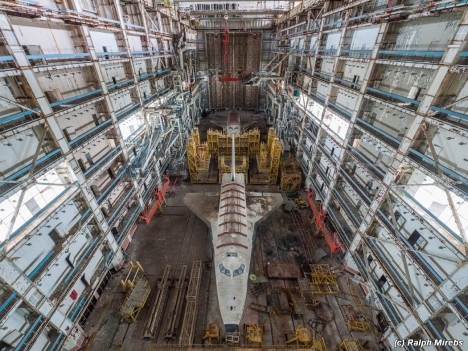
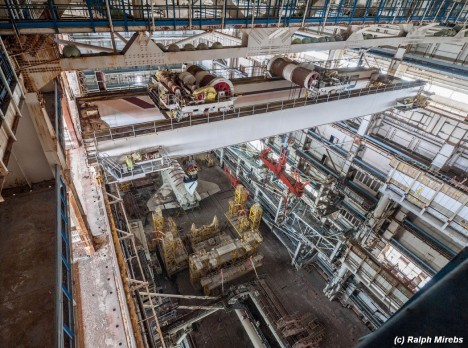
Abandoned Ship: Spacecraft Discovered in Huge Derelict Hangar

18 Sep

[ By WebUrbanist in Abandoned Places & Architecture. ]

space shuttle destroyed prototype

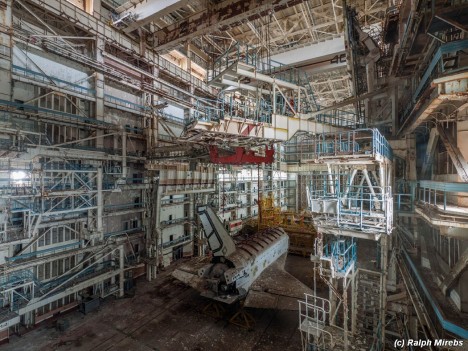
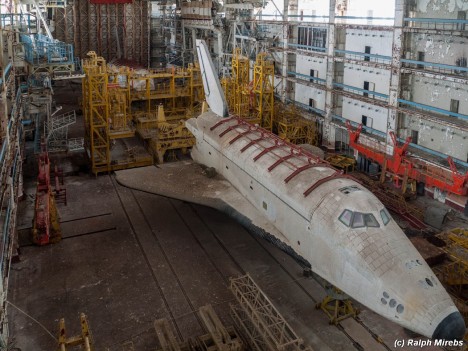
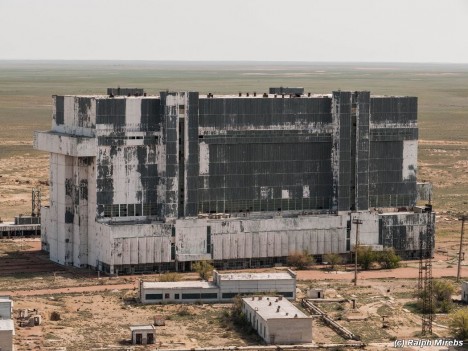
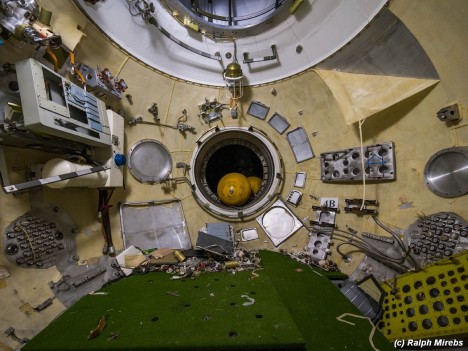
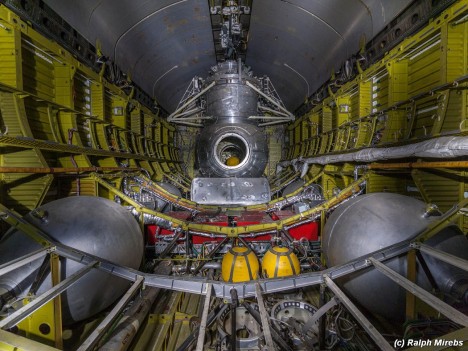
Remarkably intact and beautifully documented by a Russian urban explorer, this space shuttle prototype rests in a massive above-ground graveyard at the Baikonur Cosmodrome, deserted due to the collapse of the Soviet Union. Originally destined to dock with Soviet space station Mir, the model was almost finished and had even completed a test flight when the facility was shut down in the early 1990s.

space shuttle view above

space shuttle interior angle

space craft close up

space shuttle tail section

space shuttle building exterior

Photographer Ralph Mirebs identified the massive (yet somehow still unassuming) structure as an excellent target for exploration, but did not know just how many surprises were in store for him when he took his camera into the ruins. Positioning himself on catwalks and even entering spacecraft models, he was able to take pictures of an amazing array of spaces and equipment.

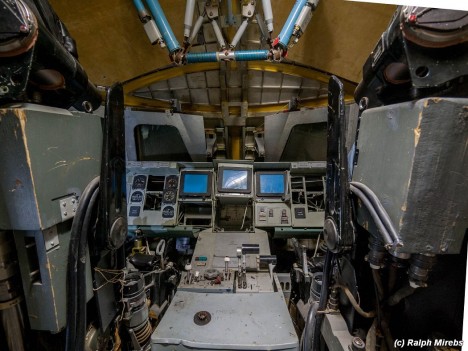
space shuttle cockpit view

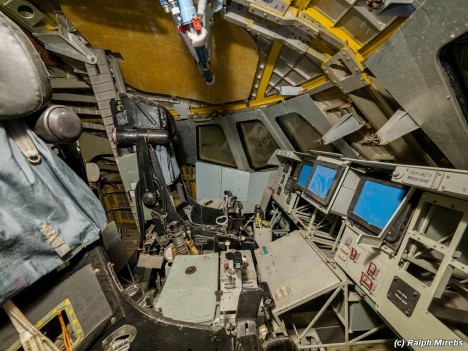
space shuttle cockpit side

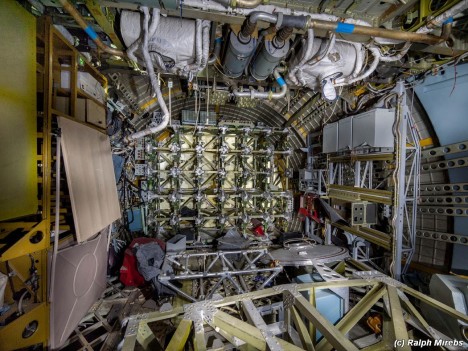
space shuttle interior debris

space shuttle inside

space shuttle looking back

As incredible as the outside of the craft may be, the insides are all the more fascinating, filled with the equipment intended to take it to space that somehow seems surprisingly fragile right here on the ground.

Next Page – Click Below to Read More:
Abandoned Ship Spacecraft Discovered In Huge Derelict Hangar

Share on Facebook


[ By WebUrbanist in Abandoned Places & Architecture. ]

[ WebUrbanist | Archives | Galleries | Privacy | TOS ]


WebUrbanist

 
Comments Off on Abandoned Ship: Spacecraft Discovered in Huge Derelict Hangar

Posted in Creativity


Amazon reveals thinner Fire HD tablets

17 Sep

Amazon has today updated its Fire tablet line and announced three new models, the Fire HD, Fire and Fire Kids. Not only are the new models lighter and thinner than the previous generation, but with their introduction the Kindle name is dropped from the Amazon tablet lineup. Read more

Articles: Digital Photography Review (dpreview.com)

 
Comments Off on Amazon reveals thinner Fire HD tablets

Posted in Uncategorized


Boom! Woah! Exploding Box Photo Album

17 Sep

Some explosions are loud and pretty. Like fireworks.

Other explosions are quiet and pretty. Like this amazing photo album that we’re gonna teach you to make.

That’s right! We’re gonna lead you step by step through the surprisingly simple process of making an Exploding Box Photo Album!

(Don’t worry, it doesn’t really explode. No safety goggles needed.)

(…)
Read the rest of Boom! Woah!
Exploding Box Photo Album (559 words)


© Taylor for Photojojo, 2015. |
Permalink |
No comment |
Add to
Exploding Box Photo Album”>del.icio.us

Post tags:


Photojojo

 
Comments Off on Boom! Woah! Exploding Box Photo Album

Posted in Equipment


Wish you could take Amazing Photos? Now you can with our Brand New Course

17 Sep

Wish you could take amazing photos with that camera that rarely comes out of Auto Mode?? Now you can.

With our brand new photography course – presented on video – Photo Nuts and Shots.

It’s a follow up to the incredibly popular Photo Nuts and Bolts course released earlier this year and complements our best-selling ebook of the same name (and author, Neil Creek).

If you already know your way around your camera but want to gain real skills that you’ll use in every shot you take, then this creative photography course is for you.

And for a limited time, it’s available at the special introductory price of just USD $ 39 – which is a saving of 33%.?

What you’ll learn

In 10 easy-to-understand video lessons, Neil reveals the tools, techniques and thought processes for producing amazing photos:

  • Learn to harness light to convey emotion
  • Understand the impact of great composition and how to achieve it
  • Take the sharpest possible photos
  • Discover how to adapt your camera’s exposure to get the shot you want
  • Master the concepts of shot perception, planning and execution – in any setting
  • Know when to break the rules for creative effect
  • Tap into your creativity to be the best photographer you can be
  • Because the videos are streamable and downloadable, you can go through at your own pace and in any order.

And the best part is that Neil’s teaching is practical and immediately actionable, so you’re guaranteed to see an instant improvement in the quality of your shots.

Take a look…

For a quick video preview, or to find out more, head here and check out the full details of this great new course.

Great photography CAN be learned – and Photo Nuts and Shots will show you how.

So get your camera ready and take this all-new dPS course today/

googletag.cmd.push(function() {
tablet_slots.push( googletag.defineSlot( “/1005424/_dPSv4_tab-all-article-bottom_(300×250)”, [300, 250], “pb-ad-78623” ).addService( googletag.pubads() ) ); } );

googletag.cmd.push(function() {
mobile_slots.push( googletag.defineSlot( “/1005424/_dPSv4_mob-all-article-bottom_(300×250)”, [300, 250], “pb-ad-78158” ).addService( googletag.pubads() ) ); } );

The post Wish you could take Amazing Photos? Now you can with our Brand New Course by Darren Rowse appeared first on Digital Photography School.


Digital Photography School
 
Comments Off on Wish you could take Amazing Photos? Now you can with our Brand New Course

Posted in Photography


Auf Abwegen

17 Sep

© Marit Beer

Große Teile der werten Leserschaft kennen meine Artikel und meine Arbeiten. Vorrangig lege ich meine Hand für die analoge Schwarzweißfotografie ins Feuer, ohne Angst vor Schmauchspuren. Aber seit einem Jahr hat es mich gepackt und durchgeschüttelt.
kwerfeldein – Fotografie Magazin | Fotocommunity

 
Comments Off on Auf Abwegen

Posted in Equipment


Exo creates housing to make GoPro operate, look more like a traditional camera

17 Sep

New Zealand-based EXO Camera Equipment has launched a Kickstarter campaign to get its camera-style casing for GoPro cameras off the ground. The company hopes to produce the EXO GP-1, a metal body into which GoPro cameras can be placed, to take on a more traditional camera form. Read more

Articles: Digital Photography Review (dpreview.com)

 
Comments Off on Exo creates housing to make GoPro operate, look more like a traditional camera

Posted in Uncategorized