RSS
 

Archive for August, 2015

Wave-Free Surfing: Electric Boards Power Through Calm Waters

26 Aug

[ By WebUrbanist in Technology & Vehicles & Mods. ]

onean surfboard

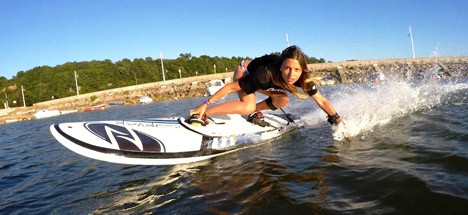
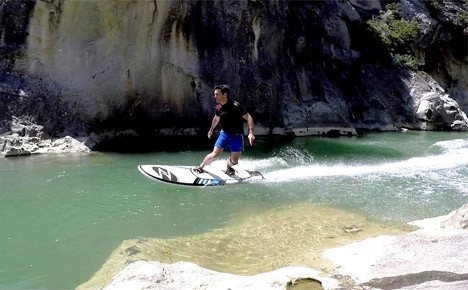
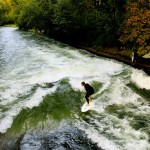
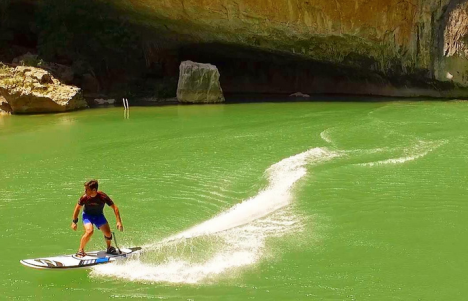
Leaving those stand-up paddleboarders in the proverbial dust, these new battery-powered boards will let you cruise lakes, rivers, cannals and other bodies of water all without that formerly-critical ingredient: waves.

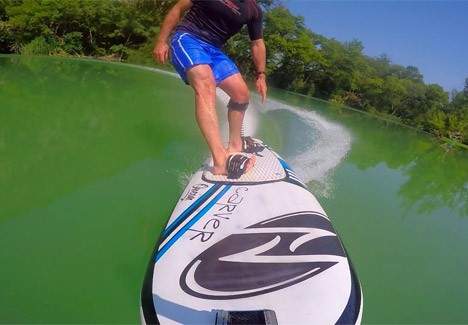
The Spanish surf company Onean has unveiled two models, the Carver and Manta, respectively designed for serious surfers to slalom across calm water and to let more casual surfers to smoothly explore still surfaces in remote places.

surf remote stream lake

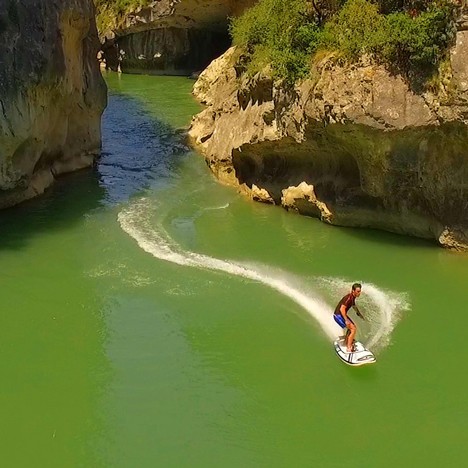
Each version has speed controls tied to a handheld remote and optional foot slots for greater traction. A third model, the Blade, is also in production but details about the board have yet to be released.

surf electric battery board

The Carver owes its look to the classic longboard and its speed (around 5 miles per hour) to an interchangeable onboard battery powering an axial water pump. The wider Manta has is slightly slower and wider, made for cruising.

surfboard remote demo

The battery life on the faster variant is only 20 minutes, at which point it can be swapped with a spare, but the latter has more energy storage, allowing for up to 2 hours of travel and enabling more ambitious explorations.

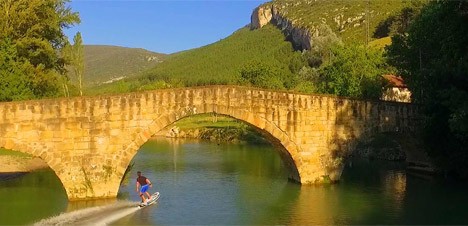
surf without waves

surfboard close up

Aside from obvious coastal uses (like providing a backup board on calm days at the beach), electric boards can bring an entirely new sport to landlocked but water-covered places like Minnesota, the Land of 10,000 Lakes.

Share on Facebook


[ By WebUrbanist in Technology & Vehicles & Mods. ]

[ WebUrbanist | Archives | Galleries | Privacy | TOS ]


WebUrbanist

 
Comments Off on Wave-Free Surfing: Electric Boards Power Through Calm Waters

Posted in Creativity


Fujifilm X100T successor rumored to feature new lens

26 Aug

According to a source speaking with Fuji Rumors, the Fujifilm X100T’s successor will have a new lens. The present lineup of X100 cameras all feature the same fixed 23mm F2 lens, and if past announcement intervals are any indication, the X100 series may see an update just around the corner. Read more

Articles: Digital Photography Review (dpreview.com)

 
Comments Off on Fujifilm X100T successor rumored to feature new lens

Posted in Uncategorized


How to Be Respectful and Safe Photographing Wildlife

26 Aug

Hang in there

Photographing large, dangerous wildlife can be extremely fun to do, but there are some unique factors to consider when your subjects are wild animals, in their natural habitat. Your adrenaline may be pumping, but you must keep your wits about you at all times, and not get caught up in the excitement! Here are a few things to consider when photographing dangerous animals in the wild.

Safety first

When photographing wild animals (such as black bear in the Great Smoky Mountains National Park, as featured throughout this article), naturally the most important factor is safety, both yours and the subject’s. Getting too close to one of these animals is never a good idea. Most national parks will post the distance that you should keep from their animal attractions for your safety. Obey them! If no guidelines are posted, as a general rule, remember – if you are close enough to an animal that they are aware of your presence, and change their behaviour because of it, you are too close.

You may think a large animal will be a slow mover and that you’ll have no problem escaping from it, but adult bears, for example, can run up to 30 MPH, and you won’t stand a chance. (You may have heard the joke that you don’t have to outrun the bear, just the guy behind you!) Getting too close to these animals is not only life-threatening to you but also to the animal, because an animal that attacks a human, or even shows aggressive behaviour to people that get too close, will likely be targeted to be euthanized. Another thing you must never ever do is put yourself between a mother and her offspring, probably the most dangerous situation you can find yourself in. So, keep your distance, and never put yourself in that position.

Litter is an issue

A third safety issue for both you and the animal, often underestimated, comes in the form of littering. Litter may become a dangerous food source for these animals, because it has human scent on it. If and when the wild animals begin to relate the human scent with a food source, these animals may also have to be euthanized for human safety. Even biodegradable items, such as an apple core, should not be thrown down. So please dispose of your trash properly! Do not carry any food on your person, as most wild animals have a very good sense of smell, and this may put you in grave danger if the animal is really hungry.

It is so tempting to get caught up in the moment while photographing these beautiful creatures, but you must keep safety as your top priority, and abide by the rules that are posted for your safety and the animals’.
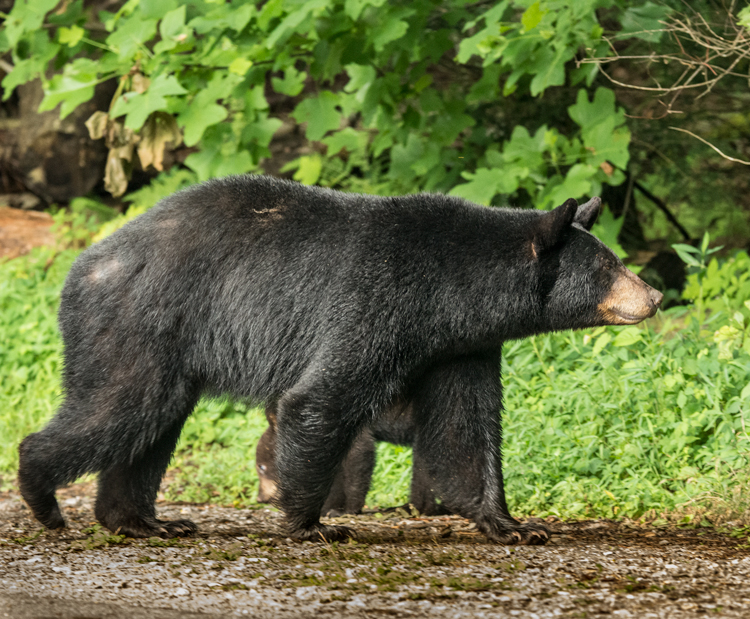
Mother Bear

Recommended equipment

  • DSLR camera, preferable to your cell phone. If you are close enough to get a great cell phone image, you are too close!
  • Lens with a long focal length: A must, because as mentioned above, getting close to untamed subjects can be dangerous. The images in this article were taken with a Tamron 150-600mm zoom lens.
  • Monopod or tripod: Because large lenses can become heavy and difficult to hold steady over a long period of time, a good monopod is a great asset, as it’s quickly and easily transportable.
  • Window mount or pad for the lens: It’s good to have something firm to brace your lens on, if you end up shooting from your vehicle window.

Do your homework

Before you head out to your chosen park or nature preserve, do your homework. Having an idea of the lay of the land is very useful before you arrive in the area, so you don’t waste time getting to know it. Download maps of roads and trails for the area. Research the wildlife you expect to photograph, learning the facts about their habitats, food sources, and what time of the year the babies appear. Learn the animals’ habits, such as what time of the day they are most active; and what, when and where they feed. One of the best ways to find this information is talk to park rangers or local residents, as they will know exactly where to locate the wildlife. I recently asked a park ranger “What is the most asked question you get as a ranger?” I had a pretty good idea what his answer would be, and it was, “Where are the bears?”
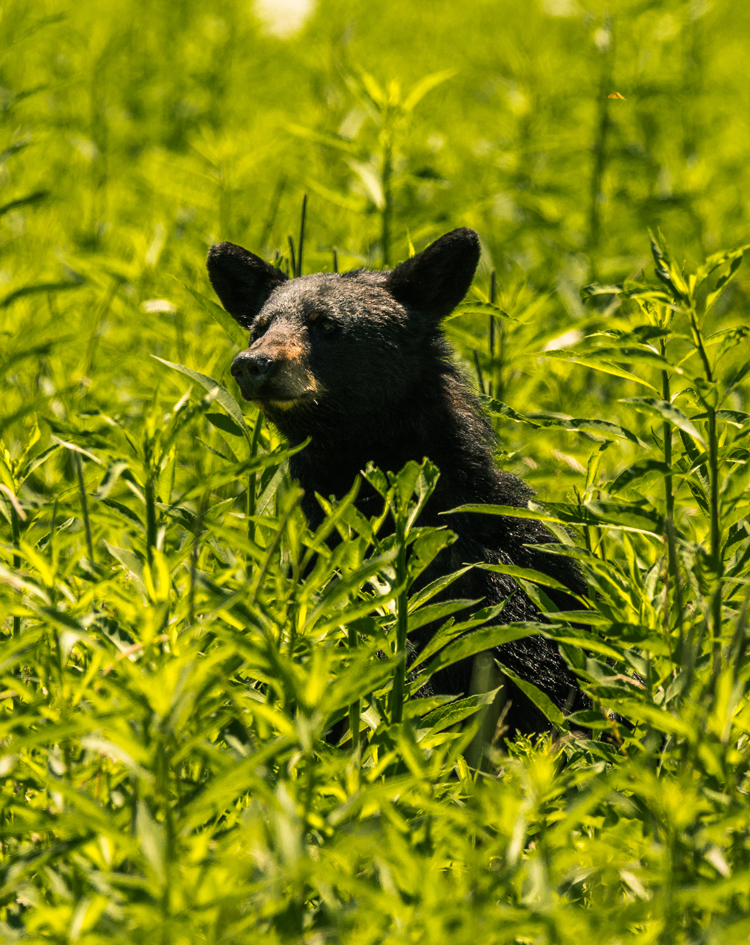
A rare sighting of a mother bear in the midday sun. The harsh lighting creates a very contrasting image.

A rare sighting of a mother bear in the midday sun. The harsh lighting creates a very contrasty image.

Be observant

The hardest part of photographing wildlife is finding them, because they often avoid contact with sight-seers and paparazzi.  Most wildlife is not likely to be found out in the open, during the heat of the day. Early morning or late afternoon are the best times to find animals moving about. During the day, look for them in shady areas or near water where they can stay cool. Don’t forget to look up, as bears and other animals will climb trees, and if they sense danger they will also send their little ones into the canopy for safety. One time as I was trying to photograph an encounter between a mother bear and a coyote, I later found out I had walked right by the tree that the mother bear had sent her cub up into for safety. A missed opportunity for a memorable photograph!
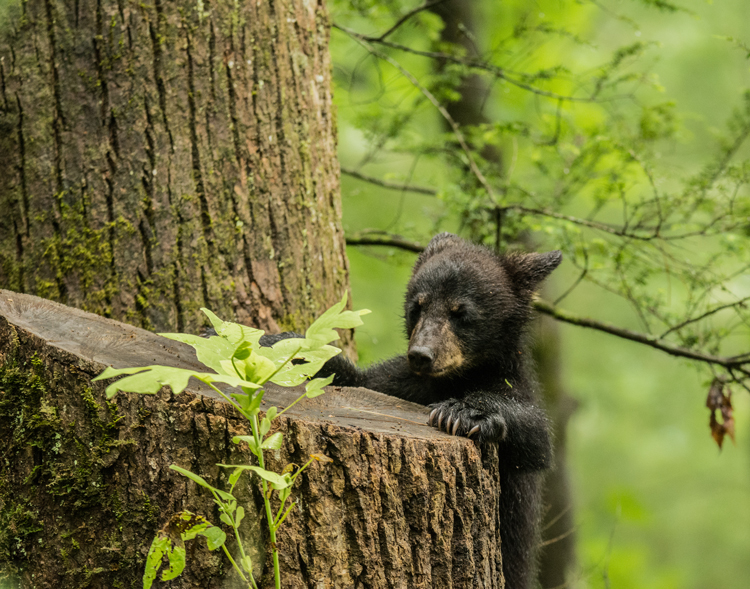
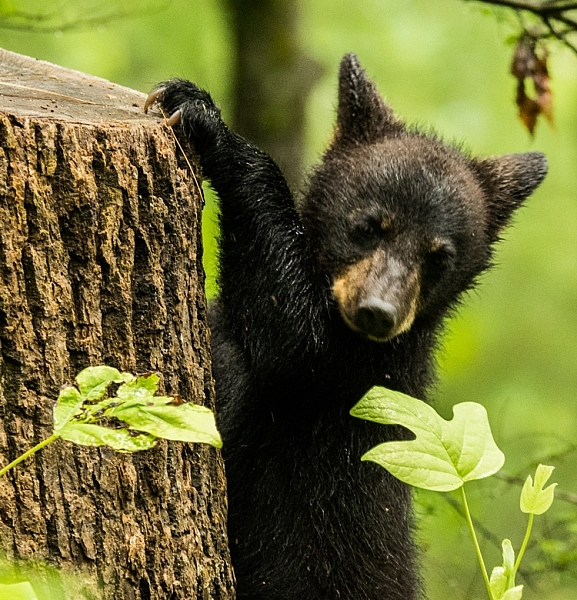
bear cub playing

Designated driver

In many cases, when you are scouting for wildlife to photograph, so are hundreds of other photographers, and park visitors, who also crave the experience of seeing an animal in the wild. When one or more are spotted, a great traffic jam may occur along the road, and by the time you get to the place the subjects were first noticed, they have moved on. If you have a willing companion, take them along for the adventure as a “designated driver”, so when traffic stops you are free to jump out with your camera and get to the animal sighting before they have disappeared.

Parks have rules about not stopping in the road, but people often get excited and just stop their vehicles to get out and get a good look. Be courteous if you are the first to come upon an animal sighting, and pull your vehicle off the road if you want to stop and photograph. Depending on the animal you are photographing, it could be dangerous to get out of your car, so be extremely careful.
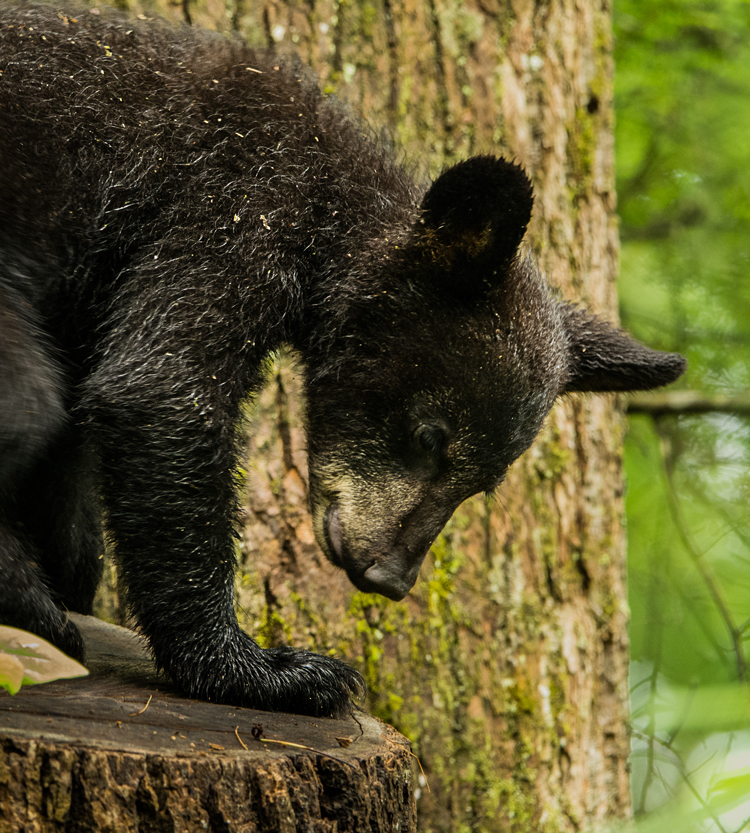
bear cub

Focusing

Focusing your camera can be one of the more challenging issues in photographing creatures in the wild. You must be careful when focusing that your camera doesn’t lock on a foreground object, instead of your intended subject. Getting a clear shot may be difficult to achieve with undergrowth, tall grass, and other distractions competing with your subject for the focus lock.

Of course, just as with any other animal, your aim is to focus on the subject’s eye. One way this can be accomplished very effectively is by using back button focus. Once your focus is locked, you are ready to shoot without worrying until your subject moves. Then you can refocus and shoot again.
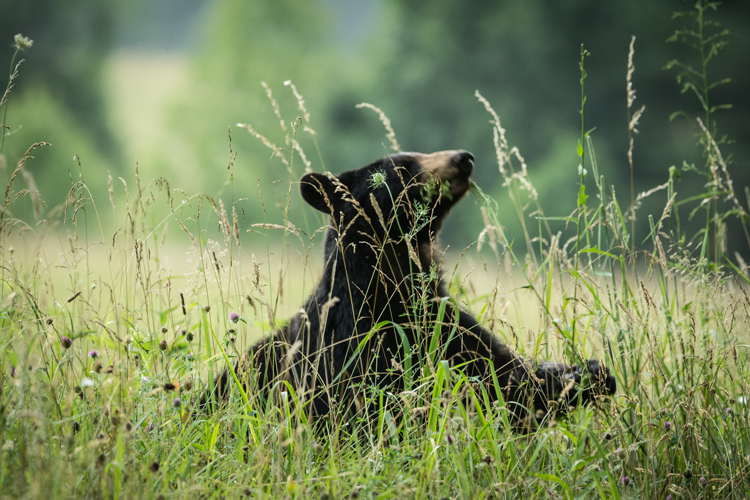
In this image the grass in the foreground made focusing difficult. Notice that the grass in in focus but the bear is out of focus.

In this image the grass in the foreground made focusing difficult. Notice that the grass is in focus, but the bear is out of focus.

Camera setting suggestions

Spotting wildlife in the bright sun of the day is, in most cases, a dream shot. Many times you are going to be faced with low-light situations with the animals in the cover of the forest. Keep in mind the exposure triangle and get the best possible combinations to achieve a good exposure.

Using a long focal length such as 600mm requires that you use a fairly fast shutter speed of around 600th of a second (depending on if, and how fast, your subject is moving, you may need an even faster shutter speed). To set your Aperture, depending what you want for depth of field, you should shoot wide open if you’re looking for a very shallow DOF to blur the background, or you may prefer to stop down to the lens’s sweet spot around f/8. Now adjust the ISO to get the proper exposure for the available light. In low light this could mean you have to adjust the ISO very high, which causes concern about digital noise, but it may be a choice between noise or no image at all.

Don’t worry about the noise, just take the shot! Most of the newer DSLR cameras do a very good job set at higher ISOs. What noise does affect your images can be removed in post processing with programs such as Photoshop, Lightroom or Nik Dfine 2.
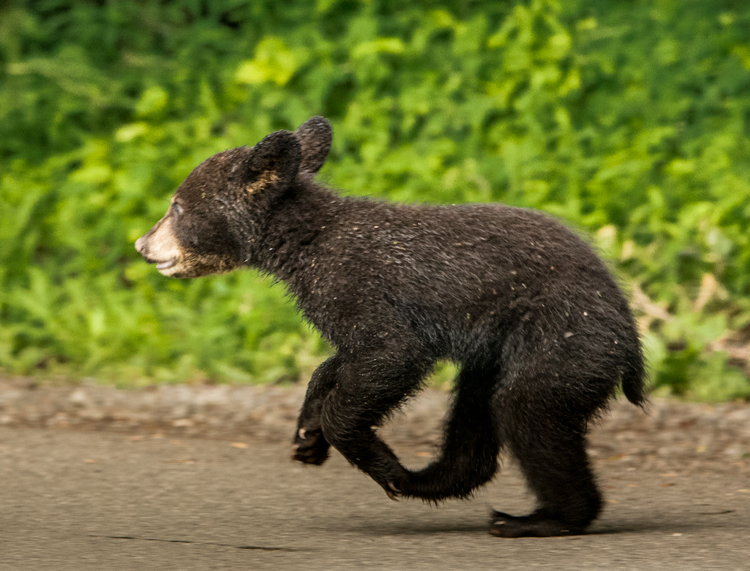
bear cub

Conclusion

While it is fun to photograph these beautiful animals, don’t forget about your safety, and also that of the animal. Be prepared and patient! Always remain calm, and treat all wildlife with respect so they are available for everyone to enjoy.

googletag.cmd.push(function() {
tablet_slots.push( googletag.defineSlot( “/1005424/_dPSv4_tab-all-article-bottom_(300×250)”, [300, 250], “pb-ad-78623” ).addService( googletag.pubads() ) ); } );

googletag.cmd.push(function() {
mobile_slots.push( googletag.defineSlot( “/1005424/_dPSv4_mob-all-article-bottom_(300×250)”, [300, 250], “pb-ad-78158” ).addService( googletag.pubads() ) ); } );

The post How to Be Respectful and Safe Photographing Wildlife by Bruce Wunderlich appeared first on Digital Photography School.


Digital Photography School
 
Comments Off on How to Be Respectful and Safe Photographing Wildlife

Posted in Photography


PIX 2015 – Limited number of FREE Expo tickets and discounted re:FRAME VIP Passes now available

26 Aug

Pre-registration has opened for our photography expo, PIX 2015 – the photo interactive experience in Seattle on October 6&7. A limited number of FREE passes are available for the main hall, where you’ll find photography experiences, educational programming, product demos, panel discussions, and brand and partner booths. For a limited time we’re also offering an early bird special on PIX VIP All-Access Passes, which includes Hall Pass plus all re:FRAME talks and galleries at McCaw Hall, and the exclusive PIX awards and cocktail party. Learn more

Articles: Digital Photography Review (dpreview.com)

 
Comments Off on PIX 2015 – Limited number of FREE Expo tickets and discounted re:FRAME VIP Passes now available

Posted in Uncategorized


Bringing Photography to the Homeless

26 Aug

Being creative is often considered a luxury. However, the folks at Café Art are taking steps to make art accessible for everyone.

Back in July, they handed out 100 dispo cams to homeless individuals around London. Allowing many of them a much needed creative outlet and the opportunity to be featured in a calendar being put together via Kickstater.

Check out a few of the photos and stories here. Contribute to the Kickstarter and receive your own calendar or original print. Proceeds go toward the artists, production costs and donations to offset the ecological impact of printing and shipping the calendars.

Wow. Café Art seriously knows how to be the good in this world.

Photo by 16 Year Old, Ellen Rostant


© Erin for Photojojo, 2015. |
Permalink |
No comment |
Add to
to the Homeless”>del.icio.us

Post tags:


Photojojo

 
Comments Off on Bringing Photography to the Homeless

Posted in Equipment


Sky Swimming: Transparent Pool Bridges Two 10-Story Buildings

25 Aug

[ By WebUrbanist in Architecture & Houses & Residential. ]

sky pool london

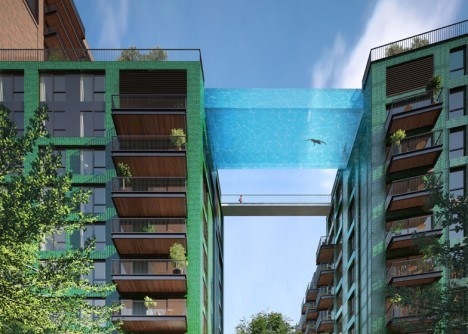
Designed to span over 80 feet and connect a pair of apartment structures in London, this remarkable see-through glass pool will give swimmers the ultimate view of the city on all sides. This record-setting, first-of-its-kind creation reflects recent advances in material science and structurally engineering.

sky pool bridge

In addition to this dazzling connector, a secondary bridge will allow people to walk between roofs, accessing other amenities including a bar and spa. Unlike many deceptive architectural renderings, this audacious structural design has already received planning approval – the real-life version coming in 2017 will indeed be as shown.

sky pool repeat

Developed by Arup Associates in collaboration with project architects of HAL, this water bridge will be 15 feet wide and 9 feet, framed in thick but transparent glass on three sides. Aquarium specialists and engineers were consulted throughout to ensure the safety of the endeavor.

battersea refab

This residential project is part of a larger overhaul being orchestrated by Frank Gehry and Foster + Partners, a master plan which includes eight other major architectural features and renovations surrounding the historic Battersea Power Station.

battersea from above

“My vision for the sky pool stemmed from a desire to push the boundaries in the capability of construction and engineering, I wanted to do something that had never been done before,” said Ballymore’s chairman and CEO, Sean Mulryan. “The experience of the pool will be truly unique, it will feel like floating through the air in central London.”

sky pool india

sky swimming design

Meanwhile, in India, a similar undertaking is underway. The pool designed for the Twilight Star development in Surat, Gujarat, has a shorter span but a bonus feature: it is cantilevered out beyond the edges of the buildings it connects, providing an additional thrill for those willing to take the plunge.

Share on Facebook


[ By WebUrbanist in Architecture & Houses & Residential. ]

[ WebUrbanist | Archives | Galleries | Privacy | TOS ]


WebUrbanist

 
Comments Off on Sky Swimming: Transparent Pool Bridges Two 10-Story Buildings

Posted in Creativity


25. August 2015

25 Aug

Das Bild des Tages von: Mette1977

20818391746 © Mette1977

Im Ausblick: Östliche Grenzen in Schottland, Kinderzimmer und alternde Hunde.
kwerfeldein – Fotografie Magazin | Fotocommunity

 
Comments Off on 25. August 2015

Posted in Equipment


Custom SLR Dual Camera Strap – Product Review

25 Aug

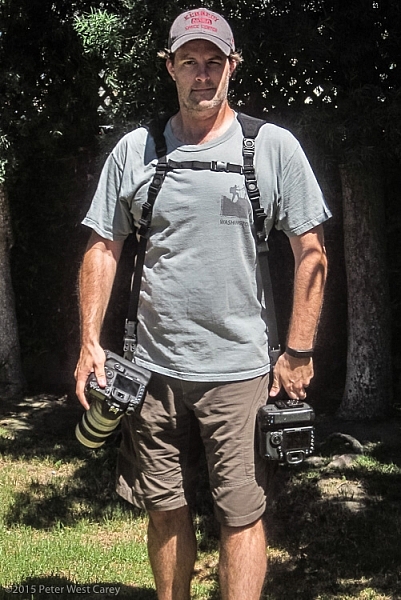
CustomSLR-Dual-Strap-DPS-PWC2015-0805-1314To be honest, I thought the Custom SLR Dual Camera Strap looked like a dorky idea when I was first asked to review it. The idea is simple: sometimes you need to carry two cameras (especially heavy cameras) and the logistics of such a feat have always been cumbersome. One strap over this way and the other maybe off of the other shoulder? Double criss-cross?

Custom SLR, a company that got its start thanks to a number of successful Kickstarter campaigns, crafted a solution using one of their best selling camera straps, times two. They sent me a copy of the Dual Camera Strap to test during a small boat cruise with UnCruise Adventures in Alaska last month. I was excited for the trip as it would mean I could take both my cameras and long lenses (28-300mm and a rented 150-600mm) for both close and distant images of marine wildlife. Having that range from 28mm-600mm (on crop factor cameras) always available was important to me so I was willing to try the Dual Camera Strap, with hopes I wouldn’t always be fumbling for the right camera.

What is it?

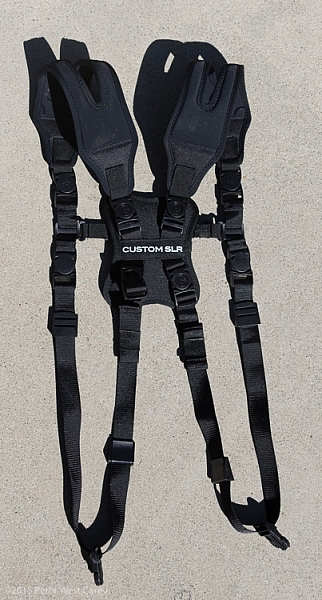
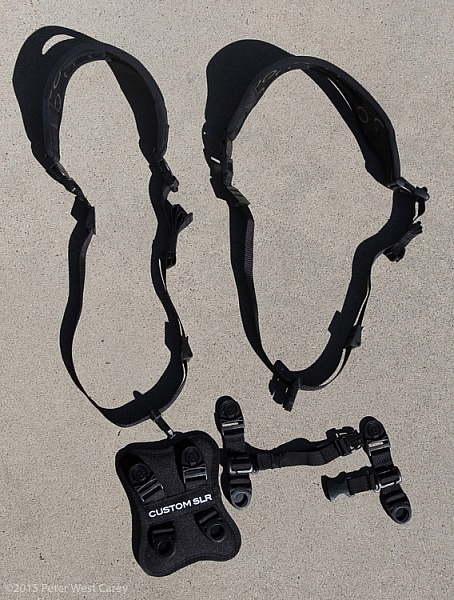
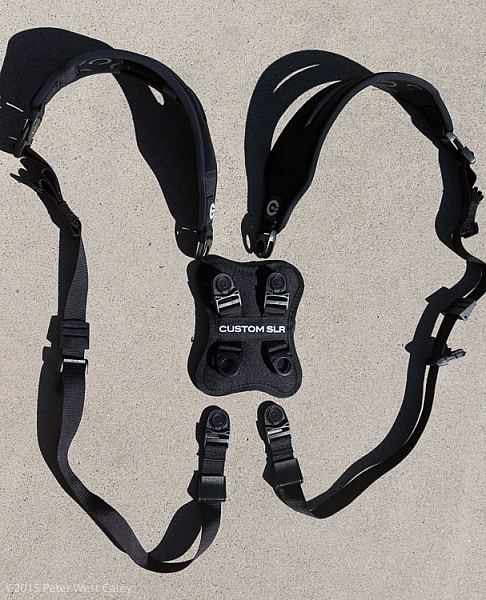
The unit is really five parts in one. Two of those parts are copies of the traditional Glide One Strap System by Custom SLR, meant to hold one camera, over one shoulder. Then they introduced a unique buckle connector that fits in the middle of your back. Lastly, there are two small pieces of webbing that add a sternum connector.

CustomSLR-Dual-Strap-DPS-PWC2015-0805-5547

The great thing about this setup is it uses two straps that can work alone. You’re not stuck with always using the dual setup when you only want to use one camera.

Let’s take a look at how it all fits together then I’ll tell you about my experience with the setup.

Anatomy of a Dual Camera Strap

The setup starts with the individual straps. Each has a piece of split neoprene to help evenly distribute weight on your shoulder. On the underside of the the split strap is a silicone print to provide traction, ensuring the strap doesn’t move around your shoulder.

CustomSLR-Dual-Strap-DPS-PWC2015-0805-5550

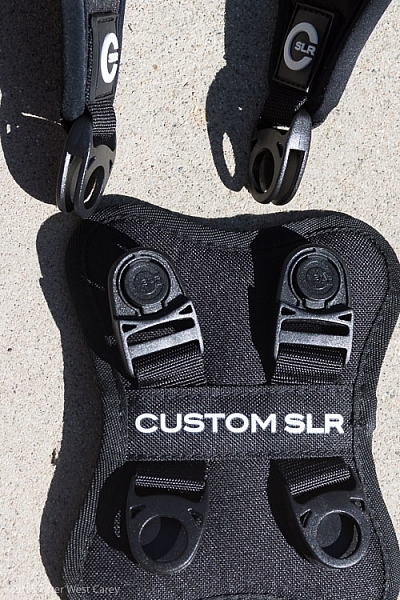
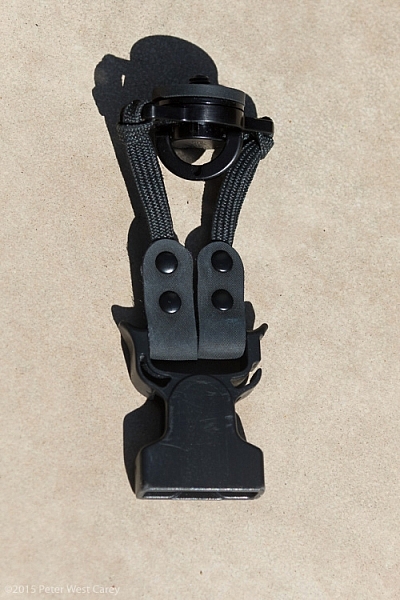
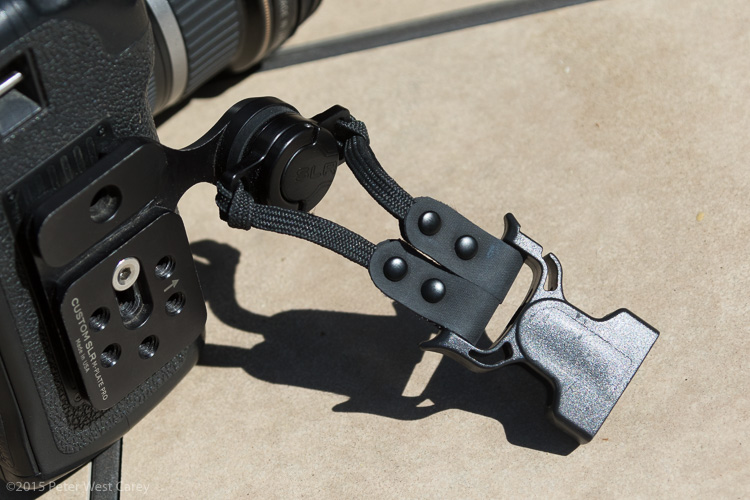
Cameras are connected to a strap via a beefy quick-release clip attached to a tripod screw, with a loop to make hand-tightening possible (no need for tools). I have used one of these single straps in my daily photography and travels to over a dozen countries for the past three years. It’s now getting a little frayed but never once has the screw mount or quick-release failed.

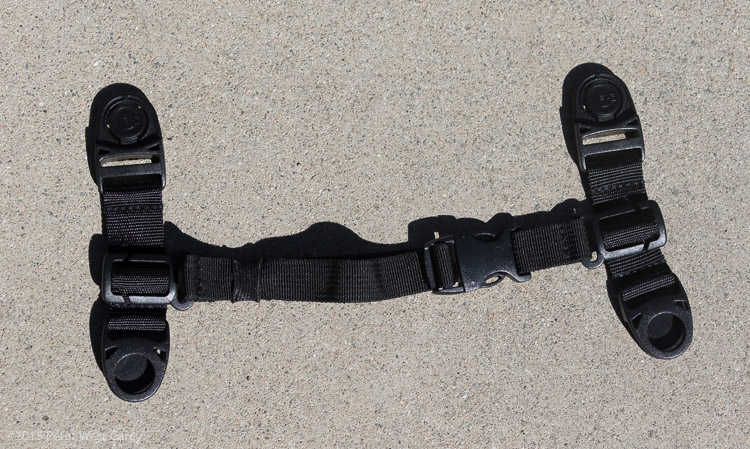
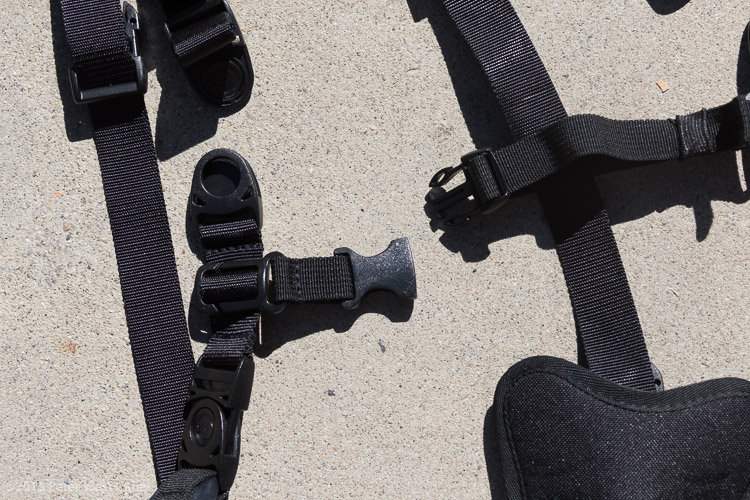
Next there is a connector that attaches the two straps in the middle of your back. Simply disconnect each single strap and clip them into the connector. The clips are one-way, making the process fairly idiot-proof.

CustomSLR-Dual-Strap-DPS-PWC2015-0805-5555

Lastly, to keep the system stable, you need to insert a sternum strap that clips the two single straps together in the front.

CustomSLR-Dual-Strap-DPS-PWC2015-0805-5551

Having received my unit already setup, I took it apart, jumbled up the pieces, and tried to put it all together at a leisurely pace. It took me one minute and 50 seconds to go from two single straps to the Dual setup, and that included making a small error and correcting it. It’s pretty easy.

CustomSLR-Dual-Strap-DPS-PWC2015-0805-5554

CustomSLR-Dual-Strap-DPS-PWC2015-0805-5556

Attach Your Cameras

When changing from single straps to dual, the straps first need to be shortened. This is because each strap is simply looping around one shoulder and not across your body.

Next, screw in the tripod mount, called a C-Loop, to each camera. As Custom SLR likes to create a whole inter-functioning ecosystem, the C-Loop also works with their M-Plate tripod quick release system. This additional plate gives better stability when using long lenses, but is sold separately (shown in second photo).

CustomSLR-Dual-Strap-DPS-PWC2015-0805-5553

CustomSLR-Dual-Strap-DPS-PWC2015-0805-5552

Suiting-Up – Harness First, Then Cameras

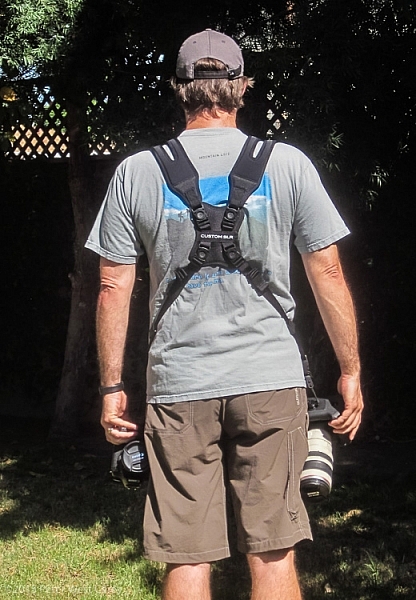
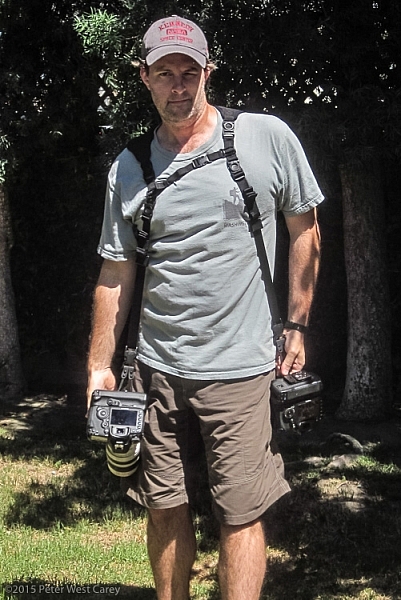
Now to put it all together! It’s best to put on the harness first before attaching cameras. It can be done the other way around, but it is quite clunky and will bang up your cameras. Then, clip each camera into your preferred side.

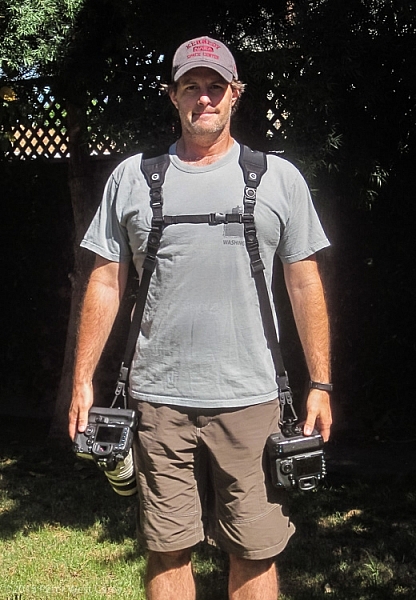
CustomSLR-Dual-Strap-DPS-PWC2015-0805-1314

CustomSLR-Dual-Strap-DPS-PWC2015-0805-1317

How Does it Feel?

What I enjoyed about the Dual Strap was how comfortable it was with the weight. I was wearing about 16lbs (7.2kg) of gear and it was no different than using a solid backpack with cameras stowed inside. In fact, short of a waist belt, this setup is just like a backpack with two comfortable stretchy neoprene shoulder straps.

How Does it Work?

In practice the unit takes some getting used to during initial setup. Having two cameras dangling from your hips also takes a different sense of awareness when maneuvering in crowds, or around hard surfaces. Keeping your hands on your cameras helps with stability.

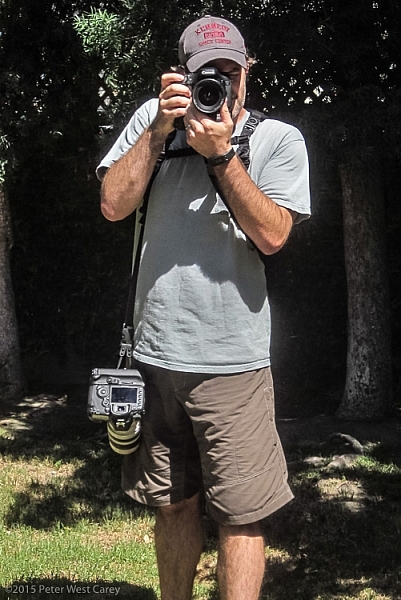
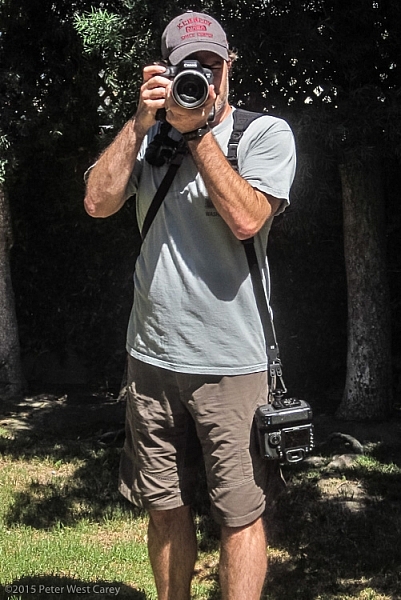
Each camera is free to glide up and down its own strap, yet is kept ready at your fingertips. When one camera is held up and the weight on that strap lessened, the second camera stays in place, without swinging to the side or sliding off your shoulder, as has been my case before using this strap.

CustomSLR-Dual-Strap-DPS-PWC2015-0805-1348  CustomSLR-Dual-Strap-DPS-PWC2015-0805-1349

CustomSLR-Dual-Strap-DPS-PWC2015-0805-1351 CustomSLR-Dual-Strap-DPS-PWC2015-0805-1352

I realize I look a little odd with this setup on my body. But the comfort and ease of use, quickly quieted my ego from worrying too much about what others think.

In short, the Dual Camera Strap now goes with me wherever I take both my camera bodies. I can break it down quickly for single camera use (I typically leave the sternum strap section attached to make setup quicker) and when I know I want both cameras at hand, there is simply no replacing this unit.

Additionally, I could still wear my F-Stop Lotus backpack over this setup, although range of motion was slightly lessened, but not enough to stop me from using the two together.

Conclusion

Dorkiness be damned, this thing works, and it works well. I wore the strap for more than 40 hours in a month, and after I figured out the best way to put it on (straps first, then attach cameras), it was a piece of cake.

There is something empowering having two cameras at the ready, and no longer worrying about one of them slipping off your shoulder. The Custom SLR Dual Camera Strap performs as advertised, and is a great solution if you have a two camera carrying problem.

Disclaimer: This product was provided to the author by the manufacturer for the purposes of doing a review. All reviews on dPS are 100% unbiased and based on the author’s opinions only. 

googletag.cmd.push(function() {
tablet_slots.push( googletag.defineSlot( “/1005424/_dPSv4_tab-all-article-bottom_(300×250)”, [300, 250], “pb-ad-78623” ).addService( googletag.pubads() ) ); } );

googletag.cmd.push(function() {
mobile_slots.push( googletag.defineSlot( “/1005424/_dPSv4_mob-all-article-bottom_(300×250)”, [300, 250], “pb-ad-78158” ).addService( googletag.pubads() ) ); } );

The post Custom SLR Dual Camera Strap – Product Review by Peter West Carey appeared first on Digital Photography School.


Digital Photography School
 
Comments Off on Custom SLR Dual Camera Strap – Product Review

Posted in Photography


Custom SLR Dual Camera Strap – Product Review

25 Aug

CustomSLR-Dual-Strap-DPS-PWC2015-0805-1314To be honest, I thought the Custom SLR Dual Camera Strap looked like a dorky idea when I was first asked to review it. The idea is simple: sometimes you need to carry two cameras (especially heavy cameras) and the logistics of such a feat have always been cumbersome. One strap over this way and the other maybe off of the other shoulder? Double criss-cross?

Custom SLR, a company that got its start thanks to a number of successful Kickstarter campaigns, crafted a solution using one of their best selling camera straps, times two. They sent me a copy of the Dual Camera Strap to test during a small boat cruise with UnCruise Adventures in Alaska last month. I was excited for the trip as it would mean I could take both my cameras and long lenses (28-300mm and a rented 150-600mm) for both close and distant images of marine wildlife. Having that range from 28mm-600mm (on crop factor cameras) always available was important to me so I was willing to try the Dual Camera Strap, with hopes I wouldn’t always be fumbling for the right camera.

What is it?

The unit is really five parts in one. Two of those parts are copies of the traditional Glide One Strap System by Custom SLR, meant to hold one camera, over one shoulder. Then they introduced a unique buckle connector that fits in the middle of your back. Lastly, there are two small pieces of webbing that add a sternum connector.

CustomSLR-Dual-Strap-DPS-PWC2015-0805-5547

The great thing about this setup is it uses two straps that can work alone. You’re not stuck with always using the dual setup when you only want to use one camera.

Let’s take a look at how it all fits together then I’ll tell you about my experience with the setup.

Anatomy of a Dual Camera Strap

The setup starts with the individual straps. Each has a piece of split neoprene to help evenly distribute weight on your shoulder. On the underside of the the split strap is a silicone print to provide traction, ensuring the strap doesn’t move around your shoulder.

CustomSLR-Dual-Strap-DPS-PWC2015-0805-5550

Cameras are connected to a strap via a beefy quick-release clip attached to a tripod screw, with a loop to make hand-tightening possible (no need for tools). I have used one of these single straps in my daily photography and travels to over a dozen countries for the past three years. It’s now getting a little frayed but never once has the screw mount or quick-release failed.

Next there is a connector that attaches the two straps in the middle of your back. Simply disconnect each single strap and clip them into the connector. The clips are one-way, making the process fairly idiot-proof.

CustomSLR-Dual-Strap-DPS-PWC2015-0805-5555

Lastly, to keep the system stable, you need to insert a sternum strap that clips the two single straps together in the front.

CustomSLR-Dual-Strap-DPS-PWC2015-0805-5551

Having received my unit already setup, I took it apart, jumbled up the pieces, and tried to put it all together at a leisurely pace. It took me one minute and 50 seconds to go from two single straps to the Dual setup, and that included making a small error and correcting it. It’s pretty easy.

CustomSLR-Dual-Strap-DPS-PWC2015-0805-5554

CustomSLR-Dual-Strap-DPS-PWC2015-0805-5556

Attach Your Cameras

When changing from single straps to dual, the straps first need to be shortened. This is because each strap is simply looping around one shoulder and not across your body.

Next, screw in the tripod mount, called a C-Loop, to each camera. As Custom SLR likes to create a whole inter-functioning ecosystem, the C-Loop also works with their M-Plate tripod quick release system. This additional plate gives better stability when using long lenses, but is sold separately (shown in second photo).

CustomSLR-Dual-Strap-DPS-PWC2015-0805-5553

CustomSLR-Dual-Strap-DPS-PWC2015-0805-5552

Suiting-Up – Harness First, Then Cameras

Now to put it all together! It’s best to put on the harness first before attaching cameras. It can be done the other way around, but it is quite clunky and will bang up your cameras. Then, clip each camera into your preferred side.

CustomSLR-Dual-Strap-DPS-PWC2015-0805-1314

CustomSLR-Dual-Strap-DPS-PWC2015-0805-1317

How Does it Feel?

What I enjoyed about the Dual Strap was how comfortable it was with the weight. I was wearing about 16lbs (7.2kg) of gear and it was no different than using a solid backpack with cameras stowed inside. In fact, short of a waist belt, this setup is just like a backpack with two comfortable stretchy neoprene shoulder straps.

How Does it Work?

In practice the unit takes some getting used to during initial setup. Having two cameras dangling from your hips also takes a different sense of awareness when maneuvering in crowds, or around hard surfaces. Keeping your hands on your cameras helps with stability.

Each camera is free to glide up and down its own strap, yet is kept ready at your fingertips. When one camera is held up and the weight on that strap lessened, the second camera stays in place, without swinging to the side or sliding off your shoulder, as has been my case before using this strap.

CustomSLR-Dual-Strap-DPS-PWC2015-0805-1348  CustomSLR-Dual-Strap-DPS-PWC2015-0805-1349

CustomSLR-Dual-Strap-DPS-PWC2015-0805-1351 CustomSLR-Dual-Strap-DPS-PWC2015-0805-1352

I realize I look a little odd with this setup on my body. But the comfort and ease of use, quickly quieted my ego from worrying too much about what others think.

In short, the Dual Camera Strap now goes with me wherever I take both my camera bodies. I can break it down quickly for single camera use (I typically leave the sternum strap section attached to make setup quicker) and when I know I want both cameras at hand, there is simply no replacing this unit.

Additionally, I could still wear my F-Stop Lotus backpack over this setup, although range of motion was slightly lessened, but not enough to stop me from using the two together.

Conclusion

Dorkiness be damned, this thing works, and it works well. I wore the strap for more than 40 hours in a month, and after I figured out the best way to put it on (straps first, then attach cameras), it was a piece of cake.

There is something empowering having two cameras at the ready, and no longer worrying about one of them slipping off your shoulder. The Custom SLR Dual Camera Strap performs as advertised, and is a great solution if you have a two camera carrying problem.

Disclaimer: This product was provided to the author by the manufacturer for the purposes of doing a review. All reviews on dPS are 100% unbiased and based on the author’s opinions only. 

googletag.cmd.push(function() {
tablet_slots.push( googletag.defineSlot( “/1005424/_dPSv4_tab-all-article-bottom_(300×250)”, [300, 250], “pb-ad-78623” ).addService( googletag.pubads() ) ); } );

googletag.cmd.push(function() {
mobile_slots.push( googletag.defineSlot( “/1005424/_dPSv4_mob-all-article-bottom_(300×250)”, [300, 250], “pb-ad-78158” ).addService( googletag.pubads() ) ); } );

The post Custom SLR Dual Camera Strap – Product Review by Peter West Carey appeared first on Digital Photography School.


Digital Photography School
 
Comments Off on Custom SLR Dual Camera Strap – Product Review

Posted in Photography


Olympus OM-D E-M10 II features 5-axis IS, redesigned controls

25 Aug

Olympus expands its digital OM lineup today with the Olympus OM-D E-M10 II. Updates include a 5-axis image stabilization system (though not the same as the E-M5 II or E-M1’s), a new 2.36M-dot OLED EVF and a 4K time lapse mode. Read more

Articles: Digital Photography Review (dpreview.com)

 
Comments Off on Olympus OM-D E-M10 II features 5-axis IS, redesigned controls

Posted in Uncategorized