RSS
 

Archive for August, 2015

5 Ways to Change Your Composition For Better Photos

28 Aug

If there is one thing in photography that every photographer can work on, it’s composition. Like many of the other techniques in photography, your composition will improve the more you practice. Very often, photographers seem to go to their comfort zone of the rule of thirds. I personally like the rule of thirds as a starting point, not every photograph however, needs to be composed on the rule of thirds. In fact, it is a good idea to shoot the same scene in a few different compositions, even depth of field can be used as a compositional tool.

A good way to work on your composition is to start with the rule of thirds, then change it up, try a few different compositions and see how that works. The challenge is this, what other compositions can you use? Let’s take a look at some advanced compositional techniques that you can try out on your next shoot.

1. Left to right
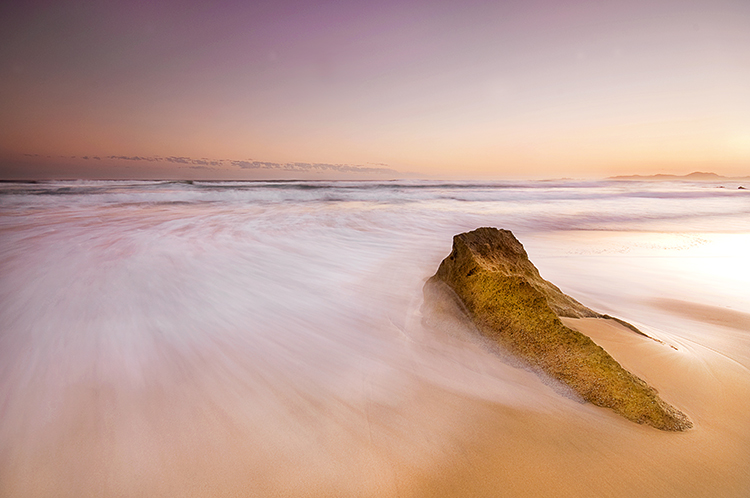
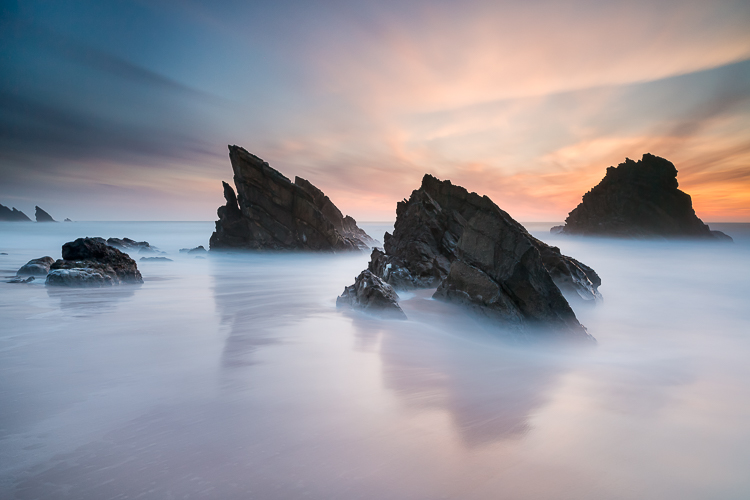
The smooth curving water leads our eye to the rock on the right of the image

The smooth curving water leads your eye to the rock on the right of the image

In the western world, we read the words on a page from left to right. It is logical to think that when someone views your image, they will generally begin on the left side of the image, and move to the right. You can use this technique in a few ways.

Firstly, you could place your subject on the right hand side of the frame with a leading line drawing the eye to your subject. The leading line could be a river, a road, or a railway track – it doesn’t really matter, all that it needs to do is allow the eye of the viewer a natural entry point, then lead them to the subject.

Secondly, if you were shooting street photography, you might have a person in the frame on the left hand side, looking toward your subject on the right. You might even have a vehicle such as a car or a motorcycle, moving from left to right. These techniques will immediately draw the eye to the right side of your image.

2. Use shapes – both seen and unseen

In many images, there are hidden and visible shapes. Window frames are square or rectangular, doors are rectangles, and so on. Look for shapes in your images, look beyond what the actual object is and see its shape. You can also compose the scene to create a shape. Sand dunes can become triangular shapes, open fields can be green rectangles, so look for shapes in your scene and compose your image to include them.
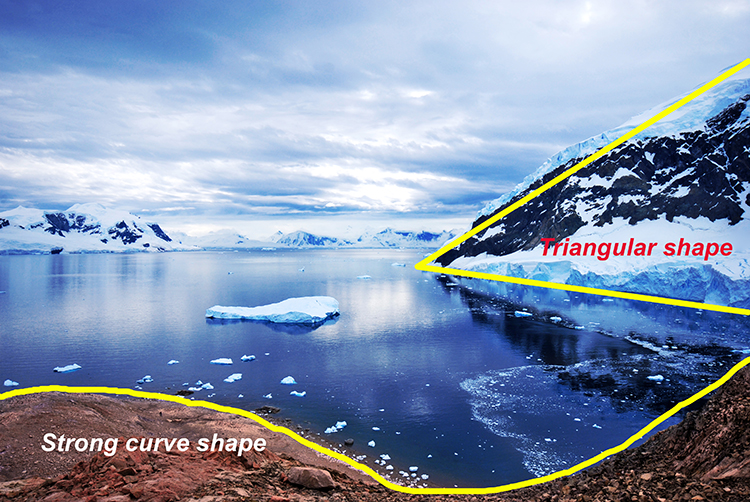
There are many shapes in each scene, use them to enhance your composition

There are many shapes in each scene, use them to enhance your composition

3. Use numbers – not literally!

If you are shooting a scene with trees or leaves, or even a river with some exposed rocks, try and use odd numbers of things. Odd numbers tend to create a dynamic feel in your scene – three trees or rocks will feel more dynamic than two trees or four rocks. This also works well for groups of people. If you have a large group of say 12 people, try not to make three rows of four people, maybe have them pose in two rows, one with seven people and one with five. For people photography, you can also try and create a triangle shape with your subjects. Three people naturally creates a triangle, give it a try!

Odd numbers work well in most images

Odd numbers work well in most images

4. Use negative space

Negative space can really make an image interesting. Negative space is essentially blank space, but really, it helps to anchor your image. It provides really important information about the image. A blue sky can be used to create negative space. The blueness of the sky tells the viewer that it was a sunny day. Your blue sky may have one small cloud in it and that can make the negative space seem interesting.

The blue sky and the hint of a cloud makes this negative space interesting

The blue sky and the hint of a cloud makes this negative space interesting

5. Framing

Framing can be used very effectively to showcase your subject. You can use a window, a door, or even trees to frame a subject. The idea is to create a frame around the subject that does not distract from the subject, but causes the viewer to know immediately where to look.

A tree, framed by an old wooden door.

A tree, framed by an old wooden door.

When you are looking at a scene for the first time, try some of these techniques, or try a combination of them. Shoot from different angles and move around your subject before settling on a composition. You will find that by looking at the scene in many different ways, you will unlock more creativity. Your best shot, may not be your first compositional choice. Composition is one of the more flexible tools in your creative toolbox. You don’t need any particular piece of equipment to change it, you simply need to move your camera around. Give it a try, load your results up in the comments!

googletag.cmd.push(function() {
tablet_slots.push( googletag.defineSlot( “/1005424/_dPSv4_tab-all-article-bottom_(300×250)”, [300, 250], “pb-ad-78623” ).addService( googletag.pubads() ) ); } );

googletag.cmd.push(function() {
mobile_slots.push( googletag.defineSlot( “/1005424/_dPSv4_mob-all-article-bottom_(300×250)”, [300, 250], “pb-ad-78158” ).addService( googletag.pubads() ) ); } );

The post 5 Ways to Change Your Composition For Better Photos by Barry J Brady appeared first on Digital Photography School.

Digital Photography School

 
Comments Off on 5 Ways to Change Your Composition For Better Photos

Posted in Photography


Outside of the box: Instagram now allows landscape and portrait formats

28 Aug

Instagram’s latest update brings a fundamental change with it. Since the app’s launch in 2010 users have been limited to posting images in square format. However, today this has changed. After installing version 7.5 of the app, you can post your images in portrait and landscape formats. Read more

Articles: Digital Photography Review (dpreview.com)

 
Comments Off on Outside of the box: Instagram now allows landscape and portrait formats

Posted in Uncategorized


10 Common Mistakes in Long Exposure photography

27 Aug

On all the 2015 Workshop I held here in Italy, I introduced a little game, where at the end of the workshop the attendees had to write down on a paper three mistakes that they used to make before taking the workshop. So I decided to collect all these lessons learned papers and make a list of the 10 most common errors in long exposure photography so you can learn from this also:

FG 1

Mistake #1 – Vibration reduction system is set to ON

There are some lovely technologies that can help get much sharper images minimizing the blur caused by camera shake, which are extremely useful in low-light conditions where slow shutter speeds are required. Every brand calls this technology something different, but the aim is the same. They can be lens-based (like for Nikon and Canon cameras) or camera-based (like for Sony, Olympus and Pentax cameras), but at the end the result is that this vibration reduction can give you the same image quality up to four shutter speed stops slower than usual.

They use some movement sensors to detect motion and try to compensate for it by moving an element group in the lens, or on the sensor itself.

The point is that if the camera is on a sturdy tripod (and if you are shooting a long exposure, your camera is definitely on a tripod!), you shouldn’t expect any vibration. You may know this, but your camera doesn’t, so even if there is no movement, it can happen that this anti-vibration system tries to compensate anyway moving a lens group (or the sensor), and this will actually result in an introduction of a vibration (and blur) instead of a removal.

So, if your camera is on a sturdy tripod, turn the anti vibration system to OFF!

FG 2

Mistake #2 – Forgetting to use Mirror Lock-up

In a DSRL camera, light travels through the lens and is sent to the viewfinder by a mirror. When you press the shutter button, the mirror flips up so that the light goes directly onto the image sensor. This movement introduces a small vibration that will cause slight blurring in the photo.

To avoid this vibration, you can activate the Mirror Lock-up function in your camera. After its activation, the first time you press the shutter button, your camera will lift the mirror; the second time it will open the shutter. If you wait a couple of seconds between the first and the second press, you will avoid the vibration!

Yes, if you have a mirrorless camera, you can skip this advice!

Mistake #3 – Not using a GND filter because they are expensive

In some situation (in places where there is not a big difference in the exposure between different areas of the scene), just a Neutral Density filter can allow you to get the desired result. However, in many situation the light condition require the use of a Graduated Neutral Density filter to balance the exposure.

If you are using a screw-on ND filter, you may believe that the only chance you have is to try to apply a GND filter in post-production – but you’d be wrong!

FG 3

You can just hold the filter with your hand in front of the lens. For a shot with a shutter speed up to few seconds, your only problem will be the correct alignment of the filter. For shots which are minutes long, even if your hand is not perfectly still, the final result will be more than great – try it if you don’t believe me. The holder is required if you want to use multiple filters together (or when you start having cramps in your hand).

Mistake #4 – Setting the aperture to f/22 to increase the exposure time

The rule was simple: if you decrease the aperture, you increase the exposure time.

With this rule in mind, you may think that you can transform your 30 second exposure to a two minute exposure just moving from f/11 to f/22. Theoretically, you’re right. Unfortunately there is a physical phenomenon called optical diffraction that above f/16 is enough intense to ruin the sharpness of your image.

If you are already at f/11 and you need a slower shutter speed, decrease ISO if possible or use a stronger filter.

FG 4

Mistake #5 – Forgetting to adjust the ISO

ISO can be a powerful ally in a long exposure. Sometimes you forget the possibility of changing the ISO setting, and you only play with filters and aperture. Remember that every camera has a range of ISO where the output quality is almost the same. In high-end cameras this range is usually between ISO 50 and 200.

This means that you have two stops to play with, and in a long exposure shoot, two stops mean minutes of exposure.

Mistake #6 – Shooting like you’re in a studio

FG 5

When you shoot pictures at home or comfortably seated in a studio, no external agent can affect the quality of your image. But if you are perched on a rock in front of the sea, on a beautiful stormy day, quite soon your filters will be completely wet.

Remember to fill your bag with cleaning cloths. A a thin layer of water on your outer filter will result in a high diffraction, and this will irremediably ruin your image. Never underestimate nature, even on a sunny day, the weather conditions can change very quickly.

Mistake #7 – Choosing a low quality filter

Every time you add a filter in front of your lens, you inevitably decrease the overall quality of the optical system. Yes, some well-known filter brands are quite expensive, but do you believe it is worth puttting a 5$ filter in front of a camera of thousand dollars? No, it isn’t – so focus on quality: fewer filters but better! You don’t need the whole set of density ranges for ND and GND filters. Try to understand which filters you will probably use more often, then remember that you have ISO and Aperture to play with to cover the gap between. Finally, remember that a lot of good quality filters are available at incredibly affordable prices. Check in advance for filter reviews on internet.

FG 7

Mistake #8 – Underestimating the wind

When you take a long exposure shoot, you camera is exposed to possible external vibration agents for minutes. Even a wind gust of a few seconds can ruin your image. Invest on a sturdy tripod, and then set it firmly on the ground. If needed, hook an additional weight to the tripod to make it even sturdier and solid.

Avoid using the tripod’s central column too – if you raise it up, you raise the center of gravity of the system and it will be less stable.

Mistake #9 – Not covering the viewfinder

You took a three minute exposure, and the preview is full of strange purple lines and halos. Why?

It is because light, like water, loves to find a way – always.

FG 9

Your camera is intended to allow light through only from the hole in your lens, but unfortunately there are some other accesses that can potentially harm your images.

The most common of them is the viewfinder. To avoid infiltration of light from it, cover it after composing the image. If your camera is not provided with a cap, you can even use some black tape. If you forgot the black tape, use a chewing gum. The typical result of viewfinder infiltration is a strange purple halo. Yes, if you have a mirrorless camera, you are also free of this issue!

If you use slot-it filter system, another possible source is the gap between one filter to another (this is one of the reason why many photographers love screw-on filters). In this case, the best solution is to cover that gap with black tape. The typical result of filter infiltration is a vertical purple line on the opposite side of the sun.

Finally, if you use a tilt-shift lens, or a lens adaptor, you may have an infiltration from the lens body. The best way to avoid this is to cover the lens with a black neck warmer.

Mistake #10 – Believing the filter vendor

FG 8

When you buy a six stop ND filter, you expect that it has exactly the optical density to get a six stop reduction. Unfortunately, you are wrong. In my life I never found a filter with the exact intensity stated by the manufacturer. Of course, the difference usually is minimal, but remember that even ½ stop of difference, in a long exposure means minutes of error.

To avoid errors when you are on field, test it in advance by following these steps:

  • Choose a room in your home, turn on the lights and close the windows (you need a place where the lighting is perfectly constant).
  • Mount your camera on a tripod and take a photo of the room until you get a shot with a good histogram. Note down all the parameters (ISO/Aperture/Shutter speed) of the shot.
  • Mount the ND filter and compensate the shutter speed obtained before, according to the f-stop reduction introduced by the filter.
  • Take a picture with the ND filter.
  • Look at the histogram of the photo taken with the filter, and compare it to one taken without. If they are approximately superimposable (exactly the same), the filter intensity stated by the manufacturer is accurate. If the new histogram has shifted to the left, your filter has an intensity greater than that the one declared; if it is moved to the right, it has a lower intensity.
  • If the two histograms are not superimposable, take another shoot changing the shutter speed to obtain a histogram approximately similar to the one of the picture without the filter.

FG 6When you have found the exact optical density, build your own shutter speed conversion table. Another possibility is the PhotoPills app for your iPhone, the only one that allows you to convert the shutter speed for non-standard f-stop reductions.

That’s the ten mistakes to avoid when doing long exposure photography. Have you got any others you’ve made and learned along the way you’d like to share? Please do so in the comments below.

googletag.cmd.push(function() {
tablet_slots.push( googletag.defineSlot( “/1005424/_dPSv4_tab-all-article-bottom_(300×250)”, [300, 250], “pb-ad-78623” ).addService( googletag.pubads() ) ); } );

googletag.cmd.push(function() {
mobile_slots.push( googletag.defineSlot( “/1005424/_dPSv4_mob-all-article-bottom_(300×250)”, [300, 250], “pb-ad-78158” ).addService( googletag.pubads() ) ); } );

The post 10 Common Mistakes in Long Exposure photography by Francesco Gola appeared first on Digital Photography School.


Digital Photography School

 
Comments Off on 10 Common Mistakes in Long Exposure photography

Posted in Photography


Workin’ From Home:Perks and Pro-Tips!

27 Aug

Working from home sounds pretty terrific, whether you’re a full-time freelancer or starting a semester of Photo 101!

But how do you get work done with at-home comforts and distractions around every corner?

We asked a freelance photog and several Photojojo team members how they focus on work while resisting the allure of procrastination.

Read their tips and fave “working from home” perks!

(…)
Read the rest of Workin’ From Home:
Perks and Pro-Tips! (712 words)


© Taylor for Photojojo, 2015. |
Permalink |
No comment |
Add to
Perks and Pro-Tips!”>del.icio.us

Post tags:


Photojojo

 
Comments Off on Workin’ From Home:Perks and Pro-Tips!

Posted in Equipment


Kiss Lid: Do You Love Coffee Enough to Make Out With It?

27 Aug

[ By Steph in Design & Products & Packaging. ]

kiss lid 1

Do you love coffee enough to make out with it every time you take a sip? You kind of have to if you’re willing to use the ‘Kiss Lid’ by Korean designer Jang WooSeok. Shaped like the lower half of a person’s face, the lid forces you to press your lips against a plastic pair in order to drink your beverage.

kiss lid 2 kiss lid 3

The lid makes a statement on take-out coffee as a fashion accessory, and also aims to make the everyday coffee drinking experience a little more fun.

kiss lid 5

The first prototype featured only a pair of lips, but WooSeok says he ultimately felt like nose-on-nose contact is an important part of the kissing experience, so the design was modified. The face shape is based on that of Greek statues for a classic look, and it’s available in a variety of colors. The design is about to go into production.

kiss lid 4

It’s made of the same disposable polystyrene plastic as a conventional lid, envisioned as a novelty at cafes, but it seems like a reusable silicone version would be preferable. Then the user could tote around a conversation piece while also cutting back on waste.

Share on Facebook


[ By Steph in Design & Products & Packaging. ]

[ WebUrbanist | Archives | Galleries | Privacy | TOS ]


WebUrbanist

 
Comments Off on Kiss Lid: Do You Love Coffee Enough to Make Out With It?

Posted in Creativity


Rezension: Chandigarh Redux

27 Aug

Cover Fotobuch Chandigarh Redux von Werner Feiersinger

Anlässlich des Todestags des Architekten Le Corbusier, der sich heute zum fünfzigsten Mal jährt, möchte ich Euch das aktuelle Fotobuch „Chandigarh Redux“ vorstellen, das Einblick in seine städtebaulichen Visionen gibt. Für die indische Stadt Chandigarh fungierte er als Berater, Raumplaner und Architekt einzelner Gebäude.
kwerfeldein – Fotografie Magazin | Fotocommunity

 
Comments Off on Rezension: Chandigarh Redux

Posted in Equipment


Coming to America: Canon EOS M3 arrives stateside in October

27 Aug

Canon has announced US availability for its EOS M3 mirrorless camera, which was launched in February for European and Asian markets. Set to be available in October, the EOS M3 includes a 24.2MP APS-C sensor, Hybrid CMOS AF III AF system, 3″ tilting touchscreen LCD and Wi-Fi with NFC. Read more

Articles: Digital Photography Review (dpreview.com)

 
Comments Off on Coming to America: Canon EOS M3 arrives stateside in October

Posted in Uncategorized


Meet PJ:Erin Edition

27 Aug

Name: Erin “Ern” Robins

What Do You Do Here? I carefully piece words together in fun ways to describe how awesome our products are!

Favorite Camera: My favorite camera tends to be the one I’m saving up for – currently a FujiFilm X-T1. But my phone, LG G2, is always there for me, which is way more useful than a wish-list camera!

(…)
Read the rest of Meet PJ:
Erin Edition (99 words)


© Taylor for Photojojo, 2015. |
Permalink |
No comment |
Add to
Erin Edition”>del.icio.us

Post tags:


Photojojo

 
Comments Off on Meet PJ:Erin Edition

Posted in Equipment


Canon EF 35mm F1.4L II USM boasts new Blue Spectrum Refractive Optics for improved chromatic aberration control

27 Aug

Canon has announced the EF 35mm F1.4L II USM, the second generation of its popular wide-angle prime. It uses newly designed Blue Spectrum Refractive Optics, which claim to reduce chromatic aberration better than any other existing technology. Read more

Articles: Digital Photography Review (dpreview.com)

 
Comments Off on Canon EF 35mm F1.4L II USM boasts new Blue Spectrum Refractive Optics for improved chromatic aberration control

Posted in Uncategorized


Warum wir die Kommentare geschlossen haben

27 Aug

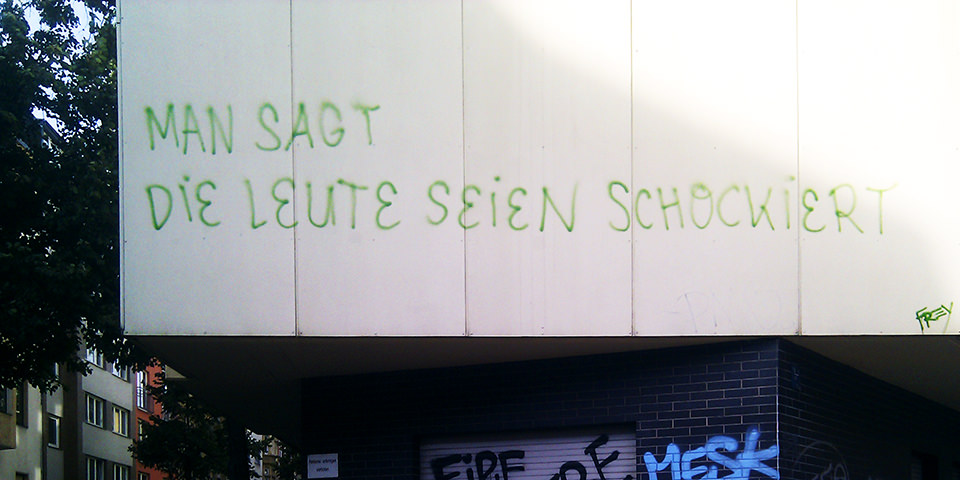
Blick auf eine Wand, auf der steht: Man sagt, die Leute seien schockiert.

Liebe Leser, wir bekommen in den letzten Tagen vermehrt die Frage zugesendet, ob es einen Grund für die nicht mehr vorhandene Möglichkeit gibt, auf kwerfeldein zu kommentieren. Dies haben wir bisher nur auf unseren sozialen Kanälen erklärt; damit es alle erfahren, nun aber auch hier:
kwerfeldein – Fotografie Magazin | Fotocommunity

 
Comments Off on Warum wir die Kommentare geschlossen haben

Posted in Equipment