RSS
 

Archive for August, 2015

Lens Rentals Canada closes its doors

05 Aug

Lens Rentals Canada is closing permanently, according to a statement issued by owner Craig Blair on Monday. He cites logistical issues and personal reasons, saying numerous problems with the business ‘didn’t make it a fun endeavor’. Read more

Articles: Digital Photography Review (dpreview.com)

 
Comments Off on Lens Rentals Canada closes its doors

Posted in Uncategorized


Chicken Church: Fowl-Shaped Abandonment Found Deep in Forest

05 Aug

[ By WebUrbanist in Abandoned Places & Architecture. ]

chicken church

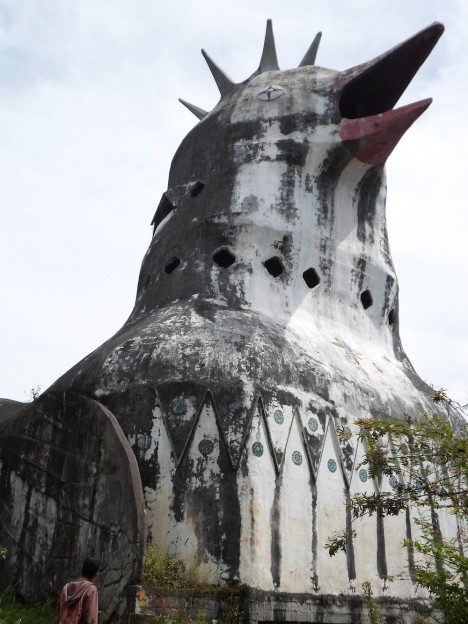
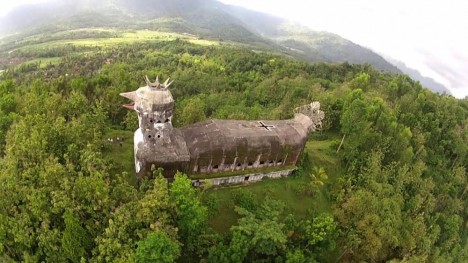
Reportedly inspired by a divine message, the architect of this poultry-shaped church initially set out to create a place of worship in the form of a giant dove, but the locals quickly dubbed his creation the Chicken Church (Gereja Ayam in the regional language).

chicken church exterior ground

chicken church side view

chicken church tail feathers

Indeed, despite the best intentions to craft it otherwise, it is impossible not to see a domestic egg-laying bird when looking at this open-beaked architectural creature.

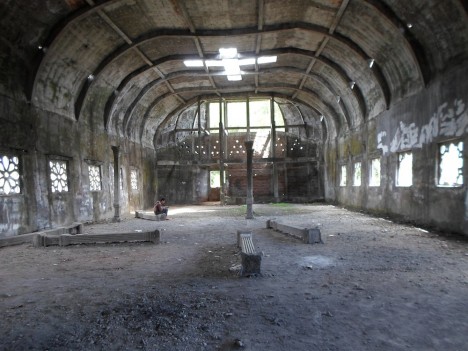
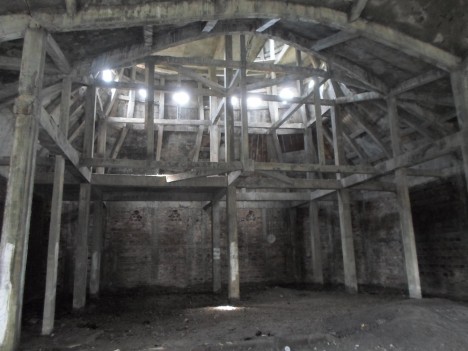
chicken church interior view

chicken church structural decay

In a remote Indonesian forest, this creation of Daniel Alamsjah was once a place of prayer as well as a rehabilitation center for children and drug addicts, but finishing the building proved too costly and the place closed down over a decade ago.

chicken church head neck

Covered in graffiti and crumbling at a structural level, the Chicken Church is likely not long for this world. For now, though, travelers (sometimes with romantic partners) can be found inside at times, cooped up away from prying eyes, but eventually the building will doubtless be either demolished or perhaps simply collapse on its own (story via Colossal and images via uzone.id, Punthuk Setumbu and Alek Kurniawan).

Share on Facebook


[ By WebUrbanist in Abandoned Places & Architecture. ]

[ WebUrbanist | Archives | Galleries | Privacy | TOS ]


WebUrbanist

 
Comments Off on Chicken Church: Fowl-Shaped Abandonment Found Deep in Forest

Posted in Creativity


Tree of 40 Fruit: Fresh Interview with Nature’s Master Grafter

05 Aug

[ By WebUrbanist in Art & Sculpture & Craft. ]

tree fruit varieties

Seven years into his experiments, the living artworks of Sam Van Aken are bearing far more than just fruit, each new variant of the Tree of 40 Fruit building on experiences learned from the last. And while simply grafting forty fruits of different kinds to a single tree is impressive, his work continues to branch out. The trees have to grow for three years before he can start to reshape them, and even then only so many grafts can be added each year.

tree diagram

Van Aken’s Frankensteinian creations are an endeavor forever in progress. With increasingly refined sets of controls and directions, he has been able to go beyond simply grafting dozens of types on a single tree. Carefully diagrammed, his planned plants can be designed to bloom and bear fruit year-round and in choreographed sequences, almost like a slow-motion fireworks display or performance piece.

tree 40 fruit bloom

His individual trees are displayed around the country, reflecting the climate as well as local varieties of the different regions in which they can be found. Each provides seasonal moments of surprise to passers by, producing almonds during one month then perhaps peaches or plums (or both) in the next.

tree fruit diagram book

From National Geographic: “Sam Van Aken, an artist and professor at Syracuse University, uses ‘chip grafting’ to create trees that each bear 40 different varieties of stone fruits, or fruits with pits. The grafting process involves slicing a bit of a branch with a bud from a tree of one of the varieties and inserting it into a slit in a branch on the ‘working tree,’ then wrapping the wound with tape until it heals and the bud starts to grow into a new branch. Over several years he adds slices of branches from other varieties to the working tree.”

tree grafting process

“In the spring the ‘Tree of 40 Fruit’ has blossoms in many hues of pink and purple, and in the summer it begins to bear the fruits in sequence—Van Aken says it’s both a work of art and a time line of the varieties’ blossoming and fruiting. He’s created more than a dozen of the trees that have been planted at sites such as museums around the U.S., which he sees as a way to spread diversity on a small scale.”

Share on Facebook


[ By WebUrbanist in Art & Sculpture & Craft. ]

[ WebUrbanist | Archives | Galleries | Privacy | TOS ]


WebUrbanist

 
Comments Off on Tree of 40 Fruit: Fresh Interview with Nature’s Master Grafter

Posted in Creativity


Beginners Guide to Using TTL Off-Camera Flash

05 Aug

So you want to use off-camera flash. But why? Your camera has that hot shoe there for a reason, right?

There are two things that you may not realize:

  1. That many DSLR-speedlight combos are capable of wireless off-camera flash using through-the-lens (TTL) metering without any additional equipment
  2. That using off-camera flash can take your photography to an entirely new level both in quality and creative potential.

Many references to off-camera flash talk about sync cords and wireless transmitters, when in fact, many DSLRs with a built-in pop-up flash have the ability to wirelessly control a speedlight. Likewise, many hot shoe mounted speedlights are fitted with an optical receiver to be wirelessly triggered.
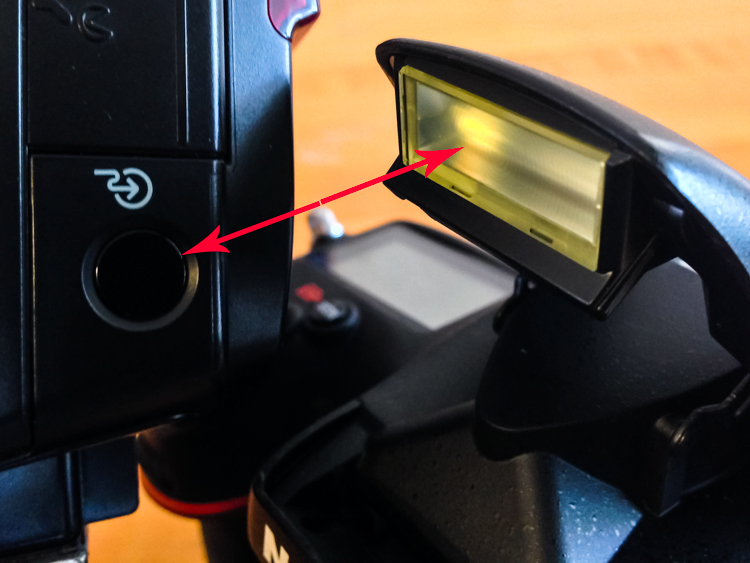
Image of pop up flash and speedlight optical receiver

Look, no wires! On camera pop-up flashes are often capable of optically triggering speedlights.

The least painful way to cross the proverbial bridge into the realm of wireless off-camera flash – often referred to as a remote or slave flash – is by utilizing your camera’s ability to act as a remote trigger for a flash combined with TTL metering.

Most Nikon cameras from the D70, and flashes from the SB-R200 and up; and Canon cameras from the 600D (T3i) and flashes from the Speedlite 90EX and up offer these features, but check the manufacturer’s website to be sure what setups will work. There are also a wide selection of other brands of flash, often less expensive, that offer similar features.

A TTL-equipped flash is manufacturer specific. The TTL feature of a Nikon dedicated flash will only work with Nikon, however, it could possibly still be used in manual mode.

In a nutshell, TTL is the way that the camera sets the exposure and flash intensity automatically by firing a nearly imperceptible pre-flash, taking an exposure reading, and adjusting settings accordingly. Nikon calls it i-TTL and Canon has dubbed it e-TTL but it’s basically the same deal.

For wireless off-camera flash functionality, the built-in flash on your camera is set to send an optical signal to your flash which triggers it.

Photo taken with a hot shoe mounted flash

This photo was taken simply with a hot shoe mounted flash set to TTL metering and the camera set to aperture priority. Shot at 200mm, f/5.6 at 1/60th of a second with the flash pointed at a low white ceiling. Nice soft, even lighting.

Photo taken with off camera wireless flash

Exact same settings as the photo above except the flash was setup off-camera in remote mode, with TTL metering. It was placed at 45-degree from the subject and aimed towards the food. Voila! Directional, moody lighting.

First time users of this method will think they just discovered sorcery. Partly because it’s such a cool trick and partly because it is easy to achieve awesome results right away. Manually controlling an off-camera flash isn’t the end of the world but it requires more thought and consideration to balance the flash and camera settings to achieve desired results.

If you have a camera and a hot-shoe-mounted flash unit that are capable and you haven’t taken advantage of it yet, this is the point where you should start getting excited.

Setup for Nikon Equipment

Camera Settings (menu locations may vary depending on camera model)

  1. Open the Custom Settings Menu
  2. Scroll down and select menu “e” – Bracketing/flash
  3. Choose e3 on the list – Flash cntrl for built-in flash
  4. Choose the last selection on this list – Commander mode
  5. The first line item is Built-in flash, scroll right to highlight the Mode column. If you haven’t messed around with this it will probably be set to TTL.
  6. Scroll down until it reads – –. This means that the camera’s built-in flash will only trigger the off-camera flash and won’t add any additional light to your exposure.
  7. No need to change it but note what channel is selected as your flash will need to be set to the corresponding channel.
  8. Press OK.
  9. Pop open the built-in flash.

Flash Settings (varies depending on flash model)
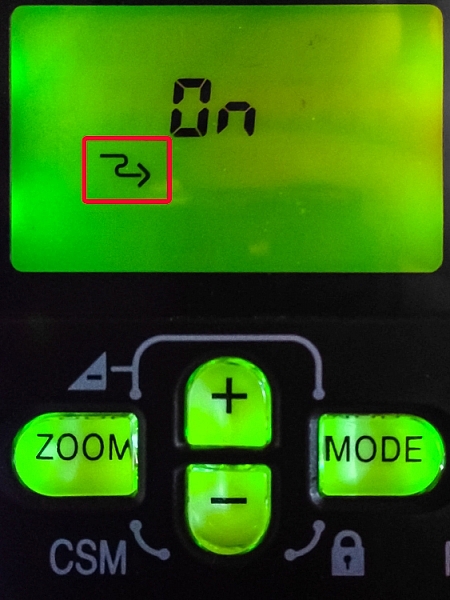
Photo showing SB-600 remote flash setting

Users of Nikon speedlight models SB-600 and SB-800 are looking for this symbol indicating the flash is ready to be wirelessly triggered. The SB-800 selection is also marked Remote.

On some Nikon flashes you are looking for a curved arrow symbol that signifies it is set to be controlled wirelessly. On some models like the SB-600 and SB-800 this is accessed in the Custom Settings menu while the SB-700, SB-900 and SB-910 have a dedicated switch to set the flash to Remote.

Setup for Canon Cameras

Camera Settings (may vary depending on camera model)

  1. Press the Q button to open the menu.
  2. Cycle through until you reach the Built-in flash func. menu setting identified by a flash symbol. Press the Set button to select.
  3. Choose the middle menu item called Easy wireless flash shooting. This setting can also be found in the first page of the shooting menu under Flash control.
  4. No need to change it but note what channel it is set to as your flash will need to be set to the corresponding channel.
  5. Pop open the built-in flash

Flash Settings (varies depending on flash model)

On Canon a flash you need to set it to slave mode. Some Speedlite models have a dedicated switch for this setting, and others require you to hold down the zoom button to switch it on.

The system is an optical one, meaning that the receiver on the speedlight needs to “see” the signal from the on camera flash. A direct line of sight is recommended but I have found that you can often hide the speedlight slightly behind a wall or other object, and it will still receive the signal.

Other than the signal being interrupted by physical objects, it can also be finicky in bright daylight, and the range is limited compared to radio frequency triggers.

Food photo with off camera flash

Simply getting the flash off of the hot shoe and a couple of feet to the side casts more visible shadows and gives the photo more dimension.

Editor’s Note: If you have a system other than Canon or Nikon consult your camera and flash manuals for the settings. We apologize if you feel left out, but we are not able to cover every brand and combination in the scope of one article. 

Notwithstanding the limitations of the system, it’s an ideal introduction to off-camera flash with minimal investment of time or money – especially if you have the equipment already.

These are the very basics. Both Nikon and Canon systems are very flexible, and expandable, with the ability to adjust flash intensity from the camera, add additional flashes in groups, and in some cases, trigger other flashes from a master flash adding more versatility and utility.

After you get the system working its magic and have officially entered the  realm of off-camera flash, there are innumerable adjustments to make both on the flash and camera to gain more control, and fine tune your lighting to create the photo you see in your mind.

A Few Quick Tips

  • Very bright ambient light and flashing lights can interfere with the optical triggering
  • For best results, point the receiver window on the flash (usually covered with red plastic) toward the camera and rotate the flash head if necessary
  • If the background is too dark, try decreasing (slowing) shutter speed and/or increasing the ISO

If you want your subject and background to have more even lighting, take a look at Dragging the Shutter: Balancing Fill Flash with Ambient Light

For more technical information about flash placement, have a read of Working with Off Camera Flash and TTL.

Just starting out with off-camera flash? Let’s hear about your experience and see your results in the comments below.

googletag.cmd.push(function() {
tablet_slots.push( googletag.defineSlot( “/1005424/_dPSv4_tab-all-article-bottom_(300×250)”, [300, 250], “pb-ad-78623” ).addService( googletag.pubads() ) ); } );

googletag.cmd.push(function() {
mobile_slots.push( googletag.defineSlot( “/1005424/_dPSv4_mob-all-article-bottom_(300×250)”, [300, 250], “pb-ad-78158” ).addService( googletag.pubads() ) ); } );

The post Beginners Guide to Using TTL Off-Camera Flash by Jeremie Schatz appeared first on Digital Photography School.


Digital Photography School
 
Comments Off on Beginners Guide to Using TTL Off-Camera Flash

Posted in Photography


Take Photos, for Science!

05 Aug

You’re usually out snapping away at flora and fauna, so why not use those photos to help document our world?

Add your nature shots to iNaturalist and help increase the already huge online database of plants, furry creatures and creepy crawlies.

Upload your photo, tag the location and name the organism if you can. No worries if you don’t know the name, iNaturalist is teeming with people eager to help classify.

It’s a cool way to connect with other nature-lovers, learn about the life around you and add your talent to scientific research!

Photo by RJAdams55


© Erin for Photojojo, 2015. |
Permalink |
No comment |
Add to
del.icio.us

Post tags:


Photojojo

 
Comments Off on Take Photos, for Science!

Posted in Equipment


4. August 2015

04 Aug

Das Bild des Tages von: Alexander

20250012972 © Alexander

Im Ausblick: Reisefotografie, Unterwasserbilder und ein Text zum Nachdenken.
kwerfeldein – Fotografie Magazin | Fotocommunity

 
Comments Off on 4. August 2015

Posted in Equipment


How To Quickly Focus Stack an Image in Photoshop

04 Aug
Four-image focus stack of sunset in Bishop, California. The foliage in the foreground was just inches away from the camera.

Four-image focus stack of sunset in Bishop, California. The foliage in the foreground was just inches away from the camera.

When you take into account all the different ways to get a tack sharp image, it can be quite overwhelming. I’ve been photographing landscapes as a full time photographer for six years now, and have tested just about every method out there. Focus stacking is just one more option, but it is one of my favorites, if the conditions are right.

Focus stacking is a life saver when you have a foreground subject that is very close to the frame, and a background subject that is equally important to the image. This happens quite a bit in landscape photography when using super wide angle lenses! Some will argue that hyperfocal calculations work in these situations too, and while they certainly can, I personally don’t like hassling with the charts and measurements unless I really have to.

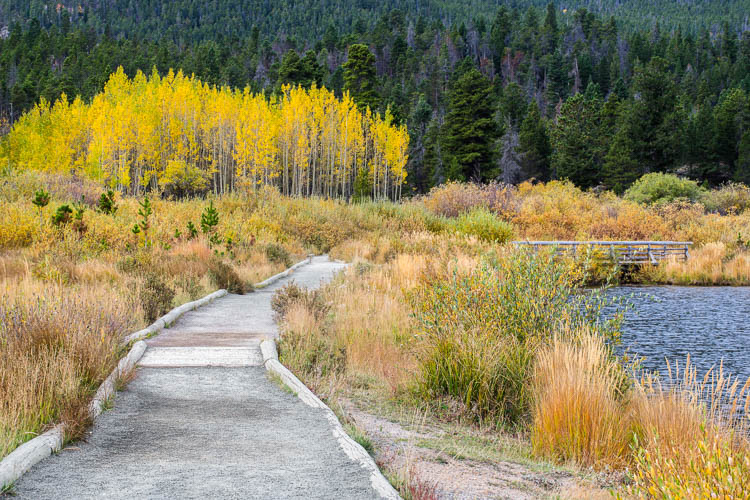
Two image focus stack of Lily Lake near Estes Park, Colorado.

Two image focus stack of Lily Lake near Estes Park, Colorado.

One of the most important things you can do out in the field is to inspect your shots instead of just assuming you nailed it. You’ll find articles all over the place making fun of photographers for chimping, but the ability to zoom in on all the tiny details of your shot is a major advantage over the film days.

When I’m taking pictures of a magnificent sunset, I’m working fast and keeping my head on a swivel. When I take a shot, I’ll quickly review it and zoom in all the way on my main subject. Then, I’ll zoom in on the other parts if they need to be sharp as well (sometimes they don’t). If you have a really close foreground subject and it’s tack sharp, but the mountains in the background are just a bit soft; this is a good time to consider focus stacking.

Two image focus stack at Great Sand Dunes National Park in Colorado. One for the sand that was less than a foot from the lens, and one for the background.

Two image focus stack at Great Sand Dunes National Park in Colorado. One for the sand that was less than a foot from the lens, and one for the background.

The best part about focus stacking is that it’s super easy! Just put your camera on a tripod and set your lens to manual focus. I use live view on the back of my camera to zoom in as close to my subject as possible and turn the focus ring on my lens until I see the subject become tack sharp. Once you’ve gotten that shot, scroll around the image and see what is soft in the background. If the mid-ground is soft, turn your focus ring until it’s sharp and take the same picture with the same settings. Then, dial the focus ring for the background and take another shot. That’s it until post processing!

Stacking the Images Together in Photoshop

Final image from the video. Three image focus stack from Zion National Park.

Final image from the video. Three image focus stack from Zion National Park.

When Focus Stacking Doesn’t Work

In all the images above that had foliage in them, there was virtually no wind at the time I took the shots. The foliage was perfectly still. If the wind is blowing and the leaves are swaying back and forth, focus stacking is going to be a nightmare, and isn’t even worth bothering with in most cases.

It’s also important to note that having the entire image in sharp focus isn’t always the best artistic approach to a scene. Sometimes having your subject sharp and the background soft will do a much better job of drawing the viewer’s eye where you want. It really just depends on the situation.

Conclusion

Focus stacking is just one trick to have in your bag, and this is just one method of doing it. There are also third party programs like Helicon Focus to consider. I personally haven’t used the program but have heard great things about it.

Have anything to add to the article? Let me know in the comments below!

googletag.cmd.push(function() {
tablet_slots.push( googletag.defineSlot( “/1005424/_dPSv4_tab-all-article-bottom_(300×250)”, [300, 250], “pb-ad-78623” ).addService( googletag.pubads() ) ); } );

googletag.cmd.push(function() {
mobile_slots.push( googletag.defineSlot( “/1005424/_dPSv4_mob-all-article-bottom_(300×250)”, [300, 250], “pb-ad-78158” ).addService( googletag.pubads() ) ); } );

The post How To Quickly Focus Stack an Image in Photoshop by James Brandon appeared first on Digital Photography School.


Digital Photography School

 
Comments Off on How To Quickly Focus Stack an Image in Photoshop

Posted in Photography


Sensor sales help Sony triple net profit in second quarter

04 Aug

Sales of image sensors helped push Sony to triple its net profit after the second quarter this year, up to 82.4 billion Yen. Sales of Devices, the category containing Sony’s sensor business, rose 35% year-on-year, which Sony attributes to higher demand of mobile products containing its sensors. Read more

Articles: Digital Photography Review (dpreview.com)

 
Comments Off on Sensor sales help Sony triple net profit in second quarter

Posted in Uncategorized


Sony reportedly shifting focus to full-frame cameras

04 Aug

Sony is planning to heavily target the full-frame camera market, according to a report from The Korea Times. At a press conference, Sony Korea’s Digital Imaging & Alpha Marketing Department head Bae Ji-hoon said that Sony plans to first target current full-frame camera users, then shift toward attracting new customers who currently use ‘entry and mid-class models.’ Read more

Articles: Digital Photography Review (dpreview.com)

 
Comments Off on Sony reportedly shifting focus to full-frame cameras

Posted in Uncategorized


kwerfeldein Award – Platz 4 bis 10

04 Aug

titelbild-award

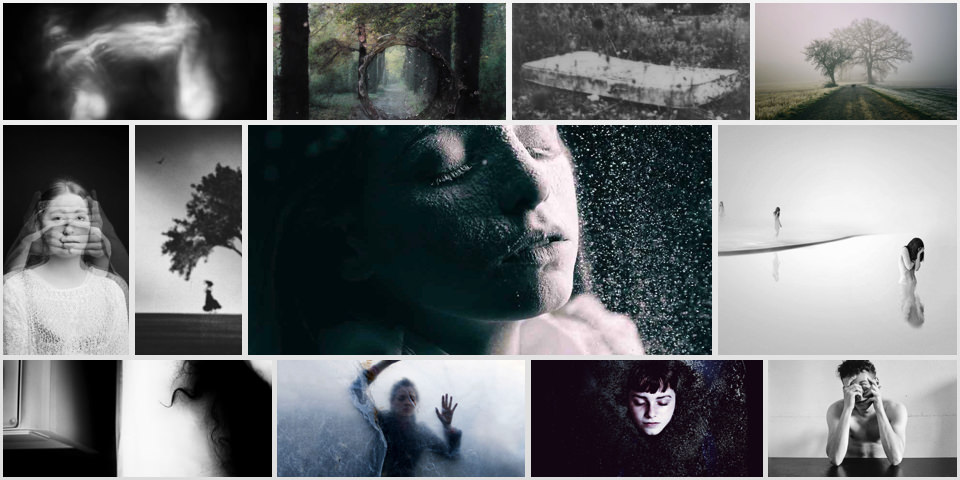
Nachdem wir gestern die drei Gewinner unseres Awards zum Thema Träume veröffentlicht haben, kam vielfach der Wunsch, auch weitere Teilnehmer und Ergebnisse zu sehen. Und da wir Eure Neugier voll und ganz verstehen können, haben wir beschlossen, Euch heute noch die Plätze 4 bis 10 nachzureichen. Wie Ihr seht, war es wirklich ein Kopf-an-Kopf-Rennen und einige Bilder in der Top 10 waren sogar punktgleich.
kwerfeldein – Fotografie Magazin | Fotocommunity

 
Comments Off on kwerfeldein Award – Platz 4 bis 10

Posted in Equipment