RSS
 

Archive for July, 2015

Kenko updates Teleplus tele-converters to record EXIF data for Canon EOS bodies

16 Jul

Kenko has introduced updated versions of its Teleplus teleconverters for lenses in the Canon EOS EF and EF-S fits with new circuitry that allows EXIF data from the lens in use to be recorded by the body. The Teleplus 2.0x HD DGX and 1.4x HD DGX converters use Hoya glass and offer full autofocusing facilities when matched with lenses with a wide enough maximum aperture. Read more


Articles: Digital Photography Review (dpreview.com)

 
Comments Off on Kenko updates Teleplus tele-converters to record EXIF data for Canon EOS bodies

Posted in Uncategorized


Art Made Flesh: 35 Sculptures Rendered in Human Skin & Hair

16 Jul

[ By Steph in Art & Sculpture & Craft. ]

flesh art tian

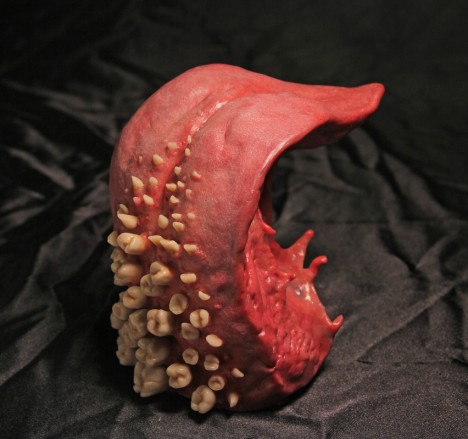
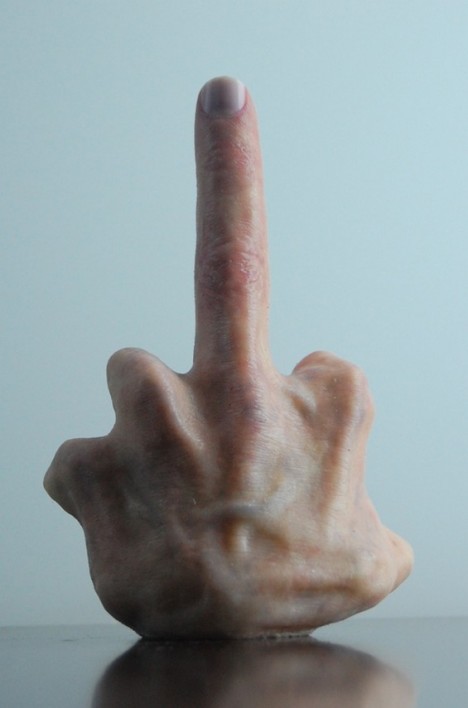
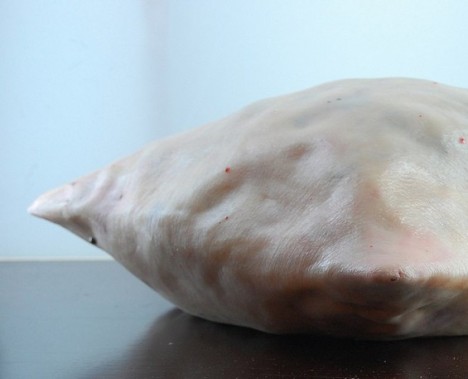
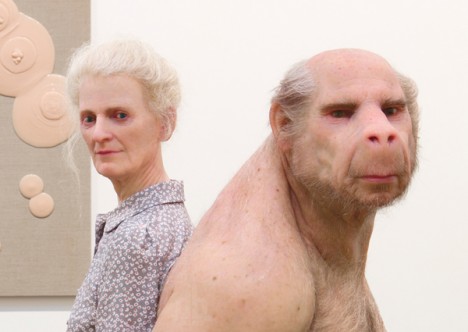
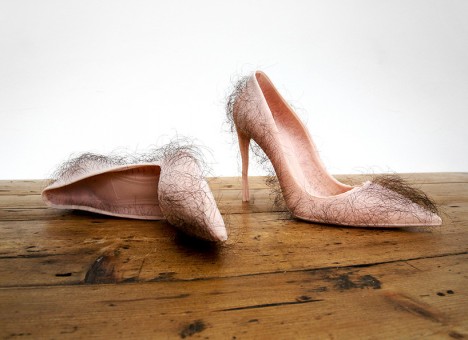
Do these fleshy works of art manipulating human body parts into unnatural shapes make you uncomfortable? That’s probably just what the artist was going for. It’s difficult for us, as humans, to look upon images of our own flesh with emotional detachment, seeing it as we would the meat of other animals, or even as an organic medium for art and architecture. Don’t worry – most of these are not made of actual humans, but rather silicone, polymer clay and wax. Read on for a tent modeled on human intestines, a pillow made of human skin and the world’s grossest pair of stiletto heels.

Jonathan Payne
flesh art payne 4

flesh art payne 3

flesh art payne 2

flesh art payne 1

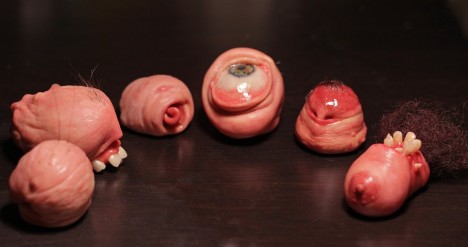
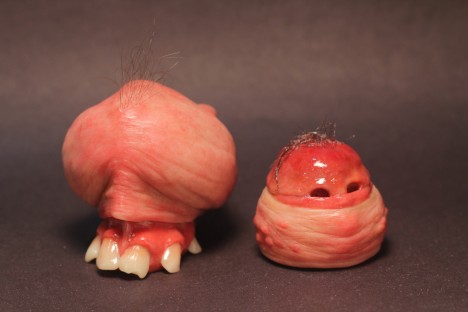
Jonathan Payne calls these deeply repulsive sculptures ‘FLESHLETTES,’ and that name says a lot. They’re basically lumps of human viscera, teeth, eyes and hair put together into little miniature packages. You probably never wanted to see a nipple with teeth, but here one is, nonetheless.

Andrea Hasler
flesh art tent 1

flesh art hasler 2

flesh art hasler 3

flesh art hasler 4

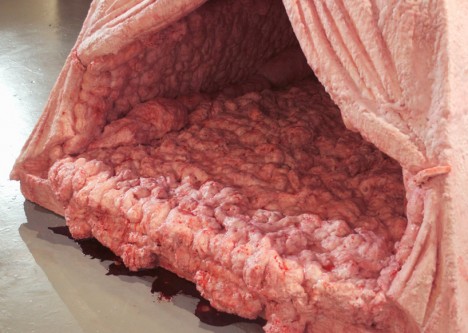
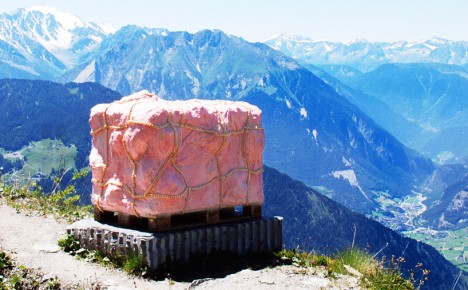
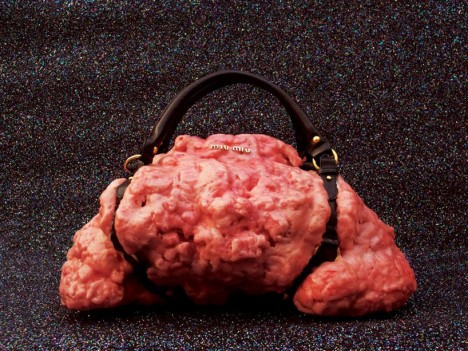
A tent made of flesh, a giant lump of what looks like human fat serenely overlooking a cliff, and a series of disgusting handbags are among the organic works of Swiss artist Andrea Hasler, who aims to humanize objects with ‘emotional surfaces.’ The tent was modeled upon human intestines and is made of polystyrene and wax as well as leather and real blood.

Felix Deac

flesh art felix deac 1

flesh art felix deac 2

flesh art felix deac 3

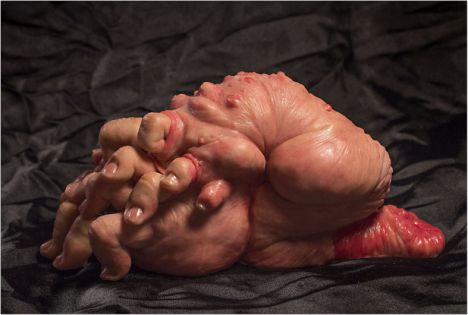
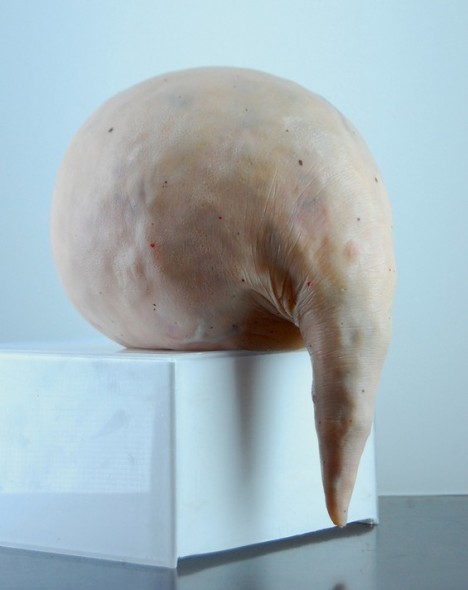
Romanian artist Felix Deac creates amorphous blobs of flesh replete with veins, moles, wrinkles and hair. While some might look like deformed human body parts, most are just abstract shapes reminiscent of nightmarish tumors that have taken on a life of their own.

Patricia Piccinini

flesh art piccinini 1

flesh art piccinini 2

flesh art piccinini 3

flesh art piccinini 4

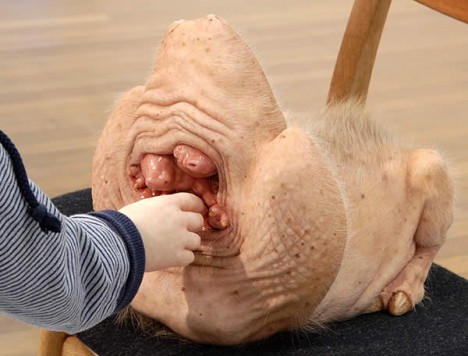
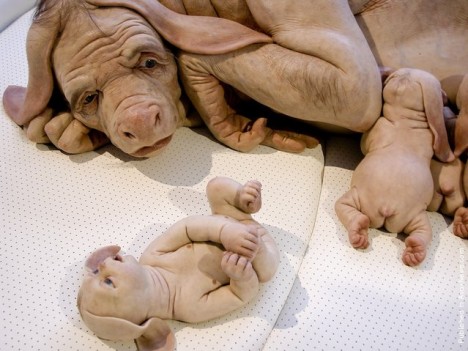
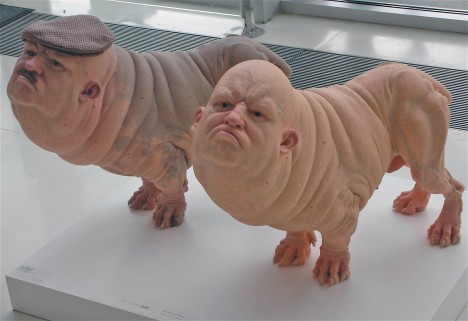
Patricia Piccinini’s work is so shockingly realistic, photographs of it are often passed around the internet as clickbait, with people wondering ‘what the heck am I looking at?’ The controversial Australian artist creates sculptures of fantastical creatures with extremely human-like skin and hair.

Next Page – Click Below to Read More:
Art Made Flesh 35 Sculptures Rendered In Human Skin Hair

Share on Facebook


[ By Steph in Art & Sculpture & Craft. ]

[ WebUrbanist | Archives | Galleries | Privacy | TOS ]


WebUrbanist

 
Comments Off on Art Made Flesh: 35 Sculptures Rendered in Human Skin & Hair

Posted in Creativity


6 Easy Steps for Post-Processing a Low-Light Photo in Lightroom

16 Jul

The word photography comes from the ancient Greek words for “light” and “drawing”. With the presence of light being a rather important constituent in the making of a photograph, it is no wonder that low-light conditions are often a photographer’s nemesis.

While so many other lighting variables have an immense impact on your images – the quality, direction, color temperature, and intensity – but if you don’t have enough light to begin with, none of these really matter.

This article will walk you through my approach to post-processing an image taken in poorly lit conditions.
A poorly lit image after editing.

With a little Lightroom sorcery, poorly lit images can be brought back to life.


The key is to start with as strong a foundation as possible, which is to maximize the quality of the image captured in camera. For more detailed advice on how to accomplish this, have a read of:

  • How to Shoot in Low Light – 9 Commonly Asked Questions
  • A Guide to Shooting Outdoors in Low Light Conditions
  • Another great resource to bookmark is Cheat Sheet: What Gear and Settings to Use for Low Light Photography

It is also worth noting that, as far as I’m concerned, the debate over whether to shoot in RAW or JPEG does not apply here. If you are shooting in low-light conditions, shooting in RAW is imperative. You want to ensure that you have as much latitude as possible to maximize post-processing efforts.

I will also echo the sentiments of others when I say, you should not rely on editing software as a crutch. Don’t be lazy. Make every effort to use lower ISO settings, noise reduction (NR) features, use slower shutter speeds, etc., in camera first.

What is low-light?

So what do I mean by low-light anyway? I believe this is one factor which contributes to the confusing nature of this topic to begin with. When I think of shooting in low-light, I imagine a scenario where I have a hard time seeing well enough to frame the shot, the camera may struggle to find focus, and without some work, the final image will make it apparent that shooting conditions were challenging.

This is when having better quality equipment pays off. Those of you with camera bodies which can produce clean shots at high ISO settings (just take a look at the Sony A7s) have a distinct advantage from the get go. Throw in a wide aperture, fast, lens and the quality of images these device can capture in near pitch dark is absolutely incredible – especially compared to 10 years ago.

With experience, you will learn the limits of your equipment and editing software to achieve the results which you consider acceptable.

Example

I will work with this street photo I snapped in Santa Monica, California as an example. It was taken long past sunset, with only some dim illumination from distant store windows and street lights. Some hoodlums had dumped soap into a fountain which had then churned into a frothing mess when this passerby stopped, grabbed a handful and blew the suds into the air.
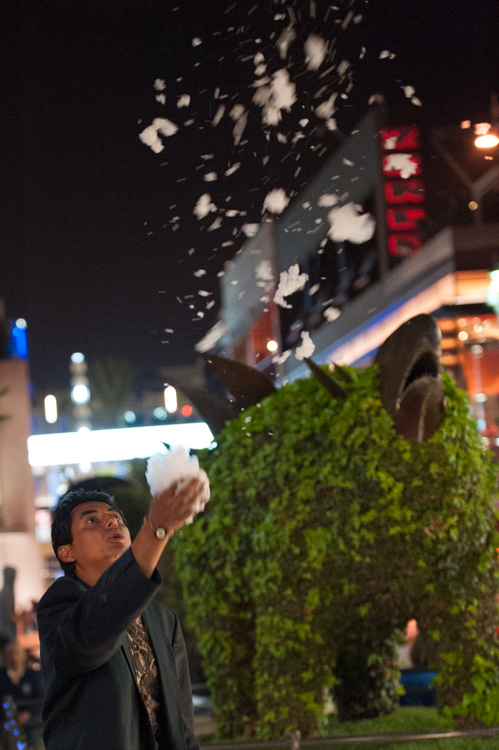
A night shot taken in poor lighting with a Nikon D700 at 70mm, f/2.8, ISO 4,000 and 1/60th of a second.

A night shot taken in poor lighting with a Nikon D700 at 70mm, f/2.8, ISO 4,000 and 1/60th of a second.

The combination of the image being a RAW file, and the less-than-ideal conditions it was taken in, has resulted in an image that is flat, has inaccurate color temperature, is low contrast, and has some noise. There is no exact process that can be replicated on every image, but I will walk you through the steps I toook to bring this photo back to life.

1. Check for clipped highlights, shadows

You can do this in two ways:

  1. Hold the Alt key while clicking on the highlights or shadows slider
  2. Hover the mouse over the small triangles in the upper corners of the histogram.

This will quickly and easily identify the areas of the photo which contain no information, and therefore no details to recover.
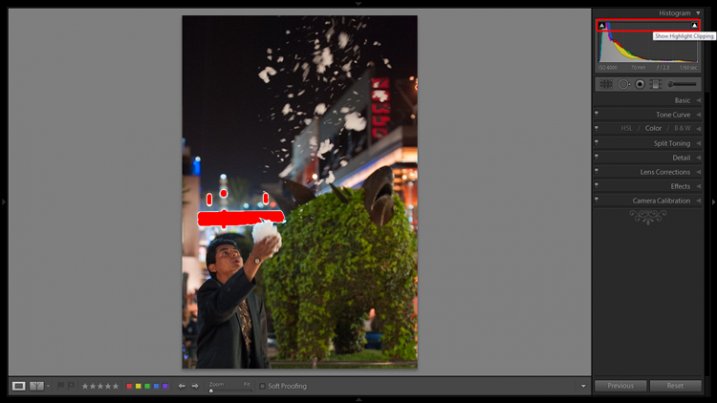
Clipped highlights are shown in red

Hovering the mouse over the triangle in the upper right corner of the histogram will illuminate all clipped highlights.
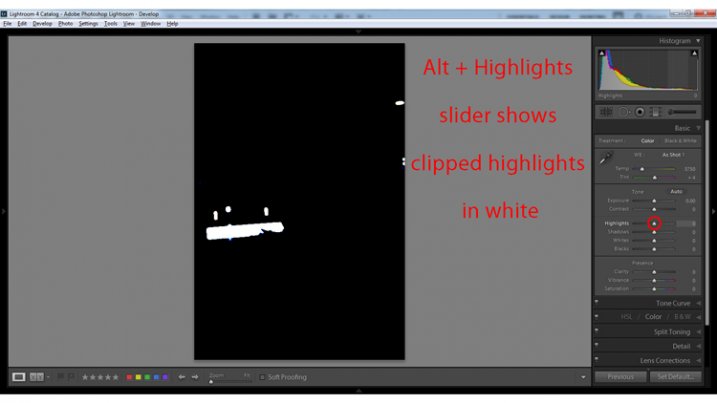
Alt + clicking on the Highlights slider shows clipped highlights
Alt + clicking on the Highlights slider shows clipped highlights

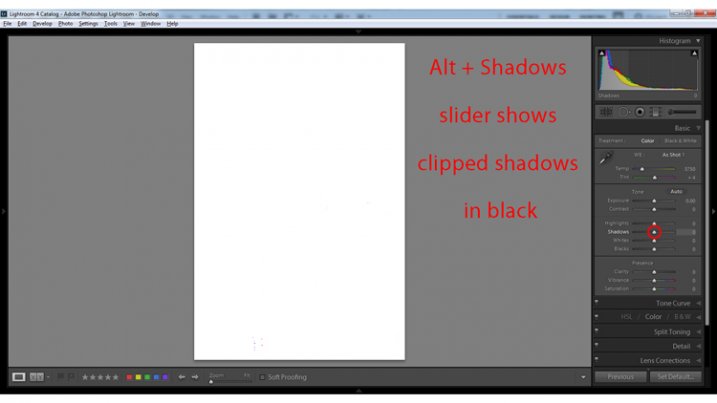
Alt + Shadows slider shows all clipped shadows.

Alt + Shadows slider shows all clipped shadows. This photo has no clipped shadows.

For shooting in low light, you will most often be concerned with clipped shadow areas. If details important to the image are clipped, it may not be salvageable – this is a judgment call to make on an individual basis.

Although it is underexposed, the image has no clipped shadows, and only a small bit of clipped highlights.

2. Adjust exposure correctly for the subject

For this image, the person is the subject so I want him to be properly exposed therefore I will zoom in on him and set the exposure. I want his face to be a bit brighter and clearer so I’ve increased exposure 9/10 of a stop (+0.90).
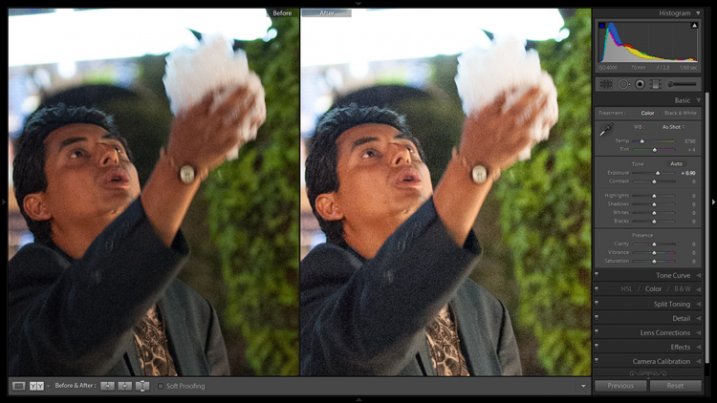
Before and after of exposure adjustment.

The exposure was increased to brighten the subject. Before and after of exposure adjustment.

3. Increase contrast

This is going to involve a process of trial and error, adjusting several sliders, and analyzing the effects they have on the image in combination with one another.

From what the histogram showed me, and what is obvious by looking at the image, there are significant portions of the image that are dark – the sky, the subjects jacket, etc. These dark areas have nothing to add to the image and after increasing the exposure, have become a lighter shade of gray and have created more noise.

Therefore, I am going to purposefully clip some of these shadowed areas by decreasing the Blacks slider value. I prefer to drag the slider all the way to -100, and start increasing it until the image looks good. At -70 the shadows obscure unimportant details which brings more attention to highlighted areas.

Contrast can be adjusted further in the Tone Curves panel. If this is uncharted territory for you, the article Lightroom’s Tone Curve Explained is a good place to start.
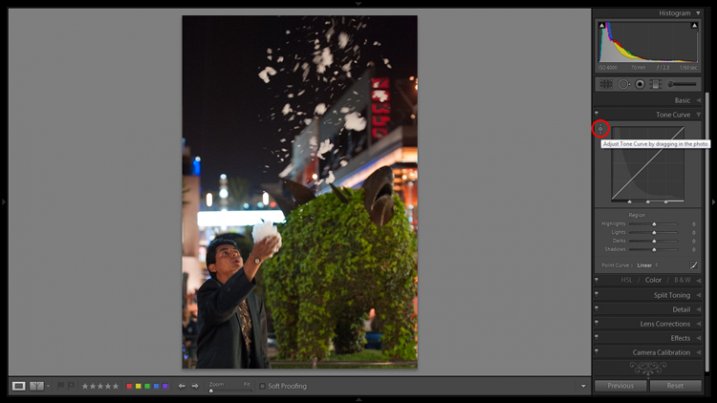
Image showing location of drag and adjust tool in Tone Curve panel

A shortcut for adjusting all similar tones in an image can be found in the Tone Curve panel.

TIP: Using the click and drag tool in the upper left hand corner of the Tone Curves panel is a quick and easy way to adjust tones in your image. Click the tool to activate it; place it over the tone in the image that you wish to adjust (shadows, highlights, etc.); click and drag the tool up or down and it will adjust all similar tones in your image automatically.

4. White balance

As exposure and contrast affect the colors in an image, I prefer to make those adjustments before dialing in the white balance. There are two ways to accomplish this:

  1. Click and drag the Temp slider
  2. Use the Eye Dropper (targeted adjustment) tool to let LR attempt to correct the white balance automatically
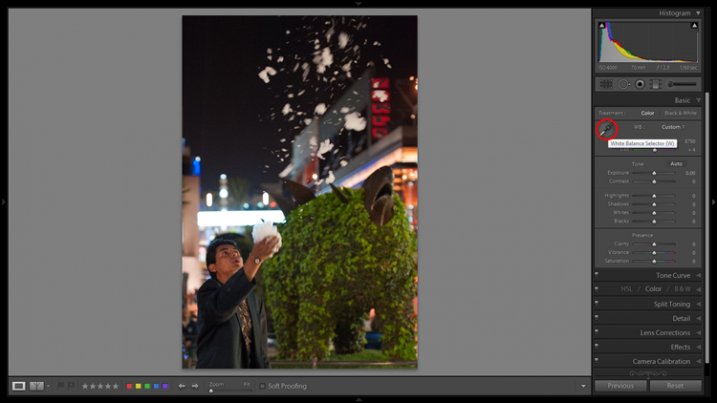
Image showing the location of the Eyedropper tool.

The Eyedropper tool is an automated feature that will approximate correct white balance for you.

The key to the Eye Dropper tool is to select an object in your image that should be pure white (or anything that you know is a neutral tone like black or gray). I find the tool can sometimes give you a starting point from which to work, but very rarely gives you an accurate result straight away.

As a result of the sodium vapour street lights, this image is far too warm, has turned the subject’s skin orange, and has made the greens too yellow. I’ve reduced the white balance color temperature from 3,750 degrees to 3,300.

TIP: In the Develop Module, the forward slash key toggles between before and after, so you can quickly see the adjustments you have made. You can also click the the box in lower left with two Y’s, which shows a before and after side-by-side comparison (if that tool bar is not showing, click T on your keyboard to show/hide it). Although this can help guide any changes you make to your image, I find it particularly useful to toggle back and forth when correcting white balance.

5. Clarity

The Clarity slider changes local contrast, especially in the midtone areas of your image. Increasing clarity can help define the edges of objects and add depth to an image, while decreasing clarity will soften details and add a dreamy glow.

Raising the Clarity slider to +25 adds a bit more pop to this image. Adding too much clarity can accentuate blemishes in portraits and dull colors, so use it sparingly.

6. Noise Reduction

Noise and color noise are the downfall of many lo- light photos, especially those taken on less capable cameras. Noise adds a general grainy haze, and color noise shows up as little little specks of random colors, which can look like big splotches on shadowed areas.

It’s often most noticeable in the dark areas of an image but can wreak havoc on skin tones as well. Luckily, it’s easy to fix in LR and doesn’t decrease image quality too much. It does have its limits so always shoot at the lowest ISO possible.

Since this photo was taken on a camera with legendary low-light capabilities (in its day), noise levels aren’t too bad even at ISO 4,000.

The Noise Reduction slider is found in the Details panel underneath the Sharpening sliders. For this image I increased the Luminance slider to +30 and the Color slider to +15.
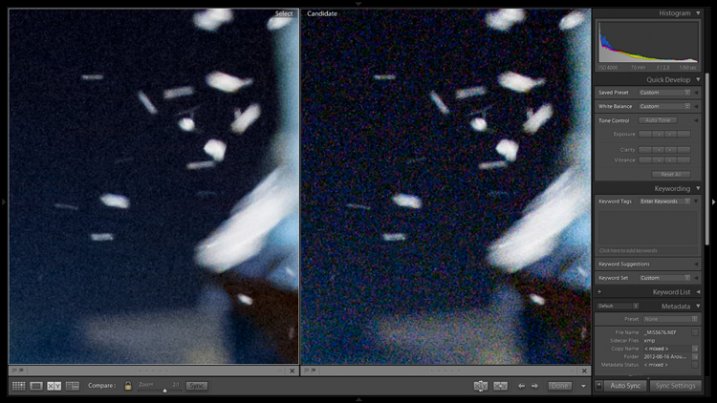
Image showing before and after noise reduction.

The noise is this image was fairly minimal and Lightroom easily reduces it. Image showing before (right) and after (left) noise reduction.

A side effect of noise reduction is decreased detail so don’t be too heavy handed.
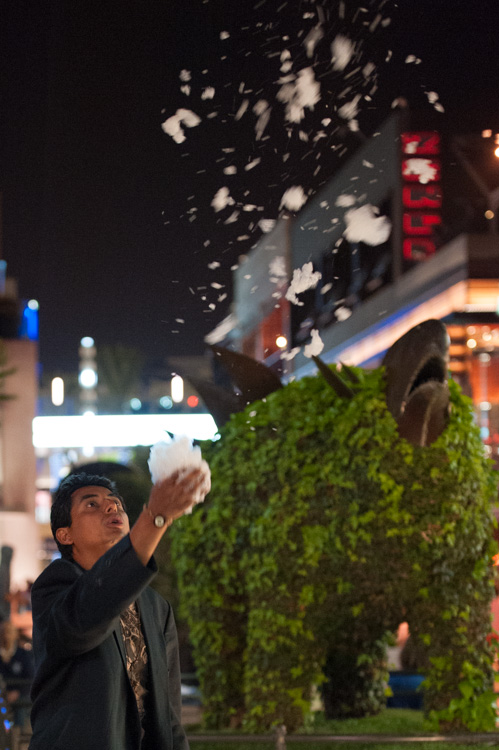
Image before edits.

The original image before any post-processing.
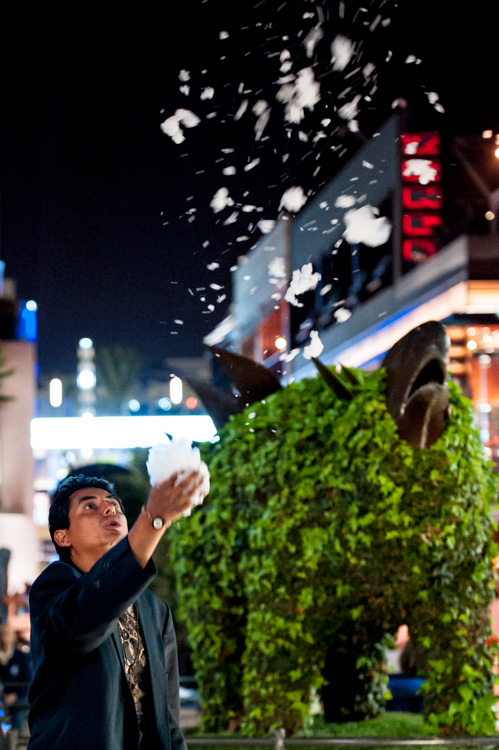
Image after edits.

The original image after post-processing.

That is a basic walk-through of my approach to a photo shot in low-light, or poor conditions. Although the editing process could go much further and get more technical, this is a good starting point to breathe some life back into poorly lit shots.

Do you have any other good post-processing tricks for low-light images to share?

googletag.cmd.push(function() {
tablet_slots.push( googletag.defineSlot( “/1005424/_dPSv4_tab-all-article-bottom_(300×250)”, [300, 250], “pb-ad-78623” ).addService( googletag.pubads() ) ); } );

googletag.cmd.push(function() {
mobile_slots.push( googletag.defineSlot( “/1005424/_dPSv4_mob-all-article-bottom_(300×250)”, [300, 250], “pb-ad-78158” ).addService( googletag.pubads() ) ); } );

The post 6 Easy Steps for Post-Processing a Low-Light Photo in Lightroom by Jeremie Schatz appeared first on Digital Photography School.


Digital Photography School
 
Comments Off on 6 Easy Steps for Post-Processing a Low-Light Photo in Lightroom

Posted in Photography


How to Get Started with Off-Camera Flash Photography – Start With One!

16 Jul

I was prompted to write this article in the hope of answering the many questions I get asked about flash photography: “I find flash photography very confusing…What do all those numbers mean at the back of the flash…What does TTL mean…What does flash-sync mean?”

This article isn’t about explaining all the technical ins and outs of flash photography, far from it. Instead, I hope to show you how to get started using off-camera flash, by using ONE flash essentially. Okay, you will need a few other items but I’ll get to that shortly.

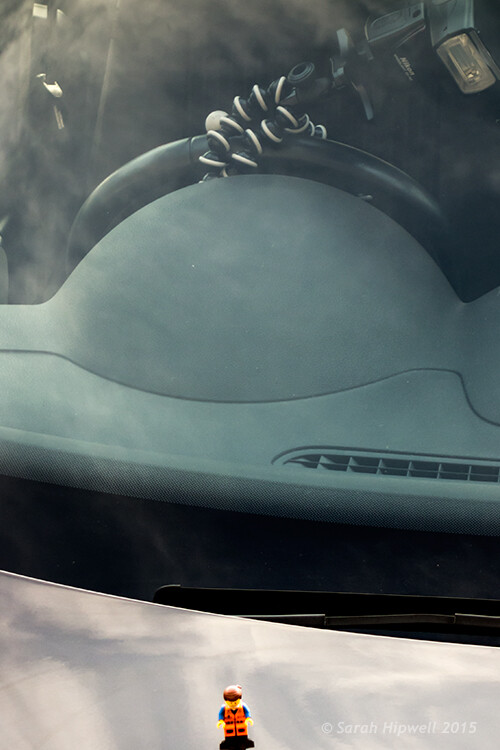
Emmet-on-car-bonnet-with-flash

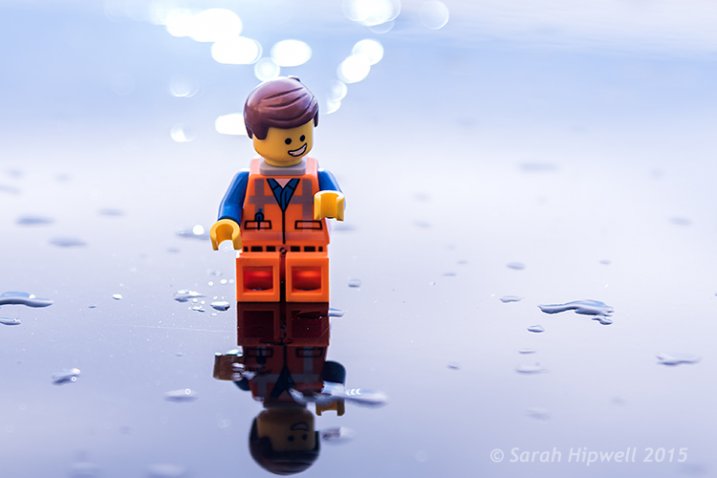
Emmet sitting on the hood of a car. Background created using one speed light attached to the steering wheel inside the car.

I like using speedlights because of their portability. When I use these small flashes, particularly outdoors, I am able to scope and think more on my feet. I am physically moving about and placing the flash, that’s on a light stand, in different positions relative to my subject or object. This allows me to visualise the type of shot I want to achieve. For the purpose of this article, I will use the same gear for all the techniques.

Camera Settings

In order to keep things simple, and not get bogged down in too much technicality, your camera settings can only use ONE aperture setting and ONE shutter speed. The flash can only use ONE power level. Flash level is stated in fractions of full power, such as on my flash: 1/128. 1/64, 1/32, 1/16, 1/8, 1/4, 1/2, up to full power, or 1/1. The camera and the flash are going to be set to manual mode.

When shooting outside, the ambient exposure, which is the available light (sun) is controlled by the shutter speed (and technically the aperture too). Just remember that the ambient light isn’t fixed (like in a studio setup with continuous lighting) so it’s constantly changing.

The flash, being instantaneous, is controlled by the aperture. I’m going to ignore ISO here. Well, I’m not quite ignoring ISO but I’m going to leave it at 100 for quality. Set your flash sync-speed to its maximum, usually 1/200th or 1/250th depending on the camera you are using (check in the manual for your camera if you aren’t sure). This will allow you to use the widest possible aperture.

Exposure

You will need to have a good understanding of exposure and how to change aperture, shutter speeds and ISO settings. See Darren Rowse’s article, Learning about Exposure – The Exposure Triangle for a refresher. Bear in mind that this article isn’t aimed at photographers who are new to photography but photographer’s who are new to off-camera flash.

What gear will you need?

  • A camera and a lens: For the following shots, I used a Nikon D750 with a 24 – 120mm f/4 lens.
  • A stand-alone flash unit that can be adjusted manually.
  • Wireless flash triggers: Nikon has the CLS system, which can fire an external flash remotely.
  • A light stand: I also used a Joby Gorilla tripod as a light stand.
  • A diffuser, or light modifer of your choice: I used a white shoot through umbrella.

Low-light conditions

Amy-no-flash

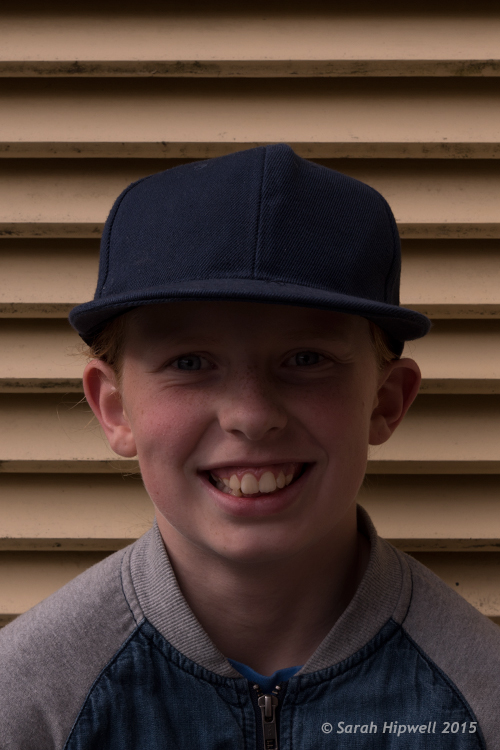
My daughter taken in low-light.

I literally grabbed my daughter and went outside our house to take the following shots. The first shot, as you can see, was taken with no flash. This was about 5:20pm in the evening.

Amy-with-flash-no-diffuser

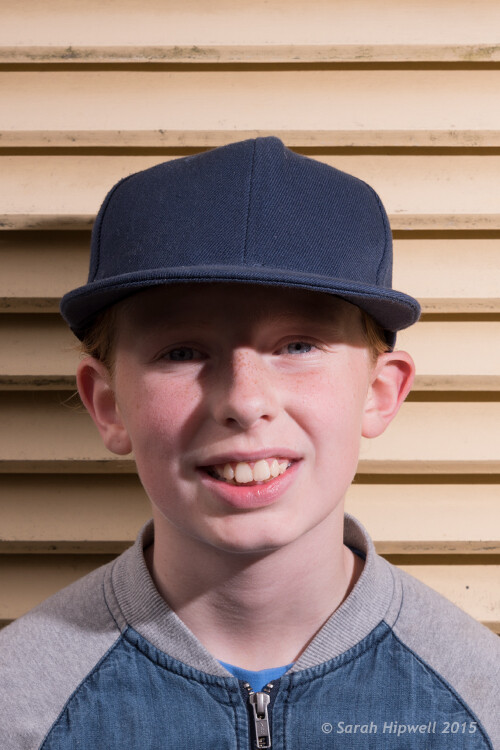
The flash is on a light stand, 2-3 feet away on the subject’s left side. The angle is about 35 degrees set to flash level 1/8 power.

For the second shot, I set my flash to 1/8th power, which is where I generally start. I had the flash on a lightstand 2-3 feet away to the left of my model, roughly at 35 degrees angle, with no diffuser on the flash. As you can see, the shadows are too harsh. I wanted to take another shot and move the light stand further back. Unfortunately, the weather changed and it started to rain!

Amy-with-flash-umbrella

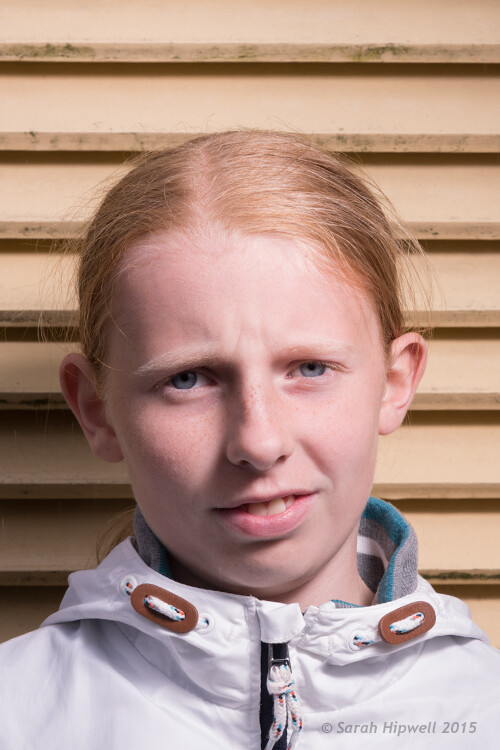
I added a shoot-through white umbrella to the flash. Umbrellas are a great modifier to create a much softer light.

This shot was taken the following day, same time and setup. But I added a white shoot-through umbrella on to the flash, to illustrate how effective this modifier is. Umbrellas are so inexpensive, and work really well to create a soft light. You can see that the shadows have become softer but they are still too strong (dark). However, my daughter’s patience ran out and no amount of bribes would make her stay for more shots!

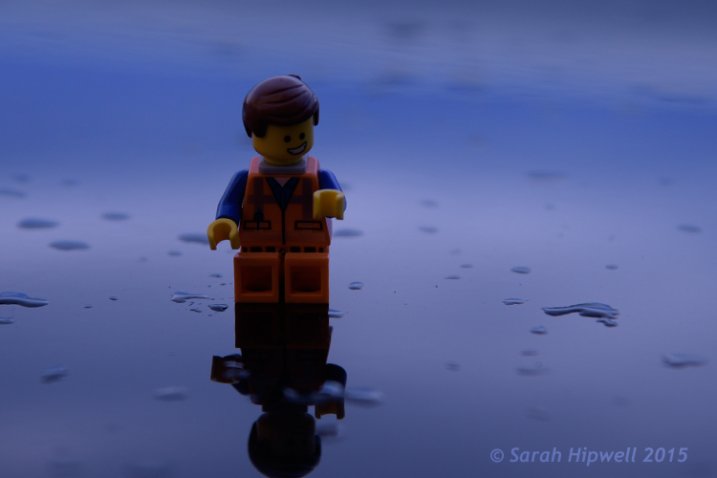
So I took the advantage of the rain and the low light conditions. Instead of a real model, I improvised with Emmet and put him on top of the hood of the car. I attached my flash to the steering wheel inside of the car with a Joby Gorilla tripod. That way, I wasn’t concerned if it started to rain while I was shooting. I had the flash power set to ¼, as I knew the hood of the car would provide a nice bounce. I had never tried this before so it was an experiment for fun; I was happy with the end result.

Emmet-on-car-bonnet-no-flash

Emmet on the hood of a car – no flash fired in this shot.

Emmet-on-car-flash-on-wheel

Flash attached to the steering wheel on the inside of the car.

Title-Emmet-on-car-bonnet-with-flash

Overcast dull days

When days are overcast and dull, it is a good opportunity to get out and start using off-camera flash. The light is even and it acts like a big diffuser. This helps you to concentrate on balancing the ambient light with the flash.

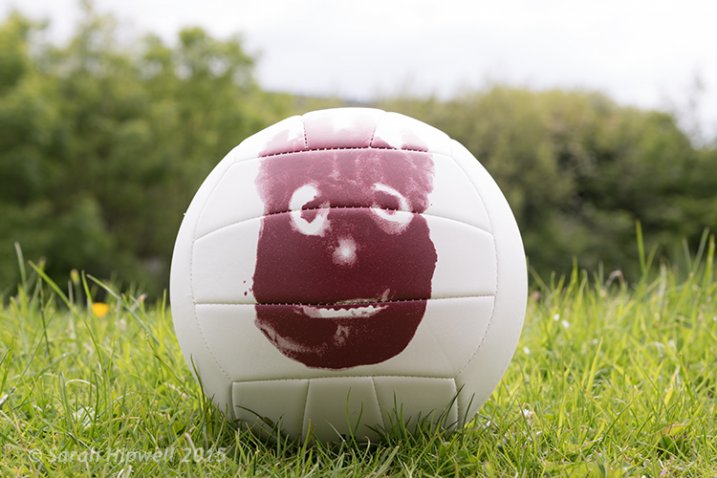
Wilson-overcast-day-no-flash

Wilson shot on an overcast, dull day – background overexposed, sky detail is lost. No flash fired.

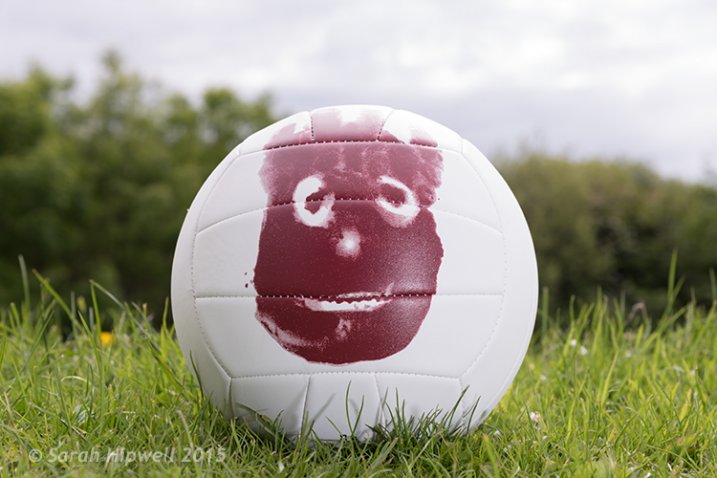
I placed the flash (on a Joby tripod) to the left of Wilson, roughly 4-5 feet away with an opaque plastic diffuser on. I wanted the light from the flash to be directed at the same level as Wilson. By adjusting the shutter speed, I was able to expose the background better. I had the flash set to 1/8th power, I wanted just enough fill light from the flash to give Wilson more depth.

Wilson-overcast-day-with-flash

I increased the aperture to bring back some detail in the sky. The flash acted as a nice fill-in or balance against the ambient light.

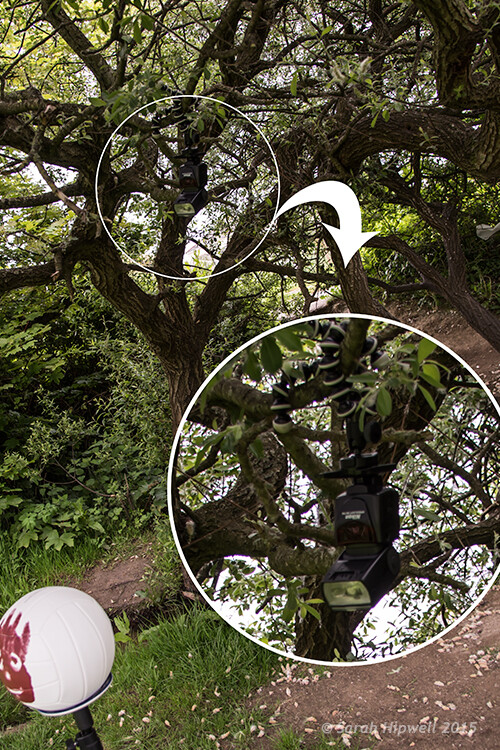
I moved to a different location but it was the same overcast conditions. This time, I wanted to change the direction of the flash and create a different shot. So I put the flash, still attached to the Joby Gorilla tripod, high up on a branch of a tree.

flash-in-tree

I still had my flash attached to the Joby Gorilla tripod from the previous shot. I then hung it upside-down and wrapped it around the branch of a tree.

Wilson-sun-dapple-no-flash

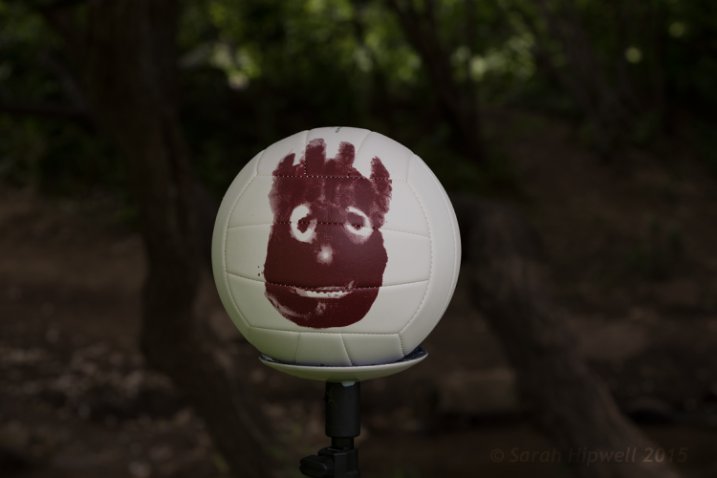
Wilson set against a backdrop of a woodland. No flash fired.

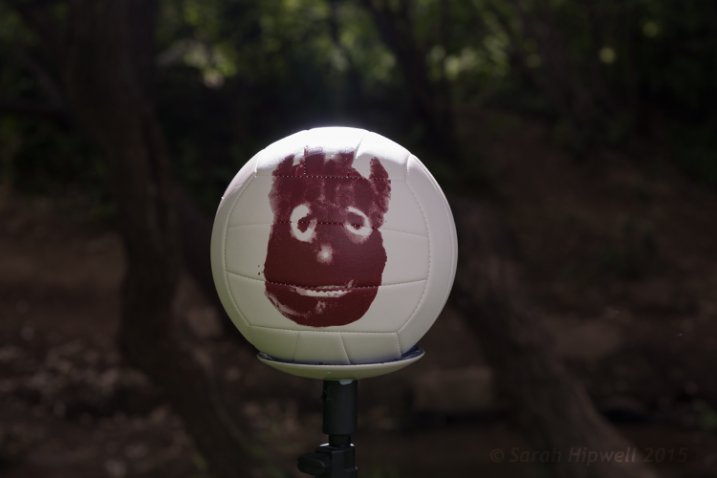
I wanted to appear as if the sun was shining down through the trees on Willson. By placing the flash high above, and behind Wilson, I was able to achieve this effect. I had the flash power set to ½ and took off the plastic opaque diffuser. I had to take a few shots before I was happy with this one. That’s the fun in this type of shooting, you are experimenting and learning as you go.

Wilson-sun-dapple-with-flash

By hanging the flash high up in the tree, it created a sun-dapple effect on Wilson.

Bright Sunny Days

I love the sun. Especially when there are blue skies and only a tiny whisper of a white cloud. However, in photography terms, this light is too harsh. In the middle of the day, the sun shines directly overhead and usually casts strong shadows on your subject (usually the face). If you face your subject looking into the sun to eliminate these strong shadows, your subject has to squint from the glare of the sun! So, by placing your subject with the sun behind them, your camera metering exposes the background correctly and your subject is too dark. Hence, you meter your subject for a correct exposure and then your background is overexposed.

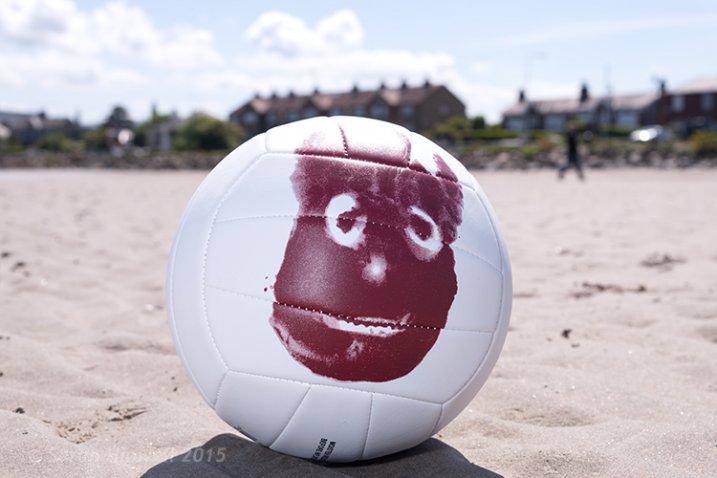
This is where your external flash comes in handy. I brought Wilson to the beach. The day was sunny and it was late afternoon. I placed Wilson on the sand with the sun behind him.

Wilson-on-beach-no-flash

Wilson at the beach with the sun high and slightly behind him. No flash fired.

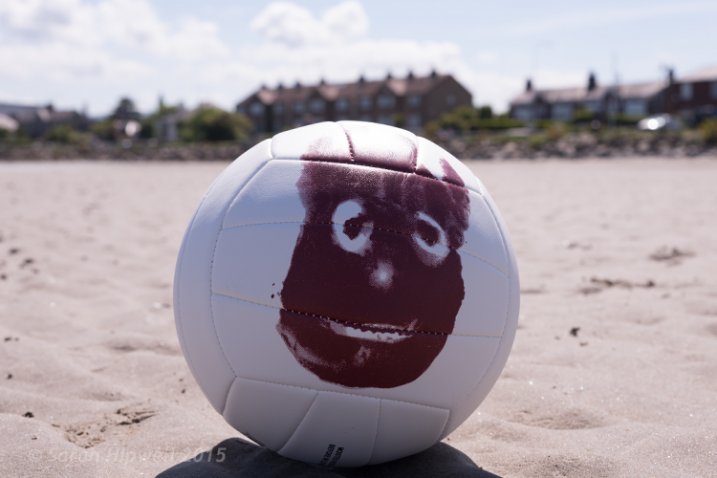
The flash was placed to the right of Wilson about four feet away. I had the diffusion plastic dome on the flash.

I didn’t achieve the shot I wanted when I reviewed my photos later on the computer. I noticed a slight hotspot on Wilson which is always a dead giveaway that you have used a flash. I wanted a nice balance between the ambient and the fill-in light from the flash. In hindsight, I should have experimented more by taking shots with the flash moved back or changed the direction slightly. As the day was very bright, I had set the flash power to ½, so I could have dialled it down! A good tip here, would be to take notes of your setup, so that you have a benchmark for similar future setups.

Wilson-on-beach-with-flash

Flash was to the right of Wilson, four feet away with a transparent dome diffuser on. Flash power set to 1/4.

Wilson-on-beach-rushes-no-flash

Another shot of Wilson on the beach. No flash fired.

Wilson-on-beach-rushes-with-flash

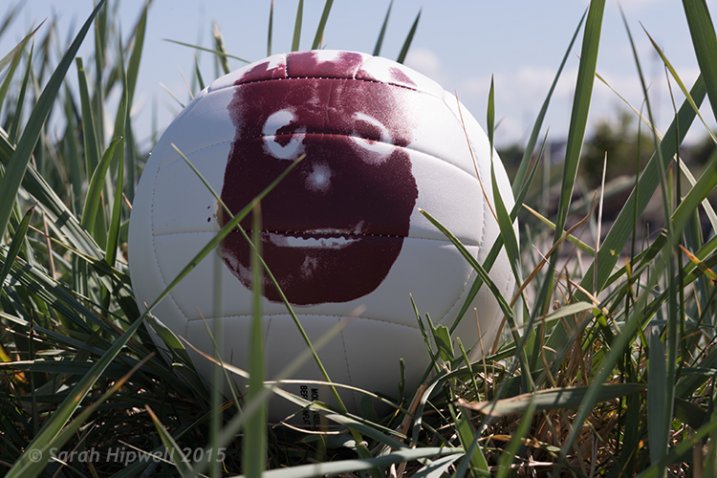
I placed the flash to the right of Wilson and the flash had to fire through the grass.

Tips:

  • Experiment with the distance of your flash relative to your subject as well as the direction.
  • If you are using an umbrella, get lots of sand bags to weigh the stand down firmly, or preferably get somebody to hold it. This is especially important on a breezy, or windy day. The light stand will take off like a kite with the umbrella attached. This happened to me. The umbrella broke but thankfully my speedlight suffered no damage. After all, umbrellas are way cheaper to replace than flashes.
  • Start with a low power level on your flash, such as 1/16 or 1/8th.
  • Put the flash sync-speed to the maximum to give you more latitude with your aperture.
  • Keep practicing before you’re ready to move on.

Conclusion

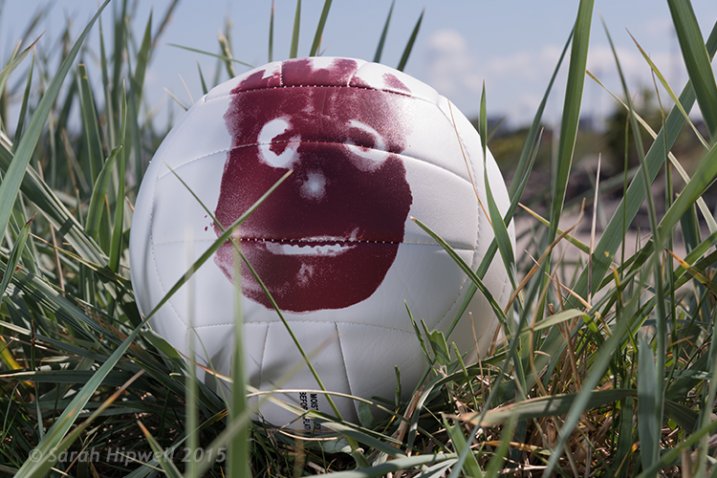
I hope that I’ve convinced you that off-camera isn’t as daunting as it may seem. However, it isn’t a one-click effect. It does take a bit of mastering. Don’t be afraid of not getting it right first time. If you can’t get a willing subject or model, go get yourself a Wilson! I chose a ball as it’s round and is a good substitute for a face. (Plus you don’t need to bribe a ball).

Do you use off-camera flash? Have any other tips for beginners? If so please share in the comments below.

googletag.cmd.push(function() {
tablet_slots.push( googletag.defineSlot( “/1005424/_dPSv4_tab-all-article-bottom_(300×250)”, [300, 250], “pb-ad-78623” ).addService( googletag.pubads() ) ); } );

googletag.cmd.push(function() {
mobile_slots.push( googletag.defineSlot( “/1005424/_dPSv4_mob-all-article-bottom_(300×250)”, [300, 250], “pb-ad-78158” ).addService( googletag.pubads() ) ); } );

The post How to Get Started with Off-Camera Flash Photography – Start With One! by Sarah Hipwell appeared first on Digital Photography School.


Digital Photography School
 
Comments Off on How to Get Started with Off-Camera Flash Photography – Start With One!

Posted in Photography


15. Juli 2015

15 Jul

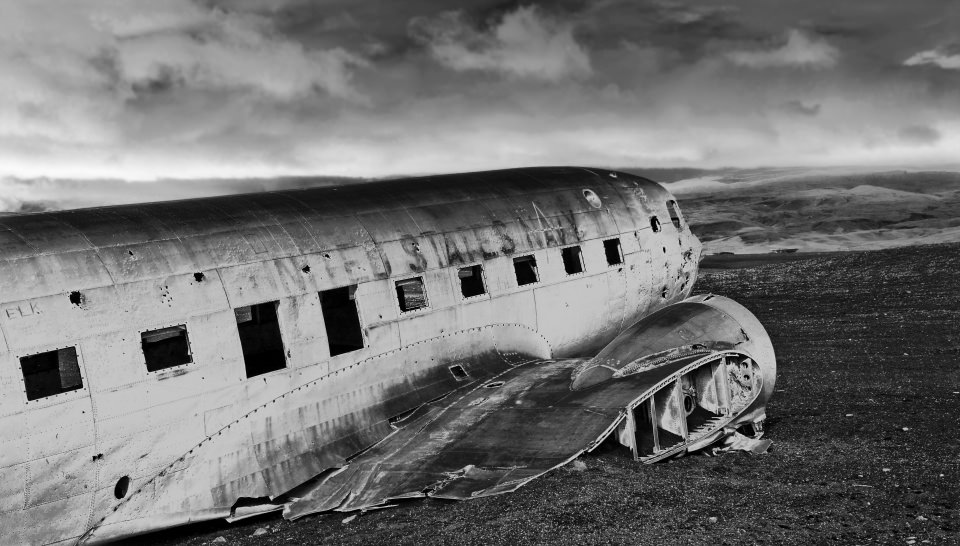
Das Bild des Tages von: Ernie Trölf

Flugzeugwrack in einer Landschaft in schwarzweiß.

Im Ausblick: Dronenfotografie, Kaffee und Kriegsspiele.
kwerfeldein – Fotografie Magazin | Fotocommunity

 
Comments Off on 15. Juli 2015

Posted in Equipment


The Art of Photojournalism: Tell a Story with Your Image

15 Jul

Many people don’t think of photojournalism as being an artistic pursuit. In many ways, it isn’t. Documentary photography is often utilitarian in nature; the photographer’s job is to tell a story plainly, honestly and efficiently. A person might argue that approaching this job with other intentions, such as producing great art, could potentially sully the images. That is, if the Continue Reading

The post The Art of Photojournalism: Tell a Story with Your Image appeared first on Photodoto.


Photodoto

 
Comments Off on The Art of Photojournalism: Tell a Story with Your Image

Posted in Photography


Newspaper protests strict photo contract by sending a cartoonist to a Foo Fighters concert

15 Jul

In an ongoing trend of protests against strict photo contracts for music photographers, Quebec newspaper le Soleil sent a cartoonist to illustrate a Foo Fighters concert. The publication called the contract one of the harshest it had seen, citing passages that require photographers to surrender copyrights to their images, giving the band the ability to use images in any media without permission or payment. Read more

Articles: Digital Photography Review (dpreview.com)

 
Comments Off on Newspaper protests strict photo contract by sending a cartoonist to a Foo Fighters concert

Posted in Uncategorized


Auf der Flucht vor dem Islamischen Staat

15 Jul

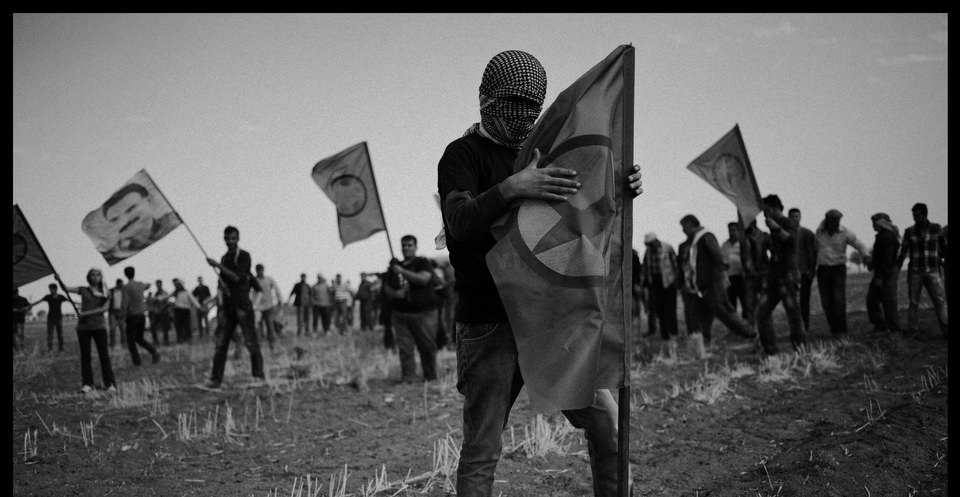
Ein kurdischer Demonstrant hält eine PKK-Flagge.

Ein Beitrag von: Martin Gommel

Der Fotojournalist Ferdi Limani reiste im September 2014 an die syrisch-türkische Grenze nach Suruc, um dort den Alltag der Flüchtlinge zu dokumentieren. Diese kamen von Syrien über die Grenze, da der Islamische Staat die Stadt Kobane ab dem 15. September angegriffen hatte.
kwerfeldein – Fotografie Magazin | Fotocommunity

 
Comments Off on Auf der Flucht vor dem Islamischen Staat

Posted in Equipment


Hearables: Sound-Controlling Earbuds Hack Everyday Acoustics

15 Jul

[ By WebUrbanist in Gadgets & Geekery & Technology. ]

here

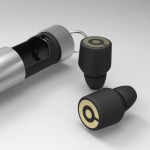
With these earbuds, you can do anything from turning down the volume on crying babies, snoring spouses and passing sirens to tuning your own mix of bass, mids and trebles at a live concert in real time. If this description sounds like a bionic hearing device of the distant future, guess again: all of these benefits are being packed by Doppler Labs into a portable pair of well-funded wireless devices already in development.

custom audio filtering plugs

Starting with the simplest features of Here: users can turn up or down everyday sounds – basically a volume knob for ordinary acoustics all around. But it gets better: using machine learning and customizable inputs tied to your smart device, Here can also filter out specific soundwaves in real time, cancelling out unwanted sounds instead of replacing them with white noise or other filler.

sound design

Beyond this baseline feature set, however, things start to get really interesting, with audiophile-oriented features that let you add or subtract everything from treble and bass to reverbs and echoes, letting you personalize all kinds of soundscapes, from background music at bars and elevator Muzak at work to live concert performances. Users can employ presets or customize their experience on the fly then save favorite settings for later, and fans will undoubtedly begin remixing acoustics in unexpected situations, creating custom soundtracks out of walks through parks.

custom ear plug design

Like many wearables, these “hearables” are controllable from your favorite smart device and thus require little onboard processing power, resulting in more extended battery life – the buds are then recharged in a portable case. Doppler has already raised thousands via Kickstarter and millions more via tech and music company investors. Some of this money will be put toward hardware but much of which will be used to further refine their algorithms and give users ever-more-custom audio control over their everyday auditory experiences.
active listening

From their fundraising campaign: “Through two truly wireless, in-ear buds and a smartphone app, Here allows you to instantly control real world audio so you can hear what you want to hear – no matter the situation – and be fully immersed in your audio environment. Here does not stream or play recorded music. Instead, the Digital Signal Processor (DSP) inside Here acts as a studio in your ears by providing you with a volume knob, equalizer and effects to transform real world audio. Use this ‘remote control for your ears’ to have an optimal listening experience every time.”
Share on Facebook


[ By WebUrbanist in Gadgets & Geekery & Technology. ]

[ WebUrbanist | Archives | Galleries | Privacy | TOS ]


WebUrbanist

 
Comments Off on Hearables: Sound-Controlling Earbuds Hack Everyday Acoustics

Posted in Creativity


InstaMeets: A National Park Meetup For Photogs

15 Jul

You know that feel when you’re left behind in a tour group because you’re too busy snapping photos? All the time. You’re not alone (this time) and a resourceful Park Ranger noticed your dilemma.

Ranger Tim created InstaMeets, in Glacier National Park, as a solution. It’s a meetup for photographers to go on photo walks, safely and slowly, together. They’re a great way to connect with and learn from other photo enthusiasts.

Hopefully this brilliant idea is picked up by other National Parks. In the meantime, if you’re headed toward Glacier, check out when the next InstaMeet is here.

Photo by NPS


© Erin for Photojojo, 2015. |
Permalink |
No comment |
Add to
del.icio.us

Post tags:


Photojojo

 
Comments Off on InstaMeets: A National Park Meetup For Photogs

Posted in Equipment