RSS
 

Archive for June, 2015

Testbericht: Zeiss Otus 85 mm f/1.4

24 Jun

© Christopher Wesser

Ein Beitrag von: Christopher Wesser

Die Marke Zeiss steht bei Objektiven ja schon seit jeher für Prestige und Qualität. Mein 50 mm f/1.4 Planar zaubert den meisten Fotografen sofort ein neidisches Lächeln auf das Gesicht. Der Effekt kommt natürlich unter anderem auch davon, dass die normalen Zeiss-Linsen im Preissegment einer typischen Canon-L-Linse liegen, also jenseits von 1.000 € beginnen (mal abgesehen vom oben genannten 50mm f/1.4). Vor allem bekommt man bei Zeiss aber auch einfach entsprechend gute Technik
kwerfeldein – Fotografie Magazin | Fotocommunity

 
Comments Off on Testbericht: Zeiss Otus 85 mm f/1.4

Posted in Equipment


Grimm Abandonment: Derelict Australian Fairy Tale Park for Sale

24 Jun

[ By WebUrbanist in Abandoned Places & Architecture. ]

abandoned park castle

Inspired by classical fairy tales, this deserted theme park recently opened its doors to an urban explorer and photographer, giving outsiders a glimpse into the current state of the place as well as its potential to be reborn in the hands of the right buyer. Traveling to the site from Tasmania, Urbexography has done a remarkable job at documenting this strangely magical place.

abandoned castle in context

abandoned fairy tale setting

abandoned welcome sign

From the Fantasy Glades website: “In the 1960’s a family of ‘Little People’ George and Rosemary Whitaker, along with their children James and Lynette, and Rosemary’s parents, Aub and Lin Gribble, set out on a journey from Sydney to Port Macquarie in NSW Australia with a dream to create their very own children’s Fairy Tale Theme Park.” It was closed 35 years later in 2002 and has remained so since.

abandoned theme park shoe

abandoned australia brothers grimm

deserted fairy tale park

The main attractions were based on the works of the Brothers Grimm, aided by the experience of the park’s founders in theatrical stage and set design work around such themes. Located in a patch of natural bushland at Parklands Close in Port Macquarie, the location features Snow White’s cottage, bedrooms of the Seven Dwarves and other features of similarly famous fairy tales and fables.

abandoned park building

abandoned chapel interior

abandoned park graffiti tag

Whether the magic is gone forever or can be maintained and rebuilt is ultimately a question of economics – the current owners would love nothing more than to sell the place to someone who has an interest in bringing it back to life.

abandoned stairs seating

abandoned moat draw breidge

abandoned park fairy castle

In the words of the photographer: “Fantasy Glades was an absolutely magical, special place for many people including myself as a child and also my children when they were little.  It has been visited and enjoyed by numerous families from all around the world since 1968 when it first opened. Fantasy Glades is a hidden piece of paradise in one of Australia’s best locations.”

Share on Facebook


[ By WebUrbanist in Abandoned Places & Architecture. ]

[ WebUrbanist | Archives | Galleries | Privacy | TOS ]


WebUrbanist

 
Comments Off on Grimm Abandonment: Derelict Australian Fairy Tale Park for Sale

Posted in Creativity


How to Simulate Tilt-Shift Lens Effects Using Lightroom

24 Jun

We’ve all at one point been enamoured by the effects produced by tilt-shift or PC (perspective control) lenses.

Even in wide-angle shots, the extremely narrow field of focus transforms the scene into a surreal miniature world. It can be hard to decipher whether it’s actually a close-up of a tiny model scene, or the result of the visual trickery that a tilt-shift lens can produce.

Tilt-shift effect applied to a beach scene.

The tilt-shift effect can be used on more than city street scenes. Use your imagination and be creative!

Besides the nifty miniaturization effect, these high-end specialty lenses are imperative for professional architectural photography. Tilt-shift lenses are basically split into two, parallel to the lens, elements and enable you to tilt the front of the lens barrel in relation to the rear portion, or slide it parallel.

Without actually changing the physical location of the camera, these adjustments allow you to alter the perceived perspective. The most practical application of this effect is to eliminate certain types of distortion, especially the keystone effect.

The keystone effect refers to the convergence of parallel lines which occurs when a camera’s sensor is not parallel to them. You have seen this distortion a million times when the camera was pointed upward at a tall building. It looks as if the building is about to fall over backwards, and it creates the illusion that it is wider at the bottom and continually narrows to the top. The same thing happens with horizontal lines but is often less noticeable, or detrimental to the image.

Although tilt-shift lenses have other practical uses, these are the two that can be replicated effectively in post-processing: creating a miniature effect, and fixing certain kinds of lens distortion.

Eliminating Converging Lines Distortion

Correcting lens distortion in Lightroom (LR) is fairly straightforward with a couple of considerations to keep in mind. I’ll use a night shot of the Petronas Tower in Kuala Lumpur, Malaysia as an example.

1. Straighten first.

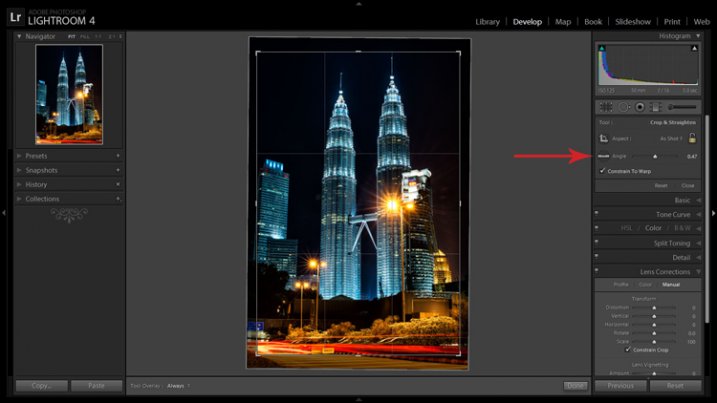
If the image you are working with has a distinct horizontal or vertical line which you know to be level or plumb, use the Straighten tool located within the Crop tool (keyboard shortcut R) to align the image before making any lens corrections.

The Level tool can be found beside the Align slider or activated by holding CTRL key.

The Level tool can be found within the Crop panel beside the Align slider, or activated by holding CTRL key.

To align the image using a vertical line, it must be near the center of the image due to the distortion which you are about to fix. With the Crop tool active, you can either grab the Level tool located beside the Angle slider, or hold down the CTRL key and drag the cursor along the chosen line and LR will rotate the image to level or plumb.

Note: new in LR6 or LRCC is the Auto function of the crop tool which attempts to do this for you. Alternatively, the Rotate slider in Lens Corrections can be used with similar results.

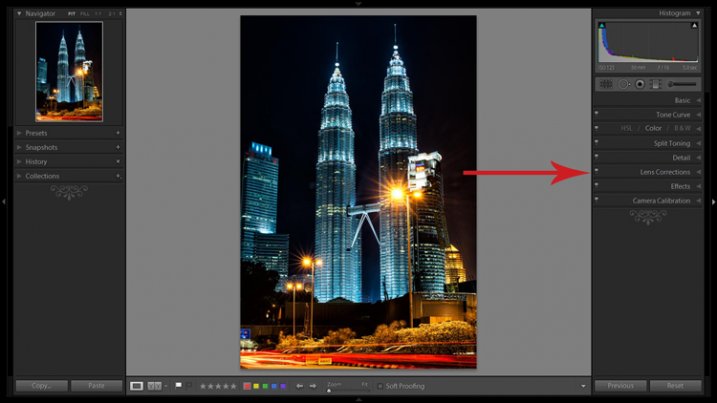
2. Open the Lens Corrections panel and click on the Manual tab.

Distortion corrections are made in the Lens Corrections panel.

Distortion corrections are made in the Lens Corrections panel.

3. Check the Constrain Crop box.

Note: As is often the case in life, you don’t get something for nothing. When LR manipulates the image to fix these lines, it must also crop it. You can also crop it manually after you adjust the image, but it is easy to inadvertently leave a little gray strip somewhere along the edge of your image by not cropping it enough.

4. Adjust the sliders

There are several ways to adjust sliders: dragging the slider itself, clicking the name of the slider and using the +/- keys, clicking the value on the right of the slider and dragging the cursor left or right, clicking the value and entering the desire value or clicking the value and using the arrow keys to make micro adjustments. I recommend the latter for accuracy.

5. Show the grid

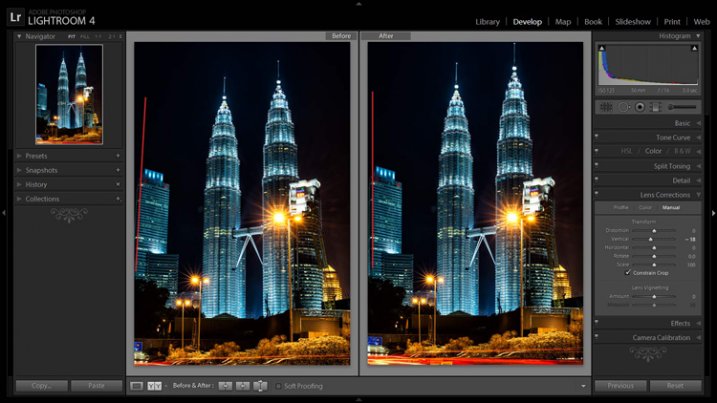
Hovering the mouse over any of the sliders will show a grid over the image to help guide your adjustment. For this image, a -18 compensation straightens the lines right up.

A before and after showing corrections for converging lines.

A before and after showing corrections for converging lines.

If you plan on shooting architecture and utilizing this feature instead of dropping $ 1,400 on a tilt-shift lens, it may benefit you to activate the crop tool (keyboard shortcut R) to get an idea of how much LR cropped your image. This will give you a point of reference while composing scenes in the future.

Creating a Miniaturization Effect

The tilt-shift effect of severely softening most of an image to isolate a small sharp strip can be simulated in post-processing very effectively. Although there are a couple of different ways to achieve this effect in Lightroom, I find the following to be the easiest and most effective.

Golden Gate Bridge with the tilt-shift effect applied.

The tilt-shift effect can add another level of interest to certain photographs.

Keep in mind that not every photo is a good candidate for this effect. You can find good advice about image selection in the article An Introduction to Tilt-Shift Photography.

1. Process the image as you normally would.

Boosting sharpening, contrast and saturation can help exaggerate the effect.

2. Activate and setup the Adjustment Brush (keyboard shortcut K).

Drag the Sharpening slider all the way down to -100. I also like to reduce Clarity which adds a bit of glow and exacerbates the effect.

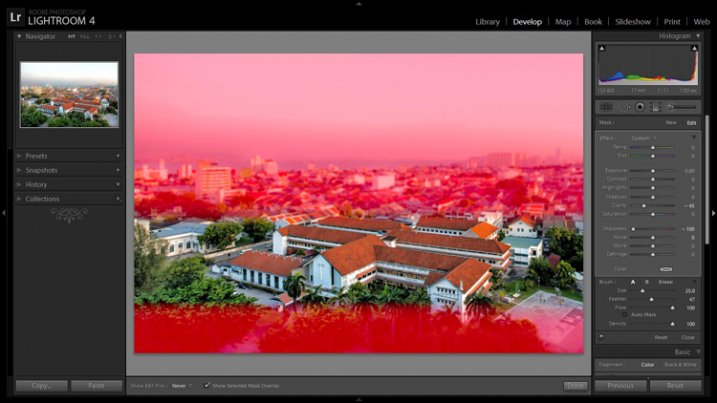
3. Show the Mask Overlay box (keyboard shortcut O)

This will allow you to clearly see where the effect is being applied (shift+O will rotate through different mask colors, you may find red is better one image whereas green may work on another).

5. Adjust the brush settings

Setup such things as brush size, flow, etc. Spend a few minutes experimenting with different combinations of these settings to find what works best for your image. CTRL+Z (CMD+Z on Mac) is your friend here.

6. Blur most of the image less a small strip

Holding down the shift key while you click and drag the brush horizontally across your image will apply the effect in a straight line. The goal is to blur the entire image except for a small strip. Make one line across the upper boundary and one line across the lower boundary of the strip you wish to isolate. You can then release the shift key and paint in the remainder of the areas. The in focus strip should account for 20 per cent or less of the image area. If the strip is too big, the effect will be weak.

Holding down the shift key will keep the brush level to paint a straight line.

Holding down the shift key will keep the brush level to paint a straight line.

7. Repeat to increase the effect.

Repeating the previous step several times will compound the effect. To repeat the step, click on New at the top of the Adjustment Brush panel – this will remove the mask to reveal the most recently applied effects, and allow you to add a new pin (brush strokes) and repeat the process.

Before applying the effect to a photo of Penang, Malaysia.

Before applying the effect to a photo of Penang, Malaysia.

After application of the miniaturization effect.

After application of the miniaturization effect.

The effect can also be applied using the Graduated Filter tool but I find it ends up blurring the entire image to some extent and is less effective.

This is a starting point from which to experiment with the effect. Everybody’s tastes differ, so although the general process will remain constant, go crazy with the other variables and see what happens!

googletag.cmd.push(function() {
tablet_slots.push( googletag.defineSlot( “/1005424/_dPSv4_tab-all-article-bottom_(300×250)”, [300, 250], “pb-ad-78623” ).addService( googletag.pubads() ) ); } );

googletag.cmd.push(function() {
mobile_slots.push( googletag.defineSlot( “/1005424/_dPSv4_mob-all-article-bottom_(300×250)”, [300, 250], “pb-ad-78158” ).addService( googletag.pubads() ) ); } );

The post How to Simulate Tilt-Shift Lens Effects Using Lightroom by Jeremie Schatz appeared first on Digital Photography School.


Digital Photography School

 
Comments Off on How to Simulate Tilt-Shift Lens Effects Using Lightroom

Posted in Photography


How to Avoid Loss of Your Digital Photos

24 Jun
Mariam S

By Mariam S

Nowadays almost all photos are taken using various digital devices. In the era of paper photos, the main photo destructors were natural disasters like fires, and also such a phenomenon as discolouration. Modern digital photos face mainly the same dangers – fires, floods, and so on. Surprisingly, digital photos also have some equivalent to discoloration – degradation of a photo storage device over time. However, apart from these dangers inherited from paper predecessors, digital photos are subject to new specific dangers, for example: loss of photos due to a storage device failure. Let’s discuss in more detail what dangers digital photos might face and how you can avoid many of them.

Generally speaking, there are three bottlenecks where you can lose photos – when taking photos, when transferring them, and in storage.

#1 Loss of photos in camera

Immediately after you have taken a photo there is only a single copy of it. If this copy is lost, you can in no way get it back. In all fairness, such cases are relatively rare. Even if data recovery software doesn’t help, as a last resort you can send a memory card to a repair lab in the hope that the hardware specialists can help. However, if it fails, all you have left to do is to say “goodbye” to the photos because there was only a single copy of them.

For example, you shoot a football match and then on the way home lightning hits your camera and all that was left was a pile of ashes. This is what contracts call “force majeure” and therefore nothing can be done. However, history has some funny stories. A man had dropped a camera into the sea; a year later some divers raised it and surprisingly the photos were readable. Divers were even able to identify a camera owner by the photos and then returned him his “property” (read the full story here).

Image 2

Tips

Here, there is little advice for you because surely you know better how not to drop the ball, say due to a camera failure or something like that, when shooting a unique event.

There are some tips on memory card health that will help though:

  • How to Spring Clean Your Memory Cards
  • The Best Way to Delete Photos From Your Memory Card

Also remember to turn off your camera before removing or changing your memory card or battery. Not doing so can result in a card crash and lost images.

#2 Transferring photos

The process of transferring digital photos from your camera to computer is akin to producing paper photos from the negative. In both cases you duplicate photos from a single copy you have, whether it would be a negative from an old camera, or a flash card in a modern digital device.

In the film days, the process of transferring photos to new data storage was laborious, took a lot of time, and required certain skills and equipment; with digital photos the process becomes radically simplified. However, strange as it may be, nowadays the chance of losing photos during transfer is still significant.

Earlier, when developing film you had to stick to certain rules. Ignoring these rules inevitably resulted in destruction of photos. For example, one such rule says that all actions with negatives must be performed in a darkroom. In case of digital photos there are also some rules, however, people tend not to follow them because ignoring them doesn’t always lead to loss of photos. Those “less fortunate” people who neglected the rules and lost their photos, then have to bother with photo recovery.

Let’s look at the rules:

  • Always use the “safely remove hardware” option when ejecting a memory card or any other removable device from a computer. Otherwise, the operating system may not have time to handle data on the removable device properly. That sometimes can lead to the RAW file system issue, the typical symptom of which is when Windows shows you the message like this:
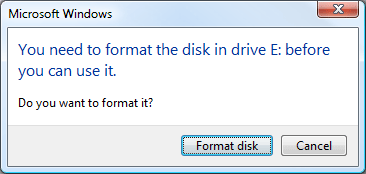
    Image 3 small
  • Don’t eject a memory card from a working camera, for the same reasons as in the previous case.
  • Always monitor the battery charge. If battery runs low at the wrong time, it may result in a file-system failure on the memory card. Generally, it is better to use a card reader device for transfers since it has no such problems.
  • Transfer photos regularly. By doing so, in the worst-case scenario would be that you lose only you’re latest photos, rather than an archive for the entire year.

However, it should be noted that all listed above typically don’t destroy photos themselves. It just leads to a file-system failure which is pretty well cured by data recovery software, given that you have not formatted a card.

#3 Storage

In general, loss of data in storage is bad form. Immediately after taking pictures you have just one chance to copy them, and you still can write data loss off to an “irresistible force of nature”, for example. Once you have enough time to create a copy of the photos, however, data loss is less excusable.

Charles Wiriawan

By Charles Wiriawan

Do not trust only one storage technology

Do not rely upon only one storage technology, even if you think it is very reliable. No data storage technology, be it a fault-tolerant RAID or modern Storage Spaces from Microsoft, can replace a good old backup. More than that, a proper backup procedure requires an off-site copy, maintained in some physically separate location. This is to prevent simultaneous loss of both original,
and backup copies to a fire or theft.

Tips

  • Off-the-shelf NAS devices like Synology and QNAP have several indicators that can be green, yellow, and red. These indicators significantly simplify monitoring of the device “health” – just remember what typical indications are, then glance at the NAS at least once a day. Extinguished or red lights are a reason for concern.
  • If you store photos on a Windows PC, use special software to monitor your disk state. S.M.A.R.T. is a technology used in hard drive self-diagnostics. Fairly often, it can predict hard drive failure ahead of time. A monitoring tool requests S.M.A.R.T. status of the device periodically and if S.M.A.R.T. data deviates from the normal values, the tool will alarm you so that you can back up the data.
  • Check the S.M.A.R.T. state of your hard drives at least once a month.

Photo recovery tips

If you have lost some photos and are looking for a way to recover them, there is no need to panic because photo recovery from a camera memory card is one of the easiest, and well-established data recovery tasks. All you need is to download and install any data recovery software – there exist both paid and free options – select a memory card from the device list, and see what it brings up.

If you are not satisfied with the quality of the recovery, it makes sense to try several tools since recovery algorithms used in various software may differ in some way. Note that data recovery tools, for the most part, are read-only so they will not destroy anything on your card. Windows CHKDSK is the significant exception to this rule – it sometimes does make matters worse.

Below are some tips on how to achieve the best result when recovering photos from a memory card:

  • Stop using a card once you see that something is wrong. If the camera’s behaviour is unusual, stop taking any new photos until you clear up the situation with the existing photos.Image 4
  • If possible, use a card reader device when recovering data. It is stable and provides better performance than a cord and direct connection to the camera.

    Matthew

    By Matthew

  • Do not take new photos once you realize that you need to recover data. Usually, with each new photo you lose a capability to recover one previously deleted photo.
  • Ascertain in advance what your camera actually does when you format a card. If the camera uses a “complete” (also called low-level) format by default, change it to a “quick” format. Thereby, if you format a card accidentally you still can recover photos from it; after a complete format, all the data will be overwritten and not recoverable.

Bonus – discolouration

In early days, when archives were stored on magnetic tape, it was critical that the tapes must be rewound regularly. Otherwise, the data became unreadable because magnetic fields mixed between adjacent layers of tape (what was then known as crosstalk effect).

Some place the photos on CDs and then do not check them for years. In five years one can easily find that at best only half of the CDs are readable. CDs are not suitable for long-term storage and should only be considered as one of the backup options for a short period of time.

Those who keep their photos on old hard disks, in ten years will not be able to find a proper connector anywhere else except in a museum. If you are going to store photos for a long time you should use the most modern devices to increase the chances of find a compatible setup in the future. This is sometimes called “future-proofing”. However, you should not bet on the ultramodern technologies since it may happen that the technology does not stick and therefore, say in five years, you will not be able to find compatible components (think beta versus VHS).

Sophia Maria

By Sophia Maria

Generally speaking, digital discolouration differs from analog (paper) discolouration, only in that you can discern at least something on a discoloured paper photo, while a digital picture is destroyed immediately and completely.

Image 5

So some care and planning on your part can help you avoid losing your images, or in the worst-case scenario, quickly able to recover them. What’s your disaster avoidance plan?

googletag.cmd.push(function() {
tablet_slots.push( googletag.defineSlot( “/1005424/_dPSv4_tab-all-article-bottom_(300×250)”, [300, 250], “pb-ad-78623” ).addService( googletag.pubads() ) ); } );

googletag.cmd.push(function() {
mobile_slots.push( googletag.defineSlot( “/1005424/_dPSv4_mob-all-article-bottom_(300×250)”, [300, 250], “pb-ad-78158” ).addService( googletag.pubads() ) ); } );

The post How to Avoid Loss of Your Digital Photos by Alexey Gubin appeared first on Digital Photography School.


Digital Photography School

 
Comments Off on How to Avoid Loss of Your Digital Photos

Posted in Photography


Final firmware Canon EOS 5DSR real-world samples posted

24 Jun

Last night the Northern Lights tip-toed farther south than they usually do, and many regions of North America not accustomed to seeing them were treated to a light show. In hopes of catching it we hopped in the car with the Canon EOS 5DSR and headed away from the city lights. We’ve got a couple of aurora shots to share as well as a selection of others taken with a final 5DS R camera. See gallery

Articles: Digital Photography Review (dpreview.com)

 
Comments Off on Final firmware Canon EOS 5DSR real-world samples posted

Posted in Uncategorized


23. Juni 2015

24 Jun

Das Bild des Tages von: Fiktion des Faktischen

19020531975 © Fiktion des Faktischen

Im Ausblick: Eine multimediale Reportage aus Nepal, Verkehrsschilder und Kreativität und Wahnsinn.
kwerfeldein – Fotografie Magazin | Fotocommunity

 
Comments Off on 23. Juni 2015

Posted in Equipment


Venus Optics launches Laowa 15mm F4, the world’s widest macro lens

24 Jun

Chinese lens manufacturer Anhui ChangGeng Optical Technology Company Limited has introduced what it describes as the world’s widest 1:1 macro lens. The Venus Optics Laowa 15mm F4 is designed for full frame sensor cameras and can focus down to just 12cm from the front element, and is equipped with a +/-6mm shift function for architectural work at normal focusing distances. Read more

Articles: Digital Photography Review (dpreview.com)

 
Comments Off on Venus Optics launches Laowa 15mm F4, the world’s widest macro lens

Posted in Uncategorized


Two World Trade Center: BIG Redesign Deconstructs Skyscraper

24 Jun

[ By WebUrbanist in Architecture & Offices & Commercial. ]

two wtc stacked boxes

A long-standing design proposal from Foster + Partners has been scrapped by developers in favor of a new scheme from BIG (Bjarke Ingels Group) that presents a different face to viewers depending on their approach or view within the city, rejecting conventional skyscraper typology and cultivating visual transitions between neighborhoods on all sides.

two world trade stack

As the last project slated to be built on the World Trade Center site, the would-be 2 WTC skyscraper is a critical piece of the Lower Manhattan landscape, but its future tenants wanted something that stood apart from the more straightforward tall buildings associated with finance and Wall Street.

two tower foster partners

The prior scheme, shown above, featured four connected verticals, each terminating in an angled plane at the top, essentially a tower with slots centrally located along each face. The new scheme, endorsed by occupants including 21st Century Fox and News Corp and shown below, intentionally shies away from the skyscraper aesthetic and creates space for greenery on a series of platforms created by recessed sections of structure.

two memorial site view

two box tower view

Its facade shows off a slim and modest structure when viewed from the memorial site on one side below but creates a stacked-box effect when seen from adjacent lower-rise parts of the city above like Tribeca: “From Tribeca, it will appear like a vertical village of singular buildings each tailored to their individual activities stacked on top of each other, forming parks and plazas in the sky.”

two platforms gardens levels

two interior exterior bridge

two wtc interior

two news media studio

two news broadcast pit

two newsroom open space

By keeping larger boxes at the base and similar overall square footage (nearly 3,000,000 square feet), the building also is designed to accommodate sizable studio spaces for the aforementioned media companies. Lower levels will be occupied by these giants while upper floors will be rented out to smaller commercial clients. Set alongside One, Three and Four World Trade Center, this structure will stand apart, its broken-down scale visually bridging the gap between the southern tip of the island and the rest of the city to the north.

Share on Facebook


[ By WebUrbanist in Architecture & Offices & Commercial. ]

[ WebUrbanist | Archives | Galleries | Privacy | TOS ]


WebUrbanist

 
Comments Off on Two World Trade Center: BIG Redesign Deconstructs Skyscraper

Posted in Creativity


Eye for an ‘i’: Canon EOS Rebel T6i review posted

23 Jun

The Canon EOS Rebel T6i (750D) bears quite the resemblance to its Rebel T6s (760D) sibling. It’s essentially the same model, down to the 24.2MP APS-C sensor and 19-point AF module. What it doesn’t offer are the higher-end controls of the T6s, including a top-plate status LCD. Does the Rebel T6i hit all the right notes for a beginning photographer? Read more

Articles: Digital Photography Review (dpreview.com)

 
Comments Off on Eye for an ‘i’: Canon EOS Rebel T6i review posted

Posted in Uncategorized


Poptography

23 Jun

You may have noticed that photography has increased in popularity in the past decade, you know, just a bit.

This photo boom can almost entirely be attributed to the photoing power of mobile phones. We’ve entered a new golden age of photography and it’s fascinating to watch current culture mix up the art a bit.

In this article on ImageBrief, Avril Delaney (whoa, cool name!) covers what she believes to be the top five ways pop culture is influencing photography. She presents some interesting challenges artists face as a result of these influences, and we’re always up for a challenge … or 5!

5 Ways Pop Culture is Influencing Photography

Photo by Ozzy Jaime


© Erin for Photojojo, 2015. |
Permalink |
No comment |
Add to
del.icio.us

Post tags:


Photojojo

 
Comments Off on Poptography

Posted in Equipment