RSS
 

Archive for May, 2015

Die 5 Fotowettbewerbe des Monats

24 May

Seifenkistenrennen

Naturaufnahmen, Kinderportraits, Wissenschaftsbilder und PR-Fotos werden dieses Mal bei unserer monatlichen Auswahl an aktuellen Fotowettbewerben gesucht. Wie immer haben wir kurz die Basisinformationen für Euch zusammengefasst. Sollte ein Wettbewerb interessant für Euch sein, lest die ausführlichen Teilnahmebedinungen der Wettbewerbe auf den jeweiligen verlinkten Seiten nach.
kwerfeldein – Fotografie Magazin | Fotocommunity

 
Comments Off on Die 5 Fotowettbewerbe des Monats

Posted in Equipment


Fit für die Ausstellung

24 May

Bilder, die an einer Wand hängen.

Ein Beitrag von: Michael Nischke

Fotos auf dem Display wirken brillant, doch sind sie winzig im Vergleich zum perfekt gedruckten Motiv, das zudem noch an der Wand hängen kann und Freunde begeistert. Der große Traum ist dann die eigene Fotoausstellung.
kwerfeldein – Fotografie Magazin | Fotocommunity

 
Comments Off on Fit für die Ausstellung

Posted in Equipment


More Thoughts on Flickr 4.0

24 May

More Thoughts on Flickr 4.0

Having had a few weeks now to spend significant time exploring Flickr 4.0, I thought I’d write up another more detailed post about my ongoing thoughts on the recent update by Flickr.

1. Autotagging. Autotagging has received a mixed reception by the Flickr community as well as the broader press. Initially a lot of the Flickr diehards have very vocally opposed it.

On the one hand, every time Flickr makes any change whatsoever a certain segment of the community will vocally oppose it no matter what the change is. The “who moved my cheese” crowd is strong and vocal at Flickr, so it’s easy to dismiss at least some of the initial criticism from the community as typical and predictable. On the other hand, many people have spent hundreds of hours organizing their tags on their Flickr photos and have a certain sort of emotional connection around tagging as it relates to their photos, which are very personal.

Any time you try to use image recognition software to recognize things you will get false positives. This is no different at Flickr. The more sensational the press can spin a story, the more clicks they end up getting. This week you saw news outlets like the Daily Mail come out with stories highlighting that Flickr was tagging concentration camps jungle gyms and black people apes. CNN reported that “Flickr’s new auto-tags are racist and offensive.” This is bad because most of the general public make assumptions based on headlines without thinking deeper about the issues at hand and most are not intimately involved with the inner mechanics of Flickr.

We also saw Google called racist this week because the White House was associated with a search for a derogatory racial term.

Personally, I’m more optimistic about Flickr using image search technology going forward and hope that the bad PR doesn’t set their efforts back there. Flickr and Yahoo are not racist (either is Google). The people who work there are a very well meaning and forward thinking group. I’m sure they will work on their algorithm to get it more and more accurate, but part of that accuracy involves getting feedback from their community when inaccuracies arise. Longer-term I think we will all benefit from having more accurate and complete search available through Flickr.

There is also part of me that wonders if Flickr’s autotagging efforts are not part of a longer-term effort to better organize this content in order to eventually partner with their community in a more significant way with stock photography. Stock photography is a multi-billion dollar business. Flickr is probably the most potentially disruptive site out there to this industry. As Yahoo thinks about monetizing Flickr in a more meaningful way, the better organized their library the more successfully they might be able to do this.

I do think Flickr should offer a setting to opt out of autotagging and I’m guessing they probably will eventually. If autotagging is on by default 99.9% of Flick users will still be using it. By creating an setting to opt out this would be an immediate way to deflect the criticism from the vocal power users that dislike it.

2. Search. Unfortunately my initial enthusiasm for search has been fading fast the past two weeks. While search looks cleaner and I do like the new view of smaller thumbnails that allow me to browse search results quickly, I’ve lost one of the most important functions of search, which is to search by my contacts.

Over the past 10 years I’ve carefully and methodically built a very large number of contacts whose photography I like and want to see more of. When I’m interested in photos of a particular subject, location, event, etc., I always do searches filtered by my contacts. This allows me the highest quality search results and gets rid of all the noisy, watermarked, junky, inaccurate images that oftentimes come up a broader search of everybody’s photos.

With the new search functionality this filtering capability is completely broken for me. What bums me out even more is that this broken functionality for my search experience is most likely affecting only people with a large number of contacts (like me) and thus is not likely to be addressed or fixed by Flickr for a long, long time.

Search is one of the most significant ways I use Flickr and with the update it is now dramatically worse for me.

Also, although I do like the two smaller view options Flickr gives you for search (a small sized photo or a thumbnail option), I do find myself missing the old larger views at the same time. Sometimes you want to search Flickr with images small so you can go fast, but other times you want to search Flickr to more carefully examine photos and here at least a medium view option would be nice to have back.

Maybe Flickr could have three possible views, medium, small and thumbnail.

One of the new features with the new search is that you can now search by date taken in addition to date posted. While date taken and posted are somewhat similar, I do see how date taken will become more and more useful over time, especially when using Flickr to search for breaking news.

3. As far as the Camera Roll and the uploader, I’m finding that I’m not using either. This doesn’t mean they are not important though. For more casual users having a view like this makes sense as a way to try to organize their offline photos in the cloud. I think this is really important for most casual users and as a way for Flickr to appeal to a broader general audience.

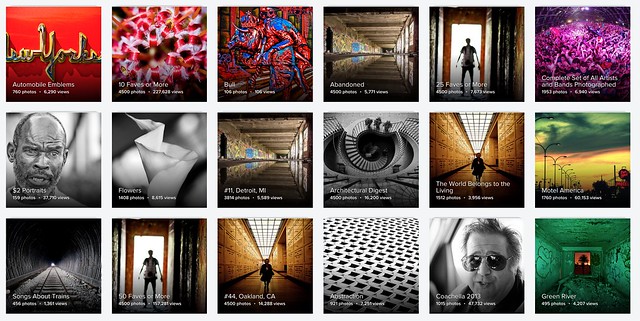
Personally, I carefully keyword all of my photos in Adobe Lightroom before uploading them to Flickr and then I use Jeremy Brook’s brilliant program SuprSetr to build albums based on these keywords. The only negative with this approach is that Flickr limits my sets to 4,500 photos when using Jeremy’s SuprSetr. :(

Magic view was fun to look at once, but I probably will never use it or go back. I prefer the way that I’ve organized my photos more than Flickr’s auto-organization.

I don’t use the uploader because for me Flickr is not a personal shoebox for all of my photos. Rather, for me, Flickr is a place to present and share my photos to the world. I don’t want random photos from my hard drive cluttering up my Flickr photostream even if they are private. 99.99% of the photos I publish to Flickr are public and the current web page uploader does a good enough job getting two batches a day up for me (except not last weekend).

4. The Flickr mobile app. To me the new Flickr mobile app is slightly better than the old app but it’s still far from ideal.

My biggest criticism is that sometimes it is so slow, laggy and clunky. Again, some of these issues may affect me more adversely than others because of the way I power use Flickr, but I find that going to my notifications can take 20-60 seconds sometimes on an LTE or wifi connection and that is just too long to have to wait. Sometimes it does go faster, but typically after not using it for a period of hours it frequently is just painful to use. It comes and goes, but I don’t have a consistent, fast experience with the mobile app. Facebook, Twitter, Google+ and most of all Instagram are so much responsive for me when I use them than the Flickr app.

Another problem I have with the app is that frequently I’ll want to favorite a photo and so I double tap on it to do this, but Flickr misreads my attempted double tap and thinks I want to open the photo up and see it large instead. I’m not really sure that there is a solution to that problem, but it’s one that frustrates me that I don’t have with Instagram.

I also find that if I look at my contact’s photos for more than about 10 minutes or so I run out of photos to look at and Flickr defaults “suggested” photos that I’ve already seen and favorited months ago. Sometimes I’ll be sitting on the train for more than 10 minutes, or working out, or doing something where I want to spend more than 10 minutes browsing my contact’s photos and wish that Flickr could expand the number of photos I’m allowed to see from my contacts on the mobile app.

I don’t use the camera or the camera roll on the Flickr app at all. I use my iPhone’s camera and then edit with Snapseed or Priime which offer far more robust editing capabilities.

5. The new album view. The new album view is more of a postscript to the new Flickr 4.0 than a part of the initial release. Earlier this week Flickr changed the primary album view on Flickr incorporating supersized huge photos into the album view layout. I really like this change. I think photos look sooooooo much better full-sized and large (which is one of the reasons why I enjoy Ello so much). Predictably many in the help forum hate this new view as they hate all change.

I do think the header in the new album view is too large. I also think that Flickr should only choose photos to enlarge that are high res originals and that fit the crop format of their large view. Small sized photos or mobile photos don’t look as good as DSLR photos when blown up huge. Also having a bad crop on a large view, really makes that view look bad.

In other news around Flickr’s new release, Bernardo Hernandez, who was managing Flickr resigned shortly after the new launch. I like Bernardo a lot and think that he was a very good leader for Flickr. After so many years in the wilderness with really ineffective management, I think Bernardo (and Markus Spiering before him) did a really good job promoting positive change at Flickr. I hope that whoever ends up replacing him is as strong and committed to the potential for what Flickr can become. After leaving Flickr, Bernardo did tweet that Flickr would be offering up support for RAW photos, this was the first time I’d seen this mentioned anywhere online and think that RAW support would be a huge positive for Flickr — especially given that Google is supposedly coming out with something new in the photo sharing space potentially as soon as the end of this month.

It’s been refreshing watching how serious a contender Flickr has become in the photo sharing world since Marissa Mayer took the helm at Yahoo. Along with Bernardo and Markus, she and everyone working on the Flickr team deserve a ton of credit for orchestrating such a remarkable turnaround over the course of the last several years. Flickr continues to get better and better and really is turning into something much better than I ever would have thought 4 years ago. I still can’t believe that I’ve been on Flickr over 10 years now and am definitely looking forward to the next 10.


Thomas Hawk Digital Connection
 
Comments Off on More Thoughts on Flickr 4.0

Posted in Photography


Shooting Fast Moving Subjects – How to Stop the Blur

24 May

In this article you will see how to deal with fast moving objects. For me shooting action is the most fun you can have with your photography. You can freeze that instant split second that the human eye couldn’t even comprehend, and capture it in an image for all time.
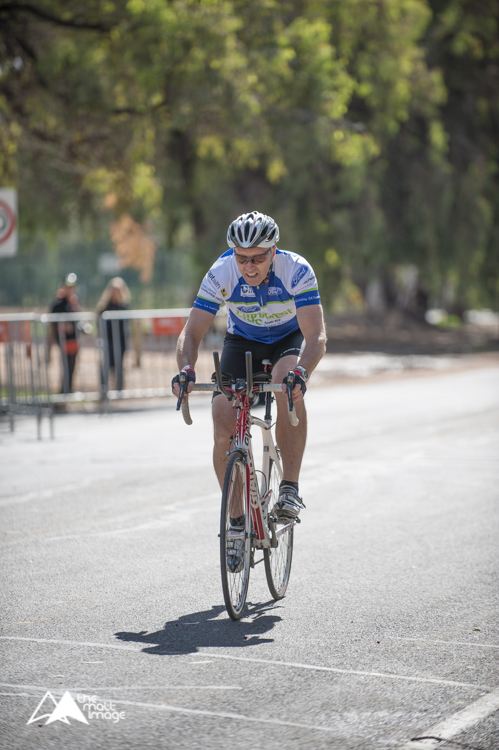
Image 4

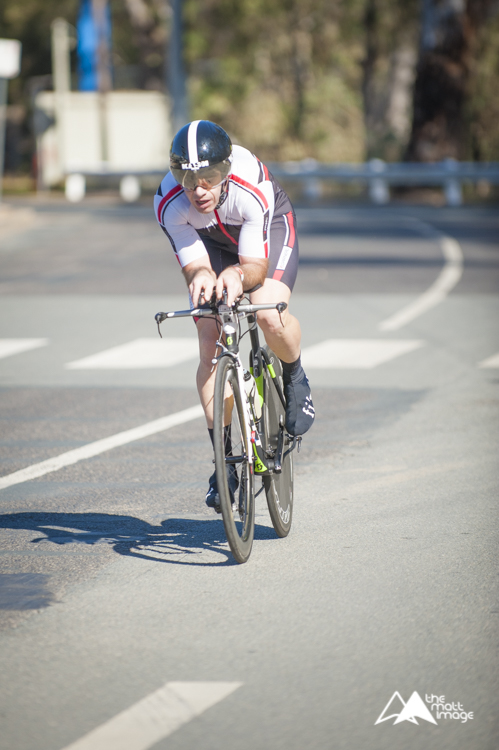
1/6400, f/6.3. ISO 800

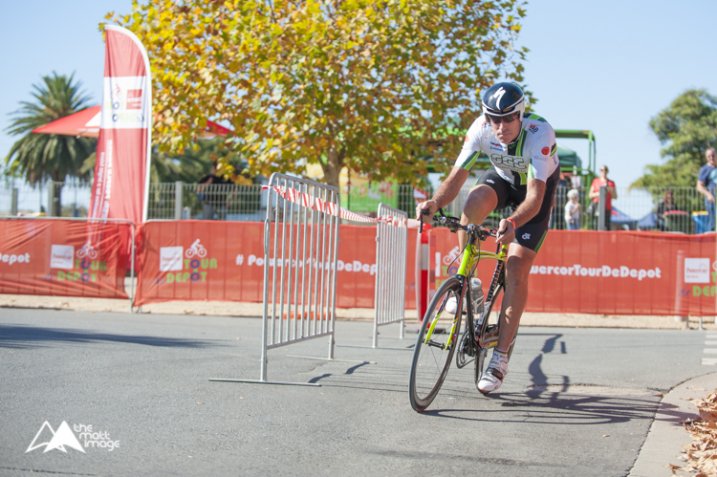
Last weekend I was lucky enough to shoot a bicycle charity event in the countryside. The sun was out, the birds were singing and there was enough distractions for me to completely leave my imagination at home.

As I was shooting fast moving road cyclists I had two lenses that I used. One which is the bread and butter lens of most photographers, the 70-200mm f/2.8. On a full frame body it has a good focal length that can capture subjects at a medium distances and the fast aperture allows for shooting in quite low light conditions. The second lens was a wide angle, for capturing some different looking shots. You don’t want to have a memory card with all the same style of shots, boring for you, and if this is for work, definitely not what the client wants to see.

image 7

Shutter speed: 1/50th, f/16, ISO 200

Although I just listed pro lenses, honestly you can do this with any kit zoom lens, a 55-200mm variable aperture or a 70-300mm like the Nikon VR which is a great value for money zoom lens.

As with most shoots I make sure I get the classic shots that I KNOW I can nail first. For me this is frozen action, nice background, and the subject at approximately a 45 degree angle.

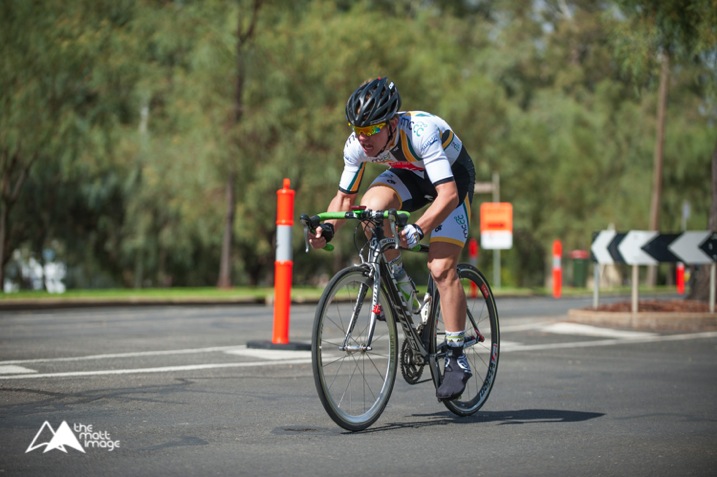
Image 1

1/2500, f/3.2, ISO 200

As you can see in this image, it’s not mind blowing, however it has all the ingredients for a nice photograph that meets the criteria of what you are trying to capture. To create this type image, shoot with your zoom lens using the following settings as a rough starting point:

  • Camera mode: Aperture Priority (Av in Canon, A in Nikon and most other brands)
  • Aperture: As you want to freeze the action you need as much light entering the camera as possible, so choose a large aperture setting. With most kit lenses go down as low as possible, at this focal length that may be f/5.6.
  • Shutter speed: No need to worry about this as the camera will adjust this automatically in this mode.
  • ISO: If it is a sunny day like above, then ISO 100 or 200 is fine. However, if it is a little bit gloomy you may have to increase your ISO, I’ll talk about this in a minute.
  • Focus: Set your camera for on Continuous or Servo focus depending on your brand. This means that while your shutter button is held halfway down, or your AF on button is pressed, the camera will continue to adjust its focus, which is what you need when tracking moving objects.


Your camera is now setup and ready to go. Get yourself in a position where the subject, in this case the cyclist, will be at approximately 45 degrees to you. Full side-on image and straight-on images can seem a bit odd unless it’s the style you are going for; at this angle you can see most of the rider and it’s more flattering.

Smoothly follow the rider with your camera; this might be easier in a crouch or if you have a monopod, utilize it. Once they are in a good position click off a shot or two. With any luck you have a nice photo of the rider, somewhat frozen in time.

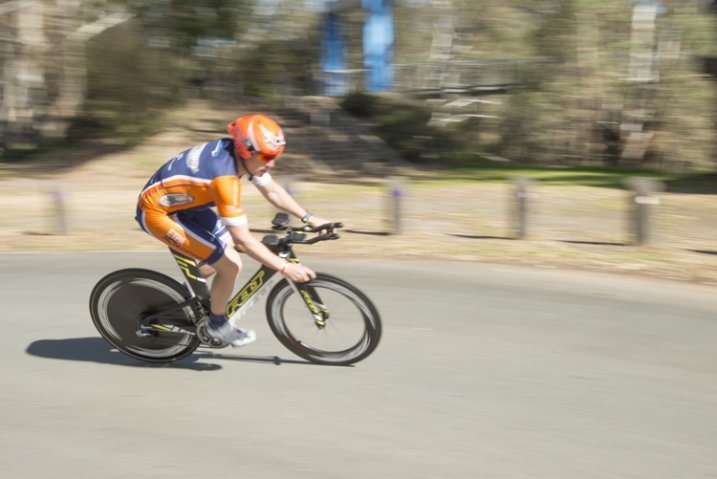
Image 2

1/1600, f/3.2, ISO 200

It didn’t work? Okay, there are two main things that could trip you up here, firstly the shutter speed wasn’t fast enough and the rider is blurry (??? and secondly???). As you are using Aperture Priority (which means you set how much light is allowed in the camera and the camera adjusts the amount of time the shutter is open automatically) it’s possible that there just isn’t enough light. So the camera has slowed the shutter speed way down to let more light in to exposure your photo properly, which has caused blurring of the subject.

When looking through your viewfinder. check your shutter speed down the bottom. You should be aiming for at least around 1/500th of a second. If it is slower than that, it’s time to bump your ISO up to compensate. Your ISO is how sensitive your camera sensor is to light. As a general rule you always want to keep this as low as possible to guarantee grain and noise-free images. However, it is a tool to be used, and on modern DSLRs shooting at ISO 800 yields incredible results over the older generation digital.

image 6

1/4000, f/3.2, ISO 400

Adjust your ISO up to 400 and try again. If you are still experiencing motion blur bump it up to 800. Unless it’s a very dark and gloomy day this should give you a crisp clear image with a fast shutter speed.

The next issue you might encounter is that the focus isn’t right. Maybe the rear wheel of the bike is in focus, but the riders face isn’t. Or even worse, the background is sharp and the rider is way out of focus. This is a simple fix.

All DSLRs give you the ability to change focus points, the square which the autofocus uses to target the focal point. Move this point to where the riders head will be in your frame. You may have to change your focus mode to Single Point Focus, as many cameras have the ability to change which focus point they use automatically, depending on the situation. You will have to consult your manual to find out where this is located in your menu system.

image 5

1/3200, f/3.5, ISO 400

Now when your rider is in frame, and you are focusing, it will focus on the rider’s face. Honestly, as long as their face is in focus the rest could be a blur, it doesn’t matter, faces are the most import thing in nearly all photos.

These guide lines should give you most of the info you need to shoot this type of photo. However, as with all photography, it’s trial and error to get things right and to get it looking the way YOU want.

Practice this week. Get your kids out on their bikes, go to the park and try to get some photos of dogs running around (this is fantastic practice for tracking subjects) or head down your local racetrack and take photos of cars, motorbikes or horses!

Image 3

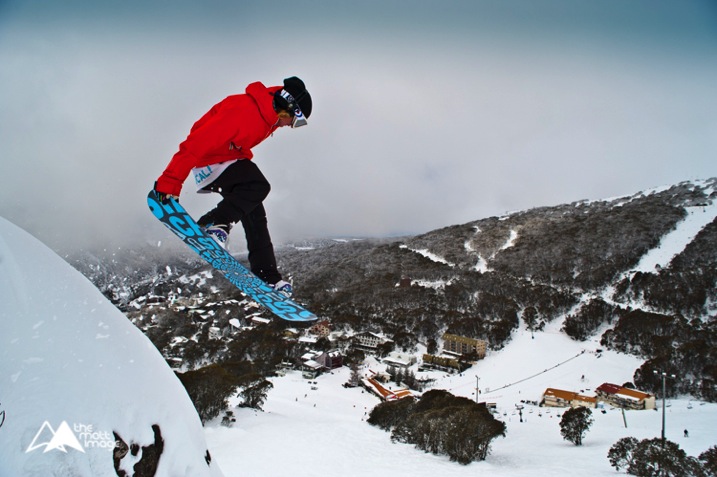
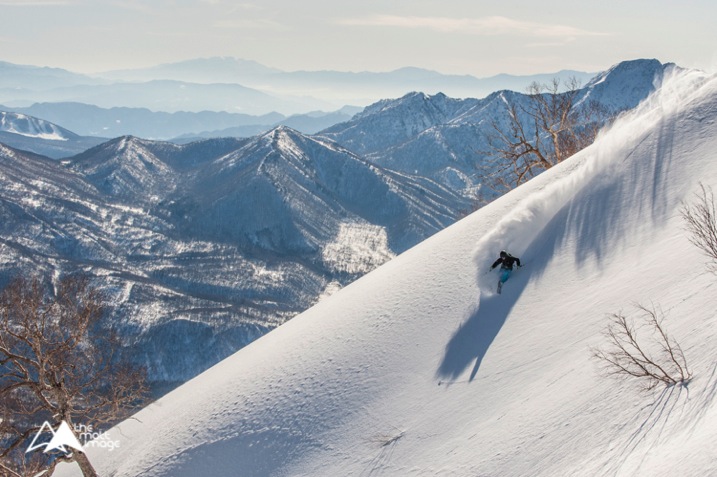
1/2500, f/7.1, ISO 500

Once you get this dialled in. it can be moved to many other subjects and situations, the photos of a skier (above) and snowboarder (top of article) were shot using exactly the same technique.

Do not dismay if things aren’t working out straight away. A lot of learning photography is trial and error and practice. Any entry level, or higher DSLR setup, can do this. Learn your gear and practice, you will be surprised at the caliber of photos you can get from even the least expensive setup.

Thank you for reading, I hope this helps you on your photography quest this week. Please post up your photos and practice shots, if you have any questions I will try to answer them all and get you on the right track to photography perfection. Happy snapping!

googletag.cmd.push(function() {
tablet_slots.push( googletag.defineSlot( “/1005424/_dPSv4_tab-all-article-bottom_(300×250)”, [300, 250], “pb-ad-78623” ).addService( googletag.pubads() ) ); } );

googletag.cmd.push(function() {
mobile_slots.push( googletag.defineSlot( “/1005424/_dPSv4_mob-all-article-bottom_(300×250)”, [300, 250], “pb-ad-78158” ).addService( googletag.pubads() ) ); } );

The post Shooting Fast Moving Subjects – How to Stop the Blur by Matt Hull appeared first on Digital Photography School.


Digital Photography School

 
Comments Off on Shooting Fast Moving Subjects – How to Stop the Blur

Posted in Photography


23. Mai 2015

24 May

Das Bild des Tages von: Dean Raphael

frau im nebelwald

Im Ausblick wird es heute noch einmal neblig.
kwerfeldein – Fotografie Magazin | Fotocommunity

 
Comments Off on 23. Mai 2015

Posted in Equipment


Rural Retrofuturism: Dystopian Visions of Swedish Countrysides

23 May

[ By WebUrbanist in Art & Drawing & Digital. ]

dystopian everyday life field

Set in an alternate-reality Sweden of the 1980s and 90s, these stunning paintings remix pastoral landscapes with futuristic robots, telling a story of a world that could have been. Robots roam alongside dinosaurs while people go about their everyday lives in surreal juxtapositions that seem all the more real for their everyday contents.

dystopian futuristic sweden

dystopian winter vehicles

dystopian print

dystopian flying machine

Simon Stålenhag‘s artwork has spread like digital wildfire across the internet over the last few years, and the announcement of a pair of English-language books (Tales from the loop) of his images and stories has been met with overwhelming support – his crowdfunding campaign has already raised more than 25 times is modest original goal.

dystopian floating tractor

dystopian fuel station

dystopian robots police car

The backstory could be the plot for an upcoming science fiction movie if fans have their way: “In the 1950s, the Swedish government orders the construction of a large particle accelerator. The state agency RIKSENERGI is tasked with developing this massive project. In 1969 the The Facility For Research In High Energy Physics is ready, located deep below the pastoral Mälaröarna-countryside. The local population soon calls it THE LOOP.”

dystopia rural countryside pastoral

dystopian scenes buildings

dystopian loop story

“The side effects of the project are dramatic. Strange sightings and bizarre rumours taints the scientific image of The Loop. In the shadow of the weird machines filling the countryside, life continues as normal. The kids of Mälaröarna grew up living above the technological marvel of The Loop, but for them it was just a part of their very ordinary lives. Until strange beasts from another time showed up, that is.”

Share on Facebook


[ By WebUrbanist in Art & Drawing & Digital. ]

[ WebUrbanist | Archives | Galleries | Privacy | TOS ]


WebUrbanist

 
Comments Off on Rural Retrofuturism: Dystopian Visions of Swedish Countrysides

Posted in Creativity


Mirrorless, DSLR or Point and Shoot: Which Camera is Best for Macro Photography?

23 May

Editor’s Note: This is part a series on macro photography this week. Look for a new one each day. The next newsletter will have them all if you miss any!

Cameras

Macro photographers have a plethora of choices when it comes to selecting a camera with this feature. From DSLRs to even cell phones, the macro function is becoming a standard add-on to most forms of digital photography. But, when put to the test, which type of camera will give you the best macro photography results? This article compares the macro photography functions of a DSLR, mirrorless, and point-and-shoot camera to evaluate the pros and cons of using each to shoot extreme close-ups.

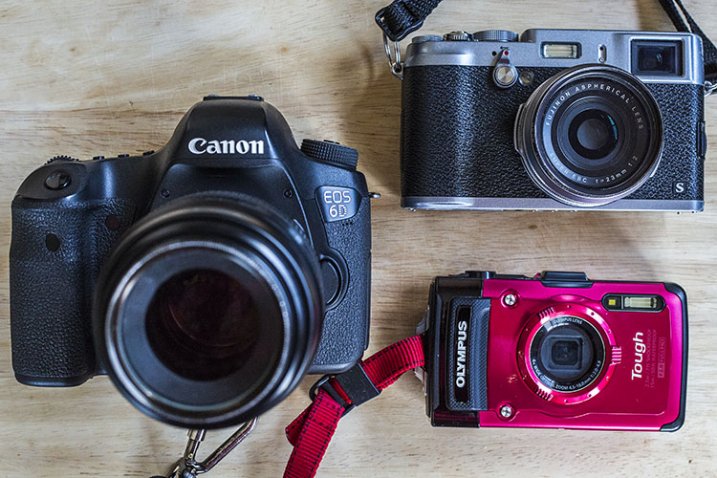
To start, can you tell which of the below images were shot with either a DSLR (Canon 6D with 100mm f/2.8 macro lens), mirrorless (Fujifilm x100s), or point-and-shoot (Olympus Stylus TG-2 Tough)? The answers, listed in sequential order below the image, may surprise you.

Fuj Oly Can

1) Fujifilm x100s

The image on the far left in the above montage was shot using the macro function of the Fujifilm x100s mirrorless camera. The x100s has a macro mode and can shoot images as close-up as 3.9 inches (10 cm). Accessing the macro mode is simple, requiring just a quick dial turn; the results can be seen below.

Fuj Dragon

Pros:

Besides being an attractive camera with its retro body, the x100s has become popular among both professional and amateur photographers, thanks to its high quality features and ability to produce stunning images with its fixed Fujinon 23mm f/2.0 lens. At 15.7oz (445g), this camera is significantly smaller and lighter than a DSLR, yet it is relatively more affordable costing around $ 900. It also offers a unique hybrid viewfinder, meaning shots can be taken using the built-in optical viewfinder, or an electronic one.

Fuj Flowers

Cons:

The fixed lens might bug some photographers since it can’t be swapped out, and the 23mm focal range means you have to get really close to your photo subject. This could produce shadows or block natural lighting, which can’t be overridden without purchasing the optional external flash unit. An additional possible grievance is the 3.9 inch maximum focusing distance. Some of the other cameras mentioned below allow you to get much closer.

These shots were taken at an aperture of f/2.8 using natural lighting, in JPG format (RAW shooting is also available) with no post-processing.

2) Olympus Stylus TG-2 Tough

This little camera shot the middle image in the above photo montage. One of the most sophisticated, prettiest, and most durable point-and-shoots on the market today is the Olympus Tough line. It is your best friend for taking high quality photos while engaging in extreme outdoor adventures, and it has a superb macro mode.

Oly Dragon

Pros:

Waterproof, freeze-proof, crushproof, and shockproof, the TG-2 also has a 12 megapixel BSI CMOS sensor and a high-speed f/2.0 lens. It is pocket-sized, although a little bulkier than most other point-and-shoots, and it only costs around $ 350 (TG-4 is the current model). This camera also has many shooting modes including two macro options: Super Macro and Underwater Macro. Both allow you to get as close as 1 cm to the photo subject, and additional magnification of up to 7x with the optical zoom, and 14x with Super Resolution zoom, which is closer than either the x100s or Canon 100mm f/2.8 macro lens offer. Its unique 5:1 magnification really makes macro photography a joy on this little camera.

Oly Flowers

Cons:

This is the only camera of the bunch that doesn’t offer RAW shooting or an optical viewfinder, but it is the only one that has a built-in flash. While the flash produces a balanced output in most situations, it isn’t helpful when shooting in macro mode since it tends to blow out the image due to being too close to the photo subject. Along those lines, shooting in macro mode on the TG-2 does require the camera to be very physically close to the subject, again making it easy to obstruct lighting.

3) Canon 100mm f/2.8 Macro Lens

The final image on the far right of the montage above was snapped with the Canon 100mm macro lens. A newer version of this lens recently debuted featuring Image Stabilization and extra goodies, but the older model still boasts spectacular, sharp optics at a relatively lower price ($ 549 versus $ 899).

Can Dragon

Pros:

Canon has a small but mighty line of macro lenses, and the 100mm is arguably the best choice. Its longer focal length causes images to be rendered at 1:1 magnification, giving you more working distance so you don’t scare away your living photo subjects, or cast shadows. Since this lens is paired with a DSLR, image resolution can be up to an astounding 50.6 megapixels if it is used with the Canon 5DS. That’s a huge number compared to the 16.3 megapixels on the Fujifilm or 12 megapixels on the Olympus.

Can Flowers

Cons:

At 20.6 oz (584.2 g), the 100mm macro lens is by far the bigger, heavier, option of the three. With a cost of $ 550-899, and the requirement of using it with a Canon DSLR, this is also the most expensive macro photography tool.

Conclusion

So which camera option is the best for macro photography? It truly depends on how you define “best.” In moments when you need a compact option, the Fujifilm x100s or Olympus Tough point and shoot are the better options, the latter being the better deal for budget or extreme sports shooters. However, if high-quality, professional imagery is your goal, a DSLR with a macro lens is your best bet.


macro-coverWant to learn more about macro photography? Check out Ed Versosky’s Introduction to Close-Up & Macro Photography ebook – just $ 10 (over 30% off) this week with coupon code: DPS. You will need to enter the code to apply the discount.

googletag.cmd.push(function() {
tablet_slots.push( googletag.defineSlot( “/1005424/_dPSv4_tab-all-article-bottom_(300×250)”, [300, 250], “pb-ad-78623” ).addService( googletag.pubads() ) ); } );

googletag.cmd.push(function() {
mobile_slots.push( googletag.defineSlot( “/1005424/_dPSv4_mob-all-article-bottom_(300×250)”, [300, 250], “pb-ad-78158” ).addService( googletag.pubads() ) ); } );

The post Mirrorless, DSLR or Point and Shoot: Which Camera is Best for Macro Photography? by Suzi Pratt appeared first on Digital Photography School.


Digital Photography School

 
Comments Off on Mirrorless, DSLR or Point and Shoot: Which Camera is Best for Macro Photography?

Posted in Photography


Balancing Act: Artist Paints Seaside Murals from a Surfboard

23 May

[ By Steph in Art & Street Art & Graffiti. ]

hula 1

Painting a hyper-realistic mural outdoors is challenging enough on its own, and artist Sean Yoro not only pulls off incredible portraits, he does it all while balancing on his surfboard. Known as HULA, the Oahu-born, NYC-based painter meticulously crafts stunning images of women onto waterfront walls. Each of the figures seems to be emerging from the surface, the rest of them unseen in the depths.

hula 8

hula 3

“Now entering the street art game. Better grab my surfboard, paints, and get as far away from the street as possible,” the artist jokes on Instagram. In the scant three days since he posted his first seaside mural image, Yoro’s work has exploded across the internet, as much for the quality of his paintings as for the unusual way in which they’re produced.

hula 7

hula 2

hula 4

Yoro scouts locations at abandoned riverside sites where concrete meets the shimmering surface of the water. The rough, weathered surfaces provide a gritty backdrop for the photo-realistic imagery, making his subjects seem all the more otherworldly in comparison.

hula 6

hula 5

In some shots, mangled metal dangles down from partially demolished buildings as Yoro works, his paint cans set up on one side of his surfboard as he kneels in the center.

hula 9

The series is entitled ‘Pu’uawai,” which means ‘heart.’ Of the first image he completed, Yoro says “This piece was inspired by the silence beneath the surface of the water, when all you can hear is your heartbeat as everything else fades away. It’s one of the many places I call home.”

See more on Yoro’s Instagram, @the_hula.

Share on Facebook


[ By Steph in Art & Street Art & Graffiti. ]

[ WebUrbanist | Archives | Galleries | Privacy | TOS ]


WebUrbanist

 
Comments Off on Balancing Act: Artist Paints Seaside Murals from a Surfboard

Posted in Creativity


Video Overview: Fujifilm X-T10

23 May

We’ve been shooting with a close-to-final version of the Fujifilm X-T10 for a few weeks now, and decided to take a bit of a closer look at this classically-styled interchangeable lens camera. Watch the video

Articles: Digital Photography Review (dpreview.com)

 
Comments Off on Video Overview: Fujifilm X-T10

Posted in Uncategorized


Weekly Photography Challenge – Get Buggy With It

23 May

Editor’s Note: This is part a series on macro photography this week. Look for a new one each day. The next newsletter will have them all if you miss any!

This week we’re focusing (pun intended) on one specialized area of photography, macro or close up photography. True macro photography means that you are close enough to reproduce the subject 1:1 or actual size on the camera sensor (or film). Usually that requires a special macro lens but there are other ways to do it – check out: 3 Ways to Try Macro Photography on a Budget for some ideas. See more examples of bug images here.

Laurenz Bobke

By Laurenz Bobke

Weekly Photography Challenge – Bugs Close-up

Your challenge this week is to get buggy with it – go find some creepy crawlers, multi-legged creatures, flying nuisances and photograph them. Get as close as you can with the equipment you have, perhaps give reverse lens macro a try if you haven’t got extension tubes or a macro lens.

Here are a few examples:

Mrholle

By mrholle

William Cho

By William Cho

François Reiniche

By François Reiniche

Special

By Special 

Think outside the box – use humor!

Share your images here:

Simply upload your shot into the comment field (look for the little camera icon in the Disqus comments section) and they’ll get embedded for us all to see or if you’d prefer upload them to your favourite photo sharing site and leave the link to them. Show me your best images in this week’s challenge. Sometimes it takes a while for an image to appear so be patient and try not to post the same image twice.

Geert Orye

By Geert Orye

William Warby

By William Warby

William Warby

By William Warby

Thomas Hawk

By Thomas Hawk


macro-coverWant to learn more about macro photography? Check out Ed Versosky’s Introduction to Close-Up & Macro Photography ebook – just $ 10 (over 30% off) this week with coupon code: DPS. You will need to enter the code to apply the discount.

googletag.cmd.push(function() {
tablet_slots.push( googletag.defineSlot( “/1005424/_dPSv4_tab-all-article-bottom_(300×250)”, [300, 250], “pb-ad-78623” ).addService( googletag.pubads() ) ); } );

googletag.cmd.push(function() {
mobile_slots.push( googletag.defineSlot( “/1005424/_dPSv4_mob-all-article-bottom_(300×250)”, [300, 250], “pb-ad-78158” ).addService( googletag.pubads() ) ); } );

The post Weekly Photography Challenge – Get Buggy With It by Darlene Hildebrandt appeared first on Digital Photography School.


Digital Photography School

 
Comments Off on Weekly Photography Challenge – Get Buggy With It

Posted in Photography