Olympus has announced two additions to its Micro Four Thirds ‘Pro’ lens series, the M.Zuiko Digital ED 7-14mm F2.8 and 8mm F1.8 Fisheye PRO. Both are weather and dust resistant and lighter than their competitors, according to the company, and both are slated to become available in June. Read more
Month: May 2015
-
Hands-on with new Olympus PRO 8mm and 7-14mm lenses
They’ve been on Olympus’s roadmap for a while, but today the company officially announced to new wideangle ‘Pro’ lenses – the The M.ZUIKO Digital ED 7-14mm f2.8 PRO and M.ZUIKO Digital ED 8mm Fisheye PRO. The 8mm fisheye is equivalent to a 16mm, while the 7-14mm covers an equivalent focal length range of 14-28mm. Both lenses are weather-sealed and are clearly intended for use with the company’s high-end OM-D cameras. Click through for a closer look
-
Olympus 7-14mm F2.8 Pro and 8mm F1.8 Fisheye Pro real-world galleries posted
Olympus has just announced a pair of wide-angle ‘Pro’ Micro Four Thirds lenses, and over the past few days we’ve been able to do a little shooting with them. The M.Zuiko Digital ED 7-14mm F2.8 and 8mm F1.8 Fisheye bring some new options to the table for Micro Four Thirds shooters – click through for a link to our sample galleries
-
Die Ursprünge aller Dinge

Ein Beitrag von: Nádia Maria
Dieses Zitat fällt mir ein, wenn ich versuche, etwas über meine Fotos zu schreiben. In meinen Arbeiten geht es um mein Innerstes oder die Manifestation dessen, was mit mir passiert. Oft realisieren wir Veränderungen erst, nachdem sie passiert sind. Für meine aktuelle Serie fehlen mir noch die Worte, da ich noch völlig darin versunken bin.
kwerfeldein – Fotografie Magazin | Fotocommunity -
Designer Sci-Fi: Ferrari Spaceship Takes Luxury Sky-High
[ By Steph in Conceptual & Futuristic & Technology. ]

Given how far away we still are from personal spacecraft, perhaps it’s not surprising that most design concepts for extra-terrestrial ships haven’t evolved much in the last couple decades. Concerned more with practicalities (and budget constraints) than aesthetics, even NASA has stuck to the same-old same-old when it comes to spacecraft design, but a fun vision of the future from Ferrari’s design director gives us some hope.

Known for incorporating Ferrari design sensibilities into all sorts of sketches, Flavio Manzoni doesn’t disappoint with his spaceship concept. Fluid and reflective, the ship is just as sleek as any of the real-life luxury cars that Manzoni has designed, including the LaFerrari supercar.

The ship is divided into two shells by a signature red line, and two wings wrap around the lower section of the body.

Unveiling the sketches and renderings at Form Trends, Manzoni says it started as just a bit of fun, inspired by his childhood living at the top of a six-story building and imagining a UFO landing on the rooftop terrace.

“I tried to imagine something that can fly in the future, since there will be less and less space available on the ground,” says Manzoni. “And I focused on creating a little craft that’s different than my childhood dreamm, when I thought that a car of the future would slip on a cushion.”
Want More? Click for Great Related Content on WebUrbanist:

The Ferrari of Rail: Ultra-Luxurious Train Design for Japan
Japan is set to get a new luxury sleeper train with spacious modern cabins designed by Ken Okuyama, who’s best known for his work with Ferrari. The $ 50 …
Click Here to Read More »»

High Tech to High Fashion: Upscale 3D-Printed Designs
These exciting 3D-printed fashion designs, including dresses, bikinis, shoes, jewelry and eyewear, could be at the forefront of a manufacturing revolution.
Click Here to Read More »»

The Future Takes Flight: 13 Forward-Thinking Airport Ideas
With their inefficient terminals and bloated footprints, today’s airports are typically ill-equipped to adapt to sharp increases in demand, scarce land …
Click Here to Read More »»


[ By Steph in Conceptual & Futuristic & Technology. ]
[ WebUrbanist | Archives | Galleries | Privacy | TOS ]
-
11. Mai 2015
Das Bild des Tages von: Sebastian Schlueter

Im Ausblick: Mandalas aus Käfern, ein Interview und Spiegelbilder.
kwerfeldein – Fotografie Magazin | Fotocommunity -
The Power of Keywording in Lightroom
I have to admit, I did not know about keywords in Lightroom, or their powerful uses, until a couple of years ago. During one of Julieanne Kost’s tutorials, I heard the terms and saw it being used in a very practical sense – a way to add specific descriptors to images in a catalog. I was intrigued and the more I researched them, the more I realized what an amazing and awesome tool was available right at my finger tips.
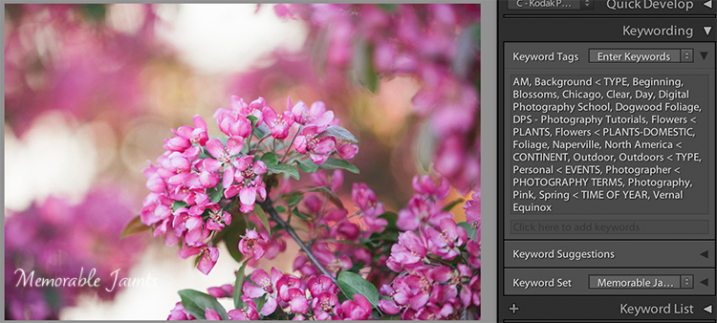
Descriptive and Specific Keywords assigned to an image in Lightroom
In the simplest sense, Keywords in Lightroom are a way to describe key elements about a photograph. Just as the basic wikipedia definition of the term, keywords add description to an image and when used in conjunction with filters, are a great way to find specific images quickly in a large catalog. Keywords also provide a way for others to find your images on the web. Keywords get attached to images as part of the image metadata when an image is exported from Lightroom. These keywords in the metadata then act as an identifier and show up in internet searches when people search for certain words and phrases. If your images have your logo, watermark, or some other identifier, that is a another way for people to get exposed to your work.
Keywords can be found in the Library module in Lightroom. There are three panels related to keywords – Keywording, Keyword Suggestions and Keyword List. Each of these can be expanded or collapsed using the triangle looking arrow (see below image).
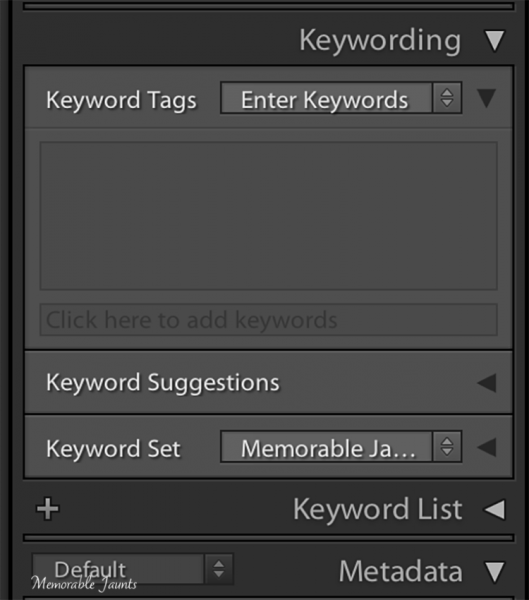
Keyword Panel in Lightroom’s Library Module
Keyword List
Keyword List basically indexes all the keywords that you have setup in your catalog. To add a word to the Keyword List, click on the “+” symbol on the left hand side of the panel and a dialog box opens up. You can enter in the information (e.g. the name of the keyword, synonyms, etc.) and once you click okay, a keyword will be added to your list. Some of my keywords are Location, Time of Year, Seasons, Time of Day, Clients and Subjects.
Within these parent keywords, I have child keywords like name of the client, the four seasons of the year, type of photography, etc. To add a child keyword to a parent keyword, select the parent keyword and then select the “+” symbol. The same dialog box opens up except this time the keyword will be added to the parent keyword. Depending on the image, I select the relevant keywords and they get added to the keyword metadata for that specific image.
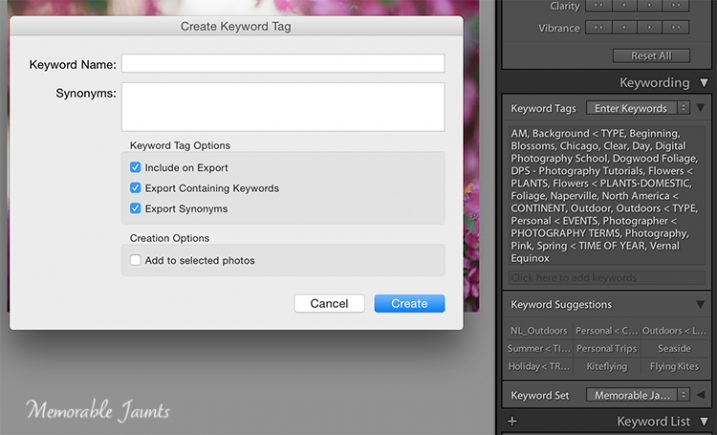
Clicking on the “+” on the left of the Keyword List panel is a way to add new keywords and keyword categories.
Keyword Set
Keyword Set is a great way to setup a pre-qualified set of keywords. This is very helpful if you photograph different genres. I have three distinct set of keywords – Memorable Jaunts Wedding Photos, Memorable Jaunts Family Photos and Memorable Jaunts Outdoor Nature Photos. Each set has related keywords assigned to it. If I am working on a wedding gallery for a client, I can choose Wedding Photos and then have a shortlist of preassigned keywords to attach to specific images in that gallery. My wedding photos keyword set has words like bride, groom, candid, posed, family, wedding party, etc.
Keyword Suggestions
Keyword Suggestions are Lightroom’s way of anticipating what your keyword needs are. These suggestions are based on the latest, most frequently used keywords. If your keyword list is long like mine, you can use this to quickly assign keywords to images especially if you tend to work with similar type of images.
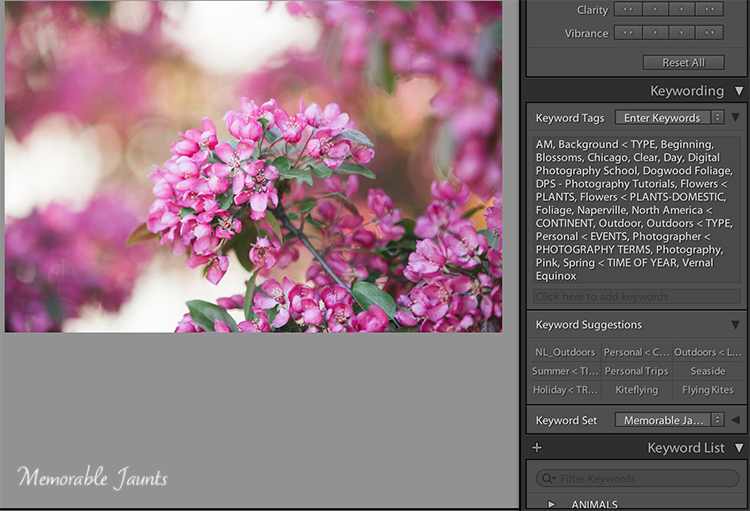
Keywords Suggestions are based on the most recently used and frequently used keywords.
Once you assign keywords to a particular image in a galley, you can use Sync Metadata and assign the same keywords to all the images within that gallery, especially if they are all along the same lines – same session, same people, and same genre.
A few tips to keep in mind
#1 – Keyword lists can grow very quickly
It is important to take the time upfront to assign keywords to all images within your catalog. This makes sorting and filtering images based on specific keywords much easier.
#2 – Try not to add keywords on the fly
Ensure that keywords are always added using the appropriate hierarchy. For example, if you have four seasons – Fall, Summer, Winter and Spring under “Seasons” parent keyword group, resist the temptation to add Summer Equinox or Early Fall to a specific image without adding it to the “Seasons” parent keyword group. If you add a keyword that is not on the keyword list, Lightroom will add it as an orphaned keyword to your list. Soon you will have many adhoc keywords that don’t really belong to any specific category or group. Along the same lines, maintain your keywords – delete the keywords that you no longer use and no longer assign to any image.
#3 – Keywords can also be imported and exported from Lightroom
LR saves keywords as a txt document. What this means is that you can create your keyword list in a normal text editor, save the file as a “.txt” file and then import it into your catalog. You can also share your keywords list between computers, say your desktop at home and the laptop you use in the field.
#4 – Create a base keyword of your name or the name of your business and assign that to all your images
Remember that keywords gets stored as metadata information for images. This ensures that your name or business information is always present on each and every one of your images.
Another powerful advantage of assigning keywords to your images is the ability to search or filter images in your catalog based on specific keywords. When you filter in Lightroom, choose the Text option and the drop-down box to select Keywords, then start entering specific keywords. Lightroom will start sorting images based on the keyword until you find all the image that have that corresponding keyword in their metadata.
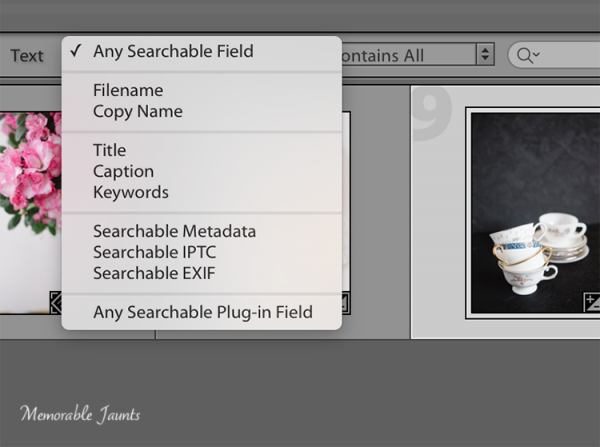
Selecting Keywords as part of search criteria ensures the ability to get specific results based on exact keywords
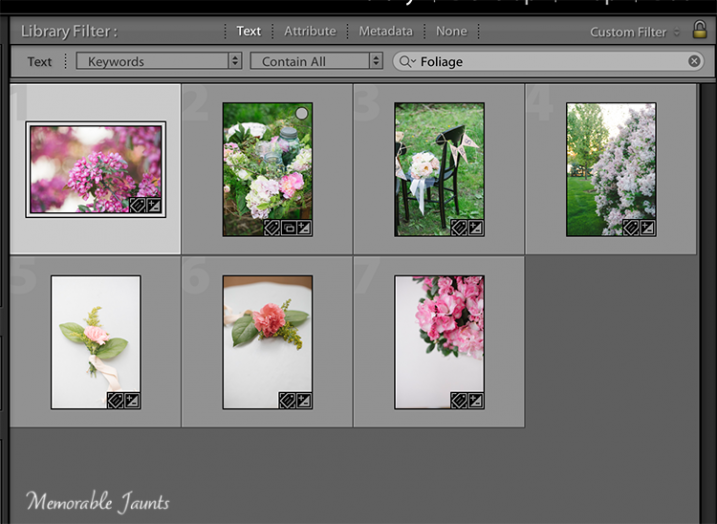
Using keywords to sort through all images in a catalog
Regardless of whether your catalog is small or large, it is worth the time and the effort to assign appropriate and relevant keywords to all your images. This makes future management and maintenance of your catalog much easier and efficient.
Tell us in the comments below how you use keywords?
googletag.cmd.push(function() {
tablet_slots.push( googletag.defineSlot( “/1005424/_dPSv4_tab-all-article-bottom_(300×250)”, [300, 250], “pb-ad-78623” ).addService( googletag.pubads() ) ); } );googletag.cmd.push(function() {
mobile_slots.push( googletag.defineSlot( “/1005424/_dPSv4_mob-all-article-bottom_(300×250)”, [300, 250], “pb-ad-78158” ).addService( googletag.pubads() ) ); } );The post The Power of Keywording in Lightroom by Karthika Gupta appeared first on Digital Photography School.
-
Dynamic range test added to Canon EOS 5DS R First Impressions Review
Canon’s EOS 5DS R tops anything we’ve seen in its class for resolution, but that’s only part of the image quality equation. We put its 50MP sensor to the test in our Raw dynamic range studio and real-world tests. Take a look at the kind of performance you might expect from the 5DS R’s (enormous) Raw files. Read more
-
5 Reasons You Should Learn Long Exposure Photography
Long exposure imagery is an interesting and highly satisfying technique of creating images. It requires you to use the manual mode or sometimes shutter priority mode to control your shutter speed.
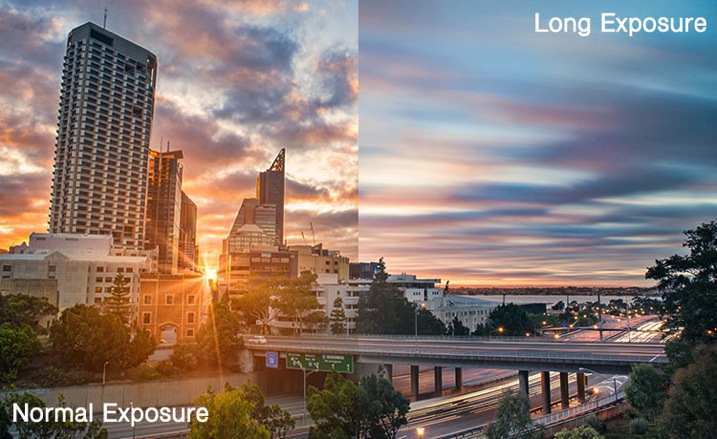
Shutter priority mode is marked on Nikon camera with ‘S’ and on Canon systems with ‘Tv’. They mean the exact same thing. When you switch to shutter priority mode you can select the shutter speed while the camera selects the appropriate aperture.
Obviously if you need a bit more flexibility, you should use the manual mode, where both shutter speed and aperture value are in your control. That helps you to maintain a long shutter speed while also controlling the depth of field.
At this point you would probably be asking yourself why you would need to shoot long exposure images. Wouldn’t shooting such exposures risk your images to be washed out? This is because there are some other tools and techniques involved in the process as well. Such as using ND filters or using exposure compensation to find the right aperture / shutter speed combination that allows sufficient light over a long period of time without risking a washed out image.
So why should you learn how to shoot long exposure images?
1. You can record an image over a long period of time.
Something that evidently means an action is recorded as it unfurls in front of the camera. For example, clouds moving across the sky in a landscape image creates a beautiful blurred effect that gives the hint of time passage. The same thing happens when you shoot an image of a pier and the surf coming back and forth is recorded over a long period of time. The final result will be a beautiful misty look.
2. You can make waterfalls become silky.

If you love nature photography there are probably a million different subjects that you could shoot using the long exposure technique. Waterfalls are often shot using a slow shutter speed which basically results in a long blurred line of water and accentuates the overall surreal look of the image. I call this “silky waterfalls”.
3. You can capture trails of lights.
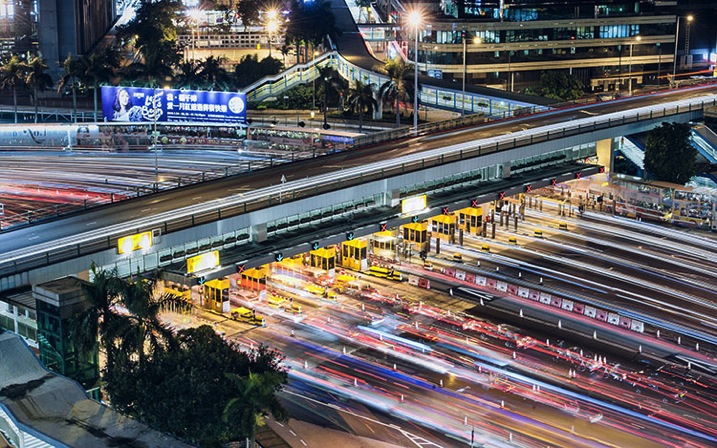
Long exposure technique is perfect for night time photography as well. You can shoot star trails, light trails, light painting, or even fireworks. All of these subjects require a long shutter speed which allow the sensor to be exposed to the light movement. These topics, when doing right, can capture a beautiful pattern of light in the final image easily.
4. You can make the annoying pedestrians disappear.
There are certain unique perspectives to get if you are prepared to use the long exposure technique in broad daylight. It is not difficult, you will just need an ND filter. What I have in mind primarily is street photos. Let’s say you are photographing a busy street at noon. You want a look when nobody is around. On a busy street right in the middle of the day, it is seemingly an impossible task. Not if you know how to use an ND filer.
A ten stop ND filter, something like a Lee big-stopper, is what you need. You can first meter for the scene, then attach the filter to the front of the lens. A ten-stop filter will allow you to use a shutter speed of up to 10 stops slower than what you metered initially, without the filter. That will make everybody simply disappear. If you do it the right way, what you will get in your image is a city completely devoid of people! Like a postapocalyptic
scene, it will be an amazing image.5. You can easily create B&W fine art photographs.
Another reason you would want to shoot long exposure photos is to enhance your black and white compositions. Black and white images are somehow more powerful than color images.

It is the contrast, the different shades of grey, ranging from pure white to pure black, the shapes, the forms, everything seems to appear more interesting. The greatest disadvantage of B&W images is that, well, they are devoid of color. That, however, is also the greatest advantage. Because without color, the essential aspects of composition and the underlying story comes to the forefront.
Do you have any other compelling reasons to do long exposure photography? Please share in the comments below.
googletag.cmd.push(function() {
tablet_slots.push( googletag.defineSlot( “/1005424/_dPSv4_tab-all-article-bottom_(300×250)”, [300, 250], “pb-ad-78623” ).addService( googletag.pubads() ) ); } );googletag.cmd.push(function() {
mobile_slots.push( googletag.defineSlot( “/1005424/_dPSv4_mob-all-article-bottom_(300×250)”, [300, 250], “pb-ad-78158” ).addService( googletag.pubads() ) ); } );The post 5 Reasons You Should Learn Long Exposure Photography by Kevin Choi appeared first on Digital Photography School.
-
Gulf Photo Plus is Coming to the US

I teach very infrequently now, at most just once or twice a year. That said, without fail I attend Gulf Photo Plus in Dubai every March.
It’s a great event, with quality instructors and a fantastic group (family?) of people running it. But Dubai is a long way away, to be sure.
So three years ago, we worked out a sort of “road version” of GPP. It’s a compressed, wall-to-wall weekend that brings a bit of GPP to another city each year. 2013 was in London. 2014 was in Singapore.
And 2015 will be in Seattle, Washington in the US. And I am really happy about this. Yeah, it’s greater Seattle (in Bellevue). The GPP folks wanted a good, but not too big, venue for the weekend.
The Particulars
Date: Sept 19th and 20th
Location: Seattle area
Price: $ 399 (early bird)The presenters for 2015 are Joe McNally, Zack Arias, Greg Heisler and yours truly. It’s designed to be a firehose weekend, done in that way so people/parents/humans/etc. can efficiently work it to travel/work schedules. If GPP in Dubai is basically a 10-day (minimum) commitment, GPP’s Pop_UP events are something a driving-radius local can do without burning a single vacation day. And someone just about anywhere in the US or Canada can do it with a travel day tacked on at each end.
Having seen the London one, I can tell you this: If I wasn’t speaking, I’d be going. (And ultimately, between you and me, it has always been my goal to make myself redundant for GPP Pop_UPs in various cities around the world and just attend.)
To that end, if you are not in the US/Canada, you can also vote on where the next Pop_UP city will be. For that, and all of the info you need if you are considering going, hit the GPP Pop_UP website.
Tickets are on sale now, and will be absolutely limited by the size of the venue. So if you are juggling air tix, etc. Best to jump on it while the variables are still in your favor.
