RSS
 

Archive for May, 2015

Get Excited About the New Adobe Lightroom CC

18 May

The day is upon us, my friends; Lightroom CC is here. The latest update to Adobe’s excellent photo management tool has arrived, and as cliche as it sounds, it really does offer something for everyone.

While the updates won’t necessarily satisfy hardcore Aperture users (who are still licking their proverbial wounds), Lightroom 4/5 users can easily justify this upgrade as a satisfying mix of under the hood, and hands-on improvements.
lr_splash

First and foremost, you’ll be ecstatic to learn that Adobe has released an independent version of the software in the form of Lightroom 6, available as a physical DVD or as a digital download. Subscribers of Adobe’s Creative Cloud service (that have Lightroom as part of their subscription plan) will automatically receive Lightroom CC, which is identical to Lightroom 6. We all let out a collective sigh when it was verified Adobe would not leave non-Creative Cloud users out in the cold.

The new and improved Lightroom sports several new features, and has included some improvements as well. Let’s go through a few of the highlights and see how they can make your photography workflow a more powerful and efficient process.

Improved Speed

While this is a behind-the-scenes improvement, it’s one of the biggest in this update. Instead of relying on the CPU (central processing unit) for all processing, as with Lightroom 5, Lightroom 6 has added the ability for some computations to be offloaded on the GPU (graphics processor) of your machine, specifically adjustments in the Develop module of the software.

This takes some of the load off of the central processor of your computer, and makes the entire program noticeably quicker. Efficiency through speed!

Photo Merge to Panorama

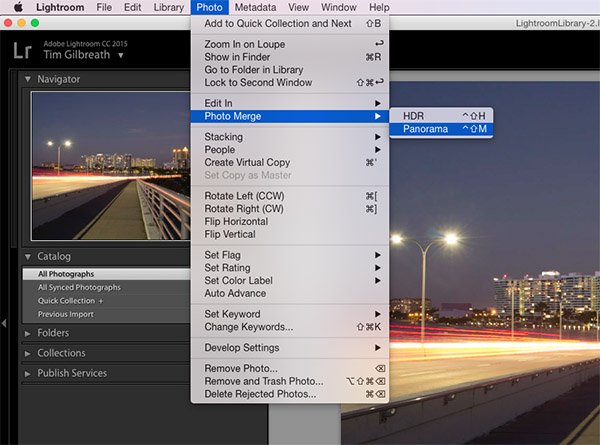
The new ability to create panoramic photos (multiple photos blended together to create a single super-wide image) directly within Lightroom will probably be one of the most talked about features of the update, along with HDR creation. In Lightroom 5, no “creation” of new pixels was allowed, meaning if you needed to create a panoramic image, you’d have to do it in Photoshop or a third-party piece of software.
pano1

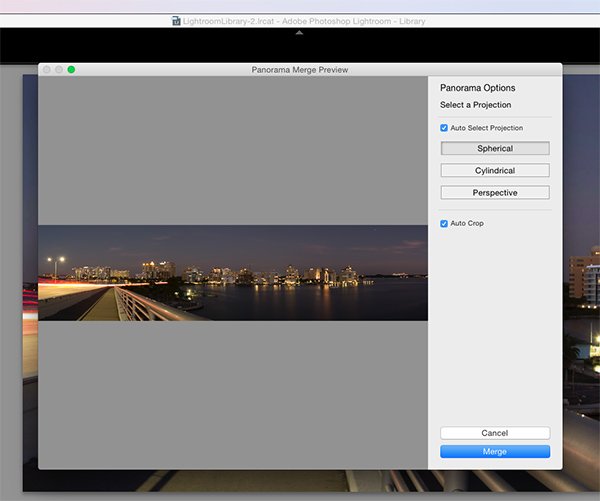
Now, Lightroom allows you to select a set of images, and it will stitch them together with a single click. The detailed controls for this process are sparse, but this is a good thing. You can even have the software automatically crop after the stitch is complete by ticking a checkbox in the creation dialog.

What do you get back after the build is complete? A 16-bit DNG (digital negative) file, a raw format that can be adjusted in the Develop module just like a RAW file. No compressed JPEG’s here.
pano2

The beauty of this process is that unlike the full rendering done in Photoshop, you are giving a very quick low-resolution preview of the image, and it can then be sent to the background, while you work on a different image. The progress of the panorama’s build is viewable in the new Activity Center, which allows you to monitor and control ongoing background processes.

Photo Merge to HDR

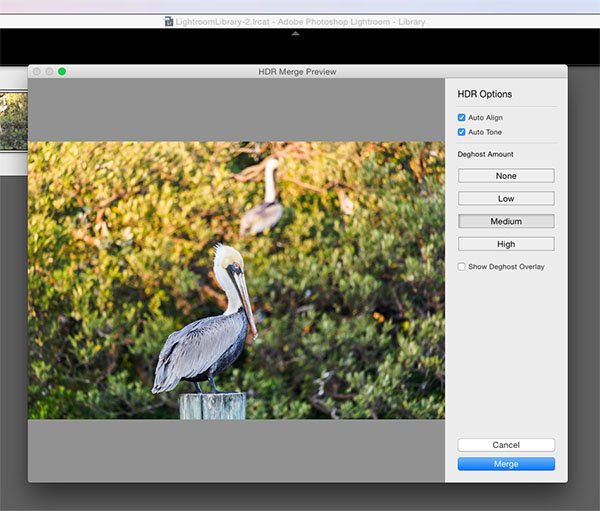
The other high profile addition in Lightroom CC is undoubtedly the ability to create HDR (high dynamic range) files. HDR images are created by blending together several shots taken at various exposures, with the intention of pulling the optimal dynamic ranges from each of those images to create a photo that contains a larger dynamic range.

As with creating panoramas, HDR creation was not available in Lightroom 5, and was most often done via a third-party program such as Photomatix, or within Photoshop.
hdr1

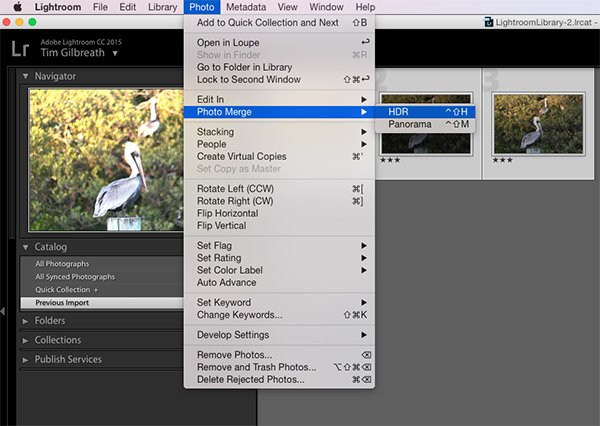
Just as with panoramic creation, Lightroom allows you to select several files within the software, and merges them together into a DNG file, with no compression. They may be modified with any of the sliders in the Develop module, just as you would do with any RAW file.
hdr2

The obvious primary benefit for both the HDR and Panorama creation tools in Lightroom CC is the ability to perform these functions right there in Lightroom, without having to merge the files together in a separate program and then import them back into your Lightroom workflow.

More Precise Adjustment Filters

The graduated and radial filters available in Lightroom are some of its most-used features. They give you the ability to paint on a varying layer of adjustments including color, exposure, and many other options. A common example would be adding a graduated filter in a landscape shot to decrease exposure in a blown-out sky, while maintaining the proper exposure for the foreground.
adj_brush1

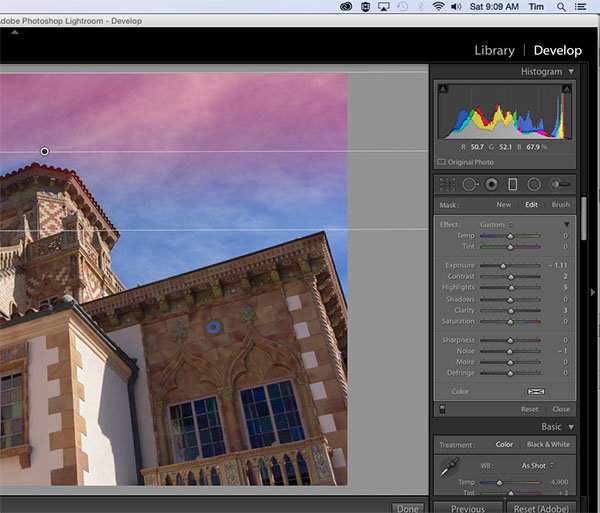
Note the red you see here is the new tool overlay which shows you where it is applying on your image. Just like the adjustment brush tool.

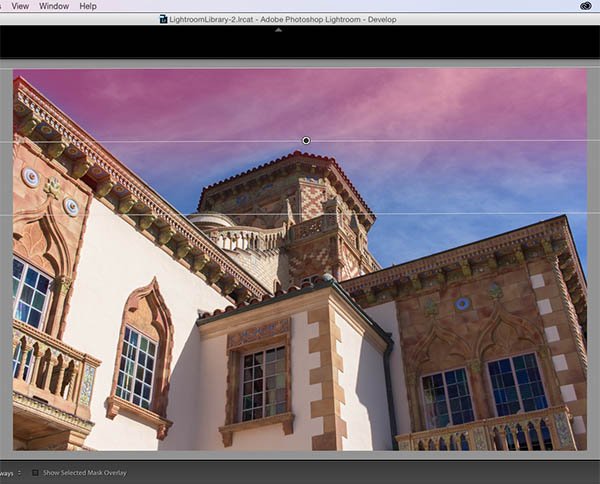
One caveat to using these filters before Lightroom CC was that they were all “what you see is what you get” implementations; if there was an object such as a tall building in your landscape image that extended to the top, a graduated filter to darken the sky would also darken the building.
adj_brush2

With Lightroom CC, this is no longer an issue. You can apply a graduated filter as usual, and then use a brush to mask the building so that the effect is only applied to the sky. This adds almost unlimited potential to the filters available in Lightroom.

Facial Recognition

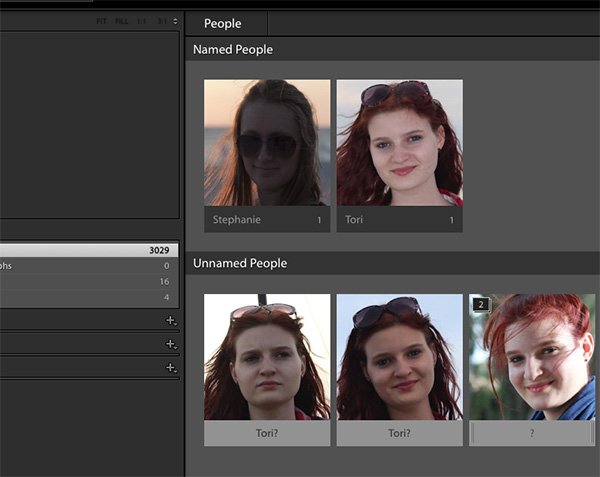
A feature becoming more and more popular in our social-sharing world, facial recognition is well-known in apps such as Facebook, where identifying and tagging friends and family in shared photos is ideal. Lightroom throws its hat in the ring with a new Facial Recognition feature that will allow you to tag people in your photos in a similar manner.

The software will automatically attempt to identify human faces, and allow you to name them for future use. Over time, you’ll build up a database of faces, and Lightroom will begin identifying faces from that database in your newly imported photos.
faces

The tags that are created from this process can then be converted into searchable keywords in the metadata for the photo, and used as any other keyword could be.

What do you think?

There are several other smaller improvements and enhancements in Lightroom CC, including updates to the Slideshow module, pet eye removal, and tethered shooting, as well as an improved experience in Lightroom Mobile. Just as a reminder, to use Lightroom Mobile you’ll need to have an Adobe Creative Cloud plan that includes Lightroom.

We’ll likely have more in-depth analysis of Lightroom CC’s new features in the coming weeks, but early in the game, what do you think? Are you excited about the upgrade? Did it change your opinion of Adobe’s Creative Cloud direction of thinking? Thanks for reading, sound off in the comments below!

googletag.cmd.push(function() {
tablet_slots.push( googletag.defineSlot( “/1005424/_dPSv4_tab-all-article-bottom_(300×250)”, [300, 250], “pb-ad-78623” ).addService( googletag.pubads() ) ); } );

googletag.cmd.push(function() {
mobile_slots.push( googletag.defineSlot( “/1005424/_dPSv4_mob-all-article-bottom_(300×250)”, [300, 250], “pb-ad-78158” ).addService( googletag.pubads() ) ); } );

The post Get Excited About the New Adobe Lightroom CC by Tim Gilbreath appeared first on Digital Photography School.


Digital Photography School

 
Comments Off on Get Excited About the New Adobe Lightroom CC

Posted in Photography


17. Mai 2015

18 May

Das Bild des Tages von: 1024 zuru

@ 1024 zuru

Heute feuern wir eine Leuchtrakete im Ausblick ab.
kwerfeldein – Fotografie Magazin | Fotocommunity

 
Comments Off on 17. Mai 2015

Posted in Equipment


Well, Done: 10 Past-Their-Prime Abandoned Steakhouses

17 May

[ By Steve in Abandoned Places & Architecture. ]

abandoned steakhouse cowpuncher buckeye
These abandoned steakhouses once served up prime cuts of beef to steely-eyed dealmakers wielding steely knives. It’s enough to drive a Mad Men man mad!

abandoned steakhouse cowpuncher buckeye 0

Mad Men may be coming to an end but classic steakhouses – those dimly-lit sanctuaries swathed in musky leather and red velour – have already ridden into the sunset. Did it help that besides doling out the most non-hipster fare imaginable, roadside steakhouses made most of their profits on overpriced, watered-down cocktails? No, no it did not.

abandoned steakhouse Texas steakhouse saloon 1a

abandoned steakhouse Texas steakhouse saloon 1b

abandoned steakhouse Texas steakhouse saloon 1c

abandoned steakhouse Texas steakhouse saloon 1d

Flickr user Ryan (RetailByRyan95) photo-documents one such misteak-house, as it were, at the Jefferson Commons plaza in Newport News, VA. Perhaps the fad for all things Texan faded out along with the late and unlamented Urban Cowboy fashion trend, or might it be that the Texas Steakhouse & Saloon’s steaks had all the consistency of a grilled cowboy boot?

Steaks & Ladders

abandoned steakhouse Trinidad Colorado 2

“I wish I was in, Tijuana, eating barbecued iguana”... A decades-old Wall Of Voodoo tune could have been the inspiration for the above abandoned steakhouse’s decor – and possibly the menu as well. Only Flickr user Phillippe Reichert visited this unnamed abandoned steakhouse in Trinidad, CO on July 11th of 2013 where he captured the mystifying image above.

Oh The Irony

abandoned steakhouse Iron Horse 3a

abandoned steakhouse Iron Horse 3b

Time was even a two-horse town like Brantford, Ontario had at least one steakhouse. They now have one less since The Iron Horse picked up its cowcatcher and went to the big sizzling grille in the sky. According to the hopeful-sounding copy on the For Lease sign outside, the building has a bar area, a banquet room for 100, and “Many Other Possible Uses”. It would seem “Steakhouse” is no longer one of them.

Next Page – Click Below to Read More:
Well Done 10 Past Their Prime Abandoned Steakhouses

Share on Facebook


[ By Steve in Abandoned Places & Architecture. ]

[ WebUrbanist | Archives | Galleries | Privacy | TOS ]


WebUrbanist

 
Comments Off on Well, Done: 10 Past-Their-Prime Abandoned Steakhouses

Posted in Creativity


The week in review: Coming into focus

17 May

It was a week of lens announcements, sample galleries and updates to our existing content for one of the year’s most notable new cameras – the Canon EOS 5DS R. And if that wasn’t enough, we went and added a second installment of our series exploring the source of noise. Catch up on any photography news you may have missed over the busy week, here and elsewhere. Read more

Articles: Digital Photography Review (dpreview.com)

 
Comments Off on The week in review: Coming into focus

Posted in Uncategorized


10 competitions to keep your photography inspired

17 May

Entering photography competitions is a great way to maintain a level of drive and inspiration in your photography, as well as winning cash and photo-related equipment. We can all collect cameras and lenses, but when it comes to using them we sometimes run out of things to take pictures of. Using the themes and category titles from photo competitions can provide a little bit of the oomph we often need to get shooting. Read more

Articles: Digital Photography Review (dpreview.com)

 
Comments Off on 10 competitions to keep your photography inspired

Posted in Uncategorized


How to Protect Your Camera in Extreme Weather

17 May

If you love to photograph nature, you surely know how unpredictable, and often hostile the elements can be. While we may get a sniffle or a chill from bad weather, the electronics inside our cameras are much more sensitive.

A little water, some sand, or extreme temperatures can cause your camera to temporarily malfunction or even suffer permanent damage. When the storm clouds roll in, it’s important to know how to take good care of, and protect your camera gear.

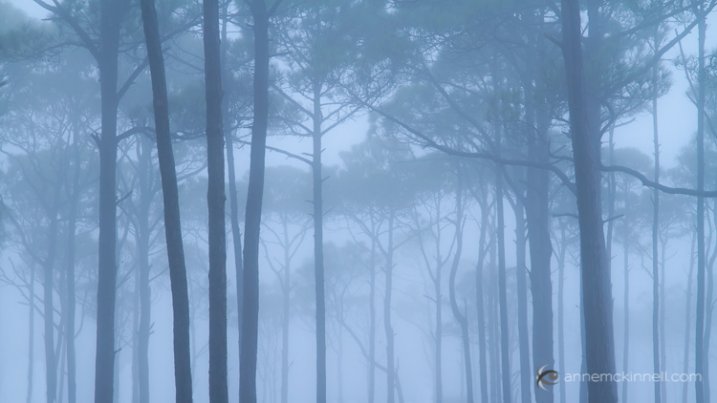
Foggy trees by Anne McKinnell

Moisture

Whether it’s full-on rain or just intense humidity, moist conditions are your camera’s number one enemy. Not only can the wetness seep into the electronic elements of cameras, flashes, lenses, and other accessories and short them out, but it can get trapped inside the casing, causing condensation and eventually mold.

To prevent this, consider purchasing a protective rain cover for your camera. You can find these in both disposable and reusable versions. In a pinch, a non-biodegradable plastic shopping bag will do the trick. Make sure all the rubber doors covering your camera’s inputs are sealed, and keep a clean, dry cloth handy to wipe away any water that condenses on the outside of the camera.

Rain drops on flowers by Anne McKinnell

In the event that your camera does get wet inside, remove the lens and set all the affected pieces next to a warm (not too hot) radiator. Remove the battery and memory card, open all the doors and gaskets, and place the camera face up and the lens face down to allow water to evaporate through the openings. Less sensitive accessories can be placed in a bag of dry rice, which will absorb the excess moisture.

Tip: Throw some silica gel (the little packages in shoe boxes, etc., that read “DO NOT EAT”) in your camera bag to protect against humidification in storage.

Intense Heat or Cold

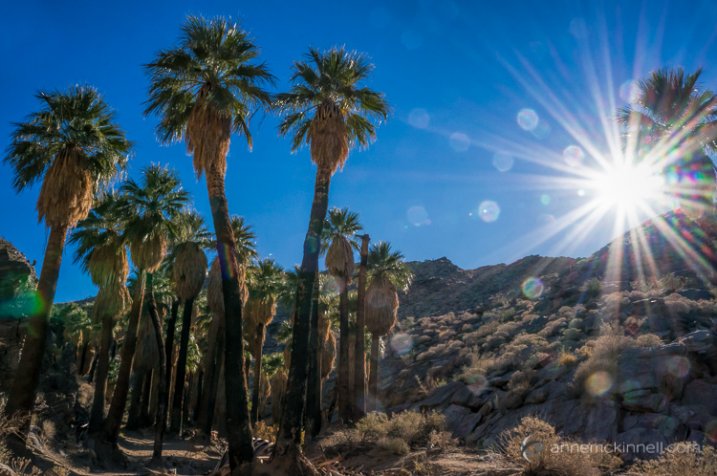
Most cameras are rated to work between -10 and +40 degrees Celsius (14-104 degrees Fahrenheit). This is generally not because of the camera itself, but because of the batteries – the chemicals inside of them cease to work properly when they get too cold, or too hot.

Palm Canyon Sunburst by Anne McKinnell

To avoid this problem, keep an extra battery in a temperature-controlled place. If you’re shooting in the cold, keep one in your pocket to be warmed by your body heat. In the heat, your camera bag should provide adequate shade to keep a battery cool enough to function.

Never place your camera face up in direct sunlight. The lens works both ways, and can act like a magnifying glass to focus the rays into your camera and burn a hole in your shutter, and eventually, your image sensor. Remember that even magnesium-alloy cameras contain plastic components, so if you shoot in really extreme places such as near volcanoes or among raging fires, use common sense and keep your camera well clear of the flames.

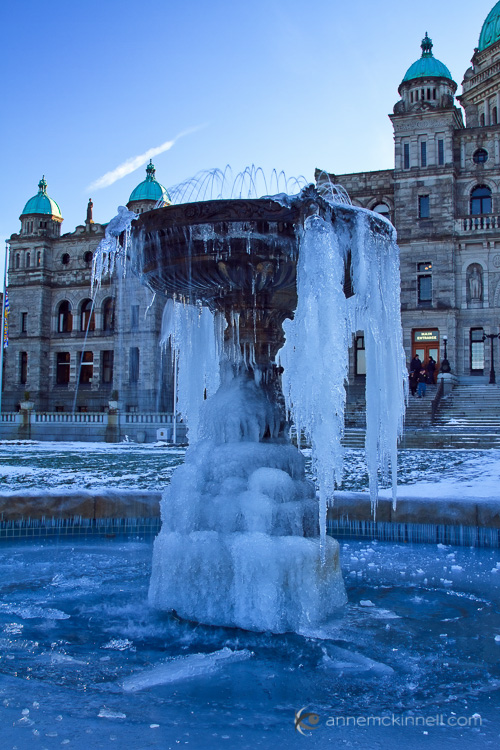
Frozen Fountain by Anne McKinnell

Sand

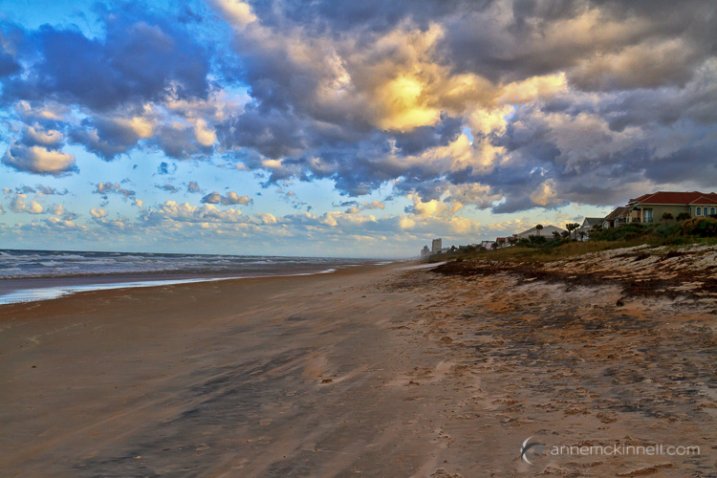
Other than moisture, this is probably the most common cause of equipment malfunction. Everyone wants to take their camera to the beach (or maybe to the desert), but as anyone who has ever tried to picnic in the surf knows, sand gets anywhere, and everywhere. At best, it can become stuck inside the lens and cause spotty pictures. At worst, it will get inside the gears and severely damage moving parts such as the shutter or auto focus motor, or scratch the lens or image sensor.

Ormond Beach by Anne McKinnell

This applies to compact cameras too – sand in the lens will cause it to grind and prevent it from extending, turning your little point-and-shoot into an expensive paper weight. Even tripods aren’t safe from this effect. Grains of sand inside the fastening screws can destroy the threading and keep them from tightening properly.

Again, make sure the rubber gaskets on your camera are tightly sealed and always tuck your equipment away inside a sealed camera bag when not in use. A protective rain cover can also help keep your camera clear of debris. If sand does get on or in your gear, don’t wipe it with a cloth which can embed it deeper, or worse, scratch the glass elements. Instead, get a hand-pumped air blower to puff the grains away. Avoid compressed air canisters, which are too strong and contain chemicals that can cause damage. If you have no other option you can use your lungs, but be very careful not to project little spit particles into your camera’s insides.

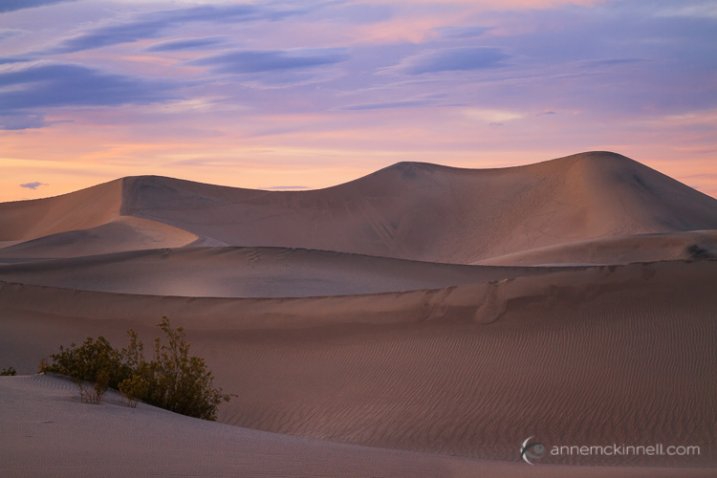
Mesquite Sand Dunes by Anne McKinnell

Wind

A stiff breeze won’t hurt much on its own, but it can easily blow over a tripod and send your camera crashing to the ground, causing untold damage. On a windy day, anchor your gear using sandbags, or simply hang your camera bag from the tripod’s centre column to weigh it down (a sack full of rocks will also work). Keep in mind that wind combined with sand creates a natural sandblaster which can scratch up your lens quite badly if you aren’t careful.

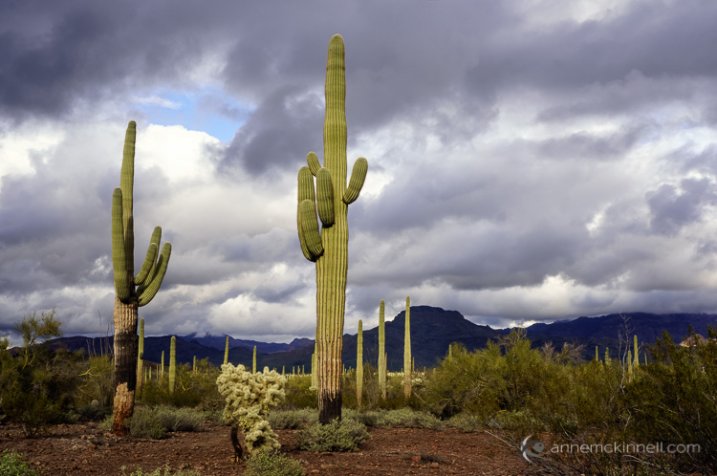
Stormy Day at Organ Pipe Cactus National Monument by Anne McKinnell

Bad weather can often make for good photographs, so get out there and make the most of it. Just make sure you are taking care of your equipment at the same time.

googletag.cmd.push(function() {
tablet_slots.push( googletag.defineSlot( “/1005424/_dPSv4_tab-all-article-bottom_(300×250)”, [300, 250], “pb-ad-78623” ).addService( googletag.pubads() ) ); } );

googletag.cmd.push(function() {
mobile_slots.push( googletag.defineSlot( “/1005424/_dPSv4_mob-all-article-bottom_(300×250)”, [300, 250], “pb-ad-78158” ).addService( googletag.pubads() ) ); } );

The post How to Protect Your Camera in Extreme Weather by Anne McKinnell appeared first on Digital Photography School.


Digital Photography School

 
Comments Off on How to Protect Your Camera in Extreme Weather

Posted in Photography


Die 5 Artikel des Monats

17 May

Grüne kaputte Schreibmaschine

Liebe Fotografinnen und Fotografen, manchmal sind Bilder nicht genug. Das ganze Internet ist voll von Fotos, man denke dabei nur an Nachrichtenmagazine, Modeblogs und soziale Netze. Doch was dem Ganzen oft fehlt, sind die Hintergründe: Wer macht denn eigentlich die Aufnahmen? Und wie arbeitet diese Person im Einzelfall?
kwerfeldein – Fotografie Magazin | Fotocommunity

 
Comments Off on Die 5 Artikel des Monats

Posted in Equipment


10 Tips for Better Cityscape Photography

17 May

This article is based on the new eBook: Landscapes, Cityscapes & Photography Tricks – 50% off for a limited time only.

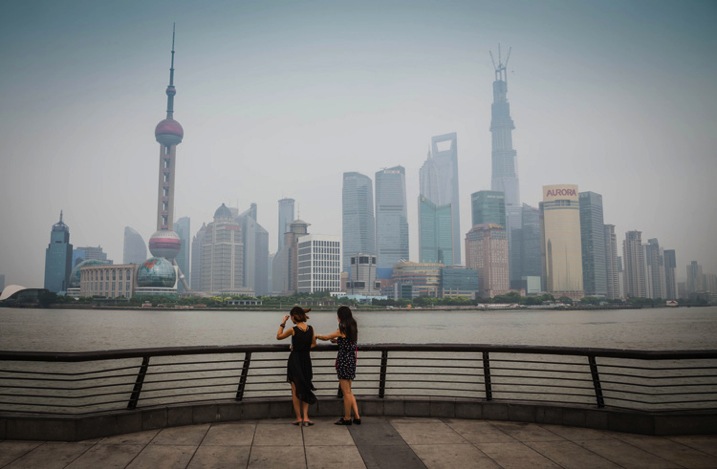
Photography is escapism. We want to see what we can’t with our own eyes; towering skyscrapers, endless skylines, the people of faraway cultures. We long for the distant, so it makes sense that cityscape photos are so popular and marketable. I hope these 10 tips will help you take better cityscape photography, and inspire you to explore faraway cultures.

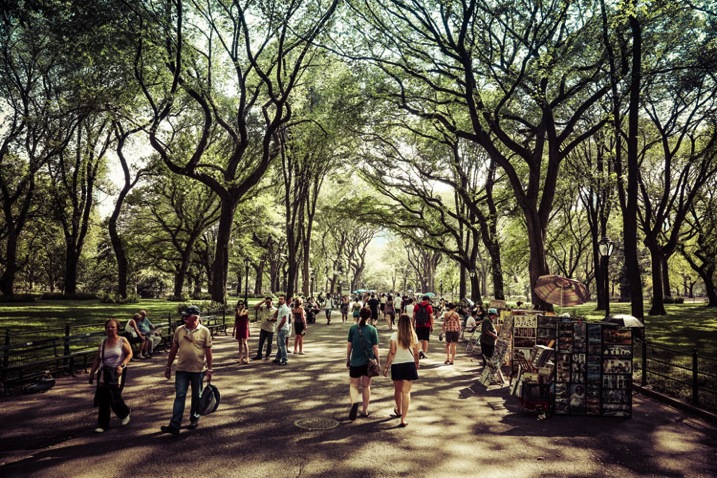
Cityscapes1

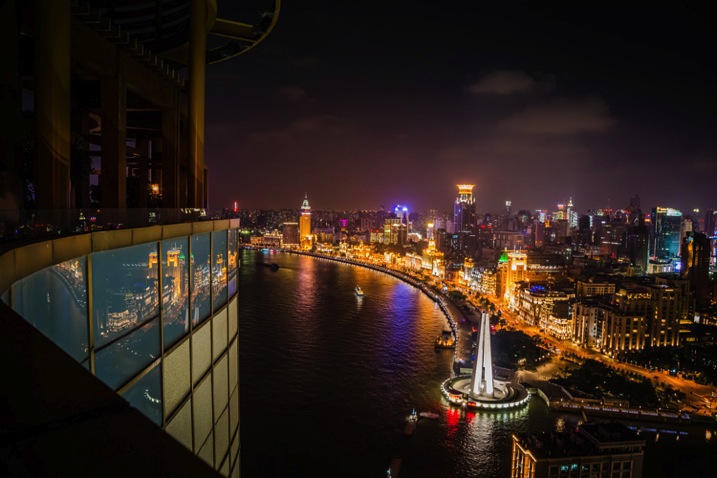
1. Right After Sunset is a Fantastic Time for Cityscape Shots

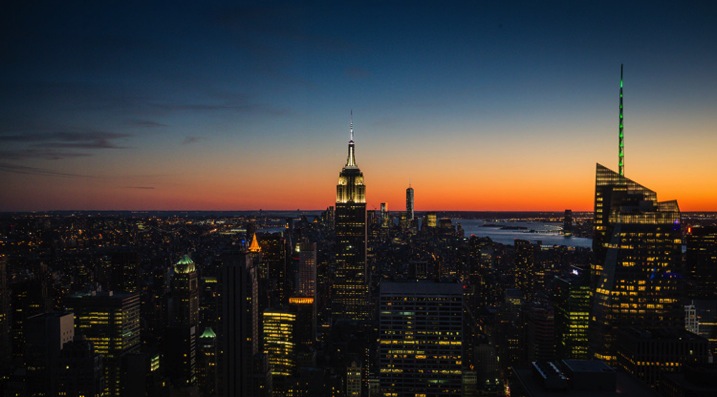
After the golden hour settles, the sky grows darker, while city lights illuminate below. This immediately post-sunset or pre-sunrise moment (known as twilight or the Blue Hour), I would argue, is the best time for shooting cityscapes. Building lights turn on before the sky turns off, and the balance of light can look almost equal. It’s a great combination of tones, and worth getting up in the morning to catch.

Cityscapes2

2. Capture the Whole Skyline with a Wide Angle Lens

For cityscapes, focal lengths between 12-35mm are a good bet. Not a necessity, but you will appreciate the wide angle, more often than not. This will allow you to capture a nice skyline without having to be miles outside the city, and allow you to include an entire skyscraper in vertical format, while standing near its base.

Cityscapes3

3. Use Your Camera’s Self-timer and a Tripod for Crisp Results

For shooting during the golden hours, and after dark, a tripod is practically essential if you want sharp crisp results. Better yet, set your camera up on the tripod, and set your camera’s two or 10-second self-timer so you don’t have to touch or jostle the camera during the actual shot. This will help your camera stay more stable, avoid blur, and capture stunningly sharp results.

4. Look for Those Leading Lines

Just like for landscape photography, leading lines are an integral part of three-dimensional cityscape composition. They add perspective, depth, and intrigue to any image, while taking the viewer on a journey from one point of the frame to another.

Cityscapes4

In cityscapes especially, leading lines can create a strong sense of coherence in an otherwise chaotic scene. Think of train tracks for example. Rows of tracks, surrounded by eager commuters and tall buildings, could easily appear cluttered and frenetic (which could be a good thing, or could seem unfocused). But, slicing the image up with the right composition and a clean line, or series of lines, can cut through the chaos.

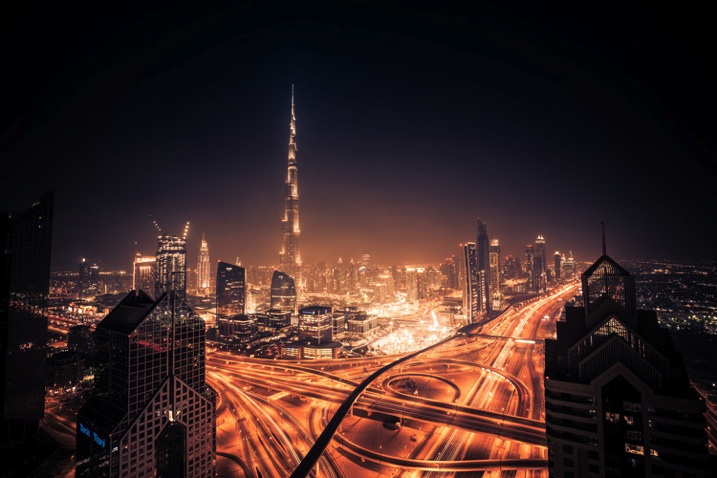
5. In the Evening, Look for Good Vantage Points Over Busy Intersections

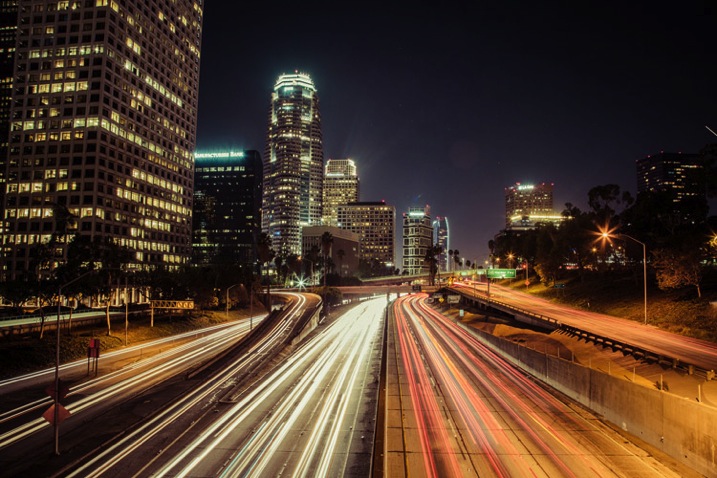
Practice your long exposures, then look for busy intersections of a city. Finding the right location for heavy traffic can be tricky. You’ve got to know a city pretty well, or at least have an idea of where the congested thoroughfares are located. The idea here is blurred movement; traffic in a straight line may be interesting if you’ve got some variety in the shot (maybe skyscrapers or a city icon nearby), but failing that, you’re going to want to see some movement, leading lines and curves. That’s why bendy roads and intersections work so well; you can create light lines out of conflict, movement and chaos.

Cityscapes5

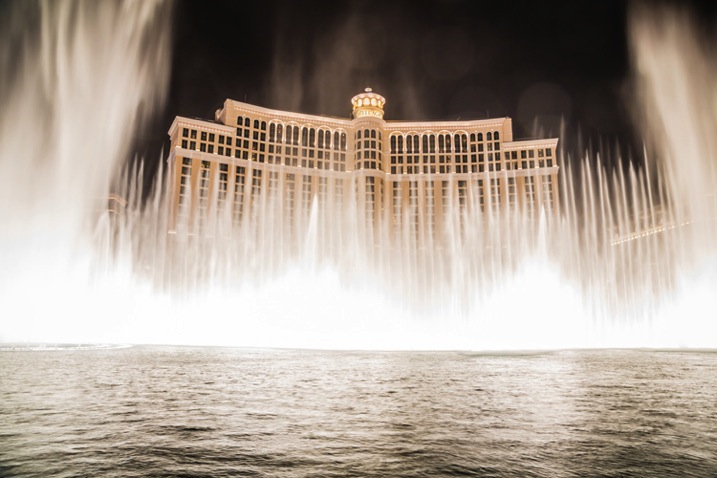
6. Just like Rivers are Great in Landscapes, Fountains are Great in Cityscapes

Photographing fountains within your cityscape can add another element of beauty and serenity to your image. Most cities are full of them. From small, historic, fountains that can add interest to a composition to huge water fountain light shows that blast water up in the air and make for exciting and spectacular photos.

Cityscapes6

7. Look for Patterns

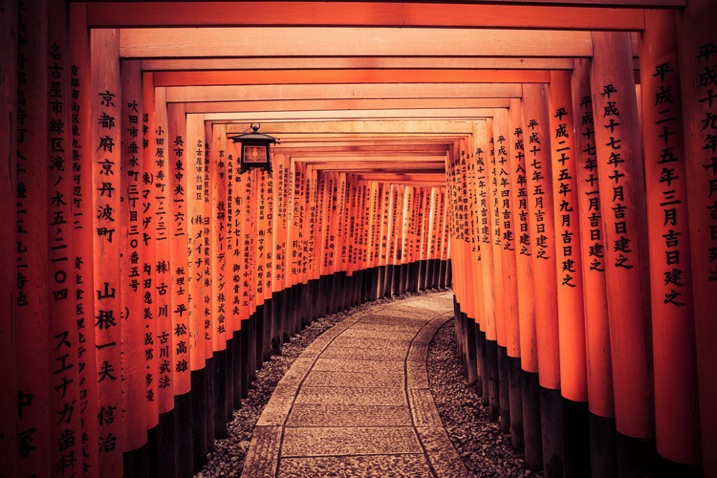
Patterns have the ability to bring a sense of visual rhythm and harmony to an image. While at first sight, a common city scene may appear dull or bland. Focusing on repeating strong graphic elements, like shapes, lines, colors or forms, will draw the viewer’s attention, and make the whole thing a lot more interesting.

Cityscapes7

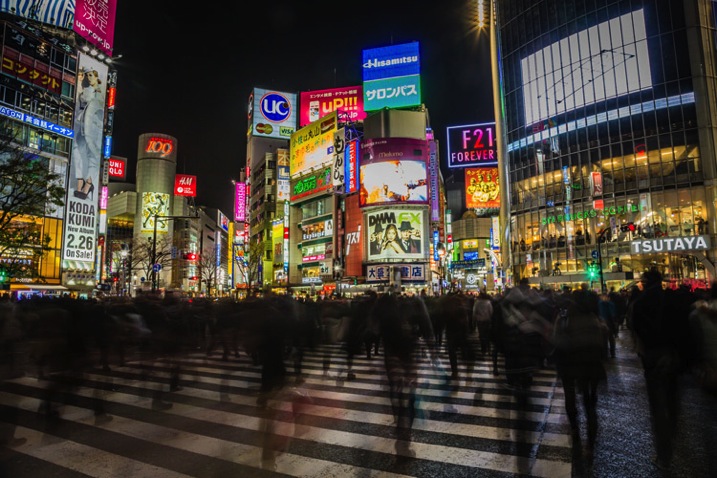
8. Don’t Be Afraid to Include Pedestrians in the Shot

When it comes to intersections, some bigger cities; New York, Tokyo, Toronto; will have four-way crosswalks, where pedestrians stream across in all directions, stopping cars on all four sides of the intersection. These make especially great hectic shots, with cloudy masses, surrounded by headlights and condo lights.

Cityscapes8

9. When Tripods Aren’t Allowed – Improvise

Many businesses with great city views that attract photographers, have gotten the impression that tripods mean professional work and therefore, money. These establishments won’t let photographers in with a tripod, likely because they might be able to make money by charging a permit fee or production fee. I’ve run into this problem mostly in the U.S., but have also come across it in a few international cities I’ve visited. It is upsetting indeed, but instead of letting it defeat you, try to do your best with what you have.

Cityscapes9

Look to see if there is a place where you can set your camera down for the shot so you don’t have to hold it risking blur from hand movement. You can use tables, pillars, walls, edges, benches, anything that is flat and safe. If you can’t find a flat surface, you can make one. Prop your camera up with your jacket or other item of clothing.

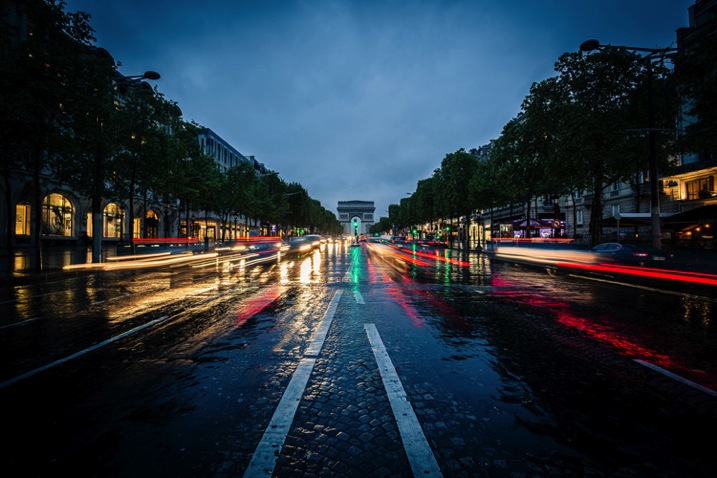
10. See Bad Weather as an Opportunity (Carefully)

Not only does bad weather add an edge to your photo, but stormy weather creates skies that are full of color and texture, providing a feeling of gloominess, fury, eeriness and even peace. In short, the stormy sky portrays emotion.

Cityscapes10

With moisture everywhere, it just seems like the city glows more right after a rainfall. Most surfaces and structures will appear more colorful when wet, as water tends to bring out the saturation.

I hope these have been some helpful tips to get you started!

For Further Training:

This relentlessly in-depth new eBook is designed to help you master challenging lighting conditions no matter your experience level, take more compelling photos, post-process them to perfection, and delve even further into long exposure tricks so you know all the possibilities. By knowing all the techniques possible, it is my hope that you will learn a lot faster than I did and start seeing hidden photo opportunities that others might miss.

Found here: Landscapes, Cityscapes & Photography Tricks

googletag.cmd.push(function() {
tablet_slots.push( googletag.defineSlot( “/1005424/_dPSv4_tab-all-article-bottom_(300×250)”, [300, 250], “pb-ad-78623” ).addService( googletag.pubads() ) ); } );

googletag.cmd.push(function() {
mobile_slots.push( googletag.defineSlot( “/1005424/_dPSv4_mob-all-article-bottom_(300×250)”, [300, 250], “pb-ad-78158” ).addService( googletag.pubads() ) ); } );

The post 10 Tips for Better Cityscape Photography by Richard Schneider appeared first on Digital Photography School.


Digital Photography School

 
Comments Off on 10 Tips for Better Cityscape Photography

Posted in Photography


16. Mai 2015

17 May

Das Bild des Tages von: Barbara Beiser

Langzeitbelichtung einer Terrakotta-Armee auf einem Steg.

Ausblick: Langzeitbelichtung einer Terrakotta-Armee.
kwerfeldein – Fotografie Magazin | Fotocommunity

 
Comments Off on 16. Mai 2015

Posted in Equipment


Floating Island: Self-Sufficient Home Produces Food & Power

17 May

[ By WebUrbanist in Architecture & Houses & Residential. ]

floating island home vancouver

Powered by solar panels and sustained by a half-acre plot of farmland, these 12 connected buoyant platforms together form an autonomous off-the-grid dwelling for the couple that built the complex over the course of more than 20 years.

freedom cove architecture buildings

Located off the coast of Vancouver Island in Canada, Freedom Cove, as it is called, has everything one could wish from a dream home including pools, beaches, gardens, greenhouses, galleries, towers, workshops and guest rooms

floating island pools plants

Its creators, artists Wayne Adams and Catherine King, spend their time painting, writing, carving and making music as well as entertaining guests – visitors are welcome in the summer, but can only reach this remote location by chartering special boat taxis.

floating island complex platforms

Like the science-fictional floating city of Armada in China Mieville’s novel The Scar, each piece is tied together and seems to have been accrued almost organically over time.

floating island fruits vegetables

Living off the land (and water), the couple fishes for food off the sides of the platforms and grow their own vegetables and fruits in a half-acre farm area above. An array of solar panels provides energy with generators used for backup.

freedom cove cloating home

“A retired ballerina, Catherine maintains these floating gardens while Wayne’s incredible sculptural talents support them. The gardens host frequent visits from whale and bear watching groups in the area. Guests leave with a candle casted from the moulds of various sculptures. They live on a very meagre annual income. “

Share on Facebook


[ By WebUrbanist in Architecture & Houses & Residential. ]

[ WebUrbanist | Archives | Galleries | Privacy | TOS ]


WebUrbanist

 
Comments Off on Floating Island: Self-Sufficient Home Produces Food & Power

Posted in Creativity