Canon has released its 2014 Q4 financial report, showing an overall profit increase but a continued slump in camera sales. Sales of office equipment are responsible for a 5.4 percent year-on-year upswing in operating profits in Q4, but the company reports that sales in its imaging business fell by 7.3% compared to the previous year. Read more
Month: January 2015
-
Food Futures: Arctic Seed Vault Adds 100,000 New Varieties
[ By WebUrbanist in Architecture & Public & Institutional. ]
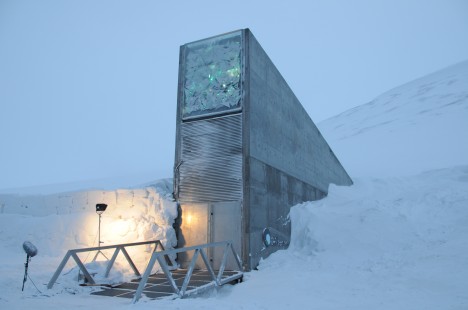
Adding to its existing collection of over 800,000 seeds, the Svalbard Global Seed Vault has just received a series of 4 deliveries representing species from 100 countries around the world. Started in 2008, this ambitious project is designed to safeguard our agricultural heritage for present and future generations and in the face of climate changes, but also to provide a catalog that inventories available types for future accessibility.
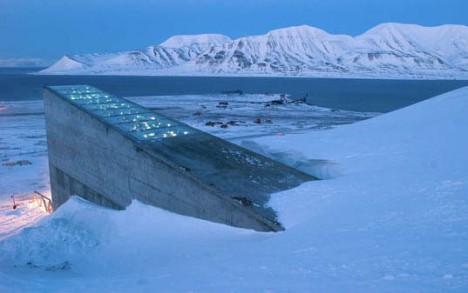
The growing store, managed by the Global Crop Diversity Trust, represents a critical repository of agricultural history and a meat-space (or more apt: seed-space) backup for both global crops and other smaller gene banks scattered around the world.
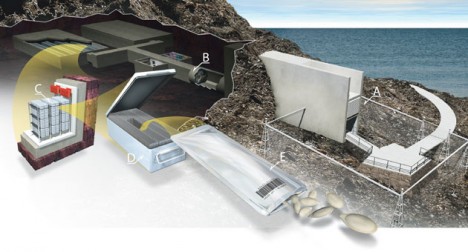
Though the contents were collected in a few cities prior to packaging and reshipment, their types and strains are myriad. “The shipments include types of wheat, barley, corn, sorghum, peal millet, chickpea, groundnut, Asian and African aubergine. Seeds of a number of indigenous African vegetables, including okra, amaranth, spider plant and jute mallow are also being deposited.”
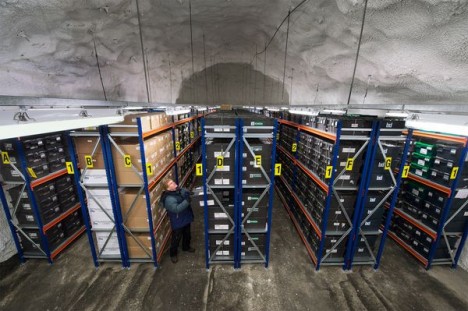
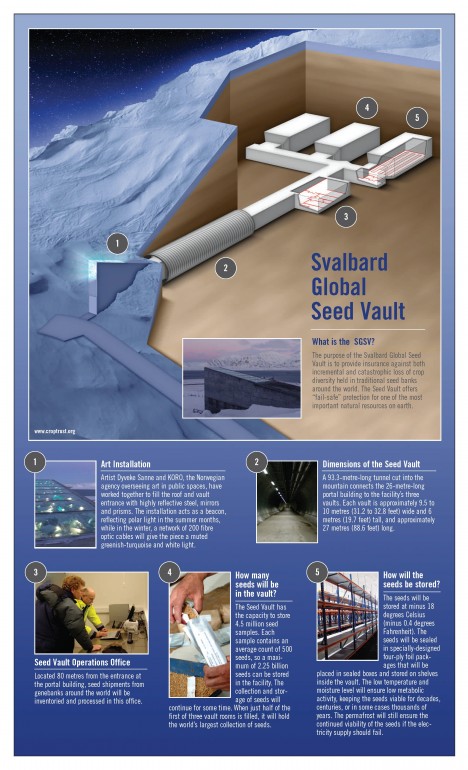
Svalbard, is a Norwegian archipelago in the Arctic Ocean. Situated north of mainland Europe, it is about midway between continental Norway and the North Pole. The seed vault is cut into rock in this remote location, and the seeds within it continuously refrigerated for long-term storage. The vault structure itself, as currently constructed, can theoretically store up to 2.5 billion seeds representing 4.5 million varieties.
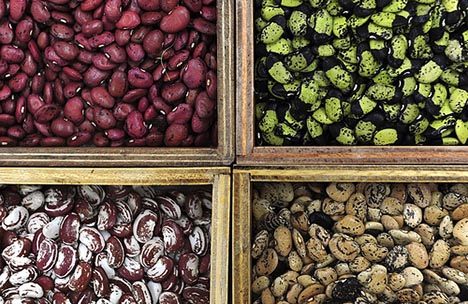
There are many dimensions to the vault trust’s mission. According to the trust, “preserving different food plant varieties will help breed and develop crops that can withstand a changing climate, for example, by being more drought resistant or able to cope with higher temperatures” As a form of genetic wealth, crop diversity provides security for the future of food for farmers and world citizens alike. The GCDT is seeking additional donations from individuals, institutions, businesses and governments to maintain and grow its endowment (approaching $ 1 billion USD) for the sake of humanity and in the face of climate change.
Fortunately for those who worry about the future, there are other repositories around the world providing a cloud-like backup network bolstering the mission of this seed bank. “Worldwide, more than 1,700 genebanks hold collections of food crops for safekeeping, yet many of these are vulnerable, exposed not only to natural catastrophes and war, but also to avoidable disasters, such as lack of funding or poor management. Something as mundane as a poorly functioning freezer can ruin an entire collection. And the loss of a crop variety is as irreversible as the extinction of a dinosaur, animal or any form of life.”
Want More? Click for Great Related Content on WebUrbanist:

Throw a Bouquet: Guerrilla Seed Bombs & Flower Grenades
Filling shotgun shells with flower seeds is just the latest (and loudest) in a long line of designs for guerrilla gardeners. If you are looking for a little …
Click Here to Read More »»

Gone to Seed: 9 Green Plant-Sprouting Product Designs
These products all have one thing in common: they were designed to be reincarnated as blooming flowers, fragrant herbs or delicious vegetables.
Click Here to Read More »»
Ghost Food: A Conceptual Taste of the Future of Eating
Drive around any mid-size to large city and you’re destined to find a number of food trucks. In recent years they’ve become almost as ubiquitous as …
Click Here to Read More »»


[ By WebUrbanist in Architecture & Public & Institutional. ]
[ WebUrbanist | Archives | Galleries | Privacy | TOS ]
-
29. Januar 2015
Das Bild des Tages von: Oliver Grimm

Fotolinks des Tages
1. 16 Jahre alt und erfolgreich
Den Namen David Uzochukwu werden die aufmerksamen Leser sicher häufiger in diesem Magazin gelesen haben. Denn David überzeugt durch seine Fotografien, mit denen er Gleichaltrigen um Längen voraus ist. Mit EyeEm sprach David darüber, wie es sich anfühlt, in seinem Alter schon so erfolgreich zu sein, was ihn derzeit inspiriert und welche Vorsätze er für 2015 hat. → ansehen
+ Keine Lust auf englisch? Kein Problem. Im zarten Alter von 14 veröffentlichte David hier im Magazin den Artikel „Am Anfang einer Reise“.
2. Pakete liefern und Fotos auch
Hobbyfotografen machen Bilder im Gegensatz zu Professionellen in ihrer Freizeit und verdienen sich die Brötchen mit einer Arbeit, die häufig wenig, bis gar nichts mit der Fotografie zu tun hat. Dies ist auch der Fall beim UPS-Mann Lou Roole, der sich in den Bereichen Akt-, Portrait- und Straßenfotografie einen Namen gemacht hat. 11&more sprach mit Lou über seinen Werdegang. → ansehen
3. Die Kinder eines Krieges
Das Thema Flüchtlinge wird derzeit immer häufiger von Fotografen aufgegriffen. Bestes Beispiel für eine gelungene Portrait-Dokumentation ist die Arbeit von Kilian Foerster aus Hamburg. Dieser porträtierte Kinder, die vor dem Islamischen Staat im Irak fliehen mussten und oftmals mitbekamen, wie ihre Eltern, Schwestern oder Brüder vom IS ermordet wurden. Spiegel Online zeigt 10 Aufnahmen, die Geschichten der Kinder und hat dem Fotografen einige Fragen zu seinem Projekt gestellt. → ansehen
-
Save the date! DPreview PIX2015 Expo May 2-3
DPReview is pleased to announce ‘Photo Interactive Expo, PIX2015’. PIX2015 is a live-streamed photo show which will be taking place on May 2nd and 3rd 2015. A true celebration of photography, the show – which will be live-streamed here on DPReview.com and on our partner sites – will feature inspiring, entertaining, educational and interactive talks and demonstrations by leading photographers and industry experts. Click through to learn more
-
Mastering The Digital Workflow
Alana Tyler Slutsky shares with the readers of FashionPhotographyBlog.com, the processes she goes through in her workflow. After revealing her tips for the photographic workflow, Alana explains that there are two types of workflow that photographers should pay attention to. In this article she will be discussing the other half of the equation, that is, the digital workflow process. Let’s jump right into it! All yours Alana!

Digital Workflow
This applies to everything that involves a computer, bring images in from the camera to prepping for print.
– Use a card reader to bring images from your CF/SD card to your computer. (Don’t bring them over via your camera!)
– Download directly to your hard drive – do not bring in via iPhoto or another photo program – This causes problems and confusion when trying to rename and separate individual images.
– Create an organized file structure so you can find anything at a moments notice.
– Bring images into Lightroom or Bridge to review
– Bring images into Photoshop to retouch
Download Directly To Your Hard Drive:
Create a new folder > Open up the DCIM folder on your CF card > Select and drag images to new folder you just made
File Structure:
My files are meticulously organized, as pictured below:
Year > Month > Shoot date/name
Each shoot has a set of 6 folders that are worked in. Nothing exists outside of these 6 folders. Then consist of:1. Capture – All images shot from the session, further broken down into folders based on look #
2. RAW Selects – ONLY the RAW files for the images I’ve selected to retouch
3. Working Files – PSD’s from the files I’ve retouched
4. Final TIFFS – Flattened, final images ready for print
5. High Res JPEGS – Flattened, final images in high-res ready to hand out to my team/client/etc
6. Low Res JPEGS – Flattened, final images sized and formatted for web use
How I organize my files
Reviewing Images In Lightroom:
As far as reviewing images goes, there is no right or wrong way, this is just how I do it. Again, keeping with the same meticulous file structure that I use to store my images, my Lightroom is organized the same way so I can easily flip between looks from a shoot.
– Flip through all the images (by look) and “flag” or “pick” anything that jumps out at me initially by clicking “P”
– Use the filter options to view only images that have been flagged. Further narrow down your selection, first by using 1 ? and working your way up to 4 ?‘s.
– Once I get to 4 ?‘s, I’ll view all my looks at once to determine which images work best together and mark my final selects as 5 ?‘s.

Making final selects
– Create a contact sheet to send to client/agency/whoever based on images rated 4 & 5 ?‘s.
To Create A Contact Sheet:
1. Select images in Lightroom
2. File > Print or Select “Print” from the menu on top right
3. Top right choose “Single Image/Contact Sheet”
4. Play with “Layout” to determine how your contact sheet is laid out
5. Save your contact sheet as a PDF to email to clients and save a copy for yourself in your newly organized file structure!
It’s helpful to add file names under the images so you know what image your client is talking about.

Print Window in Lightroom
To save as a PDF, hit Print and the following menu will pop up:


Yay Contact Sheet!
Editing Images In Photoshop:
– Once you’ve made your selections, bring your image into Photoshop
– Retouch
– Save
When you put it that way, it seems so easy!
Retouching:
If you haven’t already, check out our previous post on Retouching Skin.
1. Work on the big stuff – compositing, reshaping (liquify), any more substantial fixes
2. Heal/Clone
3. Dodge & Burn
4. Apply color – color is a whole other beast on it’s own. It’s something we’ll definitely get into in another post.
Saving Images:
1. First, save your final retouched image as a PSD file. This takes up less room than a TIFF file when layers are involve. (Remember to ALWAYS work on layers. NEVER EVER EVER work directly on your background layer! This is a terrible practice and if you currently do work on the background layer, break this habit now!)
2. Flatten your image and save it is a TIFF for printing.
3. Save a high res JPEG for agency/client/whatever – TIFFs only go for print (magazine or specifically asked for. Otherwise everyone gets jpegs.
4. Save a low res JPEG for web use. For me this is typically 72 DPI with longest side around 800 pixels.
By the time you finish all this, all those folders you made in the initial file structure should be filled (that is, it you adopt the file structure I currently use). By saving all these formats up front, you won’t need to go into the file every time someone asks for it. They will already be created and will be easily found!
I’d love to hear what your workflow is. If anyone has found an even easier/more organized way to go about file management, be a pal and share it in the comments!
As always, if you have any questions, feel free to shoot me an email.
– Alana
Did you find Alana’s post useful? Please leave your comments below in the comment section. We would like to know what you thought about this post. If you enjoyed this article, do stay tuned as Alana has another post just around the corner on FashionPhotograhyBlog.com. If you want to know more about tips for a photographer’s workflow, check our post on Mastering The Photographic Workflow.
IMAGE SOURCE:
Feature image & images 1-6: courtesy of Alana Tyler Slutsky.
-
Let It Snow! 4 Tips For Super Snow Photos

Oh, the weather outside is frightful. But photographing snow is so delightful!
It’s especially delightful when you know how to make the most of that sparkling, snow-covered landscape.
Check out our four tips for taking brrr-eautiful snow photos, and in no time you’ll be running around and enjoying the cold stuff as much as the sledders and snow-angel-makers.
We guarantee that the gorgeous winter shots you’re going to get are worth leaving the comfort of your heated blanket. (And hey, that blanket will still be waiting for you when you get home!)
Catch Snowflakes On Your Tongue and in Photos
(…)
Read the rest of Let It Snow! 4 Tips For Super Snow Photos (696 words)
© Taylor for Photojojo, 2015. |
Permalink |
No comment |
Add to
del.icio.us
Post tags:
-
Print tattoos of your Instagram photos with INK361’s Picattoo service
Instagram Web interface provider INK361 has introduced a new service for Instagram photographers that allows them to create temporary tattoos from their pictures. Once logged in to Instagram via the Picattoo website, users can select up to 12 of their own images to have made into 3x3cm square format prints on sheets of transfer material. Read more
-
Skinny Portable House for Singles Takes Just 1 Day to Build
[ By Steph in Architecture & Houses & Residential. ]

These narrow, movable, single-person residences provide affordable housing for young people shut out of more conventional options by the housing crisis in Europe’s major cities, while also finding uses for a proliferation of vacant lots. The Heijmans ONE project by Netherlands firm Moodworks Architecture can be placed temporarily in virtually any location and takes just one day to set up on the site.


Designed for a single occupant, the house measures 484 square feet and features an energy-efficient solid wood skeleton as well as solar panels to produce its own energy. It features everything you’d expect in a similarly sized apartment, including a kitchen, bathroom, living room, bedroom and patio, and can be transported via truck to its destination, whether urban or rural.

The target occupants are young professionals who want to buy their own home but are unable to afford quality housing as prices skyrocket well beyond the average person’s means. The project also addresses the issue of derelict sites in cities, taking advantage of all manner of vacant spaces, from construction sites that have been put on hold to lots that are currently up for sale.

The prefabricated houses are available for just 700 Euros per month, and two pilot homes have been placed on Zeeburgereiland in Amsterdam. Contact Heijmans to see them in person by appointment.
Want More? Click for Great Related Content on WebUrbanist:

Möbius Strip: Plans to Build World’s First 3D-Printed House
An unusual collaboration between an architect, an inventor and a mathematician-plus-artist is producing the world’s first 3D-printed home in real life.
Click Here to Read More »»
Low Cost House-in-a-House Made of 2 Shipping Containers
Two colorful shipping containers set inside a garage-like outer structure form a spacious yet incredibly affordable family home free of the issues that can …
Click Here to Read More »»

Mobile Architecture: Portable Housing to Temporary Hotels
More and more designers are developing nomadic alternatives to traditional models of static urban living, including portable hotel rooms.
Click Here to Read More »»
[ By Steph in Architecture & Houses & Residential. ]
[ WebUrbanist | Archives | Galleries | Privacy | TOS ]
-
Photographer sues Nike over rights to Jordan ‘Jumpman’ logo
In 1984, photographer Jacobus Rentmeester photographed a then college-enrolled Michael Jordan for Time Magazine. The image was later licensed and ultimately reshot by Nike, who eventually used the reshot version as the basis for their Jordan ‘Jumpman’ logo. Rentmeester is now suing Nike for copyright infringement, but does he have a case? Continue reading
-
28. Januar 2015
Das Bild des Tages von: Philipp Häfeli

Fotolinks des Tages
” target=”_blank” title=”Link zum Artikel auf Deutschlandradio” >1. Alles oder nichts
Der Straßenfotograf Espen Eichhöfer sorgt derzeit für Aufregung, da er von einer Frau verklagt wurde, die er beim Überqueren der Straße fotografierte. Deutschlandradio hat die Initiative ergriffen und ein fünfminütiges Interview mit einem Mann geführt, der bereit ist, für die Straßenfotografie bis zum bitteren Ende zu kämpfen. Warum er das macht und wie er die jetzige Situation des Genres sieht, beantwortet er in diesem Sendebeitrag.
” target=”_blank” title=”Link zum Artikel auf Deutschlandradio” >→ ansehen2. Vom Lösen und Binden
Verlust ist ein unvermeidbarer Teil des Lebens, die Frage ist, wie wir damit umgehen. Mathew Swarts verarbeitet die Trennung von seiner Freundin, in dem er alte Aufnahmen von ihr geschickt manipuliert. Diese Bilder bekommen einen illustrativen Charakter, da er die Ex-Freundin nicht einfach ausschneidet, sondern mit unterschiedlichsten Ebenen überlagert. Wie kompliziert nach einer Trennung eine neue Beziehung sein kann, das zeigt er an seiner Darstellung seiner neuen Freundin. → ansehen
3. Einmal um den Globus
Reisen und fotografieren, das gehört zusammen. Der „Travel Photographer Of The Year“ ist ein internationaler Wettbewerb, der Aufnahmen aus aller Welt in 10 Kategorien bewirbt. Vom rührenden Portrait eines 5-jährigen Mädchens aus Pakistan, einer drastischen Aufnahme der Heuschreckenplage auf Madagaskar, bishin zu einem stimmungsvollen Foto von Pilgern in den peruanischen Anden ist alles geboten. → ansehen