RSS
 

Archive for October, 2014

Pentax launches K-S1 Sweets Collection

26 Oct

Ricoh Imaging is set to introduce three new colors for the company’s Pentax K-S1 DSLR camera in what it calls the ‘Sweets Collection’. Already available in 12 different main body colors, the 20-million-pixel APS-C camera will now also come with a white body featuring cyan, yellow or magenta colored panels. The company has named these Strawberry Cake, Blue Cream Soda and Lime Pie, and each features the trademark colored light strip on the handgrip of the original K-S1 that was launched back in August.

Articles: Digital Photography Review (dpreview.com)

 
Comments Off on Pentax launches K-S1 Sweets Collection

Posted in Uncategorized


An Introduction to DSLR Photography, the Canon EOS 70D and EF-S 18-135mm f/3.5-5.6 IS STM Lens

26 Oct

Just Wait Until Midnight

The very first Canon DSLR I ever purchased, about a decade ago, was the Canon EOS 10D. The very first Canon lens I bought was the EF 28-135mm f/3.5-5.6 IS USM zoom lens.

While my photography has advanced considerably over the past decade, this was an excellent starter set up for me. It was a decent DSLR for me (for the time) with a lens, which gave me a very wide range. Ultimately I upgraded bodies and got into more expensive Canon L series prime lenses, but this early set up gave me an opportunity to really experiment and try to figure out if this was a pursuit that I was going to invest more time and energy into.

About the same time I bought my original EOS 10D and EF 28-135mm lens I also purchased a set of Ping golf clubs. I thought golf was going to be something that I’d end up being interested in. I paid too much for what at the time were top of the line clubs. Unfortunately, I never did take up golf seriously and I have a very expensive set of unused Ping golf clubs that sit in my basement today. Maybe someday one of my children will take up golf.

The point of that story is, that if you are starting out with digital photography, you need something that is solid and good enough to take awesome photos, without investing $ 10,000 into your new hobby. This is why I suggest the EOS 70D and EF-S 18-135mm STM lens as an entry point for people starting out. The EOS 70D is one of Canon’s most popular DSLRs, but it’s much cheaper than the primary body I use, my EOS 5D Mark III. Although I do encourage people to use prime lenses, most people starting out don’t want to buy 5 different prime lenses with 5 different focal distances — that can get very expensive quickly.

The EF-S 18-135mm lens is a strong, high quality lens that you can use with the EOS 70D and shoot everything from wide angle landscapes, to telephoto shots of your kid’s baseball game or school play. With just a bit more range than my first EF 28-135mm lens, it’s a great way to start out. Although I don’t personally shoot a lot of DSLR video, many people do and it’s nice to have such high quality video as another option with this set up.

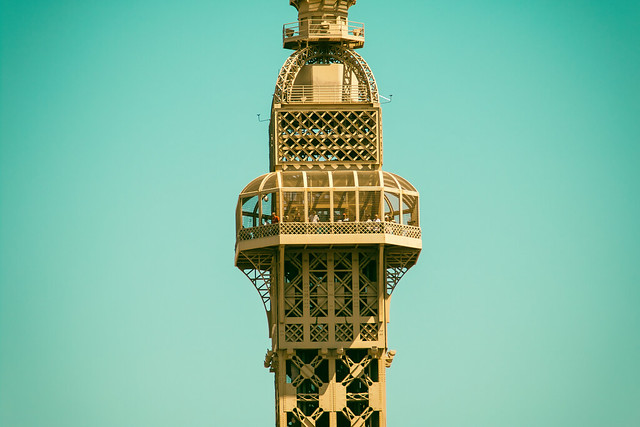
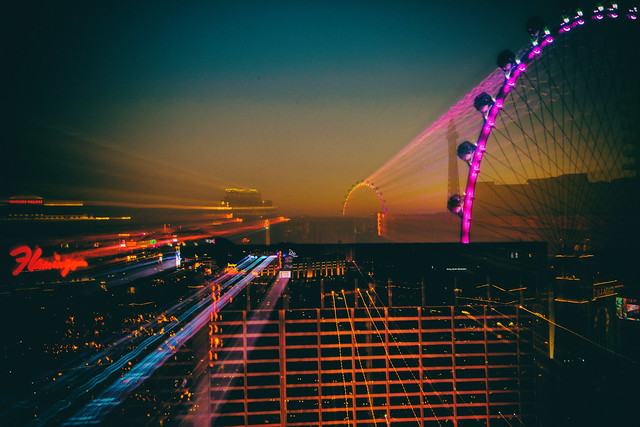
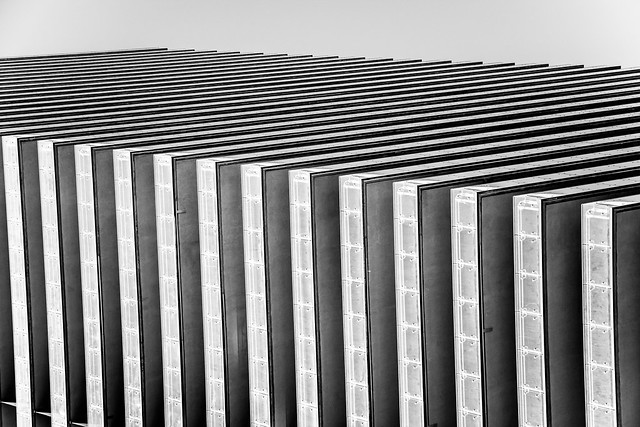
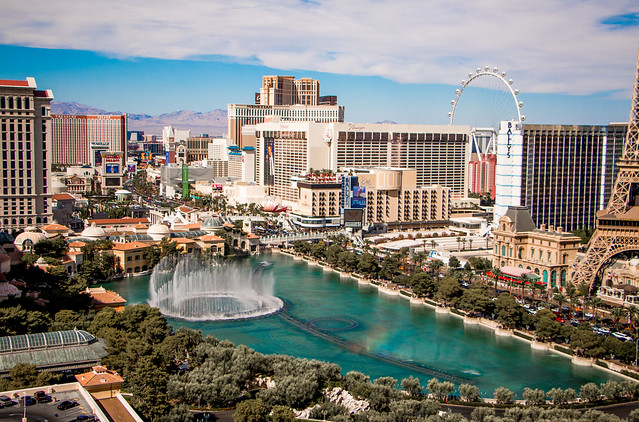
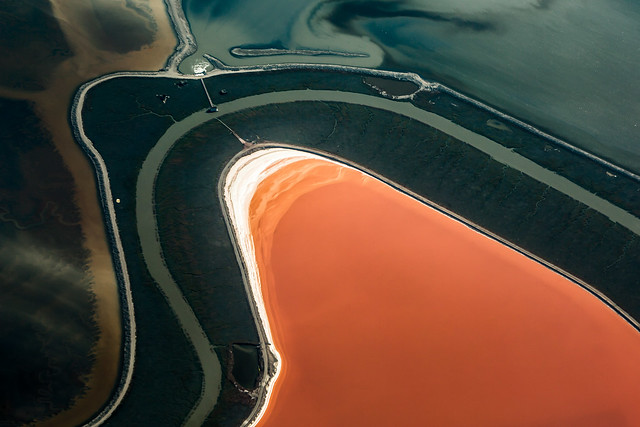
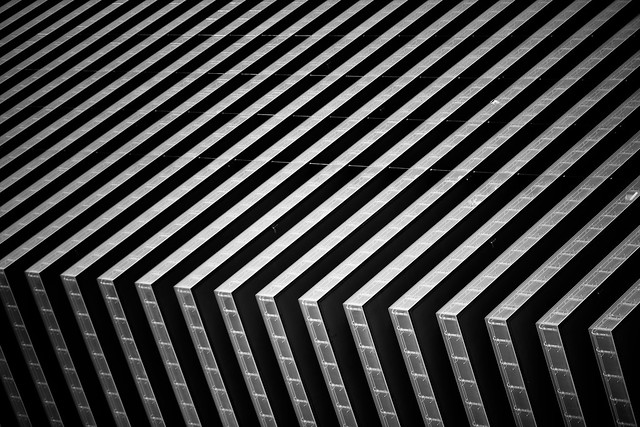
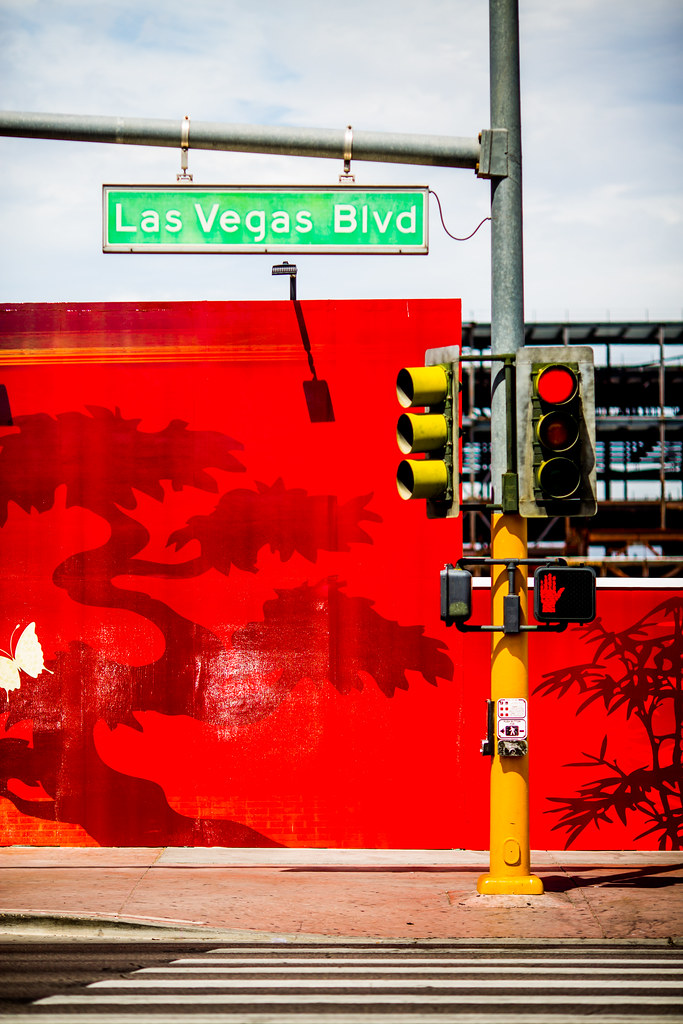
The photos in this post were all taken with this camera and this lens on my recent trip to Las Vegas.

A Joy You Could Not Measure

Through the Years

Because the EOS 70D is a cropped sensor, this lens actually has even more reach than a 135mm lens on a full frame. A cropped sensor is 1.6x times smaller than a full frame sensor — full frame sensors are the same size as traditional 35mm cameras.

Practically speaking, what you see when you look through a camera with a cropped sensor at 50mm would be equivalent to what you would see at 80mm on a camera with a full frame sensor. For this reason, if you are shooting sports or wildlife or other subject matter where you want longer reach, the cropped sensor delivers more reach.

Full frame sensors, in my opinion, do better in low light and at high iso settings and are preferable, but they are also more expensive and might not be as necessary for someone starting out.

Sunrises Are Best in Las Vegas

One of the fun things that I like doing with a zoom is zooming while my shutter is open on a long exposure shot. This creates an interesting double exposure zoom sort of effect that I use in some of my photographs. The disadvantage of this zoom is that it is not as fast (low aperture number) as some of the prime lenses.

If you end up starting with this sort of a combo, you might also want to consider the excellent value you get from a Canon EF 50mm f/1.8 II or EF 50mm f/1.4 USM prime lenses. Both of these lenses represent excellent value and are some of the least expensive prime lenses you can buy. You’ll have no problem using the EF-S 18-135mm lens during the day, but at night, or in a much lower light situation, you’ll appreciate being able to put on a faster 50mm prime lens that will work better in less light.

For many photographers the EOS 70D is all the camera you will ever need. Some of the best photographers I know are content to shoot with this body and never upgrade from here. To see some of the best work done with this camera body, check out these photos on Flickr all taken with the EOS 70D. Because this camera will be enough for some folks, I think this is a good place to start.

I personally use my EOS 70D as a second camera — a good backup to use in case something goes wrong with my EOS 5D Mark III and a camera I can keep at my office in case I feel like taking a break during the day and walking around town and shooting. I think it works especially well for street photography given the range you can get with the EF-S 18-135mm lens.

As your passion for photography grows though you will want to consider upgrading to a Canon EOS 5D Mark III and some of the prime lenses that I will review in some upcoming blog posts.

As a reminder, my analysis of my Canon gear is being done in partnership with Canon and I am receiving compensation for this work with them.

Better Lines

Boulevard Poolside

Lay Out

Just Wait and See

A Joy You Could Not Measure

A Joy You Could Not Measure

Through the Years

Through the Years


Thomas Hawk Digital Connection

 
Comments Off on An Introduction to DSLR Photography, the Canon EOS 70D and EF-S 18-135mm f/3.5-5.6 IS STM Lens

Posted in Photography


Subtle Street Art: 27 Easy-to-Overlook Urban Enhancements

26 Oct

[ By Steph in Art & Street Art & Graffiti. ]

subtle street art little people 1

Just knowing that these tiny urban art installations exist – ranging from tiny figures dangling from ATM machines to utility boxes painted to look like miniature skyscrapers – might just inspire you to look at the city around you in a new, more observant way. That’s the hope of the artists behind these 27 subtle works of street art, which are often so small and simple that they’re typically overlooked.

Beautiful Trompe L’oeil Windows in Istanbul
subtle street art pejac windows 1

subtle street art pejac windows 2

subtle street art pejac windows 3

subtle street art pejac windows 4

A tiny intriguing window framed by oversized shutters draws you in for a closer look, until you realize that what you’re seeing isn’t in three dimensions at all – it’s an expertly painted illusion on a wall. Spanish artist Pejac brightened up blank surfaces throughout Instanbul with a series entitled ‘Lock, Poster and Shutters,‘ representing the “perception and illusion of freedom.”

The Little People Project
subtle street art little people 1

subtle street art little people 2

subtle street art little people 3

subtle street art little people 4

subtle street art little people 5

subtle street art little people 6

Only the most observant passersby take notice of the miniature figures living out their lives in the big city, meticulously created and arranged by a street artist calling himself ‘Slinkachu.’ The Little People Project is an ongoing series of incredibly small installations placing human figures in humorous contexts, interacting with real-world objects like trash, dead insects and sidewalk weeds. The figures are left there to be observed or ignored, with the vast majority of people never even realizing they’re there.

Miniature Cities Within Cities by EVOL
subtle street art EVOL 1

subtle street art EVOL 2

What looks like an image of a gritty, run-down urban neighborhood is actually a collection of electric power boxes on an urban rooftop. Berlin-based artist EVOL creates cities within cities, typically transforming urban surfaces with stencils. Any rectangular or square object can become a miniature skyscraper. But when the artist has a little more time and privacy to work, the illusion is uncanny.

Yarn-Bombing Sidewalk Cracks
subtle street art yarn cracks

subtle street art yarn cracks 3

‘Project Pothole’ by artist Juliana Santacruz Herrera called attention to potholes in the streets of Paris, softening these trouble spots with installations of yarn. Filling the cracks with color, Herrera engages in a passive sort of protest while simultaneously brightening the urban landscape.

Next Page – Click Below to Read More:
Subtle Street Art 27 Easy To Overlook Urban Enhancements

Share on Facebook


[ By Steph in Art & Street Art & Graffiti. ]

[ WebUrbanist | Archives | Galleries | Privacy | TOS ]


WebUrbanist

 
Comments Off on Subtle Street Art: 27 Easy-to-Overlook Urban Enhancements

Posted in Creativity


Canon announces EOS C100 Mark II

26 Oct

Canon has announced the upcoming release of its second-generation EOS C100 Mark II digital video camera. The device houses a Super 35mm 8.3 megapixel CMOS sensor, and is positioned as an affordable solution for film and video production, providing a variety of new design and performance upgrades. Read more

Articles: Digital Photography Review (dpreview.com)

 
Comments Off on Canon announces EOS C100 Mark II

Posted in Uncategorized


5 Tips for More Successful Event Photography Using a Shot List

26 Oct

Company parties. Special galas. Nonprofit fundraisers. When someone asks you to shoot one of these events, you aren’t exactly leaping for joy, right?

Event Photo 04

Corporate event photography can get a bad reputation among creatives, mostly because it sounds like an unglamorous style of photography. While it is true that many aspects of corporate event photos can be very rote, these events actually a huge advantage that can lead to even more creative expression. Here’s why: There is almost always a set structure and schedule to corporate events that rarely deviates, meaning it is incredibly easy to build a shot list to get your essential shots out of the way very quickly. That means you have more time on your hands at the event to get creative with the way you choose to take these shots. Whether you’re a budding event photographer, or taking on an event as a favor, use these tips to build an effective event photography shot list that will make your clients happy and maybe even lead to other photography opportunities with them down the road!

Fact: Most corporate clients will not know what kind of photos they need.

At least in my experience working with west coast corporate clients, most of them can’t give me a clear answer when I ask how many photos they need, what they need shots of, etc. While this may seem frustrating at first, bear in mind that this vagueness from your client gives you the perfect opportunity to shine by filling in the blanks for them, because in general, most corporate clients want the same types of event photos.

So what kinds of photos do corporate clients want?

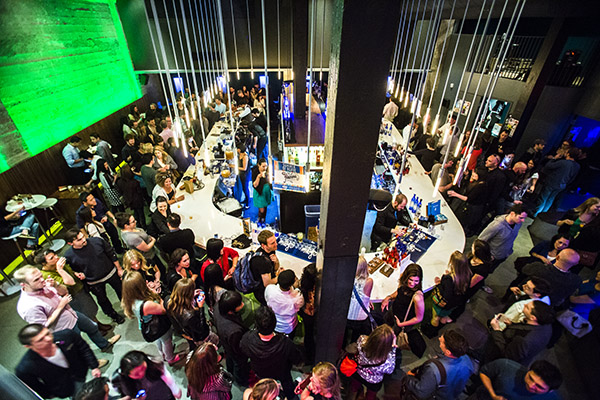
To answer this question, put yourself in the shoes of the branding or marketing coordinator who put the event together. Often, their whole purpose to having you there to is capture images that show that they did their jobs right by properly setting up the space and making sure the people they invited showed up and had a good time. They want shots that capture:

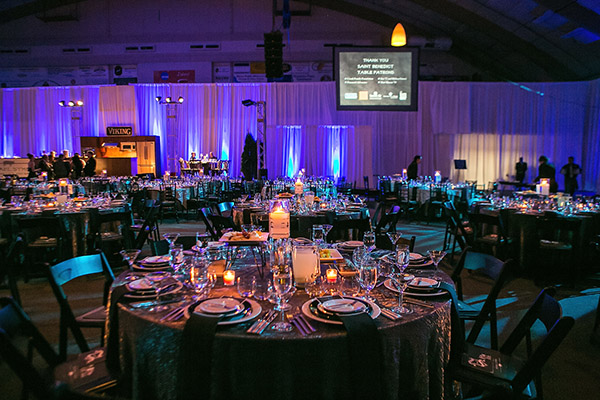
1. Setup shots of empty rooms, trade show booths, promotional items, signage, etc.

Event Photo 02

Be sure to arrive early to capture any event setup shots. It was someone’s job to put everything together, so he or she will definitely want images that show off all of the hard work that went into it. Generally, setup shots should be taken before guests arrive so that everything is still intact.

2. Candid and posed shots of VIPs or executives that are deemed important by the company.

Event Photo 01

This can be extremely tricky because often times, you won’t have any idea who the company CEO or big wigs are, even if the event coordinator hands you a sheet with all of their names on it. The best way to handle this is to ask the coordinator ahead of time if there is someone from the company who can accompany you and point out their VIPs and executives on site. Don’t be afraid to ask for help so that you can get your job done right.

3. Closeups and wide angle shots of any speakers.

Event Photo 03

As much as possible, get shots of speakers that include branding and signage somewhere in the photo. Also bear in mind that you will not always have a designated spot to shoot from, so bring a telephoto lens and prepare to possibly shoot from farther away. If you’re shooting from up close, make your shots quick so that you don’t block the view of guests.

4. Guests looking engaged and interested at the event.

Barneys New York And The Parkinson's Project Host A Luncheon In Support Of The Parkinson's Project At The Kingfish Cafe

Try not to capture photos of people (especially VIPs and executives) making unflattering expressions or gestures. It can take some patience, but make sure you get images that indicate everyone was having a good time. If you captured any goofy expressions or moments, you might be able to submit them, but be sure to flag them as optional outtakes.

5. Shots that indicate the event was well attended, such as full room shots with lots of people.

Event Photo 07

While it might still be valuable to include full room shots where only half of the seats are filled, you’ll want to pull out your zoom lens and focus in on larger clumps of people to provide shots that indicate the event was well attended.

The photos that corporate clients DON’T want

While event photography can in many ways feel like photojournalism, this is not the time to take too many images that are overly honest. Bear in mind that many times the photos are intended to be used for marketing purposes, so the last thing your clients want to see are ugly, unfavorable photos. Even though events might be poorly attended and the attendees might not be the most interesting people, it’s your job to make the event look and seem as fun as possible, even if you have to act like a hype person or stage photos to do so.

While there are many lessons and creative inspiration that can be obtained by winging it and thinking quick on the spot, professionals know there is generally more value to preparing ahead of time. One way to effectively do this is to think out every aspect of the shoot beforehand and great a comprehensive shot list. This will help you picture the finished shoot even before you step foot on set, greatly reducing any last minute issues that might arise, and giving you more freedom to take your necessary shots with creativity.

Do you photograph events? Do you have any other tips you’d like to share? You could also read 5 Tips for Special Event Photography here on dPS for more tips on covering events.

The post 5 Tips for More Successful Event Photography Using a Shot List by Suzi Pratt appeared first on Digital Photography School.


Digital Photography School

 
Comments Off on 5 Tips for More Successful Event Photography Using a Shot List

Posted in Photography


Set Sail on Rail: Quirky Vehicles Explore Abandoned Tracks

26 Oct

[ By Steph in Technology & Vehicles & Mods. ]

abandoned railroad vehicles 1

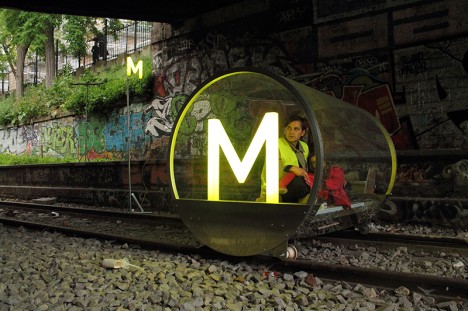
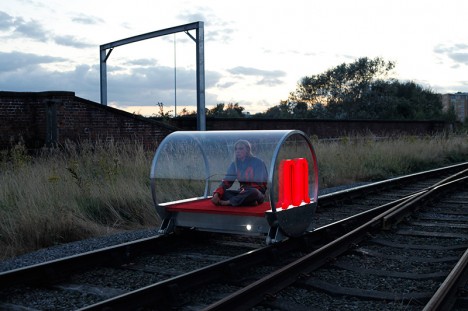
Before the abandoned railroad tracks of Paris officially disappear – which is bound to happen, as cities realize the potential for reclamation as High Line-style parks – some intrepid locals are taking the opportunity to explore. “Train Project” by French design studio HeHe is a series of fun, quirky handmade vehicles that traverse the city on a line that most local residents never get to experience firsthand.

abandoned railroad vehicles 3

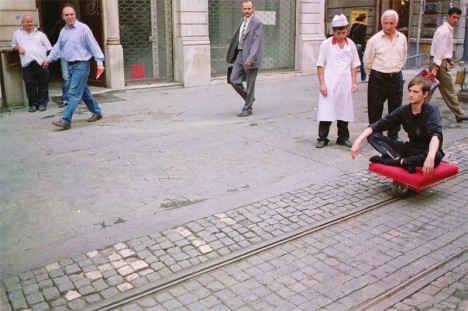
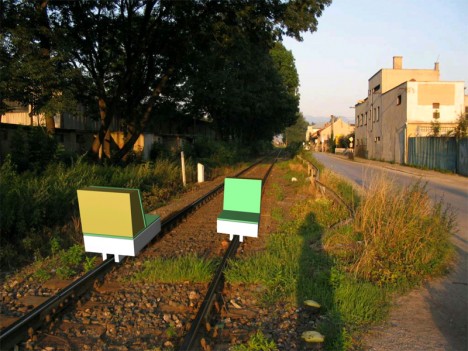
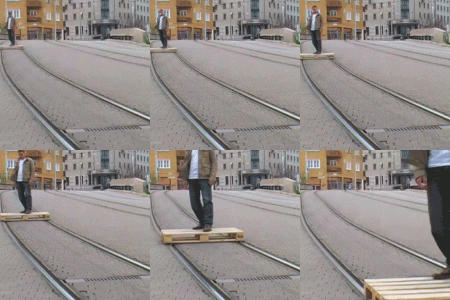
The autonomous vehicles include ‘Metronome’ and ‘M-Blem,’ two transparent, cylindrical solar-powered electric vehicles, and the sailboat-inspired ‘Radeau de Sauvetage.’ HeHe also developed additional vehicles made for train tracks in other cities, like an individual transport system to transfer objects from one place to another in Slovakia, and a one-person platform making use of the urban tracks in Istanbul.

abandoned railroad vehicles 2

HeHe calls The Train Project “an ongoing body of speculative investigation into the language and aesthetics of transport culture,” proposing personal rail travel as “a temporary, imaginative solution to question our industrialized conscience in relation to locomotion.”

abandoned railroad vehicle 5

abandoned railroad vehicle 6

The collective invited members of the public to travel on the vehicles, “journeying through space and time to experience the past and future of local transportation networks.” The idea is to take a picturesque trip through areas of the city that can’t be seen from the roads, reclaiming spaces that have been left to deteriorate until they’re inevitably integrated back into the functional urban landscape.

Custom-Railroad-Exploration-Car-1-644x429

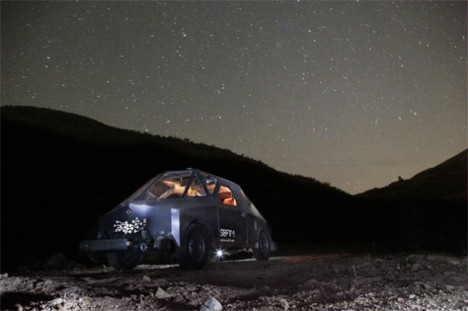
A similar project (above) explored sections of the 5,500-plus miles of abandoned railroad tracks in Mexico with the retro-futuristic SEFT-1, modeled after a midcentury vision of a spaceship.

Share on Facebook


[ By Steph in Technology & Vehicles & Mods. ]

[ WebUrbanist | Archives | Galleries | Privacy | TOS ]


WebUrbanist

 
Comments Off on Set Sail on Rail: Quirky Vehicles Explore Abandoned Tracks

Posted in Creativity


My Favorite Lens of All, the Sharp, Smooth, Feel of the Canon EF 135mm f/2L USM

26 Oct

One Last Hand

For those of you who know me or follow my work, you probably already know about my love affair with the Canon EF 135mm f/2L USM telephoto lens. Simply put, this is my favorite lens I have ever used in my life. It’s also the lens I use for probably 70% of the photographs which I produce. This is a workhorse lens and I believe it is the sharpest lens that Canon makes. If I could only own a single Canon prime lens, this would be it.

Bet Red

Professional grade Canon L series lenses are not cheap. Canon’s L series represent their top of the line optics. They are what almost all Canon professional photographers shoot with. That said, I think the EF 135mm f/2L USM is one of the best values as far as Canon L series lenses go. The lens costs a little over $ 1,000 and is amongst the most economical L series lenses you can buy.

I probably shoot this lens at f/2 the majority of the time. This gives you a super clean point of focus, with the beautiful out of focus bokeh away from your primary point of interest. For those low light shallow depth of field photos, it does not get better than this lens in my opinion. The portraits you can make with this lens are beautiful — sharp as tack but with the subtle bokeh around the edges that a lens like this can produce.

Two Hearts Can't Be Wrong

The autofocus on this lens is the most responsive of any lens I’ve ever used. It autofocuses so lightning fast and allows you to quickly lock in on the action that you want to see. It’s a very quiet and very smooth feel when you hit your focal point perfectly on the mark.

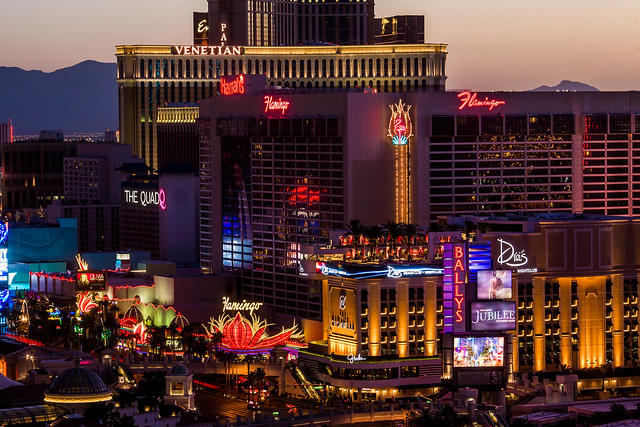
The photos in this blog post were all taken on my recent trip to Vegas with this lens. I cannot recommend this lens strongly enough. An example of why I like this lens so much can be seen in the first photo in this post. Forget about it as it appears in this post, click here to see it in full high res glory. Look at how sharp the details are on that photo. Notice the individual neon tubes as visible in the Harrahs and Flamingo signs. I took this photo from the balcony of the Cosmopolitan of Las Vegas, a great distance away. The 135mm EF f/2L USM gave me the distance I needed to shoot down with such clarity on the neon signs in the photo.

The photo of the roulette wheel and the mannequin in the post show how great the bokeh and depth of field is around an isolated focus point. This is another of my favorite characteristics of this lens. Shooting portraits at f/2 on this lens feels just perfect to me.

In addition to portraits, this lens is great for street photography, sports, concerts, abstracts, and so many other types of photography.

As a reminder, my analysis of my Canon gear is being done in partnership with Canon and I am receiving compensation for this work with them. More on Canon telephoto lenses here.

Teardrop

I'll Take Two

Seeing Red


Thomas Hawk Digital Connection

 
Comments Off on My Favorite Lens of All, the Sharp, Smooth, Feel of the Canon EF 135mm f/2L USM

Posted in Photography


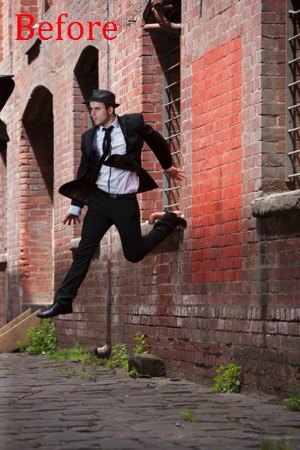
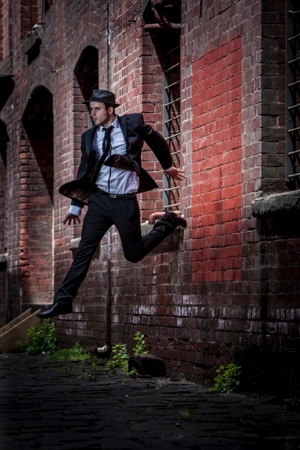
How to Add a Grunge Effect to Your Portraits Using Lightroom

26 Oct
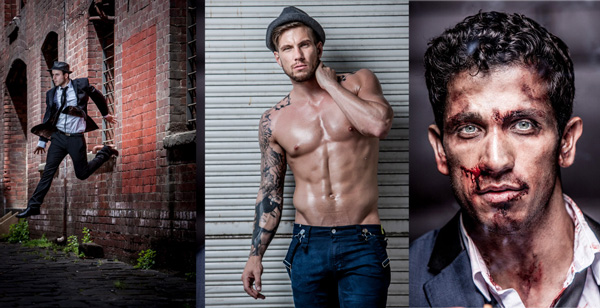
Grunge Main 600

All images copyright Gina Milicia – Model credits from left to right: Jess Kenneally, Nathan Kennedy, Firass Dirani.

Gina has a new dPS ebook just released – Portraits: After the Shot – check out out!

The style of side lighting (in the image below) is a great way to enhance muscle definition, and the post-production technique complements the lighting style. You can see that it appears as if Nathan has far better muscle definition in his after shot. I love using this post-production technique in character portraits for the entertainment industry, advertising and editorial shoots. It deliberately gives the skin a hard, detailed, gritty look, which is perfectly suited to character-style portraits.
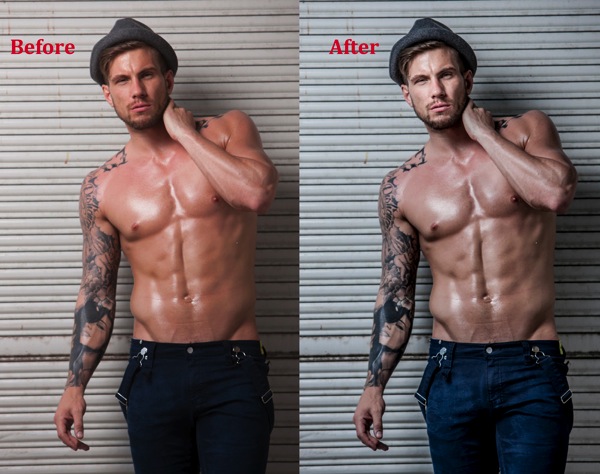
Nathan Kennedy for ML Denim

Model credit: Nathan Kennedy for ML Denim. In this image I used fill flash from my Elinchrom Quadra lights with a Rotolux Deep Octabox camera left, which is lighting Nathan from a 45-degree angle.

If you want to see a full tutorial on my favourite lighting style for this type of effect, check out: How to Create this “Fight Club” Inspired Portrait using One Light.

It’s not the most flattering technique for skin post-production, so I’m selective about which projects I use it on and tend to avoid using it on female skin tones. There are very few women who will say, “Wow, I love how detailed and large my pores look.”
Don’t forget my overnight rule. After you’ve edited your image, try not to look at it for a minimum of 12 hours. When you look at it again with fresh eyes, you should trust your gut instinct on how it looks. If your first reaction is “Ewww”, then you may have gone too far!

Here’s my step-by-step recipe for adding a grunge effect to your portraits using Lightroom:

LW GRUNGE 1 LW GRUNGE 1B

Note: Every lighting style is going to give you a slightly different result. I suggest you use my recipe as a rough guide only, tweaking your images until you get the results that best suit your image and personal style.
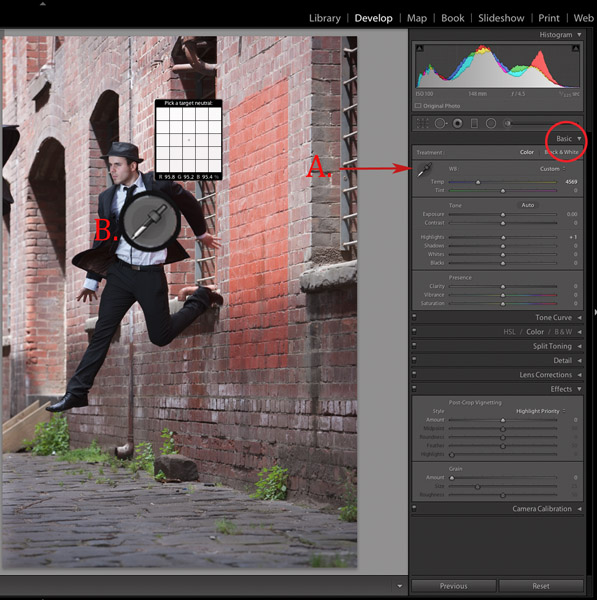
LW Grunge 2

Find a neutral area of your image and use it to correct white balance. In this case I’ve selected a very light gray section of the white shirt the model is wearing.

Step 1. Import the file into Lightroom and in the Develop module, use the eyedropper tool (A.) and do a custom white balance (B.). This is achieved by finding a neutral area on your image (gray or white works best) then using your eyedropper tool (A) click on this (Neutral area) and Lightroom will automatically adjust your white balance.

The best and most accurate technique to achieve a good white balance is to ask your model to hold a gray card in front of their face for the first frame. This gives you an accurate neutral gray to select from for your white balance.

The third option to achieve white balance is to use Lightroom’s auto white balance. Test them all if you can and see which option best suits your shooting style.

I like working with a combination of gray card and finding neutral areas. I will use Lightroom’s auto function if I am shooting television stills or theatre productions where I need to color correct images that were shot under tungsten lights.
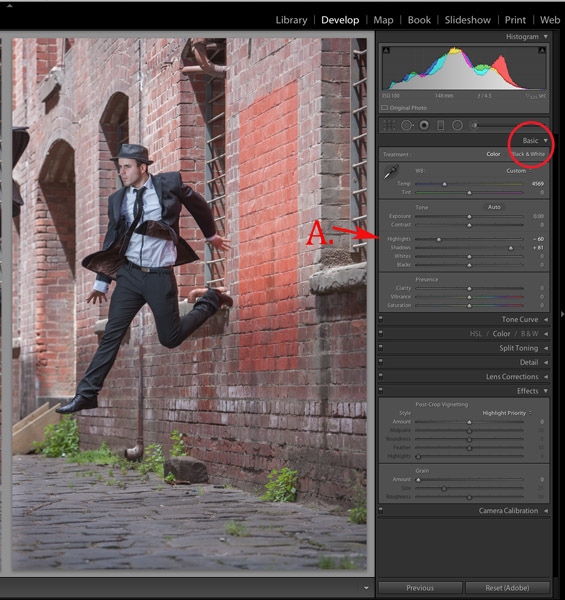
LW GRUNGE 3

Step 2. As a starting point, increase shadows (+81) and decrease highlights (-60). The image starts to look a little wrong, but stay with me.
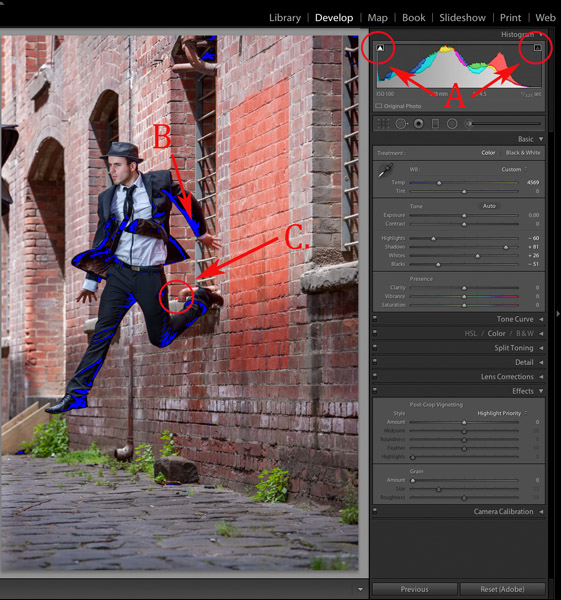
LW GRUNGE 4

Step 3. Switch on clipping mask (A.) by clicking on little triangles above the histogram.

Move the blacks slider to the left until your image gets a good black tone. The areas in blue highlight loss of detail in the shadows, and areas highlighted in red indicate loss of detail in highlights.

Purists will probably start twitching at this point because I am crunching my black tones (B.) and blowing my highlights (C.). I believe this gives the image a more realistic feel because we don’t always see detail in shadow areas with our naked eye.

I personally like my images to look good overall, and if that means losing some detail in the shadows to gain good contrast across the whole image, I’ll do it. Just because Lightroom gives us the technology to see the entire gray scale doesn’t mean we have to.
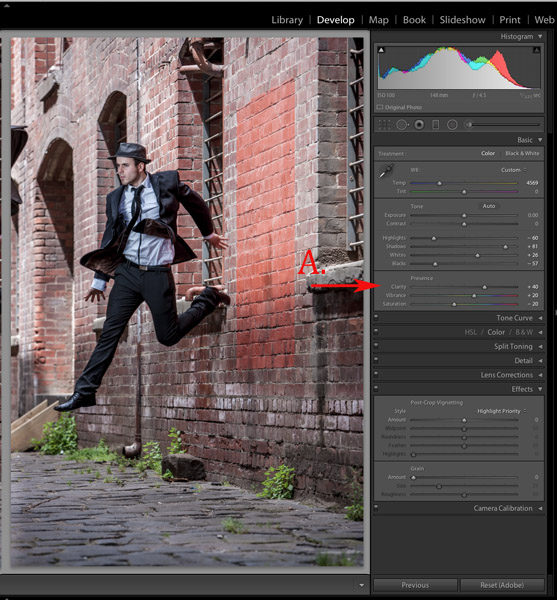
LW GRUNGE 5

Step 4. In the next step, I increase the mid-tone contrast or clarity) (A.). I also decrease saturation to counter the digital orange glow the skin tone tends to take on in Step 3. Then I increase vibrance to bring some tone back to the muted tones.
LW GRUNGE 6

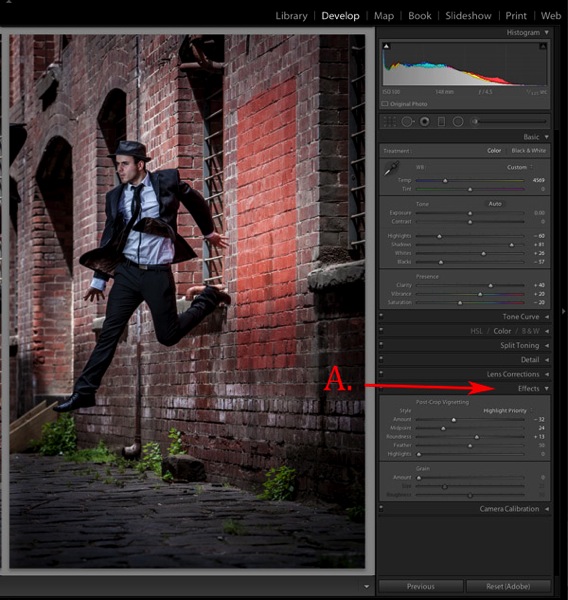
Step 5. The next step is to add a vignette from the Effects menu (A.). This is optional, but I feel it finishes the image off nicely and draws our eye to the hero of the shot, Jesse.
LW GRUNGE Main 2

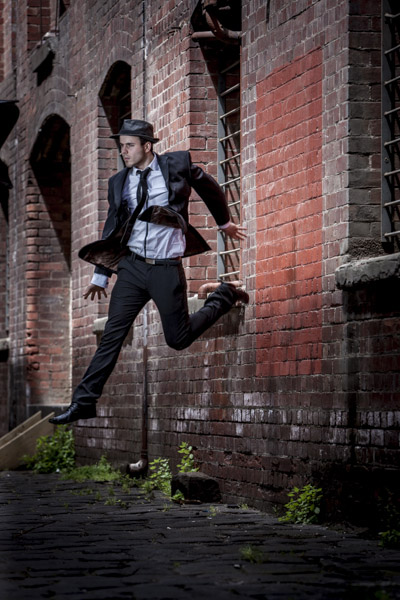
Step 6. Finally, I enhance the eyes slightly using my eye-enhancing technique for Lightroom.

If you’d like to try it, you can check it out here: 3 Simple Ways to Create Stunning Eyes in Your Portrait Photography.
LW GRUNGE BTS

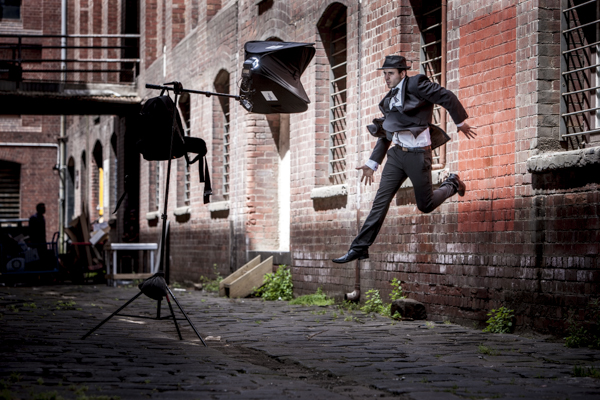
Behind the scenes on my air shoot with actor Jess Kenneally and my MacGyver-inspired lighting boom.

  • Canon 1DS MK3 ISO 100, F/5.6, 1/125th, 70-200mm IS zoom @ 200mm.
  • Jess has been lit using a Canon 580EX Speedlite and a medium softbox.

How do you create a grungy, gritty look to your portraits? Should we keep detail in the blacks and highlights, or is it okay to crunch and blow out to create the right vibe? I’d love to hear what you think.

Gina has a new dPS ebook just released – Portraits: After the Shot – check out out!

The post How to Add a Grunge Effect to Your Portraits Using Lightroom by Gina Milicia appeared first on Digital Photography School.


Digital Photography School
 
Comments Off on How to Add a Grunge Effect to Your Portraits Using Lightroom

Posted in Photography


Spooky Images to Scare you for Halloween Week

26 Oct

Are you scared yet? You should be – because this collection of images is straight out of a horror movie, designed to give you the creeps, make your skin crawl and keep you up at night!  Oooooh scary!

In honor of All Hallow’s Eve coming soon I thought it would be appropriate to see a few scary images. Enjoy, if you dare!

(These first few images are by my friend Renee Robyn, she has some masterful spooky images)

Photograph Magicked by Renee Robyn on 500px

Magicked by Renee Robyn on 500px

Photograph Survivor by Renee Robyn on 500px

Survivor by Renee Robyn on 500px

Photograph Kanína by Renee Robyn on 500px

Kanína by Renee Robyn on 500px

Photograph Lexx by Renee Robyn on 500px

Lexx by Renee Robyn on 500px

Photograph Raziel by Renee Robyn on 500px

Raziel by Renee Robyn on 500px

Photograph Titan by Chris Fletcher on 500px

Titan by Chris Fletcher on 500px

Photograph Exit Planet Dust -Escape from the "Undead" by The Fotokraft on 500px

Exit Planet Dust -Escape from the “Undead” by The Fotokraft on 500px

Photograph The dead Countess by Rebeca  Saray on 500px

The dead Countess by Rebeca Saray on 500px

Photograph Happy Halloween! by Rebeca  Saray on 500px

Happy Halloween! by Rebeca Saray on 500px

Photograph Little vampire by Manuela Kulpa on 500px

Little vampire by Manuela Kulpa on 500px

Photograph TheCrow by D?nu? Antoche on 500px

TheCrow by D?nu? Antoche on 500px

Photograph 2013 Pumpkin by Max Ellis on 500px

2013 Pumpkin by Max Ellis on 500px

Photograph She's coming for you.. by Mattia Bonavida on 500px

She’s coming for you.. by Mattia Bonavida on 500px

Photograph Music Lessons by Andy Orozco on 500px

Music Lessons by Andy Orozco on 500px

Photograph Spooky Halloween to everyone by IgoRAW  on 500px

Spooky Halloween to everyone by IgoRAW on 500px

Photograph At the wizard... by Anatoly Che on 500px

At the wizard… by Anatoly Che on 500px

Photograph Ghostly Glow by Alan Borror on 500px

Ghostly Glow by Alan Borror on 500px

Photograph Halloween is Near by Phil Koch on 500px

Halloween is Near by Phil Koch on 500px

Photograph The Possession by Robert Armstrong on 500px

The Possession by Robert Armstrong on 500px

Photograph haunted house by Jörg Barthel on 500px

haunted house by Jörg Barthel on 500px

Photograph Lost Amongst the Stars by Lijah Hanley on 500px

Lost Amongst the Stars by Lijah Hanley on 500px

Photograph The Haunted Victorian Mansion by Frank Grace on 500px

The Haunted Victorian Mansion by Frank Grace on 500px

Photograph Moonlight by Zoltan Toth on 500px

Moonlight by Zoltan Toth on 500px

Photograph Haunted House by Dohotariu Mihai on 500px

Haunted House by Dohotariu Mihai on 500px

Photograph ghost rider :) by Adrian Sommeling on 500px

ghost rider :) by Adrian Sommeling on 500px

Photograph Hell and Heaven by Dr. Prem Sundar on 500px

Hell and Heaven by Dr. Prem Sundar on 500px

Photograph Conspire Dangerously by Paolo Giraudo on 500px

Conspire Dangerously by Paolo Giraudo on 500px

Photograph Revenge by Cleon Santos on 500px

Revenge by Cleon Santos on 500px

Photograph Ghost Rider by Ravikanth Kurma on 500px

Ghost Rider by Ravikanth Kurma on 500px

Photograph Dark Stormy Place by Aaron J. Groen on 500px

Dark Stormy Place by Aaron J. Groen on 500px

Photograph Come play with us... by Marta Borreguero on 500px

Come play with us… by Marta Borreguero on 500px

Photograph Damned by Johan Lennartsson on 500px

Damned by Johan Lennartsson on 500px

Photograph From the darkness it came by Chris Fletcher on 500px

From the darkness it came by Chris Fletcher on 500px

Last of all – a classic, by the legend himself.

The post Spooky Images to Scare you for Halloween Week by Darlene Hildebrandt appeared first on Digital Photography School.


Digital Photography School

 
Comments Off on Spooky Images to Scare you for Halloween Week

Posted in Photography


Panono announces pricing and availability for rolling ball camera

26 Oct

German startup Panono has announced availability and pricing for its ball-shaped Panono Camera. The device shoots spherical panorama images and will cost $ 549/€549 when it ships worldwide in the spring of 2015. The first to receive the camera will be the backers of the crowd-funding project the company used to get started before the camera goes on general release. Learn more

Articles: Digital Photography Review (dpreview.com)

 
Comments Off on Panono announces pricing and availability for rolling ball camera

Posted in Uncategorized