RSS
 

Archive for October, 2014

Finding the Balance: Capturing Memories Versus Making Memories

27 Oct

CM3

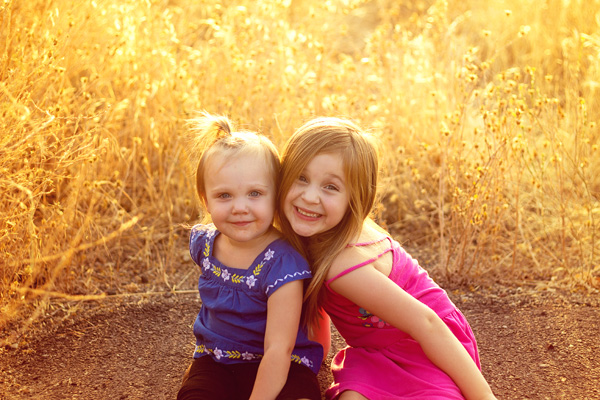
I am more than a little obsessed with capturing and preserving memories for my family. We have a photo wall that’s regularly updated. We print photo books, both from Instagram and of photos from my “real” camera. My girls know that twice a year, we go out to a field nearby our house, and I do a mini photo session with them. I’m the type of person who easily had 5,000 photos in the first year after my daughter was born, and that’s just what I decided to keep. So whenever I see a mom taking photos of her kids at the park, or a dad taking pictures at his son’s soccer game, I want to run over and give them a high five. I want to tell them that I think they are awesome, and that capturing those memories for their family is something priceless. They’re images that will be pulled out during graduation parties, played on wedding slideshows, and – God forbid – treasured after the loss of a loved one. It’s important work, and it is work that I feel absolutely passionate about.

But there’s a catch. If you’re anything like me, it can be easy to become so focused on capturing memories for our family and of our kids that we can sometimes tend to forget to be part of making memories WITH our family. It can be hard to find a balance, so here are a few tips that I have picked up along the way that can help you find that sweet spot of capturing those important moments, while also being present for them as well.

1. Do a dry run
CM

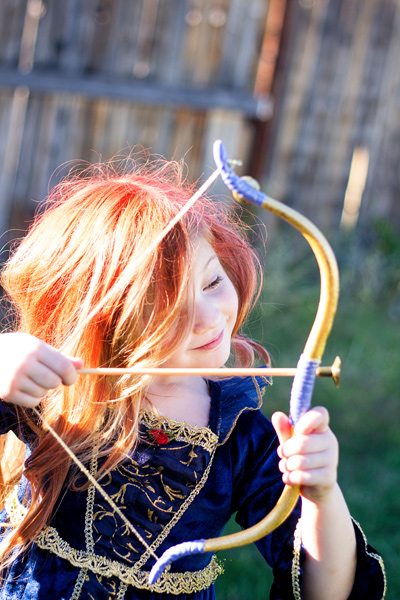
Halloween is coming up later this month, and my oldest daughter Lizzy wants to be Merida (from Pixar’s Brave). I absolutely want a non-phone photo of her all dressed-up in her costume. This is non-negotiable. But, I know that on the day of Halloween Lizzy will be excited (and probably a little hopped up on sugar), and trying to have a little photo session with her on that day would probably be fighting a losing battle. So, we did a dry run. We do this every year, and it works out so well for us because I can take a few photos of her to stick in the scrapbook in a no-pressure environment, and then on Halloween night, I can leave the camera at home and just be present with my family. We all get a good outcome, and in my book that’s a win. Does it really matter that the photo was taken the weekend before the event? Not to me in this instance, because the memory that I’m actually interested in capturing was the fact that at age four-and-a-half, Lizzy thought that Merida was the coolest of all the princesses, and that she wants to be strong, independent, and brave just like Merida is.

This tip is SO easy, but it has made such a big difference for our family, and it isn’t just for Halloween – this same idea would work for any occasion in which you want a photo of your kids either in a special outfit or with a particular person, opposed to during an event. For example, doing a dry run would be a good fit for capturing your daughter in her ballet outfit, taking a photo of your kids with Mom for Mother’s Day, or even to catch your kiddos in their Christmas pajamas.  As a bonus, doing a dry run lets us know if there are any costume or clothing  issues (dress is too itchy, shoes too tight, needing six cans of red hairspray instead of one) that need to be addressed before the big day as well.

2. Make good use of your camera’s creative modes
CM5

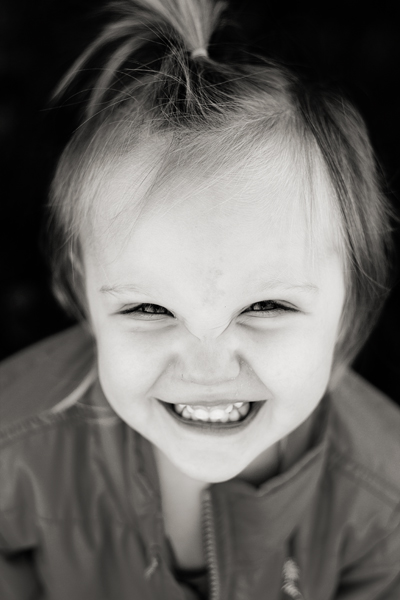
I have several friends who are currently learning how to shoot in manual. One of them was told by her mentor that the creative modes on her camera are cheating and that she should quit using them cold turkey and shoot in full manual, all the time, if she wants to be a real photographer. When she told me all this, I audibly groaned.

Here’s the deal – learning to shoot in manual is awesome and worthwhile. But as far as I’m concerned, if trying to shoot in full manual means that you spend all of your daughter’s soccer game (or birthday party) behind the camera trying to figure out appropriate settings rather than participating in the event itself, that’s a bummer. In my opinion, you would have been better off to stick your camera in Program mode or any other creative mode that you are very familiar with, take a few photos you love, and then be able to set the camera down and enjoy the rest of the time with your family. I’m not saying that you shouldn’t play around with settings or experiment at all, I’m simply saying that at special events like birthdays, weddings (in which you are not the official hired photographer), anniversaries, once-in-a-lifetime vacations, and graduations are the types of events where it is just as important to be a part of making the memories with your family as it is to be capturing those memories. If using one of your camera’s creative modes can help you in that way, go for it!

3. Don’t feel the need to photograph everything
CM2

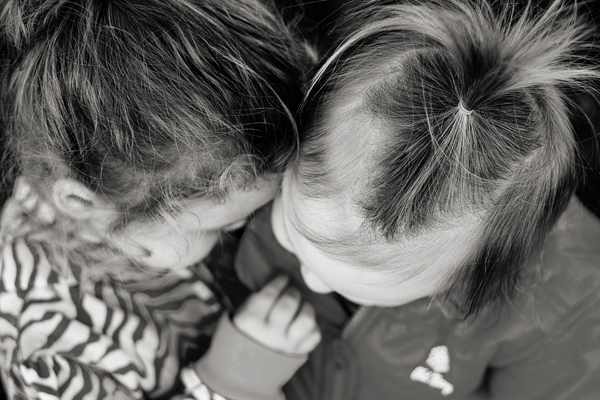
Such an easy thing to say, and such a difficult thing to put into practice! The reality is that I don’t need to photograph all three times my daughter will go to the pumpkin patch this month between school field trips, family, and friends. The reality is that I don’t need to photograph every time my kids go out to the backyard to play. Sometimes, pulling out the camera while they play is an awesome time for me to practice and play around, but it can also really frustrate my kids if I do it too often (EVEN if I’m not asking them to, “Look here and say cheese!”).

So, for my sanity and theirs, whenever my gut instinct is to grab my camera, I try to stop and ask myself when the last time I photographed this particular event or activity was. If it has been less than a month, that’s a good cue for me to pause and consider whether or not I really need to bring the camera along that day. I really encourage all you moms and dads out there to choose a similar pause point for your family – maybe it’s weekly, maybe it’s monthly, but however frequent it is, it gives you and your kids some built in grace.

4. Get IN the picture sometimes
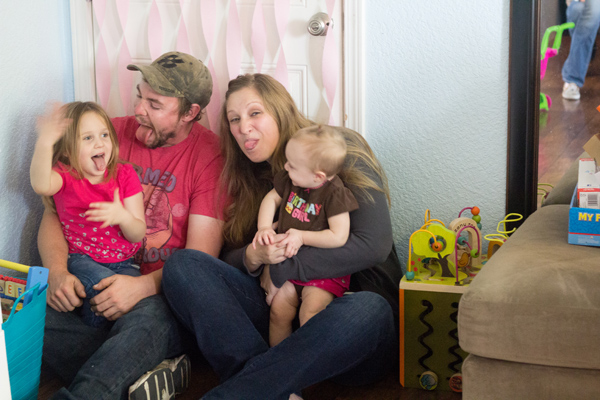
This is the only photo with me in it from my daughter's first birthday. It's a little blurry, but it went in the album nonetheless, and it's one of my daughter's favorite photos from the day.

This is the only photo with me in it from my daughter’s first birthday. It’s a little blurry, but it went in the album nonetheless, and it’s one of my daughter’s favorite photos from the day.

If you’re the photographer of the family, chances are that there are a lot fewer photos of you in the family album than there are of anyone else. I think this is something that we ALL struggle with. Or maybe you’ve even tried to pass the camera off to someone else and have been disappointed by the blurry, too light, too dark, weirdly cropped results. I get it, and I’ve been there.

One thing that I’ve noticed is that if I’m quickly handing the camera off to a friend or family member that isn’t familiar with photography, I get the best result if I pass the camera off in AV mode, with the aperture set at least at the number of people that will be in the photo, and the center focal point selected. So, if there will be four people in the photo, make sure the aperture is set to at least f/4 when you hand it over. I usually have my 50mm lens on my camera, so if I hand the camera over in Program mode, there’s a chance that it will elect to shoot at f/1.8 or f/2.2, which would probably not yield the best results for a photo of four or five people. If you’re shooting with a kit lens that isn’t capable of shooting that wide open, it may be just as beneficial to pass off the camera in Program mode. This is just one simple thing that will help yield better results when passing the camera to someone else, but trust me when I say that when it comes to family photos, the important thing is that you’re there, not that you’re well composed and perfectly in focus.

Do you struggle with the balance between capturing memories and making them? Do you have any other tips you’d like to share?

The post Finding the Balance: Capturing Memories Versus Making Memories by Meredith Clark appeared first on Digital Photography School.

Digital Photography School

 
Comments Off on Finding the Balance: Capturing Memories Versus Making Memories

Posted in Photography


Budget Mitakon 42.5mm f/1.2 offered by ZY optics for M43, Sony E and Fuji X systems

27 Oct

Chinese lens designer and manufacturer Shenyang ZhongYi Optical and Electrical Company has launched a new 42.5mm f/1.2 lens that is capable of covering an APS-C imaging sensor. Priced $ 359, and available initially in the Micro Four Thirds mount, the Mitakon 42.5mm f/1.2 appears to be aimed squarely at competing with Panasonic’s Leica DG Nocticron 42.5mm f/1.2 for its Lumix G bodies. Read more

Articles: Digital Photography Review (dpreview.com)

 
Comments Off on Budget Mitakon 42.5mm f/1.2 offered by ZY optics for M43, Sony E and Fuji X systems

Posted in Uncategorized


Super Stable, Super Fly-X3

27 Oct

Extra photos for bloggers: 1, 2, 3

Your methods for recording videos are impressive, but also complicated and terrifying. Using a skateboard and moon boots to capture smooth video? It’s not safe.

Grab the Fly-X3 Handy Motorized Phone Stabilizer instead and your vids will be smooth as can be.

The Fly-X3 is easy to use on the go. It’ll cradle your phone and automatically adjust to get level videos every time.

As you move, run, or jump the Fly-X3 keeps adjusting for the smoothest results.

Now you can use those moon boots along with the Fly-X3 for extreme action videos without the shake.

Hold steady with the Fly-X3
$ 299 at the Photojojo Shop


© Britta for Photojojo, 2014. |
Permalink |
No comment |
Add to
del.icio.us

Post tags:


Photojojo

 
Comments Off on Super Stable, Super Fly-X3

Posted in Equipment


Readers’ Showcase: Documentary and Street photography

27 Oct

With all the talk about new equipment at this time of year it’s worth remembering why we buy that gear – to make great photos. What better way to do it than to showcase the excellent work of our own community? This week we asked users of our Documentary And Street photography forum to submit their favorite shots for inclusion in our Readers’ Showcase. Click through to take a look at our favorites

Articles: Digital Photography Review (dpreview.com)

 
Comments Off on Readers’ Showcase: Documentary and Street photography

Posted in Uncategorized


Essential Photography Business Kit: 5 Things to Keep Handy at All Times

27 Oct

Even if you don’t have a business plan, or much of a business to speak of, if you’re going to be or already are a professional photographer, there are certain things you will need and often will be asked for over and over again. Luckily, you don’t have to do extra work every time to meet these needs — instead, Continue Reading

The post Essential Photography Business Kit: 5 Things to Keep Handy at All Times appeared first on Photodoto.


Photodoto

 
Comments Off on Essential Photography Business Kit: 5 Things to Keep Handy at All Times

Posted in Photography


Sony develops sensor capable of rendering color images at 0.005 lux

27 Oct

Sony has introduced a new CMOS sensor, calling it the highest sensitivity sensor of its kind. Developed for automotive use, the new chip can capture color images in light conditions down to 0.005 lux. The sensor is 1/3-inch type with 1.27 effective megapixels, and supports a Wide Dynamic Range system that uses extended exposure times rather than using multiple exposures. Read more

Articles: Digital Photography Review (dpreview.com)

 
Comments Off on Sony develops sensor capable of rendering color images at 0.005 lux

Posted in Uncategorized


5 Easy Steps to Exposure Blending for High Contrast Landscapes

27 Oct
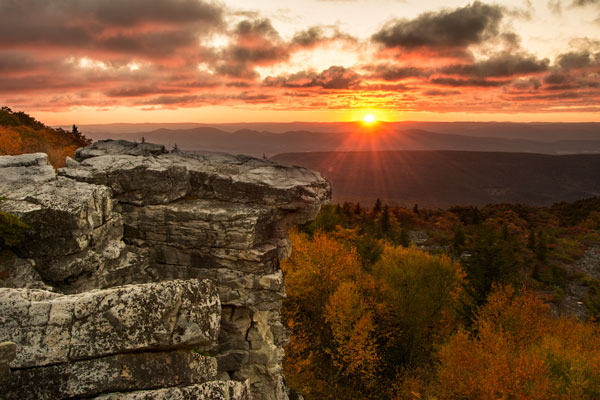
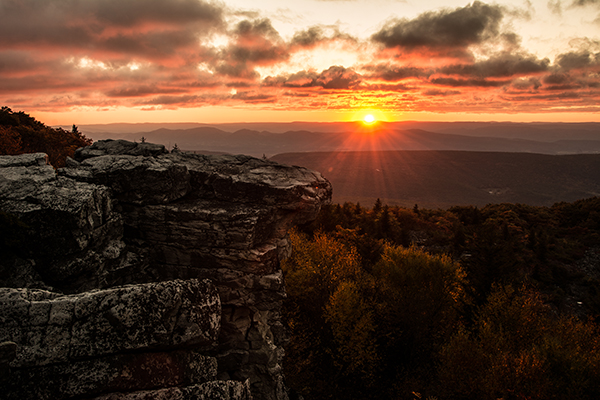
Final Image  Bear Rock, Dolly Sod Wilderness Area, West Virginia

Final Image: Bear Rock, Dolly Sod Wilderness Area, West Virginia. Sunrise and Sunsets can be extremely contrasting and very challenging to capture the wide exposure range.

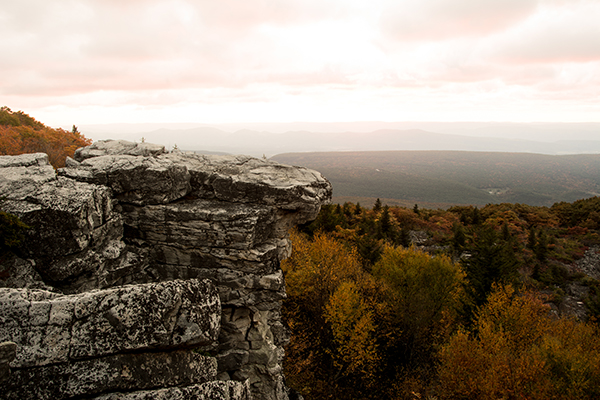
Here’s a problem I am sure you have encountered, instances where you try to photograph an image that has a greater range of light and dark than your camera can accurately capture. In the example above, when we set our exposure to expose the sky correctly, the foreground objects are severely under-exposed. Likewise, if we set our exposure to correctly expose the foreground, the sky is blown out and loses almost all detail. One solution to this dilemma might be to use HDR software to combine several bracketed exposures into one image. However, this method can be overwhelming and time-consuming to do correctly for a pleasing result. Another solution to this problem could be to use graduated neutral density filters. Unfortunately, a good set of filters can be quite expensive and a cheap set can harm the quality of your image.

A simple solution to this problem scenario may be as easy as taking two exposures, one correctly exposed for the dark areas (in this case the foreground) and the other correctly exposed for the lighter area (in this case the sky). Place your camera on a tripod so that both images will be composed exactly the same.

image correctly exposed for the sky 1/10 of a second @ f/10. ISO 100

Image exposed for the sky: 1/10th of a second @ f/10, ISO 100

Image exposed for the foreground: 1 second @ f/10, ISO 100

Image exposed for the foreground: 1 second @ f/10, ISO 100

Now, let’s look at a simple five step exposure blending process, performed in Photoshop, to resolve this contrast issue.

Step 1: Open your images

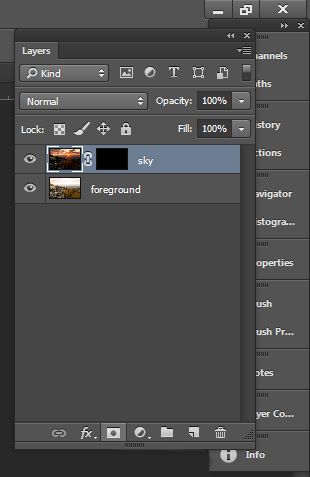
Open the two exposures in Photoshop as layers. This can be simply done with the following script. In Photoshop, select: File/Scripts/Load files into stacks (if you use Lightroom just select both thumbnails, right click and choose “Edit in>Open as Layers in PS). Then select your two exposure files. Label the layers for identification. (In this case we label one layer “Sky” and the other “Foreground”). Drag the Sky to the top layer if not already in that position.

Step 2: Add a layer mask

Add layer mask filled with black to top layer.

Add layer mask filled with black to the top layer.

Add a layer mask, as shown below, to the highlighted Sky layer. While holding down the ALT (opt) key, select the Add layer mask button located at the bottom of the layer palette. This will add a layer mask to the Sky layer and automatically fill it with black. The black-filled layer will mask out all of the Sky layer and reveal all of the Foreground layer.

Step 3: Paint over sky

Click on the black layer mask and select the paintbrush tool. Set your paintbrush to paint with white, and set the size of your brush as needed. Set the hardness of your brush to a low number to give it a soft edge while you paint. Paint over the sky area of the image, which will reveal the Sky layer. By adjusting the opacity, size and hardness of the brush as you paint, blend the two exposures together.

Paint with white on your layer mask to reveal the sky in the top image. use different opacities and hardness to make the blending look natural.

Paint with white on your layer mask to reveal the sky in the top image. Use different opacities and brush hardness to make the blending look natural. This is what the mask might look like.

Step 4: Add finishing touches

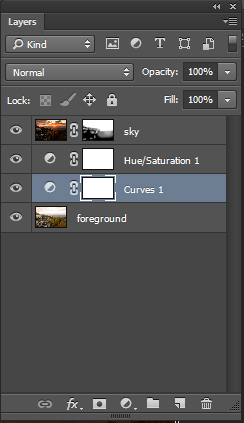
Add adjustment layers (see below) as needed to adjust colors and contrast of the layers to make the image look natural.

Final layer palette

Final layer palette

Step 5: Save your file

Save your file as a Photoshop document (.PSD). This will preserve your image with layers which you can return to if you need to make further adjustments to improve the image.  You can now can flatten the layers (Layer/ Flatten Image) and Save As a single layer file such as a JPG.

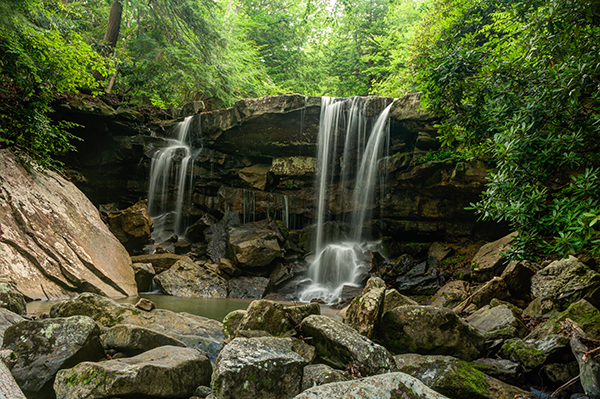
This image was created from three files using Exposure blending. Exposure #1 was exposed for the light green area above the falls and exposure #2 was exposed for the shadow area below the falls. The light was hitting the rock on the left  very hard so a third exposure was need just for that rock.

This image was created from three files using exposure blending. Exposure #1 was exposed for the light green area above the falls and exposure #2 was for the shadow area below the falls. The light was hitting the rock on the left very hard so exposure #3 was needed just for just that rock.

So next time you are faced with an extremely contrasting scene, try this easy exposure blending process to extend the exposure range of your image. Do you have any exposure blending tricks that you use? Post samples of your images.

The post 5 Easy Steps to Exposure Blending for High Contrast Landscapes by Bruce Wunderlich appeared first on Digital Photography School.

Digital Photography School

 
Comments Off on 5 Easy Steps to Exposure Blending for High Contrast Landscapes

Posted in Photography


Lomography adds Lomochrome Turquoise film to lineup

27 Oct

Back in January 2013, Lomography announced that it would be releasing a color negative film called Lomochrome Purple, which was based on Kodak’s Aerochrome. With that film, photographers could capture images with shifted colors skewed towards the presence of purple. Today the company has made a follow-up announcement, introducing the Lomochrome Turquoise XR 100-400. Read more

Articles: Digital Photography Review (dpreview.com)

 
Comments Off on Lomography adds Lomochrome Turquoise film to lineup

Posted in Uncategorized


Who Are You as a Photographer?

27 Oct

Unpaid

This is a shot I did on my own for my portfolio. In other words, it was unpaid.

Who am I? This is a question that I ask myself all the time. What kind of photography do I do? Since I am inspired by so many different photographers, across multiple genres (fashion, portrait, photojournalist, product, commercial), it can get hard for me to remember that I can’t be all things to all people, or clients.

For the sake of time, I’ve had to learn to narrow down the types of photography that I will pursue. It takes a considerable amount of time and energy to pursue new clients, to test the waters of a different area of photography.

For example, if you’ve shot primarily weddings and families for the past few years, it will take a lot of time and hard work for you to transition over to the commercial photography world. There’s a whole other language to the commercial world. Words like Prepro Doc, Hero Shot or Call Sheet may be foreign to you. The shooting process is also different, since you are likely working with a creative director before you ever even talk to the client. You also won’t get paid in advance, like you do with a wedding. In fact, I typically have to wait 30-60 days after I shoot the job to receive payment. You’ll likely need to know how to shoot with your camera tethered to a computer. You’ll need to know how to put together a quote, including usage fees. You’ll need to be able to assemble a team, including a hair stylist, makeup artist and stylist. You’ll need to have a separate website for your non-wedding photography and decent SEO for it (which can take years to build) so that new clients can find your work. You’ll need to have a decent commercial portfolio on that non-wedding site to entice creative directors, once they find their way to your site. It’s a lot to think about.

Beyond choosing what areas of photography you are going to pursue, you need to consider what image you are putting out in to the world. If a new visiter were to come to your website or blog, what would they see? Would they see a random smattering of subjects, styles and executions or would they see a focused style, or signature, to the way you compose, light and edit your images? Take photographer Nadav Kander, for example. He’s a portrait and commerce photographer based in London, England. He is not only one of my favorite photographers, but his portraits are also some of the most easily recognizable because of his unique lighting and processing. The same applies to Neil Krug, Martin Schoeller and Dan Winters, some of my other favorite photographers.

While you are in the process of determining which market(s) you want to focus on and you start to bring in to focus a signature style to your work, you need to factor these elements in to the types of clients you take, the kind of unpaid work you shoot for leisure or for your book and which images you show to the world, via social media and your website. For example, you may have the opportunity to shoot for a shoe company, a hair salon, or your kid’s soccer team, and the money is right (as in you’re hard up for cash and it pays the same day). Just because you took the gig and executed it well doesn’t mean that the images need to go on your website or blog. It may not fit in with your other images or be an area of photography you want to delve into, and that’s okay. That doesn’t make you a sell out.

Didntblog

This is from a shoot I did for a well-paying, super kind client. However, since it’s not the type of work that I want to pursue, I didn’t post any of the images on my blog.

Let’s say, for example, that you are trying to transition to the world of fashion photography. You aren’t going to start landing gigs with agencies and magazines just because you updated your bio, listing yourself as a fashion photograher. You need images – great images at that – in your portfolio to show magazine editors or modelling agencies. This means that you will need to shoot these on your own time, for likely little or no money. And once you get those first few shoots under your belt, pick a select FEW images from those shoots (read less than ten) to put on your blog and social media and ONE image from the each shoot to put on your website. Otherwise, if a client goes to your site and sees multiple images that are obviously from the same shoot, they can only assume that you aren’t very experienced in the area of fashion photography and that you’ve only done a couple shoots. You also want to make sure to shoot in a variety of settings, using a variety of different models while utilizing a variety of techniques.

Blog

These are the three images (above) that I chose to put on my blog from a recent book-building (unpaid) photo shoot that I did for my portfolio.

Port

Note the highlighted image (above) is the only image from this shoot that made it onto my website.

This process is of focusing your photography path and carving out your signature look is not a quick one. It’s been almost ten years since I graduated from college with a fine art photography degree and only within the last three or four years have I been able to start to narrow down what makes up my signature look and figure out what type of work I want to pursue. I mentioned earlier that I can’t be all things to all clients, nor do I want to be. The thought of conforming each photoshoot I do to the whims of a client’s mood board is an exhausting thought. Instead, now that I know who I am and what my style is, I can be confident that people are approaching me to shoot a job because they want me specifically. This also gives my voice more weight with a client when deciding which direction the shoot should take. Another way to ensure that you are being chosen for your style is that your prices are competitive with other photographers in the market, and the client isn’t simply choosing you because you’re the most affordable.

Myinput

This is a shot (above) I did for the cover of a local food magazine. The cover story was about edgy, high-end burgers. The editor initially asked for a photo-illustration without any people in the photo. By the end of the discussion, he went with my idea, which you can see is completely different than the editor’s original idea.

Now that I have a tightly edited portfolio, full of images that show a range of the work that I am willing and able to do, I can more easily say no to a job if it doesn’t fit in with my brand. Let’s say that a client approaches me to shoot a sexy swimsuit or lingerie editorial. I would politely decline because that’s not a part of my vision for my brand. Besides, there are plenty of talented photographers who do this exact area of work and would be happy to take the gig. Not to mention, me being a 30-something married man with a young daughter is not the image that comes to mind when I picture a swimwear or boudoir photographer. I imagine a young woman (or man) that lives and breathes sexiness. Meanwhile, I stick to what I’m passionate about.

Paid

This last image is a shot I did Charles Penzone salon, who hired me over another photographer after they saw the top image from my unpaid photo shoot.

Do you know who you are as photographer? Can you share any tips for newbies still finding their way?

The post Who Are You as a Photographer? by Nick Fancher appeared first on Digital Photography School.

Digital Photography School

 
Comments Off on Who Are You as a Photographer?

Posted in Photography


Apple iPhone 6 Plus camera review

27 Oct

The iPhone 6 Plus, introduced alongside the iPhone 6, offers one distinct feature that its sibling doesn’t – optical image stabilization. In all other respects, their 8MP cameras, F2.2 aperture lenses and updated AF systems are the same. On paper the 6 Plus doesn’t represent a great leap forward in terms of camera tech, but how does it perform in the real world? Read more

Articles: Digital Photography Review (dpreview.com)

 
Comments Off on Apple iPhone 6 Plus camera review

Posted in Uncategorized