Ein Beitrag von: Katrin Adam

kwerfeldein – Fotografie Magazin | Fotocommunity
Im vergangenen Jahrzehnt ist die Wirtschaft der Mongolei mit beispielloser Geschwindigkeit gewachsen. In jedem Jahr stieg das Bruttoinlandsprodukt um mehr als zehn Prozent.
Das Wachstum des Landes rührt größtenteils aus einem Boom in der Bergbauindustrie, denn die Mongolei verfügt über große Vorkommen an Bodenschätzen wie Kupfer, Gold und nicht zuletzt Kohle. Globale Branchengiganten haben längst begonnen, enorme Summen in das zentralasiatische Land zu investieren.


Der italienische Fotograf Michele Palazzi hat über drei Jahre hinweg das Land mehrfach besucht und den wirtschaftlichen Auf- und den gesellschaftlichen Umschwung in der Mongolei dokumentiert.
Wie die unregulierte beschleunigte Entwicklung des Landes die traditionelle Lebensweise der viehtreibenden nomadischen Bevölkerung bedroht, zeigt er in seiner Arbeit „Black Gold Hotel“.


Viele mongolische Familien haben die traditionelle Lebensweise inzwischen aufgegeben und sind in große städtische Zentren gezogen, um Arbeit in der Industrie zu finden. Nicht selten führt sie dieser Entschluss jedoch in den finanziellen und sozialen Abgrund, nämlich dann, wenn sie aufgrund des immensen Zustroms an Gleichgesinnten keinen Job finden.


Der Fotograf begleitete die Nomaden auf ihrem Zug durch die Steppe, lernte die neuen Stadtbewohner kennen und verbrachte einige Zeit mit den Bergarbeitern. Nah ist er an den Menschen, einfühlsam und unaufgeregt zeigt er uns, wie sie leben.
All diesen Menschen gemein ist, dass sie bestmöglich versuchen, mit den Umständen umzugehen. Doch Umweltverschmutzung durch Müll, Kohlestaub und Industrieabfälle vergiften die Vegetation und machen denen, die wenig haben, das Leben schwer.


Inspiriert zu dieser sehr persönlichen Arbeit, so der Fotograf, habe ihn der Film „Die Geschichte vom weinenden Kamel“. In ihm stecke viel Poesie und auch ein nostalgisches Element, dem er nachgehen wollte.
Doch auch einen journalistischen Anspruch habe er an das Projekt gehabt, selbst wenn er sich selbst eigentlich nicht als Journalisten betrachte.


Sein politisches Interesse habe ihn 2009 nach seinem Studium an der Scuola Romana di Fotografia zum Bildjournalismus geführt, erzählte Michele Palazzi mir. Er habe stets den Drang, zu verstehen, warum etwas so ist, wie es ist und den Dingen auf dokumentarische Weise auf den Grund zu gehen. Doch erachte er seine Sichtweise keineswegs als absolut maßgeblich oder objektiv.


Der Modernisierungsprozess in der Mongolei habe ihn schier überwältigt. Als er das erste Mal die Hauptstadt Ulan Bator besuchte, habe er beim Anblick des Stadtbildes sehr gemischte Gefühle gehabt – eine ungare Mischung aus Chaos, Nostalgie und Ausweglosigkeit, die ihm übel aufstieß.
Dass sich die Modernisierung nicht einfach anhalten oder gar umkehren lässt, sei Michele bewusst. Auch wolle er keinesfalls etwas oder jemanden konkret verurteilen. Ihm sei es in erster Linie persönlich wichtig, zu dokumentieren, was ihn umtreibe.


Ohne Förderung, ohne Auftrag widmete er sich seinem Projekt und unternahm immer wieder auf eigene Kosten Reisen in die Mongolei, um seinem Thema auf der Spur zu bleiben.
Viele Menschen habe er kennengelernt, zeitweise bei ihnen übernachtet, ihnen bei der Arbeit geholfen, mit ihnen gegessen und mit den Kindern gespielt. Es beweist, dass er mit Hingabe bei der Sache ist. Er sammelt nicht nur Bilder ein, er lebt die Story.


Herausgekommen ist eine Reise in Bildern in den Alltag der Menschen im ganzen Land, von den Familien in der Wüste Gobi, die sich trotz aller Schwierigkeiten entschieden haben, den Traditionen der Steppe treu zu bleiben bis zu den Jugendlichen in Ulan Bator, die eher einen westlich orientierten Lebensstil führen.
Von den Kindern der Armen, die gezwungen sind, im Zivilisationsmüll nach Schutz und Essbarem zu suchen, bis hin zu denen, die auf der Suche nach dem Glück in der Stadt das Nomadenleben hinter sich gelassen haben und jetzt zwischen beiden Welten gefangen sind.


Wer sich weitere von Micheles Arbeiten anschauen möchte, dem empfehle ich an dieser Stelle einen Blick auf seine Webseite.
kwerfeldein – Fotografie Magazin | Fotocommunity
Once you enable the filter in Lightroom’s library module, you are able to search your images in three ways – text, attributes and metadata. To activate the filter bar, the keyboard shortcut is backslash (\). The filter bar will be activated and displayed on top of the workspace (see the screenshot below), only if you press the backslash key in the Library module. If you press the same backslash key in Develop, you will be see the before version of the selected image, provided you have made some corrections to your image.

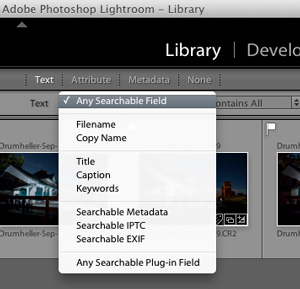
The first option, Text mode allows you to search your images by the images’ text fields, from title, caption, keywords, searchable metadata, searchable IPTC, searchable EXIF, to any searchable plugin field. The field box comes as a drop down menu, where you can pick the text your search should be based upon.

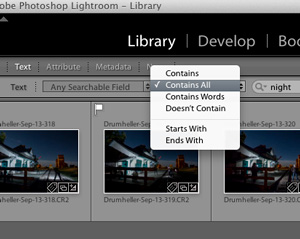
In the next box you can pick either one of the following parameters – contains all, contains, contains words, or doesn’t contain. You can select starts with or ends with as well. In the last box you can enter your text, the text which you want your search should be based upon.
 |
 |
The next option to filter is based upon the Image attributes. This section is further divided into flag status, ratings, color ratings and kind of file. In flag status, you can either pick flagged, unflagged, or rejected ones as well as a combination of two of those choices by clicking the flag symbols. Once you filter your images, the selected ones will be highlighted in white (use Ctrl/Cmd+A to select all).


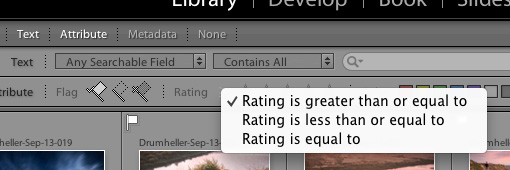
The next option in this section is star rating; you can filter photographs based on the number ratings you have applied to them. You can click the third star if you want to filter the photographs which have three stars exactly. You can also select less than or greater than by clicking the greater than symbol (>), where you will be prompted to select one of the following:
The next option in this section is filter by color label; you might have applied color labels based on your own methods of flagging images. For example green for web upload, red for yet to process, or something like that. Imagine you want to view only the red ones which you wish to process now. You can do that by clicking the red color box alone or you can add yellow along with it by clicking that box as well. In this way you can combine all the color labels, or only the ones you want. If one color label is selected, that particular box will be brighter than the other, which means it is active.
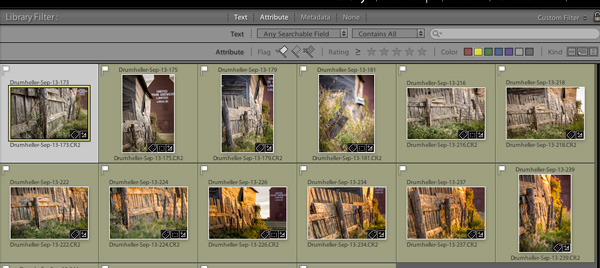
The last option in this sub-section is to filter by kind; which in this instance means the kind of file. In Lightroom you can have three kinds of files; master image files, virtual copies, and video files. If you want only the virtual copies you can select that particular icon alone. Like the other filters here, you can also combine more than one choice.
The most powerful option to filter your photographs is by metadata – the options are endless.
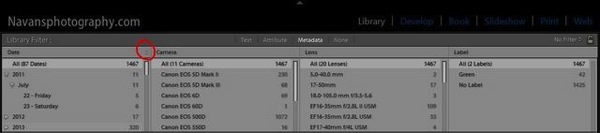
You have the option to filter your photographs by all of the metadata in your files, you can get an idea by looking at the screenshot above. You can combine multiple metadata together to work for you by adding more filter columns. Click the right side of the title for an option to add more columns with other criteria. Click the filter title itself to change it to something else. In the screenshot, I have clicked the title Label; and you can see the pull-down menu of options that appeared.
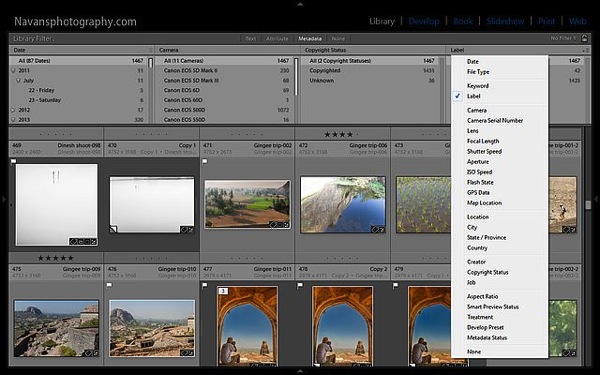
The filtered photographs based on your criteria will be instantly displayed on the below workspace. You can also combine multiple filter sections from Text to Attributes to Metadata or all together, the options are almost endless.
You can create presets if you have a particular way of filtering your photographs, provided you have managed your library in that way. Have you noticed the lock symbol on the right end of the filter bar? The drop down menu next to the lock symbol has an option to save your search as a preset, so next time you just have to select that preset. Easy right?
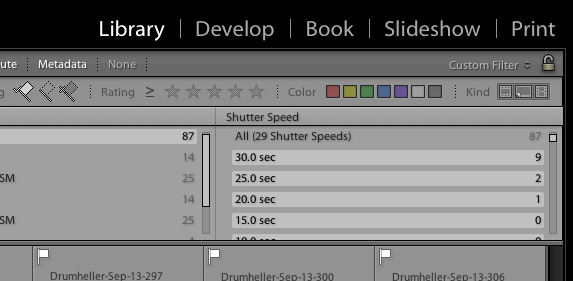
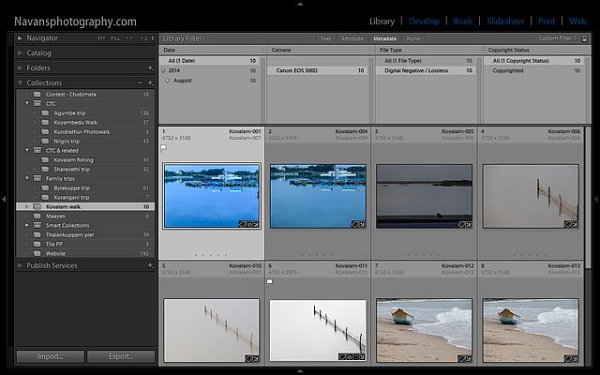
The lock symbol at the right end of the filter bar will lock the filter criteria (if you click it) and the same filter can be applied to all your collections or folders one by one as you select the folders and collections.
I hope this article helps you work smarter with Lightroom and saves you lots of time and resources.
Cheers and happy photographing.
The post How to Use the Filter in Lightroom’s Library Module by Navan Viswa appeared first on Digital Photography School.
Today Olympus announced the release of its Olympus Capture software, which is designed to bring tethering to owners of the OM-D E-M1. The software, along with the new E-M1 firmware 2.0, was announced last week at Photokina, but today photographers can finally take advantage of the new feature set. Read more
Articles: Digital Photography Review (dpreview.com)
[ By WebUrbanist in Art & Sculpture & Craft. ]

State of Dress is part fashion, part art and part personal mission, an attempt to capture the essence of all fifty States in the US through a series of site-specific dress designs tailored to each location. Robin Barcus Slonina is the multi-disciplinary artist behind this project and the star of an upcoming documentary of her travels and work.

Some, like the New York City garbage bag dress, are intentionally humorous, referencing absurd couture mixed as well as ubiquitous street-side trash bags. Others, like the Nevada casino chip gown, are plays on local pastimes – in this case: the gaming and gambling cultures for which the state is most well-known.


While artificial materials make up some of the dresses, others are constructed from local organic elements, like Iowa’s prairie dress and Minnesota’s corn dress, each set in (and seeming to spring up from) an apt natural landscape.


Other states with lots of nature likewise ended up with environmental materials, from willows in Wyoming to pine cones in Maine and pine trees in Wisconsin.

The creation of each piece of apparel comes with its own story. Here is a bit more from the artist about the making of the NYC trash bag dress: “The first time I ever visited New York as a young artist was during a massive garbage strike, and it left a lasting impression on me to see mountains of garbage piled so high on busy city sidewalks. To me, the sanitation workers that mange these tiny mountains every week are the true heroes of the city.”

“However, by no means did I mean any disrespect or want to create something ugly for this metropolis of art, beauty and fashion. I therefore strived to create a jet-black, fashionable New York dress, that just happened to be made from garbage bags. To me, this piece represents all the dramatic contrasts inherent to New York: wealth and poverty, art and homelessness – beauty and trash. To fill the bags, I used another New York icon – crumpled-up New York Times newspapers.”
Instead of burying our legacy under the Earth’s surface, these structures showcase the impact of the millions of tons of trash major cities produce on an …
Click Here to Read More »»
Dump that dirty old trash can into an even larger one, because it’s time to upgrade! Here are some fantastic artistic trash and garbage cans.
Click Here to Read More »»
Combining light art photography and high fashion, these show-stopping runway gowns are manufactured without physical material and composed purely of light.
Click Here to Read More »»


[ By WebUrbanist in Art & Sculpture & Craft. ]
[ WebUrbanist | Archives | Galleries | Privacy | TOS ]
Epson has announced a pair of high-end flatbed scanners that are capable of digitizing film in sizes of up to 10x8in. Replacing the Epson Perfection V750 and V700, which were introduced in February 2006, the Epson Perfection V850 and V800 will feature the same specification as the previous models, but will benefit from faster start-up and lower power consumption. Read more
Articles: Digital Photography Review (dpreview.com)
The latest version of Apple’s mobile operating system, iOS 8, offers camera app developers access to previously locked manual controls such as focus, shutter speed and ISO. A new app called Manual not only makes use of the manual controls offered by iOS 8, but puts them at the center of the user experience. Read more at connect.dpreview.com
Articles: Digital Photography Review (dpreview.com)
We told you about InkyDeals before. This time I’m happy to inform you that InkyDeals turns three! Since founding of the project, InkyDeals managed to gather a huge community of over 300k members. These days they’re one of the biggest websites offering daily design deals. InkyDeals is the place to go if you want to buy premium resources at unbeatable Continue Reading
The post Inky’s Birthday Treat: Get 50% off All Deals and an iPhone 5S appeared first on Photodoto.
[ By WebUrbanist in Architecture & Cities & Urbanism. ]

A complex spanning in seemingly all directions, this sky-oriented, cloud-shaped, forward-thinking design has just won the Shenzhen Super City Competition in China.


Dubbed Cloud Citizen, this winning proposal was a collaboration Urban Future Organization and CR-Design in conjunction with a team from Chalmers Technical University.


The design is aimed at tackling the Shenzhen Bay, an area adjacent to Hong Kong facing long-standing and still-growing issues of urban density and pollution. Of course, the visually-striking aspects also help form an iconic identity from this mega-structure as well.


The idea involves suspending residential, commercial and institutional nodes of activity in the air, interspersing homes with cultural facilities and leisure centers and allowing small pieces to add up to a larger whole. Instead of a straight vertical skyscraper, the organic form branches out with three-dimensional complexity to create interconnections in the sky.


Aside from its mesmerizing aesthetics, the project boasts a slew of sustainable strategies: “All 170 hectares of the 680 meter-tall super city work in cooperation with nature to make that future a reality; lush gardens act as ‘green lungs’ connecting each of Cloud Citizen’s public spaces; built-in mechanisms harvest rainwater, and power the city with solar, wind, and algae-based energy, special sections of the city will store carbon and filter particles from the air, while housing sanctuaries for plant life; localized food production modules and housing will cut down on carbon emissions from transportation. These diverse elements work together to create a harmonious vision of the cities of the future.”
Planned for a rural area outside Chengdu, ‘Great City’ will be entirely car-free, organized around central vertical housing with green spaces easily accessible.
Click Here to Read More »»
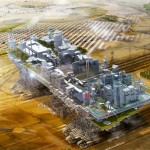
The notion of a mobile city is not new, but in this case, the architect has gone to great lengths to construct a vision that could conceivably be built. So …
Click Here to Read More »»

Taking advantage of air rights above existing an transportation nexus, this design integrates elevated train lines, apartments, offices and shops to create a …
Click Here to Read More »»
[ By WebUrbanist in Architecture & Cities & Urbanism. ]
[ WebUrbanist | Archives | Galleries | Privacy | TOS ]

You must be logged in to post a comment.