RSS
 

Archive for August, 2014

Ein Bild, hundert Möglichkeiten

27 Aug

Dies soll ein kleines Plädoyer dafür sein, sich über einen längeren Zeitraum mit ein und demselben Foto zu beschäftigen. Zu experimentieren, zu kombinieren, zu schauen, was alles aus einem Foto rauszuholen ist.

Denkt man an „ein Bild, hundert Möglichkeiten“ kommt einem vielleicht erst einmal Photoshop in den Sinn. Digitale Bildbearbeitung kann aus einem Ursprungsfoto so viele neue Versionen schaffen, man braucht nur genügend Ideen und ein bisschen Handwerk. Doch ich glaube, das funktioniert auch analog.

Photoshop habe ich nicht. Ich habe einen Scanner, ein einfaches Umsonstbearbeitungsprogramm, das meine gescannten Vorlagen beschneiden und ein bisschen an den Kontrasten drehen kann, und eine Dunkelkammer. Das reicht mir, um aus einem Foto das Beste rauszuholen und verschiedene Versionen durchspielen zu können.

Auch der Drogeriemarkt an der Ecke tut mit seinem Fotoservice ungewollt sein Möglichstes. Denn – analog Fotografierende werden es kennen – egal wie oft man sein Negativ dort abgibt, man bekommt stets eine andere Version des Abzugs zurück: Mal sind die Ränder beschnitten, mal sind es gesättigtere Farben, mal andere Kontraste. Und manchmal ist das Foto sogar spiegelverkehrt abgezogen worden. Unwissend leistet CEWE schon den ersten Schritt für meine hundert Möglichkeiten. Trotzdem ist das Selberscannen das Erste, was ich zuhause mache, denn den Abzügen traue ich nie so wirklich.

Eines meiner absoluten Lieblingsbilder ist vor sechs Jahren in einer Lagerhalle entstanden. Ich habe mit einer befreundeten Fotografin eine Tour gemacht, meine Kiev hat schnell aufgegeben, ihre Canon hat den Tag über alleine durchgehalten, später haben wir die Negative geteilt. Eines dieser Bilder zeigt mich schräg und von hinten im Licht stehen. Und obwohl es unspektakulär ist: Ich mag dieses Bild sehr.

In den letzten Jahren habe ich es immer wieder für verschiedene Ideen verwendet, habe es in der Dunkelkammer benutzt, um Chemie oder Einstellungen zu testen und im Laufe der sechs Jahre sind, ohne es geplant zu haben, viele Versionen des selben Ursprungsnegativs entstanden.

Und auch, wenn es keine hundert geworden sind, ist es für mich dennoch ein schönes Beispiel, wie sich dieses Foto als roter Faden durch meine fotografische Entwicklung zieht. Ich zeige Euch meine liebsten Versionen dieses Fotos, ohne Wertung oder Reihenfolge, welches nun die beste ist, denn eine „richtige Version“ hat dieses Foto für mich nicht.

Zuerst zeige ich Euch die einfache gescannte Version. Kleinbild, Farbfilm. Welcher, weiß ich nicht mehr, aber ISO 200 steht auf den Streifen. Da ich im Fotolabor bisher nur schwarzweiß abziehe, ist es auch die einzige Version in Farbe. Alles, was ich fortan mit den Abzügen angestellt habe, ist schwarzweiß.

Die Rückenansicht eines Mädchens mit wirren Haaren.

Eine meiner liebsten Möglichkeiten in der Dunkelkammer ist das Abwedeln. Ich habe mir einen kleinen Fächer gebastelt, mit dem ich ab und an Ecken von Bildern verwische und schöne weiß zerfließende Übergänge schaffe. Auch dieses Selbstportrait braucht für mich zerfließende Ränder. Ich lese viel und lasse mich dabei auch in meiner künstlerischen Denkweise oft von Litartur leiten, inspirieren und beeinflussen.

Literatur ist neben der Kunst meine zweite Quelle der Inspiration, der Ruhe, der Gedanken und ziemlich oft kreuzen sich diese Wege und treten in Symbiose. Ich habe mal ein wundervolles Zitat in Günter Grass’ „Der Butt“ gelesen, was mich seither beschäftigt und mich direkt an diesen Handabzug erinnert hat:

Jetzt zerfaser ich von den Rändern her.

Diese Botschaft, am äußersten Punkt angreifbar zu sein, sich dort aufzulösen, dieses Gefühl habe ich, wenn ich das Foto ansehe. Auch, wenn es für Außenstehende natürlich schwer nachvollziehbar ist, aber sechs Jahre sind eine lange Zeit, seitdem ist viel passiert und all das projiziere ich in dieses Bild mit seinen zerfasernden Rändern.

Die Rückenansicht eines Mädchens in schwarzweiß.

Das gleiche Gefühl hatte ich, als ich vor zwei Jahren meine Examensarbeit schreiben sollte. Verwirrt, unklar, wo es hinführen soll, ein großes Thema auf kleinen Schultern. Am Ende ist alles nochmal gut gegangen, ich habe das Thema zu fassen gekriegt und mich intensiv mit Schrift und Bild auseinander setzen können.

Aber ein Foto aus dieser im Zuge des Schreibens entstandenen Reihe spiegelt passend mein Gefühl wider: Das Selbstportrait in der Fabrik. Ich habe damals angefangen, mit Folien in der Dunkelkammer zu experimentieren, um auf ganz analoge Art und Weise Schriftzüge in das Foto zu bringen. Es ist ein Zitat von Finn-Ole Heinrich aus seinem „Räuberhände“-Roman geworden, mit der prägnanten Zeile „Nur ich irre umher“.

Abgetippt mit der Schreibmaschine auf weißes Papier, kopiert auf eine Folien, aufgelegt in der Dunmkelkammer auf das Fotopapier, steht es nun im Bild. Auch, wenn die Lesbarkeit ein bisschen gelitten hat, ist es in die Mappe zur Abschlussarbeit gewandert und gefällt mir auch zwei Jahre später noch.

Beschriftete Folien mit einem Zitat.

Die Rückenansicht eines Mädchens mit einem Zitat.

Dann kam eine Zeit, in der ich mich intensiver mit der Möglichkeit des Kombinierens auseinandergesetzt habe. Kombinierte Bilder als Sammlung von Geschichten.

Das Selbstportrait in der Fabrik hat in der Dunkelkammer und Zuhause auf dem Schreibtisch viele andere Fotos kennenlernen dürfen. Am Ende habe ich mich für die Konbination mit einem Knallerbsenstrauch entschieden. Das Foto hat an der linken unteren Ecke eine helle Überbelichtung, der Deckel der Kamera war etwas lichtdurchlässig.

Zusammengeschoben ergeben die beiden Fotos eine ganz neue Geschichte, jedes für seinen Teil, aber in der Mitte ist der helle Fluchtpunkt, in dem alles zerfließt. Auch das Format habe ich geändert. Da die Knallerbsen im Mittelformat fotografiert sind, habe ich das Kleinbild beschnitten und angepasst. So ist ein bisschen mehr weiße Wand und ein bisschen weniger Ich im Mittelpunkt.

Ein Knallerbsenstrauch mit Knallerbsen und Ästen.

Eine Kombination aus der Rückenansicht eines Mädchens und dem Knallerbsenstrauch.

Neben all diesen Versionen existieren noch viele weitere, die in meinem Fotokoffer liegen. Nur ein Abzug des Selbstportraits in der Fabrik hat es neben meinem Schreibtisch an die Wand geschafft und das nicht, weil er der schönste ist, ganz im Gegenteil: Eigentlich ausrangiert ist in der Dunkelkammer ein unfixierter Testreifen auf ihm gelandet und hat seine Säure überall verteilt.

Eine Rückenansicht eines Mädchens auf einem Handabzug der fleckig ist.

Aber gerade das macht ihn für mich zur persönlichsten Version, weil es zeigt, wie kleine Fehler, Unaufmerksamkeiten und Zufälle Einfluss auf die Arbeit nehmen, wenn man nicht damit rechnet. Und mit den kaffeeähnlichen Flecken mag ich ihn fast noch lieber als ohne.


kwerfeldein – Fotografie Magazin | Fotocommunity

 
Comments Off on Ein Bild, hundert Möglichkeiten

Posted in Equipment


Samyang announces 50mm f/1.4 UCM still and 50mm T1.5AS UMC video lenses

27 Aug

Korean lens brand Samyang has announced that it will use the Photokina show next month to introduce a new 50mm f/1.4 lens for stills photographers and the same lens designed for videographers using DSLR and mirrorless cameras. Both the Samyang 50mm f/1.4 AS UMC and 50mm T1.5 AS UMC are designed to cover a full frame sensor and will each come in 10 mounts. Read more

Articles: Digital Photography Review (dpreview.com)

 
Comments Off on Samyang announces 50mm f/1.4 UCM still and 50mm T1.5AS UMC video lenses

Posted in Uncategorized


Unstealable Bike: Theft-Proof Bicycle Frame Doubles as Lock

27 Aug

[ By WebUrbanist in Technology & Vehicles & Mods. ]

unstealable theft proof bicycle

If you are sick of worrying about your bike being stolen or taking a lock with you wherever you go, this design will solve both of those every problems faced by bicyclists around the world.

unstealable bicycle in action

In less than 20 seconds, the Unstealable Bike‘s locking system can be deployed by unlatching and rotating two pieces of the frame, then sliding out and using the seat bar to connect and secure those two parts.

unstealable bike leaning bridge

Unlike most quick-release seats, the ability to slide out the bar becomes an asset rather than a liability in this case, making it possible to lock up your bicycle with one of its most frequently-stolen pieces.

unstealable cycle prototype design

The scale of the components employed makes it easy to attach the cycle to anything from a slim signpost to a thick tree.

unstealable bike engineering team

Created by a team of three engineers, the bike is currently a prototype and seeking funding for mass-production and sale. Its builders bill it as safe, well-designed and comfortable – a more useful variant of the frequently-seen projects for collapsible bicycles.

Share on Facebook


[ By WebUrbanist in Technology & Vehicles & Mods. ]

[ WebUrbanist | Archives | Galleries | Privacy | TOS ]


WebUrbanist

 
Comments Off on Unstealable Bike: Theft-Proof Bicycle Frame Doubles as Lock

Posted in Creativity


Fujifilm announces X30 enthusiast compact camera

27 Aug

Fujfilm has introduced its X30 enthusiast compact, which offers a 2/3″ X-Trans II CMOS sensor and a 28-112mm equivalent F2.0-2.8 lens – both of which are retained from the X20 that precedes it. New features include a larger, tilting 3″ LCD, an XGA OLED electronic viewfinder, a control wheel around the lens, and greatly improved battery life. A new ‘Classic Chrome’ film simulation mode has also been added, as has Wi-Fi. Read more

Articles: Digital Photography Review (dpreview.com)

 
Comments Off on Fujifilm announces X30 enthusiast compact camera

Posted in Uncategorized


What’s Really Missing from Your Photographs?

27 Aug

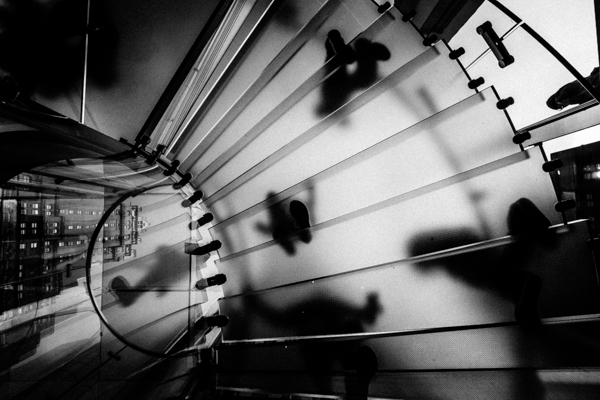
01 cover apple store glass step

Ever felt that your images are missing a certain je-ne-sais-quoi? I remember when I was a proud young shooter, I showed my images to my photography 101 teacher, ready for him to crown me the next best photographer he’s ever seen (Hey I was young). He looked at them, and politely said “They are coming along”.

What. The. Heck dude!? I looked at him in disbelief. I tried some Jedi mind tricks on him; trying to juice some positive note out of him. After a while, it was evident he didn’t want to offend me, I tried pressing him a last time and he gave me the same answer…that my photos were coming along. After thanking him I went my own way, still fooling myself that my stuff I was amazing.

Truth is, he was right, I felt there was something missing from my photographs, I couldn’t put my finger on it, but I knew it. I could see it in other’s images but not mine. I knew my technical photography, I knew the subtleties of composition, I was a graphic designer after all, but there was something that eluded me in photography and I couldn’t figure out what…until something terrible happened.

RRrrrring! A few years ago, I got a call from my aunt, she asked me to call my brother. Apparently my mom had some health issues. I was cool about it, my mom was a cancer survivor, and she sometimes failed here and there, having seizure but never anything major. I dialled my brother promptly.

Yo man! Heard there’s something wrong with mom, what’s up? I asked, ready for the news that she had a seizure episode or something.

He quickly blurted out three words in a rage. I heard the three words I was always afraid of hearing. She. Is. Dead…………. I dreaded hearing those words for years, ever since I knew she had cancer when I was 10.

I remember going to her room hundreds of times, just making sure that her belly was going up and down, meaning she was breathing, still alive. Mental preparedness didn’t mean jack in that moment. She survived cancer, but the Haitian earthquake claimed her.

Palm tree 1
Typical image before my mom passed away

Way to go brother to break the news, right, right? But I’m digressing. So, why am I telling you this? Well, after the storm calmed a bit, eventually, it dawned on me: I never made any photographs of her.

Before my mother went back to Haiti, she was in the US, but instead of spending time making photos of her, I chose instead to take pictures of buildings and flowers. I then understood something a little too late: My photographs didn’t mean anything to me. I shot because I saw other people shooting (thanks internet!), not because I cared for what I was doing. That “thing” I was missing? It was simple: connection. Connection to my work. I could have made a photograph of my mother that showed how much I loved her, how much I cared. A photograph that only I could have made, but I kept shooting things I didn’t care about.

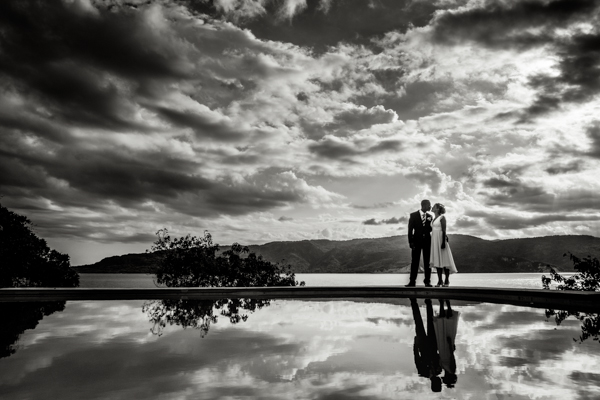
02 haiti wedding

Please don’t misunderstand, I’m not putting down making photos of flowers and buildings, I’m only saying to be emotionally connected with what you are doing. If you find yourself into photos of flowers and whatnot, by all means do it! Many photographers did, especially later in their life. You have to find your connection to your work. If you think that many landscape photographers fall short of Ansel Adam’s work, it’s really not because he had somehow special gear, it’s because he had a strong, borderline religious connection with Yosemite National Park, he came alive when he was there. Most modern landscape photographers are only interested in the physical landscape, Ansel was interested on making images that recreated the sense of awe and majesty that he felt.

It’s not the technical, the gear, the sharpness that will make you a better photographer. It’s your connection to your work. That’s the magic that no one can replicate. So what’s really missing from your photography? You. Nothing more and nothing less. So far we can’t just plug our brains into another’s to transfer the feelings and emotions we are feeling inside, but can hardly express with words. The closest thing we have to transferring our emotions directly is photography (or art in general), so why spend our time shooting things we don’t care about in the first place?

03 haitian fisherman

You can’t fake connection, shooting something that doesn’t mean anything to you will show in the work. What we feel while looking at a photograph is proportional to what the photographer felt when making it…..the big idea is that connection transcends the photograph.

When someone looks at your images, do they see something distinctively you or do they see yet another photographer? It might be easy to get likes by shooting what is expected of a photographer, but it’s much more rewarding to be yourself and connected to your work as a photographer. Trust me, been there, done that!

Be yourself, stay focused and keep on shooting.

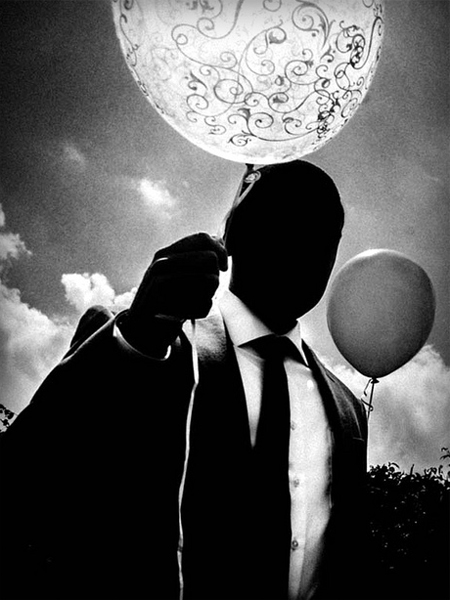
04 surrelist photo

The post What’s Really Missing from Your Photographs? by Olivier Duong appeared first on Digital Photography School.


Digital Photography School

 
Comments Off on What’s Really Missing from Your Photographs?

Posted in Photography


Instagram Hyperlapse app creates smooth time-lapse video

27 Aug

Last week Microsoft announced development of a technology that turns shaky first-person video into smooth, stabilized hyperlapse videos. Now it appears that Instagram has beaten them to market with a similar product. They’ve announced Hyperlapse, an app that converts videos of up to 45 minutes into smooth and stable time-lapses with a speed of up to 12x faster than the original. Read more

Articles: Digital Photography Review (dpreview.com)

 
Comments Off on Instagram Hyperlapse app creates smooth time-lapse video

Posted in Uncategorized


Part two: Panasonic Lumix DMC-GH4 / Sony Alpha 7S Comparative Review

27 Aug

Our comparative review of the Panasonic GH4 and Sony Alpha 7S started with a look at their designs, handling and video spec. They’ve set new benchmarks for the sophistication of their video capabilities, but they’re both potentially very capable stills cameras as well. That brings us to part two of our review, which adds six pages including analysis of image quality and dynamic range. We’ve also expanded our look at the video modes on each camera. Read more

Articles: Digital Photography Review (dpreview.com)

 
Comments Off on Part two: Panasonic Lumix DMC-GH4 / Sony Alpha 7S Comparative Review

Posted in Uncategorized


Luminosity Masks Versus HDR Software For Creating Natural Looking HDR Images

27 Aug

Jimmy’s Luminosity Masks Tutorials – Art of Digital Blending Course For Photoshop is on sale now at 15% off over at SnapnDeals. Only until September 6th, grab it now!

If you type the term ‘HDR’ into google images you’ll very quickly see why HDR photography has a bad reputation. While we all differ in our tastes, in recent years, those strongly saturated, blurry and noisy HDRs have fallen out of fashion, even amongst HDR photographers.

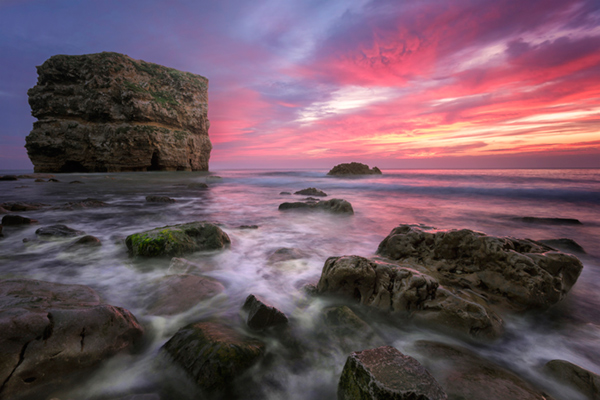
Pink seascape

Luminosity Masks Versus HDR Software For Creating Natural Looking HDR Images

The goal, among many, is now a clean HDR look. HDR programs are attempting to tidy up their processes to meet the needs of the demanding HDR photographer. However, a large number of photographers are beginning to take the blending process into their own hands, and produced beautifully balanced HDRs using luminosity masks, probably the cleanest alternative to HDR software.

In fact, luminosity masking has become an exciting buzz-term in the world of digital photography, and there’s good reason for that.

If you’re new to luminosity mask exposure blending, you can see a beginner’s tutorial on dPS in my previous article: Exposure Blending Using Luminosity Masks Tutorial

In this article we’ll take a look at the benefits and challenges of luminosity masks versus HDR software.

Benefits of Luminosity Masks

1. Image quality

We’ve all seen over-saturated, noisy, messy, HDR images. One guaranteed way to avoid the poor image quality we normally associate with HDR is to manually blend your exposures in Photoshop using luminosity masks.

When exposure blending with luminosity masks, you’re working only with the RAW files to restore highlights and shadows. You do not affect any other part of the image. In other words, your final blended image will be, more or less, exactly the same image quality as your RAW files.

You do not affect any colour changes, you retain absolute sharpness, you don’t flare up noise (which means you can shoot at a much higher ISO), and you will not exaggerate chromatic aberration.

This is the major reason why so many are turning to luminosity masking to create natural, balanced HDRs.

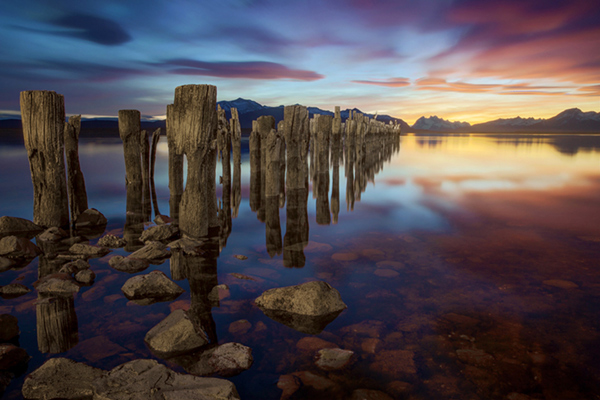
Chilean sunset

Sunset at Puerto Natales, Chile

2. Complete control over what we blend

Artists of any genre fight for complete control over their ability to express themselves. And so it is in photography. One of the problems with using HDR software is that we have very little control over the blending process.

We rely on an algorithm to choose which areas to blend with which exposures. Then we’re given some sliders to adjust. Although this gives us greater control over the process, it isn’t giving us 100% control.

Through luminosity masking, we begin with a base exposure, and we then decide for ourselves which exposures we wish to use in the blending process, and which areas we wish to adjust, and at what opacity.

The image below is a good example of how you can make very precise changes with luminosity masks.

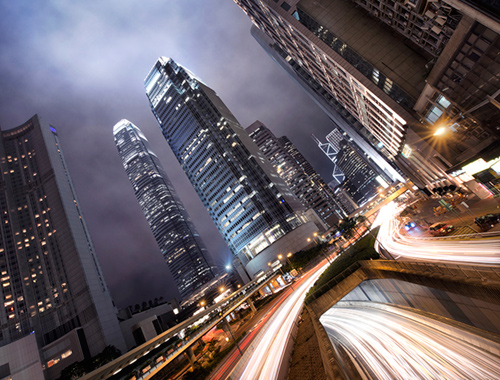
Hong Kong Light Trails

Hong Kong Light Trails

This image is made up of 11 exposures; six of which were used for the light trails, four were used for exposure blending, and one was used as the base exposure. You can learn how to create light trails like this here: How To Add Dramatic Car Trails To Your Photos In Photoshop

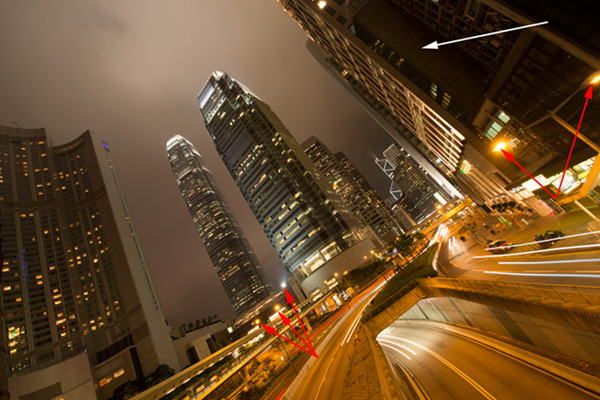
Below you’ll see the RAW file used for the base exposure.

HK Light Trails

Base Exposure

The only highlights I wanted to control in the image were the street lights, and even then I still wanted them to be bright. Through bright lights like this night cityscapes are able to give off a lot of energy and dynamism.

I very gently blended in three darker exposures to gain a little bit of control in those areas, without darkening them too much. If I ran my exposures through an HDR program, all of the highlights in the image would have been affected to some degree, which is exactly what I didn’t want.

For the darker areas, I only wanted to bring back information in one area, the side building to the right, which is noticeably dark. I used an exposure two stops brighter and, with luminosity masks, I easily painted details back into this area.

#3. No more halos and fewer ghosts

Halos simply don’t exist in luminosity mask exposure blending if you’ve done it correctly.

As for ghosts, you will rarely encounter a moving object that is difficult to blend. Since you use a base exposure, which will be done for most of your images, and simply reduce specific highlights and shadows, there shouldn’t be any ghosting.

The only challenge you may have, which is also a challenge when using HDR software, is if you have moving leaves on trees, for example, between exposures. Then the blending process is a little bit trickier.

#4. Become a better photographer

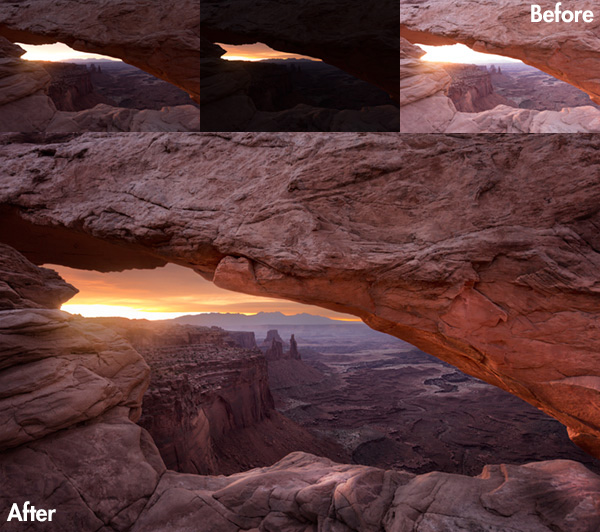
Mesa arch

Mesa Arch, Before and After Exposure Blending With Luminosity Masks

In my early days I was a die hard tone mapper. I’d approach a scene and think, “this would be a cool HDR subject”. I’d fire off some brackets and take them into Photomatix when I got home. I had a predefined routine of what to do, what result I wanted, and how to get there. I had tunnel vision.

When I began exploring luminosity masks, everything changed. I began to read a scene, not as an HDR subject, but in terms of its unique beauty and mood. I started to grasp more fully the use of light in controlling mood, whereas previously I was simply relying on getting the ‘HDR effect’ each time.

Rather than shooting off a set of automatic brackets, for a complex scene I will often bracket manually, changing the aperture, ISO and shutter speed to capture different elements of the scene. Then I’ll blend in each of the elements to hopefully get the best out of that scene.

In the Hong Kong Light Trails image above, the base exposures and brighter exposures, the light trails, and the darker exposures were all shot manually with different settings to achieve different effects.

It is through using luminosity masks, and taking my imagery into my own hands, that I have pushed myself in the field to achieve more.

#5. Combine with other HDR processes

One of the beautiful things about luminosity masks is that you can combine them with other exposure blending methods to complete the blending process. 32-bit processing is becoming an interesting way of blending exposures cleanly, but we are a long way off before the process is good enough and our monitors can handle true 32-bit files.

However, we can overcome the limitations of 32-bit processing by combining it with luminosity mask exposure blending. The tutorial below will show you exactly what I mean. The video is taken directly from the Art of Digital Blending course:

Challenges with Luminosity Masks

HDR software is simpler

Luminosity masks require more patience and a steeper learning curve than HDR software. The concept takes a little bit of time to get used to, and it will certainly challenge you to re-learn a few things.

While HDR software will take all of the leg-work out of it for you, luminosity masks require you to really think about your exposures and deepen your workflow.

Luminosity Masks don’t work on every occasion

Every now and then you’ll come across an image where luminosity masks won’t create a smooth blend between exposures. This happens because there isn’t enough contrast between the areas you wish to blend and the areas you don’t wish to affect.

In which case, using 32-bit processing or HDR software would be a good alternative.

Luminosity masks work in 8-bit mode

Like all live selections in Photoshop, luminosity masks work in 8-bit mode. They don’t affect the bit depth of your image, so if you’re working at 16 bits that won’t change. But there may be a chance of posterization in some cases.

A quote from Photoshop staff on the Adobe forum claims:

“The selection mask is 8 bits, regardless of the document precision. That fact has no affect on the precision of the image.

No, it won’t change the image or cause future posterization — the image data is still the same precision as it always was.”

So while this shouldn’t be an issue, it is something to be aware of.

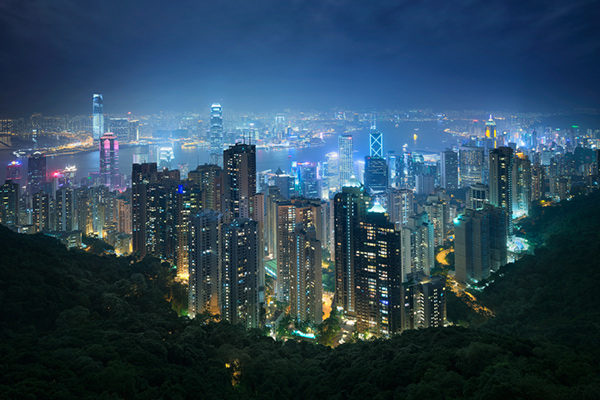
Hong kong the peak view

Conclusion

HDR images don’t have to be messy, garish and overdone. There are many ways to cleanly blend exposures to create a beautifully natural and balanced HDR. Having luminosity masks in your arsenal, will give your workflow a superb cutting edge, that can quite literally change your imagery over night.

It will require a little bit of extra work on your part, but often the best things in life do.

Jimmy’s Luminosity Masks Tutorials – Art of Digital Blending Course For Photoshop is on sale now at 15% off over at SnapnDeals. Only until September 6th, grab it now!

  • Getting Real with HDR – a Step by Step Tutorial for Realistic Looking HDR
  • Is the Death of HDR Photography Coming?

The post Luminosity Masks Versus HDR Software For Creating Natural Looking HDR Images by Jimmy McIntyre appeared first on Digital Photography School.


Digital Photography School

 
Comments Off on Luminosity Masks Versus HDR Software For Creating Natural Looking HDR Images

Posted in Photography


Forging Fun, Not Profit: Master Copycat Fakes Out 50+ Museums

26 Aug

[ By WebUrbanist in Art & Drawing & Digital. ]

fake priest artist copycat

Mark Landis is a US artist and actor of extraordinary ability, having spent decades faking various identities and committing a kind of faux philanthropy, having donated copied artworks he creates to churches and museums for decades.

fake philanthropist copyist artist

Diagnosed schizophrenic and the subject of a new documentary film Art and Craft (preview below), Landis has not been convicted of any crime since his activities were uncovered over five years ago. Primarily, he is protected by the fact that he has never sold (only gifted) his faked paintings, drawings and watercolors.

Amazingly, it took over twenty years for anyone to work out his ruse – finally, someone noted that not only was a painting he attempted to give previously donated elsewhere, but it was even gifted under the same fake moniker.

The fakes are often painted from catalog photos or over a color-printed copy that he simply creates at a copying shop, takes home and starts working over. Meanwhile, under his real name, he has also sold original paintings for years.

priest copycat artist

No one can be entirely certain of what drives Landis, since honesty and transparency are not his strongest suits, but presumably he enjoys acting the role of a generous donor, tricking the people he dupes, and ultimately seeing his faked works on display in major museums around the United States.

priest fake art

He loves being a prolific philanthropist, real or otherwise, and claims to like his role as faux Jesuit priest as well. In the end, he notes, that it doesn’t really matter to the viewer whether the thing they are seeing is real – so what should they care if the work they see is not original?

Share on Facebook


[ By WebUrbanist in Art & Drawing & Digital. ]

[ WebUrbanist | Archives | Galleries | Privacy | TOS ]


WebUrbanist

 
Comments Off on Forging Fun, Not Profit: Master Copycat Fakes Out 50+ Museums

Posted in Creativity


Opinion: Do we really need the Fuji X30?

26 Aug

With the camera industry moved on somewhat since the birth of the Fuji X series compact, is there still room for a 12 million pixel compact in a less-than compact body? In this opinion piece, senior contributing writer Damien Demolder ponders the very existence of Fujifim’s newest X-series camera. Read more

Articles: Digital Photography Review (dpreview.com)

 
Comments Off on Opinion: Do we really need the Fuji X30?

Posted in Uncategorized