RSS
 

Archive for August, 2014

Von der Idee zum Bild mit Helen Warner

24 Aug

Ein Beitrag von: Helen Warner

Ich habe dieses Foto nicht wirklich geplant. Die Location gefiel mir und ich beschloss, loszuziehen und sie mir genauer anzusehen. Ich packte einige Sachen ein, etwas Puder, Gurte, Farbe. Zudem nahm ich meine Freundin Dianne Campbell mit, falls mir dort etwas einfällt. Eine vage Idee habe ich meist, aber ich mag es auch einfach, Dinge geschehen zu lassen. Die Location begeisterte mich sehr und ich war sehr zuversichtlich, hier ein Foto improvisieren zu können.

Ich versuche, so oft wie möglich zu neuen Orten zu fahren, neue Locations zu entdecken und zu erkunden. Manchmal bin ich aber auch etwas faul und entscheide mich dann für eine „Google-Maps-Action“. Nach dem Zufallsprinzip schaue ich an verschiedenen Stellen in der Hoffnung, eine neue und aufregende Location zu finden.

Ich war überracht, dass ich bis dahin noch nicht von „St. John’s Point“ gehört hatte. Es ist ein abgelegener Ort an der Westküste von Irland. Er beginnt als grasbewachsene Landzunge und endet an einem Leuchtturm, der sich auf langen dunklen Basaltfelsen befindet. Dieser Ort ist wirklich der Traum eines jeden Fotografen!

Steiniger Pfad

Es gibt dort einen alten, zerfallenen Steinsteg, der wahrscheinlich früher dazu verwendet wurde, Boote vom Meer einzuholen. Es gelang mir, bis zum Ende des Stegs zu klettern. Mein Modell hatte es etwas schwieriger, bewaffnet mit Talkum-Puder und zwei Rauchbomben. Ich bringe nicht so gern noch Assistenten mit. Ich mag die Intimität, wenn ich nur mit einer Person arbeite. Auch wenn ich weiß, dass ich, um größere und bessere Dinge zu machen, bald eine Crew brauche.

Ein einziges kleines Probem war der starke Nebel, der vom Meer kam. Wir haben ihn selbstverständlich begrüßt, denn er brachte sehr viel Atmosphäre ins Bild, aber ursprünglich wollte ich mein Modell auf der anderen Seite des Stegs fotografieren. Der Nebel reflektierte hier jedoch zu viel Licht, sodass wir das Shooting auf einer etwas weniger interessanten Seite machen mussten. Diese ist auch spektakulär, aber auf der anderen gab es einige schöne Wasserpfützen.

Steiniger Steg mit Wasserpfützen.

Ich dirigierte mein Modell, geradeaus zu sehen, als würde sie diese tückische Landschaft durchqueren. Zudem sollte sie den Stoff des Kleides hinter sich werfen. Natürlich gab es dabei auch einige Pannen-Bilder, aber am Ende waren auch ein paar Fotos dabei, die perfekt passten und aussahen, als würde sie wirklich über die Felsen laufen und der Wind ihr entgegen wehen. Dabei war es an diesem Tag windstill. Für mich lässt die Bewegung die Atmosphäre kälter und alles etwas jenseitig erscheinen.

Spontane Fotos sind immer etwas Nervenkitzel, weil sie den Moment einfangen, in dem plötzlich alles zusammenpasst. Man arbeitet mit dem Wetter und der Landschaft und wenn dann alle Elemente passen, fühlt es sich wie ein Segen an.

Eine Frau auf einem Felsen im schwarzen Kleid.

Eine Frau in schwarzem Kleid.

Ich habe in der Nachbearbeitung nicht viel verändert, alle Details des Originalfotos blieben intakt. Jedoch entschied ich mich, alles etwas abzudunkeln, um das Kleid des Modells mit der Farbe der Felsen verschmelzen zu lassen. Ich wollte, dass es aussieht, als wäre sie Teil dieser Landschaft, als würde sie genau wissen, dass es gut ist und sie dort hin gehört.

Die Farben passten perfekt zusammen, mit ihrem schwarzen Gesicht und dem grau-schwarzen Stoff. Alles spiegelte die Farben der Basaltfelsen wieder. Alles, was ich tat, war, das Foto abzudunkeln und die Farben leicht zu verblassen, um eine kalte und feindseligen Atmosphäre zu schaffen. Ich beschloss zum Schuss noch, das Bild zu beschneiden, ihm so mehr Spielraum zu geben, Richtung Landschaftaufnahme, Panoramablick.

Eine Frau mit schwarz bemaltem Gesicht und schwarzer Kleidung geht über eine felsige Landschaft.

Das fertige Foto passt zu meiner ursprünglichen (vagen!) Idee. Ich wollte eine einsame Gestalt in dieser schönen Landschaft fotografieren und das Ergebnis übertraf meine Erwartungen.

Selbst wenn ich könnte, würde ich im Nachhinein nichts mehr verändern. Ich war glücklich mit diesem Shooting und bin begeistert davon, dass wir mit allem so viel Glück hatten: Das perfekte Licht, perfekter Nebel und diese großartige Location.


kwerfeldein – Fotografie Magazin | Fotocommunity

 
Comments Off on Von der Idee zum Bild mit Helen Warner

Posted in Equipment


23. August 2014

24 Aug

Ein Beitrag von: Bernd

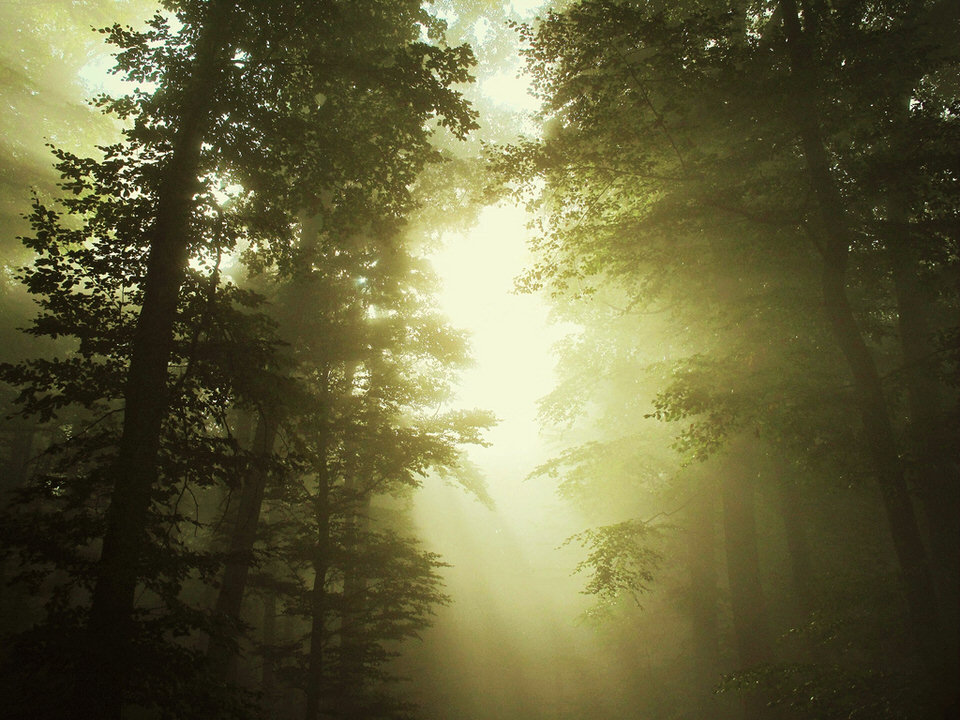
Lichtstrahlen durchfluten einen vernebelten Wald.


kwerfeldein – Fotografie Magazin | Fotocommunity

 
Comments Off on 23. August 2014

Posted in Equipment


Photoshop Versus Lightroom Which is Right for You?

24 Aug

As a photographer, whether it be professional or hobbyist, you have several skill sets to juggle and many hats to wear; you’ll need to be an artist when composing your photo’s scene, technically proficient with your camera and settings, and in the case of professionals, an adept businessperson who can maintain a business and satisfy clients consistently.

Lightroom versus photoshop

One of the most important roles you play as a photo enthusiast is that of image editor. Rarely do our images come straight out of the camera exactly as we had envisioned, so before release we are required to put our shots through the post-processing phase; this is where our raw photos are enhanced, adjusted, toned, and sharpened to give us the final image we want to deliver.

Although we have many tools at our disposal these days to help us through this phase of processing, the industry juggernaut has undoubtedly been Adobe Photoshop since its first version’s release in 1990. The software has been used by amateurs and professionals alike year after year, and is considered an essential part of most photographer’s toolboxes.

Through the following years, and the popularity surge of digital photography, Adobe realized the need for a tool more targeted for photographers, and in 2007, released Lightroom. This workflow-centric and management software has become incredibly popular in its own right, and maintains a massive following in today’s industry.
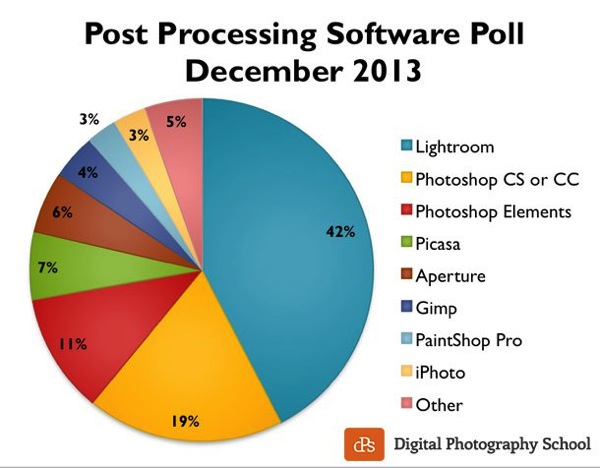
Post processing poll 2013 dPS

Click to see more on the survey results

So the obvious question is, as a photographer, which software package do you need? Both titles are excellent and carry their own strengths and weaknesses, so let’s drill down and examine them in a bit more detail to discover which one is right for you!

What we require in post-processing software

Rarely do we get a perfect result in camera that allows us to bypass the post-processing workflow, and even then, some editing is almost always required to prepare the photo for different mediums.

Generally, photos will need to be altered in size, adjusted for exposure and contrast, edited for blemishes or other imperfections, and possibly toned or have their appearance altered through filters, presets or other means. The file then needs to be exported in its final format, ready for the client, printing, or for web use.

Photoshop’s strengths

  • Pixel-level editing – images created or opened in Photoshop are comprised of pixels, which are the small physical points in a raster image, and are the smallest addressable elements in a photo. The software allows for editing even at this tiny level, meaning limitless manipulation is possible. Raster and vector images can be created from scratch.
  • Layers – Photoshop allows for multiple layers to be stored within a master file, meaning that you can keep different images or edits on separate layers, and then hide, modify or enhance any of those layers independently.
    3a

    Photoshop’s layers

    4a

    Layer blending modes in Photoshop

  • Actions  – an extremely useful feature, actions allow manipulation steps to be chained together and recorded, letting you recreate an entire editing process with a click of the mouse.
  • Compositing and blending – because of the ability to layer components within an image, it is possible to blend those layers together in unique ways. Masking allows you to protect specific parts of the photo from any adjustments being made down to the pixel level, simply by painting out the area you’d like to keep.
  • Huge toolbox – each progressive release of Photoshop seems to bring more and more useful tools into the mix. From content-aware filling, reducing camera shake effects, photo filters, and automatic panoramic image stitching, there is a tool for almost every task a photographer would need.
5

Photoshop Actions

Photoshop’s weaknesses

  • Steeper learning curve – with great power comes… a steep learning curve. Although you have a massive array of tools at your disposal, mastering them is something that takes time and practice.
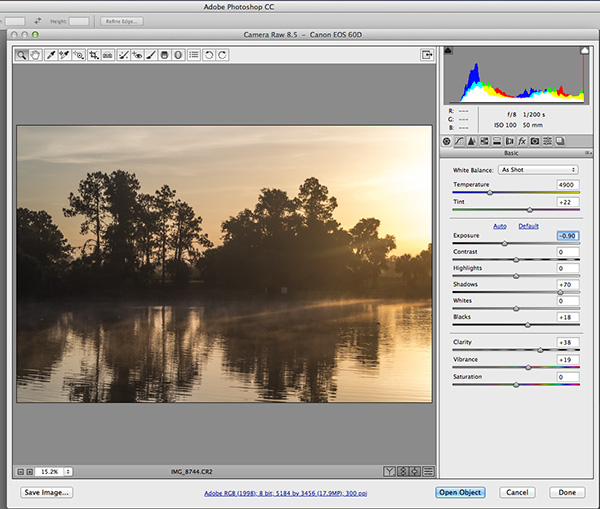
  • No built-in RAW editing – unlike Lightroom’s native ability to manipulate RAW files directly from your camera, Photoshop must rely on a plugin like ACR (Adobe Camera RAW) or something similar in order to import and modify these files.
  • No image management – Photoshop is built from the ground up to be a powerful image creation and editing tool. Although there are batch import and export tools available to make some aspects of the process easier, there isn’t a fully-recognized  built-in management or workflow system for photographers.
6

Adobe Camera Raw must be used for processing RAW files in Photoshop

Lightroom’s strengths

9

Built-in RAW processing in Lightroom

  • Built-in RAW editing – no plugin required! Lightroom natively accepts RAW files straight from your camera, and allows all of the editing you’d expect from within the software.
  • Image management and workflow centric – Lightroom was born from the desire to give photographers something better to manage their photo libraries with.  The entire program is based on creating a solid, consistent workflow that will help you make the most of the post-processing phase.

    8

    Lightroom’s image management system

  • Simple and easy to use – since Lightroom doesn’t have the huge toolbox found in Photoshop, there is MUCH less to learn. Everything from the tools available, to the interface itself, is simple and easy to manipulate.
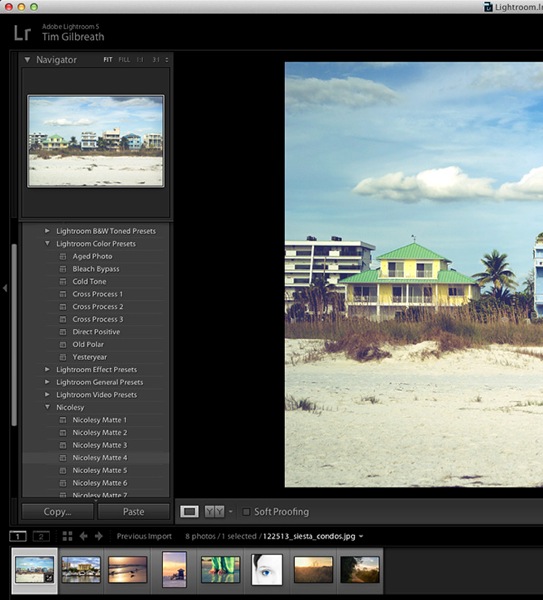
  • Presets – a photographer’s dream; imagine having the ability to string together exposure levels, contrast, and toning, and then save those to a handy file. Then imagine you can have unlimited variances of these, and apply them to any photo with a click of the mouse. Welcome to Lightroom’s presets! Photographers around the world share these online as well, giving you limitless potential options for your photo’s look and feel.
10

The power of Lightroom’s Presets

Lightroom’s weaknesses

  • No advanced editing tools – because Lightroom wasn’t intended as a full-on raster editor, most of the editing functions Photoshop users take for granted are not present here. With the exception of a few basic tools, you’ll want to use Photoshop in situations where heavy image editing is necessary.
  • No layer management – the powerful layer system in Photoshop is non-existent as well. Effects and modifications can be stacked on an image, but there is no real separation of image segments or any ability to use blending modes.
  • Photos only – again, Lightroom is intended as a workflow system for photographers, meaning you’ll only be able to import existing photos and modify them; there are no raster or vector image creation tools to be found here as there are in Photoshop. Lightroom is assuredly one-track minded.


Adobe Creative Cloud logotype with icon RGB vertical

Creative Cloud and pricing models

?Up until fairly recently, Photoshop would have had one additional disadvantage compared to Lightroom, and that would be price. In the past, purchasing Photoshop could set you back $ 400 to $ 900, depending on the version and any discounts you could use.  Comparatively, Lightroom could be had for less than $ 100. The huge up front cost made buying Photoshop outright a financial strain for budding photographers on a slim budget.

Those days are gone, thanks to Adobe’s awesome cloud and subscription program. As of the last release, all of Adobe’s main products have been converted to cloud-based programs and are all rooted in the new Creative Cloud subscription model. Generally, $ 20 per month will give you unlimited access to one Adobe title, such as Photoshop or Lightroom, and ample cloud storage, enabling you access to your files regardless of where you were. $ 50 per month will give you access to Adobe’s entire Creative Cloud suite, which is quite a deal.

This year, however, Adobe unveiled their Photography Program, and if you haven’t already gotten involved, you might want to take a look. For less than $ 10 per month, Adobe gives you Photoshop CC AND Lightroom CC, along with the aforementioned cloud storage. It’s an unbeatable deal, and eliminates the need to pick and choose which image program to use.

Which one is right for you?

Since pricing is no longer an issue, the choice as to which program to use for your photography work comes down to what is most important to you.

Use Lightroom if…

You value a smooth clean workflow more than infinite control over the editing of your images. Having said that, Lightroom is no slouch when it comes to processing photos, and you can recreate almost any look using the controls available to you in this software.

The presets provide an endless array of styles, and thousands more are available on the internet. Lightroom’s clean, efficient interface will allow you to process those multiple wedding or portrait shots quickly and consistently, and make managing all of those photos simpler than you could have imagined.

Use Photoshop if…

You need more control over your images. Photoshop can do it all, but of course the cost of that is a higher learning curve. Quick presets are not what the program does best; instead, it offers complete image editing with masks, layers, and a multitude of other tools, giving you all of the options you could ever need.

At the end of the day…

BOTH titles can be an integral part of the post-processing workflow.  Like anything else they both have strengths and weaknesses.  Fortunately, with Adobe’s wonderful new Creative Cloud subscription model, you can enjoy both programs, and employ the advantages of each within your workflow, without breaking your bank.

For more information and tutorials on both programs check out these dPS articles:

  • Save Tons of Editing Time with Lightroom Presets
  • A Concise Guide to Lightroom Develop Presets
  • 4 Quick Tips For Getting The Most Out of Lightroom Presets
  • How to Convert Photos to Black and White in Lightroom
  • Improve Your Images with the Lightroom Graduated Filter Tool
  • 3 Easy Steps Using Photoshop to Making your Images POP
  • Ten Go-to Editing Tips for Using Photoshop
  • 6 Commonly Used and Confused Tools in Photoshop Explained
  • Changing Color in Photoshop
  • Photoshop Tutorial: How to Color, Brighten and Sharpen Eyes

The post Photoshop Versus Lightroom Which is Right for You? by Tim Gilbreath appeared first on Digital Photography School.


Digital Photography School

 
Comments Off on Photoshop Versus Lightroom Which is Right for You?

Posted in Photography


Die Flügel der Schmetterlinge

23 Aug

Linden Gledhill war schon immer interessiert an Fotografie, Schmetterlingen und Insekten im Allgemeinen. In seiner Reihe „Butterfly Scales“ zeigt er spektakuläre Nahaufnahmen von Schmetterlingsflügeln, für die er mehrere Mikroskopfotos zu einem fertigen Bild komponiert.

Die Farben und Formen sind so erstaunlich, es ist ein unwiderstehliches Subjekt für die Fotografie. Ich wil, dass die Leute die Schönheit der Welt um sich herum wahrnehmen. Zum Beispiel ist es für die Leser vielleicht interessant, dass eines der spektakulärsten Bilder aus der Reihe eine Motte namens Urania ripheus ist, denn die meisten Leute glauben, dass Motten langweilig aussehen.

Von Langeweile kann man bei den Bildern von Linden Gledhill, seines Zeichens hauptberuflicher Wissenschaftler und Hobbyfotograf, nichts erkennen, sie zeigen in spektakulärer Weise einen winzigen und doch extrem faszinieren Ausschnitt unserer Natur.

Die Bilder entstehen unter einem Mikroskop mit Extension-Tubes, LED-Licht und einem High-Speed-Blitz. Ein Bild von Lindens Setup kann man hier auf Flickr bewundern. Da speziell die Schmetterlingsflügel sehr viel Tiefe haben, braucht er oft 80 oder mehr Bilder, um ein fertiges Foto mittels Focus Stacking aus millimetergenau aufeinander angepassten Bildreihen zusammenzusetzen.

Ein Schmetterlingsflügel in Nahaufnahme

Ein Schmetterlingsflügel in Nahaufnahme

Ein Schmetterlingsflügel in Nahaufnahme

Ein Schmetterlingsflügel in Nahaufnahme

Ein Schmetterlingsflügel in Nahaufnahme

Ein Schmetterlingsflügel in Nahaufnahme

Ein Schmetterlingsflügel in Nahaufnahme

Ein Schmetterlingsflügel in Nahaufnahme

Ein Schmetterlingsflügel in Nahaufnahme

Ein Schmetterlingsflügel in Nahaufnahme

Ein Schmetterlingsflügel in Nahaufnahme

Ein Schmetterlingsflügel in Nahaufnahme

Ein Schmetterlingsflügel in Nahaufnahme

Ein Schmetterlingsflügel in Nahaufnahme

Ein Schmetterlingsflügel in Nahaufnahme

Als jemand, der seine Karriere in der Wissenschaft verbracht hat, war es für Linden ein besonderes Anliegen, in dem Bereich auch Kunst zu machen.

Es ermöglichst mir, mit Leuten zusammenzuarbeiten, die ich sonst nie getroffen hätte, zum Beispiel aus den Bereichen Design und Werbung. Ich suche immer nach Leuten für weitere Zusammenarbeiten. Meine Bilder werden oft für Bildungszwecke genutzt und es macht mir großen Spaß, in den Leuten Interesse für Wissenschaft und die Natur zu wecken.

Mehr Schmetterlingsbilder und andere spektakuläre Makro-Projekte gibt es auf der Webseite von Linden Gledhill zu sehen.


kwerfeldein – Fotografie Magazin | Fotocommunity

 
Comments Off on Die Flügel der Schmetterlinge

Posted in Equipment


Things they carried: Thom Atkinson’s ‘Soldiers’ Inventories’

23 Aug

‘What’s in your bag?’ is a question we ask a lot of photographers, because, well, we’re nosy that way. Asking the very same question, photographer Thom Atkinson posed it (figuratively) to centuries of British soldiers. He’s assembled what would have been the belongings and clothing of a dozen combatants, ranging from medieval to modern-day soldiers. Take a look and learn how it all came together in our Q&A. See gallery

Articles: Digital Photography Review (dpreview.com)

 
Comments Off on Things they carried: Thom Atkinson’s ‘Soldiers’ Inventories’

Posted in Uncategorized


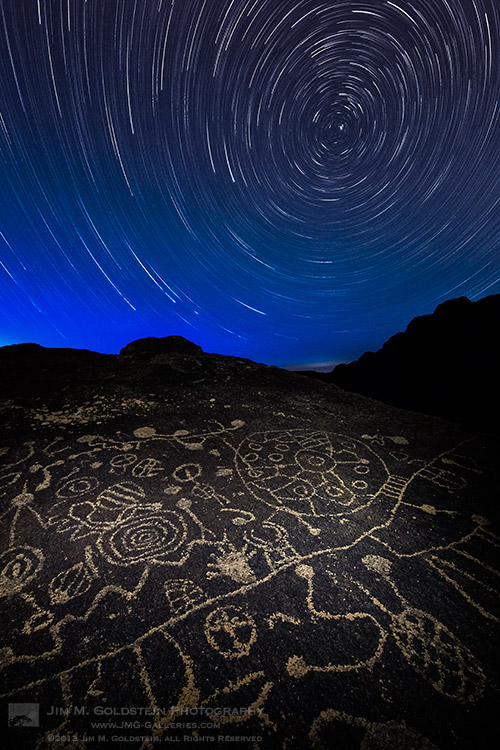
Celestial Influences: Petroglyphs and Star Trails

23 Aug

Celestial Influences: Petroglyphs and Star Trails

Standing out in the middle of no where at night in the presence of ancient petroglyphs unleashes ones imagination in more than one way. When not thinking about what wild life could be sneaking up on me (cougars, coyotes, mice… as it turns out mostly mice) my mind wandered to the source of inspiration for these ancient drawings. Was the person(s) that made these drawing bored, doodling, documenting, ancient life or gathering inspiration from the night sky? I personally made the connection between the circles & spirals on this rock with the movement of the stars.  Looking back at my photos from this night my curiosity again is piqued. I suppose the fact no one has a firm answer is what makes these petroglyphs so attractive & intriguing. What do you think?

Copyright Jim M. Goldstein, All Rights Reserved

Celestial Influences: Petroglyphs and Star Trails

The post Celestial Influences: Petroglyphs and Star Trails appeared first on JMG-Galleries – Landscape, Nature & Travel Photography.


JMG-Galleries

 
Comments Off on Celestial Influences: Petroglyphs and Star Trails

Posted in Equipment


Industrial Silos to Public Art: Massive Mural for Vancouver

23 Aug

[ By Steph in Art & Street Art & Graffiti. ]

Silo Mural Vancouver 1

Six industrial silos along the heart of Vancouver’s waterfront have been transformed into colorful, towering human figures in a massive mural project by Brazilian street artist duo Os Gemeos. The identical twins, known for large-scale and often politically-charged urban art, raised funds via IndieGoGo to complete the project for the Vancouver Biennale.

Silo Mural Vancouver 2

The silos are a landmark for the city, sitting within an ocean cement manufacturing and distribution plant on Granville Island, but they’re not exactly nice to look at. While the rest of the island is brimming with colorful plants and costumed buskers, the silos stand as the final tie to its industrial past.

Silo Mural Vancouver 5 Silo Mural Vancouver 6

The Sao Paulo-based brothers raised over $ 25,000 for the 2014-2016 Biennale exhibition celebrating art in public spaces, helping to offset the total cost. The finished work, which will be the team’s largest yet, will be unveiled on September 7th, 2014. The mural will measure a total of 23,500 square feet and stand 75 feet tall.

Silo Mural Vancouver 3

“We have an ongoing project called ‘Giants’ that has been realized in several places in the world such as Greece, USA, Poland, Portugal, the Netherlands, Brazil and England, and we will continue now in Canada, but with a difference. As the proposed Biennale has a strong connection with sculpture, we decided to find a place where the painting can be transformed, creating a dialogue between the two-dimensional and three-dimensional worlds.”

Silo Mural Vancouver 4

Silo Mural Vancouver 7

“Another aim of this project is to bring new characters to Vancouver while sharing perspectives and cultures and establishing a relationship between the people who frequent this site and integrate this work into city scenery. The connection between water and land on Granville Island, on the false creek margins, also had a lot to do with the choice of location – for us, the water acts as a vein, symbolizing life, and it is very present in our work.”

Share on Facebook


[ By Steph in Art & Street Art & Graffiti. ]

[ WebUrbanist | Archives | Galleries | Privacy | TOS ]


WebUrbanist

 
Comments Off on Industrial Silos to Public Art: Massive Mural for Vancouver

Posted in Creativity


22. August 2014

23 Aug

Ein Beitrag von: Aurélie Scouarnec

aureli_schmetterlinge


kwerfeldein – Fotografie Magazin | Fotocommunity

 
Comments Off on 22. August 2014

Posted in Equipment


Drop-Offs & Experiencing New Perspectives

23 Aug

If you’ve noticed as of late I haven’t been blogging as regularly as I have in the past. There certainly is no shortage of things to write about, but life has been an interesting ride as of late.  My focus the past several months has been primarily on family and for good reason. In a couple of months we’ll have a new member of the family arriving. This is something my wife and I have  wanted for several years and in this time we’ve been on a wild  roller coaster of highs and lows. We’re incredibly happy to have a 2nd child on the way. As I’m sure you’re curious, I know two details about the baby. First I do know the baby is a boy. Second my son has bequeathed this baby the nickname “baby cranky”. This nickname came about when I asked my son what he’d want to name his baby brother and apparently “cranky” was at the top of his 3 year old mind. Interestingly enough because I was curious I also asked him at the same time what he wanted to name the baby if it was a girl and his response was equally amusing, “wimpy”.

The process of being a parent has been hard, but amazing. While I thought I knew what sleep deprivation was as a night photographer, it is nothing compared to the prolonged sleep deprivation needed to care for a new baby. When my first son was born both my wife and I had brief moments of hallucination from our lack of sleep. We look back at those moments fondly. One hard truth about parenting beyond sleep deprivation is that time becomes precious. My time in the field for now is less than before and will remain that way, but it is deliberate and with purpose.

The one common element between parenting and photography that I enjoy is the ability to take in new perspectives. Seeing & experiencing a young child interpret the world with out bias, internal filters or awareness of boundaries is exhilarating and hilarious.  This ability to see new perspectives is what makes parenting and photography so attractive and addicting.

With that I leave you with one of my favorite quotes from my son:

When asked what he’d wish for when he sees his first star, “More stars!”

Here’s to more stars!


Copyright Jim M. Goldstein, All Rights Reserved

Drop-Offs & Experiencing New Perspectives

The post Drop-Offs & Experiencing New Perspectives appeared first on JMG-Galleries – Landscape, Nature & Travel Photography.


Feed Ads by FeedBlitz
powered by ad choices


JMG-Galleries

 
Comments Off on Drop-Offs & Experiencing New Perspectives

Posted in Equipment


Parkour

23 Aug

Parkour ist ein Sport, bei dem man sich von A nach B bewegt, ohne sich nach dem durch Architektur und Kultur vorgegebenen Wegen zu richten. Dabei gilt es natürlich, einige Hindernisse zu überwinden, wobei es bei Parkour vor allem darum geht, dies möglichst effizient zu schaffen und nur mit der Hilfe des eigenen Körpers. Die Sportart wurde Ende der 80er Jahre von Raymond Belle und seinem Sohn David Belle entwickelt und ist heute besonders durch Spielfilme und Werbung bekannt.

Andy Day ist Parkourläufer und Fotograf. Seine Bilder zeigen Parkourkünstler in Aktion. Mal schweben sie über dem Abgrund, mal steigen sie senkrecht eine Mauer nach oben oder küssen kopfüber eine Frau. Sie scheinen der Schwerkraft zu trotzen und auch, wenn man für diesen Sport einiges an Kraft und Körperkontrolle benötigt, sieht es auf den Fotos so wunderbar leicht und surreal aus.

Andy lehrt auch Parkour und wer gern noch mehr über diese Sportart wissen möchte, findet seine Beiträge auf buildering.net und parkourgenerations.com unter dem Namen Kiell.

Ein Mann spingt von einem Betonpfeiler auf einen anderen.

Ein Mann im Spagat an einer Mauer.Ein Mann klettert an einer Mauer.

Ein Mann springt an eine Mauer.

Ein Mann springt von einem Felsen.

Ein Mann springt von einem Felsen.Ein Mann hängt kopfüber an einer Mauer und küsst eine darunter stehende Frau.

Ein Mann springt von einer Mauer auf eine Treppe.

Ein Mann klettert über einem Tunneleingang. Darunter gehen Passanten.

Ein Mann macht Handstand auf dem Rand eines Gebäudes.Ein Mann sitzt auf einem hohen Gerüst über der nächtlichen Stadt.

Ein Mann springt über eine Treppe.

Ein Mann springt von einem Gebäude.Eine Frau springt von einer Mauer.

Ein Mann springt von einem Haus zum anderen.

Ein Mann klettert an einer Hauswand.

Zwei Menschen springen von einem Haus zum anderen.

Die Webseite von Andy heißt Kiell.com. Auch ein Blick auf seinen Blog und Tumblr ist sehr zu empfehlen.


kwerfeldein – Fotografie Magazin | Fotocommunity

 
Comments Off on Parkour

Posted in Equipment