RSS
 

Archive for June, 2014

Bizarre Cities: 7 More Strange Urban Wonders of the World

26 Jun

[ By Steph in 7 Wonders Series & Travel. ]

Strangest Cities

A retirement community for circus freaks, a village of Chinese dwarves and a gated community for people who claim to speak to the dead are among the world’s weirdest settlements. Going beyond mere unlikely locations for human habitation, these towns are intentional communities devoted to the strange and unusual.

Dwarf City: Mountain Home for Little People Only

Strangest Cities Dwarf Village 1
Strangest Cities Dwarf Village 2

Is an amusement park full of little people dressed up to amuse paying visitors exploitative? Maybe. But the nearly 100 people who reside at Dwarf Empire have come from all over China for guaranteed housing and, reportedly, fair wages. They live and work in tiny castles, dress up as fairies and medieval soldiers and put on shows for hundreds of guests each day, and receive dance training and English lessons. The park owners hope that many more little people – who often have difficulty finding work in China, and end up living on the streets – will help the village expand to 800-1,000 residents in the near future.

Lily Dale: Gated Community for Spiritualists

Strangest Cities Lily Dale 1

Strangest Cities Lily Dale 2

A group of spiritual mediums came together at the height of the spiritualist movement in the late 19th century to found their very own village, where only people who can read minds and communicate with spirits (and their families) could reside. Established in 1879 on the shady banks of a New York lake, the town of Lily Dale has been the setting for seances, ‘automatic messages’ that appeared on chalkboards and other such phenomena ever since. Visitors still flock to Lily Dale to talk to dead relatives or marvel at the gated-off ‘Inspiration Stump’ where mediums once called upon spirits to show themselves. Mediums who want to work in the town must pass three 30-minute test readings evaluated by officials of the Lily Dale Assembly.

Retirement Community for Carnies
Strangest Cities Gibsonton 1

Strangest Cities

Where do carnival workers go when they’re not on the road? Many live in ordinary houses in ordinary towns just like anyone else, but in the mid-20th century, some sought a refuge where they could get away from the civilians who gawk at the unusual physical features that drew them to become a part of the carnival life. Gibsonton, Florida was a small town of fishermen and lumber workers before carnival legends like Al “The Giant” Tomiani (who was 7’11″ tall) and his wife Jeanie “The Half-Woman” (2’6″ tall) bought property there. The town ultimately drew many more so-called ‘circus freaks,’ including Grady Stiles Jr., known as Lobster Boy for his claw-like hands, whose infamy was enhanced by the fact that he murdered his daughter’s fiance on the night before their wedding and was subsequently murdered in a hit taken out by his ex-wife and stepson. The town has a museum-like meeting hall with old photos of the carnivals and their stars, and features its own retirement village.

No Laws, No Utilities: Slab City, CA
Strangest Cities Slab 1

Strangest Cities Slab 2

An unforgiving stretch of the Colorado Desert near an active bombing range in southeastern California is the unlikely location for a lawless ‘alternative living community’. Slab City started as Camp Dunlop, a World War II training ground preparing United States Marines for combat duty. The camp was abandoned after the war, but a handful of chemical company workers set up trailers there in the early 1960s, and when Riverside County ordered people to leave a camping area at nearby Painted Canyon, the community grew. Today, it’s half squatter haven, half off-grid experiment, taking up some 600 acres. Home to RVs, trailers, vans, campers and shacks, the “Last Free Place in America” is home to anywhere from several hundred to a few thousand people depending on the time of year (only the hardiest can withstand the summers.) The state of California generally turns a blind eye to the community despite issues with trash and human waste. Slab City’s entrance is marked by ‘Salvation Mountain,’ a colorful hill covered in bible quotes.

Next Page – Click Below to Read More:
Bizarre Cities 7 More Strange Urban Wonders Of The World

Share on Facebook


[ By Steph in 7 Wonders Series & Travel. ]

[ WebUrbanist | Archives | Galleries | Privacy | TOS ]


WebUrbanist

 
Comments Off on Bizarre Cities: 7 More Strange Urban Wonders of the World

Posted in Creativity


Marits Equipment

26 Jun

Fragt man unter den ganzen Fotografen mal, wie sie angefangen haben, antworten die meisten mit dem gleichen Sätzlein: „Mein Vater hat …“

Ich bin Teil dieser Massenantwort und schäme mich nicht, dass mein Vater einen Fotoapparat besaß. Wenn ich an meinen Vater denke, dann gehört dieser Apparat zu ihm wie Flügel zu einem Vogel. Ohne dieses seltsame Gerät wäre mein Vater ein anderer und dann wäre das hier eine ganz andere Geschichte.

Als wir letztens gemeinsam seine alte Diasammlung im Keller durchgingen, da war ich sehr froh, dass er das, was um ihn herum geschah, dokumentierte, denn sie zeigen mir, wie er die Welt sah und uns, seine Familie.

Ein Mädchen mit langen Haaren feiert Weihnachten in blauer Strumpfhose.

Wie mein Vater die Welt und mich sah.

Aber damals sah alles danach aus, dass ich mich niemals mit diesem „Gerät“ anfreunden würde. Mein Vater erklärte mir zwar Blenden und Zeiten, aber ich war schon immer jemand, der die Dinge selbst ausprobieren musste, um sie zu kapieren. Erklärungen haben mich ermüdet, dabei bin ich nicht mal ein Kind des digitalen Zeitalters. Ich war einfach so und ich kann es meinem werten Vater nicht verübeln, dass er manchmal recht traurig über mein Desinteresse war.

Aber später haben mich die Ergebnisse interessiert. Ich war beispielsweise den Schwarzweiß-Aufnahmen aus den Familienalben meiner Großeltern verfallen und fragte eben jene Löcher in den Bauch. Mit diesen Bildern wurde das weiße Blatt meiner Vergangenheit plötzlich gefüllt. Ich fühlte, wie sich die feinen Fäden meiner Existenz mit denen verknüpfte, die schon lange unter der Erde weilten.

Ein Foto war für mich also nicht mehr nur ein Foto. Es trug eine ganze Geschichte in sich, ob sie nun stimmte oder nicht.

Meine erste Kamera war dann die meines Vaters, eine Canon EOS 500. Mit Film und alles schön automatisch. Ich hatte sie oft auf Reisen mit. Sie besaß jedoch zu viel Schnickschnack und zu wenig Magie. Ich machte viel zu viele Bilder und viel zu viele gefielen mir davon nicht. Ich wollte nicht die Realität abbilden, ich wollte dahinter schauen. Und diese Kamera half mir zwar dabei, abzubilden aber nicht, die ganze Sache zu verstehen.

Das Bild eines Ehepaars in einem Spiegel.

Ich suchte nach einer Kamera, mit der ich die Fotografie langsam begreifen konnte und fand sie in Form einer Praktika L. Die Kamera kam ohne Belichtungsmessung daher und ich habe angefangen, Licht und Zeit zu schätzen. Manchmal lag ich gut, manchmal weniger gut. Aber sie war ein paar Jahre bei mir und ich habe damit schöne Erinnerungen festgehalten und die Bilder, die ich mochte, wurden auch mehr.

Aber wie das so ist, man möchte sich stetig weiterentwickeln. Die Praktika war gut, um zu kapieren, worum es geht. Doch ich erhob mich langsam aus der fotografischen Pubertät und wollte ein Schätzlein, das mir ein paar Sachen einfach abnahm. Ich entschied mich nach vielen Recherchen für die Canon A-1 und ein Canon FD 50 mm f/1.4 Objektiv*.

Ich habe diese Entscheidung bis heute nicht bereut. Noch immer ist die Kamera ein wichtiger Teil meiner Arbeit. Sie ist robust und ich kann Blende oder Zeit selbst einstellen oder wenn ich mal ganz abenteuerlich sein will sogar beides. Sie hat außerdem eine Belichtungskorrektur, die ist ganz gut, denn manchmal weiß ich es einfach besser. Sie ist das perfekte Werkzeug für mich. Mit ihr entstand auch meine Lieblingsserie: Ghosts.

Ein Geist ist zu sehen.Und noch ein Geist ist zu sehen, diesmal mit betender Handhaltung.

Irgendwann wurde mir das Kleinformat aber zu klein und ich schaute mich nach einer Mittelformatkamera um. Es gab viele Empfehlungen, aber am Ende entschied ich mich dann für die unglückliche Kowa Six, die kaum einer kennt und wenn doch, keiner mag. Sie hat ein paar Macken und angeblich ein paar Schräubchen zu viel, aber wenn man sie gut kennt, ist sie für Innenaufnahmen wunderbar und mit einem Menschen davor noch viel besser.

Ich habe mich mittlerweile an sie gewöhnt und will sie nicht mehr missen. Allerdings hat die Gute keinen Belichtungsmesser, aber dafür nehme ich meine Canon A-1. Meine Kamera mag Standfestigkeit, deswegen bekommt sie ein gutes Stativ. Es ist ein Slik Able 300 DX* aber mit einem Stativkugelkopf von Manfrotto*.

Ein Mensch ohne Gesicht.Ein Mensch auf einem Sessel und im Hintergrund ein Klavier.

Ein weiterer Schatz und immer dabei ist meine Holga 120 GCFN*. Ich mache um sie kein Tamtam. Sie ist eine Billigkamera und kostet meiner Meinung nach viel zu viel, für das was sie kann, aber sie ist für mich die Kamera des Diffusen.

Mit ihr bilde ich ab, was man nicht sieht. Ich nutze sie für Langzeitbelichtungen oder Doppelbelichtungen. Das kann sie gut und manchmal überrascht sie mich.

Und ganz wichtig: Die Klappe der Holga springt gern einmal auf, wenn man den Film weiterspult. Außerdem ist sie immer ein bisschen undicht, also unbedingt schwarzes Tape* auf die hintere Klappe kleben, um zuviel Überraschung zu vermeiden.

Grün und blau und gelb in einem Bild voller Dunkelheit.Eine Frau ist ein Geist.

Mit im Boot sitzt nun noch die SX-70, eine Sofortbildkamera, die ich aber nicht oft nutze. Manchmal gelingen mir damit gute Aufnahmen, manchmal finde ich sie aber ganz schlimm und dass ich auf fast nichts einwirken kann, das nervt mich oft.

Ich wollte sie mal verkaufen, aber ich kann mich noch nicht so recht von ihr trennen, denn manchmal sind die Ergebnisse überirdisch gut. Aber 20 € für einen Film mit nur acht Aufnahmen? Ich glaub’, es hackt!

Frau mit weißer Haube.Frau vor blauem Hintergrund schaut geradeaus.

So, da wären wir nun schon fast durch galoppiert, aber ein bisschen fehlt noch. Denn was wären all die schönen Kameras ohne die tollen Filme? Viele schwören ja auf abgelaufene Filme, ich nicht ganz so. Ich mag derzeit den Rollei RPX 400.

Ich nutze ihn für Innenaufnahmen und für Gesichter. Natürlich mag ich auch den Kodak Tri-X 400, aber der von Rollei ist einfach günstiger und wenn ich mir mal was gönnen möchte, dann kommt auch der Tri-X in die Tasche und beide sind gutes Futter für meine Kowa Six.

In die Holga werfe ich dafür abgelaufene Filme. Da die Ergebnisse oft sowieso überraschend sind, möchte ich sie nicht mit teuren Filmen füttern und da ist es eigentlich egal, von welchem Filmhersteller die Sachen kommen.

Zusammenfassend kann ich also sagen: Technik ist nicht wichtig, aber seine Kameras gut zu kennen, hilft allemal. Meine Kameramodelle sind alle grösstenteils ausgediente Teile und wurden von mir nie zum Neuwert gekauft. Aber meine Kameras sind Charakterdarsteller, sie haben Macken, die ich gut kenne und die ich manchmal auch bewusst einsetze.

Sie sind ein gutes Werkzeug und nicht ich habe mich meinen Kameras angepasst, sondern ich habe bewusst gewählt, was zu meiner Arbeitsweise am besten passt. Es ist also völlig egal, mit welchem Kameramodell und Zubehör Du Deine Fotos machst. Wichtig ist, Du beherrschst alle und fühlst Dich gut damit.

* Das ist ein Affiliate-Link zu Amazon. Wenn Ihr darüber etwas bestellt, erhält kwerfeldein eine kleine Provision, Ihr zahlt aber keinen Cent mehr.


kwerfeldein – Fotografie Magazin | Fotocommunity

 
Comments Off on Marits Equipment

Posted in Equipment


A little bit better: Nikon D810 First Impressions Review

26 Jun

1stimpressions.jpg

The Nikon D810 replaces both the D800 and D800E, and the changes that Nikon has made in the new DSLR are significant. There’s no OLPF to get in the way of resolution, and as well as a lower base and higher maximum ISO sensitivity the D810 is 25% faster than its forebears, offers a slightly improved AF system and boasts 1080/60p video with built-in stereo recording. We had a chance to get our hands on a pre-production D810 recently, and we’ve prepared a detailed look at its key features. Click through to read our First Impressions Review

News: Digital Photography Review (dpreview.com)

 
Comments Off on A little bit better: Nikon D810 First Impressions Review

Posted in Uncategorized


Graffiti Puzzles: Urban Art Chipped Off Walls for Reassembly

26 Jun

[ By Steph in Art & Street Art & Graffiti. ]

Graffiti Puzzle 1

Pieces of graffiti that have been chipped off a wall are offered up in a box like a conventional puzzle in an exhibition that provokes thought on who street art belongs to, and whether or not it can ever be ‘owned.’ Italian artist Fra.biancoshock removes graffiti from its original context and displays it in fragments, destroying its meaning and the creator’s artistic expression in the process.

Graffiti Puzzle 2

Graffiti Puzzle 3

Is this uncomfortable? Yes. Is it meant to be? Probably, as Fra.biancoshock is well known for clever thought-provoking urban installations, like a giant bandage plastered onto a crack in a stone wall, or flowers and sympathy cards mourning a cut-down tree.

Fra.biancoshock 1

Fra.biancoshock 2

Entitled ‘Ephemeralism,’ the exhibit at Milan’s 77 Art Gallery continues the artist’s theme of producing works of art that only exist “briefly in space but limitlessly in time.” Fra.biancoshock’s installations can seem humorous yet touch on issues like poverty, capitalism and the value of human life.

Fra.biancoshock 3

Fra.biancoshock 4

Fra.biancoshock 6

The gallery works seem to convey the fact that while graffiti can be displayed indoors if it’s painted on canvases or created specifically for a given site, it’s not really meant to be consumed and appreciated within this artificial environment.

Share on Facebook


[ By Steph in Art & Street Art & Graffiti. ]

[ WebUrbanist | Archives | Galleries | Privacy | TOS ]


WebUrbanist

 
Comments Off on Graffiti Puzzles: Urban Art Chipped Off Walls for Reassembly

Posted in Creativity


Blackmagic releases firmware 1.8 for all cinema cameras

26 Jun

black_magic.jpg

Blackmagic Design, maker of a range of high-end compact cinema cameras, has announced a firmware update for all of their models. Available today, the new firmware provides an entirely new code base for the Blackmagic cameras and will enable the company to roll out new features to their devices. The new update claims to provide improved performance and introduces a new user interface. Learn more

News: Digital Photography Review (dpreview.com)

 
Comments Off on Blackmagic releases firmware 1.8 for all cinema cameras

Posted in Uncategorized


How to Create and Use Photoshop Actions to Speed up Your Workflow

26 Jun

Photoshop_CC_icon.pngWhat are Photoshop Actions?

Photoshop Actions are very useful time savers. Should you find yourself applying the same Photoshop commands or a series of commands repeatedly to images, wouldn’t it be nice to just push one key and apply that series of commands to your image, or even to a whole folder of images? It can be done, read on.

What kind of things can you do with Actions?

Inside Photoshop, just about everything you do to enhance images can be done with an Action, ranging from: applying creative styles, resizing, converting to Black and White, sharpening, watermarking, or even compositing star trails – all with one click of the mouse or a keyboard short-cut.

Why use Actions?

The use of Actions will streamline image processing by combining multiple commands into one key stroke, or batch, which will save you lots of computer time and give you more time for shooting. Every photographer wants more time for shooting.

Create a simple Action

Okay, so perhaps you want to resize an image for the web. This simple action will resize the image to 600 pixels wide, and also add copyright and contact information to the image.

action_palette-with-callouts

Steps-by-step how to create your own Action

  1. In Photoshop , open the photo file you want to work on.
  2. Open the “Action Palette” or panel (Alt+F9)
  3. Select “Create New Action” from menu or click on the “New Action” button.new action3
  4. Name your Action; use a name that will tell you what the Action will do. In this case we will name it “Save for dPS Blog”.
  5.  Assign a key board short-cut.
  6. Assign a color to Action button. (This is optional, but can be useful to organize your Actions when you set up multiples.)
  7. Assign a set in which your Action appears. This is useful if you want many Actions for many different types of work, for example “Sizing Actions”.
  8. Start recording – select record from the menu or click the  “Start Recording” button.
  9. Now, simply apply all the Photoshop commands to your open image that you want saved in that Action.
  10. Select image size (Alt+Ctrl+I) and set to 600 pixels wide.
  11. Select File Info (Alt+Shift+Ctrl+I) and enter your Copyright information.
  12. Select “Stop Recording” from menu or click the “Stop Recording” button.If any of your commands require variable settings that need to be changed on an image by image basis, click on the pause button for that Action. Now when you run your Action, it will stop at that command for your input. Otherwise, your action will run just as it was recorded with all input being applied the same.

How to use Actions

There are three ways Actions may be used:

  1. Applying it to a single open image
  2. Applying it to a batch of images
  3. By creating a Droplet of your Actions

Explanations of how each of these work follow.

Applying to open image

You can apply your Action to an open image by simply selecting the desired Action in the Action Palette and then selecting Play from the menu or by clicking the Play button.

Applying to a batch of images:

  1. Place all the  images into one folder
  2. Select the Action you want to run
  3. Under the File menu, select Automate and then Batch (because the Action you want to run is already selected, the action field will have already been preloaded with the right one)
  4. Under Source, select the desired folder from the menu.
  5. Click on the Choose button and select the folder that contains your images.
  6. Under Destination, select Folder.
  7. Click on the Choose button and select a folder where you want the final images to be saved.
  8. Select Override Action “save as commands”
  9. Click OK and Photoshop will automatically start opening all the files in the source folder one at a time and running the Action, then saving them to the destination folder. Cool, huh!?batch

Make a Droplet from an Action:

With this method you can create an executable file, which you can be place on your desktop. Then if you want to run an Action on a file, you can just drag it to your Action Droplet and the changes will be applied to your file and saved to a specified folder.

Creating a Droplet:

  1. Select the Action that you want to use to create your Droplet.
  2. Under File menu, select Automate and Create Droplet, the Create Droplet menu will open.
  3. Under Save Droplet In: click on Choose and select a destination for your droplet. Your computer desktop is a great destination and makes the Droplet easily accessible.
  4. Under Play, since we already selected the Action in step 1, this section already contains the correct command info.
  5. Under Destination select Folder.
  6. Under Destination click on Choose and select a folder where you want the finished images to be stored.
  7. Select Override Action “Save as Commands”.
  8. Click OK and Photoshop will automatically create your Droplet.
    Now simply drag your image to the Droplet and the Action will be applied to the image and saved to your specified folder.Droplet

Actions can be used for the simplest series of commands, but after you get the hang of it you can create some very complex applications. The purpose of this article is to show just how easily you can create your own Actions and thereby simplify and speed up your work flow.

If you have other tips for using Photoshop Actions please share in the comments below.

For more on Photoshop Actions try these articles:

  • Tips for Learning to Love Photoshop Actions
  • Get Creative with Photoshop Actions
  • Lightroom Presets vs. Photoshop Actions

The post How to Create and Use Photoshop Actions to Speed up Your Workflow by Bruce Wunderlich appeared first on Digital Photography School.


Digital Photography School

 
Comments Off on How to Create and Use Photoshop Actions to Speed up Your Workflow

Posted in Photography


Tamron SP 150-600mm F/5-6.3 Di VC USD lab test report

26 Jun

lensreview-thingsmall1.png

The Tamron SP 150-600mm F/5-6.3 Di VC USD is one of a select group of supertelephoto zooms for full frame SLRs that reaches or exceeds 400mm focal length, while still being reasonably portable. Its trump card over its closest competition lies in its longer focal length – at 600mm full zoom, it’ll let you get your subjects that bit larger in the frame. But does this result in an unacceptable compromise in optical quality? See the lens test data and our analysis

News: Digital Photography Review (dpreview.com)

 
Comments Off on Tamron SP 150-600mm F/5-6.3 Di VC USD lab test report

Posted in Uncategorized


Tamrac brand and assets acquired by Gura Gear

25 Jun

tamrac_bag.png

Camera bag maker Tamrac has been acquired by the Ogden, Utah-based Gura Gear. Tamrac, under Chapter 11 bankruptcy protection since January, will see its brand and assets handed over when the acquisition is finalized later this month. At that point Tamrac’s assets will be relocated to Gura Gear’s Utah headquarters.

News: Digital Photography Review (dpreview.com)

 
Comments Off on Tamrac brand and assets acquired by Gura Gear

Posted in Uncategorized


25. Juni 2014

25 Jun

Ein Beitrag von: Sandra Drljaca

Blick aus dem Flugzeug auf die Alplen, die vom Licht durchflutet werden.


kwerfeldein – Fotografie Magazin | Fotocommunity

 
Comments Off on 25. Juni 2014

Posted in Equipment


Three Uses for High ISO you Might Not Know

25 Jun

You may already know that the ISO setting is used to control your camera’s sensitivity to light. When you use a high ISO setting essentially you are telling your camera to become more receptive to the available light. This is most often used when you are photographing in low light situations in order to maintain a proper exposure. However, there are at least three other reasons you might consider using a high ISO setting when you’re either in a good light situation or on a tripod.

Freezing fast motion

when to us high ISO

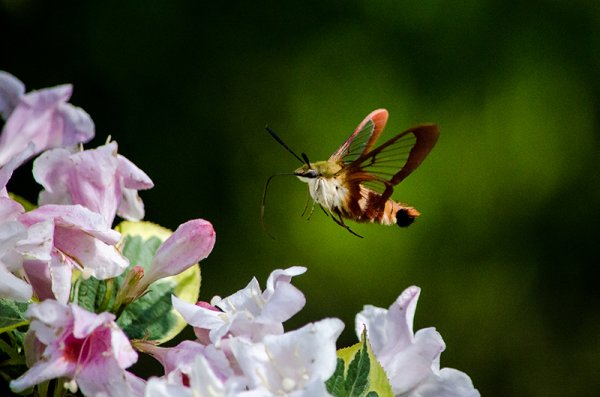
Use a high ISO setting to freeze fast motion – 1/8000th ISO 1,000

The only way to freeze fast motion, like the wings of a hummingbird moth, is to shoot with an extremely fast shutter speed. The above photograph was shot with a shutter speed of 1/8000th of a second in order to freeze the insect’s wings. However, even in the bright mid-afternoon sun, a shutter speed that fast required bumping the ISO setting on the camera to 1,000 to maintain an even exposure.

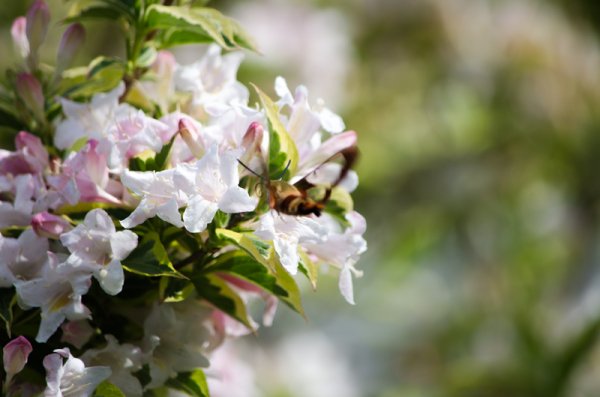
Below, is an example of why shooting at 1/8000th of a second was necessary. Even at 1/800th of a second the insect’s wings were barely visible. In order to ensure that the motion was frozen it meant that more light was needed in a shorter amount of time and the only way to get this (without a faster lens) is to bump up the ISO on the camera.

when to us high ISO-4

ISO 500 1/800th – even at that speed the wings are blurry.

Night sky photography

when to use high ISO 4

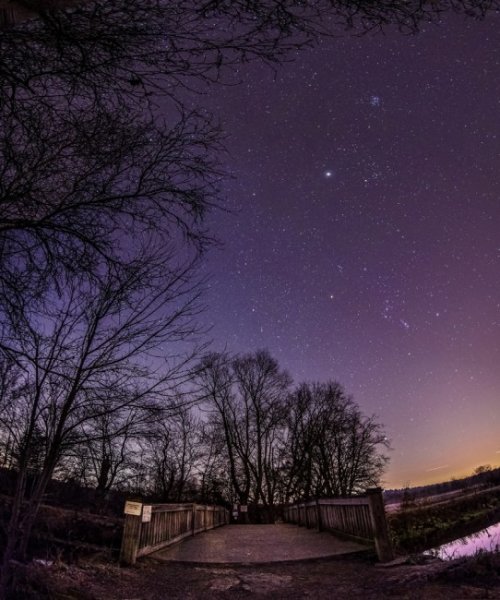
Use high ISO to capture the stars

Many different techniques come into play when you want to photographing the stars, but one of the more important things to remember is to increase that ISO setting. The reason you want to photograph the stars with a higher ISO, even though you’re using a tripod, is that as the earth rotates, the stars move across the sky and you don’t want to capture that movement in your photograph (unless you are doing star trails)

By using an ISO in the 800 to 1,000 rang,e with a fast wide-angle lens, you will be able to capture enough stars to fill the sky.  For more on photographing the stars check out: How to Photograph the Stars.

Hand-holding a long lens

when to us high ISO-3

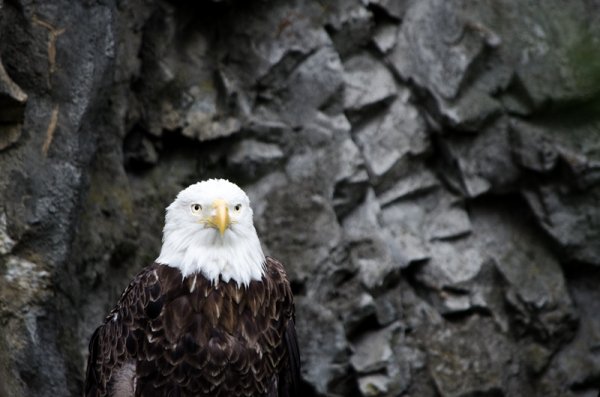
Use high ISO when shooting handheld with a long lens

If you’re shooting handheld with a long lens, you have to remember the shutter speed rule: 1/focal length (35mm equivalent).  This rule basically means that if you’re using a 300mm lens on a 1.5x crop factor DSLR then the minimum or slowest shutter speed that you can use is 1/450 (1/300 on full frame).

The bald eagle above was shot at a 450mm equivalent focal length using a shutter speed of 1/500th of second and an ISO of 1,000. Any slower on the shutter speed and you begin to run the risk of introducing camera shake.

What other uses can you think of for high ISO?

Do you ever shoot with an ISO of 800 or higher? What’s the highest you’ve ever shot? Share with us some examples and of course, if you have any other uses for high ISO that you think I’ve forgotten please share those below as well!

The post Three Uses for High ISO you Might Not Know by John Davenport appeared first on Digital Photography School.


Digital Photography School

 
Comments Off on Three Uses for High ISO you Might Not Know

Posted in Photography