RSS
 

Archive for May, 2014

Groundless City: A Guidebook to Underground Hong Hong

14 May

[ By WebUrbanist in Travel & Urban Exploration. ]

hong kong elevated walkway

Between raised walkways, subways, ferries, cable cars, a multi-block outdoor escalator and extensive double-decker bus system, it is possible to traverse a huge swath of Hong Kong without even touching the ground (photo above by HappyKiddo).

hong kong map detail

At the same time, it is hard to find maps and illustrations of this vast urban phenomena – at least outside of Cities Without Ground: A Hong Kong Guidebook, which maps 32 networks of pedestrian paths above and below the surface.

hong kong book cover

Architects and authors Jonathan D Solomon, Clara Wong, and Adam Frampton (through ORO Editions) documented these interconnected systems in amazing detail. As Kevin Kelly writes, the book captures the essence of a sort of shadow city: “Beneath and between the gleaming skyscrapers built over the cramped confines of Hong Kong proper are miles of subterranean malls, passageways, stairs, subway stations, parking garages, escalators, skybridges, and food courts.”

hong kong underground network

Like aged cities themselves (or water-carved catacombs or piecemeal-generated anthills), these networks were not designed as a whole. Rather, they developed organically over time via both private and public initiatives, slowly forming a convoluted but beautiful and evolving patchwork of voids with various degrees of privacy and accessibility.

hong kong detailed guidebook

hong kong public diagrams

If you do visit Hong Kong, try this for a start: take the escalator all the way up and back down the steeply-sloped hillside. Or: break off just before the bottom and stay on second-story walkways as far as they will take you. If you get stuck, instead of descending just to street level, go underground and see how far you can make it via subterranean passageways. If all else fails, hop on a bus, ferry or subway. You may be amazed at how far this combination can take you.

hong kong urban diagram

hong kong above

More about the book from the official description: “Hong Kong is a city without ground. This is true both physically (built on steep slopes, the city has no ground plane) and culturally (there is no concept of ground). Density obliterates figure-ground in the city, and in turn re-defines public-private spatial relationships. Perception of distance and time is distorted through compact networks of pedestrian infrastructure, public transport and natural topography in the urban landscape.Without a ground, there can be no figure either. In fact, Hong Kong lacks any of the traditional figure-ground relationships that shape urban space: axis, edge, center, even fabric.” (Photo by Nicolas Vollmer)

Share on Facebook


[ By WebUrbanist in Travel & Urban Exploration. ]

[ WebUrbanist | Archives | Galleries | Privacy | TOS ]


WebUrbanist

 
Comments Off on Groundless City: A Guidebook to Underground Hong Hong

Posted in Creativity


Getting Sharper Images – an Understanding of Focus Modes

14 May

The longer you shoot, the larger the repertoire of subjects and assignments you photograph becomes. You start off photographing flowers in the garden, your neighbour’s dog, your sister’s kids, your friend’s wedding and then before you know it you’re doing product shots for your friend’s new company. All this happens over time and there is one pretty fundamental skill that must remain paramount throughout out your process, properly focused images. Sure we’ve all been there, we’ve all taken that shot once in while which is slightly soft (a polite photographer’s term to describe out-of-focus images). But, it’s a great shot so we keep it anyway, even tho we would still have preferred it to be tack sharp.
MG 3504flat

In focus images have been one of the most fundamental rules of photography right from the dawn of the craft. In the early 1900s it was a craft in its own right, but in the 1960s Leica introduced a rudimentary autofocus system that changed everything. Since then, autofocus has developed dramatically and it’s no longer a feature on cameras, it’s a given.

So, bringing autofocus up-to-date you have a few options to choose from in your modern DSLR. Those are some of the features I will cover in this article, along with when to use them. Both Canon and Nikon have very similar settings, albeit incorporating different technologies the results are very similar. There are also other brands like Sony and Olympus etc., that also follow suit, but here I will be discussing the four main focus modes in Canon and Nikon.

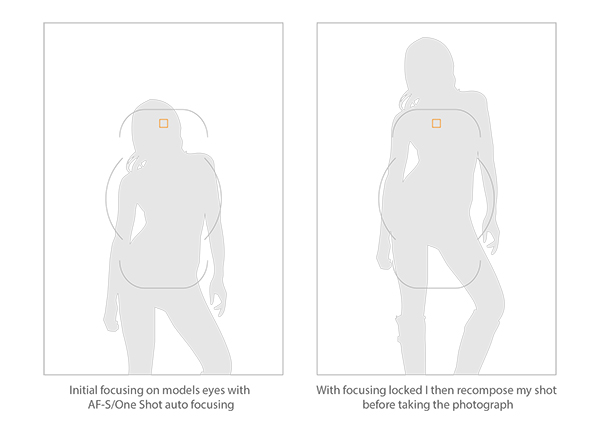
This image above was shot utilizing the AF-S (Nikon) or One Shot (Canon) autofocus mode on the camera. Here I focused on the models eyes and then recomposed my image so that she was over to the left of the frame, allowing for more space in the image in the direction she is looking.

Single Shot Mode

First off, you have the mode that’s probably been around the longest – Canon’s One Shot and Nikon’s AF-S. Both of these will do pretty much the same thing. This mode is predominantly used for stationary objects like model shoots (most of the time – more on when not to use it for model shoots later) and anything that doesn’t require your subject to move around too much in the frame. You half press the shutter in this mode, and then you can recompose the image. For example, you focus on the model’s eyes, then recompose to put her on the left hand side of the image. This autofocus mode will get you through most situations.

Active or Continuous Focus Modes

Next we have the step up from the single focus to Canon’s AI Servo, and Nikon’s AF-C modes. Essentially what this setting does is to continuously track your initial focus point and readjust the focus accordingly. This setting is ideal for moving subjects like active children, and pets that are constantly on the move.

Auto Modes

Finally out of the autofocus settings we have Canon’s AI Focus, and Nikon’s AF-A. Both of these settings actually leave it up to the camera to decide which is best out of the other two focusing modes to use. In this mode it will either choose to continuously track your chosen subject should it decide to move, or focus lock if you would like to recompose. In theory, then I needn’t of bothered explaining the other two settings as surely this is the best of both worlds? Not quite. I personally have tested this mode a fair amount with stop-start subjects and although the camera does a good job of keeping up with them it’s always more accurate to use continuous focus mode. The same also goes for its ability to determine when a subject has stopped and when to focus lock for recomposing. Personally I never use this mode as although it has the best of both, it also has the worst of both.

Infocus600px

Image above taken with an 85mm f/1.8 prime lens using manual focus. Shooting in manual focus negates the need to recompose and loose focus in autofocus modes.

So, although I have just covered the three basic settings here very briefly, there is, of course, a whole of host other technological advancements in autofocus that I haven’t covered. I know Nikon has extensive, matrix and 3D autofocusing features. As well most modern DSLR have incorporated the “back button autofocus” which also helps with focus locking. But going over all of that is not the purpose of this article.

Manual Focus Mode

The last focus mode I wanted to cover and one that is rarely used is the Manual focus mode. This mode strikes fear into the heart of nearly all modern photographers and that’s simply because they’ve probably never used it. Do you ever need to use it? That is something that only you can decide and is probably based on the type of photographs you take. If you only ever take portraits of energetic kids or fast paced sports, then autofocus is probably always your go-to mode. If however you shoot still life, architecture, landscapes and other detailed, relatively motionless subjects, then manual focus is probably a good way to go.

There are a few reasons for this. Landscape photographers will want to find the hyperfocal distance of their scene to maximize the amount of in-focus points (depth of field) in the image. This is based on an equation so autofocusing on a specific object is not always the way to go. Still life photographers will usually have their camera locked-down on a tripod so they will not want to focus and recompose once they’ve set up the shot, so it’s just far easier to focus manually. There is also another reason to want to use manual mode on some cameras and certain situations, and that was the catalyst for this article.
Outoffocus600px

This version of the image was shot using the autofocus mode AF-S/One Shot, and meant that after I had focused and recomposed the shot, the model’s eyes were left out of focus.

I recently purchased an 85mm f/1.8 prime lens, and I wanted to test the lens out and see what the sharpness was like at f/1.8. I predominately only photograph models so I set up my test and went about taking some shots at f/1.8 using my usual AF-S/One Shot autofocusing mode. When I got my shots back to the computer to take a look, I was surprised to see that most of them were very soft. It took a few minutes to realize my error and since then I’ve adjusted how I shoot with these parameters.
Recompose600px

Here you can see that the selected focal node is still situated in the middle of the viewfinder even though I have elected the outer most one when shooting in the portrait format.

I haven’t done a lot of very shallow depth of field shots up until this point so I hadn’t seen the now exaggerated results of my
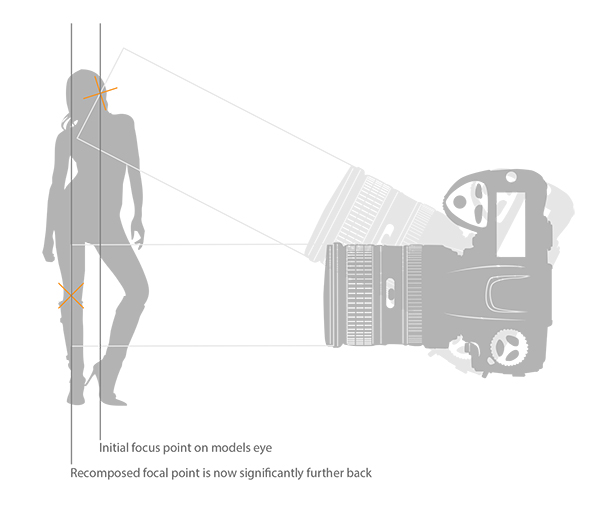
poor focusing technique previously. At f/1.8 you have a very, very shallow amount in focus (depth of field). For example, a head shot with the eyes in focus, the tip of the subject’s nose will be out of focus. For the test I was photographing the model at 3/4 length and shooting up at her so my camera height was probably about her waist height. I was about 6 feet (2 meters) away from her and I was focusing on her eyes with my focal point in camera then recomposing my shot to capture the 3/4 length crop. The problem with most cameras is that although they have a lot of focusing points, they’re all clustered in the centre of the viewfinder so even though I chose the outer most focal point I still have a dramatic amount of recomposing to do.
Focusstack600px

The diagram above clearly illustrates what’s actually going on when you recompose an image after focusing in AF-S/One Shot autofocus mode. The actual part of the image that was in focus, is now out of focus.

This isn’t normally a noticeable problem when recomposing at f/16, but at f/1.8 that dramatic shift in the focal plane means the resulting image is very soft around the model’s eyes. As I recomposed it actually repositioned my focal point further back behind the model, meaning the back of her head and hair were in focus but not her eyes.

There aren’t too many ways around this pesky little issue, especially as you may not notice it on the back of the camera’s little screen. One thing that did resolve it though was by switching to manual focus. I could then compose my shot and manually focus on the model’s eyes, resulting in a fantastically sharp image where I wanted it to be sharp.

Granted there were a few things conspiring together here to really exaggerate the issue. Firstly, I was shooting at f/1.8, that’s always going to rely on critical sharpness. Secondly, I was down low shooting up. This always exaggerates the focal plane shift when recomposing and lastly I was stuck with limited focal nodes. There are many technical reasons why modern DSLRs don’t allow focal nodes towards the edges. A lot of smaller frame cameras like the mirrorless, APS-C and micro 4/3 cameras all have selectable focal nodes covering the viewfinder, but alas, DSLR technology isn’t there yet. Until it is, it’s a good idea to be aware of what’s going on in autofocus modes on your camera, and be prepared and ready to switch to manual focus when required.

Good Luck!

The post Getting Sharper Images – an Understanding of Focus Modes by Jake Hicks appeared first on Digital Photography School.


Digital Photography School

 
Comments Off on Getting Sharper Images – an Understanding of Focus Modes

Posted in Photography


Arindam Thokder: Indien in Farbe

14 May

„Halt, Moment.“ Ich musste mich erst einmal sammeln und erneut konzentrieren. Aus wildem Herumgeklicke durch unzählige, furchtbar langweilige Straßen-Portfolios war ich auf Arindam Thokders Webseite förmlich zum Stehen gekommen.

So nahm ich einen Schluck meines gerade kalt gewordenen kenianischen Kaffees und versuchte noch einmal, mir die Bilder des Fotografen in Ruhe anzusehen. Zugegegeben, ich war überfordert und gefesselt zugleich. Irgendetwas war anders.

Die tiefgesättigten Farben und komplexen Straßenszenen erinnerten mich sofort an die Aufnahmen aus Haiti von Alex Webb. Leicht unterbelichtet, viel drauf und die harten Sonnenstrahlen bringen das Gesamtbild zum Leuchten. Dazu noch – und das ist eigentlich das Wichtigere – Menschen, die irgendetwas tun, miteinander agieren und des Zufalls eigentlich zu viel sind. Das perfekte Chaos.

Ein Frau tanzt an durch die Straße.

Eine komplexe Straßenfotografie.

Erst auf den zweiten Blick sieht der Betrachter eine Frau im Hintergrund.

Eine Frau hält die Hand vor ihr Gesicht.

Eine komplexe, farbenfrohe Straßenaufnahme.

Eine Straßenaufnahme, bunt und mit Zeitungen im Vordergrund.

Wir sehen ein Schattenspiel.

Ein Junge mit nacktem Oberkörper.

Die Silhouette einer Frau im Vordergrund.

Wir sehen eine komplexe Straßenfotografie mit Steinfiguren und Menschen.

Eine Straßenfotografie mit dem überraschenden Element einer Kuh.

Ein Junge mit Pistole in der Hand.

Eine komplexe Straßenaufnahmen mit diversen Schatten.

Ein Junge balanciert einen Ball auf der Straße.

Eine Straßenaufnahmen mit drei verschiedenen Ebenen.

Eine Straßenfotografie aus Indien, auf der viele Personen zu sehen sind.

Eine Frau mit Kopftuch ist zu sehen.

Eine Straßenfotografie mit einem Mädchen im Vordergrund, das sich die Hände an die Stirn hält.

Eine lustige Straßenfotografie.

So schrieb ich den in Bangalore, Indien lebenden Fotografen an und hoffte auf eine Antwort. In der Zwischenzeit bekam ich heraus, dass er sowohl Teil des internationalen Kollektives Street Photographers als auch der indischen Gruppe That’s life ist.

Ein paar Tage später traf die ersehnte Nachricht aus Indien ein. Auf mein Nachfragen schickte mir der Straßenfotograf genügend Bildmaterial für diesen Artikel. In seiner Antwort schrieb er, dass es ihn antreibe, „in Verbindung mit der vielfältigen Kultur Indiens zu treten.“ Weiter fasziniere ihn der überschwängliche Reichtum an Farben auf Indiens Straßen.

Mit der Fotografie verfolge er zwei Ziele. Zum Einen wolle er das tägliche Leben normaler Leute dokumentieren. Zum Anderen hoffe er, die rasanten Veränderungen in Bangalore aufzuzeichnen und ein Buch daraus zu machen, wenn er die Chance dazu bekommt.

Und das wünsche ich ihm sehr. Denn seine manchmal skurrilen, komischen und witzigen Fotos haben es mir angetan – ich wäre der Erste, der einen Bildband kaufen würde.

Bis es soweit ist, folge ich ihm einfach weiter auf Flickr und freue mich über neue Fotos.


kwerfeldein – Fotografie Magazin | Fotocommunity

 
Comments Off on Arindam Thokder: Indien in Farbe

Posted in Equipment


13. Mai 2014

14 May

Ein Beitrag von: Martin Dietrich

Landschaft im Nebel mit zwei kleinen Person am Horizont


kwerfeldein – Fotografie Magazin | Fotocommunity

 
Comments Off on 13. Mai 2014

Posted in Equipment


Photographer takes Panasonic GH4 on test shoot around Seattle

13 May

GH4_H_FS14140_slant.png

The headline feature of the Panasonic GH4 is that it’s a Micro Four Thirds camera that can shoot 4K video for under $ 2000, capturing either Quad HD (3840 x 2160) at up to 29.97p or ‘Cinema 4K’ (4096 x 2160) at up to 24p. Seattle-based photographer Erik Hecht recently took the new Panasonic GH4 for a spin to test the dynamic range and to see how well it takes color correction. See video

News: Digital Photography Review (dpreview.com)

 
Comments Off on Photographer takes Panasonic GH4 on test shoot around Seattle

Posted in Uncategorized


When is Altering Your Image Acceptable? A Debate on Post-processing

13 May

Have you ever used Photoshop’s ‘Content Aware Fill’ tool to get rid of some unsightly object in your otherwise perfect image? Have you ever cropped your image in order to give it a more pleasing composition? I know I’ve done both on many an occasion and I feel no guilt or remorse whatsoever.

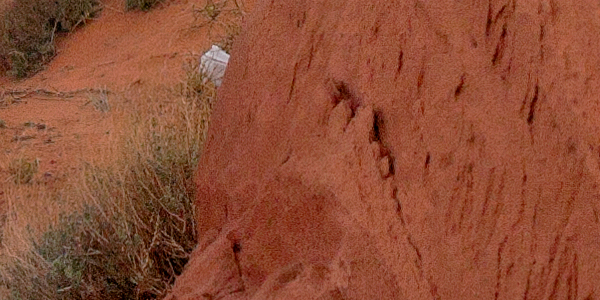
The Plastic Bag You Didn’t Notice

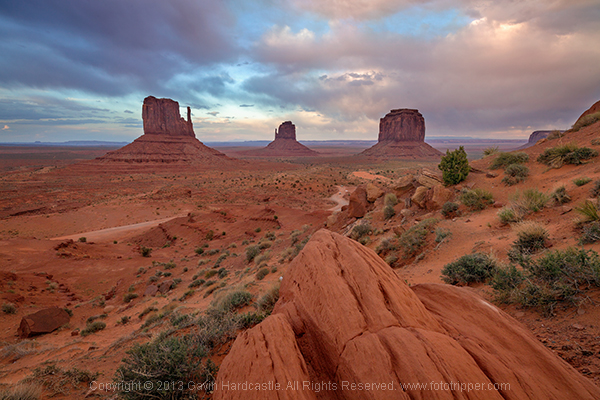
Here’s an example of a shot I took at Monument Valley in Utah. The foreground was completely covered in litter, so while editing I decided to cut out the more obvious offenders like this plastic bag. Should I have left it in? What is an acceptable level of post-processing and alteration?

Monument Valley Landscape Sunset

Monument Valley trash

I’m curious to know where you feel the line should be drawn? Would you judge me for cloning out that plastic shopping bag? Perhaps I should have walked over and picked it up, either way, it’s gone from my shot and I’m happy with the result.

Truth or beauty, the age-old question?

Landscape photographers like myself are always creating composites of multiple images just to get the tourists and other photographers out of our shots, it’s no big deal. Or is it? Are you one of those rigid purists that believes that the camera should not lie, not even a teensy little white lie? But if you are, doesn’t the camera lie the moment you frame your carefully placed shot and hit the shutter?

I can see both sides of the argument. But, given the choice of performing a ruthless crop and getting a keeper, or leaving my image untouched and forever condemning it to a digital graveyard, I’ll go for the former thank you very much.

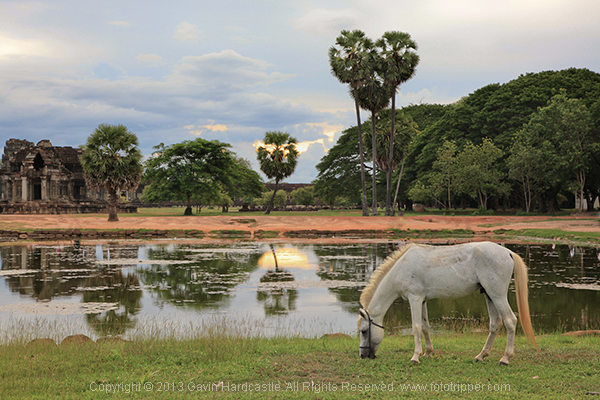
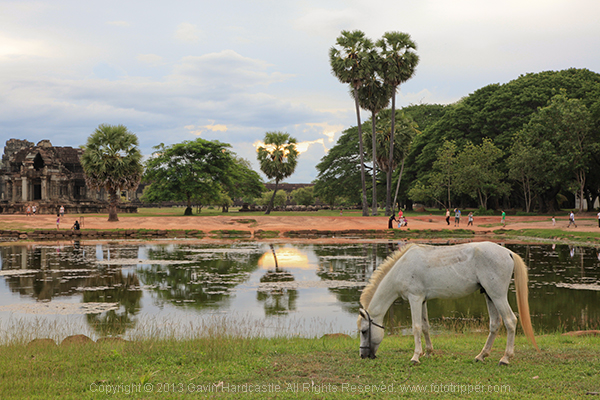
Here’s one of the very first pictures I took with a DLSR from back in 2010. I cut all of the people out of the image because they weren’t adding to the composition in any way. The eagle eyed among you will spot where I got lazy with my ‘people removal’. See the unaltered version below it and tell me if I crossed the line.

Angkor Wat Cambodia Landscape Photography - Gavin Hardcastle

Angkor Wat - Cambodia

Where does it end?

The problem is, where do you draw the line? When do you decide that enough is enough and the image should be left alone? Ultimately it’s down to you as the photographer and your creative vision, but there are instances where photography is used as an accurate historical document. In Photojournalism, we rely on a photographer to tell a story and capture a moment in history, albeit from their own unique perspective and how they choose to frame a shot.

Couldn’t it be argued that a photographer who chooses to omit certain elements, is manipulating the viewer just as clearly as when they chop out an ugly plastic shopping bag in Photoshop?

Consider the real estate photographer who carefully manages to exclude the crack shack next door to the million dollar home, no alteration but still a little white lie.

It’s all so very subjective and the truth is that you’d never know the difference if the photographer didn’t confess.

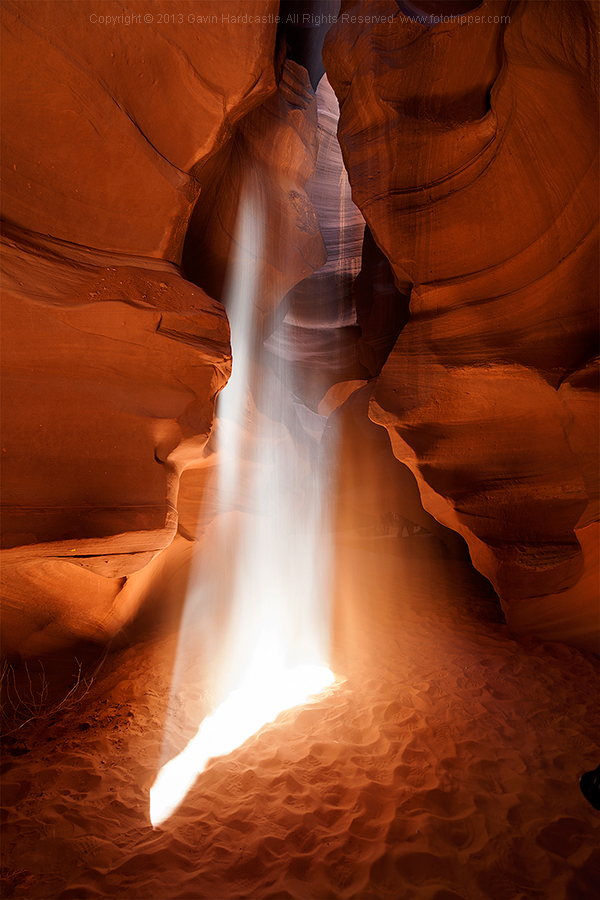
Oh what’s this below? My wife’s 24-105mm lens creeping in to the lower right of my shot, now there’s a surprise. What do you think are the chances that I’m going to be leaving that in my final edit?

Antelope Canyon Landscape Photography

Where do I draw the line?

As a landscape photographer I strive to keep all of the permanent or natural elements of my images intact. I won’t flinch at removing a discarded water bottle that I hadn’t noticed while shooting. I won’t bat an eyelid at cropping out my wife’s left foot as she reliably walks into the corner of my frame just a split second before I hit the shutter.

I draw the line however, at removing or moving objects that are natural or permanent. If there’s a tree or even a lamp post in a less than ideal spot in my composition I will not alter it. I want the viewer of my image to be able to stand in the exact place I stood when taking the shot and know that everything is in its right place. That doesn’t include the used condoms and the KitKat wrapper.

Tell me, where do you draw the line? Let the debate begin!

Share in the comments below where you stand on this subject. Do you do any post-processing on your images, and if so how far do you take it? How far is too far? Let’s discuss it.

The post When is Altering Your Image Acceptable? A Debate on Post-processing by Gavin Hardcastle appeared first on Digital Photography School.


Digital Photography School

 
Comments Off on When is Altering Your Image Acceptable? A Debate on Post-processing

Posted in Photography


Art Buyer’s Bible

13 May

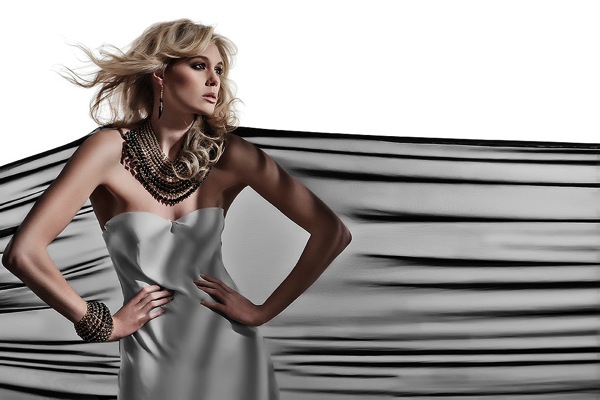
Art Buyers Bible - Picture Photographed By Jenny Brough & Edited By Chamorro

What started as a personal blog in 2008, a list of retouching and 3D animation studios that was used as an archive for personal learning and inspiration, has become an impressive collection of retouchers, illustrators and 3D artists and studios from across the globe. In 2013, Art Buyer’s Bible emerged when its owner and creator, Chris, decided to make something out of his list.

Today, ArtBuyersBible.com assists professionals and businesses to connect and network with advertising agencies and photographers to collaborate and serve as a pool of inspiration for young artists. FashionPhotographyBlog.com caught up with Chris from Art Buyer’s Bible to talk about his experience as a former freelance retoucher and his brainchild website.

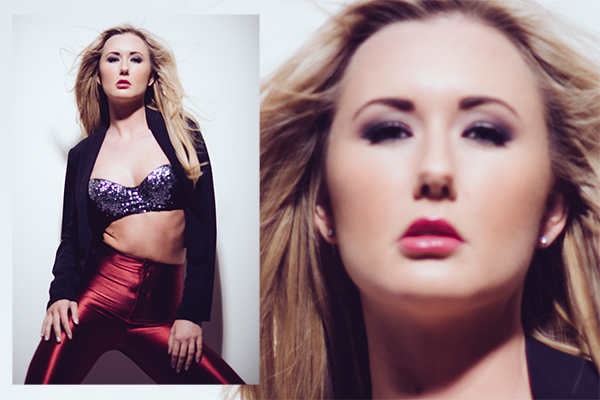
Art Buyers Bible - Picture Photographed By Valerio Trabanco & Edited By Fernando Arrais

When I asked Chris about his take on the appeal of retouching as a creative art form he replied that “There are a lot of different things that are good with retouching. For starters, it’s often a very fun and creative process to retouch images. People tell you what they are after but it’s up to you to get there. It is really rewarding when you manage to visualize what the client is looking for – when you can help get an image to go all the way; but I also have to say that Photoshop is 90% of what makes it so great. It’s such a fantastic application – maybe needless to say, but still.”
I was intrigued about how the self-starting freelance retoucher first got involved and what led him on to choose a career in photo retouching, he answered “My dad worked as an art director, so when I was growing up we always had the latest Apple computer at home, with the latest applications. Nowadays, everyone has the latest stuff, but back then (1994-96) it was not same. Many families had computers, but they were mostly used for games or word processors. I learned the overall basics at that time, but most of all I got a head start which drew me to go to a media program in high school.

ArtBuyersBible.com presents Blutsbrueder by Matthias Zenter & Franz Steiner

After school, my cousin got me into a market department of a large fashion company and after working there for a while as an art director’s assistant, I met a fashion photographer who took a lot of pictures for the fashion company. He had a quite small company at that time, but he was hiring several photographers and retouchers as they were growing. And that sounded very fun, so I started working for him. I worked there for about 4 years and it was then I really started my retouching career. Some of the senior retouchers at the company believed in me and helped me develop. They were a big inspiration. After that, I started my own company, together with another retoucher and a photographer.”

Art Buyers Bible - Picture CGI except model & edited by Glowfrog

From professional retoucher to website creator, I asked Chris how did the origins of Art Buyer’s Bible came to be, he explained “I have gotten all my inspiration from looking at other artists’ and studios’ work. Keeping watch on the big studios around the world always drew me in to create the same great work as they did. And while looking around to find other retouchers and great images I found a lot of studios. So I started collecting all of them on a blog. After a while, the list of studios was over a 100. So I decided to do something more of it and created the site. There are now over 200 studios and artist listed on Art Buyer´s Bible.”

The website offers something unique to the industry, according to Chris, “Art Buyer´s Bible has the best list of post-production studios on the web. There are endless of inspiration for both newbies and professionals. I also think we have done a really good job creating the directory overview. You can easily see what and where the great work is coming from.”

Add an ImageArt Buyers Bible - Picture Photographed By Frieke Janssens & Edited By Livingroom

When asked about what’s on the horizon for the site and if there are any future plans to include photographers, Chris gave this answer “My future plan is to give advertising agencies personal help with finding collaborators… Since it all started with me looking for inspiration for my own work, I mainly searched for retouch studios. I’ve been thinking about if I should add photographers too. Maybe,  but not in any near future. There are also so many, so then I have to think of a good way of sorting them. We’ll see.”

For people who are looking to do their own retouching, Chris recommends the following: “You need a computer with Photoshop and a big bunch of inspiration, which you can find at ArtBuyersBible.com :). Pretty soon you will also need a Wacom tablet.”

If you would like more information about Art Buyer’s Bible you can visit the website at ArtBuyersBible.com or email info@artbuyersbible.com


PHOTO CREDITS:

Picture 1: Monica Chamorro, Photo: Jenny Brough
Picture 2: Fernando Arrais, Photo: Valerio Trabanco
Picture 3: BlutsBrueder, Photographer: Matthias Zenter, Retoucher: Franz Steiner
Picture 4: Glowfrog, 100%CGI except model
Picture 5 – The Livingroom, Photo: Frieke Janssens


Fashion Photography Blog

 
Comments Off on Art Buyer’s Bible

Posted in Uncategorized


How to build a photo brand: Tips from photographer Art Wolfe

13 May

Screen_Shot_2014-05-12_at_10.34.35_AM.png

Branding is critical for a successful photography business regardless of the genre, and photographer Art Wolfe has built perhaps one of the strongest brands in his field. Wolfe has been shooting nature and wildlife images professionally for more than 30 years all over the world. This story on Photoshelter’s blog gives some insight on how he built his photography business. Learn more

News: Digital Photography Review (dpreview.com)

 
Comments Off on How to build a photo brand: Tips from photographer Art Wolfe

Posted in Uncategorized


Ecosystems 101: Intro

13 May
This site exists mostly for one reason: to help you to get comfortable with learning how to use your flashes. But what then? What next?

Read more »
Strobist

 
Comments Off on Ecosystems 101: Intro

Posted in Photography


Parrot launches drone with 14MP camera and 180-degree fisheye lens

13 May

bebop_drone1.jpg

Parrot, the maker of the popular AR Drone 2.0, has launched a new model, the AR Drone 3.0. It also flies under the name Bebop. The Bebop is essentially a flying camera with four rotors. The camera comes with an F2.2 fisheye lens with a 180-degree field of view and a 14MP sensor. Learn more

News: Digital Photography Review (dpreview.com)

 
Comments Off on Parrot launches drone with 14MP camera and 180-degree fisheye lens

Posted in Uncategorized