RSS
 

Archive for May, 2014

Urban X-Stitch: Street Artist Cross-Stitches Yarn on Fences

16 May

[ By WebUrbanist in Art & Street Art & Graffiti. ]

urban stitch skull tag

Whether you want to call it a new art form or a simply a hipster hobby, an artist France is pushing street-side string art in amusing new directions.

urban cross stitch detail

urban stitch shipping yard

Not quite your grandmother-in-rocking-chair approach, Urban X-Stitch creates colorfully cross-stitched pieces along the lines of yarn bombing and knitted graffiti.

urban x stitch art

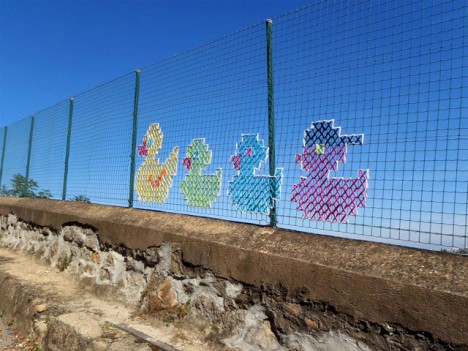
urban ducks in row

urban stitch ducks fenc

So far, these subjects are mostly tame – bright logos and cute animals mixed in with only a few things that look more like spray-painted tags, but the potential is there for something more.

urban rainbow process pic

urban cross fish rainbow

urban owl give hoot

urban cat closeup fencing

Another neat possible direction in which to take this: pattern sharing between artists and places, the same way cross-stitching in its traditional setting can follow guides and designs.

Share on Facebook


[ By WebUrbanist in Art & Street Art & Graffiti. ]

[ WebUrbanist | Archives | Galleries | Privacy | TOS ]


WebUrbanist

 
Comments Off on Urban X-Stitch: Street Artist Cross-Stitches Yarn on Fences

Posted in Creativity


Syrp Genie Robotic Tripod Head Review

16 May

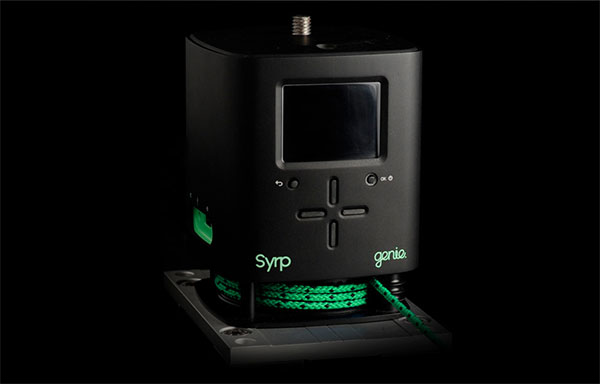
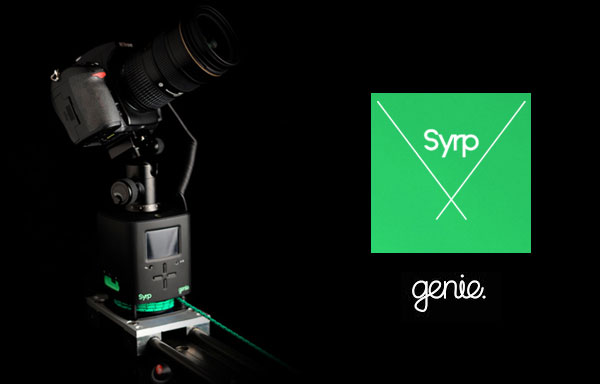
If you’re in the market for an ultra portable robotic tripod head that pans and tilts and is super easy to setup, you’ll be wanting to take a look at the Syrp Genie. The guys at Syrp have done their Kickstarter backers proud with a solid product that looks as good as it performs.

While it can’t pan and tilt at the same time, the Genie has a little trick up its sleeve to add an extra layer of motion control to its arsenal.

When you want to put the Genie on to a slider you won’t need any extra motors or cables to get things moving. The Genie comes complete with the linear accessory which utilizes a thin yet strong rope which you attach to either end of your slider. The motor inside the Genie will then pull the unit along the slider to add production value to your video recordings or time-lapse footage. You could even put the genie on a skate board or cart and then attach the ropes to trees or fences while it pulls itself through your scene.

While this might not be the most advanced method of motion control, you’ve got to love the sheer simplicity of the Genie, and with its built-in battery it really takes up very little space in your camera bag. If you’re off on a long haul flight and don’t relish the idea of packing lots of complex toys, you’ll appreciate the compact form of this device.

Syrp Genie Review - Gavin Hardcastle

Build Quality

I was really impressed with the build quality of the Genie and its accessories. The packaging was like something you’d expect from Apple and everything has a solid, ruggedness about it that feels reassuring. I had some problems with the battery on the first unit that I received so Syrp promptly replaced it and the second unit had no problems with the battery lasting as advertised.

Ease of Use

The Genie is about as easy as it gets. Time-lapse photographers will love the presets and how the time calculations are adjusted based on your input. The interface is really easy to navigate and pretty intuitive. I only had to refer to the manual on a couple of occasions. Setting up a panning shot is pretty easy but I found the tilt shots more of a challenge to get things lined up with the horizon and also struggled a little with the ball head that Syrp kindly included. Once you’ve done it a few times it gets easier.

Syrp Genie Motion Control Review - Gavin Hardcastle

Accessories

My first impression of the ball tripod head that Syrp included was that it might not be up to the job. After putting it to some serious stress tests it turned out to be a very sturdy little head that can handle a lot of weight and some hefty abuse.

Syrp Genie Review Ball Head

The infra red transmitter stalk is a really cool addition for time lapse photographers who don’t fit into the Canon/Nikon mold and can’t connect up to the Genie with a cable. The IR transmitter plugs into the Genie and then sticks out of the side like one of those gooseneck desk microphones. The idea is that you point it at the IR receiver on your camera and it triggers the camera for time lapse shoots. I shoot with a Sony A7R so this was essential for me. I just wish the IR transmitter was a couple of inches longer so that I didn’t have to strap it to my lens with an elastic band. Anyway, it works and is much easier than fiddling about with a long IR cable.

The rope that you use for linear motion on sliders is really good quality and you can order different lengths to suite your needs.

Tech Support

I found the tech support from Syrp to be pretty quick and effective. When I had any big problems they jumped on it quickly and were patient when I was just being thick and didn’t get how things worked. I get the impression that even if I wasn’t a writer for dPS, I’d still get taken care of well.

Is it Worth the Price?

This is a tricky one and it really depends on your needs. Currently priced at $ 890 USD, the Genie cannot pan and tilt at the same time. It can only pan, tilt or slide. There are other robotic ‘motion control’ heads out there that offer more functionality for around the same price, but it’s kind of unfair to compare the Genie to more advanced units because they don’t have the built in battery and they require motor accessories in order to slide. With that in mind your decision to buy the Genie might come down to its two greatest features – simplicity and portability.

The Results

Here’s some quick and rough test footage that I shot with the Genie straight out of the box. Please watch at 1080p.

I am a confessed pixel peeping perfectionist. A snob of the worst kind when it comes to image quality and the finished product of a shoot.

My main use of the Genie was for shooting time-lapse sequences and I have to say that the results I got were not as smooth as I’ve had with other devices on the market. I don’t know if this can be fixed with a firmware update or if it’s down to a mechanical limitation of the Genie design. That being said, whether or not my obsessive ‘buttery’ motion requirements would make much of a difference once a finished video is butchered by the compression ogre from Vimeo or YouTube remains to be seen.

I suspect that for most time-lapse and video shooters, the motion of the Genie will be more than sufficient. I’m just a picky bugger.

Things I Love

  • Portability
  • Ease of use
  • The Preview Function (others could learn from this)
  • Build quality
  • Built in battery

Things I Don’t Love

  • Can’t pan and tilt at the same time
  • Not the smoothest results for time-lapse
  • The little bit of ‘play’ that makes the first few frames of your time lapse completely static. You can see this in the second clip of my test footage video above.

All in all, the Genie is a really cool product that I feel is ideal for time lapse beginners and budding cinematographers. When you factor in the portability and the ease of use, the Genie comes in at a very fair price point with excellent build quality. Time-lapse shooters that are looking for something more advanced will have to spend a little more to move up to the next level of production value. I give the Syrp Genie 4 out of 5 stars.

More time-lapse tips and info here:

  • Time-Lapse Photography Equipment Guide to Getting Started
  • Discover the Wonder of Time-Lapse Photography
  • 10 Pro Motion Control Time-Lapse Tips

The post Syrp Genie Robotic Tripod Head Review by Gavin Hardcastle appeared first on Digital Photography School.


Digital Photography School

 
Comments Off on Syrp Genie Robotic Tripod Head Review

Posted in Photography


Unmögliche Architekturen

16 May

Ein Beitrag von: Normen Gadiel

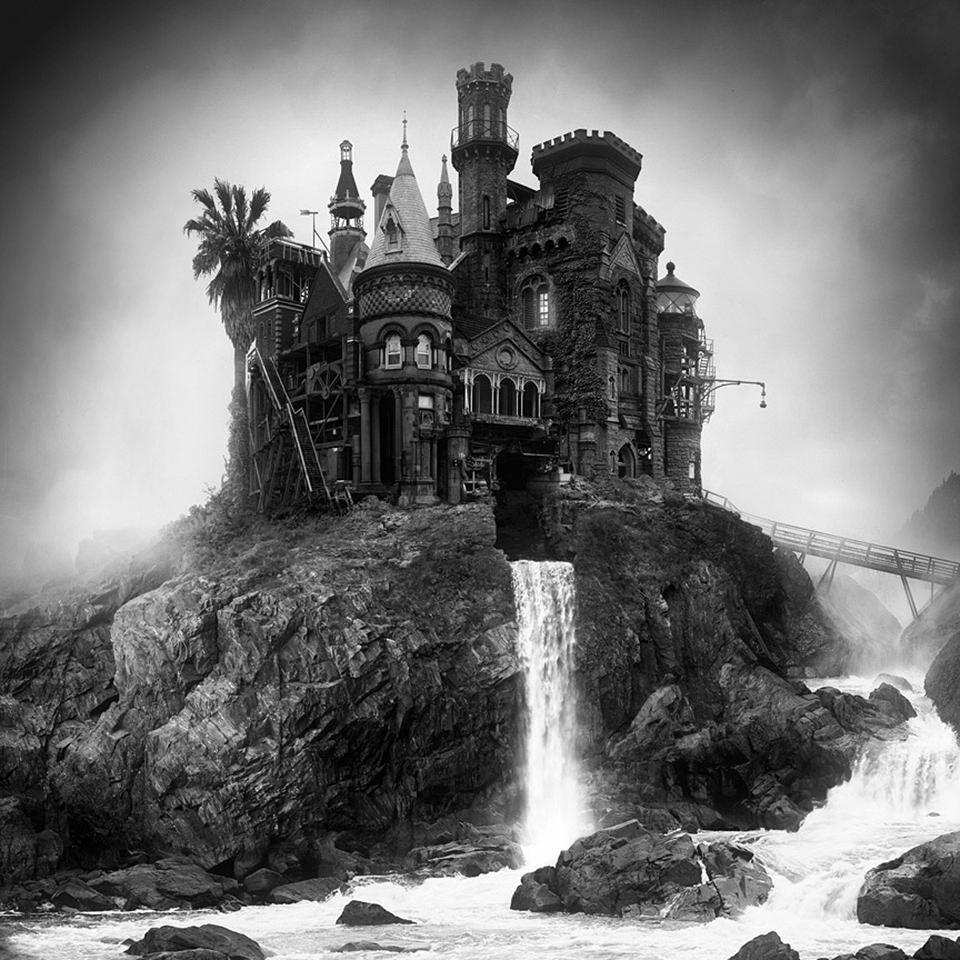
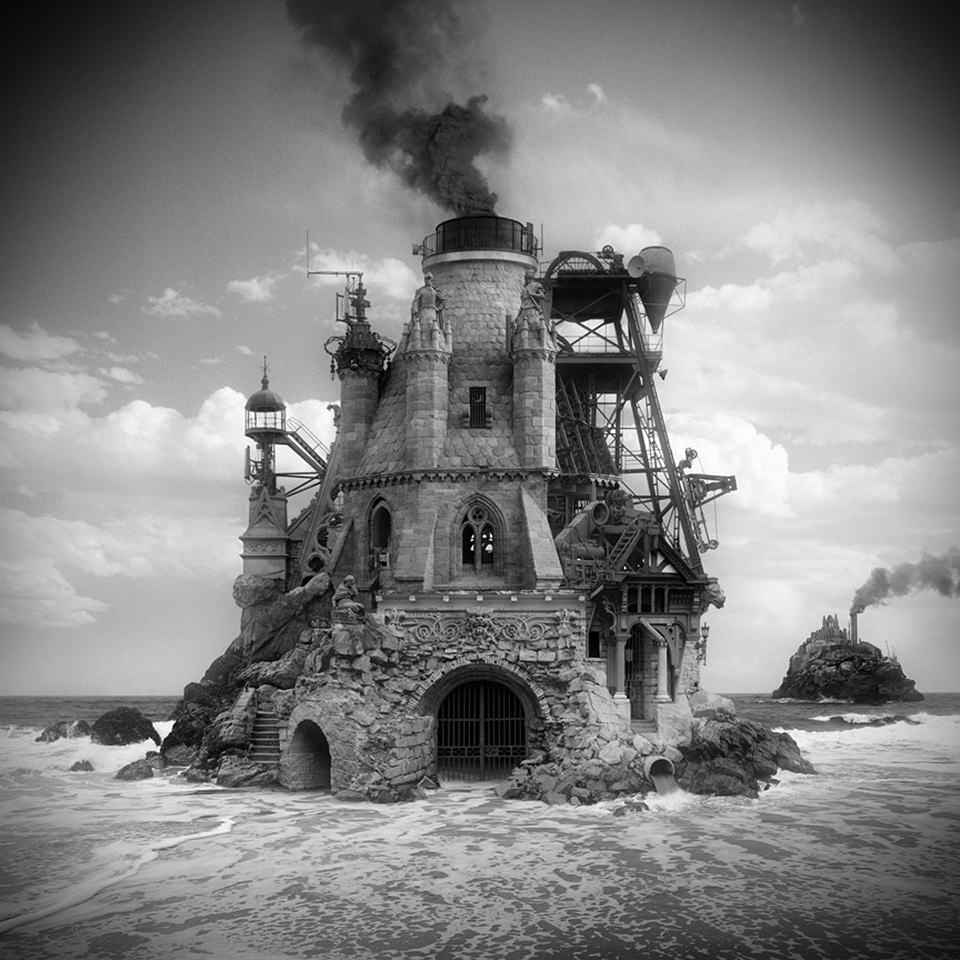
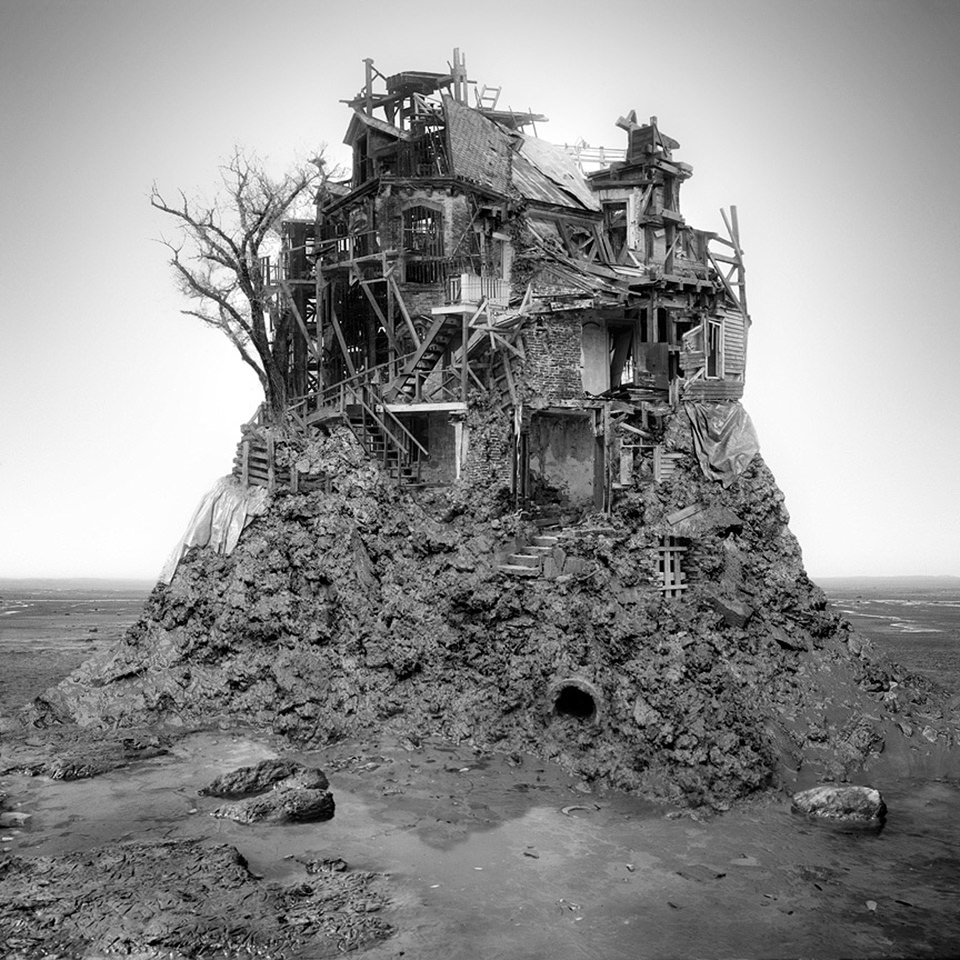
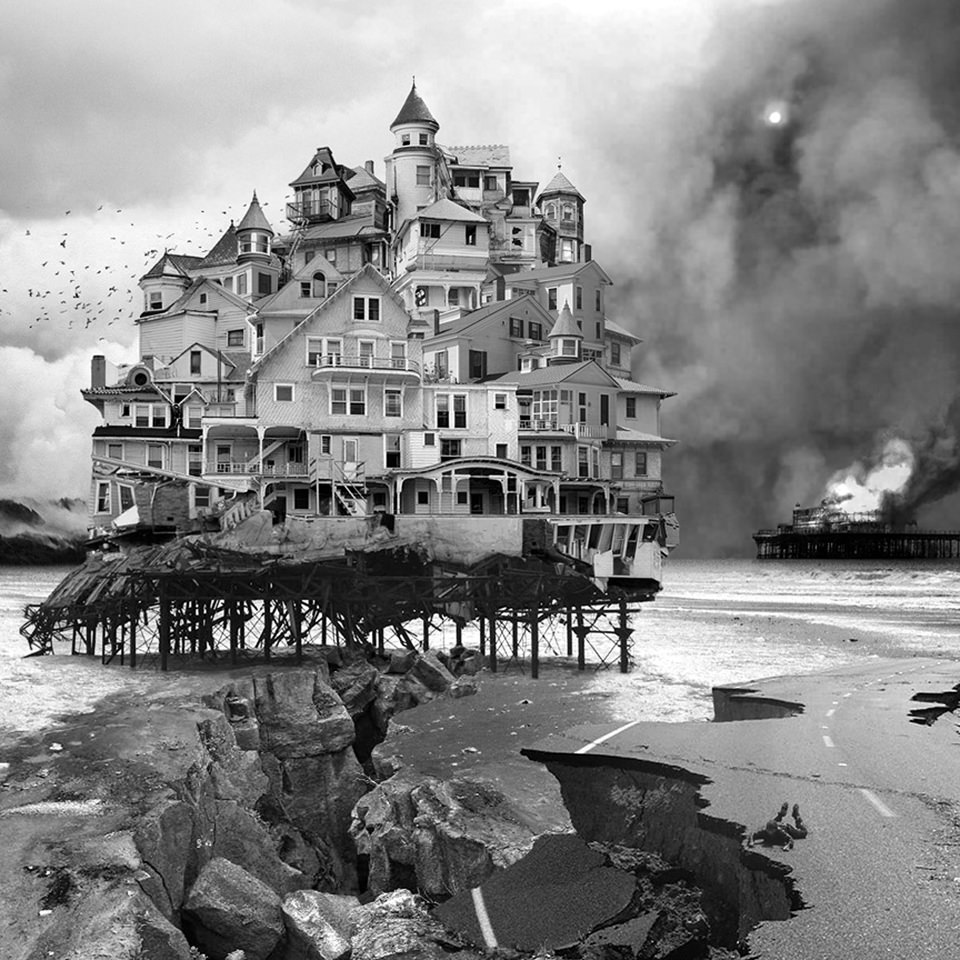
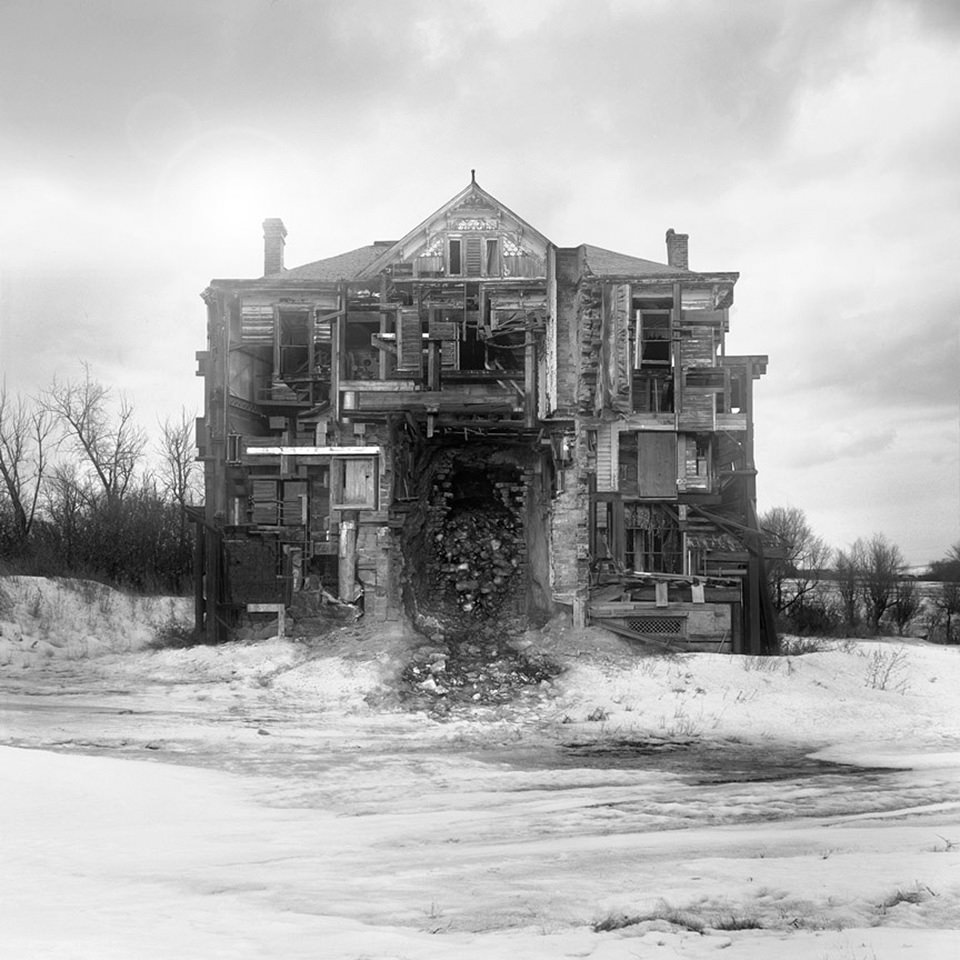
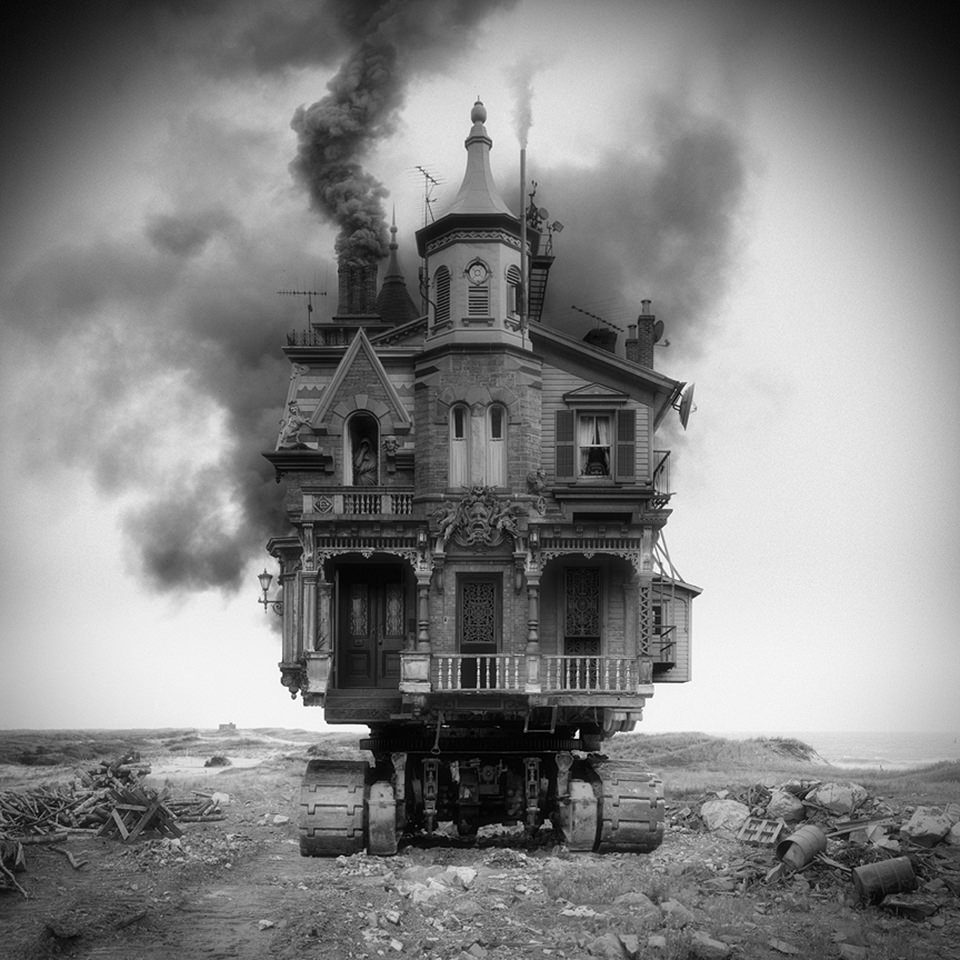
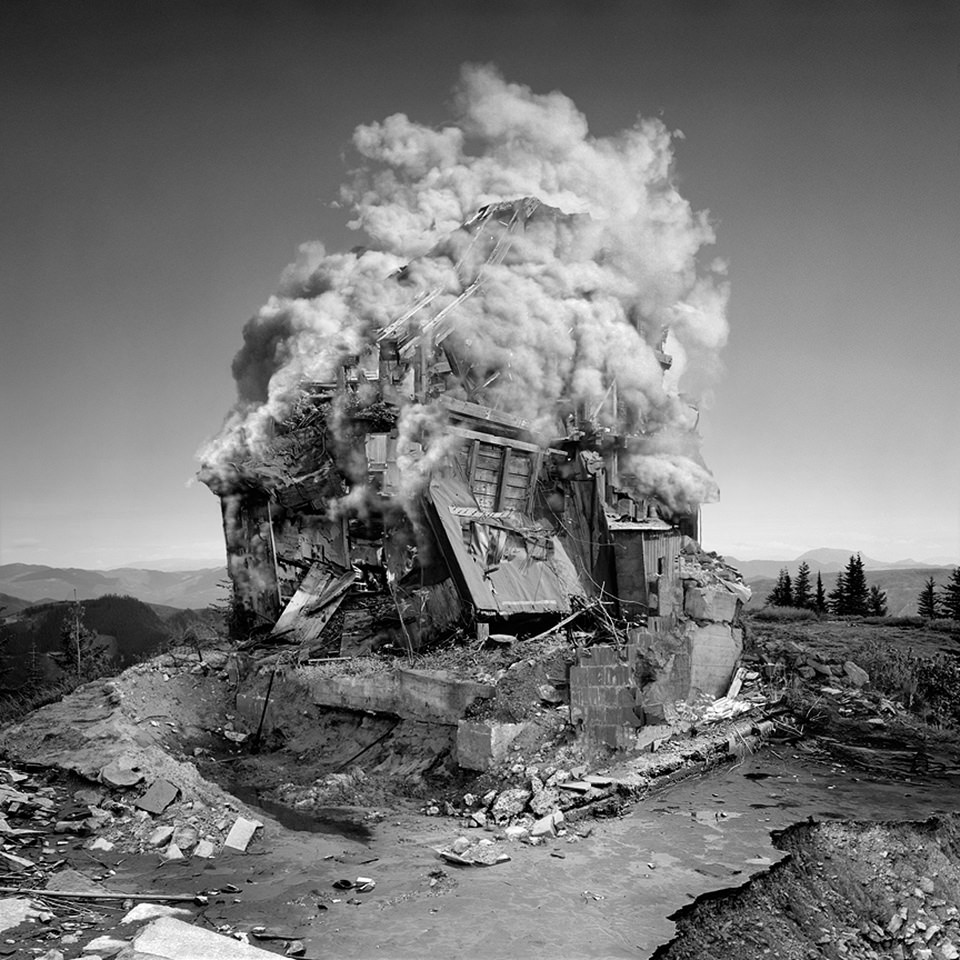
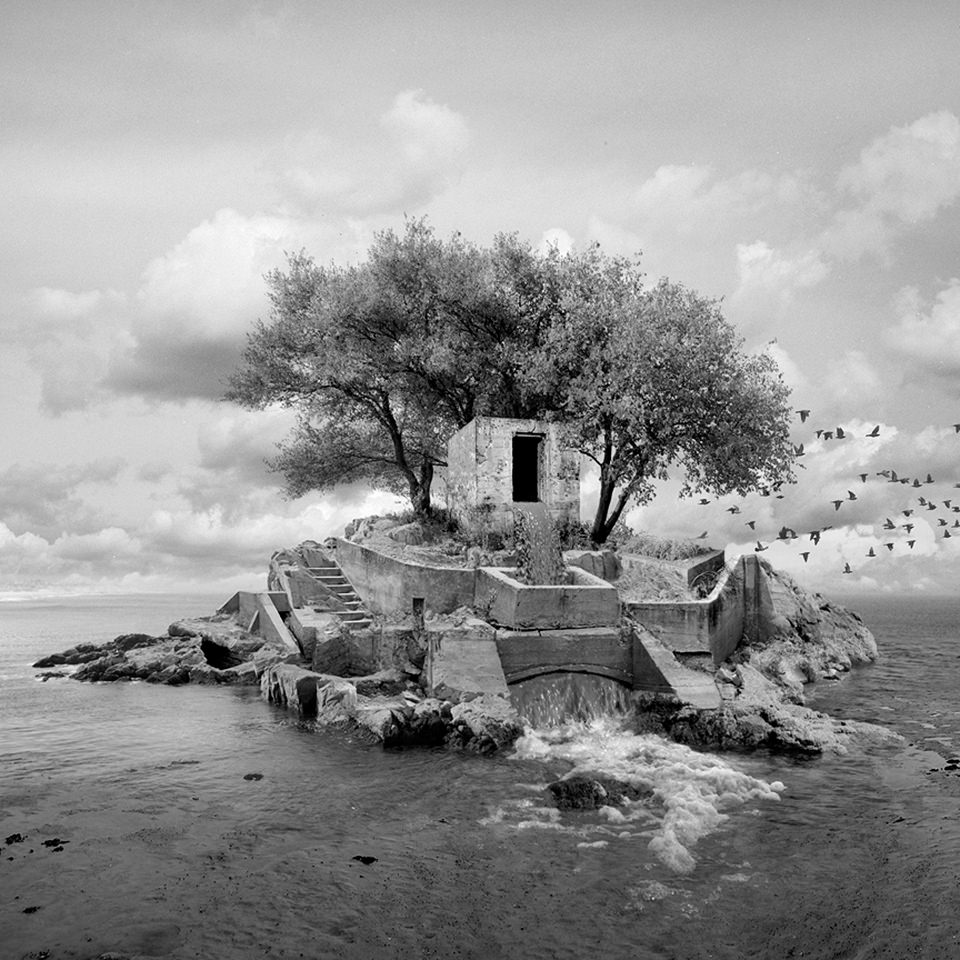
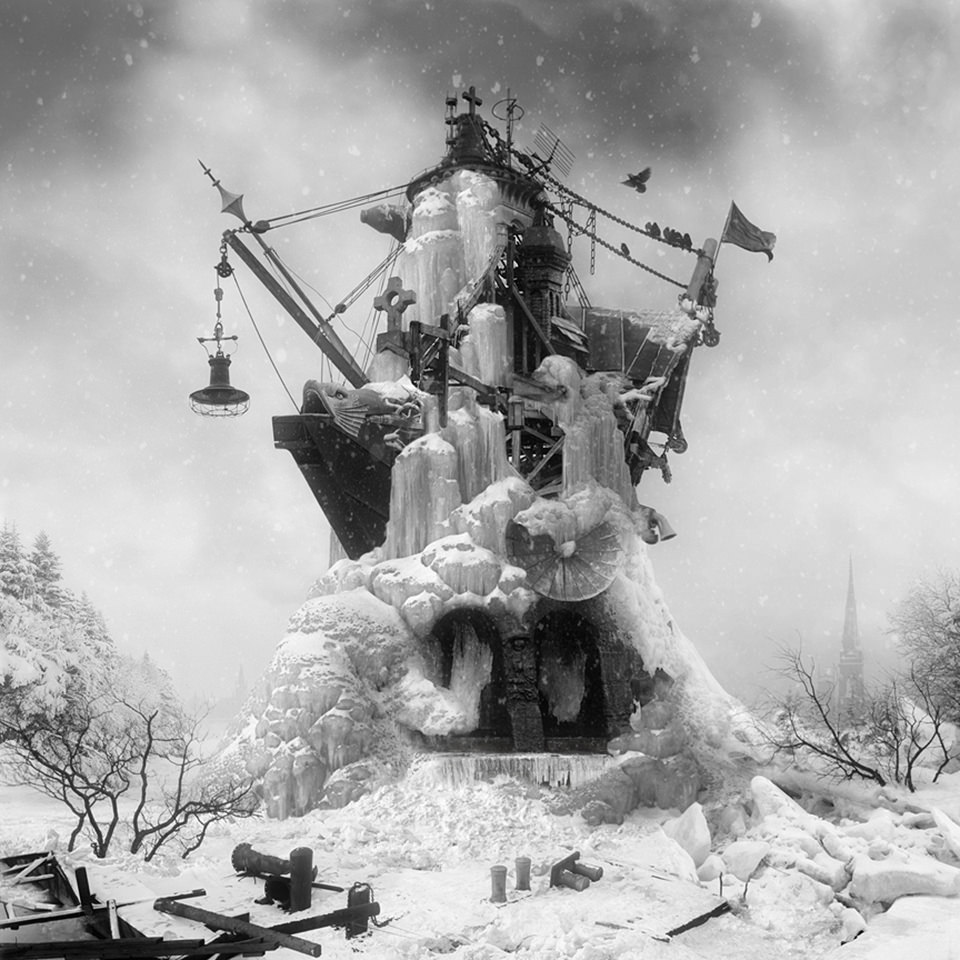
Jim Kazanjian ist Bildbearbeiter und Sammler. Er nutzt die Fülle an Fotografien, die das Internet bereitstellt und baut sie nach seinen Vorstellung zu völlig neuen Bildern zusammen. Inspieriert wird er dabei von klassischen Schriftsteller von Horrorgeschichten wie H. P. Lovecraft, Allegron Blackwood und Arthur Machen. Die furchteinflößende Atmosphäre, die diese Autoren erzeugen, sind für ihn so faszinierend.

Seine Bilder findet er durch die Bildersuche von Google. Eines seiner surrealen Bilder besteht dabei aus über 50 verschiedenen einzelnen Bildern. Um diese mit Hilfe von Photoshop zu einem neuen Fantasieort zusammenzufügen, benötigt Jim etwa 80 Stunden. Er bevorzugt Schwarzweiß, denn dies hat für ihn eine wunderbare Klarheit in den unterschiedlichen Tönen, die er so bei Farben nicht findet. Hinzu kommt noch der Aspekt der Zeitlosigkeit.

© Jim Kazanjian

© Jim Kazanjian

© Jim Kazanjian

© Jim Kazanjian

© Jim Kazanjian

© Jim Kazanjian

© Jim Kazanjian

© Jim Kazanjian

© Jim Kazanjian

Als Tipp für alle, die sich in punkto Bildbearbeitung verbessern möchten, nennt Jim uns Lynda.com. Hier gibt es jede Menge Video-Tutorials, die sehr hilfreich sind.

Jims weitere Arbeiten könnt Ihr auf seiner Homepage und auf Facebook verfolgen.


kwerfeldein – Fotografie Magazin | Fotocommunity

 
Comments Off on Unmögliche Architekturen

Posted in Equipment


Real-Life Panopticons: Deserted Dystopian Prisons in Cuba

16 May

[ By WebUrbanist in Abandoned Places & Architecture. ]

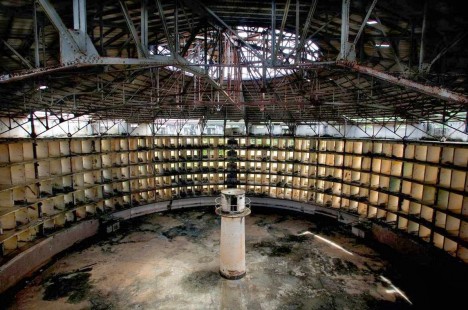
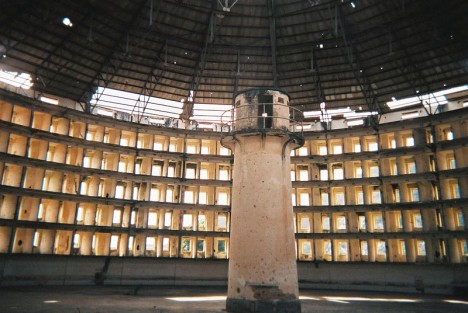
panopticon central guard tower

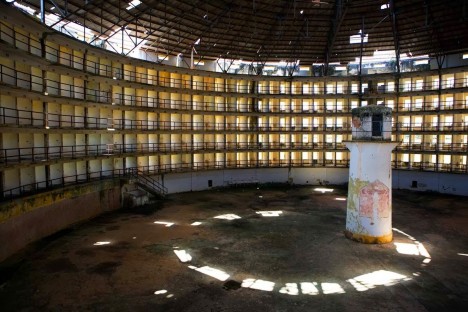
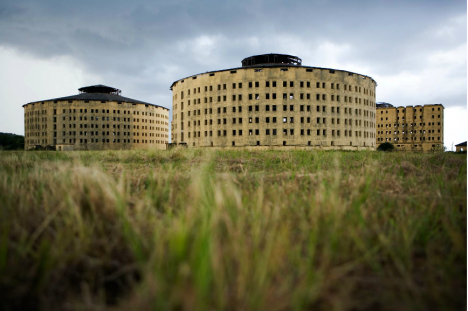
Imagine life inside a ring of cells around a central watchtower, where you can never be sure whether you are being observed. This surreal setup became an extreme reality under dictator Gerardo Machado on the Cuban Isla de la Juventud.

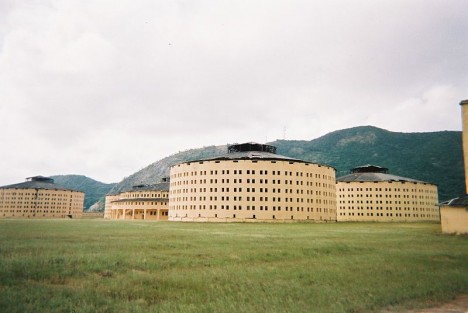
panopticon prison complex exterior

One of the creepiest concepts in the history of architecture, the Panopticon model of incarceration design proposes keeping prisoners forever on edge, fearing their watchers.

panopticon real life cuba

Both Fidel and Raul Castro spent time within the walls of this Presidio Modelo (Model Prison) complex, which, at its peak, held over 8,000 political prisoners. Apparently they found the approach sufficiently effective, since the Castro regime kept them open as well.

panopticon island cuba set

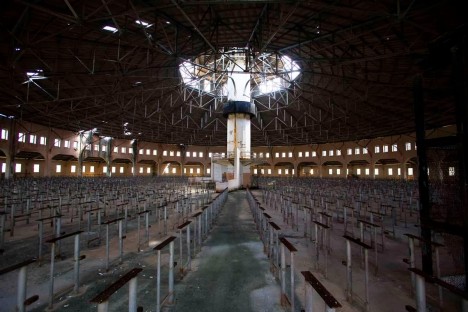
panopticon gathering space center

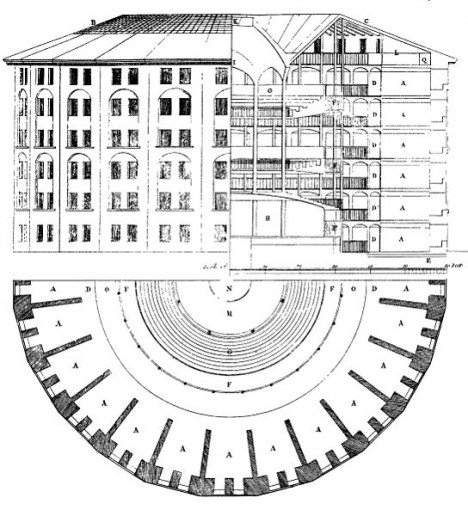
Originally the vision of Jeremy Bentham (and later nightmare of philosopher Michel Foucault), this 18th-Century idea was never realized in its creator’s lifetime but found expression in many structures after his death.

panopticon model prison diagrams

panopticon interior cell details

While there are other Panopticon-inspired prisons around the world, this complex in Cuba may be the most literal and direction realization of the original diagrams. It features circular structures and guardhouses in the center of a vast open spaces, all to keep residents in a perpetual state of uncertainty (images via Jason Florio and Wikipedia).

Share on Facebook


[ By WebUrbanist in Abandoned Places & Architecture. ]

[ WebUrbanist | Archives | Galleries | Privacy | TOS ]


WebUrbanist

 
Comments Off on Real-Life Panopticons: Deserted Dystopian Prisons in Cuba

Posted in Creativity


15. Mai 2014

16 May

Ein Beitrag von: Daniel Michael Hammelstein

© Daniel Michael Hammelstein


kwerfeldein – Fotografie Magazin | Fotocommunity

 
Comments Off on 15. Mai 2014

Posted in Equipment


5 Reasons Why Bad Weather Days are the Best Times for Photography

15 May

Bad Weather Photography Equals High Impact  Photos

Remember those days when you looked out your window and wished that the weather was better so you could get out and take some fantastic photographs? Do rainy, windy, stormy days stifle your photographic ambitions? I’ll give you five reasons why bad weather is not all doom and gloom for photographers.

bad weather photography with dark clouds

The things that keep most people indoors on bad weather days are the very things that have creative photographers heading for the great outdoors. Grab a rain jacket, brave the elements AND take your camera – these can be the best times for photography to capture something memorable.

Let’s look these five reasons to appreciate bad weather, and what they can offer you for photographs that get that second look.

  • Dark and unpredictable clouds
  • Powerful winds
  • Rain and drizzle
  • Snow
  • Fog

#1 CLOUD PHOTOGRAPHY FOR DRAMATIC IMAGES

Clouds can be brooding, moody and sinister – a great backdrop for photographing old buildings, new skyscrapers, and trees. While you’re out in the storm, also think about shooting just the clouds by themselves, to create a “cloud bank” of images to use as drop-ins for compositing with other images. Clear blue skies are pretty boring in most photos. With your catalog of cloud shots you’ll never have a bland sky photo again.

Low hanging clouds can add a really mysterious quality to your images. Think black and white photography when considering ways to take advantage of clouds. You can use post-processing techniques to accentuate the various layers of the cloud formations to add even more drama to your images.

In this shot of a storm moving in over the Bugaboo mountain range, I used Google Nik Silver Efex Pro and the Structure setting to add tonal definition to the clouds to create atmosphere.

bad weather photography stromy clouds

#2 WIND PHOTOGRAPHY FOR ARTISTIC EXPOSURES

bad weather photography- windy daysWindy days provide you with all you need to make excellent motion studies for long exposures – tall grasses flowing like waves, tress swaying wildly, leaves trembling and dancing full of motion. Waves on lakes become whitecaps, perfect for those milky long exposure waterscapes.

Even though still photographs capture a single moment, you can achieve great impact when you capture the residue of motion in a single frame. High impact daytime long exposure photographs need movement to be successful, and when the wind is blowing, things are moving. Capture this in a single frame and you have an instant “wow” shot.

Use a neutral density filter to slow your shutter so that it captures the motion created by the breeze. Use a tripod for your wind shots to make sure that whatever is not moving in your image stays nice and sharp. The contrast of solid and fluid is a powerful creative technique.

#3 RAINY DAY PHOTOGRAPHY FOR COLOR AND SPECIAL EFFECTS

badweatherphotography-rainstreaks

Rain is awesome for artistic and creative photos.

When it’s wet outside, colors become deeper, richer and more saturated. This provides you with a way to look at the great outdoors in a “different light.”  Observe how flat and lifeless colors appear on an overcast day. But add some rain and the colors really pop!

Rain photography gives you hundreds of subjects for creative artistic photos using reflections and ripples in puddles, lakes and other water bodies. A wet rainy day gives you macro photography opportunities, by providing you with drops, ripples, and rivulets, perfect in the flat, even light of a rainy day. Use rain streaks on windows as art effects to make high impact abstract images.

badweatherphotography-raindrops

badweatherphotography-rainclouds

#4 SNOW PHOTOGRAPHY

Gently falling snowflakes in photography can add an additional element of emotion to add more impact to your images – who hasn’t felt a little shudder in the blustery cold? It can be used to create a sense of realism in a photo, especially in street photography.

Heavy falling snow adds an instant texture to your images. Colors appear softer, and less vibrant as they compete with the white of the flakes. I find it adds an instant painterly effect to most images – especially those with lots of natural colors.

badweatherphotography-snow

#5 FOG PHOTOGRAPHY

Fog – moody and high impact scenic shots, great for storytelling, and it can be used as a “backdrop” to hide distracting backgrounds to isolate your subject.  I especially like fog photography because it adds an instant pastel effect to your images, which can make for stunning fine art photography.

badweatherphotography-fog

SURPRISE BENEFITS OF BAD WEATHER PHOTOGRAPHY

If you’ve endured the rain and the wet, chances are you’ll be rewarded handsomely for your efforts and patience.  You’ll have captured some rare and uncommon moments that most people never attempt. Because luck favors the prepared mind, you may also get really lucky. You’re outdoors, you have all your gear, and you are shooting. In amongst all those dramatic bad weather photographs you capture, you may find something truly wondrous in the very next frame.

badweatherphotography-opportunity

If you have any questions or comments please leave them below, and do share your bad weather stories and images as well.

The post 5 Reasons Why Bad Weather Days are the Best Times for Photography by Alex Morrison appeared first on Digital Photography School.


Digital Photography School

 
Comments Off on 5 Reasons Why Bad Weather Days are the Best Times for Photography

Posted in Photography


Light field cameras: Focusing on the future

15 May

Screen_Shot_2014-05-14_at_10.56.37_AM.png

Lytro’s new Illum camera packs in a few tricks that will appeal to some still photographers, but its aim is really to introduce a new type of imagery. Time will tell if that medium succeeds. Technology writer Liam McCabe spoke with a few players in the light field camera industry to get a sense of where this technology is headed in the next few years and beyond. Learn more

News: Digital Photography Review (dpreview.com)

 
Comments Off on Light field cameras: Focusing on the future

Posted in Uncategorized


Lenovo introduces 10-inch ThinkPad business tablet

15 May

Thinkpad-10_Standard_05_1699_1190_1.jpg

Lenovo has launched a 10-inch version of its ThinkPad tablet. Running Windows 8.1, the ThinkPad 10 is aimed at professionals and business users. The use of the optional ThinkPad Tablet Dock allows you to turn the tablet into a full-blown workstation. In terms of imaging, the ThinkPad 10 comes with an 8MP rear camera and a 2MP front-equivalent. Lenovo promises 10 hours of battery life. Learn more

News: Digital Photography Review (dpreview.com)

 
Comments Off on Lenovo introduces 10-inch ThinkPad business tablet

Posted in Uncategorized


DIY Photo Clip Garland

15 May
Extra photos for bloggers: 1, 2, 3

Laundry is a bore – why not get crafty with those clothespins instead? Transform them into a charming Photo Clip Garland!

Your photos deserve to be displayed for the world to see, and this garland is here to take care of just that.

With a little knowhow, you can whip up a photo clip garland quicker than your washing machine can complete a spin cycle.

The awesome bit? Clothespins make changing up the photos a snap!

Learn How to Make Your Own Photo Clip Garland

(…)
Read the rest of DIY Photo Clip Garland (263 words)


© Erika for Photojojo, 2014. |
Permalink |
No comment |
Add to
del.icio.us

Post tags:


Photojojo

 
Comments Off on DIY Photo Clip Garland

Posted in Equipment


Diego Angarita – The Freelance Retoucher

15 May

Diego Angarita Freelance Retoucher White Thin Dutches 1Diego Angarita co-founded Freelance Retoucher Ltd in 2012. His passion for working directly with photographers and ad agencies in the creative process to produce stunning pieces of imagery for commercial usage. Based in the UK, the high-end creative retoucher has had experience working in advertising, providing post-production services worldwide for clients in the TV, music, fashion and advertising industries. I asked Diego for a moment of his time to share his journey as a freelance retoucher and the processes that he undergoes when he is working on a project.

Diego Angarita Freelance Retoucher Mews of Mayfair 3

Diego actually started in the industry as a photographer, he explained, “My background is in photography. I landed in this exciting career by accident and am very glad I did. It all started 9 years ago as a photographer in a studio where I began editing and retouching my own images. I then realised that this was the part I enjoyed most and immersed myself completely to learn all aspects of photo retouching. I then did freelancing for various ad agencies around London and worked for a few years in a top London post-production house where I was exposed to advertising. Since then I have co-founded my own post-production studio, Freelance Retoucher Ltd, and have been working with some great photographers and ad agencies around the world.”

Diego Angarita Freelance Retoucher Julia Valimaki

From the awe inspiring images that he continues to produce as a profession, one wonders where Diego’s ideas for his images comes from and how he starts his creative process, he expressed that “I’m very inspired by classic films such as Schindler’s List and The Pianist, and modern films like Sin City, The Matrix, Oblivion, Elysium and Cloud Atlas, etc. I also take inspiration from classic painters and love Rembrandt and his use of interacting shadows and light called chiaroscuro. I follow photographers online and blogs to see what the latest trends are and keep in touch with people and network. Usually the ideas come from a brief with references, sketches and mock-ups followed by a creative call with the agency or photographer along with research on the client to get a feel of the look of their brand. Keeping in close contact with the client is important to ensure you don’t take the image far [from the brief].”

Diego Angarita Freelance Retoucher Franceska

When talking about his approach to retouching, Diego voiced that “I think it is probably about pushing the boundaries of an image to create from a realistic image, a unreal scenario achieved by not being afraid to take the risk in doing something different. I feel that this approach allows us to create beautiful pieces that evoke emotions in our artwork for the ad campaign.”

In regards to future plans, Diego mentions that “We are just setting up a blog right now that will contain a lot of  industry info and nice articles. We are planning some very exciting things this year so if you are interested then please subscribe to the newsletter on our website”.

To find out more about Diego Angarita and his work here at www.freelanceretoucher.co.uk
Works from Freelance Retoucher has been published on Behance so feel free to check it out.
To contact Diego, details are on the contact page on the website or feel free to get on the phone to his business partner Alex who is always happy to help and have a chat.


Fashion Photography Blog

 
Comments Off on Diego Angarita – The Freelance Retoucher

Posted in Uncategorized